シニア テクニカル アーキテクト
清水 優吾(しみず ゆうご) / 株式会社セカンドファクトリー
@yugoes1021
yugoes1021 Microsoft MVP
for Data Platform - Power BI
(2017.02 -)
Two Dataflows
~ 利用者が少ないように感じるので、こんな使い方はどうだろう? ~
2021-06-05
Power BI 勉強会 #21
2021/06/05 Power BI 勉強会 #21 1
https://www.slideshare.net/yugoes1021
自己紹介:
清水 優吾 (Yugo Shimizu)
株式会社セカンドファクトリー
CTO, シニア テクニカル アーキテクト
UX を看板に掲げて、飲食業を営んでいる IT 企業に勤めている会社員で
Data Platform をメインに活動をしている Technical Architect
専門・興味:
Data Platform (Azure),
Power Platform (Power Apps, Power Automate, Power BI, Power Virtual Agents)
Qiita: https://qiita.com/yugoes1021
YouTube: https://www.youtube.com/c/YugosRoom/
Power BI 勉強会: https://powerbi.connpass.com
Japan Power BI User Group: https://www.facebook.com/groups/JapanPBUG/
Japan Power Virtual Agents User Group: https://www.facebook.com/groups/JPVAUG/
Japan Power of Humans Community: https://jpohc.connpass.com/ (次回: 未定)
Microsoft MVP
for Data Platform -
Power BI
(2017.02 - )
MVP
プロフィールページ
Twitter: @yugoes1021
Facebook: yugoes1021
LinkedIn: yugoes1021
2021/06/05 Power BI 勉強会 #21 2
今日のテーマ
2021/06/05 Power BI 勉強会 #21 3
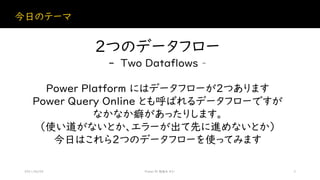
2つのデータフロー
- Two Dataflows –
Power Platform にはデータフローが2つあります
Power Query Online とも呼ばれるデータフローですが
なかなか癖があったりします。
(使い道がないとか、エラーが出て先に進めないとか)
今日はこれら2つのデータフローを使ってみます
Power Platform
2021/06/05 Power BI 勉強会 #21 8
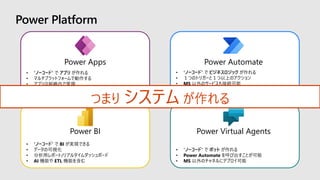
What is Power Platform?
• “ノーコード” で ビジネスロジック が作れる
• 1つのトリガーと1つ以上のアクション
• MS 以外のサービスも接続可能
• RPA 機能である UI flows が使用可能
Power Automate
• “ノーコード” で BI が実現できる
• データの可視化
• 分析用レポート/リアルタイムダッシュボード
• AI 機能や ETL 機能を含む
Power BI
• “ノーコード” で アプリ が作れる
• マルチプラットフォームで動作する
• アプリは組織内で管理
• AI Builder 利用可能
Power Apps
• “ノーコード” で ボット が作れる
• Power Automate を呼び出すことが可能
• MS 以外のチャネルにデプロイ可能
Power Virtual Agents
Power Platform
つまり システム が作れる
Microsoft Dataverse
AI Builder
Power Platform
Azure Data Lake Storage Gen2 (ADLS)
- Current Version (2020.09) -
Power Automate Power BI
Power Apps
Power
Virtual Agents
Power
Platform
dataflows
Power Query
Data Sources
Power BI
dataflows
Power Query
Dynamics 365
Teams
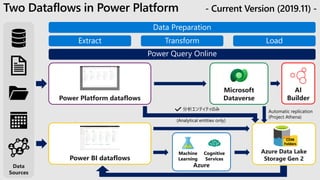
Two Dataflows in Power Platform - Current Version (2019.11) -
Data
Sources
Power Platform dataflows
Power BI dataflows
Azure Data Lake
Storage Gen 2
CDM
Folders
Azure
Machine
Learning
Cognitive
Services
Power Query Online
Automatic replication
(Project Athena)
分析エンティティのみ
(Analytical entities only)
AI
Builder
Microsoft
Dataverse
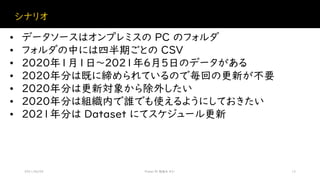
シナリオ
2021/06/05 Power BI 勉強会 #21 12
• データソースはオンプレミスの PC のフォルダ
• フォルダの中には四半期ごとの CSV
• 2020年1月1日~2021年6月5日のデータがある
• 2020年分は既に締められているので毎回の更新が不要
• 2020年分は更新対象から除外したい
• 2020年分は組織内で誰でも使えるようにしておきたい
• 2021年分は Dataset にてスケジュール更新
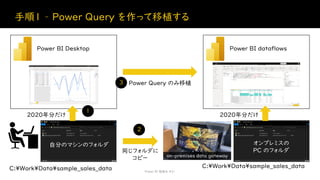
手順1 – Power Query を作って移植する
Power BI 勉強会 #21
Power BI Desktop
2020年分だけ
Power BI dataflows
Power Query のみ移植
2020年分だけ
C:¥Work¥Data¥sample_sales_data
オンプレミスの
PC のフォルダ
自分のマシンのフォルダ
C:¥Work¥Data¥sample_sales_data
on-premises data gateway
同じフォルダに
コピー
1
2
3
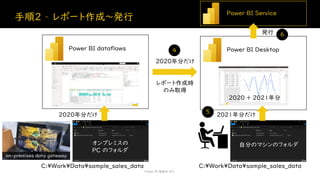
手順2 – レポート作成~発行
Power BI 勉強会 #21
Power BI dataflows
2020年分だけ
オンプレミスの
PC のフォルダ
C:¥Work¥Data¥sample_sales_data
on-premises data gateway
Power BI Desktop
自分のマシンのフォルダ
レポート作成時
のみ取得
2020年分だけ
2021年分だけ
C:¥Work¥Data¥sample_sales_data
自分のマシンのフォルダ
2020 + 2021年分
Power BI Service
発行
4
5
6
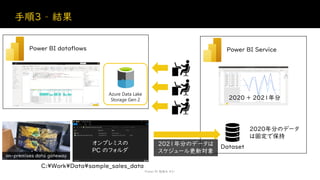
手順3 – 結果
Power BI 勉強会 #21
Power BI dataflows
オンプレミスの
PC のフォルダ
C:¥Work¥Data¥sample_sales_data
on-premises data gateway
Power BI Service
2020年分のデータ
は固定で保持
2020 + 2021年分
Dataset
2021年分のデータは
スケジュール更新対象
Azure Data Lake
Storage Gen 2
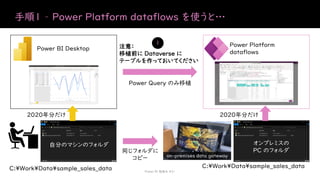
手順1 – Power Platform dataflows を使うと…
Power BI 勉強会 #21
Power BI Desktop
2020年分だけ
Power Platform
dataflows
Power Query のみ移植
2020年分だけ
C:¥Work¥Data¥sample_sales_data
オンプレミスの
PC のフォルダ
自分のマシンのフォルダ
C:¥Work¥Data¥sample_sales_data
on-premises data gateway
同じフォルダに
コピー
注意:
移植前に Dataverse に
テーブルを作っておいてください
1
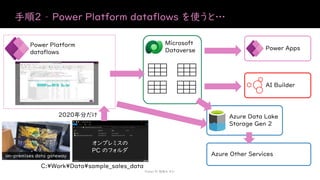
手順2 – Power Platform dataflows を使うと…
Power BI 勉強会 #21
Power Platform
dataflows
2020年分だけ
オンプレミスの
PC のフォルダ
C:¥Work¥Data¥sample_sales_data
on-premises data gateway
Microsoft
Dataverse
Azure Data Lake
Storage Gen 2
AI Builder
Power Apps
Azure Other Services

Two Dataflows

  • 1.
    シニア テクニカル アーキテクト 清水優吾(しみず ゆうご) / 株式会社セカンドファクトリー @yugoes1021 yugoes1021 Microsoft MVP for Data Platform - Power BI (2017.02 -) Two Dataflows ~ 利用者が少ないように感じるので、こんな使い方はどうだろう? ~ 2021-06-05 Power BI 勉強会 #21 2021/06/05 Power BI 勉強会 #21 1 https://www.slideshare.net/yugoes1021
  • 2.
    自己紹介: 清水 優吾 (YugoShimizu) 株式会社セカンドファクトリー CTO, シニア テクニカル アーキテクト UX を看板に掲げて、飲食業を営んでいる IT 企業に勤めている会社員で Data Platform をメインに活動をしている Technical Architect 専門・興味: Data Platform (Azure), Power Platform (Power Apps, Power Automate, Power BI, Power Virtual Agents) Qiita: https://qiita.com/yugoes1021 YouTube: https://www.youtube.com/c/YugosRoom/ Power BI 勉強会: https://powerbi.connpass.com Japan Power BI User Group: https://www.facebook.com/groups/JapanPBUG/ Japan Power Virtual Agents User Group: https://www.facebook.com/groups/JPVAUG/ Japan Power of Humans Community: https://jpohc.connpass.com/ (次回: 未定) Microsoft MVP for Data Platform - Power BI (2017.02 - ) MVP プロフィールページ Twitter: @yugoes1021 Facebook: yugoes1021 LinkedIn: yugoes1021 2021/06/05 Power BI 勉強会 #21 2
  • 3.
    今日のテーマ 2021/06/05 Power BI勉強会 #21 3 2つのデータフロー - Two Dataflows – Power Platform にはデータフローが2つあります Power Query Online とも呼ばれるデータフローですが なかなか癖があったりします。 (使い道がないとか、エラーが出て先に進めないとか) 今日はこれら2つのデータフローを使ってみます
  • 4.
    Power Platform 2021/06/05 PowerBI 勉強会 #21 8 What is Power Platform?
  • 5.
    • “ノーコード” でビジネスロジック が作れる • 1つのトリガーと1つ以上のアクション • MS 以外のサービスも接続可能 • RPA 機能である UI flows が使用可能 Power Automate • “ノーコード” で BI が実現できる • データの可視化 • 分析用レポート/リアルタイムダッシュボード • AI 機能や ETL 機能を含む Power BI • “ノーコード” で アプリ が作れる • マルチプラットフォームで動作する • アプリは組織内で管理 • AI Builder 利用可能 Power Apps • “ノーコード” で ボット が作れる • Power Automate を呼び出すことが可能 • MS 以外のチャネルにデプロイ可能 Power Virtual Agents Power Platform つまり システム が作れる
  • 6.
    Microsoft Dataverse AI Builder PowerPlatform Azure Data Lake Storage Gen2 (ADLS) - Current Version (2020.09) - Power Automate Power BI Power Apps Power Virtual Agents Power Platform dataflows Power Query Data Sources Power BI dataflows Power Query Dynamics 365 Teams
  • 7.
    Two Dataflows inPower Platform - Current Version (2019.11) - Data Sources Power Platform dataflows Power BI dataflows Azure Data Lake Storage Gen 2 CDM Folders Azure Machine Learning Cognitive Services Power Query Online Automatic replication (Project Athena) 分析エンティティのみ (Analytical entities only) AI Builder Microsoft Dataverse
  • 8.
    シナリオ 2021/06/05 Power BI勉強会 #21 12 • データソースはオンプレミスの PC のフォルダ • フォルダの中には四半期ごとの CSV • 2020年1月1日~2021年6月5日のデータがある • 2020年分は既に締められているので毎回の更新が不要 • 2020年分は更新対象から除外したい • 2020年分は組織内で誰でも使えるようにしておきたい • 2021年分は Dataset にてスケジュール更新
  • 9.
    手順1 – PowerQuery を作って移植する Power BI 勉強会 #21 Power BI Desktop 2020年分だけ Power BI dataflows Power Query のみ移植 2020年分だけ C:¥Work¥Data¥sample_sales_data オンプレミスの PC のフォルダ 自分のマシンのフォルダ C:¥Work¥Data¥sample_sales_data on-premises data gateway 同じフォルダに コピー 1 2 3
  • 10.
    手順2 – レポート作成~発行 PowerBI 勉強会 #21 Power BI dataflows 2020年分だけ オンプレミスの PC のフォルダ C:¥Work¥Data¥sample_sales_data on-premises data gateway Power BI Desktop 自分のマシンのフォルダ レポート作成時 のみ取得 2020年分だけ 2021年分だけ C:¥Work¥Data¥sample_sales_data 自分のマシンのフォルダ 2020 + 2021年分 Power BI Service 発行 4 5 6
  • 11.
    手順3 – 結果 PowerBI 勉強会 #21 Power BI dataflows オンプレミスの PC のフォルダ C:¥Work¥Data¥sample_sales_data on-premises data gateway Power BI Service 2020年分のデータ は固定で保持 2020 + 2021年分 Dataset 2021年分のデータは スケジュール更新対象 Azure Data Lake Storage Gen 2
  • 12.
    手順1 – PowerPlatform dataflows を使うと… Power BI 勉強会 #21 Power BI Desktop 2020年分だけ Power Platform dataflows Power Query のみ移植 2020年分だけ C:¥Work¥Data¥sample_sales_data オンプレミスの PC のフォルダ 自分のマシンのフォルダ C:¥Work¥Data¥sample_sales_data on-premises data gateway 同じフォルダに コピー 注意: 移植前に Dataverse に テーブルを作っておいてください 1
  • 13.
    手順2 – PowerPlatform dataflows を使うと… Power BI 勉強会 #21 Power Platform dataflows 2020年分だけ オンプレミスの PC のフォルダ C:¥Work¥Data¥sample_sales_data on-premises data gateway Microsoft Dataverse Azure Data Lake Storage Gen 2 AI Builder Power Apps Azure Other Services