
Revised v4Presenter
Speech Input API For Android
Alex Gruenstein
Outline
•  Android built-in speech features
•  Speech recognition primer
•  How to: integrate speech input directly in your
Android application
Voice Search
•  Speak any Google search query
•  Supported on Android, iPhone/
iPod/iPad, Blackberry, Nokia s60
•  15 Languages:
• English (US, UK, Indian,
Australian), Japanese,
Mandarin, Korean, Taiwanese,
French, Italian, German,
Spanish, Russian, Polish,
Czech
•  Video
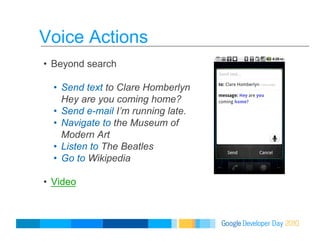
Voice Actions
•  Beyond search
•  Send text to Clare Homberlyn
Hey are you coming home?
•  Send e-mail I’m running late.
•  Navigate to the Museum of
Modern Art
•  Listen to The Beatles
•  Go to Wikipedia
•  Video
Android Voice Input
•  Speak anywhere
you would
normally type.
•  Status updates,
Twitter, SMS,
Email, etc.
•  Video
Revised v4Presenter
Speech Recognition
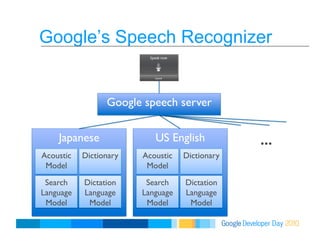
Google’s Speech Recognizer
Google speech server 
US English
Acoustic
Model
Dictionary
Search
Language
Model
Dictation
Language
Model
Japanese
Acoustic
Model
Dictionary
Search
Language
Model
Dictation
Language
Model
…
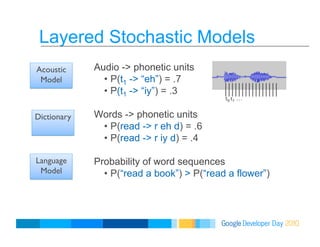
Layered Stochastic Models
Audio -> phonetic units
•  P(t1 -> “eh”) = .7
•  P(t1 -> “iy”) = .3
Words -> phonetic units
•  P(read -> r eh d) = .6
•  P(read -> r iy d) = .4
Probability of word sequences
•  P(“read a book”) > P(“read a flower”)
Acoustic
Model
Dictionary
Language
Model
t0
t1
…
Estimated with Data
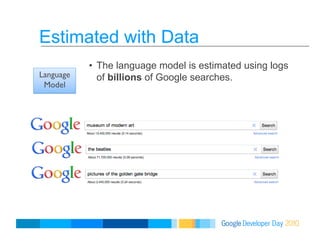
•  The language model is estimated using logs
of billions of Google searches.Language
Model
Estimated with Data
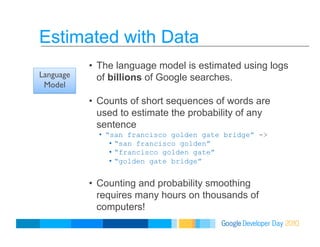
•  The language model is estimated using logs
of billions of Google searches.
•  Counts of short sequences of words are
used to estimate the probability of any
sentence
•  “san francisco golden gate bridge” ->
•  “san francisco golden”
•  “francisco golden gate”
•  “golden gate bridge”
•  Counting and probability smoothing
requires many hours on thousands of
computers!
Language
Model
Revised v4Presenter
How to:
Integrate speech input directly in
your Android application
Android Speech Input API
•  Android’s open platform makes it simple to
access Google’s speech recognizer
programmatically from your application.
•  (Or any recognizer that registers for
RecognizerIntent)
•  Simple to use to the API to:
•  Prompt the user to start speaking,
•  Stream the audio Google’s servers,
•  Retrieve the recognition hypothesis.
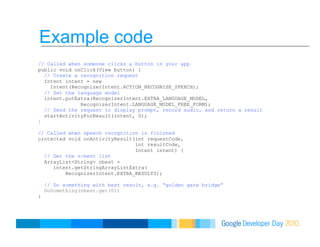
Example code
// Called when someone clicks a button in your app
public void onClick(View button) {
// Create a recognition request
Intent intent = new
Intent(RecognizerIntent.ACTION_RECOGNIZE_SPEECH);
// Set the language model
intent.putExtra(RecognizerIntent.EXTRA_LANGUAGE_MODEL,
RecognizerIntent.LANGUAGE_MODEL_FREE_FORM);
// Send the request to display prompt, record audio, and return a result
startActivityForResult(intent, 0);
}
// Called when speech recognition is finished
protected void onActivityResult(int requestCode,
int resultCode,
Intent intent) {
// Get the n-best list
ArrayList<String> nbest =
intent.getStringArrayListExtra(
RecognizerIntent.EXTRA_RESULTS);
// Do something with best result, e.g. “golden gate bridge”
DoSomething(nbest.get(0))
}
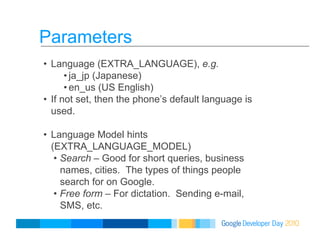
Parameters
•  Language (EXTRA_LANGUAGE), e.g.
• ja_jp (Japanese)
• en_us (US English)
•  If not set, then the phone’s default language is
used.
•  Language Model hints
(EXTRA_LANGUAGE_MODEL)
•  Search – Good for short queries, business
names, cities. The types of things people
search for on Google.
•  Free form – For dictation. Sending e-mail,
SMS, etc.
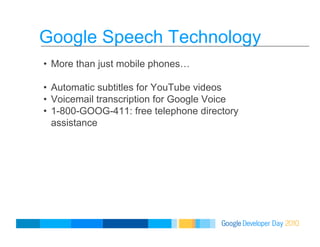
Google Speech Technology
•  More than just mobile phones…
•  Automatic subtitles for YouTube videos
•  Voicemail transcription for Google Voice
•  1-800-GOOG-411: free telephone directory
assistance
What’s next?
•  Video
•  http://www.google.co.jp/intl/ja/landing/animaru/

Google Developer Day 2010 Japan: 音声入力 API for Android (アレックス グランスタイン, 小西 祐介)

  • 2.
    Revised v4Presenter Speech InputAPI For Android Alex Gruenstein
  • 3.
    Outline •  Android built-inspeech features •  Speech recognition primer •  How to: integrate speech input directly in your Android application
  • 4.
    Voice Search •  Speakany Google search query •  Supported on Android, iPhone/ iPod/iPad, Blackberry, Nokia s60 •  15 Languages: • English (US, UK, Indian, Australian), Japanese, Mandarin, Korean, Taiwanese, French, Italian, German, Spanish, Russian, Polish, Czech •  Video
  • 5.
    Voice Actions •  Beyondsearch •  Send text to Clare Homberlyn Hey are you coming home? •  Send e-mail I’m running late. •  Navigate to the Museum of Modern Art •  Listen to The Beatles •  Go to Wikipedia •  Video
  • 6.
    Android Voice Input • Speak anywhere you would normally type. •  Status updates, Twitter, SMS, Email, etc. •  Video
  • 7.
  • 8.
    Google’s Speech Recognizer Googlespeech server US English Acoustic Model Dictionary Search Language Model Dictation Language Model Japanese Acoustic Model Dictionary Search Language Model Dictation Language Model …
  • 9.
    Layered Stochastic Models Audio-> phonetic units •  P(t1 -> “eh”) = .7 •  P(t1 -> “iy”) = .3 Words -> phonetic units •  P(read -> r eh d) = .6 •  P(read -> r iy d) = .4 Probability of word sequences •  P(“read a book”) > P(“read a flower”) Acoustic Model Dictionary Language Model t0 t1 …
  • 10.
    Estimated with Data • The language model is estimated using logs of billions of Google searches.Language Model
  • 11.
    Estimated with Data • The language model is estimated using logs of billions of Google searches. •  Counts of short sequences of words are used to estimate the probability of any sentence •  “san francisco golden gate bridge” -> •  “san francisco golden” •  “francisco golden gate” •  “golden gate bridge” •  Counting and probability smoothing requires many hours on thousands of computers! Language Model
  • 12.
    Revised v4Presenter How to: Integratespeech input directly in your Android application
  • 13.
    Android Speech InputAPI •  Android’s open platform makes it simple to access Google’s speech recognizer programmatically from your application. •  (Or any recognizer that registers for RecognizerIntent) •  Simple to use to the API to: •  Prompt the user to start speaking, •  Stream the audio Google’s servers, •  Retrieve the recognition hypothesis.
  • 14.
    Example code // Calledwhen someone clicks a button in your app public void onClick(View button) { // Create a recognition request Intent intent = new Intent(RecognizerIntent.ACTION_RECOGNIZE_SPEECH); // Set the language model intent.putExtra(RecognizerIntent.EXTRA_LANGUAGE_MODEL, RecognizerIntent.LANGUAGE_MODEL_FREE_FORM); // Send the request to display prompt, record audio, and return a result startActivityForResult(intent, 0); } // Called when speech recognition is finished protected void onActivityResult(int requestCode, int resultCode, Intent intent) { // Get the n-best list ArrayList<String> nbest = intent.getStringArrayListExtra( RecognizerIntent.EXTRA_RESULTS); // Do something with best result, e.g. “golden gate bridge” DoSomething(nbest.get(0)) }
  • 15.
    Parameters •  Language (EXTRA_LANGUAGE),e.g. • ja_jp (Japanese) • en_us (US English) •  If not set, then the phone’s default language is used. •  Language Model hints (EXTRA_LANGUAGE_MODEL) •  Search – Good for short queries, business names, cities. The types of things people search for on Google. •  Free form – For dictation. Sending e-mail, SMS, etc.
  • 16.
    Google Speech Technology • More than just mobile phones… •  Automatic subtitles for YouTube videos •  Voicemail transcription for Google Voice •  1-800-GOOG-411: free telephone directory assistance
  • 17.
    What’s next? •  Video • http://www.google.co.jp/intl/ja/landing/animaru/