Training Session 1
Programming in HTML5 with JavaScript and CSS3
References
• https://www.microsoft.com/learning/en-us/exam-70-480.aspx
• http://www.microsoft.com/web/post/get-started-using-
html5?sf1284466=1
Topics
• Structure the UI by using semantic markup, including for search
engines and screen readers (Section, Article, Nav, Header, Footer, and
Aside); create a layout container in HTML
• Programmatically add and modify HTML elements; implement media
controls; implement HTML5 canvas and SVG graphics
Terms
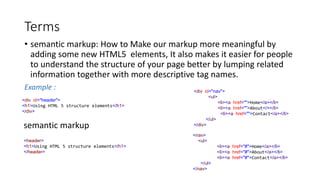
• semantic markup: How to Make our markup more meaningful by
adding some new HTML5 elements, It also makes it easier for people
to understand the structure of your page better by lumping related
information together with more descriptive tag names.
Example :
<div id="header">
<h1>Using HTML 5 structure elements</h1>
</div>
semantic markup
<header>
<h1>Using HTML 5 structure elements</h1>
</header>
<div id="nav">
<ul>
<li><a href="">Home</a></li>
<li><a href="">About</></li>
<li><a href="">Contact</a></li>
</ul>
</div>
<nav>
<ul>
<li><a href="#">Home</a></li>
<li><a href="#">About</a></li>
<li><a href="#">Contact</a></li>
</ul>
</nav>
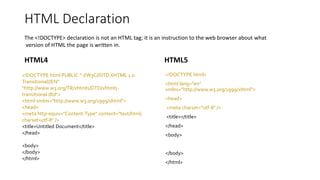
HTML Declaration
HTML4 HTML5
<!DOCTYPE html PUBLIC "-//W3C//DTD XHTML 1.0
Transitional//EN"
"http://www.w3.org/TR/xhtml1/DTD/xhtml1-
transitional.dtd">
<html xmlns="http://www.w3.org/1999/xhtml">
<head>
<meta http-equiv="Content-Type" content="text/html;
charset=utf-8" />
<title>Untitled Document</title>
</head>
<body>
</body>
</html>
<!DOCTYPE html>
<html lang="en"
xmlns="http://www.w3.org/1999/xhtml">
<head>
<meta charset="utf-8" />
<title></title>
</head>
<body>
</body>
</html>
The <!DOCTYPE> declaration is not an HTML tag; it is an instruction to the web browser about what
version of HTML the page is written in.
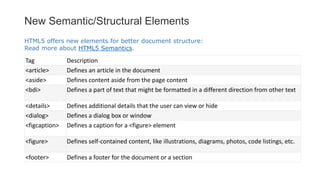
New Semantic/Structural Elements
Tag Description
<article> Defines an article in the document
<aside> Defines content aside from the page content
<bdi> Defines a part of text that might be formatted in a different direction from other text
<details> Defines additional details that the user can view or hide
<dialog> Defines a dialog box or window
<figcaption> Defines a caption for a <figure> element
<figure> Defines self-contained content, like illustrations, diagrams, photos, code listings, etc.
<footer> Defines a footer for the document or a section
HTML5 offers new elements for better document structure:
Read more about HTML5 Semantics.
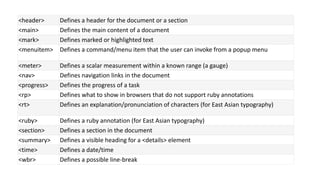
<header> Defines a header for the document or a section
<main> Defines the main content of a document
<mark> Defines marked or highlighted text
<menuitem> Defines a command/menu item that the user can invoke from a popup menu
<meter> Defines a scalar measurement within a known range (a gauge)
<nav> Defines navigation links in the document
<progress> Defines the progress of a task
<rp> Defines what to show in browsers that do not support ruby annotations
<rt> Defines an explanation/pronunciation of characters (for East Asian typography)
<ruby> Defines a ruby annotation (for East Asian typography)
<section> Defines a section in the document
<summary> Defines a visible heading for a <details> element
<time> Defines a date/time
<wbr> Defines a possible line-break
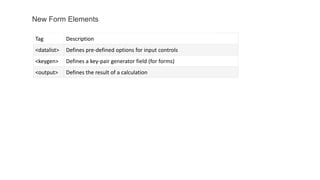
Tag Description
<datalist> Defines pre-defined options for input controls
<keygen> Defines a key-pair generator field (for forms)
<output> Defines the result of a calculation
New Form Elements
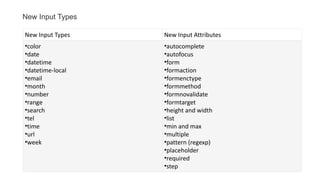
New Input Types New Input Attributes
•color
•date
•datetime
•datetime-local
•email
•month
•number
•range
•search
•tel
•time
•url
•week
•autocomplete
•autofocus
•form
•formaction
•formenctype
•formmethod
•formnovalidate
•formtarget
•height and width
•list
•min and max
•multiple
•pattern (regexp)
•placeholder
•required
•step
New Input Types
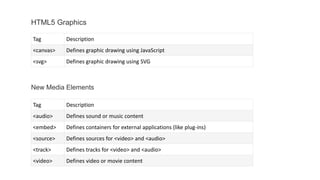
Tag Description
<canvas> Defines graphic drawing using JavaScript
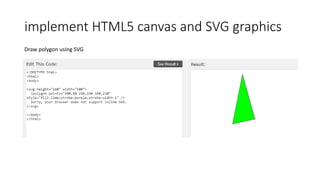
<svg> Defines graphic drawing using SVG
HTML5 Graphics
New Media Elements
Tag Description
<audio> Defines sound or music content
<embed> Defines containers for external applications (like plug-ins)
<source> Defines sources for <video> and <audio>
<track> Defines tracks for <video> and <audio>
<video> Defines video or movie content
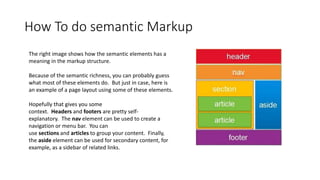
How To do semantic Markup
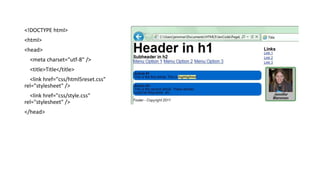
The right image shows how the semantic elements has a
meaning in the markup structure.
Because of the semantic richness, you can probably guess
what most of these elements do. But just in case, here is
an example of a page layout using some of these elements.
Hopefully that gives you some
context. Headers and footers are pretty self-
explanatory. The nav element can be used to create a
navigation or menu bar. You can
use sections and articles to group your content. Finally,
the aside element can be used for secondary content, for
example, as a sidebar of related links.
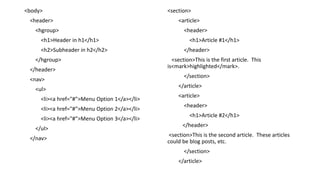
<!DOCTYPE html>
<html>
<head>
<meta charset="utf-8" />
<title>Title</title>
<link href="css/html5reset.css"
rel="stylesheet" />
<link href="css/style.css"
rel="stylesheet" />
</head>
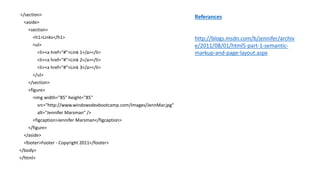
<body>
<header>
<hgroup>
<h1>Header in h1</h1>
<h2>Subheader in h2</h2>
</hgroup>
</header>
<nav>
<ul>
<li><a href="#">Menu Option 1</a></li>
<li><a href="#">Menu Option 2</a></li>
<li><a href="#">Menu Option 3</a></li>
</ul>
</nav>
<section>
<article>
<header>
<h1>Article #1</h1>
</header>
<section>This is the first article. This
is<mark>highlighted</mark>.
</section>
</article>
<article>
<header>
<h1>Article #2</h1>
</header>
<section>This is the second article. These articles
could be blog posts, etc.
</section>
</article>
</section>
<aside>
<section>
<h1>Links</h1>
<ul>
<li><a href="#">Link 1</a></li>
<li><a href="#">Link 2</a></li>
<li><a href="#">Link 3</a></li>
</ul>
</section>
<figure>
<img width="85" height="85"
src="http://www.windowsdevbootcamp.com/Images/JennMar.jpg"
alt="Jennifer Marsman" />
<figcaption>Jennifer Marsman</figcaption>
</figure>
</aside>
<footer>Footer - Copyright 2011</footer>
</body>
</html>
Referances
http://blogs.msdn.com/b/jennifer/archiv
e/2011/08/01/html5-part-1-semantic-
markup-and-page-layout.aspx
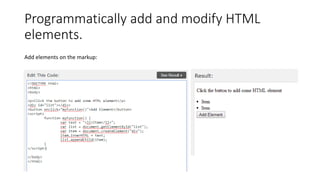
Programmatically add and modify HTML
elements.
Add elements on the markup:
Programmatically add and modify HTML
elements.
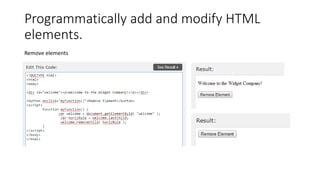
Remove elements
Programmatically add and modify HTML
elements.
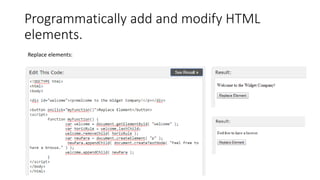
Replace elements:
Programmatically add and modify HTML
elements.
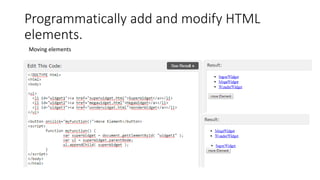
Moving elements
Implement media controls
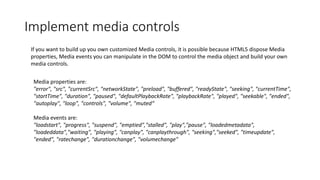
If you want to build up you own customized Media controls, it is possible because HTML5 dispose Media
properties, Media events you can manipulate in the DOM to control the media object and build your own
media controls.
Media properties are:
"error", "src", "currentSrc", "networkState", "preload", "buffered", "readyState", "seeking", "currentTime",
"startTime", "duration", "paused", "defaultPlaybackRate", "playbackRate", "played", "seekable", "ended",
"autoplay", "loop", "controls", "volume", "muted“
Media events are:
"loadstart", "progress", "suspend", "emptied","stalled", "play","pause", "loadedmetadata",
"loadeddata","waiting", "playing", "canplay", "canplaythrough", "seeking","seeked", "timeupdate",
"ended", "ratechange", "durationchange", "volumechange"
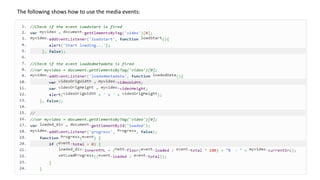
The following shows how to use the media events:
Implement media controls
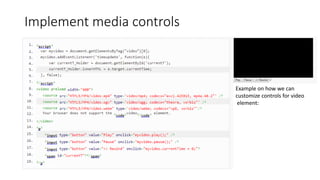
Example on how we can
customize controls for video
element:
Implement media controls
• HTML Audio and Video DOM Reference.
http://www.w3schools.com/tags/ref_av_dom.asp
implement HTML5 canvas and SVG graphics
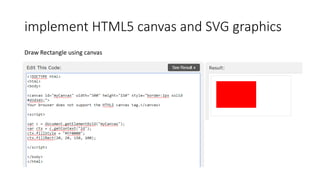
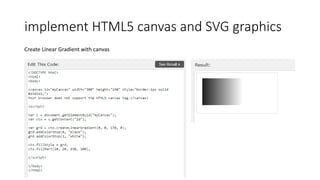
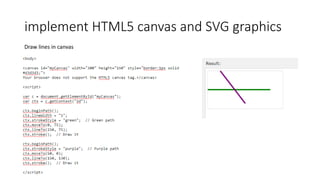
• <canvas> The HTML5 <canvas> tag is used to draw graphics, on the fly, via
scripting (usually JavaScript).
• <canvas> element has no drawing abilities of its own (it is only a container
for graphics) - you must use a script to actually draw the graphics.
Canvas function and Referances:
http://www.w3schools.com/tags/ref_canvas.asp
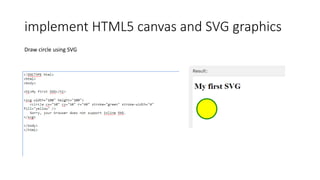
• SVG stands for Scalable Vector Graphics.
• SVG defines vector-based graphics in XML format.
SVG referances :
http://www.w3schools.com/svg/
implement HTML5 canvas and SVG graphics
Draw Rectangle using canvas
implement HTML5 canvas and SVG graphics
Create Linear Gradient with canvas
implement HTML5 canvas and SVG graphics
Draw lines in canvas
implement HTML5 canvas and SVG graphics
Draw circle using SVG
implement HTML5 canvas and SVG graphics
Draw polygon using SVG
implement HTML5 canvas and SVG graphics
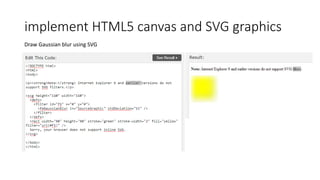
Draw Gaussian blur using SVG
Thanks for your
time hope you
enjoy it .
Motasem Alsmadi

Training HTML

  • 1.
    Training Session 1 Programmingin HTML5 with JavaScript and CSS3
  • 2.
  • 3.
    Topics • Structure theUI by using semantic markup, including for search engines and screen readers (Section, Article, Nav, Header, Footer, and Aside); create a layout container in HTML • Programmatically add and modify HTML elements; implement media controls; implement HTML5 canvas and SVG graphics
  • 4.
    Terms • semantic markup:How to Make our markup more meaningful by adding some new HTML5 elements, It also makes it easier for people to understand the structure of your page better by lumping related information together with more descriptive tag names. Example : <div id="header"> <h1>Using HTML 5 structure elements</h1> </div> semantic markup <header> <h1>Using HTML 5 structure elements</h1> </header> <div id="nav"> <ul> <li><a href="">Home</a></li> <li><a href="">About</></li> <li><a href="">Contact</a></li> </ul> </div> <nav> <ul> <li><a href="#">Home</a></li> <li><a href="#">About</a></li> <li><a href="#">Contact</a></li> </ul> </nav>
  • 5.
    HTML Declaration HTML4 HTML5 <!DOCTYPEhtml PUBLIC "-//W3C//DTD XHTML 1.0 Transitional//EN" "http://www.w3.org/TR/xhtml1/DTD/xhtml1- transitional.dtd"> <html xmlns="http://www.w3.org/1999/xhtml"> <head> <meta http-equiv="Content-Type" content="text/html; charset=utf-8" /> <title>Untitled Document</title> </head> <body> </body> </html> <!DOCTYPE html> <html lang="en" xmlns="http://www.w3.org/1999/xhtml"> <head> <meta charset="utf-8" /> <title></title> </head> <body> </body> </html> The <!DOCTYPE> declaration is not an HTML tag; it is an instruction to the web browser about what version of HTML the page is written in.
  • 6.
    New Semantic/Structural Elements TagDescription <article> Defines an article in the document <aside> Defines content aside from the page content <bdi> Defines a part of text that might be formatted in a different direction from other text <details> Defines additional details that the user can view or hide <dialog> Defines a dialog box or window <figcaption> Defines a caption for a <figure> element <figure> Defines self-contained content, like illustrations, diagrams, photos, code listings, etc. <footer> Defines a footer for the document or a section HTML5 offers new elements for better document structure: Read more about HTML5 Semantics.
  • 7.
    <header> Defines aheader for the document or a section <main> Defines the main content of a document <mark> Defines marked or highlighted text <menuitem> Defines a command/menu item that the user can invoke from a popup menu <meter> Defines a scalar measurement within a known range (a gauge) <nav> Defines navigation links in the document <progress> Defines the progress of a task <rp> Defines what to show in browsers that do not support ruby annotations <rt> Defines an explanation/pronunciation of characters (for East Asian typography) <ruby> Defines a ruby annotation (for East Asian typography) <section> Defines a section in the document <summary> Defines a visible heading for a <details> element <time> Defines a date/time <wbr> Defines a possible line-break
  • 8.
    Tag Description <datalist> Definespre-defined options for input controls <keygen> Defines a key-pair generator field (for forms) <output> Defines the result of a calculation New Form Elements
  • 9.
    New Input TypesNew Input Attributes •color •date •datetime •datetime-local •email •month •number •range •search •tel •time •url •week •autocomplete •autofocus •form •formaction •formenctype •formmethod •formnovalidate •formtarget •height and width •list •min and max •multiple •pattern (regexp) •placeholder •required •step New Input Types
  • 10.
    Tag Description <canvas> Definesgraphic drawing using JavaScript <svg> Defines graphic drawing using SVG HTML5 Graphics New Media Elements Tag Description <audio> Defines sound or music content <embed> Defines containers for external applications (like plug-ins) <source> Defines sources for <video> and <audio> <track> Defines tracks for <video> and <audio> <video> Defines video or movie content
  • 11.
    How To dosemantic Markup The right image shows how the semantic elements has a meaning in the markup structure. Because of the semantic richness, you can probably guess what most of these elements do. But just in case, here is an example of a page layout using some of these elements. Hopefully that gives you some context. Headers and footers are pretty self- explanatory. The nav element can be used to create a navigation or menu bar. You can use sections and articles to group your content. Finally, the aside element can be used for secondary content, for example, as a sidebar of related links.
  • 12.
    <!DOCTYPE html> <html> <head> <meta charset="utf-8"/> <title>Title</title> <link href="css/html5reset.css" rel="stylesheet" /> <link href="css/style.css" rel="stylesheet" /> </head>
  • 13.
    <body> <header> <hgroup> <h1>Header in h1</h1> <h2>Subheaderin h2</h2> </hgroup> </header> <nav> <ul> <li><a href="#">Menu Option 1</a></li> <li><a href="#">Menu Option 2</a></li> <li><a href="#">Menu Option 3</a></li> </ul> </nav> <section> <article> <header> <h1>Article #1</h1> </header> <section>This is the first article. This is<mark>highlighted</mark>. </section> </article> <article> <header> <h1>Article #2</h1> </header> <section>This is the second article. These articles could be blog posts, etc. </section> </article>
  • 14.
    </section> <aside> <section> <h1>Links</h1> <ul> <li><a href="#">Link 1</a></li> <li><ahref="#">Link 2</a></li> <li><a href="#">Link 3</a></li> </ul> </section> <figure> <img width="85" height="85" src="http://www.windowsdevbootcamp.com/Images/JennMar.jpg" alt="Jennifer Marsman" /> <figcaption>Jennifer Marsman</figcaption> </figure> </aside> <footer>Footer - Copyright 2011</footer> </body> </html> Referances http://blogs.msdn.com/b/jennifer/archiv e/2011/08/01/html5-part-1-semantic- markup-and-page-layout.aspx
  • 15.
    Programmatically add andmodify HTML elements. Add elements on the markup:
  • 16.
    Programmatically add andmodify HTML elements. Remove elements
  • 17.
    Programmatically add andmodify HTML elements. Replace elements:
  • 18.
    Programmatically add andmodify HTML elements. Moving elements
  • 19.
    Implement media controls Ifyou want to build up you own customized Media controls, it is possible because HTML5 dispose Media properties, Media events you can manipulate in the DOM to control the media object and build your own media controls. Media properties are: "error", "src", "currentSrc", "networkState", "preload", "buffered", "readyState", "seeking", "currentTime", "startTime", "duration", "paused", "defaultPlaybackRate", "playbackRate", "played", "seekable", "ended", "autoplay", "loop", "controls", "volume", "muted“ Media events are: "loadstart", "progress", "suspend", "emptied","stalled", "play","pause", "loadedmetadata", "loadeddata","waiting", "playing", "canplay", "canplaythrough", "seeking","seeked", "timeupdate", "ended", "ratechange", "durationchange", "volumechange"
  • 20.
    The following showshow to use the media events:
  • 21.
    Implement media controls Exampleon how we can customize controls for video element:
  • 22.
    Implement media controls •HTML Audio and Video DOM Reference. http://www.w3schools.com/tags/ref_av_dom.asp
  • 23.
    implement HTML5 canvasand SVG graphics • <canvas> The HTML5 <canvas> tag is used to draw graphics, on the fly, via scripting (usually JavaScript). • <canvas> element has no drawing abilities of its own (it is only a container for graphics) - you must use a script to actually draw the graphics. Canvas function and Referances: http://www.w3schools.com/tags/ref_canvas.asp • SVG stands for Scalable Vector Graphics. • SVG defines vector-based graphics in XML format. SVG referances : http://www.w3schools.com/svg/
  • 24.
    implement HTML5 canvasand SVG graphics Draw Rectangle using canvas
  • 25.
    implement HTML5 canvasand SVG graphics Create Linear Gradient with canvas
  • 26.
    implement HTML5 canvasand SVG graphics Draw lines in canvas
  • 27.
    implement HTML5 canvasand SVG graphics Draw circle using SVG
  • 28.
    implement HTML5 canvasand SVG graphics Draw polygon using SVG
  • 29.
    implement HTML5 canvasand SVG graphics Draw Gaussian blur using SVG
  • 30.
    Thanks for your timehope you enjoy it . Motasem Alsmadi