Functional Specification
Project Saarthi-Enabler to Business Transformation
22nd Nov 2013
TATA Power-Saarthi Project

Functional Specification V1.0

Document Control
Revision History
Date
25.11.2013

Version
V1.0

Author
Renu Bhasin

Description
Cheque – HDFC Bank

Distribution
Name

Title

Document Version

Date

Approval Signatures
Name

Title

Document
Version

Signature

Printed copies are current on date of printing only - 11/25/2013. Always refer to the electronic version for the current release.

© Copyright Capgemini 2011

Date

Page 2 of 11
TATA Power-Saarthi Project

Functional Specification V1.0

Table of Contents
1. <SECTION 1>.......................................................................................................................................... 4
1.1 <SUB SECTION>.................................................................................................................................. 4
1.2 <SUB SECTION>.................................................................................................................................. 4
2. <SECTION 2>.......................................................................................................................................... 4
2.1 <SUB SECTION>.................................................................................................................................. 4
3. GENERAL REQUIREMENTS................................................................................................................. 4
3.1 BUSINESS DRIVER .............................................................................................................................. 4
3.2 CURRENT FUNCTIONALITY .................................................................................................................... 4
3.3 DESIRED FUNCTIONALITY ..................................................................................................................... 4
3.4 ASSUMPTIONS...................................................................................................................................... 4
3.5 CONSTRAINTS...................................................................................................................................... 4
3.6 PERFORMANCE CRITERIA...................................................................................................................... 4
3.7 APPLICATIONS AFFECTED ................................................................................................................... 5
4. REQUIRED DATA................................................................................................................................... 5
4.1 INPUT DATA......................................................................................................................................... 5
4.2 OUTPUT DATA...................................................................................................................................... 5
4.3 DATA MAPPING.................................................................................................................................... 5
4.4 LEGACY FILE DETAILS.......................................................................................................................... 6
5. FORM / REPORT DESIGN...................................................................................................................... 6
5.1 GENERAL............................................................................................................................................. 6
5.2 SELECTION CRITERIA............................................................................................................................ 7
5.3 OUTPUT LAYOUT.................................................................................................................................. 9
6. CONVERSION / INTERFACE DESIGN................................................................................................... 9
6.1 GENERAL............................................................................................................................................. 9
6.2 DEPENDENCIES.................................................................................................................................. 10
6.3 SCHEDULING CONSIDERATIONS........................................................................................................... 10
7. ENHANCEMENT / MODIFICATION DESIGN.......................................................................................11
7.1 GENERAL........................................................................................................................................... 11
7.2 REQUIRED SCREENS.......................................................................................................................... 11
7.3 SCREEN LAYOUTS.............................................................................................................................. 11

Printed copies are current on date of printing only - 11/25/2013. Always refer to the electronic version for the current release.

© Copyright Capgemini 2011

Page 3 of 11
TATA Power-Saarthi Project

1.

<Section 1>

1.1

<Sub Section>

1.2

<Sub Section>

2.

<Section 2>

2.1

Functional Specification V1.0

<Sub Section>

3.
3.1

General Requirements
Business Driver
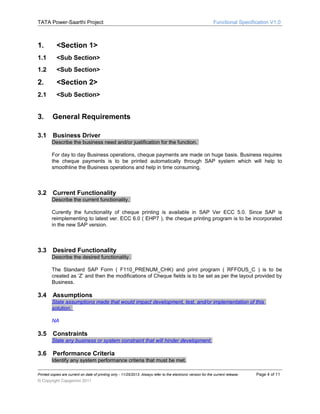
Describe the business need and/or justification for the function.
For day to day Business operations, cheque payments are made on huge basis. Business requires
the cheque payments is to be printed automatically through SAP system which will help to
smoothline the Business operations and help in time consuming.

3.2

Current Functionality
Describe the current functionality.
Curently the functionality of cheque printing is available in SAP Ver ECC 5.0. Since SAP is
reimplementing to latest ver. ECC 6.0 ( EHP7 ), the cheque printing program is to be incorporated
in the new SAP version.

3.3

Desired Functionality
Describe the desired functionality.
The Standard SAP Form ( F110_PRENUM_CHK) and print program ( RFFOUS_C ) is to be
created as ‘Z’ and then the modifications of Cheque fields is to be set as per the layout provided by
Business.

3.4

Assumptions
State assumptions made that would impact development, test, and/or implementation of this
solution.
NA

3.5

Constraints
State any business or system constraint that will hinder development.

3.6

Performance Criteria
Identify any system performance criteria that must be met.

Printed copies are current on date of printing only - 11/25/2013. Always refer to the electronic version for the current release.

© Copyright Capgemini 2011

Page 4 of 11
TATA Power-Saarthi Project

3.7

Functional Specification V1.0

Applications Affected
List of the application areas being changed or affected by this design.
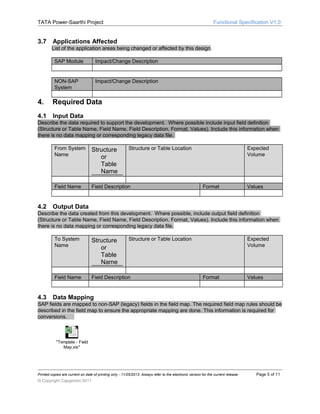
SAP Module

Impact/Change Description

NON-SAP
System

Impact/Change Description

4.

Required Data

4.1

Input Data

Describe the data required to support the development. Where possible include input field definition
(Structure or Table Name, Field Name, Field Description, Format, Values). Include this information when
there is no data mapping or corresponding legacy data file.
From System
Name

Field Name

4.2

Structure
or
Table
Name

Structure or Table Location

Field Description

Expected
Volume

Format

Values

Output Data

Describe the data created from this development. Where possible, include output field definition
(Structure or Table Name, Field Name, Field Description, Format, Values). Include this information when
there is no data mapping or corresponding legacy data file.
To System
Name

Field Name

4.3

Structure
or
Table
Name

Structure or Table Location

Field Description

Expected
Volume

Format

Values

Data Mapping

SAP fields are mapped to non-SAP (legacy) fields in the field map. The required field map rules should be
described in the field map to ensure the appropriate mapping are done. This information is required for
conversions.

"Template - Field
Map.xls"

Printed copies are current on date of printing only - 11/25/2013. Always refer to the electronic version for the current release.

© Copyright Capgemini 2011

Page 5 of 11
TATA Power-Saarthi Project

4.4

Functional Specification V1.0

Legacy File Details

Include details about all legacy data files used for input or output. This information is pertinent for
conversions and file-based interfaces. For each one, specify the following information wherever
applicable.
File Location and Name:
Logical File Name:
Variants:
Legacy File Description:
Sort Requirements:
Legacy File Layout:
Indicate precise layout of data file. Indicate field names, key, starting position, length and format.
Field names should match those indicated in under data mapping. Also indicate any required
filtering.
Record
Ref

Field

Name

Field Name

5.

Key

T
y
p
e

Format

Comments

Lengt Starting
h
Position

Form / Report Design

Complete this section for form or report development. In this context, a form refers to a printed form and
not an SAP screen.
The Standard SAP Form ( F110_PRENUM_CHK) and print program ( RFFOUS_C ) is to be copied as ‘Z’
and modification is to be done as per cheque layout provided by Business.

5.1

General

Describe the required functionality. Specify the following information wherever applicable.
SAP Menu Path:
SAP Menu Path to generate the cheque printing is done in two ways :
A] SAP Menu Accounting Financial Accounting  Accounts Payable  Document Entry 
Outgoing Payment  F-58 - Post + Print Forms OR
B] SAP Menu Accounting Financial Accounting  Accounts Payable  Document  More
Functions  Print Payment Forms ( FBZ5 )
Output Determination:
Output Type: .PDF
Mode of Execution: Cheque
Printed copies are current on date of printing only - 11/25/2013. Always refer to the electronic version for the current release.

© Copyright Capgemini 2011

Page 6 of 11
TATA Power-Saarthi Project

Functional Specification V1.0

Program Name: RFFOUS_C
Sapscript Form : F110_PRENUM_CHK
Layout Set Name: HDFC Cheque Form
Standard Text:
Special Printing/Media Requirements: To be printed on continuous stationery of HDFC Cheque
on Printer :
Sort Criteria:
Logo:
Bar Codes:
Distribution/Volume:

5.2

Selection Criteria

Specify all parameters to the form or report.

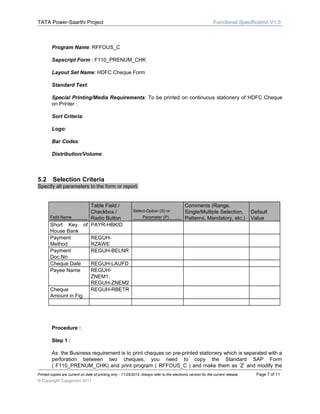
Field Name

Short Key
House Bank
Payment
Method
Payment
Doc.No
Cheque Date
Payee Name

Table Field /
Checkbox /
Radio Button
of PAYR-HBKID

Cheque
Amount in Fig.

Select-Option (S) or
Parameter (P)

Comments (Range,
Single/Multiple Selection,
Patterns, Mandatory, etc.)

Default
Value

REGUHRZAWE
REGUH-BELNR
REGUH-LAUFD
REGUHZNEM1,
REGUH-ZNEM2
REGUH-RBETR

Procedure :
Step 1 :
As the Business requirement is to print cheques on pre-printed stationery which is separated with a
perforation between two cheques, you need to copy the Standard SAP Form
( F110_PRENUM_CHK) and print program ( RFFOUS_C ) and make them as ‘Z’ and modify the
Printed copies are current on date of printing only - 11/25/2013. Always refer to the electronic version for the current release.

© Copyright Capgemini 2011

Page 7 of 11
TATA Power-Saarthi Project

Functional Specification V1.0

form as per custom requirement.
Step 2 :
As mentioned in Step 1, the new Z- SmartForm and Z – print program name will be assigned in the
FI IMG customizing for Cheque printing.
Step 3 :
A] The Functional process for generating the Payment Document Number which triggers the
Print Program .(ZRFFOUS_C)
There are two ways to generate the Payment Document Number :
01 ] Tcode : F-58 ( Payment with Printout : Header Data )
02] Tcode : FBZ5 ( Print form for Payment Document )
B] Following Tables will be used for Cheque printing :
REGUH Settlement data from the payment program
REGUP Edited invoice items from the payment program
REGUD Formatted data for printing the forms
SPELL Amounts and digits in words.
FSABE Data on accounting clerk.
C] Logic :
The Custom Z-Print program is assigned to the Payment Method ‘C’ ( Cheque ) of relevant Country
and Company code.
01 ] As per the Short key of House Bank ( PAYR – HBKID ), it will check whether the payment
method ( REGUH –RZAWE ) = ‘C’ ( Cheque ) and will get the list of Payment Document Number
( REGUH – BELNR ) to be printed on Cheque format.
02] As per the Payment Doc.Number ( REGUH – BELNR ), the other field data is fetched to print
on the cheque form.

Field name on
Cheque
Date

SAP Field name
Cheque Date

2

Pay

Vendor / Payee name

Table - Fieldname
REGUH-LAUFD
REGUH-ZNME1, REGUHZNEM2

3

Rs.

Cheque Amount in
Figures

REGUH-RBETR

Sr.No.
1

Printed copies are current on date of printing only - 11/25/2013. Always refer to the electronic version for the current release.

© Copyright Capgemini 2011

Page 8 of 11
TATA Power-Saarthi Project

4

5.3

Rupees :

Functional Specification V1.0

Cheque Amount in
Words

Functional Module
'SPELL_AMOUNT' is used to
convert Cheque Amount in
Words

Output Layout

Attach a form or report layout. Include field layout, spacing, header/footer details. Indicate whether times
should indicate local or system time. Specify paper format and paper size if not indicated in media
requirements.
HDFC cheque form layout has been attached below. As per the above logical procedure the data
will be fetched and should be pre-printed on continous stationery of cheque form within the
relevant Space of each field.

HDFC Cheque
format.pdf

After creating the cheque form layout through Abap Team , foll. are the activities for Basis Consultant :
1] The Basis Consultant will check the driver attached to the Printer .
2] The Output device type ‘SAPWIN’ is to be selected and access method as ‘F’ ( print on front end
computer )
3]The Page format and spool format created by Abap consultant will be assigned to ‘SAPWIN’ by Basis
Consultant.

6.

Conversion / Interface Design

Complete this section for conversion or interface development.

6.1

General

Describe the required functionality. Specify the following information wherever applicable.
Inbound/Outbound:
Frequency:
Volume:
Legacy Data Source:
Legacy Contact:
Method of Execution:
Mode of Handling:
Data Cleansing Process:
Reconciliation Process:
Data Consistency Check:
Error Handling Method:
Interface Process Log Details:
Printed copies are current on date of printing only - 11/25/2013. Always refer to the electronic version for the current release.

© Copyright Capgemini 2011

Page 9 of 11
TATA Power-Saarthi Project

Functional Specification V1.0

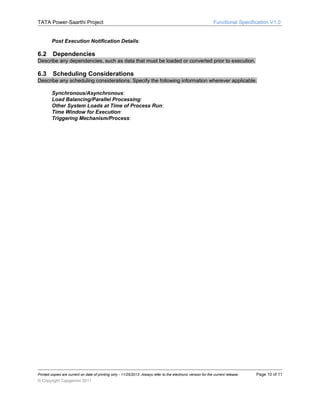
Post Execution Notification Details:

6.2

Dependencies

Describe any dependencies, such as data that must be loaded or converted prior to execution.

6.3

Scheduling Considerations

Describe any scheduling considerations. Specify the following information wherever applicable.
Synchronous/Asynchronous:
Load Balancing/Parallel Processing:
Other System Loads at Time of Process Run:
Time Window for Execution:
Triggering Mechanism/Process:

Printed copies are current on date of printing only - 11/25/2013. Always refer to the electronic version for the current release.

© Copyright Capgemini 2011

Page 10 of 11
TATA Power-Saarthi Project

7.

Enhancement / Modification Design

7.1

Functional Specification V1.0

General

Describe the required functionality. Specify the following information wherever applicable.
Transaction Code:
Menu Path:
User Exit Name:

7.2

Required Screens

List all required screens. Describe their purpose and flow.

7.3

Screen Layouts

Complete the following attachment for each screen.

Printed copies are current on date of printing only - 11/25/2013. Always refer to the electronic version for the current release.

© Copyright Capgemini 2011

Page 11 of 11

Tpc saarthi fs_fico module_cash & bank sub module_v 1.0

  • 1.
    Functional Specification Project Saarthi-Enablerto Business Transformation 22nd Nov 2013
  • 2.
    TATA Power-Saarthi Project FunctionalSpecification V1.0 Document Control Revision History Date 25.11.2013 Version V1.0 Author Renu Bhasin Description Cheque – HDFC Bank Distribution Name Title Document Version Date Approval Signatures Name Title Document Version Signature Printed copies are current on date of printing only - 11/25/2013. Always refer to the electronic version for the current release. © Copyright Capgemini 2011 Date Page 2 of 11
  • 3.
    TATA Power-Saarthi Project FunctionalSpecification V1.0 Table of Contents 1. <SECTION 1>.......................................................................................................................................... 4 1.1 <SUB SECTION>.................................................................................................................................. 4 1.2 <SUB SECTION>.................................................................................................................................. 4 2. <SECTION 2>.......................................................................................................................................... 4 2.1 <SUB SECTION>.................................................................................................................................. 4 3. GENERAL REQUIREMENTS................................................................................................................. 4 3.1 BUSINESS DRIVER .............................................................................................................................. 4 3.2 CURRENT FUNCTIONALITY .................................................................................................................... 4 3.3 DESIRED FUNCTIONALITY ..................................................................................................................... 4 3.4 ASSUMPTIONS...................................................................................................................................... 4 3.5 CONSTRAINTS...................................................................................................................................... 4 3.6 PERFORMANCE CRITERIA...................................................................................................................... 4 3.7 APPLICATIONS AFFECTED ................................................................................................................... 5 4. REQUIRED DATA................................................................................................................................... 5 4.1 INPUT DATA......................................................................................................................................... 5 4.2 OUTPUT DATA...................................................................................................................................... 5 4.3 DATA MAPPING.................................................................................................................................... 5 4.4 LEGACY FILE DETAILS.......................................................................................................................... 6 5. FORM / REPORT DESIGN...................................................................................................................... 6 5.1 GENERAL............................................................................................................................................. 6 5.2 SELECTION CRITERIA............................................................................................................................ 7 5.3 OUTPUT LAYOUT.................................................................................................................................. 9 6. CONVERSION / INTERFACE DESIGN................................................................................................... 9 6.1 GENERAL............................................................................................................................................. 9 6.2 DEPENDENCIES.................................................................................................................................. 10 6.3 SCHEDULING CONSIDERATIONS........................................................................................................... 10 7. ENHANCEMENT / MODIFICATION DESIGN.......................................................................................11 7.1 GENERAL........................................................................................................................................... 11 7.2 REQUIRED SCREENS.......................................................................................................................... 11 7.3 SCREEN LAYOUTS.............................................................................................................................. 11 Printed copies are current on date of printing only - 11/25/2013. Always refer to the electronic version for the current release. © Copyright Capgemini 2011 Page 3 of 11
  • 4.
    TATA Power-Saarthi Project 1. <Section1> 1.1 <Sub Section> 1.2 <Sub Section> 2. <Section 2> 2.1 Functional Specification V1.0 <Sub Section> 3. 3.1 General Requirements Business Driver Describe the business need and/or justification for the function. For day to day Business operations, cheque payments are made on huge basis. Business requires the cheque payments is to be printed automatically through SAP system which will help to smoothline the Business operations and help in time consuming. 3.2 Current Functionality Describe the current functionality. Curently the functionality of cheque printing is available in SAP Ver ECC 5.0. Since SAP is reimplementing to latest ver. ECC 6.0 ( EHP7 ), the cheque printing program is to be incorporated in the new SAP version. 3.3 Desired Functionality Describe the desired functionality. The Standard SAP Form ( F110_PRENUM_CHK) and print program ( RFFOUS_C ) is to be created as ‘Z’ and then the modifications of Cheque fields is to be set as per the layout provided by Business. 3.4 Assumptions State assumptions made that would impact development, test, and/or implementation of this solution. NA 3.5 Constraints State any business or system constraint that will hinder development. 3.6 Performance Criteria Identify any system performance criteria that must be met. Printed copies are current on date of printing only - 11/25/2013. Always refer to the electronic version for the current release. © Copyright Capgemini 2011 Page 4 of 11
  • 5.
    TATA Power-Saarthi Project 3.7 FunctionalSpecification V1.0 Applications Affected List of the application areas being changed or affected by this design. SAP Module Impact/Change Description NON-SAP System Impact/Change Description 4. Required Data 4.1 Input Data Describe the data required to support the development. Where possible include input field definition (Structure or Table Name, Field Name, Field Description, Format, Values). Include this information when there is no data mapping or corresponding legacy data file. From System Name Field Name 4.2 Structure or Table Name Structure or Table Location Field Description Expected Volume Format Values Output Data Describe the data created from this development. Where possible, include output field definition (Structure or Table Name, Field Name, Field Description, Format, Values). Include this information when there is no data mapping or corresponding legacy data file. To System Name Field Name 4.3 Structure or Table Name Structure or Table Location Field Description Expected Volume Format Values Data Mapping SAP fields are mapped to non-SAP (legacy) fields in the field map. The required field map rules should be described in the field map to ensure the appropriate mapping are done. This information is required for conversions. "Template - Field Map.xls" Printed copies are current on date of printing only - 11/25/2013. Always refer to the electronic version for the current release. © Copyright Capgemini 2011 Page 5 of 11
  • 6.
    TATA Power-Saarthi Project 4.4 FunctionalSpecification V1.0 Legacy File Details Include details about all legacy data files used for input or output. This information is pertinent for conversions and file-based interfaces. For each one, specify the following information wherever applicable. File Location and Name: Logical File Name: Variants: Legacy File Description: Sort Requirements: Legacy File Layout: Indicate precise layout of data file. Indicate field names, key, starting position, length and format. Field names should match those indicated in under data mapping. Also indicate any required filtering. Record Ref Field Name Field Name 5. Key T y p e Format Comments Lengt Starting h Position Form / Report Design Complete this section for form or report development. In this context, a form refers to a printed form and not an SAP screen. The Standard SAP Form ( F110_PRENUM_CHK) and print program ( RFFOUS_C ) is to be copied as ‘Z’ and modification is to be done as per cheque layout provided by Business. 5.1 General Describe the required functionality. Specify the following information wherever applicable. SAP Menu Path: SAP Menu Path to generate the cheque printing is done in two ways : A] SAP Menu Accounting Financial Accounting  Accounts Payable  Document Entry  Outgoing Payment  F-58 - Post + Print Forms OR B] SAP Menu Accounting Financial Accounting  Accounts Payable  Document  More Functions  Print Payment Forms ( FBZ5 ) Output Determination: Output Type: .PDF Mode of Execution: Cheque Printed copies are current on date of printing only - 11/25/2013. Always refer to the electronic version for the current release. © Copyright Capgemini 2011 Page 6 of 11
  • 7.
    TATA Power-Saarthi Project FunctionalSpecification V1.0 Program Name: RFFOUS_C Sapscript Form : F110_PRENUM_CHK Layout Set Name: HDFC Cheque Form Standard Text: Special Printing/Media Requirements: To be printed on continuous stationery of HDFC Cheque on Printer : Sort Criteria: Logo: Bar Codes: Distribution/Volume: 5.2 Selection Criteria Specify all parameters to the form or report. Field Name Short Key House Bank Payment Method Payment Doc.No Cheque Date Payee Name Table Field / Checkbox / Radio Button of PAYR-HBKID Cheque Amount in Fig. Select-Option (S) or Parameter (P) Comments (Range, Single/Multiple Selection, Patterns, Mandatory, etc.) Default Value REGUHRZAWE REGUH-BELNR REGUH-LAUFD REGUHZNEM1, REGUH-ZNEM2 REGUH-RBETR Procedure : Step 1 : As the Business requirement is to print cheques on pre-printed stationery which is separated with a perforation between two cheques, you need to copy the Standard SAP Form ( F110_PRENUM_CHK) and print program ( RFFOUS_C ) and make them as ‘Z’ and modify the Printed copies are current on date of printing only - 11/25/2013. Always refer to the electronic version for the current release. © Copyright Capgemini 2011 Page 7 of 11
  • 8.
    TATA Power-Saarthi Project FunctionalSpecification V1.0 form as per custom requirement. Step 2 : As mentioned in Step 1, the new Z- SmartForm and Z – print program name will be assigned in the FI IMG customizing for Cheque printing. Step 3 : A] The Functional process for generating the Payment Document Number which triggers the Print Program .(ZRFFOUS_C) There are two ways to generate the Payment Document Number : 01 ] Tcode : F-58 ( Payment with Printout : Header Data ) 02] Tcode : FBZ5 ( Print form for Payment Document ) B] Following Tables will be used for Cheque printing : REGUH Settlement data from the payment program REGUP Edited invoice items from the payment program REGUD Formatted data for printing the forms SPELL Amounts and digits in words. FSABE Data on accounting clerk. C] Logic : The Custom Z-Print program is assigned to the Payment Method ‘C’ ( Cheque ) of relevant Country and Company code. 01 ] As per the Short key of House Bank ( PAYR – HBKID ), it will check whether the payment method ( REGUH –RZAWE ) = ‘C’ ( Cheque ) and will get the list of Payment Document Number ( REGUH – BELNR ) to be printed on Cheque format. 02] As per the Payment Doc.Number ( REGUH – BELNR ), the other field data is fetched to print on the cheque form. Field name on Cheque Date SAP Field name Cheque Date 2 Pay Vendor / Payee name Table - Fieldname REGUH-LAUFD REGUH-ZNME1, REGUHZNEM2 3 Rs. Cheque Amount in Figures REGUH-RBETR Sr.No. 1 Printed copies are current on date of printing only - 11/25/2013. Always refer to the electronic version for the current release. © Copyright Capgemini 2011 Page 8 of 11
  • 9.
    TATA Power-Saarthi Project 4 5.3 Rupees: Functional Specification V1.0 Cheque Amount in Words Functional Module 'SPELL_AMOUNT' is used to convert Cheque Amount in Words Output Layout Attach a form or report layout. Include field layout, spacing, header/footer details. Indicate whether times should indicate local or system time. Specify paper format and paper size if not indicated in media requirements. HDFC cheque form layout has been attached below. As per the above logical procedure the data will be fetched and should be pre-printed on continous stationery of cheque form within the relevant Space of each field. HDFC Cheque format.pdf After creating the cheque form layout through Abap Team , foll. are the activities for Basis Consultant : 1] The Basis Consultant will check the driver attached to the Printer . 2] The Output device type ‘SAPWIN’ is to be selected and access method as ‘F’ ( print on front end computer ) 3]The Page format and spool format created by Abap consultant will be assigned to ‘SAPWIN’ by Basis Consultant. 6. Conversion / Interface Design Complete this section for conversion or interface development. 6.1 General Describe the required functionality. Specify the following information wherever applicable. Inbound/Outbound: Frequency: Volume: Legacy Data Source: Legacy Contact: Method of Execution: Mode of Handling: Data Cleansing Process: Reconciliation Process: Data Consistency Check: Error Handling Method: Interface Process Log Details: Printed copies are current on date of printing only - 11/25/2013. Always refer to the electronic version for the current release. © Copyright Capgemini 2011 Page 9 of 11
  • 10.
    TATA Power-Saarthi Project FunctionalSpecification V1.0 Post Execution Notification Details: 6.2 Dependencies Describe any dependencies, such as data that must be loaded or converted prior to execution. 6.3 Scheduling Considerations Describe any scheduling considerations. Specify the following information wherever applicable. Synchronous/Asynchronous: Load Balancing/Parallel Processing: Other System Loads at Time of Process Run: Time Window for Execution: Triggering Mechanism/Process: Printed copies are current on date of printing only - 11/25/2013. Always refer to the electronic version for the current release. © Copyright Capgemini 2011 Page 10 of 11
  • 11.
    TATA Power-Saarthi Project 7. Enhancement/ Modification Design 7.1 Functional Specification V1.0 General Describe the required functionality. Specify the following information wherever applicable. Transaction Code: Menu Path: User Exit Name: 7.2 Required Screens List all required screens. Describe their purpose and flow. 7.3 Screen Layouts Complete the following attachment for each screen. Printed copies are current on date of printing only - 11/25/2013. Always refer to the electronic version for the current release. © Copyright Capgemini 2011 Page 11 of 11