Top 5 Problems in
Oracle E-Business
Suite
Administration
Akhash Ramnath
Doyensys Pvt Ltd
02-Dec-2020
2020
Overview
This document describes in brief about the five
major problems faced by the Administrators in
the Oracle E-Business Suite Administration.
Oracle E-Business Suite is a powerful application
that unleashes various functionalities to a
business organization.E-Business Suite has its
own problems, but like everything else there is
always a fix/solution to EBS as well.
This is intended for administrators who perform
Oracle E-Business Suite Release 12
administration.It assumes knowledge of Oracle
Core Database administration as well.
Prior to implementation of any configuration
options described in this document,
EBS/Database Administrators are strongly
advised to review the deployment
method/architecture and test them properly
prior moving it to the Business.
Oracle E-Business Suite is an intricate application with
multiple tiers & technologies which makes properly securing
an Oracle EBS challenging.
When maintaining an EBS application, it is very
important to prioritize the highest security risks and
remediate those risks first.
a. Using Default Database Password
b. Application user credentials not hashed
c. SSL/TLS not configured
d. Audit trial not enabled in EBS
Using Default Database Password
EBS comes with 200+ database user accounts for
every module, and each of them gets created with
weak/default password.
These must be changed first, even for the modules we
are not using.
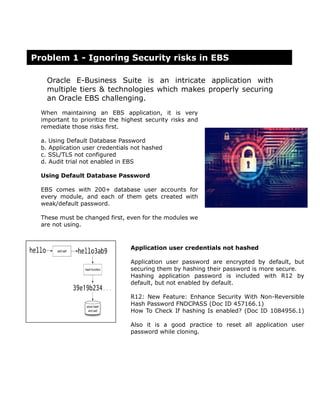
Application user credentials not hashed
Application user password are encrypted by default, but
securing them by hashing their password is more secure.
Hashing application password is included with R12 by
default, but not enabled by default.
R12: New Feature: Enhance Security With Non-Reversible
Hash Password FNDCPASS (Doc ID 457166.1)
How To Check If hashing Is enabled? (Doc ID 1084956.1)
Also it is a good practice to reset all application user
password while cloning.
Problem 1 - Ignoring Security risks in EBS
Auditing EBS Tables
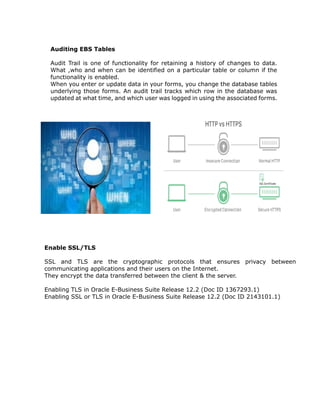
Audit Trail is one of functionality for retaining a history of changes to data.
What ,who and when can be identified on a particular table or column if the
functionality is enabled.
When you enter or update data in your forms, you change the database tables
underlying those forms. An audit trail tracks which row in the database was
updated at what time, and which user was logged in using the associated forms.
Enable SSL/TLS
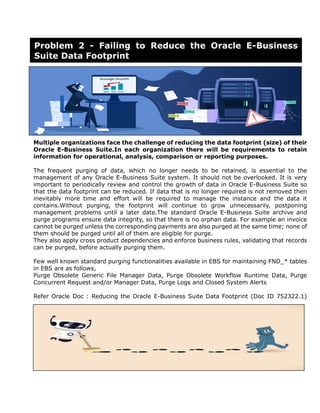
SSL and TLS are the cryptographic protocols that ensures privacy between
communicating applications and their users on the Internet.
They encrypt the data transferred between the client & the server.
Enabling TLS in Oracle E-Business Suite Release 12.2 (Doc ID 1367293.1)
Enabling SSL or TLS in Oracle E-Business Suite Release 12.2 (Doc ID 2143101.1)
Multiple organizations face the challenge of reducing the data footprint (size) of their
Oracle E-Business Suite.In each organization there will be requirements to retain
information for operational, analysis, comparison or reporting purposes.
The frequent purging of data, which no longer needs to be retained, is essential to the
management of any Oracle E-Business Suite system. It should not be overlooked. It is very
important to periodically review and control the growth of data in Oracle E-Business Suite so
that the data footprint can be reduced. If data that is no longer required is not removed then
inevitably more time and effort will be required to manage the instance and the data it
contains.Without purging, the footprint will continue to grow unnecessarily, postponing
management problems until a later date.The standard Oracle E-Business Suite archive and
purge programs ensure data integrity, so that there is no orphan data. For example an invoice
cannot be purged unless the corresponding payments are also purged at the same time; none of
them should be purged until all of them are eligible for purge.
They also apply cross product dependencies and enforce business rules, validating that records
can be purged, before actually purging them.
Few well known standard purging functionalities available in EBS for maintaining FND_* tables
in EBS are as follows,
Purge Obsolete Generic File Manager Data, Purge Obsolete Workflow Runtime Data, Purge
Concurrent Request and/or Manager Data, Purge Logs and Closed System Alerts
Refer Oracle Doc : Reducing the Oracle E-Business Suite Data Footprint (Doc ID 752322.1)
Problem 2 - Failing to Reduce the Oracle E-Business
Suite Data Footprint
E-Business Suite's Java based content requires a browser that supports
Netscape Plug-in Application Programming Interface (NPAPI) plug-ins.Few
browsers does not support this NPAPI plug-in support. Some of them are phasing
out of this which will prevent the Java plug-in from working.
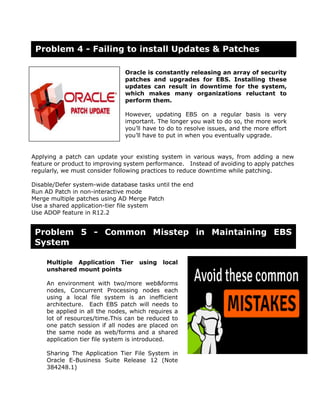
Java Web Start launches E-Business Suite Java-based functionality as Java Web Start
applications instead of as applets. Java Web Start is part of the Java Runtime
Environment (JRE).Java Web Start changes the way that Java runs on end-users'
computers but this technical change is generally invisible to end-users.
Java Web Start applications are launched from browsers using the Java Network Launching
Protocol (JNLP).
Java Web Start changes the way that Java runs on end-users' computers but this
technical change is generally invisible to end-users.
Java Web Start applications are launched from browsers using the Java Network
Launching Protocol (JNLP).
With the release of Java Web Start, E-Business Suite 12.1 and 12.2 users can launch
Java-based content (e.g. Oracle Forms) from browsers that do not support Java plug-ins
via NPAPI. Java Web Start in EBS works with:
Microsoft Internet Explorer
Microsoft Edge
Firefox Rapid Release (32-bit and 64-bit)
Firefox Extended Support Release (32-bit and 64-bit)
Google Chrome
Recommended Browsers for Oracle E-Business Suite Release 12 (MOS Note 389422.1)
Using Java Web Start with Oracle E-Business Suite (MOS Note 2188898.1)
Problem 3 - Dependency on browser with NPAPI
plug-in support
Oracle is constantly releasing an array of security
patches and upgrades for EBS. Installing these
updates can result in downtime for the system,
which makes many organizations reluctant to
perform them.
However, updating EBS on a regular basis is very
important. The longer you wait to do so, the more work
you’ll have to do to resolve issues, and the more effort
you’ll have to put in when you eventually upgrade.
Applying a patch can update your existing system in various ways, from adding a new
feature or product to improving system performance. Instead of avoiding to apply patches
regularly, we must consider following practices to reduce downtime while patching.
Disable/Defer system-wide database tasks until the end
Run AD Patch in non-interactive mode
Merge multiple patches using AD Merge Patch
Use a shared application-tier file system
Use ADOP feature in R12.2
Multiple Application Tier using local
unshared mount points
An environment with two/more web&forms
nodes, Concurrent Processing nodes each
using a local file system is an inefficient
architecture. Each EBS patch will needs to
be applied in all the nodes, which requires a
lot of resources/time.This can be reduced to
one patch session if all nodes are placed on
the same node as web/forms and a shared
application tier file system is introduced.
Sharing The Application Tier File System in
Oracle E-Business Suite Release 12 (Note
384248.1)
Problem 4 - Failing to install Updates & Patches
Problem 5 - Common Misstep in Maintaining EBS
System
Editing the files manually
Manually editing the file that are maintained by Autoconfig is not
recommended. Any such modifications made manually will be overwritten
while executing autoconfig in most circumstances.
Customizing an AutoConfig Environment (Doc ID 270519.1)
Using AutoConfig to Manage System Configurations in Oracle E-Business Suite
Release 12 (Doc ID 387859.1)
Applying patches using "hotpatch"
The adpatch 'hotpatch' parameter should be used only if it is explicitly mentioned in
the patch readme and is not intended to be an easy way of applying patches to your
system without shutting down the application tier services. Most patches should only
be applied during scheduled downtimes when all users are logged off the system,
application tier services have been shut down and Maintenance Mode enabled.
General Performance issues with Oracle EBS
Refer Oracle Doc - https://docs.oracle.com/cd/E18727_01/doc.121/e12148/toc.htm

Top_Five_problems_In_EBS_Administration.pdf

  • 1.
    Top 5 Problemsin Oracle E-Business Suite Administration Akhash Ramnath Doyensys Pvt Ltd 02-Dec-2020 2020
  • 2.
    Overview This document describesin brief about the five major problems faced by the Administrators in the Oracle E-Business Suite Administration. Oracle E-Business Suite is a powerful application that unleashes various functionalities to a business organization.E-Business Suite has its own problems, but like everything else there is always a fix/solution to EBS as well. This is intended for administrators who perform Oracle E-Business Suite Release 12 administration.It assumes knowledge of Oracle Core Database administration as well. Prior to implementation of any configuration options described in this document, EBS/Database Administrators are strongly advised to review the deployment method/architecture and test them properly prior moving it to the Business.
  • 3.
    Oracle E-Business Suiteis an intricate application with multiple tiers & technologies which makes properly securing an Oracle EBS challenging. When maintaining an EBS application, it is very important to prioritize the highest security risks and remediate those risks first. a. Using Default Database Password b. Application user credentials not hashed c. SSL/TLS not configured d. Audit trial not enabled in EBS Using Default Database Password EBS comes with 200+ database user accounts for every module, and each of them gets created with weak/default password. These must be changed first, even for the modules we are not using. Application user credentials not hashed Application user password are encrypted by default, but securing them by hashing their password is more secure. Hashing application password is included with R12 by default, but not enabled by default. R12: New Feature: Enhance Security With Non-Reversible Hash Password FNDCPASS (Doc ID 457166.1) How To Check If hashing Is enabled? (Doc ID 1084956.1) Also it is a good practice to reset all application user password while cloning. Problem 1 - Ignoring Security risks in EBS
  • 4.
    Auditing EBS Tables AuditTrail is one of functionality for retaining a history of changes to data. What ,who and when can be identified on a particular table or column if the functionality is enabled. When you enter or update data in your forms, you change the database tables underlying those forms. An audit trail tracks which row in the database was updated at what time, and which user was logged in using the associated forms. Enable SSL/TLS SSL and TLS are the cryptographic protocols that ensures privacy between communicating applications and their users on the Internet. They encrypt the data transferred between the client & the server. Enabling TLS in Oracle E-Business Suite Release 12.2 (Doc ID 1367293.1) Enabling SSL or TLS in Oracle E-Business Suite Release 12.2 (Doc ID 2143101.1)
  • 5.
    Multiple organizations facethe challenge of reducing the data footprint (size) of their Oracle E-Business Suite.In each organization there will be requirements to retain information for operational, analysis, comparison or reporting purposes. The frequent purging of data, which no longer needs to be retained, is essential to the management of any Oracle E-Business Suite system. It should not be overlooked. It is very important to periodically review and control the growth of data in Oracle E-Business Suite so that the data footprint can be reduced. If data that is no longer required is not removed then inevitably more time and effort will be required to manage the instance and the data it contains.Without purging, the footprint will continue to grow unnecessarily, postponing management problems until a later date.The standard Oracle E-Business Suite archive and purge programs ensure data integrity, so that there is no orphan data. For example an invoice cannot be purged unless the corresponding payments are also purged at the same time; none of them should be purged until all of them are eligible for purge. They also apply cross product dependencies and enforce business rules, validating that records can be purged, before actually purging them. Few well known standard purging functionalities available in EBS for maintaining FND_* tables in EBS are as follows, Purge Obsolete Generic File Manager Data, Purge Obsolete Workflow Runtime Data, Purge Concurrent Request and/or Manager Data, Purge Logs and Closed System Alerts Refer Oracle Doc : Reducing the Oracle E-Business Suite Data Footprint (Doc ID 752322.1) Problem 2 - Failing to Reduce the Oracle E-Business Suite Data Footprint
  • 6.
    E-Business Suite's Javabased content requires a browser that supports Netscape Plug-in Application Programming Interface (NPAPI) plug-ins.Few browsers does not support this NPAPI plug-in support. Some of them are phasing out of this which will prevent the Java plug-in from working. Java Web Start launches E-Business Suite Java-based functionality as Java Web Start applications instead of as applets. Java Web Start is part of the Java Runtime Environment (JRE).Java Web Start changes the way that Java runs on end-users' computers but this technical change is generally invisible to end-users. Java Web Start applications are launched from browsers using the Java Network Launching Protocol (JNLP). Java Web Start changes the way that Java runs on end-users' computers but this technical change is generally invisible to end-users. Java Web Start applications are launched from browsers using the Java Network Launching Protocol (JNLP). With the release of Java Web Start, E-Business Suite 12.1 and 12.2 users can launch Java-based content (e.g. Oracle Forms) from browsers that do not support Java plug-ins via NPAPI. Java Web Start in EBS works with: Microsoft Internet Explorer Microsoft Edge Firefox Rapid Release (32-bit and 64-bit) Firefox Extended Support Release (32-bit and 64-bit) Google Chrome Recommended Browsers for Oracle E-Business Suite Release 12 (MOS Note 389422.1) Using Java Web Start with Oracle E-Business Suite (MOS Note 2188898.1) Problem 3 - Dependency on browser with NPAPI plug-in support
  • 7.
    Oracle is constantlyreleasing an array of security patches and upgrades for EBS. Installing these updates can result in downtime for the system, which makes many organizations reluctant to perform them. However, updating EBS on a regular basis is very important. The longer you wait to do so, the more work you’ll have to do to resolve issues, and the more effort you’ll have to put in when you eventually upgrade. Applying a patch can update your existing system in various ways, from adding a new feature or product to improving system performance. Instead of avoiding to apply patches regularly, we must consider following practices to reduce downtime while patching. Disable/Defer system-wide database tasks until the end Run AD Patch in non-interactive mode Merge multiple patches using AD Merge Patch Use a shared application-tier file system Use ADOP feature in R12.2 Multiple Application Tier using local unshared mount points An environment with two/more web&forms nodes, Concurrent Processing nodes each using a local file system is an inefficient architecture. Each EBS patch will needs to be applied in all the nodes, which requires a lot of resources/time.This can be reduced to one patch session if all nodes are placed on the same node as web/forms and a shared application tier file system is introduced. Sharing The Application Tier File System in Oracle E-Business Suite Release 12 (Note 384248.1) Problem 4 - Failing to install Updates & Patches Problem 5 - Common Misstep in Maintaining EBS System
  • 8.
    Editing the filesmanually Manually editing the file that are maintained by Autoconfig is not recommended. Any such modifications made manually will be overwritten while executing autoconfig in most circumstances. Customizing an AutoConfig Environment (Doc ID 270519.1) Using AutoConfig to Manage System Configurations in Oracle E-Business Suite Release 12 (Doc ID 387859.1) Applying patches using "hotpatch" The adpatch 'hotpatch' parameter should be used only if it is explicitly mentioned in the patch readme and is not intended to be an easy way of applying patches to your system without shutting down the application tier services. Most patches should only be applied during scheduled downtimes when all users are logged off the system, application tier services have been shut down and Maintenance Mode enabled. General Performance issues with Oracle EBS Refer Oracle Doc - https://docs.oracle.com/cd/E18727_01/doc.121/e12148/toc.htm