Elayne Gordonov
Market Manager, Bio Market
Top 5 Sources of Error in Biomedical Testing
2
1. Load Cell Measurement
2. System Bandwidth
3. Data Rate
4. Strain Measurement
5. Environmental Conditions
Top 5 Sources of Error in Biomedical Testing:
3
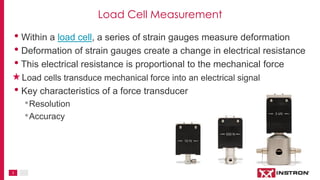
Load Cell Measurement
• Within a load cell, a series of strain gauges measure deformation
• Deformation of strain gauges create a change in electrical resistance
• This electrical resistance is proportional to the mechanical force
Load cells transduce mechanical force into an electrical signal
• Key characteristics of a force transducer
•Resolution
•Accuracy
4
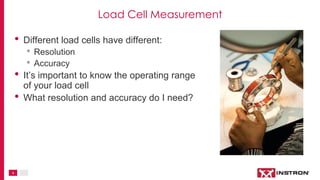
Load Cell Measurement
• Different load cells have different:
• Resolution
• Accuracy
• It’s important to know the operating range
of your load cell
• What resolution and accuracy do I need?
5
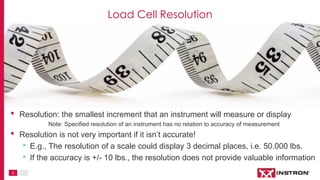
• Resolution: the smallest increment that an instrument will measure or display
Note: Specified resolution of an instrument has no relation to accuracy of measurement
• Resolution is not very important if it isn’t accurate!
• E.g., The resolution of a scale could display 3 decimal places, i.e. 50.000 lbs.
• If the accuracy is +/- 10 lbs., the resolution does not provide valuable information
Load Cell Resolution
6
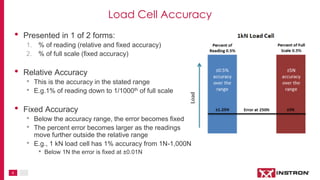
• Presented in 1 of 2 forms:
1. % of reading (relative and fixed accuracy)
2. % of full scale (fixed accuracy)
• Relative Accuracy
• This is the accuracy in the stated range
• E.g.1% of reading down to 1/1000th of full scale
• Fixed Accuracy
• Below the accuracy range, the error becomes fixed
• The percent error becomes larger as the readings
move further outside the relative range
• E.g., 1 kN load cell has 1% accuracy from 1N-1,000N
• Below 1N the error is fixed at ±0.01N
Load Cell Accuracy
7
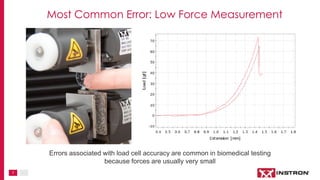
Most Common Error: Low Force Measurement
Errors associated with load cell accuracy are common in biomedical testing
because forces are usually very small
8
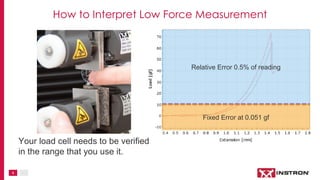
Relative Error 0.5% of reading
Fixed Error at 0.051 gf
Your load cell needs to be verified
in the range that you use it.
How to Interpret Low Force Measurement
9
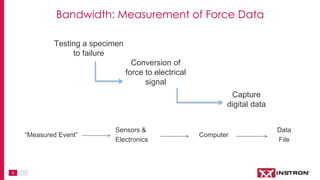
Testing a specimen
to failure
Conversion of
force to electrical
signal
Capture
digital data
Sensors &
Electronics
Computer
Data
File
“Measured Event”
Bandwidth: Measurement of Force Data
10
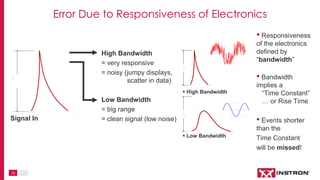
A
Signal In
 Low Bandwidth
A
A
 High Bandwidth
High Bandwidth
= very responsive
= noisy (jumpy displays,
scatter in data)
Low Bandwidth
= big range
= clean signal (low noise)
Error Due to Responsiveness of Electronics
• Responsiveness
of the electronics
defined by
“bandwidth”
• Bandwidth
implies a
“Time Constant”
… or Rise Time
• Events shorter
than the
Time Constant
will be missed!
11
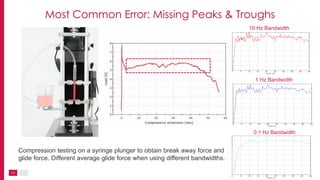
10 Hz Bandwidth
1 Hz Bandwidth
0.1 Hz Bandwidth
Compression testing on a syringe plunger to obtain break away force and
glide force. Different average glide force when using different bandwidths.
Most Common Error: Missing Peaks & Troughs
12
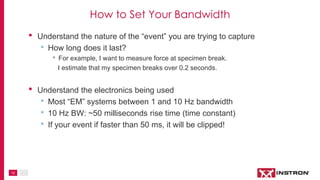
• Understand the nature of the “event” you are trying to capture
• How long does it last?
• For example, I want to measure force at specimen break.
I estimate that my specimen breaks over 0.2 seconds.
• Understand the electronics being used
• Most “EM” systems between 1 and 10 Hz bandwidth
• 10 Hz BW: ~50 milliseconds rise time (time constant)
• If your event if faster than 50 ms, it will be clipped!
How to Set Your Bandwidth
13
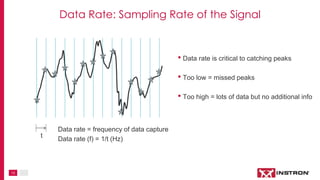
Data rate = frequency of data capture
Data rate (f) = 1/t (Hz)
t
• Data rate is critical to catching peaks
• Too low = missed peaks
• Too high = lots of data but no additional info
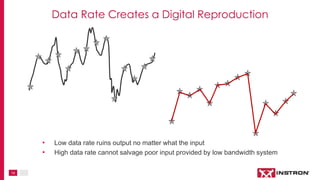
Data Rate: Sampling Rate of the Signal
14
• Low data rate ruins output no matter what the input
• High data rate cannot salvage poor input provided by low bandwidth system
Data Rate Creates a Digital Reproduction
15
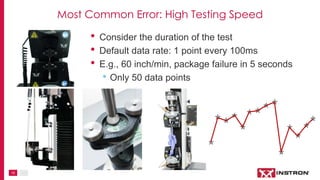
• Consider the duration of the test
• Default data rate: 1 point every 100ms
• E.g., 60 inch/min, package failure in 5 seconds
• Only 50 data points
Most Common Error: High Testing Speed
16
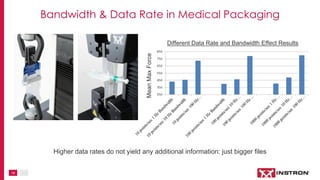
MeanMaxForce
Different Data Rate and Bandwidth Effect Results
Higher data rates do not yield any additional information: just bigger files
Bandwidth & Data Rate in Medical Packaging
17
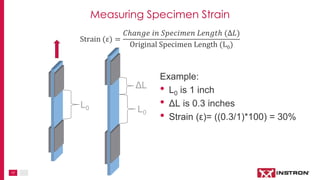
Strain (ε) =
𝐶ℎ𝑎𝑛𝑔𝑒 𝑖𝑛 𝑆𝑝𝑒𝑐𝑖𝑚𝑒𝑛 𝐿𝑒𝑛𝑔𝑡ℎ (∆𝐿)
Original Specimen Length (L0)
L0
ΔL
Example:
• L0 is 1 inch
• ΔL is 0.3 inches
• Strain (ε)= ((0.3/1)*100) = 30%
L0
Measuring Specimen Strain
18
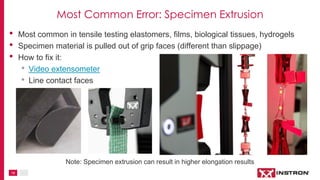
• Most common in tensile testing elastomers, films, biological tissues, hydrogels
• Specimen material is pulled out of grip faces (different than slippage)
• How to fix it:
• Video extensometer
• Line contact faces
Note: Specimen extrusion can result in higher elongation results
Most Common Error: Specimen Extrusion
19
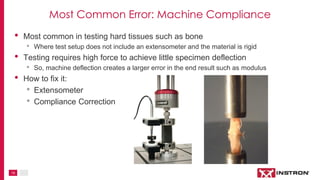
• Most common in testing hard tissues such as bone
• Where test setup does not include an extensometer and the material is rigid
• Testing requires high force to achieve little specimen deflection
• So, machine deflection creates a larger error in the end result such as modulus
• How to fix it:
• Extensometer
• Compliance Correction
Most Common Error: Machine Compliance
20
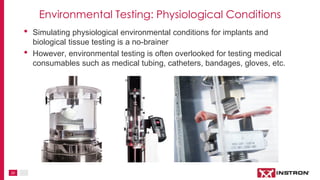
• Simulating physiological environmental conditions for implants and
biological tissue testing is a no-brainer
• However, environmental testing is often overlooked for testing medical
consumables such as medical tubing, catheters, bandages, gloves, etc.
Environmental Testing: Physiological Conditions
21
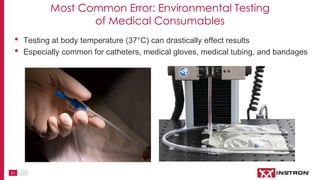
• Testing at body temperature (37°C) can drastically effect results
• Especially common for catheters, medical gloves, medical tubing, and bandages
Most Common Error: Environmental Testing
of Medical Consumables
22
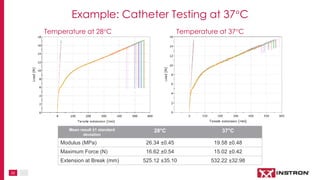
Temperature at 28°C Temperature at 37°C
Mean result ±1 standard
deviation
28°C 37°C
Modulus (MPa) 26.34 ±0.45 19.58 ±0.48
Maximum Force (N) 16.62 ±0.54 15.02 ±0.42
Extension at Break (mm) 525.12 ±35.10 532.22 ±32.98
Example: Catheter Testing at 37°C
23
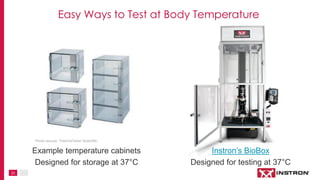
Easy Ways to Test at Body Temperature
Example temperature cabinets
Designed for storage at 37°C
Instron’s BioBox
Designed for testing at 37°C
Photo source: ThermoFisher Scientific
24
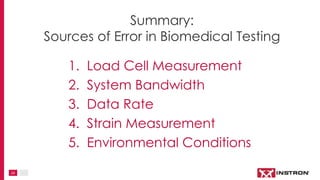
1. Load Cell Measurement
2. System Bandwidth
3. Data Rate
4. Strain Measurement
5. Environmental Conditions
Summary:
Sources of Error in Biomedical Testing
25
Thank you for your time!
Please contact Instron® with any questions.
Visit www.instron.com
for more information.

Top 5 Sources of Error in Biomedical Testing

  • 1.
    Elayne Gordonov Market Manager,Bio Market Top 5 Sources of Error in Biomedical Testing
  • 2.
    2 1. Load CellMeasurement 2. System Bandwidth 3. Data Rate 4. Strain Measurement 5. Environmental Conditions Top 5 Sources of Error in Biomedical Testing:
  • 3.
    3 Load Cell Measurement •Within a load cell, a series of strain gauges measure deformation • Deformation of strain gauges create a change in electrical resistance • This electrical resistance is proportional to the mechanical force Load cells transduce mechanical force into an electrical signal • Key characteristics of a force transducer •Resolution •Accuracy
  • 4.
    4 Load Cell Measurement •Different load cells have different: • Resolution • Accuracy • It’s important to know the operating range of your load cell • What resolution and accuracy do I need?
  • 5.
    5 • Resolution: thesmallest increment that an instrument will measure or display Note: Specified resolution of an instrument has no relation to accuracy of measurement • Resolution is not very important if it isn’t accurate! • E.g., The resolution of a scale could display 3 decimal places, i.e. 50.000 lbs. • If the accuracy is +/- 10 lbs., the resolution does not provide valuable information Load Cell Resolution
  • 6.
    6 • Presented in1 of 2 forms: 1. % of reading (relative and fixed accuracy) 2. % of full scale (fixed accuracy) • Relative Accuracy • This is the accuracy in the stated range • E.g.1% of reading down to 1/1000th of full scale • Fixed Accuracy • Below the accuracy range, the error becomes fixed • The percent error becomes larger as the readings move further outside the relative range • E.g., 1 kN load cell has 1% accuracy from 1N-1,000N • Below 1N the error is fixed at ±0.01N Load Cell Accuracy
  • 7.
    7 Most Common Error:Low Force Measurement Errors associated with load cell accuracy are common in biomedical testing because forces are usually very small
  • 8.
    8 Relative Error 0.5%of reading Fixed Error at 0.051 gf Your load cell needs to be verified in the range that you use it. How to Interpret Low Force Measurement
  • 9.
    9 Testing a specimen tofailure Conversion of force to electrical signal Capture digital data Sensors & Electronics Computer Data File “Measured Event” Bandwidth: Measurement of Force Data
  • 10.
    10 A Signal In  LowBandwidth A A  High Bandwidth High Bandwidth = very responsive = noisy (jumpy displays, scatter in data) Low Bandwidth = big range = clean signal (low noise) Error Due to Responsiveness of Electronics • Responsiveness of the electronics defined by “bandwidth” • Bandwidth implies a “Time Constant” … or Rise Time • Events shorter than the Time Constant will be missed!
  • 11.
    11 10 Hz Bandwidth 1Hz Bandwidth 0.1 Hz Bandwidth Compression testing on a syringe plunger to obtain break away force and glide force. Different average glide force when using different bandwidths. Most Common Error: Missing Peaks & Troughs
  • 12.
    12 • Understand thenature of the “event” you are trying to capture • How long does it last? • For example, I want to measure force at specimen break. I estimate that my specimen breaks over 0.2 seconds. • Understand the electronics being used • Most “EM” systems between 1 and 10 Hz bandwidth • 10 Hz BW: ~50 milliseconds rise time (time constant) • If your event if faster than 50 ms, it will be clipped! How to Set Your Bandwidth
  • 13.
    13 Data rate =frequency of data capture Data rate (f) = 1/t (Hz) t • Data rate is critical to catching peaks • Too low = missed peaks • Too high = lots of data but no additional info Data Rate: Sampling Rate of the Signal
  • 14.
    14 • Low datarate ruins output no matter what the input • High data rate cannot salvage poor input provided by low bandwidth system Data Rate Creates a Digital Reproduction
  • 15.
    15 • Consider theduration of the test • Default data rate: 1 point every 100ms • E.g., 60 inch/min, package failure in 5 seconds • Only 50 data points Most Common Error: High Testing Speed
  • 16.
    16 MeanMaxForce Different Data Rateand Bandwidth Effect Results Higher data rates do not yield any additional information: just bigger files Bandwidth & Data Rate in Medical Packaging
  • 17.
    17 Strain (ε) = 𝐶ℎ𝑎𝑛𝑔𝑒𝑖𝑛 𝑆𝑝𝑒𝑐𝑖𝑚𝑒𝑛 𝐿𝑒𝑛𝑔𝑡ℎ (∆𝐿) Original Specimen Length (L0) L0 ΔL Example: • L0 is 1 inch • ΔL is 0.3 inches • Strain (ε)= ((0.3/1)*100) = 30% L0 Measuring Specimen Strain
  • 18.
    18 • Most commonin tensile testing elastomers, films, biological tissues, hydrogels • Specimen material is pulled out of grip faces (different than slippage) • How to fix it: • Video extensometer • Line contact faces Note: Specimen extrusion can result in higher elongation results Most Common Error: Specimen Extrusion
  • 19.
    19 • Most commonin testing hard tissues such as bone • Where test setup does not include an extensometer and the material is rigid • Testing requires high force to achieve little specimen deflection • So, machine deflection creates a larger error in the end result such as modulus • How to fix it: • Extensometer • Compliance Correction Most Common Error: Machine Compliance
  • 20.
    20 • Simulating physiologicalenvironmental conditions for implants and biological tissue testing is a no-brainer • However, environmental testing is often overlooked for testing medical consumables such as medical tubing, catheters, bandages, gloves, etc. Environmental Testing: Physiological Conditions
  • 21.
    21 • Testing atbody temperature (37°C) can drastically effect results • Especially common for catheters, medical gloves, medical tubing, and bandages Most Common Error: Environmental Testing of Medical Consumables
  • 22.
    22 Temperature at 28°CTemperature at 37°C Mean result ±1 standard deviation 28°C 37°C Modulus (MPa) 26.34 ±0.45 19.58 ±0.48 Maximum Force (N) 16.62 ±0.54 15.02 ±0.42 Extension at Break (mm) 525.12 ±35.10 532.22 ±32.98 Example: Catheter Testing at 37°C
  • 23.
    23 Easy Ways toTest at Body Temperature Example temperature cabinets Designed for storage at 37°C Instron’s BioBox Designed for testing at 37°C Photo source: ThermoFisher Scientific
  • 24.
    24 1. Load CellMeasurement 2. System Bandwidth 3. Data Rate 4. Strain Measurement 5. Environmental Conditions Summary: Sources of Error in Biomedical Testing
  • 25.
    25 Thank you foryour time! Please contact Instron® with any questions. Visit www.instron.com for more information.