iGoogle and Google Docs Carmen Lamha Maura Devlin-Clancy Computer Networking and Information Technology City College of San Francisco
Google Apps Overview   Gmail iGoogle Google Docs Upcoming Workshops Google Calendar Google Sites
Google Terms of Service "By submitting, posting or displaying Content on or through Google services which are intended to be available to the members of the public,  you grant Google a worldwide, non-exclusive, royalty-free license to reproduce, adapt, modify, publish and distribute such Content on Google services  for the purpose of displaying, distributing and promoting Google services. Google reserves the right to syndicate Content submitted, posted or displayed by you on or through Google services and use that Content in connection with any service offered by Google..." Security Privacy Intellectual Property
Today’s Objectives Create Gmail accounts Set up iGoogle Make iGoogle your start page Google Docs: collaboration Docs Spreadsheets Presentations
Activity 1: Create Gmail account Think about choice of username and password Go to the Gmail site https://mail.google.com Click on  Sign up for Gmail   Fill out the form  Desired Login Name: check availability  Password: minimum 8 characters Word Verification  If you don't get it right try again Click: I accept button   At the Google site, click on iGoogle and Sign in Send 1 sentence email to carmen.ccsf@gmail.com
iGoogle Overview iGoogle Sign in Tools Tabs  Gadgets  Opens  Directs to a Website
Activity 2: iGoogle Create your iGoogle  Create 3 Tabs and 3 Gadgets  “ Add Stuff” Explore the Tab menu  Modify the Layout using Edit
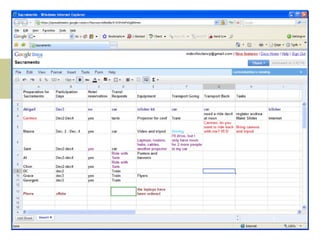
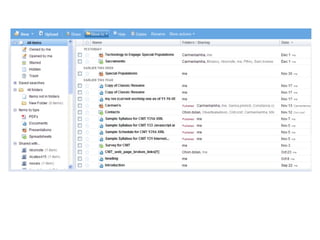
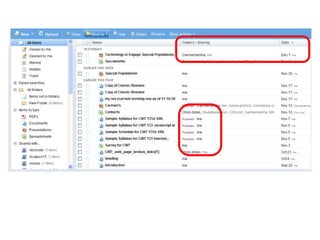
Google Docs Overview Documents link Feature of Google Docs home Online: Documents Presentations Spreadsheets Publishing your documents Collaboration Rules; how will you work together? Establish a leader or owner
Activity 3: Google Docs Click on Documents link Located “Party” spreadsheet from Carmen Fill in your details – what will you bring to the party?


Activity: On your own Questions Work on iGoogle to fit your needs More with Docs

TLC_iGoogle_and_Docs

  • 1.
    iGoogle and GoogleDocs Carmen Lamha Maura Devlin-Clancy Computer Networking and Information Technology City College of San Francisco
  • 2.
    Google Apps Overview  Gmail iGoogle Google Docs Upcoming Workshops Google Calendar Google Sites
  • 3.
    Google Terms ofService "By submitting, posting or displaying Content on or through Google services which are intended to be available to the members of the public, you grant Google a worldwide, non-exclusive, royalty-free license to reproduce, adapt, modify, publish and distribute such Content on Google services for the purpose of displaying, distributing and promoting Google services. Google reserves the right to syndicate Content submitted, posted or displayed by you on or through Google services and use that Content in connection with any service offered by Google..." Security Privacy Intellectual Property
  • 4.
    Today’s Objectives CreateGmail accounts Set up iGoogle Make iGoogle your start page Google Docs: collaboration Docs Spreadsheets Presentations
  • 5.
    Activity 1: CreateGmail account Think about choice of username and password Go to the Gmail site https://mail.google.com Click on Sign up for Gmail Fill out the form Desired Login Name: check availability Password: minimum 8 characters Word Verification If you don't get it right try again Click: I accept button  At the Google site, click on iGoogle and Sign in Send 1 sentence email to carmen.ccsf@gmail.com
  • 6.
    iGoogle Overview iGoogleSign in Tools Tabs Gadgets Opens Directs to a Website
  • 7.
    Activity 2: iGoogleCreate your iGoogle Create 3 Tabs and 3 Gadgets “ Add Stuff” Explore the Tab menu Modify the Layout using Edit
  • 8.
    Google Docs OverviewDocuments link Feature of Google Docs home Online: Documents Presentations Spreadsheets Publishing your documents Collaboration Rules; how will you work together? Establish a leader or owner
  • 9.
    Activity 3: GoogleDocs Click on Documents link Located “Party” spreadsheet from Carmen Fill in your details – what will you bring to the party?
  • 10.
  • 11.
  • 12.
  • 13.
    Activity: On yourown Questions Work on iGoogle to fit your needs More with Docs