Building the Titanium Mobile
SDK from source
Angus Fox @nuxnix
CTO @Multizone
CTO @PiotaApps- Over 250 Alloy apps iOS and Android
Co organiser - London Twitter Developer Community
Lightning Talk
Titanium London
18 May 2017
Open Source
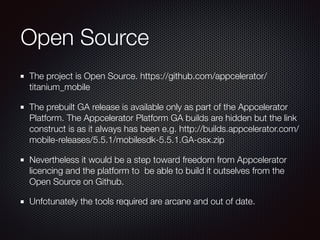
The project is Open Source. https://github.com/appcelerator/
titanium_mobile
The prebuilt GA release is available only as part of the Appcelerator
Platform. The Appcelerator Platform GA builds are hidden but the link
construct is as it always has been e.g. http://builds.appcelerator.com/
mobile-releases/5.5.1/mobilesdk-5.5.1.GA-osx.zip
Nevertheless it would be a step toward freedom from Appcelerator
licencing and the platform to be able to build it outselves from the
Open Source on Github.
Unfotunately the tools required are arcane and out of date.
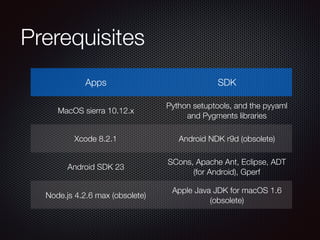
Prerequisites
Apps SDK
MacOS sierra 10.12.x
Python setuptools, and the pyyaml
and Pygments libraries
Xcode 8.2.1 Android NDK r9d (obsolete)
Android SDK 23
SCons, Apache Ant, Eclipse, ADT
(for Android), Gperf
Node.js 4.2.6 max (obsolete)
Apple Java JDK for macOS 1.6
(obsolete)
Android SDK
To install Android Studio on your Mac, proceed
as follows:
Launch the Android Studio DMG file.
Drag and drop Android Studio into the
Applications folder, then launch Android Studio.
Select whether you want to import previous
Android Studio settings, then click OK.
Complete the Android Studio Setup Wizard
Choose Configure --> SDK manager and install
API 23 (Marshmallow / 6.0) and r21 versions of
the tools
Note SDK location /Users/angusf/Library/
Android/sdk
https://en.wikipedia.org/wiki/Android_Studio
Android NDK
r9d macOS 64 bit
This is no longer easy to find
but can be installed Install by
unpacking to a suitable place
fromthe old ddownload archive 
https://dl.google.com/android/
ndk/android-ndk-r9d-darwin-
x86_64.tar.bz2
I chose ~/Library/Android/ndk/
android-ndk-r9d near to where
Android Studio put the SDK.
https://en.wikipedia.org/wiki/Android_(operating_system)
Brew Package Manager
Brew is s package manager for
macOS that makes it easier to
install stuff 
https://brew.sh/
Ant - a Java library and command-
line tool that helps building software.
SCons used to be used to build the
Titanium SDK, it is a build tool like
make
$ brew install ant
$ brew install scons
https://en.wikipedia.org/wiki/Homebrew_(package_management_software)
Node.JS 4.2.6
N - Node Version Manager because
Titanium requires a very specific version of
Node.JS
$ cd /usr/local
…
$ brew install n
$ n 4.2.6
     install : node-v4.2.6
       mkdir : /usr/local/n/versions/node/4.2.6
       fetch : https://nodejs.org/dist/v4.2.6/
node-v4.2.6-darwin-x64.tar.gz
#################################################
####################### 100.0%
   installed : v4.2.6
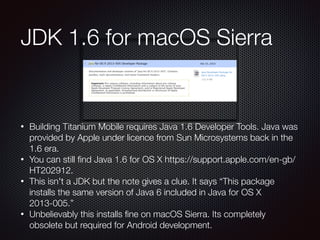
• Building Titanium Mobile requires Java 1.6 Developer Tools. Java was
provided by Apple under licence from Sun Microsystems back in the
1.6 era.
• You can still find Java 1.6 for OS X https://support.apple.com/en-gb/
HT202912.
• This isn't a JDK but the note gives a clue. It says “This package
installs the same version of Java 6 included in Java for OS X
2013-005.”
• Unbelievably this installs fine on macOS Sierra. Its completely
obsolete but required for Android development.
JDK 1.6 for macOS Sierra
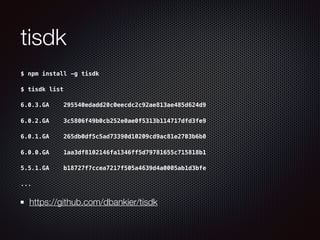
tisdk
$ npm install -g tisdk
$ tisdk list
6.0.3.GA    295540edadd20c0eecdc2c92ae813ae485d624d9
6.0.2.GA    3c5806f49b0cb252e0ae0f5313b114717dfd3fe9
6.0.1.GA    265db0df5c5ad73390d10209cd9ac81e2703b6b0
6.0.0.GA    1aa3df8102146fa1346ff5d79781655c715818b1
5.5.1.GA    b18727f7ccea7217f505a4639d4a0005ab1d3bfe
...
https://github.com/dbankier/tisdk
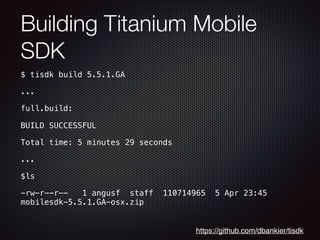
Building Titanium Mobile
SDK
$ tisdk build 5.5.1.GA
...
full.build:
BUILD SUCCESSFUL
Total time: 5 minutes 29 seconds
...
$ls
-rw-r--r--   1 angusf  staff  110714965  5 Apr 23:45
mobilesdk-5.5.1.GA-osx.zip
https://github.com/dbankier/tisdk
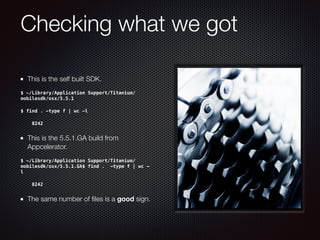
Checking what we got
This is the self built SDK.
$ ~/Library/Application Support/Titanium/
mobilesdk/osx/5.5.1
$ find . -type f | wc -l
8242
This is the 5.5.1.GA build from
Appcelerator.
$ ~/Library/Application Support/Titanium/
mobilesdk/osx/5.5.1.GA$ find . -type f | wc -
l
8242
The same number of files is a good sign.
Building Titanium CLI, and
Alloy
$ npm install -g titanium alloy appcelerator
$ ti sdk
ti sdk
Titanium Command-Line Interface, CLI version 5.0.12, Titanium SDK version 5.5.1
Copyright (c) 2012-2015, Appcelerator, Inc. All Rights Reserved.
Please report bugs to http://jira.appcelerator.org/
SDK Install Locations:
/Library/Application Support/Titanium
/Users/angusf/Library/Application Support/Titanium [default]
Installed SDKs:
5.5.1 [selected] 5.5.1 /Users/angusf/Library/Application Support/Titanium/mobilesdk/
osx/5.5.1
$
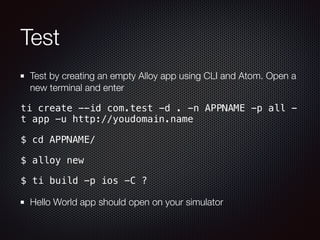
Test
Test by creating an empty Alloy app using CLI and Atom. Open a
new terminal and enter
ti create --id com.test -d . -n APPNAME -p all -
t app -u http://youdomain.name
$ cd APPNAME/
$ alloy new
$ ti build -p ios -C ?
Hello World app should open on your simulator
Thanks, Questions? Tweet @nuxnix Slides at slideshare.net/nuxnix

Titanium London Lightning Talk - Building Titanium from the source

  • 1.
    Building the TitaniumMobile SDK from source Angus Fox @nuxnix CTO @Multizone CTO @PiotaApps- Over 250 Alloy apps iOS and Android Co organiser - London Twitter Developer Community Lightning Talk Titanium London 18 May 2017
  • 2.
    Open Source The projectis Open Source. https://github.com/appcelerator/ titanium_mobile The prebuilt GA release is available only as part of the Appcelerator Platform. The Appcelerator Platform GA builds are hidden but the link construct is as it always has been e.g. http://builds.appcelerator.com/ mobile-releases/5.5.1/mobilesdk-5.5.1.GA-osx.zip Nevertheless it would be a step toward freedom from Appcelerator licencing and the platform to be able to build it outselves from the Open Source on Github. Unfotunately the tools required are arcane and out of date.
  • 3.
    Prerequisites Apps SDK MacOS sierra10.12.x Python setuptools, and the pyyaml and Pygments libraries Xcode 8.2.1 Android NDK r9d (obsolete) Android SDK 23 SCons, Apache Ant, Eclipse, ADT (for Android), Gperf Node.js 4.2.6 max (obsolete) Apple Java JDK for macOS 1.6 (obsolete)
  • 4.
    Android SDK To installAndroid Studio on your Mac, proceed as follows: Launch the Android Studio DMG file. Drag and drop Android Studio into the Applications folder, then launch Android Studio. Select whether you want to import previous Android Studio settings, then click OK. Complete the Android Studio Setup Wizard Choose Configure --> SDK manager and install API 23 (Marshmallow / 6.0) and r21 versions of the tools Note SDK location /Users/angusf/Library/ Android/sdk https://en.wikipedia.org/wiki/Android_Studio
  • 5.
    Android NDK r9d macOS64 bit This is no longer easy to find but can be installed Install by unpacking to a suitable place fromthe old ddownload archive  https://dl.google.com/android/ ndk/android-ndk-r9d-darwin- x86_64.tar.bz2 I chose ~/Library/Android/ndk/ android-ndk-r9d near to where Android Studio put the SDK. https://en.wikipedia.org/wiki/Android_(operating_system)
  • 6.
    Brew Package Manager Brewis s package manager for macOS that makes it easier to install stuff  https://brew.sh/ Ant - a Java library and command- line tool that helps building software. SCons used to be used to build the Titanium SDK, it is a build tool like make $ brew install ant $ brew install scons https://en.wikipedia.org/wiki/Homebrew_(package_management_software)
  • 7.
    Node.JS 4.2.6 N - NodeVersion Manager because Titanium requires a very specific version of Node.JS $ cd /usr/local … $ brew install n $ n 4.2.6      install : node-v4.2.6        mkdir : /usr/local/n/versions/node/4.2.6        fetch : https://nodejs.org/dist/v4.2.6/ node-v4.2.6-darwin-x64.tar.gz ################################################# ####################### 100.0%    installed : v4.2.6
  • 8.
    • Building TitaniumMobile requires Java 1.6 Developer Tools. Java was provided by Apple under licence from Sun Microsystems back in the 1.6 era. • You can still find Java 1.6 for OS X https://support.apple.com/en-gb/ HT202912. • This isn't a JDK but the note gives a clue. It says “This package installs the same version of Java 6 included in Java for OS X 2013-005.” • Unbelievably this installs fine on macOS Sierra. Its completely obsolete but required for Android development. JDK 1.6 for macOS Sierra
  • 9.
    tisdk $ npm install-g tisdk $ tisdk list 6.0.3.GA    295540edadd20c0eecdc2c92ae813ae485d624d9 6.0.2.GA    3c5806f49b0cb252e0ae0f5313b114717dfd3fe9 6.0.1.GA    265db0df5c5ad73390d10209cd9ac81e2703b6b0 6.0.0.GA    1aa3df8102146fa1346ff5d79781655c715818b1 5.5.1.GA    b18727f7ccea7217f505a4639d4a0005ab1d3bfe ... https://github.com/dbankier/tisdk
  • 10.
    Building Titanium Mobile SDK $tisdk build 5.5.1.GA ... full.build: BUILD SUCCESSFUL Total time: 5 minutes 29 seconds ... $ls -rw-r--r--   1 angusf  staff  110714965  5 Apr 23:45 mobilesdk-5.5.1.GA-osx.zip https://github.com/dbankier/tisdk
  • 11.
    Checking what wegot This is the self built SDK. $ ~/Library/Application Support/Titanium/ mobilesdk/osx/5.5.1 $ find . -type f | wc -l 8242 This is the 5.5.1.GA build from Appcelerator. $ ~/Library/Application Support/Titanium/ mobilesdk/osx/5.5.1.GA$ find . -type f | wc - l 8242 The same number of files is a good sign.
  • 12.
    Building Titanium CLI,and Alloy $ npm install -g titanium alloy appcelerator $ ti sdk ti sdk Titanium Command-Line Interface, CLI version 5.0.12, Titanium SDK version 5.5.1 Copyright (c) 2012-2015, Appcelerator, Inc. All Rights Reserved. Please report bugs to http://jira.appcelerator.org/ SDK Install Locations: /Library/Application Support/Titanium /Users/angusf/Library/Application Support/Titanium [default] Installed SDKs: 5.5.1 [selected] 5.5.1 /Users/angusf/Library/Application Support/Titanium/mobilesdk/ osx/5.5.1 $
  • 13.
    Test Test by creatingan empty Alloy app using CLI and Atom. Open a new terminal and enter ti create --id com.test -d . -n APPNAME -p all - t app -u http://youdomain.name $ cd APPNAME/ $ alloy new $ ti build -p ios -C ? Hello World app should open on your simulator
  • 14.
    Thanks, Questions? Tweet@nuxnix Slides at slideshare.net/nuxnix