TIMEGINEE
Effective People Management and Time Management Tool
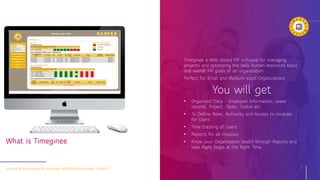
Timeginee a Web-based HR software for managing
projects and optimizing the daily human resources tasks
and overall HR goals of an organization
Perfect for Small and Medium sized Organizations
You will get
• Organized Data – Employee Information, Leave
records, Project -Tasks Status etc.
• To Define Roles, Authority and Access to modules
for Users
• Time tracking of Users
• Reports for all modules
• Know your Organization health through Reports and
take Right Steps at the Right Time
Get rid of Spreadsheets ,Manage All Vital Data under 1 Roof !! 2
What is Timeginee
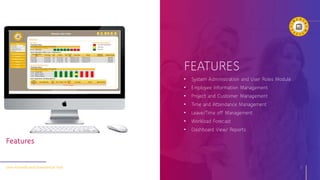
FEATURES
• System Administration and User Roles Module
• Employee Information Management
• Project and Customer Management
• Time and Attendance Management
• Leave/Time off Management
• Workload Forecast
• Dashboard View/ Reports
User-Friendly and Economical Tool 3
Features
OVERVIEW
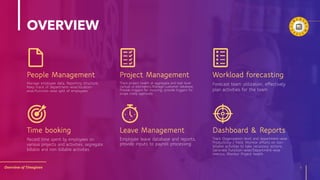
People Management
Overview of Timeginee 4
Project Management Workload forecasting
Time booking Leave Management Dashboard & Reports
Manage employee data, Reporting structure,
Keep track of department-wise/location-
wise/function-wise split of employees
Track project health at aggregate and task level
(actual vs estimates),Manage customer database,
Provide triggers for invoicing, provide triggers for
scope creep approvals
Forecast team utilization, effectively
plan activities for the team
Record time spent by employees on
various projects and activities, segregate
billable and non-billable activities
Employee leave database and reports,
provide inputs to payroll processing
Track Organization-level and department-wise
Productivity / Yield, Monitor efforts on non-
billable activities to take necessary actions,
Generate Function-wise/Department-wise
metrics, Monitor Project health
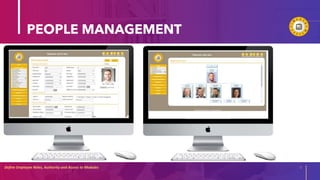
PEOPLE MANAGEMENT
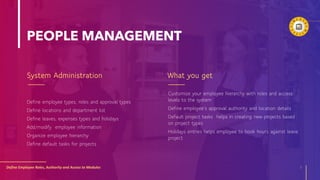
System Administration
Define employee types, roles and approval types
Define locations and department list
Define leaves, expenses types and holidays
Add/modify employee information
Organize employee hierarchy
Define default tasks for projects
What you get
Define Employee Roles, Authority and Access to Modules 5
Customize your employee hierarchy with roles and access
levels to the system
Define employee’s approval authority and location details
Default project tasks helps in creating new projects based
on project types
Holidays entries helps employee to book hours against leave
project
PEOPLE MANAGEMENT
Define Employee Roles, Authority and Access to Modules 6
20XX
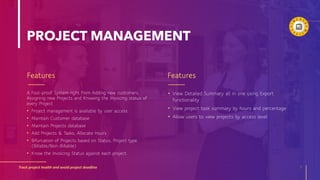
PROJECT MANAGEMENT
Features
A Fool-proof System right from Adding new customers,
Assigning new Projects and Knowing the Invoicing status of
every Project
• Project management is available by user access
• Maintain Customer database
• Maintain Projects database
• Add Projects & Tasks, Allocate Hours
• Bifurcation of Projects based on Status, Project type
(Billable/Non-Billable)
• Know the Invoicing Status against each project.
Features
Track project health and avoid project deadline 7
• View Detailed Summary all in one using Export
functionality
• View project task summary by hours and percentage
• Allow users to view projects by access level
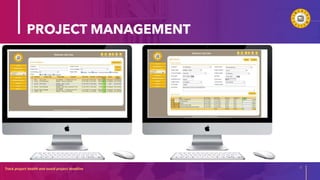
PROJECT MANAGEMENT
Track project health and avoid project deadline 8
20XX
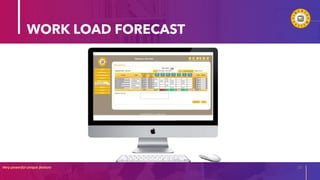
WORKLOAD FORECAST
Forecast you workload What you get
Very powerful unique feature 9
• Project forecast helps in finding detailed analysis on
estimate vs actual effort.
• Get clarity about future workload distribution
• Analysis over period of time helps in effective project
execution
• Users can Forecast the work for subsequent months
• Forecast Adjustment feature for the Supervisors
WORK LOAD FORECAST
Very powerful unique feature 10
20XX
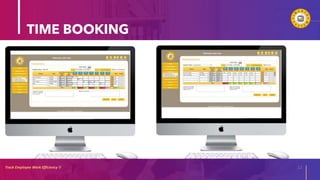
TIME BOOKING
Time Management What you get
Track Employee Work Efficiency !! 11
• Track user times by each task levels with detail
comments
• Allow user to see available hours on each tasks
• Task prefill options save the working tasks selection for
future entries
• Color coding shows minimum and maximum hours
configure in the system
• Easily navigate through months and week.
• Supervisor can adjust, approve, reject hours for his/her
sub-ordinates.
• Timesheet Entry by Users
• Approval by Supervisors
• Pre-fill option
• Track Attendance, leaves applied
• Timesheet adjustment feature for Supervisors
TIME BOOKING
Track Employee Work Efficiency !! 12
20XX
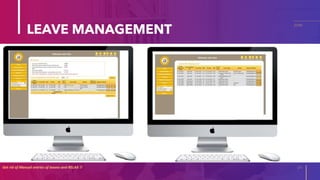
LEAVE MANAGEMENT
Leave Management What you get
Get rid of Manual entries of leaves and RELAX !! 13
• User paid leaves automatically calculated based on
length of service
• System automatically exclude holidays and calculate exact
hours of leave on application
• User leaves go through approval cycle by supervisor
• Reports generated for HR for payroll.
• View Leave Summary
• View Leave Calendar
• View Leave Reports month wise, week wise
LEAVE MANAGEMENT
Get rid of Manual entries of leaves and RELAX !! 14
20XX
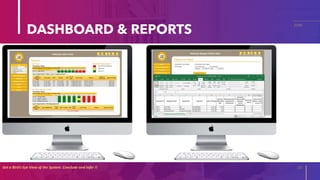
DASHBOARD & REPORTS
User Dashboard Reports
Get a Bird’s Eye View of the System. Conclude and Infer !! 15
• Extract all Reports Month wise, Week-wise, Day-wise
• Timesheet
• Leaves
• Forecast
• Generate detailed reports from timesheet data
• View Individual Timesheet status
• View Team Members Timesheet status
• View Individual Leave Application status
• View Team Members Leaves Pending Approval
DASHBOARD & REPORTS
Get a Bird’s Eye View of the System. Conclude and Infer !! 16
20XX
THANK YOU!
NYAAS INFOTECH INC.
5616 Pinnacle Heights Cir #303
Tampa, Florida -33624, USA
www.nyaasinfotech.com

Timeginee Presentation.pptx

  • 1.
    TIMEGINEE Effective People Managementand Time Management Tool
  • 2.
    Timeginee a Web-basedHR software for managing projects and optimizing the daily human resources tasks and overall HR goals of an organization Perfect for Small and Medium sized Organizations You will get • Organized Data – Employee Information, Leave records, Project -Tasks Status etc. • To Define Roles, Authority and Access to modules for Users • Time tracking of Users • Reports for all modules • Know your Organization health through Reports and take Right Steps at the Right Time Get rid of Spreadsheets ,Manage All Vital Data under 1 Roof !! 2 What is Timeginee
  • 3.
    FEATURES • System Administrationand User Roles Module • Employee Information Management • Project and Customer Management • Time and Attendance Management • Leave/Time off Management • Workload Forecast • Dashboard View/ Reports User-Friendly and Economical Tool 3 Features
  • 4.
    OVERVIEW People Management Overview ofTimeginee 4 Project Management Workload forecasting Time booking Leave Management Dashboard & Reports Manage employee data, Reporting structure, Keep track of department-wise/location- wise/function-wise split of employees Track project health at aggregate and task level (actual vs estimates),Manage customer database, Provide triggers for invoicing, provide triggers for scope creep approvals Forecast team utilization, effectively plan activities for the team Record time spent by employees on various projects and activities, segregate billable and non-billable activities Employee leave database and reports, provide inputs to payroll processing Track Organization-level and department-wise Productivity / Yield, Monitor efforts on non- billable activities to take necessary actions, Generate Function-wise/Department-wise metrics, Monitor Project health
  • 5.
    PEOPLE MANAGEMENT System Administration Defineemployee types, roles and approval types Define locations and department list Define leaves, expenses types and holidays Add/modify employee information Organize employee hierarchy Define default tasks for projects What you get Define Employee Roles, Authority and Access to Modules 5 Customize your employee hierarchy with roles and access levels to the system Define employee’s approval authority and location details Default project tasks helps in creating new projects based on project types Holidays entries helps employee to book hours against leave project
  • 6.
    PEOPLE MANAGEMENT Define EmployeeRoles, Authority and Access to Modules 6 20XX
  • 7.
    PROJECT MANAGEMENT Features A Fool-proofSystem right from Adding new customers, Assigning new Projects and Knowing the Invoicing status of every Project • Project management is available by user access • Maintain Customer database • Maintain Projects database • Add Projects & Tasks, Allocate Hours • Bifurcation of Projects based on Status, Project type (Billable/Non-Billable) • Know the Invoicing Status against each project. Features Track project health and avoid project deadline 7 • View Detailed Summary all in one using Export functionality • View project task summary by hours and percentage • Allow users to view projects by access level
  • 8.
    PROJECT MANAGEMENT Track projecthealth and avoid project deadline 8 20XX
  • 9.
    WORKLOAD FORECAST Forecast youworkload What you get Very powerful unique feature 9 • Project forecast helps in finding detailed analysis on estimate vs actual effort. • Get clarity about future workload distribution • Analysis over period of time helps in effective project execution • Users can Forecast the work for subsequent months • Forecast Adjustment feature for the Supervisors
  • 10.
    WORK LOAD FORECAST Verypowerful unique feature 10 20XX
  • 11.
    TIME BOOKING Time ManagementWhat you get Track Employee Work Efficiency !! 11 • Track user times by each task levels with detail comments • Allow user to see available hours on each tasks • Task prefill options save the working tasks selection for future entries • Color coding shows minimum and maximum hours configure in the system • Easily navigate through months and week. • Supervisor can adjust, approve, reject hours for his/her sub-ordinates. • Timesheet Entry by Users • Approval by Supervisors • Pre-fill option • Track Attendance, leaves applied • Timesheet adjustment feature for Supervisors
  • 12.
    TIME BOOKING Track EmployeeWork Efficiency !! 12 20XX
  • 13.
    LEAVE MANAGEMENT Leave ManagementWhat you get Get rid of Manual entries of leaves and RELAX !! 13 • User paid leaves automatically calculated based on length of service • System automatically exclude holidays and calculate exact hours of leave on application • User leaves go through approval cycle by supervisor • Reports generated for HR for payroll. • View Leave Summary • View Leave Calendar • View Leave Reports month wise, week wise
  • 14.
    LEAVE MANAGEMENT Get ridof Manual entries of leaves and RELAX !! 14 20XX
  • 15.
    DASHBOARD & REPORTS UserDashboard Reports Get a Bird’s Eye View of the System. Conclude and Infer !! 15 • Extract all Reports Month wise, Week-wise, Day-wise • Timesheet • Leaves • Forecast • Generate detailed reports from timesheet data • View Individual Timesheet status • View Team Members Timesheet status • View Individual Leave Application status • View Team Members Leaves Pending Approval
  • 16.
    DASHBOARD & REPORTS Geta Bird’s Eye View of the System. Conclude and Infer !! 16 20XX
  • 17.
    THANK YOU! NYAAS INFOTECHINC. 5616 Pinnacle Heights Cir #303 Tampa, Florida -33624, USA www.nyaasinfotech.com