Detailed Comparison
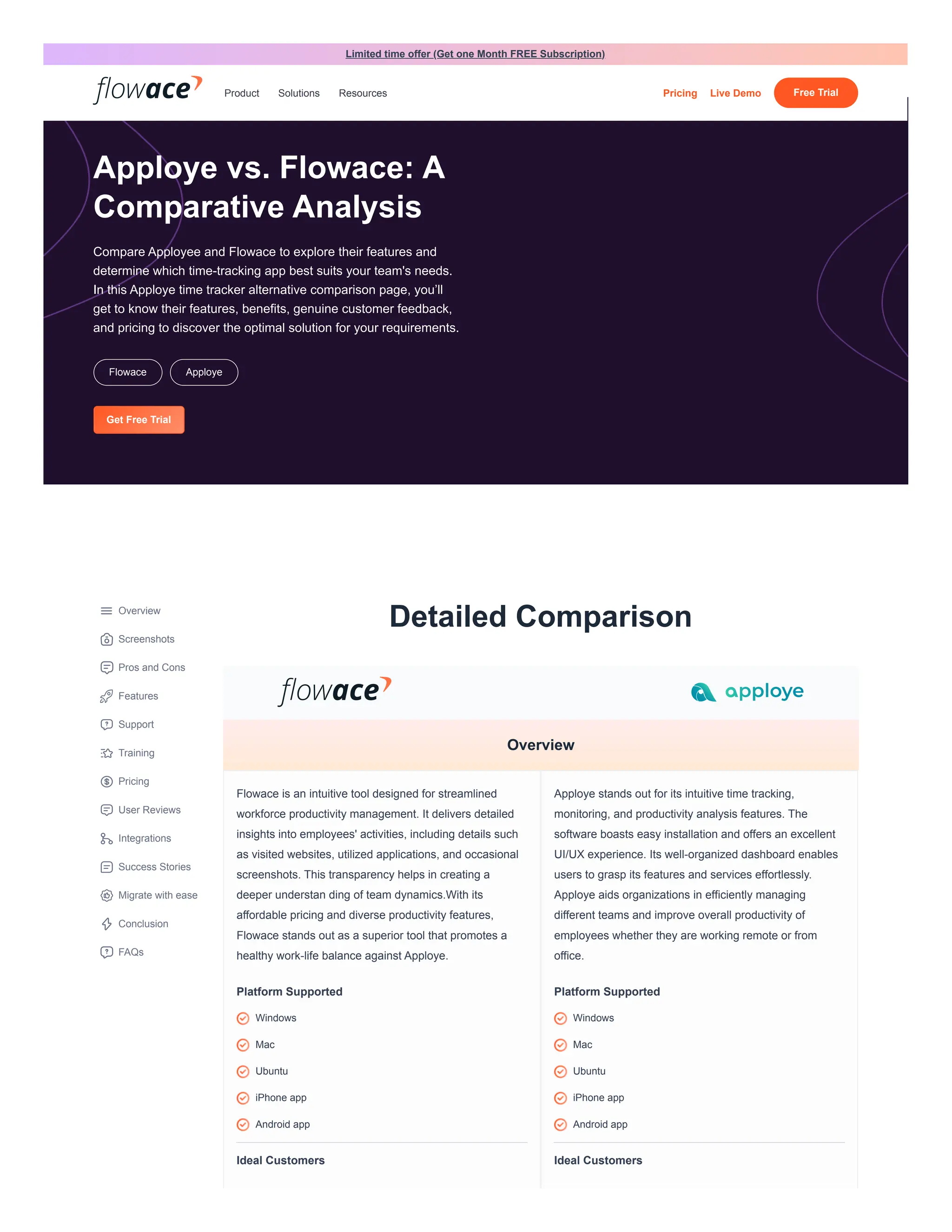
Flowace is an intuitive tool designed for streamlined
workforce productivity management. It delivers detailed
insights into employees' activities, including details such
as visited websites, utilized applications, and occasional
screenshots. This transparency helps in creating a
deeper understan ding of team dynamics.With its
affordable pricing and diverse productivity features,
Flowace stands out as a superior tool that promotes a
healthy work-life balance against Apploye.
Platform Supported
Ideal Customers
Apploye stands out for its intuitive time tracking,
monitoring, and productivity analysis features. The
software boasts easy installation and offers an excellent
UI/UX experience. Its well-organized dashboard enables
users to grasp its features and services effortlessly.
Apploye aids organizations in efficiently managing
different teams and improve overall productivity of
employees whether they are working remote or from
office.
Platform Supported
Ideal Customers
Overview
Screenshots
Pros and Cons
Features
Support
Training
Pricing
User Reviews
Integrations
Success Stories
Migrate with ease
Conclusion
FAQs
Overview
Windows
Mac
Ubuntu
iPhone app
Android app
Windows
Mac
Ubuntu
iPhone app
Android app
Apploye vs. Flowace: A
Comparative Analysis
Compare Apployee and Flowace to explore their features and
determine which time-tracking app best suits your team's needs.
In this Apploye time tracker alternative comparison page, you’ll
get to know their features, benefits, genuine customer feedback,
and pricing to discover the optimal solution for your requirements.
Flowace Apploye
Get Free Trial
Limited time offer (Get one Month FREE Subscription)
Product Solutions Resources Pricing Live Demo Free Trial
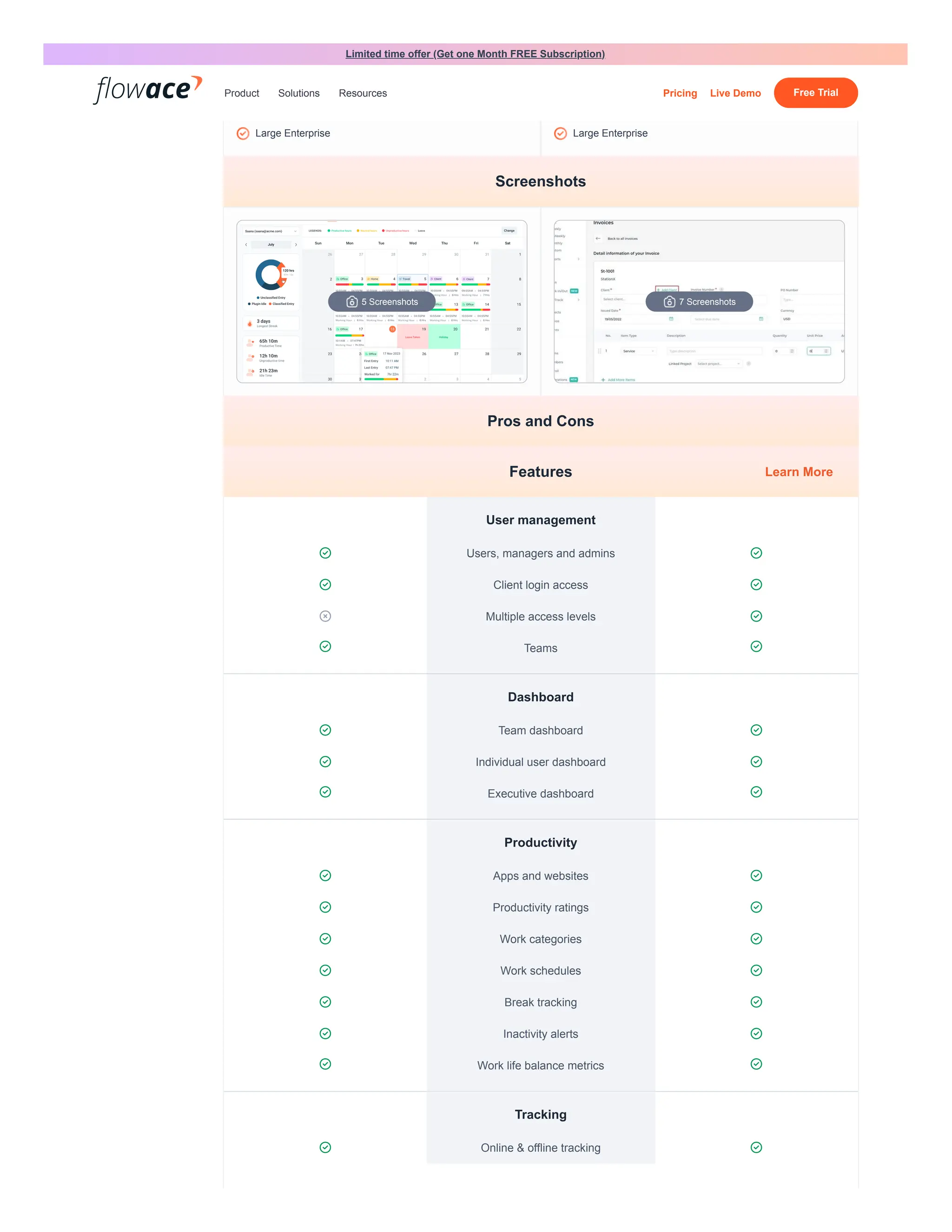
User management
 Users, managers and admins 
 Client login access 
 Multiple access levels 
 Teams 
Dashboard
 Team dashboard 
 Individual user dashboard 
 Executive dashboard 
Productivity
 Apps and websites 
 Productivity ratings 
 Work categories 
 Work schedules 
 Break tracking 
 Inactivity alerts 
 Work life balance metrics 
Tracking
 Online & offline tracking 
Freelancers
Small businesses
Mid-size businesses
Large Enterprise
Freelancers
Small businesses
Mid-size businesses
Large Enterprise
Screenshots
5 Screenshots 7 Screenshots
Pros and Cons
Features Learn More
Limited time offer (Get one Month FREE Subscription)
Product Solutions Resources Pricing Live Demo Free Trial
 Silent tracking / Stealth mode 

User-controlled desktop app / Interactive
mode

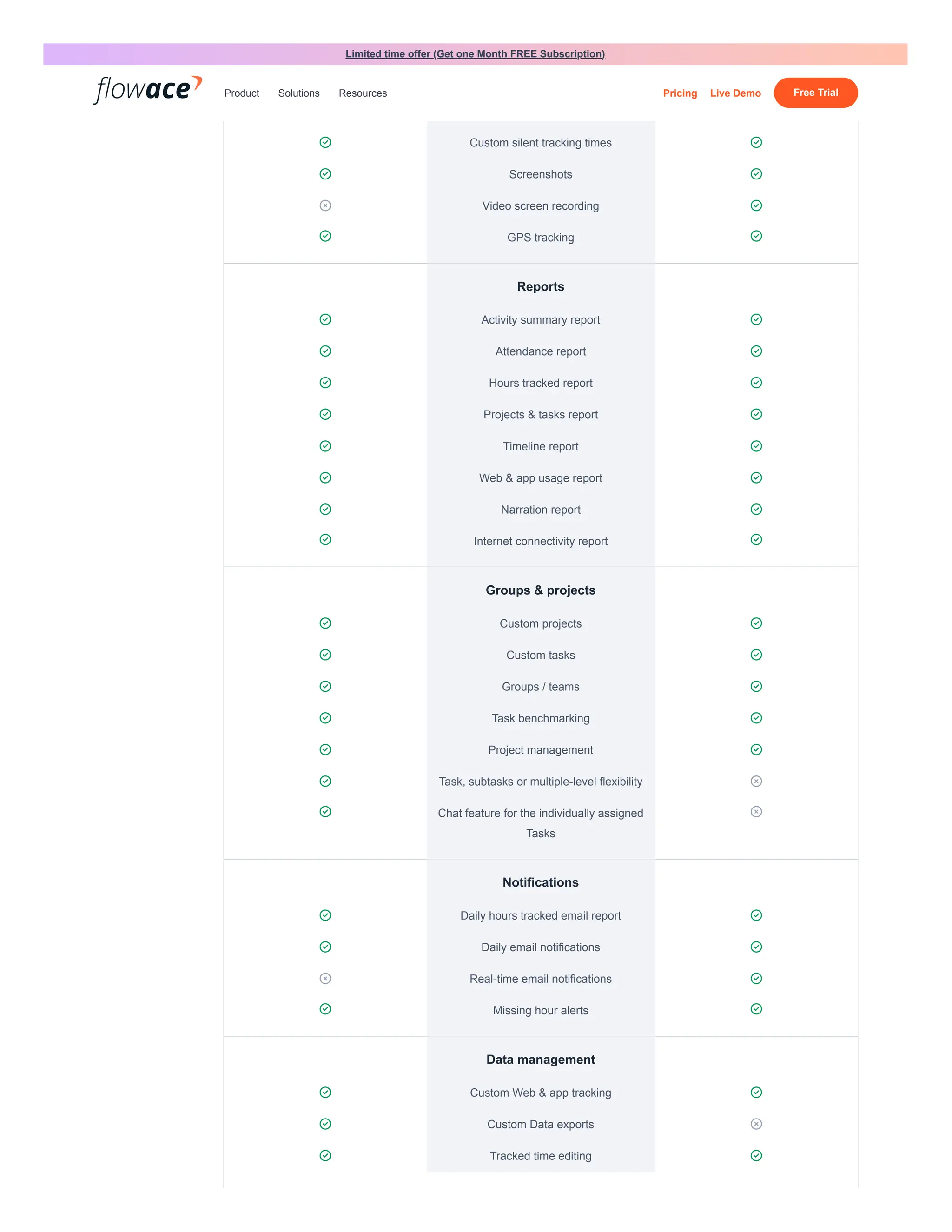
 Custom silent tracking times 
 Screenshots 
 Video screen recording 
 GPS tracking 
Reports
 Activity summary report 
 Attendance report 
 Hours tracked report 
 Projects & tasks report 
 Timeline report 
 Web & app usage report 
 Narration report 
 Internet connectivity report 
Groups & projects
 Custom projects 
 Custom tasks 
 Groups / teams 
 Task benchmarking 
 Project management 
 Task, subtasks or multiple-level flexibility 
 Chat feature for the individually assigned
Tasks

Notifications
 Daily hours tracked email report 
 Daily email notifications 
 Real-time email notifications 
 Missing hour alerts 
Data management
 Custom Web & app tracking 
 Custom Data exports 
 Tracked time editing 
Limited time offer (Get one Month FREE Subscription)
Product Solutions Resources Pricing Live Demo Free Trial
 Approvals for tracked time edits 
 Historical tracking data 
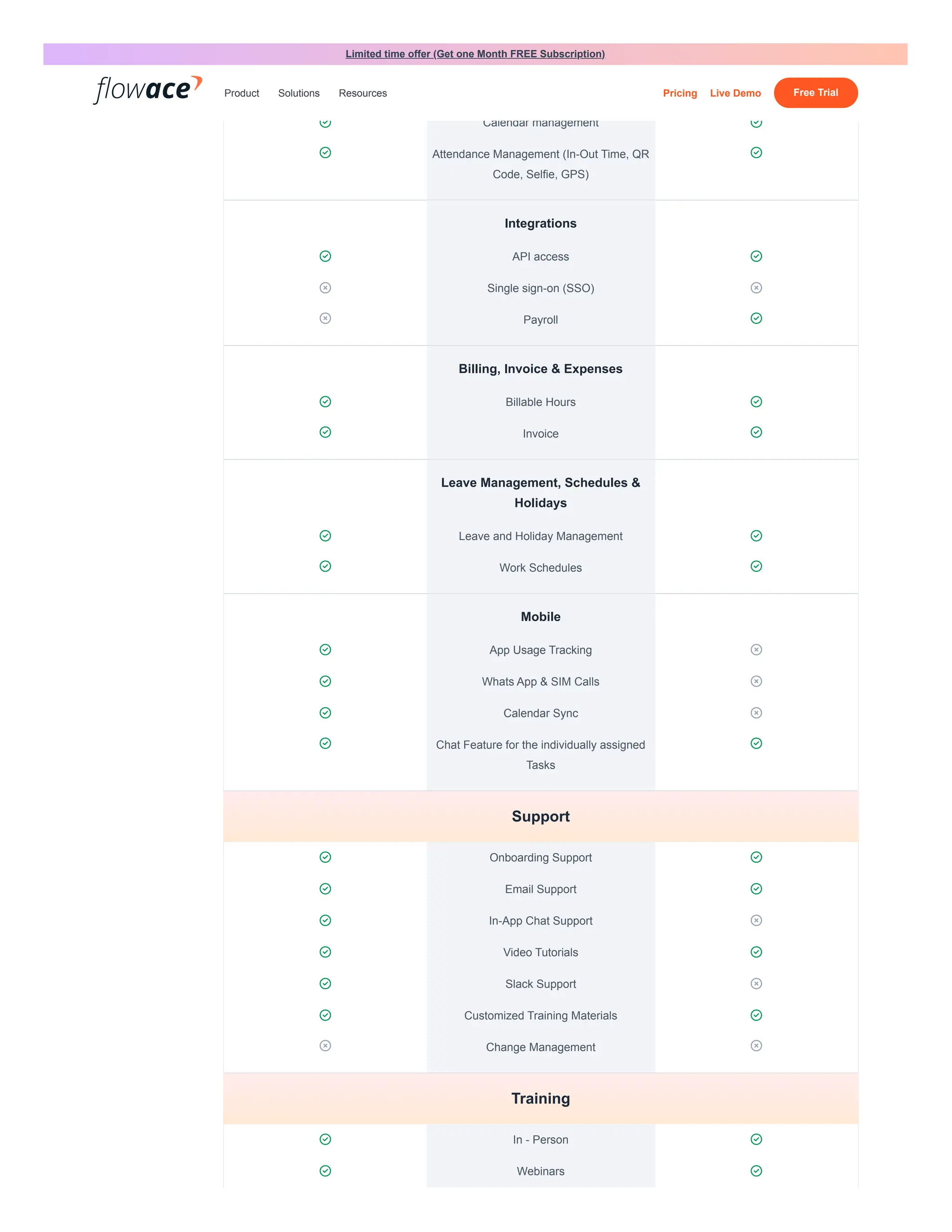
 Calendar management 
 Attendance Management (In-Out Time, QR
Code, Selfie, GPS)

Integrations
 API access 
 Single sign-on (SSO) 
 Payroll 
Billing, Invoice & Expenses
 Billable Hours 
 Invoice 
Leave Management, Schedules &
Holidays
 Leave and Holiday Management 
 Work Schedules 
Mobile
 App Usage Tracking 
 Whats App & SIM Calls 
 Calendar Sync 
 Chat Feature for the individually assigned
Tasks

 Onboarding Support 
 Email Support 
 In-App Chat Support 
 Video Tutorials 
 Slack Support 
 Customized Training Materials 
 Change Management 
 In - Person 
 Webinars 
Support
Training
Limited time offer (Get one Month FREE Subscription)
Product Solutions Resources Pricing Live Demo Free Trial
 Documentation 
 Live Online 
 Videos 
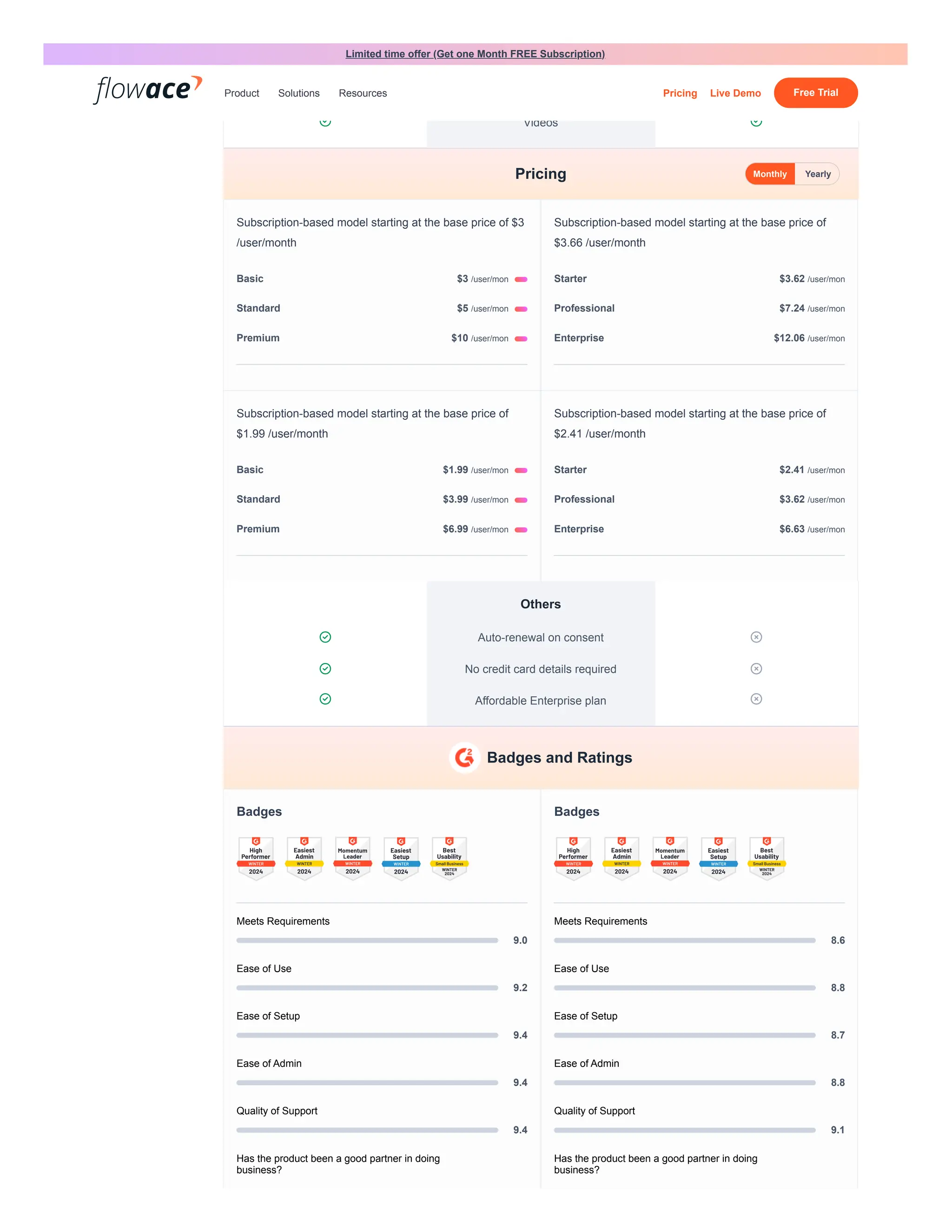
Subscription-based model starting at the base price of $3
/user/month
Subscription-based model starting at the base price of
$3.66 /user/month
Subscription-based model starting at the base price of
$1.99 /user/month
Subscription-based model starting at the base price of
$2.41 /user/month
Others
 Auto-renewal on consent 
 No credit card details required 
 Affordable Enterprise plan 
Badges
Meets Requirements
9.0
Ease of Use
9.2
Ease of Setup
9.4
Ease of Admin
9.4
Quality of Support
9.4
Has the product been a good partner in doing
business?
Badges
Meets Requirements
8.6
Ease of Use
8.8
Ease of Setup
8.7
Ease of Admin
8.8
Quality of Support
9.1
Has the product been a good partner in doing
business?
Pricing Monthly Yearly
Basic $3 /user/mon
Standard $5 /user/mon
Premium $10 /user/mon
Starter $3.62 /user/mon
Professional $7.24 /user/mon
Enterprise $12.06 /user/mon
Basic $1.99 /user/mon
Standard $3.99 /user/mon
Premium $6.99 /user/mon
Starter $2.41 /user/mon
Professional $3.62 /user/mon
Enterprise $6.63 /user/mon
Badges and Ratings
Limited time offer (Get one Month FREE Subscription)
Product Solutions Resources Pricing Live Demo Free Trial
9.5
Product Direction (% positive)
9.4
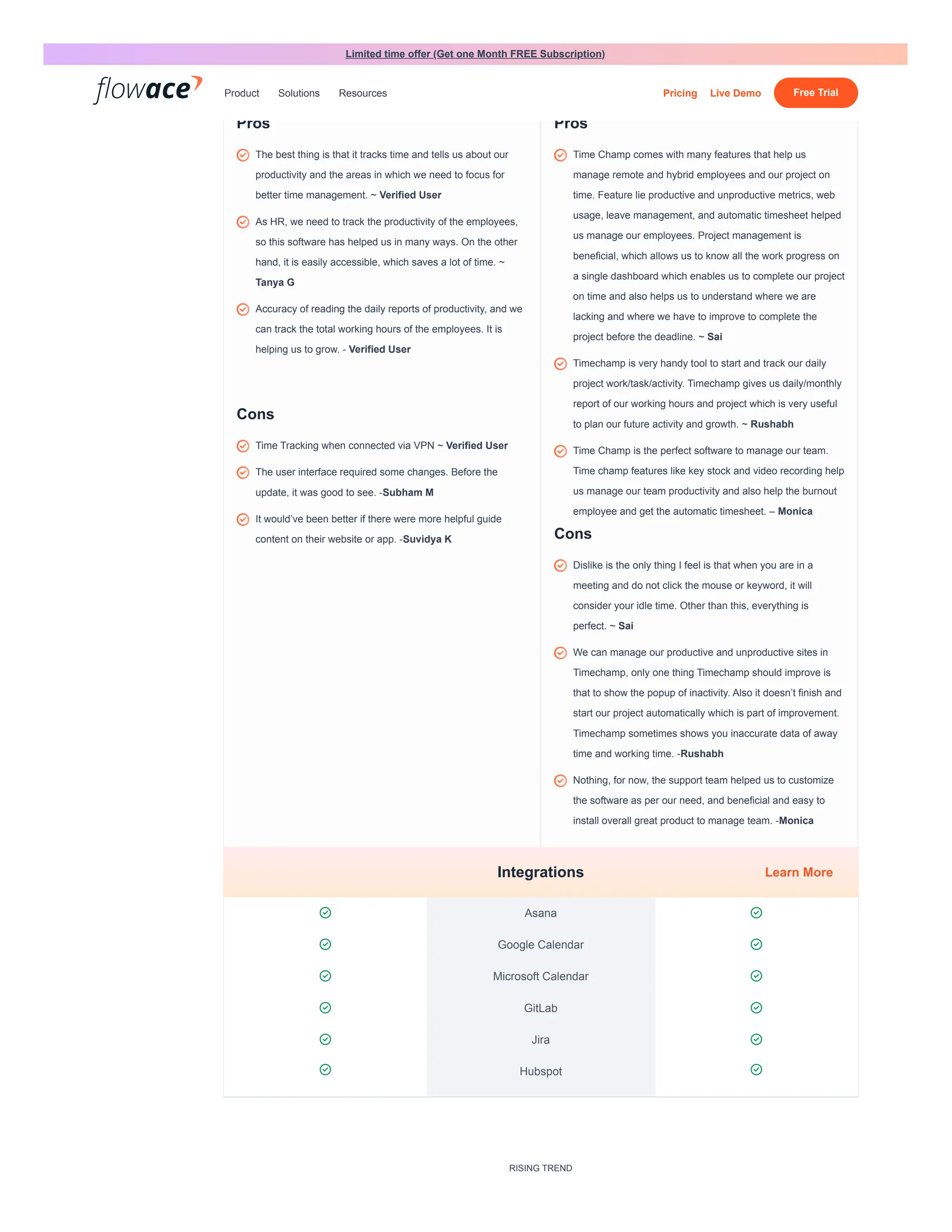
Pros
Cons
8.9
Product Direction (% positive)
9.0
Pros
Cons
 Asana 
 Google Calendar 
 Microsoft Calendar 
 GitLab 
 Jira 
 Hubspot 
RISING TREND
The best thing is that it tracks time and tells us about our
productivity and the areas in which we need to focus for
better time management. ~ Verified User
As HR, we need to track the productivity of the employees,
so this software has helped us in many ways. On the other
hand, it is easily accessible, which saves a lot of time. ~
Tanya G
Accuracy of reading the daily reports of productivity, and we
can track the total working hours of the employees. It is
helping us to grow. - Verified User
Time Tracking when connected via VPN ~ Verified User
The user interface required some changes. Before the
update, it was good to see. -Subham M
It would’ve been better if there were more helpful guide
content on their website or app. -Suvidya K
Time Champ comes with many features that help us
manage remote and hybrid employees and our project on
time. Feature lie productive and unproductive metrics, web
usage, leave management, and automatic timesheet helped
us manage our employees. Project management is
beneficial, which allows us to know all the work progress on
a single dashboard which enables us to complete our project
on time and also helps us to understand where we are
lacking and where we have to improve to complete the
project before the deadline. ~ Sai
Timechamp is very handy tool to start and track our daily
project work/task/activity. Timechamp gives us daily/monthly
report of our working hours and project which is very useful
to plan our future activity and growth. ~ Rushabh
Time Champ is the perfect software to manage our team.
Time champ features like key stock and video recording help
us manage our team productivity and also help the burnout
employee and get the automatic timesheet. – Monica
Dislike is the only thing I feel is that when you are in a
meeting and do not click the mouse or keyword, it will
consider your idle time. Other than this, everything is
perfect. ~ Sai
We can manage our productive and unproductive sites in
Timechamp, only one thing Timechamp should improve is
that to show the popup of inactivity. Also it doesn’t finish and
start our project automatically which is part of improvement.
Timechamp sometimes shows you inaccurate data of away
time and working time. -Rushabh
Nothing, for now, the support team helped us to customize
the software as per our need, and beneficial and easy to
install overall great product to manage team. -Monica
Integrations Learn More
Limited time offer (Get one Month FREE Subscription)
Product Solutions Resources Pricing Live Demo Free Trial
More Companies Opting for Flowace over
Time Champ
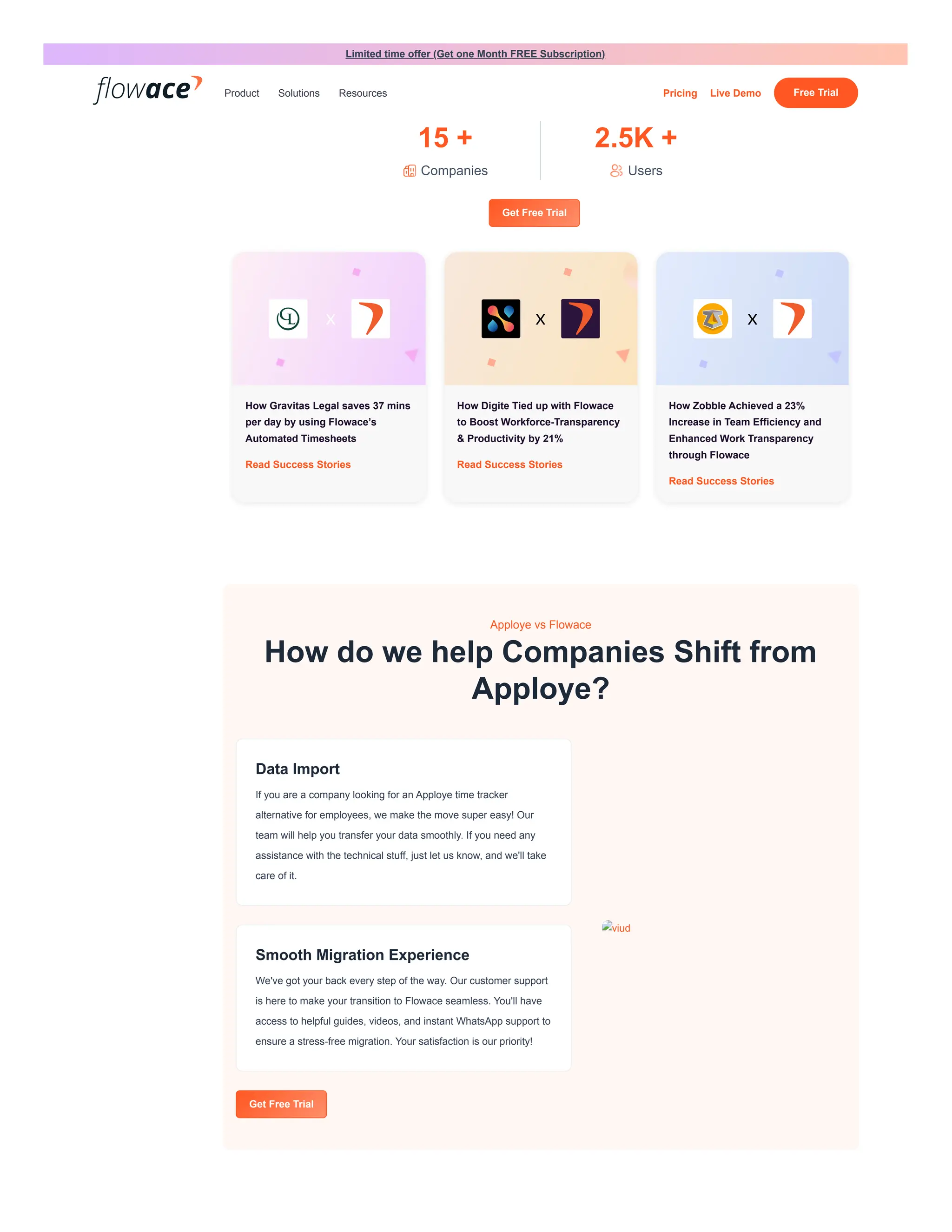
15 +
Companies
2.5K +
Users
Get Free Trial
How Gravitas Legal saves 37 mins
per day by using Flowace’s
Automated Timesheets
Read Success Stories
How Digite Tied up with Flowace
to Boost Workforce-Transparency
& Productivity by 21%
Read Success Stories
How Zobble Achieved a 23%
Increase in Team Efficiency and
Enhanced Work Transparency
through Flowace
Read Success Stories
Apploye vs Flowace
How do we help Companies Shift from
Apploye?
Data Import
If you are a company looking for an Apploye time tracker
alternative for employees, we make the move super easy! Our
team will help you transfer your data smoothly. If you need any
assistance with the technical stuff, just let us know, and we'll take
care of it.
Smooth Migration Experience
We've got your back every step of the way. Our customer support
is here to make your transition to Flowace seamless. You'll have
access to helpful guides, videos, and instant WhatsApp support to
ensure a stress-free migration. Your satisfaction is our priority!
Get Free Trial
viud
Limited time offer (Get one Month FREE Subscription)
Product Solutions Resources Pricing Live Demo Free Trial
Why should you choose Flowace as a Time Doctor alternative?
Get Free Trial
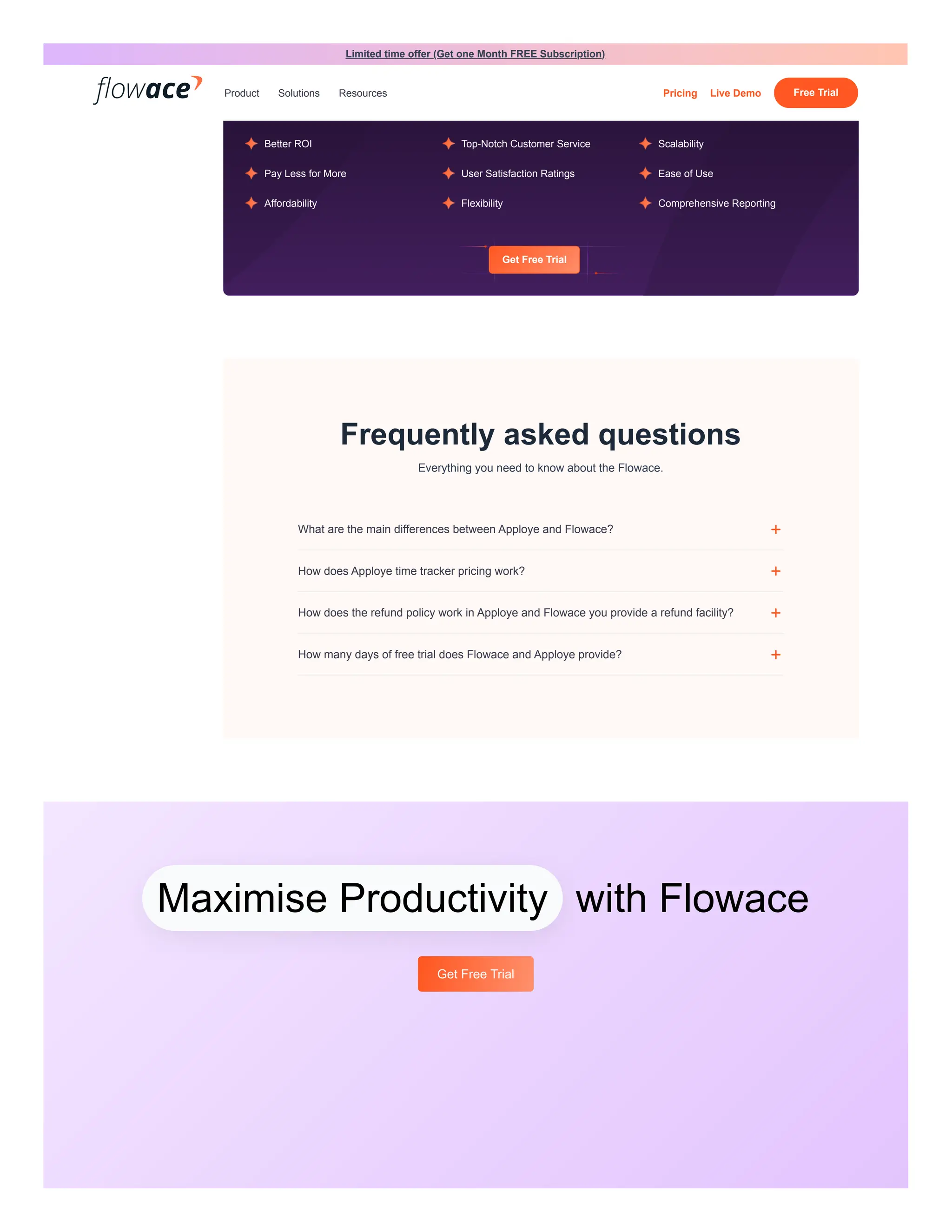
Frequently asked questions
Everything you need to know about the Flowace.
Better ROI Top-Notch Customer Service Scalability
Pay Less for More User Satisfaction Ratings Ease of Use
Affordability Flexibility Comprehensive Reporting
What are the main differences between Apploye and Flowace? +
How does Apploye time tracker pricing work? +
How does the refund policy work in Apploye and Flowace you provide a refund facility? +
How many days of free trial does Flowace and Apploye provide? +
Maximise Productivity with Flowace
Get Free Trial
Limited time offer (Get one Month FREE Subscription)
Product Solutions Resources Pricing Live Demo Free Trial
PRODUCTS
Overview
Productivity Tracker
Automated
Attendance
Employee Monitoring
Time Tracking
Integrations
Download
Team Health
Field
COMPANY
About Us
Contact us
Knowledge base
Blog
Press
Affiliates
Locations
ALTERNATIVES
Time Doctor
Hubstaff
Time Champ
ActivTrak
Apploye
PLATFORMS
Android
iOS
MacOS
Windows
Ubuntu
Chrome
Firefox
★★★★★ 98 reviews
Follow us
    
Flowace: an intuitive tool for simplified workforce productivity management. Effortlessly
monitor your employees activities like usage of apps and websites, meeting time, transit
time, and more. With Flowace, you can easily keep track of time and ensure that employees
are focused on their work, irrespective of their work location.
Terms Privacy
Limited time offer (Get one Month FREE Subscription)
Product Solutions Resources Pricing Live Demo Free Trial

Apploye vs. Flowace: A Comparative Analysis

  • 1.
    Detailed Comparison Flowace isan intuitive tool designed for streamlined workforce productivity management. It delivers detailed insights into employees' activities, including details such as visited websites, utilized applications, and occasional screenshots. This transparency helps in creating a deeper understan ding of team dynamics.With its affordable pricing and diverse productivity features, Flowace stands out as a superior tool that promotes a healthy work-life balance against Apploye. Platform Supported Ideal Customers Apploye stands out for its intuitive time tracking, monitoring, and productivity analysis features. The software boasts easy installation and offers an excellent UI/UX experience. Its well-organized dashboard enables users to grasp its features and services effortlessly. Apploye aids organizations in efficiently managing different teams and improve overall productivity of employees whether they are working remote or from office. Platform Supported Ideal Customers Overview Screenshots Pros and Cons Features Support Training Pricing User Reviews Integrations Success Stories Migrate with ease Conclusion FAQs Overview Windows Mac Ubuntu iPhone app Android app Windows Mac Ubuntu iPhone app Android app Apploye vs. Flowace: A Comparative Analysis Compare Apployee and Flowace to explore their features and determine which time-tracking app best suits your team's needs. In this Apploye time tracker alternative comparison page, you’ll get to know their features, benefits, genuine customer feedback, and pricing to discover the optimal solution for your requirements. Flowace Apploye Get Free Trial Limited time offer (Get one Month FREE Subscription) Product Solutions Resources Pricing Live Demo Free Trial
  • 2.
    User management  Users,managers and admins   Client login access   Multiple access levels   Teams  Dashboard  Team dashboard   Individual user dashboard   Executive dashboard  Productivity  Apps and websites   Productivity ratings   Work categories   Work schedules   Break tracking   Inactivity alerts   Work life balance metrics  Tracking  Online & offline tracking  Freelancers Small businesses Mid-size businesses Large Enterprise Freelancers Small businesses Mid-size businesses Large Enterprise Screenshots 5 Screenshots 7 Screenshots Pros and Cons Features Learn More Limited time offer (Get one Month FREE Subscription) Product Solutions Resources Pricing Live Demo Free Trial
  • 3.
     Silent tracking/ Stealth mode   User-controlled desktop app / Interactive mode   Custom silent tracking times   Screenshots   Video screen recording   GPS tracking  Reports  Activity summary report   Attendance report   Hours tracked report   Projects & tasks report   Timeline report   Web & app usage report   Narration report   Internet connectivity report  Groups & projects  Custom projects   Custom tasks   Groups / teams   Task benchmarking   Project management   Task, subtasks or multiple-level flexibility   Chat feature for the individually assigned Tasks  Notifications  Daily hours tracked email report   Daily email notifications   Real-time email notifications   Missing hour alerts  Data management  Custom Web & app tracking   Custom Data exports   Tracked time editing  Limited time offer (Get one Month FREE Subscription) Product Solutions Resources Pricing Live Demo Free Trial
  • 4.
     Approvals fortracked time edits   Historical tracking data   Calendar management   Attendance Management (In-Out Time, QR Code, Selfie, GPS)  Integrations  API access   Single sign-on (SSO)   Payroll  Billing, Invoice & Expenses  Billable Hours   Invoice  Leave Management, Schedules & Holidays  Leave and Holiday Management   Work Schedules  Mobile  App Usage Tracking   Whats App & SIM Calls   Calendar Sync   Chat Feature for the individually assigned Tasks   Onboarding Support   Email Support   In-App Chat Support   Video Tutorials   Slack Support   Customized Training Materials   Change Management   In - Person   Webinars  Support Training Limited time offer (Get one Month FREE Subscription) Product Solutions Resources Pricing Live Demo Free Trial
  • 5.
     Documentation  Live Online   Videos  Subscription-based model starting at the base price of $3 /user/month Subscription-based model starting at the base price of $3.66 /user/month Subscription-based model starting at the base price of $1.99 /user/month Subscription-based model starting at the base price of $2.41 /user/month Others  Auto-renewal on consent   No credit card details required   Affordable Enterprise plan  Badges Meets Requirements 9.0 Ease of Use 9.2 Ease of Setup 9.4 Ease of Admin 9.4 Quality of Support 9.4 Has the product been a good partner in doing business? Badges Meets Requirements 8.6 Ease of Use 8.8 Ease of Setup 8.7 Ease of Admin 8.8 Quality of Support 9.1 Has the product been a good partner in doing business? Pricing Monthly Yearly Basic $3 /user/mon Standard $5 /user/mon Premium $10 /user/mon Starter $3.62 /user/mon Professional $7.24 /user/mon Enterprise $12.06 /user/mon Basic $1.99 /user/mon Standard $3.99 /user/mon Premium $6.99 /user/mon Starter $2.41 /user/mon Professional $3.62 /user/mon Enterprise $6.63 /user/mon Badges and Ratings Limited time offer (Get one Month FREE Subscription) Product Solutions Resources Pricing Live Demo Free Trial
  • 6.
    9.5 Product Direction (%positive) 9.4 Pros Cons 8.9 Product Direction (% positive) 9.0 Pros Cons  Asana   Google Calendar   Microsoft Calendar   GitLab   Jira   Hubspot  RISING TREND The best thing is that it tracks time and tells us about our productivity and the areas in which we need to focus for better time management. ~ Verified User As HR, we need to track the productivity of the employees, so this software has helped us in many ways. On the other hand, it is easily accessible, which saves a lot of time. ~ Tanya G Accuracy of reading the daily reports of productivity, and we can track the total working hours of the employees. It is helping us to grow. - Verified User Time Tracking when connected via VPN ~ Verified User The user interface required some changes. Before the update, it was good to see. -Subham M It would’ve been better if there were more helpful guide content on their website or app. -Suvidya K Time Champ comes with many features that help us manage remote and hybrid employees and our project on time. Feature lie productive and unproductive metrics, web usage, leave management, and automatic timesheet helped us manage our employees. Project management is beneficial, which allows us to know all the work progress on a single dashboard which enables us to complete our project on time and also helps us to understand where we are lacking and where we have to improve to complete the project before the deadline. ~ Sai Timechamp is very handy tool to start and track our daily project work/task/activity. Timechamp gives us daily/monthly report of our working hours and project which is very useful to plan our future activity and growth. ~ Rushabh Time Champ is the perfect software to manage our team. Time champ features like key stock and video recording help us manage our team productivity and also help the burnout employee and get the automatic timesheet. – Monica Dislike is the only thing I feel is that when you are in a meeting and do not click the mouse or keyword, it will consider your idle time. Other than this, everything is perfect. ~ Sai We can manage our productive and unproductive sites in Timechamp, only one thing Timechamp should improve is that to show the popup of inactivity. Also it doesn’t finish and start our project automatically which is part of improvement. Timechamp sometimes shows you inaccurate data of away time and working time. -Rushabh Nothing, for now, the support team helped us to customize the software as per our need, and beneficial and easy to install overall great product to manage team. -Monica Integrations Learn More Limited time offer (Get one Month FREE Subscription) Product Solutions Resources Pricing Live Demo Free Trial
  • 7.
    More Companies Optingfor Flowace over Time Champ 15 + Companies 2.5K + Users Get Free Trial How Gravitas Legal saves 37 mins per day by using Flowace’s Automated Timesheets Read Success Stories How Digite Tied up with Flowace to Boost Workforce-Transparency & Productivity by 21% Read Success Stories How Zobble Achieved a 23% Increase in Team Efficiency and Enhanced Work Transparency through Flowace Read Success Stories Apploye vs Flowace How do we help Companies Shift from Apploye? Data Import If you are a company looking for an Apploye time tracker alternative for employees, we make the move super easy! Our team will help you transfer your data smoothly. If you need any assistance with the technical stuff, just let us know, and we'll take care of it. Smooth Migration Experience We've got your back every step of the way. Our customer support is here to make your transition to Flowace seamless. You'll have access to helpful guides, videos, and instant WhatsApp support to ensure a stress-free migration. Your satisfaction is our priority! Get Free Trial viud Limited time offer (Get one Month FREE Subscription) Product Solutions Resources Pricing Live Demo Free Trial
  • 8.
    Why should youchoose Flowace as a Time Doctor alternative? Get Free Trial Frequently asked questions Everything you need to know about the Flowace. Better ROI Top-Notch Customer Service Scalability Pay Less for More User Satisfaction Ratings Ease of Use Affordability Flexibility Comprehensive Reporting What are the main differences between Apploye and Flowace? + How does Apploye time tracker pricing work? + How does the refund policy work in Apploye and Flowace you provide a refund facility? + How many days of free trial does Flowace and Apploye provide? + Maximise Productivity with Flowace Get Free Trial Limited time offer (Get one Month FREE Subscription) Product Solutions Resources Pricing Live Demo Free Trial
  • 9.
    PRODUCTS Overview Productivity Tracker Automated Attendance Employee Monitoring TimeTracking Integrations Download Team Health Field COMPANY About Us Contact us Knowledge base Blog Press Affiliates Locations ALTERNATIVES Time Doctor Hubstaff Time Champ ActivTrak Apploye PLATFORMS Android iOS MacOS Windows Ubuntu Chrome Firefox ★★★★★ 98 reviews Follow us      Flowace: an intuitive tool for simplified workforce productivity management. Effortlessly monitor your employees activities like usage of apps and websites, meeting time, transit time, and more. With Flowace, you can easily keep track of time and ensure that employees are focused on their work, irrespective of their work location. Terms Privacy Limited time offer (Get one Month FREE Subscription) Product Solutions Resources Pricing Live Demo Free Trial