DEVELOPING A MODERN WEB
APPLICATION USING SPRING
FRAMEWORK
i2 SUPPLY REFRESH
AUTOMATION
Submitted to:
Dr. Ghanshyam Singh
Prof-Incharge, ECE Dept
MNIT JAIPUR
Submitted by:
Aman Khan
2019PEC5517
MNIT JAIPUR
Index
• CONCEPT
• PROBLEM AREA
• STUDY OF MANUAL PROCESS
• ITERATION
• KEY INITIATIVE TAKEN
• FUNCTIONAL REQUIREMENT
Index (Cont…)
• NON FUNCTIONAL REQUIREMENT
• USE CASE DIAGRAM
• WORK DONE FOR AUTOMATION
• KEY PROJECT ACHIEVEMENT
• TECHNOLOGY USED
• FUTURE WORK
• CONCLUSION
Concept
SUPPLY CHAIN ? + MANAGEMENT ?
Problem Area
Complex Manual Process
Required 3rd party person
Slow/Less Productivity
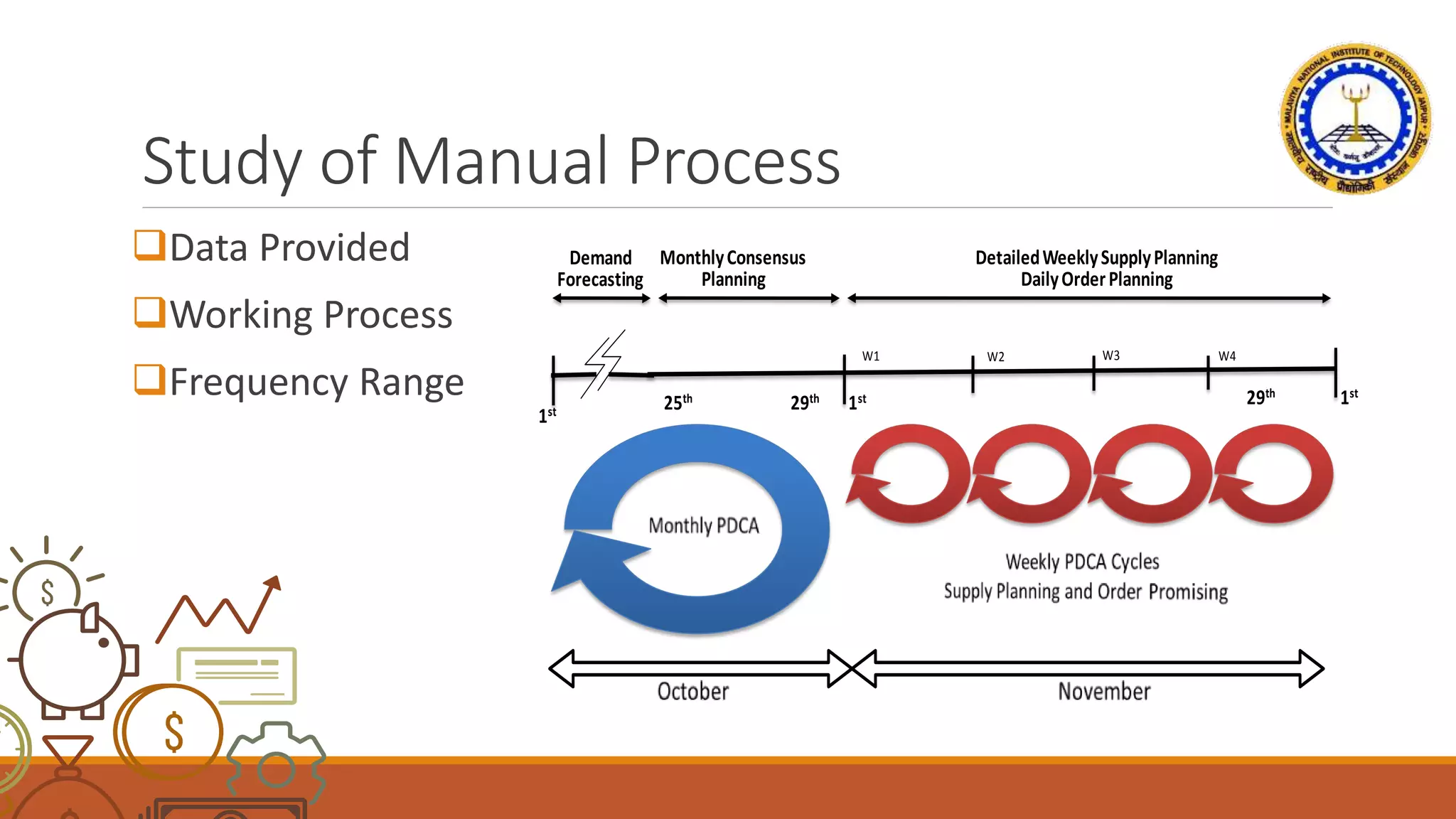
Study of Manual Process
Data Provided
Working Process
Frequency Range 25th
W1
1st 29th
1st 29th
MonthlyConsensus
Planning
1st
W2 W3
Demand
Forecasting
W4
DetailedWeeklySupplyPlanning
DailyOrderPlanning
Iteration
Type of priority
Channels
Products
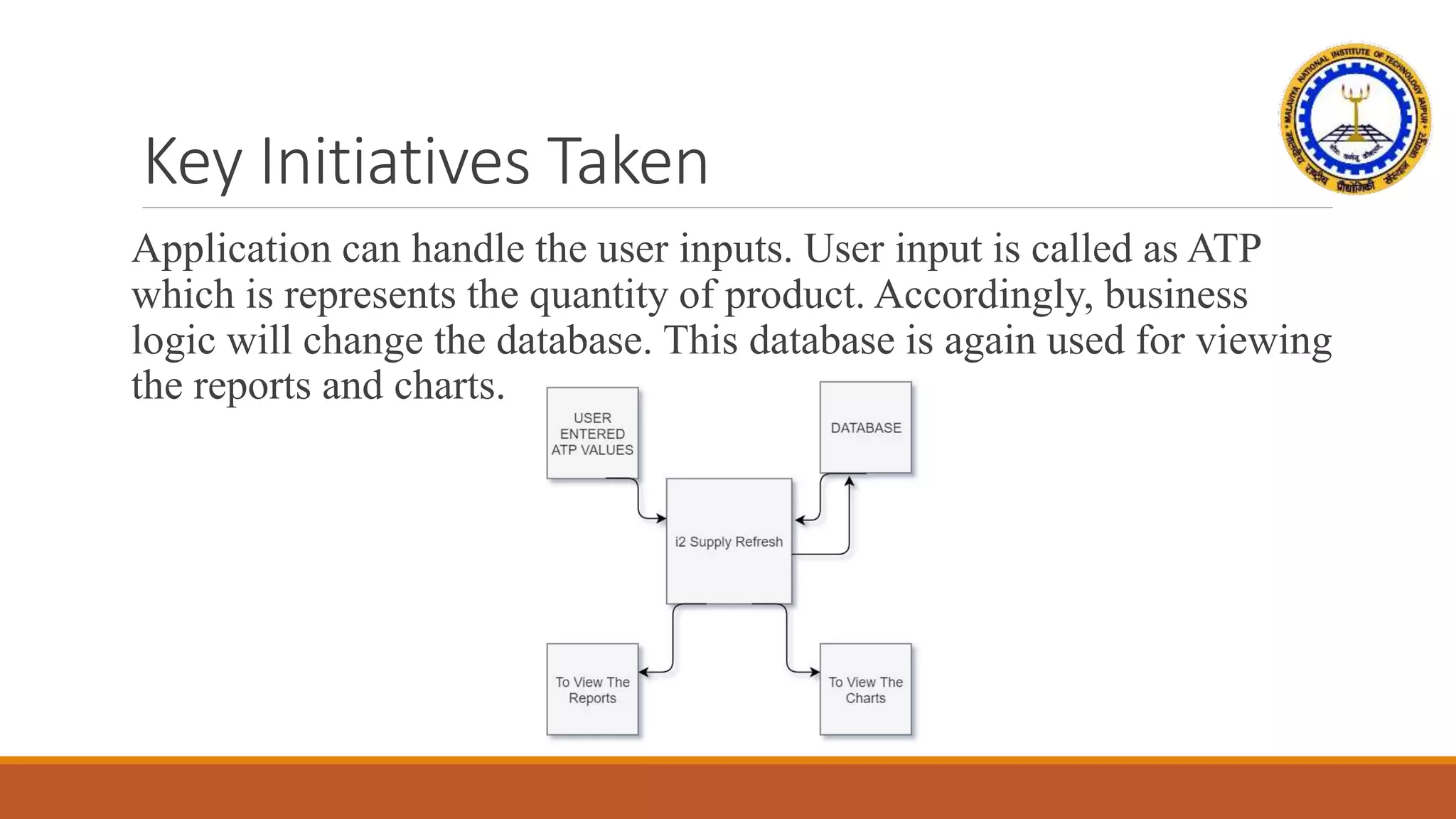
Key Initiatives Taken
Application can handle the user inputs. User input is called as ATP
which is represents the quantity of product. Accordingly, business
logic will change the database. This database is again used for viewing
the reports and charts.
Functional Requirements
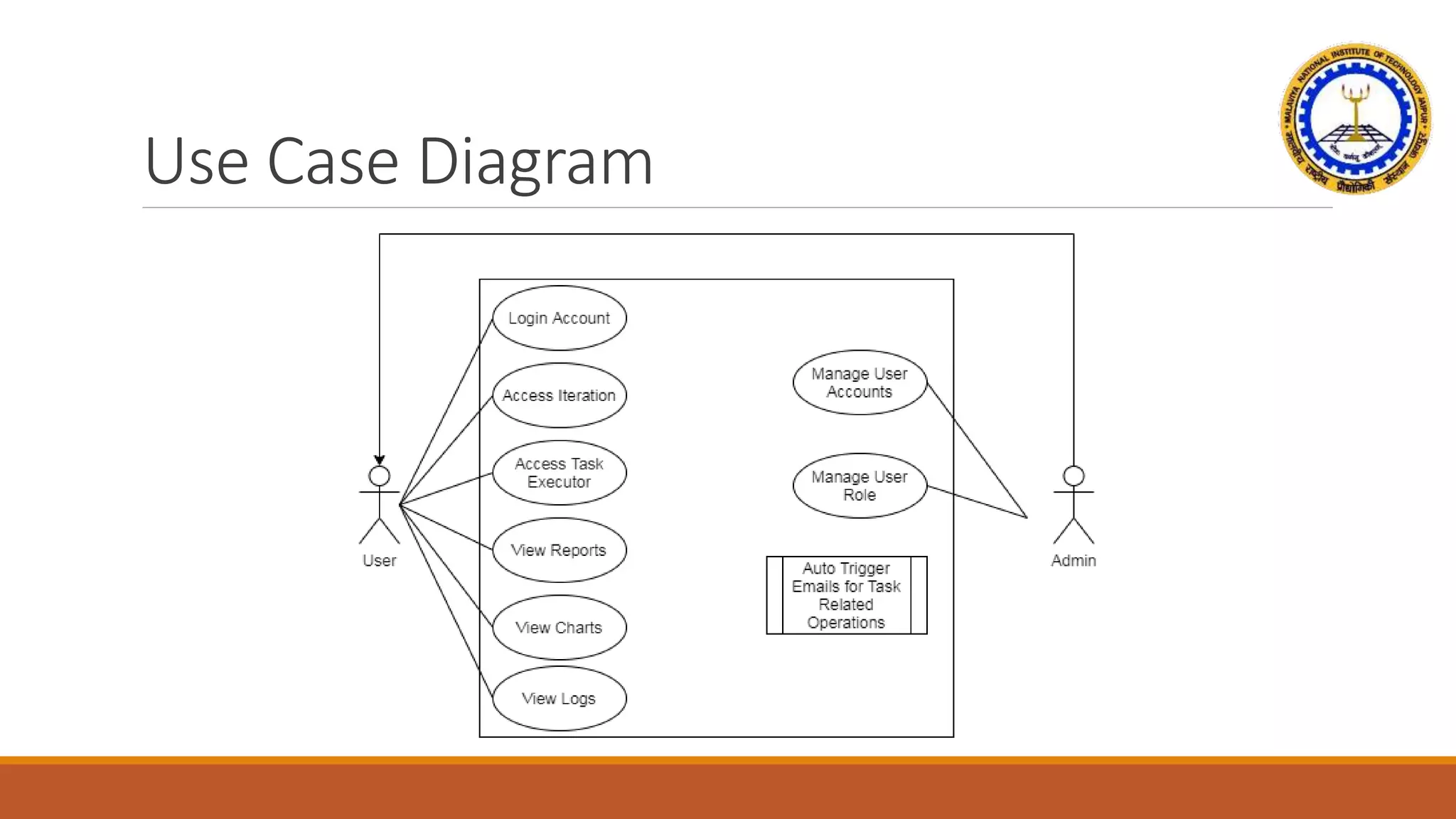
Features of an admin user management system and a dynamic
employee can play any role tailored to your requirements.
Authorization for the user to have customized accessible tabs and
tasks to perform.
Allow an admin to create/edit any user role, block or active any
user and set the accessible menu and task for the user.
Allow users to submit the ATP (Available to Promise) requirement
values for the WSR and MSR.
Functional Requirements (Continue)
Allow users to perform task-related activities to complete the cycle
for both WSR and MSR.
Access to analyze reports and charts with filter and sorting feature.
Access to view logs related to the task performed.
Feature to schedule tasks for future dates.
Allow users to check current progress.
Non-Functional Requirements
Dynamic Navigational Bar menu.
Keep object-oriented principles and employ an extensible and
maintain-able MVC framework.
Implementing the latest libraries and web standards.
Use of frontend framework i.e. Bootstrap 5.
Uses JavaScript or jQuery for client-side input verification and for
faster execution client-side support.
Non-Functional Requirements (Cont..)
Implementation of log4j framework for development logs.
Using of properties file for the changing the values dynamically.
Excel file upload feature to perform iteration task.
Excel download feature to store the data of reports.
Use Case Diagram
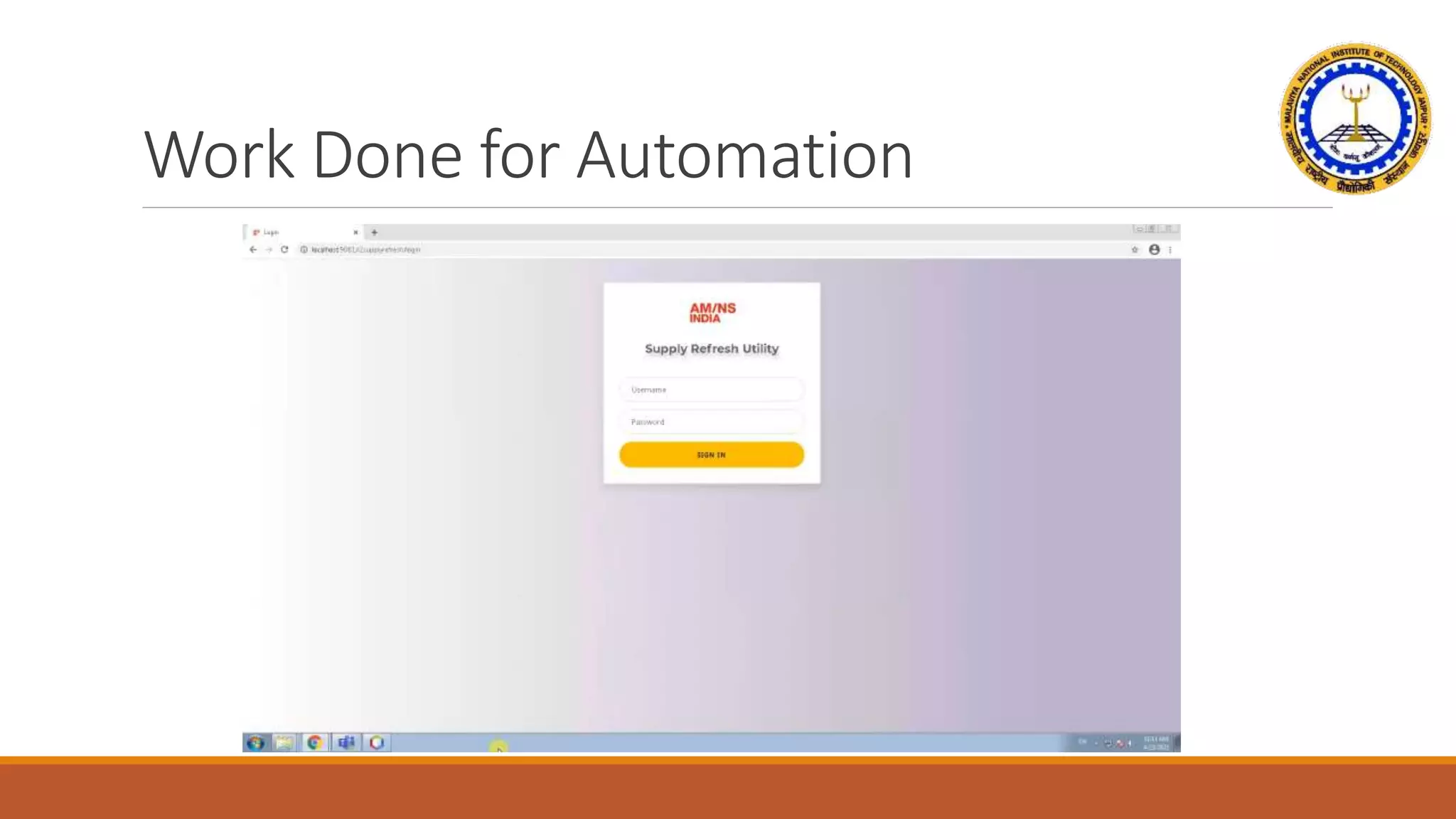
Work Done for Automation
Key Project Achievements
Successful Design.
User can initiate all the process through website only.
No need of any support team to handle task.
Fast, Accurate and Easy.
Benefits of getting all report in one place.
Key Project Achievements (Cont…)
No need of bulky excel to refresh reports.
Feature of email alerts which can guide user.
Modern frontend experience.
Authorization for access.
Admin Control to add new User and Permissions.
Technology Used
Spring MVC
Java
JavaScript
HTML
CSS
jQuery
Bootstrap
Git (Tortoise)
JS Libraries
PL/SQL
Future Work
Developments for various other dept.
Implementation of updated version/new framework.
LDAP implementation.
Better Database design.
SSL certificate implementation.
Conclusion
The core business logic of executing and performing certain manual
tasks through automation. This implementation is currently live in the
organization and acquired positive feedback and a higher success rate
from the client.
The main objective of this application is to create a user-friendly web
interface that can be used by the DCM team of AM/NS India. This
web application should consist of certain functionalities and processes
to perform the task. With that, analytical reports and charts are also
included at the same time which saves a lot of time and effort to create
these reports and charts manually.
Thanks!
Any questions?

Thesis presentation over Web Development

  • 1.
    DEVELOPING A MODERNWEB APPLICATION USING SPRING FRAMEWORK i2 SUPPLY REFRESH AUTOMATION Submitted to: Dr. Ghanshyam Singh Prof-Incharge, ECE Dept MNIT JAIPUR Submitted by: Aman Khan 2019PEC5517 MNIT JAIPUR
  • 2.
    Index • CONCEPT • PROBLEMAREA • STUDY OF MANUAL PROCESS • ITERATION • KEY INITIATIVE TAKEN • FUNCTIONAL REQUIREMENT
  • 3.
    Index (Cont…) • NONFUNCTIONAL REQUIREMENT • USE CASE DIAGRAM • WORK DONE FOR AUTOMATION • KEY PROJECT ACHIEVEMENT • TECHNOLOGY USED • FUTURE WORK • CONCLUSION
  • 4.
    Concept SUPPLY CHAIN ?+ MANAGEMENT ?
  • 5.
    Problem Area Complex ManualProcess Required 3rd party person Slow/Less Productivity
  • 6.
    Study of ManualProcess Data Provided Working Process Frequency Range 25th W1 1st 29th 1st 29th MonthlyConsensus Planning 1st W2 W3 Demand Forecasting W4 DetailedWeeklySupplyPlanning DailyOrderPlanning
  • 7.
  • 8.
    Key Initiatives Taken Applicationcan handle the user inputs. User input is called as ATP which is represents the quantity of product. Accordingly, business logic will change the database. This database is again used for viewing the reports and charts.
  • 9.
    Functional Requirements Features ofan admin user management system and a dynamic employee can play any role tailored to your requirements. Authorization for the user to have customized accessible tabs and tasks to perform. Allow an admin to create/edit any user role, block or active any user and set the accessible menu and task for the user. Allow users to submit the ATP (Available to Promise) requirement values for the WSR and MSR.
  • 10.
    Functional Requirements (Continue) Allowusers to perform task-related activities to complete the cycle for both WSR and MSR. Access to analyze reports and charts with filter and sorting feature. Access to view logs related to the task performed. Feature to schedule tasks for future dates. Allow users to check current progress.
  • 11.
    Non-Functional Requirements Dynamic NavigationalBar menu. Keep object-oriented principles and employ an extensible and maintain-able MVC framework. Implementing the latest libraries and web standards. Use of frontend framework i.e. Bootstrap 5. Uses JavaScript or jQuery for client-side input verification and for faster execution client-side support.
  • 12.
    Non-Functional Requirements (Cont..) Implementationof log4j framework for development logs. Using of properties file for the changing the values dynamically. Excel file upload feature to perform iteration task. Excel download feature to store the data of reports.
  • 13.
  • 14.
    Work Done forAutomation
  • 15.
    Key Project Achievements SuccessfulDesign. User can initiate all the process through website only. No need of any support team to handle task. Fast, Accurate and Easy. Benefits of getting all report in one place.
  • 16.
    Key Project Achievements(Cont…) No need of bulky excel to refresh reports. Feature of email alerts which can guide user. Modern frontend experience. Authorization for access. Admin Control to add new User and Permissions.
  • 17.
  • 18.
    Future Work Developments forvarious other dept. Implementation of updated version/new framework. LDAP implementation. Better Database design. SSL certificate implementation.
  • 19.
    Conclusion The core businesslogic of executing and performing certain manual tasks through automation. This implementation is currently live in the organization and acquired positive feedback and a higher success rate from the client. The main objective of this application is to create a user-friendly web interface that can be used by the DCM team of AM/NS India. This web application should consist of certain functionalities and processes to perform the task. With that, analytical reports and charts are also included at the same time which saves a lot of time and effort to create these reports and charts manually.
  • 20.