 The safety check app
 The Safety Check features
 WHAT DOES SAFETY CHECK DO
 How the SAFETY CHECK work
• Facebook rolls out Safety Check for natural
disasters:
Facebook is to roll out a new feature that can
inform friends and loved ones of your well-being
during and after a natural disaster.
• The Safety Check features:
• The service lets you input whether you are safe
or not in the affected area.
• Users can see how other friends and family in
an affected area are doing and can mark people
as ‘safe’.
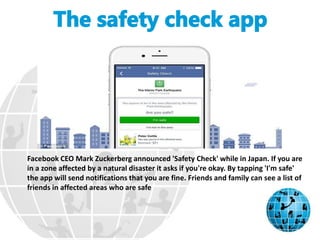
Facebook CEO Mark Zuckerberg announced 'Safety Check' while in Japan. If you are
in a zone affected by a natural disaster it asks if you're okay. By tapping 'I'm safe'
the app will send notifications that you are fine. Friends and family can see a list of
friends in affected areas who are safe
WHAT DOES SAFETY CHECK DO?
• If Facebook notices that you are using a device
in an affected area during a natural disaster
like an earthquake, it will ask: ‘Are you safe?’
• Let friends and family know you’re safe
• Check on others in the affected area
• Mark your friends as safe
1. Your location is determined by the city listed in your
profile, you last location if you use the Nearby
Friends product or the city where you are using the
internet.
2. It can be used around the world on Android, iOS,
feature phone and on computers.
3. If you’re not in the area, you can select ‘I’m not in the
area.
4. And if you’re in the area but are okay, you can select
‘I’m safe.
5. This will send out a notification and News Feed story
with your update.
6. Friends can then also mark you as 'safe', so they know
they don’t have to worry.
7. The tool can also be used to keep track of friends in an
affected area. Once the tool has been activated, a notification
will be received each time a friend checks in as being safe.
The service is available now for iOS, Android, feature phones and
desktops (shown). Your location is determined by the city listed in
your profile, you last location if you use the Nearby Friends product
or the city where you are using the internet
If Facebook notices that you are using a device in an affected area during a
natural disaster like an earthquake, it will ask: ‘Are you safe?’ If you’re not
in the area, you can select ‘I’m not in the area.’ And if you’re in the area
but are okay, you can select ‘I’m safe.’ This will send out a notification and
News Feed story with your update

The safety chek app

  • 2.
     The safetycheck app  The Safety Check features  WHAT DOES SAFETY CHECK DO  How the SAFETY CHECK work
  • 3.
    • Facebook rollsout Safety Check for natural disasters: Facebook is to roll out a new feature that can inform friends and loved ones of your well-being during and after a natural disaster.
  • 4.
    • The SafetyCheck features: • The service lets you input whether you are safe or not in the affected area. • Users can see how other friends and family in an affected area are doing and can mark people as ‘safe’.
  • 5.
    Facebook CEO MarkZuckerberg announced 'Safety Check' while in Japan. If you are in a zone affected by a natural disaster it asks if you're okay. By tapping 'I'm safe' the app will send notifications that you are fine. Friends and family can see a list of friends in affected areas who are safe
  • 6.
    WHAT DOES SAFETYCHECK DO? • If Facebook notices that you are using a device in an affected area during a natural disaster like an earthquake, it will ask: ‘Are you safe?’ • Let friends and family know you’re safe • Check on others in the affected area • Mark your friends as safe
  • 7.
    1. Your locationis determined by the city listed in your profile, you last location if you use the Nearby Friends product or the city where you are using the internet. 2. It can be used around the world on Android, iOS, feature phone and on computers. 3. If you’re not in the area, you can select ‘I’m not in the area. 4. And if you’re in the area but are okay, you can select ‘I’m safe.
  • 8.
    5. This willsend out a notification and News Feed story with your update. 6. Friends can then also mark you as 'safe', so they know they don’t have to worry. 7. The tool can also be used to keep track of friends in an affected area. Once the tool has been activated, a notification will be received each time a friend checks in as being safe.
  • 9.
    The service isavailable now for iOS, Android, feature phones and desktops (shown). Your location is determined by the city listed in your profile, you last location if you use the Nearby Friends product or the city where you are using the internet
  • 10.
    If Facebook noticesthat you are using a device in an affected area during a natural disaster like an earthquake, it will ask: ‘Are you safe?’ If you’re not in the area, you can select ‘I’m not in the area.’ And if you’re in the area but are okay, you can select ‘I’m safe.’ This will send out a notification and News Feed story with your update