Ring Documentation, Release 1.8
Hello
How are you?
Welcome to Ring
one
two
three
67.6 Using $ and @ in the start of the variable name
You can use any unicode character in the variable name also we can use $ and @ in the name.
This feature may help, for example we can start global variables with $ and the object attributes with @.
In other languages like Ruby this is the rule, In the Ring language this is just an option without any force from the
Compiler.
example:
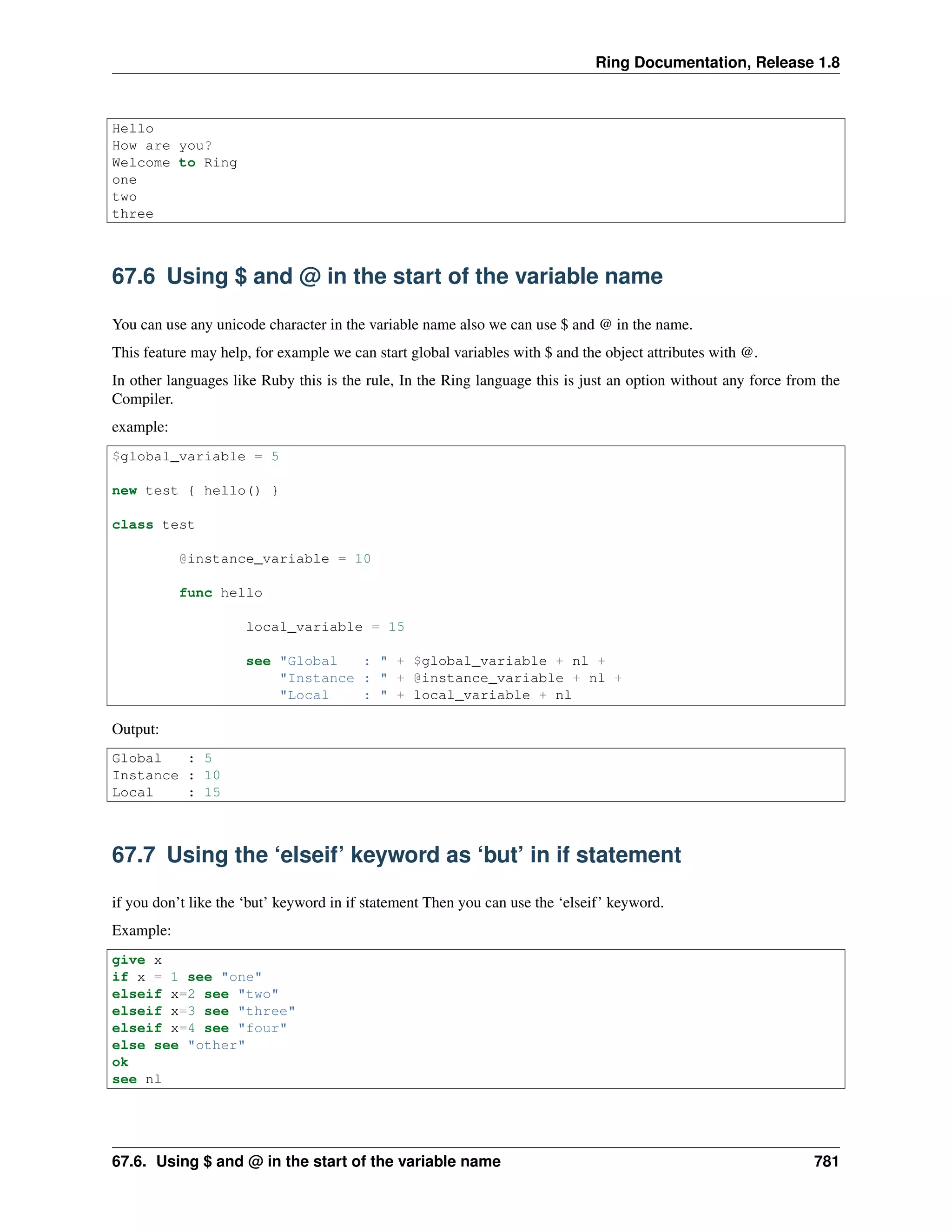
$global_variable = 5
new test { hello() }
class test
@instance_variable = 10
func hello
local_variable = 15
see "Global : " + $global_variable + nl +
"Instance : " + @instance_variable + nl +
"Local : " + local_variable + nl
Output:
Global : 5
Instance : 10
Local : 15
67.7 Using the ‘elseif’ keyword as ‘but’ in if statement
if you don’t like the ‘but’ keyword in if statement Then you can use the ‘elseif’ keyword.
Example:
give x
if x = 1 see "one"
elseif x=2 see "two"
elseif x=3 see "three"
elseif x=4 see "four"
else see "other"
ok
see nl
67.6. Using $ and @ in the start of the variable name 781
Ring Documentation, Release 1.8
67.8 Using the ‘else’ keyword as ‘other’ in switch statement
if you don’t like the ‘other’ keyword in switch statement Then you can use the ‘else’ keyword.
Also you can replace ‘else’ with ‘other’ in if statement.
i.e. ‘other’ keyword is the same as ‘else’ keyword.
Example:
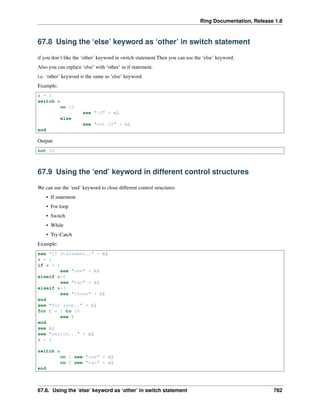
x = 1
switch x
on 10
see "10" + nl
else
see "not 10" + nl
end
Output:
not 10
67.9 Using the ‘end’ keyword in different control structures
We can use the ‘end’ keyword to close different control structures
• If statement
• For loop
• Switch
• While
• Try-Catch
Example:
see "if statement.." + nl
x = 1
if x = 1
see "one" + nl
elseif x=2
see "two" + nl
elseif x=3
see "three" + nl
end
see "for loop.." + nl
for t = 1 to 10
see t
end
see nl
see "switch..." + nl
x = 1
switch x
on 1 see "one" + nl
on 2 see "two" + nl
end
67.8. Using the ‘else’ keyword as ‘other’ in switch statement 782
Ring Documentation, Release 1.8
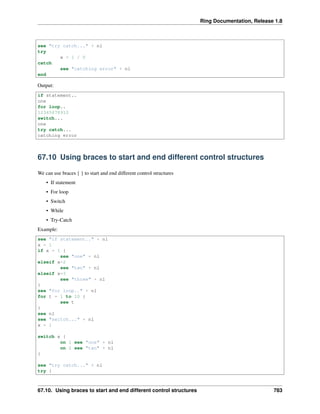
see "try catch..." + nl
try
x = 1 / 0
catch
see "catching error" + nl
end
Output:
if statement..
one
for loop..
12345678910
switch...
one
try catch...
catching error
67.10 Using braces to start and end different control structures
We can use braces { } to start and end different control structures
• If statement
• For loop
• Switch
• While
• Try-Catch
Example:
see "if statement.." + nl
x = 1
if x = 1 {
see "one" + nl
elseif x=2
see "two" + nl
elseif x=3
see "three" + nl
}
see "for loop.." + nl
for t = 1 to 10 {
see t
}
see nl
see "switch..." + nl
x = 1
switch x {
on 1 see "one" + nl
on 2 see "two" + nl
}
see "try catch..." + nl
try {
67.10. Using braces to start and end different control structures 783
Ring Documentation, Release 1.8
x = 1 / 0
catch
see "catching error" + nl
}
Output:
if statement..
one
for loop..
12345678910
switch...
one
try catch...
catching error
67.11 Using ‘put’ and ‘get’ as ‘see’ and ‘give’
We can replace the ‘see’ keyword with the ‘put’ keyword.
Also we can replacew the ‘give’ keyword with the ‘get’ keyword.
Example:
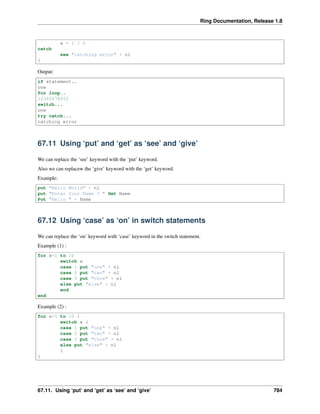
put "Hello World" + nl
put "Enter Your Name ? " Get Name
Put "Hello " + Name
67.12 Using ‘case’ as ‘on’ in switch statements
We can replace the ‘on’ keyword with ‘case’ keyword in the switch statement.
Example (1) :
for x=1 to 10
switch x
case 1 put "one" + nl
case 2 put "two" + nl
case 3 put "thre" + nl
else put "else" + nl
end
end
Example (2) :
for x=1 to 10 {
switch x {
case 1 put "one" + nl
case 2 put "two" + nl
case 3 put "thre" + nl
else put "else" + nl
}
}
67.11. Using ‘put’ and ‘get’ as ‘see’ and ‘give’ 784
Ring Documentation, Release 1.8
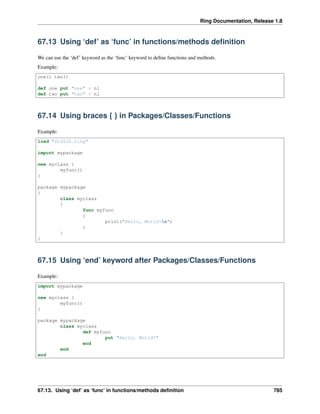
67.13 Using ‘def’ as ‘func’ in functions/methods definition
We can use the ‘def’ keyword as the ‘func’ keyword to define functions and methods.
Example:
one() two()
def one put "one" + nl
def two put "two" + nl
67.14 Using braces { } in Packages/Classes/Functions
Example:
load "stdlib.ring"
import mypackage
new myclass {
myfunc()
}
package mypackage
{
class myclass
{
func myfunc
{
print("Hello, World!n")
}
}
}
67.15 Using ‘end’ keyword after Packages/Classes/Functions
Example:
import mypackage
new myclass {
myfunc()
}
package mypackage
class myclass
def myfunc
put "Hello, World!"
end
end
end
67.13. Using ‘def’ as ‘func’ in functions/methods definition 785
Ring Documentation, Release 1.8
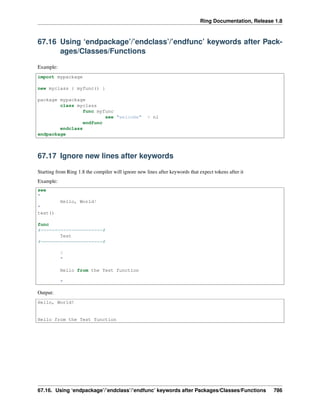
67.16 Using ‘endpackage’/’endclass’/’endfunc’ keywords after Pack-
ages/Classes/Functions
Example:
import mypackage
new myclass { myfunc() }
package mypackage
class myclass
func myfunc
see "welcome" + nl
endfunc
endclass
endpackage
67.17 Ignore new lines after keywords
Starting from Ring 1.8 the compiler will ignore new lines after keywords that expect tokens after it
Example:
see
"
Hello, World!
"
test()
func
#======================#
Test
#======================#
?
"
Hello from the Test function
"
Output:
Hello, World!
Hello from the Test function
67.16. Using ‘endpackage’/’endclass’/’endfunc’ keywords after Packages/Classes/Functions 786
CHAPTER
SIXTYEIGHT
INTRODUCTION TO THE TYPE HINTS LIBRARY
In this chapter we will learn about the Type Hints Library
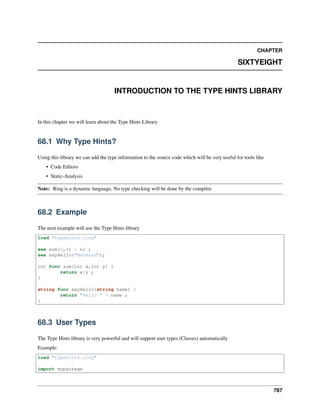
68.1 Why Type Hints?
Using this library we can add the type information to the source code which will be very useful for tools like
• Code Editors
• Static-Analysis
Note: Ring is a dynamic language, No type checking will be done by the compiler.
68.2 Example
The next example will use the Type Hints library
load "typehints.ring"
see sum(3,4) + nl ;
see sayHello("Mahmoud");
int func sum(int x,int y) {
return x+y ;
}
string func sayHello(string name) {
return "Hello " + name ;
}
68.3 User Types
The Type Hints library is very powerful and will support user types (Classes) automatically
Example:
load "typehints.ring"
import mypackage
787
Ring Documentation, Release 1.8
test() { main([:one,:two,:three]) }
myclass func test() {
see "Testing User Types!" + nl
return new myclass
}
package mypackage {
public class myclass {
public static void func main(list args) {
see "welcome" + nl
see args
}
}
}
68.4 Using Types inside Code
Also you can use the types inside the code (not only the function prototype)
Example:
load "typehints.ring"
int sum = sum(3,4)
string msg = sayHello("Mahmoud")
see "Sum = " + sum + nl + msg + nl
int func sum(int x,int y) {
return x+y ;
}
string func sayHello(string name) {
return "Hello " + name ;
}
68.5 Rules
• To use the types in the function prototype you must use ‘(‘ and ‘)’ around parameters
• To use the types in the function code, You must set the variable value (Assignment).
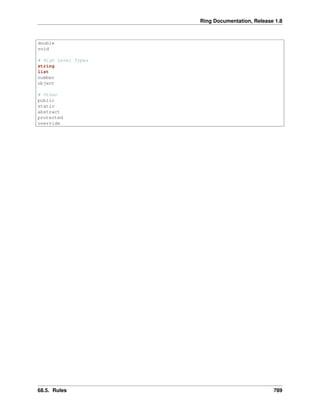
The next types are defined by the library
# Low Level Types
char
unsigned
signed
int
short
long
float
68.4. Using Types inside Code 788
Ring Documentation, Release 1.8
double
void
# High Level Types
string
list
number
object
# Other
public
static
abstract
protected
override
68.5. Rules 789
CHAPTER
SIXTYNINE
COMMAND LINE OPTIONS
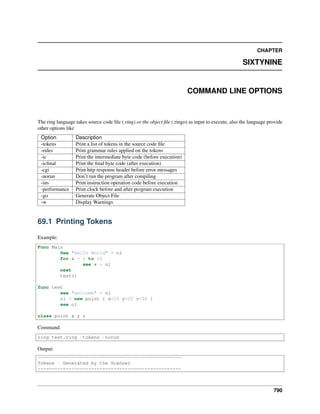
The ring language takes source code file (.ring) or the object file (.ringo) as input to execute, also the language provide
other options like
Option Description
-tokens Print a list of tokens in the source code file
-rules Print grammar rules applied on the tokens
-ic Print the intermediate byte code (before execution)
-icfinal Print the final byte code (after execution)
-cgi Print http response header before error messages
-norun Don’t run the program after compiling
-ins Print instruction operation code before execution
-performance Print clock before and after program execution
-go Generate Object File
-w Display Warnings
69.1 Printing Tokens
Example:
Func Main
See "Hello World" + nl
for x = 1 to 10
see x + nl
next
test()
func test
see "welcome" + nl
o1 = new point { x=10 y=20 z=30 }
see o1
class point x y z
Command:
ring test.ring -tokens -norun
Output:
===================================================
Tokens - Generated by the Scanner
===================================================
790

The Ring programming language version 1.8 book - Part 82 of 202

  • 1.
    Ring Documentation, Release1.8 Hello How are you? Welcome to Ring one two three 67.6 Using $ and @ in the start of the variable name You can use any unicode character in the variable name also we can use $ and @ in the name. This feature may help, for example we can start global variables with $ and the object attributes with @. In other languages like Ruby this is the rule, In the Ring language this is just an option without any force from the Compiler. example: $global_variable = 5 new test { hello() } class test @instance_variable = 10 func hello local_variable = 15 see "Global : " + $global_variable + nl + "Instance : " + @instance_variable + nl + "Local : " + local_variable + nl Output: Global : 5 Instance : 10 Local : 15 67.7 Using the ‘elseif’ keyword as ‘but’ in if statement if you don’t like the ‘but’ keyword in if statement Then you can use the ‘elseif’ keyword. Example: give x if x = 1 see "one" elseif x=2 see "two" elseif x=3 see "three" elseif x=4 see "four" else see "other" ok see nl 67.6. Using $ and @ in the start of the variable name 781
  • 2.
    Ring Documentation, Release1.8 67.8 Using the ‘else’ keyword as ‘other’ in switch statement if you don’t like the ‘other’ keyword in switch statement Then you can use the ‘else’ keyword. Also you can replace ‘else’ with ‘other’ in if statement. i.e. ‘other’ keyword is the same as ‘else’ keyword. Example: x = 1 switch x on 10 see "10" + nl else see "not 10" + nl end Output: not 10 67.9 Using the ‘end’ keyword in different control structures We can use the ‘end’ keyword to close different control structures • If statement • For loop • Switch • While • Try-Catch Example: see "if statement.." + nl x = 1 if x = 1 see "one" + nl elseif x=2 see "two" + nl elseif x=3 see "three" + nl end see "for loop.." + nl for t = 1 to 10 see t end see nl see "switch..." + nl x = 1 switch x on 1 see "one" + nl on 2 see "two" + nl end 67.8. Using the ‘else’ keyword as ‘other’ in switch statement 782
  • 3.
    Ring Documentation, Release1.8 see "try catch..." + nl try x = 1 / 0 catch see "catching error" + nl end Output: if statement.. one for loop.. 12345678910 switch... one try catch... catching error 67.10 Using braces to start and end different control structures We can use braces { } to start and end different control structures • If statement • For loop • Switch • While • Try-Catch Example: see "if statement.." + nl x = 1 if x = 1 { see "one" + nl elseif x=2 see "two" + nl elseif x=3 see "three" + nl } see "for loop.." + nl for t = 1 to 10 { see t } see nl see "switch..." + nl x = 1 switch x { on 1 see "one" + nl on 2 see "two" + nl } see "try catch..." + nl try { 67.10. Using braces to start and end different control structures 783
  • 4.
    Ring Documentation, Release1.8 x = 1 / 0 catch see "catching error" + nl } Output: if statement.. one for loop.. 12345678910 switch... one try catch... catching error 67.11 Using ‘put’ and ‘get’ as ‘see’ and ‘give’ We can replace the ‘see’ keyword with the ‘put’ keyword. Also we can replacew the ‘give’ keyword with the ‘get’ keyword. Example: put "Hello World" + nl put "Enter Your Name ? " Get Name Put "Hello " + Name 67.12 Using ‘case’ as ‘on’ in switch statements We can replace the ‘on’ keyword with ‘case’ keyword in the switch statement. Example (1) : for x=1 to 10 switch x case 1 put "one" + nl case 2 put "two" + nl case 3 put "thre" + nl else put "else" + nl end end Example (2) : for x=1 to 10 { switch x { case 1 put "one" + nl case 2 put "two" + nl case 3 put "thre" + nl else put "else" + nl } } 67.11. Using ‘put’ and ‘get’ as ‘see’ and ‘give’ 784
  • 5.
    Ring Documentation, Release1.8 67.13 Using ‘def’ as ‘func’ in functions/methods definition We can use the ‘def’ keyword as the ‘func’ keyword to define functions and methods. Example: one() two() def one put "one" + nl def two put "two" + nl 67.14 Using braces { } in Packages/Classes/Functions Example: load "stdlib.ring" import mypackage new myclass { myfunc() } package mypackage { class myclass { func myfunc { print("Hello, World!n") } } } 67.15 Using ‘end’ keyword after Packages/Classes/Functions Example: import mypackage new myclass { myfunc() } package mypackage class myclass def myfunc put "Hello, World!" end end end 67.13. Using ‘def’ as ‘func’ in functions/methods definition 785
  • 6.
    Ring Documentation, Release1.8 67.16 Using ‘endpackage’/’endclass’/’endfunc’ keywords after Pack- ages/Classes/Functions Example: import mypackage new myclass { myfunc() } package mypackage class myclass func myfunc see "welcome" + nl endfunc endclass endpackage 67.17 Ignore new lines after keywords Starting from Ring 1.8 the compiler will ignore new lines after keywords that expect tokens after it Example: see " Hello, World! " test() func #======================# Test #======================# ? " Hello from the Test function " Output: Hello, World! Hello from the Test function 67.16. Using ‘endpackage’/’endclass’/’endfunc’ keywords after Packages/Classes/Functions 786
  • 7.
    CHAPTER SIXTYEIGHT INTRODUCTION TO THETYPE HINTS LIBRARY In this chapter we will learn about the Type Hints Library 68.1 Why Type Hints? Using this library we can add the type information to the source code which will be very useful for tools like • Code Editors • Static-Analysis Note: Ring is a dynamic language, No type checking will be done by the compiler. 68.2 Example The next example will use the Type Hints library load "typehints.ring" see sum(3,4) + nl ; see sayHello("Mahmoud"); int func sum(int x,int y) { return x+y ; } string func sayHello(string name) { return "Hello " + name ; } 68.3 User Types The Type Hints library is very powerful and will support user types (Classes) automatically Example: load "typehints.ring" import mypackage 787
  • 8.
    Ring Documentation, Release1.8 test() { main([:one,:two,:three]) } myclass func test() { see "Testing User Types!" + nl return new myclass } package mypackage { public class myclass { public static void func main(list args) { see "welcome" + nl see args } } } 68.4 Using Types inside Code Also you can use the types inside the code (not only the function prototype) Example: load "typehints.ring" int sum = sum(3,4) string msg = sayHello("Mahmoud") see "Sum = " + sum + nl + msg + nl int func sum(int x,int y) { return x+y ; } string func sayHello(string name) { return "Hello " + name ; } 68.5 Rules • To use the types in the function prototype you must use ‘(‘ and ‘)’ around parameters • To use the types in the function code, You must set the variable value (Assignment). The next types are defined by the library # Low Level Types char unsigned signed int short long float 68.4. Using Types inside Code 788
  • 9.
    Ring Documentation, Release1.8 double void # High Level Types string list number object # Other public static abstract protected override 68.5. Rules 789
  • 10.
    CHAPTER SIXTYNINE COMMAND LINE OPTIONS Thering language takes source code file (.ring) or the object file (.ringo) as input to execute, also the language provide other options like Option Description -tokens Print a list of tokens in the source code file -rules Print grammar rules applied on the tokens -ic Print the intermediate byte code (before execution) -icfinal Print the final byte code (after execution) -cgi Print http response header before error messages -norun Don’t run the program after compiling -ins Print instruction operation code before execution -performance Print clock before and after program execution -go Generate Object File -w Display Warnings 69.1 Printing Tokens Example: Func Main See "Hello World" + nl for x = 1 to 10 see x + nl next test() func test see "welcome" + nl o1 = new point { x=10 y=20 z=30 } see o1 class point x y z Command: ring test.ring -tokens -norun Output: =================================================== Tokens - Generated by the Scanner =================================================== 790