Ring Documentation, Release 1.6
name = "Mahmoud"
aFriends = []
aFriends + new Friend
aFriends[len(aFriends)] {
aFriends[len(aFriends)].name = "Gal"
}
aFriends + new Friend
aFriends[len(aFriends)] {
aFriends[len(aFriends)].name = "Bert"
}
Class Friend
name
Solution (2) : Create Method in the friend class to set the name attribute.
New Account {
see aFriends
}
Class Account
name = "Mahmoud"
aFriends = []
aFriends + new Friend {
setname("Gal")
}
aFriends + new Friend {
setname("Bert")
}
Class Friend
name
func setname cName
name = cName
Solution (3) : Create a method in the account class to set the attribute
New Account {
see aFriends
}
Class Account
name = "Mahmoud"
aFriends = []
friend("Gal")
friend("Bert")
func friend cName
aFriends + new Friend {
name = cName
}
Class Friend
name
Solution (4) : Declarative Programming
New Account {
name = "mahmoud"
friend {
61.12. Conflict between self inside braces and self in the class region 723
Ring Documentation, Release 1.6
name = "Gal"
}
friend {
name = "Bert"
}
see aFriends
}
Class Account
name
aFriends = []
friend
func getfriend
aFriends + new Friend
return aFriends[len(aFriends)]
Class Friend
name
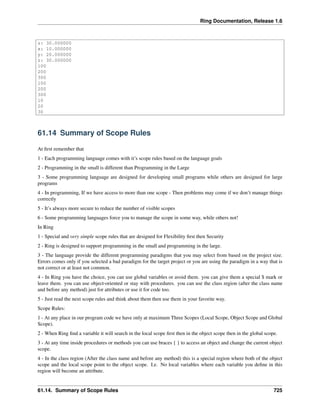
Output:
name: Gal
name: Bert
61.13 Using braces to escape from the current object scope
Since braces change the current object scope to another object. we can use it to do some work without modifying the
class attributes and using the same variable names.
new point {x=10 y=20 z=30 start() }
class point x y z
func start
see self # print the x y z values (10,20,30)
new Local {
x = 100
y = 200
z = 300
}
see self # print the x y z values (10,20,30)
see x + nl # will print 100
see y + nl # will print 200
see z + nl # will print 300
Self { # NO Advantage - Search is done in local scope first
see x + nl # will print 100
see y + nl # will print 200
see z + nl # will print 300
}
see self.x + nl # will print 10
see self.y + nl # will print 20
see self.z + nl # will print 30
class Local
Output:
x: 10.000000
y: 20.000000
61.13. Using braces to escape from the current object scope 724
Ring Documentation, Release 1.6
z: 30.000000
x: 10.000000
y: 20.000000
z: 30.000000
100
200
300
100
200
300
10
20
30
61.14 Summary of Scope Rules
At first remember that
1 - Each programming language comes with it’s scope rules based on the language goals
2 - Programming in the small is different than Programming in the Large
3 - Some programming language are designed for developing small programs while others are designed for large
programs
4 - In programming, If we have access to more than one scope - Then problems may come if we don’t manage things
correctly
5 - It’s always more secure to reduce the number of visible scopes
6 - Some programming languages force you to manage the scope in some way, while others not!
In Ring
1 - Special and very simple scope rules that are designed for Flexibility first then Security
2 - Ring is designed to support programming in the small and programming in the large.
3 - The language provide the different programming paradigms that you may select from based on the project size.
Errors comes only if you selected a bad paradigm for the target project or you are using the paradigm in a way that is
not correct or at least not common.
4 - In Ring you have the choice, you can use global variables or avoid them. you can give them a special $ mark or
leave them. you can use object-oriented or stay with procedures. you can use the class region (after the class name
and before any method) just for attributes or use it for code too.
5 - Just read the next scope rules and think about them then use them in your favorite way.
Scope Rules:
1 - At any place in our program code we have only at maximum Three Scopes (Local Scope, Object Scope and Global
Scope).
2 - When Ring find a variable it will search in the local scope first then in the object scope then in the global scope.
3 - At any time inside procedures or methods you can use braces { } to access an object and change the current object
scope.
4 - In the class region (After the class name and before any method) this is a special region where both of the object
scope and the local scope point to the object scope. I.e. No local variables where each variable you define in this
region will become an attribute.
61.14. Summary of Scope Rules 725
Ring Documentation, Release 1.6
5 - Before defining any variable (in any scope and in the class region too) a search process will be done to use the
variable if it’s found.
6 - Functions and Methods parameters are defined automatically as local variables to these functions or methods.
7 - Using Object.Attribute will search in the object attributes only.
8 - Using Self.Attribute will lead to a search for Self first then search in Self Attributes.
9 - The Self reference inside class region (after the class name and before any method) always point to the object scope
created from the class.
10- The Self reference inside methods will be changed when we uses Braces to be a reference to the object that we
access.
11- Writing variable names directly in the class region (after the class name and before any method) means using them
or define then (in order).
12- Using self.attribute in the class region reduce search to the object scope (avoid conflict with global scope).
From these rules you can understand all types of conflicts and why you may have them and how to avoid them
Simple advices to avoid any conflict and use the scope rules in a better way
1 - Try to avoid global variables
2 - Use the Main Function - This will help you to avoid global variables
3 - If you are going to use many global variables use the $ mark before the variable name
4 - In the class region if you don’t respect the advice number three ($) then use self.attribute when you define your
attributes
5 - You can use object.attribute and object.method() instead of object { attribute } and object { method() } if you don’t
like changing the object scope.
6 - If you will use nested braces in a class - think about using the class region if possible because in this region you
will have access to the object that you access using { } + access to the class attributes
7 - If you are inside a class method and used nested braces you will change the object scope with each brace and you
will loss the access to the class attributes directly but you have access to the local scope before and after using brace
{ } , if you will read/modify the class attribute from braces then use This.Attribute because using ‘This’ means (The
object created from this class) while using ‘Self’ means (The object in the current object scope).
After understanding all of the previous points, You will master this topic.
61.14. Summary of Scope Rules 726
CHAPTER
SIXTYTWO
SCOPE RULES FOR FUNCTIONS AND METHODS
In this chapter we will learn about the scope rules for functions and methods.
You need to know the next information once you started using Ring for large applications.
These applications may contains and use
• Many Packages and Classes written in Ring
• Many Functions written in Ring
• Standard Ring Functions (Written in C language)
• Functions and Classes written in C/C++ languages
62.1 How Ring find the Functions and Methods?
When you call a method or function, Ring will start a search process to find this function
If found –> Call the function and store the function pointer in the cache so Ring can use it again with doing another
search.
If not found —> Runtime error message (That you can avoid using Try/Catch)
How the search process is done?
Search for functions/methods follow the next order
1 - Search in methods (if we are inside class method or object using braces {})
2 - Search in functions written by the programmer using Ring Code
3 - Search in functions written in C/C++ like standard Ring functions
This enable us to write clean code inside classes methods and avoid any conflict with functions.
If we want to call a function with the same name as a method in the class we will need a wrapper function or we will
access a temp. object using { } then call that function there.
We can replace C/C++ Functions with Ring Functions.
We can replace Ring Functions with Ring Methods.
Note: Using self.method() is not necessary in any use case.
Tip: We can use this.method() to escape from the current active scope that we access using braces {} and call a
method in the class that we are inside.
727
Ring Documentation, Release 1.6
62.2 Example about Sharing Names between Functions and Methods
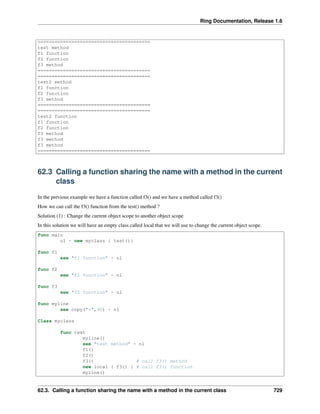
Look at the next example
func main
o1 = new myclass { test() test2() }
test2()
func f1
see "f1 function" + nl
func f2
see "f2 function" + nl
func f3
see "f3 function" + nl
func test2
myline()
see "test2 function" + nl
new myclass {
f1()
f2()
f3()
self.f3()
}
myobj = new myclass
myobj.f3()
myline()
func myline
see copy("=",40) + nl
Class myclass
func test
myline()
see "test method" + nl
f1()
f2()
f3()
myline()
func f3
see "f3 method" + nl
func test2
myline()
see "test2 method" + nl
self {
f1()
f2()
f3()
}
myline()
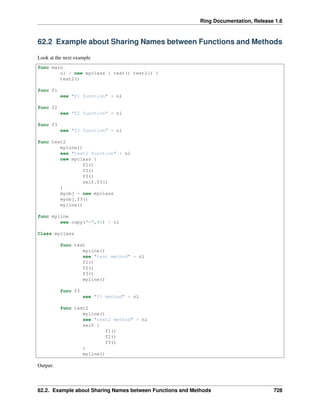
Output:
62.2. Example about Sharing Names between Functions and Methods 728
Ring Documentation, Release 1.6
========================================
test method
f1 function
f2 function
f3 method
========================================
========================================
test2 method
f1 function
f2 function
f3 method
========================================
========================================
test2 function
f1 function
f2 function
f3 method
f3 method
f3 method
========================================
62.3 Calling a function sharing the name with a method in the current
class
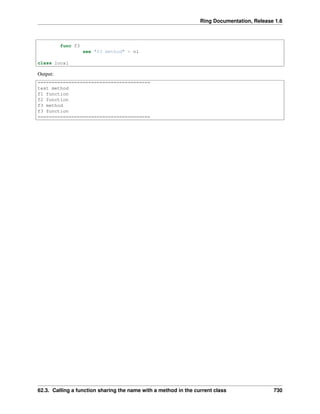
In the previous example we have a function called f3() and we have a method called f3()
How we can call the f3() function from the test() method ?
Solution (1) : Change the current object scope to another object scope
In this solution we will have an empty class called local that we will use to change the current object scope.
func main
o1 = new myclass { test()}
func f1
see "f1 function" + nl
func f2
see "f2 function" + nl
func f3
see "f3 function" + nl
func myline
see copy("=",40) + nl
Class myclass
func test
myline()
see "test method" + nl
f1()
f2()
f3() # call f3() method
new local { f3() } # call f3() function
myline()
62.3. Calling a function sharing the name with a method in the current class 729
Ring Documentation, Release 1.6
func f3
see "f3 method" + nl
class local
Output:
========================================
test method
f1 function
f2 function
f3 method
f3 function
========================================
62.3. Calling a function sharing the name with a method in the current class 730
CHAPTER
SIXTYTHREE
SYNTAX FLEXIBILITY
In this chapter we will learn about some options that are provided automatically by the Ring compiler for syntax
flexibility.
63.1 Change Language Keywords
We can change any keyword using the ChangeRingKeyword command.
Note: Remember to restore the keyword again if the team will mix between styles in the same project.
Tip: The ChangeRingKeyword command is executed in the scanner stage by the compiler (before parsing).
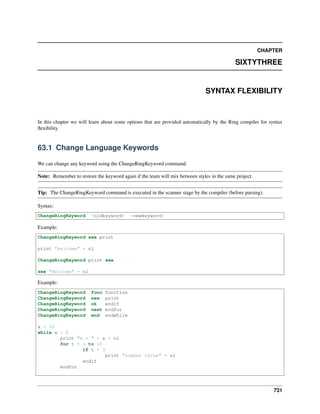
Syntax:
ChangeRingKeyword <oldkeyword> <newkeyword>
Example:
ChangeRingKeyword see print
print "welcome" + nl
ChangeRingKeyword print see
see "Welcome" + nl
Example:
ChangeRingKeyword func function
ChangeRingKeyword see print
ChangeRingKeyword ok endif
ChangeRingKeyword next endfor
ChangeRingKeyword end endwhile
x = 10
while x > 0
print "x = " + x + nl
for t = 1 to 10
if t = 3
print "number three" + nl
endif
endfor
731
Ring Documentation, Release 1.6
x--
endwhile
test()
function test
print "message from test" + nl
ChangeRingKeyword function func
ChangeRingKeyword print see
ChangeRingKeyword endif ok
ChangeRingKeyword endfor next
ChangeRingKeyword endwhile end
63.2 Change Language Operators
We can change any operator using the ChangeRingOperator command.
Note: Remember to restore the operator again if the team will mix between styles in the same project.
Tip: The ChangeRingOperartor command is executed in the scanner stage by the compiler (before parsing).
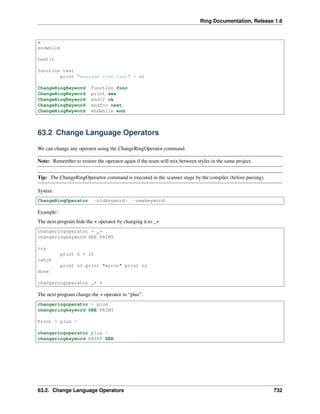
Syntax:
ChangeRingOperator <oldkeyword> <newkeyword>
Example:
The next program hide the + operator by changing it to _+
changeringoperator + _+
changeringkeyword SEE PRINT
try
print 5 + 10
catch
print nl print "error" print nl
done
changeringoperator _+ +
The next program change the + operator to “plus”.
changeringoperator + plus
changeringkeyword SEE PRINT
Print 5 plus 5
changeringoperator plus +
changeringkeyword PRINT SEE
63.2. Change Language Operators 732

The Ring programming language version 1.6 book - Part 76 of 189

  • 1.
    Ring Documentation, Release1.6 name = "Mahmoud" aFriends = [] aFriends + new Friend aFriends[len(aFriends)] { aFriends[len(aFriends)].name = "Gal" } aFriends + new Friend aFriends[len(aFriends)] { aFriends[len(aFriends)].name = "Bert" } Class Friend name Solution (2) : Create Method in the friend class to set the name attribute. New Account { see aFriends } Class Account name = "Mahmoud" aFriends = [] aFriends + new Friend { setname("Gal") } aFriends + new Friend { setname("Bert") } Class Friend name func setname cName name = cName Solution (3) : Create a method in the account class to set the attribute New Account { see aFriends } Class Account name = "Mahmoud" aFriends = [] friend("Gal") friend("Bert") func friend cName aFriends + new Friend { name = cName } Class Friend name Solution (4) : Declarative Programming New Account { name = "mahmoud" friend { 61.12. Conflict between self inside braces and self in the class region 723
  • 2.
    Ring Documentation, Release1.6 name = "Gal" } friend { name = "Bert" } see aFriends } Class Account name aFriends = [] friend func getfriend aFriends + new Friend return aFriends[len(aFriends)] Class Friend name Output: name: Gal name: Bert 61.13 Using braces to escape from the current object scope Since braces change the current object scope to another object. we can use it to do some work without modifying the class attributes and using the same variable names. new point {x=10 y=20 z=30 start() } class point x y z func start see self # print the x y z values (10,20,30) new Local { x = 100 y = 200 z = 300 } see self # print the x y z values (10,20,30) see x + nl # will print 100 see y + nl # will print 200 see z + nl # will print 300 Self { # NO Advantage - Search is done in local scope first see x + nl # will print 100 see y + nl # will print 200 see z + nl # will print 300 } see self.x + nl # will print 10 see self.y + nl # will print 20 see self.z + nl # will print 30 class Local Output: x: 10.000000 y: 20.000000 61.13. Using braces to escape from the current object scope 724
  • 3.
    Ring Documentation, Release1.6 z: 30.000000 x: 10.000000 y: 20.000000 z: 30.000000 100 200 300 100 200 300 10 20 30 61.14 Summary of Scope Rules At first remember that 1 - Each programming language comes with it’s scope rules based on the language goals 2 - Programming in the small is different than Programming in the Large 3 - Some programming language are designed for developing small programs while others are designed for large programs 4 - In programming, If we have access to more than one scope - Then problems may come if we don’t manage things correctly 5 - It’s always more secure to reduce the number of visible scopes 6 - Some programming languages force you to manage the scope in some way, while others not! In Ring 1 - Special and very simple scope rules that are designed for Flexibility first then Security 2 - Ring is designed to support programming in the small and programming in the large. 3 - The language provide the different programming paradigms that you may select from based on the project size. Errors comes only if you selected a bad paradigm for the target project or you are using the paradigm in a way that is not correct or at least not common. 4 - In Ring you have the choice, you can use global variables or avoid them. you can give them a special $ mark or leave them. you can use object-oriented or stay with procedures. you can use the class region (after the class name and before any method) just for attributes or use it for code too. 5 - Just read the next scope rules and think about them then use them in your favorite way. Scope Rules: 1 - At any place in our program code we have only at maximum Three Scopes (Local Scope, Object Scope and Global Scope). 2 - When Ring find a variable it will search in the local scope first then in the object scope then in the global scope. 3 - At any time inside procedures or methods you can use braces { } to access an object and change the current object scope. 4 - In the class region (After the class name and before any method) this is a special region where both of the object scope and the local scope point to the object scope. I.e. No local variables where each variable you define in this region will become an attribute. 61.14. Summary of Scope Rules 725
  • 4.
    Ring Documentation, Release1.6 5 - Before defining any variable (in any scope and in the class region too) a search process will be done to use the variable if it’s found. 6 - Functions and Methods parameters are defined automatically as local variables to these functions or methods. 7 - Using Object.Attribute will search in the object attributes only. 8 - Using Self.Attribute will lead to a search for Self first then search in Self Attributes. 9 - The Self reference inside class region (after the class name and before any method) always point to the object scope created from the class. 10- The Self reference inside methods will be changed when we uses Braces to be a reference to the object that we access. 11- Writing variable names directly in the class region (after the class name and before any method) means using them or define then (in order). 12- Using self.attribute in the class region reduce search to the object scope (avoid conflict with global scope). From these rules you can understand all types of conflicts and why you may have them and how to avoid them Simple advices to avoid any conflict and use the scope rules in a better way 1 - Try to avoid global variables 2 - Use the Main Function - This will help you to avoid global variables 3 - If you are going to use many global variables use the $ mark before the variable name 4 - In the class region if you don’t respect the advice number three ($) then use self.attribute when you define your attributes 5 - You can use object.attribute and object.method() instead of object { attribute } and object { method() } if you don’t like changing the object scope. 6 - If you will use nested braces in a class - think about using the class region if possible because in this region you will have access to the object that you access using { } + access to the class attributes 7 - If you are inside a class method and used nested braces you will change the object scope with each brace and you will loss the access to the class attributes directly but you have access to the local scope before and after using brace { } , if you will read/modify the class attribute from braces then use This.Attribute because using ‘This’ means (The object created from this class) while using ‘Self’ means (The object in the current object scope). After understanding all of the previous points, You will master this topic. 61.14. Summary of Scope Rules 726
  • 5.
    CHAPTER SIXTYTWO SCOPE RULES FORFUNCTIONS AND METHODS In this chapter we will learn about the scope rules for functions and methods. You need to know the next information once you started using Ring for large applications. These applications may contains and use • Many Packages and Classes written in Ring • Many Functions written in Ring • Standard Ring Functions (Written in C language) • Functions and Classes written in C/C++ languages 62.1 How Ring find the Functions and Methods? When you call a method or function, Ring will start a search process to find this function If found –> Call the function and store the function pointer in the cache so Ring can use it again with doing another search. If not found —> Runtime error message (That you can avoid using Try/Catch) How the search process is done? Search for functions/methods follow the next order 1 - Search in methods (if we are inside class method or object using braces {}) 2 - Search in functions written by the programmer using Ring Code 3 - Search in functions written in C/C++ like standard Ring functions This enable us to write clean code inside classes methods and avoid any conflict with functions. If we want to call a function with the same name as a method in the class we will need a wrapper function or we will access a temp. object using { } then call that function there. We can replace C/C++ Functions with Ring Functions. We can replace Ring Functions with Ring Methods. Note: Using self.method() is not necessary in any use case. Tip: We can use this.method() to escape from the current active scope that we access using braces {} and call a method in the class that we are inside. 727
  • 6.
    Ring Documentation, Release1.6 62.2 Example about Sharing Names between Functions and Methods Look at the next example func main o1 = new myclass { test() test2() } test2() func f1 see "f1 function" + nl func f2 see "f2 function" + nl func f3 see "f3 function" + nl func test2 myline() see "test2 function" + nl new myclass { f1() f2() f3() self.f3() } myobj = new myclass myobj.f3() myline() func myline see copy("=",40) + nl Class myclass func test myline() see "test method" + nl f1() f2() f3() myline() func f3 see "f3 method" + nl func test2 myline() see "test2 method" + nl self { f1() f2() f3() } myline() Output: 62.2. Example about Sharing Names between Functions and Methods 728
  • 7.
    Ring Documentation, Release1.6 ======================================== test method f1 function f2 function f3 method ======================================== ======================================== test2 method f1 function f2 function f3 method ======================================== ======================================== test2 function f1 function f2 function f3 method f3 method f3 method ======================================== 62.3 Calling a function sharing the name with a method in the current class In the previous example we have a function called f3() and we have a method called f3() How we can call the f3() function from the test() method ? Solution (1) : Change the current object scope to another object scope In this solution we will have an empty class called local that we will use to change the current object scope. func main o1 = new myclass { test()} func f1 see "f1 function" + nl func f2 see "f2 function" + nl func f3 see "f3 function" + nl func myline see copy("=",40) + nl Class myclass func test myline() see "test method" + nl f1() f2() f3() # call f3() method new local { f3() } # call f3() function myline() 62.3. Calling a function sharing the name with a method in the current class 729
  • 8.
    Ring Documentation, Release1.6 func f3 see "f3 method" + nl class local Output: ======================================== test method f1 function f2 function f3 method f3 function ======================================== 62.3. Calling a function sharing the name with a method in the current class 730
  • 9.
    CHAPTER SIXTYTHREE SYNTAX FLEXIBILITY In thischapter we will learn about some options that are provided automatically by the Ring compiler for syntax flexibility. 63.1 Change Language Keywords We can change any keyword using the ChangeRingKeyword command. Note: Remember to restore the keyword again if the team will mix between styles in the same project. Tip: The ChangeRingKeyword command is executed in the scanner stage by the compiler (before parsing). Syntax: ChangeRingKeyword <oldkeyword> <newkeyword> Example: ChangeRingKeyword see print print "welcome" + nl ChangeRingKeyword print see see "Welcome" + nl Example: ChangeRingKeyword func function ChangeRingKeyword see print ChangeRingKeyword ok endif ChangeRingKeyword next endfor ChangeRingKeyword end endwhile x = 10 while x > 0 print "x = " + x + nl for t = 1 to 10 if t = 3 print "number three" + nl endif endfor 731
  • 10.
    Ring Documentation, Release1.6 x-- endwhile test() function test print "message from test" + nl ChangeRingKeyword function func ChangeRingKeyword print see ChangeRingKeyword endif ok ChangeRingKeyword endfor next ChangeRingKeyword endwhile end 63.2 Change Language Operators We can change any operator using the ChangeRingOperator command. Note: Remember to restore the operator again if the team will mix between styles in the same project. Tip: The ChangeRingOperartor command is executed in the scanner stage by the compiler (before parsing). Syntax: ChangeRingOperator <oldkeyword> <newkeyword> Example: The next program hide the + operator by changing it to _+ changeringoperator + _+ changeringkeyword SEE PRINT try print 5 + 10 catch print nl print "error" print nl done changeringoperator _+ + The next program change the + operator to “plus”. changeringoperator + plus changeringkeyword SEE PRINT Print 5 plus 5 changeringoperator plus + changeringkeyword PRINT SEE 63.2. Change Language Operators 732