Ring Documentation, Release 1.5.4
36.7 Create Database
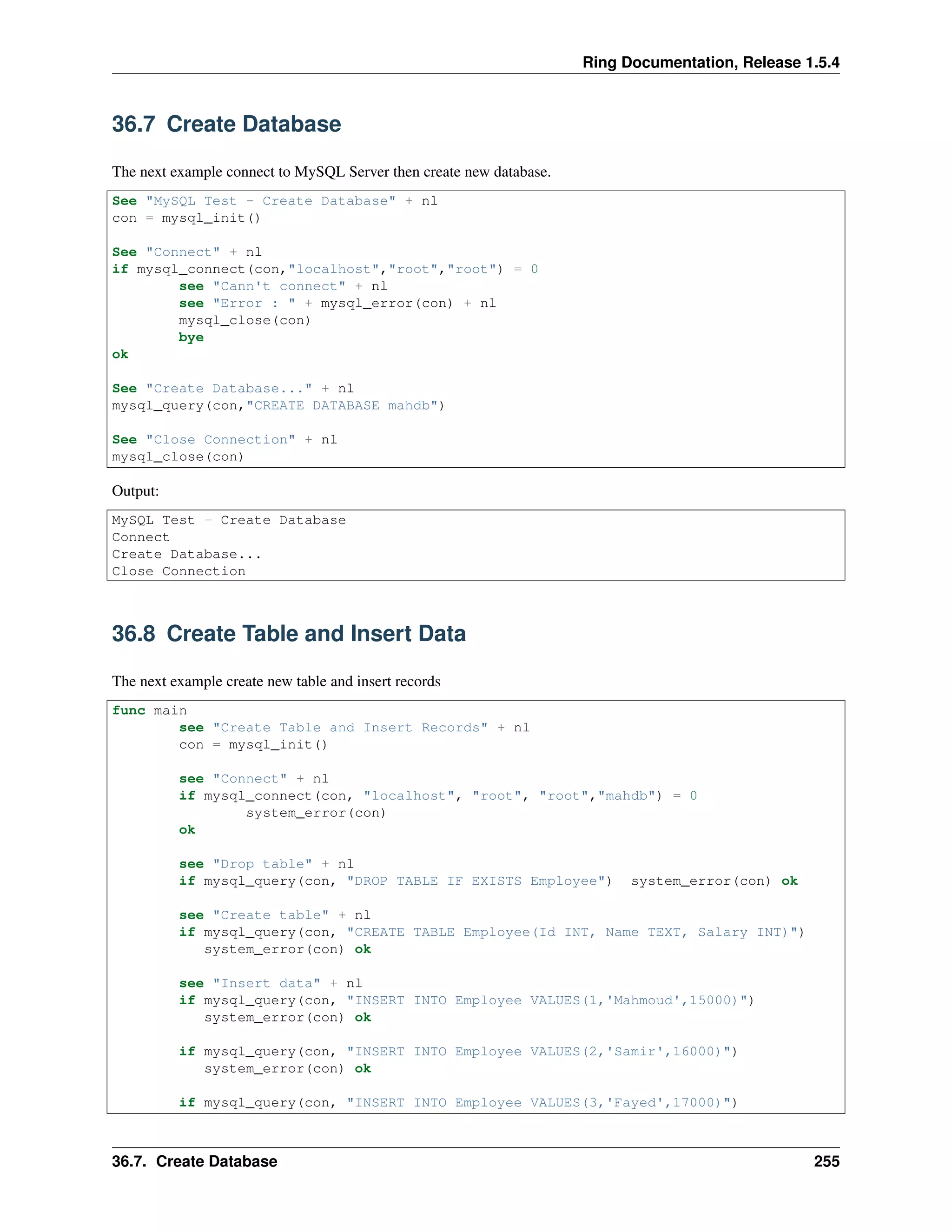
The next example connect to MySQL Server then create new database.
See "MySQL Test - Create Database" + nl
con = mysql_init()
See "Connect" + nl
if mysql_connect(con,"localhost","root","root") = 0
see "Cann't connect" + nl
see "Error : " + mysql_error(con) + nl
mysql_close(con)
bye
ok
See "Create Database..." + nl
mysql_query(con,"CREATE DATABASE mahdb")
See "Close Connection" + nl
mysql_close(con)
Output:
MySQL Test - Create Database
Connect
Create Database...
Close Connection
36.8 Create Table and Insert Data
The next example create new table and insert records
func main
see "Create Table and Insert Records" + nl
con = mysql_init()
see "Connect" + nl
if mysql_connect(con, "localhost", "root", "root","mahdb") = 0
system_error(con)
ok
see "Drop table" + nl
if mysql_query(con, "DROP TABLE IF EXISTS Employee") system_error(con) ok
see "Create table" + nl
if mysql_query(con, "CREATE TABLE Employee(Id INT, Name TEXT, Salary INT)")
system_error(con) ok
see "Insert data" + nl
if mysql_query(con, "INSERT INTO Employee VALUES(1,'Mahmoud',15000)")
system_error(con) ok
if mysql_query(con, "INSERT INTO Employee VALUES(2,'Samir',16000)")
system_error(con) ok
if mysql_query(con, "INSERT INTO Employee VALUES(3,'Fayed',17000)")
36.7. Create Database 255
Ring Documentation, Release 1.5.4
system_error(con) ok
see "Close connection" + nl
mysql_close(con)
func system_error con
see mysql_error(con) mysql_close(con) bye
Output:
Create Table and Insert Records
Connect
Drop table
Create table
Insert data
Close connection
36.9 MySQL_Insert_ID() Function
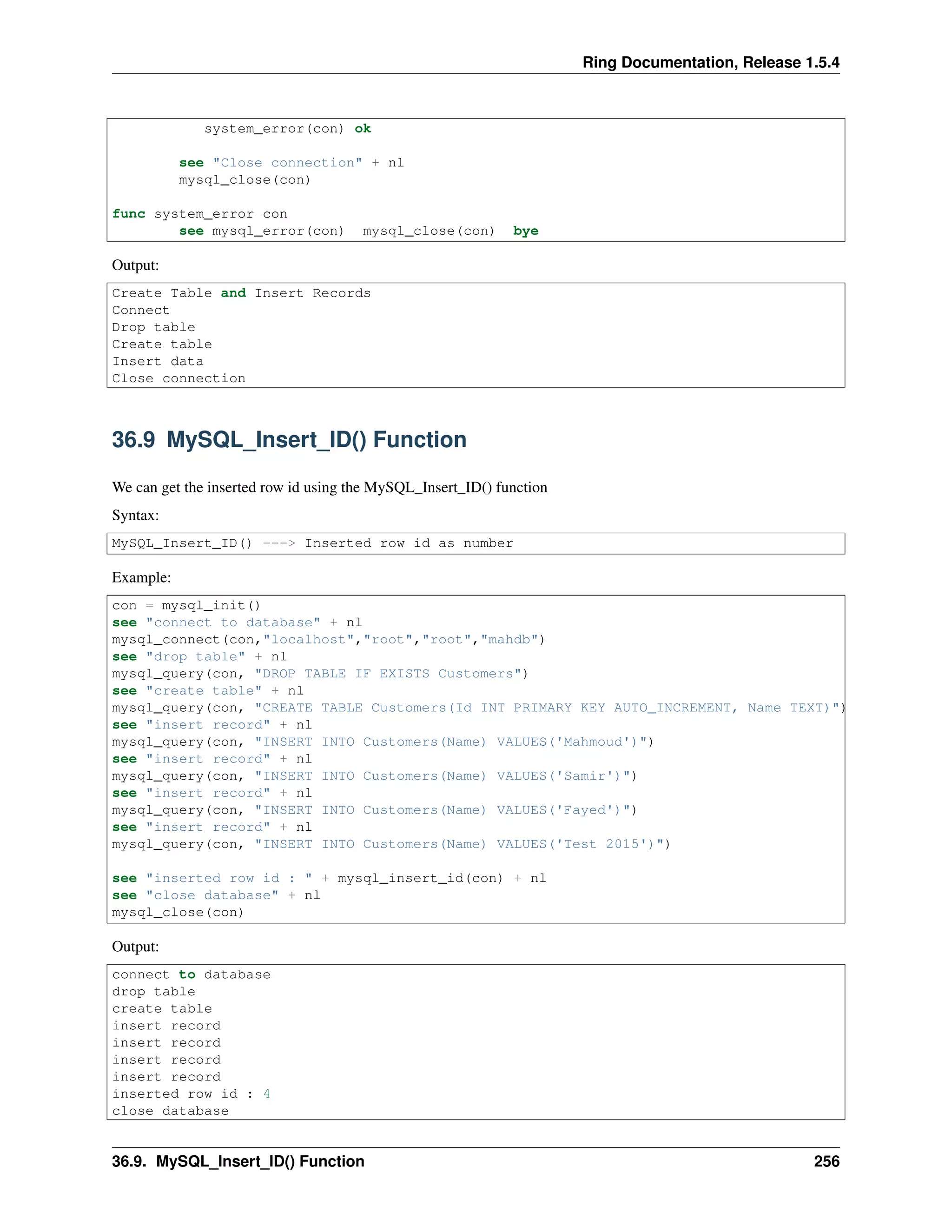
We can get the inserted row id using the MySQL_Insert_ID() function
Syntax:
MySQL_Insert_ID() ---> Inserted row id as number
Example:
con = mysql_init()
see "connect to database" + nl
mysql_connect(con,"localhost","root","root","mahdb")
see "drop table" + nl
mysql_query(con, "DROP TABLE IF EXISTS Customers")
see "create table" + nl
mysql_query(con, "CREATE TABLE Customers(Id INT PRIMARY KEY AUTO_INCREMENT, Name TEXT)")
see "insert record" + nl
mysql_query(con, "INSERT INTO Customers(Name) VALUES('Mahmoud')")
see "insert record" + nl
mysql_query(con, "INSERT INTO Customers(Name) VALUES('Samir')")
see "insert record" + nl
mysql_query(con, "INSERT INTO Customers(Name) VALUES('Fayed')")
see "insert record" + nl
mysql_query(con, "INSERT INTO Customers(Name) VALUES('Test 2015')")
see "inserted row id : " + mysql_insert_id(con) + nl
see "close database" + nl
mysql_close(con)
Output:
connect to database
drop table
create table
insert record
insert record
insert record
insert record
inserted row id : 4
close database
36.9. MySQL_Insert_ID() Function 256
Ring Documentation, Release 1.5.4
36.10 MySQL_Result() Function
We can get the query result (data without column names) using the MySQL_Result() function.
Syntax:
MySQL_Result(MySQL Handle) ---> List contains the query result
36.11 MySQL_Next_Result() Function
We can move to the next query result using the MySQL_Next_Result() function. We use this function when we have
multiple SQL statements in the same query.
Syntax:
MySQL_Next_Result(MySQL Handle)
36.12 Print Query Result
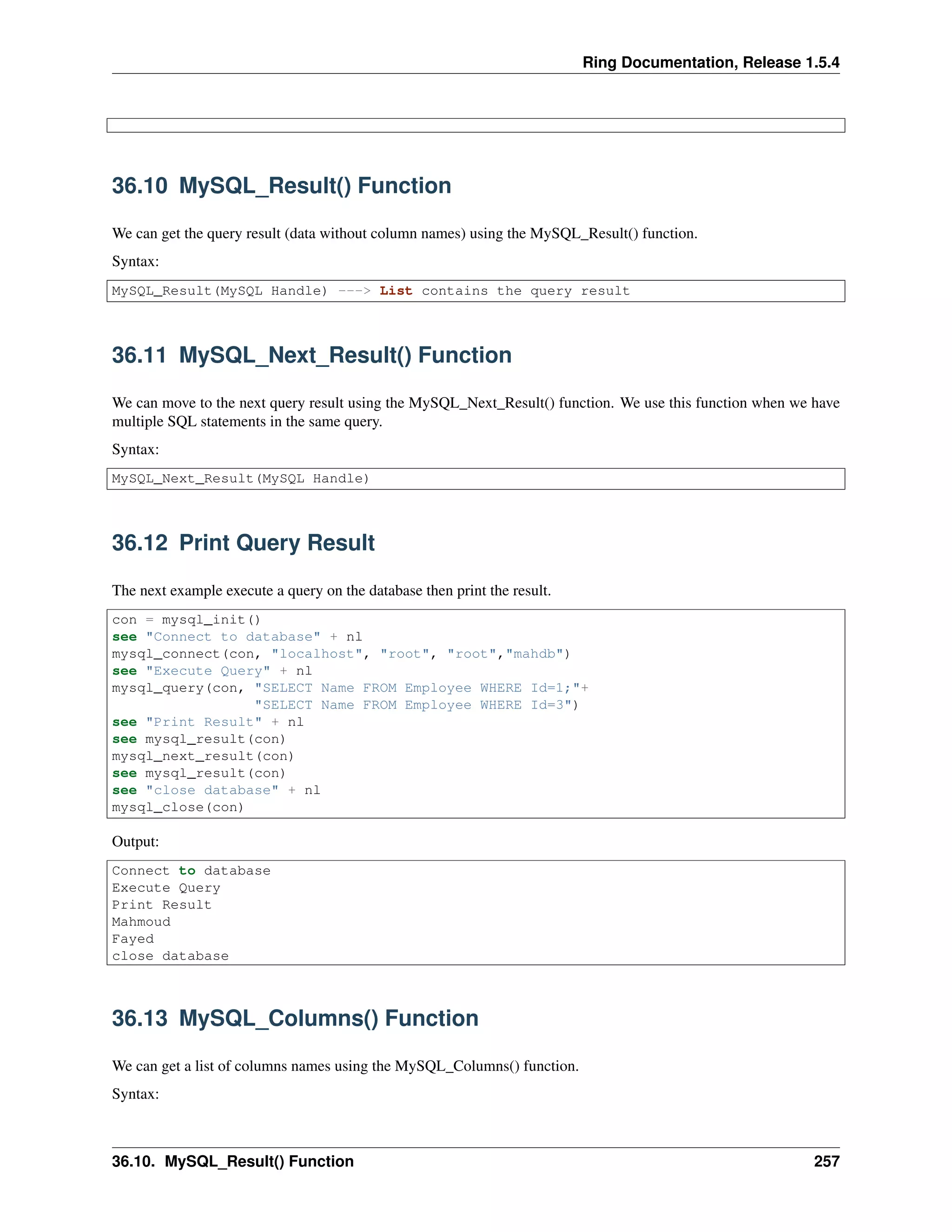
The next example execute a query on the database then print the result.
con = mysql_init()
see "Connect to database" + nl
mysql_connect(con, "localhost", "root", "root","mahdb")
see "Execute Query" + nl
mysql_query(con, "SELECT Name FROM Employee WHERE Id=1;"+
"SELECT Name FROM Employee WHERE Id=3")
see "Print Result" + nl
see mysql_result(con)
mysql_next_result(con)
see mysql_result(con)
see "close database" + nl
mysql_close(con)
Output:
Connect to database
Execute Query
Print Result
Mahmoud
Fayed
close database
36.13 MySQL_Columns() Function
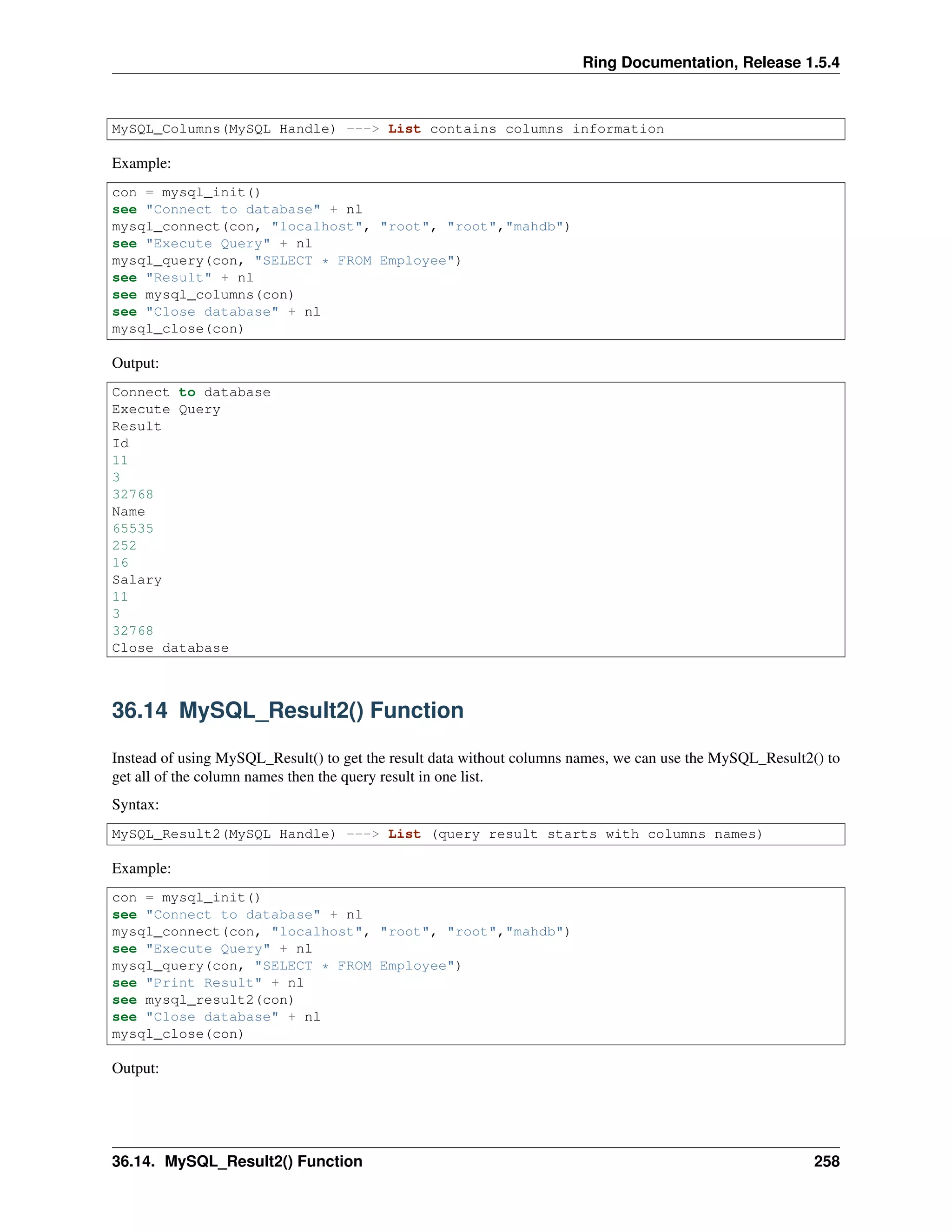
We can get a list of columns names using the MySQL_Columns() function.
Syntax:
36.10. MySQL_Result() Function 257
Ring Documentation, Release 1.5.4
MySQL_Columns(MySQL Handle) ---> List contains columns information
Example:
con = mysql_init()
see "Connect to database" + nl
mysql_connect(con, "localhost", "root", "root","mahdb")
see "Execute Query" + nl
mysql_query(con, "SELECT * FROM Employee")
see "Result" + nl
see mysql_columns(con)
see "Close database" + nl
mysql_close(con)
Output:
Connect to database
Execute Query
Result
Id
11
3
32768
Name
65535
252
16
Salary
11
3
32768
Close database
36.14 MySQL_Result2() Function
Instead of using MySQL_Result() to get the result data without columns names, we can use the MySQL_Result2() to
get all of the column names then the query result in one list.
Syntax:
MySQL_Result2(MySQL Handle) ---> List (query result starts with columns names)
Example:
con = mysql_init()
see "Connect to database" + nl
mysql_connect(con, "localhost", "root", "root","mahdb")
see "Execute Query" + nl
mysql_query(con, "SELECT * FROM Employee")
see "Print Result" + nl
see mysql_result2(con)
see "Close database" + nl
mysql_close(con)
Output:
36.14. MySQL_Result2() Function 258
Ring Documentation, Release 1.5.4
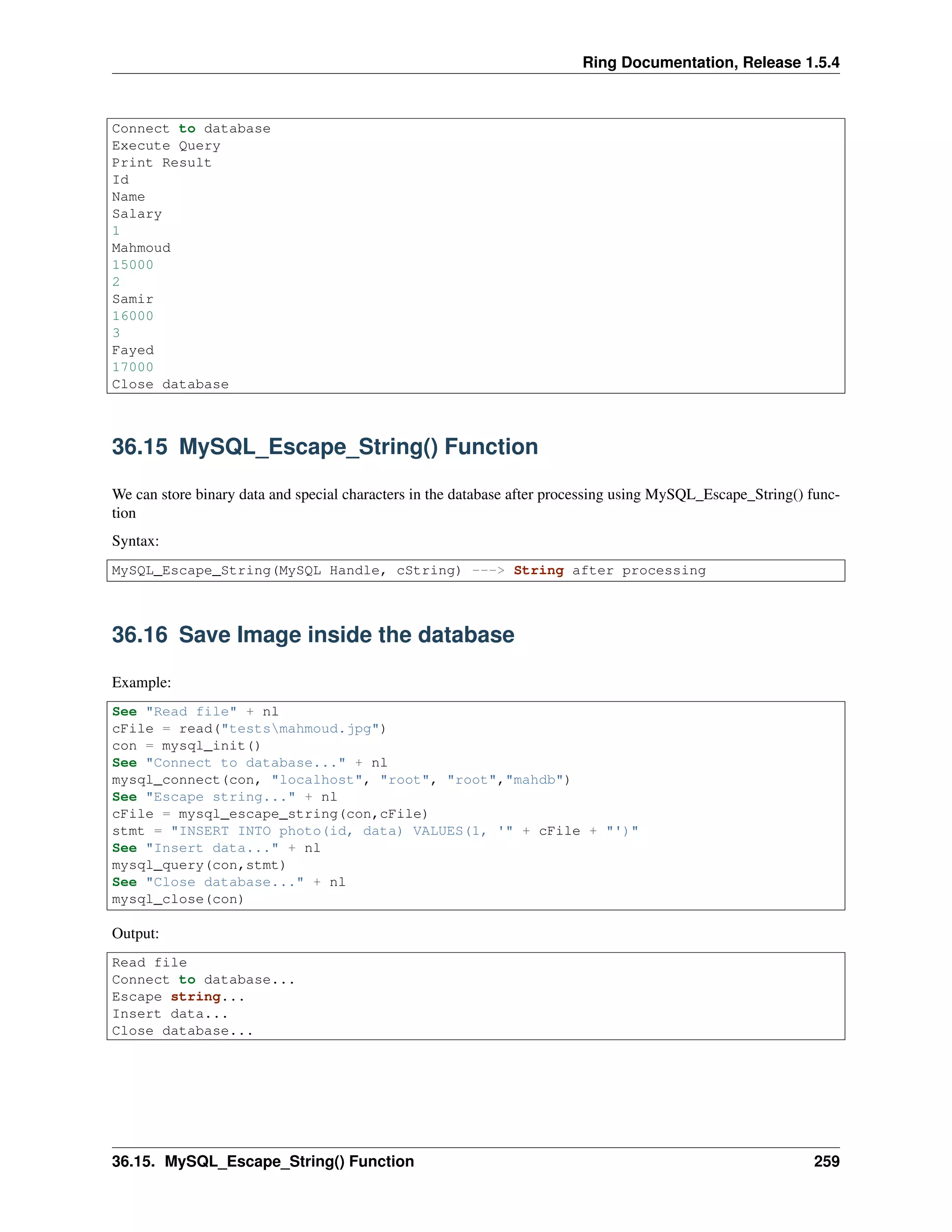
Connect to database
Execute Query
Print Result
Id
Name
Salary
1
Mahmoud
15000
2
Samir
16000
3
Fayed
17000
Close database
36.15 MySQL_Escape_String() Function
We can store binary data and special characters in the database after processing using MySQL_Escape_String() func-
tion
Syntax:
MySQL_Escape_String(MySQL Handle, cString) ---> String after processing
36.16 Save Image inside the database
Example:
See "Read file" + nl
cFile = read("testsmahmoud.jpg")
con = mysql_init()
See "Connect to database..." + nl
mysql_connect(con, "localhost", "root", "root","mahdb")
See "Escape string..." + nl
cFile = mysql_escape_string(con,cFile)
stmt = "INSERT INTO photo(id, data) VALUES(1, '" + cFile + "')"
See "Insert data..." + nl
mysql_query(con,stmt)
See "Close database..." + nl
mysql_close(con)
Output:
Read file
Connect to database...
Escape string...
Insert data...
Close database...
36.15. MySQL_Escape_String() Function 259
Ring Documentation, Release 1.5.4
36.17 Restore Image From The Database
Example:
con = mysql_init()
See "Connect to database..." + nl
mysql_connect(con, "localhost", "root", "root","mahdb")
See "Read data from database..." + nl
mysql_query(con,"SELECT data FROM photo WHERE id=1")
See "Write new file" + nl
result = mysql_result(con)
write("testsmahmoud2.jpg",result[1][1])
See "Close database..." + nl
mysql_close(con)
Output:
Connect to database...
Read data from database...
Write new file
Close database...
36.18 MySQL_AutoCommit() Function
We can enable or disable the auto commit feature using the MySQL_AutoCommit() function.
Syntax:
MySQL_AutoCommit(MySQL Handle, lStatus) # lstatus can be True/False
36.19 MySQL_Commit() Function
We can commit updates to the database using the MySQL_Commit() function.
Syntax:
MySQL_Commit(MySQL Handle)
36.20 MySQL_Rollback() Function
We can rollback updates to the database using the MySQL_Rollback() function.
Syntax:
MySQL_Rollback(MySQL Handle)
36.21 Transaction Example
The next example presents the usage of MySQL_Autocommit(), MySQL_Commit() & MySQL_RollBack() functions.
Example:
36.17. Restore Image From The Database 260
Ring Documentation, Release 1.5.4
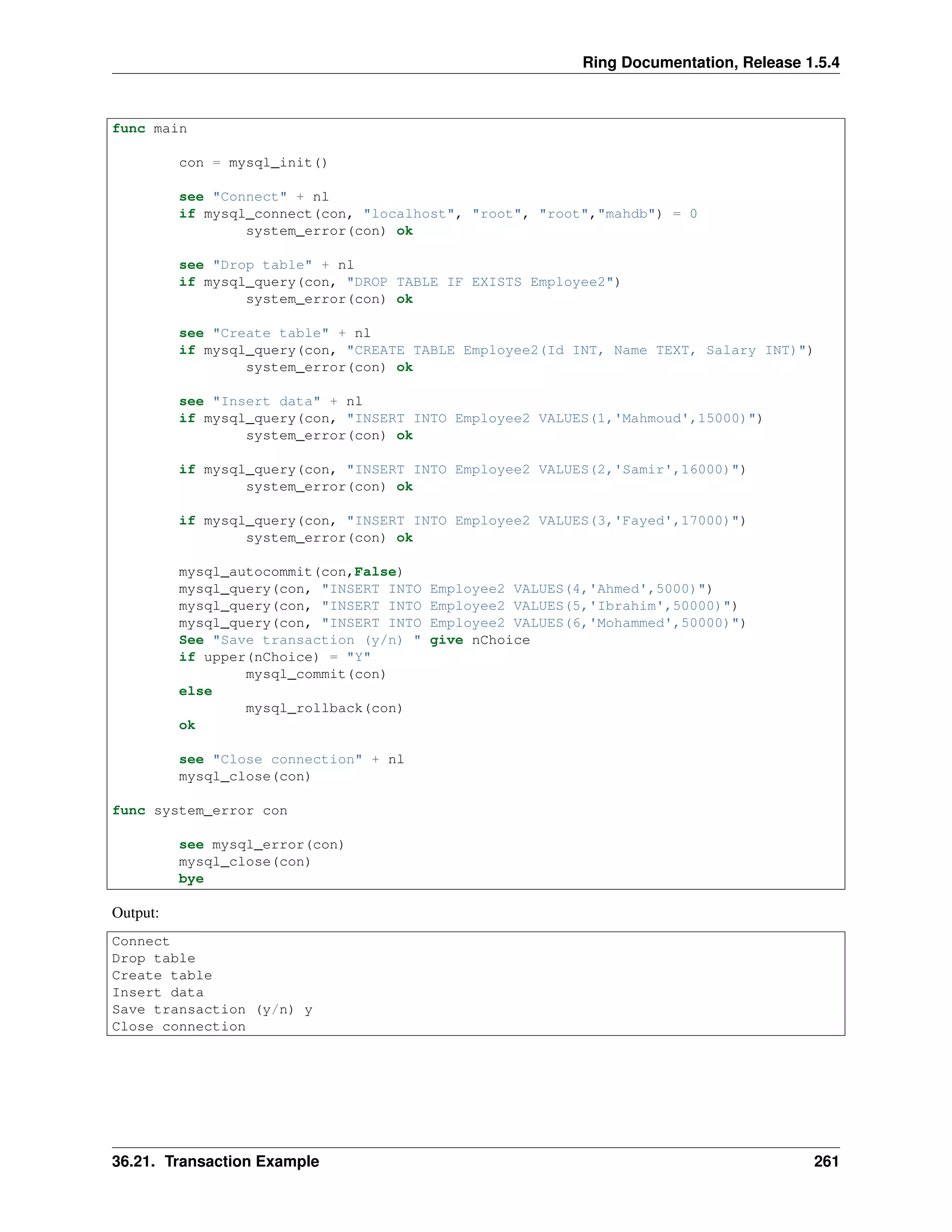
func main
con = mysql_init()
see "Connect" + nl
if mysql_connect(con, "localhost", "root", "root","mahdb") = 0
system_error(con) ok
see "Drop table" + nl
if mysql_query(con, "DROP TABLE IF EXISTS Employee2")
system_error(con) ok
see "Create table" + nl
if mysql_query(con, "CREATE TABLE Employee2(Id INT, Name TEXT, Salary INT)")
system_error(con) ok
see "Insert data" + nl
if mysql_query(con, "INSERT INTO Employee2 VALUES(1,'Mahmoud',15000)")
system_error(con) ok
if mysql_query(con, "INSERT INTO Employee2 VALUES(2,'Samir',16000)")
system_error(con) ok
if mysql_query(con, "INSERT INTO Employee2 VALUES(3,'Fayed',17000)")
system_error(con) ok
mysql_autocommit(con,False)
mysql_query(con, "INSERT INTO Employee2 VALUES(4,'Ahmed',5000)")
mysql_query(con, "INSERT INTO Employee2 VALUES(5,'Ibrahim',50000)")
mysql_query(con, "INSERT INTO Employee2 VALUES(6,'Mohammed',50000)")
See "Save transaction (y/n) " give nChoice
if upper(nChoice) = "Y"
mysql_commit(con)
else
mysql_rollback(con)
ok
see "Close connection" + nl
mysql_close(con)
func system_error con
see mysql_error(con)
mysql_close(con)
bye
Output:
Connect
Drop table
Create table
Insert data
Save transaction (y/n) y
Close connection
36.21. Transaction Example 261
CHAPTER
THIRTYSEVEN
SQLITE FUNCTIONS
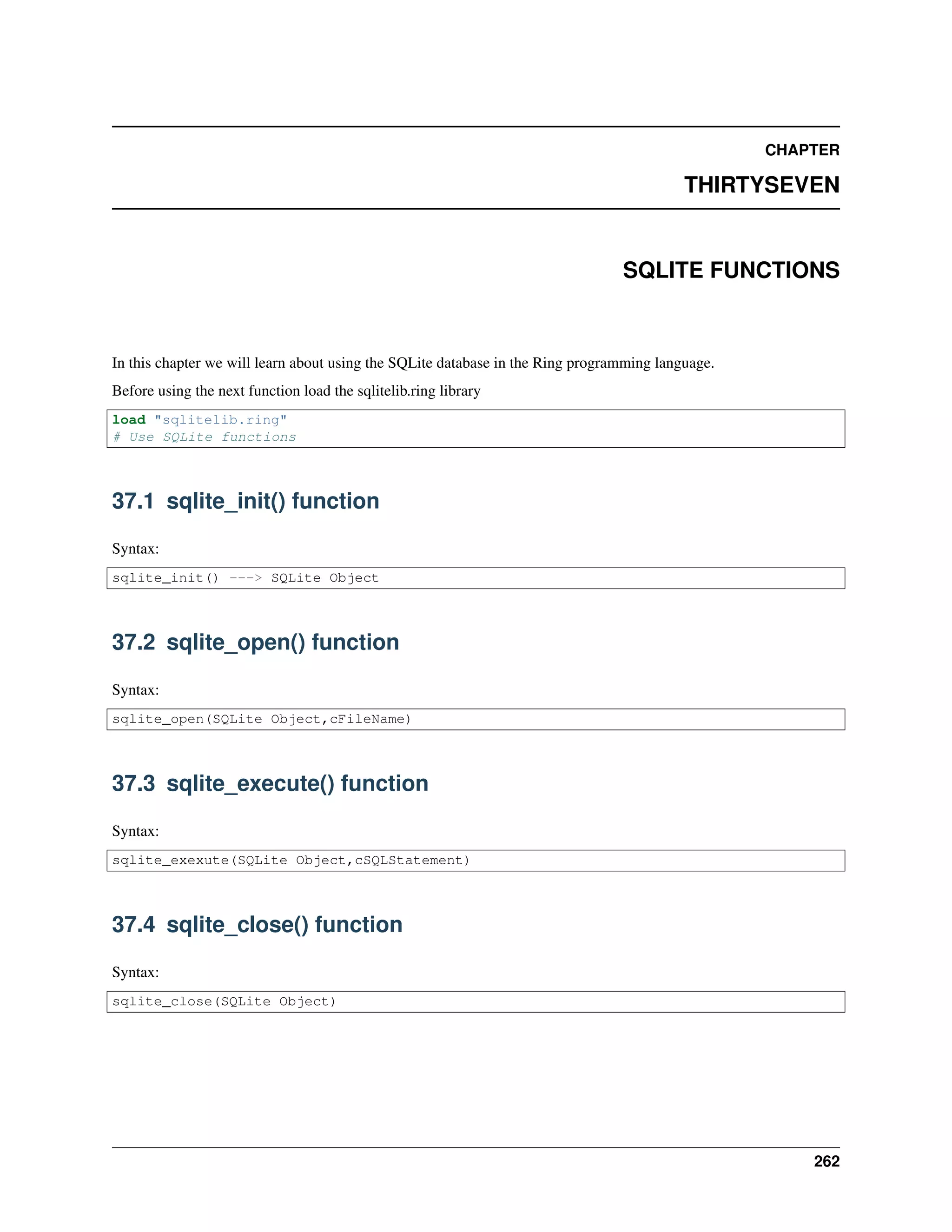
In this chapter we will learn about using the SQLite database in the Ring programming language.
Before using the next function load the sqlitelib.ring library
load "sqlitelib.ring"
# Use SQLite functions
37.1 sqlite_init() function
Syntax:
sqlite_init() ---> SQLite Object
37.2 sqlite_open() function
Syntax:
sqlite_open(SQLite Object,cFileName)
37.3 sqlite_execute() function
Syntax:
sqlite_exexute(SQLite Object,cSQLStatement)
37.4 sqlite_close() function
Syntax:
sqlite_close(SQLite Object)
262
Ring Documentation, Release 1.5.4
37.5 Example
The next code create a SQLite database, add new records then display the data.
oSQLite = sqlite_init()
sqlite_open(oSQLite,"mytest.db")
sql = "CREATE TABLE COMPANY(" +
"ID INT PRIMARY KEY NOT NULL," +
"NAME TEXT NOT NULL," +
"AGE INT NOT NULL," +
"ADDRESS CHAR(50)," +
"SALARY REAL );"
sqlite_execute(oSQLite,sql)
sql = "INSERT INTO COMPANY (ID,NAME,AGE,ADDRESS,SALARY) " +
"VALUES (1, 'Mahmoud', 29, 'Jeddah', 20000.00 ); " +
"INSERT INTO COMPANY (ID,NAME,AGE,ADDRESS,SALARY) " +
"VALUES (2, 'Ahmed', 27, 'Jeddah', 15000.00 ); " +
"INSERT INTO COMPANY (ID,NAME,AGE,ADDRESS,SALARY)" +
"VALUES (3, 'Mohammed', 31, 'Egypt', 20000.00 );" +
"INSERT INTO COMPANY (ID,NAME,AGE,ADDRESS,SALARY)" +
"VALUES (4, 'Ibrahim', 24, 'Egypt ', 65000.00 );"
sqlite_execute(oSQLite,sql)
aResult = sqlite_execute(oSQLite,"select * from COMPANY")
for x in aResult
for t in x
see t[2] + nl
next
next
see copy("*",50) + nl
for x in aResult
see x["name"] + nl
next
sqlite_close(oSQLite)
Output:
1
Mahmoud
29
Jeddah
20000.0
2
Ahmed
27
Jeddah
15000.0
3
Mohammed
31
Egypt
20000.0
4
37.5. Example 263
Ring Documentation, Release 1.5.4
Ibrahim
24
Egypt
65000.0
**************************************************
Mahmoud
Ahmed
Mohammed
Ibrahim
37.5. Example 264

The Ring programming language version 1.5.4 book - Part 29 of 185

  • 1.
    Ring Documentation, Release1.5.4 36.7 Create Database The next example connect to MySQL Server then create new database. See "MySQL Test - Create Database" + nl con = mysql_init() See "Connect" + nl if mysql_connect(con,"localhost","root","root") = 0 see "Cann't connect" + nl see "Error : " + mysql_error(con) + nl mysql_close(con) bye ok See "Create Database..." + nl mysql_query(con,"CREATE DATABASE mahdb") See "Close Connection" + nl mysql_close(con) Output: MySQL Test - Create Database Connect Create Database... Close Connection 36.8 Create Table and Insert Data The next example create new table and insert records func main see "Create Table and Insert Records" + nl con = mysql_init() see "Connect" + nl if mysql_connect(con, "localhost", "root", "root","mahdb") = 0 system_error(con) ok see "Drop table" + nl if mysql_query(con, "DROP TABLE IF EXISTS Employee") system_error(con) ok see "Create table" + nl if mysql_query(con, "CREATE TABLE Employee(Id INT, Name TEXT, Salary INT)") system_error(con) ok see "Insert data" + nl if mysql_query(con, "INSERT INTO Employee VALUES(1,'Mahmoud',15000)") system_error(con) ok if mysql_query(con, "INSERT INTO Employee VALUES(2,'Samir',16000)") system_error(con) ok if mysql_query(con, "INSERT INTO Employee VALUES(3,'Fayed',17000)") 36.7. Create Database 255
  • 2.
    Ring Documentation, Release1.5.4 system_error(con) ok see "Close connection" + nl mysql_close(con) func system_error con see mysql_error(con) mysql_close(con) bye Output: Create Table and Insert Records Connect Drop table Create table Insert data Close connection 36.9 MySQL_Insert_ID() Function We can get the inserted row id using the MySQL_Insert_ID() function Syntax: MySQL_Insert_ID() ---> Inserted row id as number Example: con = mysql_init() see "connect to database" + nl mysql_connect(con,"localhost","root","root","mahdb") see "drop table" + nl mysql_query(con, "DROP TABLE IF EXISTS Customers") see "create table" + nl mysql_query(con, "CREATE TABLE Customers(Id INT PRIMARY KEY AUTO_INCREMENT, Name TEXT)") see "insert record" + nl mysql_query(con, "INSERT INTO Customers(Name) VALUES('Mahmoud')") see "insert record" + nl mysql_query(con, "INSERT INTO Customers(Name) VALUES('Samir')") see "insert record" + nl mysql_query(con, "INSERT INTO Customers(Name) VALUES('Fayed')") see "insert record" + nl mysql_query(con, "INSERT INTO Customers(Name) VALUES('Test 2015')") see "inserted row id : " + mysql_insert_id(con) + nl see "close database" + nl mysql_close(con) Output: connect to database drop table create table insert record insert record insert record insert record inserted row id : 4 close database 36.9. MySQL_Insert_ID() Function 256
  • 3.
    Ring Documentation, Release1.5.4 36.10 MySQL_Result() Function We can get the query result (data without column names) using the MySQL_Result() function. Syntax: MySQL_Result(MySQL Handle) ---> List contains the query result 36.11 MySQL_Next_Result() Function We can move to the next query result using the MySQL_Next_Result() function. We use this function when we have multiple SQL statements in the same query. Syntax: MySQL_Next_Result(MySQL Handle) 36.12 Print Query Result The next example execute a query on the database then print the result. con = mysql_init() see "Connect to database" + nl mysql_connect(con, "localhost", "root", "root","mahdb") see "Execute Query" + nl mysql_query(con, "SELECT Name FROM Employee WHERE Id=1;"+ "SELECT Name FROM Employee WHERE Id=3") see "Print Result" + nl see mysql_result(con) mysql_next_result(con) see mysql_result(con) see "close database" + nl mysql_close(con) Output: Connect to database Execute Query Print Result Mahmoud Fayed close database 36.13 MySQL_Columns() Function We can get a list of columns names using the MySQL_Columns() function. Syntax: 36.10. MySQL_Result() Function 257
  • 4.
    Ring Documentation, Release1.5.4 MySQL_Columns(MySQL Handle) ---> List contains columns information Example: con = mysql_init() see "Connect to database" + nl mysql_connect(con, "localhost", "root", "root","mahdb") see "Execute Query" + nl mysql_query(con, "SELECT * FROM Employee") see "Result" + nl see mysql_columns(con) see "Close database" + nl mysql_close(con) Output: Connect to database Execute Query Result Id 11 3 32768 Name 65535 252 16 Salary 11 3 32768 Close database 36.14 MySQL_Result2() Function Instead of using MySQL_Result() to get the result data without columns names, we can use the MySQL_Result2() to get all of the column names then the query result in one list. Syntax: MySQL_Result2(MySQL Handle) ---> List (query result starts with columns names) Example: con = mysql_init() see "Connect to database" + nl mysql_connect(con, "localhost", "root", "root","mahdb") see "Execute Query" + nl mysql_query(con, "SELECT * FROM Employee") see "Print Result" + nl see mysql_result2(con) see "Close database" + nl mysql_close(con) Output: 36.14. MySQL_Result2() Function 258
  • 5.
    Ring Documentation, Release1.5.4 Connect to database Execute Query Print Result Id Name Salary 1 Mahmoud 15000 2 Samir 16000 3 Fayed 17000 Close database 36.15 MySQL_Escape_String() Function We can store binary data and special characters in the database after processing using MySQL_Escape_String() func- tion Syntax: MySQL_Escape_String(MySQL Handle, cString) ---> String after processing 36.16 Save Image inside the database Example: See "Read file" + nl cFile = read("testsmahmoud.jpg") con = mysql_init() See "Connect to database..." + nl mysql_connect(con, "localhost", "root", "root","mahdb") See "Escape string..." + nl cFile = mysql_escape_string(con,cFile) stmt = "INSERT INTO photo(id, data) VALUES(1, '" + cFile + "')" See "Insert data..." + nl mysql_query(con,stmt) See "Close database..." + nl mysql_close(con) Output: Read file Connect to database... Escape string... Insert data... Close database... 36.15. MySQL_Escape_String() Function 259
  • 6.
    Ring Documentation, Release1.5.4 36.17 Restore Image From The Database Example: con = mysql_init() See "Connect to database..." + nl mysql_connect(con, "localhost", "root", "root","mahdb") See "Read data from database..." + nl mysql_query(con,"SELECT data FROM photo WHERE id=1") See "Write new file" + nl result = mysql_result(con) write("testsmahmoud2.jpg",result[1][1]) See "Close database..." + nl mysql_close(con) Output: Connect to database... Read data from database... Write new file Close database... 36.18 MySQL_AutoCommit() Function We can enable or disable the auto commit feature using the MySQL_AutoCommit() function. Syntax: MySQL_AutoCommit(MySQL Handle, lStatus) # lstatus can be True/False 36.19 MySQL_Commit() Function We can commit updates to the database using the MySQL_Commit() function. Syntax: MySQL_Commit(MySQL Handle) 36.20 MySQL_Rollback() Function We can rollback updates to the database using the MySQL_Rollback() function. Syntax: MySQL_Rollback(MySQL Handle) 36.21 Transaction Example The next example presents the usage of MySQL_Autocommit(), MySQL_Commit() & MySQL_RollBack() functions. Example: 36.17. Restore Image From The Database 260
  • 7.
    Ring Documentation, Release1.5.4 func main con = mysql_init() see "Connect" + nl if mysql_connect(con, "localhost", "root", "root","mahdb") = 0 system_error(con) ok see "Drop table" + nl if mysql_query(con, "DROP TABLE IF EXISTS Employee2") system_error(con) ok see "Create table" + nl if mysql_query(con, "CREATE TABLE Employee2(Id INT, Name TEXT, Salary INT)") system_error(con) ok see "Insert data" + nl if mysql_query(con, "INSERT INTO Employee2 VALUES(1,'Mahmoud',15000)") system_error(con) ok if mysql_query(con, "INSERT INTO Employee2 VALUES(2,'Samir',16000)") system_error(con) ok if mysql_query(con, "INSERT INTO Employee2 VALUES(3,'Fayed',17000)") system_error(con) ok mysql_autocommit(con,False) mysql_query(con, "INSERT INTO Employee2 VALUES(4,'Ahmed',5000)") mysql_query(con, "INSERT INTO Employee2 VALUES(5,'Ibrahim',50000)") mysql_query(con, "INSERT INTO Employee2 VALUES(6,'Mohammed',50000)") See "Save transaction (y/n) " give nChoice if upper(nChoice) = "Y" mysql_commit(con) else mysql_rollback(con) ok see "Close connection" + nl mysql_close(con) func system_error con see mysql_error(con) mysql_close(con) bye Output: Connect Drop table Create table Insert data Save transaction (y/n) y Close connection 36.21. Transaction Example 261
  • 8.
    CHAPTER THIRTYSEVEN SQLITE FUNCTIONS In thischapter we will learn about using the SQLite database in the Ring programming language. Before using the next function load the sqlitelib.ring library load "sqlitelib.ring" # Use SQLite functions 37.1 sqlite_init() function Syntax: sqlite_init() ---> SQLite Object 37.2 sqlite_open() function Syntax: sqlite_open(SQLite Object,cFileName) 37.3 sqlite_execute() function Syntax: sqlite_exexute(SQLite Object,cSQLStatement) 37.4 sqlite_close() function Syntax: sqlite_close(SQLite Object) 262
  • 9.
    Ring Documentation, Release1.5.4 37.5 Example The next code create a SQLite database, add new records then display the data. oSQLite = sqlite_init() sqlite_open(oSQLite,"mytest.db") sql = "CREATE TABLE COMPANY(" + "ID INT PRIMARY KEY NOT NULL," + "NAME TEXT NOT NULL," + "AGE INT NOT NULL," + "ADDRESS CHAR(50)," + "SALARY REAL );" sqlite_execute(oSQLite,sql) sql = "INSERT INTO COMPANY (ID,NAME,AGE,ADDRESS,SALARY) " + "VALUES (1, 'Mahmoud', 29, 'Jeddah', 20000.00 ); " + "INSERT INTO COMPANY (ID,NAME,AGE,ADDRESS,SALARY) " + "VALUES (2, 'Ahmed', 27, 'Jeddah', 15000.00 ); " + "INSERT INTO COMPANY (ID,NAME,AGE,ADDRESS,SALARY)" + "VALUES (3, 'Mohammed', 31, 'Egypt', 20000.00 );" + "INSERT INTO COMPANY (ID,NAME,AGE,ADDRESS,SALARY)" + "VALUES (4, 'Ibrahim', 24, 'Egypt ', 65000.00 );" sqlite_execute(oSQLite,sql) aResult = sqlite_execute(oSQLite,"select * from COMPANY") for x in aResult for t in x see t[2] + nl next next see copy("*",50) + nl for x in aResult see x["name"] + nl next sqlite_close(oSQLite) Output: 1 Mahmoud 29 Jeddah 20000.0 2 Ahmed 27 Jeddah 15000.0 3 Mohammed 31 Egypt 20000.0 4 37.5. Example 263
  • 10.
    Ring Documentation, Release1.5.4 Ibrahim 24 Egypt 65000.0 ************************************************** Mahmoud Ahmed Mohammed Ibrahim 37.5. Example 264