The Path to Personalization 
Roundtable 
May 21, 2014
Intros 
Derek 
Phillips 
Content Strategy Lead 
@digistrategist 
Amanda 
Bernard 
Director Digital Marketing 
@amandabernard 
Barbara 
Holmes 
Director User Experience 
@volleyballbarb
Agenda 
• 
What is personalization? 
• 
What is the value? 
• 
How do you start? 
• 
Group discussion 
– 
Issues, opportunities, challenges 
• 
Your feedback
WHAT IS PERSONALIZATION? 
The Path to Personalization
• 
Definition 
– 
(adj) individualized, made for or directed or adjusted to a particular individual: "personalized luggage"; "personalized advice”; “personalized experience” 
What Is Personalization? 
For our purposes, as delivered via a content management system (CMS) or another 3rd party tool
Personalization Spectrum 
Classic 
2014 
Anonymous Browsing 
Logged in User 
Implicit Personalization 
Self Identification 
Positively Identified 
Logged in User 
Detected without user’s input 
User provides info through navigation paths or choices 
User identified & remembered 
Implicit 
Explicit 
Information tailored to user
Common Methods of Detection 
• 
Geography 
• 
Site browsing behavior 
• 
Referring site or inbound channel 
• 
Simple/full self-identification 
• 
Device type 
• 
IP lookup combined with “firmographics” data to identify prospect’s company 
• 
Campaign funnel
WHAT IS THE VALUE? 
The Path to Personalization
What Is the Value to a Brand? 
• 
Brand affinity 
• 
Customer insights 
• 
Revenue 
• 
Support 
• 
Service design
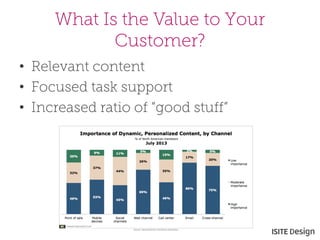
What Is the Value to Your Customer? 
• 
Relevant content 
• 
Focused task support 
• 
Increased ratio of “good stuff”
But… 
Companies need to show the VALUE of sharing information to create personalized experiences. 
• 
57% are OK with providing personal information on a website as long as it’s for their benefit and being used in responsible ways. 
• 
77% would trust businesses more if they explained how they’re using personal information to improve their online experience.
Personalization in Action 
Potential for Discovery 
The opportunities for both listener and musician have been revolutionized by the Internet…. –Billy Bragg 
Source: http://www.musictank.co.uk/blog/billy- bragg-on-streaming-debate
Personalization in Action 
Slingshot shows restraint in how and when they use personalized messaging. 
Using Segmentation to Increase Relevancy 
Slingshot SEO also segmented its email list to only send to those who hadn't already downloaded the calendar on their own. 
Know who and what you should leave out of your email. 
Source: http://litmus.com/blog/slingshot-seo-inspires-with- personalization-relevancy
Personalization in Action 
Provide Value 
I got this email reminding me of a product feature I didn't know existed (or just forgot about), but makes my experience using Dropbox infinitely better and more efficient. 
Source: http://blog.hubspot.com/blog/tabid/6307/bid/34146/7- Excellent-Examples-of-Email-Personalization-in-Action.aspx 
Dropbox recognized a behavior and highlighted a service that supports that user need.
What Happens When It Goes Wrong?
Examples 
Relevancy to the User 
What’s the simple lesson here? If you’re asking your customers to take the time to volunteer information, then use it — and use it appropriately. 
If creating effective personalization is beyond your budget or expertise, then it’s better to not even try. 
Source: http://blog.fluencymedia.com/b2c-email- marketing-fail/#sthash.gqCpEcNi.dpuf
Examples 
The recipient’s mother, Ann (who is named in the email), died six months previously. 
The Dangers of Assuming 
I guess you can say my wife should have just gone into her ProFlowers address book and removed my mother’s information — and her grandmother’s, too. But anyone who has lost a family member knows how hard it is to delete their names from anything. 
Source: http://multichannelmerchant.com/marketing/proflowers- personalization-fail-20112013/
HOW DO YOU START? 
The Path to Personalization
The Mindset 
• 
80% thinking and planning 
• 
20% pulling the levers and implementing 
• 
Always be testing, optimizing and measuring the return
What Is Required? 
• 
Organizational readiness 
• 
Content strategy 
• 
User experience design 
• 
Measurement & optimization 
• 
Marketing technology
Organization Readiness 
• 
Senior leaders as active stakeholders 
• 
Access to customer data 
• 
Have a “Team Content” (or ready to build a team) 
• 
Technology is in place or ready to be purchased
Content Strategy 
• 
Understanding of content creation process and governance 
• 
Content mapping to personas and/or campaigns 
• 
Content tagging 
• 
Resources! 
– 
Personalization requires lots of content
Content Development 
Implications 
Content Audience 
Low Broad 
High Narrow
User Experience 
• 
Understanding of key audiences (personas and customer research) 
• 
Understanding of most relevant content 
• 
Determine meaningful personalization 
• 
Mapping of customer lifecycle/journey
UX Guidelines 
• 
Be transparent about the personalization to gain trust 
• 
Limit audience segments in order to be manageable 
• 
Be sure to have default content that’s not personalized 
• 
Be consistent
Measurement & Optimization 
• 
Business objectives, digital goals, KPIs, desired outcomes 
• 
Engagement valuation by content type or persona type 
• 
Marketing funnels and inbound channels 
• 
Audience segmentation 
• 
Engagement, lead generation and acquisition initiatives 
• 
Optimization testing and data analysis 
• 
Performance reporting
Marketing Technology 
• 
Tools are important 
• 
Choose the one(s) that meet your strategy and user experience vision 
• 
Design and develop to support rapid testing 
• 
Plan for change
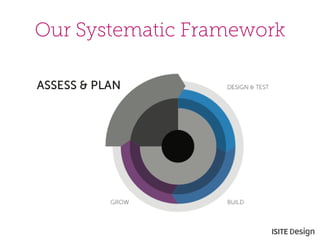
Our Systematic Framework
GROUP DISCUSSION 
The Path to Personalization
LET’S TALK ABOUT… 
The Path to Personalization
What is the potential value of personalization to your customers?
What problem(s) could personalization help solve in your organization?
What are the challenges you are currently facing or will face?
Remember… 
• 
Crawl, walk, run. 
• 
Be strategic! Don’t just buy a tool and press play. 
• 
Test first, then implement. 
• 
Measure ROI and evaluate personalization based on company success metrics. 
• 
Use a roadmap to tie together all personalization opportunities and effectively sequence the roll out.
Upcoming Webinar 
• 
In June, we’re doing a webinar briefing on this topic. We hope you and your colleagues will join us! 
– 
June 10th, 2014 at 11am PDT 
• 
If you’d like to attend, please sign up online at http://cx.isitedesign.com/briefing/personalization
THANK YOU! 
The Path to Personalization

The pathtopersonalization isite_5212014

  • 1.
    The Path toPersonalization Roundtable May 21, 2014
  • 2.
    Intros Derek Phillips Content Strategy Lead @digistrategist Amanda Bernard Director Digital Marketing @amandabernard Barbara Holmes Director User Experience @volleyballbarb
  • 3.
    Agenda • Whatis personalization? • What is the value? • How do you start? • Group discussion – Issues, opportunities, challenges • Your feedback
  • 4.
    WHAT IS PERSONALIZATION? The Path to Personalization
  • 5.
    • Definition – (adj) individualized, made for or directed or adjusted to a particular individual: "personalized luggage"; "personalized advice”; “personalized experience” What Is Personalization? For our purposes, as delivered via a content management system (CMS) or another 3rd party tool
  • 6.
    Personalization Spectrum Classic 2014 Anonymous Browsing Logged in User Implicit Personalization Self Identification Positively Identified Logged in User Detected without user’s input User provides info through navigation paths or choices User identified & remembered Implicit Explicit Information tailored to user
  • 7.
    Common Methods ofDetection • Geography • Site browsing behavior • Referring site or inbound channel • Simple/full self-identification • Device type • IP lookup combined with “firmographics” data to identify prospect’s company • Campaign funnel
  • 8.
    WHAT IS THEVALUE? The Path to Personalization
  • 9.
    What Is theValue to a Brand? • Brand affinity • Customer insights • Revenue • Support • Service design
  • 10.
    What Is theValue to Your Customer? • Relevant content • Focused task support • Increased ratio of “good stuff”
  • 11.
    But… Companies needto show the VALUE of sharing information to create personalized experiences. • 57% are OK with providing personal information on a website as long as it’s for their benefit and being used in responsible ways. • 77% would trust businesses more if they explained how they’re using personal information to improve their online experience.
  • 12.
    Personalization in Action Potential for Discovery The opportunities for both listener and musician have been revolutionized by the Internet…. –Billy Bragg Source: http://www.musictank.co.uk/blog/billy- bragg-on-streaming-debate
  • 13.
    Personalization in Action Slingshot shows restraint in how and when they use personalized messaging. Using Segmentation to Increase Relevancy Slingshot SEO also segmented its email list to only send to those who hadn't already downloaded the calendar on their own. Know who and what you should leave out of your email. Source: http://litmus.com/blog/slingshot-seo-inspires-with- personalization-relevancy
  • 14.
    Personalization in Action Provide Value I got this email reminding me of a product feature I didn't know existed (or just forgot about), but makes my experience using Dropbox infinitely better and more efficient. Source: http://blog.hubspot.com/blog/tabid/6307/bid/34146/7- Excellent-Examples-of-Email-Personalization-in-Action.aspx Dropbox recognized a behavior and highlighted a service that supports that user need.
  • 15.
    What Happens WhenIt Goes Wrong?
  • 16.
    Examples Relevancy tothe User What’s the simple lesson here? If you’re asking your customers to take the time to volunteer information, then use it — and use it appropriately. If creating effective personalization is beyond your budget or expertise, then it’s better to not even try. Source: http://blog.fluencymedia.com/b2c-email- marketing-fail/#sthash.gqCpEcNi.dpuf
  • 17.
    Examples The recipient’smother, Ann (who is named in the email), died six months previously. The Dangers of Assuming I guess you can say my wife should have just gone into her ProFlowers address book and removed my mother’s information — and her grandmother’s, too. But anyone who has lost a family member knows how hard it is to delete their names from anything. Source: http://multichannelmerchant.com/marketing/proflowers- personalization-fail-20112013/
  • 18.
    HOW DO YOUSTART? The Path to Personalization
  • 19.
    The Mindset • 80% thinking and planning • 20% pulling the levers and implementing • Always be testing, optimizing and measuring the return
  • 20.
    What Is Required? • Organizational readiness • Content strategy • User experience design • Measurement & optimization • Marketing technology
  • 21.
    Organization Readiness • Senior leaders as active stakeholders • Access to customer data • Have a “Team Content” (or ready to build a team) • Technology is in place or ready to be purchased
  • 22.
    Content Strategy • Understanding of content creation process and governance • Content mapping to personas and/or campaigns • Content tagging • Resources! – Personalization requires lots of content
  • 23.
    Content Development Implications Content Audience Low Broad High Narrow
  • 24.
    User Experience • Understanding of key audiences (personas and customer research) • Understanding of most relevant content • Determine meaningful personalization • Mapping of customer lifecycle/journey
  • 25.
    UX Guidelines • Be transparent about the personalization to gain trust • Limit audience segments in order to be manageable • Be sure to have default content that’s not personalized • Be consistent
  • 26.
    Measurement & Optimization • Business objectives, digital goals, KPIs, desired outcomes • Engagement valuation by content type or persona type • Marketing funnels and inbound channels • Audience segmentation • Engagement, lead generation and acquisition initiatives • Optimization testing and data analysis • Performance reporting
  • 27.
    Marketing Technology • Tools are important • Choose the one(s) that meet your strategy and user experience vision • Design and develop to support rapid testing • Plan for change
  • 28.
  • 29.
    GROUP DISCUSSION ThePath to Personalization
  • 30.
    LET’S TALK ABOUT… The Path to Personalization
  • 31.
    What is thepotential value of personalization to your customers?
  • 32.
    What problem(s) couldpersonalization help solve in your organization?
  • 33.
    What are thechallenges you are currently facing or will face?
  • 34.
    Remember… • Crawl,walk, run. • Be strategic! Don’t just buy a tool and press play. • Test first, then implement. • Measure ROI and evaluate personalization based on company success metrics. • Use a roadmap to tie together all personalization opportunities and effectively sequence the roll out.
  • 35.
    Upcoming Webinar • In June, we’re doing a webinar briefing on this topic. We hope you and your colleagues will join us! – June 10th, 2014 at 11am PDT • If you’d like to attend, please sign up online at http://cx.isitedesign.com/briefing/personalization
  • 36.
    THANK YOU! ThePath to Personalization