THE FLEXIBILITY OF
DRUPAL 8
MIKE MILES
Genuine ( )wearegenuine.com
All the internet places: mikemiles86
FLEXIBLITY
WHAT MAKES DRUPAL FLEXIBLE
Modular design
Decoupled systems
Open Source nature
WHY FLEXIBLITY IS IMPORTANT
Make Drupal do what you want
No "right way", just a "right for me" way
Adjust for skillsets, time and budget
THREE AREAS OF FLEXIBILITY
The Interface
Display Layer
Data Layer
FOCUS OF THIS SESSION
To prove the flexiblity of Drupal
To demostrate abilities of all skillsets
To discuss considerations and limitations
THE DEMO
Drupal 8.1.3
Standard Install Profile
Change menu tabs using 8 different methods
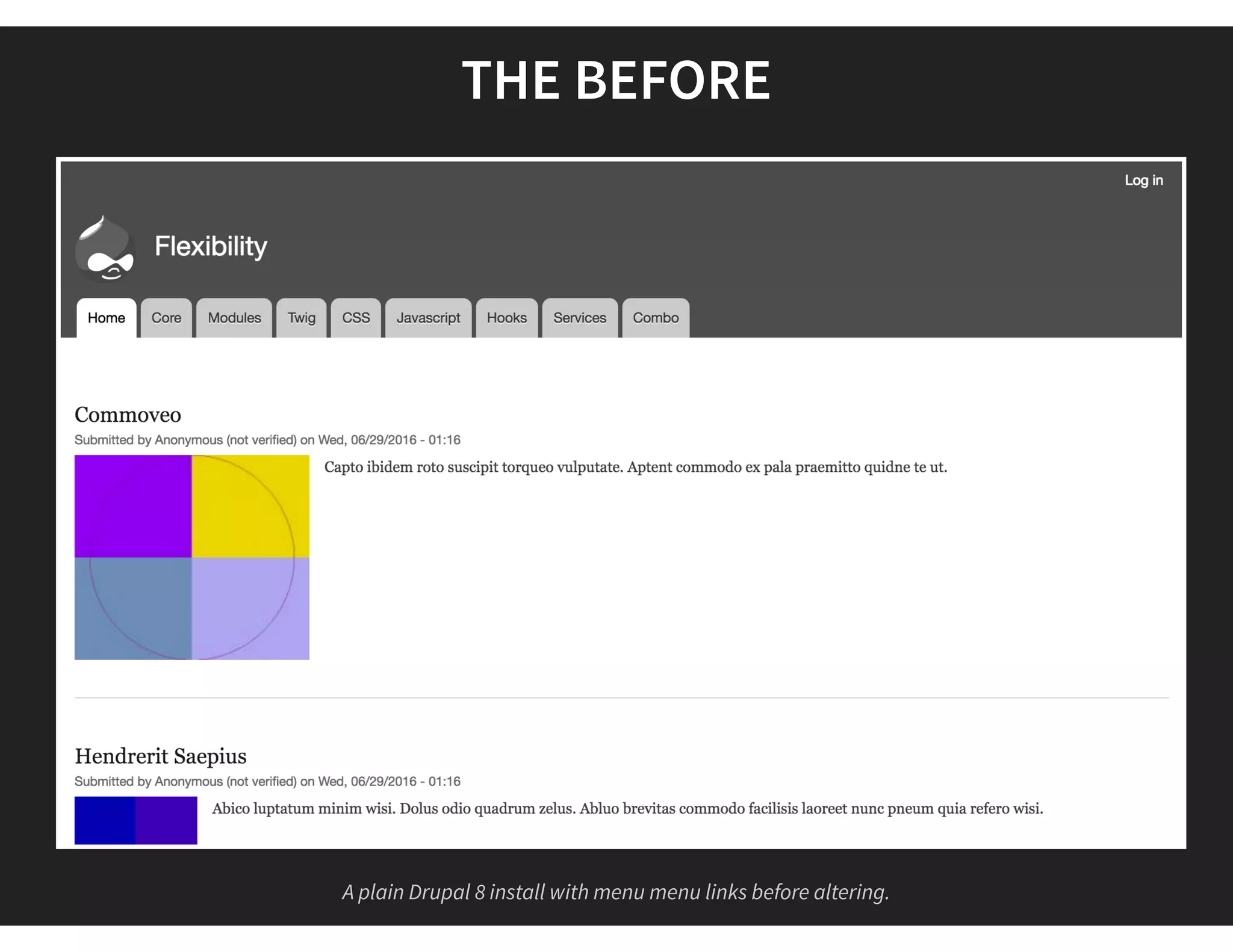
THE BEFORE
A plain Drupal 8 install with menu menu links before altering.
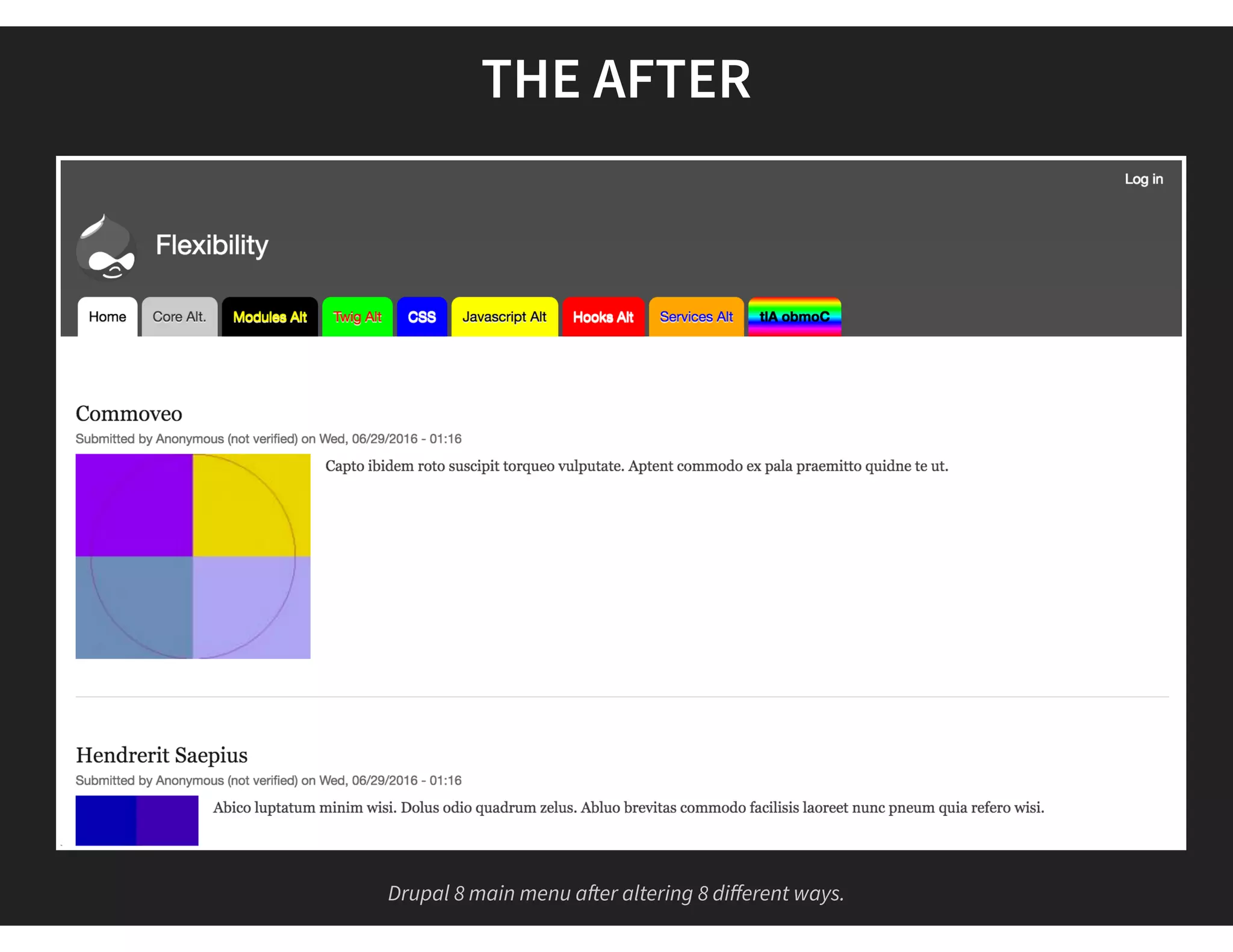
THE AFTER
Drupal 8 main menu a er altering 8 different ways.
#1 DRUPAL CORE
THE "CLICKING BUTTONS" METHOD
"Easy" and "Quick"
Little to No dev skills needed
Capabilities are limited
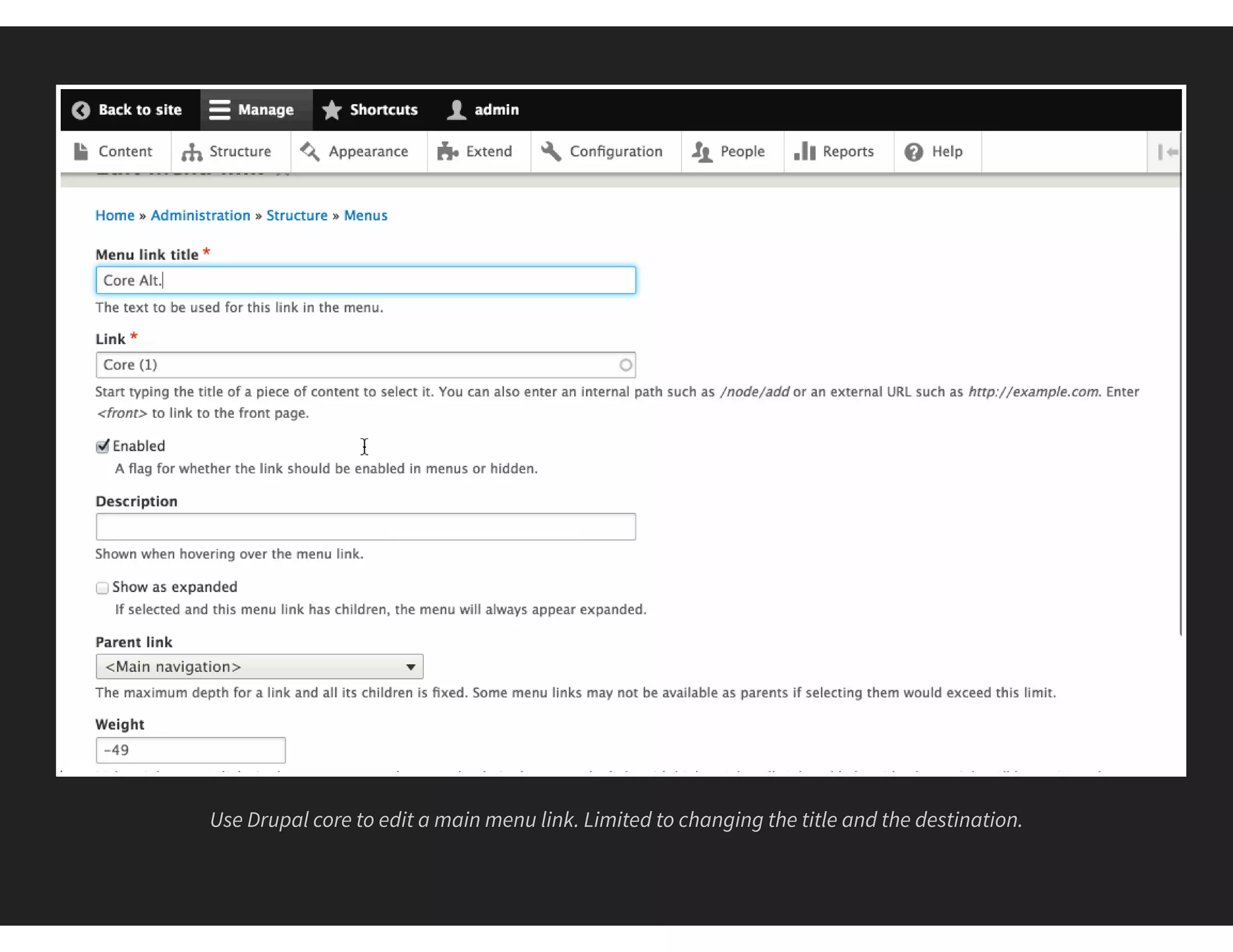
Use Drupal core to edit a main menu link. Limited to changing the title and the destination.
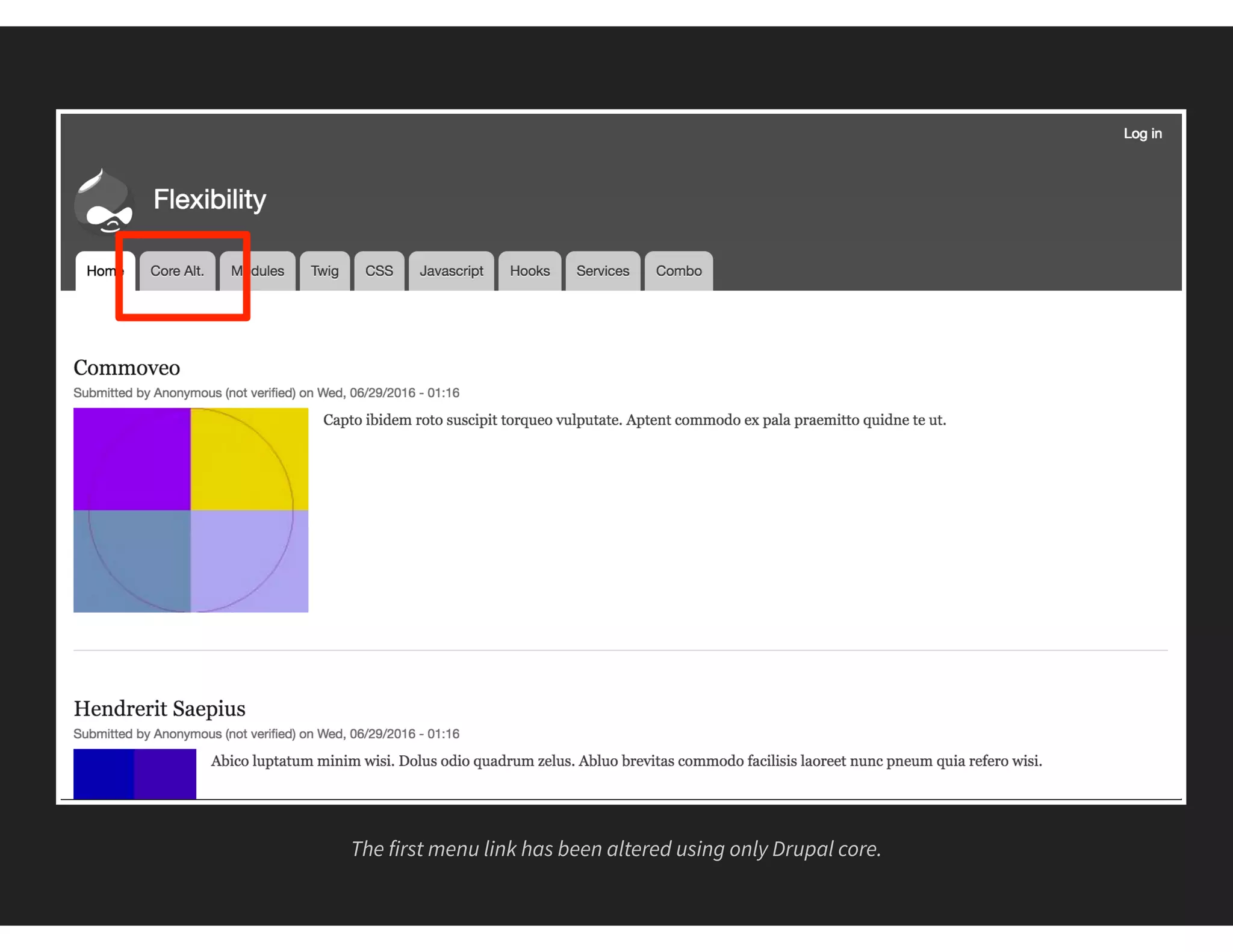
The first menu link has been altered using only Drupal core.
#2 MODULES
THE EXTEND CORE METHOD
Requires time for research.
Can't find one? Can build your own (Dev skills needed)
Requires long term maintence
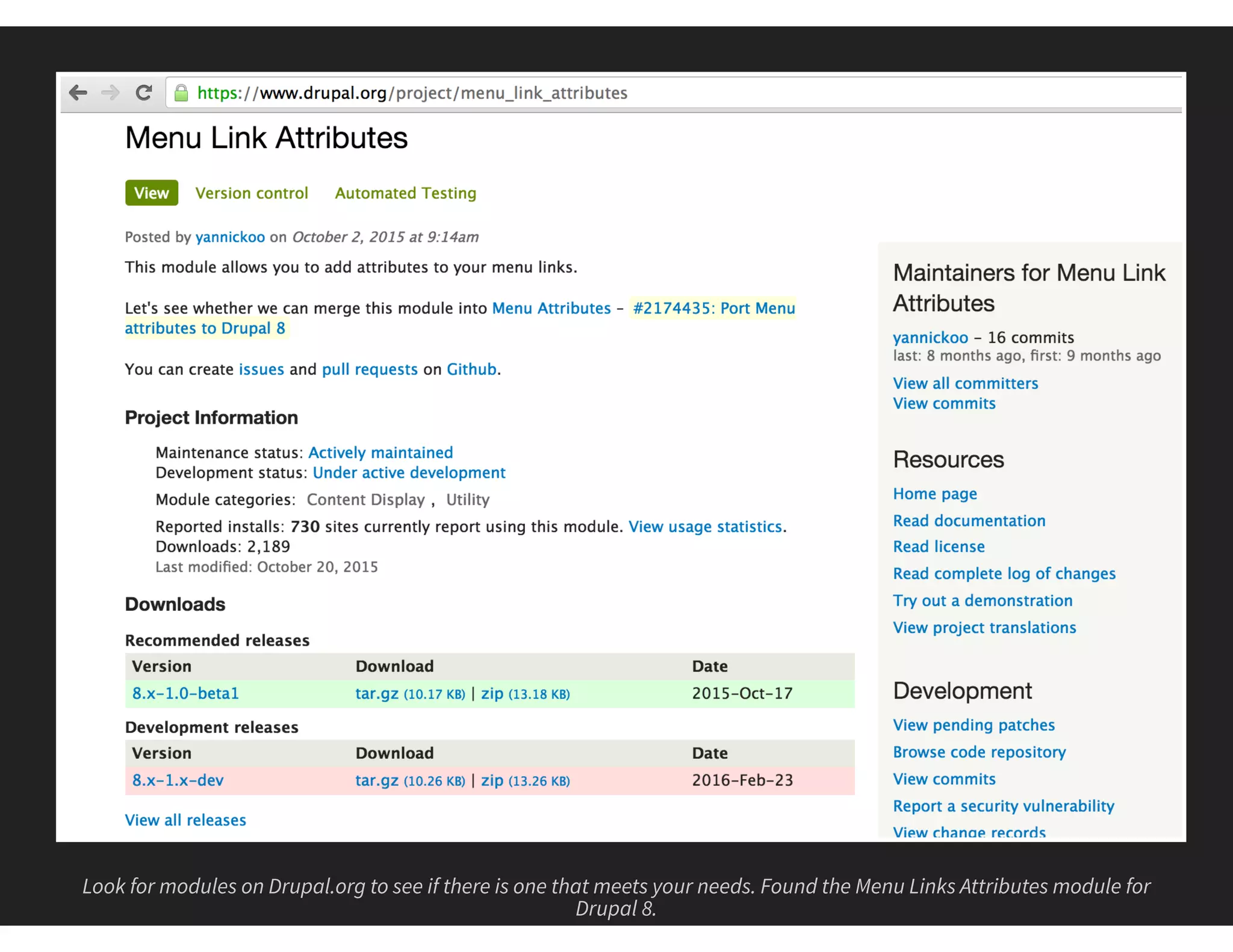
Look for modules on Drupal.org to see if there is one that meets your needs. Found the Menu Links Attributes module for
Drupal 8.
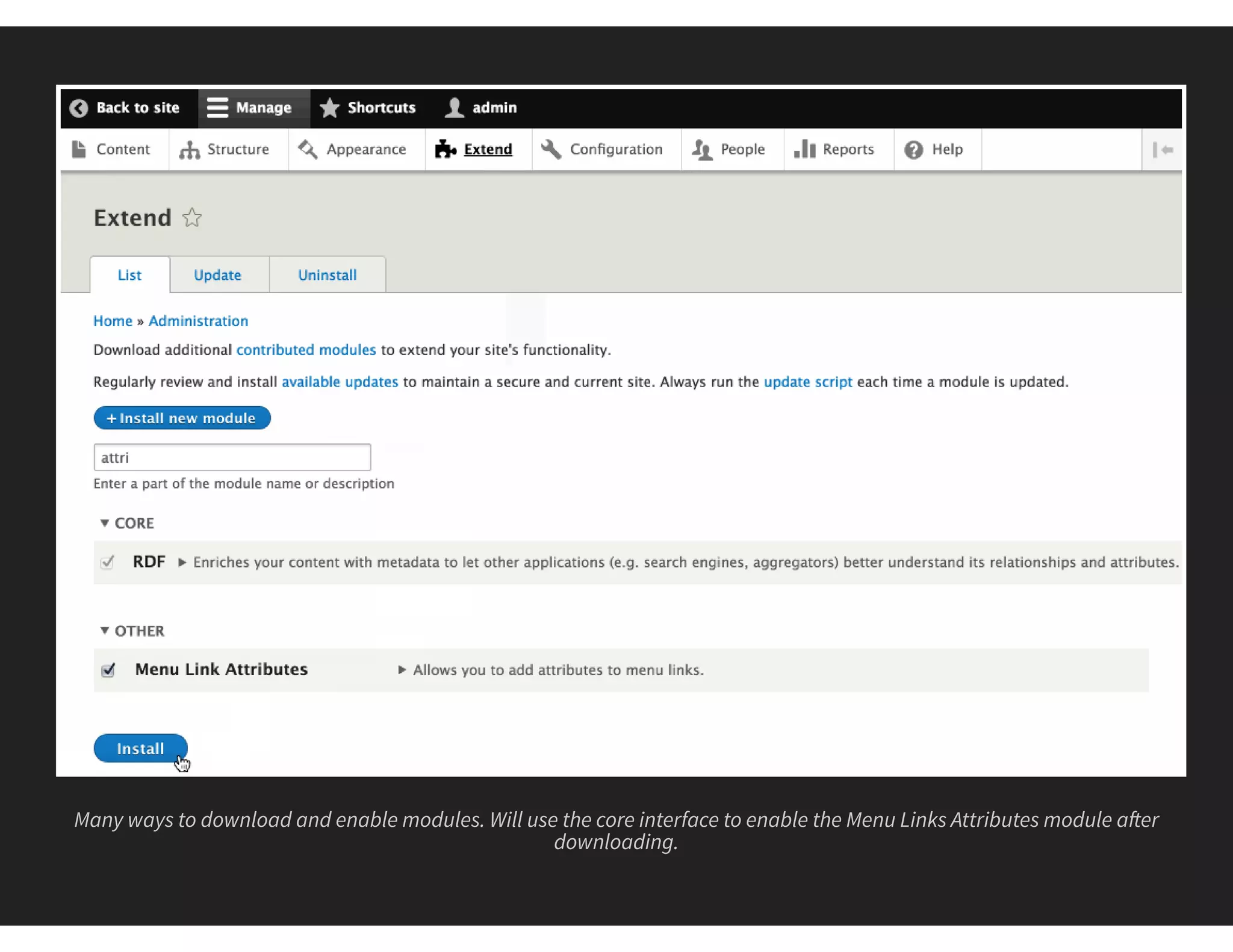
Many ways to download and enable modules. Will use the core interface to enable the Menu Links Attributes module a er
downloading.
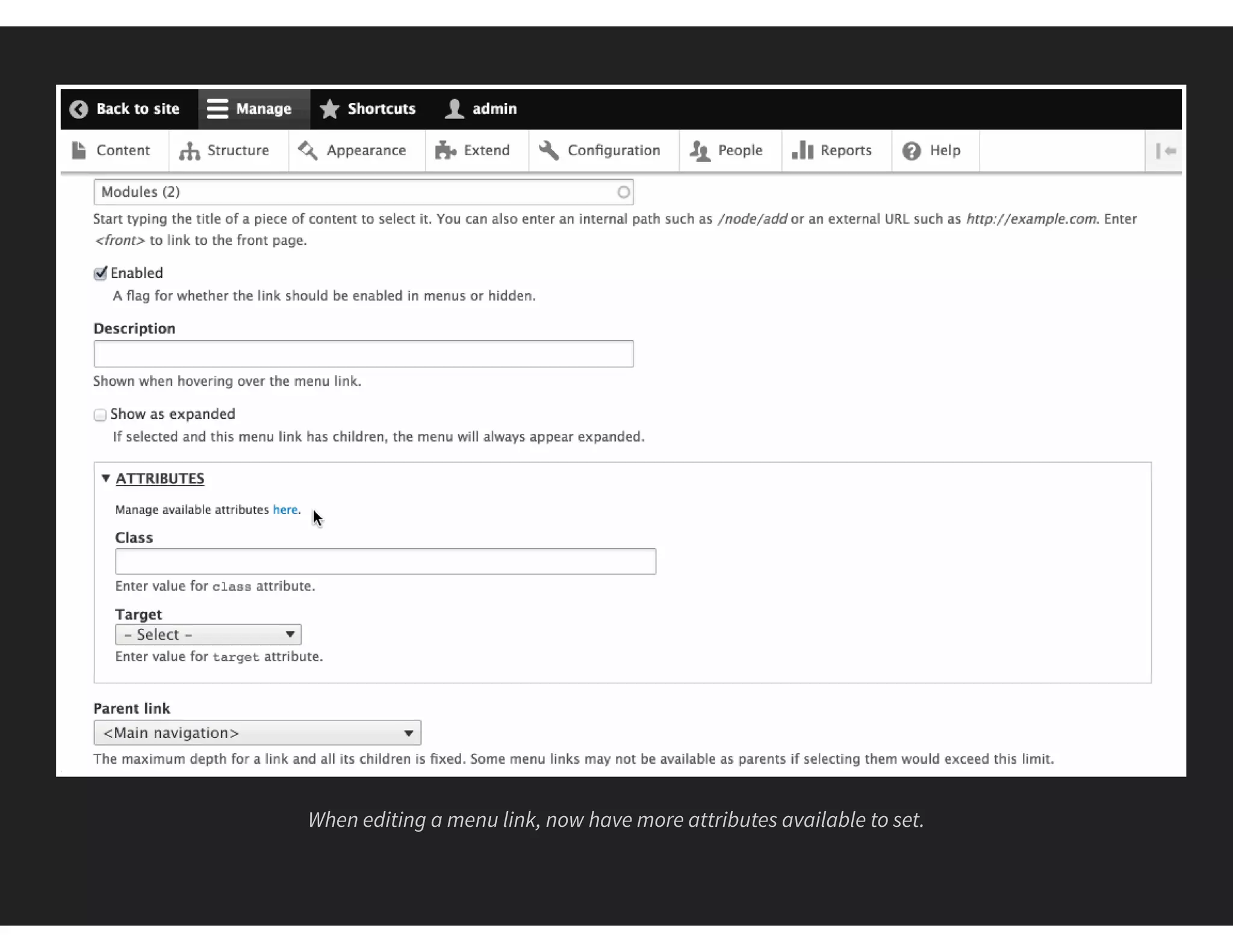
When editing a menu link, now have more attributes available to set.
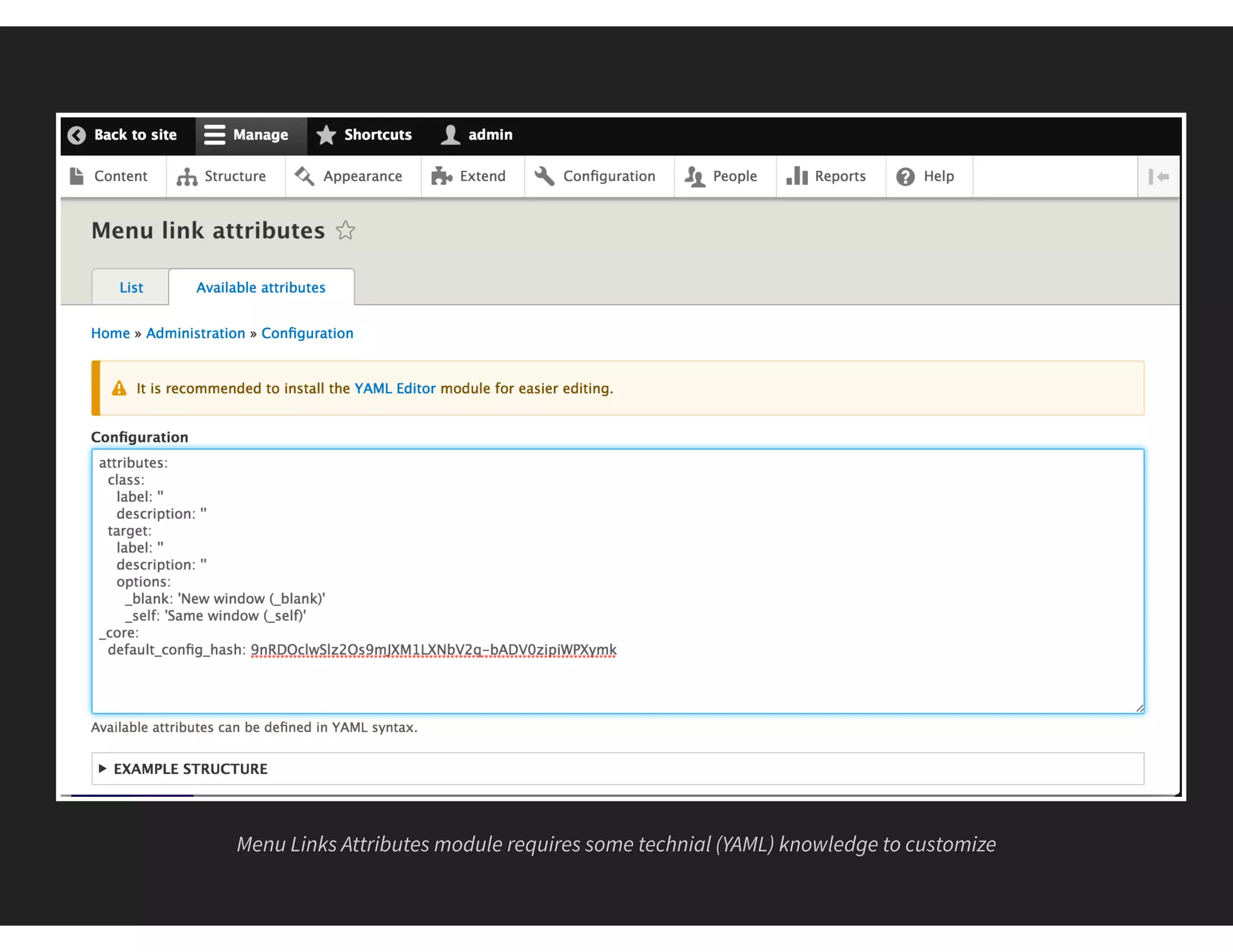
Menu Links Attributes module requires some technial (YAML) knowledge to customize
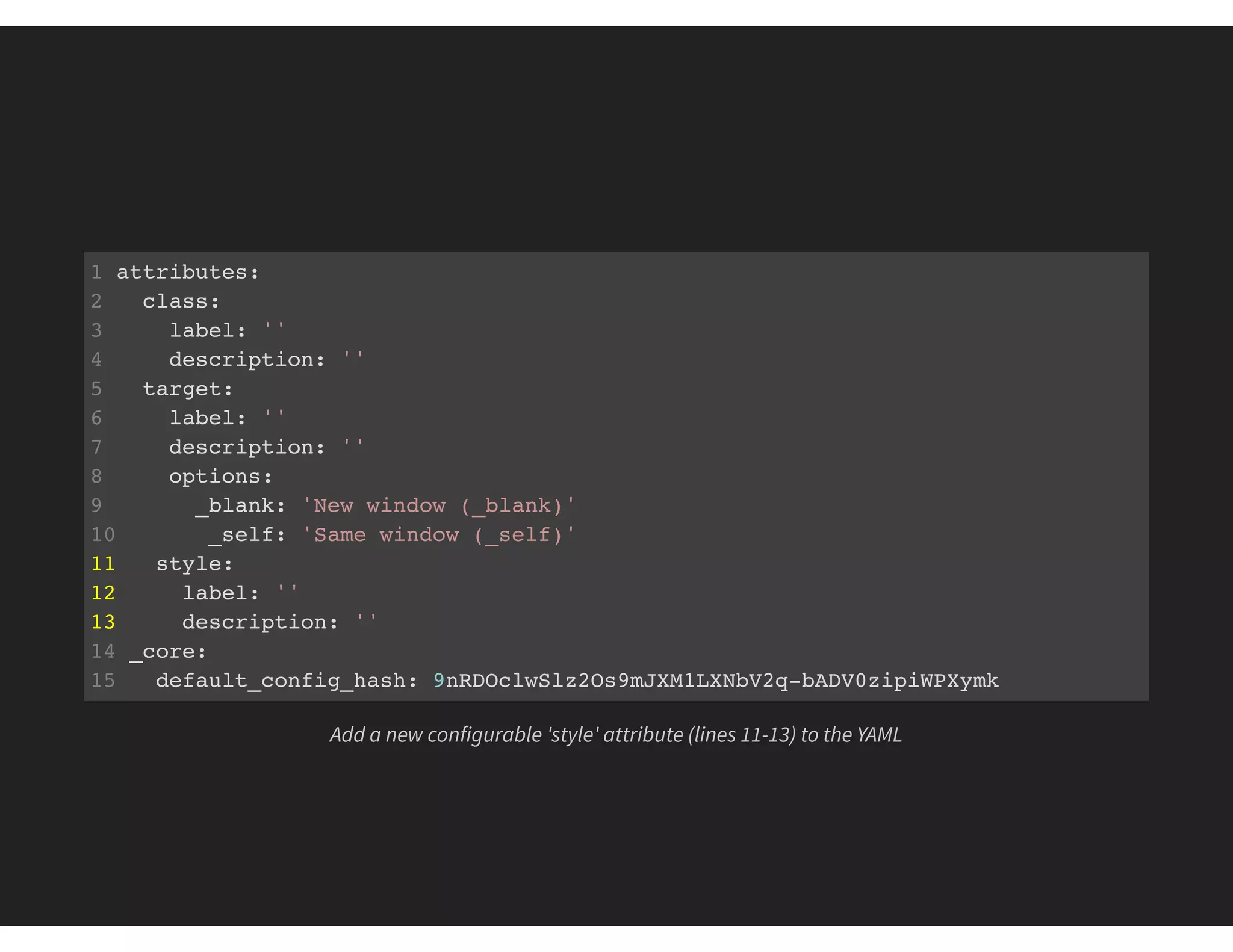
1 attributes:
2 class:
3 label: ''
4 description: ''
5 target:
6 label: ''
7 description: ''
8 options:
9 _blank: 'New window (_blank)'
10 _self: 'Same window (_self)'
11 style:
12 label: ''
13 description: ''
14 _core:
15 default_config_hash: 9nRDOclwSlz2Os9mJXM1LXNbV2q-bADV0zipiWPXymk
Add a new configurable 'style' attribute (lines 11-13) to the YAML
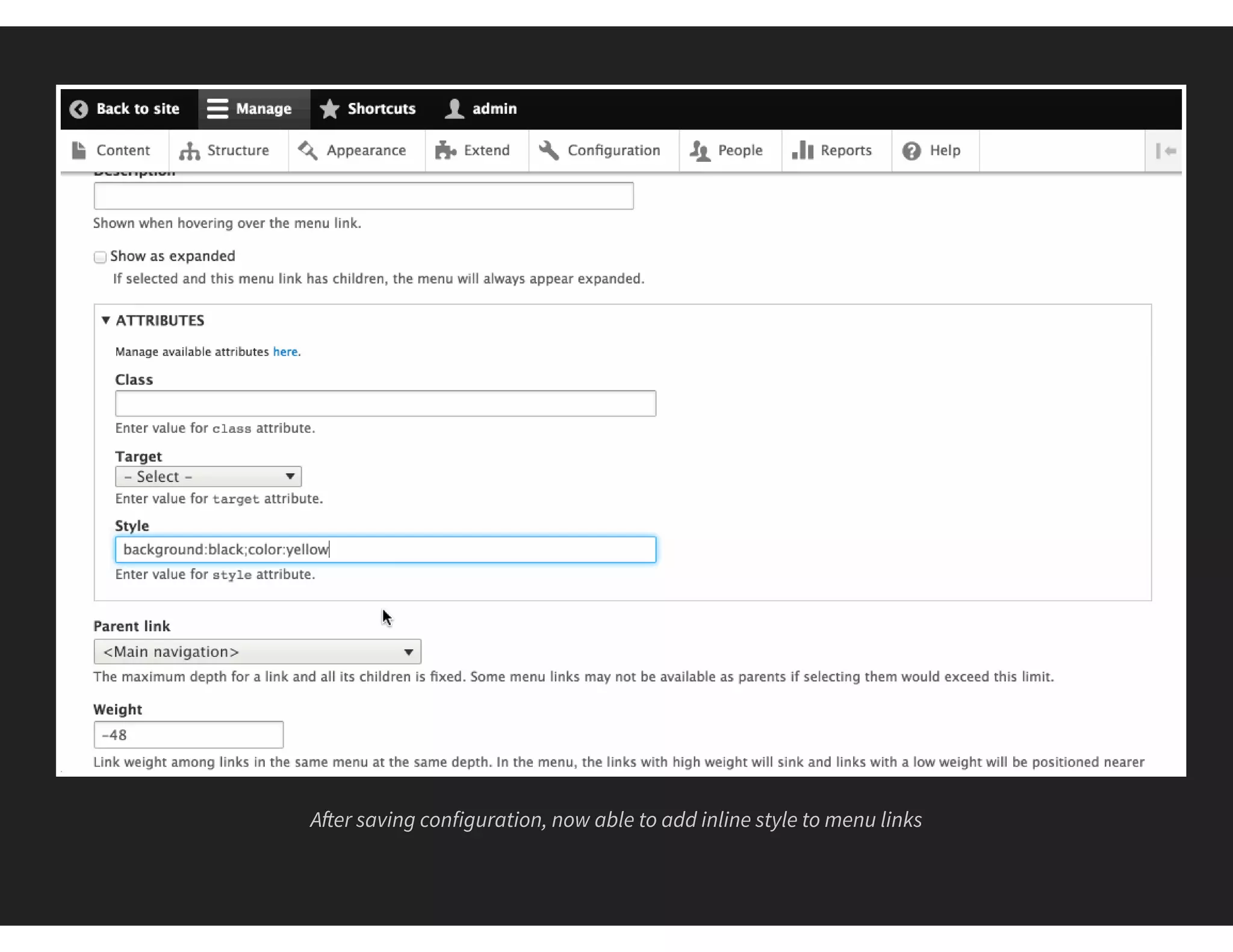
A er saving configuration, now able to add inline style to menu links
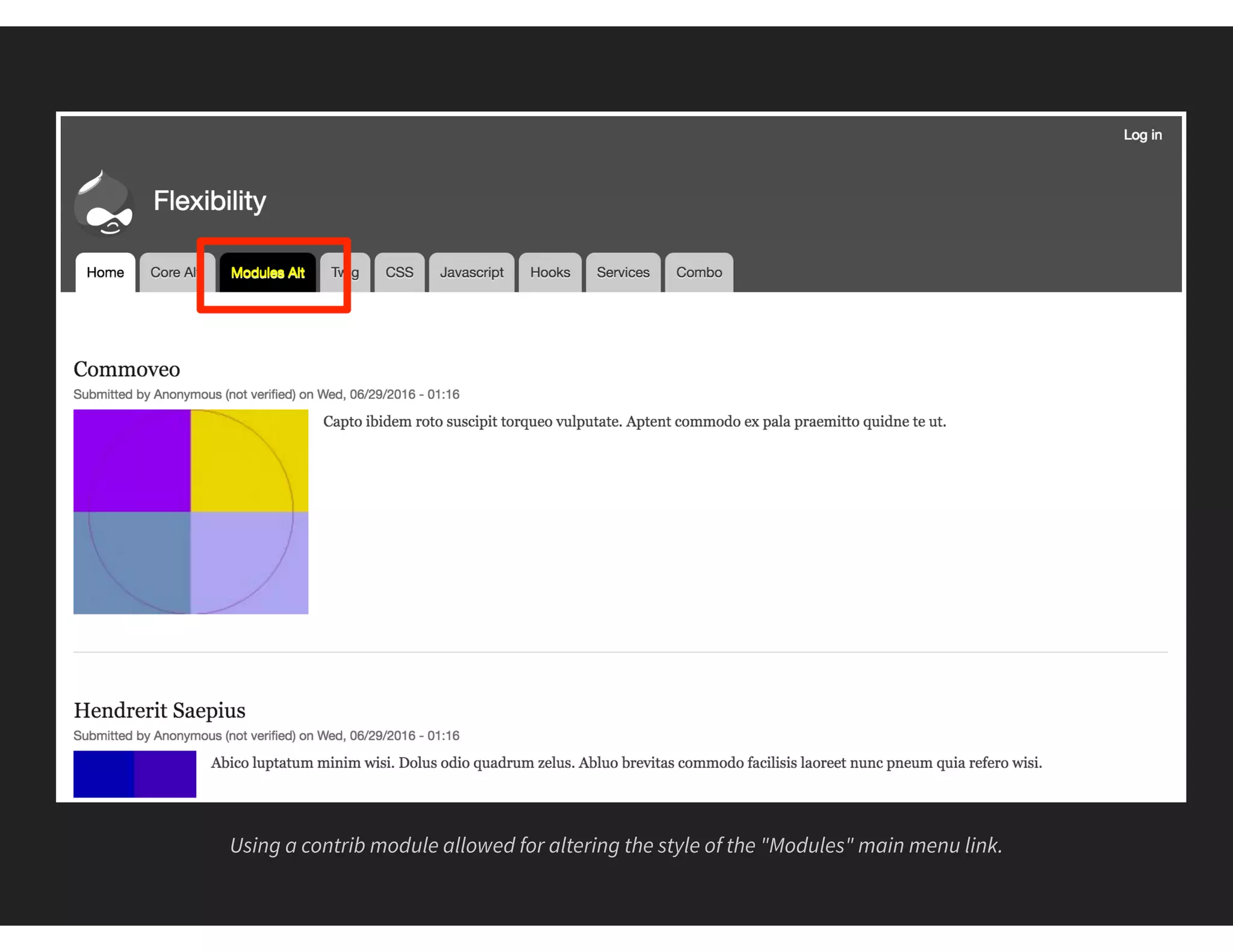
Using a contrib module allowed for altering the style of the "Modules" main menu link.
#3 TWIG TEMPLATES
THE ALTER MARKUP METHOD
Almost everything is templated
Need to know HTML and/or Twig
Requires a custom theme
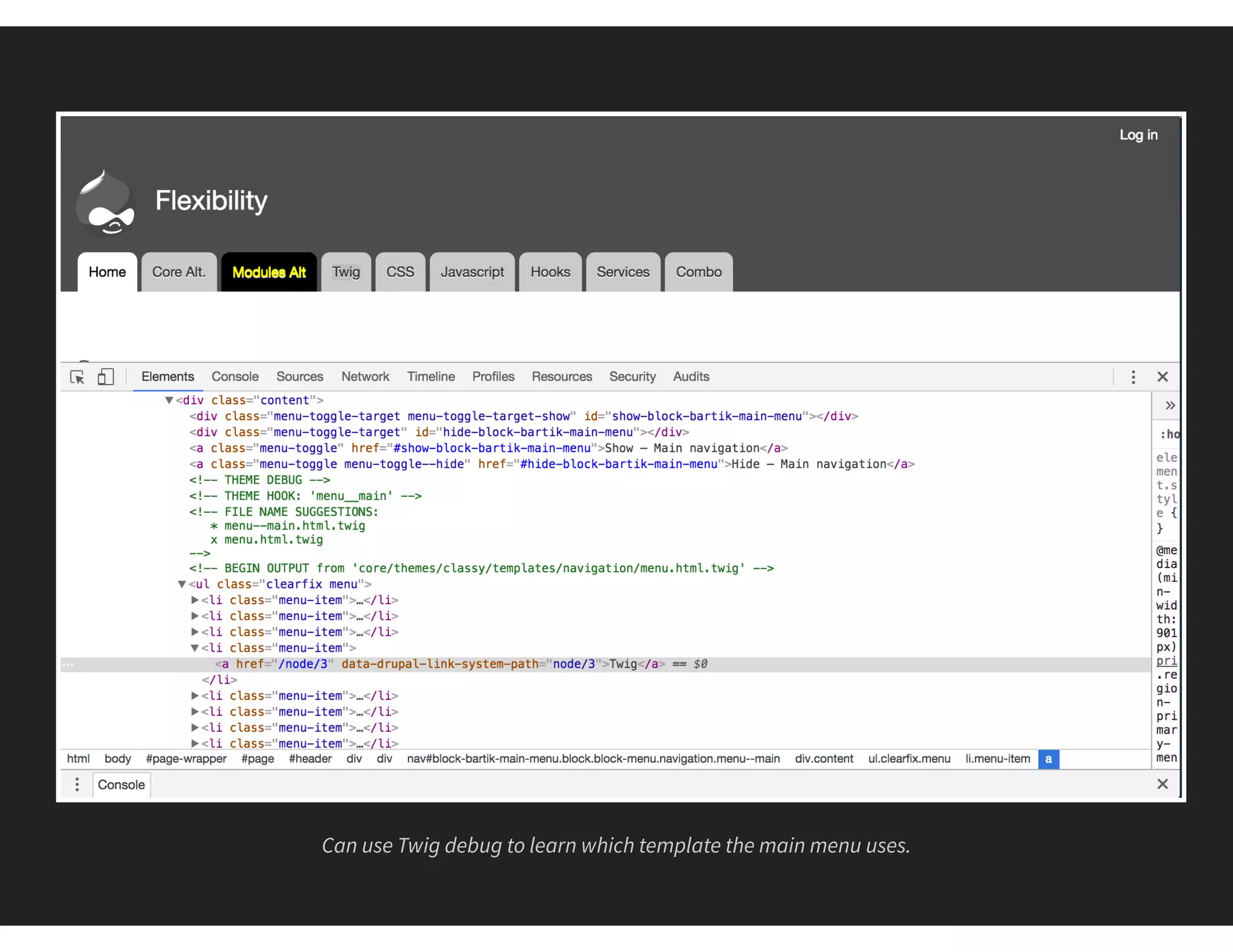
Can use Twig debug to learn which template the main menu uses.
1 <!-- THEME DEBUG -->
2 <!-- THEME HOOK: 'menu__main' -->
3 <!-- FILE NAME SUGGESTIONS:
4 * menu--main.html.twig
5 x menu.html.twig
6 -->
7 <!-- BEGIN OUTPUT from 'core/themes/classy/templates/navigation/menu.html.twig' -->
8 <ul class="clearfix menu">
9 <!-- // ... -->
10 <li class="menu-item">
11 <a href="/node/3" data-drupal-link-system-path="node/3">Twig</a>
12 </li>
13 <!-- // ... -->
14 </ul>
15 <!-- END OUTPUT from 'core/themes/classy/templates/navigation/menu.html.twig'
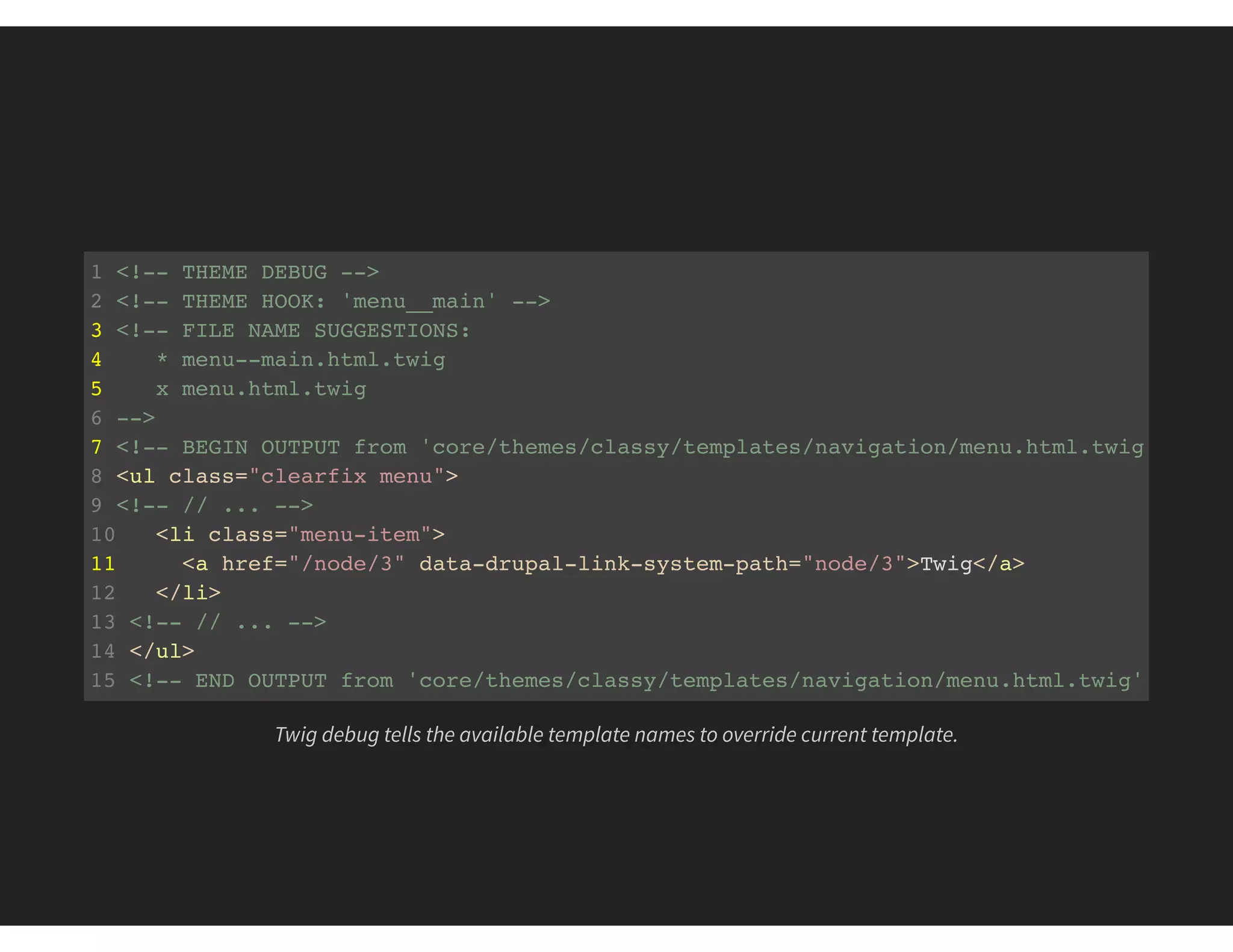
Twig debug tells the available template names to override current template.
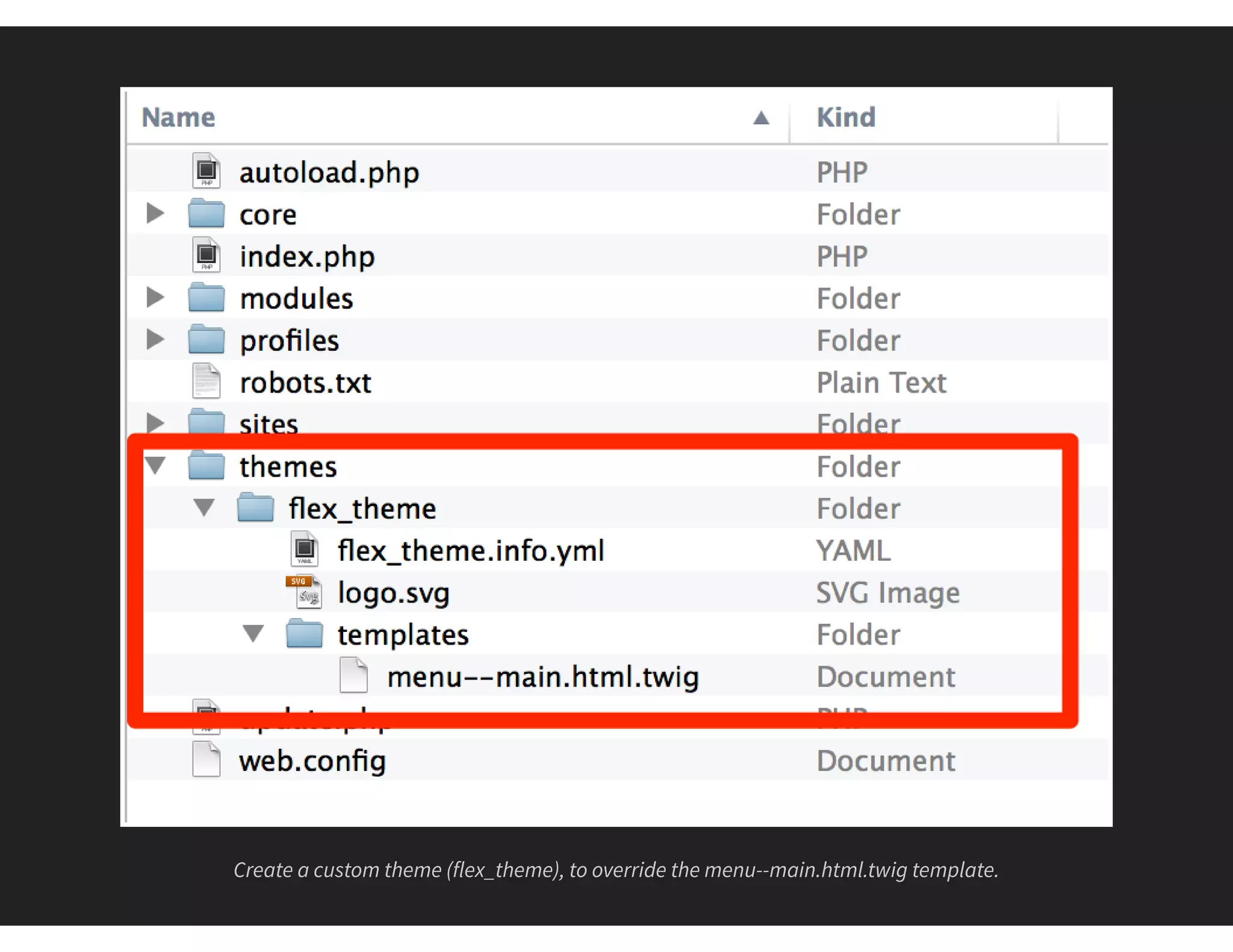
Create a custom theme (flex_theme), to override the menu--main.html.twig template.
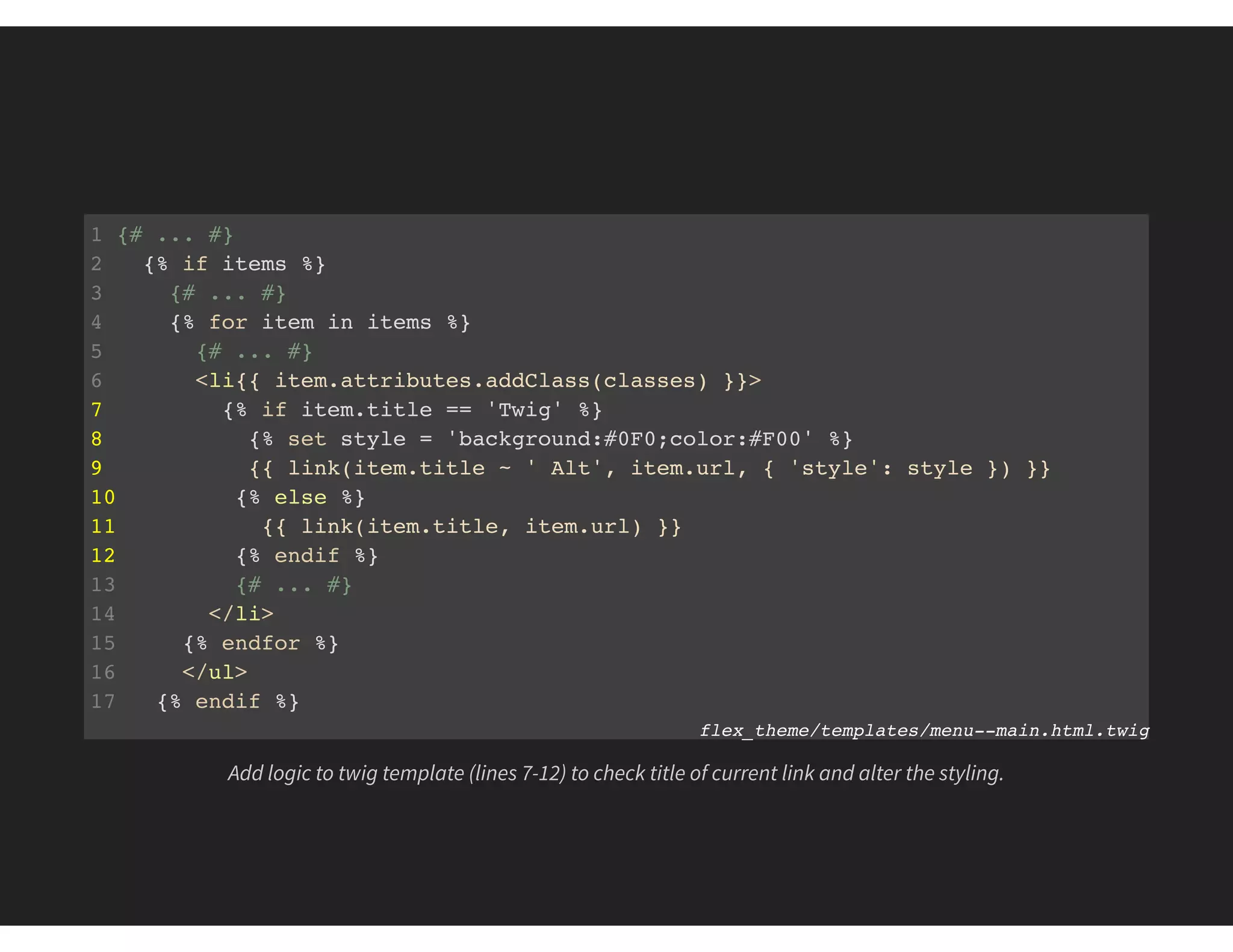
1 {# ... #}
2 {% if items %}
3 {# ... #}
4 {% for item in items %}
5 {# ... #}
6 <li{{ item.attributes.addClass(classes) }}>
7 {% if item.title == 'Twig' %}
8 {% set style = 'background:#0F0;color:#F00' %}
9 {{ link(item.title ~ ' Alt', item.url, { 'style': style }) }}
10 {% else %}
11 {{ link(item.title, item.url) }}
12 {% endif %}
13 {# ... #}
14 </li>
15 {% endfor %}
16 </ul>
17 {% endif %}
flex_theme/templates/menu--main.html.twig
Add logic to twig template (lines 7-12) to check title of current link and alter the styling.
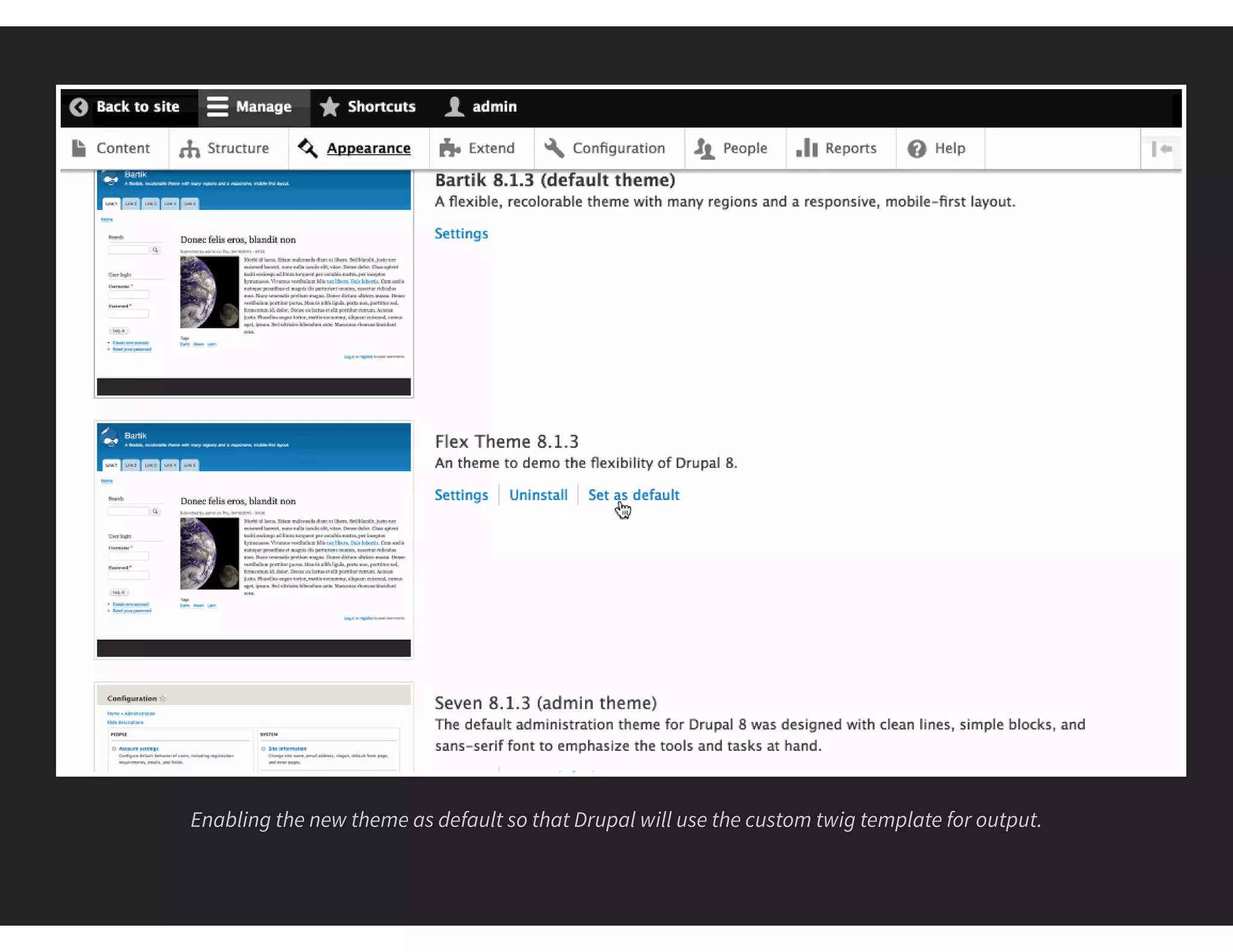
Enabling the new theme as default so that Drupal will use the custom twig template for output.
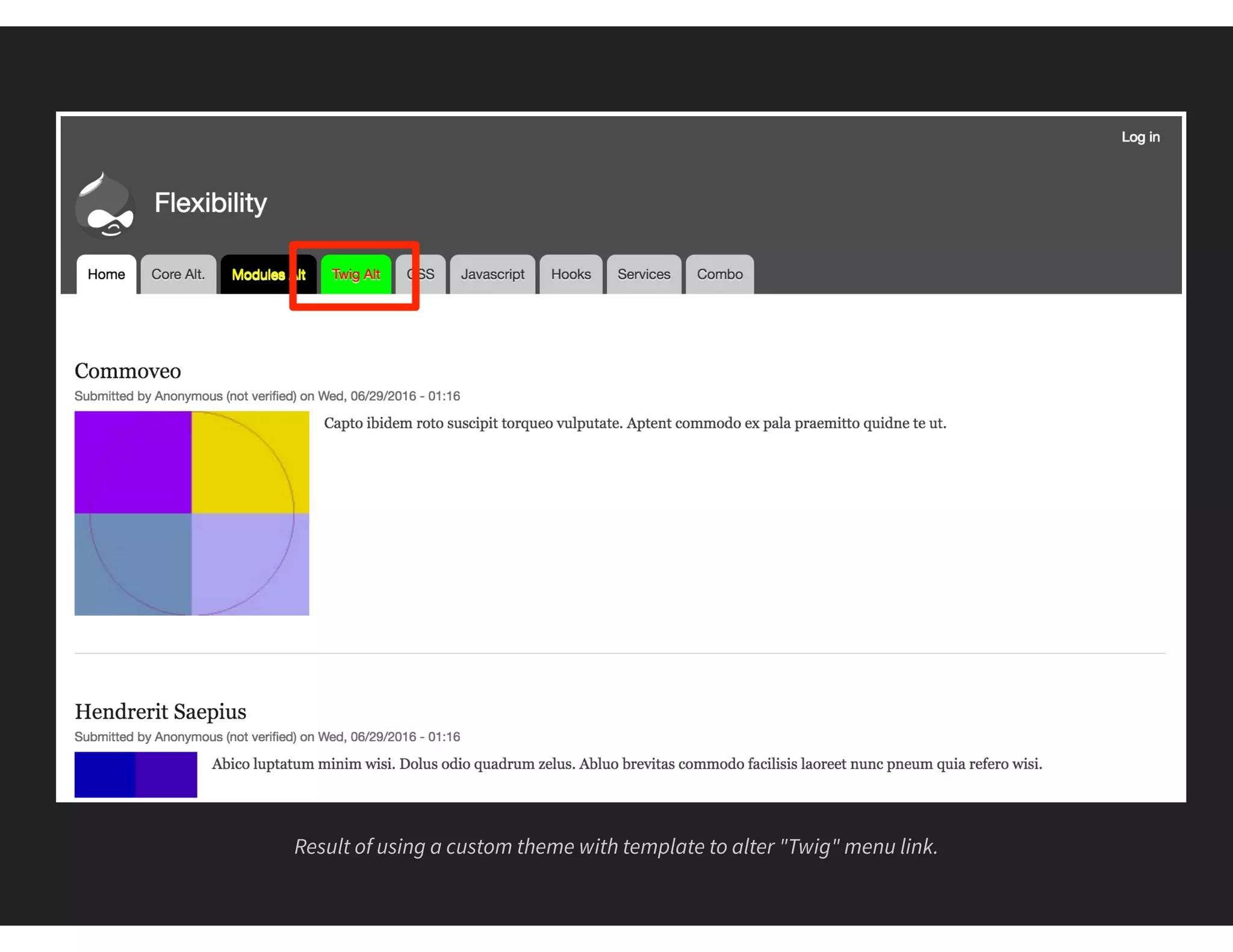
Result of using a custom theme with template to alter "Twig" menu link.
#4 CSS
THE ALTER DISPLAY METHOD
Target any element on the "page"
Need to know CSS and how to add a library
Requires a custom theme or module
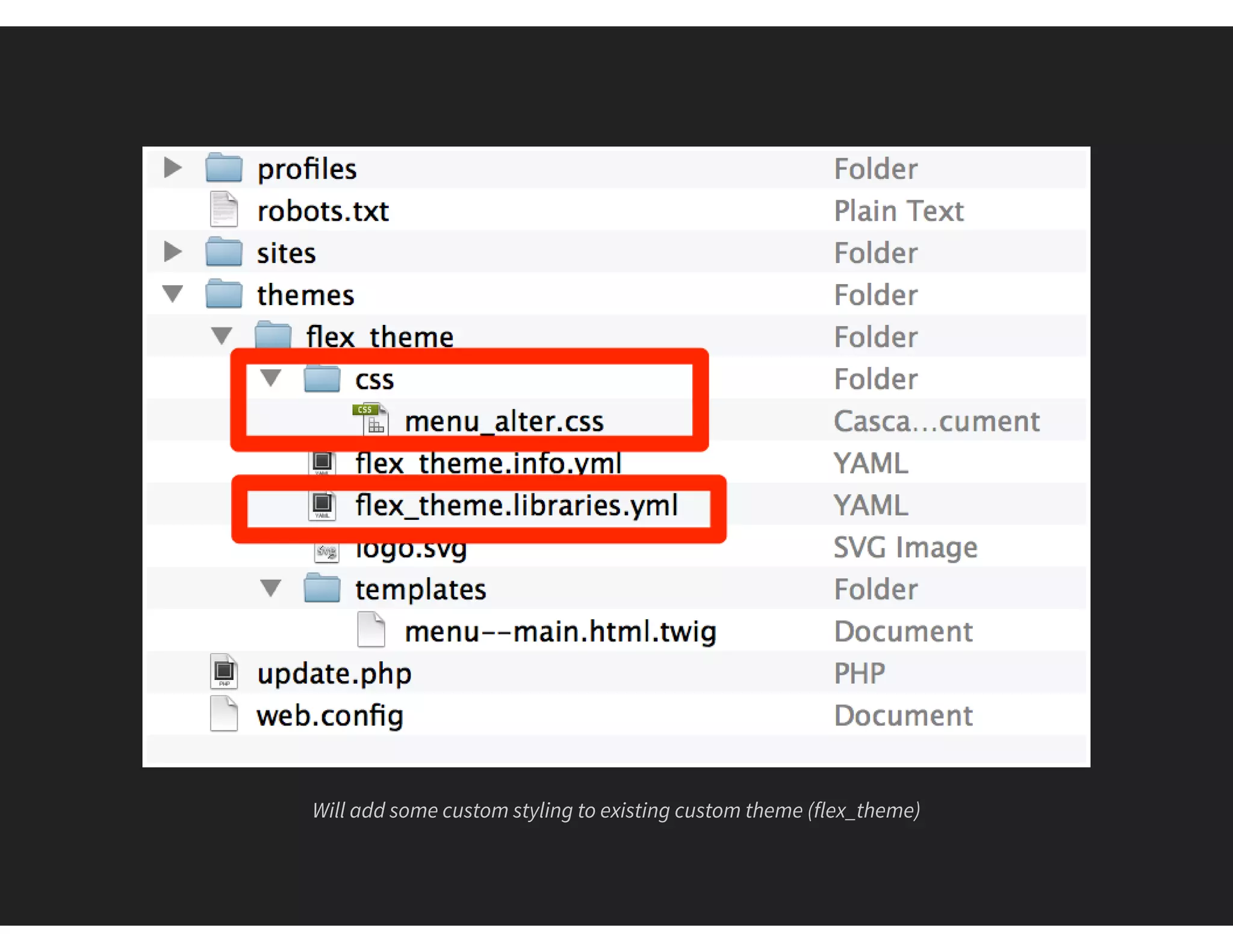
Will add some custom styling to existing custom theme (flex_theme)
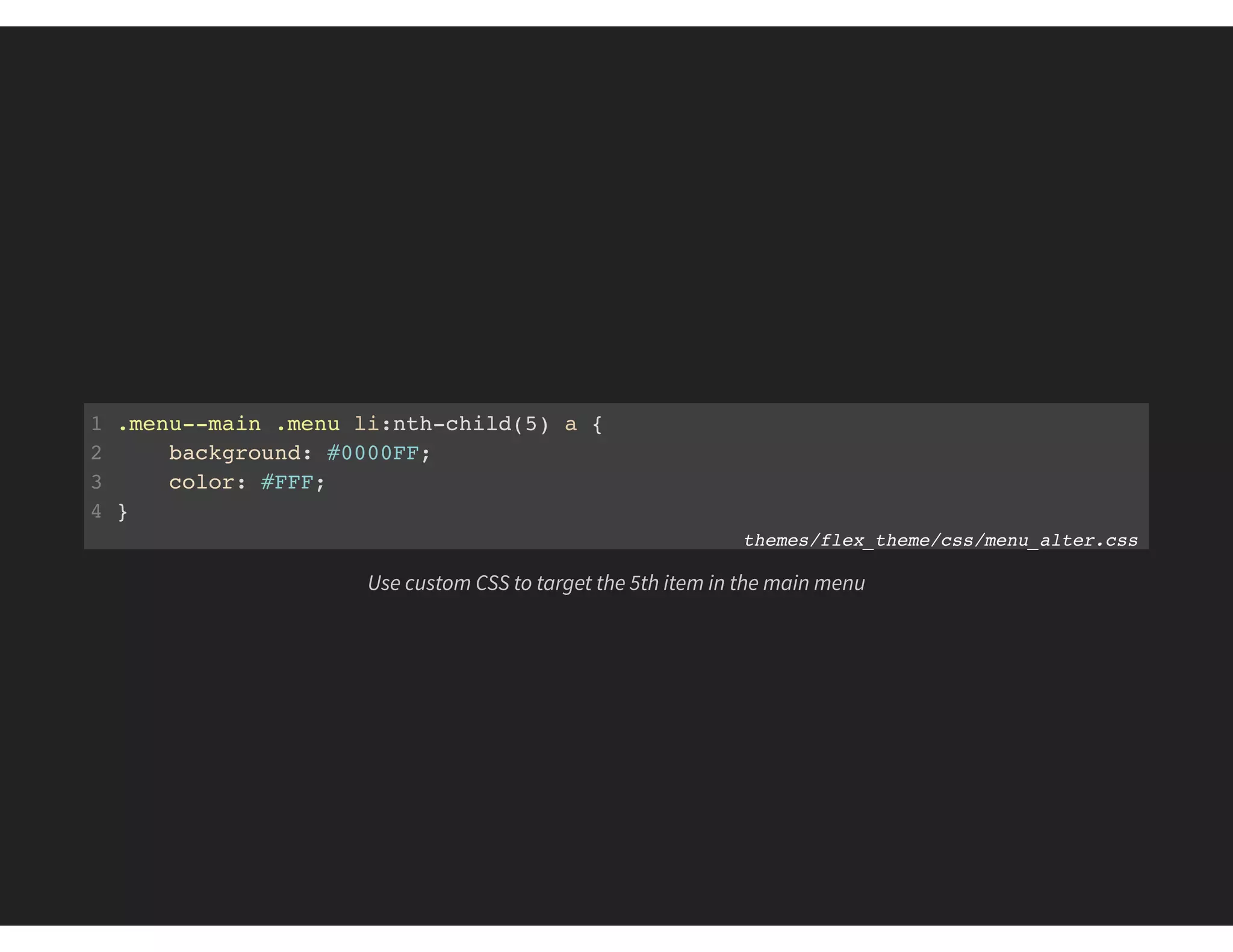
1 .menu--main .menu li:nth-child(5) a {
2 background: #0000FF;
3 color: #FFF;
4 }
themes/flex_theme/css/menu_alter.css
Use custom CSS to target the 5th item in the main menu
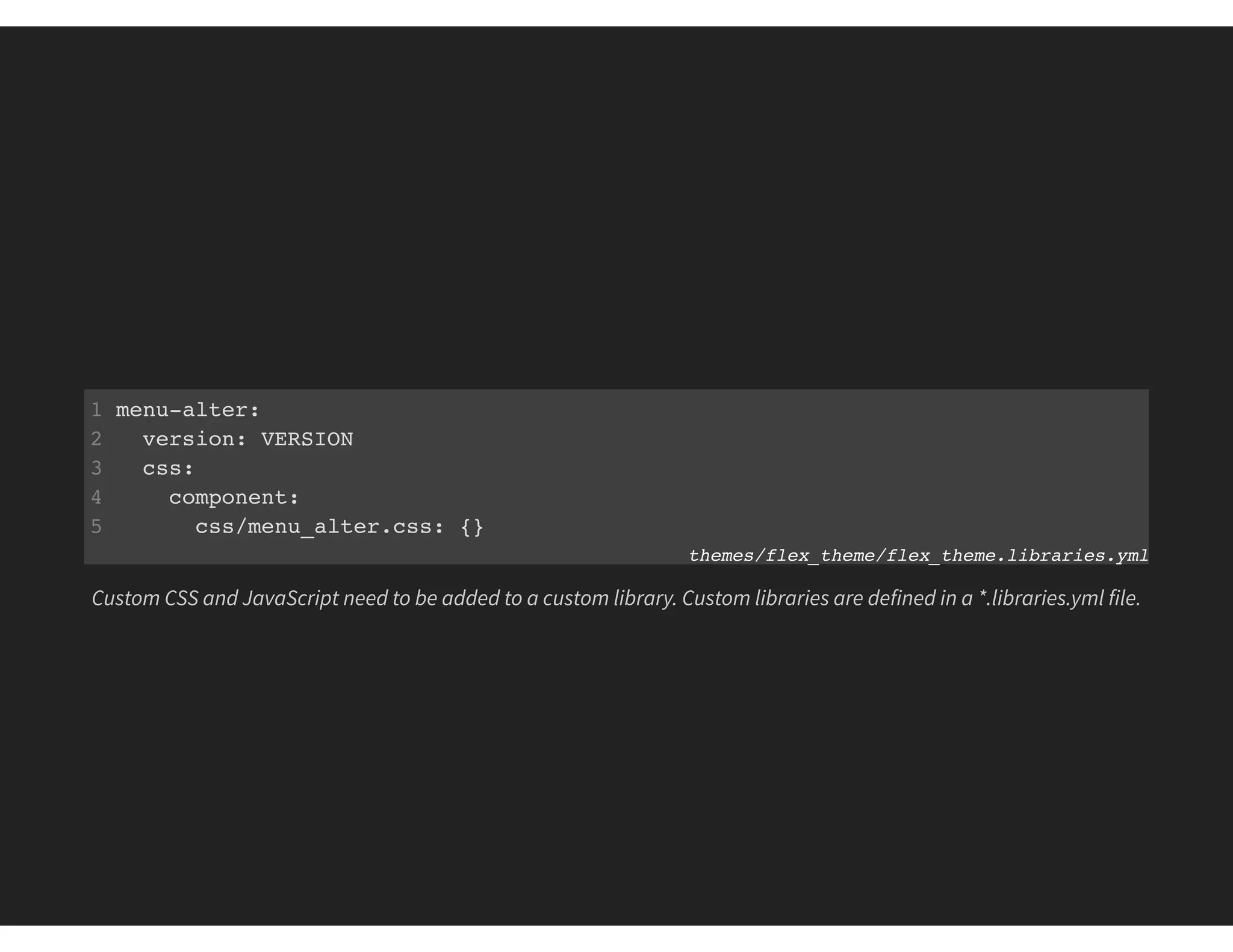
1 menu-alter:
2 version: VERSION
3 css:
4 component:
5 css/menu_alter.css: {}
themes/flex_theme/flex_theme.libraries.yml
Custom CSS and JavaScript need to be added to a custom library. Custom libraries are defined in a *.libraries.yml file.
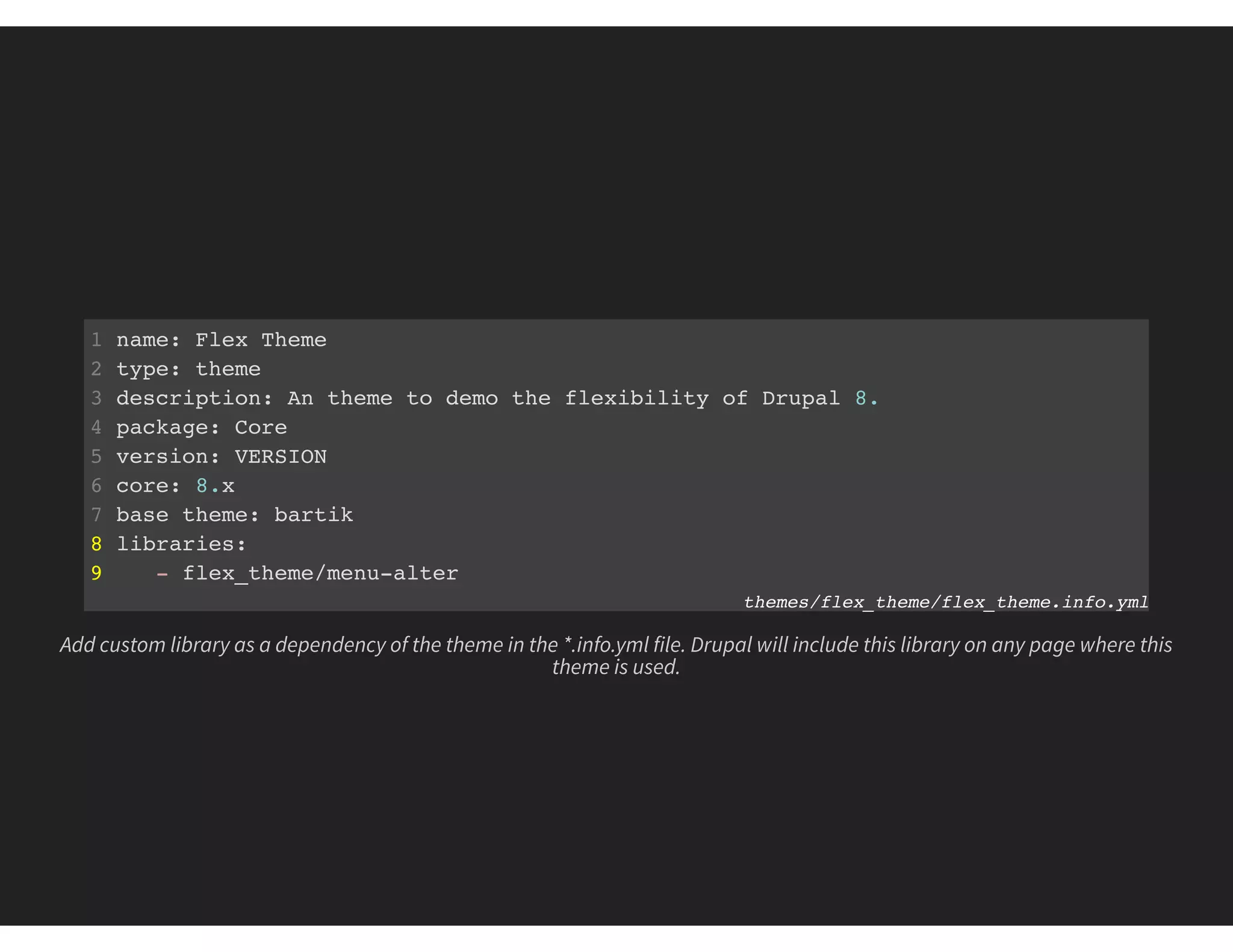
1 name: Flex Theme
2 type: theme
3 description: An theme to demo the flexibility of Drupal 8.
4 package: Core
5 version: VERSION
6 core: 8.x
7 base theme: bartik
8 libraries:
9 - flex_theme/menu-alter
themes/flex_theme/flex_theme.info.yml
Add custom library as a dependency of the theme in the *.info.yml file. Drupal will include this library on any page where this
theme is used.
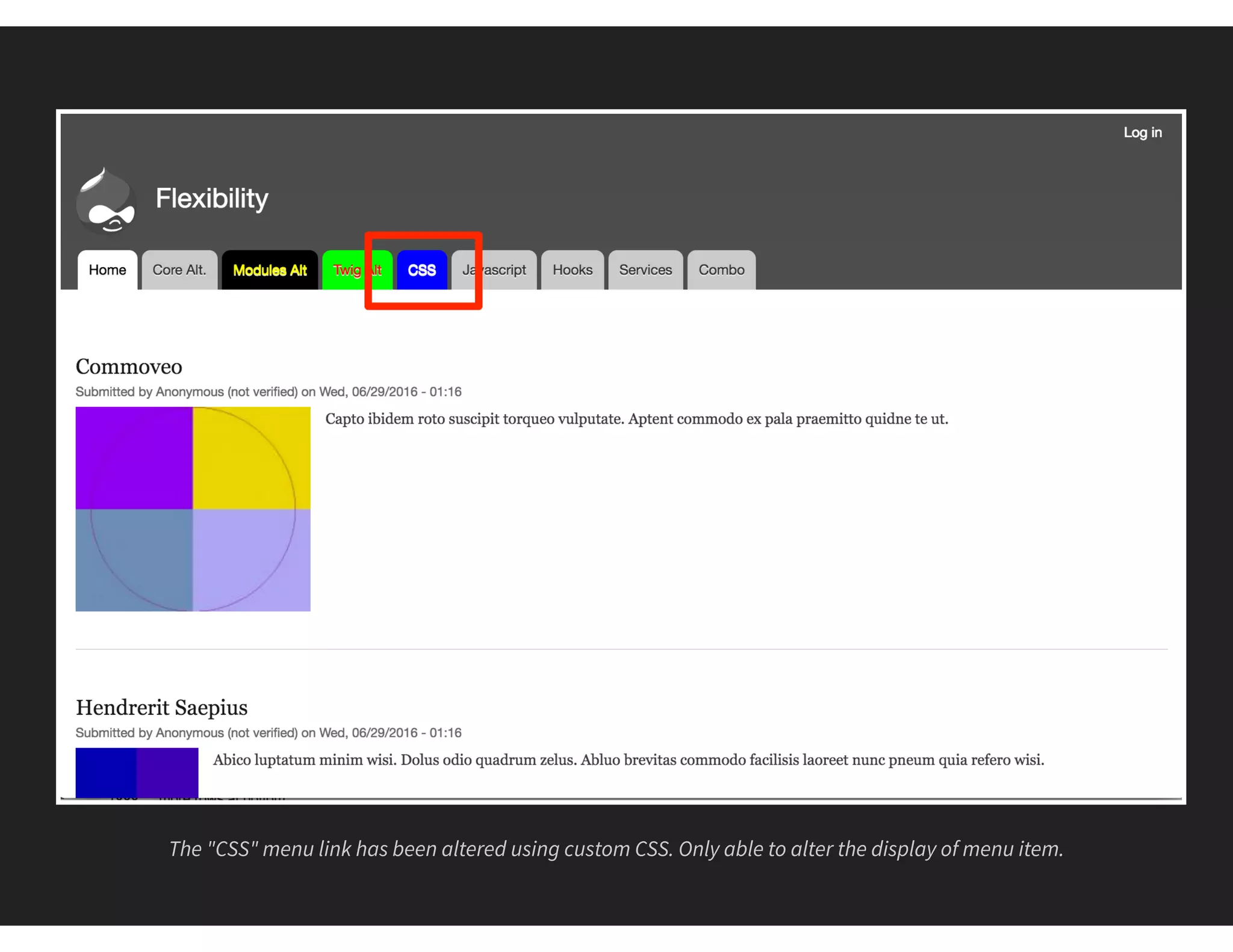
The "CSS" menu link has been altered using custom CSS. Only able to alter the display of menu item.
#5 JAVASCRIPT
THE DOM MANIPULATION METHOD
Change based on actions
Need to know JavaScript and how to add a library
Dependent on client browser, delay in execution
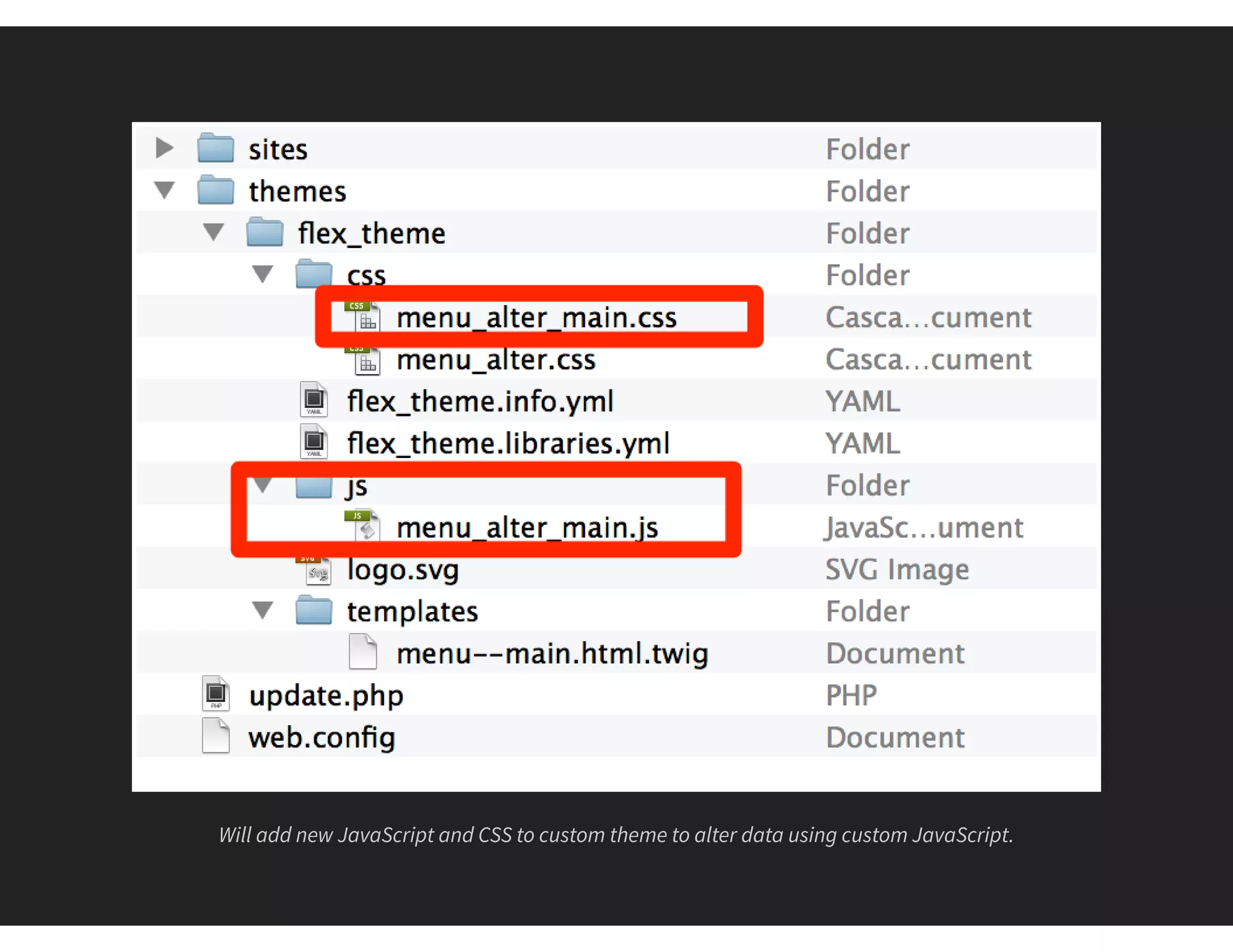
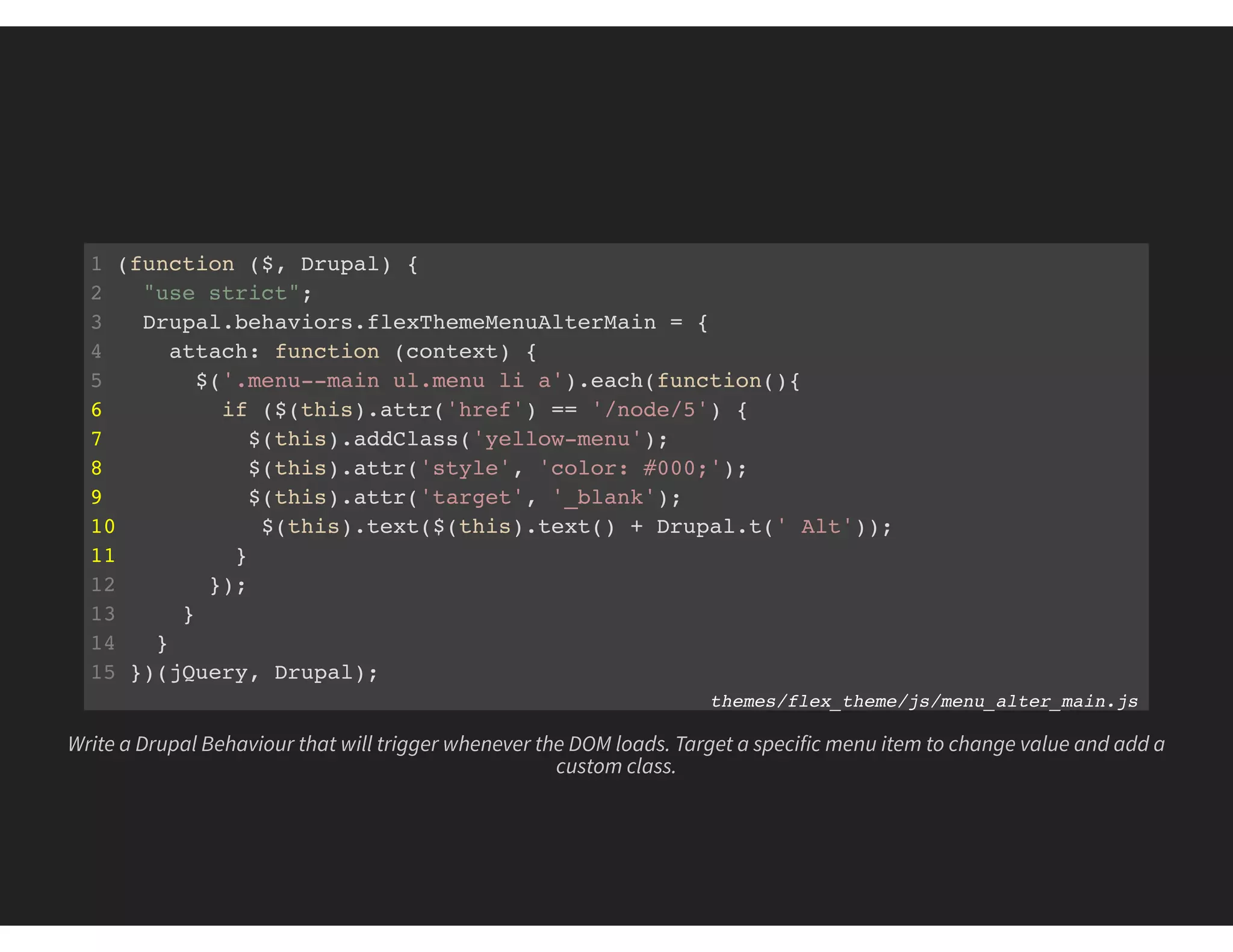
Will add new JavaScript and CSS to custom theme to alter data using custom JavaScript.
1 (function ($, Drupal) {
2 "use strict";
3 Drupal.behaviors.flexThemeMenuAlterMain = {
4 attach: function (context) {
5 $('.menu--main ul.menu li a').each(function(){
6 if ($(this).attr('href') == '/node/5') {
7 $(this).addClass('yellow-menu');
8 $(this).attr('style', 'color: #000;');
9 $(this).attr('target', '_blank');
10 $(this).text($(this).text() + Drupal.t(' Alt'));
11 }
12 });
13 }
14 }
15 })(jQuery, Drupal);
themes/flex_theme/js/menu_alter_main.js
Write a Drupal Behaviour that will trigger whenever the DOM loads. Target a specific menu item to change value and add a
custom class.
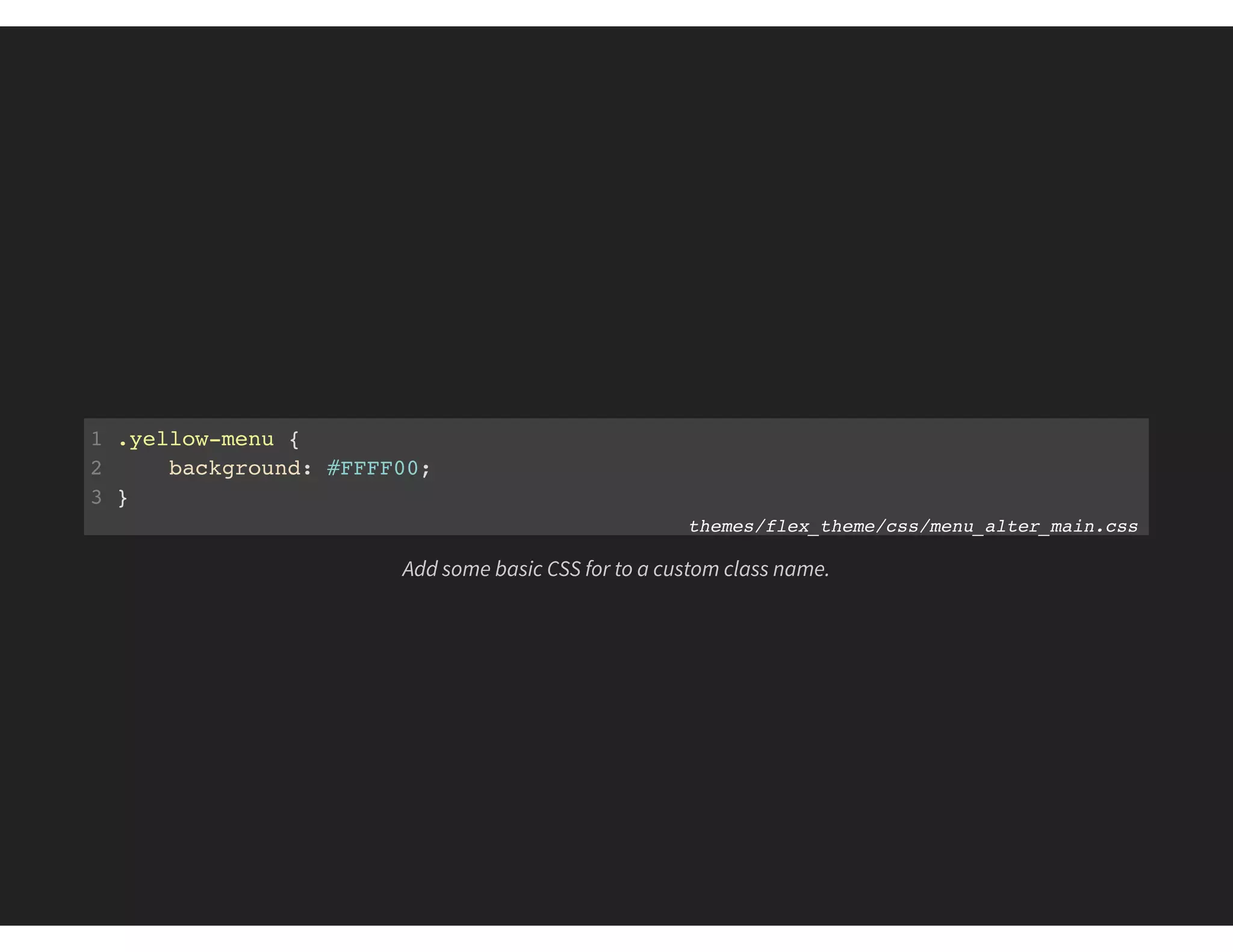
1 .yellow-menu {
2 background: #FFFF00;
3 }
themes/flex_theme/css/menu_alter_main.css
Add some basic CSS for to a custom class name.
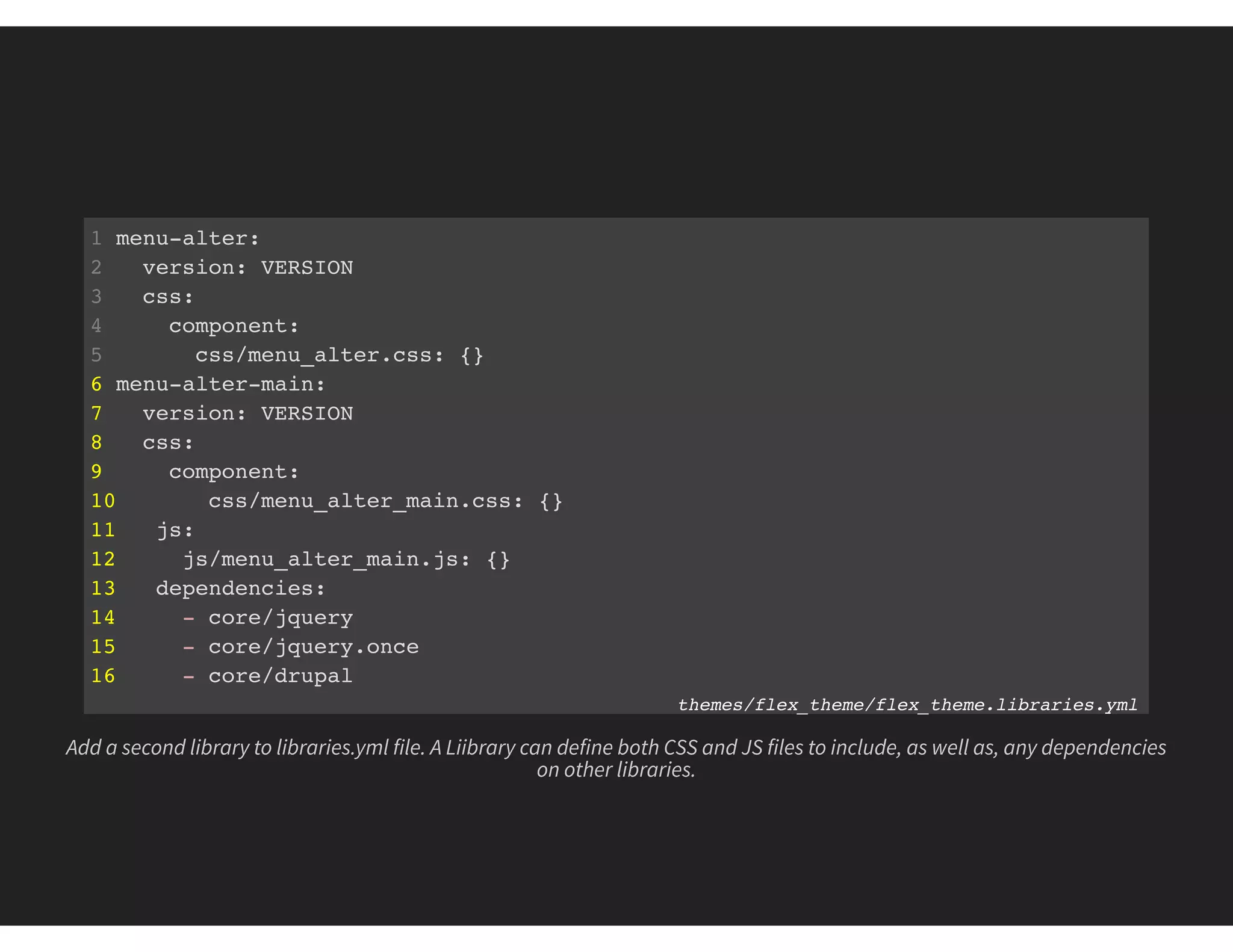
1 menu-alter:
2 version: VERSION
3 css:
4 component:
5 css/menu_alter.css: {}
6 menu-alter-main:
7 version: VERSION
8 css:
9 component:
10 css/menu_alter_main.css: {}
11 js:
12 js/menu_alter_main.js: {}
13 dependencies:
14 - core/jquery
15 - core/jquery.once
16 - core/drupal
themes/flex_theme/flex_theme.libraries.yml
Add a second library to libraries.yml file. A Liibrary can define both CSS and JS files to include, as well as, any dependencies
on other libraries.
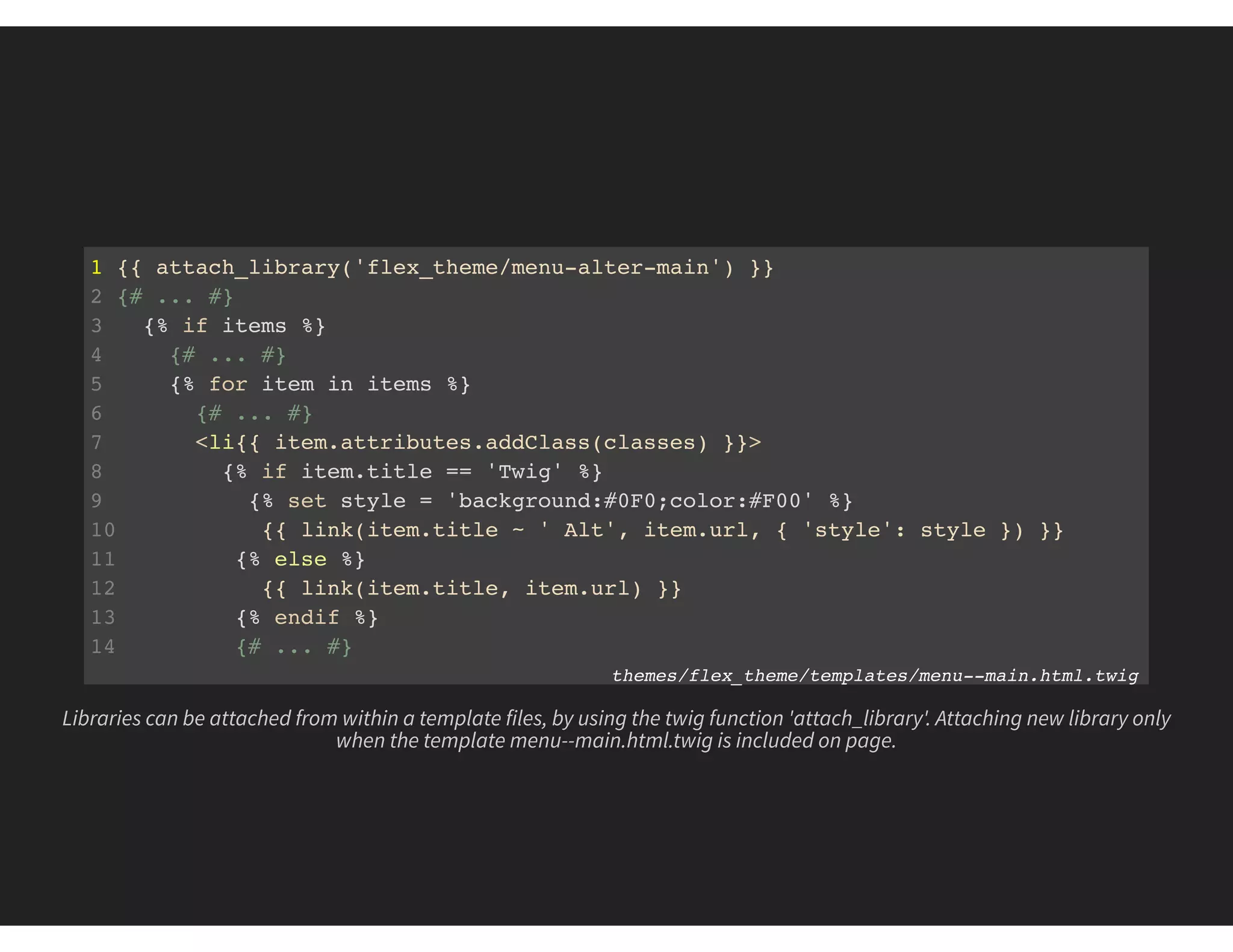
1 {{ attach_library('flex_theme/menu-alter-main') }}
2 {# ... #}
3 {% if items %}
4 {# ... #}
5 {% for item in items %}
6 {# ... #}
7 <li{{ item.attributes.addClass(classes) }}>
8 {% if item.title == 'Twig' %}
9 {% set style = 'background:#0F0;color:#F00' %}
10 {{ link(item.title ~ ' Alt', item.url, { 'style': style }) }}
11 {% else %}
12 {{ link(item.title, item.url) }}
13 {% endif %}
14 {# ... #}
themes/flex_theme/templates/menu--main.html.twig
Libraries can be attached from within a template files, by using the twig function 'attach_library'. Attaching new library only
when the template menu--main.html.twig is included on page.
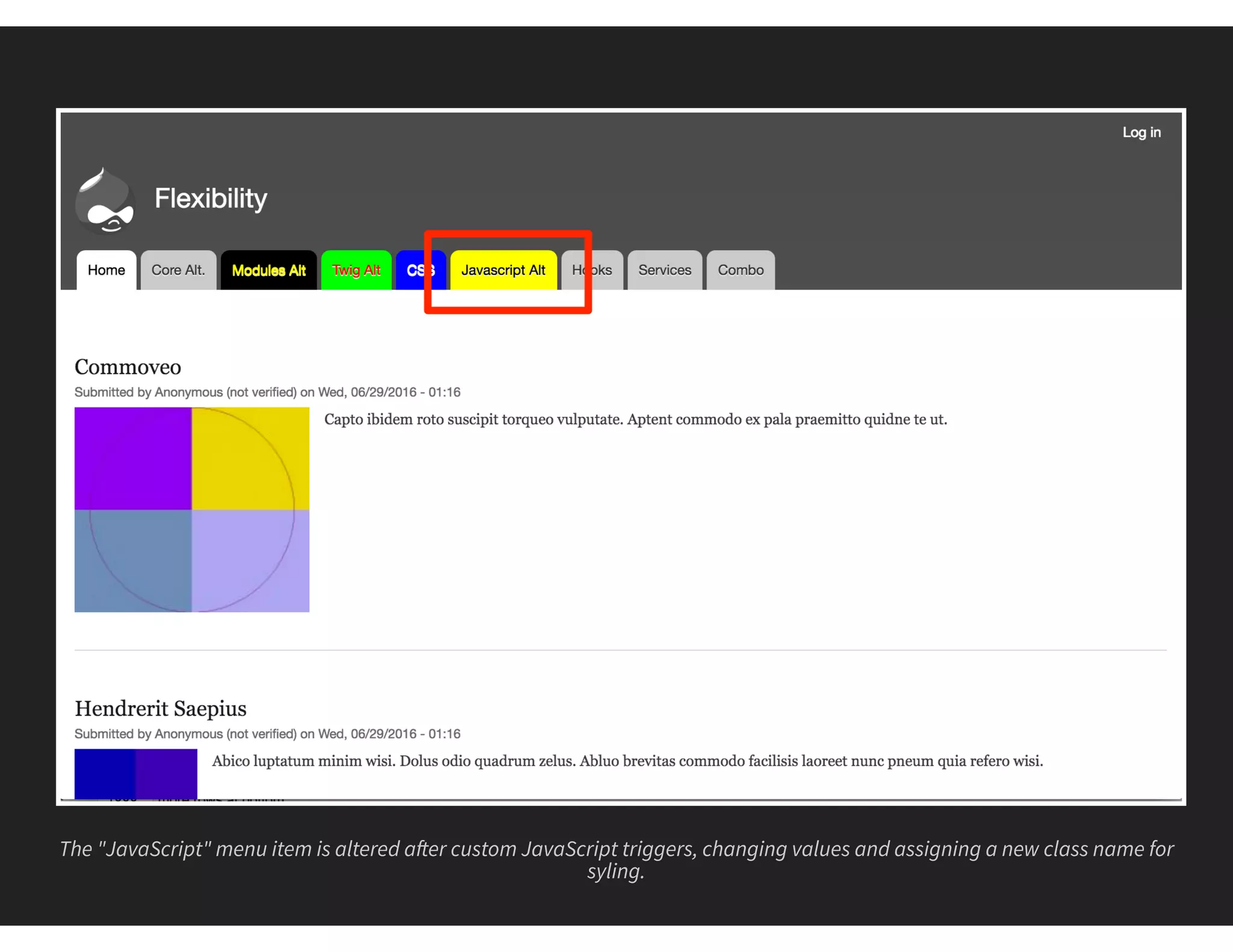
The "JavaScript" menu item is altered a er custom JavaScript triggers, changing values and assigning a new class name for
syling.
#6 HOOKS
THE ALTER DATA METHOD
Provided by core and modules
Requires PHP and Drupal skillset
Requires custom theme or module
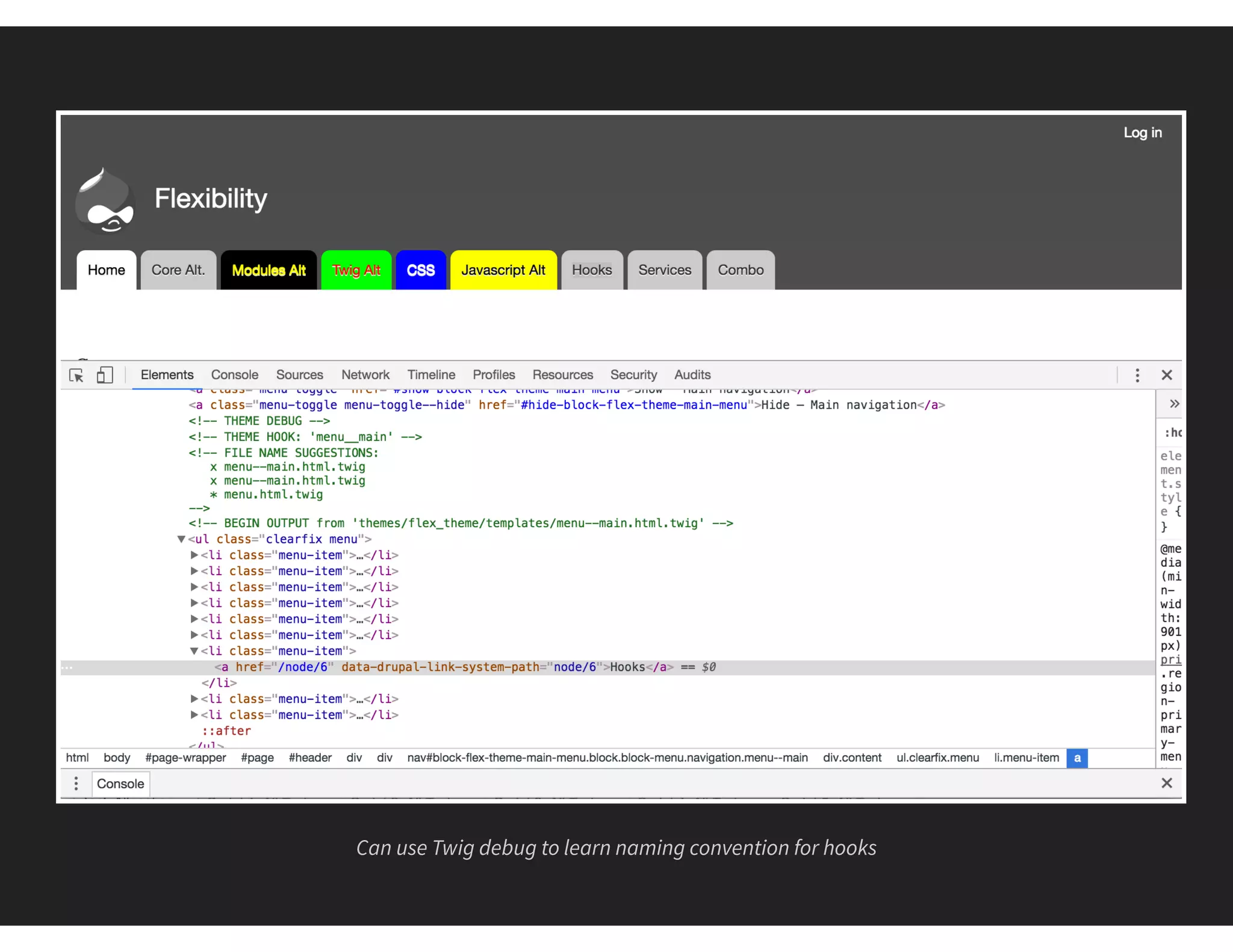
Can use Twig debug to learn naming convention for hooks
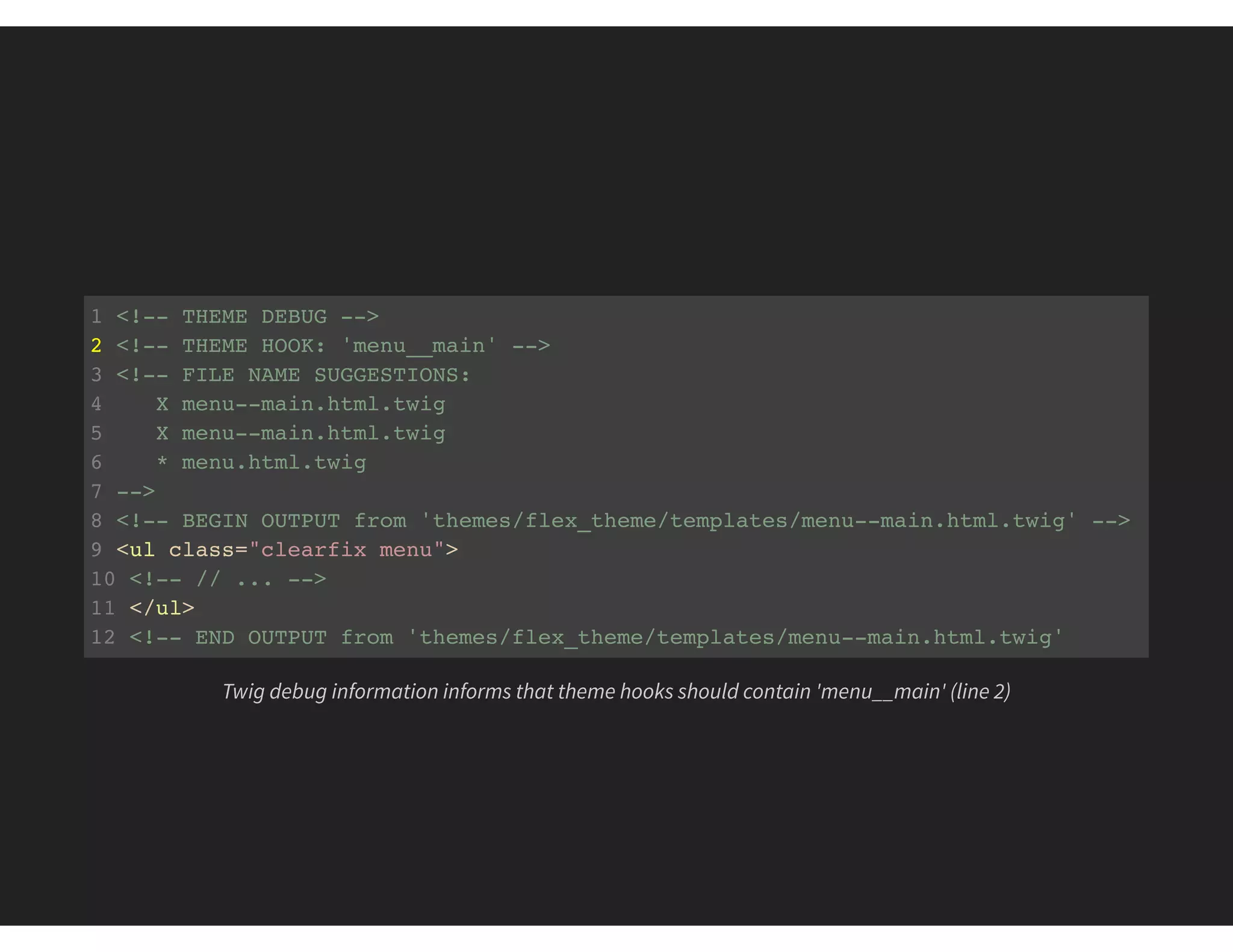
1 <!-- THEME DEBUG -->
2 <!-- THEME HOOK: 'menu__main' -->
3 <!-- FILE NAME SUGGESTIONS:
4 X menu--main.html.twig

5 X menu--main.html.twig
6 * menu.html.twig
7 -->
8 <!-- BEGIN OUTPUT from 'themes/flex_theme/templates/menu--main.html.twig' -->
9 <ul class="clearfix menu">
10 <!-- // ... -->
11 </ul>
12 <!-- END OUTPUT from 'themes/flex_theme/templates/menu--main.html.twig'
Twig debug information informs that theme hooks should contain 'menu__main' (line 2)
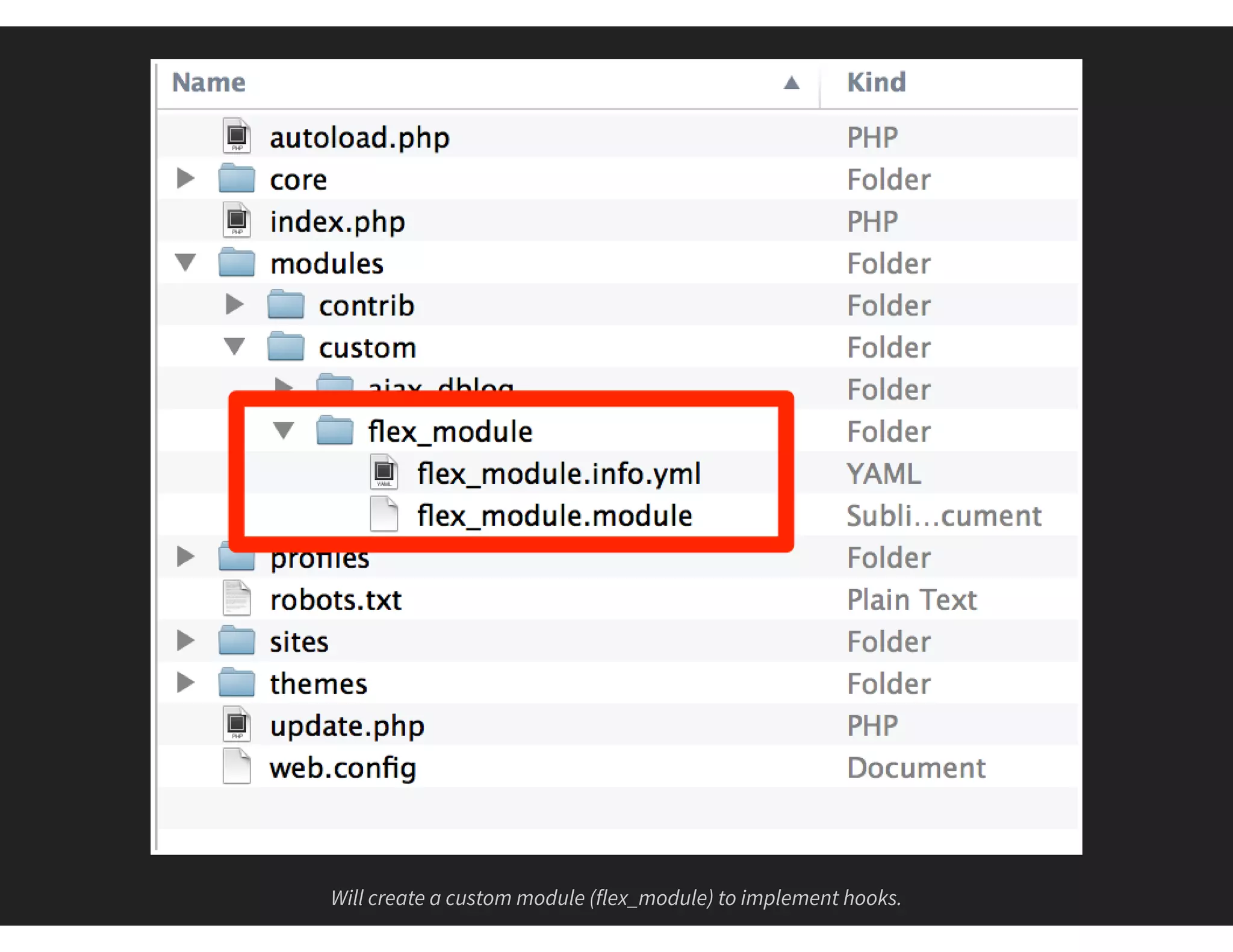
Will create a custom module (flex_module) to implement hooks.
1 // Implements hook_preprocess_HOOK().
2 function flex_module_preprocess_menu__main(&$variables) {
3 // Loop through all menu tabs.
4 foreach ($variables['items'] as &$menu_tab) {
5 // Current tab pointing to node/6 ?
6 if ($menu_tab['url']->toString() == '/node/6') {
7 // Alter Title
8 $menu_tab['title'] .= ' Alt';
9 // Existing attributes?
10 $attributes = $menu_tab['url']->getOption('attributes');
11 // Add custom styling.
12 $attributes['style'] .= 'color:#FFF;background:#F00;';
13 // Add back modified attributes.
14 $menu_tab['url']->setOption('attributes', $attributes);
15 }
16 }
17 }
module/custom/flex_module/flex_module.module
Implement a preprocess hook targeted at the main menu. Loop through all the menu items and alter any that point to
node/6
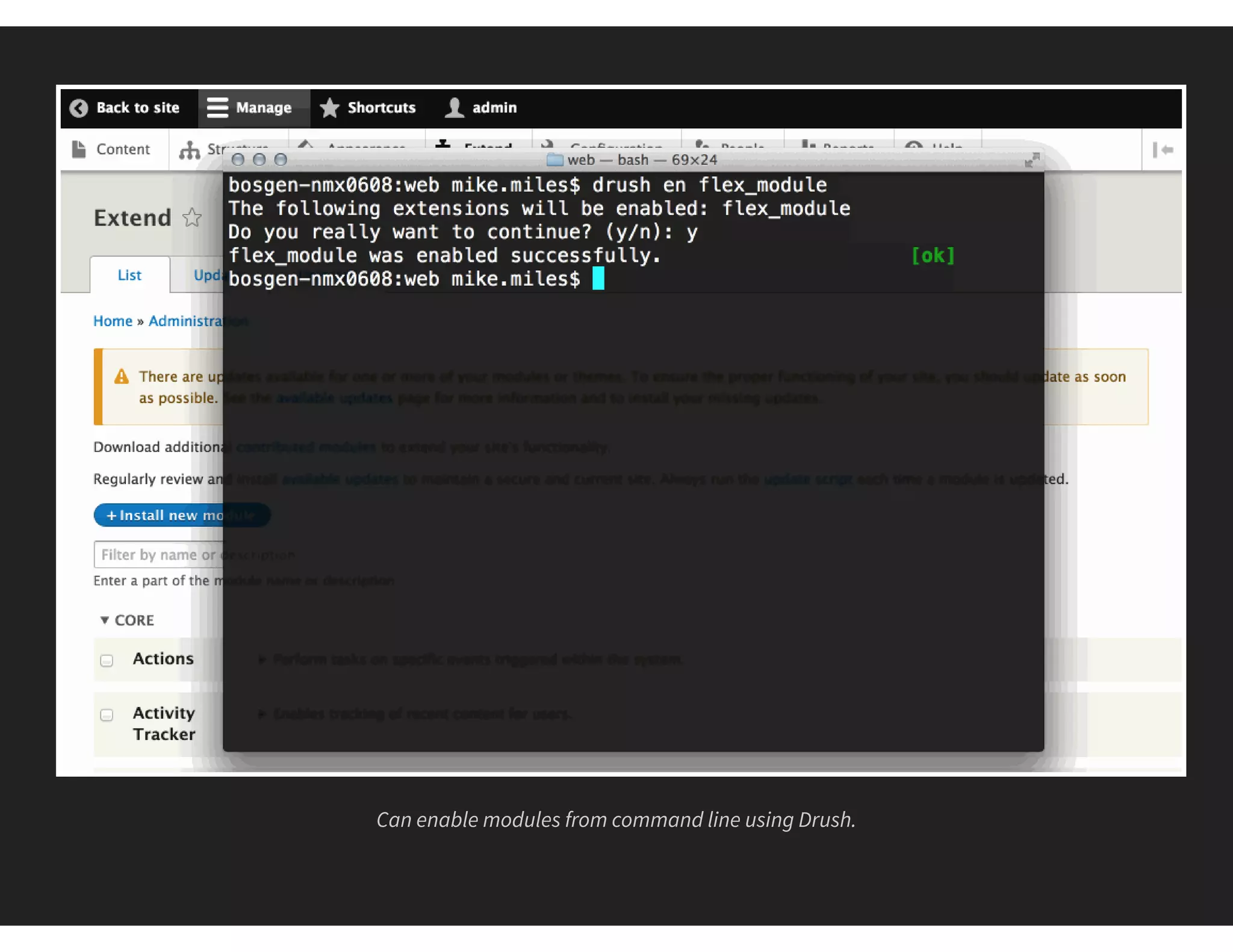
Can enable modules from command line using Drush.
"Hooks" menu item has been altered by using preprocess hook in a custom module
#7 SERVICES
THE REPLACE CORE METHOD
Replace/Alter global systems
Requires advanced Drupal and OOP skillset
Requires a custom module
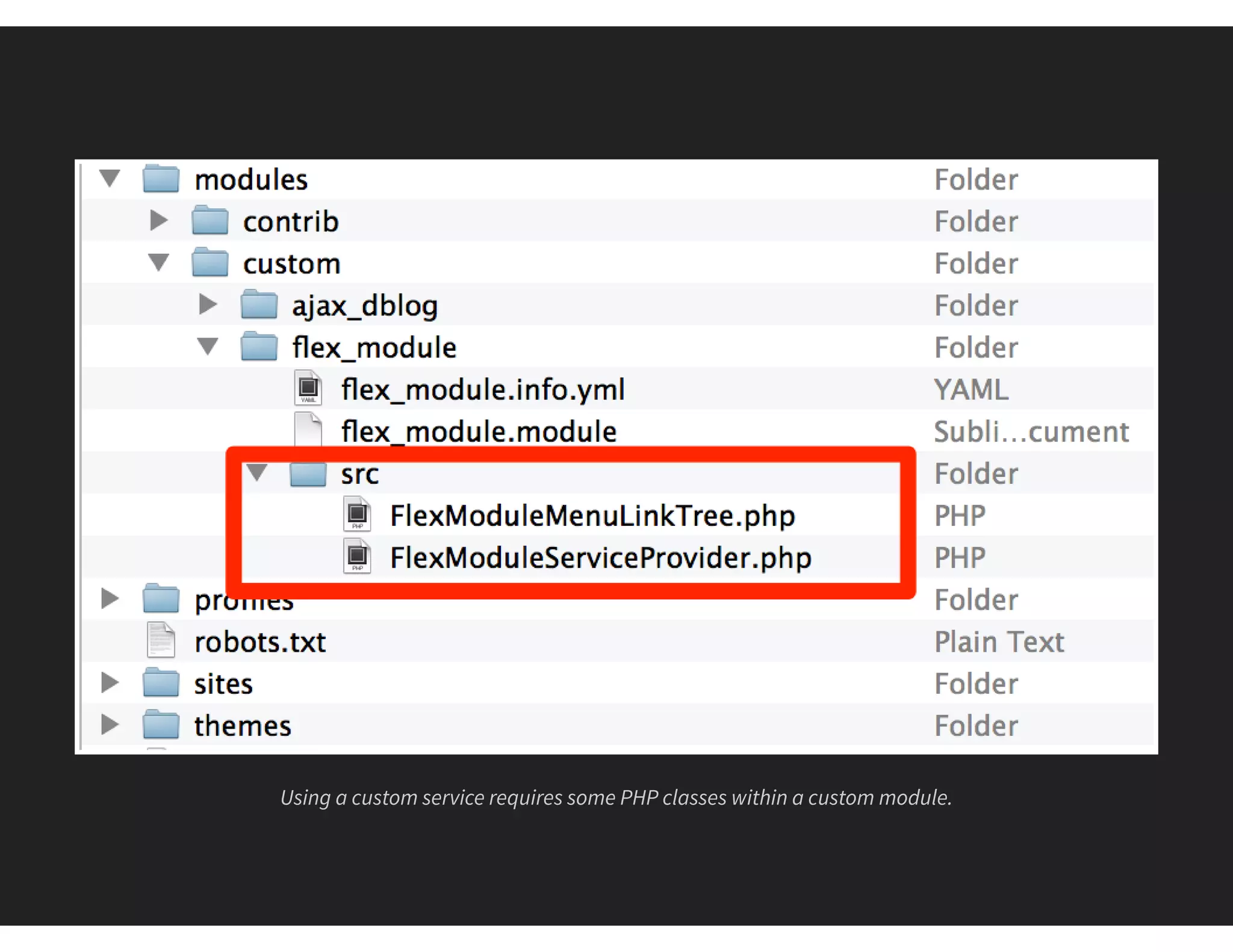
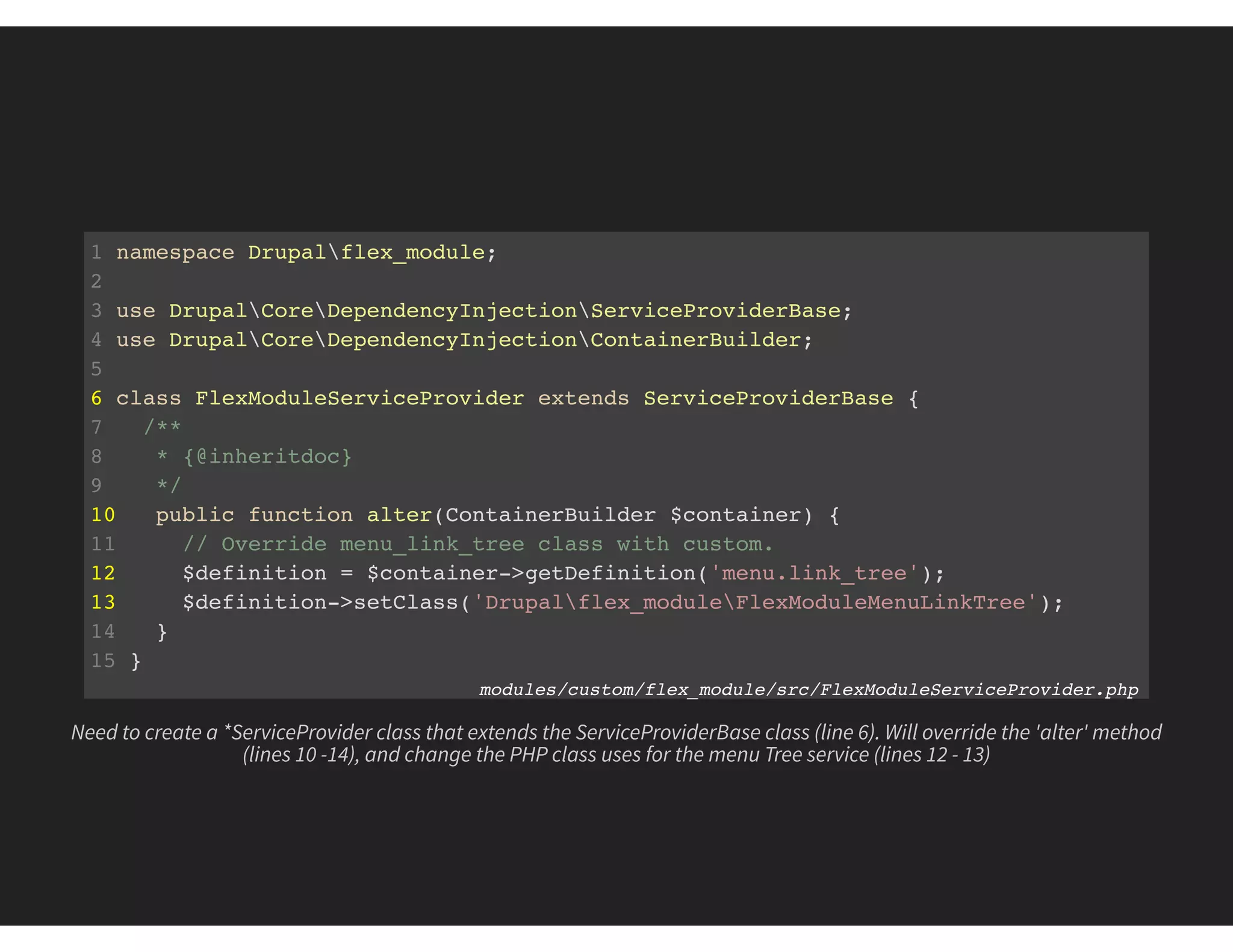
Using a custom service requires some PHP classes within a custom module.
1 namespace Drupalflex_module;
2
3 use DrupalCoreDependencyInjectionServiceProviderBase;
4 use DrupalCoreDependencyInjectionContainerBuilder;
5
6 class FlexModuleServiceProvider extends ServiceProviderBase {
7 /**
8 * {@inheritdoc}
9 */
10 public function alter(ContainerBuilder $container) {
11 // Override menu_link_tree class with custom.
12 $definition = $container->getDefinition('menu.link_tree');
13 $definition->setClass('Drupalflex_moduleFlexModuleMenuLinkTree');
14 }
15 }
modules/custom/flex_module/src/FlexModuleServiceProvider.php
Need to create a *ServiceProvider class that extends the ServiceProviderBase class (line 6). Will override the 'alter' method
(lines 10 -14), and change the PHP class uses for the menu Tree service (lines 12 - 13)
1 namespace Drupalflex_module;
2 use DrupalCoreMenuMenuLinkTree;
3
4 class FlexModuleMenuLinkTree extends MenuLinkTree {
5 // Overrides DrupalCoreMenuMenuLinkTree::build().
6 public function build(array $tree) {
7 $build = parent::build($tree);
8 if (isset($build['#items']) && $build['#theme'] == 'menu__main') {
9 $n = 0;
10 foreach ($build['#items'] as &$item ) {
11 if (++$n == 8) {
12 // Change Title, path and add styling.
13 $item['title'] .= ' Alt';
14 $item['url']->setOption('attributes', array(
15 'style' => 'color:#00F;background:#FFA500;',
16 ));
17 }
18 }
19 }
20 return $build;
21 } modules/custom/flex_module/src/FlexModuleMenuLinkTree.php
Create a new service class that extends the core MenuLinkTree service (line 4). Will override the core 'build' method, so that
can use custom logic to tartget the 8th main menu item.
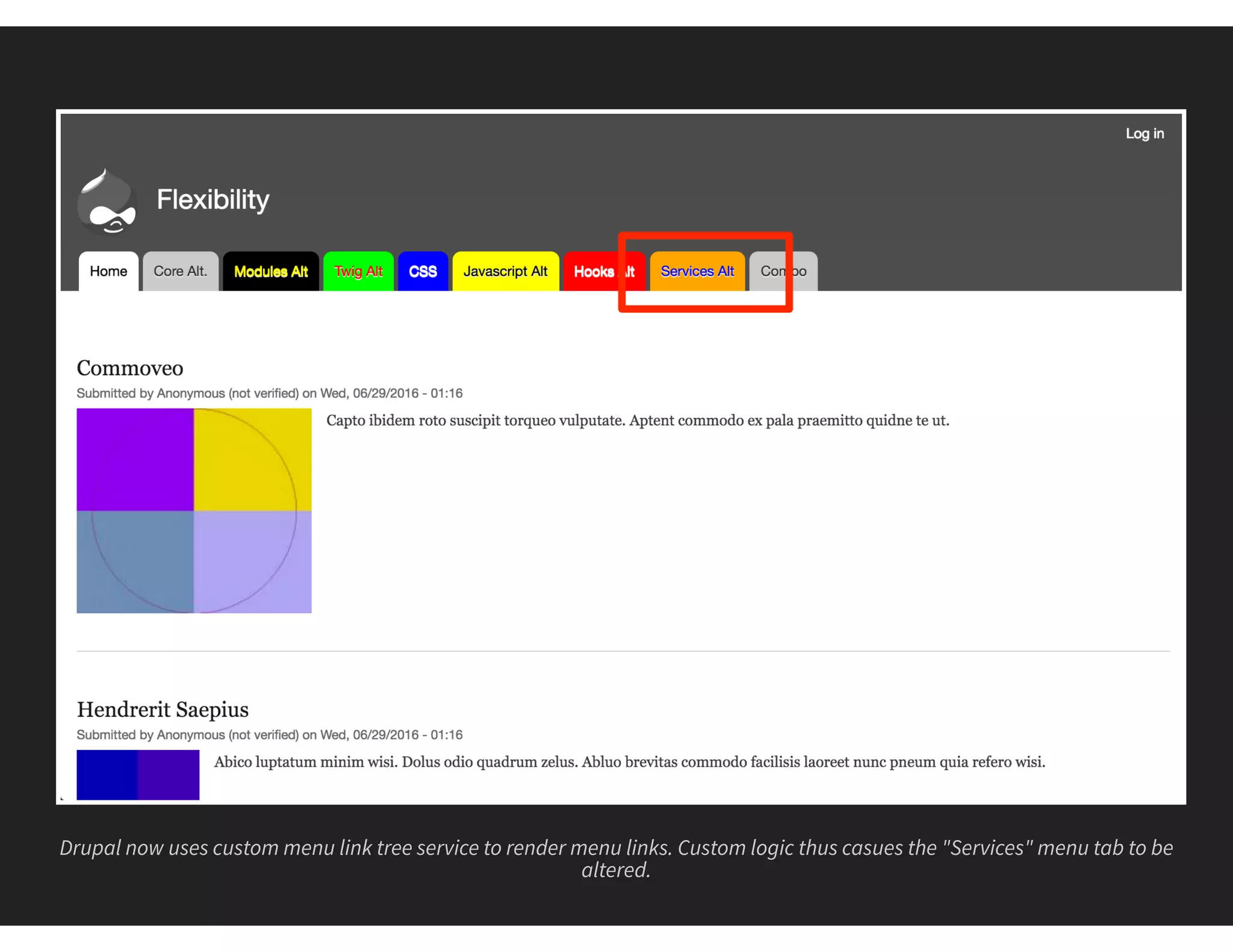
Drupal now uses custom menu link tree service to render menu links. Custom logic thus casues the "Services" menu tab to be
altered.
#8 COMBINATIONS
THE REAL WORLD METHOD
Most control over Drupal
Use multiple skillsets
Requires more time and effort
1 namespace Drupalflex_module;
2 use DrupalCoreMenuMenuLinkTree;
3
4 class FlexModuleMenuLinkTree extends MenuLinkTree {
5 // Overrides DrupalCoreMenuMenuLinkTree::build().
6 public function build(array $tree) {
7 $build = parent::build($tree);
8 if (isset($build['#items']) && $build['#theme'] == 'menu__main') {
9 $n = 0;
10 foreach ($build['#items'] as &$item ) {
11 // ...
12 if ($item['url']->toString() == '/node/8') {
13 $item['title'] .= ' Alt';
14 }
15 }
16 }
17 return $build;
18 }
19 }
modules/custom/flex_module/src/FlexModuleMenuLinkTree.php
Use custom service to alter the Display title of a menu link (lines 12 - 14)
1 // Implements hook_preprocess_HOOK().
2 function flex_module_preprocess_menu__main(&$variables) {
3 $size = count($variables['items']);
4 $m = 1;
5 // Loop through all menu tabs.
6 foreach ($variables['items'] as &$menu_tab) {
7 // Current tab pointing to node/6 ?
8 if ($menu_tab['url']->toString() == '/node/6') {
9 // ...
10 }
11 $menu_tab['is_combo'] = ($m++ == $size);
12 }
13 }
modules/custom/flex_module/flex_module.module
Use a preprocess hook in a custom module to target items in main menu. Will add new menu item boolean attribute to check
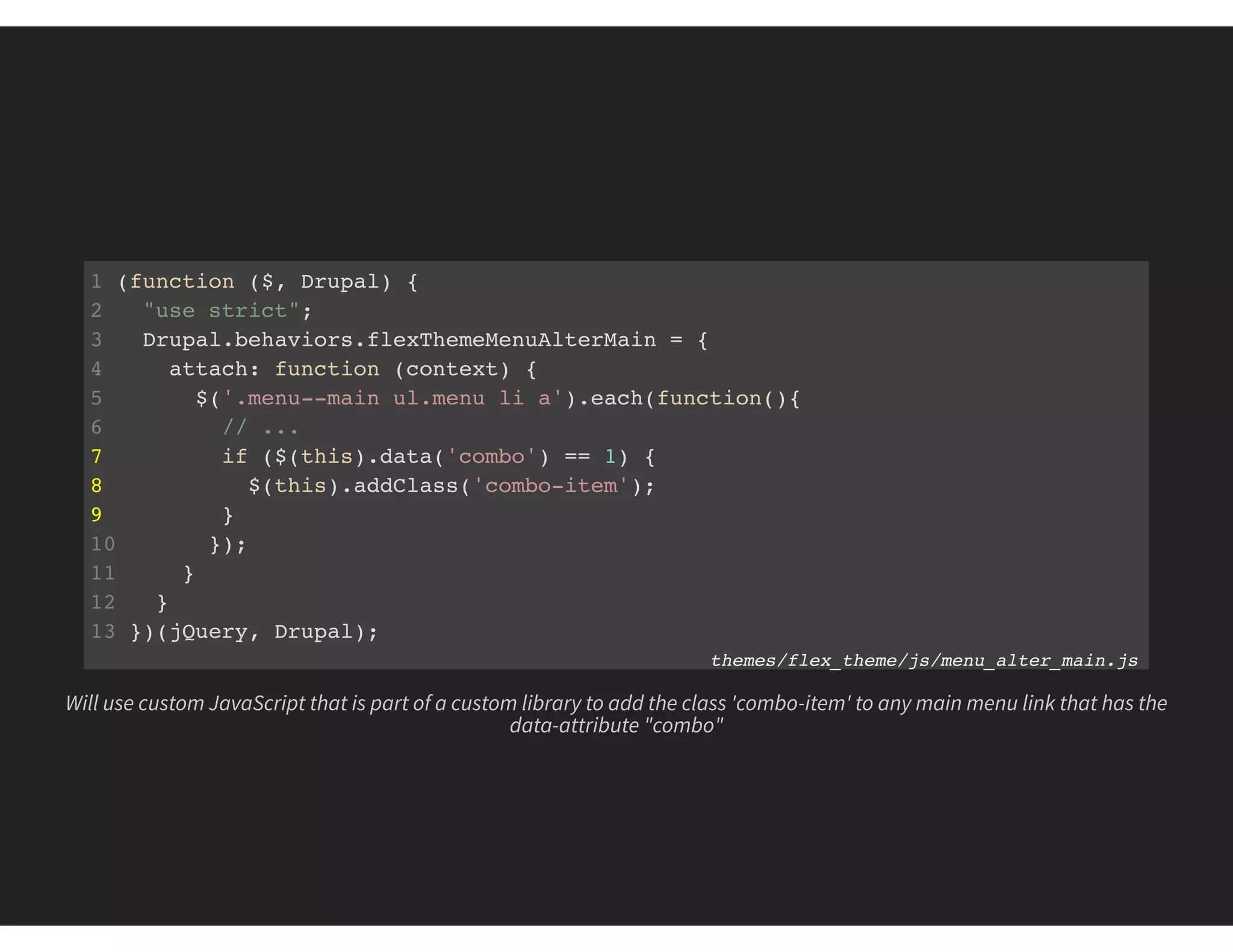
if last item (line #11).
1 (function ($, Drupal) {
2 "use strict";
3 Drupal.behaviors.flexThemeMenuAlterMain = {
4 attach: function (context) {
5 $('.menu--main ul.menu li a').each(function(){
6 // ...
7 if ($(this).data('combo') == 1) {
8 $(this).addClass('combo-item');
9 }
10 });
11 }
12 }
13 })(jQuery, Drupal);
themes/flex_theme/js/menu_alter_main.js
Will use custom JavaScript that is part of a custom library to add the class 'combo-item' to any main menu link that has the
data-attribute "combo"
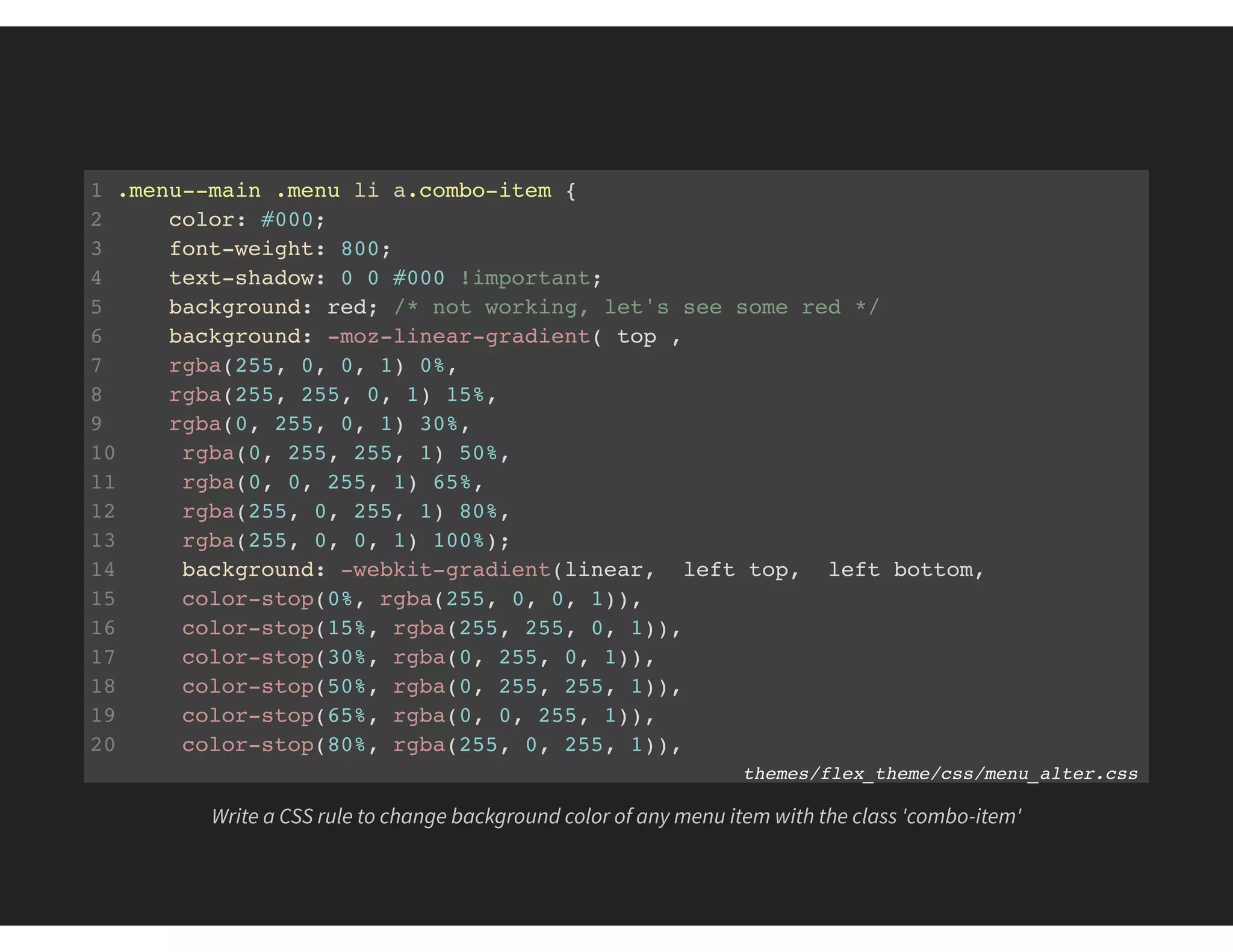
1 .menu--main .menu li a.combo-item {
2 color: #000;
3 font-weight: 800;
4 text-shadow: 0 0 #000 !important;
5 background: red; /* not working, let's see some red */
6 background: -moz-linear-gradient( top ,
7 rgba(255, 0, 0, 1) 0%,
8 rgba(255, 255, 0, 1) 15%,
9 rgba(0, 255, 0, 1) 30%,
10 rgba(0, 255, 255, 1) 50%,
11 rgba(0, 0, 255, 1) 65%,
12 rgba(255, 0, 255, 1) 80%,
13 rgba(255, 0, 0, 1) 100%);
14 background: -webkit-gradient(linear, left top, left bottom,
15 color-stop(0%, rgba(255, 0, 0, 1)),
16 color-stop(15%, rgba(255, 255, 0, 1)),
17 color-stop(30%, rgba(0, 255, 0, 1)),
18 color-stop(50%, rgba(0, 255, 255, 1)),
19 color-stop(65%, rgba(0, 0, 255, 1)),
20 color-stop(80%, rgba(255, 0, 255, 1)),
21 color-stop(100%, rgba(255, 0, 0, 1))); themes/flex_theme/css/menu_alter.css
Write a CSS rule to change background color of any menu item with the class 'combo-item'
1 <ul class="menu">
2 {% endif %}
3 {% for item in items %}
4 {# ... #}
5 <li{{ item.attributes.addClass(classes) }}>
6 {% if item.title == 'Twig' %}
7 {# ... #}
8 {% elseif item.is_combo %}
9 {{ link(item.title | reverse, item.url) }}
10 {% else %}
11 {{ link(item.title, item.url) }}
12 {% endif %}
13 {# ... #}
14 </li>
15 {% endfor %}
16 </ul>
theme/flex_theme/tempplates/menu--main.html.twig
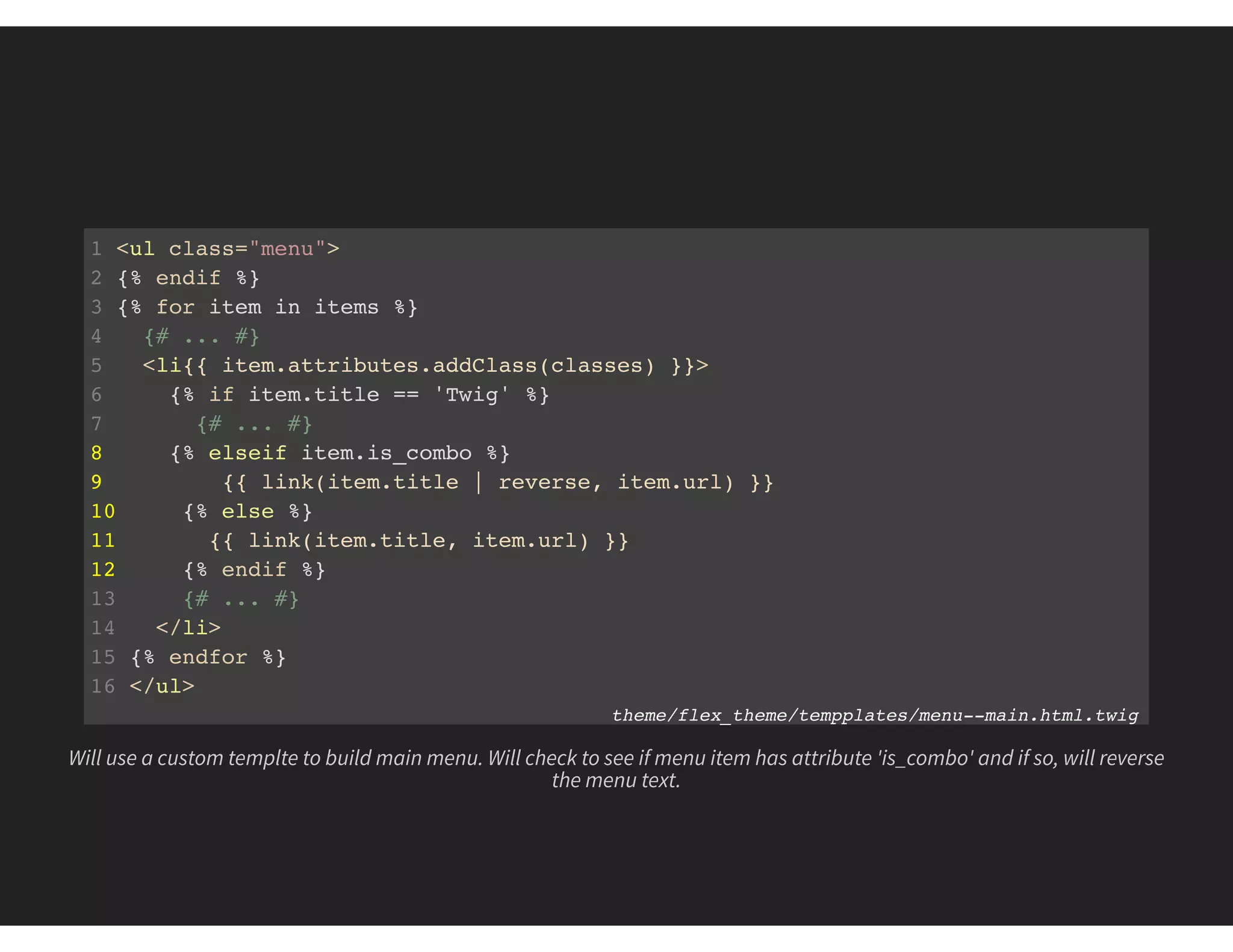
Will use a custom templte to build main menu. Will check to see if menu item has attribute 'is_combo' and if so, will reverse
the menu text.
1 attributes:
2 class:
3 label: ''
4 description: ''
5 target:
6 label: ''
7 description: ''
8 options:
9 _blank: 'New window (_blank)'
10 _self: 'Same window (_self)'
11 style:
12 label: ''
13 description: ''
14 data-combo:
15 label: 'Combo Item'
16 description: 'Is this a combo menu item?'
17 options:
18 0: 'No'
19 1: 'Yes'
20 _core:
21 default_config_hash: 9nRDOclwSlz2Os9mJXM1LXNbV2q-bADV0zipiWPXymk
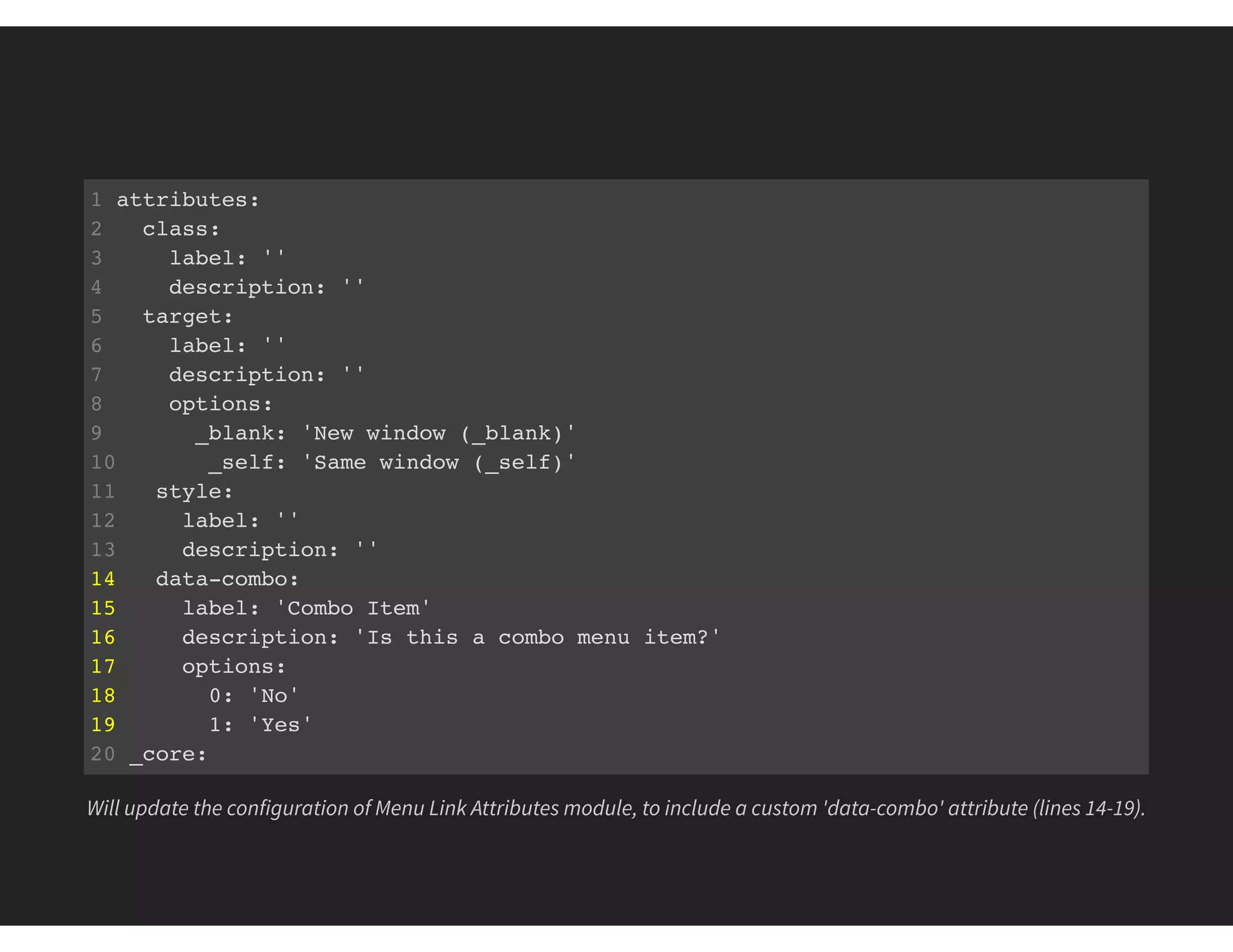
Will update the configuration of Menu Link Attributes module, to include a custom 'data-combo' attribute (lines 14-19).
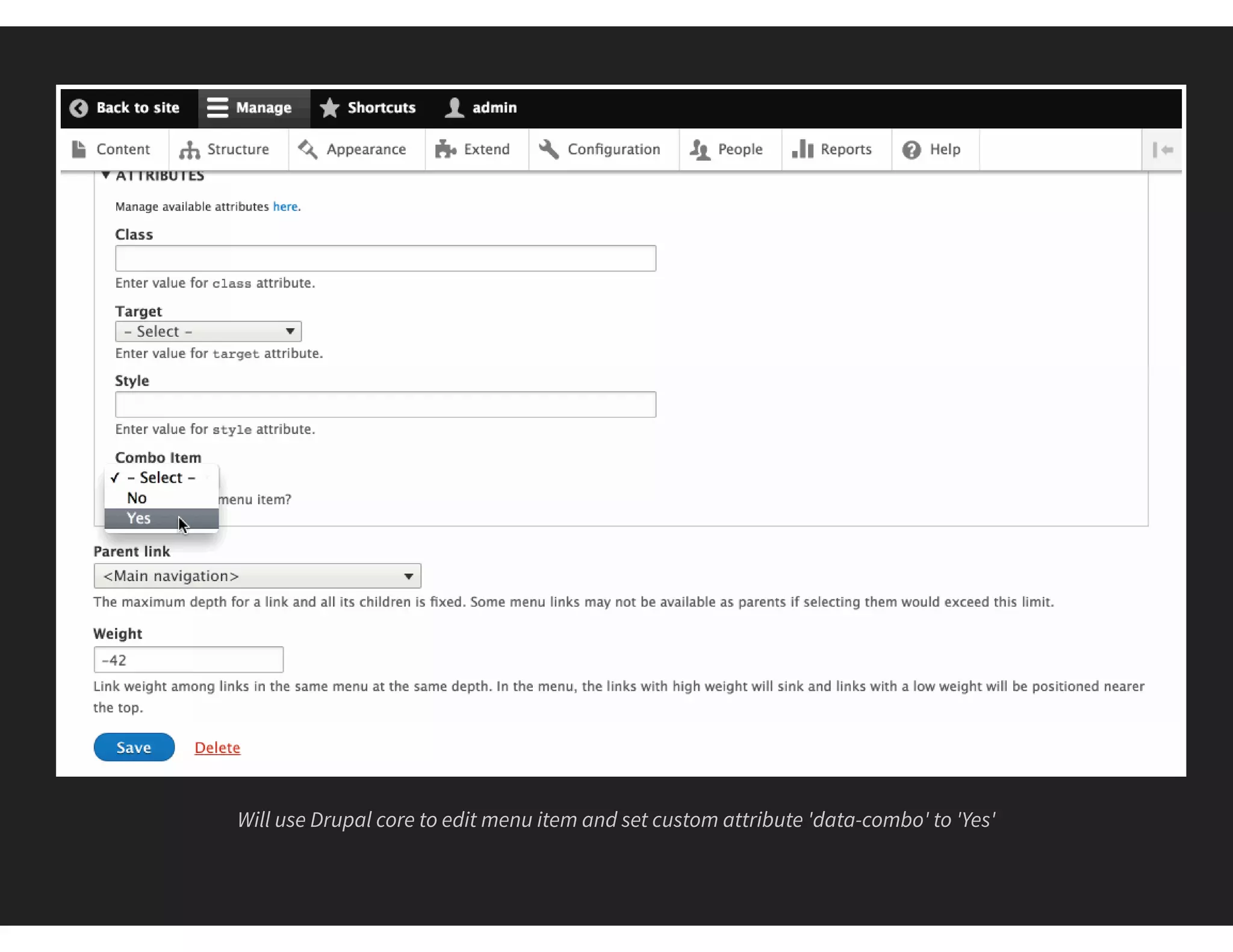
Will use Drupal core to edit menu item and set custom attribute 'data-combo' to 'Yes'
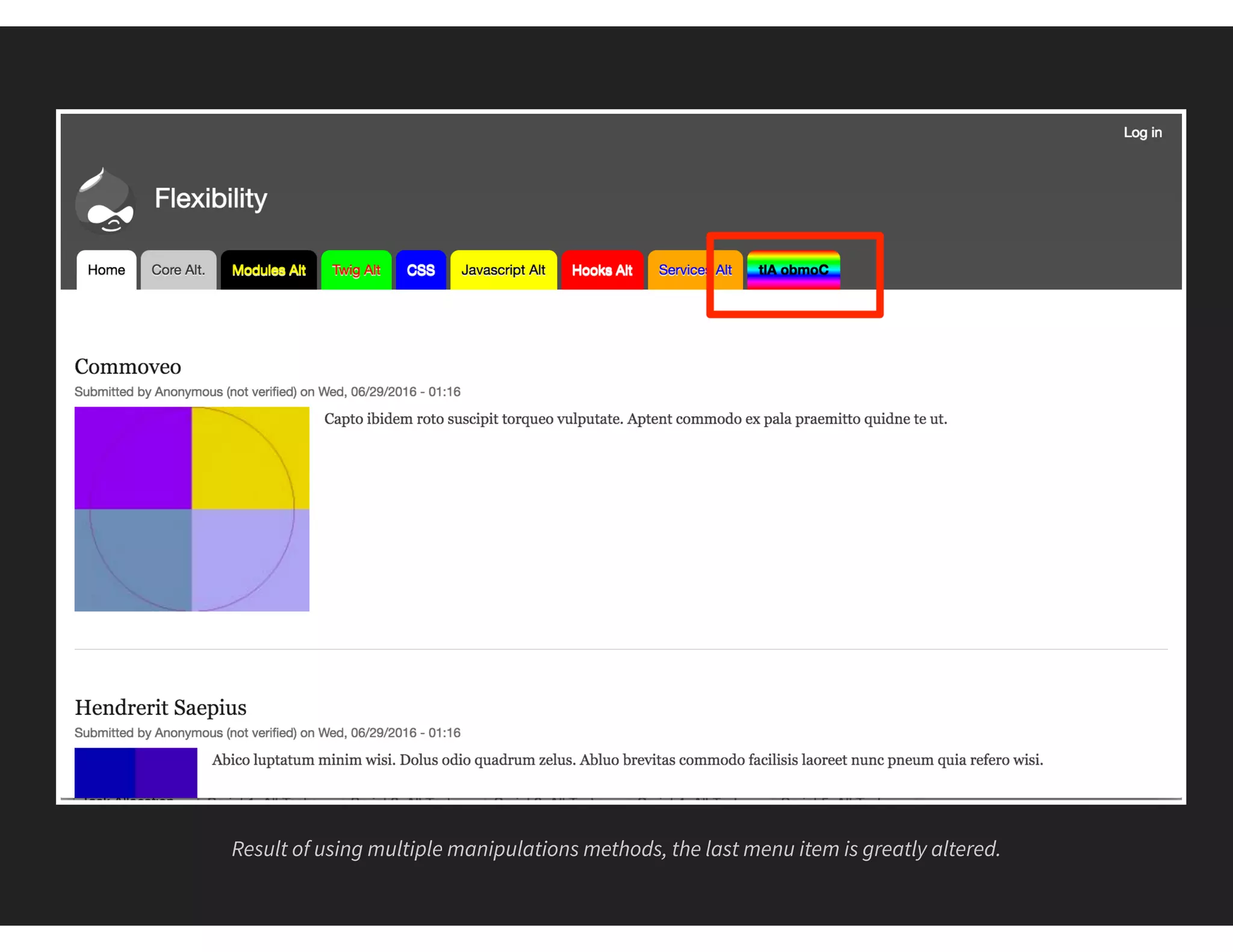
Result of using multiple manipulations methods, the last menu item is greatly altered.
WHAT DID WE LEARN?
Drupal is flexible!
No "right" way, just "right for me" way
RESOURCES
bit.ly/NYC16Flex
This presentation
bit.ly/NYC16FlexSlides
Annotated Slides
bit.ly/NYC16FlexCode
Demo code (theme and module)
mike-miles.com
My blog
FEEDBACK
@MIKEMILES86
THANK YOU!

The Flexibility of Drupal 8

  • 1.
  • 2.
    MIKE MILES Genuine ()wearegenuine.com All the internet places: mikemiles86
  • 3.
  • 4.
    WHAT MAKES DRUPALFLEXIBLE Modular design Decoupled systems Open Source nature
  • 5.
    WHY FLEXIBLITY ISIMPORTANT Make Drupal do what you want No "right way", just a "right for me" way Adjust for skillsets, time and budget
  • 6.
    THREE AREAS OFFLEXIBILITY The Interface Display Layer Data Layer
  • 7.
    FOCUS OF THISSESSION To prove the flexiblity of Drupal To demostrate abilities of all skillsets To discuss considerations and limitations
  • 8.
    THE DEMO Drupal 8.1.3 StandardInstall Profile Change menu tabs using 8 different methods
  • 9.
    THE BEFORE A plainDrupal 8 install with menu menu links before altering.
  • 10.
    THE AFTER Drupal 8main menu a er altering 8 different ways.
  • 11.
  • 12.
    THE "CLICKING BUTTONS"METHOD "Easy" and "Quick" Little to No dev skills needed Capabilities are limited
  • 13.
    Use Drupal coreto edit a main menu link. Limited to changing the title and the destination.
  • 14.
    The first menulink has been altered using only Drupal core.
  • 15.
  • 16.
    THE EXTEND COREMETHOD Requires time for research. Can't find one? Can build your own (Dev skills needed) Requires long term maintence
  • 17.
    Look for moduleson Drupal.org to see if there is one that meets your needs. Found the Menu Links Attributes module for Drupal 8.
  • 18.
    Many ways todownload and enable modules. Will use the core interface to enable the Menu Links Attributes module a er downloading.
  • 19.
    When editing amenu link, now have more attributes available to set.
  • 20.
    Menu Links Attributesmodule requires some technial (YAML) knowledge to customize
  • 21.
    1 attributes: 2 class: 3label: '' 4 description: '' 5 target: 6 label: '' 7 description: '' 8 options: 9 _blank: 'New window (_blank)' 10 _self: 'Same window (_self)' 11 style: 12 label: '' 13 description: '' 14 _core: 15 default_config_hash: 9nRDOclwSlz2Os9mJXM1LXNbV2q-bADV0zipiWPXymk Add a new configurable 'style' attribute (lines 11-13) to the YAML
  • 22.
    A er savingconfiguration, now able to add inline style to menu links
  • 23.
    Using a contribmodule allowed for altering the style of the "Modules" main menu link.
  • 24.
  • 25.
    THE ALTER MARKUPMETHOD Almost everything is templated Need to know HTML and/or Twig Requires a custom theme
  • 26.
    Can use Twigdebug to learn which template the main menu uses.
  • 27.
    1 <!-- THEMEDEBUG --> 2 <!-- THEME HOOK: 'menu__main' --> 3 <!-- FILE NAME SUGGESTIONS: 4 * menu--main.html.twig 5 x menu.html.twig 6 --> 7 <!-- BEGIN OUTPUT from 'core/themes/classy/templates/navigation/menu.html.twig' --> 8 <ul class="clearfix menu"> 9 <!-- // ... --> 10 <li class="menu-item"> 11 <a href="/node/3" data-drupal-link-system-path="node/3">Twig</a> 12 </li> 13 <!-- // ... --> 14 </ul> 15 <!-- END OUTPUT from 'core/themes/classy/templates/navigation/menu.html.twig' Twig debug tells the available template names to override current template.
  • 28.
    Create a customtheme (flex_theme), to override the menu--main.html.twig template.
  • 29.
    1 {# ...#} 2 {% if items %} 3 {# ... #} 4 {% for item in items %} 5 {# ... #} 6 <li{{ item.attributes.addClass(classes) }}> 7 {% if item.title == 'Twig' %} 8 {% set style = 'background:#0F0;color:#F00' %} 9 {{ link(item.title ~ ' Alt', item.url, { 'style': style }) }} 10 {% else %} 11 {{ link(item.title, item.url) }} 12 {% endif %} 13 {# ... #} 14 </li> 15 {% endfor %} 16 </ul> 17 {% endif %} flex_theme/templates/menu--main.html.twig Add logic to twig template (lines 7-12) to check title of current link and alter the styling.
  • 30.
    Enabling the newtheme as default so that Drupal will use the custom twig template for output.
  • 31.
    Result of usinga custom theme with template to alter "Twig" menu link.
  • 32.
  • 33.
    THE ALTER DISPLAYMETHOD Target any element on the "page" Need to know CSS and how to add a library Requires a custom theme or module
  • 34.
    Will add somecustom styling to existing custom theme (flex_theme)
  • 35.
    1 .menu--main .menuli:nth-child(5) a { 2 background: #0000FF; 3 color: #FFF; 4 } themes/flex_theme/css/menu_alter.css Use custom CSS to target the 5th item in the main menu
  • 36.
    1 menu-alter: 2 version:VERSION 3 css: 4 component: 5 css/menu_alter.css: {} themes/flex_theme/flex_theme.libraries.yml Custom CSS and JavaScript need to be added to a custom library. Custom libraries are defined in a *.libraries.yml file.
  • 37.
    1 name: FlexTheme 2 type: theme 3 description: An theme to demo the flexibility of Drupal 8. 4 package: Core 5 version: VERSION 6 core: 8.x 7 base theme: bartik 8 libraries: 9 - flex_theme/menu-alter themes/flex_theme/flex_theme.info.yml Add custom library as a dependency of the theme in the *.info.yml file. Drupal will include this library on any page where this theme is used.
  • 38.
    The "CSS" menulink has been altered using custom CSS. Only able to alter the display of menu item.
  • 39.
  • 40.
    THE DOM MANIPULATIONMETHOD Change based on actions Need to know JavaScript and how to add a library Dependent on client browser, delay in execution
  • 41.
    Will add newJavaScript and CSS to custom theme to alter data using custom JavaScript.
  • 42.
    1 (function ($,Drupal) { 2 "use strict"; 3 Drupal.behaviors.flexThemeMenuAlterMain = { 4 attach: function (context) { 5 $('.menu--main ul.menu li a').each(function(){ 6 if ($(this).attr('href') == '/node/5') { 7 $(this).addClass('yellow-menu'); 8 $(this).attr('style', 'color: #000;'); 9 $(this).attr('target', '_blank'); 10 $(this).text($(this).text() + Drupal.t(' Alt')); 11 } 12 }); 13 } 14 } 15 })(jQuery, Drupal); themes/flex_theme/js/menu_alter_main.js Write a Drupal Behaviour that will trigger whenever the DOM loads. Target a specific menu item to change value and add a custom class.
  • 43.
    1 .yellow-menu { 2background: #FFFF00; 3 } themes/flex_theme/css/menu_alter_main.css Add some basic CSS for to a custom class name.
  • 44.
    1 menu-alter: 2 version:VERSION 3 css: 4 component: 5 css/menu_alter.css: {} 6 menu-alter-main: 7 version: VERSION 8 css: 9 component: 10 css/menu_alter_main.css: {} 11 js: 12 js/menu_alter_main.js: {} 13 dependencies: 14 - core/jquery 15 - core/jquery.once 16 - core/drupal themes/flex_theme/flex_theme.libraries.yml Add a second library to libraries.yml file. A Liibrary can define both CSS and JS files to include, as well as, any dependencies on other libraries.
  • 45.
    1 {{ attach_library('flex_theme/menu-alter-main')}} 2 {# ... #} 3 {% if items %} 4 {# ... #} 5 {% for item in items %} 6 {# ... #} 7 <li{{ item.attributes.addClass(classes) }}> 8 {% if item.title == 'Twig' %} 9 {% set style = 'background:#0F0;color:#F00' %} 10 {{ link(item.title ~ ' Alt', item.url, { 'style': style }) }} 11 {% else %} 12 {{ link(item.title, item.url) }} 13 {% endif %} 14 {# ... #} themes/flex_theme/templates/menu--main.html.twig Libraries can be attached from within a template files, by using the twig function 'attach_library'. Attaching new library only when the template menu--main.html.twig is included on page.
  • 46.
    The "JavaScript" menuitem is altered a er custom JavaScript triggers, changing values and assigning a new class name for syling.
  • 47.
  • 48.
    THE ALTER DATAMETHOD Provided by core and modules Requires PHP and Drupal skillset Requires custom theme or module
  • 49.
    Can use Twigdebug to learn naming convention for hooks
  • 50.
    1 <!-- THEMEDEBUG --> 2 <!-- THEME HOOK: 'menu__main' --> 3 <!-- FILE NAME SUGGESTIONS: 4 X menu--main.html.twig 5 X menu--main.html.twig 6 * menu.html.twig 7 --> 8 <!-- BEGIN OUTPUT from 'themes/flex_theme/templates/menu--main.html.twig' --> 9 <ul class="clearfix menu"> 10 <!-- // ... --> 11 </ul> 12 <!-- END OUTPUT from 'themes/flex_theme/templates/menu--main.html.twig' Twig debug information informs that theme hooks should contain 'menu__main' (line 2)
  • 51.
    Will create acustom module (flex_module) to implement hooks.
  • 52.
    1 // Implementshook_preprocess_HOOK(). 2 function flex_module_preprocess_menu__main(&$variables) { 3 // Loop through all menu tabs. 4 foreach ($variables['items'] as &$menu_tab) { 5 // Current tab pointing to node/6 ? 6 if ($menu_tab['url']->toString() == '/node/6') { 7 // Alter Title 8 $menu_tab['title'] .= ' Alt'; 9 // Existing attributes? 10 $attributes = $menu_tab['url']->getOption('attributes'); 11 // Add custom styling. 12 $attributes['style'] .= 'color:#FFF;background:#F00;'; 13 // Add back modified attributes. 14 $menu_tab['url']->setOption('attributes', $attributes); 15 } 16 } 17 } module/custom/flex_module/flex_module.module Implement a preprocess hook targeted at the main menu. Loop through all the menu items and alter any that point to node/6
  • 53.
    Can enable modulesfrom command line using Drush.
  • 54.
    "Hooks" menu itemhas been altered by using preprocess hook in a custom module
  • 55.
  • 56.
    THE REPLACE COREMETHOD Replace/Alter global systems Requires advanced Drupal and OOP skillset Requires a custom module
  • 57.
    Using a customservice requires some PHP classes within a custom module.
  • 58.
    1 namespace Drupalflex_module; 2 3use DrupalCoreDependencyInjectionServiceProviderBase; 4 use DrupalCoreDependencyInjectionContainerBuilder; 5 6 class FlexModuleServiceProvider extends ServiceProviderBase { 7 /** 8 * {@inheritdoc} 9 */ 10 public function alter(ContainerBuilder $container) { 11 // Override menu_link_tree class with custom. 12 $definition = $container->getDefinition('menu.link_tree'); 13 $definition->setClass('Drupalflex_moduleFlexModuleMenuLinkTree'); 14 } 15 } modules/custom/flex_module/src/FlexModuleServiceProvider.php Need to create a *ServiceProvider class that extends the ServiceProviderBase class (line 6). Will override the 'alter' method (lines 10 -14), and change the PHP class uses for the menu Tree service (lines 12 - 13)
  • 59.
    1 namespace Drupalflex_module; 2use DrupalCoreMenuMenuLinkTree; 3 4 class FlexModuleMenuLinkTree extends MenuLinkTree { 5 // Overrides DrupalCoreMenuMenuLinkTree::build(). 6 public function build(array $tree) { 7 $build = parent::build($tree); 8 if (isset($build['#items']) && $build['#theme'] == 'menu__main') { 9 $n = 0; 10 foreach ($build['#items'] as &$item ) { 11 if (++$n == 8) { 12 // Change Title, path and add styling. 13 $item['title'] .= ' Alt'; 14 $item['url']->setOption('attributes', array( 15 'style' => 'color:#00F;background:#FFA500;', 16 )); 17 } 18 } 19 } 20 return $build; 21 } modules/custom/flex_module/src/FlexModuleMenuLinkTree.php Create a new service class that extends the core MenuLinkTree service (line 4). Will override the core 'build' method, so that can use custom logic to tartget the 8th main menu item.
  • 60.
    Drupal now usescustom menu link tree service to render menu links. Custom logic thus casues the "Services" menu tab to be altered.
  • 61.
  • 62.
    THE REAL WORLDMETHOD Most control over Drupal Use multiple skillsets Requires more time and effort
  • 63.
    1 namespace Drupalflex_module; 2use DrupalCoreMenuMenuLinkTree; 3 4 class FlexModuleMenuLinkTree extends MenuLinkTree { 5 // Overrides DrupalCoreMenuMenuLinkTree::build(). 6 public function build(array $tree) { 7 $build = parent::build($tree); 8 if (isset($build['#items']) && $build['#theme'] == 'menu__main') { 9 $n = 0; 10 foreach ($build['#items'] as &$item ) { 11 // ... 12 if ($item['url']->toString() == '/node/8') { 13 $item['title'] .= ' Alt'; 14 } 15 } 16 } 17 return $build; 18 } 19 } modules/custom/flex_module/src/FlexModuleMenuLinkTree.php Use custom service to alter the Display title of a menu link (lines 12 - 14)
  • 64.
    1 // Implementshook_preprocess_HOOK(). 2 function flex_module_preprocess_menu__main(&$variables) { 3 $size = count($variables['items']); 4 $m = 1; 5 // Loop through all menu tabs. 6 foreach ($variables['items'] as &$menu_tab) { 7 // Current tab pointing to node/6 ? 8 if ($menu_tab['url']->toString() == '/node/6') { 9 // ... 10 } 11 $menu_tab['is_combo'] = ($m++ == $size); 12 } 13 } modules/custom/flex_module/flex_module.module Use a preprocess hook in a custom module to target items in main menu. Will add new menu item boolean attribute to check if last item (line #11).
  • 65.
    1 (function ($,Drupal) { 2 "use strict"; 3 Drupal.behaviors.flexThemeMenuAlterMain = { 4 attach: function (context) { 5 $('.menu--main ul.menu li a').each(function(){ 6 // ... 7 if ($(this).data('combo') == 1) { 8 $(this).addClass('combo-item'); 9 } 10 }); 11 } 12 } 13 })(jQuery, Drupal); themes/flex_theme/js/menu_alter_main.js Will use custom JavaScript that is part of a custom library to add the class 'combo-item' to any main menu link that has the data-attribute "combo"
  • 66.
    1 .menu--main .menuli a.combo-item { 2 color: #000; 3 font-weight: 800; 4 text-shadow: 0 0 #000 !important; 5 background: red; /* not working, let's see some red */ 6 background: -moz-linear-gradient( top , 7 rgba(255, 0, 0, 1) 0%, 8 rgba(255, 255, 0, 1) 15%, 9 rgba(0, 255, 0, 1) 30%, 10 rgba(0, 255, 255, 1) 50%, 11 rgba(0, 0, 255, 1) 65%, 12 rgba(255, 0, 255, 1) 80%, 13 rgba(255, 0, 0, 1) 100%); 14 background: -webkit-gradient(linear, left top, left bottom, 15 color-stop(0%, rgba(255, 0, 0, 1)), 16 color-stop(15%, rgba(255, 255, 0, 1)), 17 color-stop(30%, rgba(0, 255, 0, 1)), 18 color-stop(50%, rgba(0, 255, 255, 1)), 19 color-stop(65%, rgba(0, 0, 255, 1)), 20 color-stop(80%, rgba(255, 0, 255, 1)), 21 color-stop(100%, rgba(255, 0, 0, 1))); themes/flex_theme/css/menu_alter.css Write a CSS rule to change background color of any menu item with the class 'combo-item'
  • 67.
    1 <ul class="menu"> 2{% endif %} 3 {% for item in items %} 4 {# ... #} 5 <li{{ item.attributes.addClass(classes) }}> 6 {% if item.title == 'Twig' %} 7 {# ... #} 8 {% elseif item.is_combo %} 9 {{ link(item.title | reverse, item.url) }} 10 {% else %} 11 {{ link(item.title, item.url) }} 12 {% endif %} 13 {# ... #} 14 </li> 15 {% endfor %} 16 </ul> theme/flex_theme/tempplates/menu--main.html.twig Will use a custom templte to build main menu. Will check to see if menu item has attribute 'is_combo' and if so, will reverse the menu text.
  • 68.
    1 attributes: 2 class: 3label: '' 4 description: '' 5 target: 6 label: '' 7 description: '' 8 options: 9 _blank: 'New window (_blank)' 10 _self: 'Same window (_self)' 11 style: 12 label: '' 13 description: '' 14 data-combo: 15 label: 'Combo Item' 16 description: 'Is this a combo menu item?' 17 options: 18 0: 'No' 19 1: 'Yes' 20 _core: 21 default_config_hash: 9nRDOclwSlz2Os9mJXM1LXNbV2q-bADV0zipiWPXymk Will update the configuration of Menu Link Attributes module, to include a custom 'data-combo' attribute (lines 14-19).
  • 69.
    Will use Drupalcore to edit menu item and set custom attribute 'data-combo' to 'Yes'
  • 70.
    Result of usingmultiple manipulations methods, the last menu item is greatly altered.
  • 71.
    WHAT DID WELEARN? Drupal is flexible! No "right" way, just "right for me" way
  • 72.
  • 73.
  • 74.