Progression Hours – Year 12
“Successful people ask better 
questions, and as a result, they get 
better answers.” 
Tony Robbins
Internet research skills/critical reading 
Following on from last lesson, in small groups you 
are going to take one of the projects forward and 
begin completing some internet research. 
By the end of the session, you will have a clear 
topic, question/thesis for the exemplar project, 
and you will have carried out some basic 
secondary research using the internet.
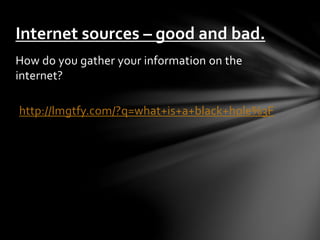
Internet sources – good and bad. 
How do you gather your information on the 
internet? 
http://lmgtfy.com/?q=what+is+a+black+hole%3F
Is that how you use the web? 
If so, you may be missing valuable research 
data. 
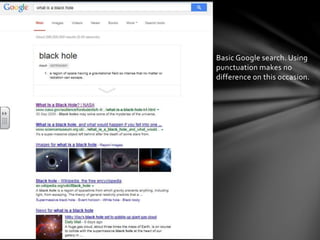
A simple switch for academic purposes will 
yield a greater variety of data, see the 
screen shots on the next slide.
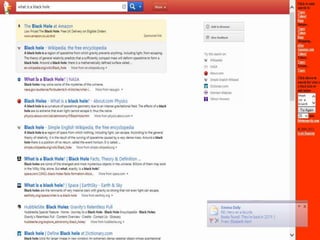
Basic Google search. Using 
punctuation makes no 
difference on this occasion.
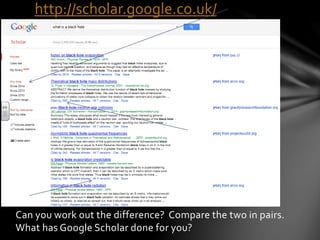
http://scholar.google.co.uk/ 
Can you work out the difference? Compare the two in pairs. 
What has Google Scholar done for you?
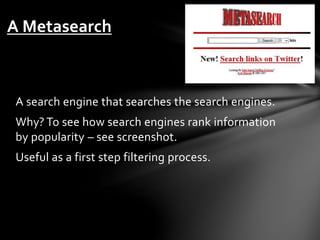
A Metasearch 
A search engine that searches the search engines. 
Why? To see how search engines rank information 
by popularity – see screenshot. 
Useful as a first step filtering process.
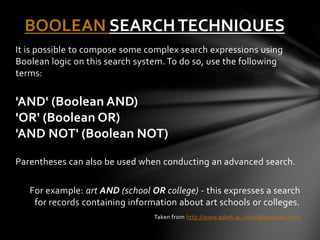
BOOLEAN SEARCH TECHNIQUES 
It is possible to compose some complex search expressions using 
Boolean logic on this search system. To do so, use the following 
terms: 
'AND' (Boolean AND) 
'OR' (Boolean OR) 
'AND NOT' (Boolean NOT) 
Parentheses can also be used when conducting an advanced search. 
For example: art AND (school OR college) - this expresses a search 
for records containing information about art schools or colleges. 
Taken from http://www.adam.ac.uk/info/boolean.html
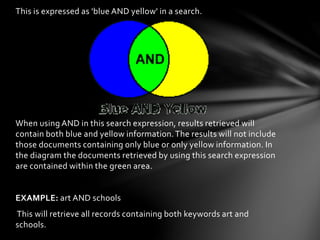
This is expressed as 'blue AND yellow' in a search. 
When using AND in this search expression, results retrieved will 
contain both blue and yellow information. The results will not include 
those documents containing only blue or only yellow information. In 
the diagram the documents retrieved by using this search expression 
are contained within the green area. 
EXAMPLE: art AND schools 
This will retrieve all records containing both keywords art and 
schools.
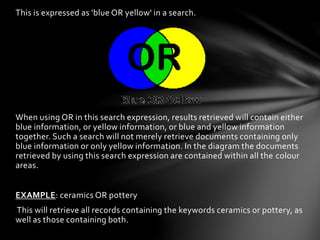
This is expressed as 'blue OR yellow' in a search. 
When using OR in this search expression, results retrieved will contain either 
blue information, or yellow information, or blue and yellow information 
together. Such a search will not merely retrieve documents containing only 
blue information or only yellow information. In the diagram the documents 
retrieved by using this search expression are contained within all the colour 
areas. 
EXAMPLE: ceramics OR pottery 
This will retrieve all records containing the keywords ceramics or pottery, as 
well as those containing both.
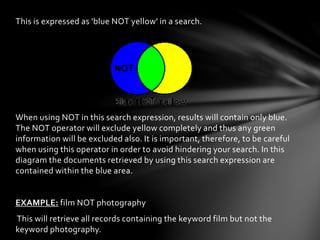
This is expressed as 'blue NOT yellow' in a search. 
When using NOT in this search expression, results will contain only blue. 
The NOT operator will exclude yellow completely and thus any green 
information will be excluded also. It is important, therefore, to be careful 
when using this operator in order to avoid hindering your search. In this 
diagram the documents retrieved by using this search expression are 
contained within the blue area. 
EXAMPLE: film NOT photography 
This will retrieve all records containing the keyword film but not the 
keyword photography.
Student Exemplar 
Billy studies Psychology, Sociology, Maths and Media. 
His project title is ‘Do Video Games increase aggressive 
behaviour in teenagers?’ 
Billy is stuck. 
Billy needs your help. 
Will you help Billy? 
Please… 
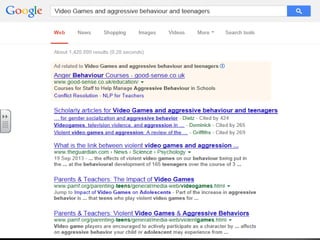
In pairs, discuss what you would search on the internet 
and what advice you would give Billy. 
Feedback.
Step 1 – identify key words 
• Video Games 
• Aggressive behaviour 
• Teenagers 
These will form the basis of your search. 
Complete your first search using the Boolean AND 
method and show me your results.
Step 2 – Alternate Key Words 
• Video Games – Computer Games 
• Aggressive Behaviour – Aggression 
• Teenagers – Adolescents 
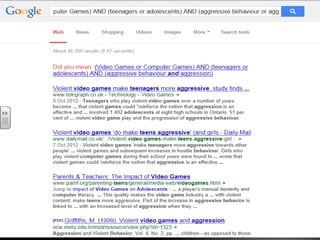
This will form the basis of your second search. Use the Boolean method 
using AND and OR in search. 
Example: 
(Video Games or Computer Games) AND (teenagers or adolescents) AND 
(aggressive behaviour or aggression) 
What are the results? Compare with your partner.
Now develop your project from last session. 
Using your improved research skills, work as a group to find 
some initial secondary research using the internet. 
Complete the activity ‘Spinning the Web: Assessing Internet 
Sources’ which can be found at the back of your pack. 
Feedback to class. 
All questions and enquiries to 
@RMTBAH Mr Mayers 
All feedback on this session welcome.

The extended project qualification 2

  • 1.
  • 2.
    “Successful people askbetter questions, and as a result, they get better answers.” Tony Robbins
  • 4.
    Internet research skills/criticalreading Following on from last lesson, in small groups you are going to take one of the projects forward and begin completing some internet research. By the end of the session, you will have a clear topic, question/thesis for the exemplar project, and you will have carried out some basic secondary research using the internet.
  • 5.
    Internet sources –good and bad. How do you gather your information on the internet? http://lmgtfy.com/?q=what+is+a+black+hole%3F
  • 6.
    Is that howyou use the web? If so, you may be missing valuable research data. A simple switch for academic purposes will yield a greater variety of data, see the screen shots on the next slide.
  • 7.
    Basic Google search.Using punctuation makes no difference on this occasion.
  • 8.
    http://scholar.google.co.uk/ Can youwork out the difference? Compare the two in pairs. What has Google Scholar done for you?
  • 9.
    A Metasearch Asearch engine that searches the search engines. Why? To see how search engines rank information by popularity – see screenshot. Useful as a first step filtering process.
  • 11.
    BOOLEAN SEARCH TECHNIQUES It is possible to compose some complex search expressions using Boolean logic on this search system. To do so, use the following terms: 'AND' (Boolean AND) 'OR' (Boolean OR) 'AND NOT' (Boolean NOT) Parentheses can also be used when conducting an advanced search. For example: art AND (school OR college) - this expresses a search for records containing information about art schools or colleges. Taken from http://www.adam.ac.uk/info/boolean.html
  • 12.
    This is expressedas 'blue AND yellow' in a search. When using AND in this search expression, results retrieved will contain both blue and yellow information. The results will not include those documents containing only blue or only yellow information. In the diagram the documents retrieved by using this search expression are contained within the green area. EXAMPLE: art AND schools This will retrieve all records containing both keywords art and schools.
  • 13.
    This is expressedas 'blue OR yellow' in a search. When using OR in this search expression, results retrieved will contain either blue information, or yellow information, or blue and yellow information together. Such a search will not merely retrieve documents containing only blue information or only yellow information. In the diagram the documents retrieved by using this search expression are contained within all the colour areas. EXAMPLE: ceramics OR pottery This will retrieve all records containing the keywords ceramics or pottery, as well as those containing both.
  • 14.
    This is expressedas 'blue NOT yellow' in a search. When using NOT in this search expression, results will contain only blue. The NOT operator will exclude yellow completely and thus any green information will be excluded also. It is important, therefore, to be careful when using this operator in order to avoid hindering your search. In this diagram the documents retrieved by using this search expression are contained within the blue area. EXAMPLE: film NOT photography This will retrieve all records containing the keyword film but not the keyword photography.
  • 15.
    Student Exemplar Billystudies Psychology, Sociology, Maths and Media. His project title is ‘Do Video Games increase aggressive behaviour in teenagers?’ Billy is stuck. Billy needs your help. Will you help Billy? Please… In pairs, discuss what you would search on the internet and what advice you would give Billy. Feedback.
  • 16.
    Step 1 –identify key words • Video Games • Aggressive behaviour • Teenagers These will form the basis of your search. Complete your first search using the Boolean AND method and show me your results.
  • 17.
    Step 2 –Alternate Key Words • Video Games – Computer Games • Aggressive Behaviour – Aggression • Teenagers – Adolescents This will form the basis of your second search. Use the Boolean method using AND and OR in search. Example: (Video Games or Computer Games) AND (teenagers or adolescents) AND (aggressive behaviour or aggression) What are the results? Compare with your partner.
  • 20.
    Now develop yourproject from last session. Using your improved research skills, work as a group to find some initial secondary research using the internet. Complete the activity ‘Spinning the Web: Assessing Internet Sources’ which can be found at the back of your pack. Feedback to class. All questions and enquiries to @RMTBAH Mr Mayers All feedback on this session welcome.