Globalcode – Open4education
Trilha – iOS
Rodrigo Freitas Leite
iOS Developer
CloudKit
Entendendo a cloud da Apple
Rodrigo Leite
CTO at Kobe
rodrigo.freitas@kobe.io
www.kobe.io
Focus on mobile development
Outsourcing
Product Development
www.kobe.io
What is Cloudkit ?
How do we start an app with CloudKit?
Register iCloud Container
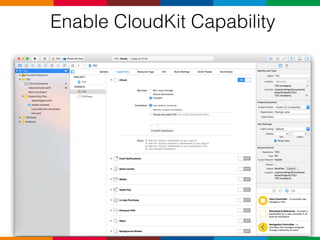
Enable CloudKit Capability
CloudKit Dashboard
Record Type
Security Roles
Subscription Types
User Records
Public Default Zone
Usage
Team
Deployment
CloudKit Objects
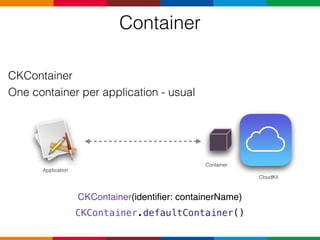
Container
CKContainer
One container per application - usual
CKContainer(identifier: containerName)
CKContainer.defaultContainer()
Application
Container
CloudKit
Database
CKDatabase
• Public
• Private
• Every app access to at least one container.
• Every container has two databases
Database
CKDatabase
• Every app access to at least one container.
Public
Public
Private
• Every container has two databases
Database
CKDatabase
Public PrivatePrivate
Public Private
let publicDatabase = CKContainer.defaultContainer().publicCloudDatabase
let privateDatabase = CKContainer.defaultContainer().privateCloudDatabase
• Every app access to at least one container.
• Every container has two databases
Database
Public Private
Data Type Shared Data User’s Data
Account Required for writing Required
Quota Developer User
Default Permissions World Redable User readable
Editing Permissions Dashboard Rules N/A
Record
Public
Record Record Record
CKRecord class
Record
Structured data
Wraps key/values pairs
Metadata
Record Values
• String
• NSNumber
• NSDate
• NSData
• CLLocation
• CKAsset
• CKReference
Array of these types
let session = CKRecord(recordType: "Session")
session["name"] = "Endentendo a Cloudkit da Apple"
session["author"] = "Rodrigo Leite"
session["start_date"] = NSDate()
Record
Record
class session: CKRecord{
func name() -> String?{
return self["name"] as? String
}
func author() -> String?{
return self["author"] as? String
}
....
}
• Subclassing
Apple Docs
Record
class Session: NSObject{
let record: CKRecord?
var name: String?{
didSet{
record!["name"] = name
}
}
var author: String?{
didSet{
record!["author"] = name
}
}
init(record: CKRecord){
self.record = record
self.name = self.record!["name"] as? String
self.author = self.record!["author"] as? String
}
}
Apple Docs
CKRecordZone class
RecordZone
Public
Record
Record
Record
Record
Record
Record
Default Zone Custom Zone
Record Identifier
public class CKRecord : NSObject, NSSecureCoding, NSCopying {
/* These create the record in the default zone. */
public init(recordType: String)
public init(recordType: String, recordID: CKRecordID)
public init(recordType: String, zoneID: CKRecordZoneID)
public var recordType: String { get }
@NSCopying public var recordID: CKRecordID { get }
/* Change tags are updated by the server to a unique value every time a record is modified.
A different change tag necessarily means that the contents of the record are different. */
public var recordChangeTag: String? { get }
/* This is a User Record recordID, identifying the user that created this record. */
@NSCopying public var creatorUserRecordID: CKRecordID? { get }
@NSCopying public var creationDate: NSDate? { get }
/* This is a User Record recordID, identifying the user that last modified this record. */
@NSCopying public var lastModifiedUserRecordID: CKRecordID? { get }
@NSCopying public var modificationDate: NSDate? { get }
..
}
• The identifier of the record in the cloud kit
References
Public
Session
Attendee
Session
Attendee
Attendee
CKReference class
References
•Back Reference
•Cascade Deletes
/* *** Record Types **** */
let session = CKRecord(recordType: "Session")
let attendee = CKRecord(recordType: "Attendee")
/* *** Create Reference by Record *** */
let reference = CKReference(record: session, action: .DeleteSelf)
attendee["session"] = reference
/* **** Create Reference by RecordID *** */
let recordID = CKRecordID(recordName: "Session")
let referenceWithRecordID = CKReference(recordID: recordID, action: .DeleteSelf)
attendee["session"] = reference
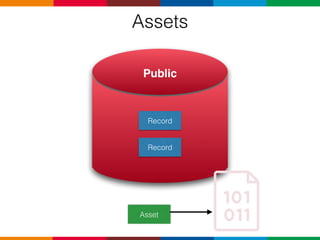
Assets
Public
Record
Record
Asset
Assets
Record
Record
Public Bulk Storage
Asset
Assets
• CKAsset class
• Large, unstructured data
•Files on disk
•Owned by records
•Removed when owner is deleted
let attendee = CKRecord(recordType: "Attendee")
let image = UIImage(named: "")!
let documentDirectory = NSSearchPathForDirectoriesInDomains(.DocumentDirectory,
.UserDomainMask,
true).first! as String
let localPath = documentDirectory + "/profilePicture"
let data = UIImageJPEGRepresentation(image, 0.85)
data!.writeToFile(localPath, atomically: true)
let photoURL = NSURL(fileURLWithPath: localPath)
let asset = CKAsset(fileURL: photoURL)
attendee["profileImage"] = asset
Login
Login
CKContainer.defaultContainer().accountStatusWithCompletionHandler { (status:
CKAccountStatus, error: NSError?) in
switch status{
case .Available: print("Account is available")
case .Restricted: print("Parental control or restriction")
case .NoAccount: print("No account provide ")
case .CouldNotDetermine: print("No account provide ")
}
Convenience API
extension CKDatabase {
/* Convenience APIs
These calls operate on a single item in the default zone and allow for simple operations.
If you'd like to batch your requests, add dependencies between requests, set priorities,
or schedule operations on your own queue, take a look at the corresponding CKOperation.
This work is treated as having NSQualityOfServiceUserInitiated quality of service.
*/
/* CKFetchRecordsOperation and CKModifyRecordsOperation are the more configurable,
CKOperation-based alternatives to these methods */
public func fetchRecordWithID(recordID: CKRecordID, completionHandler: (CKRecord?, NSError?) -> Void)
public func saveRecord(record: CKRecord, completionHandler: (CKRecord?, NSError?) -> Void)
public func deleteRecordWithID(recordID: CKRecordID, completionHandler: (CKRecordID?, NSError?) -> Void)
/* CKQueryOperation is the more configurable, CKOperation-based
alternative to this method */
public func performQuery(query: CKQuery, inZoneWithID zoneID: CKRecordZoneID?, completionHandler: ([CKRecord]?,
NSError?) -> Void)
/* CKFetchRecordZonesOperation and CKModifyRecordZonesOperation are the more configurable,
CKOperation-based alternatives to these methods */
public func fetchAllRecordZonesWithCompletionHandler(completionHandler: ([CKRecordZone]?, NSError?) -> Void)
public func fetchRecordZoneWithID(zoneID: CKRecordZoneID, completionHandler: (CKRecordZone?, NSError?) -> Void)
public func saveRecordZone(zone: CKRecordZone, completionHandler: (CKRecordZone?, NSError?) -> Void)
public func deleteRecordZoneWithID(zoneID: CKRecordZoneID, completionHandler: (CKRecordZoneID?, NSError?) -> Void)
/* CKFetchSubscriptionsOperation and CKModifySubscriptionsOperation are the more configurable,
CKOperation-based alternative to these methods */
public func fetchSubscriptionWithID(subscriptionID: String, completionHandler: (CKSubscription?, NSError?) -> Void)
public func fetchAllSubscriptionsWithCompletionHandler(completionHandler: ([CKSubscription]?, NSError?) -> Void)
public func saveSubscription(subscription: CKSubscription, completionHandler: (CKSubscription?, NSError?) -> Void)
public func deleteSubscriptionWithID(subscriptionID: String, completionHandler: (String?, NSError?) -> Void)
}
Convenience API
let session = CKRecord(recordType: "Session")
session["name"] = "Endentendo a Cloudkit da Apple"
session["author"] = "Rodrigo Leite"
session["start_date"] = NSDate()
let publicDatabase = CKContainer.defaultContainer().publicCloudDatabase
publicDatabase.saveRecord(session) { (record: CKRecord?, error: NSError?) in
if (error != nil){
/* Error handling */
}else{
}
}
Save Object
Convenience API
Fetch Object
Convenience API
let database = CKContainer.defaultContainer().publicCloudDatabase
database.fetchRecordWithID(recordID) { (record, error) in
if error != nil {
/* *** ERROR HANDLING **** */
}else{
}
}
CKOperation
Basic NSOperation
public class NSOperation : NSObject {
/* **** LIFE CYCLE **** */
public var completionBlock: (() -> Void)?
public func cancel()
/* ***** STATE ***** */
public var executing: Bool { get }
public var finished: Bool { get }
/* ***** DEPENDENCIES **** */
public func addDependency(op: NSOperation)
public func removeDependency(op: NSOperation)
}
Basic NSOperationQueue
public class NSOperationQueue : NSObject {
/* ******* START OPERATION **** */
public func addOperations(ops: [NSOperation], waitUntilFinished wait: Bool)
public var operations: [NSOperation] { get }
/* ****** CANCEL OPERATION **** */
public var suspended: Bool
public func cancelAllOperations()
}
CKOperation
public class CKFetchRecordsOperation : CKDatabaseOperation {
public init()
public convenience init(recordIDs: [CKRecordID])
public class func fetchCurrentUserRecordOperation() -> Self
public var recordIDs: [CKRecordID]?
/* Declares which user-defined keys should be fetched and added to the resulting CKRecords. If nil,
declares the entire record should be downloaded. If set to an empty array, declares that no user fields should
be downloaded. Defaults to nil. */
public var desiredKeys: [String]?
/* Called repeatedly during transfer. */
public var perRecordProgressBlock: ((CKRecordID, Double) -> Void)?
/* Called on success or failure for each record. */
public var perRecordCompletionBlock: ((CKRecord?, CKRecordID?, NSError?) -> Void)?
/* This block is called when the operation completes.
The [NSOperation completionBlock] will also be called if both are set.
If the error is CKErrorPartialFailure, the error's userInfo dictionary contains
a dictionary of recordIDs to errors keyed off of CKPartialErrorsByItemIDKey.
*/
public var fetchRecordsCompletionBlock: (([CKRecordID : CKRecord]?, NSError?) -> Void)?
}
let database = CKContainer.defaultContainer().publicCloudDatabase
database.fetchRecordWithID(recordID) { (record, error) in
...
database.fetchRecordWithID(otherRecordID, completionHandler: { (record, error) in
...
database.saveRecord(otherRecord, completionHandler: { (record, error) in
....
})
})
}
Convenience API
var session : CKRecord?
var attendees = [CKRecord]()
let firstQuery = CKQuery(recordType: "Session", predicate: NSPredicate(format: "name == %@", "Cloudkit"))
let firstFetch = CKQueryOperation(query: firstQuery)
firstFetch.recordFetchedBlock = { record in
session = record
}
let reference = CKReference(record: session!, action: .None )
let secondQuery = CKQuery(recordType: "Atendee", predicate: NSPredicate(format: "reference == %@",
reference))
let secondFetch = CKQueryOperation(query: secondQuery)
secondFetch.recordFetchedBlock = { record in
attendees.append(record)
}
secondFetch.addDependency(firstFetch)
let queue = NSOperationQueue()
queue.addOperations([firstFetch, secondFetch], waitUntilFinished: false)
Dependent Task
• Fetch all attendee in a session
CKQuery
NSPredicate
CKQuery
CKQuery only accepts a subset of predicate behaviors
Rules
• Predicates are based on a format string
• Predicates operate only on fields containing primitive data forms
NSPredicate
CKQuery
Pagination
CKQueryOperation
class KBQueryOperation<T:KBRecord>{
var objects: [CKRecord]?
var query: CKQuery?
var cursor: CKQueryCursor?
var limit: Int?
var operation: CKQueryOperation?
func performQuery(completion: (result:[T]?, error: NSError?) -> Void){
self.operation = cursor == nil ? CKQueryOperation(query: self.query!)
: CKQueryOperation(cursor: cursor!)
if let resultLimit = limit{
self.operation!.resultsLimit = resultLimit
}
self.operation!.recordFetchedBlock = { (record: CKRecord) -> Void in
self.objects?.append(record)
}
self.operation!.queryCompletionBlock = { (cursor: CKQueryCursor?, error: NSError?) -> Void in
if error != nil{
completion(result: nil, error: error)
return
}
self.cursor = cursor
let values = self.objects?.map({ (element) -> T in
return T(record: element)
})
completion(result: values, error: nil)
}
KBCloudKit.dataBaseFromContainer(type: .PUBLIC).addOperation(operation!)
}
func resetQuery(){
self.cursor = nil
self.objects = [CKRecord]()
}
}
https://gitlab.com/rodrigo_leite/TDConf.git
CloudKit
Entendendo a cloud da Apple
rodrigo.freitas@kobe.io

The Developer Conference - CloudKit, entendendo a Cloud da Apple

  • 1.
    Globalcode – Open4education Trilha– iOS Rodrigo Freitas Leite iOS Developer
  • 2.
  • 3.
    Rodrigo Leite CTO atKobe rodrigo.freitas@kobe.io
  • 4.
    www.kobe.io Focus on mobiledevelopment Outsourcing Product Development
  • 5.
  • 6.
  • 8.
    How do westart an app with CloudKit?
  • 9.
  • 11.
  • 13.
  • 16.
  • 17.
  • 18.
  • 19.
  • 20.
  • 21.
  • 22.
  • 23.
  • 24.
  • 25.
    Container CKContainer One container perapplication - usual CKContainer(identifier: containerName) CKContainer.defaultContainer() Application Container CloudKit
  • 26.
    Database CKDatabase • Public • Private •Every app access to at least one container. • Every container has two databases
  • 27.
    Database CKDatabase • Every appaccess to at least one container. Public Public Private • Every container has two databases
  • 28.
    Database CKDatabase Public PrivatePrivate Public Private letpublicDatabase = CKContainer.defaultContainer().publicCloudDatabase let privateDatabase = CKContainer.defaultContainer().privateCloudDatabase • Every app access to at least one container. • Every container has two databases
  • 29.
    Database Public Private Data TypeShared Data User’s Data Account Required for writing Required Quota Developer User Default Permissions World Redable User readable Editing Permissions Dashboard Rules N/A
  • 30.
  • 31.
    CKRecord class Record Structured data Wrapskey/values pairs Metadata Record Values • String • NSNumber • NSDate • NSData • CLLocation • CKAsset • CKReference Array of these types
  • 32.
    let session =CKRecord(recordType: "Session") session["name"] = "Endentendo a Cloudkit da Apple" session["author"] = "Rodrigo Leite" session["start_date"] = NSDate() Record
  • 33.
    Record class session: CKRecord{ funcname() -> String?{ return self["name"] as? String } func author() -> String?{ return self["author"] as? String } .... } • Subclassing Apple Docs
  • 34.
    Record class Session: NSObject{ letrecord: CKRecord? var name: String?{ didSet{ record!["name"] = name } } var author: String?{ didSet{ record!["author"] = name } } init(record: CKRecord){ self.record = record self.name = self.record!["name"] as? String self.author = self.record!["author"] as? String } } Apple Docs
  • 35.
  • 36.
    Record Identifier public classCKRecord : NSObject, NSSecureCoding, NSCopying { /* These create the record in the default zone. */ public init(recordType: String) public init(recordType: String, recordID: CKRecordID) public init(recordType: String, zoneID: CKRecordZoneID) public var recordType: String { get } @NSCopying public var recordID: CKRecordID { get } /* Change tags are updated by the server to a unique value every time a record is modified. A different change tag necessarily means that the contents of the record are different. */ public var recordChangeTag: String? { get } /* This is a User Record recordID, identifying the user that created this record. */ @NSCopying public var creatorUserRecordID: CKRecordID? { get } @NSCopying public var creationDate: NSDate? { get } /* This is a User Record recordID, identifying the user that last modified this record. */ @NSCopying public var lastModifiedUserRecordID: CKRecordID? { get } @NSCopying public var modificationDate: NSDate? { get } .. } • The identifier of the record in the cloud kit
  • 37.
  • 38.
    CKReference class References •Back Reference •CascadeDeletes /* *** Record Types **** */ let session = CKRecord(recordType: "Session") let attendee = CKRecord(recordType: "Attendee") /* *** Create Reference by Record *** */ let reference = CKReference(record: session, action: .DeleteSelf) attendee["session"] = reference /* **** Create Reference by RecordID *** */ let recordID = CKRecordID(recordName: "Session") let referenceWithRecordID = CKReference(recordID: recordID, action: .DeleteSelf) attendee["session"] = reference
  • 39.
  • 40.
  • 41.
    Assets • CKAsset class •Large, unstructured data •Files on disk •Owned by records •Removed when owner is deleted let attendee = CKRecord(recordType: "Attendee") let image = UIImage(named: "")! let documentDirectory = NSSearchPathForDirectoriesInDomains(.DocumentDirectory, .UserDomainMask, true).first! as String let localPath = documentDirectory + "/profilePicture" let data = UIImageJPEGRepresentation(image, 0.85) data!.writeToFile(localPath, atomically: true) let photoURL = NSURL(fileURLWithPath: localPath) let asset = CKAsset(fileURL: photoURL) attendee["profileImage"] = asset
  • 42.
  • 43.
    Login CKContainer.defaultContainer().accountStatusWithCompletionHandler { (status: CKAccountStatus,error: NSError?) in switch status{ case .Available: print("Account is available") case .Restricted: print("Parental control or restriction") case .NoAccount: print("No account provide ") case .CouldNotDetermine: print("No account provide ") }
  • 44.
  • 45.
    extension CKDatabase { /*Convenience APIs These calls operate on a single item in the default zone and allow for simple operations. If you'd like to batch your requests, add dependencies between requests, set priorities, or schedule operations on your own queue, take a look at the corresponding CKOperation. This work is treated as having NSQualityOfServiceUserInitiated quality of service. */ /* CKFetchRecordsOperation and CKModifyRecordsOperation are the more configurable, CKOperation-based alternatives to these methods */ public func fetchRecordWithID(recordID: CKRecordID, completionHandler: (CKRecord?, NSError?) -> Void) public func saveRecord(record: CKRecord, completionHandler: (CKRecord?, NSError?) -> Void) public func deleteRecordWithID(recordID: CKRecordID, completionHandler: (CKRecordID?, NSError?) -> Void) /* CKQueryOperation is the more configurable, CKOperation-based alternative to this method */ public func performQuery(query: CKQuery, inZoneWithID zoneID: CKRecordZoneID?, completionHandler: ([CKRecord]?, NSError?) -> Void) /* CKFetchRecordZonesOperation and CKModifyRecordZonesOperation are the more configurable, CKOperation-based alternatives to these methods */ public func fetchAllRecordZonesWithCompletionHandler(completionHandler: ([CKRecordZone]?, NSError?) -> Void) public func fetchRecordZoneWithID(zoneID: CKRecordZoneID, completionHandler: (CKRecordZone?, NSError?) -> Void) public func saveRecordZone(zone: CKRecordZone, completionHandler: (CKRecordZone?, NSError?) -> Void) public func deleteRecordZoneWithID(zoneID: CKRecordZoneID, completionHandler: (CKRecordZoneID?, NSError?) -> Void) /* CKFetchSubscriptionsOperation and CKModifySubscriptionsOperation are the more configurable, CKOperation-based alternative to these methods */ public func fetchSubscriptionWithID(subscriptionID: String, completionHandler: (CKSubscription?, NSError?) -> Void) public func fetchAllSubscriptionsWithCompletionHandler(completionHandler: ([CKSubscription]?, NSError?) -> Void) public func saveSubscription(subscription: CKSubscription, completionHandler: (CKSubscription?, NSError?) -> Void) public func deleteSubscriptionWithID(subscriptionID: String, completionHandler: (String?, NSError?) -> Void) } Convenience API
  • 46.
    let session =CKRecord(recordType: "Session") session["name"] = "Endentendo a Cloudkit da Apple" session["author"] = "Rodrigo Leite" session["start_date"] = NSDate() let publicDatabase = CKContainer.defaultContainer().publicCloudDatabase publicDatabase.saveRecord(session) { (record: CKRecord?, error: NSError?) in if (error != nil){ /* Error handling */ }else{ } } Save Object Convenience API
  • 47.
    Fetch Object Convenience API letdatabase = CKContainer.defaultContainer().publicCloudDatabase database.fetchRecordWithID(recordID) { (record, error) in if error != nil { /* *** ERROR HANDLING **** */ }else{ } }
  • 48.
  • 49.
    Basic NSOperation public classNSOperation : NSObject { /* **** LIFE CYCLE **** */ public var completionBlock: (() -> Void)? public func cancel() /* ***** STATE ***** */ public var executing: Bool { get } public var finished: Bool { get } /* ***** DEPENDENCIES **** */ public func addDependency(op: NSOperation) public func removeDependency(op: NSOperation) }
  • 50.
    Basic NSOperationQueue public classNSOperationQueue : NSObject { /* ******* START OPERATION **** */ public func addOperations(ops: [NSOperation], waitUntilFinished wait: Bool) public var operations: [NSOperation] { get } /* ****** CANCEL OPERATION **** */ public var suspended: Bool public func cancelAllOperations() }
  • 51.
    CKOperation public class CKFetchRecordsOperation: CKDatabaseOperation { public init() public convenience init(recordIDs: [CKRecordID]) public class func fetchCurrentUserRecordOperation() -> Self public var recordIDs: [CKRecordID]? /* Declares which user-defined keys should be fetched and added to the resulting CKRecords. If nil, declares the entire record should be downloaded. If set to an empty array, declares that no user fields should be downloaded. Defaults to nil. */ public var desiredKeys: [String]? /* Called repeatedly during transfer. */ public var perRecordProgressBlock: ((CKRecordID, Double) -> Void)? /* Called on success or failure for each record. */ public var perRecordCompletionBlock: ((CKRecord?, CKRecordID?, NSError?) -> Void)? /* This block is called when the operation completes. The [NSOperation completionBlock] will also be called if both are set. If the error is CKErrorPartialFailure, the error's userInfo dictionary contains a dictionary of recordIDs to errors keyed off of CKPartialErrorsByItemIDKey. */ public var fetchRecordsCompletionBlock: (([CKRecordID : CKRecord]?, NSError?) -> Void)? }
  • 52.
    let database =CKContainer.defaultContainer().publicCloudDatabase database.fetchRecordWithID(recordID) { (record, error) in ... database.fetchRecordWithID(otherRecordID, completionHandler: { (record, error) in ... database.saveRecord(otherRecord, completionHandler: { (record, error) in .... }) }) } Convenience API
  • 53.
    var session :CKRecord? var attendees = [CKRecord]() let firstQuery = CKQuery(recordType: "Session", predicate: NSPredicate(format: "name == %@", "Cloudkit")) let firstFetch = CKQueryOperation(query: firstQuery) firstFetch.recordFetchedBlock = { record in session = record } let reference = CKReference(record: session!, action: .None ) let secondQuery = CKQuery(recordType: "Atendee", predicate: NSPredicate(format: "reference == %@", reference)) let secondFetch = CKQueryOperation(query: secondQuery) secondFetch.recordFetchedBlock = { record in attendees.append(record) } secondFetch.addDependency(firstFetch) let queue = NSOperationQueue() queue.addOperations([firstFetch, secondFetch], waitUntilFinished: false) Dependent Task • Fetch all attendee in a session
  • 54.
  • 55.
    NSPredicate CKQuery CKQuery only acceptsa subset of predicate behaviors Rules • Predicates are based on a format string • Predicates operate only on fields containing primitive data forms
  • 56.
  • 57.
    Pagination CKQueryOperation class KBQueryOperation<T:KBRecord>{ var objects:[CKRecord]? var query: CKQuery? var cursor: CKQueryCursor? var limit: Int? var operation: CKQueryOperation? func performQuery(completion: (result:[T]?, error: NSError?) -> Void){ self.operation = cursor == nil ? CKQueryOperation(query: self.query!) : CKQueryOperation(cursor: cursor!) if let resultLimit = limit{ self.operation!.resultsLimit = resultLimit } self.operation!.recordFetchedBlock = { (record: CKRecord) -> Void in self.objects?.append(record) } self.operation!.queryCompletionBlock = { (cursor: CKQueryCursor?, error: NSError?) -> Void in if error != nil{ completion(result: nil, error: error) return } self.cursor = cursor let values = self.objects?.map({ (element) -> T in return T(record: element) }) completion(result: values, error: nil) } KBCloudKit.dataBaseFromContainer(type: .PUBLIC).addOperation(operation!) } func resetQuery(){ self.cursor = nil self.objects = [CKRecord]() } }
  • 58.
  • 59.
    CloudKit Entendendo a cloudda Apple rodrigo.freitas@kobe.io