.consulting .solutions .partnership
Text Analysis with SAP HANA
2© msg | September 2015 | Text Analysis with SAP HANA - IT Conference on SAP Technologies by msg
Motivation - Big Data1 3
Text Analysis with SAP HANA2 7
Enhancement Options3 21
Text Analysis with SAP HANA
3© msg | September 2015 | Text Analysis with SAP HANA - IT Conference on SAP Technologies by msg
Motivation - Big Data1 3
Text Analysis with SAP HANA2 7
Enhancement Options3 21
Big Data - taking a closer look
© msg | September 2015 | Text Analysis with SAP HANA - IT Conference on SAP Technologies by msg 4
• Big Data is hot topic today, but what is hidden in the “Big Data”?
• According to Merril Lynch 80-90% of all potentially usable business information may originate in
unstructured form
(Structure, Models and Meaning: Is "unstructured" data merely unmodeled?, Intelligent Enterprise, March 1, 2005.)
• According to Computer World unstructured information might account for more than 70%–80% of
all data in organizations
(Holzinger, Andreas; et al. (2013). "Combining HCI, Natural Language Processing, and Knowledge Discovery - Potential of IBM Content
Analytics as an Assistive Technology in the Biomedical Field" in Human-Computer Interaction and Knowledge Discovery in Complex,
Unstructured, Big Data. Lecture Notes in Computer Science. Springer. pp. 13–24)
• This data will grow up to 40 zettabytes by 2020
• The data might origin from:
− Social Networks
− Call Centers
− “Letters” from Customer
− ...
What is the Problem with Unstructured Data?
© msg | September 2015 | Text Analysis with SAP HANA - IT Conference on SAP Technologies by msg 5
• It is unstructured!
− Not organized
− No pre-defined data model
− No metadata or mix of data and metadata
Limited/No access to the data via classical programs
• But the data contains valuable information
We have a lot of information that is relevant for the business but we cannot access it
How can we solve that issue?
© msg | September 2015 | Text Analysis with SAP HANA - IT Conference on SAP Technologies by msg 6
• Text Analysis: Extracting high quality information from texts
• Typical process of a text analysis:
− Parsing of the text
− Adding features like linguistic information
− Insertion to database in structured manner
• Examples for typical text analysis tasks:
− Entity recognition: Is it an organization or a person or a place including domain facts like
requests?
− Sentiment analysis: What attitudinal information is “hidden” in the text?
− Relationship, fact and event extraction
Text Analysis with SAP HANA
7© msg | September 2015 | Text Analysis with SAP HANA - IT Conference on SAP Technologies by msg
Motivation - Big Data1 3
Text Analysis with SAP HANA2 7
Enhancement Options3 21
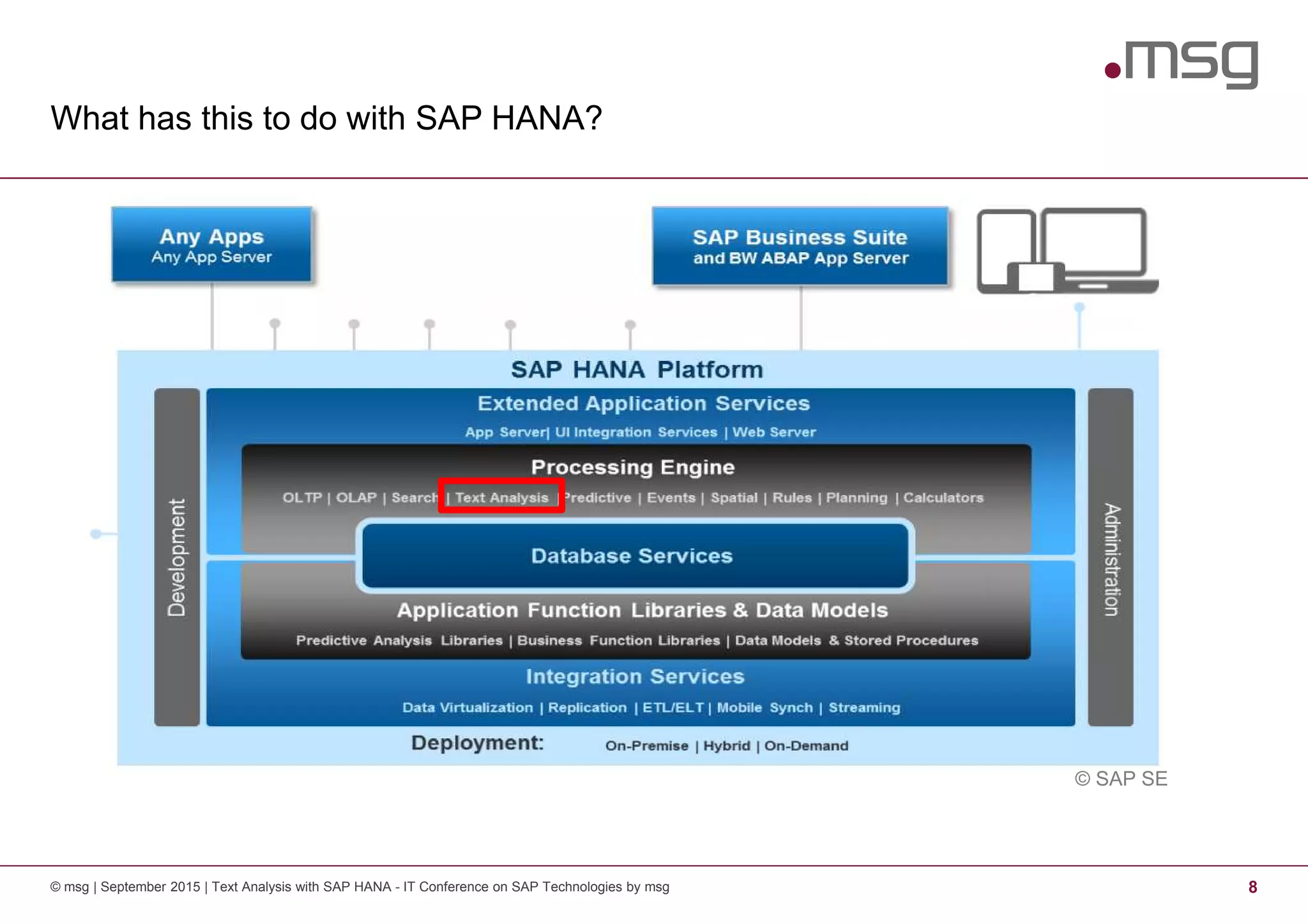
What has this to do with SAP HANA?
© msg | September 2015 | Text Analysis with SAP HANA - IT Conference on SAP Technologies by msg 8
© SAP SE
Text Analysis with HANA - Basics
© msg | September 2015 | Text Analysis with SAP HANA - IT Conference on SAP Technologies by msg 9
• Starting point: database table containing the text
• Supported data types are:
− TEXT
− BINTEXT
− NVARCHAR
− VARCHAR
− NCLOB,
− CLOB
− BLOB
Text Analysis with HANA - Basics
© msg | September 2015 | Text Analysis with SAP HANA - IT Conference on SAP Technologies by msg 10
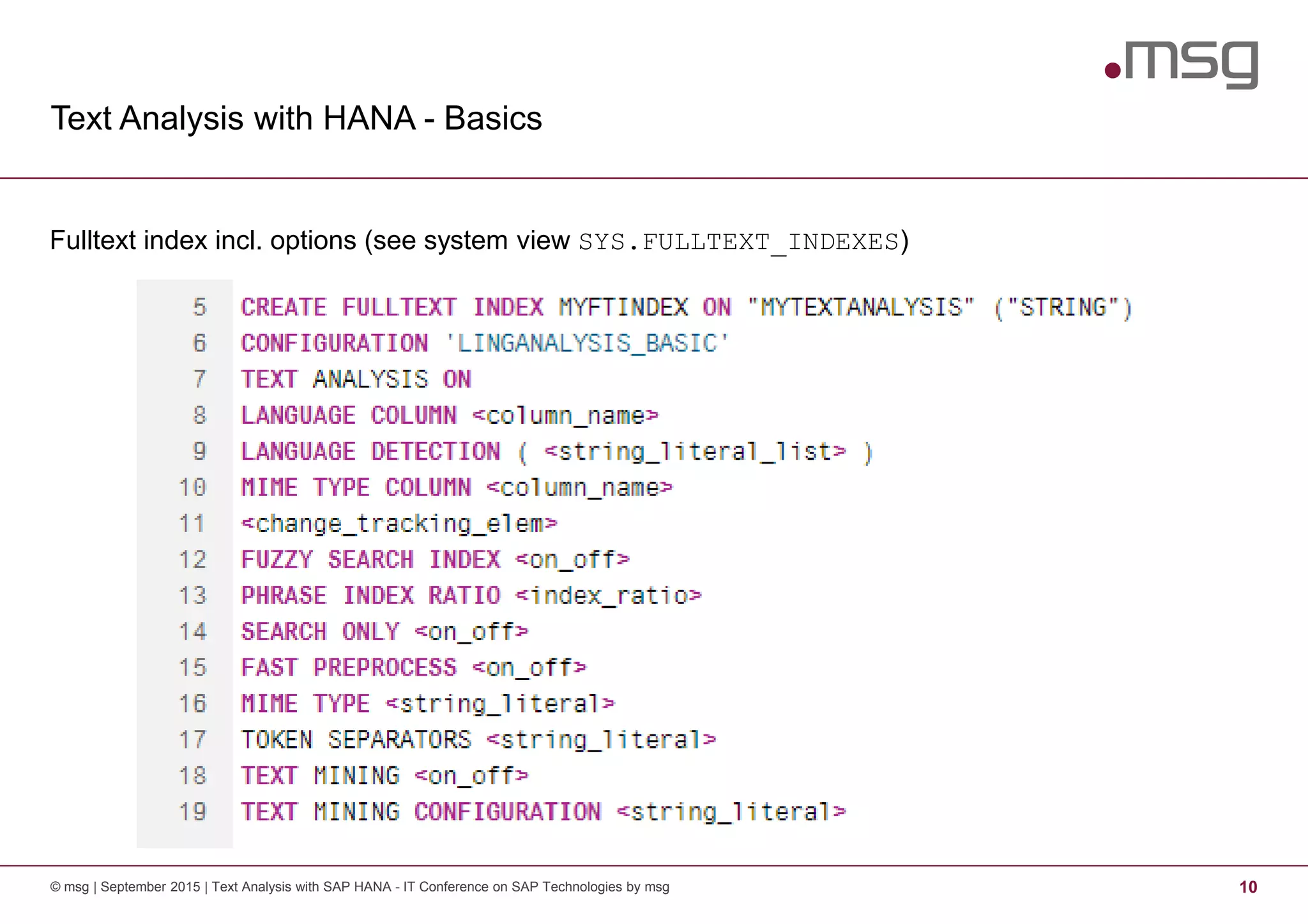
Fulltext index incl. options (see system view SYS.FULLTEXT_INDEXES)
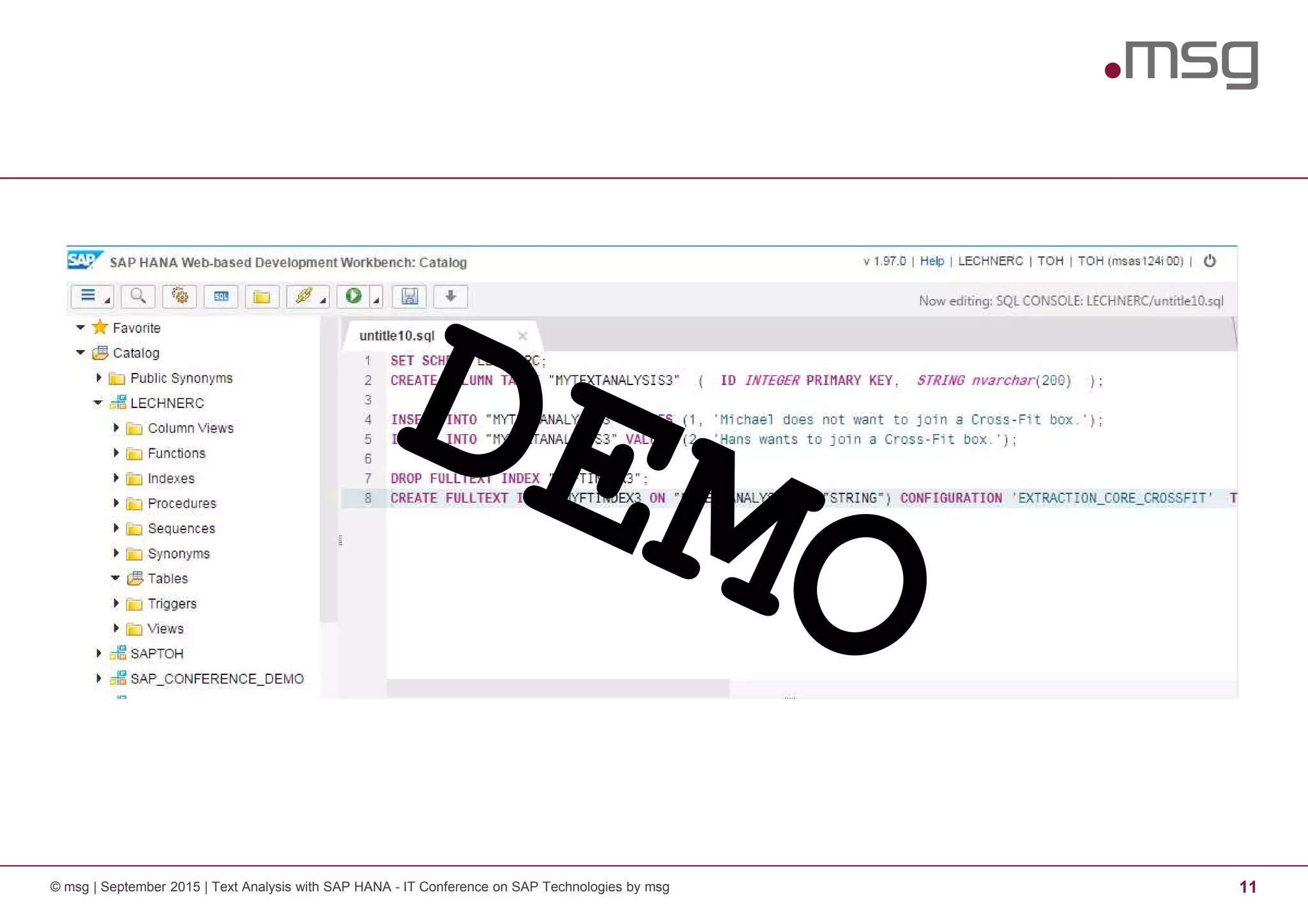
© msg | September 2015 | Text Analysis with SAP HANA - IT Conference on SAP Technologies by msg 11
Text Analysis with HANA - Basics
© msg | September 2015 | Text Analysis with SAP HANA - IT Conference on SAP Technologies by msg 12
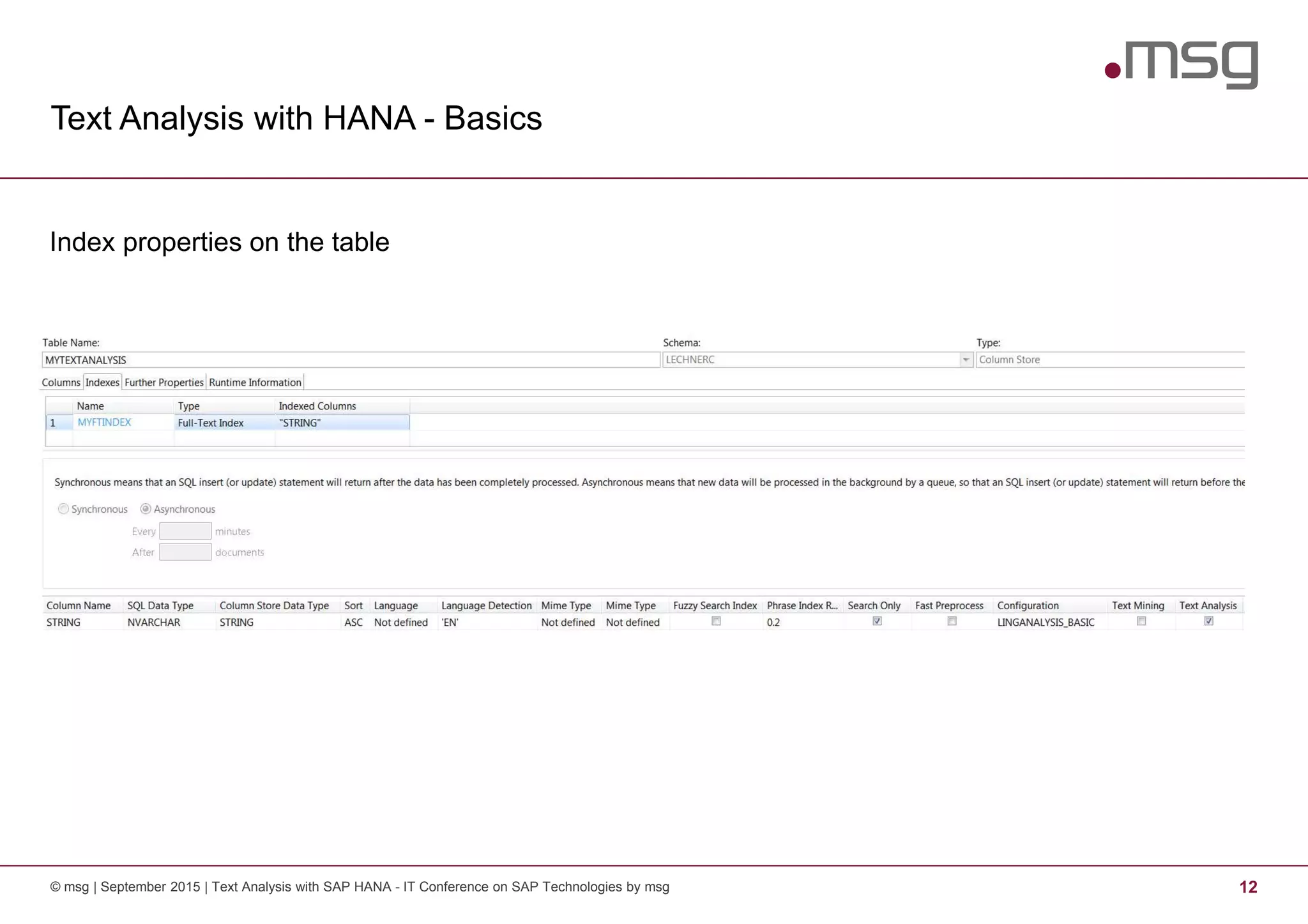
Index properties on the table
Text Analysis with HANA - Basics
© msg | September 2015 | Text Analysis with SAP HANA - IT Conference on SAP Technologies by msg 13
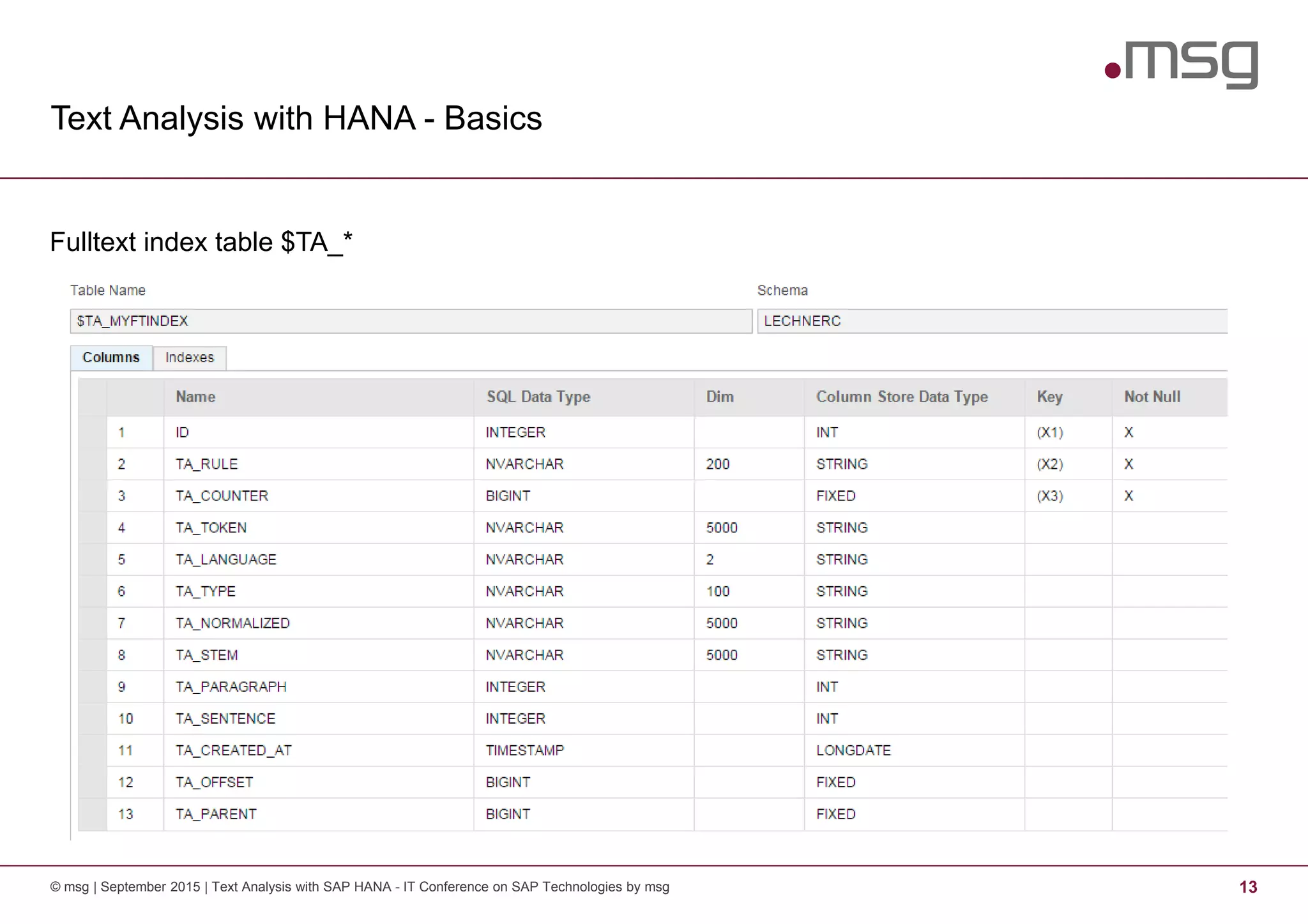
Fulltext index table $TA_*
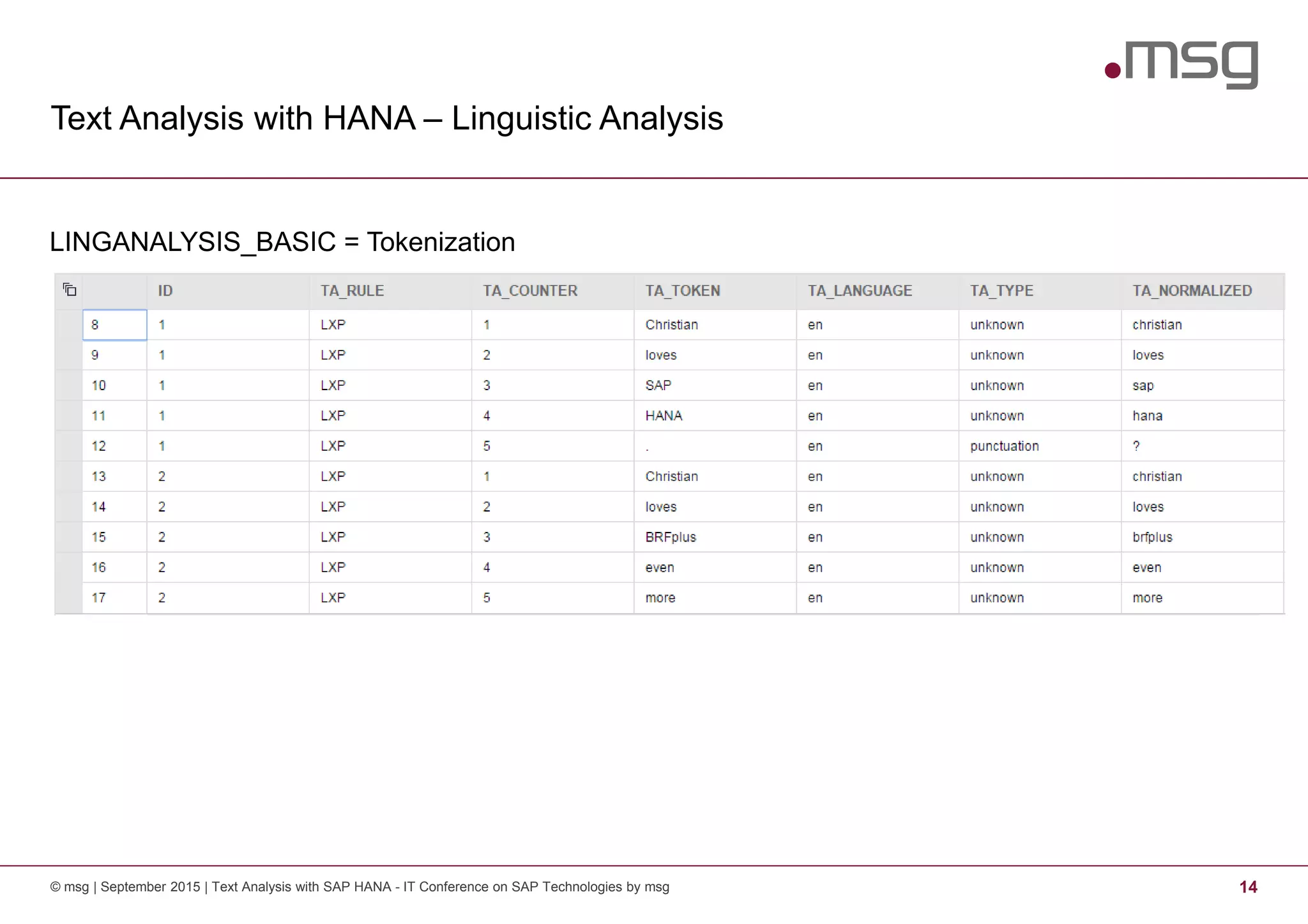
Text Analysis with HANA – Linguistic Analysis
© msg | September 2015 | Text Analysis with SAP HANA - IT Conference on SAP Technologies by msg 14
LINGANALYSIS_BASIC = Tokenization
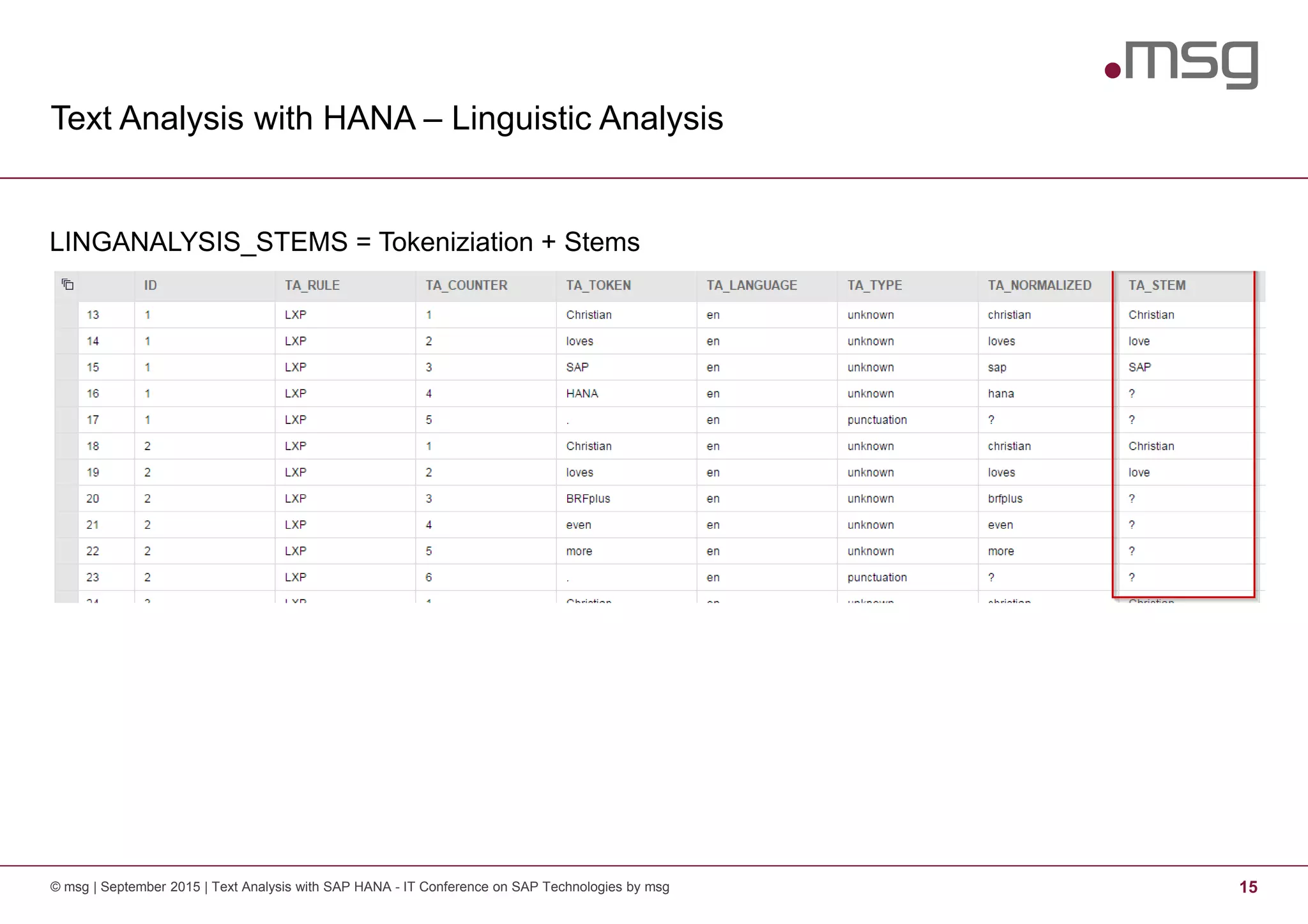
Text Analysis with HANA – Linguistic Analysis
© msg | September 2015 | Text Analysis with SAP HANA - IT Conference on SAP Technologies by msg 15
LINGANALYSIS_STEMS = Tokeniziation + Stems
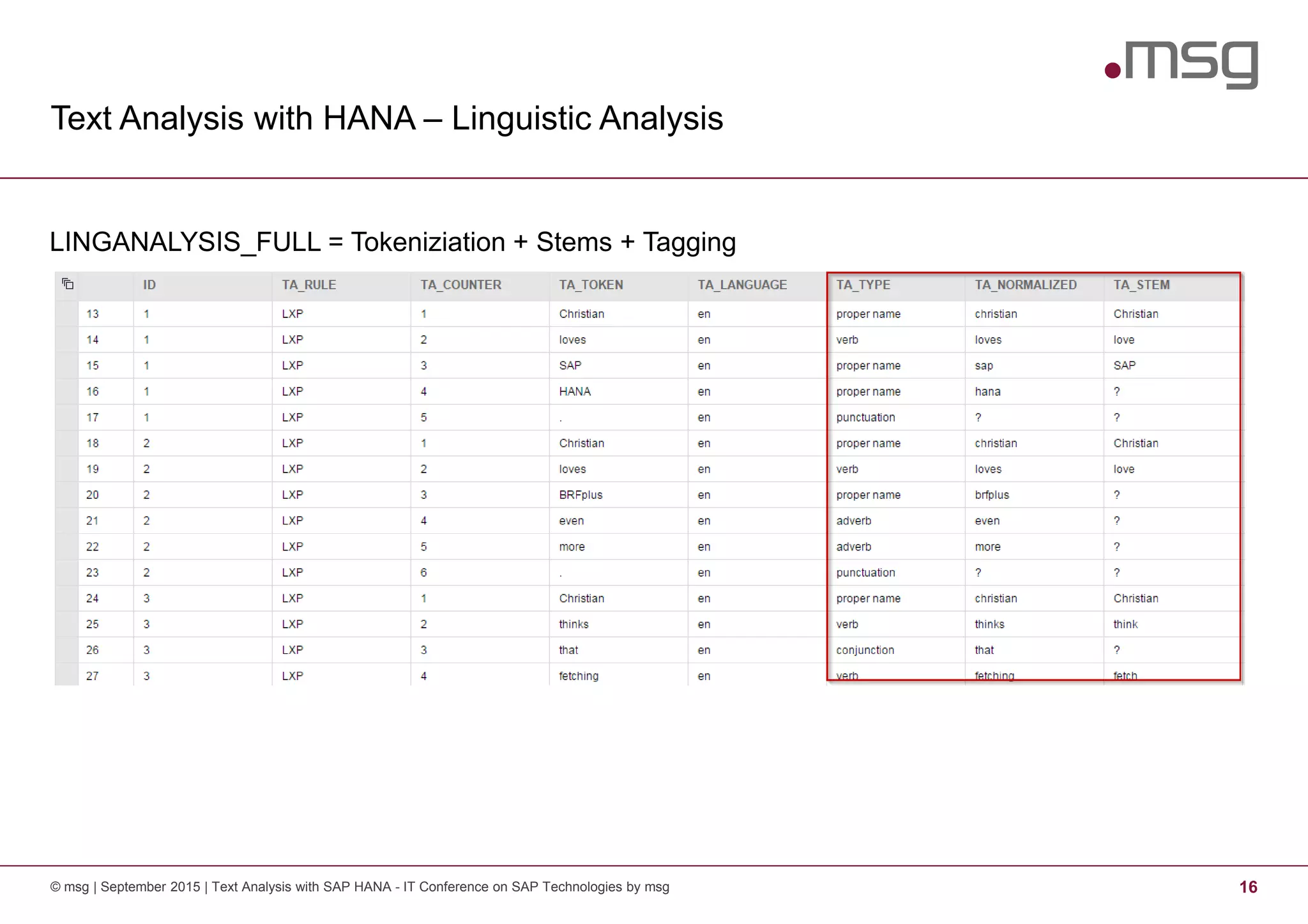
Text Analysis with HANA – Linguistic Analysis
© msg | September 2015 | Text Analysis with SAP HANA - IT Conference on SAP Technologies by msg 16
LINGANALYSIS_FULL = Tokeniziation + Stems + Tagging
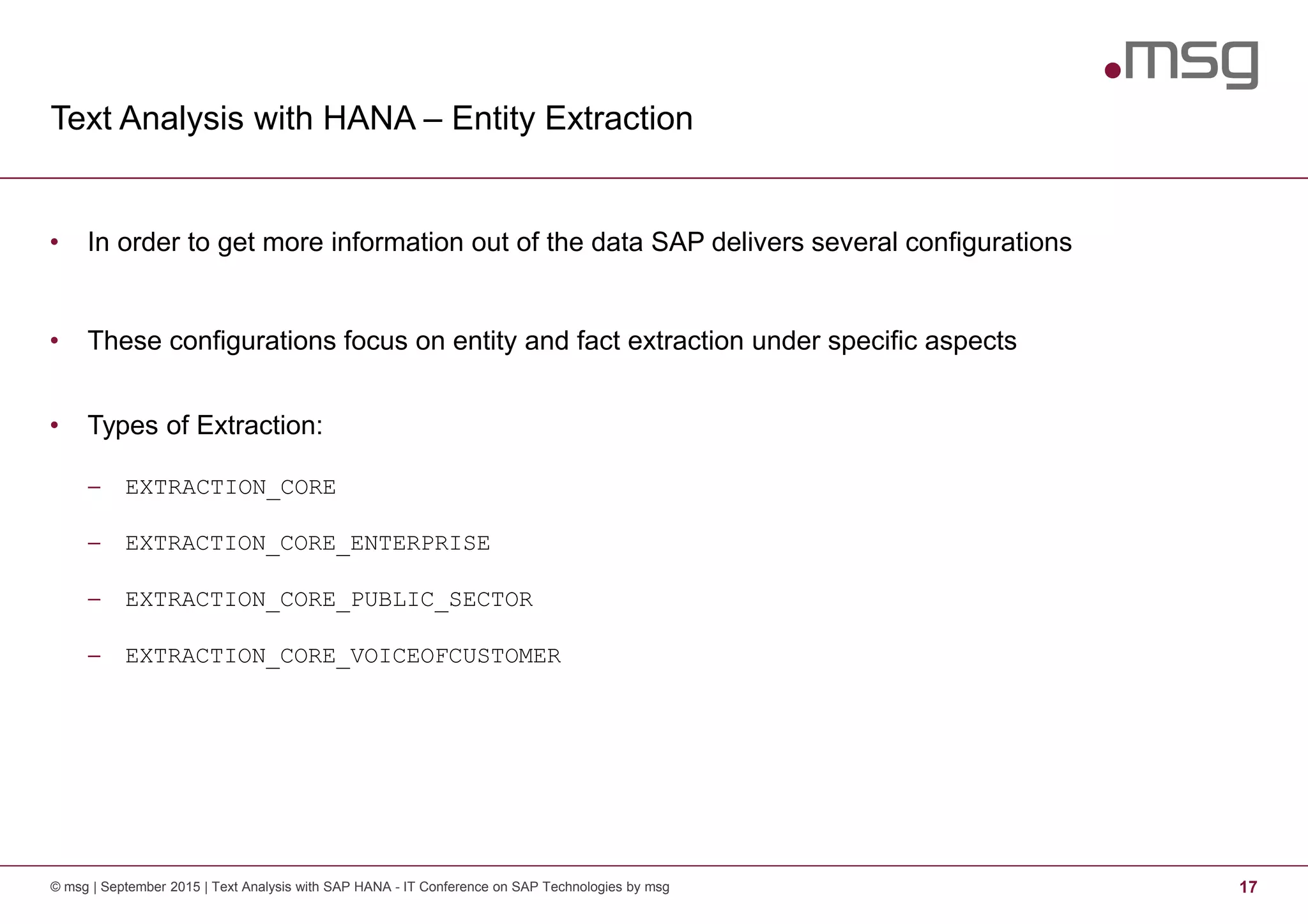
Text Analysis with HANA – Entity Extraction
© msg | September 2015 | Text Analysis with SAP HANA - IT Conference on SAP Technologies by msg 17
• In order to get more information out of the data SAP delivers several configurations
• These configurations focus on entity and fact extraction under specific aspects
• Types of Extraction:
− EXTRACTION_CORE
− EXTRACTION_CORE_ENTERPRISE
− EXTRACTION_CORE_PUBLIC_SECTOR
− EXTRACTION_CORE_VOICEOFCUSTOMER
© msg | September 2015 | Text Analysis with SAP HANA - IT Conference on SAP Technologies by msg 18
Text Analysis with HANA – Entity Extraction
© msg | September 2015 | Text Analysis with SAP HANA - IT Conference on SAP Technologies by msg 19
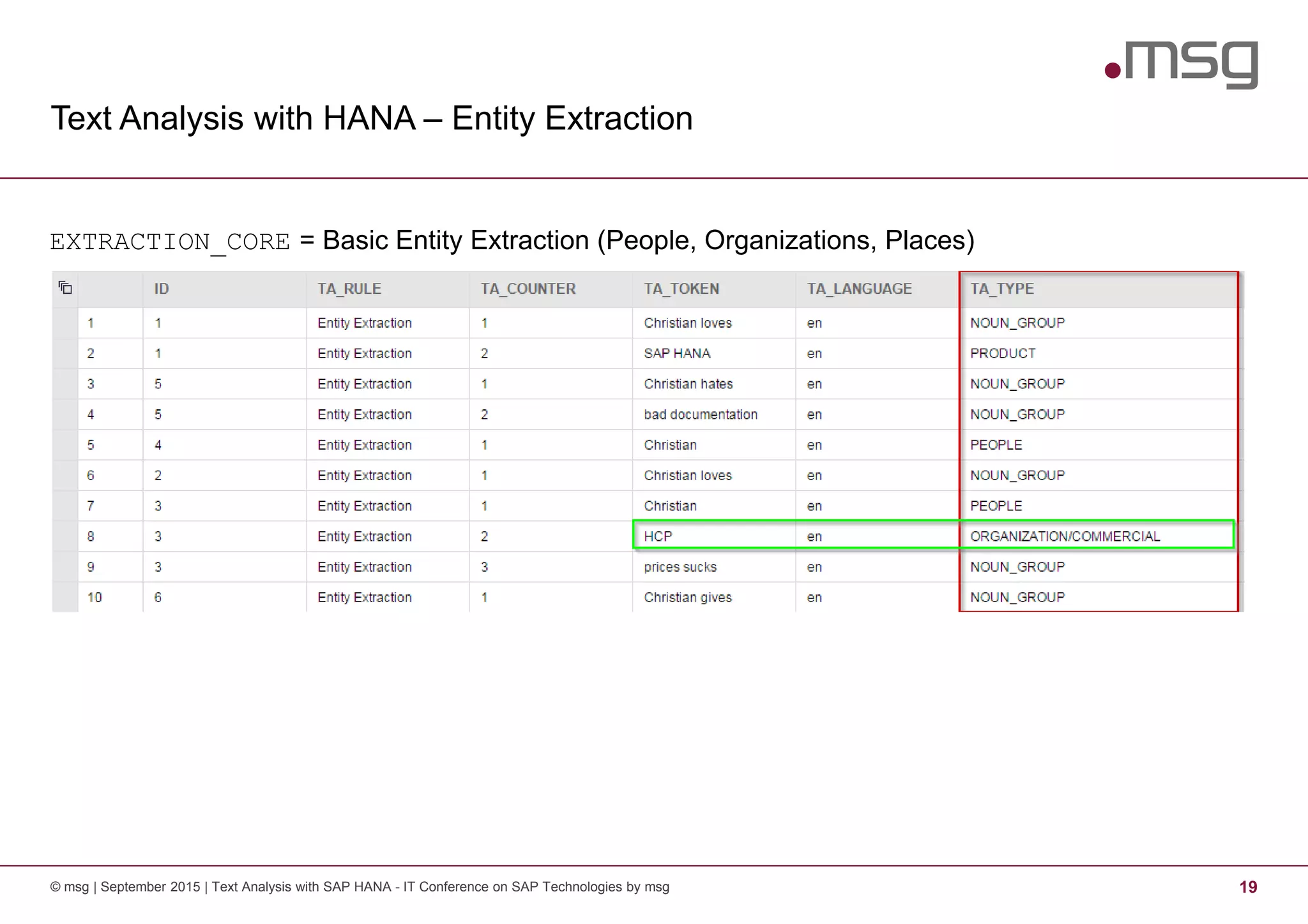
EXTRACTION_CORE = Basic Entity Extraction (People, Organizations, Places)
Text Analysis with HANA – Entity Extraction
© msg | September 2015 | Text Analysis with SAP HANA - IT Conference on SAP Technologies by msg 20
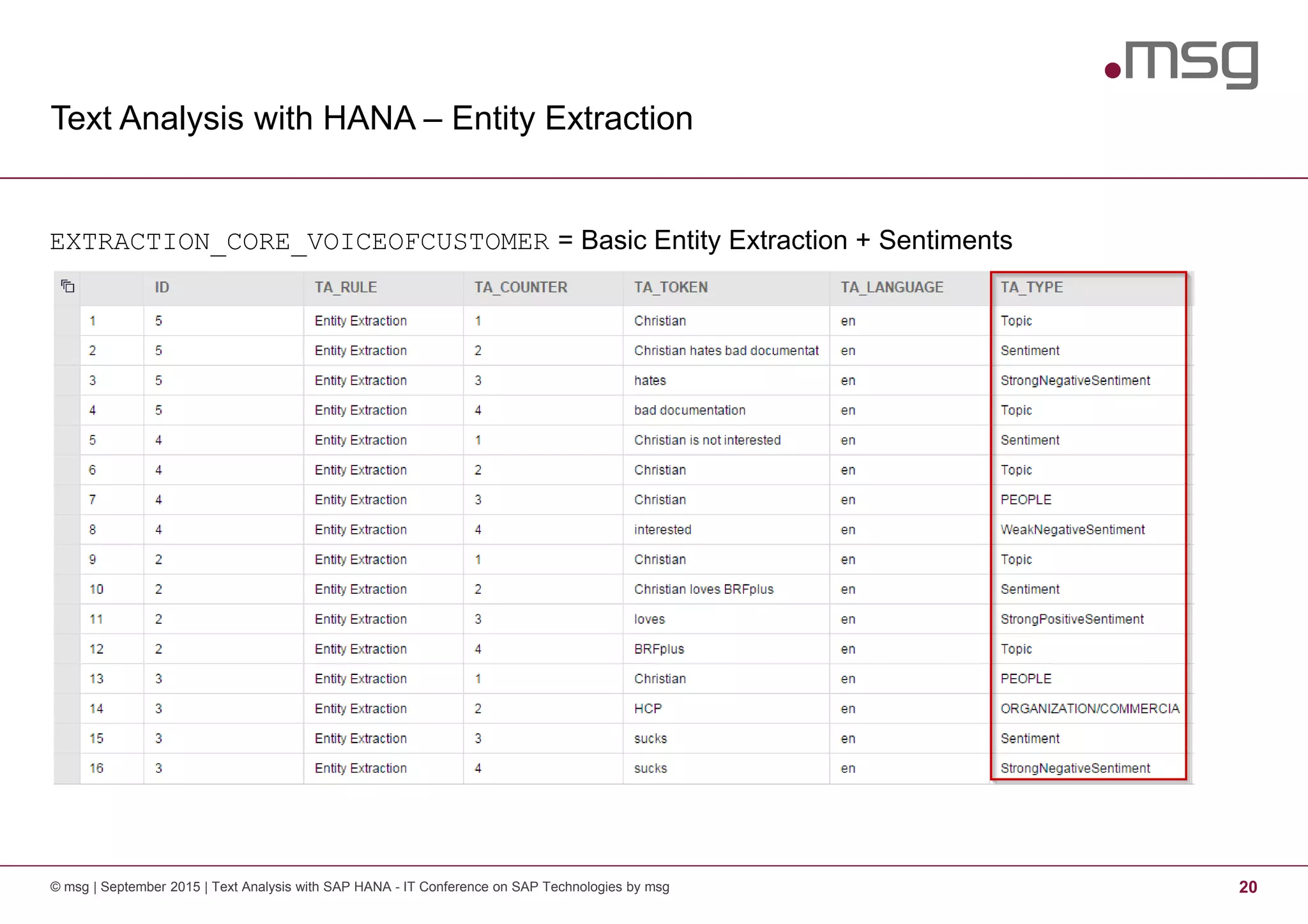
EXTRACTION_CORE_VOICEOFCUSTOMER = Basic Entity Extraction + Sentiments
Text Analysis with SAP HANA
21© msg | September 2015 | Text Analysis with SAP HANA - IT Conference on SAP Technologies by msg
Motivation - Big Data1 3
Text Analysis with SAP HANA2 7
Enhancement Options3 21
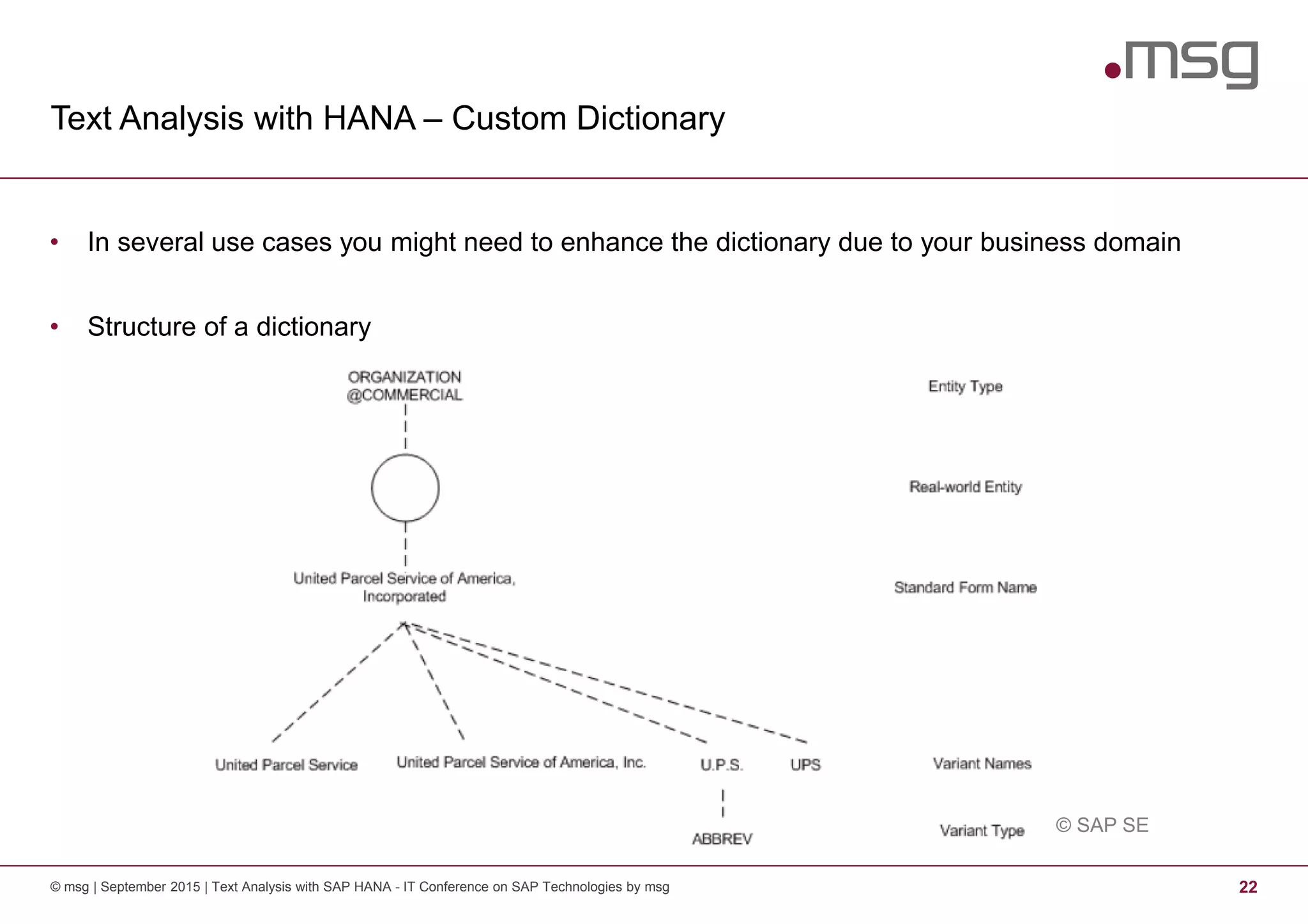
Text Analysis with HANA – Custom Dictionary
© msg | September 2015 | Text Analysis with SAP HANA - IT Conference on SAP Technologies by msg 22
• In several use cases you might need to enhance the dictionary due to your business domain
• Structure of a dictionary
© SAP SE
Text Analysis with HANA – Workflow of Enhancement
© msg | September 2015 | Text Analysis with SAP HANA - IT Conference on SAP Technologies by msg 23
1. Find an extraction configuration that is most fitting for you
2. Copy the configuration into the target folder
3. Create a new custom dictionary
4. Reference the dictionary in your configuration copy
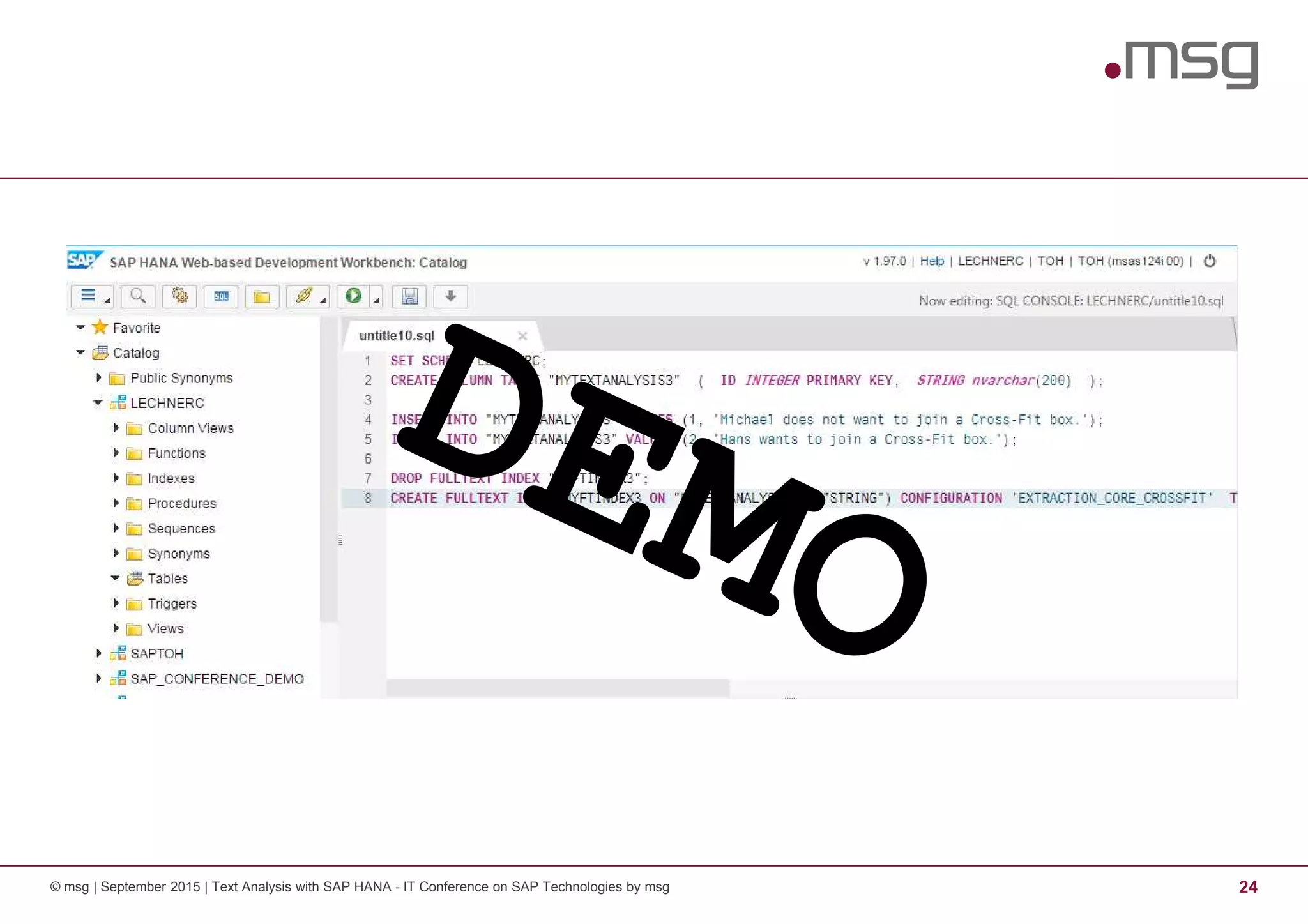
5. Recreate the fulltext index using your custom configuration
© msg | September 2015 | Text Analysis with SAP HANA - IT Conference on SAP Technologies by msg 24
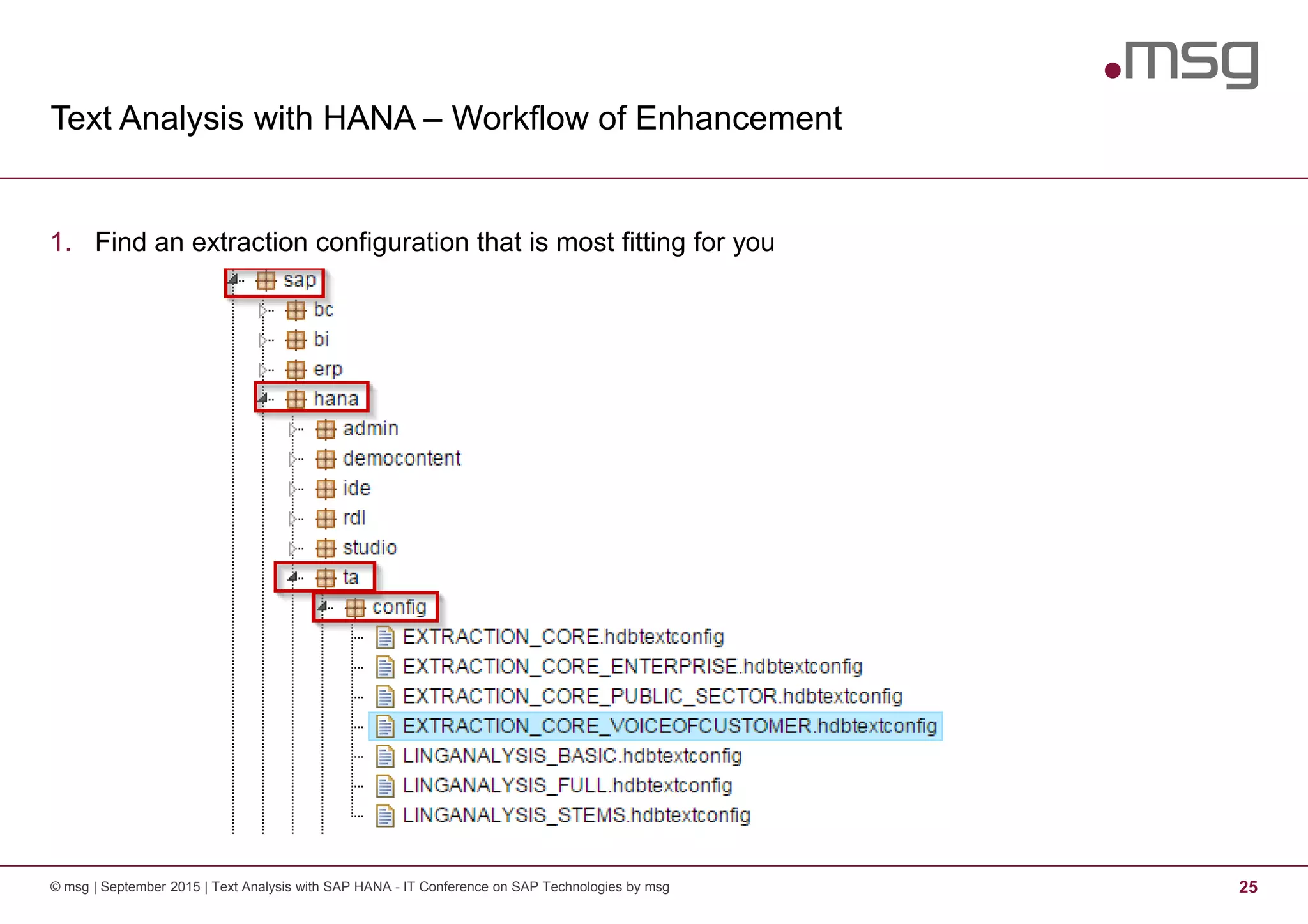
Text Analysis with HANA – Workflow of Enhancement
© msg | September 2015 | Text Analysis with SAP HANA - IT Conference on SAP Technologies by msg 25
1. Find an extraction configuration that is most fitting for you
Text Analysis with HANA – Workflow of Enhancement
© msg | September 2015 | Text Analysis with SAP HANA - IT Conference on SAP Technologies by msg 26
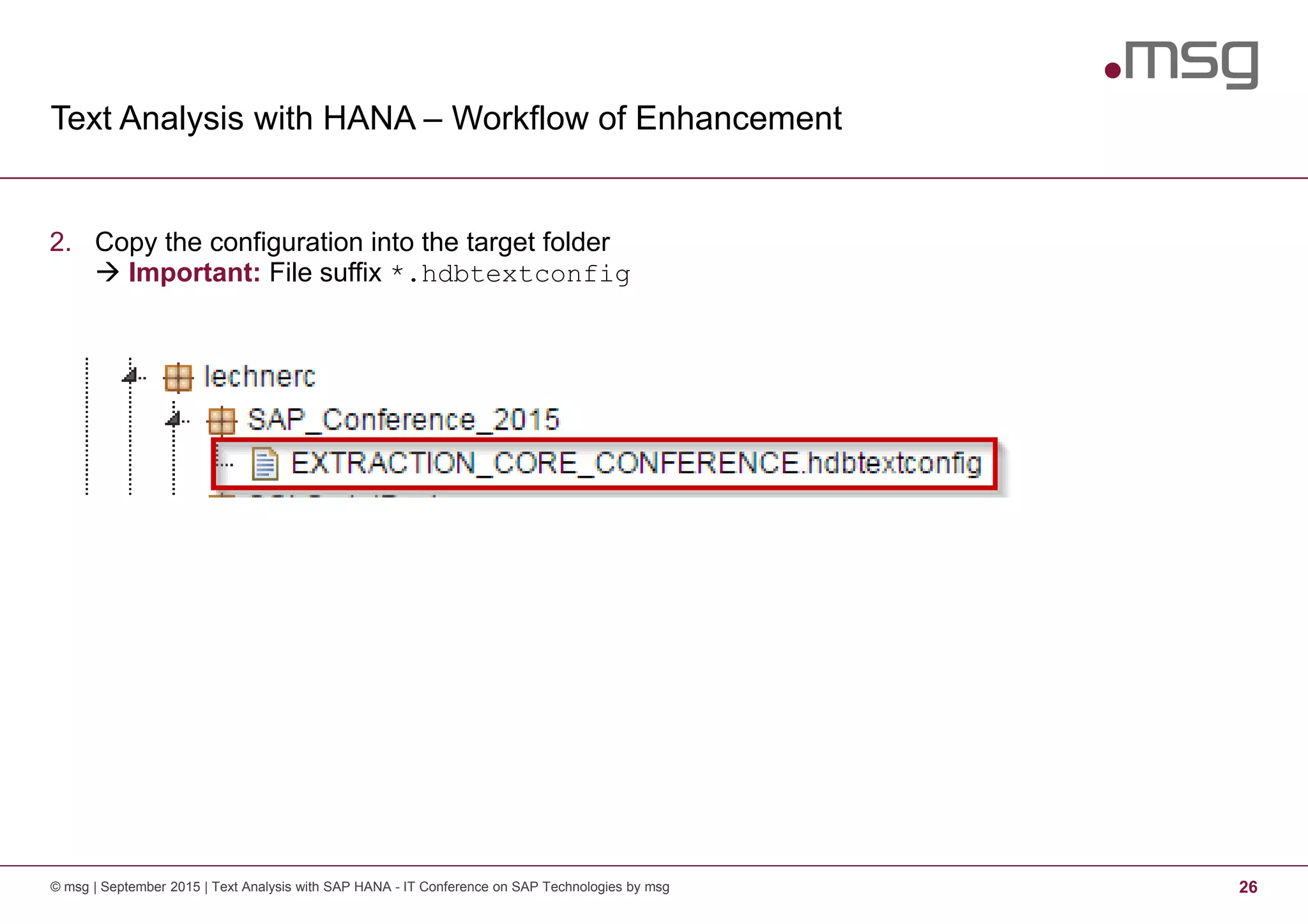
2. Copy the configuration into the target folder
Important: File suffix *.hdbtextconfig
Text Analysis with HANA – Workflow of Enhancement
© msg | September 2015 | Text Analysis with SAP HANA - IT Conference on SAP Technologies by msg 27
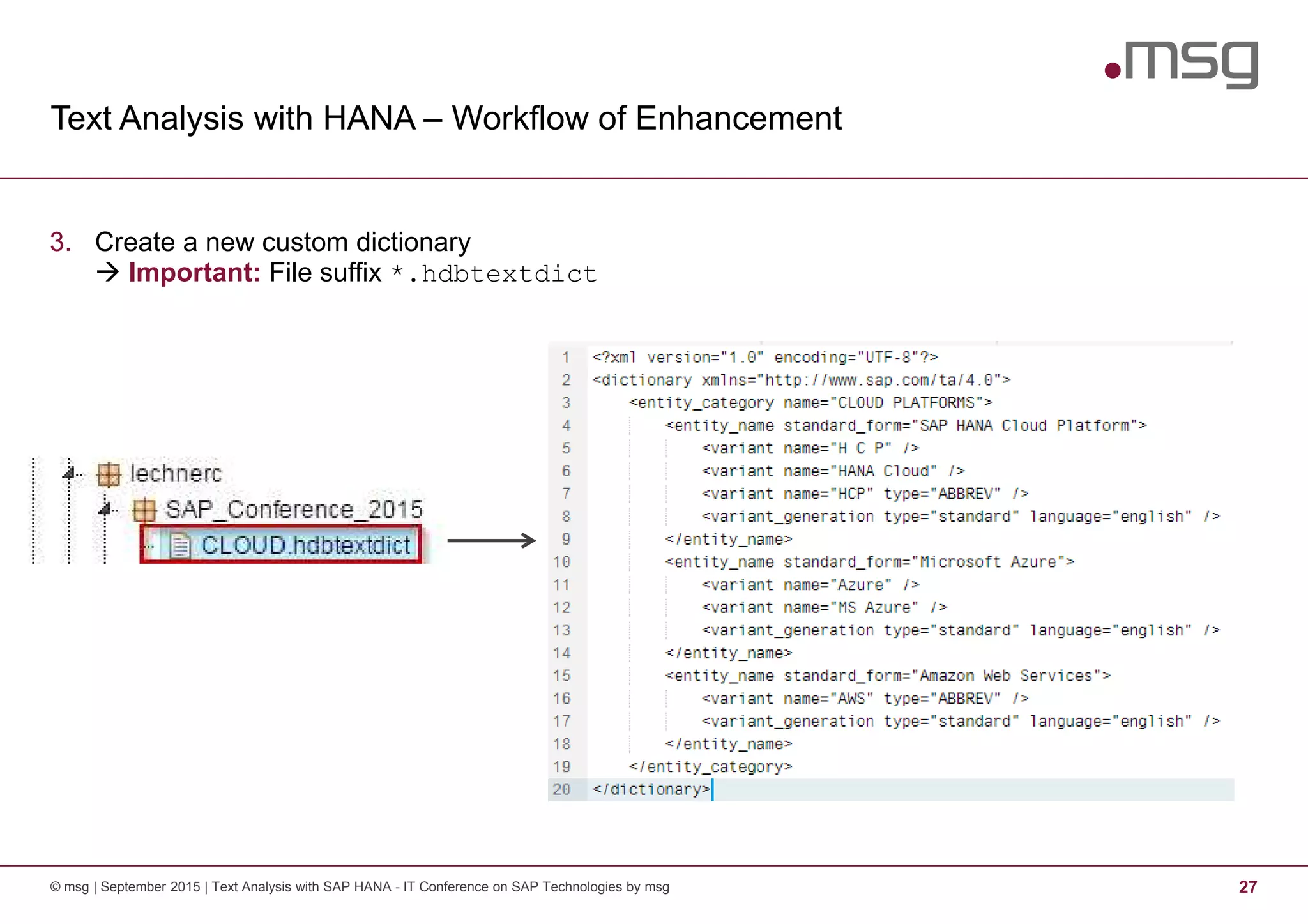
3. Create a new custom dictionary
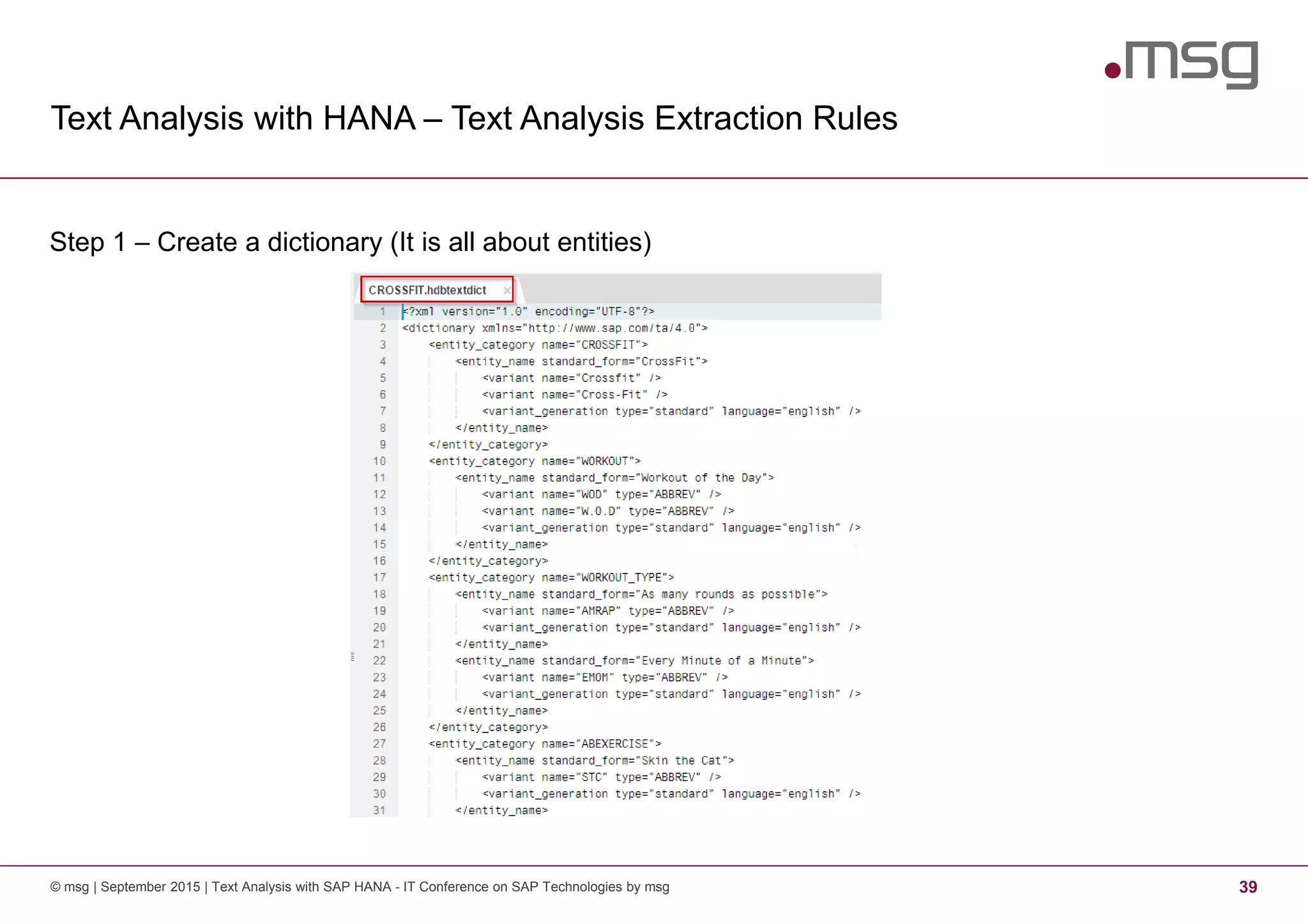
Important: File suffix *.hdbtextdict
Text Analysis with HANA – Workflow of Enhancement
© msg | September 2015 | Text Analysis with SAP HANA - IT Conference on SAP Technologies by msg 28
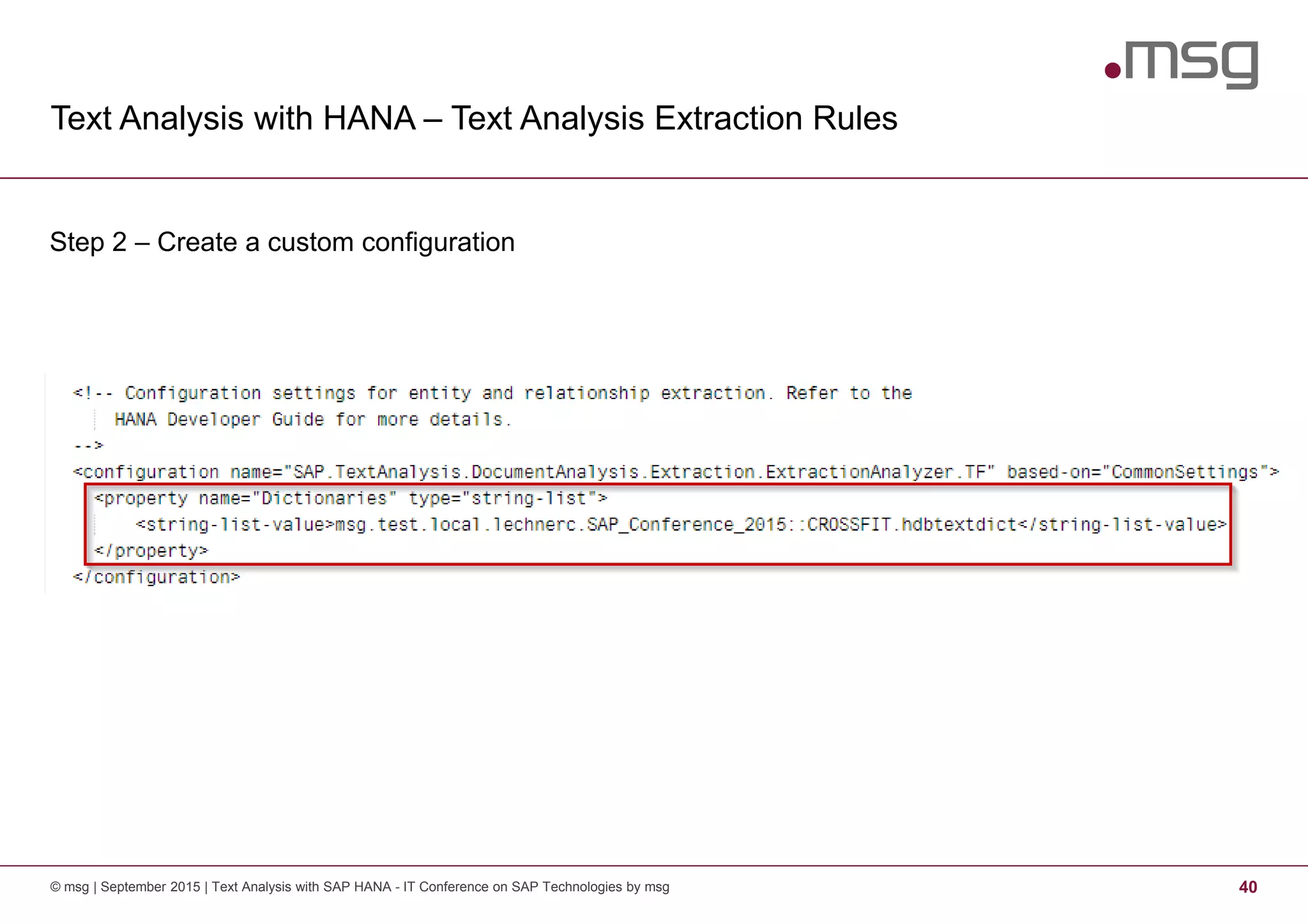
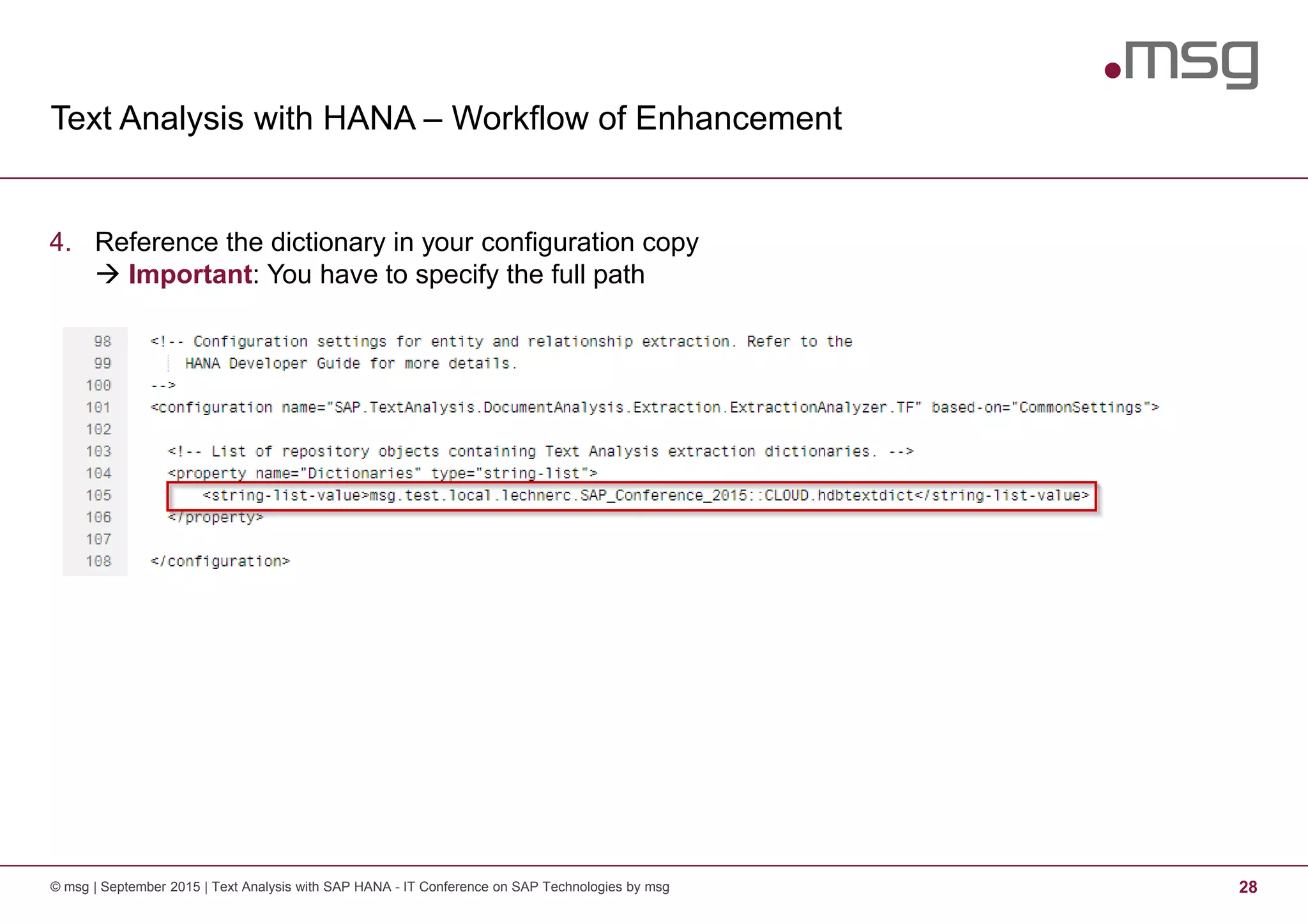
4. Reference the dictionary in your configuration copy
Important: You have to specify the full path
Text Analysis with HANA – Workflow of Enhancement
© msg | September 2015 | Text Analysis with SAP HANA - IT Conference on SAP Technologies by msg 29
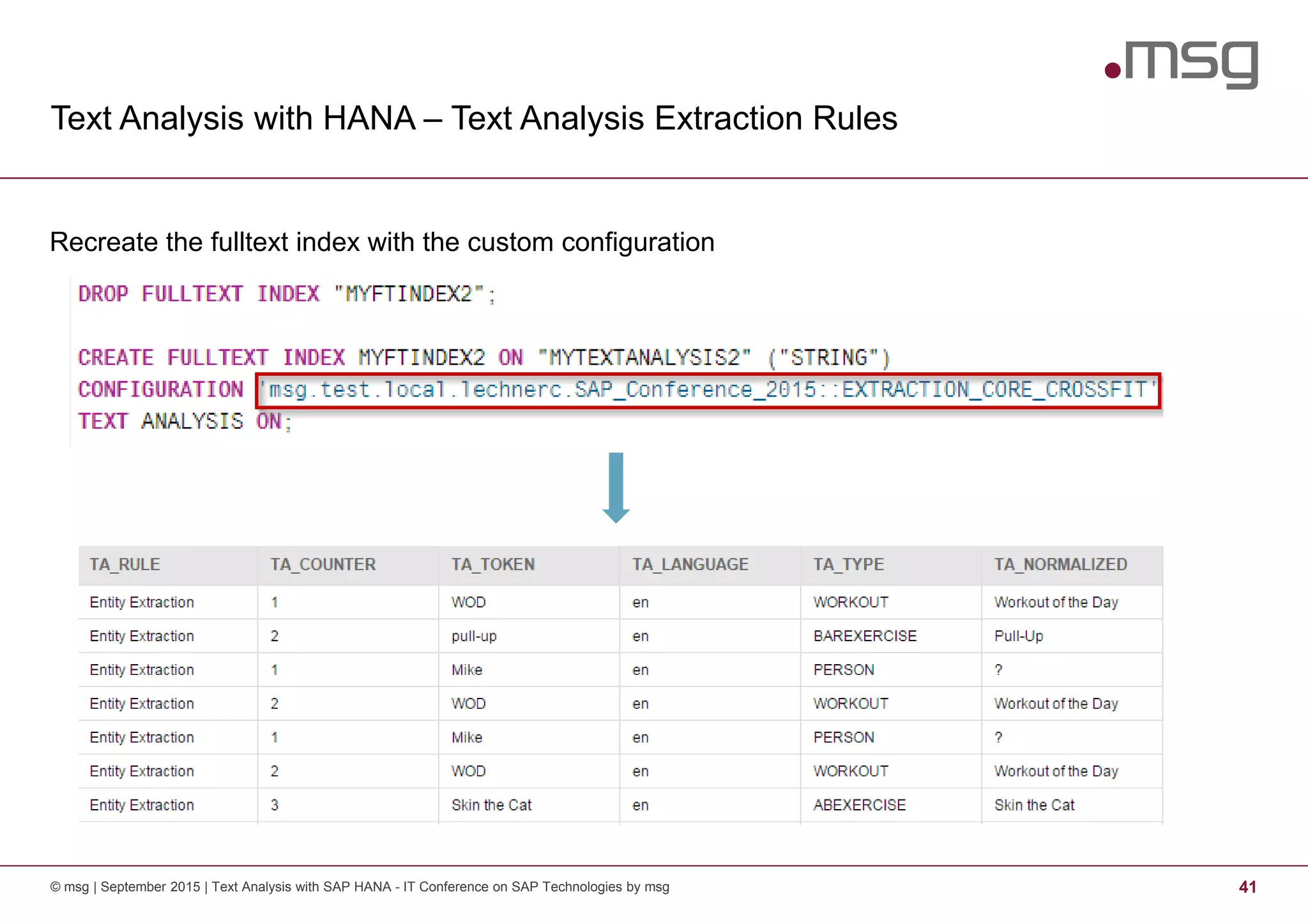
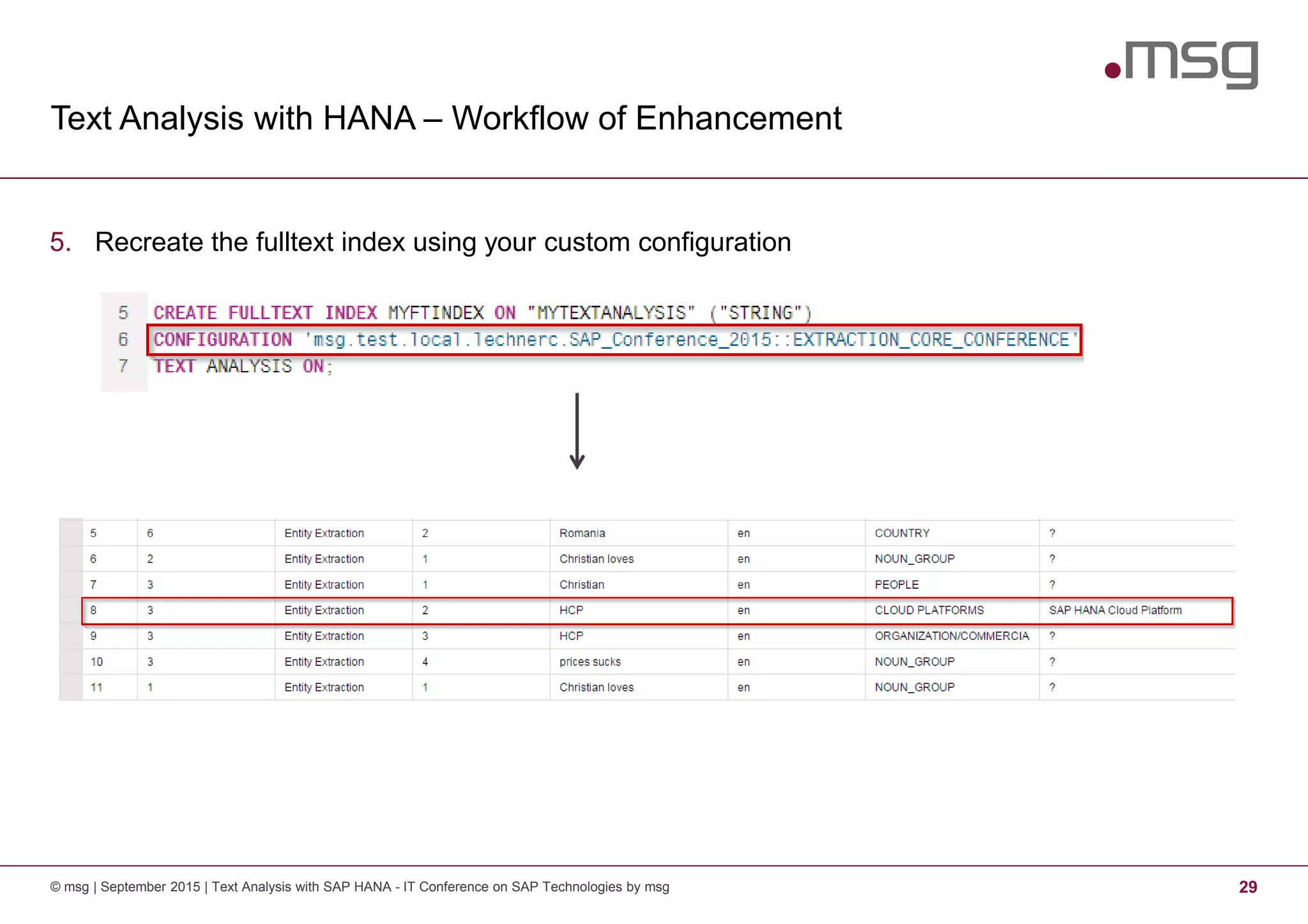
5. Recreate the fulltext index using your custom configuration
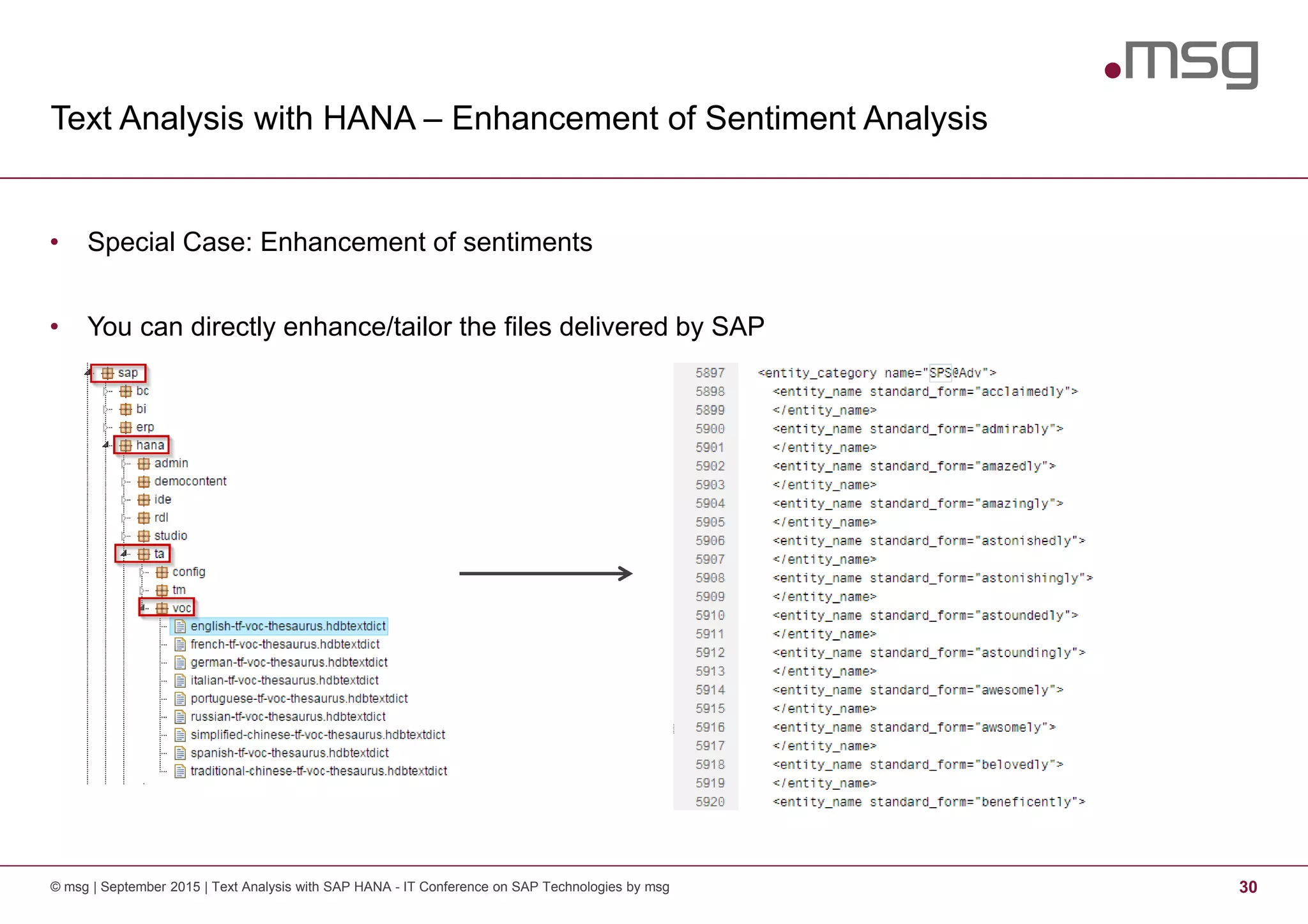
Text Analysis with HANA – Enhancement of Sentiment Analysis
© msg | September 2015 | Text Analysis with SAP HANA - IT Conference on SAP Technologies by msg 30
• Special Case: Enhancement of sentiments
• You can directly enhance/tailor the files delivered by SAP
Text Analysis with HANA – What’s next?
© msg | September 2015 | Text Analysis with SAP HANA - IT Conference on SAP Technologies by msg 31
• Assume that we are in an “industry”-specific context or mining for “slang”-like facts and entities
• Good example for this are sports!
• We use the example of CrossFit® … as there are some funny facts to extract
• Question: How can we extract complex entities from a text?
• Examples:
− Did somebody attend a CrossFit training?
− Does somebody want to join a CrossFit box?
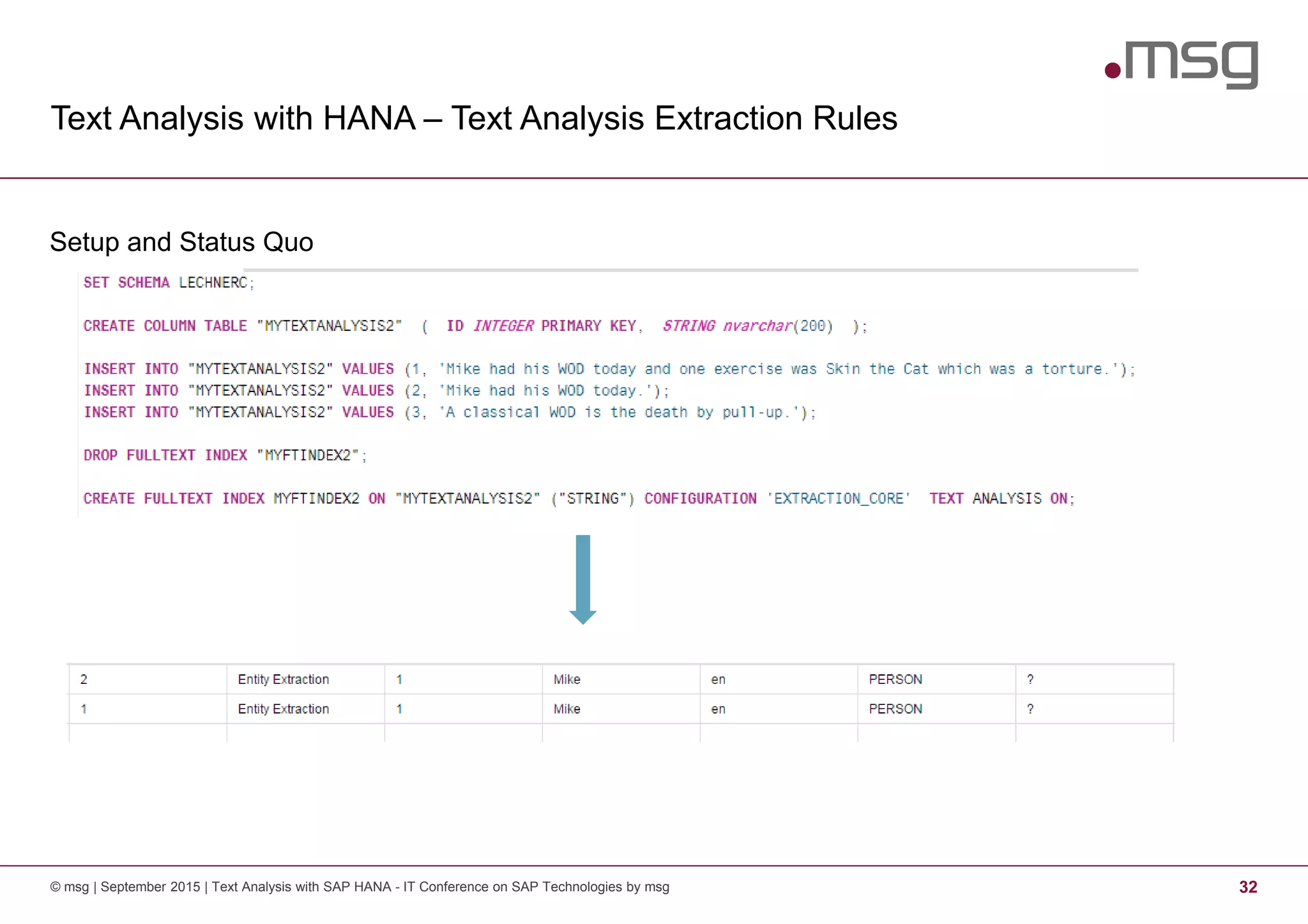
Text Analysis with HANA – Text Analysis Extraction Rules
© msg | September 2015 | Text Analysis with SAP HANA - IT Conference on SAP Technologies by msg 32
Setup and Status Quo
Text Analysis with HANA – Text Analysis Extraction Rules
© msg | September 2015 | Text Analysis with SAP HANA - IT Conference on SAP Technologies by msg 33
• Extraction rules (CGUL rules): pattern-based language for pattern matching using character or
token-based regular expressions combined with linguistic attributes to define custom entity types.
• Goal of the rule sets:
− Extract complex facts based on relations between entities and predicates.
− Entity-to-Entity relations to associate entities such as times, dates, and locations, with other
entities
− Identify entities in domain-specific language.
− Capture facts expressed in new, popular “slang”
Text Analysis with HANA – Text Analysis Extraction Rules
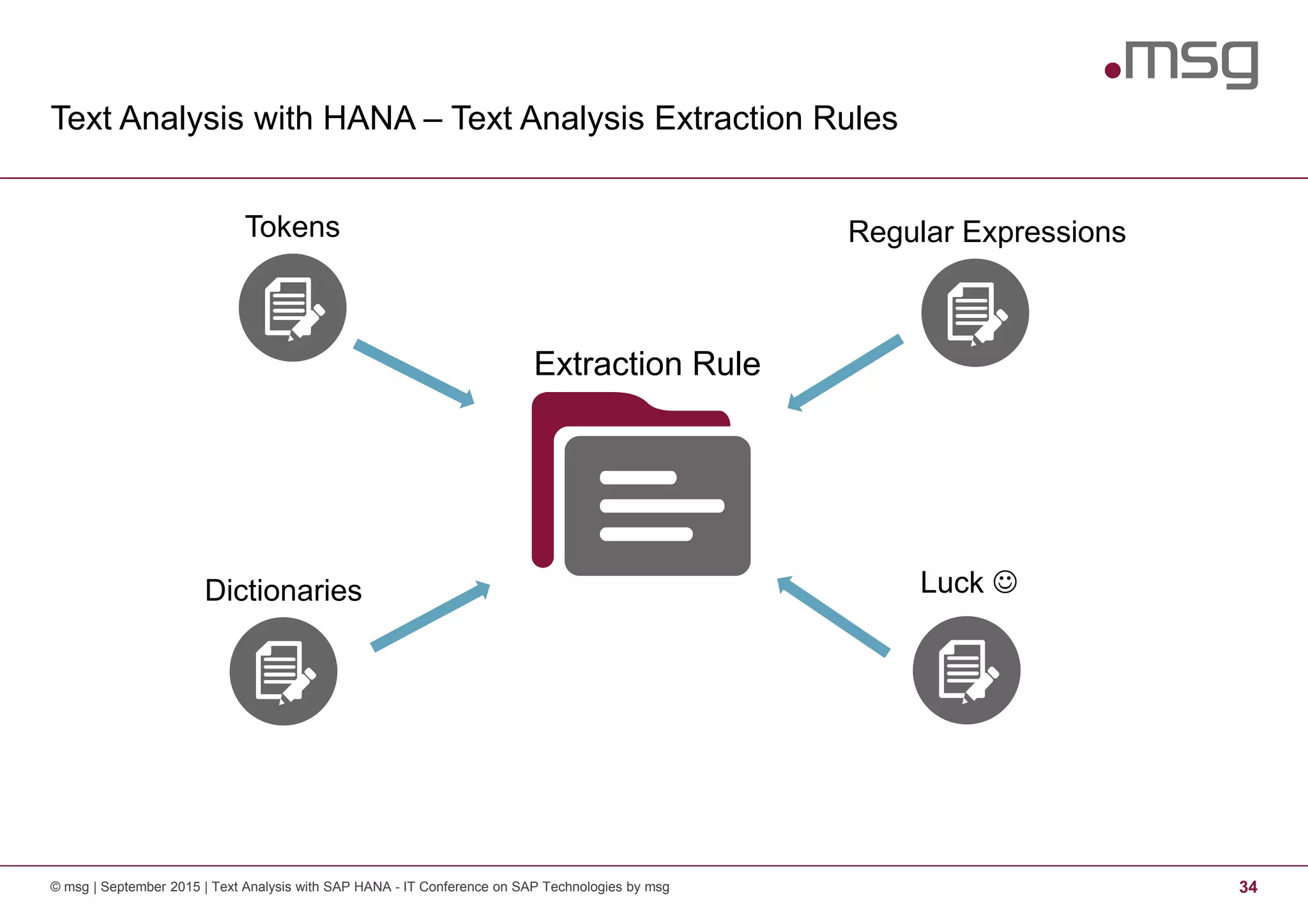
© msg | September 2015 | Text Analysis with SAP HANA - IT Conference on SAP Technologies by msg 34
Extraction Rule
Regular ExpressionsTokens
Luck ☺Dictionaries
Text Analysis with HANA
Tokens, Operators, Expression Markers and Directives
© msg | September 2015 | Text Analysis with SAP HANA - IT Conference on SAP Technologies by msg 35
• Tokens define the syntactic units of the text analysis
<string, STEM: <stem>, POS: <postag>>
• Example: <activat.*, STEM: activat.*, POS: V>
• Several operators are possible to enable the matching:
− Standard operators e. g. character wildcard “.”, alternations “|”
− Iteration operators
e.g. zero or one occurrence of preceding item “?” ; zero or many occurrence of preceding item “*”
− Grouping and containment operators, e. g. item group “( )”, range groups “[ ]”
Text Analysis with HANA
Tokens, Operators, Expression Markers and Directives
© msg | September 2015 | Text Analysis with SAP HANA - IT Conference on SAP Technologies by msg 36
• Expression Markers allow the definition of delimiters of the searched terms
• Several markers are available:
− Paragraph Marker: Specifies beginning and end of paragraph – [P]
− Entity Marker: Limits an expression to one or several entity types – [TE] <expr> [/TE]
− Sentence Marker: Specifies the beginning and end of a sentence – [SN] [/SN]
− Clause Container: Matches entire clause if expression is matched somewhere in the clause
[CC] <expr> [/CC]
Text Analysis with HANA
Tokens, Operators, Expression Markers and Directives
© msg | September 2015 | Text Analysis with SAP HANA - IT Conference on SAP Technologies by msg 37
• Directives allow the definition of character classes, groups of tokens and relation types
• #define (character class): denotes character expressions
Example: #define ALPHA: [A-Za-z]
• #subgroup (group of tokens): defines a group of one or more tokens
Example: #subgroup Cloud: <HCP>|<AWS>|<Azure>
• #group (relation type): definition of custom facts and entity types consisting of one or more
tokens
Example:
#group HANA: <HANA>
#group HANANATIVE: %(HANA) <native>
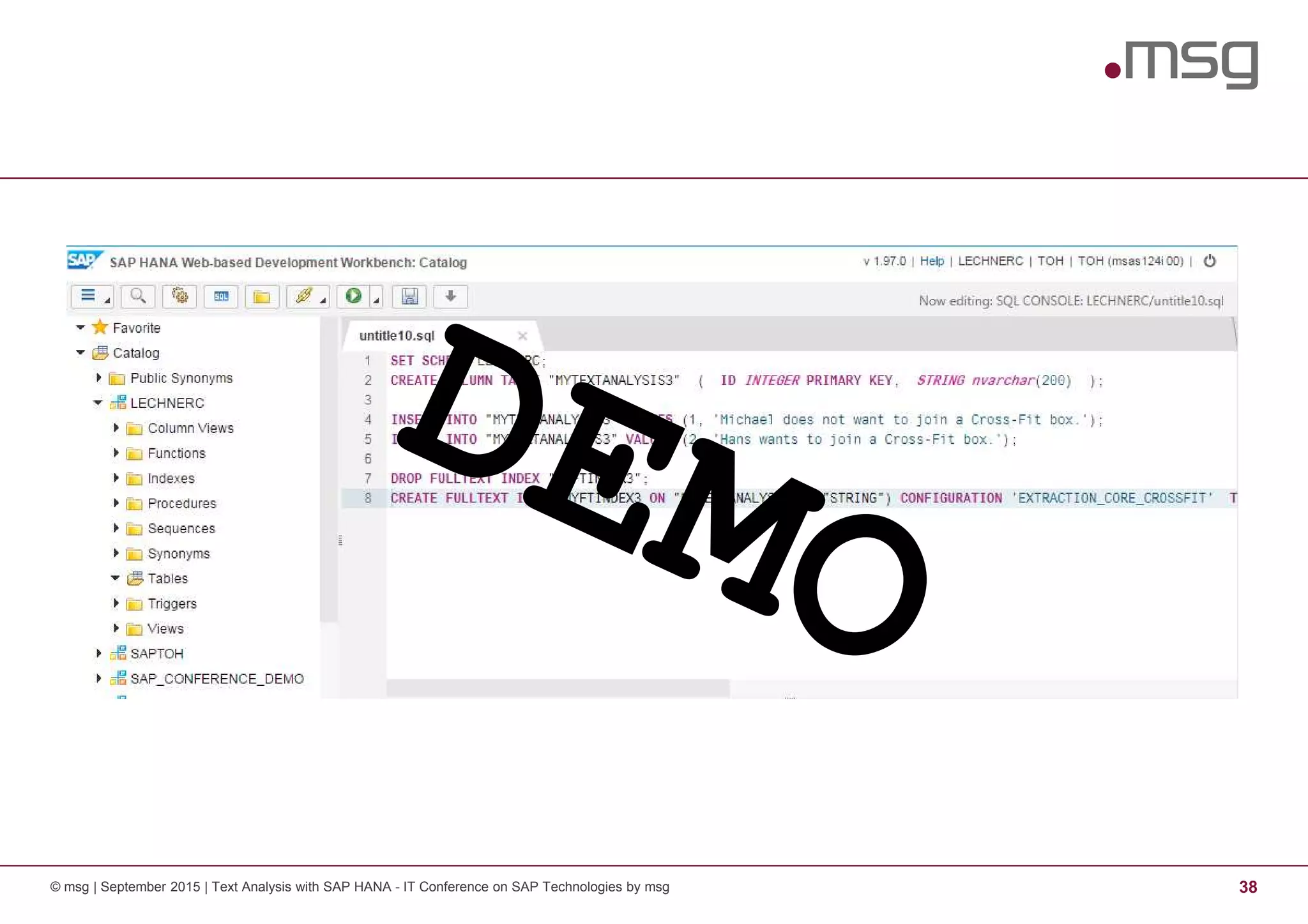
© msg | September 2015 | Text Analysis with SAP HANA - IT Conference on SAP Technologies by msg 38
Text Analysis with HANA – Text Analysis Extraction Rules
© msg | September 2015 | Text Analysis with SAP HANA - IT Conference on SAP Technologies by msg 39
Step 1 – Create a dictionary (It is all about entities)
Text Analysis with HANA – Text Analysis Extraction Rules
© msg | September 2015 | Text Analysis with SAP HANA - IT Conference on SAP Technologies by msg 40
Step 2 – Create a custom configuration
Text Analysis with HANA – Text Analysis Extraction Rules
© msg | September 2015 | Text Analysis with SAP HANA - IT Conference on SAP Technologies by msg 41
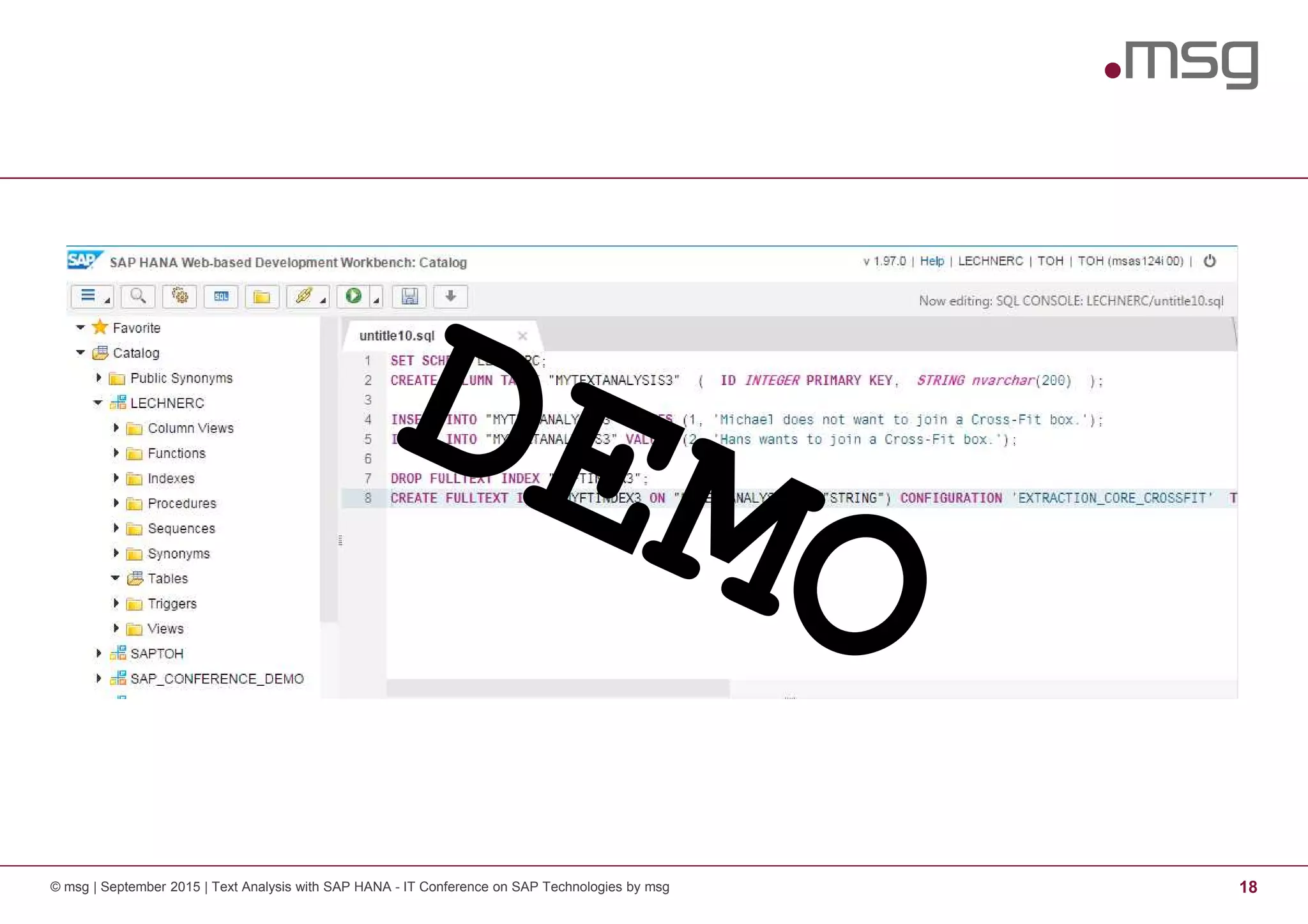
Recreate the fulltext index with the custom configuration
Text Analysis with HANA – Text Analysis Extraction Rules
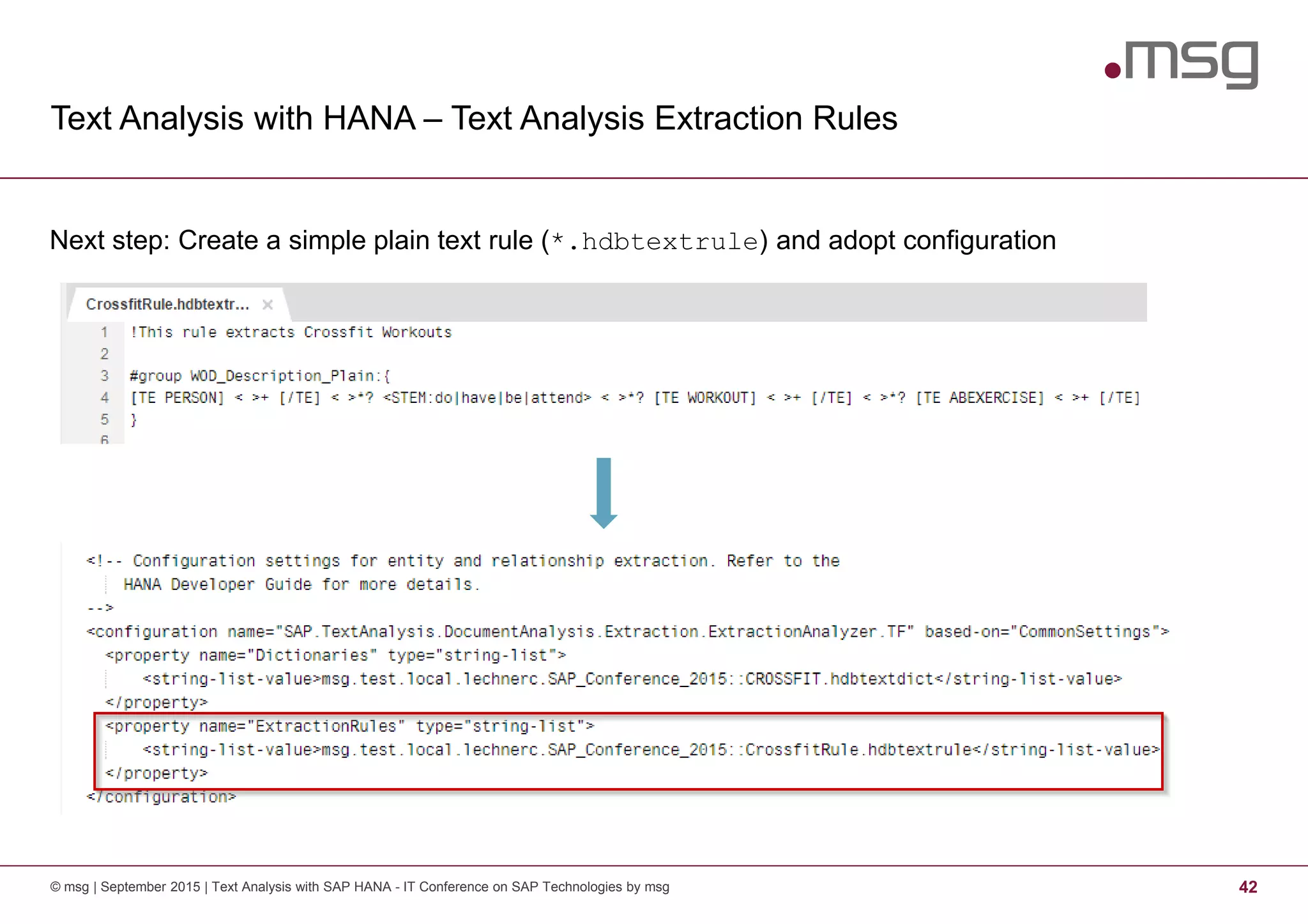
© msg | September 2015 | Text Analysis with SAP HANA - IT Conference on SAP Technologies by msg 42
Next step: Create a simple plain text rule (*.hdbtextrule) and adopt configuration
Text Analysis with HANA – Text Analysis Extraction Rules
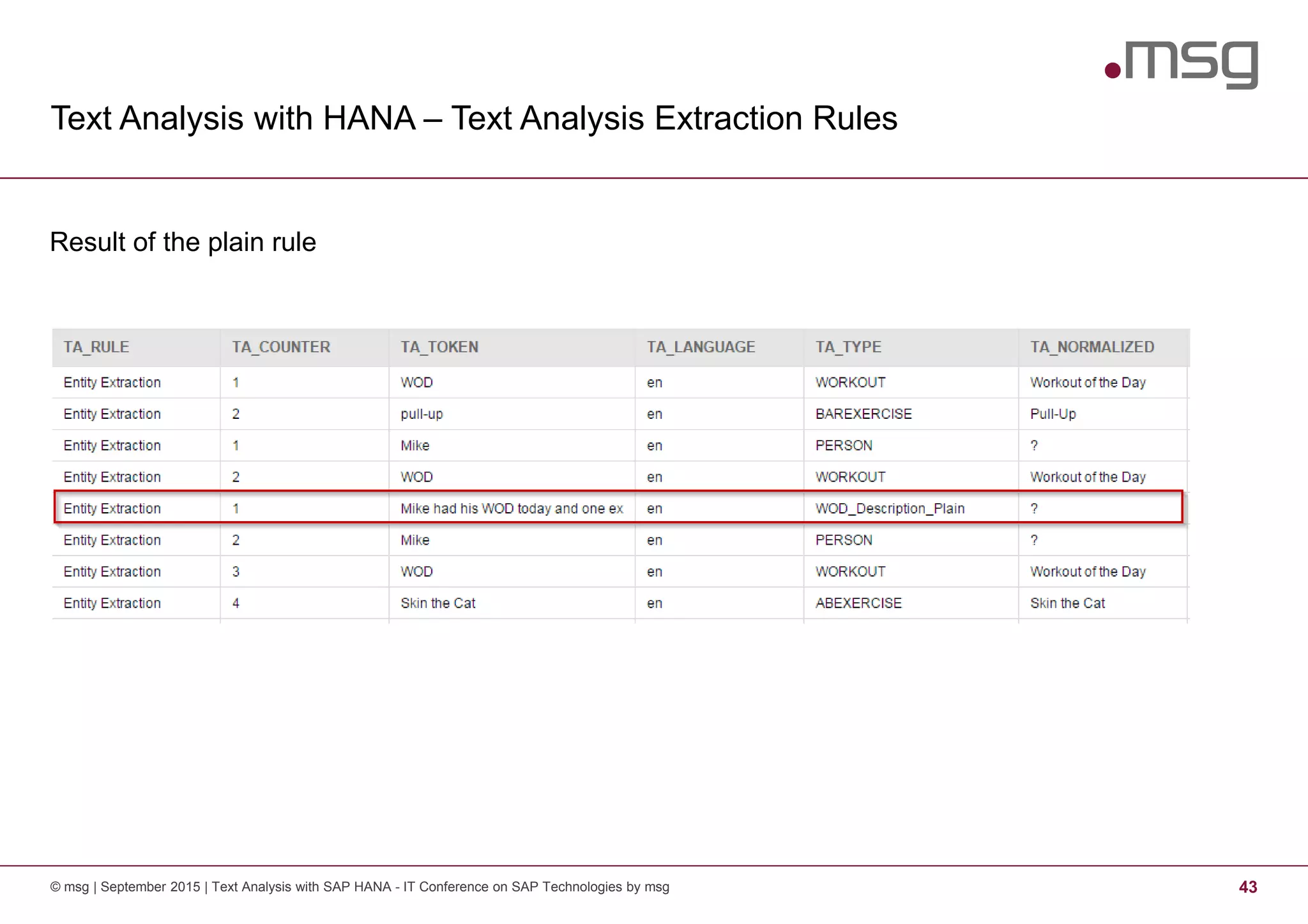
© msg | September 2015 | Text Analysis with SAP HANA - IT Conference on SAP Technologies by msg 43
Result of the plain rule
Text Analysis with HANA – Text Analysis Extraction Rules
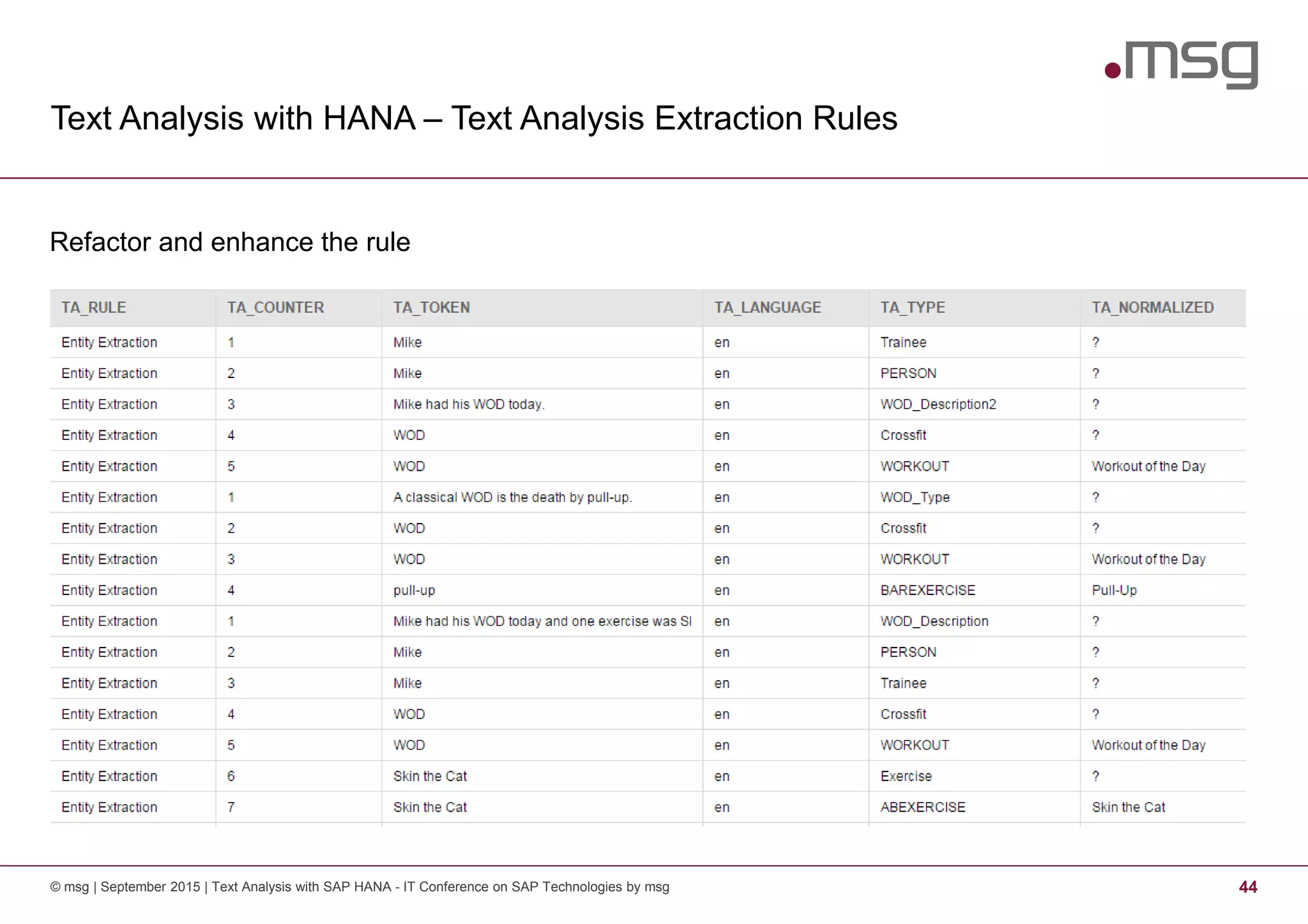
© msg | September 2015 | Text Analysis with SAP HANA - IT Conference on SAP Technologies by msg 44
Refactor and enhance the rule
Text Analysis with HANA – Text Analysis Extraction Rules
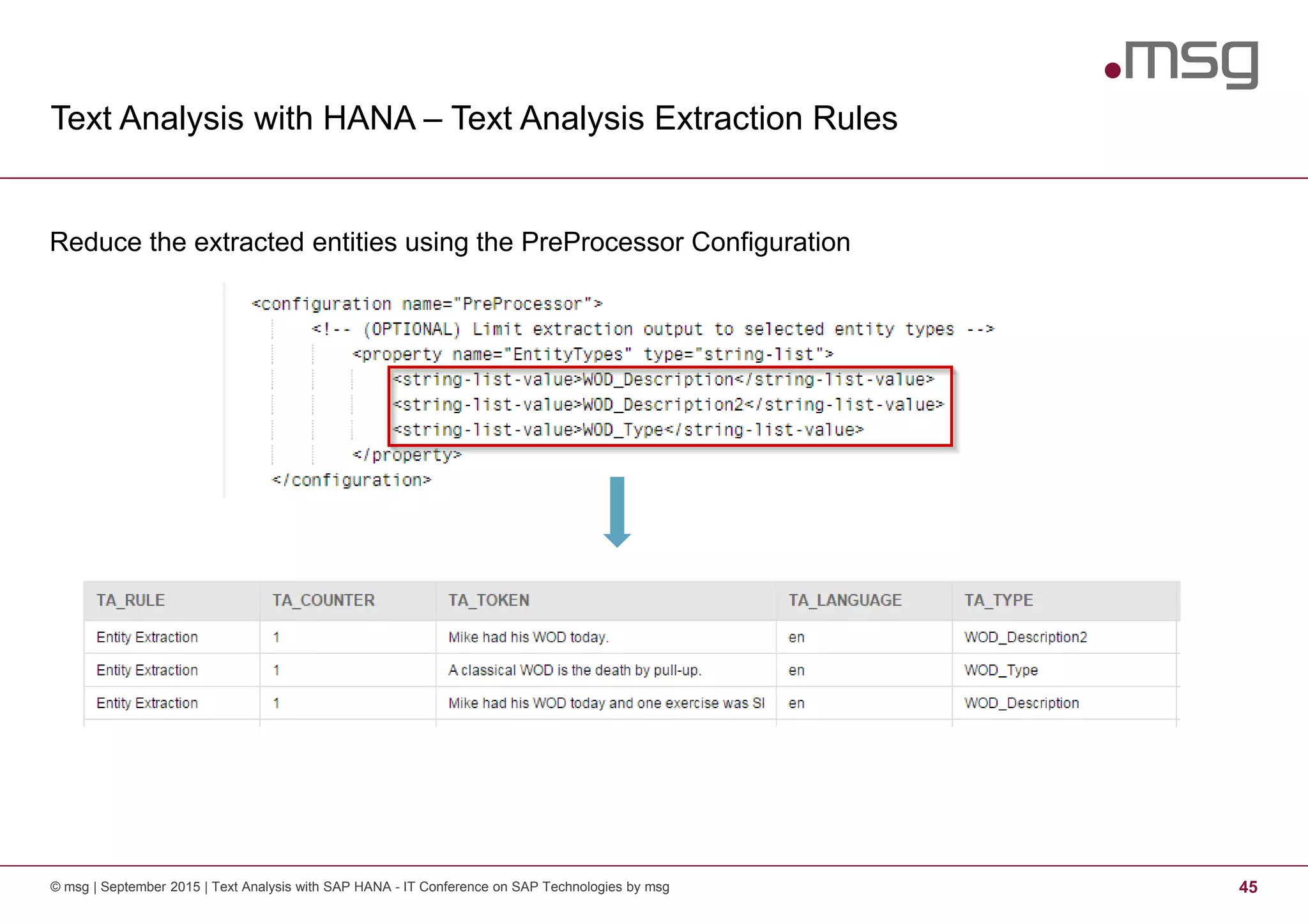
© msg | September 2015 | Text Analysis with SAP HANA - IT Conference on SAP Technologies by msg 45
Reduce the extracted entities using the PreProcessor Configuration
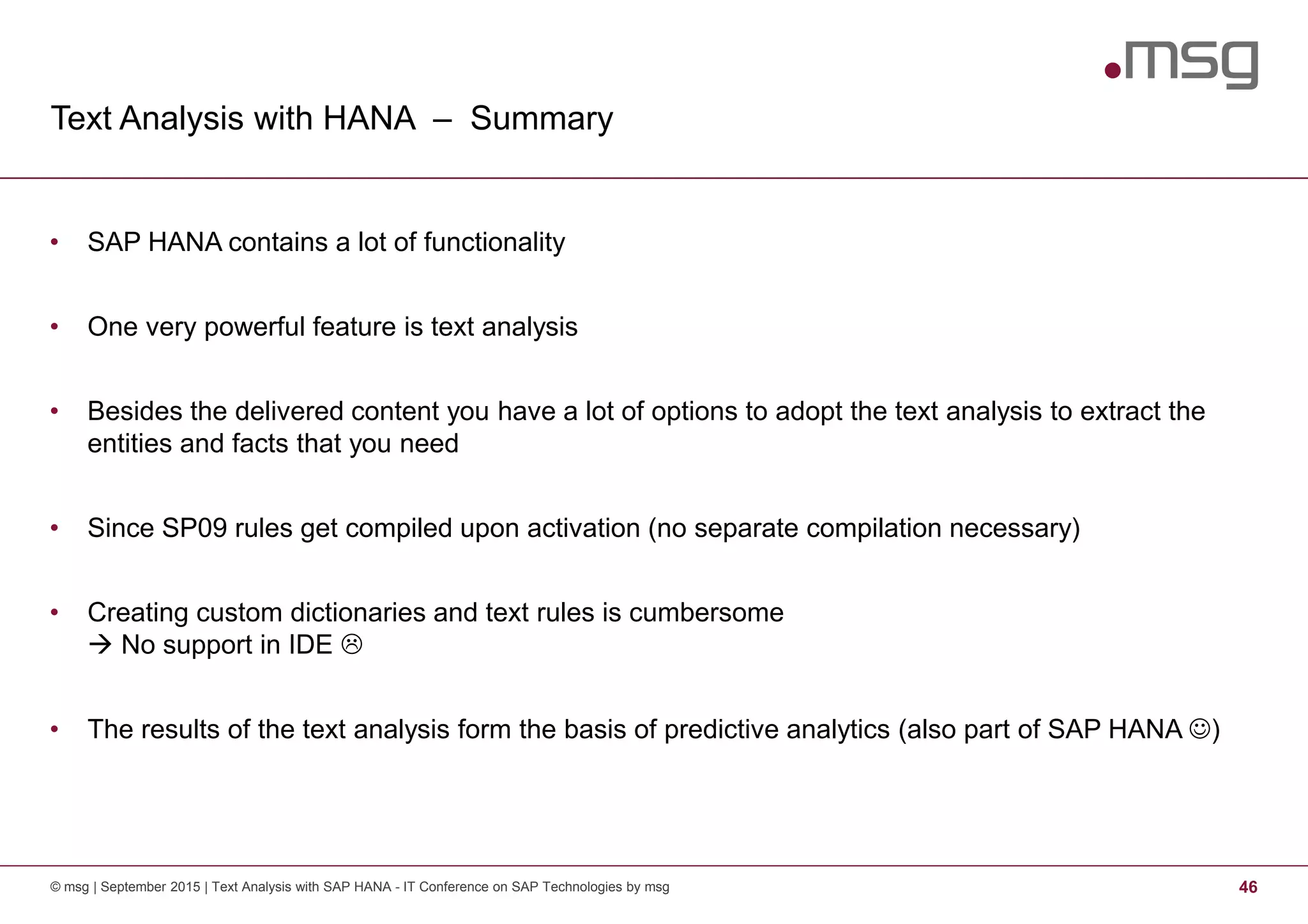
Text Analysis with HANA – Summary
© msg | September 2015 | Text Analysis with SAP HANA - IT Conference on SAP Technologies by msg 46
• SAP HANA contains a lot of functionality
• One very powerful feature is text analysis
• Besides the delivered content you have a lot of options to adopt the text analysis to extract the
entities and facts that you need
• Since SP09 rules get compiled upon activation (no separate compilation necessary)
• Creating custom dictionaries and text rules is cumbersome
No support in IDE
• The results of the text analysis form the basis of predictive analytics (also part of SAP HANA ☺)
© msg | September 2015 | SAP Web IDE - IT Conference on SAP Technologies by msg 47
Q&A
.consulting .solutions .partnership
Dr. Christian Lechner
Principal IT Consultant
+49 (0) 171 7617190
christian.lechner@msg-systems.com
msg systems ag (Headquarters)
Robert-Buerkle-Str. 1, 85737 Ismaning
Germany
www.msg-systems.com
Text Analysis with HANA – Ressources
© msg | September 2015 | Text Analysis with SAP HANA - IT Conference on SAP Technologies by msg 49
• SAP HANA Search Developer Guide (Fulltext Index Options)
help.sap.com -> Search Developer Guide
• SAP HANA Text Analysis Developer Guide:
help.sap.com -> TA Developer Guide
• SAP HANA Text Analysis Language Reference Guide:
help.sap.com -> TA Language Refrence Guide
• SAP HANA Text Analysis Extraction Customization Guide:
help.sap.com -> TA Extraction Customization Guide
• YouTube Playlist of SAP HANA Academy:
Text Analysis and Search

Text Analysis with SAP HANA

  • 1.
  • 2.
    Text Analysis withSAP HANA 2© msg | September 2015 | Text Analysis with SAP HANA - IT Conference on SAP Technologies by msg Motivation - Big Data1 3 Text Analysis with SAP HANA2 7 Enhancement Options3 21
  • 3.
    Text Analysis withSAP HANA 3© msg | September 2015 | Text Analysis with SAP HANA - IT Conference on SAP Technologies by msg Motivation - Big Data1 3 Text Analysis with SAP HANA2 7 Enhancement Options3 21
  • 4.
    Big Data -taking a closer look © msg | September 2015 | Text Analysis with SAP HANA - IT Conference on SAP Technologies by msg 4 • Big Data is hot topic today, but what is hidden in the “Big Data”? • According to Merril Lynch 80-90% of all potentially usable business information may originate in unstructured form (Structure, Models and Meaning: Is "unstructured" data merely unmodeled?, Intelligent Enterprise, March 1, 2005.) • According to Computer World unstructured information might account for more than 70%–80% of all data in organizations (Holzinger, Andreas; et al. (2013). "Combining HCI, Natural Language Processing, and Knowledge Discovery - Potential of IBM Content Analytics as an Assistive Technology in the Biomedical Field" in Human-Computer Interaction and Knowledge Discovery in Complex, Unstructured, Big Data. Lecture Notes in Computer Science. Springer. pp. 13–24) • This data will grow up to 40 zettabytes by 2020 • The data might origin from: − Social Networks − Call Centers − “Letters” from Customer − ...
  • 5.
    What is theProblem with Unstructured Data? © msg | September 2015 | Text Analysis with SAP HANA - IT Conference on SAP Technologies by msg 5 • It is unstructured! − Not organized − No pre-defined data model − No metadata or mix of data and metadata Limited/No access to the data via classical programs • But the data contains valuable information We have a lot of information that is relevant for the business but we cannot access it
  • 6.
    How can wesolve that issue? © msg | September 2015 | Text Analysis with SAP HANA - IT Conference on SAP Technologies by msg 6 • Text Analysis: Extracting high quality information from texts • Typical process of a text analysis: − Parsing of the text − Adding features like linguistic information − Insertion to database in structured manner • Examples for typical text analysis tasks: − Entity recognition: Is it an organization or a person or a place including domain facts like requests? − Sentiment analysis: What attitudinal information is “hidden” in the text? − Relationship, fact and event extraction
  • 7.
    Text Analysis withSAP HANA 7© msg | September 2015 | Text Analysis with SAP HANA - IT Conference on SAP Technologies by msg Motivation - Big Data1 3 Text Analysis with SAP HANA2 7 Enhancement Options3 21
  • 8.
    What has thisto do with SAP HANA? © msg | September 2015 | Text Analysis with SAP HANA - IT Conference on SAP Technologies by msg 8 © SAP SE
  • 9.
    Text Analysis withHANA - Basics © msg | September 2015 | Text Analysis with SAP HANA - IT Conference on SAP Technologies by msg 9 • Starting point: database table containing the text • Supported data types are: − TEXT − BINTEXT − NVARCHAR − VARCHAR − NCLOB, − CLOB − BLOB
  • 10.
    Text Analysis withHANA - Basics © msg | September 2015 | Text Analysis with SAP HANA - IT Conference on SAP Technologies by msg 10 Fulltext index incl. options (see system view SYS.FULLTEXT_INDEXES)
  • 11.
    © msg |September 2015 | Text Analysis with SAP HANA - IT Conference on SAP Technologies by msg 11
  • 12.
    Text Analysis withHANA - Basics © msg | September 2015 | Text Analysis with SAP HANA - IT Conference on SAP Technologies by msg 12 Index properties on the table
  • 13.
    Text Analysis withHANA - Basics © msg | September 2015 | Text Analysis with SAP HANA - IT Conference on SAP Technologies by msg 13 Fulltext index table $TA_*
  • 14.
    Text Analysis withHANA – Linguistic Analysis © msg | September 2015 | Text Analysis with SAP HANA - IT Conference on SAP Technologies by msg 14 LINGANALYSIS_BASIC = Tokenization
  • 15.
    Text Analysis withHANA – Linguistic Analysis © msg | September 2015 | Text Analysis with SAP HANA - IT Conference on SAP Technologies by msg 15 LINGANALYSIS_STEMS = Tokeniziation + Stems
  • 16.
    Text Analysis withHANA – Linguistic Analysis © msg | September 2015 | Text Analysis with SAP HANA - IT Conference on SAP Technologies by msg 16 LINGANALYSIS_FULL = Tokeniziation + Stems + Tagging
  • 17.
    Text Analysis withHANA – Entity Extraction © msg | September 2015 | Text Analysis with SAP HANA - IT Conference on SAP Technologies by msg 17 • In order to get more information out of the data SAP delivers several configurations • These configurations focus on entity and fact extraction under specific aspects • Types of Extraction: − EXTRACTION_CORE − EXTRACTION_CORE_ENTERPRISE − EXTRACTION_CORE_PUBLIC_SECTOR − EXTRACTION_CORE_VOICEOFCUSTOMER
  • 18.
    © msg |September 2015 | Text Analysis with SAP HANA - IT Conference on SAP Technologies by msg 18
  • 19.
    Text Analysis withHANA – Entity Extraction © msg | September 2015 | Text Analysis with SAP HANA - IT Conference on SAP Technologies by msg 19 EXTRACTION_CORE = Basic Entity Extraction (People, Organizations, Places)
  • 20.
    Text Analysis withHANA – Entity Extraction © msg | September 2015 | Text Analysis with SAP HANA - IT Conference on SAP Technologies by msg 20 EXTRACTION_CORE_VOICEOFCUSTOMER = Basic Entity Extraction + Sentiments
  • 21.
    Text Analysis withSAP HANA 21© msg | September 2015 | Text Analysis with SAP HANA - IT Conference on SAP Technologies by msg Motivation - Big Data1 3 Text Analysis with SAP HANA2 7 Enhancement Options3 21
  • 22.
    Text Analysis withHANA – Custom Dictionary © msg | September 2015 | Text Analysis with SAP HANA - IT Conference on SAP Technologies by msg 22 • In several use cases you might need to enhance the dictionary due to your business domain • Structure of a dictionary © SAP SE
  • 23.
    Text Analysis withHANA – Workflow of Enhancement © msg | September 2015 | Text Analysis with SAP HANA - IT Conference on SAP Technologies by msg 23 1. Find an extraction configuration that is most fitting for you 2. Copy the configuration into the target folder 3. Create a new custom dictionary 4. Reference the dictionary in your configuration copy 5. Recreate the fulltext index using your custom configuration
  • 24.
    © msg |September 2015 | Text Analysis with SAP HANA - IT Conference on SAP Technologies by msg 24
  • 25.
    Text Analysis withHANA – Workflow of Enhancement © msg | September 2015 | Text Analysis with SAP HANA - IT Conference on SAP Technologies by msg 25 1. Find an extraction configuration that is most fitting for you
  • 26.
    Text Analysis withHANA – Workflow of Enhancement © msg | September 2015 | Text Analysis with SAP HANA - IT Conference on SAP Technologies by msg 26 2. Copy the configuration into the target folder Important: File suffix *.hdbtextconfig
  • 27.
    Text Analysis withHANA – Workflow of Enhancement © msg | September 2015 | Text Analysis with SAP HANA - IT Conference on SAP Technologies by msg 27 3. Create a new custom dictionary Important: File suffix *.hdbtextdict
  • 28.
    Text Analysis withHANA – Workflow of Enhancement © msg | September 2015 | Text Analysis with SAP HANA - IT Conference on SAP Technologies by msg 28 4. Reference the dictionary in your configuration copy Important: You have to specify the full path
  • 29.
    Text Analysis withHANA – Workflow of Enhancement © msg | September 2015 | Text Analysis with SAP HANA - IT Conference on SAP Technologies by msg 29 5. Recreate the fulltext index using your custom configuration
  • 30.
    Text Analysis withHANA – Enhancement of Sentiment Analysis © msg | September 2015 | Text Analysis with SAP HANA - IT Conference on SAP Technologies by msg 30 • Special Case: Enhancement of sentiments • You can directly enhance/tailor the files delivered by SAP
  • 31.
    Text Analysis withHANA – What’s next? © msg | September 2015 | Text Analysis with SAP HANA - IT Conference on SAP Technologies by msg 31 • Assume that we are in an “industry”-specific context or mining for “slang”-like facts and entities • Good example for this are sports! • We use the example of CrossFit® … as there are some funny facts to extract • Question: How can we extract complex entities from a text? • Examples: − Did somebody attend a CrossFit training? − Does somebody want to join a CrossFit box?
  • 32.
    Text Analysis withHANA – Text Analysis Extraction Rules © msg | September 2015 | Text Analysis with SAP HANA - IT Conference on SAP Technologies by msg 32 Setup and Status Quo
  • 33.
    Text Analysis withHANA – Text Analysis Extraction Rules © msg | September 2015 | Text Analysis with SAP HANA - IT Conference on SAP Technologies by msg 33 • Extraction rules (CGUL rules): pattern-based language for pattern matching using character or token-based regular expressions combined with linguistic attributes to define custom entity types. • Goal of the rule sets: − Extract complex facts based on relations between entities and predicates. − Entity-to-Entity relations to associate entities such as times, dates, and locations, with other entities − Identify entities in domain-specific language. − Capture facts expressed in new, popular “slang”
  • 34.
    Text Analysis withHANA – Text Analysis Extraction Rules © msg | September 2015 | Text Analysis with SAP HANA - IT Conference on SAP Technologies by msg 34 Extraction Rule Regular ExpressionsTokens Luck ☺Dictionaries
  • 35.
    Text Analysis withHANA Tokens, Operators, Expression Markers and Directives © msg | September 2015 | Text Analysis with SAP HANA - IT Conference on SAP Technologies by msg 35 • Tokens define the syntactic units of the text analysis <string, STEM: <stem>, POS: <postag>> • Example: <activat.*, STEM: activat.*, POS: V> • Several operators are possible to enable the matching: − Standard operators e. g. character wildcard “.”, alternations “|” − Iteration operators e.g. zero or one occurrence of preceding item “?” ; zero or many occurrence of preceding item “*” − Grouping and containment operators, e. g. item group “( )”, range groups “[ ]”
  • 36.
    Text Analysis withHANA Tokens, Operators, Expression Markers and Directives © msg | September 2015 | Text Analysis with SAP HANA - IT Conference on SAP Technologies by msg 36 • Expression Markers allow the definition of delimiters of the searched terms • Several markers are available: − Paragraph Marker: Specifies beginning and end of paragraph – [P] − Entity Marker: Limits an expression to one or several entity types – [TE] <expr> [/TE] − Sentence Marker: Specifies the beginning and end of a sentence – [SN] [/SN] − Clause Container: Matches entire clause if expression is matched somewhere in the clause [CC] <expr> [/CC]
  • 37.
    Text Analysis withHANA Tokens, Operators, Expression Markers and Directives © msg | September 2015 | Text Analysis with SAP HANA - IT Conference on SAP Technologies by msg 37 • Directives allow the definition of character classes, groups of tokens and relation types • #define (character class): denotes character expressions Example: #define ALPHA: [A-Za-z] • #subgroup (group of tokens): defines a group of one or more tokens Example: #subgroup Cloud: <HCP>|<AWS>|<Azure> • #group (relation type): definition of custom facts and entity types consisting of one or more tokens Example: #group HANA: <HANA> #group HANANATIVE: %(HANA) <native>
  • 38.
    © msg |September 2015 | Text Analysis with SAP HANA - IT Conference on SAP Technologies by msg 38
  • 39.
    Text Analysis withHANA – Text Analysis Extraction Rules © msg | September 2015 | Text Analysis with SAP HANA - IT Conference on SAP Technologies by msg 39 Step 1 – Create a dictionary (It is all about entities)
  • 40.
    Text Analysis withHANA – Text Analysis Extraction Rules © msg | September 2015 | Text Analysis with SAP HANA - IT Conference on SAP Technologies by msg 40 Step 2 – Create a custom configuration
  • 41.
    Text Analysis withHANA – Text Analysis Extraction Rules © msg | September 2015 | Text Analysis with SAP HANA - IT Conference on SAP Technologies by msg 41 Recreate the fulltext index with the custom configuration
  • 42.
    Text Analysis withHANA – Text Analysis Extraction Rules © msg | September 2015 | Text Analysis with SAP HANA - IT Conference on SAP Technologies by msg 42 Next step: Create a simple plain text rule (*.hdbtextrule) and adopt configuration
  • 43.
    Text Analysis withHANA – Text Analysis Extraction Rules © msg | September 2015 | Text Analysis with SAP HANA - IT Conference on SAP Technologies by msg 43 Result of the plain rule
  • 44.
    Text Analysis withHANA – Text Analysis Extraction Rules © msg | September 2015 | Text Analysis with SAP HANA - IT Conference on SAP Technologies by msg 44 Refactor and enhance the rule
  • 45.
    Text Analysis withHANA – Text Analysis Extraction Rules © msg | September 2015 | Text Analysis with SAP HANA - IT Conference on SAP Technologies by msg 45 Reduce the extracted entities using the PreProcessor Configuration
  • 46.
    Text Analysis withHANA – Summary © msg | September 2015 | Text Analysis with SAP HANA - IT Conference on SAP Technologies by msg 46 • SAP HANA contains a lot of functionality • One very powerful feature is text analysis • Besides the delivered content you have a lot of options to adopt the text analysis to extract the entities and facts that you need • Since SP09 rules get compiled upon activation (no separate compilation necessary) • Creating custom dictionaries and text rules is cumbersome No support in IDE • The results of the text analysis form the basis of predictive analytics (also part of SAP HANA ☺)
  • 47.
    © msg |September 2015 | SAP Web IDE - IT Conference on SAP Technologies by msg 47 Q&A
  • 48.
    .consulting .solutions .partnership Dr.Christian Lechner Principal IT Consultant +49 (0) 171 7617190 christian.lechner@msg-systems.com msg systems ag (Headquarters) Robert-Buerkle-Str. 1, 85737 Ismaning Germany www.msg-systems.com
  • 49.
    Text Analysis withHANA – Ressources © msg | September 2015 | Text Analysis with SAP HANA - IT Conference on SAP Technologies by msg 49 • SAP HANA Search Developer Guide (Fulltext Index Options) help.sap.com -> Search Developer Guide • SAP HANA Text Analysis Developer Guide: help.sap.com -> TA Developer Guide • SAP HANA Text Analysis Language Reference Guide: help.sap.com -> TA Language Refrence Guide • SAP HANA Text Analysis Extraction Customization Guide: help.sap.com -> TA Extraction Customization Guide • YouTube Playlist of SAP HANA Academy: Text Analysis and Search