Welcome 
Today’s webcast will help you understand how to: 
What the mobile boom means for today’s developers and testers 
How to test at the speed of mobile 
Who uses Jenkins and how Jenkins supports mobile testing 
How to test your mobile app or website on real mobile devices 
1 
©2014 Keynote
The Mobile (App) Imperative 
2 
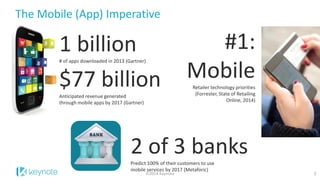
1 billion 
# of apps downloaded in 2013 (Gartner) 
$77 billion 
Anticipated revenue generated through mobile apps by 2017 (Gartner) 
#1: Mobile 
Retailer technology priorities (Forrester, State of Retailing Online, 2014) 
2 of 3 banks 
Predict 100% of their customers to use mobile services by 2017 (Metaforic) 
©2014 Keynote
The Mobile (App) Imperative 
3 
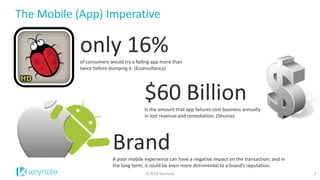
only 16% 
of consumers would try a failing app more than twice before dumping it. (Econsultancy) 
Brand 
A poor mobile experience can have a negative impact on the transaction; and in the long term, it could be even more detrimental to a brand’s reputation. 
$60 Billion 
Is the amount that app failures cost business annually in lost revenue and remediation. (Shunra) 
©2014 Keynote
4 
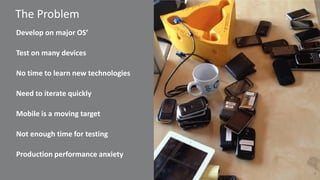
The Problem 
Develop on major OS’ 
Test on many devices 
No time to learn new technologies 
Need to iterate quickly 
Mobile is a moving target 
Not enough time for testing 
Production performance anxiety
Poll Question: What do you see are the biggest challenges in testing mobile apps?
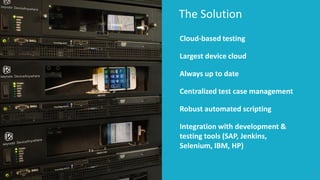
The Solution 
6 
Cloud-based testing 
Largest device cloud 
Always up to date 
Centralized test case management 
Robust automated scripting 
Integration with development & testing tools (SAP, Jenkins, Selenium, IBM, HP)
Poll Question: What percentage of your mobile native applications regression tests is currently automated using scripting?
Poll Question: How are you performing mobile APP automated testing today?
Automated Mobile Testing – Object-Level Scripting 
9 
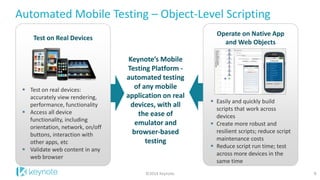
Test on real devices: accurately view rendering, performance, functionality 
Access all device functionality, including orientation, network, on/off buttons, interaction with other apps, etc 
Validate web content in any web browser 
Test on Real Devices 
Keynote’s Mobile Testing Platform - automated testing of any mobile application on real devices, with all the ease of emulator and browser-based testing 
Easily and quickly build scripts that work across devices 
Create more robust and resilient scripts; reduce script maintenance costs 
Reduce script run time; test across more devices in the same time 
Operate on Native App and Web Objects 
©2014 Keynote
Automated Mobile Testing – Object-Level Scripting 
10 
Native and Web element object-level scripting, supporting Native, Web, & Hybrid Applications 
UI-based scripting (OCR, Image) 
Capture playback, programming, or WYSIWYG scripting options 
Scheduling Convenience 
Run ad hoc or schedule your tests 
Scalability 
Create thousands of test cases 
Unlimited concurrent tests, users 
©2014 Keynote
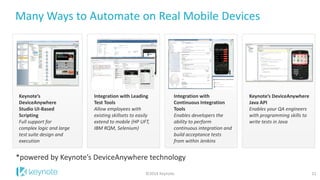
Many Ways to Automate on Real Mobile Devices 
11 
Keynote’s DeviceAnywhere Studio UI-Based Scripting 
Full support for complex logic and large test suite design and execution 
Integration with Leading Test Tools 
Allow employees with existing skillsets to easily extend to mobile (HP UFT, IBM RQM, Selenium) 
Keynote’s DeviceAnywhere Java API 
Enables your QA engineers with programming skills to write tests in Java 
Integration with Continuous Integration Tools 
Enables developers the ability to perform continuous integration and build acceptance tests from within Jenkins 
*powered by Keynote’s DeviceAnywhere technology 
©2014 Keynote
All about Jenkins
Meet Jenkins 
13 
©2014 Keynote 
#1 Continuous Integration and Continuous Deployment server 
MIT-licensed, 8 years old 
500+ releases 
Java web application 
“java –jar jenkins.war” 
jenkins-ci.org
Massive Adoption 
14 
©2014 Keynote 
78,000+ installations around the world; +60% in last year 
900+ plugins by 500 contributors 
Huge community 
87% are ‘very satisfied’ or ‘satisfied’
Poll Question: Do you use Jenkins to do Continuous Integration for Mobile?
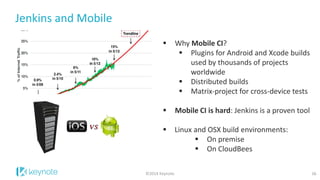
Jenkins and Mobile 
16 
©2014 Keynote 
Why Mobile CI? 
Plugins for Android and Xcode builds used by thousands of projects worldwide 
Distributed builds 
Matrix-project for cross-device tests 
Mobile CI is hard: Jenkins is a proven tool 
 Linux and OSX build environments: 
On premise 
On CloudBees
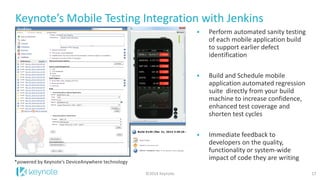
Keynote’s Mobile Testing Integration with Jenkins 
17 
©2014 Keynote 
Perform automated sanity testing of each mobile application build to support earlier defect identification 
Build and Schedule mobile application automated regression suite directly from your build machine to increase confidence, enhanced test coverage and shorten test cycles 
Immediate feedback to developers on the quality, functionality or system-wide impact of code they are writing 
*powered by Keynote’s DeviceAnywhere technology
Live Demo Keynote’s Mobile Testing Integration with Jenkins
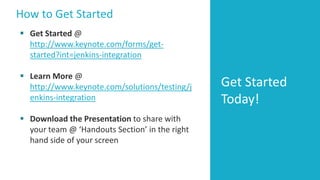
How to Get Started 
Get Started Today! 
Get Started @ http://www.keynote.com/forms/get- started?int=jenkins-integration 
Learn More @ http://www.keynote.com/solutions/testing/jenkins-integration 
Download the Presentation to share with your team @ ‘Handouts Section’ in the right hand side of your screen

Testing at the Speed of Mobile: Adopting Continuous Integration with Agile

  • 1.
    Welcome Today’s webcastwill help you understand how to: What the mobile boom means for today’s developers and testers How to test at the speed of mobile Who uses Jenkins and how Jenkins supports mobile testing How to test your mobile app or website on real mobile devices 1 ©2014 Keynote
  • 2.
    The Mobile (App)Imperative 2 1 billion # of apps downloaded in 2013 (Gartner) $77 billion Anticipated revenue generated through mobile apps by 2017 (Gartner) #1: Mobile Retailer technology priorities (Forrester, State of Retailing Online, 2014) 2 of 3 banks Predict 100% of their customers to use mobile services by 2017 (Metaforic) ©2014 Keynote
  • 3.
    The Mobile (App)Imperative 3 only 16% of consumers would try a failing app more than twice before dumping it. (Econsultancy) Brand A poor mobile experience can have a negative impact on the transaction; and in the long term, it could be even more detrimental to a brand’s reputation. $60 Billion Is the amount that app failures cost business annually in lost revenue and remediation. (Shunra) ©2014 Keynote
  • 4.
    4 The Problem Develop on major OS’ Test on many devices No time to learn new technologies Need to iterate quickly Mobile is a moving target Not enough time for testing Production performance anxiety
  • 5.
    Poll Question: Whatdo you see are the biggest challenges in testing mobile apps?
  • 6.
    The Solution 6 Cloud-based testing Largest device cloud Always up to date Centralized test case management Robust automated scripting Integration with development & testing tools (SAP, Jenkins, Selenium, IBM, HP)
  • 7.
    Poll Question: Whatpercentage of your mobile native applications regression tests is currently automated using scripting?
  • 8.
    Poll Question: Howare you performing mobile APP automated testing today?
  • 9.
    Automated Mobile Testing– Object-Level Scripting 9 Test on real devices: accurately view rendering, performance, functionality Access all device functionality, including orientation, network, on/off buttons, interaction with other apps, etc Validate web content in any web browser Test on Real Devices Keynote’s Mobile Testing Platform - automated testing of any mobile application on real devices, with all the ease of emulator and browser-based testing Easily and quickly build scripts that work across devices Create more robust and resilient scripts; reduce script maintenance costs Reduce script run time; test across more devices in the same time Operate on Native App and Web Objects ©2014 Keynote
  • 10.
    Automated Mobile Testing– Object-Level Scripting 10 Native and Web element object-level scripting, supporting Native, Web, & Hybrid Applications UI-based scripting (OCR, Image) Capture playback, programming, or WYSIWYG scripting options Scheduling Convenience Run ad hoc or schedule your tests Scalability Create thousands of test cases Unlimited concurrent tests, users ©2014 Keynote
  • 11.
    Many Ways toAutomate on Real Mobile Devices 11 Keynote’s DeviceAnywhere Studio UI-Based Scripting Full support for complex logic and large test suite design and execution Integration with Leading Test Tools Allow employees with existing skillsets to easily extend to mobile (HP UFT, IBM RQM, Selenium) Keynote’s DeviceAnywhere Java API Enables your QA engineers with programming skills to write tests in Java Integration with Continuous Integration Tools Enables developers the ability to perform continuous integration and build acceptance tests from within Jenkins *powered by Keynote’s DeviceAnywhere technology ©2014 Keynote
  • 12.
  • 13.
    Meet Jenkins 13 ©2014 Keynote #1 Continuous Integration and Continuous Deployment server MIT-licensed, 8 years old 500+ releases Java web application “java –jar jenkins.war” jenkins-ci.org
  • 14.
    Massive Adoption 14 ©2014 Keynote 78,000+ installations around the world; +60% in last year 900+ plugins by 500 contributors Huge community 87% are ‘very satisfied’ or ‘satisfied’
  • 15.
    Poll Question: Doyou use Jenkins to do Continuous Integration for Mobile?
  • 16.
    Jenkins and Mobile 16 ©2014 Keynote Why Mobile CI? Plugins for Android and Xcode builds used by thousands of projects worldwide Distributed builds Matrix-project for cross-device tests Mobile CI is hard: Jenkins is a proven tool  Linux and OSX build environments: On premise On CloudBees
  • 17.
    Keynote’s Mobile TestingIntegration with Jenkins 17 ©2014 Keynote Perform automated sanity testing of each mobile application build to support earlier defect identification Build and Schedule mobile application automated regression suite directly from your build machine to increase confidence, enhanced test coverage and shorten test cycles Immediate feedback to developers on the quality, functionality or system-wide impact of code they are writing *powered by Keynote’s DeviceAnywhere technology
  • 18.
    Live Demo Keynote’sMobile Testing Integration with Jenkins
  • 19.
    How to GetStarted Get Started Today! Get Started @ http://www.keynote.com/forms/get- started?int=jenkins-integration Learn More @ http://www.keynote.com/solutions/testing/jenkins-integration Download the Presentation to share with your team @ ‘Handouts Section’ in the right hand side of your screen