Josh Galde, SrProduct Marketing Manager of Quality, Keynote 
Chris Karnacki, SrSolutions Consultant, Keynote 
Jason Xia, Engineering Manager, iOS, Keynote 
Aug, 2014 
iOS 8 –Are you ready?
Welcome 
Today’s webcast will help you understand how to: 
Test the new Multitasking Interface in iOS 8 on multiple devices in the cloud 
Test new features including Sharing Options, Photo Editing, and Interactive Notification Center 
Test and interact with the new Health App 
See the value and importance of testing and monitoring on iOS 8 on Day 1 
2 ©2014 Keynote
Housekeeping 
This webcast is being recorded 
Your line is currently muted; touch *0 for operator assistance if you experience any web or audio issues 
Please send questions at any time during the webcast using the Q & A panel seen here: 
Join our conversation on Twitter! Use hashtag: #iOS8AppQuality to comment live 
©2014 Keynote 
#iOS8AppQuality 
3
Things to Remember 
#iOS8AppQuality 
1.Know What’s Coming 
2.Know Your Users’ Experiences 
3.Know that it Will Happen Again 
4.How is Keynote Getting Ready
#1: Know What’s Coming 
#iOS8AppQuality
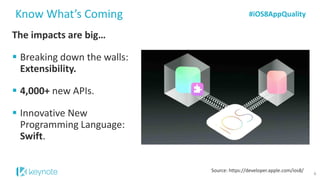
The impacts are big… 
Breaking down the walls: Extensibility. 
4,000+new APIs. 
Innovative New Programming Language: Swift. 
Know What’s Coming 
#iOS8AppQuality 
6 
Source: https://developer.apple.com/ios8/
And likely immediate… 
Know What’s Coming 
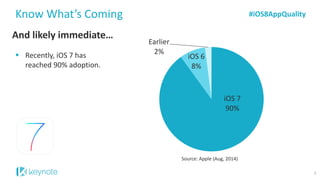
Recently, iOS 7 has reached 90% adoption. 
Source: Apple (Aug, 2014) 
#iOS8AppQuality 
7 
iOS 790% 
iOS 68% 
Earlier2%
And likely immediate… 
Know What’s Coming 
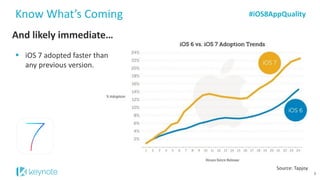
iOS 7 adopted faster than any previous version. 
Source: Tapjoy 
#iOS8AppQuality 
8
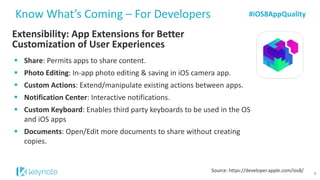
Extensibility: App Extensions for Better Customization of User Experiences 
Know What’s Coming –For Developers 
Share: Permits apps to share content. 
Photo Editing: In-app photo editing & saving in iOS camera app. 
Custom Actions: Extend/manipulate existing actions between apps. 
Notification Center: Interactive notifications. 
Custom Keyboard: Enables third party keyboards to be used in the OS and iOS apps 
Documents: Open/Edit more documents to share without creating copies. 
Source: https://developer.apple.com/ios8/ 
#iOS8AppQuality 
9
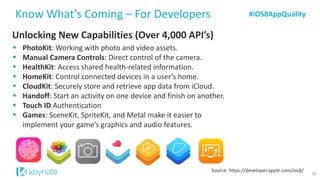
Unlocking New Capabilities (Over 4,000 API’s) 
PhotoKit: Working with photo and video assets. 
Manual Camera Controls: Direct control of the camera. 
HealthKit: Access shared health-related information. 
HomeKit: Control connected devices in a user’s home. 
CloudKit: Securely store and retrieve app data from iCloud. 
Handoff: Start an activity on one device and finish on another. 
Touch ID Authentication 
Games: SceneKit, SpriteKit, and Metal make it easier to implement your game’s graphics and audio features. 
Source: https://developer.apple.com/ios8/ 
Know What’s Coming –For Developers 
#iOS8AppQuality 
10
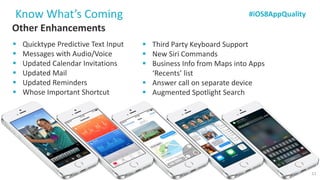
Other Enhancements 
QuicktypePredictive Text Input 
Messages with Audio/Voice 
Updated Calendar Invitations 
Updated Mail 
Updated Reminders 
Whose Important Shortcut 
Know What’s Coming 
Source: https://developer.apple.com/ios8/ 
Third Party Keyboard Support 
New Siri Commands 
Business Info from Maps into Apps ‘Recents’ list 
Answer call on separate device 
Augmented Spotlight Search 
#iOS8AppQuality 
11
#2: Know Your Users’ Experiences 
#iOS8AppQuality
Know Your Users’ Experiences 
#iOS8AppQuality 
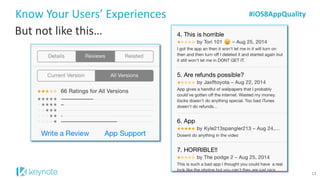
But not like this… 
13
Know Your Users’ Experiences 
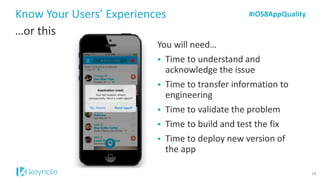
…or this 
#iOS8AppQuality 
You will need… 
Time to understand and acknowledge the issue 
Time to transfer information to engineering 
Time to validate the problem 
Time to build and test the fix 
Time to deploy new version of the app 
14
#3: Know That it Will Happen Again… 
#iOS8AppQuality
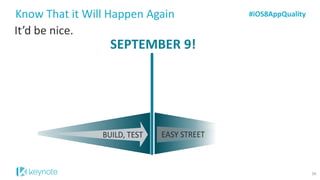
It’d be nice. 
Know That it Will Happen Again 
SEPTEMBER 9! 
#iOS8AppQuality 
16
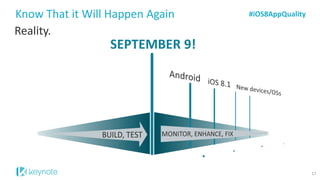
Reality. 
Know That it Will Happen Again 
SEPTEMBER 9! 
#iOS8AppQuality 
17
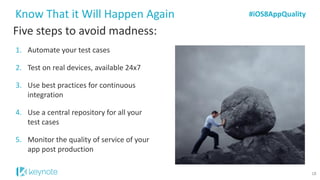
Five steps to avoid madness: 
1.Automate your test cases 
2.Test on real devices, available 24x7 
3.Use best practices for continuous integration 
4.Use a central repository for all your test cases 
5.Monitor the quality of service of your app post production 
Know That it Will Happen Again 
#iOS8AppQuality 
18
Poll Question: What’s your biggest concern with iOS 8? 
#iOS8AppQuality
#4: So How is Keynote Getting Ready? 
#iOS8AppQuality
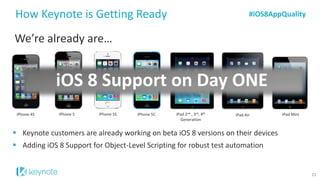
Keynote customers are already working on beta iOS 8 versions on their devices 
Adding iOS 8 Support for Object-Level Scripting for robust test automation 
How Keynote is Getting Ready 
#iOS8AppQuality 
We’re already are… 
21 
iPhone 4S 
iPhone 5 
iPhone 5S 
iPhone 5C 
iPad 2nd, 3rd, 4thGeneration 
iPad Air 
iPad Mini 
iOS 8 Support on Day ONE
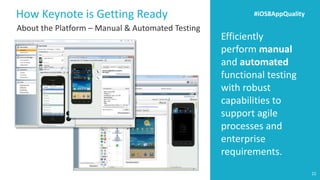
Efficiently perform manual and automatedfunctional testing with robust capabilities to support agile processes and enterprise requirements. 
How Keynote is Getting Ready 
#iOS8AppQuality 
22 
About the Platform –Manual & Automated Testing
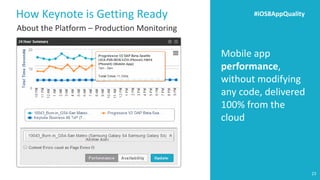
Mobile app performance, without modifying any code, delivered 100% from the cloud 
How Keynote is Getting Ready 
#iOS8AppQuality 
23 
About the Platform –Production Monitoring
Live Demo of iOS 8 Features & Functionality on Keynote’s Mobile Testing Platform 
#iOS8AppQuality
Featuring: 
•HealthKit: Health app for activity/health tracking. 
•Notification Center: Interactive notifications. 
•HandOff:Start an activity on one device and finish on another. 
•Photo Editing: Embed custom filters and editing tools. 
Live Demo -iOS 8 Features & Functionality 
Other Mentions: 
•QuicktypePredictive Text Input 
•Messages with Audio/Voice 
#iOS8AppQuality 
25
Q & A 
#iOS8AppQualityAbout Keynote -Global leader in cloud–based performance management for mobile and web-Operates the world’s largest on-demand cloud testing platform with over 500+ devices-Forbes ‘One of the Best 100 Companies in America’ -www.keynote.com
How Can I Get Started? 
27 
27 
Current Customers: Upgradeyour devices with iOS 8 beta version NOW 
Not Yet a Customer? Start a trial of Keynote Mobile Testing and be ready on Day 1 
Can’t do it yourself? Contact a Keynote testing partner today: 
DAY 1 Ready

Are You Ready for iOS 8?

  • 1.
    Josh Galde, SrProductMarketing Manager of Quality, Keynote Chris Karnacki, SrSolutions Consultant, Keynote Jason Xia, Engineering Manager, iOS, Keynote Aug, 2014 iOS 8 –Are you ready?
  • 2.
    Welcome Today’s webcastwill help you understand how to: Test the new Multitasking Interface in iOS 8 on multiple devices in the cloud Test new features including Sharing Options, Photo Editing, and Interactive Notification Center Test and interact with the new Health App See the value and importance of testing and monitoring on iOS 8 on Day 1 2 ©2014 Keynote
  • 3.
    Housekeeping This webcastis being recorded Your line is currently muted; touch *0 for operator assistance if you experience any web or audio issues Please send questions at any time during the webcast using the Q & A panel seen here: Join our conversation on Twitter! Use hashtag: #iOS8AppQuality to comment live ©2014 Keynote #iOS8AppQuality 3
  • 4.
    Things to Remember #iOS8AppQuality 1.Know What’s Coming 2.Know Your Users’ Experiences 3.Know that it Will Happen Again 4.How is Keynote Getting Ready
  • 5.
    #1: Know What’sComing #iOS8AppQuality
  • 6.
    The impacts arebig… Breaking down the walls: Extensibility. 4,000+new APIs. Innovative New Programming Language: Swift. Know What’s Coming #iOS8AppQuality 6 Source: https://developer.apple.com/ios8/
  • 7.
    And likely immediate… Know What’s Coming Recently, iOS 7 has reached 90% adoption. Source: Apple (Aug, 2014) #iOS8AppQuality 7 iOS 790% iOS 68% Earlier2%
  • 8.
    And likely immediate… Know What’s Coming iOS 7 adopted faster than any previous version. Source: Tapjoy #iOS8AppQuality 8
  • 9.
    Extensibility: App Extensionsfor Better Customization of User Experiences Know What’s Coming –For Developers Share: Permits apps to share content. Photo Editing: In-app photo editing & saving in iOS camera app. Custom Actions: Extend/manipulate existing actions between apps. Notification Center: Interactive notifications. Custom Keyboard: Enables third party keyboards to be used in the OS and iOS apps Documents: Open/Edit more documents to share without creating copies. Source: https://developer.apple.com/ios8/ #iOS8AppQuality 9
  • 10.
    Unlocking New Capabilities(Over 4,000 API’s) PhotoKit: Working with photo and video assets. Manual Camera Controls: Direct control of the camera. HealthKit: Access shared health-related information. HomeKit: Control connected devices in a user’s home. CloudKit: Securely store and retrieve app data from iCloud. Handoff: Start an activity on one device and finish on another. Touch ID Authentication Games: SceneKit, SpriteKit, and Metal make it easier to implement your game’s graphics and audio features. Source: https://developer.apple.com/ios8/ Know What’s Coming –For Developers #iOS8AppQuality 10
  • 11.
    Other Enhancements QuicktypePredictiveText Input Messages with Audio/Voice Updated Calendar Invitations Updated Mail Updated Reminders Whose Important Shortcut Know What’s Coming Source: https://developer.apple.com/ios8/ Third Party Keyboard Support New Siri Commands Business Info from Maps into Apps ‘Recents’ list Answer call on separate device Augmented Spotlight Search #iOS8AppQuality 11
  • 12.
    #2: Know YourUsers’ Experiences #iOS8AppQuality
  • 13.
    Know Your Users’Experiences #iOS8AppQuality But not like this… 13
  • 14.
    Know Your Users’Experiences …or this #iOS8AppQuality You will need… Time to understand and acknowledge the issue Time to transfer information to engineering Time to validate the problem Time to build and test the fix Time to deploy new version of the app 14
  • 15.
    #3: Know Thatit Will Happen Again… #iOS8AppQuality
  • 16.
    It’d be nice. Know That it Will Happen Again SEPTEMBER 9! #iOS8AppQuality 16
  • 17.
    Reality. Know Thatit Will Happen Again SEPTEMBER 9! #iOS8AppQuality 17
  • 18.
    Five steps toavoid madness: 1.Automate your test cases 2.Test on real devices, available 24x7 3.Use best practices for continuous integration 4.Use a central repository for all your test cases 5.Monitor the quality of service of your app post production Know That it Will Happen Again #iOS8AppQuality 18
  • 19.
    Poll Question: What’syour biggest concern with iOS 8? #iOS8AppQuality
  • 20.
    #4: So Howis Keynote Getting Ready? #iOS8AppQuality
  • 21.
    Keynote customers arealready working on beta iOS 8 versions on their devices Adding iOS 8 Support for Object-Level Scripting for robust test automation How Keynote is Getting Ready #iOS8AppQuality We’re already are… 21 iPhone 4S iPhone 5 iPhone 5S iPhone 5C iPad 2nd, 3rd, 4thGeneration iPad Air iPad Mini iOS 8 Support on Day ONE
  • 22.
    Efficiently perform manualand automatedfunctional testing with robust capabilities to support agile processes and enterprise requirements. How Keynote is Getting Ready #iOS8AppQuality 22 About the Platform –Manual & Automated Testing
  • 23.
    Mobile app performance,without modifying any code, delivered 100% from the cloud How Keynote is Getting Ready #iOS8AppQuality 23 About the Platform –Production Monitoring
  • 24.
    Live Demo ofiOS 8 Features & Functionality on Keynote’s Mobile Testing Platform #iOS8AppQuality
  • 25.
    Featuring: •HealthKit: Healthapp for activity/health tracking. •Notification Center: Interactive notifications. •HandOff:Start an activity on one device and finish on another. •Photo Editing: Embed custom filters and editing tools. Live Demo -iOS 8 Features & Functionality Other Mentions: •QuicktypePredictive Text Input •Messages with Audio/Voice #iOS8AppQuality 25
  • 26.
    Q & A #iOS8AppQualityAbout Keynote -Global leader in cloud–based performance management for mobile and web-Operates the world’s largest on-demand cloud testing platform with over 500+ devices-Forbes ‘One of the Best 100 Companies in America’ -www.keynote.com
  • 27.
    How Can IGet Started? 27 27 Current Customers: Upgradeyour devices with iOS 8 beta version NOW Not Yet a Customer? Start a trial of Keynote Mobile Testing and be ready on Day 1 Can’t do it yourself? Contact a Keynote testing partner today: DAY 1 Ready