How to create your Twitter
application
Please follow these steps to create your own Twitter
application:
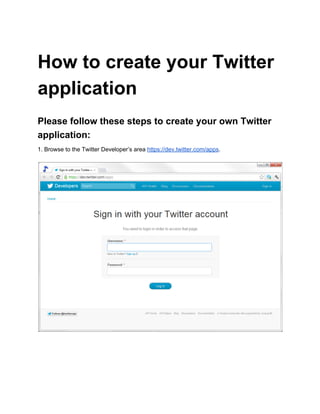
1. Browse to the Twitter Developer’s area https://dev.twitter.com/apps.
2. Log into your Twitter account if asked.
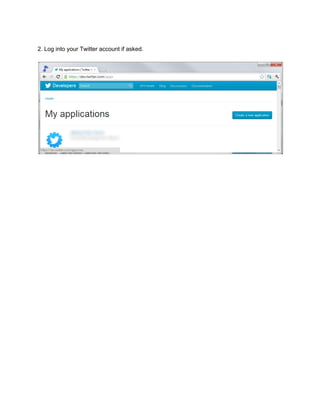
3. Click Create a new application.
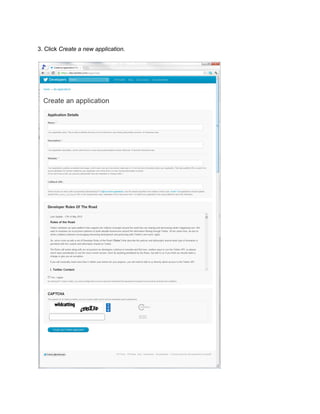
4. Fill in the name of your application and the website where you would like users to go to when
clicking on the application link associated with each tweet. Tick Yes, I agree, enter the
CAPTCHA and click Create your Twitter application.
Note: Callback URL must be set correctly (as specified in your email) otherwise your Twitter
application will not redirect properly.
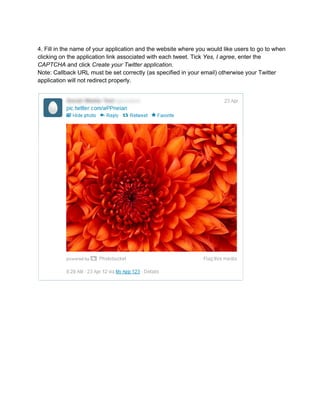
5. An example of a tweet with the application name set to My App 123 (and the website is
http://me.com).
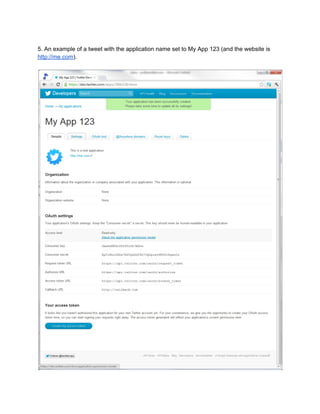
6. You should see a confirmation screen like the one above. If there are any errors, correct them
and resubmit the form. Make a note of the Consumer key and Consumer secret as you will need
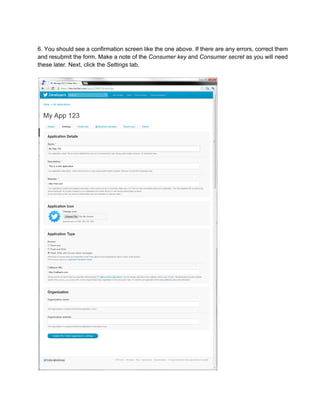
these later. Next, click the Settings tab.
7. Under Application Type select Read, Write and Access direct messages. If you want to
show a small application icon next to “via your application name” then you can also change the
icon. Finally, click Update this Twitter application’s settings.
8. Your Twitter application is now setup and ready to use by Sendible. Please fill in the form at
https://docs.google.com/a/sendible.com/spreadsheet/viewform?formkey=dEZLU0szR2hxYXFkU
FNkSG1WWW1Da2c6MQ, specifying the Consumer key and Consumer secret from the
application Detail tab. Note: It will take between 24 and 48 hours before this service is live.

test