TTeekkEENNUUMM
Installation & Configuration Guide
Version 1.2
TTeekkEENNUUMM Version 1.2 - Installation & Configuration Guide
© 2011-2016 KaplanSoft - http://www.kaplansoft.com/ 2
Document Revision 1.6
http://www.kaplansoft.com/
TekENUM is built by Yasin KAPLAN
Read “Readme.txt” for last minute changes and updates which can be found under
application directory.
Copyright © 2011-2016 KaplanSoft. All Rights Reserved. This document is supplied by KaplanSoft.
No part of this document may be reproduced, republished or retransmitted in any form or by any
means whatsoever, whether electronically or mechanically, including, but not limited to, by way of
photocopying, recording, information recording or through retrieval systems, without the written
permission of KaplanSoft. If you would like permission to use any of this material, please contact
KaplanSoft.
KaplanSoft reserves the right to revise this document and make changes at any time without prior
notice. Specifications contained in this document are subject to change without notice. Please send
your comments by email to info@kaplansoft.com.
Microsoft, Win32, Windows 2000, Windows, Windows NT and Windows Vista are either registered
trademarks or trademarks of Microsoft Corporation in the United States and/or other countries.
KaplanSoft is registered trademark of Kaplan Bilisim Teknolojileri Yazılım ve Ticaret Ltd.
Cisco is registered trademark of Cisco Systems, Inc. and/or its affiliates in the U.S. and certain
other countries.
TTeekkEENNUUMM Version 1.2 - Installation & Configuration Guide
© 2011-2016 KaplanSoft - http://www.kaplansoft.com/ 3
Table of Contents
Table of Contents.............................................................................................................................3
Introduction......................................................................................................................................4
System Requirements.......................................................................................................................4
Installation........................................................................................................................................4
Configuration ...................................................................................................................................4
Settings Tab..................................................................................................................................5
Routing.............................................................................................................................................5
Application Log ...............................................................................................................................6
Starting TekENUM..........................................................................................................................6
SQL Mode........................................................................................................................................7
Troubleshooting ...............................................................................................................................7
TekENUM Messages ...................................................................................................................9
TTeekkEENNUUMM Version 1.2 - Installation & Configuration Guide
© 2011-2016 KaplanSoft - http://www.kaplansoft.com/ 4
Introduction
TekENUM is an ENUM Server (Based on RFC 3761) runs under Windows (XP/Vista/7/8,
2003/2008/2012 Server).
TekENUM can act as a DNS Proxy for undefined ENUM endpoints as well as unsupported DNS
query types.
System Requirements
1. A Windows system with at least 1024 MB of RAM.
2. Microsoft.NET Framework v2.0.50727 (Min.)
3. 2 MB of disk space for installation.
4. Administrative privileges.
Installation
Unzip “TekENUM.zip” and click “Setup.exe” comes with the distribution. Follow the instruction of
setup wizard. Setup will install TekENUM Manager and TekENUM Service, add a shortcut for
TekENUM Manager to desktop and the start menu.
Configuration
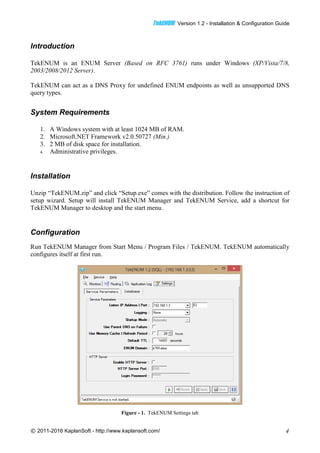
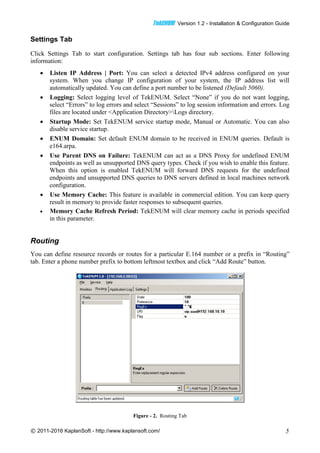
Run TekENUM Manager from Start Menu / Program Files / TekENUM. TekENUM automatically
configures itself at first run.
Figure - 1. TekENUM Settings tab
TTeekkEENNUUMM Version 1.2 - Installation & Configuration Guide
© 2011-2016 KaplanSoft - http://www.kaplansoft.com/ 5
Settings Tab
Click Settings Tab to start configuration. Settings tab has four sub sections. Enter following
information:
 Listen IP Address | Port: You can select a detected IPv4 address configured on your
system. When you change IP configuration of your system, the IP address list will
automatically updated. You can define a port number to be listened (Default 5060).
 Logging: Select logging level of TekENUM. Select “None” if you do not want logging,
select “Errors” to log errors and select “Sessions” to log session information and errors. Log
files are located under <Application Directory>Logs directory.
 Startup Mode: Set TekENUM service startup mode, Manual or Automatic. You can also
disable service startup.
 ENUM Domain: Set default ENUM domain to be received in ENUM queries. Default is
e164.arpa.
 Use Parent DNS on Failure: TekENUM can act as a DNS Proxy for undefined ENUM
endpoints as well as unsupported DNS query types. Check if you wish to enable this feature.
When this option is enabled TekENUM will forward DNS requests for the undefined
endpoints and unsupported DNS queries to DNS servers defined in local machines network
configuration.
 Use Memory Cache: This feature is available in commercial edition. You can keep query
result in memory to provide faster responses to subsequent queries.
 Memory Cache Refresh Period: TekENUM will clear memory cache in periods specified
in this parameter.
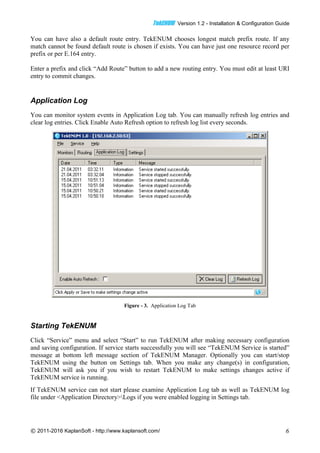
Routing
You can define resource records or routes for a particular E.164 number or a prefix in “Routing”
tab. Enter a phone number prefix to bottom leftmost textbox and click “Add Route” button.
Figure - 2. Routing Tab
TTeekkEENNUUMM Version 1.2 - Installation & Configuration Guide
© 2011-2016 KaplanSoft - http://www.kaplansoft.com/ 6
You can have also a default route entry. TekENUM chooses longest match prefix route. If any
match cannot be found default route is chosen if exists. You can have just one resource record per
prefix or per E.164 entry.
Enter a prefix and click “Add Route” button to add a new routing entry. You must edit at least URI
entry to commit changes.
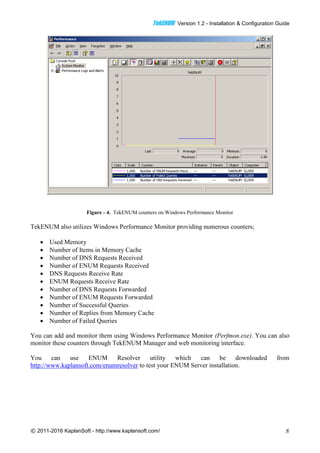
Application Log
You can monitor system events in Application Log tab. You can manually refresh log entries and
clear log entries. Click Enable Auto Refresh option to refresh log list every seconds.
Figure - 3. Application Log Tab
Starting TekENUM
Click “Service” menu and select “Start” to run TekENUM after making necessary configuration
and saving configuration. If service starts successfully you will see “TekENUM Service is started”
message at bottom left message section of TekENUM Manager. Optionally you can start/stop
TekENUM using the button on Settings tab. When you make any change(s) in configuration,
TekENUM will ask you if you wish to restart TekENUM to make settings changes active if
TekENUM service is running.
If TekENUM service can not start please examine Application Log tab as well as TekENUM log
file under <Application Directory>Logs if you were enabled logging in Settings tab.
TTeekkEENNUUMM Version 1.2 - Installation & Configuration Guide
© 2011-2016 KaplanSoft - http://www.kaplansoft.com/ 7
SQL Mode
TekENUM uses built-in Microsoft Access database by default. If you plan to use a Microsoft SQL
Server database, create database and “Routes” table using TekENUM.sql and Routes.sql scripts
respectively. These scripts can be found TekENUM application directory. You need to add flowing
section and parameters for SQL mode operation to TekENUM.ini which can be found under
TeENUM application directory;
[Database]
SQL_Server=<IP Address of the SQL Server>
Catalog=TekENUM
Table=<Table which holds routing entries>
UserName=<Database username, sa e.g.>
Password=<Database user password>
Timeout=30
You can optionally add SelectClause parameter to define an alternative SQL query under
[Database] section of TekENUM.ini. For example;
SelectClause=EXECUTE getroute ‘N%prefix%’
TekENUM will replace %prefix% variable with queried E.164 address. TekENUM invokes stored
procedure getroute in this sample. If you use a view or a stored procedure, returned record
structure must be in following format;
CREATE TABLE [dbo].[Routes](
[Prefix] [nvarchar](255) NOT NULL,
[Order] [int] NULL CONSTRAINT [DF_Routes_Order] DEFAULT ((100)),
[Preference] [int] NULL CONSTRAINT [DF_Routes_Preference] DEFAULT ((10)),
[RegEx] [nvarchar](255) NULL CONSTRAINT [DF_Routes_RegEx] DEFAULT ('^.*$'),
[URI] [nvarchar](255) NULL,
[Flag] [char](1) NULL,
[TXT] [nvarchar](255) NULL
) ON [PRIMARY]
Default select clause is;
SELECT TOP 1 * FROM [Routes] (NOLOCK) WHERE [Prefix]='%prefix%' order by
[Prefix] asc
You must have SQL Management Studio installed to execute SQL statements above.
Re-start TekENUM service after adding these parameters.
You can also use TekSIP Route Server GUI for SQL connection settings;
Troubleshooting
TekENUM provides many messages when problems occur. You can see error messages on
TekENUM Status bar or in the log file of TekENUM service. You can enable logging in Settings
Tab. There are three levels of logging; None, Errors, Sessions. If you select Errors TekENUM logs
just error messages. If you select Sessions both Session and Error messages will be logged. You
have to save or apply settings changes if you change logging level setting. Log files are located
under <Application Directory>Logs directory.
TTeekkEENNUUMM Version 1.2 - Installation & Configuration Guide
© 2011-2016 KaplanSoft - http://www.kaplansoft.com/ 8
Figure - 4. TekENUM counters on Windows Performance Monitor
TekENUM also utilizes Windows Performance Monitor providing numerous counters;
 Used Memory
 Number of Items in Memory Cache
 Number of DNS Requests Received
 Number of ENUM Requests Received
 DNS Requests Receive Rate
 ENUM Requests Receive Rate
 Number of DNS Requests Forwarded
 Number of ENUM Requests Forwarded
 Number of Successful Queries
 Number of Replies from Memory Cache
 Number of Failed Queries
You can add and monitor them using Windows Performance Monitor (Perfmon.exe). You can also
monitor these counters through TekENUM Manager and web monitoring interface.
You can use ENUM Resolver utility which can be downloaded from
http://www.kaplansoft.com/enumresolver to test your ENUM Server installation.
TTeekkEENNUUMM Version 1.2 - Installation & Configuration Guide
© 2011-2016 KaplanSoft - http://www.kaplansoft.com/ 9
TekENUM Messages
TekENUM started. Listening on x.x.x.x.
This message notifies that TekENUM service is started.
Listened IP Address is being changed from x.x.x.x to y.y.y.y.
TekENUM has detected a change in system’s IP configuration and automatically changed listened
IP address. You might change or remove the IP address configured for listening.
Settings could not be loaded. Initializing with default values.
TekENUM Service is being started with default values on : x.x.x.x
You get this message at first run of TekENUM. If TekENUM can not find or read TekENUM.ini
initialize itself with default settings.
Unable to initialize UDP/TCP thread [x.x.x.x:5060]
If another application is configured to use same UDP port (53) with TekENUM, TekENUM can not
initialize respective thread. Please also check if a DNS server is running on the same machine.
Default route points to this host
You can not specify listened IP address as default route.
Can not apply changes; enter minimum configuration
There is missing configuration data.

TekENUM Manual

  • 1.
  • 2.
    TTeekkEENNUUMM Version 1.2- Installation & Configuration Guide © 2011-2016 KaplanSoft - http://www.kaplansoft.com/ 2 Document Revision 1.6 http://www.kaplansoft.com/ TekENUM is built by Yasin KAPLAN Read “Readme.txt” for last minute changes and updates which can be found under application directory. Copyright © 2011-2016 KaplanSoft. All Rights Reserved. This document is supplied by KaplanSoft. No part of this document may be reproduced, republished or retransmitted in any form or by any means whatsoever, whether electronically or mechanically, including, but not limited to, by way of photocopying, recording, information recording or through retrieval systems, without the written permission of KaplanSoft. If you would like permission to use any of this material, please contact KaplanSoft. KaplanSoft reserves the right to revise this document and make changes at any time without prior notice. Specifications contained in this document are subject to change without notice. Please send your comments by email to info@kaplansoft.com. Microsoft, Win32, Windows 2000, Windows, Windows NT and Windows Vista are either registered trademarks or trademarks of Microsoft Corporation in the United States and/or other countries. KaplanSoft is registered trademark of Kaplan Bilisim Teknolojileri Yazılım ve Ticaret Ltd. Cisco is registered trademark of Cisco Systems, Inc. and/or its affiliates in the U.S. and certain other countries.
  • 3.
    TTeekkEENNUUMM Version 1.2- Installation & Configuration Guide © 2011-2016 KaplanSoft - http://www.kaplansoft.com/ 3 Table of Contents Table of Contents.............................................................................................................................3 Introduction......................................................................................................................................4 System Requirements.......................................................................................................................4 Installation........................................................................................................................................4 Configuration ...................................................................................................................................4 Settings Tab..................................................................................................................................5 Routing.............................................................................................................................................5 Application Log ...............................................................................................................................6 Starting TekENUM..........................................................................................................................6 SQL Mode........................................................................................................................................7 Troubleshooting ...............................................................................................................................7 TekENUM Messages ...................................................................................................................9
  • 4.
    TTeekkEENNUUMM Version 1.2- Installation & Configuration Guide © 2011-2016 KaplanSoft - http://www.kaplansoft.com/ 4 Introduction TekENUM is an ENUM Server (Based on RFC 3761) runs under Windows (XP/Vista/7/8, 2003/2008/2012 Server). TekENUM can act as a DNS Proxy for undefined ENUM endpoints as well as unsupported DNS query types. System Requirements 1. A Windows system with at least 1024 MB of RAM. 2. Microsoft.NET Framework v2.0.50727 (Min.) 3. 2 MB of disk space for installation. 4. Administrative privileges. Installation Unzip “TekENUM.zip” and click “Setup.exe” comes with the distribution. Follow the instruction of setup wizard. Setup will install TekENUM Manager and TekENUM Service, add a shortcut for TekENUM Manager to desktop and the start menu. Configuration Run TekENUM Manager from Start Menu / Program Files / TekENUM. TekENUM automatically configures itself at first run. Figure - 1. TekENUM Settings tab
  • 5.
    TTeekkEENNUUMM Version 1.2- Installation & Configuration Guide © 2011-2016 KaplanSoft - http://www.kaplansoft.com/ 5 Settings Tab Click Settings Tab to start configuration. Settings tab has four sub sections. Enter following information:  Listen IP Address | Port: You can select a detected IPv4 address configured on your system. When you change IP configuration of your system, the IP address list will automatically updated. You can define a port number to be listened (Default 5060).  Logging: Select logging level of TekENUM. Select “None” if you do not want logging, select “Errors” to log errors and select “Sessions” to log session information and errors. Log files are located under <Application Directory>Logs directory.  Startup Mode: Set TekENUM service startup mode, Manual or Automatic. You can also disable service startup.  ENUM Domain: Set default ENUM domain to be received in ENUM queries. Default is e164.arpa.  Use Parent DNS on Failure: TekENUM can act as a DNS Proxy for undefined ENUM endpoints as well as unsupported DNS query types. Check if you wish to enable this feature. When this option is enabled TekENUM will forward DNS requests for the undefined endpoints and unsupported DNS queries to DNS servers defined in local machines network configuration.  Use Memory Cache: This feature is available in commercial edition. You can keep query result in memory to provide faster responses to subsequent queries.  Memory Cache Refresh Period: TekENUM will clear memory cache in periods specified in this parameter. Routing You can define resource records or routes for a particular E.164 number or a prefix in “Routing” tab. Enter a phone number prefix to bottom leftmost textbox and click “Add Route” button. Figure - 2. Routing Tab
  • 6.
    TTeekkEENNUUMM Version 1.2- Installation & Configuration Guide © 2011-2016 KaplanSoft - http://www.kaplansoft.com/ 6 You can have also a default route entry. TekENUM chooses longest match prefix route. If any match cannot be found default route is chosen if exists. You can have just one resource record per prefix or per E.164 entry. Enter a prefix and click “Add Route” button to add a new routing entry. You must edit at least URI entry to commit changes. Application Log You can monitor system events in Application Log tab. You can manually refresh log entries and clear log entries. Click Enable Auto Refresh option to refresh log list every seconds. Figure - 3. Application Log Tab Starting TekENUM Click “Service” menu and select “Start” to run TekENUM after making necessary configuration and saving configuration. If service starts successfully you will see “TekENUM Service is started” message at bottom left message section of TekENUM Manager. Optionally you can start/stop TekENUM using the button on Settings tab. When you make any change(s) in configuration, TekENUM will ask you if you wish to restart TekENUM to make settings changes active if TekENUM service is running. If TekENUM service can not start please examine Application Log tab as well as TekENUM log file under <Application Directory>Logs if you were enabled logging in Settings tab.
  • 7.
    TTeekkEENNUUMM Version 1.2- Installation & Configuration Guide © 2011-2016 KaplanSoft - http://www.kaplansoft.com/ 7 SQL Mode TekENUM uses built-in Microsoft Access database by default. If you plan to use a Microsoft SQL Server database, create database and “Routes” table using TekENUM.sql and Routes.sql scripts respectively. These scripts can be found TekENUM application directory. You need to add flowing section and parameters for SQL mode operation to TekENUM.ini which can be found under TeENUM application directory; [Database] SQL_Server=<IP Address of the SQL Server> Catalog=TekENUM Table=<Table which holds routing entries> UserName=<Database username, sa e.g.> Password=<Database user password> Timeout=30 You can optionally add SelectClause parameter to define an alternative SQL query under [Database] section of TekENUM.ini. For example; SelectClause=EXECUTE getroute ‘N%prefix%’ TekENUM will replace %prefix% variable with queried E.164 address. TekENUM invokes stored procedure getroute in this sample. If you use a view or a stored procedure, returned record structure must be in following format; CREATE TABLE [dbo].[Routes]( [Prefix] [nvarchar](255) NOT NULL, [Order] [int] NULL CONSTRAINT [DF_Routes_Order] DEFAULT ((100)), [Preference] [int] NULL CONSTRAINT [DF_Routes_Preference] DEFAULT ((10)), [RegEx] [nvarchar](255) NULL CONSTRAINT [DF_Routes_RegEx] DEFAULT ('^.*$'), [URI] [nvarchar](255) NULL, [Flag] [char](1) NULL, [TXT] [nvarchar](255) NULL ) ON [PRIMARY] Default select clause is; SELECT TOP 1 * FROM [Routes] (NOLOCK) WHERE [Prefix]='%prefix%' order by [Prefix] asc You must have SQL Management Studio installed to execute SQL statements above. Re-start TekENUM service after adding these parameters. You can also use TekSIP Route Server GUI for SQL connection settings; Troubleshooting TekENUM provides many messages when problems occur. You can see error messages on TekENUM Status bar or in the log file of TekENUM service. You can enable logging in Settings Tab. There are three levels of logging; None, Errors, Sessions. If you select Errors TekENUM logs just error messages. If you select Sessions both Session and Error messages will be logged. You have to save or apply settings changes if you change logging level setting. Log files are located under <Application Directory>Logs directory.
  • 8.
    TTeekkEENNUUMM Version 1.2- Installation & Configuration Guide © 2011-2016 KaplanSoft - http://www.kaplansoft.com/ 8 Figure - 4. TekENUM counters on Windows Performance Monitor TekENUM also utilizes Windows Performance Monitor providing numerous counters;  Used Memory  Number of Items in Memory Cache  Number of DNS Requests Received  Number of ENUM Requests Received  DNS Requests Receive Rate  ENUM Requests Receive Rate  Number of DNS Requests Forwarded  Number of ENUM Requests Forwarded  Number of Successful Queries  Number of Replies from Memory Cache  Number of Failed Queries You can add and monitor them using Windows Performance Monitor (Perfmon.exe). You can also monitor these counters through TekENUM Manager and web monitoring interface. You can use ENUM Resolver utility which can be downloaded from http://www.kaplansoft.com/enumresolver to test your ENUM Server installation.
  • 9.
    TTeekkEENNUUMM Version 1.2- Installation & Configuration Guide © 2011-2016 KaplanSoft - http://www.kaplansoft.com/ 9 TekENUM Messages TekENUM started. Listening on x.x.x.x. This message notifies that TekENUM service is started. Listened IP Address is being changed from x.x.x.x to y.y.y.y. TekENUM has detected a change in system’s IP configuration and automatically changed listened IP address. You might change or remove the IP address configured for listening. Settings could not be loaded. Initializing with default values. TekENUM Service is being started with default values on : x.x.x.x You get this message at first run of TekENUM. If TekENUM can not find or read TekENUM.ini initialize itself with default settings. Unable to initialize UDP/TCP thread [x.x.x.x:5060] If another application is configured to use same UDP port (53) with TekENUM, TekENUM can not initialize respective thread. Please also check if a DNS server is running on the same machine. Default route points to this host You can not specify listened IP address as default route. Can not apply changes; enter minimum configuration There is missing configuration data.