1
Part A: Formulate a business system solution to a potential customer or supplier that is
currently facing problems with the current manual or inadequate system, and address
the following issues:
- the current situation
- the requirements of the system
- how a system might meet these requirements
- the strengths and opportunities of your proposal
- the weaknesses and threats to your proposal
Part B: Critically discuss the issues raised by your study with regard to a concept or
theory related to the design of information systems.
Technology and Innovation
User Experience in Business Database Systems
2
Part A:
1. Introduction
Pivot Marketing is an event management firm renowned for its strong industrial expertise.
It faces a critical problem of ineffective project management partly due to the loss of tacit
knowledge caused by high turnover rates and general operational inefficiency. This
project focuses specifically on loss of supplier information and how technology can tackle
this problem in retaining company knowledge.
Skype interviews were conducted with existing project managers (PM) and project staff
(PS), ex-employees of the firm and current suppliers to elicit requirements. Scenarios
were used for requirements specification and further interviews were conducted for
greater requirements analysis. Systems were designed based on database management
systems (DBMS).
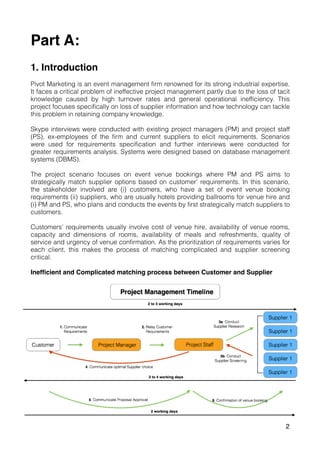
The project scenario focuses on event venue bookings where PM and PS aims to
strategically match supplier options based on customer’ requirements. In this scenario,
the stakeholder involved are (i) customers, who have a set of event venue booking
requirements (ii) suppliers, who are usually hotels providing ballrooms for venue hire and
(i) PM and PS, who plans and conducts the events by first strategically match suppliers to
customers.
Customers’ requirements usually involve cost of venue hire, availability of venue rooms,
capacity and dimensions of rooms, availability of meals and refreshments, quality of
service and urgency of venue confirmation. As the prioritization of requirements varies for
each client, this makes the process of matching complicated and supplier screening
critical.
Inefficient and Complicated matching process between Customer and Supplier
Pivot’s customer-supplier matching is inefficient with bottlenecks usually found in the
supplier research and supplier screening processes. These problems are attributed by
the following factors:

A. Manual and informal data collection
Pivot’s lack of available information on past and existing suppliers requires current
employees to conduct supplier sourcing from scratch for every event. This involves
employees manually calling multiple suppliers for quotations and retrieving data in bulk.
PS revealed a potential risk of small details being overlooked, misinterpretation of
information via phone and human errors in note taking. As such, quality of data is
compromised and further reconfirmation of details is required.
Current data collection method is also inflexible. In the event where client changes their
requirements, i.e. capacity of people turning up for the event, PS are required to re-
conduct their research to accommodate for a new capacity altogether. Additionally, if
suppliers made updates to their services, PS were not promptly informed unless PS are
currently engaged with suppliers on a particular deal.
B. Duplication and Isolation of work
As work is highly interrelated between different event teams serving different customer
needs, the process of data collection is repetitive, time consuming and laborious. Existing
group of suppliers are constantly communicating with PS from different project teams,
requesting for similar information in multiple phone and email exchanges. This results in
supplier confusion of requirements from different teams, creating possibility of incorrect
data supply to respective PS.
C. Delays and Human error in data consolidation
Data consolidation process is prolonged with inefficient suppliers. This is crucial when
customer’s event is of high urgency or when customers may seek last minute changes. In
the event of email follow up, suppliers may conduct selective replying due to extensive
data extraction, thus requiring another round of email exchanges.
Additionally, PS have to filter their email inboxes, download and open numerous quotation
PDF files, manually extract relevant information, and compile the different data in a
Microsoft PowerPoint table for easier supplier comparison.
While repeatedly dealing with multiple suppliers with extensive information, “occurrences
of data consolidation errors are higher, which may ultimately result in wrong decision
making”, revealed by a PS.
3
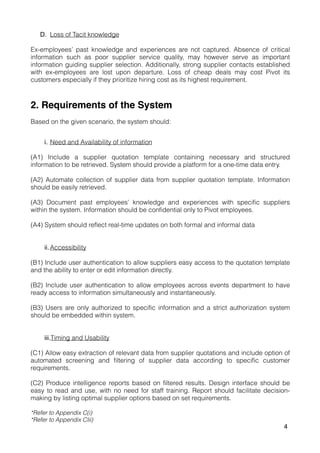
D. Loss of Tacit knowledge
Ex-employees’ past knowledge and experiences are not captured. Absence of critical
information such as poor supplier service quality, may however serve as important
information guiding supplier selection. Additionally, strong supplier contacts established
with ex-employees are lost upon departure. Loss of cheap deals may cost Pivot its
customers especially if they prioritize hiring cost as its highest requirement.
2. Requirements of the System
Based on the given scenario, the system should:
i. Need and Availability of information
(A1) Include a supplier quotation template containing necessary and structured
information to be retrieved. System should provide a platform for a one-time data entry.
(A2) Automate collection of supplier data from supplier quotation template. Information
should be easily retrieved.
(A3) Document past employees’ knowledge and experiences with specific suppliers
within the system. Information should be confidential only to Pivot employees.
(A4) System should reflect real-time updates on both formal and informal data
ii.Accessibility
(B1) Include user authentication to allow suppliers easy access to the quotation template
and the ability to enter or edit information directly.
(B2) Include user authentication to allow employees across events department to have
ready access to information simultaneously and instantaneously.
(B3) Users are only authorized to specific information and a strict authorization system
should be embedded within system.
iii.Timing and Usability
(C1) Allow easy extraction of relevant data from supplier quotations and include option of
automated screening and filtering of supplier data according to specific customer
requirements.
(C2) Produce intelligence reports based on filtered results. Design interface should be
easy to read and use, with no need for staff training. Report should facilitate decision-
making by listing optimal supplier options based on set requirements.
*Refer to Appendix C(i)
*Refer to Appendix CIii)
4
3. System Requirements
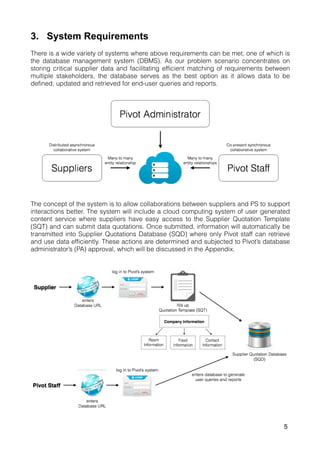
There is a wide variety of systems where above requirements can be met, one of which is
the database management system (DBMS). As our problem scenario concentrates on
storing critical supplier data and facilitating efficient matching of requirements between
multiple stakeholders, the database serves as the best option as it allows data to be
defined, updated and retrieved for end-user queries and reports.
The concept of the system is to allow collaborations between suppliers and PS to support
interactions better. The system will include a cloud computing system of user generated
content service where suppliers have easy access to the Supplier Quotation Template
(SQT) and can submit data quotations. Once submitted, information will automatically be
transmitted into Supplier Quotations Database (SQD) where only Pivot staff can retrieve
and use data efficiently. These actions are determined and subjected to Pivot’s database
administrator’s (PA) approval, which will be discussed in the Appendix.
5
i. Accessibility
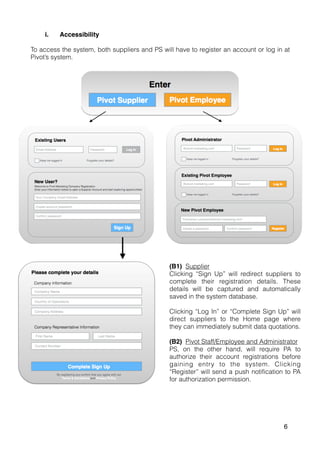
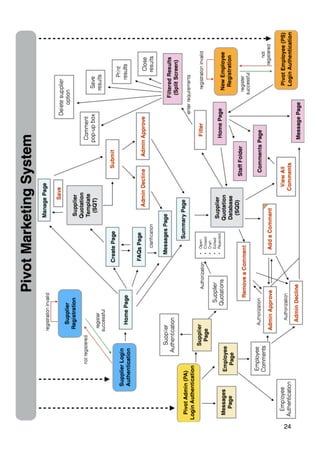
To access the system, both suppliers and PS will have to register an account or log in at
Pivot’s system.
(B1) Supplier
Clicking “Sign Up” will redirect suppliers to
complete their registration details. These
details will be captured and automatically
saved in the system database.
Clicking “Log In” or “Complete Sign Up” will
direct suppliers to the Home page where
they can immediately submit data quotations.
(B2) Pivot Staff/Employee and Administrator
PS, on the other hand, will require PA to
authorize their account registrations before
gaining entry to the system. Clicking
“Register” will send a push notification to PA
for authorization permission.
6
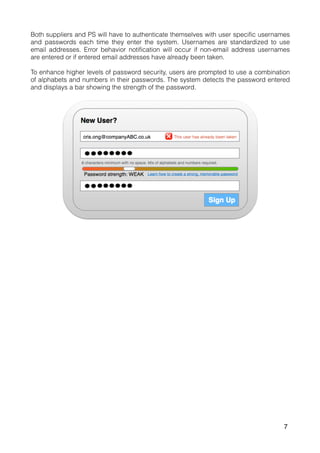
Both suppliers and PS will have to authenticate themselves with user specific usernames
and passwords each time they enter the system. Usernames are standardized to use
email addresses. Error behavior notification will occur if non-email address usernames
are entered or if entered email addresses have already been taken.
To enhance higher levels of password security, users are prompted to use a combination
of alphabets and numbers in their passwords. The system detects the password entered
and displays a bar showing the strength of the password.
7
ii. Need and Availability of Information (Supplier)
Under the supplier user interface, database should be organized into
• Three functional areas: Create, Manage and Message
• Two non-functional areas: Summary and FAQs
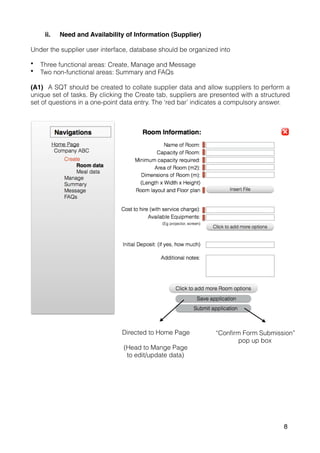
(A1) A SQT should be created to collate supplier data and allow suppliers to perform a
unique set of tasks. By clicking the Create tab, suppliers are presented with a structured
set of questions in a one-point data entry. The ‘red bar’ indicates a compulsory answer.
Directed to Home Page
(Head to Mange Page
to edit/update data)
“Confirm Form Submission”
pop up box
8
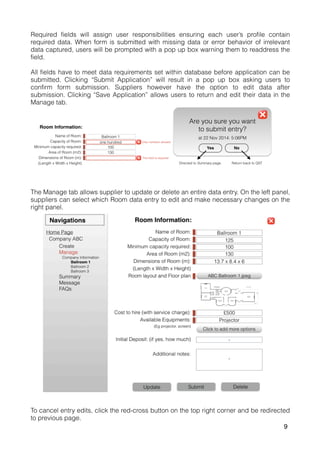
Required fields will assign user responsibilities ensuring each user’s profile contain
required data. When form is submitted with missing data or error behavior of irrelevant
data captured, users will be prompted with a pop up box warning them to readdress the
field.
All fields have to meet data requirements set within database before application can be
submitted. Clicking “Submit Application” will result in a pop up box asking users to
confirm form submission. Suppliers however have the option to edit data after
submission. Clicking “Save Application” allows users to return and edit their data in the
Manage tab.
The Manage tab allows supplier to update or delete an entire data entry. On the left panel,
suppliers can select which Room data entry to edit and make necessary changes on the
right panel.
To cancel entry edits, click the red-cross button on the top right corner and be redirected
to previous page.
9
When a new entry (Submit application) or an updated version of old entry (Save
application) is submitted, PA will receive a push notification requesting for approval of
entries. Suppliers will be notified of entry decision when they revisit the database page.
Pivot’s database will automatically reflect the changes in a timely manner (A2).
*Refer to Appendix E(i)
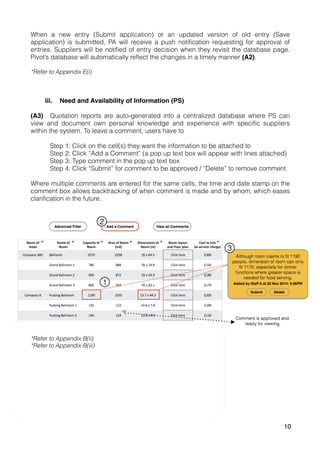
iii. Need and Availability of Information (PS)
(A3) Quotation reports are auto-generated into a centralized database where PS can
view and document own personal knowledge and experience with specific suppliers
within the system. To leave a comment, users have to
Step 1: Click on the cell(s) they want the information to be attached to
Step 2: Click “Add a Comment” (a pop up text box will appear with lines attached)
Step 3: Type comment in the pop up text box
Step 4: Click “Submit” for comment to be approved / ”Delete” to remove comment
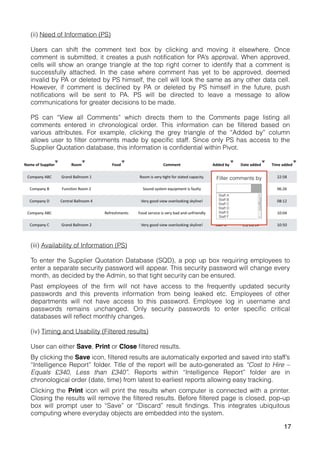
Where multiple comments are entered for the same cells, the time and date stamp on the
comment box allows backtracking of when comment is made and by whom, which eases
clarification in the future.
*Refer to Appendix B(ii)
*Refer to Appendix B(iii)
10
iv. Timing and Usability
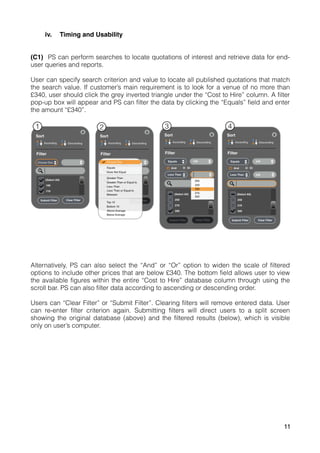
(C1) PS can perform searches to locate quotations of interest and retrieve data for end-
user queries and reports.
User can specify search criterion and value to locate all published quotations that match
the search value. If customer’s main requirement is to look for a venue of no more than
£340, user should click the grey inverted triangle under the “Cost to Hire” column. A filter
pop-up box will appear and PS can filter the data by clicking the “Equals” field and enter
the amount “£340”.
Alternatively, PS can also select the “And” or “Or” option to widen the scale of filtered
options to include other prices that are below £340. The bottom field allows user to view
the available figures within the entire “Cost to Hire” database column through using the
scroll bar. PS can also filter data according to ascending or descending order.
Users can “Clear Filter” or “Submit Filter”. Clearing filters will remove entered data. User
can re-enter filter criterion again. Submitting filters will direct users to a split screen
showing the original database (above) and the filtered results (below), which is visible
only on user’s computer.
11
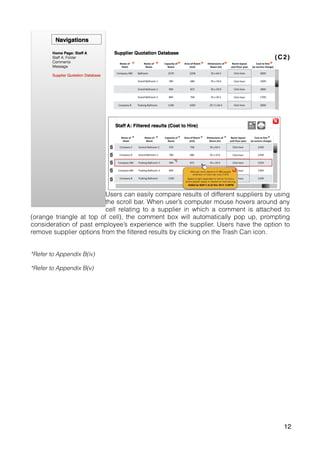
(C2)
Users can easily compare results of different suppliers by using
the scroll bar. When user’s computer mouse hovers around any
cell relating to a supplier in which a comment is attached to
(orange triangle at top of cell), the comment box will automatically pop up, prompting
consideration of past employee’s experience with the supplier. Users have the option to
remove supplier options from the filtered results by clicking on the Trash Can icon.
*Refer to Appendix B(iv)
*Refer to Appendix B(v)
12
4. SWOT
Strength
1. Ubiquitous network access
2. Integrated information-retrieving tools with automated consolidation of databases
3. Increases accuracy with one-point data entry
4. Combination of both formal and informal documentation.
5. Allows PS to
a. Access all information sources through a single search mechanism
b. Rule out certain supplier options, thus narrowing search
c. Re-filter criterion quickly when customer requirements change
d. Backtrack comment records for further clarification of significance of message
e. Leverage on best practice knowledge for reuse
6. Enhance communicability with stakeholders involved
7. Minimal maintenance of in-house hardware
8. High storage space at low costs
Weakness
1. No matches and lack of suppliers response to submit quotations require PS to
conduct manual sourcing
2. Unreliability of supplier quotations requires employees to reconfirm information
3. Lack of supplier quotation updates may result in inefficient or false matching
4. Unreliability of comments as individual’s knowledge and experiences are subjective
5. Unable to automate supplier comparisons based on criteria that is captured based on
knowledge and experience (i.e. quality of service).
6. Unbalanced comparisons as some quotations may not contain comments.
7. No advanced search options allowing multiple criterion filtering
8. Inefficient PA decision making may result in loss of potential matches
9. Potential loss of or inability to access critical data if system is down
10. System unable to capture all client requirements due to information complexity
11. Inability for clarification of knowledge/experience from ex-employee especially when
Pivot faces high turnover problem
Opportunities
1. Strong supplier working relations may be established resulting in cheaper quotations
2. Collaborate with Customers to integrate customers into database system and
automate matching of suppliers to customers directly
3. Expand supplier sourcing of other event requirements (i.e. printing suppliers for event
collaterals)
4. Develop Shared Calendar where suppliers post room availability, which reduces need
for PS to monitor their availability
13
Threat
1. Competitors adoption of same system diminishes Pivot’s competitive advantage of
efficient matching
2. Risk of data integrity if unauthorized individual access system hacks or uses another’s
username and password
3. Barriers to effective use from unstable operating system
4. Organizational barriers to change
a. Resistance to making a wide-scale change
b. Resistance of new informal knowledge compared to centralized controlled
documentations
c. Lack of resources to support system
d. Employees unwilling to share personal tacit knowledge
5. Steps required to Implement Proposal
To implement the Pivot system, more thorough analysis of information system
requirements need to be conducted, as critical problem of matching may not yet be
solved. Pivot should conduct its first trial of system and re-modify it accordingly. This is
however tricky as it involves multiple stakeholders and requires flexibility to adjust to
different events. Additionally, Pivot needs to brainstorm for possible incentives for
suppliers to partake in this system for it to be useful. Pivot could capture wider supplier
audience by pushing out invitations to different suppliers via email requests and create
supplier incentive by promoting possible large business deals with Pivot. This would
remove the possibility of unreliable data and prompt immediate quotation updates to a
certain extent.
Pivot should also provide incentives for employees to share knowledge. For example,
publicly awarding employees who provide most useful comments quarterly, to incentivize
others to contribute as well. If system is successfully launched, Pivot can then consider
multiple criterion filtering and improve sourcing results of other event related information.
Cross-functional collaboration and matching with suppliers and customers can be a long-
term possibility.
(2493 words)
14
APPENDIX
15
Appendix A: Scenario
Normal case scenario:
1. Employee receives client requirements of venue booking
2. Employee phones and email suppliers (hotel vendors) to ask for quotations
3. Employee makes comparisons of quotations
4. Employee propose the best option to client
5. Client accepts proposal and project is further developed
Refined case scenario:
1. Employee receives client requirements of venue booking from Project Manager (PM)
2. Employee searches online for possible venues relating to client’s requirements and
short lists 5-8 different hotel vendors
Information includes:
a. Availability on specific date
b. Capacity to fit x number of people
c. Cost of hiring
d. Equipment required (i.e. projector, whiteboard)
e. Refreshment options and costs per pax
i. Within the ballroom (Standing cocktail reception? Buffet style? Able to
insert tables and fit the required pax?)
ii. Restaurants within hotel (where is it located, floor plan?)
f. Selling point of the venue (compared to competitors)
g. Allowance of pre-event set up the day before? At what time? Additional costs?
h. Proximity of client’s firm to hotel venue
3. Employee phones hotel vendors reconfirming vendors’ room availabilities and abilities
to meet requirements, and requests for email follow up for formal PDF quotations and
other required room layouts
4. Employee consolidates vendor quotation options into a Microsoft PowerPoint and
filters options according to client’s main priority requirement using a comparison table
5. Employee propose and justifies the best option to client, detailing how decision was
made
6. Client accepts proposal and project is further developed
Alternative case scenarios:
1. Employee is unable to find the best match. No suppliers provide that requirement.
a. Select next best alternative
b. Continue researching for specific vendors that can solve that requirement
2. Employee found best fit, but supplier does not have room available
a. Calendar showing availability of rooms on specific dates (but what if supplier
unwilling to reveal their date availabilities?)
3. Client rejects proposed idea
Exception case scenario:
1. Employee conducts human error while making comparison table and selects wrong
optimal vendor
a. Automated table of comparison on specific requirements
2. Suppliers approached is the same vendor used in past events
3. Supplier options fall within proposed range requirements, but Client specifically
mentioned to not consider this particular vendor
a. Option of removing vendor option from comparison table
b. Tip comment box: Identifying knowledge and experience from past clients/
employees
What-if case scenario:
1. Constraints of phone/email quotation:
a. What if supplier quotations are done through online or database? (refrains
human error if information is misinterpreted by reader/through phone)
b. What if quotations are done via mobile apps?
Appendix B: Design Requirements
(i) Need and Availability of Information (Supplier)
FAQs tab assist suppliers by providing a sample of a quotation entry and a set of
frequently asked questions to guide the drafting of quotation documents. Alternatively,
suppliers can create a Message to communicate with Pivot Admin to ask for assistance.
Approved supplier quotations
− ‘Click here’ direct users to Summary page to view final quotation.
− Summary page also detail all other quotations submitted.
Declined supplier quotations
− ‘Send a Message to Admin’ direct users to Message page to clarify decision.
− Messages are interlinked with user’s email in which whenever a decision is made
by PA, users (suppliers) will receive an email notification prompting them to check
back with the system
− History of messages is captured and efficient two-way communication between
supplier and administrator is available.
− Users however have the option of disconnecting Messages from the Emails.
Ultimately, suppliers can ignore decision by closing notification (red cross box).
16
(ii) Need of Information (PS)
Users can shift the comment text box by clicking and moving it elsewhere. Once
comment is submitted, it creates a push notification for PA’s approval. When approved,
cells will show an orange triangle at the top right corner to identify that a comment is
successfully attached. In the case where comment has yet to be approved, deemed
invalid by PA or deleted by PS himself, the cell will look the same as any other data cell.
However, if comment is declined by PA or deleted by PS himself in the future, push
notifications will be sent to PA. PS will be directed to leave a message to allow
communications for greater decisions to be made.
PS can “View all Comments” which directs them to the Comments page listing all
comments entered in chronological order. This information can be filtered based on
various attributes. For example, clicking the grey triangle of the “Added by” column
allows user to filter comments made by specific staff. Since only PS has access to the
Supplier Quotation database, this information is confidential within Pivot.
(iii) Availability of Information (PS)
To enter the Supplier Quotation Database (SQD), a pop up box requiring employees to
enter a separate security password will appear. This security password will change every
month, as decided by the Admin, so that tight security can be ensured.
Past employees of the firm will not have access to the frequently updated security
passwords and this prevents information from being leaked etc. Employees of other
departments will not have access to this password. Employee log in username and
passwords remains unchanged. Only security passwords to enter specific critical
databases will reflect monthly changes.
(iv) Timing and Usability (Filtered results)
User can either Save, Print or Close filtered results.
By clicking the Save icon, filtered results are automatically exported and saved into staff’s
“Intelligence Report” folder. Title of the report will be auto-generated as “Cost to Hire –
Equals £340, Less than £340”. Reports within “Intelligence Report” folder are in
chronological order (date, time) from latest to earliest reports allowing easy tracking.
Clicking the Print icon will print the results when computer is connected with a printer.
Closing the results will remove the filtered results. Before filtered page is closed, pop-up
box will prompt user to “Save” or “Discard” result findings. This integrates ubiquitous
computing where everyday objects are embedded into the system.
17
(v) Accessibility of Information (determined by Admin)
(B3) Admin will log into the system using the same platform. Once he enters the
database, he will be notified of new messages in his Message folder, which will require
some form of action. This involves administrative matters such as authorizing users into
system or specific data and approving or declining submitted supplier quotations or
employee-generated comments within the database.
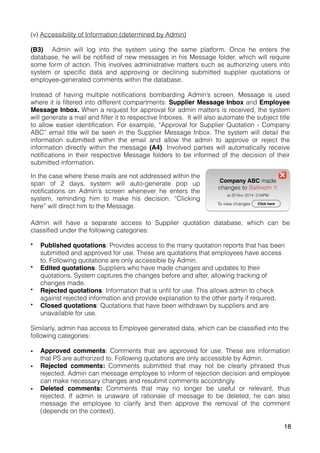
Instead of having multiple notifications bombarding Admin’s screen, Message is used
where it is filtered into different compartments: Supplier Message Inbox and Employee
Message Inbox. When a request for approval for admin matters is received, the system
will generate a mail and filter it to respective Inboxes. It will also automate the subject title
to allow easier identification. For example, “Approval for Supplier Quotation - Company
ABC” email title will be seen in the Supplier Message Inbox. The system will detail the
information submitted within the email and allow the admin to approve or reject the
information directly within the message (A4). Involved parties will automatically receive
notifications in their respective Message folders to be informed of the decision of their
submitted information.
Admin will have a separate access to Supplier quotation database, which can be
classified under the following categories:
• Published quotations: Provides access to the many quotation reports that has been
submitted and approved for use. These are quotations that employees have access
to. Following quotations are only accessible by Admin.
• Edited quotations: Suppliers who have made changes and updates to their
quotations. System captures the changes before and after, allowing tracking of
changes made.
• Rejected quotations: Information that is unfit for use. This allows admin to check
against rejected information and provide explanation to the other party if required.
• Closed quotations: Quotations that have been withdrawn by suppliers and are
unavailable for use.
Similarly, admin has access to Employee generated data, which can be classified into the
following categories:
• Approved comments: Comments that are approved for use. These are information
that PS are authorized to. Following quotations are only accessible by Admin.
• Rejected comments: Comments submitted that may not be clearly phrased thus
rejected. Admin can message employee to inform of rejection decision and employee
can make necessary changes and resubmit comments accordingly.
• Deleted comments: Comments that may no longer be useful or relevant, thus
rejected. If admin is unaware of rationale of message to be deleted, he can also
message the employee to clarify and then approve the removal of the comment
(depends on the context).
In the case where these mails are not addressed within the
span of 2 days, system will auto-generate pop up
notifications on Admin’s screen whenever he enters the
system, reminding him to make his decision. “Clicking
here” will direct him to the Message.
18
C. System Requirements
(i) Supplier Quotation Template (SQT)
Requirement A1: Structured one-point data entry which can be edited whenever to
reflect new changes
Description:
The system shall prompt suppliers to identify and insert data required to be collected in a
one-point entry.
Rationale:
• Avoid duplication and isolation of work
• To prevent employees from overlooking specific information to be collected
• Prevent misinterpretation of information and human error of info collection
• Reduce time wastage for re-contacting of supplier to retrieve data.
• Remove problem of selective email replies.
• Remove supplier confusion on which team is requesting for what information
Fit criterion:
• Structured template collating all formal data in one time
• Message option and FAQs tab allows clarification of fields when in doubt
• Required fields and error behavior notice will refrain suppliers from entering empty or
unapproved data
Constraints:
• Suppliers may enter unreliable information just to ‘increase’ their profile
• Although it facilitates better strategic match between client and supplier, we do not
know of the availability of the supplier, which requires us to take additional step
reconfirming details before selection.
• System doesn't allow for bargaining or negotiation rates. If supplier has promotional
discounts or wants to provide a special discount rate for you personally, system does
not allow that.
19
(ii) Supplier Quotation Database (SQD)
Requirement A2: Simple and easy-to-use/read system which consolidates all information
automatically
Description:
The system shall be linked to the Supplier one-point data entry and compile structured
data automatically and accurately
Rationale:
• To reduce time wastage and human error.
• Easy to access, information readily available (even on weekends, higher ability to
meet urgent needs)
• Removes the need of opening different computer software for supplier screening/
comparison
Fit criterion:
• Auto-generated supplier quotation database
Requirement B1 & B2: User authentication for access system
Description: Allow easy access but tight security for entry to private and critical data.
Rationale:
• To ensure that critical information will be secured and encourage suppliers to
collaborate with Pivot
• Easy access so it will not deter suppliers from collaboration
Fit criterion:
• Sign up and Log in details will be captured
• Strong passwords required, with combination of numbers and alphabets
• Employee sign up subjected to approval of Admin (limit them to access of critical
information)
Requirement B3: Employee information authorization
Description: Employees only allowed to access selective information database
Rationale:
• Private and confidential data are only available to limited users
• Prevents risk of critical information being leaked
Fit criterion:
• System designer will restrict employees to limited information within database,
requiring a password to enter specified databases.
• Passwords are changed monthly to ensure strict security of database.
20
Requirement A4: Provide real time updates on information within system
Description: System should provide timely updates on new quotations or comments, or
remove irrelevant ones immediately when found.
Rationale: To support efficient and effective supplier to client matching
Fit criterion:
• Push notifications will be generated immediately when submission of entries are
made. Admin will receive immediate notice on email and/or database when he logs in
and can make necessary actions directly
• “Delete” supplier option available to remove supplier if they are no longer active.
• Employee user-generated knowledge through comments allowing other individuals to
benefit from their knowledge/experience.
• Date and time stamps available to track when quotations/comments were made.
• Identifies whom the comment-provider is allowing retriever to Message comment-
provider and clarify with his/her experience.
Constraints:
• Lack of supplier updates on their side may result in inefficient or false matching
• If comment was made one year ago, information may be irrelevant. Depends on the
context.
Requirement C1 & C2: Filtering and production of comparison table of filtered results
Description: System should allow employees to filter supplier quotations based on client
requirements. Results should be produced into a table allowing easy comparisons.
Rationale:
• Flexibility of retrieving relevant information
• To create clearer picture of optimal supplier fit with client’s requirements.
• Allows for back tracking of why that option is chosen, and what are the next best
alternatives.
• To reduce human error when compiling of information
Fit criterion:
• Filtering option available within system
• Auto-generated comparison table highlighting crucial information through pop-up
comment box which may be useful for faster decision making
Constraints:
• Does not have advance filtering option for filtering of more than one requirement. For
example, client wants a venue capacity of 400, but for cost to be within their £300
budget. Employee can only select the most important criteria, then manually compare
against the second criteria.
• If nothing fits within the range of requirements, employees have no options to choose
from and will require them to conduct information search through the traditional way.
• Inability to filter suppliers based on informal data
• Unbalanced comparisons. Good suppliers with no comments on their data records
may not be chosen because employee may select other suppliers that have received
a positive comment label although they may potentially be less matching for their
client requirements.
21
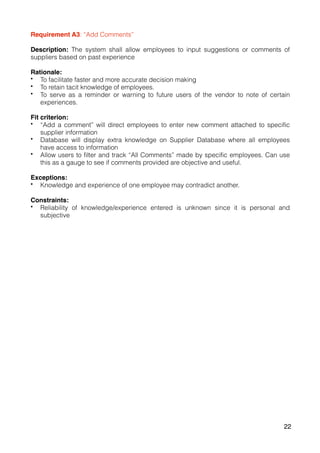
Requirement A3: “Add Comments”
Description: The system shall allow employees to input suggestions or comments of
suppliers based on past experience
Rationale:
• To facilitate faster and more accurate decision making
• To retain tacit knowledge of employees.
• To serve as a reminder or warning to future users of the vendor to note of certain
experiences.
Fit criterion:
• “Add a comment” will direct employees to enter new comment attached to specific
supplier information
• Database will display extra knowledge on Supplier Database where all employees
have access to information
• Allow users to filter and track “All Comments” made by specific employees. Can use
this as a gauge to see if comments provided are objective and useful.
Exceptions:
• Knowledge and experience of one employee may contradict another.
Constraints:
• Reliability of knowledge/experience entered is unknown since it is personal and
subjective
22
24
Part B:
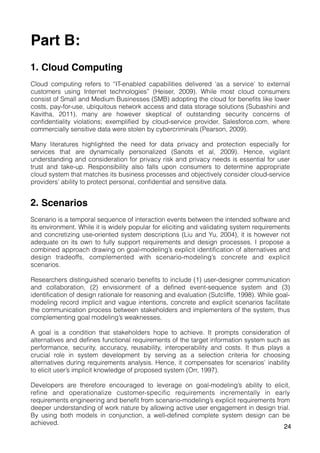
1. Cloud Computing
Cloud computing refers to “IT-enabled capabilities delivered ‘as a service’ to external
customers using Internet technologies” (Heiser, 2009). While most cloud consumers
consist of Small and Medium Businesses (SMB) adopting the cloud for benefits like lower
costs, pay-for-use, ubiquitous network access and data storage solutions (Subashini and
Kavitha, 2011), many are however skeptical of outstanding security concerns of
confidentiality violations; exemplified by cloud-service provider, Salesforce.com, where
commercially sensitive data were stolen by cybercriminals (Pearson, 2009).
Many literatures highlighted the need for data privacy and protection especially for
services that are dynamically personalized (Sanots et al, 2009). Hence, vigilant
understanding and consideration for privacy risk and privacy needs is essential for user
trust and take-up. Responsibility also falls upon consumers to determine appropriate
cloud system that matches its business processes and objectively consider cloud-service
providers’ ability to protect personal, confidential and sensitive data.
2. Scenarios
Scenario is a temporal sequence of interaction events between the intended software and
its environment. While it is widely popular for eliciting and validating system requirements
and concretizing use-oriented system descriptions (Liu and Yu, 2004), it is however not
adequate on its own to fully support requirements and design processes. I propose a
combined approach drawing on goal-modeling’s explicit identification of alternatives and
design tradeoffs, complemented with scenario-modeling’s concrete and explicit
scenarios.
Researchers distinguished scenario benefits to include (1) user-designer communication
and collaboration, (2) envisionment of a defined event-sequence system and (3)
identification of design rationale for reasoning and evaluation (Sutcliffe, 1998). While goal-
modeling record implicit and vague intentions, concrete and explicit scenarios facilitate
the communication process between stakeholders and implementers of the system, thus
complementing goal modeling’s weaknesses.
A goal is a condition that stakeholders hope to achieve. It prompts consideration of
alternatives and defines functional requirements of the target information system such as
performance, security, accuracy, reusability, interoperability and costs. It thus plays a
crucial role in system development by serving as a selection criteria for choosing
alternatives during requirements analysis. Hence, it compensates for scenarios’ inability
to elicit user’s implicit knowledge of proposed system (Orr, 1997).
Developers are therefore encouraged to leverage on goal-modeling’s ability to elicit,
refine and operationalize customer-specific requirements incrementally in early
requirements engineering and benefit from scenario-modeling’s explicit requirements from
deeper understanding of work nature by allowing active user engagement in design trial.
By using both models in conjunction, a well-defined complete system design can be
achieved.
24
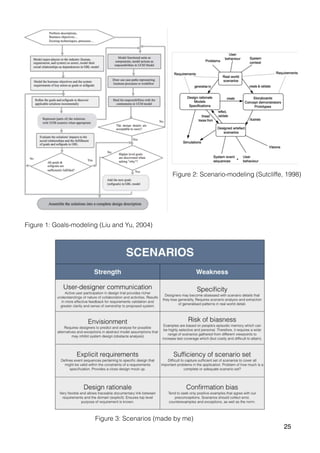
Figure 1: Goals-modeling (Liu and Yu, 2004)
Figure 2: Scenario-modeling (Sutcliffe, 1998)
Figure 3: Scenarios (made by me)
25
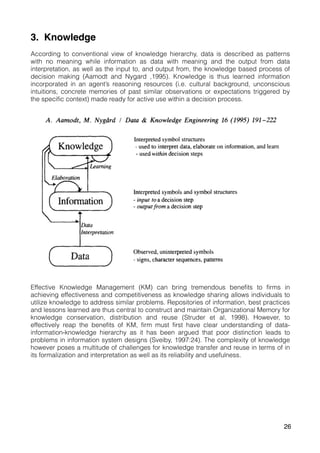
3. Knowledge
According to conventional view of knowledge hierarchy, data is described as patterns
with no meaning while information as data with meaning and the output from data
interpretation, as well as the input to, and output from, the knowledge based process of
decision making (Aamodt and Nygard ,1995). Knowledge is thus learned information
incorporated in an agent’s reasoning resources (i.e. cultural background, unconscious
intuitions, concrete memories of past similar observations or expectations triggered by
the specific context) made ready for active use within a decision process.
Effective Knowledge Management (KM) can bring tremendous benefits to firms in
achieving effectiveness and competitiveness as knowledge sharing allows individuals to
utilize knowledge to address similar problems. Repositories of information, best practices
and lessons learned are thus central to construct and maintain Organizational Memory for
knowledge conservation, distribution and reuse (Struder et al, 1998). However, to
effectively reap the benefits of KM, firm must first have clear understanding of data-
information-knowledge hierarchy as it has been argued that poor distinction leads to
problems in information system designs (Sveiby, 1997:24). The complexity of knowledge
however poses a multitude of challenges for knowledge transfer and reuse in terms of in
its formalization and interpretation as well as its reliability and usefulness.
26
Formalization and Reliability
As databases capture formal data in which informal tacit knowledge cannot be classified
under, knowledge must be given structure and embedded in artifacts for it to become a
physical information object that can be shared (Aamodt and Nygard, 1995). However, as
computers do not process knowledge, it requires an articulator to implicitly rely on
culturally shared and accumulated stocks of knowledge. Nonaka and Takeuchi (1995; 59)
further justify this by defining knowledge as personal and context specific containing
cognitive (paradigms, perspectives, beliefs, viewpoints) and technical elements
(concrete know-how, crafts and skills) in which making tacit knowledge “sticky” and
difficult to formalize and communicate.
Even if formalized, modeling process is dependent on knowledge engineer’s subjective
interpretations and experiences; hence grounds of these truth claims are hence
subjected to validity and contexts (Studer et al, 1998). Additionally, rapidly changing
(non-stationary) knowledge can make previously discovered information invalid, creating
uncertainties in the truth claims (Fayyad et al, 1996).
Interpretation and Usefulness
Interpretation is also difficult as substantial knowledge is lost when tacit knowledge is
reconstructed. A retriever needs to understand the way the original articulator fixed the
meaning structured within the computer system for explicit knowledge to be extracted for
its intended meaning. “Common perspective” must also first be established, as individual
communities own unique and context-specific vocabularies may impede communication
(Sambamurthy and Subramani, 2005). Knowledge reuse is thus challenging as it requires
practice and needs to be learned before the tool can be used appropriately (Tuomi,
1999).
Although this is beneficial for formalized routine operations, it however does not work well
for knowledge intensive, flexible and creative organizational processes as explicit
knowledge is generalized and standardized, losing its flexibility for interpretation.
Additionally, while knowledge is based on the “justification” or truthfulness of concepts,
the input and output terms are the only concepts communicated which oversimplifies
information providing insufficient explanation facility, thus limiting proper knowledge-reuse
(Nonaka, 1994).
Above all, while knowledge transfer and reuse may hold multiple challenges, these can
be reduced if data-information-knowledge hierarchy is clearly defined and if careful
attention is paid to the system design. This involves all intermediaries, facilitators and
knowledge engineers to collaborate efficiently for KM to be effective.
(997 words)
27
Bibliography
Aamodt, A. and Nygård, M. (1995). Different roles and mutual dependencies of data, information,
and knowledge — An AI perspective on their integration.  Data & Knowledge Engineering,
16(3), pp.191-222.
Carroll, J., Rosson, M., Chin, G. and Koenemann, J. (1998). Requirements development in
scenario-based design. IIEEE Trans. Software Eng., 24(12), pp.1156-1170.
Connell, N., Klein, J. and Powell, P. (2003). It's tacit knowledge but not as we know it: redirecting
the search for knowledge. Journal of the Operational Research Society, 54(2), pp.140-152.
Fayyad, U., Shapiro, G. and Smyth, P. (1996). 1st ed. [ebook] pp.82-88. Available at: http://
www.aaai.org/Papers/KDD/1996/KDD96-014 [Accessed 4 Dec. 2014].
Fernandez, I. and Sabherwal, R. (2014). Organizational Knowledge Management: A Contingency
Perspective. Journal of Management Information Systems, 18(1), pp.23-55.
Heiser, J. (2009). What you need to know about cloud computing security and compliance,
Gartner, Research, ID Number: G00168345, 2009.
Liu, L. and Yu, E. (2004). Designing information systems in social context: a goal and scenario
modelling approach. Information Systems, 29(2), pp.187-203.
Markus, M. (2014). Toward a Theory of Knowledge Reuse: Types of Knowledge Reuse Situations
and Factors in Reuse Success.  Journal of Management Information Systems, 18(1), pp.
57-93.
Nonaka, I. (1994). A Dynamic Theory of Organizational Knowledge Creation.  Organization
Science, 5(1), pp.14-37.
Nonaka, I. and H. Takeuchi (1995). The Knowledge- Creating Company: How Japanese
Companies Create the Dynamics of Innovation. Oxford University Press, Oxford.
Nonaka, I. and von Krogh, G. (2009). Perspective—Tacit Knowledge and Knowledge Conversion:
Controversy and Advancement in Organizational Knowledge Creation Theory. Organization
Science, 20(3), pp.635-652.
Pearson. 2009. Taking account of privacy when designing cloud computing services.
InProceedings of the 2009 ICSE Workshop on Software Engineering Challenges of
Cloud Computing(CLOUD '09). IEEE Computer Society, Washington, DC, USA, 44-52.
doi=10.1109/cloud.2009.5071532 http://dx.doi.org/10.1109/CLOUD.2009.5071532
Sambamurthy, V. and Subramani, M. (2014). Special Issue on Information Technologies and
Knowledge Management. MIS Quarterly, 29(1), pp.1-7.
Santos, N., Gummadi, K. P. & Rodrigues, R. (2009). Towards Trusted Cloud
Computing, accessed 30 September 2011, URL:
http://www.mpi-sws.org/~gummadi/papers/trusted_cloud.pdf
Studer, R., Benjamins, V. and Fensel, D. (1998). Knowledge engineering: Principles and
methods. Data & Knowledge Engineering, 25(1-2), pp.161-197.
Subashini, S. and Kavitha, V. (2011). A survey on security issues in service delivery models of
cloud computing. Journal of Network and Computer Applications, 34(1), pp.1-11.
Sutcliffe, A. (1998). Scenario-based requirements analysis. Requirements Engineering, 3(1), pp.
48-65.
28
Sveiby, K.E. (1997). The New Organizational Wealth: Managing and Measuring Knowledge-Based
Assets. Berrett-Koehler Publishers, Inc. San Francisco.
Tuomi, I. (1999). Data Is More Than Knowledge: Implications of the Reversed Knowledge
Hierarchy for Knowledge Management and Organizational Memory. Journal of Management
Information Systems, 16(3), pp.103-117.
29

Technology & Innovation - User Experience in Business Database Systems

  • 1.
    1 Part A: Formulatea business system solution to a potential customer or supplier that is currently facing problems with the current manual or inadequate system, and address the following issues: - the current situation - the requirements of the system - how a system might meet these requirements - the strengths and opportunities of your proposal - the weaknesses and threats to your proposal Part B: Critically discuss the issues raised by your study with regard to a concept or theory related to the design of information systems. Technology and Innovation User Experience in Business Database Systems
  • 2.
    2 Part A: 1. Introduction PivotMarketing is an event management firm renowned for its strong industrial expertise. It faces a critical problem of ineffective project management partly due to the loss of tacit knowledge caused by high turnover rates and general operational inefficiency. This project focuses specifically on loss of supplier information and how technology can tackle this problem in retaining company knowledge. Skype interviews were conducted with existing project managers (PM) and project staff (PS), ex-employees of the firm and current suppliers to elicit requirements. Scenarios were used for requirements specification and further interviews were conducted for greater requirements analysis. Systems were designed based on database management systems (DBMS). The project scenario focuses on event venue bookings where PM and PS aims to strategically match supplier options based on customer’ requirements. In this scenario, the stakeholder involved are (i) customers, who have a set of event venue booking requirements (ii) suppliers, who are usually hotels providing ballrooms for venue hire and (i) PM and PS, who plans and conducts the events by first strategically match suppliers to customers. Customers’ requirements usually involve cost of venue hire, availability of venue rooms, capacity and dimensions of rooms, availability of meals and refreshments, quality of service and urgency of venue confirmation. As the prioritization of requirements varies for each client, this makes the process of matching complicated and supplier screening critical. Inefficient and Complicated matching process between Customer and Supplier
  • 3.
    Pivot’s customer-supplier matchingis inefficient with bottlenecks usually found in the supplier research and supplier screening processes. These problems are attributed by the following factors:
 A. Manual and informal data collection Pivot’s lack of available information on past and existing suppliers requires current employees to conduct supplier sourcing from scratch for every event. This involves employees manually calling multiple suppliers for quotations and retrieving data in bulk. PS revealed a potential risk of small details being overlooked, misinterpretation of information via phone and human errors in note taking. As such, quality of data is compromised and further reconfirmation of details is required. Current data collection method is also inflexible. In the event where client changes their requirements, i.e. capacity of people turning up for the event, PS are required to re- conduct their research to accommodate for a new capacity altogether. Additionally, if suppliers made updates to their services, PS were not promptly informed unless PS are currently engaged with suppliers on a particular deal. B. Duplication and Isolation of work As work is highly interrelated between different event teams serving different customer needs, the process of data collection is repetitive, time consuming and laborious. Existing group of suppliers are constantly communicating with PS from different project teams, requesting for similar information in multiple phone and email exchanges. This results in supplier confusion of requirements from different teams, creating possibility of incorrect data supply to respective PS. C. Delays and Human error in data consolidation Data consolidation process is prolonged with inefficient suppliers. This is crucial when customer’s event is of high urgency or when customers may seek last minute changes. In the event of email follow up, suppliers may conduct selective replying due to extensive data extraction, thus requiring another round of email exchanges. Additionally, PS have to filter their email inboxes, download and open numerous quotation PDF files, manually extract relevant information, and compile the different data in a Microsoft PowerPoint table for easier supplier comparison. While repeatedly dealing with multiple suppliers with extensive information, “occurrences of data consolidation errors are higher, which may ultimately result in wrong decision making”, revealed by a PS. 3
  • 4.
    D. Loss ofTacit knowledge Ex-employees’ past knowledge and experiences are not captured. Absence of critical information such as poor supplier service quality, may however serve as important information guiding supplier selection. Additionally, strong supplier contacts established with ex-employees are lost upon departure. Loss of cheap deals may cost Pivot its customers especially if they prioritize hiring cost as its highest requirement. 2. Requirements of the System Based on the given scenario, the system should: i. Need and Availability of information (A1) Include a supplier quotation template containing necessary and structured information to be retrieved. System should provide a platform for a one-time data entry. (A2) Automate collection of supplier data from supplier quotation template. Information should be easily retrieved. (A3) Document past employees’ knowledge and experiences with specific suppliers within the system. Information should be confidential only to Pivot employees. (A4) System should reflect real-time updates on both formal and informal data ii.Accessibility (B1) Include user authentication to allow suppliers easy access to the quotation template and the ability to enter or edit information directly. (B2) Include user authentication to allow employees across events department to have ready access to information simultaneously and instantaneously. (B3) Users are only authorized to specific information and a strict authorization system should be embedded within system. iii.Timing and Usability (C1) Allow easy extraction of relevant data from supplier quotations and include option of automated screening and filtering of supplier data according to specific customer requirements. (C2) Produce intelligence reports based on filtered results. Design interface should be easy to read and use, with no need for staff training. Report should facilitate decision- making by listing optimal supplier options based on set requirements. *Refer to Appendix C(i) *Refer to Appendix CIii) 4
  • 5.
    3. System Requirements Thereis a wide variety of systems where above requirements can be met, one of which is the database management system (DBMS). As our problem scenario concentrates on storing critical supplier data and facilitating efficient matching of requirements between multiple stakeholders, the database serves as the best option as it allows data to be defined, updated and retrieved for end-user queries and reports. The concept of the system is to allow collaborations between suppliers and PS to support interactions better. The system will include a cloud computing system of user generated content service where suppliers have easy access to the Supplier Quotation Template (SQT) and can submit data quotations. Once submitted, information will automatically be transmitted into Supplier Quotations Database (SQD) where only Pivot staff can retrieve and use data efficiently. These actions are determined and subjected to Pivot’s database administrator’s (PA) approval, which will be discussed in the Appendix. 5
  • 6.
    i. Accessibility To accessthe system, both suppliers and PS will have to register an account or log in at Pivot’s system. (B1) Supplier Clicking “Sign Up” will redirect suppliers to complete their registration details. These details will be captured and automatically saved in the system database. Clicking “Log In” or “Complete Sign Up” will direct suppliers to the Home page where they can immediately submit data quotations. (B2) Pivot Staff/Employee and Administrator PS, on the other hand, will require PA to authorize their account registrations before gaining entry to the system. Clicking “Register” will send a push notification to PA for authorization permission. 6
  • 7.
    Both suppliers andPS will have to authenticate themselves with user specific usernames and passwords each time they enter the system. Usernames are standardized to use email addresses. Error behavior notification will occur if non-email address usernames are entered or if entered email addresses have already been taken. To enhance higher levels of password security, users are prompted to use a combination of alphabets and numbers in their passwords. The system detects the password entered and displays a bar showing the strength of the password. 7
  • 8.
    ii. Need andAvailability of Information (Supplier) Under the supplier user interface, database should be organized into • Three functional areas: Create, Manage and Message • Two non-functional areas: Summary and FAQs (A1) A SQT should be created to collate supplier data and allow suppliers to perform a unique set of tasks. By clicking the Create tab, suppliers are presented with a structured set of questions in a one-point data entry. The ‘red bar’ indicates a compulsory answer. Directed to Home Page (Head to Mange Page to edit/update data) “Confirm Form Submission” pop up box 8
  • 9.
    Required fields willassign user responsibilities ensuring each user’s profile contain required data. When form is submitted with missing data or error behavior of irrelevant data captured, users will be prompted with a pop up box warning them to readdress the field. All fields have to meet data requirements set within database before application can be submitted. Clicking “Submit Application” will result in a pop up box asking users to confirm form submission. Suppliers however have the option to edit data after submission. Clicking “Save Application” allows users to return and edit their data in the Manage tab. The Manage tab allows supplier to update or delete an entire data entry. On the left panel, suppliers can select which Room data entry to edit and make necessary changes on the right panel. To cancel entry edits, click the red-cross button on the top right corner and be redirected to previous page. 9
  • 10.
    When a newentry (Submit application) or an updated version of old entry (Save application) is submitted, PA will receive a push notification requesting for approval of entries. Suppliers will be notified of entry decision when they revisit the database page. Pivot’s database will automatically reflect the changes in a timely manner (A2). *Refer to Appendix E(i) iii. Need and Availability of Information (PS) (A3) Quotation reports are auto-generated into a centralized database where PS can view and document own personal knowledge and experience with specific suppliers within the system. To leave a comment, users have to Step 1: Click on the cell(s) they want the information to be attached to Step 2: Click “Add a Comment” (a pop up text box will appear with lines attached) Step 3: Type comment in the pop up text box Step 4: Click “Submit” for comment to be approved / ”Delete” to remove comment Where multiple comments are entered for the same cells, the time and date stamp on the comment box allows backtracking of when comment is made and by whom, which eases clarification in the future. *Refer to Appendix B(ii) *Refer to Appendix B(iii) 10
  • 11.
    iv. Timing andUsability (C1) PS can perform searches to locate quotations of interest and retrieve data for end- user queries and reports. User can specify search criterion and value to locate all published quotations that match the search value. If customer’s main requirement is to look for a venue of no more than £340, user should click the grey inverted triangle under the “Cost to Hire” column. A filter pop-up box will appear and PS can filter the data by clicking the “Equals” field and enter the amount “£340”. Alternatively, PS can also select the “And” or “Or” option to widen the scale of filtered options to include other prices that are below £340. The bottom field allows user to view the available figures within the entire “Cost to Hire” database column through using the scroll bar. PS can also filter data according to ascending or descending order. Users can “Clear Filter” or “Submit Filter”. Clearing filters will remove entered data. User can re-enter filter criterion again. Submitting filters will direct users to a split screen showing the original database (above) and the filtered results (below), which is visible only on user’s computer. 11
  • 12.
    (C2) Users can easilycompare results of different suppliers by using the scroll bar. When user’s computer mouse hovers around any cell relating to a supplier in which a comment is attached to (orange triangle at top of cell), the comment box will automatically pop up, prompting consideration of past employee’s experience with the supplier. Users have the option to remove supplier options from the filtered results by clicking on the Trash Can icon. *Refer to Appendix B(iv) *Refer to Appendix B(v) 12
  • 13.
    4. SWOT Strength 1. Ubiquitousnetwork access 2. Integrated information-retrieving tools with automated consolidation of databases 3. Increases accuracy with one-point data entry 4. Combination of both formal and informal documentation. 5. Allows PS to a. Access all information sources through a single search mechanism b. Rule out certain supplier options, thus narrowing search c. Re-filter criterion quickly when customer requirements change d. Backtrack comment records for further clarification of significance of message e. Leverage on best practice knowledge for reuse 6. Enhance communicability with stakeholders involved 7. Minimal maintenance of in-house hardware 8. High storage space at low costs Weakness 1. No matches and lack of suppliers response to submit quotations require PS to conduct manual sourcing 2. Unreliability of supplier quotations requires employees to reconfirm information 3. Lack of supplier quotation updates may result in inefficient or false matching 4. Unreliability of comments as individual’s knowledge and experiences are subjective 5. Unable to automate supplier comparisons based on criteria that is captured based on knowledge and experience (i.e. quality of service). 6. Unbalanced comparisons as some quotations may not contain comments. 7. No advanced search options allowing multiple criterion filtering 8. Inefficient PA decision making may result in loss of potential matches 9. Potential loss of or inability to access critical data if system is down 10. System unable to capture all client requirements due to information complexity 11. Inability for clarification of knowledge/experience from ex-employee especially when Pivot faces high turnover problem Opportunities 1. Strong supplier working relations may be established resulting in cheaper quotations 2. Collaborate with Customers to integrate customers into database system and automate matching of suppliers to customers directly 3. Expand supplier sourcing of other event requirements (i.e. printing suppliers for event collaterals) 4. Develop Shared Calendar where suppliers post room availability, which reduces need for PS to monitor their availability 13
  • 14.
    Threat 1. Competitors adoptionof same system diminishes Pivot’s competitive advantage of efficient matching 2. Risk of data integrity if unauthorized individual access system hacks or uses another’s username and password 3. Barriers to effective use from unstable operating system 4. Organizational barriers to change a. Resistance to making a wide-scale change b. Resistance of new informal knowledge compared to centralized controlled documentations c. Lack of resources to support system d. Employees unwilling to share personal tacit knowledge 5. Steps required to Implement Proposal To implement the Pivot system, more thorough analysis of information system requirements need to be conducted, as critical problem of matching may not yet be solved. Pivot should conduct its first trial of system and re-modify it accordingly. This is however tricky as it involves multiple stakeholders and requires flexibility to adjust to different events. Additionally, Pivot needs to brainstorm for possible incentives for suppliers to partake in this system for it to be useful. Pivot could capture wider supplier audience by pushing out invitations to different suppliers via email requests and create supplier incentive by promoting possible large business deals with Pivot. This would remove the possibility of unreliable data and prompt immediate quotation updates to a certain extent. Pivot should also provide incentives for employees to share knowledge. For example, publicly awarding employees who provide most useful comments quarterly, to incentivize others to contribute as well. If system is successfully launched, Pivot can then consider multiple criterion filtering and improve sourcing results of other event related information. Cross-functional collaboration and matching with suppliers and customers can be a long- term possibility. (2493 words) 14
  • 15.
    APPENDIX 15 Appendix A: Scenario Normalcase scenario: 1. Employee receives client requirements of venue booking 2. Employee phones and email suppliers (hotel vendors) to ask for quotations 3. Employee makes comparisons of quotations 4. Employee propose the best option to client 5. Client accepts proposal and project is further developed Refined case scenario: 1. Employee receives client requirements of venue booking from Project Manager (PM) 2. Employee searches online for possible venues relating to client’s requirements and short lists 5-8 different hotel vendors Information includes: a. Availability on specific date b. Capacity to fit x number of people c. Cost of hiring d. Equipment required (i.e. projector, whiteboard) e. Refreshment options and costs per pax i. Within the ballroom (Standing cocktail reception? Buffet style? Able to insert tables and fit the required pax?) ii. Restaurants within hotel (where is it located, floor plan?) f. Selling point of the venue (compared to competitors) g. Allowance of pre-event set up the day before? At what time? Additional costs? h. Proximity of client’s firm to hotel venue 3. Employee phones hotel vendors reconfirming vendors’ room availabilities and abilities to meet requirements, and requests for email follow up for formal PDF quotations and other required room layouts 4. Employee consolidates vendor quotation options into a Microsoft PowerPoint and filters options according to client’s main priority requirement using a comparison table 5. Employee propose and justifies the best option to client, detailing how decision was made 6. Client accepts proposal and project is further developed Alternative case scenarios: 1. Employee is unable to find the best match. No suppliers provide that requirement. a. Select next best alternative b. Continue researching for specific vendors that can solve that requirement 2. Employee found best fit, but supplier does not have room available a. Calendar showing availability of rooms on specific dates (but what if supplier unwilling to reveal their date availabilities?) 3. Client rejects proposed idea
  • 16.
    Exception case scenario: 1.Employee conducts human error while making comparison table and selects wrong optimal vendor a. Automated table of comparison on specific requirements 2. Suppliers approached is the same vendor used in past events 3. Supplier options fall within proposed range requirements, but Client specifically mentioned to not consider this particular vendor a. Option of removing vendor option from comparison table b. Tip comment box: Identifying knowledge and experience from past clients/ employees What-if case scenario: 1. Constraints of phone/email quotation: a. What if supplier quotations are done through online or database? (refrains human error if information is misinterpreted by reader/through phone) b. What if quotations are done via mobile apps? Appendix B: Design Requirements (i) Need and Availability of Information (Supplier) FAQs tab assist suppliers by providing a sample of a quotation entry and a set of frequently asked questions to guide the drafting of quotation documents. Alternatively, suppliers can create a Message to communicate with Pivot Admin to ask for assistance. Approved supplier quotations − ‘Click here’ direct users to Summary page to view final quotation. − Summary page also detail all other quotations submitted. Declined supplier quotations − ‘Send a Message to Admin’ direct users to Message page to clarify decision. − Messages are interlinked with user’s email in which whenever a decision is made by PA, users (suppliers) will receive an email notification prompting them to check back with the system − History of messages is captured and efficient two-way communication between supplier and administrator is available. − Users however have the option of disconnecting Messages from the Emails. Ultimately, suppliers can ignore decision by closing notification (red cross box). 16
  • 17.
    (ii) Need ofInformation (PS) Users can shift the comment text box by clicking and moving it elsewhere. Once comment is submitted, it creates a push notification for PA’s approval. When approved, cells will show an orange triangle at the top right corner to identify that a comment is successfully attached. In the case where comment has yet to be approved, deemed invalid by PA or deleted by PS himself, the cell will look the same as any other data cell. However, if comment is declined by PA or deleted by PS himself in the future, push notifications will be sent to PA. PS will be directed to leave a message to allow communications for greater decisions to be made. PS can “View all Comments” which directs them to the Comments page listing all comments entered in chronological order. This information can be filtered based on various attributes. For example, clicking the grey triangle of the “Added by” column allows user to filter comments made by specific staff. Since only PS has access to the Supplier Quotation database, this information is confidential within Pivot. (iii) Availability of Information (PS) To enter the Supplier Quotation Database (SQD), a pop up box requiring employees to enter a separate security password will appear. This security password will change every month, as decided by the Admin, so that tight security can be ensured. Past employees of the firm will not have access to the frequently updated security passwords and this prevents information from being leaked etc. Employees of other departments will not have access to this password. Employee log in username and passwords remains unchanged. Only security passwords to enter specific critical databases will reflect monthly changes. (iv) Timing and Usability (Filtered results) User can either Save, Print or Close filtered results. By clicking the Save icon, filtered results are automatically exported and saved into staff’s “Intelligence Report” folder. Title of the report will be auto-generated as “Cost to Hire – Equals £340, Less than £340”. Reports within “Intelligence Report” folder are in chronological order (date, time) from latest to earliest reports allowing easy tracking. Clicking the Print icon will print the results when computer is connected with a printer. Closing the results will remove the filtered results. Before filtered page is closed, pop-up box will prompt user to “Save” or “Discard” result findings. This integrates ubiquitous computing where everyday objects are embedded into the system. 17
  • 18.
    (v) Accessibility ofInformation (determined by Admin) (B3) Admin will log into the system using the same platform. Once he enters the database, he will be notified of new messages in his Message folder, which will require some form of action. This involves administrative matters such as authorizing users into system or specific data and approving or declining submitted supplier quotations or employee-generated comments within the database. Instead of having multiple notifications bombarding Admin’s screen, Message is used where it is filtered into different compartments: Supplier Message Inbox and Employee Message Inbox. When a request for approval for admin matters is received, the system will generate a mail and filter it to respective Inboxes. It will also automate the subject title to allow easier identification. For example, “Approval for Supplier Quotation - Company ABC” email title will be seen in the Supplier Message Inbox. The system will detail the information submitted within the email and allow the admin to approve or reject the information directly within the message (A4). Involved parties will automatically receive notifications in their respective Message folders to be informed of the decision of their submitted information. Admin will have a separate access to Supplier quotation database, which can be classified under the following categories: • Published quotations: Provides access to the many quotation reports that has been submitted and approved for use. These are quotations that employees have access to. Following quotations are only accessible by Admin. • Edited quotations: Suppliers who have made changes and updates to their quotations. System captures the changes before and after, allowing tracking of changes made. • Rejected quotations: Information that is unfit for use. This allows admin to check against rejected information and provide explanation to the other party if required. • Closed quotations: Quotations that have been withdrawn by suppliers and are unavailable for use. Similarly, admin has access to Employee generated data, which can be classified into the following categories: • Approved comments: Comments that are approved for use. These are information that PS are authorized to. Following quotations are only accessible by Admin. • Rejected comments: Comments submitted that may not be clearly phrased thus rejected. Admin can message employee to inform of rejection decision and employee can make necessary changes and resubmit comments accordingly. • Deleted comments: Comments that may no longer be useful or relevant, thus rejected. If admin is unaware of rationale of message to be deleted, he can also message the employee to clarify and then approve the removal of the comment (depends on the context). In the case where these mails are not addressed within the span of 2 days, system will auto-generate pop up notifications on Admin’s screen whenever he enters the system, reminding him to make his decision. “Clicking here” will direct him to the Message. 18
  • 19.
    C. System Requirements (i)Supplier Quotation Template (SQT) Requirement A1: Structured one-point data entry which can be edited whenever to reflect new changes Description: The system shall prompt suppliers to identify and insert data required to be collected in a one-point entry. Rationale: • Avoid duplication and isolation of work • To prevent employees from overlooking specific information to be collected • Prevent misinterpretation of information and human error of info collection • Reduce time wastage for re-contacting of supplier to retrieve data. • Remove problem of selective email replies. • Remove supplier confusion on which team is requesting for what information Fit criterion: • Structured template collating all formal data in one time • Message option and FAQs tab allows clarification of fields when in doubt • Required fields and error behavior notice will refrain suppliers from entering empty or unapproved data Constraints: • Suppliers may enter unreliable information just to ‘increase’ their profile • Although it facilitates better strategic match between client and supplier, we do not know of the availability of the supplier, which requires us to take additional step reconfirming details before selection. • System doesn't allow for bargaining or negotiation rates. If supplier has promotional discounts or wants to provide a special discount rate for you personally, system does not allow that. 19
  • 20.
    (ii) Supplier QuotationDatabase (SQD) Requirement A2: Simple and easy-to-use/read system which consolidates all information automatically Description: The system shall be linked to the Supplier one-point data entry and compile structured data automatically and accurately Rationale: • To reduce time wastage and human error. • Easy to access, information readily available (even on weekends, higher ability to meet urgent needs) • Removes the need of opening different computer software for supplier screening/ comparison Fit criterion: • Auto-generated supplier quotation database Requirement B1 & B2: User authentication for access system Description: Allow easy access but tight security for entry to private and critical data. Rationale: • To ensure that critical information will be secured and encourage suppliers to collaborate with Pivot • Easy access so it will not deter suppliers from collaboration Fit criterion: • Sign up and Log in details will be captured • Strong passwords required, with combination of numbers and alphabets • Employee sign up subjected to approval of Admin (limit them to access of critical information) Requirement B3: Employee information authorization Description: Employees only allowed to access selective information database Rationale: • Private and confidential data are only available to limited users • Prevents risk of critical information being leaked Fit criterion: • System designer will restrict employees to limited information within database, requiring a password to enter specified databases. • Passwords are changed monthly to ensure strict security of database. 20
  • 21.
    Requirement A4: Providereal time updates on information within system Description: System should provide timely updates on new quotations or comments, or remove irrelevant ones immediately when found. Rationale: To support efficient and effective supplier to client matching Fit criterion: • Push notifications will be generated immediately when submission of entries are made. Admin will receive immediate notice on email and/or database when he logs in and can make necessary actions directly • “Delete” supplier option available to remove supplier if they are no longer active. • Employee user-generated knowledge through comments allowing other individuals to benefit from their knowledge/experience. • Date and time stamps available to track when quotations/comments were made. • Identifies whom the comment-provider is allowing retriever to Message comment- provider and clarify with his/her experience. Constraints: • Lack of supplier updates on their side may result in inefficient or false matching • If comment was made one year ago, information may be irrelevant. Depends on the context. Requirement C1 & C2: Filtering and production of comparison table of filtered results Description: System should allow employees to filter supplier quotations based on client requirements. Results should be produced into a table allowing easy comparisons. Rationale: • Flexibility of retrieving relevant information • To create clearer picture of optimal supplier fit with client’s requirements. • Allows for back tracking of why that option is chosen, and what are the next best alternatives. • To reduce human error when compiling of information Fit criterion: • Filtering option available within system • Auto-generated comparison table highlighting crucial information through pop-up comment box which may be useful for faster decision making Constraints: • Does not have advance filtering option for filtering of more than one requirement. For example, client wants a venue capacity of 400, but for cost to be within their £300 budget. Employee can only select the most important criteria, then manually compare against the second criteria. • If nothing fits within the range of requirements, employees have no options to choose from and will require them to conduct information search through the traditional way. • Inability to filter suppliers based on informal data • Unbalanced comparisons. Good suppliers with no comments on their data records may not be chosen because employee may select other suppliers that have received a positive comment label although they may potentially be less matching for their client requirements. 21
  • 22.
    Requirement A3: “AddComments” Description: The system shall allow employees to input suggestions or comments of suppliers based on past experience Rationale: • To facilitate faster and more accurate decision making • To retain tacit knowledge of employees. • To serve as a reminder or warning to future users of the vendor to note of certain experiences. Fit criterion: • “Add a comment” will direct employees to enter new comment attached to specific supplier information • Database will display extra knowledge on Supplier Database where all employees have access to information • Allow users to filter and track “All Comments” made by specific employees. Can use this as a gauge to see if comments provided are objective and useful. Exceptions: • Knowledge and experience of one employee may contradict another. Constraints: • Reliability of knowledge/experience entered is unknown since it is personal and subjective 22
  • 23.
  • 24.
    Part B: 1. CloudComputing Cloud computing refers to “IT-enabled capabilities delivered ‘as a service’ to external customers using Internet technologies” (Heiser, 2009). While most cloud consumers consist of Small and Medium Businesses (SMB) adopting the cloud for benefits like lower costs, pay-for-use, ubiquitous network access and data storage solutions (Subashini and Kavitha, 2011), many are however skeptical of outstanding security concerns of confidentiality violations; exemplified by cloud-service provider, Salesforce.com, where commercially sensitive data were stolen by cybercriminals (Pearson, 2009). Many literatures highlighted the need for data privacy and protection especially for services that are dynamically personalized (Sanots et al, 2009). Hence, vigilant understanding and consideration for privacy risk and privacy needs is essential for user trust and take-up. Responsibility also falls upon consumers to determine appropriate cloud system that matches its business processes and objectively consider cloud-service providers’ ability to protect personal, confidential and sensitive data. 2. Scenarios Scenario is a temporal sequence of interaction events between the intended software and its environment. While it is widely popular for eliciting and validating system requirements and concretizing use-oriented system descriptions (Liu and Yu, 2004), it is however not adequate on its own to fully support requirements and design processes. I propose a combined approach drawing on goal-modeling’s explicit identification of alternatives and design tradeoffs, complemented with scenario-modeling’s concrete and explicit scenarios. Researchers distinguished scenario benefits to include (1) user-designer communication and collaboration, (2) envisionment of a defined event-sequence system and (3) identification of design rationale for reasoning and evaluation (Sutcliffe, 1998). While goal- modeling record implicit and vague intentions, concrete and explicit scenarios facilitate the communication process between stakeholders and implementers of the system, thus complementing goal modeling’s weaknesses. A goal is a condition that stakeholders hope to achieve. It prompts consideration of alternatives and defines functional requirements of the target information system such as performance, security, accuracy, reusability, interoperability and costs. It thus plays a crucial role in system development by serving as a selection criteria for choosing alternatives during requirements analysis. Hence, it compensates for scenarios’ inability to elicit user’s implicit knowledge of proposed system (Orr, 1997). Developers are therefore encouraged to leverage on goal-modeling’s ability to elicit, refine and operationalize customer-specific requirements incrementally in early requirements engineering and benefit from scenario-modeling’s explicit requirements from deeper understanding of work nature by allowing active user engagement in design trial. By using both models in conjunction, a well-defined complete system design can be achieved. 24
  • 25.
    Figure 1: Goals-modeling(Liu and Yu, 2004) Figure 2: Scenario-modeling (Sutcliffe, 1998) Figure 3: Scenarios (made by me) 25
  • 26.
    3. Knowledge According toconventional view of knowledge hierarchy, data is described as patterns with no meaning while information as data with meaning and the output from data interpretation, as well as the input to, and output from, the knowledge based process of decision making (Aamodt and Nygard ,1995). Knowledge is thus learned information incorporated in an agent’s reasoning resources (i.e. cultural background, unconscious intuitions, concrete memories of past similar observations or expectations triggered by the specific context) made ready for active use within a decision process. Effective Knowledge Management (KM) can bring tremendous benefits to firms in achieving effectiveness and competitiveness as knowledge sharing allows individuals to utilize knowledge to address similar problems. Repositories of information, best practices and lessons learned are thus central to construct and maintain Organizational Memory for knowledge conservation, distribution and reuse (Struder et al, 1998). However, to effectively reap the benefits of KM, firm must first have clear understanding of data- information-knowledge hierarchy as it has been argued that poor distinction leads to problems in information system designs (Sveiby, 1997:24). The complexity of knowledge however poses a multitude of challenges for knowledge transfer and reuse in terms of in its formalization and interpretation as well as its reliability and usefulness. 26
  • 27.
    Formalization and Reliability Asdatabases capture formal data in which informal tacit knowledge cannot be classified under, knowledge must be given structure and embedded in artifacts for it to become a physical information object that can be shared (Aamodt and Nygard, 1995). However, as computers do not process knowledge, it requires an articulator to implicitly rely on culturally shared and accumulated stocks of knowledge. Nonaka and Takeuchi (1995; 59) further justify this by defining knowledge as personal and context specific containing cognitive (paradigms, perspectives, beliefs, viewpoints) and technical elements (concrete know-how, crafts and skills) in which making tacit knowledge “sticky” and difficult to formalize and communicate. Even if formalized, modeling process is dependent on knowledge engineer’s subjective interpretations and experiences; hence grounds of these truth claims are hence subjected to validity and contexts (Studer et al, 1998). Additionally, rapidly changing (non-stationary) knowledge can make previously discovered information invalid, creating uncertainties in the truth claims (Fayyad et al, 1996). Interpretation and Usefulness Interpretation is also difficult as substantial knowledge is lost when tacit knowledge is reconstructed. A retriever needs to understand the way the original articulator fixed the meaning structured within the computer system for explicit knowledge to be extracted for its intended meaning. “Common perspective” must also first be established, as individual communities own unique and context-specific vocabularies may impede communication (Sambamurthy and Subramani, 2005). Knowledge reuse is thus challenging as it requires practice and needs to be learned before the tool can be used appropriately (Tuomi, 1999). Although this is beneficial for formalized routine operations, it however does not work well for knowledge intensive, flexible and creative organizational processes as explicit knowledge is generalized and standardized, losing its flexibility for interpretation. Additionally, while knowledge is based on the “justification” or truthfulness of concepts, the input and output terms are the only concepts communicated which oversimplifies information providing insufficient explanation facility, thus limiting proper knowledge-reuse (Nonaka, 1994). Above all, while knowledge transfer and reuse may hold multiple challenges, these can be reduced if data-information-knowledge hierarchy is clearly defined and if careful attention is paid to the system design. This involves all intermediaries, facilitators and knowledge engineers to collaborate efficiently for KM to be effective. (997 words) 27
  • 28.
    Bibliography Aamodt, A. andNygård, M. (1995). Different roles and mutual dependencies of data, information, and knowledge — An AI perspective on their integration.  Data & Knowledge Engineering, 16(3), pp.191-222. Carroll, J., Rosson, M., Chin, G. and Koenemann, J. (1998). Requirements development in scenario-based design. IIEEE Trans. Software Eng., 24(12), pp.1156-1170. Connell, N., Klein, J. and Powell, P. (2003). It's tacit knowledge but not as we know it: redirecting the search for knowledge. Journal of the Operational Research Society, 54(2), pp.140-152. Fayyad, U., Shapiro, G. and Smyth, P. (1996). 1st ed. [ebook] pp.82-88. Available at: http:// www.aaai.org/Papers/KDD/1996/KDD96-014 [Accessed 4 Dec. 2014]. Fernandez, I. and Sabherwal, R. (2014). Organizational Knowledge Management: A Contingency Perspective. Journal of Management Information Systems, 18(1), pp.23-55. Heiser, J. (2009). What you need to know about cloud computing security and compliance, Gartner, Research, ID Number: G00168345, 2009. Liu, L. and Yu, E. (2004). Designing information systems in social context: a goal and scenario modelling approach. Information Systems, 29(2), pp.187-203. Markus, M. (2014). Toward a Theory of Knowledge Reuse: Types of Knowledge Reuse Situations and Factors in Reuse Success.  Journal of Management Information Systems, 18(1), pp. 57-93. Nonaka, I. (1994). A Dynamic Theory of Organizational Knowledge Creation.  Organization Science, 5(1), pp.14-37. Nonaka, I. and H. Takeuchi (1995). The Knowledge- Creating Company: How Japanese Companies Create the Dynamics of Innovation. Oxford University Press, Oxford. Nonaka, I. and von Krogh, G. (2009). Perspective—Tacit Knowledge and Knowledge Conversion: Controversy and Advancement in Organizational Knowledge Creation Theory. Organization Science, 20(3), pp.635-652. Pearson. 2009. Taking account of privacy when designing cloud computing services. InProceedings of the 2009 ICSE Workshop on Software Engineering Challenges of Cloud Computing(CLOUD '09). IEEE Computer Society, Washington, DC, USA, 44-52. doi=10.1109/cloud.2009.5071532 http://dx.doi.org/10.1109/CLOUD.2009.5071532 Sambamurthy, V. and Subramani, M. (2014). Special Issue on Information Technologies and Knowledge Management. MIS Quarterly, 29(1), pp.1-7. Santos, N., Gummadi, K. P. & Rodrigues, R. (2009). Towards Trusted Cloud Computing, accessed 30 September 2011, URL: http://www.mpi-sws.org/~gummadi/papers/trusted_cloud.pdf Studer, R., Benjamins, V. and Fensel, D. (1998). Knowledge engineering: Principles and methods. Data & Knowledge Engineering, 25(1-2), pp.161-197. Subashini, S. and Kavitha, V. (2011). A survey on security issues in service delivery models of cloud computing. Journal of Network and Computer Applications, 34(1), pp.1-11. Sutcliffe, A. (1998). Scenario-based requirements analysis. Requirements Engineering, 3(1), pp. 48-65. 28
  • 29.
    Sveiby, K.E. (1997).The New Organizational Wealth: Managing and Measuring Knowledge-Based Assets. Berrett-Koehler Publishers, Inc. San Francisco. Tuomi, I. (1999). Data Is More Than Knowledge: Implications of the Reversed Knowledge Hierarchy for Knowledge Management and Organizational Memory. Journal of Management Information Systems, 16(3), pp.103-117. 29