Tech Spec Roundup
All-in-One Desktop PCs
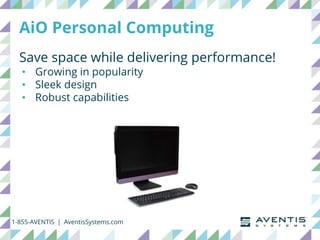
AiO Personal Computing
Save space while delivering performance!
• Growing in popularity
• Sleek design
• Robust capabilities
1-855-AVENTIS | AventisSystems.com
AiO Use Cases
Environments where clutter-free is priority
• School rooms
• Call centers
• Retail kiosks
• Self-service check-ins
• Conference rooms
• Reception areas
• Front desks
• Open offices
1-855-AVENTIS | AventisSystems.com
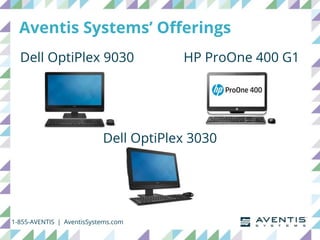
Aventis Systems’ Offerings
Dell OptiPlex 9030
1-855-AVENTIS | AventisSystems.com
Dell OptiPlex 3030
HP ProOne 400 G1
Spec Breakdown
1-855-AVENTIS | AventisSystems.com
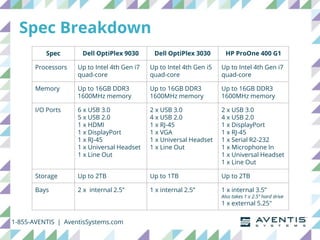
Spec Dell OptiPlex 9030 Dell OptiPlex 3030 HP ProOne 400 G1
Processors Up to Intel 4th Gen i7
quad-core
Up to Intel 4th Gen i5
quad-core
Up to Intel 4th Gen i7
quad-core
Memory Up to 16GB DDR3
1600MHz memory
Up to 16GB DDR3
1600MHz memory
Up to 16GB DDR3
1600MHz memory
I/O Ports 6 x USB 3.0
5 x USB 2.0
1 x HDMI
1 x DisplayPort
1 x RJ-45
1 x Universal Headset
1 x Line Out
2 x USB 3.0
4 x USB 2.0
1 x RJ-45
1 x VGA
1 x Universal Headset
1 x Line Out
2 x USB 3.0
4 x USB 2.0
1 x DisplayPort
1 x RJ-45
1 x Serial R2-232
1 x Microphone In
1 x Universal Headset
1 x Line Out
Storage Up to 2TB Up to 1TB Up to 2TB
Bays 2 x internal 2.5” 1 x internal 2.5” 1 x internal 3.5”
Also takes 1 x 2.5” hard drive
1 x external 5.25"
Spec Breakdown
1-855-AVENTIS | AventisSystems.com
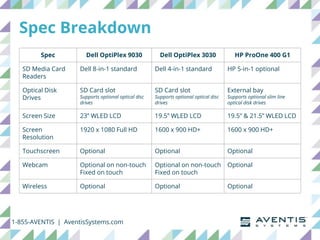
Spec Dell OptiPlex 9030 Dell OptiPlex 3030 HP ProOne 400 G1
SD Media Card
Readers
Dell 8-in-1 standard Dell 4-in-1 standard HP 5-in-1 optional
Optical Disk
Drives
SD Card slot
Supports optional optical disc
drives
SD Card slot
Supports optional optical disc
drives
External bay
Supports optional slim line
optical disk drives
Screen Size 23” WLED LCD 19.5” WLED LCD 19.5” & 21.5” WLED LCD
Screen
Resolution
1920 x 1080 Full HD 1600 x 900 HD+ 1600 x 900 HD+
Touchscreen Optional Optional Optional
Webcam Optional on non-touch
Fixed on touch
Optional on non-touch
Fixed on touch
Optional
Wireless Optional Optional Optional
Take a Look
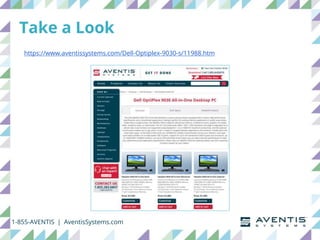
https://www.aventissystems.com/Dell-Optiplex-9030-s/11988.htm
1-855-AVENTIS | AventisSystems.com
Take a Look
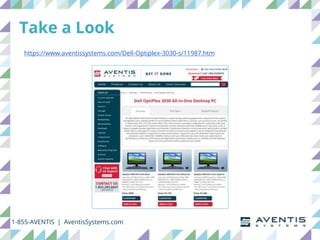
https://www.aventissystems.com/Dell-Optiplex-3030-s/11987.htm
1-855-AVENTIS | AventisSystems.com
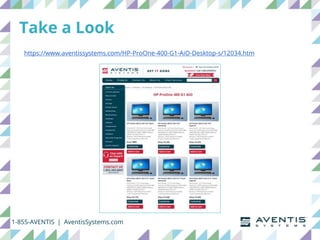
Take a Look
https://www.aventissystems.com/HP-ProOne-400-G1-AiO-Desktop-s/12034.htm
1-855-AVENTIS | AventisSystems.com
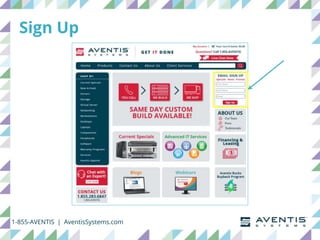
Sign Up
1-855-AVENTIS | AventisSystems.com
Stay Updated
1-855-AVENTIS | AventisSystems.com
@AventisSystems
1-855-AVENTIS | AventisSystems.com
Thank You!

Tech Spec Roundup - All-in-One Desktop PCs

Editor's Notes

  • #2 Hello and welcome to, “Tech Spec Roundup - All-in-One Desktop PCs”
  • #3 AiO personal computing solutions are growing in popularity. In this webinar I’m highlighting features and specs of a few models we offer here at Aventis Systems to illustrate how, despite their sleek design, AiOs offer robust performance. Moderator Interjection Sounds great, Riley. First, would you tell us what type of customers AiOs are a good fit for?
  • #4 Absolutely. Since the key benefit of AiOs is that they save space while delivering excellent performance, they’re perfect for environments where clutter-free is a priority such as: school rooms call centers retail kiosks self-service check-ins conference rooms reception areas front desks and open offices Moderator Interjection That makes perfect sense! Let’s dive into the specs. Riley Point 2 - Spec breakdown You got it, Amber.
  • #5 The current AiO PCs we have at Aventis Systems are the Dell OptiPlex 9030 and 3030, and the HP ProOne 400 G1.
  • #6 The OptiPlex 9030 and ProOne 400 support up to 4th generation Intel i7 Quad-core processors, while the OptiPlex 3030 supports up to the i5. All three support up to 16GB DDR3 1600MHz memory I/O port highlights include a total of 6 USBs for the OptiPlex 3030 and ProOne 400 and 11 USBs for the OptiPlex 9030; the OptiPlex 9030 and ProOne 400 have a DisplayPort; the OptiPlex 9030 also has an HDMI port; and all three have a RJ-45 ethernet port. Other ports included can be found on our chart. The OptiPlex 9030 and ProOne 400 can store up to 2TB while the OptiPlex 3030 can store up to 1TB according to Dell’s specs… but it should be noted that we configure it with up to 2TB.
  • #7 In terms of expansion slots, the OptiPlex 9030 and 3030 have 1 NGFF connector, and the ProOne 400 has 1 mini PCIe half-length. The OptiPlex 9030 has 2 internal 2.5” bays while the OptiPlex 3030 has 1, and the ProOne 400 has 1 internal 3.5” bay and an external 5.25” bay. SD media card readers come standard in Dell’s OptiPlex 9030 and 3030, 8-in-1 and 4-in-1 respectively, and the HP ProOne 400 G1 has an optional 5-in-1. Optical disk drives are optional in all three, supported through the SD card slots in OptiPlex 9030 and 3030, and through the external bay of the ProOne 400 G1. In terms of screen size and resolution, the OptiPlex 9030 offers 23” with a 1920 x 1080 full HD resolution while the OptiPlex 3030 and ProOne 400 offer 19.5” and a 1600 x 900 HD+ resolution. The ProOne 400 also has a 21.5” option. Also, all three have optional wireless and touchscreens. The OptiPlex 9030 and 3030 have a fixed webcam in the touch system, and an optional webcam in the non-touch. The ProOne 400 G1 webcam is optional in both. Moderator Wrap-up & Close Wow, that was a lot of specs you just covered! Thank you, Riley.
  • #8 If you’re interested in AiOs, take a look at our offerings at aventissystems.com including the Dell OptiPlex 9030
  • #9 The Dell OptiPlex 3030
  • #10 And the HP ProOne 400 G1
  • #11 While you’re on our website, sign up to receive product specials and our latest webinars and blog articles.
  • #12 And stay up-to-date with us on social media.
  • #13 Thank you for watching.