@simona_cotin
@simona_cotin
@simona_cotin
@simona_cotin
@simona_cotin
@simona_cotin
REPEATABLE
INFRASTRUCTURE
REPEATABLE
INFRASTRUCTURE
TERRAFORM
HELM
AZURE RESOURCE
MANAGER
@simona_cotin
AUTOMATED
DEPLOYMENTS
@simona_cotin
CONTROLS
@simona_cotin
SECRETSSECRETS
@simona_cotin
SECRETSVAULTS
@simona_cotin
OBSERVABILITY
@simona_cotin
ALERTS
@simona_cotin Photo by Samuel Zeller on Unsplash
SCALING
@simona_cotin
DECOUPLING
@simona_cotin
ASYNC/AWAIT
@simona_cotin
MESSAGE QUEUES
@simona_cotin
@simona_cotin
@simona_cotin
@simona_cotin
@simona_cotin
@simona_cotin
DON’T MISS THE TREES
FROM THE FOREST
@simona_cotin
DATA
STORES
QUEUE SERVICES
@simona_cotin
MANAGED SERVICES
@simona_cotin
@simona_cotin
@simona_cotin
@simona_cotin
@simona_cotin
RUNTIME
HYPE
CONSISTENT
ENVIRONMENT
DEVELOPERS
TEAMS
OPERATIONS
RESOURCE
UTILIZATION
@simona_cotin
“A CONTAINER IS A
STANDARD UNIT OF
SOFTWARE THAT
PACKAGES UP CODE AND
ALL ITS DEPENDENCIES SO
THE APPLICATION RUNS
QUICKLY AND RELIABLY
FROM ONE COMPUTING
ENVIRONMENT TO
ANOTHER.
— DOCKER.IO
@simona_cotin
@simona_cotin
@simona_cotin
ONE SERVICE
MULTIPLE ENVIRONMENTS
@simona_cotin
MULTI-STAGE
BUILDS
@simona_cotin
@simona_cotin
@simona_cotin
AZURE CONTAINER INSTANCES
@simona_cotin
@simona_cotin
Kubernetes is an open-source system for
automating deployment, scaling, and
management of containerized applications.
A container is a standard unit of software
that packages up code and all its
dependencies so the application runs
quickly and reliably from one computing
environment to another.
—kubernetes.io
@simona_cotin
LOAD BALANCING
@simona_cotin
LOAD BALANCING
SERVICE DISCOVERY
@simona_cotin
@simona_cotin
@simona_cotin
@simona_cotin
@simona_cotin
@simona_cotin
@simona_cotin

Tech Roadmap

Editor's Notes

  • #3 The easy thing for me to do as somebody standing up here representing Microsoft is to try to impress you with all the stuff that we do with Azure. To overload you with information about the entire kit of parts. Things represented with lots of cute icons. I’m not going to do that today. Here’s why. First, when done in the amount of time we have, it feels like too much of a marketing pitch. Yes, I work for Microsoft, but I’m a developer first and foremost.
  • #4 Second, we just don’t have time for this. Azure, like the other significant clouds, consists of so many different services that it takes a long time to summarize them all. Scott Gutherie, our Executive Vice President in charge of Azure sometimes does this thing where he does a quick demo of almost every service. That alone takes hours. It’s cool, but I’m not Scott and, besides, I’ve actually got a different goal.
  • #5 Third, as much as it’d make life so much easier, there isn’t a single one-size-fits-all technology roadmap we can give you to help you with your startup. It just isn’t possible.
  • #6 So what are we going to do? My colleagues and I have pulled together a short list of concepts, technologies, services, and -- between the lines -- a way of thinking that we think are essential for you to consider when building your roadmap. Even if you don’t end up using the specific things we talk about, we know that in discussing them, you will be doing the right thinking to help guide you in the right direction for you. To build your own roadmap that is right for you, right now.
  • #8 Whatever tools you use, its essential to be able to use them in a repeatable infrastructure. Of course, when you’re just figuring out how to do something, the natural thing to do is to hack away at it by gluing everything together manually in your cloud provider’s console. Create a VM. Log in. Set up some packages. Launch a service. Copy and paste some database connection strings.
  • #9 Figuring it out once is fine. Doing it again weeks later when you’ve forgotten how to do it is not. And making somebody else suffer through it is totally not OK. As soon as you figure out how to put something together, you should capture it in a way that can be repeated again by running a command.
  • #10 Terraform, Helm, or our own Azure Resource Manager are useful tools for this. Even capturing a set of commands in a shell script and committing that to source control is acceptable. Once you’ve started down this path, you can always upgrade and evolve how you approach it over time. My own personal rule of thumb: Script it the second time you build something. I follow this rule of thumb for everything I can, including the setup of my development laptops.
  • #11 Continuing the theme, you want the deployment of your code to be a total non-event. The path between a developer making a change on their local environment and committing it into source control, and then that change showing up in production -- whether it’s the server or client code -- should be totally automated.
  • #12 Yes, you may need to put controls in so that approval can be made to deploy to production. And the realities of mobile app development mean that there’s always a big jump into production. But even in this case, you want to make the path between a code commit and the ability for your test or insider users to use the change to be as smooth and automatic as possible. Any tools or technologies that don’t support your efforts in doing this shouldn’t be on your roadmap. Full stop.
  • #13 When it’s just yourself, it’s tempting to just make a personal account on the servers needed to deploy and set things up yourself. I do that all the time when I’m experimenting. It works until you start working with somebody else. Then you have a decision. Share credentials, with all of the mess that entails, or use role-based access control, aka RBAC. You want to pick technologies and platforms that let you use RBAC whenever possible. And don’t just apply these roles to users in your organization, apply them to your services. Set things up so that your web handlers can connect to your data sources because they are defined to be in a role.
  • #14 Furthermore, since we’re talking about credentials, use secret stores, like Azure Key Vault, AWS Secrets Manager, or Hashicorp’s Vault. These take more than a few minutes to set up, but if you put the work into it, you’ll be in a much better place later on. You’ll hear a bit more about these thoughts and more later today in Phoummala’s presentation.
  • #15 Being able to see what’s happening in your application is essential. You don’t just want metrics that tell you how many users you have -- although your business people will appreciate that -- you want metrics that allow you to see how your systems are running. On the server side, this includes understanding the current usage of each service, how many instances are running, and where problem points are between services. On the client side, this means understanding how your app is performing on actual customer devices and what the network environment is between your user application and your services.
  • #16 And speaking of alerts, you want it to be as easy as possible to set up alerts on events that you need to be notified about.
  • #17 Whatever you use, you should be picking tools and technologies that let you scale. Now, let’s look at this a bit more carefully. I’m not talking about scaling from startup to Google scale. There’s a lot of truth in the statement that you’re not Google or Facebook or Uber, at least not yet. But what you want to be able to do is absorb the need to scale from where you are to where you might be in a few months. When you’re prototyping, you’ve got a handful of users using your application. Then, as you launch, hopefully, you’re going to thousands or tens of thousands. Your running system needs to absorb that. Also, you want the base building blocks to support going to even higher scale by changing the environment in which you deploy them. To go from tens of thousands to millions of users, for example, is something that will reasonably require a lot of work, but the bulk of that work should be in sorting out how your infrastructure is structured to handle it. It should be possible for your individual services to be much the same, even if they need a bit of work to process more requests and not bottleneck the system.
  • #18 One of the most powerful tools we have to work when building software with is decoupling. This means being able to safely change a piece of software without affecting everything else in your system. This is, of course, a fundamental principle in software and we see it everywhere from Unix utilities using pipes to communicate with each other to object-oriented software designs to, well, pretty much everything.
  • #19 As essential as decoupling is, it’s still pretty hard for us to put it into action when we sit down to write something. It’s way to easy to write an asynchronous tightly-coupled bit of code. We not only need to take advantage of all the decoupling that happens in the foundations that we build on, but we also need to infuse all of our own work with it as well. This can be as small as using `async/await` style programming in JavaScript to thinking about how we decouple message passing between the layers of our application.
  • #20 At the network application level, one of the most powerful tools we have to decouple a system is the use of message queues. They’re deceptively simple in concept, and typically not something you would use when building an application that runs as a single process, but they let you eliminate the direct link between parts of a system. Queues also build in robustness. When a component that is consuming from a queue goes down, the messages can build up until the component comes back up again and nothing will be lost. In a multi-process system, I consider their use to be one of the best indicators of how resilient and scalable a system will be.
  • #21 Next, let’s move onto a concept is often confused with a specific technology or set of technologies.
  • #22 Here’s an opinion: Serverless is a pretty unfortunate name for a technology that can change the way compute works forever.
  • #23 Serverless is the latest step on the path of abstracting and taking away the burden of infrastructure from the engineering team.
  • #24 Much like high-level programming languages are an abstraction of machine code, serverless is an abstraction for cloud infrastructure. When programming in a low-level language, we need to understand the memory requirements for our system to run, explicitly allocate and de-allocate it. Same with traditional applications, we need to estimate the workload at any given moment in time and provision the infrastructure required to run it.
  • #25 With serverless, the thing you focus on is the problem. It’s when you run into a performance or scaling issue with your solution that indicates that you might need to go to a lower level. And, if you do ever need to go to lower-level abstractions like containers or even deploying VMs, starting with serverless means that your application has a better chance of being factored well enough to let you focus those optimization efforts on just what needs it.
  • #26 One of the general ideas about serverless is that it’s the latest way to do something like CGI. Handle a web request in a process that gets executed for you. That’s looking at a tree and missing the forest.
  • #27 Storage, such as Amazon’s S3 or Azure Blob Storage, is serverless. These tools have done such a great job at reliably storing and serving up petabytes of data that it’s now the default way to think of storing data in the cloud. It includes structured data stores, like table storage or managed relational stores. It includes queue services. It even includes the ability to call machine learning tools via REST API calls. Shameless plug: Be sure to stick around to the end to hear Ari talk about machine learning. It’s the best explanation of ML I’ve listened to yet. Back on topic.
  • #28 Fully managed and highly scalable services are core tenants of any serverless system. They clear the path for us to focus on features that are truly relevant to our business by removing the need for us to learn, configure and host them. Sure, at some point it might make sense to build your own solutions for these. Dropbox eventually decided to move off S3 to their own custom hardware after many years of running successfully on S3. But then again it might not. Netflix is still on S3. Hit play on your favorite show using Netflix and the data comes off of a serverless data store. If your app gets really popular and the cost model of serverless becomes an ongoing concern, then you know precisely the place to focus efforts on moving to a low-level abstraction while leaving the rest of your system in an area that is at the higher level.
  • #29 At the core of serverless, and what many people mean when they say “Serverless,” are cloud functions. Some of us old school people that still think in terms of Infrastructure as a Service, Software and a Service, and Platform as a Service like to call this “Functions as a Service.” They enable us to run code in ephemeral containers in reaction to an event. The execution can be triggered by any of the managed services or some custom sources you might define.
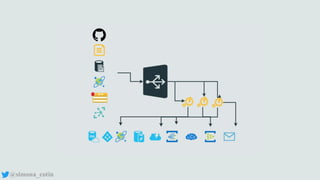
  • #30 Our code runs in response to specific triggers which can be of type HTTP when we react to HTTP requests, blob trigger  when we run code in response to a file being uploaded to a storage account. Other commonly used triggers can be from a queue, to process a message uploaded on a queue or time triggers to run code at specified time intervals. Your function receives data (for example, the content of a queue message) in function parameters or JSON payload. You send data (for example, to create a queue message) by using the return value of the function. This input/output is an example of the decoupling we talked about earlier.
  • #31 Functions as a service are stateless, and if you do need to save state, the place to it is in a service like a message queue, blob storage, a table store, or a relational database.
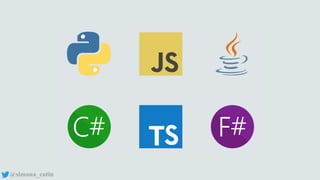
  • #32 Functions as a service are implemented by each vendor in a way that supports a subset of all the languages you might be interested in. In Azure, for example, we support JavaScript (and TypeScript, of course!), Java, C#, and F#. Python is in preview, as is PowerShell.
  • #33 Another thing to note is that functions are run in a cloud-provided runtime. The runtime for Azure functions is something you can download and develop with on your machine, which is pretty cool, but it _is_ a controlled environment. It’s like dynamic binding. You’re relying on the system to bring some functionality. What if you want to go further and put the abstraction at a level that lets you run any language configured however you like it? That’s our cue to move on to containers.
  • #34 Like serverless, it’s hard to evaluate containers without being bombarded with hype. If you believe tech journalists and infatuated developers, you might think that containers are the deliverance of the developer, the emancipation of operations, and the freer of finances. Any or all of these could be true. But let’s explore containers from a practical perspective.
  • #35 The real promise of containers is their ability to provide a consistent runtime environment for a process. That process might be a database like MySQL, or it could be your own application. When you run a container, you have full control of the environment that surrounds that process. One reason containers have become so popular is that they seem to have use cases in every corner of software development and operations.
  • #36 Developers like containers because they now spend much less time configuring laptops and running ancillary services like databases, and more time actually writing code to solve business problems. Starting up a new project by running one or more containers to build and run your application and any additional services, and you’re ready to write code.
  • #37 Teams like containers because they provide a `lingua franca` for development environments. There is no more confusion over which version of a particular service is installed, it’s specified right in the container. This immutable infrastructure means environmental issues disappear along with the “it worked on MY LAPTOP” syndrome.
  • #38 Operations teams like containers because they reduce the deployment burden for new services and applications. A properly configured container might only need some environment variables set, and perhaps some persistent storage attached to it.
  • #39 Finally, the folks paying the bills appreciate containers because they’re more lightweight and resource efficient than virtual machines, and therefore cheaper to run. Containers share the kernel with the host they run on and contain the bits needed to run your application. This makes it possible to run hundreds or sometimes thousands of containers on a single host, enabling a much higher density and resource utilization than bare metal or simply virtualization machines can provide, with sometimes only one application per device.
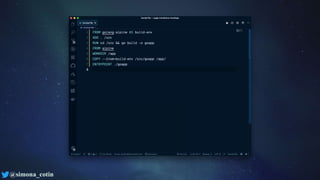
  • #42 Docker uses Dockerfiles to specify a series of commands that are run consecutively to create a container. You can think of a Dockerfile as a blueprint or a recipe. To create a container, you create a Dockerfile that has the recipe for the environment you want, and docker will use this to build a container image for you.
  • #43 Docker uses Dockerfiles to specify a series of commands that are run consecutively to create a container. You can think of a Dockerfile as a blueprint or a recipe. To create a container, you create a Dockerfile that has the recipe for the environment you want, and docker will use this to build a container image for you.
  • #44 The ability to build these environments quickly and declaratively means we can use different Dockerfiles or resulting container images, for various purposes, against the same codebase. For example, you might have a Dockerfile that includes all of the necessary components for advanced testing of your app and use that only during local development, while a Dockerfile with only production dependencies gets used for deployment.
  • #45 You can also use multi-stage builds make it easy to keep container sizes as small as possible, allowing you to build, test and compile our application in one Docker container, and copy the build artifacts into an another, shedding all of the weight of the development tools you used along the way.
  • #46 You can also use multi-stage builds make it easy to keep container sizes as small as possible, allowing you to build, test and compile our application in one Docker container, and copy the build artifacts into an another, shedding all of the weight of the development tools you used along the way.
  • #47 Once you have a container, what then? You put it into a registry, either by pushing it yourself or -- better yet -- having a continuous delivery task do it for you. You can self-host a container registry (please don’t), use Docker’s public registry, or use Azure Container Registry (ACR), which comes with an automation feature called ACR Tasks, which, among other things, can take care of creating containers from your source code repository.
  • #48 There are lots of ways you can deploy to containers to the cloud. Let's talk about a few ways you can run them in Azure. First up is Azure Container Instances Azure Container Instances allow you to run a single container on-demand in seconds with a public or private IP address. ACI could be called “Containers as a Service,” and the use cases are only limited to your imagination. Billing is PER SECOND, so it’s economical to use ACI for a variety of tasks.
  • #49 Right now, Kubernetes is the orchestrator that looks to be the de facto choice. And for a good reason. Kubernetes distills the best practices of a whole lot of amazing operations engineers into a set of tools and lets everyone benefit. Our own Azure Kubernetes Service, or AKS, provides a fully managed container orchestration service based on fully open source Kubernetes. Run your containerized workloads using Kubernetes on Azure to simplify the complications of deployment, like scheduling, service discovery, and load balancing.
  • #51 One of the most complicated things about setting up the infrastructure is getting load-balancing right. Kubernetes will route requests to any of your available containers automatically. This simplifies scaling -- your app doesn’t care which instance receives the request so you can start one or twenty instances without changing your code.
  • #52 Tied directly to load balancing is service discovery. A service is available to any container in the cluster through a DNS name that matches the name of the service. Your containers remain available behind a stable DNS name even if they die, or are moved to a different node in your cluster.
  • #53 For all the amazing things that Kubernetes does – and it is worth all the attention it’s getting – I encourage you to think long and hard before you embrace it. Make sure that you really need everything it does. You get a lot out of it, but it’s also a power tool that requires a lot of work to comprehend
  • #54 Distributed data storage is another cloud feature that is extremely powerful. Distributed databases, like CosmosDB, take all the difficulty (and trust me, there’s a lot) of having distributed copies of your data close to where you need them, and predictably keeping them in sync. Cosmos DB is Azure's service for this and it’s borderline magic. Physics and the speed of light mean there are always decisions you’ll have to make regarding consistency – if two people on opposite sides of the planet edit a record at the same time, who wins? – but Cosmos lets you make simple decisions to handle this consistently and predictably. It's worth noting that this comes with a cost, but if it's important to you you’re paying for a solution to an incredibly hard problem.

  • #55 So far, I've concentrated mainly on the server - the cloud, but most modern cloud applications have a client and a server component. Let's talk for a moment about the client side.
  • #56 The web contains a vast sea of options, and somehow, over thirty years on, advances are happening every day. Angular, React, Vue -- they’re all excellent. I can't tell you which to choose. The decision depends on the style you're comfortable with and what your application does. So how do you choose? The best advice I've received is from a couple of colleagues - John Papa and Sarah Drasner. The only real way to know is to use them, so timebox some trials. Set aside a few days or even a week with each framework to write something a little beyond a hello world. When you're done, go with the framework that "feels" right to you and your team.
  • #57 When it comes to devices, the question is whether you go native, use a cross-platform platform like React Native or Xamarin, or if you just wrap a web interface and call it good. To roadmap this out for your startup, you’re going to have to take an intense look at your needs. Do you really need to be running on more than one platform at first? My own personal opinion: Until you have product-market fit, one platform is all you need. Minimize the work you’re doing. Once you’ve figured out what makes customers want to use your product, then sort out what to do next. Of course, if you go that way, that still leaves the question of iOS or Android. Have a strong feeling when I say that? Then that’s a great sign that you’ve got some thinking to do. Do it. Chase those thoughts. Narrow down your thinking. And you’ll sort it out.


  • #58 If there’s anything I want to leave you with it’s this: you want to spend most of your time solving your specific business problem. Your idea. The solution you hope will be better than anyone else's and the one your customers will love. If you’re in the business of configuring and managing databases or servers, by all means, you should spend all your time on that. But if you want to work out an idea and see if there’s something to it with a minimum of cost and minimum of the ceremony of running servers, then the things I’ve talked about today should help you sort out what your roadmap looks like. Figuring out what your business is, and then figure out what the next issues that opens up when you’re ready to scale are then. But know, that if you apply what we’ve talked about, going to scale won’t be a re-write. It’ll be a refactor.