TEC Electronic Cash Register

MA-1535-2 SERIES
Programming Manual
                               Document No. EO3-11102

Original    Jan., 2003
(Revised               )


                                            PRINTED IN JAPAN
EO3-11102


                                                 TABLE OF CONTENTS

                                                                                                                                       Page
1. INTRODUCTION ........................................................................................................ 1- 1
     1.1    Main Features............................................................................................................... 1- 1

2. SPECIFICATIONS ...................................................................................................... 2- 1
3. RAM CLEAR, DATA CLEAR, STATUS CLEAR........................................................ 3- 1
     3.1    RAM Clear .................................................................................................................... 3- 1
     3.2    DATA Clear................................................................................................................... 3- 2
     3.3    STATUS Clear .............................................................................................................. 3- 2

4. PROGRAMMING OPERATIONS ............................................................................... 4- 1
     4.1    Basic Key Functions ..................................................................................................... 4- 2
     4.2    Character Entry Method ................................................................................................ 4- 3
     4.3    Condition Required for Programming Operations.......................................................... 4- 5
     4.4    RAM Allocation Setting ................................................................................................. 4- 6
     4.5    SFKC (Selective Function Key Code) Programming ..................................................... 4- 8
     4.6    TAX System Programming........................................................................................... 4-11
     4.7    EFT Programming........................................................................................................ 4-12
     4.8    Store Message and Commercial Message Programming (Submode 1) ....................... 4-15
     4.9    Cashier Code and Name Programming (Submode 2) .................................................. 4-17
     4.10   Department Table Programming (Submode 3)............................................................. 4-20
     4.11   PLU Table Programming (Submode 4) ........................................................................ 4-23
     4.12   Time Setting or Adjustment (Submode 5)..................................................................... 4-27
     4.13   Date Setting or Adjustment (Submode 6) ..................................................................... 4-28
     4.14   Media Tender Key Setting (Submode 8) ...................................................................... 4-28
     4.15   Financial Report Item Name Programming (Submode 9) ............................................. 4-30
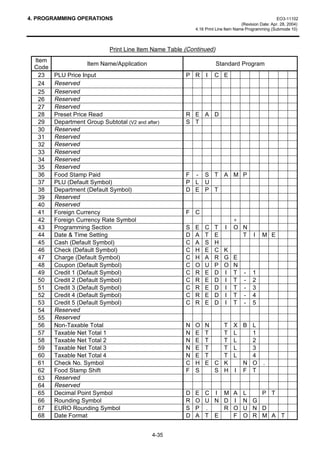
     4.16   Print Line Item Name Programming (Submode 10)...................................................... 4-33
     4.17   Print Item on Reports Setting (Submode 11)................................................................ 4-36
     4.18   Tax Table Programming (Submode 12) ....................................................................... 4-38
     4.19   Department Group Name Programming (Submode 13) ............................................... 4-41
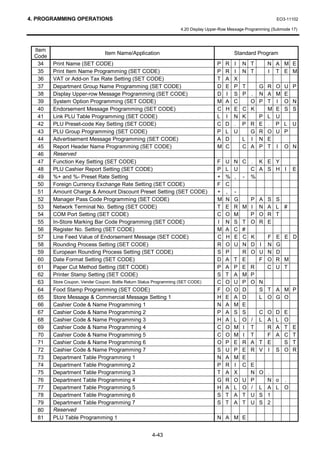
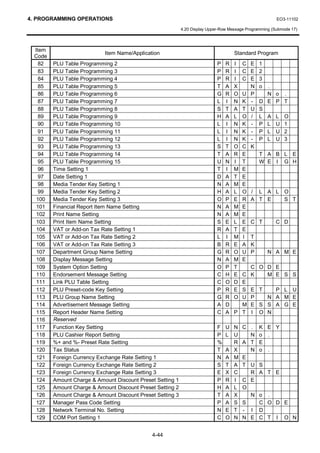
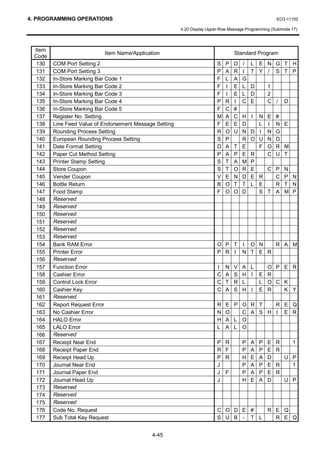
     4.20   Display Upper-Row Message Programming (Submode 17) ......................................... 4-42
     4.21   System Option Programming (Submode 18)................................................................ 4-49
     4.22   Endorsement (or France Check Print) Message Programming (Submode 22) ............. 4-53
     4.23   Link-PLU Table Programming (Submode 25)............................................................... 4-54
     4.24   PLU Preset-Code Key Setting (Submode 27) .............................................................. 4-55
     4.25   PLU Group Programming (Submode 29) ..................................................................... 4-55
     4.26   Advertisement Message Programming (Submode 31) ................................................. 4-57
     4.27   Report Header Name Programming (Submode 32) ..................................................... 4-59
     4.28   Function Key (Combination Key) Setting (Submode 34) .............................................. 4-62
     4.29   PLU Cashier Report Setting (Submode 35).................................................................. 4-63
     4.30   %+ and %- Preset Rate Setting (Submode 36) ............................................................ 4-63
     4.31   Foreign Currency Exchange Rate Setting (Submode 37)............................................. 4-65
     4.32   + (Amount Charge) and - (Amount Discount) Preset Setting (Submode 38)................. 4-66
EO3-11102


                                                                                                                                        Page
    4.33   Manager Pass Code Programming (Submode 39) .......................................................4-68
    4.34   Network Terminal No. Setting (Submode 40)................................................................4-68
    4.35   COM Port Setting (Submode 41) ..................................................................................4-69
    4.36   In-Store Marking Bar Code Programming (Submode 42)..............................................4-70
    4.37   Register No. Setting (Submode 43) ..............................................................................4-71
    4.38   Line Feed Value of Endorsement Message (Submode 46) ...........................................4-71
    4.39   Rounding Process Setting (Submode 47) .....................................................................4-72
    4.40   Date Format Setting (Submode 49) ..............................................................................4-72
    4.41   Printer Cutting Setting (Submode 51) ...........................................................................4-73
    4.42   Store Coupon, Vender Coupon, Bottle Return Taxable Status Programming
           (Submode 53)...............................................................................................................4-73
    4.43   Food Stamp Programming (Submode 54) ....................................................................4-74
    4.44   Age Limit Setting (Submode 55) ...................................................................................4-75
    4.45   Tare Table Setting (Submode 56).................................................................................4-76
    4.46   General Unit Weight Setting (Submode 57) ..................................................................4-76
    4.47   Media Tender Key Setting 2 (Submode 58) ..................................................................4-77
    4.48   EFT Timer and Status Setting (Submode 59) ...............................................................4-78
    4.49   PLU Stock Loading or Changing (Submode 90) ...........................................................4-79

5. PROGRAMMED DATA VERIFICATION.....................................................................5- 1
    5.1    Programmed Data Verification in BLIND Mode ..............................................................5- 1
    5.2    Programmed Data Verification in X or SET Mode ..........................................................5- 2


 CAUTION!
 1. This manual may not be copied in whole or in part without prior written permission of TOSHIBA
    TEC.
 2. The contents of this manual may be changed without notification.
 3. Please refer to your local Authorised Service representative with regard to any queries you may
    have in this manual.

                                                                                                     Copyright © 2003
                                                                                                     by TOSHIBA TEC CORPORATION
                                                                                                     All Rights Reserved
                                                                                                     570 Ohito, Izunokuni-shi, Shizuoka-ken, JAPAN
1. INTRODUCTION                                                                         EO3-11102

                                                                                  1.1 Main Features


1. INTRODUCTION
This programming manual for TEC Electronic Cash Register MA-1535-2 Series is provided for
salespersons, field engineers and other support personnel.

1.1 Main Features
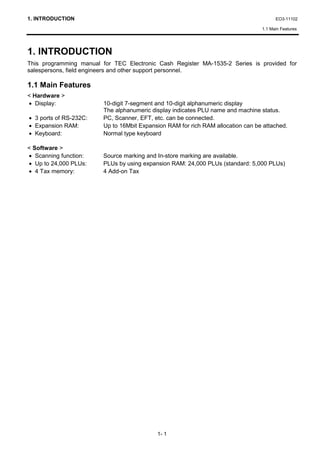
< Hardware >
• Display:               10-digit 7-segment and 10-digit alphanumeric display
                         The alphanumeric display indicates PLU name and machine status.
• 3 ports of RS-232C:    PC, Scanner, EFT, etc. can be connected.
• Expansion RAM:         Up to 16Mbit Expansion RAM for rich RAM allocation can be attached.
• Keyboard:              Normal type keyboard

< Software >
• Scanning function:     Source marking and In-store marking are available.
• Up to 24,000 PLUs:     PLUs by using expansion RAM: 24,000 PLUs (standard: 5,000 PLUs)
• 4 Tax memory:          4 Add-on Tax


                                            1- 1
2. SPECIFICATIONS                                                                                        EO3-11102
                                                                                      (Revision Date: Aug. 26, 2004)
                                                                                               2. SPECIFICATIONS


2. SPECIFICATIONS
< Hardware >
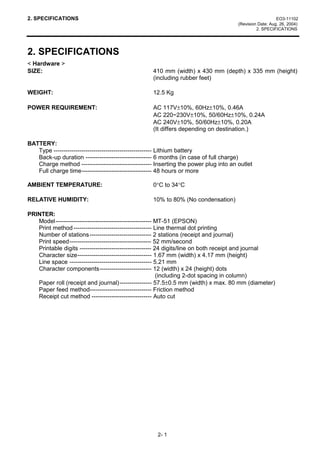
SIZE:                                              410 mm (width) x 430 mm (depth) x 335 mm (height)
                                                   (including rubber feet)

WEIGHT:                                            12.5 Kg

POWER REQUIREMENT:                                 AC 117V±10%, 60Hz±10%, 0.46A
                                                   AC 220~230V±10%, 50/60Hz±10%, 0.24A
                                                   AC 240V±10%, 50/60Hz±10%, 0.20A
                                                   (It differs depending on destination.)

BATTERY:
   Type ------------------------------------------------- Lithium battery
   Back-up duration --------------------------------- 6 months (in case of full charge)
   Charge method ----------------------------------- Inserting the power plug into an outlet
   Full charge time----------------------------------- 48 hours or more

AMBIENT TEMPERATURE:                               0°C to 34°C

RELATIVE HUMIDITY:                                 10% to 80% (No condensation)

PRINTER:
   Model------------------------------------------------ MT-51 (EPSON)
   Print method --------------------------------------- Line thermal dot printing
   Number of stations ------------------------------- 2 stations (receipt and journal)
   Print speed----------------------------------------- 52 mm/second
   Printable digits ------------------------------------ 24 digits/line on both receipt and journal
   Character size------------------------------------- 1.67 mm (width) x 4.17 mm (height)
   Line space ----------------------------------------- 5.21 mm
   Character components-------------------------- 12 (width) x 24 (height) dots
                                                          (including 2-dot spacing in column)
   Paper roll (receipt and journal) ---------------- 57.5±0.5 mm (width) x max. 80 mm (diameter)
   Paper feed method------------------------------- Friction method
   Receipt cut method ------------------------------ Auto cut


                                                     2- 1
2. SPECIFICATIONS                                                                              EO3-11102
                                                                            (Revision Date: Aug. 26, 2004)
                                                                                     2. SPECIFICATIONS


< Software >
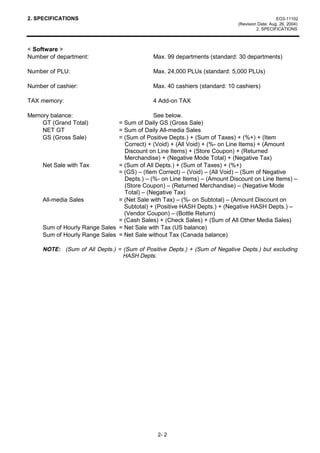
Number of department:                        Max. 99 departments (standard: 30 departments)

Number of PLU:                               Max. 24,000 PLUs (standard: 5,000 PLUs)

Number of cashier:                           Max. 40 cashiers (standard: 10 cashiers)

TAX memory:                                  4 Add-on TAX

Memory balance:                             See below.
    GT (Grand Total)           = Sum of Daily GS (Gross Sale)
    NET GT                     = Sum of Daily All-media Sales
    GS (Gross Sale)            = (Sum of Positive Depts.) + (Sum of Taxes) + (%+) + (Item
                                 Correct) + (Void) + (All Void) + (%- on Line Items) + (Amount
                                 Discount on Line Items) + (Store Coupon) + (Returned
                                 Merchandise) + (Negative Mode Total) + (Negative Tax)
     Net Sale with Tax         = (Sum of All Depts.) + (Sum of Taxes) + (%+)
                               = (GS) – (Item Correct) – (Void) – (All Void) – (Sum of Negative
                                 Depts.) – (%- on Line Items) – (Amount Discount on Line Items) –
                                 (Store Coupon) – (Returned Merchandise) – (Negative Mode
                                 Total) – (Negative Tax)
     All-media Sales           = (Net Sale with Tax) – (%- on Subtotal) – (Amount Discount on
                                 Subtotal) + (Positive HASH Depts.) + (Negative HASH Depts.) –
                                 (Vendor Coupon) – (Bottle Return)
                               = (Cash Sales) + (Check Sales) + (Sum of All Other Media Sales)
     Sum of Hourly Range Sales = Net Sale with Tax (US balance)
     Sum of Hourly Range Sales = Net Sale without Tax (Canada balance)

     NOTE: (Sum of All Depts.) = (Sum of Positive Depts.) + (Sum of Negative Depts.) but excluding
                                 HASH Depts.


                                               2- 2
3. RAM CLEAR, DATA CLEAR, STATUS CLEAR                                                       EO3-11102

                                                                                          3.1 RAM Clear


3. RAM CLEAR, DATA CLEAR, STATUS CLEAR
     CAUTION!
     1. When setting up the MA-1535 for the first time, charge the ECR for 48 hours or more by
        plugging the power cord into an AC outlet.
     2. When using the MA-1535 unelectrified for 1 month or more, charge the ECR for 48 hours or
        more by plugging the power cord into an AC outlet.
     3. If the MA-1535 just unpacked or unelectrified for 1 month or more doesn’t perform normally
        at the power on, perform a RAM Clear, charge the ECR for 48 hours or more and then retry.


3.1 RAM Clear
     CAUTION!
     This clear operation deletes all programmed data and sales data stored in the memory of the
     ECR. (i.e., the register goes back to initial status.)

If the ECR becomes completely inoperative due to battery discharge or malfunction of the program
memory, the RAM Clear operation must be carried out. When the RAM Clear is operated, all memory
stored in the RAM will be cleared. (i.e., the programmed data and the sales data) In the clearing
process, the designated zero-amount format is reset. Also “Initial Data” and “Initial Status” for
respective programming items are automatically reset.

1. Use the S key to turn the Control Lock to “BLIND”.                      
                                                                                  285 5((,37
                                                                                    7+$1. 28
2. Depress the following Numeric keys according to the type of keyboard.   
      Numeric Key          Type of Keyboard                                          
        [3] [9]          Normal Type Keyboard
                                                                           5$0

3. Depress the [AT/TL] key.                                                              70

4. A RAM Clear receipt is issued.

NOTE: When the RAM clear operation is performed, the condition “after all sales data reset” is
      obtained, just as “Status Clear” and “Data Clear”. Therefore, no Reset Report should be taken
      for starting any programming operation.


                                               3- 1
3. RAM CLEAR, DATA CLEAR, STATUS CLEAR                                                             EO3-11102

                                                                                               3.2 DATA Clear


3.2 DATA Clear
     CAUTION!
     This clear operation deletes all sales data of any operation sequence stored in the memory of the
     ECR.

Performing the DATA Clear operation will clear only the sales data accumulated in the memory of the
ECR (report memory), however, the programmed data will not be cleared. By this operation, all sales
data including non-resettable totals and counters, Reset Report Counts, and Receipt Consecutive No.
are cleared.

1. Use the S key to turn the Control Lock to “BLIND”.                        
                                                                                    285 5((,37
                                                                                      7+$1. 28
2. Depress the [3] key (Numeric key) and then the [AT/TL] key.               

3. A DATA Clear receipt is issued.                                                         

                                                                             '$7$
NOTE: When the DATA clear operation is performed, the condition
      “after all sales data reset” is obtained, just as “Status Clear” and                    70
      “Data Clear”. Therefore, no Reset Report should be taken for
      starting any programming operation.


3.3 STATUS Clear
Performing the STATUS Clear operation will clear an error and the key locked condition, however, the
sales data and the programmed data will not be cleared by this operation. When the STATUS Clear is
operated to clear a key locked condition during sale, the sale item data that has already been entered
for the current sale will be cleared.

The STATUS Clear operation obtains the condition “after all sales data reset” which is required for
some programming operations, but this operation will not affect any sales data. This condition is
obtained by taking reset reports. In case you do not want to reset the sales data such as in business
hours, this function is effective. Depending on the programming item, sales data should be reset
instead of STATUS Clear to keep consistency between programmed data and sales data.

The STATUS Clear can be performed in 2 methods shown below.

 Method 1                                                                  
                                                                                    285 5((,37
1. Use the S key to turn the Control Lock to “BLIND”.                                 7+$1. 28
2. Depress the [0] key (Numeric key) and then the [AT/TL] key.               
3. A STATUS Clear receipt is issued.
                                                                                            

 Method 2                                                                  67$786
1. Remove the power code of the ECR from the wall outlet.
                                                                                               70
2. Use the S key to turn the Control Lock to “BLIND”.
3. Plug in the power code and turn the power ON.
4. A STATUS Clear receipt is issued.


                                                3- 2
4. PROGRAMMING OPERATIONS                                                                        EO3-11102

                                                                                4. PROGRAMMING OPERATIONS


4. PROGRAMMING OPERATIONS
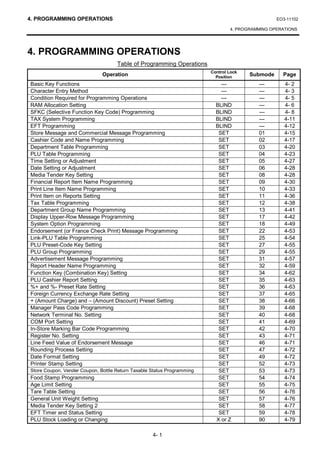
                                    Table of Programming Operations
                                                                        Control Lock
                              Operation                                   Position
                                                                                       Submode     Page
Basic Key Functions                                                         ---           ---       4- 2
Character Entry Method                                                      ---           ---       4- 3
Condition Required for Programming Operations                               ---           ---       4- 5
RAM Allocation Setting                                                    BLIND           ---       4- 6
SFKC (Selective Function Key Code) Programming                            BLIND           ---       4- 8
TAX System Programming                                                    BLIND           ---       4-11
EFT Programming                                                           BLIND           ---       4-12
Store Message and Commercial Message Programming                           SET            01        4-15
Cashier Code and Name Programming                                          SET            02        4-17
Department Table Programming                                               SET            03        4-20
PLU Table Programming                                                      SET            04        4-23
Time Setting or Adjustment                                                 SET            05        4-27
Date Setting or Adjustment                                                 SET            06        4-28
Media Tender Key Setting                                                   SET            08        4-28
Financial Report Item Name Programming                                     SET            09        4-30
Print Line Item Name Programming                                           SET            10        4-33
Print Item on Reports Setting                                              SET            11        4-36
Tax Table Programming                                                      SET            12        4-38
Department Group Name Programming                                          SET            13        4-41
Display Upper-Row Message Programming                                      SET            17        4-42
System Option Programming                                                  SET            18        4-49
Endorsement (or France Check Print) Message Programming                    SET            22        4-53
Link-PLU Table Programming                                                 SET            25        4-54
PLU Preset-Code Key Setting                                                SET            27        4-55
PLU Group Programming                                                      SET            29        4-55
Advertisement Message Programming                                          SET            31        4-57
Report Header Name Programming                                             SET            32        4-59
Function Key (Combination Key) Setting                                     SET            34        4-62
PLU Cashier Report Setting                                                 SET            35        4-63
%+ and %- Preset Rate Setting                                              SET            36        4-63
Foreign Currency Exchange Rate Setting                                     SET            37        4-65
+ (Amount Charge) and – (Amount Discount) Preset Setting                   SET            38        4-66
Manager Pass Code Programming                                              SET            39        4-68
Network Terminal No. Setting                                               SET            40        4-68
COM Port Setting                                                           SET            41        4-69
In-Store Marking Bar Code Programming                                      SET            42        4-70
Register No. Setting                                                       SET            43        4-71
Line Feed Value of Endorsement Message                                     SET            46        4-71
Rounding Process Setting                                                   SET            47        4-72
Date Format Setting                                                        SET            49        4-72
Printer Stamp Setting                                                      SET            52        4-73
Store Coupon, Vender Coupon, Bottle Return Taxable Status Programming      SET            53        4-73
Food Stamp Programming                                                     SET            54        4-74
Age Limit Setting                                                          SET            55        4-75
Tare Table Setting                                                         SET            56        4-76
General Unit Weight Setting                                                SET            57        4-76
Media Tender Key Setting 2                                                 SET            58        4-77
EFT Timer and Status Setting                                               SET            59        4-78
PLU Stock Loading or Changing                                             X or Z          90        4-79

                                                   4- 1
4. PROGRAMMING OPERATIONS                                                                         EO3-11102

                                                                                      4.1 Basic Key Functions


Programming Operations are performed in “BLIND” position or in “SET”
position of the Control Lock.
When you turn the Control Lock to “BLIND” or “SET” position, the letter “S”
in “BLIND” mode or the letter “P” in “SET” mode is displayed on the
leftmost column of the 10-digit Alphanumeric Display.


4.1 Basic Key Functions
1) Main keys
    [#/NS]------------------ Used to enter the Program Submode No., Address data, Item data.
                             Used to end the entire Program Submode Sequence.
    [ST], [AT/TL] -------- Used to enter the Address No., Item Code.
                             Used to end the Item data entries.

2) [C] key
     • When the program data has finished to be printed, the [C] key cannot clear it. If you correct the
        program data, re-enter the data.
     • Before the program data is printed, the [C] key can clear it. (except in the SFKC programming
        operation)

3) [ITEM CORR] key
     When you enter incorrect settings, depressing the [ITEM CORR] key can return the display to the
     previous item setting.

4) To clarify the operation flow, definitions of keys of the ECR keyboard are as shown below.
    |        | ------- Selective numeric value which is entered through the Numeric keys.
    [        ]-------- Depression of the function key.
      xxxx ---------- Fixed numeric value which is entered through the Numeric keys.
     Fixed


                                                4- 2
4. PROGRAMMING OPERATIONS                                                                    EO3-11102

                                                                              4.2 Character Entry Method


4.2 Character Entry Method
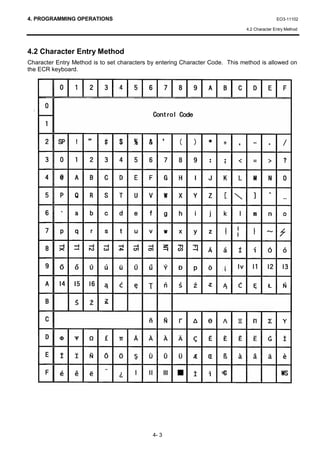
Character Entry Method is to set characters by entering Character Code. This method is allowed on
the ECR keyboard.


                                             4- 3
4. PROGRAMMING OPERATIONS                                                                                   EO3-11102

                                                                                             4.2 Character Entry Method


Character Setting Operation
Key layout required at character setting is shown below. (Keys of bold characters are used at
programming operation.)

                   f     #/NS                        E              J               O           T       Y      SPACE


                   e      C (Clear)                  D              I               N           S       X        :

                   d      7       8       9          C             H                M           R       W        ,

                   c      4       5       6          B             G                L           Q       V        .

                   b      1       2       3          A             F                K           P       U        Z

                   a      0      00       .                       AT/TL


As character entry method, the Character Codes shown on the previous page are used basically. The
above shadowed keys are used for character code entry. To enter numeric rows and columns, the Ten
Keys on the keyboard are used. To enter alphabetic rows and columns A to F, the shadowed keys a to
f are used, respectively. When entering character codes, enter row code and then column code.
Therefore, one character should consist of two codes.


• To set a regular-sized character, enter Row code and then Column code.
  Example)     To set “A”, enter [4] [1].
               To set “n”, enter [6] [e].
               To set “ä”, enter [e] [e].

• To set a blank instead of a character, enter [2] [0].

• To set a double-sized character, enter [f] [f] and then enter Row code and the Column code.
  Example)    To set “Drink”, “D” in double-sized, and “rink” in regular-sized;
              [f] [f] [4] [4]  [7] [2]    [6] [9]      [6] [e]    [6] [b]
                     D            r           i           n          k

                To set “Drink”, all in double-sized;
                [f] [f] [4] [4] [f] [f] [7] [2] [f] [f] [6] [9]   [f] [f] [6] [e]   [f] [f] [6] [b]
                       D               r               i                 n                 k

The keys of SPACE and big-letter alphabets are used to enter spaces and alphabets in big letter
directly from the keyboard instead of character code entry.


                                                    4- 4
4. PROGRAMMING OPERATIONS                                                                                   EO3-11102

                                                                      4.3 Condition Required for Programming Operations


4.3 Condition Required for Programming Operations
“CONDITION” is given at the top of each programming operation. The ECR must satisfy this condition
to perform programming operations.

There are two types of conditions:

“Any time outside a sale”
It means that the programming operation is allowed when a sale is finalized before going into any other
sale entry.

“After------ reset”
It means that the designated reset report must be taken before entering the programming operation.
Attempting operations without taking the report will cause an error. However, the condition “After------
reset” doesn’t mean “immediately after------ reset”.

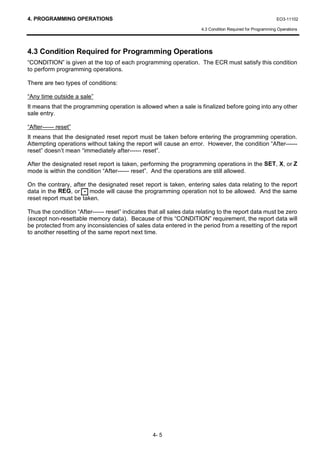
After the designated reset report is taken, performing the programming operations in the SET, X, or Z
mode is within the condition “After------ reset”. And the operations are still allowed.

On the contrary, after the designated reset report is taken, entering sales data relating to the report
data in the REG, or - mode will cause the programming operation not to be allowed. And the same
reset report must be taken.

Thus the condition “After------ reset” indicates that all sales data relating to the report data must be zero
(except non-resettable memory data). Because of this “CONDITION” requirement, the report data will
be protected from any inconsistencies of sales data entered in the period from a resetting of the report
to another resetting of the same report next time.


                                                  4- 5
4. PROGRAMMING OPERATIONS                                                                                               EO3-11102

                                                                                                      4.4 RAM Allocation Setting


4.4 RAM Allocation Setting
The type of ECR, the Numbers of Departments, PLUs, and Cashiers can be set in this submode.
  CONDITION        After a RAM clear

 OPERATION                Control Lock: BLIND

           01 [#/NS]                   |Type of ECR|                                [AT/TL]
                                        1 digit (0 or 1)
                                            0: without PLU accumulation (Default)
                                            1: with PLU accumulation


                                       |Number of Departments|                      [AT/TL]
                                                 Max. 2 digits


                                       |Number of PLUs|                             [AT/TL]
                                            Max. 5 digits                                            (See * for the value
                                                                                                     of each item.)

                                       |Number of Cashiers|                         [AT/TL]
                                               Max. 2 digits


                          [AT/TL]


* Value to be set for the Number of Departments, the Number PLUs and the Number of Cashiers:
Case 1: Without PLU accumulation
    Item                Default Value              Value range when        Value range when 4Mbit    Value range when 12Mbit
 (Number of:)      (auto-set a RAM Clear)       Standard Memory is used   Expansion Memory is used   Expansion Memory is used
 Departments                30                          1 to 99                       1 to 99                 1 to 99
    PLUs                   5,000                       0 to 6,168                   0 to 12,336             0 to 24,000
  Cashiers                  10                          0 to 40                       0 to 40                 0 to 40

Case 2: With PLU accumulation
    Item                Default Value              Value range when        Value range when 4Mbit    Value range when 12Mbit
 (Number of:)      (auto-set a RAM Clear)       Standard Memory is used   Expansion Memory is used   Expansion Memory is used

 Departments                30                          1 to 99                       1 to 99                 1 to 99
    PLUs              5,000 (NOTE 3)                   0 to 4,440                   0 to 8,880              0 to 17,760
  Cashiers                  10                          0 to 40                       0 to 40                 0 to 40


NOTES:          1. Even when a large area remains to be unallocated in the RAM, setting of any item
                   cannot exceed its value range specified in the table above.
                2. When you enter incorrect values, depressing the [C] key will return the display to the
                   previous item.
                3. With PLU accumulation, 5,000 is automatically set after a RAM clear, however, the
                   number of PLUs can be set up to 4,440 when the Standard Memory is used.


                                                               4- 6
4. PROGRAMMING OPERATIONS                                                          EO3-11102

                                                                    4.4 RAM Allocation Setting


Example)
To allocate the RAM as follows;
    Expansion Memory:             None
                                                                           
    Type of ECR:                  without PLU accumulation
    Number of Departments:        30 Departments
    Number of PLUs:               3,000 PLUs                 6                   
    Number of Cashiers:           10 cashiers                 0(025     2. 
                                                             '(37751               
                                                             '(3735*               '(
Control Lock: BLIND                                          $6+,(535*            $
                                                             '(376$/(              $
         01 [#/NS]                                           $6+,(56$/(           '
          0 [AT/TL]     (Type of ECR)                        (1'%$6(               %
         30 [AT/TL]     (Number of Departments)              3/867$57              
                                                             3/8(1'                )
      3000 [AT/TL]      (Number of PLUs)
         10 [AT/TL]     (Number of Cashiers)
              [AT/TL]   (To complete this program.)
                                                             3/873(                    
                                                             '(37                       
                                                             3/8                      
                                                             $6+,(5                    

                                                                              70


                                               4- 7
4. PROGRAMMING OPERATIONS                                                                                      EO3-11102
                                                                                            (Revision Date: Apr. 28, 2004)
                                                                     4.5 SFKC (Selective Function Key Code) Programming


4.5 SFKC (Selective Function Key Code) Programming
SFKC Programming is to determine the keyboard layout with the required keys. This operation must
be performed first before any other programming operation. If the RAM Clear is performed prior to the
SFKC programming, program only the keys that require changes from the SFKC in the Standard
Keyboard which has been set by the RAM Clear operation automatically. (For Standard Keyboards,
see Page 4-10.)
   CONDITION        After all Z  GTZ reports, or after RAM Clear, DATA Clear or STATUS Clear

  OPERATION         Control Lock: BLIND

        20 [#/NS]           10         |SFKC|                         [Key]
                           Fixed    Refer to the SFKC table.      A key that requires the
                                    (See NOTE below.)             SFKC function.
                                                      Repeat

                            20         |Department No.|               [Key]
                                                                                                       Department
                           Fixed       Max. 2 digits (1 to 99)*   A key that requires the
                                                                  SFKC function.                       Key
                                                      Repeat


                            3          096                            [Key]
                           Fixed       Fixed                      A key that requires the               PLU Preset-
                                                                  SFKC function.                        Code Key
                                                      Repeat


                            500     |Media Tender Key No.|            [Key]
                            Fixed       1 digit (2 to 9)**        A key that requires the               Media
                                                                  SFKC function.                        Tender Key
                                                      Repeat


                                                                                                [#/NS]

STEP 1. Enter 20 and depress the [#/NS] key. This operation declares on the SFKC Programming.
STEP 2. Enter [1] [0], SFKC (see SFKC Table on Page 4-9), and then depress a key which requires
        the key name of the SFKC. Repeat these operations until all required keys are set with their
        own SFKCs. Each key of the keyboard must correspond to one SFKC.
STEP 3. Enter [2] [0], Department No. (1 to 99)*, and then depress a key to be the Department key.
        Repeat these operations until all required keys are set with their own Department keys.
STEP 4. Enter [3] and [0] [9] [6], and then depress a key to be the PLU Preset-Code key. Repeat
        these operations until all required keys are set with their own PLU Preset-Code keys.
STEP 5. Enter [5] [0] [0], Media Tender Key No. (2 to 9)**, and then depress a key to be the Media
        Tender key. Repeat these operations until all required keys are set with their own Media
        Tender keys.
STEP 6. Depress the [#/NS] key to end the SFKC Programming operation.

* The Department keys should be set within the Number of Departments which were set in RAM
   Allocation Setting.
** The Media Tender Key No.1 has already been set to the [AT/TL] key.
   By allocating the Media Tender Key No. 8 to CREDIT and the Media Tender Key No. 9 to DEBIT,
   the EFT function will be available.
NOTE: If “9999” is entered as SFKC, the key will be dead. (V2 and after)


                                                 4- 8
4. PROGRAMMING OPERATIONS                                                                           EO3-11102
                                                                                 (Revision Date: Apr. 28, 2004)
                                                          4.5 SFKC (Selective Function Key Code) Programming


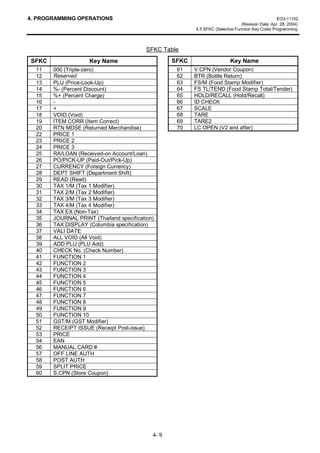
                                          SFKC Table
SFKC                Key Name                       SFKC                    Key Name
  11   000 (Triple-zero)                            61    V.CPN (Vendor Coupon)
  12   Reserved                                     62    BTR (Bottle Return)
  13   PLU (Price-Look-Up)                          63    FS/M (Food Stamp Modifier)
  14   %- (Percent Discount)                        64    FS TL/TEND (Food Stamp Total/Tender)
  15   %+ (Percent Charge)                          65    HOLD/RECALL (Hold/Recall)
  16   -                                            66    ID CHECK
  17   +                                            67    SCALE
  18   VOID (Void)                                  68    TARE
  19   ITEM CORR (Item Correct)                     69    TARE2
  20   RTN MDSE (Returned Merchandise)              70    LC OPEN (V2 and after)
  22   PRICE 1
  23   PRICE 2
  24   PRICE 3
  25   RA/LOAN (Received-on Account/Loan)
  26   PO/PICK-UP (Paid-Out/Pick-Up)
  27   CURRENCY (Foreign Currency)
  28   DEPT SHIFT (Department Shift)
  29   READ (Read)
  30   TAX 1/M (Tax 1 Modifier)
  31   TAX 2/M (Tax 2 Modifier)
  32   TAX 3/M (Tax 3 Modifier)
  33   TAX 4/M (Tax 4 Modifier)
  34   TAX EX (Non-Tax)
  35   JOURNAL PRINT (Thailand specification)
  36   TAX DISPLAY (Columbia specification)
  37   VALI DATE
  38   ALL VOID (All Void)
  39   ADD PLU (PLU Add)
  40   CHECK No. (Check Number)
  41   FUNCTION 1
  42   FUNCTION 2
  43   FUNCTION 3
  44   FUNCTION 4
  45   FUNCTION 5
  46   FUNCTION 6
  47   FUNCTION 7
  48   FUNCTION 8
  49   FUNCTION 9
  50   FUNCTION 10
  51   GST/M (GST Modifier)
  52   RECEIPT ISSUE (Receipt Post-issue)
  53   PRICE
  54   EAN
  56   MANUAL CARD #
  57   OFF LINE AUTH
  58   POST AUTH
  59   SPLIT PRICE
  60   S.CPN (Store Coupon)


                                            4- 9
4. PROGRAMMING OPERATIONS                                                                                                                               EO3-11102

                                                                                                          4.5 SFKC (Selective Function Key Code) Programming


                          6                                     
  Map code                        !     )
                                  !     )                            NOTES: 1. FCxx: Function Key
                                  !     )                                      DPxx: Department Key
                                  !     )
                                  !     )                                      PLU:     PLU Preset-Code Key
                                  !     )                                      TDxx: Media Tender Key
                                  !     )                                   2. For the Keys not described in the SFKC
                                  !     )                                      Table ([LOG RECEIPT], [#/NS], [RF],
                                  !     )
                                  !     )                                      [JF], [C], [X/TIME], [ST], [AT/TL], [.], [0],
                                  !     )                                      [00], and [1] to [9]), they cannot be
                                  !     '3                                      programmed.
                                  !     '3
                                  !     '3
                                  !     '3
                                  !     '3
                                  !     '3
                                  !     '3
                                  !     '3
                                  !     '3
                                  !     '3
                                  !     '3
                                  !     '3
                                  !     '3
                                  !     '3
                                  !     3/8
                                  !     7'
                                  !     7'
                                  !     7'

                                                            70


                                                  Standard Keyboard (Auto-set by RAM Clear)
                                                         --- Normal Type Keyboard ---
    LOG                  HOLD/
  RECEIPT   BTR         RECALL         #/NS           RF          JF                     DP 1              DP 6               DP 11   DP 16    DP 21      DP 26
        0           1          2              3                               4             5   6             7      8            9       10       11         12
  RECEIPT    ALL
   ISSUE    VOID          PO                      C              X/TIME                  DP 2              DP 7               DP 12   DP 17    DP 22      DP 27
       13        14             15          16             17         18      19           20   21           22      23          24       25       26         27


    CUR      (-)          R/A           7             8            9                     DP 3              DP 8               DP 13   DP 18    DP 23      DP 28
       28          29           30          31             32            33   34           35   36           37      38          39       40       41         42
    RTN
   MDSE      %-         TAX/EX          4             5            6                     DP 4              DP 9               DP 14   DP 19    DP 24      DP 29
       43          44        45             46             47            48   49           50   51           52      53          54       55       56         57


   VOID     READ        TX1/M           1             2            3                     DP 5             DP 10               DP 15   DP 20    DP 25      DP 30
       58       59          60              61             62            63   64           65   66           67      68          69       70       71         72
   ITEM
   CORR     PLU         TX2/M           0             00             .             ST             AT/TL               CHECK              CHARGE            CPN
       73          74       75              76             77            78   79          80    81           82      83         84       85        86         87


NOTE: The numbers at the bottom of each key are shown as map code.


                                                                                  4-10
4. PROGRAMMING OPERATIONS                                                                       EO3-11102

                                                                                4.6 TAX System Programming


4.6 TAX System Programming
TAX System for the ECR can be set in this submode.
  CONDITION        After all Z  GTZ reports, or after RAM Clear, DATA Clear or STATUS Clear

 OPERATION          Control Lock: BLIND

        30 [#/NS]            1              |TAX System|              [AT/TL]                 [#/NS]
                           Fixed            1 digit (1 to 4)
                                           1: US Break (Default)
                                           2: Canadian (General)
                                           3: Canadian (Tax on tax)
                                           4: Canadian (Ontario)


NOTES: 1. After the RAM Clear, the TAX System is set to US Break as standard.
       2. By performing this programming, Tax Table Programming (Submode 12) will be reset.


Example)
To set the TAX System as follows;
    TAX System:           US Break

Control Lock: BLIND
         30 [#/NS]
                                                                                       
         11 [AT/TL]
              [#/NS]
                                                                        6                    
                                                                        7$; %$/$1                   

                                                                                          70


                                             4-11
4. PROGRAMMING OPERATIONS                                                                          EO3-11102

                                                                                          4.7 EFT Programming


4.7 EFT Programming
For EFT function, the following 4 settings should be programmed and the following 5 operations can be
performed here. Before performing 4.7.2 Dial In Load Command Sending, 4.7.6 Dial Out Load
Command Sending, 4.7.7 Network List Output, 4.7.8 Local Total Report Output, and 4.7.9 Clear
Current Batch, you should make sure that the EFT terminal is connected and that the EFT setting had
been done in 4.35 COM Port Setting (Submode 41).

4.7.1 PIN Pad Selection
The use of PIN Pad and the type can be selected here.
  CONDITION        Anytime outside a sale

 OPERATION          Control Lock: BLIND

  40 [#/NS]          |Type of PIN Pad|           [AT/TL]         [#/NS]
                      1 digit (0, 3, or 4)                                                 
                      0: Not used
                      3: DUKPT Debit
                      4: NOVA Debit (Default)
                                                                             6                   
                                                                             3,1 3$'                      

                                                                                              70


4.7.2 Dial In Load Command Sending
The Dial In Load Command will be sent to the EFT terminal by the operation below. Before performing
this operation, you should make sure that the EFT terminal is connected and that the EFT setting had
been done in 4.35 COM Port Setting (Submode 41).
   CONDITION         Anytime outside a sale

 OPERATION          Control Lock: BLIND

  41 [#/NS]             [AT/TL]


4.7.3 Telephone Number Setting
  CONDITION         Anytime outside a sale

 OPERATION          Control Lock: BLIND

  42 [#/NS]          |Telephone Number|                [AT/TL]      [#/NS]
                         Max. 25 digits
                       (See NOTE below.)


NOTE:     The [0] to [9], [00], and [.] keys only can be used.                             
          The value “0” is set as a default.
                                                                             6                   
                                                                             3+21(            

                                                                                              70


                                                4-12
4. PROGRAMMING OPERATIONS                                                                          EO3-11102

                                                                                          4.7 EFT Programming


4.7.4 Host ID Number Setting
  CONDITION        Anytime outside a sale

 OPERATION         Control Lock: BLIND

  43 [#/NS]         |ID Number|                 [AT/TL]        [#/NS]                      
                     8 digits fixed
                (00000000 to 99999999)                                       6                   
NOTE: The value “00000000” is set as a default.                              +267 ,'             

                                                                                              70


4.7.5 Dialing System Setting
  CONDITION        Anytime outside a sale

 OPERATION         Control Lock: BLIND

  44 [#/NS]         |Dialling System|                [AT/TL]        [#/NS]                 
                       1 digit (0 or 1)
                   1: Pulse dialing (Default)
                   2: Tone dialing
                                                                             6                   
                                                                             ',$/,1*                      

                                                                                              70


4.7.6 Dial Out Load Command Sending
By this operation, the Telephone Number, Host ID Number and Dialing System programmed will be
sent to the EFT terminal. Before performing this operation, you should make sure that the EFT
terminal is connected and that the EFT setting had been done in 4.35 COM Port Setting (Submode
41).
   CONDITION         Anytime outside a sale

 OPERATION         Control Lock: BLIND

  45 [#/NS]             [AT/TL]                   [#/NS]


                                                    4-13
4. PROGRAMMING OPERATIONS                                                                                EO3-11102

                                                                                                4.7 EFT Programming


4.7.7 Network List Output
By this operation, list of network information stored in the EFT terminal (Data Tran) will be printed out
from the printer provided for the ECR. In this list, functions programmed in the EFT terminal,
allowance for the functions (ON/OFF status), and EFT terminal version will be printed. Before
performing this operation, you should make sure that the EFT terminal is connected and that the EFT
setting had been done in 4.35 COM Port Setting (Submode 41).
   CONDITION          Anytime outside a sale

 OPERATION          Control Lock: BLIND                                                          


  46 [#/NS]              [AT/TL]               [#/NS]
                                                          EFT terminal Version
                                                                                   6                   
                                                         Functions programmed      +. 96 1'2  9HU 
                                                            in the EFT terminal    21 21 21 2))

                                                     Allowance for the functions                    70
                                                              (ON/OFF status)


4.7.8 Local Total Report Output
By this operation, sales information stored in the EFT terminal will be printed out from the printer
provided for the ECR. Before performing this operation, you should make sure that the EFT terminal is
connected and that the EFT setting had been done in 4.35 COM Port Setting (Submode 41).
  CONDITION         Anytime outside a sale

 OPERATION          Control Lock: BLIND
                                                                                                 
  47 [#/NS]              [AT/TL]
                                                                                   6                   
                                                             Amount, Count           
                                                                                     
                       2: AMEX            7: Diner’s Club or Carte Blanche           
                       3: VISA            8: JCB                                     
                       4: Master Card     9: Debit                                   
                       5: Discover        99: Total for all card types               
                       6: Private Label


                                                                                                    70


4.7.9 Clear Current Batch
By this operation, reported information for EFT will be cleared. Before performing this operation, you
should make sure that the EFT terminal is connected and that the EFT setting had been done in 4.35
COM Port Setting (Submode 41).
  CONDITION          Anytime outside a sale
                                                                                                 
 OPERATION          Control Lock: BLIND
                                                                                   6                   
  48 [#/NS]              [AT/TL]
                                                                                   ()7 5(3257 /($5

                                                                                                    70


                                                  4-14
4. PROGRAMMING OPERATIONS                                                                                          EO3-11102

                                                             4.8 Store Message and Commercial Message Programming (Submode 1)


4.8 Store Message and Commercial Message Programming (Submode 1)
Store Message and Commercial Message to be printed as receipt header can be programmed here.
   CONDITION      Anytime outside a sale

 OPERATION           Control Lock: SET


         01 [#/NS]             |Line No.| [#/NS]                         Repeat for other lines.
                           2 digits (01 to 07)

                                                                 (For sequentially programming lines,
                                                                 the Line Number specification can be
                                                                 skipped.)


                               Character Entries                                [AT/TL]                       [#/NS]
                            Max. 24 characters/line                             Complete this                 Complete this
                            (See 4.2 Character Entry                            line.                         programming
                            Method.)                                                                          operation.


NOTES:     1. For each line, up to 24 regular-sized characters or 12 double-sized characters can be
              entered. Also a combination of both types can be entered.
           2. If incorrect characters are programmed, depress the [C] key to clear all characters on a
              line and then re-enter characters from the beginning, or end the line with the [AT/TL]
              key and reprogram the entire line. The new data will be active.
           3. When all the lines have been programmed, do a check by issuing a receipt. Only the
              lines with errors requires to be re-programmed. Other lines will not be affected.
           4. When blanks are entered for the whole one line, it causes one line space.

Example)
To program the following Store Message and Commercial Message
(under the Store Message Print feature)

                     T     E        C                S           T       O      R       E
                                                                                                         Line No. 1
                         1 3 4 3           P E A C H                     D R I      V E
                                                                                                         Line No. 2
                           P H O N E :                   8 7         -   6 4 3 7
                                                                                                         Line No. 3

                                                                                                         Line No. 4

          O p e n               8   :   0 0 a m              t       o     7    :   0 0 p m              Line No. 5

          C l   o s      e d    :       e v      e   r   y           W e d n e s            d a y        Line No. 6

                                                                                                         Line No. 7


                                                         4-15
4. PROGRAMMING OPERATIONS                                                                                                         EO3-11102

                                                                       4.8 Store Message and Commercial Message Programming (Submode 1)


Key Operation: Control Lock: SET, Enter 01 and depress the [#/NS] key.

 01 [#/NS] (Line No. 1)                                                                                     [2] [0]    (Space)
                                  [2] [0]    (Space)                                                        [3] [7]    (7)
                                  [2] [0]    (Space)                                                        [3] [a]    (:)
                                  [2] [0]    (Space)                                                        [3] [0]    (0)
                          [f] [f] [5] [4]    (T)                                                            [3] [0]    (0)
                          [f] [f] [4] [5]    (E)                                                            [7] [0]    (p)
                          [f] [f] [4] [3]    (C)                                                            [6] [d]    (m)
                                  [2] [0]    (Space)                                                      [AT/TL]      (to complete Line 5)
                                  [2] [0]    (Space)                         06 [#/NS] (Line No. 6)
                          [f] [f] [5] [3]    (S)                                                            [4] [3]    (C)
                          [f] [f] [5] [4]    (T)                                                            [6] [c]    (l)
                           [f] [f] [4] [f]   (O)                                                             [6] [f]   (o)
                          [f] [f] [5] [2]    (R)                                                            [7] [3]    (s)
                          [f] [f] [4] [5]    (E)                                                            [6] [5]    (e)
                                [AT/TL]      (to complete Line 1)                                           [6] [4]    (d)
 02 [#/NS] (Line No. 2)                                                                                     [3] [a]    (:)
                                 [2] [0]     (Space)                                                        [2] [0]    (Space)
                                 [2] [0]     (Space)                                                        [6] [5]    (e)
                                 [2] [0]     (Space)                                                        [7] [6]    (v)
                                 [2] [0]     (Space)                                                        [6] [5]    (e)
                                 [3] [1]     (1)                                                            [7] [2]    (r)
                                 [3] [3]     (3)                                                            [7] [9]    (y)
                                 [3] [4]     (4)                                                            [2] [0]    (Space)
                                 [3] [3]     (3)                                                            [5] [7]    (W)
                                 [2] [0]     (Space)                                                        [6] [5]    (e)
                                 [5] [0]     (P)                                                            [6] [4]    (d)
                                 [4] [5]     (E)                                                            [6] [e]    (n)
                                 [4] [1]     (A)                                                            [6] [5]    (e)
                                 [4] [3]     (C)                                                            [7] [3]    (s)
                                 [4] [8]     (H)                                                            [6] [4]    (d)
                                 [2] [0]     (Space)                                                        [6] [1]    (a)
                                 [4] [4]     (D)                                                            [7] [9]    (y)
                                 [5] [2]     (R)                                                          [AT/TL]      (to complete Line 6)
                                 [4] [9]     (I)                             07 [#/NS] (Line No. 7)
                                 [5] [6]     (V)                                                            [2] [0]    (Spaces of
                                 [4] [5]     (E)                                                                        24 characters)
                               [AT/TL]       (to complete Line 2)                                           [2] [0]
 03 [#/NS] (Line No. 3)                                                                                   [AT/TL]      (to complete Line 7)
                                 [2] [0]     (Space)                                                       [#/NS]      (to complete this
                                 [2] [0]     (Space)                                                                   submode)
                                 [2] [0]     (Space)
                                 [2] [0]     (Space)
                                 [2] [0]     (Space)
                                 [5] [0]     (P)
                                 [4] [8]     (H)
                                  [4] [f]    (O)
                                 [4] [e]     (N)
                                                                                                                   
                                 [4] [5]     (E)
                                 [3] [a]
                                 [2] [0]
                                             (:)
                                             (Space)                                              35*                    
                                 [3] [8]     (8)
                                                                                                  
                                 [3] [7]
                                 [2] [d]
                                             (7)
                                             (-)                                                      7( 6725(
                                 [3] [6]     (6)                                                  
                                 [3] [4]     (4)                                                       3($+ '5,9(
                                 [3] [3]     (3)                                                  
                                 [3] [7]     (7)                                                        3+21( 
                               [AT/TL]       (to complete Line 3)                                 
 05 [#/NS] (Line No. 5)                                                                           2SHQ DP WR SP
                                  [4] [f]    (O)                                                  
                                 [7] [0]     (p)                                                  ORVHG HYHU :HGQHVGD
                                 [6] [5]     (e)                                                  
                                 [6] [e]     (n)
                                 [2] [0]     (Space)
                                 [2] [0]     (Space)
                                 [3] [8]     (8)
                                 [3] [a]     (:)                                                                      70
                                 [3] [0]     (0)
                                 [3] [0]     (0)
                                 [6] [1]     (a)
                                 [6] [d]     (m)
                                 [2] [0]     (Space)
                                 [7] [4]     (t)
                                  [6] [f]    (o)

                                                                    4-16
4. PROGRAMMING OPERATIONS                                                                                        EO3-11102
                                                                                              (Revision Date: Apr. 28, 2004)
                                                                       4.9 Cashier Code and Name Programming (Submode 2)


4.9 Cashier Code and Name Programming (Submode 2)
  CONDITION       Anytime outside a sale

 OPERATION        Control Lock: SET
                                                                                           Repeat for other cashiers.

      02 [#/NS]                   |Cashier Code| [#/NS]
                                  2 digits (01 to 40)


                  01: Cashier Name
                                  Character entry                                                 [AT/TL]
                                  Max. 18 characters
                                  (See NOTE 2 on the next page.)


                  02: Cashier Pass Code
                                  |Pass Code|                                                     [AT/TL]
                                  3 digits (000 to 999)
                                  (See NOTE 3 on the next page.)


                  03: High Amount Limit/Low Amount Limit
                                  |HALO||LALO|*                                                   [AT/TL]
                                   1 digit   1 digit


                  04: Commission Rate
                                  |Commission Rate|                                               [AT/TL]
                                    0.00 to 99.99%
                                    (Use the [.] key when a decimal
                                    point is contained in the rate.)


                  05: Calculating the Commission Amount
                                  |Commission Amount|                                             [AT/TL]
                                    1 digit (0 fixed)
                                    0: Commission Amount = (Net Sale without Tax) x (Commission Rate)


                  06: Cashier prohibited item
                                  |Security Code 1| |Security Code 2|                             [AT/TL]
                                    2 digits (Enter the codes in numeric values.)
                                    (Refer to Cashier Security Code Table**.)


                  07: Cashier Status
                                  |Cashier Status|                                                [AT/TL]
                                    1 digit (0 to 2)
                                    0: Cashier for sale entries
                                    1: Supervisor (See NOTE 4 on the next page.)
                                    2: Cashier for training entries (See NOTE 5 on the next page.)

                      [#/NS]
                       To complete this programming operation.


                                                       4-17
4. PROGRAMMING OPERATIONS                                                                               EO3-11102
                                                                                     (Revision Date: Apr. 28, 2004)
                                                              4.9 Cashier Code and Name Programming (Submode 2)


*HALO/LALO     (This setting will be effective as amount limit at the payment, Received-on-Account, or
               Paid-Out.)
  HALO (High Amount to be Locked Out)                 LALO (Low Amount to be Locked Out)
     0: No limit                                           0: No limit
     1: 1 digit (0 to 9)                                   1: 1 digit (1 to 9999999)
     2: 2 digits (0 to 99)                                 2: 2 digits (10 to 9999999)
     3: 3 digits (0 to 999)                                3: 3 digits (100 to 9999999)
     4: 4 digits (0 to 9999)                               4: 4 digits (1000 to 9999999)
     5: 5 digits (0 to 99999)                              5: 5 digits (10000 to 9999999)
     6: 6 digits (0 to 999999)                             6: 6 digits (100000 to 9999999)
     7: 7 digits (0 to 9999999)                            7: 7 digits (1000000 to 9999999)

**Cashier Security Code Table
   Security Code Table 1
                                                        0     1      2       3       4       5        6       7
  Prohibition of Returned Merchandise and Bottle
                                                             O               O               O               O
  Return Operation
  Prohibition of Amount Discount, Amount Charge,
                                                                     O       O                       O       O
  Percent Discount and Percent Charge Operation
  Prohibition of Negative PLU/Department Entry and
                                                                                     O       O       O       O
  Correct Operation (NOTE 6)

  Security Code Table 2
                                                        0     1      2       3       4       5        6       7
  Prohibition of Tax Exemption, Vendor Coupon and
                                                             O               O               O               O
  Store Coupon Operation
  Prohibition of Finalizing Operation when the total
                                                                     O       O                       O       O
  is less than 0.
  Prohibition of Paid-Out Operation                                                  O       O       O       O


NOTES:    1. In each item setting, depressing the [AT/TL] key without data entry skips to the next
             item setting.
          2. Entering 2 digits of numeric code provides an alphanumeric character of Cashier Name.
             Therefore, odd number of numeric digit entry will cause an error. When less than 36
             digits of numeric data are entered, this ECR uses space code entry. If a Cashier Name
             includes spaces at the beginning, entering space code is required at the beginning of
             data entry. For the Cashier name, up to 18 regular-sized or 9 double-sized characters
             can be entered. Also a combination of both types can be entered.
          3. If you enter “000”, this ECR is released from the Pass Code system.
          4. When “1: Supervisor” is set as cashier status, the cashier can always interrupt other
             cashiers. When a cashier requires to perform prohibited operations, the cashier
             programmed as Supervisor can release the prohibition by SIGN-IN, resulting to perform
             any operations. (Before V2)
             When interrupting another cashier’s operation, the Supervisor can perform only one
             operation just after releasing the prohibition. After that, the prohibitive condition is
             restored. (V2 and after)
          5. After selecting Cashier for Training Entry, a cashier can operate the same transaction
             entries as those in the REG mode. The data in the training mode is not processed,
             therefore, not affect any actual sales data in business. “TRAINING” as header will be
             printed on the receipt.
          6. After “Prohibition of Correct Operation” is set, Void and All Void operations will be
             invalid.

                                              4-18
4. PROGRAMMING OPERATIONS                                                                                 EO3-11102

                                                                   4.9 Cashier Code and Name Programming (Submode 2)


Example)
To program the following cashier data
    Cashier Code:               01
    Cashier Name:               Jones
    Pass Code:                  111
    HALO/LALO:                  No limit/No limit
    Commission Rate:            0.5%
    Commission Amount:          (Net sale without Tax) x (Commission Rate)
    Cashier prohibited item:    Paid-Out operation
    Cashier Status:             Cashier for sale entries


Key Operation: Control Lock: SET, Enter 02 and depress the [#/NS] key.

               [0] [1] [#/NS]      (Cashier Code)
                        [4] [a]    (J)
                         [4] [f]   (O)                                                         
                        [4] [e]    (N)   (01: Cashier Name)
                        [4] [5]
                        [5] [3]
                                   (E)                                          35*                  
                                   (S)
                      [AT/TL]                                                    
         [1] [1] [1] [AT/TL]                                                              -21(6
                                   (02: Cashier Pass Code)                                              
             [0] [0] [AT/TL]       (03: HALO/LALO)                                                       
          [0] [.] [5] [AT/TL]      (04: Commission Rate)                                               
                  [0] [AT/TL]      (05: Commission Amount)                                                
                                                                                                         
             [0] [4] [AT/TL]       (06: Cashier prohibited item)                                          
                  [0] [AT/TL]      (07: Cashier Status)
                       [#/NS]      (Complete this submode.)                                       70


                                                 4-19
4. PROGRAMMING OPERATIONS                                                                                          EO3-11102
                                                                                                (Revision Date: Feb. 28, 2003)
                                                                              4.10 Department Table Programming (Submode 3)


4.10 Department Table Programming (Submode 3)
  CONDITION       To change the positive/negative, Hash Department and Age Limit statuses:
                       After Department Reset
                  To change any other programmed data or to newly program departments:
                       Anytime outside a sale
 OPERATION        Control Lock: SET
                                                                                         Repeat for other departments.

      03 [#/NS]                      |Department Code| [#/NS]
                                      2 digits (01 to 99)


                  01: Department Name
                                     Character entry                                                [AT/TL]
                                     Max. 18 characters
                                     (See NOTE 2 on the next page.)


                  02: Preset Price
                                     |Preset Price|                                                 [AT/TL]
                                     Max. 8 digits (0 to 99999999)
                                     (See NOTE 8 on the next page.)

                  03: Tax Status
                                     |Tax Status Code|                                              [AT/TL]
                                        Max. 5 digits
                                        (See NOTE 3 on the next page.)


                  04: Department Group Number
                                     |Group Number|                                                 [AT/TL]
                                     2 digits (01 to 09)


                  05: High Amount Limit digit/Low Amount Limit digit
                                     |HALO||LALO|                                                   [AT/TL]
                                      1 digit 1 digit
                                      (See NOTE 4 on the next page.)


                  06: Status 1 Code/Age Limit Code
                                     |Status 1 Code| |Age Limit Code|                               [AT/TL]
                                     1 digit                1 digit (0 to 4)
                   (See NOTE 5 on the next page.)           (See NOTE 6 on the next page.)
                                                            0: None (Default)   3: Age Limit Code 3
                                                            1: Age Limit Code 1 4: Age Limit Code 4
                                                            2: Age Limit Code 2

                  07: Status 2 Code/Scale Status Code
                                     |Status 2 Code| |Scale Status Code|                            [AT/TL]
                                         1 digit             1 digit
                                      (See NOTE 7 on the next page.)


                      [#/NS]
                       To complete this programming operation.


                                                      4-20
4. PROGRAMMING OPERATIONS                                                                                     EO3-11102
                                                                                           (Revision Date: Apr. 28, 2004)
                                                                         4.10 Department Table Programming (Submode 3)


NOTES:   1. In each item setting, depressing the [AT/TL] key without data entry skips to the next
            item setting.
         2. Entering 2 digits of numeric code provides an alphanumeric character of Department
            Name. Therefore, odd number of numeric digit entry will cause an error. When less
            than 36 digits of numeric data are entered, this ECR uses space code entry. If a
            Department Name includes spaces at the beginning, entering space code is required at
            the beginning of data entry. For the Department name, up to 18 regular-sized or 9
            double-sized characters can be entered. Also a combination of both types can be
            entered.
         3. Enter a maximum of 5 digits by combining 0 to 5.
               0: Non-taxable
               1: Tax 1 (Tax 1 taxable)
               2: Tax 2 (Tax 2 taxable)
               3: Tax 3 (Tax 3 taxable) Enter a maximum of 5 digits by combining 0 to 5.
               4: Tax 4 (Tax 4 taxable)
               5: Food stamp
         4. HALO/LALO
            HALO (High Amount to be Locked Out)       LALO (Low Amount to be Locked Out)
               0: No limit                              0: No limit
               1: 1 digit (0 to 9)                      1: 1 digit (1 to 9999999)
               2: 2 digits (0 to 99)                    2: 2 digits (10 to 9999999)
               3: 3 digits (0 to 999)                   3: 3 digits (100 to 9999999)
               4: 4 digits (0 to 9999)                  4: 4 digits (1000 to 9999999)
               5: 5 digits (0 to 99999)                 5: 5 digits (10000 to 9999999)
               6: 6 digits (0 to 999999)                6: 6 digits (100000 to 9999999)
               7: 7 digits (0 to 9999999)               7: 7 digits (1000000 to 9999999)
         5. Status 1 Code Table (Default: 0)
              Item                             Code    0      1      2     3    4    5   6    7
              Single Item                                    O             O         O        O
            Negative Department                                              O      O                       O      O
            Hash Department                                                                 O       O       O      O
         6. Age Limit Code can be programmed in 4.44 Age Limit Setting (Submode 55).
         7. Status 2 Code Table (Default: 0)
             Item                            Code   0    1     2     3    4   5    6                               7
             Store Coupon                                O           O        O                                    O
            Gasoline Status                                                  O      O                       O      O
            Split Package Pricing is available. (V2 and after)                              O
           Scale Status Code Table (Default: 0)
            Item                                       Code      0   1       2      3       4       5       6      7
            Scale Status                                             O              O               O              O
            Tare 2 (Manual Tare) Entry Compulsion                                   O                              O
            Food Stamp Symbol is printed. (NOTE 9)                                          O       O       O      O
         8. Be sure to enter the amount less than cent when programming the preset price of
            gasoline only. (Up to $999.999 can be entered.)
         9. This status is effective only when Canadian Tax System is set.


                                                   4-21
4. PROGRAMMING OPERATIONS                                                                         EO3-11102

                                                               4.10 Department Table Programming (Submode 3)


Example)
To program the following department data
  Department Code:                    01
  Department Name:                    VEGETABLE
  Preset Price:                       Open
  Tax Status:                         Tax 1 taxable and Foot Stamp
  Department Group No.:               01
  HALO/LALO:                          No limit/No limit
  Status 1 Code/Age Limit Code:       None/None
  Status 2 Code/Scale Status Code: None/None


Key Operation: Control Lock: SET, Enter 03 and depress the [#/NS] key.

              [0] [1] [#/NS]    (Department Code)
                      [5] [6]   (V)
                      [4] [5]   (E)
                      [4] [7]   (G)                                                       
                      [4] [5]   (E)
                      [5] [4]
                      [4] [1]
                                (T)
                                (A)
                                      (01: Department Name)                35*                  
                      [4] [2]   (B)                                         
                      [4] [c]                                                       9(*(7$%/(
                                (L)                                                                 
                      [4] [5]   (E)                                                                 
                    [AT/TL]                                                                         
                    [AT/TL]     (02: Preset Price (open))                                           
                                                                                                    
            [1] [5] [AT/TL]     (03: Tax Status)
            [0] [1] [AT/TL]     (04: Department Group Number)                                70
            [0] [0] [AT/TL]     (05: HALO/LALO)
            [0] [0] [AT/TL]     (06: Status 1 Code/Age Limit Code)
            [0] [0] [AT/TL]     (07: Status 2 Code/Scale Status Code)
                      [#/NS]    (Complete this submode.)


                                             4-22
4. PROGRAMMING OPERATIONS                                                                                                           EO3-11102

                                                                                                       4.11 PLU Table Programming (Submode 4)


4.11 PLU Table Programming (Submode 4)
 CONDITION       To program new PLUs or to change any programmed contents of PLUs except the
                 following case: Anytime outside a sale
                 To change the linked Department of a PLU with sales data not zero: After PLU Reset
OPERATION        Control Lock: SET
                                                                                                              Repeat for other PLUs.

      04 [#/NS]                     |PLU Code| [#/NS]
                                       Max. 14 digits (Free code)
                                       (See NOTE 2 on the next page.)
                                    |Source Code or In-Store Code| [X/TIME]
                                       (See NOTE 3 on the next page.)
                                    Barcode Scanning

                  01: PLU Name
                                    Character entry                                                                   [AT/TL]
                                     Max. 18 characters
                                     (See NOTE 4 on the next page.)

                 02: Preset Price/Unit Price of Whole Package for HI-CONE PLU                  *1
                                    |Preset Price| or |Unit Price of Whole Package|                                   [AT/TL]
                                      Max. 8 digits                    Max. 8 digits
                                    (0 to 99999999)                  (0 to 99999999)

                 03: 2nd Preset Price/Unit Price of Indiv. Split Package                                     *1
                                    |2nd Preset Price| or |Unit Price of Indiv. Split Package|                        [AT/TL]
                                          Max. 8 digits                        Max. 8 digits
                                        (0 to 99999999)                      (0 to 99999999)
                 04: 3rd Preset Price/Whole Package Quantity for HI-CONE PLU
                                                                                                  *1
                                    |3rd Preset Price| or |Whole Package Quantity|                                    [AT/TL]
                                         Max. 8 digits                    Max. 8 digits
                                       (0 to 99999999)                  (0 to 99999999)
                 05: Tax Status
                                    |Tax Status|                                                                      [AT/TL]
                                       Max. 5 digits
                                       (See NOTE 5 on the next page.)
                 06: PLU Group Number
                                    |PLU Group Number|                                                                [AT/TL]
                                       2 digits (01 to 99)
                 07: Link Department
                                    |Department Code|                                                                 [AT/TL]
                                       2 digits (01 to 99)
                                       (See NOTE 6 on the next page.)

                 08: Status Code/Scale Status Code           *1,*2
                                    |Status Code| |Scale Status Code|                                                 [AT/TL]
                                         1 digit           1 digit
                                         (See NOTE 7 on the next page.)

                 09: High Amount Limit digit/Low Amount Limit digit
                                    |HALO| |LALO|                                                                     [AT/TL]
                                     1 digit 1 digit
                                     (See NOTE 8 on the next page.)

                 10: Link PLU No. 1/M  M Group Number
                                                                                       *2
                                    |Link PLU No. 1| or |M  M Group No.|                                             [AT/TL]
                                    2 digits (01 to 50)         2 digits (01 to 99)
                        (See NOTE 9 on the next page.)          (See NOTE 10 on the next page.)
                                                                                                                                             A
      *1: This setting is exclusive to the PLU allocated HI-CONE PLU in the Status                            (Continued on the next page)
          Code setting.
      *2: This setting is exclusive to the PLU allocated M  M Table in the Status Code
          setting.


                                                                 4-23
4. PROGRAMMING OPERATIONS                                                                                                  EO3-11102

                                                                                             4.11 PLU Table Programming (Submode 4)


                                                                                                                                  A
                                                                                             (Continued from the previous page)


               11: Link PLU No. 2
                                   |Link PLU No. 2|                                                         [AT/TL]
                                    2 digits (01 to 50)
                                    (See NOTE 9 on the next page.)
              12: Link PLU No. 3
                                   |Link PLU No. 3|                                                         [AT/TL]
                                    2 digits (01 to 50)
                                    (See NOTE 9 on the next page.)
              13: PLU Stock Quantity
                                   |PLU Stock Quantity|                                                     [AT/TL]
                                 0.001 to 9999.999
                                 (Use the [.] key when a decimal point is contained in the rate.)
              14: Tare Table Number
                                   |Tare Table No.|                                                         [AT/TL]
                                    1 digit (0 to 9)
                                    0: No Tare Table
                                    (See NOTE11.)
              15: Unit Weight Code
                                   |Unit Weight Code|                                                       [AT/TL]
                                    0 to 11 (0: Following the unit weight in the system)
                                    (See NOTE12.)


                                   [#/NS] (To complete this programming operation.)


NOTES:   1.   In each item setting, depressing the [AT/TL] key without data entry skips to the next
              item setting.
         2.   Up to 24,000 PLUs are programmable. (The Number of PLU varies depending on the
              capacity and allocation of the RAM.)
         3.   Before using the In-store Bar Code, you should perform the setting in 4.36 In-Store
              Marking Bar Code Programming (Submode 42).
              In case the following conditions, pressing the [X/TIME] key adds the Check Digit value
              to the code, resulting that the PLU No. will be generated automatically.
                • In case 7-digit-or-less values are entered.
                • In case 11-digit or 12 digit values are entered.
         4.   Entering 2 digits of numeric code provides an alphanumeric character of PLU Name.
              Therefore, odd number of numeric digit entry will cause an error. When less than 36
              digits of numeric data are entered, this ECR uses space code entry. If a PLU Name
              includes spaces at the beginning, entering space code is required at the beginning of
              data entry. For the PLU name, up to 18 regular-sized or 9 double-sized characters can
              be entered. Also a combination of both types can be entered.
         5.   Enter a maximum of 5 digits by combining 0 to 5.
              0: Non-taxable
              1: Tax 1 (Tax 1 taxable)
              2: Tax 2 (Tax 2 taxable)
              3: Tax 3 (Tax 3 taxable) Enter a maximum of 5 digits by combining 0 to 5.
              4: Tax 4 (Tax 4 taxable)
              5: Food stamp
         6.   Enter 2-digit of Department Code to which the PLU is linked. When the PLU is newly
              programmed, this entry is compulsory. (This entry can be skipped, however, an error
              occurs when this programming is completed. Therefore, this entry is compulsory.)
              When linked to HASH Department, a PLU will be HASH PLU. When a linked
              department is processed by single item, a PLU is also processed in the same way.

                                                           4-24
4. PROGRAMMING OPERATIONS                                                                                      EO3-11102
                                                                                          (Revision Date: Feb. 28, 2003)
                                                                                4.11 PLU Table Programming (Submode 4)


        7.   Status Code and Scale Status Code are as the tables below show.
             Status Code Table (Default: 0)
              Item                                     Code   0         1   2        3      4       5      6       7
              Negative                                                  O            O              O              O
              HI-CONE Status                                                O        O                     O       O
              M  M Table                                                                                  O       O
             By HI-CONE Status setting, a PLU will be programmed for commodities in a package.
             Scale Status Code Table (Default: 0)
              Item                                     Code   0         1   2        3      4       5      6       7
              Scale Status                                              O            O              O              O
              Tare 2 (Manual Tare) Entry Compulsion                                  O                             O
              Food Stamp Symbol is printed. (NOTE 13)                                       O       O      O       O
        8.  HALO digit/LALO digit
              HALO (High Amount to be Locked Out) LALO (Low Amount to be Locked Out)
               0: No limit                              0: No limit
               1: 1 digit (0 to 9)                      1: 1 digit (1 to 9999999)
               2: 2 digits (0 to 99)                    2: 2 digits (10 to 9999999)
               3: 3 digits (0 to 999)                   3: 3 digits (100 to 9999999)
               4: 4 digits (0 to 9999)                  4: 4 digits (1000 to 9999999)
               5: 5 digits (0 to 99999)                 5: 5 digits (10000 to 9999999)
               6: 6 digits (0 to 999999)                6: 6 digits (100000 to 9999999)
               7: 7 digits (0 to 9999999)               7: 7 digits (1000000 to 9999999)
        9. “00” indicates that no Link PLU exists. This setting is applied to the PLUs without M 
            M Table setting. Up to 99 can be entered, however, the Numbers 51 to 99 indicate
            that no Link PLU exists.
        10. M  M Group
              Item                                     PLU        PLU1           PLU2             PLU3
              Whole Package Price                                 100              100             100
              Whole Package Quantity                               3                3                3
              Unit Price of Individual Split Package               40              40               40
            In case PLU1 to PLU3 are set in different M  M Groups respectively:
              1 [SPLIT PRICE] 1 [PLU] --- 40
              1 [SPLIT PRICE] 2 [PLU] --- 40     The amount total will be 120.
              1 [SPLIT PRICE] 3 [PLU] --- 40
            In case PLU1 to PLU3 are set in the same M  M Group:
              1 [SPLIT PRICE] 1 [PLU] --- 40     The amount total (whole package price) will be
              1 [SPLIT PRICE] 2 [PLU] --- 40     100 so that the unit price of individual split
              1 [SPLIT PRICE] 3 [PLU] --- 20     package of PLU3 is arranged automatically.
        11. The Tare Table can be programmed in 4.45 Tare Table Setting (Submode 56).


                                               4-25
4. PROGRAMMING OPERATIONS                                                                          EO3-11102
                                                                                (Revision Date: Apr. 28, 2004)
                                                                     4.11 PLU Table Programming (Submode 4)


           12. Unit Weight Code Table
               General Unit Weight Code     LB Unit     Kg Unit
                            1                 1 LB        1 Kg
                            2                 2 LB        2 Kg
                            3                 3 LB        3 Kg
                            4                 4 LB        4 Kg
                            5                 5 LB        5 Kg
                            6                 6 LB        6 Kg
                            7                 7 LB        7 Kg
                            8                 8 LB        8 Kg
                            9                 9 LB        9 Kg
                           10               1/2 LB       100 g
                           11               1/4 LB         ---
          13. This status is effective only when Canadian Tax System is set.
Example) To program the following PLU data
  PLU Code:                  01000000010101
  PLU Name:                  Tomato
  Preset Price:              1.00
  2nd Preset Price:          1.20
  3rd Preset Price:          1.40
  Tax Status:                Tax 1 taxable and Food Stamp
  PLU Group No.:             01
  Linked Dept. Code:         01
  Status Code/Scale Status Code:            Positive/None
  HALO/LALO:                 No limit/No limit
  Link PLU No. 1:            None
  Link PLU No. 2:            None
  Link PLU No. 3:            None
  Stock Quantity:            100.00
  Tare Table No.:            None
  Unit Weight Code:          Unit Weight in the system

Key Operation: Control Lock: SET, Enter 04 and depress the [#/NS] key.
    01000000010101 [#/NS]         (PLU Code)
                         [5] [4]                                                           
                                  (T)
                          [6] [f] (o)
                         [6] [d]  (m)                                      35*                   
                         [6] [1]  (a) (01: PLU Name)
                                                                           
                         [7] [4]  (t)                                         
                          [6] [f] (o)                                             7RPDWR
                       [AT/TL]                                                                    
                                                                                                  
           [1] [0] [0] [AT/TL]    (02: Preset Price)                                              
           [1] [2] [0] [AT/TL]    (03: 2nd Preset Price)                                            
           [1] [4] [0] [AT/TL]    (04: 3rd Preset Price)                                            
               [1] [5] [AT/TL]                                                                      
                                  (05: Tax Status)                                                  
               [0] [1] [AT/TL]    (06: PLU Group Number)                                            
               [0] [1] [AT/TL]    (07: Linked Dept. Code)                                           
               [0] [0] [AT/TL]    (08: Status Code/Scale Status Code)                               
                                                                                                    
               [0] [0] [AT/TL]    (09: HALO/LALO)                                              
               [0] [0] [AT/TL]    (10: Link PLU No. 1)                                               
               [0] [0] [AT/TL]    (11: Link PLU No. 2)                                              
               [0] [0] [AT/TL]    (12: Link PLU No. 3)
           [1] [0] [0] [AT/TL]    (13: Stock Quantity)                                        70
                   [0] [AT/TL]    (14: Tare Table Number)
                   [0] [AT/TL]    (15:Unit Weight Code)
                        [#/NS]    (Complete this submode.)

                                             4-26
4. PROGRAMMING OPERATIONS                                                                                 EO3-11102

                                                                          4.12 Time Setting or Adjustment (Submode 5)


Deletion
  CONDITION         After PLU reset

 OPERATION          Control Lock: SET
                                                                   Repeat for other PLUs.

     04 [#/NS]          [VOID]               |PLU Code| [#/NS]                                         [#/NS]
                                               Max. 14digits
                                             |Source Code or In-Store Code| [X/TIME]
                                             Barcode Scanning


Example) To delete PLU No. 01000000090101 (Coke Small-A) that was programmed.

Key Operation: Control Lock: SET, Enter 04 and depress the [#/NS] key.

                    [VOID]                                                                           
     01000000090101 [#/NS] (PLU Code)
                    [#/NS]                                                           35*                   
                                                                                      ∗∗∗∗∗∗ 3/8 '(/(7( ∗∗∗∗∗∗
                                                                                     
                                                                                        
                                                                                             RNH 6PDOO$

                                                                                                        70


4.12 Time Setting or Adjustment (Submode 5)
  CONDITION         Anytime outside a sale

  OPERATION         Control Lock: SET

        05 [#/NS]             |Hour| |Minute| [AT/TL]                  [#/NS]
                              (00 to 23) (00 to 59)


NOTE: If an hour value of more than 23 or a minute value of more than 59 is entered, an error occurs.

Example) To set time “1:15 p.m. (13:15)”.

Key Operation: Control Lock: SET, Enter 05 and depress the [#/NS] key.

        [1] [3] [1] [5] [AT/TL]
                                                                                                     
                         [#/NS]
                                                                                     35*                   
                                                                                                           

                                                                                                        70


                                                      4-27
4. PROGRAMMING OPERATIONS                                                                                      EO3-11102

                                                                               4.13 Date Setting or Adjustment (Submode 6)


4.13 Date Setting or Adjustment (Submode 6)
  CONDITION         Anytime outside a sale

 OPERATION          Control Lock: SET

        06 [#/NS]                |Day| |Month| |Year| [AT/TL]                        [#/NS]
                              (01 to 31) (01 to 12)   (00 to 99)


NOTE: The date entry order may be Month-Day-Year or Year-Month-Day instead of Day-Month-Year
      if so selected in 4.40 Date Format Setting.
      After RAM clear, ”Day-Month-Year” is set as a default.

Example) To set date “January 24, 2002”.

Key Operation: Control Lock: SET, Enter 06 and depress the [#/NS] key.
                                                                                                        
         [2] [4] [0] [1] [0] [2] [AT/TL]
                                  [#/NS]
                                                                                        35*                   
                                                                                                            

                                                                                                           70


4.14 Media Tender Key Setting (Submode 8)
Media Tender Keys and the High Amount Limit/Low Amount Limit in finalizing transactions by
tendering through each media key which is functioned by SFKC programming can be set in this
submode.
   CONDITION         Anytime outside a sale

 OPERATION            Control Lock: SET
                                                                               Repeat for other Media Tender Keys.

        08 [#/NS]                   |Media Tender key No.| [#/NS]
                                       2 digits (01 to 09)
                                       (01: CASH media is fixed., 02: CHECK media is fixed.)


                                    Character entry                                              [AT/TL]
                                    Max. 12 characters
                                    (See NOTE 1 on the next page.)


                                    |HALO| |LALO|                                                [AT/TL]
                                    1 digit 1 digit
                                    (See NOTE 2 on the next page.)


                                    |Status Code 1| |Status Code 2|                              [AT/TL]
                                        1 digit (0 to 7)  1 digit (0 to 7)
                                        (See NOTE 3 on the next page.)


                        [#/NS]
                        To complete this programming operation.


                                                        4-28
4. PROGRAMMING OPERATIONS                                                                                 EO3-11102
                                                                                       (Revision Date: Apr. 28, 2004)
                                                                          4.14 Media Tender Key Setting (Submode 8)


NOTES:     1. Entering 2 digits of numeric code provides an alphanumeric character of Media Tender
              Key Name. Therefore, odd number of numeric digit entry will cause an error. When
              less than 24 digits of numeric data are entered, this ECR uses space code entry. If a
              Media Tender Key Name includes spaces at the beginning, entering space code is
              required at the beginning of data entry. For the Media Tender Key name, up to 12
              regular-sized or 6 double-sized characters can be entered. Also a combination of both
              types can be entered.
           2. HALO digit/LALO digit
                HALO (High Amount to be Locked Out)       LALO (Low Amount to be Locked Out)
                 0: No limit                                0: No limit
                 1: 1 digit (0 to 9)                        1: 1 digit (1 to 9999999)
                 2: 2 digits (0 to 99)                      2: 2 digits (10 to 9999999)
                 3: 3 digits (0 to 999)                     3: 3 digits (100 to 9999999)
                 4: 4 digits (0 to 9999)                    4: 4 digits (1000 to 9999999)
                 5: 5 digits (0 to 99999)                   5: 5 digits (10000 to 9999999)
                 6: 6 digits (0 to 999999)                  6: 6 digits (100000 to 9999999)
                 7: 7 digits (0 to 9999999)                 7: 7 digits (1000000 to 9999999)
           3. Prohibited/restricted items are programmed by a combination of Status Code 1 and
              Status Code 2.
                Status Code 1 Table                                   : Default setting after RAM clear
                                                                          0    1     2     3    4      5    6     7
                Over-tendering (tendering an amount larger than the
                                                                               O          O           O           O
                sale total) is prohibited.
                Short-tendering (tendering an amount less than the sale
                                                                                    O     O                 O     O
                total) is prohibited.
                Opening the drawer is prohibited.                                               O     O     O     O
               Status Code 2 Table
                                                                          0    1     2    3     4     5     6     7
                Entering the Non-add # is required.                            O          O           O           O
                Depressing the [ST] key before finalizing by the tender
                                                                                    O     O                 O     O
                key is required.
                Entering the price at tendering is required.                                    O     O     O     O

Example) To program “Media Tender Key No.02”
  Key Name:                    CHECK
  HALO/LALO:                   No limit/No limit
  Prohibited/restricted items: Over-tendering is prohibited.
                               Entering the price at tendering is required.

Key Operation: Control Lock: SET, Enter 08 and depress the [#/NS] key.
               [0] [2] [[#/NS]   (Media Tender Key No.)
                        [4] [3]  (C)
                        [4] [8]  (H)                                                                  
                        [4] [5]  (E) (Key Name)
                        [4] [3]  (C)                                               35*                      
                        [4] [b]  (K)
                                                                                               +(.
                      [AT/TL]                                                                                  
              [0] [0] [AT/TL]    (HALO/LALO)                                                                   
              [1] [4] [AT/TL]    (Status Codes 1 and 2)                                                        
                        [#/NS]                                                                          70


                                                 4-29
4. PROGRAMMING OPERATIONS                                                                                            EO3-11102

                                                                         4.15 Financial Report Item Name Programming (Submode 9)


4.15 Financial Report Item Name Programming (Submode 9)
Item Names printed on Financial Report are programmed here. Many of them are also printed on
sales receipts. Other Line Item Names will be programmed in 4.16 Print Line Item Name
Programming (Submode 10).

  CONDITION            After Financial Reset

 OPERATION             Control Lock: SET

                                                    Repeat for other items.

         09 [#/NS]          |Item Code|[#/NS]                Character entry                  [AT/TL]                [#/NS]
                              (See the table on            Max. 12 characters            the end of each item
                              the next pages.)             (See NOTE 1 below.)           name. (Any
                                                                                         unprogrammed parts
                                                                                         will be filled with
                                                                                         blanks.)


NOTES:     1. Entering 2 digits of numeric code provides an alphanumeric character of Financial
              Report Item Name. Therefore, odd number of numeric digit entry will cause an error.
              When less than 24 digits of numeric data are entered, this ECR uses space code entry.
              If a Financial Report Item Name includes spaces at the beginning, entering space code
              is required at the beginning of data entry. For the Financial Report Item name, up to 12
              regular-sized or 6 double-sized characters can be entered. Also a combination of both
              types can be entered.
           2. As shown in the table on the next pages, the Standard program data are pre-
               programmed (which is auto-set after a RAM Clear). Therefore, program only the items
               that need to be changed.


Example)
To program “NET GT” instead of “NET GT” for Item Code 02 (NET GT) all in double-sized characters.

Key Operation: Control Lock: SET, Enter 09 and depress the [#/NS] key.

                     [0] [2] [#/NS]          (Item Code)
                       [f] [f] [4] [e]       (N )
                       [f] [f] [4] [5]       (E )                                                            
                       [f] [f] [5] [4]       (T )        (Item Name)
                       [f] [f] [2] [0]       (Space)                                          35*                 
                       [f] [f] [4] [7]
                                                                                                                1(7 *7
                                             (G )
                       [f] [f] [5] [4]       (T )                                              
                             [AT/TL]                                                                             70
                              [#/NS]         (To complete this submode)


                                                      4-30
4. PROGRAMMING OPERATIONS                                                                            EO3-11102

                                                       4.15 Financial Report Item Name Programming (Submode 9)


                               Financial Report Item Name Table
 Item
                          Item Name                                  Standard Program
 Code
   01   Ground Total                                    G        T
   02   NET GT                                         N E      T         G T
   03   Gross Sale                                      G        S
   04   %+ on Subtotal                                 % +
   05   Amount Charge on Subtotal                      A D      D         O N
   06   Net Sale without Tax                            N        S          w / o                T    a    x
   07   Add on Tax 1                                   T A      X         1
   08   Add on Tax 2                                   T A      X         2
   09   Add on Tax 3                                   T A      X         3
   10   Add on Tax 4                                   T A      X         4
   11   Net Sale with Tax                               N        S          w /   T              a     x
   12   Positive Hash Department                       H A      S H         D P T
   13   Negative Hash Department                       - H      A S       H   D P T
   14   %- on Subtotal                                 % -
   15   Amount Discount on Subtotal                    D I      S    C
   16   Vender Coupon                                  V .      C    P N
   17   Bottle Return                                  B T      R
   18   Negative Department                            -        D    P T
   19   Special Round                                  S P      .    R O U N D
   20   All Media Sales                                M E      D    I A   T L
   21   Reserved
   22   Food Stamp Sales                               F   S         T    L
   23   Received-on Account                            R   /    A
   24   Paid-Out                                       P   O
   25   Loan                                           L   O    A    N
   26   Pick Up                                        P   I    C    K     U P
   27   Cash-in-Drawer                                 C   A    S    H     I D
   28   Media 2-in Drawer (Check)                      C   H    E    C   K   I         D
   29   Media 3-in Drawer (Chg)                        C   H    A    R   G E           I D
   30   Media 4-in Drawer (CPN)                        C   O    U    P   O N           I D
   31   Media 5-in Drawer (Credit 1)                   C   R    E    D   I T -         1         I    D
   32   Media 6-in Drawer (Credit 2)                   C   R    E    D   I T -         2         I    D
   33   Media 7-in Drawer (Credit 3)                   C   R    E    D   I T -         3         I    D
   34   Media 8-in Drawer (Credit 4)                   C   R    E    D   I T -         4         I    D
   35   Media 9-in Drawer (Credit 5)                   C   R    E    D   I T -         5         I    D
   36   Food Stamp-in-Drawer                           F   S         I   D
   37   Food Stamp Change                              F   S         C   G
   38   Cash-in-Drawer Difference                      C   A    S    H     D I         F
   39   Media 2-in-Drawer (Check) Difference           C   H    E    C   K   D         I F
   40   Media 3-in Drawer (Chg) Difference             C   H    A    R   G E           D I F
   41   Media 4-in Drawer (CPN) Difference             C   O    U    P   O N           D I F
   42   Media 5-in Drawer (Credit 1) Difference        C   R    E    D   I T -         1   D           I   F
   43   Media 6-in Drawer (Credit 2) Difference        C   R    E    D   I T -         2   D           I   F
   44   Media 7-in Drawer (Credit 3) Difference        C   R    E    D   I T -         3   D           I   F
   45   Media 8-in Drawer (Credit 4) Difference        C   R    E    D   I T -         4   D           I   F
   46   Media 9-in Drawer (Credit 5) Difference        C   R    E    D   I T -         5   D           I   F


                                            4-31
4. PROGRAMMING OPERATIONS                                                                           EO3-11102

                                                      4.15 Financial Report Item Name Programming (Submode 9)


                        Financial Report Item Name Table (Continued)
 Item
                        Item Name                                   Standard Program
 Code
   47   Void/Item Correct                             V   O    I    D / C O R R
   48   All Void Total                                A   L    L      V O I D
   49   Store Coupon                                  S   .    C    P N
   50   Returned Merchandise                          R   T    N
   51   %+ on Line Items                              I   T    E    M   %         +
   52   Amount Charge on Line Items                   I   T    E    M   A         D D   O N
   53   %- on Line Items                              I   T    E    M   %         -
   54   Amount Discount on Line Items                 I   T    E    M   D         I S C
   55   Negative Tax                                  -        T    A X
   56   Negative Mode Total                           R   E    G    -
   57   Taxable Total 1                               T   X    B    L   T         L        1
   58   Taxable Total 2                               T   X    B    L   T         L        2
   59   Taxable Total 3                               T   X    B    L   T         L        3
   60   Taxable Total 4                               T   X    B    L   T         L        4
   61   Tax-Exempted Counter                          E   X         C U S
   62   Tax 1 Exempted Sales                          T   A    X      E X              1
   63   Tax 2 Exempted Sales                          T   A    X      E X              2
   64   Tax 3 Exempted Sales                          T   A    X      E X              3
   65   Tax 4 Exempted Sales                          T   A    X      E X              4
   66   Reserved
   67   [C] Key Counter                               C   L    E    A   R         C   T R
   68   No-Sale Counter                               N   O    -    S   A L       E
   69   Validation Counter                            V   A    L    I     C       T   R
   70   Power ON/OFF Counter                          P   O    W    E   R         O   F F       /    O N
   71   Initial Counter                               #   I    N    I   C I       A   L
   72   Transaction Address of Department (BLIND)     D   E    P    T   - T       R   N
   73   Setting Address of Department (BLIND)         D   E    P    T   - P       R   G
   74   Reserved
   75   Setting Address of Cashier (BLIND)            C A S H            I   E R -         P R G
   76   Sale Address of Department (BLIND)            D E P T            -   S A L         E
   77   Reserved
   78   Sale Address by Cashier (BLIND)               C   A    S H I E R - S A L                         E
   79   Base Memory End Address (BLIND)               E   N    D - B A S E
   80   Start Address of PLU No. (BLIND)              P   L    U - S T A R T
   81   End Address of PLU No. (BLIND)                P   L    U - E N D
   82   Reserved
   83   Reserved
   84   Reserved
   85   Reserved
   86   PLU Type Setting Code (BLIND)                 P   L    U - T Y P E
   87   Number of Department Setting (BLIND)          D   E    P T
   88   Number of PLU Setting (BLIND)                 P   L    U
   89   Number of Cashier Setting (BLIND)             C   A    S H I E R
   90   Reserved
   91   Reserved
   92   Reserved


                                          4-32
4. PROGRAMMING OPERATIONS                                                                                             EO3-11102
                                                                                                   (Revision Date: Apr. 28, 2004)
                                                                           4.16 Print Line Item Name Programming (Submode 10)


                            Financial Report Item Name Table (Continued)
  Item
                        Total/Counter Name                                           Standard Program
  Code
    93    NEG-GT                                                      N E G - G T
    94    Commission                                                  C O M M I S S I                        O N
    95    MISC VOID                                                   M I S C   V O I                        D
    96    Reserved
    97    Reserved
    98    Reserved
    99    Reserved


4.16 Print Line Item Name Programming (Submode 10)
Print Line Item Names not listed in 4.15 Financial Report Item Name Programming (Submode 9)
can be programmed here.

   CONDITION          Anytime outside a sale

  OPERATION           Control Lock: SET
                                                 Repeat for other items.

         10 [#/NS]         |Item Code|[#/NS]              Character entry                     [AT/TL]               [#/NS]
                            (See the table on           Max. 12 characters            Indicates the end of
                            the next pages.)            (See NOTE 1 below.)           each item name.
                                                                                      (Any unprogrammed
                                                                                      parts will be filled
                                                                                      with blanks.)
NOTES:
1. Entering 2 digits of numeric code provides an alphanumeric character of Print Line Item Name.
   Therefore, odd number of numeric digit entry will cause an error. When less than 24 digits of numeric
   data are entered, this ECR uses space code entry. If a Print Line Item Name includes spaces at the
   beginning, entering space code is required at the beginning of data entry. For the Print Line Item name,
   up to 12 regular-sized or 6 double-sized characters can be entered. Also a combination of both types
   can be entered.
2. As shown in the table on the next pages, the Standard program data are pre-programmed (which is auto-
   set after a RAM Clear). Therefore, program only the items that need to be changed.
3. The name in Standard Program for Item Code 7 Amount Mark is set with a blank after a RAM Clear.
   When the specific amount mark for domestic currency (such as $) is required on sales receipts, you must
   program the entire contents of Item Code 7.
4. The Cashier Symbol to be set in Item Code 8 (“CL” in Standard Program) will be used to print 2-digit
   Cashier ID Code on a validation slip. On receipts, the name of cashier programmed in the Cashier Code
   and Name Programming operation will be printed.
5. Even when partly altering the contents of Item Codes 7 through 11, you must program the entire
   contents.

                                          Print Line Item Name Table
  Item
                       Item Name/Application                                         Standard Program
  Code
    01    Subtotal in transactions                                    S U B T             L
    02    Reserved
    03    Sale Total each transactions                                T O T A L
    04    Change due in transaction                                   C H A N G E


                                                   4-33
4. PROGRAMMING OPERATIONS                                                                           EO3-11102

                                                           4.16 Print Line Item Name Programming (Submode 10)


                           Print Line Item Name Table (Continued)
 Item
                    Item Name/Application                           Standard Program
 Code
   05 Reserved
   06 Reserved
   07 The following items must be set together.        @        I   T E M                       l    b   $
        Unit Price Symbol (1 digit)
        Reserved (1 digit)
        Sale Item Count Symbol on Receipt (6 digits)
        Currency Symbol (1 digit)
        Weight Symbol (2 digits)
        Unit Price Symbol for Scale (1 digit)
   08 The following items must be set together.            #   C L       T M G S                /
        Register No. Symbol (2 digits)
        Cashier/Clerk Symbol (2 digits)
        Time Symbol (2 digits)
        Gasoline Symbol (2 digits)
        Split Package Symbol (2 digits)
   09 The following items must be set together.        C U          x    Z 1      :    Z   2    :
        Customer Count Symbol on Receipt (2 digits)
        Multiplication Symbol on Receipt (2 digits)
        Z1 Counter Symbol (3 digits)
        Z2 Counter Symbol (3 digits)
        Reserved (2 digits)
   10 The following items must be set together.        X Z P R G S G T X G T Z
        X mode Symbol (1 digit)
        Z mode Symbol (1 digit)
        PRG mode Symbol (3 digits)
        BLIND mode Symbol (1 digit)
        X2 mode Symbol (3 digits)
        Z2 mode Symbol (3 digits)
   11 The following items must be set together.        T       T         T        T        T         F
        Tax Symbol (2 digits)
        Tax 1 Symbol (2 digits)
        Tax 2 Symbol (2 digits)
        Tax 3 Symbol (2 digits)
        Tax 4 Symbol (2 digits)
        Food Stamp Symbol (1 digit)
        Reserved (1 digit)
   12 PLU Urgent Maintenance                           A   D   D        P L       U
   13 Taxable Total                                    T   A   X        T L
   14 Total Amount with Tax                            T   X   B L        T       L        W T
   15 Total Amount without Tax                         T   X   B L        T       L
   16 Non-taxable                                      N   O     T      A X
   17 Tax 1 Charge                                     T   A   X        1         O    N
   18 Tax 2 Charge                                     T   A   X        2         O    N
   19 Tax 3 Charge                                     T   A   X        3         O    N
   20 Tax 4 Charge                                     T   A   X        4         O    N
   21 Void                                             V   O   I D
   22 Item Correct                                     C   O   R R

                                          4-34
4. PROGRAMMING OPERATIONS                                                                              EO3-11102
                                                                                    (Revision Date: Apr. 28, 2004)
                                                            4.16 Print Line Item Name Programming (Submode 10)


                             Print Line Item Name Table (Continued)
 Item
                    Item Name/Application                             Standard Program
 Code
   23   PLU Price Input                                 P R      I   C E
   24   Reserved
   25   Reserved
   26   Reserved
   27   Reserved
   28   Preset Price Read                               R E A D
   29   Department Group Subtotal (V2 and after)        S T
   30   Reserved
   31   Reserved
   32   Reserved
   33   Reserved
   34   Reserved
   35   Reserved
   36   Food Stamp Paid                                 F - S T A M P
   37   PLU (Default Symbol)                            P L U
   38   Department (Default Symbol)                     D E P T
   39   Reserved
   40   Reserved
   41   Foreign Currency                                F C
   42   Foreign Currency Rate Symbol                                     ∗
   43   Programming Section                             S   E   C    T I O          N
   44   Date  Time Setting                             D   A   T    E              T     I    M E
   45   Cash (Default Symbol)                           C   A   S    H
   46   Check (Default Symbol)                          C   H   E    C K
   47   Charge (Default Symbol)                         C   H   A    R G E
   48   Coupon (Default Symbol)                         C   O   U    P O N
   49   Credit 1 (Default Symbol)                       C   R   E    D I T           -    1
   50   Credit 2 (Default Symbol)                       C   R   E    D I T           -    2
   51   Credit 3 (Default Symbol)                       C   R   E    D I T           -    3
   52   Credit 4 (Default Symbol)                       C   R   E    D I T           -    4
   53   Credit 5 (Default Symbol)                       C   R   E    D I T           -    5
   54   Reserved
   55   Reserved
   56   Non-Taxable Total                               N   O   N         T    X B L
   57   Taxable Net Total 1                             N   E   T         T    L   1
   58   Taxable Net Total 2                             N   E   T         T    L   2
   59   Taxable Net Total 3                             N   E   T         T    L   3
   60   Taxable Net Total 4                             N   E   T         T    L   4
   61   Check No. Symbol                                C   H   E C       K      N O           .
   62   Food Stamp Shift                                F   S     S       H    I F T
   63   Reserved
   64   Reserved
   65   Decimal Point Symbol                            D   E C I M A               L   P T
   66   Rounding Symbol                                 R   O U N D I               N G
   67   EURO Rounding Symbol                            S   P .   R O               U N D
   68   Date Format                                     D   A T E   F               O R M A T


                                             4-35
4. PROGRAMMING OPERATIONS                                                                                          EO3-11102
                                                                                              (Revision Date: Feb. 28, 2003)
                                                                             4.17 Print Item on Reports Setting (Submode 11)


                                  Print Line Item Name Table (Continued)
  Item
                       Item Name/Application                                        Standard Program
  Code
    69    Reserved
    70    Auto Cutter                                            A U T O   C U T T E R
    71    Stamp                                                  S T A M P
    72    Reserved
    73    Expiring Date of Merchant Receipt                      E   X     P   D A T E
    74    Amount                                                 C   A     R D
    75    Authorized Code                                        A   P     P #
    76    Reference Number                                       R   E     F #
    77    Reserved
    78    Birthday Check                                         I   D              C H   E C K
    79    Scale Weight Manual Entry                              M   A     N          W   T
    80    Scale Tare Weight                                      T   A     R        E /
    81    Void Credit, Void Credit Return                        V   O     I        D :
    82    Credit  Debit Return                                  R   E     F        U N   D :
    83    Post Authorization                                     P   O     S        T     A U T H             :
Example) To program the weight symbol “Kg” in Item Code 7
         (The amount mark has not been preset as the standard program data.)
Key Operation: Control Lock: SET, Enter 10 and depress the [#/NS] key.
                 [0] [7] [#/NS]    (Item Code)
                         [4] [0]   (@)
                         [2] [0]   (Space)                                      
                         [4] [9]   (I)
                         [5] [4]
                         [4] [5]
                                   (T)
                                   (E)                                                  35*                   
                         [4] [d]   (M)                                         # ,7(0 .J
                         [2] [0]   (Space)
                         [2] [0]   (Space)                                          70
                         [4] [b]   (K)
                         [6] [7]   (g)
                         [2] [4]   ($)
                       [AT/TL]
                         [#/NS]    (To complete this submode)


4.17 Print Item on Reports Setting (Submode 11)
  CONDITION          Anytime outside a sale

 OPERATION           Control Lock: SET

         11 [#/NS]       01 [#/NS]        |Print Item Code 1| |Print Item Code 2| [AT/TL]
                        Fixed                 1 digit (0 to 7)   1 digit (0 to 7)


                         02 [#/NS]        |Print Item Code 3| |Print Item Code 4| [AT/TL]
                        Fixed                 1 digit (0 to 7)   1 digit (0 to 7)


                         03 [#/NS]        |Print Item Code 5| |Print Item Code 6| [AT/TL]
                        Fixed                 1 digit (0 to 7)   1 digit (0 to 7)


                         [#/NS]

                                                    4-36
4. PROGRAMMING OPERATIONS                                                                               EO3-11102
                                                                                     (Revision Date: Apr. 28, 2004)
                                                                  4.17 Print Item on Reports Setting (Submode 11)


 Print Item Code Table 1                                          : Default setting after RAM clear
                                                          0   1   2        3       4        5       6        7
  GT (Grand Total) on Reports                             O       O                O                O
  Returned Merchandise on Reports                         O   O                    O        O
  Void/Item Correct on Reports                            O   O   O        O
 Print Item Code Table 2
                                                          0   1   2        3       4        5       6        7
  Read/Reset Count on Reports                             O       O                O                O
  Tax Rate on Reports                                     O   O                    O        O
  Reserved
 Print Item Code Table 3
                                                          0   1   2        3       4        5       6        7
  No-Sale Count on Reports                                O       O                O                O
  Reserved
  [C] Key Counter on Reports                              O   O   O        O
 Print Item Code Table 4
                                                          0   1    2       3        4       5        6       7
  Department and PLU Sales Ratio on Reports                   O            O                O                O
  Data “0” on the Department/PLU Reports (NOTE)                   O        O                        O        O
  Data “0” on Reports excepting the Department/PLU
                                                                                   O        O       O        O
  Reports (NOTE)
 NOTE: Regardless of this option setting, zero-skip will be performed on both Read Report and Reset
          Report.
 Print Item Code Table 5
                                                          0   1    2       3        4       5        6       7
  Stock quantity is not printed on the PLU Report.            O            O                O                O
  Subtotal amount print for individual department group
                                                                  O        O                        O        O
  (V2 and after) (NOTE)
  Reserved
 NOTE: When this option has been set, subtotal for individual department group is printed on the
          department reports and on the DP and financial reports.
 Print Item Code Table 6
                                                          0   1    2       3        4       5        6       7
  Reserved
  Reserved
  Reserved

Example) To program the items below which will be printed on the report.
     GT (Grand Total)
     No-Sale Count                                                                             
     [C] Key Counter
Key Operation: Control Lock: SET, Enter 11 and depress the [#/NS] key.         35*                   
                [0] [1] [#/NS]
                [6] [3] [AT/TL]                                                                         
                                                                                                        
                [0] [2] [#/NS]                                                                          
                [2] [0] [AT/TL]
                [0] [3] [#/NS]                                                                    70
                [0] [0] [AT/TL]
                        [#/NS]

                                                  4-37
4. PROGRAMMING OPERATIONS                                                                                               EO3-11102

                                                                                           4.18 Tax Table Programming (Submode 12)


4.18 Tax Table Programming (Submode 12)
The rate of Tax, which is applicable for Department and PLU, can be programmed here. The
Department and PLU have already been set in 4.10 Department Table Programming (Submode 3)
and 4.11 PLU Table Programming (Submode 4), respectively.

  CONDITION             After Financial Daily Reset

 OPERATION              Control Lock: SET

1) When “Canadian (General, Tax on tax, or Ontario)” is selected in 4.6 Tax System Programming;

                                                     Repeat for other Tax rate.

        12 [#/NS]                      |Tax Code| [#/NS]                      |Rate| [AT/TL]                         [#/NS]
                                        1:   Tax 1                                0.00 to 99.99 (%):
                                        2:   Tax 2                                (Use the [.] key when a
                                        3:   Tax 3                                decimal point is contained
                                        4:   Tax 4                                in the rate.)


  NOTE: When “Canadian (Ontario)” is selected in 4.6 Tax System Programming, program Limit
        Price in the following procedure.

        12 [#/NS]                5 [#/NS]                |Limit Price| [AT/TL]                        [#/NS]
                               Fixed                      Max. 8 digits
                                                          (0 to 99999999)


2) When “US break” is selected in 4.6 Tax System Programming;
  TYPE 1: TAX 1 FULL BREAKS (COMBINATION OF NON-CYCLIC AND CYCLIC BREAKS)
      Enter 12, and depress the [#/NS] key.
      |Tax Code| [#/NS]
        1 digit (1 to 4)
        1: Tax 1, 2: Tax 2, 3: Tax 3, 4: Tax 4
        |Max. amount non-taxable| [X/TIME]
        |Max. amount for 1¢ tax levied| [X/TIME]
        |Max. amount for 2¢ tax levied| [X/TIME]


        Repeat up to the “A” Break.


        |Max. amount for N¢ tax levied| [X/TIME]:     “A” Break (Non-cyclic Break Limit)
               [ST] (to indicate the completion of Non-cyclic Breaks)


        |Max. amount for N + 1¢ tax levied| [X/TIME]: (beginning of Cyclic Breaks)
        |Max. amount for N + 2¢ tax levied| [X/TIME]


        Repeat up to the “B” Break (“B” Break – “A” Break + Multiple of $1.00; Up to $9.00)
              [#/NS] (to complete this tax table programming)

  NOTE: The break amount entry must be up to 4 digits (1 to 9999 resulting in $0.01 to $99.99)


                                                      4-38
4. PROGRAMMING OPERATIONS                                                                                     EO3-11102
                                                                                           (Revision Date: Apr. 28, 2004)
                                                                              4.18 Tax Table Programming (Submode 12)


  TYPE 2: TAX 1 COMBINATION OF NON-CYCLIC BREAKS AND % RATE
      Enter 12, and depress the [#/NS] key.
      |Tax Code| [#/NS]
       1 digit (1 to 4)
       1: Tax 1, 2: Tax 2, 3: Tax 3, 4: Tax 4
       First set all the breaks up to the “A” Break entry, and then depress the [ST] key as shown in
       TYPE 1.


       |Tax Rate applied when exceeding the “A” Break amount| [AT/TL]
       (0.00% to 99.999%; Use the [.] key when a decimal point is contained.
       Examples; To set 5%, enter 5. To set 5.26%, enter 5.26. The fraction of the amount resulting
       from this % rate calculation will be rounded off.)


                [#/NS] (to complete this tax programming)

  TYPE 3: TAX 1 % RATE ONLY
      12 [#/NS]       |Tax Code| [#/NS]                          0 [X/TIME]          [ST]
                               1 digit (1 to 4)
                               1: Tax 1, 2: Tax 2, 3: Tax 3, 4: Tax 4


                              |Tax Rate| [AT/TL]                              [#/NS]
                              (The description for the Tax Rate in TYPE
                              2 is also applied to this case.)
  NOTES: 1. For Tax 2, Tax 3, and Tax 4 Table Programming, follow the same procedure in TYPE
            1, 2, and 3 as shown the above.
         2. If multiple tax tables are programmed, the Tax 1 table must be set first, and then Tax
             2, Tax 3, and Tax 4. The Tax 1 table setting will automatically reset all of the old Tax
             1, 2, 3, and 4 tables if they have been programmed.
         3. Do not depress the [ST] key over twice in one tax table programming.
         4. Up to 99 breaks can be entered for Tax 1 to Tax 4 tables together.

Example 1) TAX 1 FULL BREAKS
             Tax Table                                   Key Operation
                                                      Control Lock: SET,
                                                                                                      
      Amount Range         Tax Levied                 Enter 12 and depress
                                                      the [#/NS] key.
      $0.00 to $0.10
      $0.11 to $0.22
                               0¢
                               1¢                          1 [#/NS]                  35*                    
      $0.23 to $0.39           2¢                        10 [X/TIME]                                           
      $0.40 to $0.56           3¢                        22 [X/TIME]                                             
      $0.57 to $0.73           4¢                        39 [X/TIME]                                             
                                                                                                                 
      $0.74 to $0.90           5¢                        56 [X/TIME]                                             
      $0.91 to $1.08           6¢                        73 [X/TIME]                                             
            ---- “A” Break                               90 [X/TIME]                                            
      $1.09 to $1.24           7¢                       108 [X/TIME]                                                67
                                                                                                                
      $1.25 to $1.41           8¢                              [ST]                                             
      $1.42 to $1.58           9¢                       124 [X/TIME]                                            
      $1.59 to $1.74          10¢                       141 [X/TIME]                                            
                                                                                                                
      $1.75 to $1.92          11¢                       158 [X/TIME]                                            
      $1.93 to $2.08          12¢                       174 [X/TIME]
            ---- “B” Break                              192 [X/TIME]                                     70
                                                        208 [X/TIME]
                                                               [#/NS]


                                                       4-39
4. PROGRAMMING OPERATIONS                                                                  EO3-11102

                                                      4.18 VAT or Add-on Tax Rate Setting (Submode 12)


Example 2) TAX 2 COMBINATION OF NON-CYCLIC BREAKS AND % RATE
              Tax Table                  Key Operation
                                      Control Lock: SET,
     Amount Range          Tax Levied Enter 12 and depress
     $0.00 to $0.09            0¢     the [#/NS] key.                               
     $0.10 to $0.29            1¢          2 [#/NS]
     $0.30 to $0.59            2¢          9 [X/TIME]               35*                   
     $0.60 to $0.84            3¢        29 [X/TIME]
                                                                                             
     $0.85 to $1.12            4¢        59 [X/TIME]                                          
            ---- “A” Break               84 [X/TIME]                                          
     5% is applied to any amount        112 [X/TIME]                                          
                                                                                             
     exceeding the “A” Break.                  [ST]                                              67
                                           5 [AT/TL]                                      
                                               [#/NS]
                                                                                       70


Example 3) TAX 10% RATE ONLY
             Tax Table                Key Operation
                                    Control Lock: SET,
     10% is applied to any sale     Enter 12,
                                                                                    
     amount.                        and depress the [#/NS] key.
                                        3 [#/NS]
                                        0 [X/TIME]                  35*                   
                                             [ST]                                            
                                       10 [AT/TL]                                                67
                                             [#/NS]                                      

                                                                                       70


                                     4-40
4. PROGRAMMING OPERATIONS                                                                                               EO3-11102

                                                                              4.19 Department Group Name Programming (Submode 13)


4.19 Department Group Name Programming (Submode 13)
The Name of Department Group can be programmed here, which Department has already been linked
to a Group in 4.10 Department Table Programming (Submode 3).

  CONDITION              Anytime outside a sale

 OPERATION               Control Lock: SET
                                             Repeat for other Groups. (Max. 9 groups)

  13 [#/NS]            |Group Code| [#/NS]                   Character entry                        [AT/TL]         [#/NS]
                       2 digits (01 to 09)                    Max. 18 characters
                                                              (See NOTE below.)


  NOTE: Entering 2 digits of numeric code provides an alphanumeric character of Department Group
        Name. Therefore, odd number of numeric digit entry will cause an error. When less than
        36 digits of numeric data are entered, this ECR uses space code entry. If a Department
        Group Name includes spaces at the beginning, entering space code is required at the
        beginning of data entry. For the Department Group name, up to 18 regular-sized or 9
        double-sized characters can be entered. Also a combination of both types can be entered.

Example)
To program the following names to the respective Groups:
                         D       P                G        P        #       0           1
        Group 1

        Group 2          D       P                G        P        #       0           2

        Group 3          O       T       H        E        R


Key Operation: Control Lock: SET, Enter 13 and depress the [#/NS] key.

         [0] [1] [#/NS]         (Group 1)                      [f] [f] [5] [4]          (T )
           [f] [f] [4] [4]      (D )                           [f] [f] [4] [8]          (H )
           [f] [f] [5] [0]      (P )                           [f] [f] [4] [5]          (E )
           [f] [f] [2] [0]      (Space)                        [f] [f] [5] [2]          (R )
           [f] [f] [4] [7]      (G )                                 [AT/TL]
           [f] [f] [5] [0]      (P )                                  [#/NS]            (To complete this submode)
           [f] [f] [2] [3]      (# )
           [f] [f] [3] [0]      (0 )
           [f] [f] [3] [1]      (1 )
                 [AT/TL]
         [0] [2] [#/NS]         (Group 2)                                                             
           [f] [f] [4] [4]      (D )
           [f] [f] [5] [0]      (P )                                                        35*               
           [f] [f] [2] [0]      (Space)
                                                                                            
           [f] [f] [4] [7]
           [f] [f] [5] [0]
                                (G )                                                            '3 *3
                                (P )                                                        
           [f] [f] [2] [3]      (# )                                                            '3 *3
                                                                                            
           [f] [f] [3] [0]
           [f] [f] [3] [2]
                                (0 )
                                (2 )
                                                                                                  27+(5
                 [AT/TL]                                                                                  70
         [0] [3] [#/NS]         (Group 3)
            [f] [f] [4] [f]     (O )


                                                           4-41
4. PROGRAMMING OPERATIONS                                                                                           EO3-11102
                                                                                               (Revision Date: Feb. 28, 2003)
                                                                    4.20 Display Upper-Row Message Programming (Submode 17)


4.20 Display Upper-Row Message Programming (Submode 17)
Messages to be displayed on the upper row of the Operator Display can be programmed here. The
messages will be displayed when certain items are entered.

  CONDITION          Anytime outside a sale

 OPERATION           Control Lock: SET
                                               Repeat for other messages.

         17 [#/NS]         |Item Code| [#/NS]                 Character entry                [AT/TL]                  [#/NS]
                          (See table below.)                  Max. 10 characters          Indicates the end of
                                                              (See NOTE below.)           each item name.
                                                                                          (Any unprogrammed
                                                                                          parts will be filled with
                                                                                          blanks.)

  Item
                             Item Name/Application                                            Standard Program
  Code
    01   Reserved
    02   Signed-OFF or Signed OUT condition (in REG, MGR, or - mode)                                                  L O G
    03   Reserved
    04   Reserved
    05   Reserved
    06   Reserved
    07   RAM Clear                                                                                  R A M -                    C
    08   Data Clear                                                                               D A T A -                    C
    09   Status Clear                                                                         S T A T U S -                    C
    10   Reserved
    11   Reserved
    12   Reserved
    13   Hold                                                                                                     H O L D
    14   Reserved
    15   Reserved
    16   Check Endorsement request                                                       C    H E C K                 R E Q
    17   Tax System Setting (BLIND)                                                  T   A    X   B A L               A N C
    18   PLU Type Code (BLIND)                                                       P   L    U   T Y P               E
    19   Number of Department Setting (BLIND)                                        D   E    P A R T M               E N T
    20   Number of PLU Setting (BLIND)                                               P   L    U
    21   Number of Cashier Setting (BLIND)                                           C   A    S H I E R
    22   Reserved
    23   Reserved
    24   SFKC Setting (BLIND)                                                        K   E    Y         A S S I          G N
    25   Verification of Programmed Data (BLIND)                                     D   U    M   P
    26   Store Message  Commercial Message Programming (SET CODE)                   L   O    G   O   L I N E
    27   Cashier Code  Name Programming (SET CODE)                                  C   A    S   H I E R
    28   Department Table Programming (SET CODE)                                     D   E    P   A R T M E N T
    29   PLU Table Programming (SET CODE)                                            P   L    U
    30   Time Setting or Adjustment (SET CODE)                                       T   I    M   E
    31   Date Setting or Adjustment (SET CODE)                                       D   A    T   E
    32   Media Tender Key Setting (SET CODE)                                         T   E    N   D E R
    33   Financial Report Item Name Programming (SET CODE)                           T   R    A   N S . N A M E


                                                     4-42
4. PROGRAMMING OPERATIONS                                                                                         EO3-11102

                                                                     4.20 Display Upper-Row Message Programming (Submode 17)


 Item
                                 Item Name/Application                                        Standard Program
 Code
   34   Print Name (SET CODE)                                                         P   R   I   N T        N A M E
   35   Print Item Name Programming (SET CODE)                                        P   R   I   N T        I T E M
   36   VAT or Add-on Tax Rate Setting (SET CODE)                                     T   A   X
   37   Department Group Name Programming (SET CODE)                                  D   E   P   T      G R O U         P
   38   Display Upper-row Message Programming (SET CODE)                              D   I   S   P .    N A M E
   39   System Option Programming (SET CODE)                                          M   A   C     O    P T I O         N
   40   Endorsement Message Programming (SET CODE)                                    C   H   E   C K      M E S         S
   41   Link PLU Table Programming (SET CODE)                                         L   I   N   K      P L U
   42   PLU Preset-code Key Setting (SET CODE)                                        C   D   .   P R    E . P L         U
   43   PLU Group Programming (SET CODE)                                              P   L   U     G    R O U P
   44   Advertisement Message Programming (SET CODE)                                  A   D       L I    N E
   45   Report Header Name Programming (SET CODE)                                     M   C       C A    P T I O         N
   46   Reserved
   47   Function Key Setting (SET CODE)                                               F   U   N C . K E Y
   48   PLU Cashier Report Setting (SET CODE)                                         P   L   U   C A S H I              E
   49   %+ and %- Preset Rate Setting                                                 +   %   , - %
   50   Foreign Currency Exchange Rate Setting (SET CODE)                             F   C
   51   Amount Charge  Amount Discount Preset Setting (SET CODE)                     +   ,   -
   52   Manager Pass Code Programming (SET CODE)                                      M   N   G     P    A   S S
   53   Network Terminal No. Setting (SET CODE)                                       T   E   R   M I    N   A L #
   54   COM Port Setting (SET CODE)                                                   C   O   M     P    O   R T
   55   In-Store Marking Bar Code Programming (SET CODE)                              I   N   S   T O    R   E
   56   Register No. Setting (SET CODE)                                               M   A   C   #
   57   Line Feed Value of Endorsement Message (SET CODE)                             C   H   E   C K      F     E E D
   58   Rounding Process Setting (SET CODE)                                           R   O   U   N D    I N     G
   59   European Rounding Process Setting (SET CODE)                                  S   P       R O    U N     D
   60   Date Format Setting (SET CODE)                                                D   A   T   E      F O     R M
   61   Paper Cut Method Setting (SET CODE)                                           P   A   P   E R      C     U T
   62   Printer Stamp Setting (SET CODE)                                              S   T   A   M P
   63   Store Coupon, Vender Coupon, Bottle Return Status Programming (SET CODE)      C   O   U   P O    N
   64   Food Stamp Programming (SET CODE)                                             F   O   O   D      S T A M P
   65   Store Message  Commercial Message Setting 1                                  H   E   A   D      L O G O
   66   Cashier Code  Name Programming 1                                             N   A   M   E
   67   Cashier Code  Name Programming 2                                             P   A   S   S      C O D       E
   68   Cashier Code  Name Programming 3                                             H   A   L   O /    L A L       O
   69   Cashier Code  Name Programming 4                                             C   O   M   I T      R A       T   E
   70   Cashier Code  Name Programming 5                                             C   O   M   I T      F A       C   T
   71   Cashier Code  Name Programming 6                                             O   P   E   R A    T E         S   T
   72   Cashier Code  Name Programming 7                                             S   U   P   E R    V I S       O   R
   73   Department Table Programming 1                                                N   A   M   E
   74   Department Table Programming 2                                                P   R   I   C E
   75   Department Table Programming 3                                                T   A   X     N    O .
   76   Department Table Programming 4                                                G   R   O   U P      N o .
   77   Department Table Programming 5                                                H   A   L   O /    L A L O
   78   Department Table Programming 6                                                S   T   A   T U    S 1
   79   Department Table Programming 7                                                S   T   A   T U    S 2
   80   Reserved
   81   PLU Table Programming 1                                                       N A M E


                                                        4-43
4. PROGRAMMING OPERATIONS                                                                               EO3-11102

                                                           4.20 Display Upper-Row Message Programming (Submode 17)


 Item
                           Item Name/Application                                    Standard Program
 Code
   82   PLU Table Programming 2                                             P   R   I C E 1
   83   PLU Table Programming 3                                             P   R   I C E 2
   84   PLU Table Programming 4                                             P   R   I C E 3
   85   PLU Table Programming 5                                             T   A   X   N o        .
   86   PLU Table Programming 6                                             G   R   O U P          N o .
   87   PLU Table Programming 7                                             L   I   N K - D        E P T
   88   PLU Table Programming 8                                             S   T   A T U S
   89   PLU Table Programming 9                                             H   A   L O / L        A   L   O
   90   PLU Table Programming 10                                            L   I   N K - P        L   U   1
   91   PLU Table Programming 11                                            L   I   N K - P        L   U   2
   92   PLU Table Programming 12                                            L   I   N K - P        L   U   3
   93   PLU Table Programming 13                                            S   T   O C K
   94   PLU Table Programming 14                                            T   A   R E   T        A B L E
   95   PLU Table Programming 15                                            U   N   I T   W        E I G H
   96   Time Setting 1                                                      T   I   M E
   97   Date Setting 1                                                      D   A   T E
   98   Media Tender Key Setting 1                                          N   A   M E
   99   Media Tender Key Setting 2                                          H   A   L O / L        A L O
  100   Media Tender Key Setting 3                                          O   P   E R A T        E   S T
  101   Financial Report Item Name Setting                                  N   A   M E
  102   Print Name Setting                                                  N   A   M E
  103   Print Item Name Setting                                             S   E   L E C T            C D
  104   VAT or Add-on Tax Rate Setting 1                                    R   A   T E
  105   VAT or Add-on Tax Rate Setting 2                                    L   I   M I T
  106   VAT or Add-on Tax Rate Setting 3                                    B   R   E A K
  107   Department Group Name Setting                                       G   R   O U P          N A M E
  108   Display Message Setting                                             N   A   M E
  109   System Option Setting                                               O   P   T   C O        D E
  110   Endorsement Message Setting                                         C   H   E C K          M E S S
  111   Link PLU Table Setting                                              C   O   D E
  112   PLU Preset-code Key Setting                                         P   R   E S E T          P L U
  113   PLU Group Name Setting                                              G   R   O U P          N A M E
  114   Advertisement Message Setting                                       A   D     M E S        S A G E
  115   Report Header Name Setting                                          C   A   P T I O        N
  116   Reserved
  117   Function Key Setting                                                F   U N     C .    K E Y
  118   PLU Cashier Report Setting                                          P   L U       N    o .
  119   %+ and %- Preset Rate Setting                                       %     R     A T    E
  120   Tax Status                                                          T   A X       N    o .
  121   Foreign Currency Exchange Rate Setting 1                            N   A M     E
  122   Foreign Currency Exchange Rate Setting 2                            S   T A     T U    S
  123   Foreign Currency Exchange Rate Setting 3                            E   X C       R    A T E
  124   Amount Charge  Amount Discount Preset Setting 1                    P   R I     C E
  125   Amount Charge  Amount Discount Preset Setting 2                    H   A L     O
  126   Amount Charge  Amount Discount Preset Setting 3                    T   A X       N    o .
  127   Manager Pass Code Setting                                           P   A S     S      C O D E
  128   Network Terminal No. Setting                                        N   E T     - I    D
  129   COM Port Setting 1                                                  C   O N     N E    C T I O N


                                             4-44
4. PROGRAMMING OPERATIONS                                                                             EO3-11102

                                                         4.20 Display Upper-Row Message Programming (Submode 17)


 Item
                           Item Name/Application                                  Standard Program
 Code
  130   COM Port Setting 2                                                S   P   D   /   L E N G T H
  131   COM Port Setting 3                                                P   A   R   I   T Y / S T P
  132   In-Store Marking Bar Code 1                                       F   L   A   G
  133   In-Store Marking Bar Code 2                                       F   I   E   L   D       1
  134   In-Store Marking Bar Code 3                                       F   I   E   L   D       2
  135   In-Store Marking Bar Code 4                                       P   R   I   C   E       C /     D
  136   In-Store Marking Bar Code 5                                       F   C   #
  137   Register No. Setting                                              M   A   C   H   I N     E   #
  138   Line Feed Value of Endorsement Message Setting                    F   E   E   D     L     I   N E
  139   Rounding Process Setting                                          R   O   U   N   D I     N   G
  140   European Rounding Process Setting                                 S   P       R   O U     N   D
  141   Date Format Setting                                               D   A   T   E     F     O   R M
  142   Paper Cut Method Setting                                          P   A   P   E   R       C   U T
  143   Printer Stamp Setting                                             S   T   A   M   P
  144   Store Coupon                                                      S   T   O   R   E       C P     N
  145   Vender Coupon                                                     V   E   N   D   E R       C     P N
  146   Bottle Return                                                     B   O   T   T   L E       R     T N
  147   Food Stamp                                                        F   O   O   D     S     T A     M P
  148   Reserved
  149   Reserved
  150   Reserved
  151   Reserved
  152   Reserved
  153   Reserved
  154   Bank RAM Error                                                    O P T I O N   R A M
  155   Printer Error                                                     P R I N T E R
  156   Reserved
  157   Function Error                                                    I   N   V   A L   O P E R
  158   Cashier Error                                                     C   A   S   H I E R
  159   Control Lock Error                                                C   T   R   L   L O C K
  160   Cashier Key                                                       C   A   S   H I E R   K Y
  161   Reserved
  162   Report Request Error                                              R   E P O R T   R E Q
  163   No Cashier Error                                                  N   O   C A S H I E R
  164   HALO Error                                                        H   A L O
  165   LALO Error                                                        L   A L O
  166   Reserved
  167   Receipt Near End                                                  P   R       P   A   P   E   R       1
  168   Receipt Paper End                                                 R   F       P   A   P   E   R
  169   Receipt Head Up                                                   P   R       H   E   A   D     U P
  170   Journal Near End                                                  J           P   A   P   E   R   1
  171   Journal Paper End                                                 J   F       P   A   P   E   R
  172   Journal Head Up                                                   J           H   E   A   D     U P
  173   Reserved
  174   Reserved
  175   Reserved
  176   Code No. Request                                                  C O D E #   R E Q
  177   Sub Total Key Request                                             S U B - T L   R E Q


                                             4-45
4. PROGRAMMING OPERATIONS                                                                           EO3-11102

                                                       4.20 Display Upper-Row Message Programming (Submode 17)


 Item
                            Item Name/Application                               Standard Program
 Code
  178   Amount Tender Request                                           A M O U N T   R E Q
  179   Drawer Close Request                                            C L O S E   D R W
  180   Tare 2 (Manual Tare) Entry Request                              T A R E 2   R E Q
  181   Reserved
  182   Reserved
  183   Reserved
  184   Reserved
  185   Reserved
  186   Reserved
  187   Cashier ID Error                                                C A S H I          E R          I   D
  188   Reserved
  189   Reserved
  190   Reserved
  191   Reserved
  192   Reserved
  193   Reserved
  194   Reserved
  195   Reserved
  196   Reserved
  197   Reserved
  198   Reserved
  199   Slip Printer Status Error                                       S P         S T A T U S
  200   Slip Printer Hardware Error                                     S P         E R R O R
  201   Slip Printer BUSY                                               S P         B U S Y
  202   Reserved
  203   Reserved
  204   Reserved
  205   Card Swipe Request for EFT                                      S   W   I P E          C   A R D
  206   EFT is under process.                                           P   R   O C E      S   S   I N G
  207   No Response from EFT                                            N   O     R E      S   P   O N S
  208   Response NG from EFT                                            R   E   S P O      N   S     N G
  209   EFT was approved.                                               A   P   P R O      V   E   D
  210   Reserved
  211   PIN Entry Request for EFT                                       E   N   T E R   P I N #
  212   Authorized Code Entry Request for EFT                           E   N   T   A U T   C D
  213   Reference No. Entry Request for EFT                             E   N   T   R E F . N O
  214   Card No. Entry Request for EFT                                  E   N   T   C A R D #
  215   Expiration Date Entry Request for EFT                           E   X   P   D A T E
  216   Card No. Manual Entry for EFT                                   M   A   N U A L   C D
  217   EFT Offline Approval                                            O   F   F   L I N E
  218   Amount Entry Request for EFT                                    E   N   T   A M O U N T
  219   EFT Cancel                                                      E   F   T   C A N C E L
  220   PIN Error                                                       P   I   N   E R R O R
  221   Reserved
  222   Age Limit Setting                                               P R E S E T                A G E
  223   Reserved
  224   Scale Tare Weight Setting                                       T A R E            W E I       G H
  225   Reserved


                                                4-46
4. PROGRAMMING OPERATIONS                                                                              EO3-11102

                                                          4.20 Display Upper-Row Message Programming (Submode 17)


 Item
                            Item Name/Application                                  Standard Program
 Code
  226    Scale General Unit Weight Setting                                 U   N   I   T      W E I       G H
  227    Media Tender Setting 2                                            T   E   N   D E    R 2
  228    EFT Media Selection                                               E   F   T     M    E D I       A
  229    Media Status Setting                                              M   E   D   I A      S T       S
  230    EFT Timer Setting                                                 E   F   T     T    I M E       R
  231    MSR Waiting Time Setting                                          M   S   R     W    A I T
  232    Card Authorization Waiting Time Setting                           A   U   T   H      W A I       T
  233    PIN Entry Waiting Time Setting                                    P   I   N     W    A I T
  234    Debit Sales Response Waiting Time Setting                         D   E   B   I T      W A       I T
  235    EFT Status Setting                                                E   F   T     S    T A T       U S
  236    Birthday Entry Request for Age Limit                              C   H   E   C K      I D
  237    Age Limit NG                                                      U   N   D   E R      A G       E
  238    Birthday Setting for Age Limit                                    I   D       S E    T
  239    PIN Pad Type Setting for EFT                                      P   I   N     P    A D
  240    EFT Dial In Load Command is performed.                            D   I   A   L      I N
  241    Telephone Number Setting for EFT Dial Out Load                    P   H   O   N E    #
  242    Host ID Setting for EFT Dial Out Load                             H   O   S   T      I D
  243    Dialing System Setting for EFT Dial Out Load                      D   I   A   L I    N G
  244    EFT Dial Out Load Command is performed                            D   I   A   L      O U T
  245    EFT Network List Output Command is performed.                     I   N   S   T .      N E       T
  246    EFT is waiting to be processed.                                   W   A   I   T I    N G
  247    The scale is weighing an item.                                    W   E   I   G H    T
  248    Scale Error                                                       S   C   A   L E      E R       R
  249    Local Total Report Output                                         L   O   C   A L      R E       P
  250    Clear Current Batch                                               C   L   R     B    A T C       H

NOTES:    1. Entering 2 digits of numeric code provides an alphanumeric character of Message.
             Therefore, odd number of numeric digit entry will cause an error. When less than 20
             digits of numeric data are entered, this ECR uses space code entry. If a Message
             includes spaces at the beginning, entering space code is required at the beginning of
             data entry. For the Message, up to 10 regular-sized or 5 double-sized characters can
             be entered. Also a combination of both types can be entered.
          2. As shown in the table above, the Standard Program Message is prepared for each Item
              Code. (which is auto-set after a RAM Clear). Therefore, program only the message
              that needs to be changed.
          3. Item Codes 151 to 204 indicate error messages.


                                               4-47
4. PROGRAMMING OPERATIONS                                                                          EO3-11102

                                                      4.20 Display Upper-Row Message Programming (Submode 17)


Example)
To program “BALANCE DUE” instead of Standard Program Message “TOTAL” for Item Code 3.

Key Operation: Control Lock: SET, Enter 17 and depress the [#/NS] key.

                [0] [3] [#/NS]    (Item Code)
                        [4] [2]   (B)
                        [4] [1]   (A)
                        [4] [c]   (L)
                        [4] [1]   (A)                                                      
                        [4] [e]   (N)
                        [4] [3]
                        [4] [5]
                                  (C)
                                  (E)
                                                                             35*                  
                        [4] [4]   (D)                                                    %$/$1('8(
                        [5] [5]   (U)
                                                                                               70
                        [4] [5]   (E)
                      [AT/TL]
                        [#/NS]    To complete this submode.


                                            4-48
4. PROGRAMMING OPERATIONS                                                                                            EO3-11102
                                                                                                  (Revision Date: Apr. 28, 2004)
                                                                                 4.21 System Option Programming (Submode 18)


4.21 System Option Programming (Submode 18)
The ECR’s basic features and selective functions can be programmed here to meet the requirements
of the market and your user.

  CONDITION            After Financial Daily Reset

 OPERATION             Control Lock: SET or BLIND
                                            Repeat for other system options.

    18 [#/NS]       |Address No.| [#/NS]             |Bit No. for “SET”| |Bit No. for “SET”| [AT/TL]                  [#/NS]
                    2 digits (01 to 13)                  1 digit (0 to 7)      1 digit (0 to 7)


                                                         One Address consists of two Bit Nos.
                                                         According to the requirement, select
                                                         applicable Bit Nos. from each Table.

Example)
To set Address No.1 according to the following requirements.
                                                                                                              
(Refer to Address No.1 Table on the next page.)
           Bit No. 3 in Table 1:   Tax Symbol Print on Receipt
           Bit No. 1 in Table 2:   Date and Time Print on Receipt                           35*                    
                                                                                                                    
Key Operation: Control Lock: SET, Enter 18 and depress the [#/NS] key.
                                                                                                               70
                   [0] [1] [#/NS]         (Address No.1)
                 [3] [1] [AT/TL]          (Bit No. for “SET”)
                           [#/NS]         (To complete this submode.)

Address No. 1:                                                                     : Default setting after RAM clear
  Table 1
                                                                                             0 1 2 3 4 5 6 7
   Individual tax amount print on receipt                                                    O        O        O         O
   Amount with tax print on receipt                                                          O    O            O    O
   Tax symbol print on receipt                                                               O    O   O    O

  Table 2
                                                                                             0 1 2 3 4 5 6 7
   PLU code print on receipt                                                                 O        O        O         O
   Date print on journal and receipt                                                         O    O            O    O
   Time print on journal and receipt                                                         O    O   O    O


Address No. 2:
  Table 1
                                                                                             0 1 2 3 4 5 6 7
   Register No. print on journal and receipt                                                 O        O        O         O
   Receipt Consecutive No. print on journal and receipt                                      O    O            O    O
   Subtotal amount print on receipt and journal by depressing the [ST] key                   O    O   O    O

  Table 2
                                                                                             0 1 2 3 4 5 6 7
   Item count print on journal and receipt                                                   O        O        O          O
   Logo message print on receipt                                                             O    O            O    O
   Cashier name print on journal  receipt                                                   O    O   O    O


                                                        4-49
4. PROGRAMMING OPERATIONS                                                                                  EO3-11102
                                                                                        (Revision Date: Apr. 28, 2004)
                                                                       4.21 System Option Programming (Submode 18)


Address No. 3:
  Table 1
                                                                                   0 1 2 3 4 5 6 7
   Z report counter reset after reset report is issued in “Z” mode                      O        O        O        O
   GTZ report counter reset after reset report is issued in “Z” mode                        O    O             O   O
   GT (Grand Total) reset after reset report is issued in “Z” mode                                    O   O    O   O

  Table 2
                                                                                   0 1 2 3 4 5 6 7
   Receipt Consecutive No. reset after reset report is issued in “Z” mode               O        O        O        O
   Amount “0” registration is prohibited.                                                   O    O             O   O
   Cashier function is unavailable.                                                                   O   O    O   O


Address No. 4:
  Table 1
                                                                                   0 1 2 3 4 5 6 7
   Reserved
   Post-issue receipt is allowed.                                                  O    O             O   O
   Check digit is valid at the short barcode setting and entering. (NOTE 1)        O    O   O    O

  Table 2
                                                                                   0 1 2 3 4 5 6 7
   12-hour system                                                                      O         O        O        O
   Cashier No. entry for each transaction (NOTE 2)                                          O    O            O    O
   Reserved
  NOTES: 1. Valid:      When 7-digit-or-below codes are entered manually with the [EAN] key, the
                        check digit will be added automatically.
               Invalid: When the short code is entered through the barcode scanner, the check digit
                        will be deleted. When an 8-digit short barcode set with the [X/TIME] key is
                        entered manually with the [EAN] key, the last digit will be regarded as the
                        check digit to be deleted.
            2. By selecting this setting, when the transaction is finalized, the cashier will be signed off
               automatically and the cashier symbol will be cleared. Depressing the [C] key will
               indicate “LOG” (sign off status) on the upper display.

Address No. 5:
  Table 1
                                                                                  0 1 2 3 4 5 6 7
   Price shift function (“O” indicates as NOTE below shows.)                           O         O        O        O
   Key-in tone is OFF                                                                       O    O             O   O
   Cashier interruption is allowed.                                                                  O    O    O   O

  Table 2
                                                                                   0 1 2 3 4 5 6 7
   Money declaration operation is compulsory.                                          O         O        O        O
   Correction over the registered amount is prohibited.                                     O    O             O   O
   The month name is printed in alphabets.                                                           O    O    O   O

  NOTE: When the [2nd PRICE] key is pressed, second price level is held until the [1st PRICE] key
        is pressed.


                                                4-50
4. PROGRAMMING OPERATIONS                                                                                                              EO3-11102
                                                                                                                    (Revision Date: Apr. 28, 2004)
                                                                                                   4.21 System Option Programming (Submode 18)


Address No. 6:
  Table 1
                                                                                                               0 1 2 3 4 5 6 7
   Subtotal in Foreign Currency-1 is printed for all time.                                                     O         O         O         O
   Change in Foreign Currency-1 is printed for all time.                                                       O    O              O    O
   The rate of Foreign Currency-1 is printed for all time.                                                     O         O

  Table 2
                                                                                                               0 1 2 3 4 5 6 7
   Subtotal in Foreign Currency-1 is printed.                                                                  O         O         O         O
   Change in Foreign Currency-1 is printed.                                                                    O    O              O    O
   The rate of Foreign Currency-1 is printed.                                                                  O    O    O    O


Address No. 7:
  Table 1
                                                                                                               0 1 2 3 4 5 6 7
   Tax is printed after payment amount print                                                                        O         O         O         O
   VAT/Add-on Tax total is printed.                                                                                      O    O              O    O
   Tax rate is printed.                                                                                                            O    O    O    O

  Table 2
                                                                                                               0 1 2 3 4 5 6 7
   Logo Header is printed on the receipt and the journal.                                                           O         O         O         O
   %-, %+, +, - after subtotal within a sale is allowed only once.                                                       O    O              O    O
   Zero-skip of PLU data when transmitting to PC                                                                                   O    O    O    O


Address No. 8:
  Table 1
                                                                                                               0 1 2 3 4 5 6 7
   Non-add # entries within a receipt is allowed only once.                                                         O         O         O         O
   No-sale after Non-add # entry is allowed.                                                                             O    O              O    O
   Drawer close is compulsory.(i.e. any registering operation is prohibited at the drawer open.)                                   O    O    O    O

  Table 2
                                                                                                               0 1 2 3 4 5 6 7
   Decimal point in item count and % rate                                                                       .   ,     .   ,    .    ,    .    ,
   Amount division symbol                                                                                       .   .     ,   ,    .    .    ,    ,
   Net total print on sale receipt                                                                             O    O    O    O


Address No. 9:
  Table 1
                                                                                                              0 1 2 3 4 5 6 7
   US endorsement/FR check compulsory.                                                                              O         O         O         O
   Code No. entry is compulsory before [CHECK No.] key. (US endorsement)                                                 O    O              O    O
   US endorsement/FR check                                                                                     US   US   US   US   FR   FR   FR   FR


  Table 2
                                                                                                               0 1 2 3 4 5 6 7
   Date and Register No. Print on journal (Thailand specification only)                                        O         O         O         O
   Power ON/OFF count print on journal                                                                                   O    O              O    O
   The [C] key count print on journal                                                                                              O    O    O    O


                                                                  4-51
4. PROGRAMMING OPERATIONS                                                                                     EO3-11102
                                                                                           (Revision Date: Apr. 28, 2004)
                                                                          4.21 System Option Programming (Submode 18)


Address No. 10:
  Table 1
                                                                                      0 1 2 3 4 5 6 7
   Check No. in US endorsement printing                                               O        O        O         O
   Date/Time in US endorsement/FR check printing                                      O   O             O    O
   Sale total amount in US endorsement printing                                       O   O    O    O

  Table 2
                                                                                      0 1 2 3 4 5 6 7
   Two-line print of amount in France check print                                         O         O        O        O
   REG- mode is prohibited.                                                                    O    O             O   O
   Canadian balance (hourly-range sale without tax) NOTE                                                O    O    O   O

  NOTE: Hourly-range total with tax or without tax can be programmed here.

Address No. 11:
  Table 1
                                                                                      0 1 2 3 4 5 6 7
   EU rounding (cash only)                                                                 O        O        O        O
   Reserved
   Reserved
  Table 2
                                                                                      0 1 2 3 4 5 6 7
   Cashier LOG-IN/OFF receipt will not be issued.                                          O        O        O        O
   The Slip Printer has been installed.                                                        O    O             O   O
   Initial count is output to the report. (Columbia specification only)                                  O   O    O   O


Address No. 12:
  Table 1
                                                                                      0 1 2 3 4 5 6 7
   Birthday entry is compulsory when an item with age limit is entered.               O        O         O        O
   Weight manual entry on the scale item is allowed. (REG mode)                       O    O             O   O
   [RETURN] and [VOID] operations are allowed at the scale weight                     O    O   O    O
   manual entry. (REG mode)
  Table 2
                                                                                      0 1 2 3 4 5 6 7
   Unit weight selection for scale entry: Kg (blank)/LB (O) (NOTE 1)                       O        O        O        O
   Fraction rounding at the HI-CONE PLU entry:                                                 O    O             O   O
   The result is rounded up. (blank)/The unit price is rounded up. (O)
   The drawer is opened at the Cashier LOG-ON/OFF. (NOTE 2)                                              O   O    O   O

  NOTES: 1. When the unit weight is switched, the Tare Table setting will be cleared.
         2. By this option setting, the Cashier Interrupt operation will be prohibited, however, the
            Supervisor can perform the Interrupt operation. The cashier can be changed with
            another by LOG-OFF.

Address No. 13:
  Table 1
                                                                                      0 1 2 3 4 5 6 7
   Journal print/non-print (O) (NOTE 1)                                                    O        O        O        O
   Narrow print on the journal is performed. (O)/not performed. (NOTE 2)                       O                  O
   Over-tendering operation by cent in the food stamp transaction is                                     O   O    O   O
   allowed. (NOTE 3)


                                                 4-52
4. PROGRAMMING OPERATIONS                                                                                           EO3-11102
                                                                                                 (Revision Date: Mar. 31, 2005)
                                                  4.22 Endorsement (or France Check Print) Message Programming (Submode 22)


  Table 2
                                                                                  0 1 2 3 4 5 6 7
   Print format for AU in the scale entry (in Kg unit system only) (NOTE 4)         O      O      O      O
   EFT command for Canada is active. (NOTE 5)                                          O O            O O
   Reserved
  NOTES:
  1. When this option has been set, the journal print is not performed in any of SET, REG,
      - , X, Z, and BLIND modes. When reset, the journal print is performed in any mode. Also the
     journal print is performed at the RAM clear so that the journal paper should be set beforehand. The
     [JF] or [JP] key depression is ignored.
  2. When this option has been set, narrow-sized characters are printed on the journal only. When reset,
     standard-sized characters are printed.
  3. When this option has been set, the over-tendering by cent in the food stamp transaction is allowed.
     When reset, this operation is prohibited.
  4. When this option has been set, printing is performed in the Australia print format at the scale entry,
     manual scale entry, scale entry with tare, and manual scale entry with tare.
  5. When this option has been set, EFT command for Canada is active. In other words, BUILD GET PIN
     COMMAND as standard setting is changed to a cash back command while a DEBIT transaction is
     performed with the EFT terminal.


4.22 Endorsement (or France Check Print) Message Programming
     (Submode 22)
Endorsement Message or France Check Message printed on a check by the Remote Slip Printer
(option) can be programmed here. Endorsement printing will be activated by depressing the [CHECK
No.] key after finalizing a sale.

  CONDITION          Anytime outside a sale

  OPERATION          Control Lock: SET
                                                     Repeat for other lines.

        22 [#/NS]             |Line No.| [#/NS]                     Character entry [AT/TL]                         [#/NS]
                            2 digits (01 to 03)                       Max. 42 characters
                            (See NOTE 1 below.)                       (See NOTE 2 below.)

  NOTES:
  1. For the France Check, 2-line message will be printed so that the space code entry is required for the
     Line No. 3.
  2. Entering 2 digits of numeric code provides an alphanumeric character of message. Therefore, odd
     number of numeric digit entry will cause an error. When less than 84 digits of numeric data are
     entered, this ECR uses space code entry. If a message includes spaces at the beginning, entering
     space code is required at the beginning of data entry. For the message, up to 42 regular-sized or 21
     double-sized characters can be entered. Also a combination of both types can be entered.
  3. For activating the remote slip printer, perform the two settings as shown below.
     Step 1: Set Bit No. 2, 3, 6, or 7 in Address 11, Table 2 in the system option programming.
              (For details, refer to Section 4.21 System Option Programming (Submode 18)).
              Address No. 11, Table 2:
                                                                                      0     1   2   3   4   5   6   7
               Cashier LOG-IN/OFF receipt will not be issued.                               O       O       O       O
               The Slip Printer has been installed.                                             O   O           O   O
               Initial count is output to the report. (Columbia specification only)                     O   O   O   O

     Step 2: Perform the COM port setting.              (For details, refer to Section 4.34 COM Port Setting
             (Submode 41)).

                                                        4-53
4. PROGRAMMING OPERATIONS                                                                                                             EO3-11102
                                                                                                                   (Revision Date: Mar. 31, 2005)
                                                                                                  4.23 Link-PLU Table Programming (Submode 25)


Example) To program the following Endorsement Message:
 T      E C                     S     T     O R            E

 P E A C H                D R I V E ,          L I V E R P O O L ,

 E N G L A N D


Key Operation: Control Lock: SET, Enter 22 and depress the [#/NS] key.

     [0] [1] [#/NS]        (Line #1)                                     [2] [0]    (Space)
                                                                                                                  24-01-2002               #0000
       [f] [f] [5] [4]     (T)                                           [4] [c]    (L)
       [f] [f] [4] [5]     (E)                                           [4] [9]    (I)
       [f] [f] [4] [3]     (C)                                           [5] [6]    (V)
               [2] [0]     (Space)                                       [4] [5]    (E)                           PRG                   22
               [2] [0]     (Space)                                       [5] [2]    (R)
       [f] [f] [5] [3]     (S)                                           [5] [0]    (P)                           01-01
       [f] [f] [5] [4]     (T)                                            [4] [f]   (O)                           TEC       STORE
        [f] [f] [4] [f]    (O)                                            [4] [f]   (O)                           01-02
       [f] [f] [5] [2]     (R)                                           [4] [c]    (L)
       [f] [f] [4] [5]     (E)                                           [2] [c]    (,)                           02-01
             [AT/TL]       (To complete Line #1)                      [AT/TL]       (To complete Line #2)         PEACH DRIVE, LIVERPOOL,
     [0] [2] [#/NS]        (Line #2)                            [0] [3] [#/NS]      (Line #3)                     02-02
               [5] [0]     (P)                                           [4] [5]    (E)
               [4] [5]     (E)                                           [4] [e]    (N)                           03-01
               [4] [1]     (A)                                           [4] [7]    (G)                           ENGLAND
               [4] [3]     (C)                                           [4] [c]    (L)                           03-02
               [4] [8]     (H)                                           [4] [1]    (A)
               [2] [0]     (Space)                                       [4] [e]    (N)
               [4] [4]     (D)                                           [4] [4]    (D)
               [5] [2]     (R)                                        [AT/TL]       (To complete Line #3)                   0031         15:01TM
               [4] [9]     (I)                                          [#/NS]      (To complete this
               [5] [6]     (V)                                                      submode)
               [4] [5]     (E)
               [2] [c]     (,)


4.23 Link-PLU Table Programming (Submode 25)
  CONDITION                   Anytime outside a sale

  OPERATION                   Control Lock: SET
                                                                     Repeat for other tables.

            25 [#/NS]                 |Link-PLU Table No.| [#/NS]                               |PLU Code| [AT/TL]                  [#/NS]
                                          2 digits (01 to 50)                                   Max. 14 digits
                                                                                                Barcode Scanning

Example) To program the following Link-PLU Table data.
 Link-PLU Table No.           01                02                                                      03                         04
 Link-PLU Code        01000000010100 01000000020200                                             01000000030300            01000000040400

Key Operation: Control Lock: SET, Enter 25 and depress the [#/NS] key.
                              01 [#/NS]
                                                                                                                 24-01-2002               #0000
                01000000010100 [AT/TL]
                              02 [#/NS]
                01000000020200 [AT/TL]                                                                           PRG                25
                              03 [#/NS]
                                                                                                                 01-01        01000000010100
                01000000030300 [AT/TL]                                                                           02-01        01000000020200
                              04 [#/NS]                                                                          03-01        01000000030300
                01000000040400 [AT/TL]                                                                           04-01        01000000040400
                                  [#/NS] (To complete this submode)
                                                                                                                          0082          15:03TM

                                                                        4-54
4. PROGRAMMING OPERATIONS                                                                                                                           EO3-11102

                                                                                                                  4.24 PLU Preset Code Key Setting (Submode 27)


4.24 PLU Preset-Code Key Setting (Submode 27)
To program keys on the ECR Keyboard as PLU Preset-Code Keys, PLU code can be preset to these
keys.
  CONDITION       Anytime outside a sale

 OPERATION                       Control Lock: SET
                                                                                Repeat for other keys.

            27 [#/NS]                            |PLU Code|                                         [KEY]                          [#/NS]
                                             Max. 14 digits                                  Depress the required key
                                             (Enter through Numeric Keys                     on the ECR Keyboard.
                                             on the ECR Keyboard.                            (See NOTE 3 below.)
                                             See NOTE 2 below.)


NOTES:        1. If PLU code entry is skipped and a [KEY] is simply depressed in the above sequence,
                 pre-programmed PLU code of the KEY is displayed.
              2. If “0” is entered as PLU code in the above sequence, the KEY is reset.
              3. The [KEY] in the above sequence should be set to “3096” in 4.5 SFKC Programming
                 beforehand.

Example) To program the following PLU Codes to required KEYs on the ECR Keyboard.
         Key Operation: Control Lock: SET,
                         Enter 27, depress the [#/NS] key.

                   01000000010101 [required key] [#/NS]

                  #/NS
                            RF     JF
   0    1     2       3                      4          5      6       7    8      9    10     11     12
                        C         X/TIME                                                                                                    
  13   14    15    16       17        18     19        20     21      22   23     24    25     26     27


                                                                                                                            35*                   
                   7        8      9
  28   29    30     31       32     33       34        35     36      37   38     39    40     41     42
                   4        5      6
                    46       47     48
  43   44    45
                   1        2      3
                                             49        50     51      52   53     54    55     56     57
                                                                                                             Map Code                  
  58   59    60     61       62     63       64        65     66      67   68     69    70     71     72
                   0        00      .             ST            AT/TL                                                                          70
  73   74    75     76       77         78   79        80     81      82   83     84    85     86     87


4.25 PLU Group Programming (Submode 29)
The name of each PLU Group can be programmed here, of which PLU has already been linked to PLU
Group in 4.11 PLU Table Programming (Submode 4).
  CONDITION        Anytime outside a sale

 OPERATION                       Control Lock: SET
                                                            Repeat for other PLU groups (Max. 99 groups).

            29 [#/NS]                            |PLU Group Code| [#/NS]                                   Character entry [AT/TL]                  [#/NS]
                                                  2 digits (01 to 99)                                      Max. 18 characters
                                                                                                           (See NOTE below.)


  NOTE: Entering 2 digits of numeric code provides an alphanumeric character of PLU Group Name.
        Therefore, odd number of numeric digit entry will cause an error. When less than 36 digits
        of numeric data are entered, this ECR uses space code entry. If a PLU Group Name
        includes spaces at the beginning, entering space code is required at the beginning of data
        entry. For the PLU Group Name, up to 18 regular-sized or 9 double-sized characters can
        be entered. Also a combination of both types can be entered.

                                                                                  4-55
4. PROGRAMMING OPERATIONS                                                                      EO3-11102

                                                                  4.25 PLU Group Programming (Submode 29)


Example) To program the following names to respective Groups.

        PLU Group 1          G R O C E R Y           P L U       G P        1
        PLU Group 2          G R O C E R Y           P L U       G P        2


Key Operation: Control Lock: SET, Enter 29 and depress the [#/NS] key.

                [0] [1] [#/NS]     (PLU Group 1)
                        [4] [7]    (G)
                        [5] [2]    (R)
                                                                                       
                         [4] [f]   (O)
                        [4] [3]    (C)
                        [4] [5]    (E)                                   35*                 
                        [5] [2]    (R)                                   
                        [5] [9]    (Y)                                           *52(5 3/8 *3 
                        [2] [0]    (Space)                               
                        [5] [0]                                                  *52(5 3/8 *3 
                                   (P)
                        [4] [c]    (L)                                                     70
                        [5] [5]    (U)
                        [2] [0]    (Space)
                        [4] [7]    (G)
                        [5] [0]    (P)
                        [2] [0]    (Space)
                        [3] [1]    (1)
                      [AT/TL]
                [0] [2] [#/NS]     (PLU Group 2)
                        [4] [7]    (G)
                        [5] [2]    (R)
                         [4] [f]   (O)
                        [4] [3]    (C)
                        [4] [5]    (E)
                        [5] [2]    (R)
                        [5] [9]    (Y)
                        [2] [0]    (Space)
                        [5] [0]    (P)
                        [4] [c]    (L)
                        [5] [5]    (U)
                        [2] [0]    (Space)
                        [4] [7]    (G)
                        [5] [0]    (P)
                        [2] [0]    (Space)
                        [3] [2]    (2)
                      [AT/TL]
                        [#/NS]     To complete this submode.


                                              4-56
4. PROGRAMMING OPERATIONS                                                                                          EO3-11102
                                                                                                (Revision Date: Apr. 28, 2004)
                                                                       4.26 Advertisement Message Programming (Submode 31)


4.26 Advertisement Message Programming (Submode 31)
An advertisement message (max. 120 characters; 24 characters x 5 lines) to be printed on the footer
portion of receipt can be programmed here.
  CONDITION          Anytime outside a sale

 OPERATION          Control Lock: SET
                                   Repeat for other lines.

        31 [#/NS]         |Line No.| [#/NS]                      Character entry [AT/TL]                    [#/NS]
                              2 digits (01 to 05)                 Max. 24 characters
                                                                  (See NOTE below.)


  NOTES: 1. Entering 2 digits of numeric code provides an alphanumeric character of Advertisement
            Message. Therefore, odd number of numeric digit entry will cause an error. When
            less than 48 digits of numeric data are entered, this ECR uses space code entry. If an
            Advertisement Message includes spaces at the beginning, entering space code is
            required at the beginning of data entry. For the Advertisement Message, up to 24
            regular-sized or 12 double-sized characters can be entered. Also a combination of
            both types can be entered.
         2. None of the Advertisement Message is printed on the journal. (V2 and after)

Example) To program the following Store Message and Advertisement Message
          B a   r   g a   i    n        s   a   l   e s          o n      e v      e   r   y              Line No. 1

          T u e s      d a y        .                                                                     Line No. 2

          C o m e         t    o        s   a v     e          m o n e y       !                          Line No. 3

                                                                                                          Line No. 4

                                                                                                          Line No. 5


                                                        4-57
4. PROGRAMMING OPERATIONS                                                                                EO3-11102

                                                                4.26 Advertisement Message Programming (Submode 31)


Key Operation: Control Lock: SET, Enter 31 and depress the [#/NS] key.

               [0] [1] [#/NS]      (Line #1)
                        [4] [2]    (B)
                        [6] [1]    (a)                                                           
                        [7] [2]    (r)
                        [6] [7]
                        [6] [1]
                                   (g)
                                   (a)
                                                                                  35*                  
                        [6] [9]    (i)                                            
                        [6] [e]    (n)                                            %DUJDLQ VDOHV RQ HYHU
                        [2] [0]    (Space)                                        
                        [7] [3]    (s)                                            7XHVGD
                        [6] [1]    (a)                                            
                                                                                  RPH WR VDYH PRQH
                        [6] [c]    (l)
                        [6] [5]    (e)                                                              70
                        [7] [3]    (s)
                        [2] [0]    (Space)
                         [6] [f]   (o)
                        [6] [e]    (n)
                        [2] [0]    (Space)
                        [6] [5]    (e)
                        [7] [6]    (v)
                        [6] [5]    (e)
                        [7] [2]    (r)
                        [7] [9]    (y)
                     [AT/TL]       (To complete Line #1)

               [0] [2] [#/NS]      (Line #2)
                        [5] [4]    (T)
                        [7] [5]    (u)
                        [6] [5]    (e)
                        [7] [3]    (s)
                        [6] [4]    (d)
                        [6] [1]    (a)
                        [7] [9]    (y)
                        [2] [e]    (.)
                     [AT/TL]       (To complete Line #2)

               [0] [3] [#/NS]      (Line #3)
                        [4] [3]    (C)
                         [6] [f]   (o)
                       [6] [d]     (m)
                        [6] [5]    (e)
                        [2] [0]    (Space)
                        [7] [4]    (t)
                         [6] [f]   (o)
                        [2] [0]    (Space)
                        [7] [3]    (s)
                        [6] [1]    (a)
                        [7] [6]    (v)
                        [6] [5]    (e)
                        [2] [0]    (Space)
                       [6] [d]     (m)
                         [6] [f]   (o)
                        [6] [e]    (n)
                        [6] [5]    (e)
                        [7] [9]    (y)
                        [2] [1]    (!)
                     [AT/TL]       (To complete Line #3)
                       [#/NS]      (To complete this submode)


                                                   4-58
4. PROGRAMMING OPERATIONS                                                                                                                                  EO3-11102

                                                                                                 4.27 Report Header Name Programming (Submode 32)


4.27 Report Header Name Programming (Submode 32)
Report Header Names to be printed on each Report can be programmed here.
  CONDITION      Anytime outside a sale

 OPERATION             Control Lock: SET
                                                       Repeat for other items.

         32 [#/NS]             |Item Code| [#/NS]                        Character entry                             [AT/TL]                               [#/NS]
                              (See Table below.)                         Max. 24 characters                          Indicates the end of each
                                                                         (See NOTE 1 below.)                         item name.
                                                                                                                     (Any unprogrammed parts
                                                                                                                     will be filled with blanks.)

NOTES:     1. Entering 2 digits of numeric code provides an alphanumeric character of Report Header
              Name. Therefore, odd number of numeric digit entry will cause an error. When less
              than 48 digits of numeric data are entered, this ECR uses space code entry. If a Report
              Header Name includes spaces at the beginning, entering space code is required at the
              beginning of data entry. For the Report Header Name, up to 24 regular-sized or 12
              double-sized characters can be entered. Also a combination of both types can be
              entered.
           2. As shown in the table below, the Standard Program Report Header is prepared for each
               Item Code. (which is auto-set after a RAM Clear). Therefore, program only the Report
               Header that needs to be changed.

                                           Read/Reset Report Name Table
Item
                         Contents                                                                    Standard Program
Code
  01   Message of stopped Report                       -       - - -                 S T O P P E D                     R E P O R T                     - - - -
  02   Hourly Report Header                                                            H O U R L Y                     R E P O R T
  03   Cashier Report Header                                                             C A S H I E R                     R E P O R T
  04   PLU Report Header                                                                     P L U             R E P O R T
  05   Maintenance PLU Report Header                                                 S K U            P L U            R E P O R T
  06   Financial Report Header                         *                     F I N A N C I A L                             R E P O R T                                     *
  07   Message of PLU Delete                           * * * * * *                           P L U             D E L E T E                 * * * * * *
  08   Department Programmed Data Read Report Header   * * * * * *                           D E P A R T M E N T                           * * * * * *
  09   System Read Report Header                       * * * *                       S Y S T E M                 P R E S E T                       * * * * *
  10   PLU Programmed Data Read Report Header          * * * * * * * * *                                  P L U            * * * * * * * * * *
  11   Partition hyphens                               -         -           -           -       -        -      -         -       -       -           -           -
  12   Partition slashes                               /       / /       /   /       /   /   /   /    /   /    / /     /   /   /   /   /   /       /   /       /   /       /
  13   Partition “*****”                               * * * * * * * * * * * * * * * * * * * * * * * *
  14   Key Code Preset Read Report Header              K E Y                 C O D E                  .   .    . .     .   .   .   .       P R E S E T
  15   Message of Status Clear                         S T A T U S - C
  16   Message of RAM Clear                            R A M - C
  17   Department Report Header                                              D E P A R T M E N T                               R E P O R T
  18   Memory OK Message                               .       . .       .   .       .       M E M O R Y                       O K         .       .   .       .   .       .
  19   Memory Over Message                             !       ! !       !   !           M E M O R Y                       O V E R                 !   !       !   !       !
  20   Power Failure                                   * * * * * *                           P O WE R                  F A I L             * * * * * *
  21   Printer Error                                   ~         ~           ~           ~       ~        ~      ~         ~       ~       ~           ~           ~
  22   Invoice Message                                            I          N           V       O         I     C         E
  23   All Void Message                                    *         *                   A        L       L                V       D                       *           *
  24   Hold Message                                                              *                H       O      L         D                   *


                                                               4-59
4. PROGRAMMING OPERATIONS                                                                                                                    EO3-11102
                                                                                                                        (Revision Date: Feb. 28, 2003)
                                                                                                   4.27 Report Header Name Programming (Submode 32)


                                   Read/Reset Report Name Table (continued)
Item
                         Contents                                                                    Standard Program
Code
  25   Recall Message                                                    *                   R       E       C       A       L       L                   *
  26   Cashier Interrupt Message                             *                   I       N       T       E       R       R       U       P       T                   *
  27   Return Interrupt Message                                          *                   R       E       T       U       R       N                   *
  28   Store Message  Commercial Message Dummy Area 1   /       /   /       /       /   /   / /     / /     /   /   /   /   /   /   /   /   /   /   /       /   /       /
  29   Store Message  Commercial Message Dummy Area 2

  30   Store Message  Commercial Message Dummy Area 3                                       Y O U R             R E C E I P T
  31   Store Message  Commercial Message Dummy Area 4

  32   Store Message  Commercial Message Dummy Area 5                                           T H A N K               Y O U
  33   Store Message  Commercial Message Dummy Area 6

  34   Store Message  Commercial Message Dummy Area 7   /       /   /       /       /   /   / /     / /     /   /   /   /   /   /   /   /   /   /   /       /   /       /
  35   Data Clear Message                                D A T A - C
  36   Training Header                                   * * * *                         T R A I N I N G                     M O D E             * * * * *
  37   Cashier PLU Report Header                                             C A S H I E R                       P L U           R E P O R T
  38   Cashier Report Title                                                              C A S H I E R                   R E P O R T
  39   Media-in-drawer Report Header                                                 M E D I A               I N         D R A WE R
  40   Log-in                                                *                       S    I  G               N             O N                                       *
  41   Log-off                                               *                       S       I       G       N               O       F       F                       *
  42   Receipt issue                                         *       C               O       P       Y                                                               *
  43   REG-                                                  *       R               E       G       -                                                               *
  44   Reserved
  45   Reserved
  46   Reserved
 47    Reserved
 48    Reserved
 49    Reserved
 50    Reserved
 51    Reserved
 52    Reserved
 53    Reserved
 54    Merchant Receipt Title Message                    M E R C H A N T                                 C O P Y
 55    Merchant Receipt Signature Line                   X _ _ _ _ _ _ _ _ _ _ _ _ _ _ _ _ _ _ _ _ _ _ _
 56    Merchant Receipt Agreement Message Line #1        I           A G R E E                       T O         P A Y           A B O V E
 57    Merchant Receipt Agreement Message Line #2        T O T A L                           A M O U N T                 A C C O R D I N G
 58    Merchant Receipt Agreement Message Line #3        T O                 I S S U E R S                       A G R E E M E N T
 59    EFT Report Clear                                  E F T                       R E P O R T                 C L E A R
 60    Check Encashment Message                          C A S H I N G .                             . .     .   .   .   .   .   .   .   .   .   .   .       .   .       .


                                                                 4-60
4. PROGRAMMING OPERATIONS                                                                        EO3-11102

                                                           4.27 Report Header Name Programming (Submode 32)


Example) To program “****** DATA CLEAR ******” instead of “DATA-C” for Item Code 35.

Key Operation: Control Lock: SET, Enter 32 and depress the [#/NS] key.
   [3] [5] [#/NS] (Item Code)         [2] [a] (*)
           [2] [a] (*)                [2] [a] (*)
           [2] [a] (*)                [2] [a] (*)                                         
           [2] [a] (*)                [2] [a] (*)
           [2] [a] (*)                [2] [a] (*)                          35*                  
           [2] [a] (*)                [2] [a] (*)
                                                                           
           [2] [a] (*)              [AT/TL]                                ∗∗∗∗∗∗   '$7$ /($5 ∗ ∗ ∗ ∗ ∗ ∗
           [2] [0] (Space)           [#/NS] (To complete this
           [4] [4] (D)                         submode)                                      70
           [4] [1] (A)
           [5] [4] (T)
           [4] [1] (A)
           [2] [0] (Space)
           [4] [3] (C)
           [4] [c] (L)
           [4] [5] (E)
           [4] [1] (A)
           [5] [2] (R)
           [2] [0] (Space)


                                            4-61
4. PROGRAMMING OPERATIONS                                                                                             EO3-11102

                                                                         4.28 Function Key (Combination Key) Setting (Submode 34)


4.28 Function Key (Combination Key) Setting (Submode 34)
A string of key opeartions can be set on each FUNCTION key ([FUNCTION 1] to [FUNCTION 10]).
Using such programmed [FUNCTION] keys, the operator can eliminate time in various routine
operation procedures. (Up to 10 strokes of key operations can be set to each [FUNCTION] key.)
  CONDITION        Anytime outside a sale

 OPERATION           Control Lock: SET
                                                   Repeat for other FUNCTION keys.

         34 [#/NS]        [FUNCTION]                 [KEY]………[KEY]                      [FUNCTION]                   [#/NS]
                          Depress one of the         Depress the keys to be             Depress the same
                          [FUNCTION] keys.           contained in the key string.       FUNCTION key that
                          (FUNCTION 1 to             (Max. 10 strokes)                  was depressed at the
                          FUNCTION 10)                                                  declaration.


NOTES:     1. To delete a string of key operations once set on a FUNCTION key, operate as follows.
                                        Repeatable for other FUNCTION keys
                                        whose string of keys are to be deleted.

              34 [#/NS]                [FUNCTION]                         [FUNCTION]                    [#/NS]
                                                          Same key


           2. Neither [C], [RF], [JF] nor [FUNCTION] keys can be set in a string of keys in the setting
              operation above.

Example) To set the following key operation as [FUNCTION 1] key:
           100 [DEPT 1] [ST] [AT/TL]

Key Operation: Control Lock: SET, Enter 34 and depress the [#/NS] key.
       [FUNCTION 1]
       [1] [0] [0] [DEPT 1] [ST] [AT/TL]
       [FUNCTION 1]                                                                                           
       [#/NS]
                                                                                             35*                    
                                                                                             )                           
                                                                                                                            
                                                                                                                            
                                                                                                                         '3
                                                                                                                         )$
                                                                                                                         7'

                                                                                                                 70


                                                      4-62
4. PROGRAMMING OPERATIONS                                                                                                EO3-11102
                                                                                                     (Revision Date: Apr. 28, 2004)
                                                                                      4.29 PLU Cashier Report Setting (Submode 35)


4.29 PLU Cashier Report Setting (Submode 35)
Up to 40 PLUs can be set to output to the Cashier Report.
  CONDITION       Anytime outside a sale

  OPERATION          Control Lock: SET
                                                   Repeat for other PLUs.

         35 [#/NS]         |PLU Select No.| [#/NS]                        |PLU Code| [AT/TL]                       [#/NS]
                            2 digits (01 to 40)                             Max. 14 digits
                            (See NOTE below.)
                                                                          Barcode Scanning

Example) To set the following PLUs to be output to the Cashier Report:
           No.01: PLU Code 01000000010101
           No.02: PLU Code 01000000010102                                                                       


Key Operation: Control Lock: SET, Enter 35 and depress the [#/NS] key.                          35*                   
                           01 [#/NS]                                                                      
              01000000010101 [AT/TL]                                                                      
                           02 [#/NS]
              01000000010102 [AT/TL]
                              [#/NS]                                                                                70


NOTE: PLU Select No. indicates Individual Item Record No. which each cashier can manage up to 40
      items.
      When PLUs to be output to the Cashier Report are sold, this setting can be changed only after
      the issuance of the ALL PLU Reset Report and the PLU Cashier Sales Report.


4.30 %+ and %- Preset Rate Setting (Submode 36)
A Preset Rate can be set on each of the [%+] and [%-] keys, one independent rate for each key. Once
a rate is preset, the % key will simply be depressed without a prior rate entry to activate the preset rate.
If a rate is entered prior to the depression of the key, the entered rate (manual rate) will be activated
instead.
    CONDITION           Anytime outside a sale

  OPERATION           Control Lock: SET


         36 [#/NS]                  |Key Selection| [#/NS]
                                    01 or 02
                                    (01: [%+] key
                                     02: [%-] key)


                                    |Preset Rate|                                                        [AT/TL]
                                    0.00 to 99.99%
                                    (Use the [.] key when a decimal point is
                                    contained in the rate.)

                                    |Tax Status 1| |Tax Status 2|                                        [AT/TL]
                                    2 digits (Enter the codes in numeric values.)
                                    (Refer to Tax Status Tables on the next page.)


                                    [#/NS]
                                     To complete this programming operation.
                                                       4-63
4. PROGRAMMING OPERATIONS                                                                                       EO3-11102

                                                                            4.30 %+ and %- Preset Rate Setting (Submode 36)


Tax Status 1 Table                    : Default setting after RAM clear
                                             0 1 2 3 4 5 6 7
 Tax 1 taxable                                   O          O       O       O
 Tax 2 taxable                                        O     O           O   O
 Tax 3 taxable                                                  O   O   O   O

Tax Status 2 Table
                                             0 1 2 3 4 5 6 7
 Tax 4 taxable                                   O          O       O       O
 Reserved
 Reserved


Example) To program the following rate to each key.
         [%+] key
           Rate:           5.00%
           Tax Status:     Non-taxable

         [%-] key
           Rate:               10.00%
           Tax Status:         Non-taxable


Key Operation: Control Lock: SET, Enter 36 and depress the [#/NS] key.

                    [0] [1] [#/NS]      ([%+] key)
          [5] [.] [0] [0] [AT/TL]       (Percent Charge Rate)
                  [0] [0] [AT/TL]       (Tax Status (Non-taxable))                                      

                     [0] [2] [#/NS]     ([%-] key)                                      35*                   
       [1] [0] [.] [0] [0] [AT/TL]      (Percent Discount Rate)
                                                                                                              
                   [0] [0] [AT/TL]      (Tax Status (Non-taxable))                                                
                             [#/NS]     (To complete this submode.)                                          


                                                                                                           70


                                                     4-64
4. PROGRAMMING OPERATIONS                                                                                    EO3-11102

                                                                4.31 Foreign Currency Exchange Rate Setting (Submode 37)


4.31 Foreign Currency Exchange Rate Setting (Submode 37)
The rate of each Foreign Currency (corresponding to the [CUR1] to [CUR4] keys) can be set here. By
setting a rate on each Foreign Currency Key, reading the sale total and tendering in the foreign
currency value will be possible for sale finalization.
                     Anytime outside a sale
   CONDITION
                    Control Lock: SET
 OPERATION

        37 [#/NS]         |Currency Key Code| [#/NS]                   Character entry [AT/TL]
                              01 to 04                                   Max. 12 characters
                              (01: CUR1, 02: CUR2                        (See NOTE below.)
                               03: CUR3, 04: CUR4)


                      |Decimal Point Place for Rate| |Decimal Place for Convert Amount| [AT/TL]
                                1 digit (0 to 8)                     1 digit (0 to 3)


                      |Effective Numeric for Exchange Rate| [AT/TL]                        [#/NS]
                              6 digits (000000 to 999999)


NOTE: Entering 2 digits of numeric code provides an alphanumeric character of Currency Name.
      Therefore, odd number of numeric digit entry will cause an error. When less than 24 digits of
      numeric data are entered, this ECR uses space code entry. If a Currency Name includes
      spaces at the beginning, entering space code is required at the beginning of data entry. For
      the Currency Name, up to 12 regular-sized or 6 double-sized characters can be entered. Also
      a combination of both types can be entered.
      When the Media Tender Key Name was programmed in 12 regular-sized characters, up to 11
      characters of the Foreign Currency Name is printed, which was programmed in 12 characters.

Conditions given for Domestic and Foreign Currencies
(The rate here is simply an example.)

     Domestic Currency is US dollar:               1.00 EURO = 0.8785 US$

Key Operation: Control Lock: SET, Enter 37 and depress the [#/NS] key.

            [0] [1] [#/NS]    (CUR1)
                    [5] [5]   (U)
                    [5] [3]   (S)                                                                    
                    [2] [4]   ($)
                  [AT/TL]     (to complete character entry)                             35*                
                        [4]   (Decimal point place for Rate)
                        [2]   (Decimal point place for Convert Amount)                          86
                                                                                                              
                  [AT/TL]                                                                                 
            8785 [AT/TL]      (Rate)
                    [#/NS]    (to complete this submode.)                                               70


                                                        4-65
4. PROGRAMMING OPERATIONS                                                                                       EO3-11102

                                                 4.32 + (Amount Charge) and – (Amount Discount) Preset Setting (Submode 38)


4.32 + (Amount Charge) and – (Amount Discount) Preset Setting
     (Submode 38)
A Preset Amount can be set on each of the [+] and [-] keys, one independent amount for each key.
Once an amount is preset, these keys will simply be depressed without a prior amount entry to activate
the preset amount. If an amount is entered prior to the depression of the key, the entered amount
(manual amount) will be activated instead.
   CONDITION         Anytime outside a sale

  OPERATION          Control Lock: SET


        38 [#/NS]                |Key Selection Code| [#/NS]
                                 01 or 02
                                 (01: [+] key
                                  02: [-] key)


                                 |Preset Amount|                                                  [AT/TL]
                                   Max. 8 digits
                                 (0 to 99999999)


                                 |HALO|                                                           [AT/TL]
                                1 digit (0 to 7)
                                (See NOTE 1 below.)


                                 |Tax Status 1| |Tax Status 2|                                    [AT/TL]
                                  2 digits (Enter the codes in numeric values.)
                                  (See NOTE 2 below.)


                                 [#/NS]
                                  To complete this programming operation.


NOTES: 1. HALO (High Amount to be Locked Out) digit
           0: No limit
           1: 1 digit (0 to 9)
           2: 2 digits (0 to 99)
           3: 3 digits (0 to 999)
           4: 4 digits (0 to 9999)
           5: 5 digits (0 to 99999)
           6: 6 digits (0 to 999999)
           7: 7 digits (0 to 9999999)
       2. Tax Status 1 Table           : Default setting after RAM clear
                                               0 1 2 3 4 5 6 7
           Tax 1 taxable                            O     O      O     O
           Tax 2 taxable                              O O          O O
           Tax 3 taxable                                     O O O O
          Tax Status 2 Table
                                               0 1 2 3 4 5 6 7
           Tax 4 taxable                            O     O      O     O
           Reserved
           Reserved


                                                   4-66
4. PROGRAMMING OPERATIONS                                                                                    EO3-11102

                                              4.32 + (Amount Charge) and – (Amount Discount) Preset Setting (Submode 38)


Example) To program the following amount to each key.
         [+] key
            Preset Amount: 0.50
            HALO:            3 digits
            Tax Status:      Non-taxable

         [-] key
             Preset Amount: 1.00
             HALO:          4 digits
             Tax Status:    Non-taxable


Key Operation: Control Lock: SET, Enter 38 and depress the [#/NS] key.

                  [0] [1] [#/NS]    ([+] key)
                [5] [0] [AT/TL]     (Preset Amount)
                                                                                                     
                    [3] [AT/TL]     (HALO digit)
                [0] [0] [AT/TL]     (Tax Status (Non-taxable))
                                                                                     35*                   
                   [0] [2] [#/NS]   ([-] key)                                                              
             [1] [0] [0] [AT/TL]    (Preset Amount)                                                             
                     [4] [AT/TL]    (HALO digit)                                                               
                 [0] [0] [AT/TL]    (Tax Status (Non-taxable))                                             
                                                                                                                
                           [#/NS]   (To complete this submode.)                                                

                                                                                                        70


                                              4-67
4. PROGRAMMING OPERATIONS                                                                                               EO3-11102
                                                                                                     (Revision Date: Apr. 28, 2004)
                                                                                4.33 Manager Pass Code Programming (Submode 39)


4.33 Manager Pass Code Programming (Submode 39)
Manager Pass Code in Z mode or SET mode can be programmed here, which restricts the access to Z
and SET modes only for a manager.

  CONDITION          Anytime outside a sale

 OPERATION           Control Lock: SET
                                                  Repeat for the other Pass Code.

        39 [#/NS]           |Mode Code| [#/NS]                     |Pass Code|                [AT/TL]                [#/NS]
                            2 digits (01 or 02)                       4 digits
                            01: Z mode                            (0000 to 9999)
                            02: SET mode                        (See NOTE below.)


  NOTE: If you enter “0000”, the ECR is released from Pass Code System.

Example) To program the following Manager Pass Codes.
           Pass Code in Z mode:             0101
           Pass Code in SET mode:           0202

Key Operation: Control Lock: SET, Enter 39 and depress the [#/NS] key.                                          

                   [0] [1] [#/NS]
         [0] [1] [0] [1] [AT/TL]
                                       (Z mode)
                                       (Pass Code)
                                                                                                35*                   
                   [0] [2] [#/NS]      (SET mode)                                                                     
         [0] [2] [0] [2] [AT/TL]       (Pass Code)                                                                    
                           [#/NS]      (To complete this submode.)                                                  70


4.34 Network Terminal No. Setting (Submode 40)
Network Terminal No. can be programmed here, which is required to communicate with PC.

  CONDITION          Anytime outside a sale

 OPERATION           Control Lock: SET


        40 [#/NS]           |Network Terminal No.| [AT/TL]                          [#/NS]
                               2 digits (00 to 08)


Example) To set Network Terminal No.7.

Key Operation: Control Lock: SET, Enter 40 and depress the [#/NS] key.                                          

                [0] [7] [AT/TL]
                         [#/NS]
                                       (Network Terminal No.)
                                       (To complete this submode.)
                                                                                                35*                   
                                                                                                                         

                                                                                                                    70


                                                        4-68
4. PROGRAMMING OPERATIONS                                                                                                               EO3-11102
                                                                                                                     (Revision Date: Mar. 31, 2005)
                                                                                                               4.35 COM Port Setting (Submode 41)


4.35 COM Port Setting (Submode 41)
Detailed setting of 3 COM ports of the ECR can be programmed here.
  CONDITION            Anytime outside a sale

  OPERATION                   Control Lock: SET
                                                             Repeat for the other Pass Code.

            41 [#/NS]             |COM Port No.| [#/NS]                    |Control Code| |Connection|                          [AT/TL]
            [#/NS]                2 digits (01, 02 or 03)                   1 digit (0 or 1)      1 digit (0 to 6)
                                                                            0: DTR/DSR            0: Not used
                                                                            1: XON/XOFF           1: PC interface
                                                                                                  2: EFT
                                                                                                  3: Slip printer
                                                                                                  4: Not used
                                                                                                  5: Barcode reader
                                                                                                  6: Scale

              |Baud Rate| |Data Length| [AT/TL]                            |Parity Bit| |Stop Bit| [AT/TL]                          [#/NS]
               1 digit (0 to 3)   1 digit (0 or 1)                         1 digit (0 to 2) 1 digit (0 or 1)
               0: 4800 bps        0: 7 bits                                0: None          0: 1 stop
               1: 9600 bps        1: 8 bits                                1: Odd           1: 2 stops
               2: 19200 bps                                                2: Even
               3: 2400 bps

NOTES:       1. As the table below shows, each port is set as standard after the RAM Clear.
 Port No.      Port Name          Control Code              Connection          Baud Rate           Data Length           Parity Bit    Stop Bit
    01           COM 1              DTR/DSR             Barcode Reader              9600 bps             8 bits             None        1 stop
    02           COM 2              DTR/DSR                 Slip Printer            9600 bps             8 bits             None        1 stop
    03           COM 3              DTR/DSR                 PC Interface          19200 bps              8 bits              Odd        1 stop
             2. Standard setting values when connecting the EFT terminal and the scale are as shown below,
                however, they may differ according to the setting of the EFT terminal and the scale.
                     Device         Control Code            Connection        Baud Rate           Data Length             Parity Bit    Stop Bit
                       EFT            DTR/DSR                  EFT             2400 bps               8 bits                None         1 stop
                    Scale     DTR/DSR           Scale       2400 bps          7 bits      Even                                           1 stop
             3. When connecting a PC to the ECR, use a PC interface cable as shown below.
                   MA-1535 PC Interface Cable
                D-sub 9pin               D-sub 9pin
                 Female                   Female

               2P                                    2P               2P and 3P cross connection
               3P                                    3P               5P straight connection                                     COM COM COM
                                                                      7P and 8P short                                             3   2   1
               5P                                    5P

               7P                                    7P
               8P                                    8P

Example) To program COM Port 02 (COM B) as the following data                                                                      
        Control Code:  DTR/DSR       Data Length: 8 bits
        Connection:
        Baud Rate:
                       EFT
                       2400 bps
                                     Parity Bit:
                                     Stop Bit:
                                                      None
                                                      1 stop
                                                                                                                  35*                   
                                                                                                                                            
Key Operation:       Control Lock: SET, Enter 41 and depress the [#/NS] key.                                                                  
                           [2] [#/NS]                                                                                                         
                       [0] [2] [AT/TL]
                                                                                                                                     70
                       [3] [1] [AT/TL]
                       [0] [0] [AT/TL]
                                [#/NS]    (To complete this submode.)

                                                                   4-69
4. PROGRAMMING OPERATIONS                                                                                                          EO3-11102
                                                                                                                (Revision Date: Mar. 31, 2005)
                                                                                   4.36 In-Store Marking Bar Code Programming (Submode 42)


4.36 In-Store Marking Bar Code Programming (Submode 42)
In-Store Marking Bar Code can be programmed here. All the settings in this submode should be done
before you perform 4.11 PLU Table Programming (Submode 4).

   CONDITION               Anytime outside a sale

   OPERATION               Control Lock: SET

           42 [#/NS]                      |Code|* [#/NS]                           |Flag Code Data|** [AT/TL]
                                           2 digits (01 to 30)                     Max. 3 digits (0 to 999)
                                           01 to 20: Standard
                                           21 to 30: Shortened

                                 |Digit Data of Field 1| [AT/TL]                             |Data of Field 2| [AT/TL]
                                      1 digit (2 to 6)                                       1 digit (0 to 3)
                                                                                             0: Amount
                                                                                             1: Item Count
                                                                                             2: Coupon (Bottle return)
                                                                                             3: Weight

                                 |Status|*** [AT/TL]                        |FC Conversion| [AT/TL]                                 [#/NS]
                                  1 digit (0 to 3)                          1 digit (0 to 4)
                                                                            0:       Domestic
                                                                            1 to 4: Conversion of CUR1 to CUR4

*Code:
You can set up a maximum of 20 kinds of In-store Marking Codes for Long code and 10 kinds of codes for short code.
       Long Code: 13-digit code
       Short Code: Shorten codes such as EAN-8, UPC Short
**Flag Code Data:
Specify an In-Store code Flag No.
***Status:
“With or Without Price Check Digit” and “Multiplying the Unit Price/Weight by 10 or 100” can be set.
Select a combination of the three statuses for the In-Store code.
           Data                  0                   1           2            3              4                5             6            7

  Price Check Digit            Without          With        Without         With          Without         With            Without       With

  x10                            x1              x1           x10            x10             x1               x1           x10           x10

  x100                           x1              x1           x1             x1             x100          x100             x100         x100


Example) To program the following In-store Marking Bar Code.
         “2300000016000” of which 1600 indicates $16.00.
                          Long Code (13 digits code)


                  2 3 0 0 0 0 0 0 1 6 0 0 C/D
                        Field 1 = 6 digits                 Check Digits
                                                                                                                  24-01-2002                 #0000
              Flag Code = 23                 Field 2 = “0” (Amount)

                                                                                                                  PRG                  42
Key Operation: Control Lock: SET, Enter 42 and depress the [#/NS] key.
                 [0] [1] [#/NS]   (Code: Long Code No.01)                                                         01-01                        002
                [2] [3] [AT/TL]   (Flag Code)                                                                       -02                          5
                    [6] [AT/TL]   (Field 1 digit: 6 digits)                                                         -03                          0
                                                                                                                    -04                          1
                    [0] [AT/TL]   (Field 2 data: Amount)                                                            -05                          0
                    [0] [AT/TL]   (Status)
                    [0] [AT/TL]   (FC Conversion: Domestic)                                                                0045         15:33TM
                         [#/NS]   (To complete this submode.)


                                                                     4-70
4. PROGRAMMING OPERATIONS                                                                                     EO3-11102

                                                                                   4.37 Register No. Setting (Submode 43)


4.37 Register No. Setting (Submode 43)
4-digit numbers can be set as Register ID No. Once set, it will be printed on journal and every receipt.

  CONDITION           Anytime outside a sale

  OPERATION           Control Lock: SET

        43 [#/NS]            01 [#/NS]            |Register No.| [AT/TL]                  [#/NS]
                           Fixed                4 digits (0000 to 9999)


Example) To set 1234 as Register No.                                                                   


Key Operation: Control Lock: SET, Enter 43 and depress the [#/NS] key.                 35*                   
                                                                                                              
                    [0] [1] [#/NS]
          [1] [2] [3] [4] [AT/TL]                                                                          70
                            [#/NS]       (To complete this submode.)


4.38 Line Feed Value of Endorsement Message (Submode 46)
The number of line feed for a Check Endorsement can be set here.

  CONDITION           Anytime outside a sale

  OPERATION           Control Lock: SET

        46 [#/NS]            |Line Feed Value| [AT/TL]                    [#/NS]
                                     0 to 11

NOTE:     When a value is entered for “Line Feed Value”, printing of data actually starts after feeding
          the number of lines of the entered value.

Example) To set 5 as Line Feed Value

Key Operation: Control Lock: SET, Enter 46 and depress the [#/NS] key.

                     [5] [AT/TL]
                          [#/NS]         (To complete this submode.)                                 


                                                                                     35*                   
                                                                                                              

                                                                                                         70


                                                   4-71
4. PROGRAMMING OPERATIONS                                                                             EO3-11102
                                                                                  (Revision Date: Feb. 28, 2003)
                                                                     4.39 Rounding Process Setting (Submode 47)


4.39 Rounding Process Setting (Submode 47)
  CONDITION          Anytime outside a sale

  OPERATION          Control Lock: SET

        47 [#/NS]          |Rounding Process Code| [AT/TL]              [#/NS]
                                1 digit (0 to 2)
                                0: Round down
                                1: Round off
                                2: Round up

NOTES: 1. After RAM Clear, Rounding Process is set to “1: Round off” as standard.
       2. The number 0, 1, 2, or 3 entered prior to the Rounding Process Code indicates the
          decimal point place for currency. However, the entered number will be neither displayed
          nor printed during setting.

Example) To set “Round down” as Rounding Process Code

Key Operation: Control Lock: SET, Enter 47 and depress the [#/NS] key.
                  [0] [AT/TL]
                                                                                             
                        [#/NS]    (To complete this submode.)

                                                                             35*                   
                                                                                                       

                                                                                                 70


4.40 Date Format Setting (Submode 49)
Date Format of which date is printed on every receipt and journal can be set here.
  CONDITION         Anytime outside a sale

  OPERATION          Control Lock: SET

        49 [#/NS]          |Date Format Code| [AT/TL]              [#/NS]
                             1 digit (0 to 2)
                               0: DD-MM-YY
                               1: MM-DD-YY
                               2: YY-MM-DD

  NOTE: Date Format is set to “1: MM-DD-YY” as standard after the RAM Clear.

Key Operation: Control Lock: SET, Enter 49 and depress the [#/NS] key.
                  [1] [AT/TL]
                        [#/NS]    (To complete this submode.)                                 


                                                                              35*                   
                                                                                                        

                                                                                                 70


                                                   4-72
4. PROGRAMMING OPERATIONS                                                                                          EO3-11102

                                                                                     4.41 Printer Cutting Setting (Submode 51)


4.41 Printer Cutting Setting (Submode 51)
This Submode sets the paper cutting method of receipt on Receipt/Journal Printer.
   CONDITION        Anytime outside a sale

  OPERATION          Control Lock: SET

        51 [#/NS]         |Code| [AT/TL]                                   [#/NS]
                           1 digit (0 to 2)
                             0: Full Cut
                             1: Partial Cut
                             2: Manual Cut

  NOTE: “0: Full Cut” is set as standard after the RAM Clear.


4.42 Store Coupon, Vender Coupon, Bottle Return Taxable Status
     Programming (Submode 53)
Tax Status for Store Coupon, Vender Coupon, and Bottle Return can be programmed respectively.
  CONDITION          Anytime outside a sale

  OPERATION          Control Lock: SET


        53 [#/NS]       |Code| [AT/TL]                   |Tax Status 1| |Tax Status 2| [AT/TL]                      [#/NS]
                        2 digits (01 to 03)                2 digits (Enter the codes in numeric values.)
                          01: Store Coupon setting         (See Tax Status Tables below.)
                          02: Vender Coupon setting
                          03: Bottle Return setting


Tax Status 1 Table               : Default setting after RAM clear
                                        0 1 2 3 4 5 6 7
 Tax 1 taxable                                  O          O       O        O
 Tax 2 taxable                                       O     O           O    O
 Tax 3 taxable                                                 O   O   O    O

Tax Status 2 Table
                                              0 1 2 3 4 5 6 7
 Tax 4 taxable                                  O          O       O        O
 Reserved
 Reserved

Example) To program the following Tax Status.
                                                                                                          
Key Operation: Control Lock: SET, Enter 53 and depress the [#/NS] key.
                 [0] [1] [#/NS]
                   [1] [AT/TL]
                                  (Store Coupon)
                                  (Non-taxable)                                          35*                    
                 [0] [2] [#/NS]   (Vender Coupon)                                                                    
                   [1] [AT/TL]    (Non-taxable)                                                                      
                 [0] [3] [#/NS]   (Bottle Return)                                                                    
               [0] [0] [AT/TL]    (Non-taxable)                                                               70
                         [#/NS]   (To complete this submode.)


                                                    4-73
4. PROGRAMMING OPERATIONS                                                                         EO3-11102

                                                                    4.43 Food Stamp Programming (Submode 54)


4.43 Food Stamp Programming (Submode 54)
The Type of Food Stamp can be programmed here.
   CONDITION        Anytime outside a sale

  OPERATION         Control Lock: SET

        54 [#/NS]         |Type of Food Stamp| [AT/TL]              [#/NS]
                            1 digit (0 to 2)
                              0: General type*
                              1: Illinois type**
                              2: New Jersey type***
                            (See NOTE below.)

*General type:
    The customer can pay in food stamps up to the amount of the Food-stampable Total (the sale
    portion that can be paid in food stamps) plus its taxes due.

**Illinois type:
        The customer can pay in food stamps up to the amount of the Food-stampable Total, which is
        exempted from taxes. (The actual amount paid in food stamps only is exempted from taxes.)

***New Jersey type:
     The customer can pay in food stamps up to the amount of the Food-stampable Total, which is
     exempted from taxes regardless of the actual amount paid in food stamps.


  NOTE: “0: General type” is set as standard after the RAM Clear.

Key Operation: Control Lock: SET, Enter 54 and depress the [#/NS] key.
                  [1] [AT/TL] (Illinois type)
                        [#/NS] (To complete this submode.)


                                                                             35*                 
                                                                                                    

                                                                                              70


                                                4-74
4. PROGRAMMING OPERATIONS                                                                                 EO3-11102

                                                                                  4.44 Age Limit Setting (Submode 55)


4.44 Age Limit Setting (Submode 55)
An Age Limit to purchase items restricted by the programmed age can be set here.
  CONDITION          Anytime outside a sale

  OPERATION         Control Lock: SET
                                               Repeat for another code.

        55 [#/NS]         |Age Limit Code| [#/NS]                 |Age| [AT/TL]                [#/NS]
                            1 digit (1 to 4)                    Max. 2 digits
                                                                  (0 to 99)
                                                             (See NOTE below.)
NOTE: For Age setting, the youngest age allowable to the item entry should be set.


Example) To set as follows:
             Age of 18 for Age Limit Code 1
             Age of 20 for Age Limit Code 2
             Age of 23 for Age Limit Code 3
             Age of 30 for Age Limit Code 4

Key Operation: Control Lock: SET, Enter 55 and depress the [#/NS] key.
                     [1] [#/NS]   (Age Limit Code 1)
               [1] [8] [AT/TL]
                     [2] [#/NS]   (Age Limit Code 2)                                              
               [2] [0] [AT/TL]
                     [3] [#/NS]   (Age Limit Code 3)                              35*                   
               [2] [3] [AT/TL]
                     [4] [#/NS]   (Age Limit Code 4)                                                       
                                                                                                           
               [3] [0] [AT/TL]                                                                             
                         [#/NS]   (To complete this submode.)                                              

                                                                                                     70


                                                  4-75
4. PROGRAMMING OPERATIONS                                                                                       EO3-11102

                                                                                       4.45 Tare Table Setting (Submode 56)


4.45 Tare Table Setting (Submode 56)
In 4.11 PLU Table Programming (Submode 4), some of Scale-compulsory PLUs may be set with a
Tare Table Number. The actual Tare Weight is set to each Tare Table here.
    CONDITION       Anytime outside a sale

  OPERATION           Control Lock: SET
                                                  Repeat for another table.

        56 [#/NS]            |Tare Table No.| [#/NS]                   |Tare Weight| [AT/TL]               [#/NS]
                               1 digit (1 to 9)                        X to 999X (gram) or 0 to 999 (LB)
                                                                       (Unit: 1/100 LB or gram
                                                                        Example: Enter 13 for 0.13 LB.)
NOTE: In the lowest digit of the Tare Weight (gram), only the value “0” or “5” can be set.

Example) To set Tare Table No. 1 with Tare Weight 0.13 LB:

Key Operation: Control Lock: SET, Enter 56 and depress the [#/NS] key.
                     [1] [#/NS]   (Tare Table No. 1)                                                    
               [1] [3] [AT/TL]    (Tare Weight)
                         [#/NS]   (To complete this submode.)                           35*                   
                                                                                                                 

                                                                                                           70


4.46 General Unit Weight Setting (Submode 57)
General Unit Weight can be set here so that the Unit Weight may be effective to scale items entered
through departments or PLUs without any individual Unit Weight designation.
   CONDITION        Anytime outside a sale

  OPERATION           Control Lock: SET

        57 [#/NS]            |General Unit Weight Code| [AT/TL]                         [#/NS]
                                         1 to 11
                    (Refer to General Unit Weight Code Table below.)

 General Unit Weight Code Table
 Code     LB unit     Kg unit     Example) To set General Unit Weight Code 2:
   1       1 LB        1 Kg
   2       2 LB        2 Kg       Key Operation:
   3       3 LB        3 Kg       Control Lock: SET,
   4       4 LB        4 Kg       Enter 57 and depress the [#/NS] key.                                  
   5       5 LB        5 Kg                [2] [AT/TL]
   6       6 LB        6 Kg                     [#/NS]
                                                                                        35*                   
   7       7 LB        7 Kg
   8       8 LB        8 Kg                                                                                      
   9       9 LB        9 Kg                                                                                70
  10      1/2 LB      100 g
  11      1/4 LB        ---


                                                     4-76
4. PROGRAMMING OPERATIONS                                                                                          EO3-11102
                                                                                               (Revision Date: Apr. 28, 2004)
                                                                                4.47 Media Tender Key Setting 2 (Submode 58)


4.47 Media Tender Key Setting 2 (Submode 58)
For the Media Tender Keys programmed in 4.14 Media Tender Key Setting (Submode 8), access to
the EFT can be set in this submode.
   CONDITION         Anytime outside a sale

  OPERATION             Control Lock: SET
                                                                                 Repeat for other Media Tender Keys.

         58 [#/NS]                   |Media Tender key No.| [#/NS]
                                       2 digits (03 to 09)

                                     |EFT Media Selection|                                             [AT/TL]
                                     1 digit (0, 1, or 2) (NOTE 4)
                                       0: Not accessed to the EFT terminal
                                       1: Credit
                                       2: Debit

                                     |Media Status 1| |Media Status 2|                                 [AT/TL]
                                     2 digits (Enter the codes in numeric values.)
                                     (See Media Status Tables below.)

                         [#/NS] (To complete this programming operation.)

Media Status 1 Table                                                            : Default setting after RAM clear
                                                                                      0 1 2 3 4 5 6 7
 Card No. Manual Entry is allowed. (NOTE 1)                                            O           O          O        O
 Authorization in off-line status is allowed. (NOTE 1)                                 O     O                O   O
 Signature column is printed. (NOTE 1)                                                 O     O     O    O

Media Status 2 Table
                                                                                       0 1 2 3 4 5 6 7
  Receipts for the store are issued. (NOTE 2)                                          O      O       O       O
  Tender operation is allowed. (NOTE 3)                                                O O            O O
  Media cashing is allowed. (V2 and after) (NOTE 6)                                    O O O O
NOTES:
1. This status is effective only when “1: Credit” is selected in the EFT Media Selection.
2. This status is effective only when “1: Credit” or “2: Debit” is selected in the EFT Media Selection.
3. This status is always effective regardless of the EFT Media Selection.
4. To select “1: Credit” or “2: Debit”, “Depressing the [ST] key before finalizing by the tender key is required.”
   should be selected as Status Code 2 in 4.14 Media Tender Key Setting (Submode 8).
5. For the Media Tender Key which “Credit” is selected as EFT Media, payment must not exceed the sale
   amount.
6. When this option status has been set to a Media Tender Key, the cashing operation with this key is available.
   With the Media Tender Key to which “1: Credit” has been selected in the EFT Media Selection, the cashing
   operation cannot be performed even when this option status “Media cashing is allowed.” has been set. When
   reset, the cashing operation cannot be performed.

Example) To program “Media Tender Key No.8 (CREDIT)” as follows.
          EFT Media Selection:  Credit
          Media Status:         Card No. Manual Entry is allowed.                                             
                                Authorization in off-line status is allowed.
                                Signature column is printed.                               35*                    
                                Receipts for the store are issued.
                                Tender operation is allowed.                                                           
                                                                                                                        
Key Operation: Control Lock: SET, Enter 58 and depress the [#/NS] key.                                            70
                    [0] [8] [#/NS]   (Media Tender Key No.)
                      [1] [AT/TL]    (EFT Media Selection: Credit)
                  [0] [0] [AT/TL]    (Status Codes 1 and 2)
                            [#/NS]   (To complete this submode.)

                                                      4-77
4. PROGRAMMING OPERATIONS                                                                                          EO3-11102
                                                                                               (Revision Date: Apr. 28, 2004)
                                                                              4.48 EFT Timer and Status Setting (Submode 59)


4.48 EFT Timer and Status Setting (Submode 59)
Time-out values when the ECR has an access to the EFT terminal can be set in this submode.
Also the EFT status can be set here.

  CONDITION          Anytime outside a sale

 OPERATION           Control Lock: SET

        59 [#/NS]                   |Timer 1 Setting|                                               [AT/TL]
                                    Time-out value while the MSR enable command is being sent.
                                    Max. 2 digits (5 to 60)
                                    (Default: 33 seconds)


                                    |Timer 2 Setting|                                               [AT/TL]
                                    Time-out value while the ECR is in wait condition.
                                    Max. 3 digits (1 to 255)
                                    (Default: 90 seconds)


                                    |Timer 3 Setting|                                               [AT/TL]
                                    Time-out value while the ECR is receiving PIN Number command.
                                    Max. 3 digits (1 to 255)
                                    (Default: 65 seconds)


                                    |Timer 4 Setting|                                               [AT/TL]
                                    Time-out value while the ECR sends the Debit sales command response.
                                    Max. 3 digits (1 to 255)
                                    (Default: 5 seconds)


                                    |EFT Status 1| |EFT Status 2|                                   [AT/TL]
                                      2 digits (Enter the codes in numeric values.)
                                      (Refer to EFT Status Tables below.)


                         [#/NS]
                         To complete this programming operation.

EFT Status 1 Table                                                           : Default setting after RAM clear
                                                                                    0 1 2 3 4 5 6 7
 Reserved
 Reserved
 Reserved
EFT Status 2 Table
                                                                                         0 1 2 3 4 5 6 7
 Symbol ∗ instead of the card No. and the expiration date is printed at the sale            O        O        O        O
 finalization by EFT. (Customer receipt) (NOTE 2)
 Symbol ∗ instead of the card No. and the expiration date is printed at the sale                O    O             O   O
 finalization by EFT. (Customer receipt/Journal) (NOTE 2)
 Reserved

NOTES: 1. The values of the Timer 1 to Timer 4 indicate the time-out for the ECR. A time-out may
          occur on the EFT terminal previous to the ECR, causing an error. When a time-out is
          performed in the ECR, “NO RESPONS” (if set as a default) will be displayed on the alpha-
          numeric display.


                                                     4-78
4. PROGRAMMING OPERATIONS                                                                                    EO3-11102
                                                                                          (Revision Date: Apr. 28, 2004)
                                                                      4.49 PLU Stock Loading or Changing (Submode 90)


         2. When this program option has been set, the card No. and the expiration date are printed
            as shown below.
            Card No.:           Numeric values are printed in the lower 4 digits and the symbol ∗ is
                                printed in the other digits.
            Expiration date:    The symbol ∗ is printed in all the digits instead of numeric values.
            When reset, all the Card No. and the expiration date will be printed with numeric values.

Example) To set the EFT Timer and EFT Status as follows;
         Timer 1:       30 seconds
         Timer 2:       60 seconds
         Timer 3:       45 seconds                                                                  
         Timer 4:       5 seconds
         EFT Status:    Account Number is not printed on Receipts.                 35*                    
                                                                                                             
Key Operation: Control Lock: SET, Enter 59 and depress the [#/NS] key.                                        
               [3] [0] [AT/TL]    (Timer 1)                                                                   
               [6] [0] [AT/TL]    (Timer 2)                                                                   
                                                                                                               
               [4] [5] [AT/TL]    (Timer 3)
                   [5] [AT/TL]    (Timer 4)                                                            70
               [0] [1] [AT/TL]    (EFT Status)
                        [#/NS]    (To complete this submode.)


4.49 PLU Stock Loading or Changing (Submode 90)
This Submode loads or changes the stock quantities of PLUs.
   CONDITION       Anytime outside a sale

  OPERATION          Control Lock: X or Z
                                             Repeat for other PLUs.

       90 [ST]        |PLU Code| [PLU] |Stock Quantity|                 [R/A] or [LOAN]                       [ST]
                                            (0.001~9999.999)            (When adding the
                                                                        stock quantity.)
                                                                        [PO] or [PICK-UP]
                                                                        (When subtracting
                                                                        the stock quantity.)
  NOTE: PLU programming should be done before this operation.


Example) To change the stock quantity of the following PLU.

Key Operation: Control Lock: X or Z, Enter 90 and depress the [ST] key.
             01000000010101        (PLU Code)
                         [PLU]
                             20    (Stock Quantity)
              [R/A] or [LOAN]      (When adding the stock quantity.)
                           [ST]    (To complete this submode.)


                                                 4-79
5. PROGRAMMED DATA VERIFICATION                                                                               EO3-11102

                                                                           5.1 Programmed Data Verification in BLIND Mode


5. PROGRAMMED DATA VERIFICATION
Whenever programming operations are performed, it is recommended to issue Program Verification
receipts to check the programmed data before entering any other operation. The print format of each
program reading is almost the same as that of the program receipt.

5.1 Programmed Data Verification in BLIND Mode
   CONDITION            Anytime outside a sale

   OPERATION            Mode Lock: BLIND

                                Contents to be printed for verification
     1) 90 [#/NS] 01 [AT/TL] [#/NS] -------- RAM Allocation Setting Read
     2) 90 [#/NS] 20 [AT/TL] [#/NS] -------- SFKC (Selective Function Key Code) Read
     3) 90 [#/NS] 30 [AT/TL] [#/NS] -------- Memory Balance/Tax System Programming Read
     4) 90 [#/NS] 40 [AT/TL] [#/NS] -------- EFT Programming Read

     1)                                2)                                        3)


          6                               6                                        6                    
          3/873(                            )$    )                    7$; %$/$1                 
          '(37                               )    )
          3/8                              )                                          70
          $6+,(5                            )$      
                                                     
                     70               '3    


                                                     7'
                                               '3      
                                               )      7'
                                               )      
                                               )      7'
                                               )      7'

                                                             70


     4)


          6               
          3,1 3$'               
          3+21(       
          +267 ,'        
          ',$/,1*               

                     70


                                                   5- 1
5. PROGRAMMED DATA VERIFICATION                                                                                              EO3-11102
                                                                                                           (Revision Date: Apr. 28, 2004)
                                                                                        5.2 Programmed Data Verification in X or SET Mode


   5.2 Programmed Data Verification in X or SET Mode
        CONDITION               Anytime outside a sale

       OPERATION                Mode Lock: X or SET

   1) Programmed data read for each Submode
       • X mode
         90 [AT/TL]      01 [#/NS]         |Submode No.| [AT/TL]                                          [#/NS]
                                                             2 digits (01 to 59)
       •    SET mode
           90 [#/NS]             01 [#/NS]               |Submode No.| [AT/TL]                            [#/NS]
                                                             2 digits (01 to 59)

   NOTES: 1. Printing will be cancelled by depressing the [C] key during report print.
          2. On the cashier programming read report, the pass code assigned to individual cashier is
             printed not in X mode but in SET mode.

   2) Zone PLU Read
       • X mode
        90 [AT/TL]          02 [#/NS]       |Zone-start PLU Code| [X/TIME]                  |Zone-end PLU Code| [AT/TL] [#/NS]
                                                 14 digits                                         14 digits
       •    SET mode
        90 [#/NS]           02 [#/NS]       |Zone-start PLU Code| [X/TIME]                  |Zone-end PLU Code| [AT/TL] [#/NS]
                                                 14 digits                                         14 digits


   NOTES: 1. Printing will be cancelled by depressing the [C] key during report print.
          2. The Zone-end PLU Code must be bigger than the Zone-start PLU Code. Failure to do this
             may cause an error.


                                                        7( 6725(                                                           3RWDWR
                                                        3($+ '5,9(                                                       
                                                        3+21(                                                         
                                                  2SHQ DP WR SP                                                       
                                                  ORVHG HYHU :HGQHVGD                                                       
                                                                                                                                
When the report is issued                                                                                        
              in X mode:                X                                                                                        
                                                  ;                                                                           
When the report is issued
           in SET mode:        PRG                                                                                              
                                                                                                                                
                                                  6(7,21                                                                     
             Zone-start PLU Code                                                                              
                                                                                7RPDWR
                                                                                  
                                                                                                /              70


             Zone-end PLU Code                    


                                                                5- 2
5. PROGRAMMED DATA VERIFICATION                                                                               EO3-11102
                                                                                         (Revision Date: Apr. 28, 2004)
                                                                      5.2 Programmed Data Verification in X or SET Mode


3) Individual PLU Group Read
    • X mode
     90 [AT/TL]       03 [#/NS]             |PLU Group Code| [AT/TL] [#/NS]
                                              2 digits (01 to 99)
   • SET mode
    90 [#/NS]            03 [#/NS]          |PLU Group Code| [AT/TL] [#/NS]
                                               2 digits (01 to 99)


NOTE:     Printing will be cancelled by depressing the [C] key during report print.


                                                   7( 6725(                        
                                                    3($+ '5,9(                                      /HPRQ
                                                    3+21(                                         
                                              2SHQ DP WR SP                                       
                                              ORVHG HYHU :HGQHVGD                                     
                                                                                                            
                                                                                             
   When the report is issued                                                                                
                 in X mode:
   When the report is issued
                                     X        ;                                     


              in SET mode:     PRG            6(7,21                                                     
                                                                                              
                                                                   7RPDWR                           
                                                                             
                                                                                                  $SSOH


                                                                   3RWDWR                           
                                                                     
                                                                     
                                                                             /              70


                                                                   2UDQJH


                                                  5- 3
5. PROGRAMMED DATA VERIFICATION                                                                              EO3-11102

                                                                       5.2 Programmed Data Verification in X or SET Mode


4) Zone Department Read
    • X mode
     90 [AT/TL]         04 [#/NS]           |Zone-start Department Code| [X/TIME]
              |Zone-end Department Code| [AT/TL] [#/NS]
   • SET mode
    90 [#/NS]           04 [#/NS]           |Zone-start Department Code| [X/TIME]
              |Zone-end Department Code| [AT/TL] [#/NS]

NOTE:      Printing will be cancelled by depressing the [C] key during report print.


                                                 7( 6725(
                                                   3($+ '5,9(
                                                   3+21( 
                                             2SHQ DP WR SP
                                             ORVHG HYHU :HGQHVGD

                                                           
 When the report is issued
               in X mode:
 When the report is issued
                                 X
                                             ;                    
            in SET mode:     PRG             6(7,21 
                                                             9(*(7$%/(                  Zone-start Department
                                                                                      (Department code: 01)


                                                                 )58,7


                                                                  0($7


                                                                  ),6+


                                                                 '$,5                 Zone-end Department
                                                                                     (Department code: 05)


                                             /               70


                                                    5- 4
5. PROGRAMMED DATA VERIFICATION                                                                          EO3-11102

                                                                   5.2 Programmed Data Verification in X or SET Mode


5) Simple PLU Read
In this operation, the following 5 items (PLU Code, PLU Name, Unit Price 1, Unit Price 2, and Unit
Price 3) extracted from the PLU read report will be printed out.
    • X mode
     90 [AT/TL]           05 [#/NS]            [AT/TL] [#/NS]
   • SET mode
    90 [#/NS]                05 [#/NS]           [AT/TL] [#/NS]

NOTE:     Printing will be cancelled by depressing the [C] key during report print.


                                                  7( 6725(                      
                                                   3($+ '5,9(                               6DOPRQ
                                                   3+21(                                   
                                             2SHQ DP WR SP                                 
                                             ORVHG HYHU :HGQHVGD                               
                                                                                 
                                                                                     RG
 When the report is issued                                                                         
               in X mode:
 When the report is issued
                                    X
                                             ;                                   


            in SET mode:       PRG           6(7,21                                           6KULPS
                                                                                     
                                                               7RPDWR                           
                                                                                            
                                                                          
                                                                                 0LON/DUJH 3DFN
                                                                                     
                                                               3RWDWR                           
                                                                                            
                                                                          
                                                                                 0LON6PDOO 3DFN
                                                                                     
                                                               2UDQJH                           


                                                                   /              70
                                                                /HPRQ


                                                                $SSOH


                                                                 %HHI


                                                                 3RUN


                                                               0XWWRQ


                                                  5- 5
5. PROGRAMMED DATA VERIFICATION                                                                       EO3-11102

                                                                5.2 Programmed Data Verification in X or SET Mode


6) Simple Zone PLU Read
    • X mode
    90 [AT/TL]    06 [#/NS]   |Zone-start PLU Code| [X/TIME]           |Zone-end PLU Code| [AT/TL] [#/NS]
                                    14 digits                                14 digits
   •   SET mode
    90 [#/NS]     06 [#/NS]   |Zone-start PLU Code| [X/TIME]           |Zone-end PLU Code| [AT/TL] [#/NS]
                                    14 digits                                14 digits


NOTES: 1. Printing will be cancelled by depressing the [C] key during report print.
       2. The Zone-end PLU Code must be bigger than the Zone-start PLU Code. Failure to do this
          may cause an error.


                                            35*              
                                            
                                                            3/8


                                                            3/8


                                                         70


                                                5- 6
EO3-11102


Revision Record
   Date
                 Page                   Section                                                  Description
  (T/I #)
Feb. 28, 2003   4-20         4.10 Department Table                    CONDITION below (underlined portion) has been added.
(SVO03A3007)                      Programming (Submode 3)             To change the positive/negative, Hash Department and Age Limit
                                                                      statuses
                4-21         4.10 Department Table                    In Scale Status Code Table, Tare 2 (Manual Tare) Entry Compulsion
                                  Programming (Submode 3)             has been unavailable by Codes 2 nor 6 (NOTE 7)
                4-25         4.11 PLU Table Programming               In Scale Status Code Table, Tare 2 (Manual Tare) Entry Compulsion
                                  (Submode 4)                         has been unavailable by Codes 2 nor 6 (NOTE 6)
                4-36         4.16 Print Item on Reports Setting       In Print Line Item Name Table, Item Code 74 has been altered.
                                  (Submode 11)
                4-42         4.20 Display Upper-Row Message           Item Codes 03, 05, 10 to 12, and 14 have been altered to “Reserved”.
                                  Programming (Submode 17)            Item Code 16 has been altered.
                4-50         4.21 System Option Programming           For Address No.4, NOTE2 has been added.
                                  (Submode 18)
                4-60         4.27 Report Header Name                  Item Codes 28 to 34 have been altered.
                                  Programming (Submode 32)
                4-63         4.29 PLU Cashier Report Setting          NOTE has been added.
                                  (Submode 35)
                4-72         4.40 Date Format Setting                 Default value after the RAM Clear has been changed from “DD-MM-YY”
                                  (Submode 49)                        to “MM-DD-YY”.
                4-77         4.47 Media Tender Key Setting 2          NOTE5 has been added.
                                  (Submode 58)
Apr. 28, 2004   4-8          4.5 SFKC (Selective Function             NOTE which describes dead key setting for the SFKC has been added.
(SVO04A3020)    4-9               Key Code) Programming               SFKC 70 [LC OPEN] key has been added to the SFKC Table.
                4-17         4.9 Cashier Code and Name                Range of cashier code has been altered from “01 to 99” to “01 to 40”.
                4-18              Programming (Submode 2)             Note for the interruption by the supervisor cashier has been added to
                                                                      NOTE 4.
                4-21         4.10 Department Table                    An option setting “Split Package Pricing is available” has been added to
                                  Programming (Submode 3)             Status 2 Code Table. (NOTE 7)
                4-26         4.11 PLU Table Programming               In the receipt sample, the number of decimals for Address No. 13 has
                                  (Submode 4)                         been altered from 2 digits to 3 digits.
                4-29         4.14 Media Tender Key Setting            Default setting after a RAM clear has been added to Status Code
                                  (Submode 8)                         Tables. (NOTE 3)
                4-33         4.16 Print Line Item Name                NOTE 5 has been added.
                4-35              Programming (Submode 10)            Department Group Subtotal has been added as Item Code 29 in the
                                                                      Print Line Item Name Table.
                4-37         4.17 Print Item on Report Setting        Print Item Code Table 3:
                                  (Submode 11)                        • The option setting “Daily Financial Read Count on Reports” was
                                                                         deleted.
                                                                      Print Item Code Table 5:
                                                                      • The option setting “Subtotal amount print for individual department
                                                                         group” has been added.
                                                                      • The default setting has been altered.
                4-39         4.18 Tax Table Programming               Tax rate has become programmable to three decimal places.
                                  (Submode 12)
                4-49         4.21 System Option Programming           The system option programming has become available in BLIND mode
                                  (Submode 18)                        also.
                4-50                                                  Default setting for Address No. 4 has been altered.
                4-51                                                  Address No. 7, Table 2:
                                                                      The amount charge (+) and amount discount (-) operations have been
                                                                      added to the second item.
                4-52, 4-53                                            Address No. 13 has been newly added.
                4-54         4.23 Link-PLU Table                      PLU code entry through the barcode scanner has become available.
                                  Programming (Submode 25)
                4-57         4.26 Advertisement Message               NOTE 2 has been added.
                                  Programming (Submode 31)
                4-63         4.29 PLU Cashier Report Setting          PLU code entry through the barcode scanner has become available.
                                  (Submode 35)
                4-68         4.34 Network Terminal No.                Range of Network Terminal No. has been altered from “01 to 08” to “00
                                  Setting (Submode 40)                to 08”.
                4-69         4.35 COM Port Setting (Submode           • COM port names have been altered.
                                  41)                                 • Standard setting values when connecting the EFT terminal and the
                                                                         scale have been added.
                4-77         4.47 Media Tender Key Setting 2          • The option setting “Media cashing is allowed.” has been added to the
                                  (Submode 58)                           Media Status 2 Table. Also the default setting after a RAM clear has
                                                                         been altered.
                                                                      • NOTE 6 has been added.


                                                                  1
EO3-11102


   Date
                 Page                   Section                                            Description
  (T/I #)
Apr. 28, 2004   4-78, 4-79   4.48 EFT Timer and Status           • The option settings in the EFT Status 2 Table have been altered.
(SVO04A3020)                      Setting (Submode 59)              Also the default setting after a RAM clear has been altered.
(Continued)
                                                                 • NOTE 2 has been added.
                5-2          5.2  Programmed Data                NOTE 2 has been added.
                5-3               Verification in X or SET       In the receipt sample, the number of decimals for Address No. 13 has
                                  Mode                           been altered from 2 digits to 3 digits.
Aug. 26, 2004   2-1, 2-2     2. SPECIFICATIONS                   Battery specification has been added.
(SVO04A3034)


                                                             2

Tec ma 1535 program manual

  • 1.
    TEC Electronic CashRegister MA-1535-2 SERIES Programming Manual Document No. EO3-11102 Original Jan., 2003 (Revised ) PRINTED IN JAPAN
  • 2.
    EO3-11102 TABLE OF CONTENTS Page 1. INTRODUCTION ........................................................................................................ 1- 1 1.1 Main Features............................................................................................................... 1- 1 2. SPECIFICATIONS ...................................................................................................... 2- 1 3. RAM CLEAR, DATA CLEAR, STATUS CLEAR........................................................ 3- 1 3.1 RAM Clear .................................................................................................................... 3- 1 3.2 DATA Clear................................................................................................................... 3- 2 3.3 STATUS Clear .............................................................................................................. 3- 2 4. PROGRAMMING OPERATIONS ............................................................................... 4- 1 4.1 Basic Key Functions ..................................................................................................... 4- 2 4.2 Character Entry Method ................................................................................................ 4- 3 4.3 Condition Required for Programming Operations.......................................................... 4- 5 4.4 RAM Allocation Setting ................................................................................................. 4- 6 4.5 SFKC (Selective Function Key Code) Programming ..................................................... 4- 8 4.6 TAX System Programming........................................................................................... 4-11 4.7 EFT Programming........................................................................................................ 4-12 4.8 Store Message and Commercial Message Programming (Submode 1) ....................... 4-15 4.9 Cashier Code and Name Programming (Submode 2) .................................................. 4-17 4.10 Department Table Programming (Submode 3)............................................................. 4-20 4.11 PLU Table Programming (Submode 4) ........................................................................ 4-23 4.12 Time Setting or Adjustment (Submode 5)..................................................................... 4-27 4.13 Date Setting or Adjustment (Submode 6) ..................................................................... 4-28 4.14 Media Tender Key Setting (Submode 8) ...................................................................... 4-28 4.15 Financial Report Item Name Programming (Submode 9) ............................................. 4-30 4.16 Print Line Item Name Programming (Submode 10)...................................................... 4-33 4.17 Print Item on Reports Setting (Submode 11)................................................................ 4-36 4.18 Tax Table Programming (Submode 12) ....................................................................... 4-38 4.19 Department Group Name Programming (Submode 13) ............................................... 4-41 4.20 Display Upper-Row Message Programming (Submode 17) ......................................... 4-42 4.21 System Option Programming (Submode 18)................................................................ 4-49 4.22 Endorsement (or France Check Print) Message Programming (Submode 22) ............. 4-53 4.23 Link-PLU Table Programming (Submode 25)............................................................... 4-54 4.24 PLU Preset-Code Key Setting (Submode 27) .............................................................. 4-55 4.25 PLU Group Programming (Submode 29) ..................................................................... 4-55 4.26 Advertisement Message Programming (Submode 31) ................................................. 4-57 4.27 Report Header Name Programming (Submode 32) ..................................................... 4-59 4.28 Function Key (Combination Key) Setting (Submode 34) .............................................. 4-62 4.29 PLU Cashier Report Setting (Submode 35).................................................................. 4-63 4.30 %+ and %- Preset Rate Setting (Submode 36) ............................................................ 4-63 4.31 Foreign Currency Exchange Rate Setting (Submode 37)............................................. 4-65 4.32 + (Amount Charge) and - (Amount Discount) Preset Setting (Submode 38)................. 4-66
  • 3.
    EO3-11102 Page 4.33 Manager Pass Code Programming (Submode 39) .......................................................4-68 4.34 Network Terminal No. Setting (Submode 40)................................................................4-68 4.35 COM Port Setting (Submode 41) ..................................................................................4-69 4.36 In-Store Marking Bar Code Programming (Submode 42)..............................................4-70 4.37 Register No. Setting (Submode 43) ..............................................................................4-71 4.38 Line Feed Value of Endorsement Message (Submode 46) ...........................................4-71 4.39 Rounding Process Setting (Submode 47) .....................................................................4-72 4.40 Date Format Setting (Submode 49) ..............................................................................4-72 4.41 Printer Cutting Setting (Submode 51) ...........................................................................4-73 4.42 Store Coupon, Vender Coupon, Bottle Return Taxable Status Programming (Submode 53)...............................................................................................................4-73 4.43 Food Stamp Programming (Submode 54) ....................................................................4-74 4.44 Age Limit Setting (Submode 55) ...................................................................................4-75 4.45 Tare Table Setting (Submode 56).................................................................................4-76 4.46 General Unit Weight Setting (Submode 57) ..................................................................4-76 4.47 Media Tender Key Setting 2 (Submode 58) ..................................................................4-77 4.48 EFT Timer and Status Setting (Submode 59) ...............................................................4-78 4.49 PLU Stock Loading or Changing (Submode 90) ...........................................................4-79 5. PROGRAMMED DATA VERIFICATION.....................................................................5- 1 5.1 Programmed Data Verification in BLIND Mode ..............................................................5- 1 5.2 Programmed Data Verification in X or SET Mode ..........................................................5- 2 CAUTION! 1. This manual may not be copied in whole or in part without prior written permission of TOSHIBA TEC. 2. The contents of this manual may be changed without notification. 3. Please refer to your local Authorised Service representative with regard to any queries you may have in this manual. Copyright © 2003 by TOSHIBA TEC CORPORATION All Rights Reserved 570 Ohito, Izunokuni-shi, Shizuoka-ken, JAPAN
  • 4.
    1. INTRODUCTION EO3-11102 1.1 Main Features 1. INTRODUCTION This programming manual for TEC Electronic Cash Register MA-1535-2 Series is provided for salespersons, field engineers and other support personnel. 1.1 Main Features < Hardware > • Display: 10-digit 7-segment and 10-digit alphanumeric display The alphanumeric display indicates PLU name and machine status. • 3 ports of RS-232C: PC, Scanner, EFT, etc. can be connected. • Expansion RAM: Up to 16Mbit Expansion RAM for rich RAM allocation can be attached. • Keyboard: Normal type keyboard < Software > • Scanning function: Source marking and In-store marking are available. • Up to 24,000 PLUs: PLUs by using expansion RAM: 24,000 PLUs (standard: 5,000 PLUs) • 4 Tax memory: 4 Add-on Tax 1- 1
  • 5.
    2. SPECIFICATIONS EO3-11102 (Revision Date: Aug. 26, 2004) 2. SPECIFICATIONS 2. SPECIFICATIONS < Hardware > SIZE: 410 mm (width) x 430 mm (depth) x 335 mm (height) (including rubber feet) WEIGHT: 12.5 Kg POWER REQUIREMENT: AC 117V±10%, 60Hz±10%, 0.46A AC 220~230V±10%, 50/60Hz±10%, 0.24A AC 240V±10%, 50/60Hz±10%, 0.20A (It differs depending on destination.) BATTERY: Type ------------------------------------------------- Lithium battery Back-up duration --------------------------------- 6 months (in case of full charge) Charge method ----------------------------------- Inserting the power plug into an outlet Full charge time----------------------------------- 48 hours or more AMBIENT TEMPERATURE: 0°C to 34°C RELATIVE HUMIDITY: 10% to 80% (No condensation) PRINTER: Model------------------------------------------------ MT-51 (EPSON) Print method --------------------------------------- Line thermal dot printing Number of stations ------------------------------- 2 stations (receipt and journal) Print speed----------------------------------------- 52 mm/second Printable digits ------------------------------------ 24 digits/line on both receipt and journal Character size------------------------------------- 1.67 mm (width) x 4.17 mm (height) Line space ----------------------------------------- 5.21 mm Character components-------------------------- 12 (width) x 24 (height) dots (including 2-dot spacing in column) Paper roll (receipt and journal) ---------------- 57.5±0.5 mm (width) x max. 80 mm (diameter) Paper feed method------------------------------- Friction method Receipt cut method ------------------------------ Auto cut 2- 1
  • 6.
    2. SPECIFICATIONS EO3-11102 (Revision Date: Aug. 26, 2004) 2. SPECIFICATIONS < Software > Number of department: Max. 99 departments (standard: 30 departments) Number of PLU: Max. 24,000 PLUs (standard: 5,000 PLUs) Number of cashier: Max. 40 cashiers (standard: 10 cashiers) TAX memory: 4 Add-on TAX Memory balance: See below. GT (Grand Total) = Sum of Daily GS (Gross Sale) NET GT = Sum of Daily All-media Sales GS (Gross Sale) = (Sum of Positive Depts.) + (Sum of Taxes) + (%+) + (Item Correct) + (Void) + (All Void) + (%- on Line Items) + (Amount Discount on Line Items) + (Store Coupon) + (Returned Merchandise) + (Negative Mode Total) + (Negative Tax) Net Sale with Tax = (Sum of All Depts.) + (Sum of Taxes) + (%+) = (GS) – (Item Correct) – (Void) – (All Void) – (Sum of Negative Depts.) – (%- on Line Items) – (Amount Discount on Line Items) – (Store Coupon) – (Returned Merchandise) – (Negative Mode Total) – (Negative Tax) All-media Sales = (Net Sale with Tax) – (%- on Subtotal) – (Amount Discount on Subtotal) + (Positive HASH Depts.) + (Negative HASH Depts.) – (Vendor Coupon) – (Bottle Return) = (Cash Sales) + (Check Sales) + (Sum of All Other Media Sales) Sum of Hourly Range Sales = Net Sale with Tax (US balance) Sum of Hourly Range Sales = Net Sale without Tax (Canada balance) NOTE: (Sum of All Depts.) = (Sum of Positive Depts.) + (Sum of Negative Depts.) but excluding HASH Depts. 2- 2
  • 7.
    3. RAM CLEAR,DATA CLEAR, STATUS CLEAR EO3-11102 3.1 RAM Clear 3. RAM CLEAR, DATA CLEAR, STATUS CLEAR CAUTION! 1. When setting up the MA-1535 for the first time, charge the ECR for 48 hours or more by plugging the power cord into an AC outlet. 2. When using the MA-1535 unelectrified for 1 month or more, charge the ECR for 48 hours or more by plugging the power cord into an AC outlet. 3. If the MA-1535 just unpacked or unelectrified for 1 month or more doesn’t perform normally at the power on, perform a RAM Clear, charge the ECR for 48 hours or more and then retry. 3.1 RAM Clear CAUTION! This clear operation deletes all programmed data and sales data stored in the memory of the ECR. (i.e., the register goes back to initial status.) If the ECR becomes completely inoperative due to battery discharge or malfunction of the program memory, the RAM Clear operation must be carried out. When the RAM Clear is operated, all memory stored in the RAM will be cleared. (i.e., the programmed data and the sales data) In the clearing process, the designated zero-amount format is reset. Also “Initial Data” and “Initial Status” for respective programming items are automatically reset. 1. Use the S key to turn the Control Lock to “BLIND”. 285 5((,37 7+$1. 28 2. Depress the following Numeric keys according to the type of keyboard. Numeric Key Type of Keyboard [3] [9] Normal Type Keyboard 5$0 3. Depress the [AT/TL] key. 70 4. A RAM Clear receipt is issued. NOTE: When the RAM clear operation is performed, the condition “after all sales data reset” is obtained, just as “Status Clear” and “Data Clear”. Therefore, no Reset Report should be taken for starting any programming operation. 3- 1
  • 8.
    3. RAM CLEAR,DATA CLEAR, STATUS CLEAR EO3-11102 3.2 DATA Clear 3.2 DATA Clear CAUTION! This clear operation deletes all sales data of any operation sequence stored in the memory of the ECR. Performing the DATA Clear operation will clear only the sales data accumulated in the memory of the ECR (report memory), however, the programmed data will not be cleared. By this operation, all sales data including non-resettable totals and counters, Reset Report Counts, and Receipt Consecutive No. are cleared. 1. Use the S key to turn the Control Lock to “BLIND”. 285 5((,37 7+$1. 28 2. Depress the [3] key (Numeric key) and then the [AT/TL] key. 3. A DATA Clear receipt is issued. '$7$ NOTE: When the DATA clear operation is performed, the condition “after all sales data reset” is obtained, just as “Status Clear” and 70 “Data Clear”. Therefore, no Reset Report should be taken for starting any programming operation. 3.3 STATUS Clear Performing the STATUS Clear operation will clear an error and the key locked condition, however, the sales data and the programmed data will not be cleared by this operation. When the STATUS Clear is operated to clear a key locked condition during sale, the sale item data that has already been entered for the current sale will be cleared. The STATUS Clear operation obtains the condition “after all sales data reset” which is required for some programming operations, but this operation will not affect any sales data. This condition is obtained by taking reset reports. In case you do not want to reset the sales data such as in business hours, this function is effective. Depending on the programming item, sales data should be reset instead of STATUS Clear to keep consistency between programmed data and sales data. The STATUS Clear can be performed in 2 methods shown below. Method 1 285 5((,37 1. Use the S key to turn the Control Lock to “BLIND”. 7+$1. 28 2. Depress the [0] key (Numeric key) and then the [AT/TL] key. 3. A STATUS Clear receipt is issued. Method 2 67$786 1. Remove the power code of the ECR from the wall outlet. 70 2. Use the S key to turn the Control Lock to “BLIND”. 3. Plug in the power code and turn the power ON. 4. A STATUS Clear receipt is issued. 3- 2
  • 9.
    4. PROGRAMMING OPERATIONS EO3-11102 4. PROGRAMMING OPERATIONS 4. PROGRAMMING OPERATIONS Table of Programming Operations Control Lock Operation Position Submode Page Basic Key Functions --- --- 4- 2 Character Entry Method --- --- 4- 3 Condition Required for Programming Operations --- --- 4- 5 RAM Allocation Setting BLIND --- 4- 6 SFKC (Selective Function Key Code) Programming BLIND --- 4- 8 TAX System Programming BLIND --- 4-11 EFT Programming BLIND --- 4-12 Store Message and Commercial Message Programming SET 01 4-15 Cashier Code and Name Programming SET 02 4-17 Department Table Programming SET 03 4-20 PLU Table Programming SET 04 4-23 Time Setting or Adjustment SET 05 4-27 Date Setting or Adjustment SET 06 4-28 Media Tender Key Setting SET 08 4-28 Financial Report Item Name Programming SET 09 4-30 Print Line Item Name Programming SET 10 4-33 Print Item on Reports Setting SET 11 4-36 Tax Table Programming SET 12 4-38 Department Group Name Programming SET 13 4-41 Display Upper-Row Message Programming SET 17 4-42 System Option Programming SET 18 4-49 Endorsement (or France Check Print) Message Programming SET 22 4-53 Link-PLU Table Programming SET 25 4-54 PLU Preset-Code Key Setting SET 27 4-55 PLU Group Programming SET 29 4-55 Advertisement Message Programming SET 31 4-57 Report Header Name Programming SET 32 4-59 Function Key (Combination Key) Setting SET 34 4-62 PLU Cashier Report Setting SET 35 4-63 %+ and %- Preset Rate Setting SET 36 4-63 Foreign Currency Exchange Rate Setting SET 37 4-65 + (Amount Charge) and – (Amount Discount) Preset Setting SET 38 4-66 Manager Pass Code Programming SET 39 4-68 Network Terminal No. Setting SET 40 4-68 COM Port Setting SET 41 4-69 In-Store Marking Bar Code Programming SET 42 4-70 Register No. Setting SET 43 4-71 Line Feed Value of Endorsement Message SET 46 4-71 Rounding Process Setting SET 47 4-72 Date Format Setting SET 49 4-72 Printer Stamp Setting SET 52 4-73 Store Coupon, Vender Coupon, Bottle Return Taxable Status Programming SET 53 4-73 Food Stamp Programming SET 54 4-74 Age Limit Setting SET 55 4-75 Tare Table Setting SET 56 4-76 General Unit Weight Setting SET 57 4-76 Media Tender Key Setting 2 SET 58 4-77 EFT Timer and Status Setting SET 59 4-78 PLU Stock Loading or Changing X or Z 90 4-79 4- 1
  • 10.
    4. PROGRAMMING OPERATIONS EO3-11102 4.1 Basic Key Functions Programming Operations are performed in “BLIND” position or in “SET” position of the Control Lock. When you turn the Control Lock to “BLIND” or “SET” position, the letter “S” in “BLIND” mode or the letter “P” in “SET” mode is displayed on the leftmost column of the 10-digit Alphanumeric Display. 4.1 Basic Key Functions 1) Main keys [#/NS]------------------ Used to enter the Program Submode No., Address data, Item data. Used to end the entire Program Submode Sequence. [ST], [AT/TL] -------- Used to enter the Address No., Item Code. Used to end the Item data entries. 2) [C] key • When the program data has finished to be printed, the [C] key cannot clear it. If you correct the program data, re-enter the data. • Before the program data is printed, the [C] key can clear it. (except in the SFKC programming operation) 3) [ITEM CORR] key When you enter incorrect settings, depressing the [ITEM CORR] key can return the display to the previous item setting. 4) To clarify the operation flow, definitions of keys of the ECR keyboard are as shown below. | | ------- Selective numeric value which is entered through the Numeric keys. [ ]-------- Depression of the function key. xxxx ---------- Fixed numeric value which is entered through the Numeric keys. Fixed 4- 2
  • 11.
    4. PROGRAMMING OPERATIONS EO3-11102 4.2 Character Entry Method 4.2 Character Entry Method Character Entry Method is to set characters by entering Character Code. This method is allowed on the ECR keyboard. 4- 3
  • 12.
    4. PROGRAMMING OPERATIONS EO3-11102 4.2 Character Entry Method Character Setting Operation Key layout required at character setting is shown below. (Keys of bold characters are used at programming operation.) f #/NS E J O T Y SPACE e C (Clear) D I N S X : d 7 8 9 C H M R W , c 4 5 6 B G L Q V . b 1 2 3 A F K P U Z a 0 00 . AT/TL As character entry method, the Character Codes shown on the previous page are used basically. The above shadowed keys are used for character code entry. To enter numeric rows and columns, the Ten Keys on the keyboard are used. To enter alphabetic rows and columns A to F, the shadowed keys a to f are used, respectively. When entering character codes, enter row code and then column code. Therefore, one character should consist of two codes. • To set a regular-sized character, enter Row code and then Column code. Example) To set “A”, enter [4] [1]. To set “n”, enter [6] [e]. To set “ä”, enter [e] [e]. • To set a blank instead of a character, enter [2] [0]. • To set a double-sized character, enter [f] [f] and then enter Row code and the Column code. Example) To set “Drink”, “D” in double-sized, and “rink” in regular-sized; [f] [f] [4] [4] [7] [2] [6] [9] [6] [e] [6] [b] D r i n k To set “Drink”, all in double-sized; [f] [f] [4] [4] [f] [f] [7] [2] [f] [f] [6] [9] [f] [f] [6] [e] [f] [f] [6] [b] D r i n k The keys of SPACE and big-letter alphabets are used to enter spaces and alphabets in big letter directly from the keyboard instead of character code entry. 4- 4
  • 13.
    4. PROGRAMMING OPERATIONS EO3-11102 4.3 Condition Required for Programming Operations 4.3 Condition Required for Programming Operations “CONDITION” is given at the top of each programming operation. The ECR must satisfy this condition to perform programming operations. There are two types of conditions: “Any time outside a sale” It means that the programming operation is allowed when a sale is finalized before going into any other sale entry. “After------ reset” It means that the designated reset report must be taken before entering the programming operation. Attempting operations without taking the report will cause an error. However, the condition “After------ reset” doesn’t mean “immediately after------ reset”. After the designated reset report is taken, performing the programming operations in the SET, X, or Z mode is within the condition “After------ reset”. And the operations are still allowed. On the contrary, after the designated reset report is taken, entering sales data relating to the report data in the REG, or - mode will cause the programming operation not to be allowed. And the same reset report must be taken. Thus the condition “After------ reset” indicates that all sales data relating to the report data must be zero (except non-resettable memory data). Because of this “CONDITION” requirement, the report data will be protected from any inconsistencies of sales data entered in the period from a resetting of the report to another resetting of the same report next time. 4- 5
  • 14.
    4. PROGRAMMING OPERATIONS EO3-11102 4.4 RAM Allocation Setting 4.4 RAM Allocation Setting The type of ECR, the Numbers of Departments, PLUs, and Cashiers can be set in this submode. CONDITION After a RAM clear OPERATION Control Lock: BLIND 01 [#/NS] |Type of ECR| [AT/TL] 1 digit (0 or 1) 0: without PLU accumulation (Default) 1: with PLU accumulation |Number of Departments| [AT/TL] Max. 2 digits |Number of PLUs| [AT/TL] Max. 5 digits (See * for the value of each item.) |Number of Cashiers| [AT/TL] Max. 2 digits [AT/TL] * Value to be set for the Number of Departments, the Number PLUs and the Number of Cashiers: Case 1: Without PLU accumulation Item Default Value Value range when Value range when 4Mbit Value range when 12Mbit (Number of:) (auto-set a RAM Clear) Standard Memory is used Expansion Memory is used Expansion Memory is used Departments 30 1 to 99 1 to 99 1 to 99 PLUs 5,000 0 to 6,168 0 to 12,336 0 to 24,000 Cashiers 10 0 to 40 0 to 40 0 to 40 Case 2: With PLU accumulation Item Default Value Value range when Value range when 4Mbit Value range when 12Mbit (Number of:) (auto-set a RAM Clear) Standard Memory is used Expansion Memory is used Expansion Memory is used Departments 30 1 to 99 1 to 99 1 to 99 PLUs 5,000 (NOTE 3) 0 to 4,440 0 to 8,880 0 to 17,760 Cashiers 10 0 to 40 0 to 40 0 to 40 NOTES: 1. Even when a large area remains to be unallocated in the RAM, setting of any item cannot exceed its value range specified in the table above. 2. When you enter incorrect values, depressing the [C] key will return the display to the previous item. 3. With PLU accumulation, 5,000 is automatically set after a RAM clear, however, the number of PLUs can be set up to 4,440 when the Standard Memory is used. 4- 6
  • 15.
    4. PROGRAMMING OPERATIONS EO3-11102 4.4 RAM Allocation Setting Example) To allocate the RAM as follows; Expansion Memory: None Type of ECR: without PLU accumulation Number of Departments: 30 Departments Number of PLUs: 3,000 PLUs 6 Number of Cashiers: 10 cashiers 0(025 2. '(37751 '(3735* '( Control Lock: BLIND $6+,(535* $ '(376$/( $ 01 [#/NS] $6+,(56$/( ' 0 [AT/TL] (Type of ECR) (1'%$6( % 30 [AT/TL] (Number of Departments) 3/867$57 3/8(1' ) 3000 [AT/TL] (Number of PLUs) 10 [AT/TL] (Number of Cashiers) [AT/TL] (To complete this program.) 3/873( '(37 3/8 $6+,(5 70 4- 7
  • 16.
    4. PROGRAMMING OPERATIONS EO3-11102 (Revision Date: Apr. 28, 2004) 4.5 SFKC (Selective Function Key Code) Programming 4.5 SFKC (Selective Function Key Code) Programming SFKC Programming is to determine the keyboard layout with the required keys. This operation must be performed first before any other programming operation. If the RAM Clear is performed prior to the SFKC programming, program only the keys that require changes from the SFKC in the Standard Keyboard which has been set by the RAM Clear operation automatically. (For Standard Keyboards, see Page 4-10.) CONDITION After all Z GTZ reports, or after RAM Clear, DATA Clear or STATUS Clear OPERATION Control Lock: BLIND 20 [#/NS] 10 |SFKC| [Key] Fixed Refer to the SFKC table. A key that requires the (See NOTE below.) SFKC function. Repeat 20 |Department No.| [Key] Department Fixed Max. 2 digits (1 to 99)* A key that requires the SFKC function. Key Repeat 3 096 [Key] Fixed Fixed A key that requires the PLU Preset- SFKC function. Code Key Repeat 500 |Media Tender Key No.| [Key] Fixed 1 digit (2 to 9)** A key that requires the Media SFKC function. Tender Key Repeat [#/NS] STEP 1. Enter 20 and depress the [#/NS] key. This operation declares on the SFKC Programming. STEP 2. Enter [1] [0], SFKC (see SFKC Table on Page 4-9), and then depress a key which requires the key name of the SFKC. Repeat these operations until all required keys are set with their own SFKCs. Each key of the keyboard must correspond to one SFKC. STEP 3. Enter [2] [0], Department No. (1 to 99)*, and then depress a key to be the Department key. Repeat these operations until all required keys are set with their own Department keys. STEP 4. Enter [3] and [0] [9] [6], and then depress a key to be the PLU Preset-Code key. Repeat these operations until all required keys are set with their own PLU Preset-Code keys. STEP 5. Enter [5] [0] [0], Media Tender Key No. (2 to 9)**, and then depress a key to be the Media Tender key. Repeat these operations until all required keys are set with their own Media Tender keys. STEP 6. Depress the [#/NS] key to end the SFKC Programming operation. * The Department keys should be set within the Number of Departments which were set in RAM Allocation Setting. ** The Media Tender Key No.1 has already been set to the [AT/TL] key. By allocating the Media Tender Key No. 8 to CREDIT and the Media Tender Key No. 9 to DEBIT, the EFT function will be available. NOTE: If “9999” is entered as SFKC, the key will be dead. (V2 and after) 4- 8
  • 17.
    4. PROGRAMMING OPERATIONS EO3-11102 (Revision Date: Apr. 28, 2004) 4.5 SFKC (Selective Function Key Code) Programming SFKC Table SFKC Key Name SFKC Key Name 11 000 (Triple-zero) 61 V.CPN (Vendor Coupon) 12 Reserved 62 BTR (Bottle Return) 13 PLU (Price-Look-Up) 63 FS/M (Food Stamp Modifier) 14 %- (Percent Discount) 64 FS TL/TEND (Food Stamp Total/Tender) 15 %+ (Percent Charge) 65 HOLD/RECALL (Hold/Recall) 16 - 66 ID CHECK 17 + 67 SCALE 18 VOID (Void) 68 TARE 19 ITEM CORR (Item Correct) 69 TARE2 20 RTN MDSE (Returned Merchandise) 70 LC OPEN (V2 and after) 22 PRICE 1 23 PRICE 2 24 PRICE 3 25 RA/LOAN (Received-on Account/Loan) 26 PO/PICK-UP (Paid-Out/Pick-Up) 27 CURRENCY (Foreign Currency) 28 DEPT SHIFT (Department Shift) 29 READ (Read) 30 TAX 1/M (Tax 1 Modifier) 31 TAX 2/M (Tax 2 Modifier) 32 TAX 3/M (Tax 3 Modifier) 33 TAX 4/M (Tax 4 Modifier) 34 TAX EX (Non-Tax) 35 JOURNAL PRINT (Thailand specification) 36 TAX DISPLAY (Columbia specification) 37 VALI DATE 38 ALL VOID (All Void) 39 ADD PLU (PLU Add) 40 CHECK No. (Check Number) 41 FUNCTION 1 42 FUNCTION 2 43 FUNCTION 3 44 FUNCTION 4 45 FUNCTION 5 46 FUNCTION 6 47 FUNCTION 7 48 FUNCTION 8 49 FUNCTION 9 50 FUNCTION 10 51 GST/M (GST Modifier) 52 RECEIPT ISSUE (Receipt Post-issue) 53 PRICE 54 EAN 56 MANUAL CARD # 57 OFF LINE AUTH 58 POST AUTH 59 SPLIT PRICE 60 S.CPN (Store Coupon) 4- 9
  • 18.
    4. PROGRAMMING OPERATIONS EO3-11102 4.5 SFKC (Selective Function Key Code) Programming 6 Map code ! ) ! ) NOTES: 1. FCxx: Function Key ! ) DPxx: Department Key ! ) ! ) PLU: PLU Preset-Code Key ! ) TDxx: Media Tender Key ! ) 2. For the Keys not described in the SFKC ! ) Table ([LOG RECEIPT], [#/NS], [RF], ! ) ! ) [JF], [C], [X/TIME], [ST], [AT/TL], [.], [0], ! ) [00], and [1] to [9]), they cannot be ! '3 programmed. ! '3 ! '3 ! '3 ! '3 ! '3 ! '3 ! '3 ! '3 ! '3 ! '3 ! '3 ! '3 ! '3 ! 3/8 ! 7' ! 7' ! 7' 70 Standard Keyboard (Auto-set by RAM Clear) --- Normal Type Keyboard --- LOG HOLD/ RECEIPT BTR RECALL #/NS RF JF DP 1 DP 6 DP 11 DP 16 DP 21 DP 26 0 1 2 3 4 5 6 7 8 9 10 11 12 RECEIPT ALL ISSUE VOID PO C X/TIME DP 2 DP 7 DP 12 DP 17 DP 22 DP 27 13 14 15 16 17 18 19 20 21 22 23 24 25 26 27 CUR (-) R/A 7 8 9 DP 3 DP 8 DP 13 DP 18 DP 23 DP 28 28 29 30 31 32 33 34 35 36 37 38 39 40 41 42 RTN MDSE %- TAX/EX 4 5 6 DP 4 DP 9 DP 14 DP 19 DP 24 DP 29 43 44 45 46 47 48 49 50 51 52 53 54 55 56 57 VOID READ TX1/M 1 2 3 DP 5 DP 10 DP 15 DP 20 DP 25 DP 30 58 59 60 61 62 63 64 65 66 67 68 69 70 71 72 ITEM CORR PLU TX2/M 0 00 . ST AT/TL CHECK CHARGE CPN 73 74 75 76 77 78 79 80 81 82 83 84 85 86 87 NOTE: The numbers at the bottom of each key are shown as map code. 4-10
  • 19.
    4. PROGRAMMING OPERATIONS EO3-11102 4.6 TAX System Programming 4.6 TAX System Programming TAX System for the ECR can be set in this submode. CONDITION After all Z GTZ reports, or after RAM Clear, DATA Clear or STATUS Clear OPERATION Control Lock: BLIND 30 [#/NS] 1 |TAX System| [AT/TL] [#/NS] Fixed 1 digit (1 to 4) 1: US Break (Default) 2: Canadian (General) 3: Canadian (Tax on tax) 4: Canadian (Ontario) NOTES: 1. After the RAM Clear, the TAX System is set to US Break as standard. 2. By performing this programming, Tax Table Programming (Submode 12) will be reset. Example) To set the TAX System as follows; TAX System: US Break Control Lock: BLIND 30 [#/NS] 11 [AT/TL] [#/NS] 6 7$; %$/$1 70 4-11
  • 20.
    4. PROGRAMMING OPERATIONS EO3-11102 4.7 EFT Programming 4.7 EFT Programming For EFT function, the following 4 settings should be programmed and the following 5 operations can be performed here. Before performing 4.7.2 Dial In Load Command Sending, 4.7.6 Dial Out Load Command Sending, 4.7.7 Network List Output, 4.7.8 Local Total Report Output, and 4.7.9 Clear Current Batch, you should make sure that the EFT terminal is connected and that the EFT setting had been done in 4.35 COM Port Setting (Submode 41). 4.7.1 PIN Pad Selection The use of PIN Pad and the type can be selected here. CONDITION Anytime outside a sale OPERATION Control Lock: BLIND 40 [#/NS] |Type of PIN Pad| [AT/TL] [#/NS] 1 digit (0, 3, or 4) 0: Not used 3: DUKPT Debit 4: NOVA Debit (Default) 6 3,1 3$' 70 4.7.2 Dial In Load Command Sending The Dial In Load Command will be sent to the EFT terminal by the operation below. Before performing this operation, you should make sure that the EFT terminal is connected and that the EFT setting had been done in 4.35 COM Port Setting (Submode 41). CONDITION Anytime outside a sale OPERATION Control Lock: BLIND 41 [#/NS] [AT/TL] 4.7.3 Telephone Number Setting CONDITION Anytime outside a sale OPERATION Control Lock: BLIND 42 [#/NS] |Telephone Number| [AT/TL] [#/NS] Max. 25 digits (See NOTE below.) NOTE: The [0] to [9], [00], and [.] keys only can be used. The value “0” is set as a default. 6 3+21( 70 4-12
  • 21.
    4. PROGRAMMING OPERATIONS EO3-11102 4.7 EFT Programming 4.7.4 Host ID Number Setting CONDITION Anytime outside a sale OPERATION Control Lock: BLIND 43 [#/NS] |ID Number| [AT/TL] [#/NS] 8 digits fixed (00000000 to 99999999) 6 NOTE: The value “00000000” is set as a default. +267 ,' 70 4.7.5 Dialing System Setting CONDITION Anytime outside a sale OPERATION Control Lock: BLIND 44 [#/NS] |Dialling System| [AT/TL] [#/NS] 1 digit (0 or 1) 1: Pulse dialing (Default) 2: Tone dialing 6 ',$/,1* 70 4.7.6 Dial Out Load Command Sending By this operation, the Telephone Number, Host ID Number and Dialing System programmed will be sent to the EFT terminal. Before performing this operation, you should make sure that the EFT terminal is connected and that the EFT setting had been done in 4.35 COM Port Setting (Submode 41). CONDITION Anytime outside a sale OPERATION Control Lock: BLIND 45 [#/NS] [AT/TL] [#/NS] 4-13
  • 22.
    4. PROGRAMMING OPERATIONS EO3-11102 4.7 EFT Programming 4.7.7 Network List Output By this operation, list of network information stored in the EFT terminal (Data Tran) will be printed out from the printer provided for the ECR. In this list, functions programmed in the EFT terminal, allowance for the functions (ON/OFF status), and EFT terminal version will be printed. Before performing this operation, you should make sure that the EFT terminal is connected and that the EFT setting had been done in 4.35 COM Port Setting (Submode 41). CONDITION Anytime outside a sale OPERATION Control Lock: BLIND 46 [#/NS] [AT/TL] [#/NS] EFT terminal Version 6 Functions programmed +. 96 1'2 9HU in the EFT terminal 21 21 21 2)) Allowance for the functions 70 (ON/OFF status) 4.7.8 Local Total Report Output By this operation, sales information stored in the EFT terminal will be printed out from the printer provided for the ECR. Before performing this operation, you should make sure that the EFT terminal is connected and that the EFT setting had been done in 4.35 COM Port Setting (Submode 41). CONDITION Anytime outside a sale OPERATION Control Lock: BLIND 47 [#/NS] [AT/TL] 6 Amount, Count 2: AMEX 7: Diner’s Club or Carte Blanche 3: VISA 8: JCB 4: Master Card 9: Debit 5: Discover 99: Total for all card types 6: Private Label 70 4.7.9 Clear Current Batch By this operation, reported information for EFT will be cleared. Before performing this operation, you should make sure that the EFT terminal is connected and that the EFT setting had been done in 4.35 COM Port Setting (Submode 41). CONDITION Anytime outside a sale OPERATION Control Lock: BLIND 6 48 [#/NS] [AT/TL] ()7 5(3257 /($5 70 4-14
  • 23.
    4. PROGRAMMING OPERATIONS EO3-11102 4.8 Store Message and Commercial Message Programming (Submode 1) 4.8 Store Message and Commercial Message Programming (Submode 1) Store Message and Commercial Message to be printed as receipt header can be programmed here. CONDITION Anytime outside a sale OPERATION Control Lock: SET 01 [#/NS] |Line No.| [#/NS] Repeat for other lines. 2 digits (01 to 07) (For sequentially programming lines, the Line Number specification can be skipped.) Character Entries [AT/TL] [#/NS] Max. 24 characters/line Complete this Complete this (See 4.2 Character Entry line. programming Method.) operation. NOTES: 1. For each line, up to 24 regular-sized characters or 12 double-sized characters can be entered. Also a combination of both types can be entered. 2. If incorrect characters are programmed, depress the [C] key to clear all characters on a line and then re-enter characters from the beginning, or end the line with the [AT/TL] key and reprogram the entire line. The new data will be active. 3. When all the lines have been programmed, do a check by issuing a receipt. Only the lines with errors requires to be re-programmed. Other lines will not be affected. 4. When blanks are entered for the whole one line, it causes one line space. Example) To program the following Store Message and Commercial Message (under the Store Message Print feature) T E C S T O R E Line No. 1 1 3 4 3 P E A C H D R I V E Line No. 2 P H O N E : 8 7 - 6 4 3 7 Line No. 3 Line No. 4 O p e n 8 : 0 0 a m t o 7 : 0 0 p m Line No. 5 C l o s e d : e v e r y W e d n e s d a y Line No. 6 Line No. 7 4-15
  • 24.
    4. PROGRAMMING OPERATIONS EO3-11102 4.8 Store Message and Commercial Message Programming (Submode 1) Key Operation: Control Lock: SET, Enter 01 and depress the [#/NS] key. 01 [#/NS] (Line No. 1) [2] [0] (Space) [2] [0] (Space) [3] [7] (7) [2] [0] (Space) [3] [a] (:) [2] [0] (Space) [3] [0] (0) [f] [f] [5] [4] (T) [3] [0] (0) [f] [f] [4] [5] (E) [7] [0] (p) [f] [f] [4] [3] (C) [6] [d] (m) [2] [0] (Space) [AT/TL] (to complete Line 5) [2] [0] (Space) 06 [#/NS] (Line No. 6) [f] [f] [5] [3] (S) [4] [3] (C) [f] [f] [5] [4] (T) [6] [c] (l) [f] [f] [4] [f] (O) [6] [f] (o) [f] [f] [5] [2] (R) [7] [3] (s) [f] [f] [4] [5] (E) [6] [5] (e) [AT/TL] (to complete Line 1) [6] [4] (d) 02 [#/NS] (Line No. 2) [3] [a] (:) [2] [0] (Space) [2] [0] (Space) [2] [0] (Space) [6] [5] (e) [2] [0] (Space) [7] [6] (v) [2] [0] (Space) [6] [5] (e) [3] [1] (1) [7] [2] (r) [3] [3] (3) [7] [9] (y) [3] [4] (4) [2] [0] (Space) [3] [3] (3) [5] [7] (W) [2] [0] (Space) [6] [5] (e) [5] [0] (P) [6] [4] (d) [4] [5] (E) [6] [e] (n) [4] [1] (A) [6] [5] (e) [4] [3] (C) [7] [3] (s) [4] [8] (H) [6] [4] (d) [2] [0] (Space) [6] [1] (a) [4] [4] (D) [7] [9] (y) [5] [2] (R) [AT/TL] (to complete Line 6) [4] [9] (I) 07 [#/NS] (Line No. 7) [5] [6] (V) [2] [0] (Spaces of [4] [5] (E) 24 characters) [AT/TL] (to complete Line 2) [2] [0] 03 [#/NS] (Line No. 3) [AT/TL] (to complete Line 7) [2] [0] (Space) [#/NS] (to complete this [2] [0] (Space) submode) [2] [0] (Space) [2] [0] (Space) [2] [0] (Space) [5] [0] (P) [4] [8] (H) [4] [f] (O) [4] [e] (N) [4] [5] (E) [3] [a] [2] [0] (:) (Space) 35* [3] [8] (8) [3] [7] [2] [d] (7) (-) 7( 6725( [3] [6] (6) [3] [4] (4) 3($+ '5,9( [3] [3] (3) [3] [7] (7) 3+21( [AT/TL] (to complete Line 3) 05 [#/NS] (Line No. 5) 2SHQ DP WR SP [4] [f] (O) [7] [0] (p) ORVHG HYHU :HGQHVGD [6] [5] (e) [6] [e] (n) [2] [0] (Space) [2] [0] (Space) [3] [8] (8) [3] [a] (:) 70 [3] [0] (0) [3] [0] (0) [6] [1] (a) [6] [d] (m) [2] [0] (Space) [7] [4] (t) [6] [f] (o) 4-16
  • 25.
    4. PROGRAMMING OPERATIONS EO3-11102 (Revision Date: Apr. 28, 2004) 4.9 Cashier Code and Name Programming (Submode 2) 4.9 Cashier Code and Name Programming (Submode 2) CONDITION Anytime outside a sale OPERATION Control Lock: SET Repeat for other cashiers. 02 [#/NS] |Cashier Code| [#/NS] 2 digits (01 to 40) 01: Cashier Name Character entry [AT/TL] Max. 18 characters (See NOTE 2 on the next page.) 02: Cashier Pass Code |Pass Code| [AT/TL] 3 digits (000 to 999) (See NOTE 3 on the next page.) 03: High Amount Limit/Low Amount Limit |HALO||LALO|* [AT/TL] 1 digit 1 digit 04: Commission Rate |Commission Rate| [AT/TL] 0.00 to 99.99% (Use the [.] key when a decimal point is contained in the rate.) 05: Calculating the Commission Amount |Commission Amount| [AT/TL] 1 digit (0 fixed) 0: Commission Amount = (Net Sale without Tax) x (Commission Rate) 06: Cashier prohibited item |Security Code 1| |Security Code 2| [AT/TL] 2 digits (Enter the codes in numeric values.) (Refer to Cashier Security Code Table**.) 07: Cashier Status |Cashier Status| [AT/TL] 1 digit (0 to 2) 0: Cashier for sale entries 1: Supervisor (See NOTE 4 on the next page.) 2: Cashier for training entries (See NOTE 5 on the next page.) [#/NS] To complete this programming operation. 4-17
  • 26.
    4. PROGRAMMING OPERATIONS EO3-11102 (Revision Date: Apr. 28, 2004) 4.9 Cashier Code and Name Programming (Submode 2) *HALO/LALO (This setting will be effective as amount limit at the payment, Received-on-Account, or Paid-Out.) HALO (High Amount to be Locked Out) LALO (Low Amount to be Locked Out) 0: No limit 0: No limit 1: 1 digit (0 to 9) 1: 1 digit (1 to 9999999) 2: 2 digits (0 to 99) 2: 2 digits (10 to 9999999) 3: 3 digits (0 to 999) 3: 3 digits (100 to 9999999) 4: 4 digits (0 to 9999) 4: 4 digits (1000 to 9999999) 5: 5 digits (0 to 99999) 5: 5 digits (10000 to 9999999) 6: 6 digits (0 to 999999) 6: 6 digits (100000 to 9999999) 7: 7 digits (0 to 9999999) 7: 7 digits (1000000 to 9999999) **Cashier Security Code Table Security Code Table 1 0 1 2 3 4 5 6 7 Prohibition of Returned Merchandise and Bottle O O O O Return Operation Prohibition of Amount Discount, Amount Charge, O O O O Percent Discount and Percent Charge Operation Prohibition of Negative PLU/Department Entry and O O O O Correct Operation (NOTE 6) Security Code Table 2 0 1 2 3 4 5 6 7 Prohibition of Tax Exemption, Vendor Coupon and O O O O Store Coupon Operation Prohibition of Finalizing Operation when the total O O O O is less than 0. Prohibition of Paid-Out Operation O O O O NOTES: 1. In each item setting, depressing the [AT/TL] key without data entry skips to the next item setting. 2. Entering 2 digits of numeric code provides an alphanumeric character of Cashier Name. Therefore, odd number of numeric digit entry will cause an error. When less than 36 digits of numeric data are entered, this ECR uses space code entry. If a Cashier Name includes spaces at the beginning, entering space code is required at the beginning of data entry. For the Cashier name, up to 18 regular-sized or 9 double-sized characters can be entered. Also a combination of both types can be entered. 3. If you enter “000”, this ECR is released from the Pass Code system. 4. When “1: Supervisor” is set as cashier status, the cashier can always interrupt other cashiers. When a cashier requires to perform prohibited operations, the cashier programmed as Supervisor can release the prohibition by SIGN-IN, resulting to perform any operations. (Before V2) When interrupting another cashier’s operation, the Supervisor can perform only one operation just after releasing the prohibition. After that, the prohibitive condition is restored. (V2 and after) 5. After selecting Cashier for Training Entry, a cashier can operate the same transaction entries as those in the REG mode. The data in the training mode is not processed, therefore, not affect any actual sales data in business. “TRAINING” as header will be printed on the receipt. 6. After “Prohibition of Correct Operation” is set, Void and All Void operations will be invalid. 4-18
  • 27.
    4. PROGRAMMING OPERATIONS EO3-11102 4.9 Cashier Code and Name Programming (Submode 2) Example) To program the following cashier data Cashier Code: 01 Cashier Name: Jones Pass Code: 111 HALO/LALO: No limit/No limit Commission Rate: 0.5% Commission Amount: (Net sale without Tax) x (Commission Rate) Cashier prohibited item: Paid-Out operation Cashier Status: Cashier for sale entries Key Operation: Control Lock: SET, Enter 02 and depress the [#/NS] key. [0] [1] [#/NS] (Cashier Code) [4] [a] (J) [4] [f] (O) [4] [e] (N) (01: Cashier Name) [4] [5] [5] [3] (E) 35* (S) [AT/TL] [1] [1] [1] [AT/TL] -21(6 (02: Cashier Pass Code) [0] [0] [AT/TL] (03: HALO/LALO) [0] [.] [5] [AT/TL] (04: Commission Rate) [0] [AT/TL] (05: Commission Amount) [0] [4] [AT/TL] (06: Cashier prohibited item) [0] [AT/TL] (07: Cashier Status) [#/NS] (Complete this submode.) 70 4-19
  • 28.
    4. PROGRAMMING OPERATIONS EO3-11102 (Revision Date: Feb. 28, 2003) 4.10 Department Table Programming (Submode 3) 4.10 Department Table Programming (Submode 3) CONDITION To change the positive/negative, Hash Department and Age Limit statuses: After Department Reset To change any other programmed data or to newly program departments: Anytime outside a sale OPERATION Control Lock: SET Repeat for other departments. 03 [#/NS] |Department Code| [#/NS] 2 digits (01 to 99) 01: Department Name Character entry [AT/TL] Max. 18 characters (See NOTE 2 on the next page.) 02: Preset Price |Preset Price| [AT/TL] Max. 8 digits (0 to 99999999) (See NOTE 8 on the next page.) 03: Tax Status |Tax Status Code| [AT/TL] Max. 5 digits (See NOTE 3 on the next page.) 04: Department Group Number |Group Number| [AT/TL] 2 digits (01 to 09) 05: High Amount Limit digit/Low Amount Limit digit |HALO||LALO| [AT/TL] 1 digit 1 digit (See NOTE 4 on the next page.) 06: Status 1 Code/Age Limit Code |Status 1 Code| |Age Limit Code| [AT/TL] 1 digit 1 digit (0 to 4) (See NOTE 5 on the next page.) (See NOTE 6 on the next page.) 0: None (Default) 3: Age Limit Code 3 1: Age Limit Code 1 4: Age Limit Code 4 2: Age Limit Code 2 07: Status 2 Code/Scale Status Code |Status 2 Code| |Scale Status Code| [AT/TL] 1 digit 1 digit (See NOTE 7 on the next page.) [#/NS] To complete this programming operation. 4-20
  • 29.
    4. PROGRAMMING OPERATIONS EO3-11102 (Revision Date: Apr. 28, 2004) 4.10 Department Table Programming (Submode 3) NOTES: 1. In each item setting, depressing the [AT/TL] key without data entry skips to the next item setting. 2. Entering 2 digits of numeric code provides an alphanumeric character of Department Name. Therefore, odd number of numeric digit entry will cause an error. When less than 36 digits of numeric data are entered, this ECR uses space code entry. If a Department Name includes spaces at the beginning, entering space code is required at the beginning of data entry. For the Department name, up to 18 regular-sized or 9 double-sized characters can be entered. Also a combination of both types can be entered. 3. Enter a maximum of 5 digits by combining 0 to 5. 0: Non-taxable 1: Tax 1 (Tax 1 taxable) 2: Tax 2 (Tax 2 taxable) 3: Tax 3 (Tax 3 taxable) Enter a maximum of 5 digits by combining 0 to 5. 4: Tax 4 (Tax 4 taxable) 5: Food stamp 4. HALO/LALO HALO (High Amount to be Locked Out) LALO (Low Amount to be Locked Out) 0: No limit 0: No limit 1: 1 digit (0 to 9) 1: 1 digit (1 to 9999999) 2: 2 digits (0 to 99) 2: 2 digits (10 to 9999999) 3: 3 digits (0 to 999) 3: 3 digits (100 to 9999999) 4: 4 digits (0 to 9999) 4: 4 digits (1000 to 9999999) 5: 5 digits (0 to 99999) 5: 5 digits (10000 to 9999999) 6: 6 digits (0 to 999999) 6: 6 digits (100000 to 9999999) 7: 7 digits (0 to 9999999) 7: 7 digits (1000000 to 9999999) 5. Status 1 Code Table (Default: 0) Item Code 0 1 2 3 4 5 6 7 Single Item O O O O Negative Department O O O O Hash Department O O O O 6. Age Limit Code can be programmed in 4.44 Age Limit Setting (Submode 55). 7. Status 2 Code Table (Default: 0) Item Code 0 1 2 3 4 5 6 7 Store Coupon O O O O Gasoline Status O O O O Split Package Pricing is available. (V2 and after) O Scale Status Code Table (Default: 0) Item Code 0 1 2 3 4 5 6 7 Scale Status O O O O Tare 2 (Manual Tare) Entry Compulsion O O Food Stamp Symbol is printed. (NOTE 9) O O O O 8. Be sure to enter the amount less than cent when programming the preset price of gasoline only. (Up to $999.999 can be entered.) 9. This status is effective only when Canadian Tax System is set. 4-21
  • 30.
    4. PROGRAMMING OPERATIONS EO3-11102 4.10 Department Table Programming (Submode 3) Example) To program the following department data Department Code: 01 Department Name: VEGETABLE Preset Price: Open Tax Status: Tax 1 taxable and Foot Stamp Department Group No.: 01 HALO/LALO: No limit/No limit Status 1 Code/Age Limit Code: None/None Status 2 Code/Scale Status Code: None/None Key Operation: Control Lock: SET, Enter 03 and depress the [#/NS] key. [0] [1] [#/NS] (Department Code) [5] [6] (V) [4] [5] (E) [4] [7] (G) [4] [5] (E) [5] [4] [4] [1] (T) (A) (01: Department Name) 35* [4] [2] (B) [4] [c] 9(*(7$%/( (L) [4] [5] (E) [AT/TL] [AT/TL] (02: Preset Price (open)) [1] [5] [AT/TL] (03: Tax Status) [0] [1] [AT/TL] (04: Department Group Number) 70 [0] [0] [AT/TL] (05: HALO/LALO) [0] [0] [AT/TL] (06: Status 1 Code/Age Limit Code) [0] [0] [AT/TL] (07: Status 2 Code/Scale Status Code) [#/NS] (Complete this submode.) 4-22
  • 31.
    4. PROGRAMMING OPERATIONS EO3-11102 4.11 PLU Table Programming (Submode 4) 4.11 PLU Table Programming (Submode 4) CONDITION To program new PLUs or to change any programmed contents of PLUs except the following case: Anytime outside a sale To change the linked Department of a PLU with sales data not zero: After PLU Reset OPERATION Control Lock: SET Repeat for other PLUs. 04 [#/NS] |PLU Code| [#/NS] Max. 14 digits (Free code) (See NOTE 2 on the next page.) |Source Code or In-Store Code| [X/TIME] (See NOTE 3 on the next page.) Barcode Scanning 01: PLU Name Character entry [AT/TL] Max. 18 characters (See NOTE 4 on the next page.) 02: Preset Price/Unit Price of Whole Package for HI-CONE PLU *1 |Preset Price| or |Unit Price of Whole Package| [AT/TL] Max. 8 digits Max. 8 digits (0 to 99999999) (0 to 99999999) 03: 2nd Preset Price/Unit Price of Indiv. Split Package *1 |2nd Preset Price| or |Unit Price of Indiv. Split Package| [AT/TL] Max. 8 digits Max. 8 digits (0 to 99999999) (0 to 99999999) 04: 3rd Preset Price/Whole Package Quantity for HI-CONE PLU *1 |3rd Preset Price| or |Whole Package Quantity| [AT/TL] Max. 8 digits Max. 8 digits (0 to 99999999) (0 to 99999999) 05: Tax Status |Tax Status| [AT/TL] Max. 5 digits (See NOTE 5 on the next page.) 06: PLU Group Number |PLU Group Number| [AT/TL] 2 digits (01 to 99) 07: Link Department |Department Code| [AT/TL] 2 digits (01 to 99) (See NOTE 6 on the next page.) 08: Status Code/Scale Status Code *1,*2 |Status Code| |Scale Status Code| [AT/TL] 1 digit 1 digit (See NOTE 7 on the next page.) 09: High Amount Limit digit/Low Amount Limit digit |HALO| |LALO| [AT/TL] 1 digit 1 digit (See NOTE 8 on the next page.) 10: Link PLU No. 1/M M Group Number *2 |Link PLU No. 1| or |M M Group No.| [AT/TL] 2 digits (01 to 50) 2 digits (01 to 99) (See NOTE 9 on the next page.) (See NOTE 10 on the next page.) A *1: This setting is exclusive to the PLU allocated HI-CONE PLU in the Status (Continued on the next page) Code setting. *2: This setting is exclusive to the PLU allocated M M Table in the Status Code setting. 4-23
  • 32.
    4. PROGRAMMING OPERATIONS EO3-11102 4.11 PLU Table Programming (Submode 4) A (Continued from the previous page) 11: Link PLU No. 2 |Link PLU No. 2| [AT/TL] 2 digits (01 to 50) (See NOTE 9 on the next page.) 12: Link PLU No. 3 |Link PLU No. 3| [AT/TL] 2 digits (01 to 50) (See NOTE 9 on the next page.) 13: PLU Stock Quantity |PLU Stock Quantity| [AT/TL] 0.001 to 9999.999 (Use the [.] key when a decimal point is contained in the rate.) 14: Tare Table Number |Tare Table No.| [AT/TL] 1 digit (0 to 9) 0: No Tare Table (See NOTE11.) 15: Unit Weight Code |Unit Weight Code| [AT/TL] 0 to 11 (0: Following the unit weight in the system) (See NOTE12.) [#/NS] (To complete this programming operation.) NOTES: 1. In each item setting, depressing the [AT/TL] key without data entry skips to the next item setting. 2. Up to 24,000 PLUs are programmable. (The Number of PLU varies depending on the capacity and allocation of the RAM.) 3. Before using the In-store Bar Code, you should perform the setting in 4.36 In-Store Marking Bar Code Programming (Submode 42). In case the following conditions, pressing the [X/TIME] key adds the Check Digit value to the code, resulting that the PLU No. will be generated automatically. • In case 7-digit-or-less values are entered. • In case 11-digit or 12 digit values are entered. 4. Entering 2 digits of numeric code provides an alphanumeric character of PLU Name. Therefore, odd number of numeric digit entry will cause an error. When less than 36 digits of numeric data are entered, this ECR uses space code entry. If a PLU Name includes spaces at the beginning, entering space code is required at the beginning of data entry. For the PLU name, up to 18 regular-sized or 9 double-sized characters can be entered. Also a combination of both types can be entered. 5. Enter a maximum of 5 digits by combining 0 to 5. 0: Non-taxable 1: Tax 1 (Tax 1 taxable) 2: Tax 2 (Tax 2 taxable) 3: Tax 3 (Tax 3 taxable) Enter a maximum of 5 digits by combining 0 to 5. 4: Tax 4 (Tax 4 taxable) 5: Food stamp 6. Enter 2-digit of Department Code to which the PLU is linked. When the PLU is newly programmed, this entry is compulsory. (This entry can be skipped, however, an error occurs when this programming is completed. Therefore, this entry is compulsory.) When linked to HASH Department, a PLU will be HASH PLU. When a linked department is processed by single item, a PLU is also processed in the same way. 4-24
  • 33.
    4. PROGRAMMING OPERATIONS EO3-11102 (Revision Date: Feb. 28, 2003) 4.11 PLU Table Programming (Submode 4) 7. Status Code and Scale Status Code are as the tables below show. Status Code Table (Default: 0) Item Code 0 1 2 3 4 5 6 7 Negative O O O O HI-CONE Status O O O O M M Table O O By HI-CONE Status setting, a PLU will be programmed for commodities in a package. Scale Status Code Table (Default: 0) Item Code 0 1 2 3 4 5 6 7 Scale Status O O O O Tare 2 (Manual Tare) Entry Compulsion O O Food Stamp Symbol is printed. (NOTE 13) O O O O 8. HALO digit/LALO digit HALO (High Amount to be Locked Out) LALO (Low Amount to be Locked Out) 0: No limit 0: No limit 1: 1 digit (0 to 9) 1: 1 digit (1 to 9999999) 2: 2 digits (0 to 99) 2: 2 digits (10 to 9999999) 3: 3 digits (0 to 999) 3: 3 digits (100 to 9999999) 4: 4 digits (0 to 9999) 4: 4 digits (1000 to 9999999) 5: 5 digits (0 to 99999) 5: 5 digits (10000 to 9999999) 6: 6 digits (0 to 999999) 6: 6 digits (100000 to 9999999) 7: 7 digits (0 to 9999999) 7: 7 digits (1000000 to 9999999) 9. “00” indicates that no Link PLU exists. This setting is applied to the PLUs without M M Table setting. Up to 99 can be entered, however, the Numbers 51 to 99 indicate that no Link PLU exists. 10. M M Group Item PLU PLU1 PLU2 PLU3 Whole Package Price 100 100 100 Whole Package Quantity 3 3 3 Unit Price of Individual Split Package 40 40 40 In case PLU1 to PLU3 are set in different M M Groups respectively: 1 [SPLIT PRICE] 1 [PLU] --- 40 1 [SPLIT PRICE] 2 [PLU] --- 40 The amount total will be 120. 1 [SPLIT PRICE] 3 [PLU] --- 40 In case PLU1 to PLU3 are set in the same M M Group: 1 [SPLIT PRICE] 1 [PLU] --- 40 The amount total (whole package price) will be 1 [SPLIT PRICE] 2 [PLU] --- 40 100 so that the unit price of individual split 1 [SPLIT PRICE] 3 [PLU] --- 20 package of PLU3 is arranged automatically. 11. The Tare Table can be programmed in 4.45 Tare Table Setting (Submode 56). 4-25
  • 34.
    4. PROGRAMMING OPERATIONS EO3-11102 (Revision Date: Apr. 28, 2004) 4.11 PLU Table Programming (Submode 4) 12. Unit Weight Code Table General Unit Weight Code LB Unit Kg Unit 1 1 LB 1 Kg 2 2 LB 2 Kg 3 3 LB 3 Kg 4 4 LB 4 Kg 5 5 LB 5 Kg 6 6 LB 6 Kg 7 7 LB 7 Kg 8 8 LB 8 Kg 9 9 LB 9 Kg 10 1/2 LB 100 g 11 1/4 LB --- 13. This status is effective only when Canadian Tax System is set. Example) To program the following PLU data PLU Code: 01000000010101 PLU Name: Tomato Preset Price: 1.00 2nd Preset Price: 1.20 3rd Preset Price: 1.40 Tax Status: Tax 1 taxable and Food Stamp PLU Group No.: 01 Linked Dept. Code: 01 Status Code/Scale Status Code: Positive/None HALO/LALO: No limit/No limit Link PLU No. 1: None Link PLU No. 2: None Link PLU No. 3: None Stock Quantity: 100.00 Tare Table No.: None Unit Weight Code: Unit Weight in the system Key Operation: Control Lock: SET, Enter 04 and depress the [#/NS] key. 01000000010101 [#/NS] (PLU Code) [5] [4] (T) [6] [f] (o) [6] [d] (m) 35* [6] [1] (a) (01: PLU Name) [7] [4] (t) [6] [f] (o) 7RPDWR [AT/TL] [1] [0] [0] [AT/TL] (02: Preset Price) [1] [2] [0] [AT/TL] (03: 2nd Preset Price) [1] [4] [0] [AT/TL] (04: 3rd Preset Price) [1] [5] [AT/TL] (05: Tax Status) [0] [1] [AT/TL] (06: PLU Group Number) [0] [1] [AT/TL] (07: Linked Dept. Code) [0] [0] [AT/TL] (08: Status Code/Scale Status Code) [0] [0] [AT/TL] (09: HALO/LALO) [0] [0] [AT/TL] (10: Link PLU No. 1) [0] [0] [AT/TL] (11: Link PLU No. 2) [0] [0] [AT/TL] (12: Link PLU No. 3) [1] [0] [0] [AT/TL] (13: Stock Quantity) 70 [0] [AT/TL] (14: Tare Table Number) [0] [AT/TL] (15:Unit Weight Code) [#/NS] (Complete this submode.) 4-26
  • 35.
    4. PROGRAMMING OPERATIONS EO3-11102 4.12 Time Setting or Adjustment (Submode 5) Deletion CONDITION After PLU reset OPERATION Control Lock: SET Repeat for other PLUs. 04 [#/NS] [VOID] |PLU Code| [#/NS] [#/NS] Max. 14digits |Source Code or In-Store Code| [X/TIME] Barcode Scanning Example) To delete PLU No. 01000000090101 (Coke Small-A) that was programmed. Key Operation: Control Lock: SET, Enter 04 and depress the [#/NS] key. [VOID] 01000000090101 [#/NS] (PLU Code) [#/NS] 35* ∗∗∗∗∗∗ 3/8 '(/(7( ∗∗∗∗∗∗ RNH 6PDOO$ 70 4.12 Time Setting or Adjustment (Submode 5) CONDITION Anytime outside a sale OPERATION Control Lock: SET 05 [#/NS] |Hour| |Minute| [AT/TL] [#/NS] (00 to 23) (00 to 59) NOTE: If an hour value of more than 23 or a minute value of more than 59 is entered, an error occurs. Example) To set time “1:15 p.m. (13:15)”. Key Operation: Control Lock: SET, Enter 05 and depress the [#/NS] key. [1] [3] [1] [5] [AT/TL] [#/NS] 35* 70 4-27
  • 36.
    4. PROGRAMMING OPERATIONS EO3-11102 4.13 Date Setting or Adjustment (Submode 6) 4.13 Date Setting or Adjustment (Submode 6) CONDITION Anytime outside a sale OPERATION Control Lock: SET 06 [#/NS] |Day| |Month| |Year| [AT/TL] [#/NS] (01 to 31) (01 to 12) (00 to 99) NOTE: The date entry order may be Month-Day-Year or Year-Month-Day instead of Day-Month-Year if so selected in 4.40 Date Format Setting. After RAM clear, ”Day-Month-Year” is set as a default. Example) To set date “January 24, 2002”. Key Operation: Control Lock: SET, Enter 06 and depress the [#/NS] key. [2] [4] [0] [1] [0] [2] [AT/TL] [#/NS] 35* 70 4.14 Media Tender Key Setting (Submode 8) Media Tender Keys and the High Amount Limit/Low Amount Limit in finalizing transactions by tendering through each media key which is functioned by SFKC programming can be set in this submode. CONDITION Anytime outside a sale OPERATION Control Lock: SET Repeat for other Media Tender Keys. 08 [#/NS] |Media Tender key No.| [#/NS] 2 digits (01 to 09) (01: CASH media is fixed., 02: CHECK media is fixed.) Character entry [AT/TL] Max. 12 characters (See NOTE 1 on the next page.) |HALO| |LALO| [AT/TL] 1 digit 1 digit (See NOTE 2 on the next page.) |Status Code 1| |Status Code 2| [AT/TL] 1 digit (0 to 7) 1 digit (0 to 7) (See NOTE 3 on the next page.) [#/NS] To complete this programming operation. 4-28
  • 37.
    4. PROGRAMMING OPERATIONS EO3-11102 (Revision Date: Apr. 28, 2004) 4.14 Media Tender Key Setting (Submode 8) NOTES: 1. Entering 2 digits of numeric code provides an alphanumeric character of Media Tender Key Name. Therefore, odd number of numeric digit entry will cause an error. When less than 24 digits of numeric data are entered, this ECR uses space code entry. If a Media Tender Key Name includes spaces at the beginning, entering space code is required at the beginning of data entry. For the Media Tender Key name, up to 12 regular-sized or 6 double-sized characters can be entered. Also a combination of both types can be entered. 2. HALO digit/LALO digit HALO (High Amount to be Locked Out) LALO (Low Amount to be Locked Out) 0: No limit 0: No limit 1: 1 digit (0 to 9) 1: 1 digit (1 to 9999999) 2: 2 digits (0 to 99) 2: 2 digits (10 to 9999999) 3: 3 digits (0 to 999) 3: 3 digits (100 to 9999999) 4: 4 digits (0 to 9999) 4: 4 digits (1000 to 9999999) 5: 5 digits (0 to 99999) 5: 5 digits (10000 to 9999999) 6: 6 digits (0 to 999999) 6: 6 digits (100000 to 9999999) 7: 7 digits (0 to 9999999) 7: 7 digits (1000000 to 9999999) 3. Prohibited/restricted items are programmed by a combination of Status Code 1 and Status Code 2. Status Code 1 Table : Default setting after RAM clear 0 1 2 3 4 5 6 7 Over-tendering (tendering an amount larger than the O O O O sale total) is prohibited. Short-tendering (tendering an amount less than the sale O O O O total) is prohibited. Opening the drawer is prohibited. O O O O Status Code 2 Table 0 1 2 3 4 5 6 7 Entering the Non-add # is required. O O O O Depressing the [ST] key before finalizing by the tender O O O O key is required. Entering the price at tendering is required. O O O O Example) To program “Media Tender Key No.02” Key Name: CHECK HALO/LALO: No limit/No limit Prohibited/restricted items: Over-tendering is prohibited. Entering the price at tendering is required. Key Operation: Control Lock: SET, Enter 08 and depress the [#/NS] key. [0] [2] [[#/NS] (Media Tender Key No.) [4] [3] (C) [4] [8] (H) [4] [5] (E) (Key Name) [4] [3] (C) 35* [4] [b] (K) +(. [AT/TL] [0] [0] [AT/TL] (HALO/LALO) [1] [4] [AT/TL] (Status Codes 1 and 2) [#/NS] 70 4-29
  • 38.
    4. PROGRAMMING OPERATIONS EO3-11102 4.15 Financial Report Item Name Programming (Submode 9) 4.15 Financial Report Item Name Programming (Submode 9) Item Names printed on Financial Report are programmed here. Many of them are also printed on sales receipts. Other Line Item Names will be programmed in 4.16 Print Line Item Name Programming (Submode 10). CONDITION After Financial Reset OPERATION Control Lock: SET Repeat for other items. 09 [#/NS] |Item Code|[#/NS] Character entry [AT/TL] [#/NS] (See the table on Max. 12 characters the end of each item the next pages.) (See NOTE 1 below.) name. (Any unprogrammed parts will be filled with blanks.) NOTES: 1. Entering 2 digits of numeric code provides an alphanumeric character of Financial Report Item Name. Therefore, odd number of numeric digit entry will cause an error. When less than 24 digits of numeric data are entered, this ECR uses space code entry. If a Financial Report Item Name includes spaces at the beginning, entering space code is required at the beginning of data entry. For the Financial Report Item name, up to 12 regular-sized or 6 double-sized characters can be entered. Also a combination of both types can be entered. 2. As shown in the table on the next pages, the Standard program data are pre- programmed (which is auto-set after a RAM Clear). Therefore, program only the items that need to be changed. Example) To program “NET GT” instead of “NET GT” for Item Code 02 (NET GT) all in double-sized characters. Key Operation: Control Lock: SET, Enter 09 and depress the [#/NS] key. [0] [2] [#/NS] (Item Code) [f] [f] [4] [e] (N ) [f] [f] [4] [5] (E ) [f] [f] [5] [4] (T ) (Item Name) [f] [f] [2] [0] (Space) 35* [f] [f] [4] [7] 1(7 *7 (G ) [f] [f] [5] [4] (T ) [AT/TL] 70 [#/NS] (To complete this submode) 4-30
  • 39.
    4. PROGRAMMING OPERATIONS EO3-11102 4.15 Financial Report Item Name Programming (Submode 9) Financial Report Item Name Table Item Item Name Standard Program Code 01 Ground Total G T 02 NET GT N E T G T 03 Gross Sale G S 04 %+ on Subtotal % + 05 Amount Charge on Subtotal A D D O N 06 Net Sale without Tax N S w / o T a x 07 Add on Tax 1 T A X 1 08 Add on Tax 2 T A X 2 09 Add on Tax 3 T A X 3 10 Add on Tax 4 T A X 4 11 Net Sale with Tax N S w / T a x 12 Positive Hash Department H A S H D P T 13 Negative Hash Department - H A S H D P T 14 %- on Subtotal % - 15 Amount Discount on Subtotal D I S C 16 Vender Coupon V . C P N 17 Bottle Return B T R 18 Negative Department - D P T 19 Special Round S P . R O U N D 20 All Media Sales M E D I A T L 21 Reserved 22 Food Stamp Sales F S T L 23 Received-on Account R / A 24 Paid-Out P O 25 Loan L O A N 26 Pick Up P I C K U P 27 Cash-in-Drawer C A S H I D 28 Media 2-in Drawer (Check) C H E C K I D 29 Media 3-in Drawer (Chg) C H A R G E I D 30 Media 4-in Drawer (CPN) C O U P O N I D 31 Media 5-in Drawer (Credit 1) C R E D I T - 1 I D 32 Media 6-in Drawer (Credit 2) C R E D I T - 2 I D 33 Media 7-in Drawer (Credit 3) C R E D I T - 3 I D 34 Media 8-in Drawer (Credit 4) C R E D I T - 4 I D 35 Media 9-in Drawer (Credit 5) C R E D I T - 5 I D 36 Food Stamp-in-Drawer F S I D 37 Food Stamp Change F S C G 38 Cash-in-Drawer Difference C A S H D I F 39 Media 2-in-Drawer (Check) Difference C H E C K D I F 40 Media 3-in Drawer (Chg) Difference C H A R G E D I F 41 Media 4-in Drawer (CPN) Difference C O U P O N D I F 42 Media 5-in Drawer (Credit 1) Difference C R E D I T - 1 D I F 43 Media 6-in Drawer (Credit 2) Difference C R E D I T - 2 D I F 44 Media 7-in Drawer (Credit 3) Difference C R E D I T - 3 D I F 45 Media 8-in Drawer (Credit 4) Difference C R E D I T - 4 D I F 46 Media 9-in Drawer (Credit 5) Difference C R E D I T - 5 D I F 4-31
  • 40.
    4. PROGRAMMING OPERATIONS EO3-11102 4.15 Financial Report Item Name Programming (Submode 9) Financial Report Item Name Table (Continued) Item Item Name Standard Program Code 47 Void/Item Correct V O I D / C O R R 48 All Void Total A L L V O I D 49 Store Coupon S . C P N 50 Returned Merchandise R T N 51 %+ on Line Items I T E M % + 52 Amount Charge on Line Items I T E M A D D O N 53 %- on Line Items I T E M % - 54 Amount Discount on Line Items I T E M D I S C 55 Negative Tax - T A X 56 Negative Mode Total R E G - 57 Taxable Total 1 T X B L T L 1 58 Taxable Total 2 T X B L T L 2 59 Taxable Total 3 T X B L T L 3 60 Taxable Total 4 T X B L T L 4 61 Tax-Exempted Counter E X C U S 62 Tax 1 Exempted Sales T A X E X 1 63 Tax 2 Exempted Sales T A X E X 2 64 Tax 3 Exempted Sales T A X E X 3 65 Tax 4 Exempted Sales T A X E X 4 66 Reserved 67 [C] Key Counter C L E A R C T R 68 No-Sale Counter N O - S A L E 69 Validation Counter V A L I C T R 70 Power ON/OFF Counter P O W E R O F F / O N 71 Initial Counter # I N I C I A L 72 Transaction Address of Department (BLIND) D E P T - T R N 73 Setting Address of Department (BLIND) D E P T - P R G 74 Reserved 75 Setting Address of Cashier (BLIND) C A S H I E R - P R G 76 Sale Address of Department (BLIND) D E P T - S A L E 77 Reserved 78 Sale Address by Cashier (BLIND) C A S H I E R - S A L E 79 Base Memory End Address (BLIND) E N D - B A S E 80 Start Address of PLU No. (BLIND) P L U - S T A R T 81 End Address of PLU No. (BLIND) P L U - E N D 82 Reserved 83 Reserved 84 Reserved 85 Reserved 86 PLU Type Setting Code (BLIND) P L U - T Y P E 87 Number of Department Setting (BLIND) D E P T 88 Number of PLU Setting (BLIND) P L U 89 Number of Cashier Setting (BLIND) C A S H I E R 90 Reserved 91 Reserved 92 Reserved 4-32
  • 41.
    4. PROGRAMMING OPERATIONS EO3-11102 (Revision Date: Apr. 28, 2004) 4.16 Print Line Item Name Programming (Submode 10) Financial Report Item Name Table (Continued) Item Total/Counter Name Standard Program Code 93 NEG-GT N E G - G T 94 Commission C O M M I S S I O N 95 MISC VOID M I S C V O I D 96 Reserved 97 Reserved 98 Reserved 99 Reserved 4.16 Print Line Item Name Programming (Submode 10) Print Line Item Names not listed in 4.15 Financial Report Item Name Programming (Submode 9) can be programmed here. CONDITION Anytime outside a sale OPERATION Control Lock: SET Repeat for other items. 10 [#/NS] |Item Code|[#/NS] Character entry [AT/TL] [#/NS] (See the table on Max. 12 characters Indicates the end of the next pages.) (See NOTE 1 below.) each item name. (Any unprogrammed parts will be filled with blanks.) NOTES: 1. Entering 2 digits of numeric code provides an alphanumeric character of Print Line Item Name. Therefore, odd number of numeric digit entry will cause an error. When less than 24 digits of numeric data are entered, this ECR uses space code entry. If a Print Line Item Name includes spaces at the beginning, entering space code is required at the beginning of data entry. For the Print Line Item name, up to 12 regular-sized or 6 double-sized characters can be entered. Also a combination of both types can be entered. 2. As shown in the table on the next pages, the Standard program data are pre-programmed (which is auto- set after a RAM Clear). Therefore, program only the items that need to be changed. 3. The name in Standard Program for Item Code 7 Amount Mark is set with a blank after a RAM Clear. When the specific amount mark for domestic currency (such as $) is required on sales receipts, you must program the entire contents of Item Code 7. 4. The Cashier Symbol to be set in Item Code 8 (“CL” in Standard Program) will be used to print 2-digit Cashier ID Code on a validation slip. On receipts, the name of cashier programmed in the Cashier Code and Name Programming operation will be printed. 5. Even when partly altering the contents of Item Codes 7 through 11, you must program the entire contents. Print Line Item Name Table Item Item Name/Application Standard Program Code 01 Subtotal in transactions S U B T L 02 Reserved 03 Sale Total each transactions T O T A L 04 Change due in transaction C H A N G E 4-33
  • 42.
    4. PROGRAMMING OPERATIONS EO3-11102 4.16 Print Line Item Name Programming (Submode 10) Print Line Item Name Table (Continued) Item Item Name/Application Standard Program Code 05 Reserved 06 Reserved 07 The following items must be set together. @ I T E M l b $ Unit Price Symbol (1 digit) Reserved (1 digit) Sale Item Count Symbol on Receipt (6 digits) Currency Symbol (1 digit) Weight Symbol (2 digits) Unit Price Symbol for Scale (1 digit) 08 The following items must be set together. # C L T M G S / Register No. Symbol (2 digits) Cashier/Clerk Symbol (2 digits) Time Symbol (2 digits) Gasoline Symbol (2 digits) Split Package Symbol (2 digits) 09 The following items must be set together. C U x Z 1 : Z 2 : Customer Count Symbol on Receipt (2 digits) Multiplication Symbol on Receipt (2 digits) Z1 Counter Symbol (3 digits) Z2 Counter Symbol (3 digits) Reserved (2 digits) 10 The following items must be set together. X Z P R G S G T X G T Z X mode Symbol (1 digit) Z mode Symbol (1 digit) PRG mode Symbol (3 digits) BLIND mode Symbol (1 digit) X2 mode Symbol (3 digits) Z2 mode Symbol (3 digits) 11 The following items must be set together. T T T T T F Tax Symbol (2 digits) Tax 1 Symbol (2 digits) Tax 2 Symbol (2 digits) Tax 3 Symbol (2 digits) Tax 4 Symbol (2 digits) Food Stamp Symbol (1 digit) Reserved (1 digit) 12 PLU Urgent Maintenance A D D P L U 13 Taxable Total T A X T L 14 Total Amount with Tax T X B L T L W T 15 Total Amount without Tax T X B L T L 16 Non-taxable N O T A X 17 Tax 1 Charge T A X 1 O N 18 Tax 2 Charge T A X 2 O N 19 Tax 3 Charge T A X 3 O N 20 Tax 4 Charge T A X 4 O N 21 Void V O I D 22 Item Correct C O R R 4-34
  • 43.
    4. PROGRAMMING OPERATIONS EO3-11102 (Revision Date: Apr. 28, 2004) 4.16 Print Line Item Name Programming (Submode 10) Print Line Item Name Table (Continued) Item Item Name/Application Standard Program Code 23 PLU Price Input P R I C E 24 Reserved 25 Reserved 26 Reserved 27 Reserved 28 Preset Price Read R E A D 29 Department Group Subtotal (V2 and after) S T 30 Reserved 31 Reserved 32 Reserved 33 Reserved 34 Reserved 35 Reserved 36 Food Stamp Paid F - S T A M P 37 PLU (Default Symbol) P L U 38 Department (Default Symbol) D E P T 39 Reserved 40 Reserved 41 Foreign Currency F C 42 Foreign Currency Rate Symbol ∗ 43 Programming Section S E C T I O N 44 Date Time Setting D A T E T I M E 45 Cash (Default Symbol) C A S H 46 Check (Default Symbol) C H E C K 47 Charge (Default Symbol) C H A R G E 48 Coupon (Default Symbol) C O U P O N 49 Credit 1 (Default Symbol) C R E D I T - 1 50 Credit 2 (Default Symbol) C R E D I T - 2 51 Credit 3 (Default Symbol) C R E D I T - 3 52 Credit 4 (Default Symbol) C R E D I T - 4 53 Credit 5 (Default Symbol) C R E D I T - 5 54 Reserved 55 Reserved 56 Non-Taxable Total N O N T X B L 57 Taxable Net Total 1 N E T T L 1 58 Taxable Net Total 2 N E T T L 2 59 Taxable Net Total 3 N E T T L 3 60 Taxable Net Total 4 N E T T L 4 61 Check No. Symbol C H E C K N O . 62 Food Stamp Shift F S S H I F T 63 Reserved 64 Reserved 65 Decimal Point Symbol D E C I M A L P T 66 Rounding Symbol R O U N D I N G 67 EURO Rounding Symbol S P . R O U N D 68 Date Format D A T E F O R M A T 4-35
  • 44.
    4. PROGRAMMING OPERATIONS EO3-11102 (Revision Date: Feb. 28, 2003) 4.17 Print Item on Reports Setting (Submode 11) Print Line Item Name Table (Continued) Item Item Name/Application Standard Program Code 69 Reserved 70 Auto Cutter A U T O C U T T E R 71 Stamp S T A M P 72 Reserved 73 Expiring Date of Merchant Receipt E X P D A T E 74 Amount C A R D 75 Authorized Code A P P # 76 Reference Number R E F # 77 Reserved 78 Birthday Check I D C H E C K 79 Scale Weight Manual Entry M A N W T 80 Scale Tare Weight T A R E / 81 Void Credit, Void Credit Return V O I D : 82 Credit Debit Return R E F U N D : 83 Post Authorization P O S T A U T H : Example) To program the weight symbol “Kg” in Item Code 7 (The amount mark has not been preset as the standard program data.) Key Operation: Control Lock: SET, Enter 10 and depress the [#/NS] key. [0] [7] [#/NS] (Item Code) [4] [0] (@) [2] [0] (Space) [4] [9] (I) [5] [4] [4] [5] (T) (E) 35* [4] [d] (M) # ,7(0 .J [2] [0] (Space) [2] [0] (Space) 70 [4] [b] (K) [6] [7] (g) [2] [4] ($) [AT/TL] [#/NS] (To complete this submode) 4.17 Print Item on Reports Setting (Submode 11) CONDITION Anytime outside a sale OPERATION Control Lock: SET 11 [#/NS] 01 [#/NS] |Print Item Code 1| |Print Item Code 2| [AT/TL] Fixed 1 digit (0 to 7) 1 digit (0 to 7) 02 [#/NS] |Print Item Code 3| |Print Item Code 4| [AT/TL] Fixed 1 digit (0 to 7) 1 digit (0 to 7) 03 [#/NS] |Print Item Code 5| |Print Item Code 6| [AT/TL] Fixed 1 digit (0 to 7) 1 digit (0 to 7) [#/NS] 4-36
  • 45.
    4. PROGRAMMING OPERATIONS EO3-11102 (Revision Date: Apr. 28, 2004) 4.17 Print Item on Reports Setting (Submode 11) Print Item Code Table 1 : Default setting after RAM clear 0 1 2 3 4 5 6 7 GT (Grand Total) on Reports O O O O Returned Merchandise on Reports O O O O Void/Item Correct on Reports O O O O Print Item Code Table 2 0 1 2 3 4 5 6 7 Read/Reset Count on Reports O O O O Tax Rate on Reports O O O O Reserved Print Item Code Table 3 0 1 2 3 4 5 6 7 No-Sale Count on Reports O O O O Reserved [C] Key Counter on Reports O O O O Print Item Code Table 4 0 1 2 3 4 5 6 7 Department and PLU Sales Ratio on Reports O O O O Data “0” on the Department/PLU Reports (NOTE) O O O O Data “0” on Reports excepting the Department/PLU O O O O Reports (NOTE) NOTE: Regardless of this option setting, zero-skip will be performed on both Read Report and Reset Report. Print Item Code Table 5 0 1 2 3 4 5 6 7 Stock quantity is not printed on the PLU Report. O O O O Subtotal amount print for individual department group O O O O (V2 and after) (NOTE) Reserved NOTE: When this option has been set, subtotal for individual department group is printed on the department reports and on the DP and financial reports. Print Item Code Table 6 0 1 2 3 4 5 6 7 Reserved Reserved Reserved Example) To program the items below which will be printed on the report. GT (Grand Total) No-Sale Count [C] Key Counter Key Operation: Control Lock: SET, Enter 11 and depress the [#/NS] key. 35* [0] [1] [#/NS] [6] [3] [AT/TL] [0] [2] [#/NS] [2] [0] [AT/TL] [0] [3] [#/NS] 70 [0] [0] [AT/TL] [#/NS] 4-37
  • 46.
    4. PROGRAMMING OPERATIONS EO3-11102 4.18 Tax Table Programming (Submode 12) 4.18 Tax Table Programming (Submode 12) The rate of Tax, which is applicable for Department and PLU, can be programmed here. The Department and PLU have already been set in 4.10 Department Table Programming (Submode 3) and 4.11 PLU Table Programming (Submode 4), respectively. CONDITION After Financial Daily Reset OPERATION Control Lock: SET 1) When “Canadian (General, Tax on tax, or Ontario)” is selected in 4.6 Tax System Programming; Repeat for other Tax rate. 12 [#/NS] |Tax Code| [#/NS] |Rate| [AT/TL] [#/NS] 1: Tax 1 0.00 to 99.99 (%): 2: Tax 2 (Use the [.] key when a 3: Tax 3 decimal point is contained 4: Tax 4 in the rate.) NOTE: When “Canadian (Ontario)” is selected in 4.6 Tax System Programming, program Limit Price in the following procedure. 12 [#/NS] 5 [#/NS] |Limit Price| [AT/TL] [#/NS] Fixed Max. 8 digits (0 to 99999999) 2) When “US break” is selected in 4.6 Tax System Programming; TYPE 1: TAX 1 FULL BREAKS (COMBINATION OF NON-CYCLIC AND CYCLIC BREAKS) Enter 12, and depress the [#/NS] key. |Tax Code| [#/NS] 1 digit (1 to 4) 1: Tax 1, 2: Tax 2, 3: Tax 3, 4: Tax 4 |Max. amount non-taxable| [X/TIME] |Max. amount for 1¢ tax levied| [X/TIME] |Max. amount for 2¢ tax levied| [X/TIME] Repeat up to the “A” Break. |Max. amount for N¢ tax levied| [X/TIME]: “A” Break (Non-cyclic Break Limit) [ST] (to indicate the completion of Non-cyclic Breaks) |Max. amount for N + 1¢ tax levied| [X/TIME]: (beginning of Cyclic Breaks) |Max. amount for N + 2¢ tax levied| [X/TIME] Repeat up to the “B” Break (“B” Break – “A” Break + Multiple of $1.00; Up to $9.00) [#/NS] (to complete this tax table programming) NOTE: The break amount entry must be up to 4 digits (1 to 9999 resulting in $0.01 to $99.99) 4-38
  • 47.
    4. PROGRAMMING OPERATIONS EO3-11102 (Revision Date: Apr. 28, 2004) 4.18 Tax Table Programming (Submode 12) TYPE 2: TAX 1 COMBINATION OF NON-CYCLIC BREAKS AND % RATE Enter 12, and depress the [#/NS] key. |Tax Code| [#/NS] 1 digit (1 to 4) 1: Tax 1, 2: Tax 2, 3: Tax 3, 4: Tax 4 First set all the breaks up to the “A” Break entry, and then depress the [ST] key as shown in TYPE 1. |Tax Rate applied when exceeding the “A” Break amount| [AT/TL] (0.00% to 99.999%; Use the [.] key when a decimal point is contained. Examples; To set 5%, enter 5. To set 5.26%, enter 5.26. The fraction of the amount resulting from this % rate calculation will be rounded off.) [#/NS] (to complete this tax programming) TYPE 3: TAX 1 % RATE ONLY 12 [#/NS] |Tax Code| [#/NS] 0 [X/TIME] [ST] 1 digit (1 to 4) 1: Tax 1, 2: Tax 2, 3: Tax 3, 4: Tax 4 |Tax Rate| [AT/TL] [#/NS] (The description for the Tax Rate in TYPE 2 is also applied to this case.) NOTES: 1. For Tax 2, Tax 3, and Tax 4 Table Programming, follow the same procedure in TYPE 1, 2, and 3 as shown the above. 2. If multiple tax tables are programmed, the Tax 1 table must be set first, and then Tax 2, Tax 3, and Tax 4. The Tax 1 table setting will automatically reset all of the old Tax 1, 2, 3, and 4 tables if they have been programmed. 3. Do not depress the [ST] key over twice in one tax table programming. 4. Up to 99 breaks can be entered for Tax 1 to Tax 4 tables together. Example 1) TAX 1 FULL BREAKS Tax Table Key Operation Control Lock: SET, Amount Range Tax Levied Enter 12 and depress the [#/NS] key. $0.00 to $0.10 $0.11 to $0.22 0¢ 1¢ 1 [#/NS] 35* $0.23 to $0.39 2¢ 10 [X/TIME] $0.40 to $0.56 3¢ 22 [X/TIME] $0.57 to $0.73 4¢ 39 [X/TIME] $0.74 to $0.90 5¢ 56 [X/TIME] $0.91 to $1.08 6¢ 73 [X/TIME] ---- “A” Break 90 [X/TIME] $1.09 to $1.24 7¢ 108 [X/TIME] 67 $1.25 to $1.41 8¢ [ST] $1.42 to $1.58 9¢ 124 [X/TIME] $1.59 to $1.74 10¢ 141 [X/TIME] $1.75 to $1.92 11¢ 158 [X/TIME] $1.93 to $2.08 12¢ 174 [X/TIME] ---- “B” Break 192 [X/TIME] 70 208 [X/TIME] [#/NS] 4-39
  • 48.
    4. PROGRAMMING OPERATIONS EO3-11102 4.18 VAT or Add-on Tax Rate Setting (Submode 12) Example 2) TAX 2 COMBINATION OF NON-CYCLIC BREAKS AND % RATE Tax Table Key Operation Control Lock: SET, Amount Range Tax Levied Enter 12 and depress $0.00 to $0.09 0¢ the [#/NS] key. $0.10 to $0.29 1¢ 2 [#/NS] $0.30 to $0.59 2¢ 9 [X/TIME] 35* $0.60 to $0.84 3¢ 29 [X/TIME] $0.85 to $1.12 4¢ 59 [X/TIME] ---- “A” Break 84 [X/TIME] 5% is applied to any amount 112 [X/TIME] exceeding the “A” Break. [ST] 67 5 [AT/TL] [#/NS] 70 Example 3) TAX 10% RATE ONLY Tax Table Key Operation Control Lock: SET, 10% is applied to any sale Enter 12, amount. and depress the [#/NS] key. 3 [#/NS] 0 [X/TIME] 35* [ST] 10 [AT/TL] 67 [#/NS] 70 4-40
  • 49.
    4. PROGRAMMING OPERATIONS EO3-11102 4.19 Department Group Name Programming (Submode 13) 4.19 Department Group Name Programming (Submode 13) The Name of Department Group can be programmed here, which Department has already been linked to a Group in 4.10 Department Table Programming (Submode 3). CONDITION Anytime outside a sale OPERATION Control Lock: SET Repeat for other Groups. (Max. 9 groups) 13 [#/NS] |Group Code| [#/NS] Character entry [AT/TL] [#/NS] 2 digits (01 to 09) Max. 18 characters (See NOTE below.) NOTE: Entering 2 digits of numeric code provides an alphanumeric character of Department Group Name. Therefore, odd number of numeric digit entry will cause an error. When less than 36 digits of numeric data are entered, this ECR uses space code entry. If a Department Group Name includes spaces at the beginning, entering space code is required at the beginning of data entry. For the Department Group name, up to 18 regular-sized or 9 double-sized characters can be entered. Also a combination of both types can be entered. Example) To program the following names to the respective Groups: D P G P # 0 1 Group 1 Group 2 D P G P # 0 2 Group 3 O T H E R Key Operation: Control Lock: SET, Enter 13 and depress the [#/NS] key. [0] [1] [#/NS] (Group 1) [f] [f] [5] [4] (T ) [f] [f] [4] [4] (D ) [f] [f] [4] [8] (H ) [f] [f] [5] [0] (P ) [f] [f] [4] [5] (E ) [f] [f] [2] [0] (Space) [f] [f] [5] [2] (R ) [f] [f] [4] [7] (G ) [AT/TL] [f] [f] [5] [0] (P ) [#/NS] (To complete this submode) [f] [f] [2] [3] (# ) [f] [f] [3] [0] (0 ) [f] [f] [3] [1] (1 ) [AT/TL] [0] [2] [#/NS] (Group 2) [f] [f] [4] [4] (D ) [f] [f] [5] [0] (P ) 35* [f] [f] [2] [0] (Space) [f] [f] [4] [7] [f] [f] [5] [0] (G ) '3 *3 (P ) [f] [f] [2] [3] (# ) '3 *3 [f] [f] [3] [0] [f] [f] [3] [2] (0 ) (2 ) 27+(5 [AT/TL] 70 [0] [3] [#/NS] (Group 3) [f] [f] [4] [f] (O ) 4-41
  • 50.
    4. PROGRAMMING OPERATIONS EO3-11102 (Revision Date: Feb. 28, 2003) 4.20 Display Upper-Row Message Programming (Submode 17) 4.20 Display Upper-Row Message Programming (Submode 17) Messages to be displayed on the upper row of the Operator Display can be programmed here. The messages will be displayed when certain items are entered. CONDITION Anytime outside a sale OPERATION Control Lock: SET Repeat for other messages. 17 [#/NS] |Item Code| [#/NS] Character entry [AT/TL] [#/NS] (See table below.) Max. 10 characters Indicates the end of (See NOTE below.) each item name. (Any unprogrammed parts will be filled with blanks.) Item Item Name/Application Standard Program Code 01 Reserved 02 Signed-OFF or Signed OUT condition (in REG, MGR, or - mode) L O G 03 Reserved 04 Reserved 05 Reserved 06 Reserved 07 RAM Clear R A M - C 08 Data Clear D A T A - C 09 Status Clear S T A T U S - C 10 Reserved 11 Reserved 12 Reserved 13 Hold H O L D 14 Reserved 15 Reserved 16 Check Endorsement request C H E C K R E Q 17 Tax System Setting (BLIND) T A X B A L A N C 18 PLU Type Code (BLIND) P L U T Y P E 19 Number of Department Setting (BLIND) D E P A R T M E N T 20 Number of PLU Setting (BLIND) P L U 21 Number of Cashier Setting (BLIND) C A S H I E R 22 Reserved 23 Reserved 24 SFKC Setting (BLIND) K E Y A S S I G N 25 Verification of Programmed Data (BLIND) D U M P 26 Store Message Commercial Message Programming (SET CODE) L O G O L I N E 27 Cashier Code Name Programming (SET CODE) C A S H I E R 28 Department Table Programming (SET CODE) D E P A R T M E N T 29 PLU Table Programming (SET CODE) P L U 30 Time Setting or Adjustment (SET CODE) T I M E 31 Date Setting or Adjustment (SET CODE) D A T E 32 Media Tender Key Setting (SET CODE) T E N D E R 33 Financial Report Item Name Programming (SET CODE) T R A N S . N A M E 4-42
  • 51.
    4. PROGRAMMING OPERATIONS EO3-11102 4.20 Display Upper-Row Message Programming (Submode 17) Item Item Name/Application Standard Program Code 34 Print Name (SET CODE) P R I N T N A M E 35 Print Item Name Programming (SET CODE) P R I N T I T E M 36 VAT or Add-on Tax Rate Setting (SET CODE) T A X 37 Department Group Name Programming (SET CODE) D E P T G R O U P 38 Display Upper-row Message Programming (SET CODE) D I S P . N A M E 39 System Option Programming (SET CODE) M A C O P T I O N 40 Endorsement Message Programming (SET CODE) C H E C K M E S S 41 Link PLU Table Programming (SET CODE) L I N K P L U 42 PLU Preset-code Key Setting (SET CODE) C D . P R E . P L U 43 PLU Group Programming (SET CODE) P L U G R O U P 44 Advertisement Message Programming (SET CODE) A D L I N E 45 Report Header Name Programming (SET CODE) M C C A P T I O N 46 Reserved 47 Function Key Setting (SET CODE) F U N C . K E Y 48 PLU Cashier Report Setting (SET CODE) P L U C A S H I E 49 %+ and %- Preset Rate Setting + % , - % 50 Foreign Currency Exchange Rate Setting (SET CODE) F C 51 Amount Charge Amount Discount Preset Setting (SET CODE) + , - 52 Manager Pass Code Programming (SET CODE) M N G P A S S 53 Network Terminal No. Setting (SET CODE) T E R M I N A L # 54 COM Port Setting (SET CODE) C O M P O R T 55 In-Store Marking Bar Code Programming (SET CODE) I N S T O R E 56 Register No. Setting (SET CODE) M A C # 57 Line Feed Value of Endorsement Message (SET CODE) C H E C K F E E D 58 Rounding Process Setting (SET CODE) R O U N D I N G 59 European Rounding Process Setting (SET CODE) S P R O U N D 60 Date Format Setting (SET CODE) D A T E F O R M 61 Paper Cut Method Setting (SET CODE) P A P E R C U T 62 Printer Stamp Setting (SET CODE) S T A M P 63 Store Coupon, Vender Coupon, Bottle Return Status Programming (SET CODE) C O U P O N 64 Food Stamp Programming (SET CODE) F O O D S T A M P 65 Store Message Commercial Message Setting 1 H E A D L O G O 66 Cashier Code Name Programming 1 N A M E 67 Cashier Code Name Programming 2 P A S S C O D E 68 Cashier Code Name Programming 3 H A L O / L A L O 69 Cashier Code Name Programming 4 C O M I T R A T E 70 Cashier Code Name Programming 5 C O M I T F A C T 71 Cashier Code Name Programming 6 O P E R A T E S T 72 Cashier Code Name Programming 7 S U P E R V I S O R 73 Department Table Programming 1 N A M E 74 Department Table Programming 2 P R I C E 75 Department Table Programming 3 T A X N O . 76 Department Table Programming 4 G R O U P N o . 77 Department Table Programming 5 H A L O / L A L O 78 Department Table Programming 6 S T A T U S 1 79 Department Table Programming 7 S T A T U S 2 80 Reserved 81 PLU Table Programming 1 N A M E 4-43
  • 52.
    4. PROGRAMMING OPERATIONS EO3-11102 4.20 Display Upper-Row Message Programming (Submode 17) Item Item Name/Application Standard Program Code 82 PLU Table Programming 2 P R I C E 1 83 PLU Table Programming 3 P R I C E 2 84 PLU Table Programming 4 P R I C E 3 85 PLU Table Programming 5 T A X N o . 86 PLU Table Programming 6 G R O U P N o . 87 PLU Table Programming 7 L I N K - D E P T 88 PLU Table Programming 8 S T A T U S 89 PLU Table Programming 9 H A L O / L A L O 90 PLU Table Programming 10 L I N K - P L U 1 91 PLU Table Programming 11 L I N K - P L U 2 92 PLU Table Programming 12 L I N K - P L U 3 93 PLU Table Programming 13 S T O C K 94 PLU Table Programming 14 T A R E T A B L E 95 PLU Table Programming 15 U N I T W E I G H 96 Time Setting 1 T I M E 97 Date Setting 1 D A T E 98 Media Tender Key Setting 1 N A M E 99 Media Tender Key Setting 2 H A L O / L A L O 100 Media Tender Key Setting 3 O P E R A T E S T 101 Financial Report Item Name Setting N A M E 102 Print Name Setting N A M E 103 Print Item Name Setting S E L E C T C D 104 VAT or Add-on Tax Rate Setting 1 R A T E 105 VAT or Add-on Tax Rate Setting 2 L I M I T 106 VAT or Add-on Tax Rate Setting 3 B R E A K 107 Department Group Name Setting G R O U P N A M E 108 Display Message Setting N A M E 109 System Option Setting O P T C O D E 110 Endorsement Message Setting C H E C K M E S S 111 Link PLU Table Setting C O D E 112 PLU Preset-code Key Setting P R E S E T P L U 113 PLU Group Name Setting G R O U P N A M E 114 Advertisement Message Setting A D M E S S A G E 115 Report Header Name Setting C A P T I O N 116 Reserved 117 Function Key Setting F U N C . K E Y 118 PLU Cashier Report Setting P L U N o . 119 %+ and %- Preset Rate Setting % R A T E 120 Tax Status T A X N o . 121 Foreign Currency Exchange Rate Setting 1 N A M E 122 Foreign Currency Exchange Rate Setting 2 S T A T U S 123 Foreign Currency Exchange Rate Setting 3 E X C R A T E 124 Amount Charge Amount Discount Preset Setting 1 P R I C E 125 Amount Charge Amount Discount Preset Setting 2 H A L O 126 Amount Charge Amount Discount Preset Setting 3 T A X N o . 127 Manager Pass Code Setting P A S S C O D E 128 Network Terminal No. Setting N E T - I D 129 COM Port Setting 1 C O N N E C T I O N 4-44
  • 53.
    4. PROGRAMMING OPERATIONS EO3-11102 4.20 Display Upper-Row Message Programming (Submode 17) Item Item Name/Application Standard Program Code 130 COM Port Setting 2 S P D / L E N G T H 131 COM Port Setting 3 P A R I T Y / S T P 132 In-Store Marking Bar Code 1 F L A G 133 In-Store Marking Bar Code 2 F I E L D 1 134 In-Store Marking Bar Code 3 F I E L D 2 135 In-Store Marking Bar Code 4 P R I C E C / D 136 In-Store Marking Bar Code 5 F C # 137 Register No. Setting M A C H I N E # 138 Line Feed Value of Endorsement Message Setting F E E D L I N E 139 Rounding Process Setting R O U N D I N G 140 European Rounding Process Setting S P R O U N D 141 Date Format Setting D A T E F O R M 142 Paper Cut Method Setting P A P E R C U T 143 Printer Stamp Setting S T A M P 144 Store Coupon S T O R E C P N 145 Vender Coupon V E N D E R C P N 146 Bottle Return B O T T L E R T N 147 Food Stamp F O O D S T A M P 148 Reserved 149 Reserved 150 Reserved 151 Reserved 152 Reserved 153 Reserved 154 Bank RAM Error O P T I O N R A M 155 Printer Error P R I N T E R 156 Reserved 157 Function Error I N V A L O P E R 158 Cashier Error C A S H I E R 159 Control Lock Error C T R L L O C K 160 Cashier Key C A S H I E R K Y 161 Reserved 162 Report Request Error R E P O R T R E Q 163 No Cashier Error N O C A S H I E R 164 HALO Error H A L O 165 LALO Error L A L O 166 Reserved 167 Receipt Near End P R P A P E R 1 168 Receipt Paper End R F P A P E R 169 Receipt Head Up P R H E A D U P 170 Journal Near End J P A P E R 1 171 Journal Paper End J F P A P E R 172 Journal Head Up J H E A D U P 173 Reserved 174 Reserved 175 Reserved 176 Code No. Request C O D E # R E Q 177 Sub Total Key Request S U B - T L R E Q 4-45
  • 54.
    4. PROGRAMMING OPERATIONS EO3-11102 4.20 Display Upper-Row Message Programming (Submode 17) Item Item Name/Application Standard Program Code 178 Amount Tender Request A M O U N T R E Q 179 Drawer Close Request C L O S E D R W 180 Tare 2 (Manual Tare) Entry Request T A R E 2 R E Q 181 Reserved 182 Reserved 183 Reserved 184 Reserved 185 Reserved 186 Reserved 187 Cashier ID Error C A S H I E R I D 188 Reserved 189 Reserved 190 Reserved 191 Reserved 192 Reserved 193 Reserved 194 Reserved 195 Reserved 196 Reserved 197 Reserved 198 Reserved 199 Slip Printer Status Error S P S T A T U S 200 Slip Printer Hardware Error S P E R R O R 201 Slip Printer BUSY S P B U S Y 202 Reserved 203 Reserved 204 Reserved 205 Card Swipe Request for EFT S W I P E C A R D 206 EFT is under process. P R O C E S S I N G 207 No Response from EFT N O R E S P O N S 208 Response NG from EFT R E S P O N S N G 209 EFT was approved. A P P R O V E D 210 Reserved 211 PIN Entry Request for EFT E N T E R P I N # 212 Authorized Code Entry Request for EFT E N T A U T C D 213 Reference No. Entry Request for EFT E N T R E F . N O 214 Card No. Entry Request for EFT E N T C A R D # 215 Expiration Date Entry Request for EFT E X P D A T E 216 Card No. Manual Entry for EFT M A N U A L C D 217 EFT Offline Approval O F F L I N E 218 Amount Entry Request for EFT E N T A M O U N T 219 EFT Cancel E F T C A N C E L 220 PIN Error P I N E R R O R 221 Reserved 222 Age Limit Setting P R E S E T A G E 223 Reserved 224 Scale Tare Weight Setting T A R E W E I G H 225 Reserved 4-46
  • 55.
    4. PROGRAMMING OPERATIONS EO3-11102 4.20 Display Upper-Row Message Programming (Submode 17) Item Item Name/Application Standard Program Code 226 Scale General Unit Weight Setting U N I T W E I G H 227 Media Tender Setting 2 T E N D E R 2 228 EFT Media Selection E F T M E D I A 229 Media Status Setting M E D I A S T S 230 EFT Timer Setting E F T T I M E R 231 MSR Waiting Time Setting M S R W A I T 232 Card Authorization Waiting Time Setting A U T H W A I T 233 PIN Entry Waiting Time Setting P I N W A I T 234 Debit Sales Response Waiting Time Setting D E B I T W A I T 235 EFT Status Setting E F T S T A T U S 236 Birthday Entry Request for Age Limit C H E C K I D 237 Age Limit NG U N D E R A G E 238 Birthday Setting for Age Limit I D S E T 239 PIN Pad Type Setting for EFT P I N P A D 240 EFT Dial In Load Command is performed. D I A L I N 241 Telephone Number Setting for EFT Dial Out Load P H O N E # 242 Host ID Setting for EFT Dial Out Load H O S T I D 243 Dialing System Setting for EFT Dial Out Load D I A L I N G 244 EFT Dial Out Load Command is performed D I A L O U T 245 EFT Network List Output Command is performed. I N S T . N E T 246 EFT is waiting to be processed. W A I T I N G 247 The scale is weighing an item. W E I G H T 248 Scale Error S C A L E E R R 249 Local Total Report Output L O C A L R E P 250 Clear Current Batch C L R B A T C H NOTES: 1. Entering 2 digits of numeric code provides an alphanumeric character of Message. Therefore, odd number of numeric digit entry will cause an error. When less than 20 digits of numeric data are entered, this ECR uses space code entry. If a Message includes spaces at the beginning, entering space code is required at the beginning of data entry. For the Message, up to 10 regular-sized or 5 double-sized characters can be entered. Also a combination of both types can be entered. 2. As shown in the table above, the Standard Program Message is prepared for each Item Code. (which is auto-set after a RAM Clear). Therefore, program only the message that needs to be changed. 3. Item Codes 151 to 204 indicate error messages. 4-47
  • 56.
    4. PROGRAMMING OPERATIONS EO3-11102 4.20 Display Upper-Row Message Programming (Submode 17) Example) To program “BALANCE DUE” instead of Standard Program Message “TOTAL” for Item Code 3. Key Operation: Control Lock: SET, Enter 17 and depress the [#/NS] key. [0] [3] [#/NS] (Item Code) [4] [2] (B) [4] [1] (A) [4] [c] (L) [4] [1] (A) [4] [e] (N) [4] [3] [4] [5] (C) (E) 35* [4] [4] (D) %$/$1('8( [5] [5] (U) 70 [4] [5] (E) [AT/TL] [#/NS] To complete this submode. 4-48
  • 57.
    4. PROGRAMMING OPERATIONS EO3-11102 (Revision Date: Apr. 28, 2004) 4.21 System Option Programming (Submode 18) 4.21 System Option Programming (Submode 18) The ECR’s basic features and selective functions can be programmed here to meet the requirements of the market and your user. CONDITION After Financial Daily Reset OPERATION Control Lock: SET or BLIND Repeat for other system options. 18 [#/NS] |Address No.| [#/NS] |Bit No. for “SET”| |Bit No. for “SET”| [AT/TL] [#/NS] 2 digits (01 to 13) 1 digit (0 to 7) 1 digit (0 to 7) One Address consists of two Bit Nos. According to the requirement, select applicable Bit Nos. from each Table. Example) To set Address No.1 according to the following requirements. (Refer to Address No.1 Table on the next page.) Bit No. 3 in Table 1: Tax Symbol Print on Receipt Bit No. 1 in Table 2: Date and Time Print on Receipt 35* Key Operation: Control Lock: SET, Enter 18 and depress the [#/NS] key. 70 [0] [1] [#/NS] (Address No.1) [3] [1] [AT/TL] (Bit No. for “SET”) [#/NS] (To complete this submode.) Address No. 1: : Default setting after RAM clear Table 1 0 1 2 3 4 5 6 7 Individual tax amount print on receipt O O O O Amount with tax print on receipt O O O O Tax symbol print on receipt O O O O Table 2 0 1 2 3 4 5 6 7 PLU code print on receipt O O O O Date print on journal and receipt O O O O Time print on journal and receipt O O O O Address No. 2: Table 1 0 1 2 3 4 5 6 7 Register No. print on journal and receipt O O O O Receipt Consecutive No. print on journal and receipt O O O O Subtotal amount print on receipt and journal by depressing the [ST] key O O O O Table 2 0 1 2 3 4 5 6 7 Item count print on journal and receipt O O O O Logo message print on receipt O O O O Cashier name print on journal receipt O O O O 4-49
  • 58.
    4. PROGRAMMING OPERATIONS EO3-11102 (Revision Date: Apr. 28, 2004) 4.21 System Option Programming (Submode 18) Address No. 3: Table 1 0 1 2 3 4 5 6 7 Z report counter reset after reset report is issued in “Z” mode O O O O GTZ report counter reset after reset report is issued in “Z” mode O O O O GT (Grand Total) reset after reset report is issued in “Z” mode O O O O Table 2 0 1 2 3 4 5 6 7 Receipt Consecutive No. reset after reset report is issued in “Z” mode O O O O Amount “0” registration is prohibited. O O O O Cashier function is unavailable. O O O O Address No. 4: Table 1 0 1 2 3 4 5 6 7 Reserved Post-issue receipt is allowed. O O O O Check digit is valid at the short barcode setting and entering. (NOTE 1) O O O O Table 2 0 1 2 3 4 5 6 7 12-hour system O O O O Cashier No. entry for each transaction (NOTE 2) O O O O Reserved NOTES: 1. Valid: When 7-digit-or-below codes are entered manually with the [EAN] key, the check digit will be added automatically. Invalid: When the short code is entered through the barcode scanner, the check digit will be deleted. When an 8-digit short barcode set with the [X/TIME] key is entered manually with the [EAN] key, the last digit will be regarded as the check digit to be deleted. 2. By selecting this setting, when the transaction is finalized, the cashier will be signed off automatically and the cashier symbol will be cleared. Depressing the [C] key will indicate “LOG” (sign off status) on the upper display. Address No. 5: Table 1 0 1 2 3 4 5 6 7 Price shift function (“O” indicates as NOTE below shows.) O O O O Key-in tone is OFF O O O O Cashier interruption is allowed. O O O O Table 2 0 1 2 3 4 5 6 7 Money declaration operation is compulsory. O O O O Correction over the registered amount is prohibited. O O O O The month name is printed in alphabets. O O O O NOTE: When the [2nd PRICE] key is pressed, second price level is held until the [1st PRICE] key is pressed. 4-50
  • 59.
    4. PROGRAMMING OPERATIONS EO3-11102 (Revision Date: Apr. 28, 2004) 4.21 System Option Programming (Submode 18) Address No. 6: Table 1 0 1 2 3 4 5 6 7 Subtotal in Foreign Currency-1 is printed for all time. O O O O Change in Foreign Currency-1 is printed for all time. O O O O The rate of Foreign Currency-1 is printed for all time. O O Table 2 0 1 2 3 4 5 6 7 Subtotal in Foreign Currency-1 is printed. O O O O Change in Foreign Currency-1 is printed. O O O O The rate of Foreign Currency-1 is printed. O O O O Address No. 7: Table 1 0 1 2 3 4 5 6 7 Tax is printed after payment amount print O O O O VAT/Add-on Tax total is printed. O O O O Tax rate is printed. O O O O Table 2 0 1 2 3 4 5 6 7 Logo Header is printed on the receipt and the journal. O O O O %-, %+, +, - after subtotal within a sale is allowed only once. O O O O Zero-skip of PLU data when transmitting to PC O O O O Address No. 8: Table 1 0 1 2 3 4 5 6 7 Non-add # entries within a receipt is allowed only once. O O O O No-sale after Non-add # entry is allowed. O O O O Drawer close is compulsory.(i.e. any registering operation is prohibited at the drawer open.) O O O O Table 2 0 1 2 3 4 5 6 7 Decimal point in item count and % rate . , . , . , . , Amount division symbol . . , , . . , , Net total print on sale receipt O O O O Address No. 9: Table 1 0 1 2 3 4 5 6 7 US endorsement/FR check compulsory. O O O O Code No. entry is compulsory before [CHECK No.] key. (US endorsement) O O O O US endorsement/FR check US US US US FR FR FR FR Table 2 0 1 2 3 4 5 6 7 Date and Register No. Print on journal (Thailand specification only) O O O O Power ON/OFF count print on journal O O O O The [C] key count print on journal O O O O 4-51
  • 60.
    4. PROGRAMMING OPERATIONS EO3-11102 (Revision Date: Apr. 28, 2004) 4.21 System Option Programming (Submode 18) Address No. 10: Table 1 0 1 2 3 4 5 6 7 Check No. in US endorsement printing O O O O Date/Time in US endorsement/FR check printing O O O O Sale total amount in US endorsement printing O O O O Table 2 0 1 2 3 4 5 6 7 Two-line print of amount in France check print O O O O REG- mode is prohibited. O O O O Canadian balance (hourly-range sale without tax) NOTE O O O O NOTE: Hourly-range total with tax or without tax can be programmed here. Address No. 11: Table 1 0 1 2 3 4 5 6 7 EU rounding (cash only) O O O O Reserved Reserved Table 2 0 1 2 3 4 5 6 7 Cashier LOG-IN/OFF receipt will not be issued. O O O O The Slip Printer has been installed. O O O O Initial count is output to the report. (Columbia specification only) O O O O Address No. 12: Table 1 0 1 2 3 4 5 6 7 Birthday entry is compulsory when an item with age limit is entered. O O O O Weight manual entry on the scale item is allowed. (REG mode) O O O O [RETURN] and [VOID] operations are allowed at the scale weight O O O O manual entry. (REG mode) Table 2 0 1 2 3 4 5 6 7 Unit weight selection for scale entry: Kg (blank)/LB (O) (NOTE 1) O O O O Fraction rounding at the HI-CONE PLU entry: O O O O The result is rounded up. (blank)/The unit price is rounded up. (O) The drawer is opened at the Cashier LOG-ON/OFF. (NOTE 2) O O O O NOTES: 1. When the unit weight is switched, the Tare Table setting will be cleared. 2. By this option setting, the Cashier Interrupt operation will be prohibited, however, the Supervisor can perform the Interrupt operation. The cashier can be changed with another by LOG-OFF. Address No. 13: Table 1 0 1 2 3 4 5 6 7 Journal print/non-print (O) (NOTE 1) O O O O Narrow print on the journal is performed. (O)/not performed. (NOTE 2) O O Over-tendering operation by cent in the food stamp transaction is O O O O allowed. (NOTE 3) 4-52
  • 61.
    4. PROGRAMMING OPERATIONS EO3-11102 (Revision Date: Mar. 31, 2005) 4.22 Endorsement (or France Check Print) Message Programming (Submode 22) Table 2 0 1 2 3 4 5 6 7 Print format for AU in the scale entry (in Kg unit system only) (NOTE 4) O O O O EFT command for Canada is active. (NOTE 5) O O O O Reserved NOTES: 1. When this option has been set, the journal print is not performed in any of SET, REG, - , X, Z, and BLIND modes. When reset, the journal print is performed in any mode. Also the journal print is performed at the RAM clear so that the journal paper should be set beforehand. The [JF] or [JP] key depression is ignored. 2. When this option has been set, narrow-sized characters are printed on the journal only. When reset, standard-sized characters are printed. 3. When this option has been set, the over-tendering by cent in the food stamp transaction is allowed. When reset, this operation is prohibited. 4. When this option has been set, printing is performed in the Australia print format at the scale entry, manual scale entry, scale entry with tare, and manual scale entry with tare. 5. When this option has been set, EFT command for Canada is active. In other words, BUILD GET PIN COMMAND as standard setting is changed to a cash back command while a DEBIT transaction is performed with the EFT terminal. 4.22 Endorsement (or France Check Print) Message Programming (Submode 22) Endorsement Message or France Check Message printed on a check by the Remote Slip Printer (option) can be programmed here. Endorsement printing will be activated by depressing the [CHECK No.] key after finalizing a sale. CONDITION Anytime outside a sale OPERATION Control Lock: SET Repeat for other lines. 22 [#/NS] |Line No.| [#/NS] Character entry [AT/TL] [#/NS] 2 digits (01 to 03) Max. 42 characters (See NOTE 1 below.) (See NOTE 2 below.) NOTES: 1. For the France Check, 2-line message will be printed so that the space code entry is required for the Line No. 3. 2. Entering 2 digits of numeric code provides an alphanumeric character of message. Therefore, odd number of numeric digit entry will cause an error. When less than 84 digits of numeric data are entered, this ECR uses space code entry. If a message includes spaces at the beginning, entering space code is required at the beginning of data entry. For the message, up to 42 regular-sized or 21 double-sized characters can be entered. Also a combination of both types can be entered. 3. For activating the remote slip printer, perform the two settings as shown below. Step 1: Set Bit No. 2, 3, 6, or 7 in Address 11, Table 2 in the system option programming. (For details, refer to Section 4.21 System Option Programming (Submode 18)). Address No. 11, Table 2: 0 1 2 3 4 5 6 7 Cashier LOG-IN/OFF receipt will not be issued. O O O O The Slip Printer has been installed. O O O O Initial count is output to the report. (Columbia specification only) O O O O Step 2: Perform the COM port setting. (For details, refer to Section 4.34 COM Port Setting (Submode 41)). 4-53
  • 62.
    4. PROGRAMMING OPERATIONS EO3-11102 (Revision Date: Mar. 31, 2005) 4.23 Link-PLU Table Programming (Submode 25) Example) To program the following Endorsement Message: T E C S T O R E P E A C H D R I V E , L I V E R P O O L , E N G L A N D Key Operation: Control Lock: SET, Enter 22 and depress the [#/NS] key. [0] [1] [#/NS] (Line #1) [2] [0] (Space) 24-01-2002 #0000 [f] [f] [5] [4] (T) [4] [c] (L) [f] [f] [4] [5] (E) [4] [9] (I) [f] [f] [4] [3] (C) [5] [6] (V) [2] [0] (Space) [4] [5] (E) PRG 22 [2] [0] (Space) [5] [2] (R) [f] [f] [5] [3] (S) [5] [0] (P) 01-01 [f] [f] [5] [4] (T) [4] [f] (O) TEC STORE [f] [f] [4] [f] (O) [4] [f] (O) 01-02 [f] [f] [5] [2] (R) [4] [c] (L) [f] [f] [4] [5] (E) [2] [c] (,) 02-01 [AT/TL] (To complete Line #1) [AT/TL] (To complete Line #2) PEACH DRIVE, LIVERPOOL, [0] [2] [#/NS] (Line #2) [0] [3] [#/NS] (Line #3) 02-02 [5] [0] (P) [4] [5] (E) [4] [5] (E) [4] [e] (N) 03-01 [4] [1] (A) [4] [7] (G) ENGLAND [4] [3] (C) [4] [c] (L) 03-02 [4] [8] (H) [4] [1] (A) [2] [0] (Space) [4] [e] (N) [4] [4] (D) [4] [4] (D) [5] [2] (R) [AT/TL] (To complete Line #3) 0031 15:01TM [4] [9] (I) [#/NS] (To complete this [5] [6] (V) submode) [4] [5] (E) [2] [c] (,) 4.23 Link-PLU Table Programming (Submode 25) CONDITION Anytime outside a sale OPERATION Control Lock: SET Repeat for other tables. 25 [#/NS] |Link-PLU Table No.| [#/NS] |PLU Code| [AT/TL] [#/NS] 2 digits (01 to 50) Max. 14 digits Barcode Scanning Example) To program the following Link-PLU Table data. Link-PLU Table No. 01 02 03 04 Link-PLU Code 01000000010100 01000000020200 01000000030300 01000000040400 Key Operation: Control Lock: SET, Enter 25 and depress the [#/NS] key. 01 [#/NS] 24-01-2002 #0000 01000000010100 [AT/TL] 02 [#/NS] 01000000020200 [AT/TL] PRG 25 03 [#/NS] 01-01 01000000010100 01000000030300 [AT/TL] 02-01 01000000020200 04 [#/NS] 03-01 01000000030300 01000000040400 [AT/TL] 04-01 01000000040400 [#/NS] (To complete this submode) 0082 15:03TM 4-54
  • 63.
    4. PROGRAMMING OPERATIONS EO3-11102 4.24 PLU Preset Code Key Setting (Submode 27) 4.24 PLU Preset-Code Key Setting (Submode 27) To program keys on the ECR Keyboard as PLU Preset-Code Keys, PLU code can be preset to these keys. CONDITION Anytime outside a sale OPERATION Control Lock: SET Repeat for other keys. 27 [#/NS] |PLU Code| [KEY] [#/NS] Max. 14 digits Depress the required key (Enter through Numeric Keys on the ECR Keyboard. on the ECR Keyboard. (See NOTE 3 below.) See NOTE 2 below.) NOTES: 1. If PLU code entry is skipped and a [KEY] is simply depressed in the above sequence, pre-programmed PLU code of the KEY is displayed. 2. If “0” is entered as PLU code in the above sequence, the KEY is reset. 3. The [KEY] in the above sequence should be set to “3096” in 4.5 SFKC Programming beforehand. Example) To program the following PLU Codes to required KEYs on the ECR Keyboard. Key Operation: Control Lock: SET, Enter 27, depress the [#/NS] key. 01000000010101 [required key] [#/NS] #/NS RF JF 0 1 2 3 4 5 6 7 8 9 10 11 12 C X/TIME 13 14 15 16 17 18 19 20 21 22 23 24 25 26 27 35* 7 8 9 28 29 30 31 32 33 34 35 36 37 38 39 40 41 42 4 5 6 46 47 48 43 44 45 1 2 3 49 50 51 52 53 54 55 56 57 Map Code 58 59 60 61 62 63 64 65 66 67 68 69 70 71 72 0 00 . ST AT/TL 70 73 74 75 76 77 78 79 80 81 82 83 84 85 86 87 4.25 PLU Group Programming (Submode 29) The name of each PLU Group can be programmed here, of which PLU has already been linked to PLU Group in 4.11 PLU Table Programming (Submode 4). CONDITION Anytime outside a sale OPERATION Control Lock: SET Repeat for other PLU groups (Max. 99 groups). 29 [#/NS] |PLU Group Code| [#/NS] Character entry [AT/TL] [#/NS] 2 digits (01 to 99) Max. 18 characters (See NOTE below.) NOTE: Entering 2 digits of numeric code provides an alphanumeric character of PLU Group Name. Therefore, odd number of numeric digit entry will cause an error. When less than 36 digits of numeric data are entered, this ECR uses space code entry. If a PLU Group Name includes spaces at the beginning, entering space code is required at the beginning of data entry. For the PLU Group Name, up to 18 regular-sized or 9 double-sized characters can be entered. Also a combination of both types can be entered. 4-55
  • 64.
    4. PROGRAMMING OPERATIONS EO3-11102 4.25 PLU Group Programming (Submode 29) Example) To program the following names to respective Groups. PLU Group 1 G R O C E R Y P L U G P 1 PLU Group 2 G R O C E R Y P L U G P 2 Key Operation: Control Lock: SET, Enter 29 and depress the [#/NS] key. [0] [1] [#/NS] (PLU Group 1) [4] [7] (G) [5] [2] (R) [4] [f] (O) [4] [3] (C) [4] [5] (E) 35* [5] [2] (R) [5] [9] (Y) *52(5 3/8 *3 [2] [0] (Space) [5] [0] *52(5 3/8 *3 (P) [4] [c] (L) 70 [5] [5] (U) [2] [0] (Space) [4] [7] (G) [5] [0] (P) [2] [0] (Space) [3] [1] (1) [AT/TL] [0] [2] [#/NS] (PLU Group 2) [4] [7] (G) [5] [2] (R) [4] [f] (O) [4] [3] (C) [4] [5] (E) [5] [2] (R) [5] [9] (Y) [2] [0] (Space) [5] [0] (P) [4] [c] (L) [5] [5] (U) [2] [0] (Space) [4] [7] (G) [5] [0] (P) [2] [0] (Space) [3] [2] (2) [AT/TL] [#/NS] To complete this submode. 4-56
  • 65.
    4. PROGRAMMING OPERATIONS EO3-11102 (Revision Date: Apr. 28, 2004) 4.26 Advertisement Message Programming (Submode 31) 4.26 Advertisement Message Programming (Submode 31) An advertisement message (max. 120 characters; 24 characters x 5 lines) to be printed on the footer portion of receipt can be programmed here. CONDITION Anytime outside a sale OPERATION Control Lock: SET Repeat for other lines. 31 [#/NS] |Line No.| [#/NS] Character entry [AT/TL] [#/NS] 2 digits (01 to 05) Max. 24 characters (See NOTE below.) NOTES: 1. Entering 2 digits of numeric code provides an alphanumeric character of Advertisement Message. Therefore, odd number of numeric digit entry will cause an error. When less than 48 digits of numeric data are entered, this ECR uses space code entry. If an Advertisement Message includes spaces at the beginning, entering space code is required at the beginning of data entry. For the Advertisement Message, up to 24 regular-sized or 12 double-sized characters can be entered. Also a combination of both types can be entered. 2. None of the Advertisement Message is printed on the journal. (V2 and after) Example) To program the following Store Message and Advertisement Message B a r g a i n s a l e s o n e v e r y Line No. 1 T u e s d a y . Line No. 2 C o m e t o s a v e m o n e y ! Line No. 3 Line No. 4 Line No. 5 4-57
  • 66.
    4. PROGRAMMING OPERATIONS EO3-11102 4.26 Advertisement Message Programming (Submode 31) Key Operation: Control Lock: SET, Enter 31 and depress the [#/NS] key. [0] [1] [#/NS] (Line #1) [4] [2] (B) [6] [1] (a) [7] [2] (r) [6] [7] [6] [1] (g) (a) 35* [6] [9] (i) [6] [e] (n) %DUJDLQ VDOHV RQ HYHU [2] [0] (Space) [7] [3] (s) 7XHVGD [6] [1] (a) RPH WR VDYH PRQH [6] [c] (l) [6] [5] (e) 70 [7] [3] (s) [2] [0] (Space) [6] [f] (o) [6] [e] (n) [2] [0] (Space) [6] [5] (e) [7] [6] (v) [6] [5] (e) [7] [2] (r) [7] [9] (y) [AT/TL] (To complete Line #1) [0] [2] [#/NS] (Line #2) [5] [4] (T) [7] [5] (u) [6] [5] (e) [7] [3] (s) [6] [4] (d) [6] [1] (a) [7] [9] (y) [2] [e] (.) [AT/TL] (To complete Line #2) [0] [3] [#/NS] (Line #3) [4] [3] (C) [6] [f] (o) [6] [d] (m) [6] [5] (e) [2] [0] (Space) [7] [4] (t) [6] [f] (o) [2] [0] (Space) [7] [3] (s) [6] [1] (a) [7] [6] (v) [6] [5] (e) [2] [0] (Space) [6] [d] (m) [6] [f] (o) [6] [e] (n) [6] [5] (e) [7] [9] (y) [2] [1] (!) [AT/TL] (To complete Line #3) [#/NS] (To complete this submode) 4-58
  • 67.
    4. PROGRAMMING OPERATIONS EO3-11102 4.27 Report Header Name Programming (Submode 32) 4.27 Report Header Name Programming (Submode 32) Report Header Names to be printed on each Report can be programmed here. CONDITION Anytime outside a sale OPERATION Control Lock: SET Repeat for other items. 32 [#/NS] |Item Code| [#/NS] Character entry [AT/TL] [#/NS] (See Table below.) Max. 24 characters Indicates the end of each (See NOTE 1 below.) item name. (Any unprogrammed parts will be filled with blanks.) NOTES: 1. Entering 2 digits of numeric code provides an alphanumeric character of Report Header Name. Therefore, odd number of numeric digit entry will cause an error. When less than 48 digits of numeric data are entered, this ECR uses space code entry. If a Report Header Name includes spaces at the beginning, entering space code is required at the beginning of data entry. For the Report Header Name, up to 24 regular-sized or 12 double-sized characters can be entered. Also a combination of both types can be entered. 2. As shown in the table below, the Standard Program Report Header is prepared for each Item Code. (which is auto-set after a RAM Clear). Therefore, program only the Report Header that needs to be changed. Read/Reset Report Name Table Item Contents Standard Program Code 01 Message of stopped Report - - - - S T O P P E D R E P O R T - - - - 02 Hourly Report Header H O U R L Y R E P O R T 03 Cashier Report Header C A S H I E R R E P O R T 04 PLU Report Header P L U R E P O R T 05 Maintenance PLU Report Header S K U P L U R E P O R T 06 Financial Report Header * F I N A N C I A L R E P O R T * 07 Message of PLU Delete * * * * * * P L U D E L E T E * * * * * * 08 Department Programmed Data Read Report Header * * * * * * D E P A R T M E N T * * * * * * 09 System Read Report Header * * * * S Y S T E M P R E S E T * * * * * 10 PLU Programmed Data Read Report Header * * * * * * * * * P L U * * * * * * * * * * 11 Partition hyphens - - - - - - - - - - - - 12 Partition slashes / / / / / / / / / / / / / / / / / / / / / / / / 13 Partition “*****” * * * * * * * * * * * * * * * * * * * * * * * * 14 Key Code Preset Read Report Header K E Y C O D E . . . . . . . . P R E S E T 15 Message of Status Clear S T A T U S - C 16 Message of RAM Clear R A M - C 17 Department Report Header D E P A R T M E N T R E P O R T 18 Memory OK Message . . . . . . M E M O R Y O K . . . . . . 19 Memory Over Message ! ! ! ! ! M E M O R Y O V E R ! ! ! ! ! 20 Power Failure * * * * * * P O WE R F A I L * * * * * * 21 Printer Error ~ ~ ~ ~ ~ ~ ~ ~ ~ ~ ~ ~ 22 Invoice Message I N V O I C E 23 All Void Message * * A L L V D * * 24 Hold Message * H O L D * 4-59
  • 68.
    4. PROGRAMMING OPERATIONS EO3-11102 (Revision Date: Feb. 28, 2003) 4.27 Report Header Name Programming (Submode 32) Read/Reset Report Name Table (continued) Item Contents Standard Program Code 25 Recall Message * R E C A L L * 26 Cashier Interrupt Message * I N T E R R U P T * 27 Return Interrupt Message * R E T U R N * 28 Store Message Commercial Message Dummy Area 1 / / / / / / / / / / / / / / / / / / / / / / / / 29 Store Message Commercial Message Dummy Area 2 30 Store Message Commercial Message Dummy Area 3 Y O U R R E C E I P T 31 Store Message Commercial Message Dummy Area 4 32 Store Message Commercial Message Dummy Area 5 T H A N K Y O U 33 Store Message Commercial Message Dummy Area 6 34 Store Message Commercial Message Dummy Area 7 / / / / / / / / / / / / / / / / / / / / / / / / 35 Data Clear Message D A T A - C 36 Training Header * * * * T R A I N I N G M O D E * * * * * 37 Cashier PLU Report Header C A S H I E R P L U R E P O R T 38 Cashier Report Title C A S H I E R R E P O R T 39 Media-in-drawer Report Header M E D I A I N D R A WE R 40 Log-in * S I G N O N * 41 Log-off * S I G N O F F * 42 Receipt issue * C O P Y * 43 REG- * R E G - * 44 Reserved 45 Reserved 46 Reserved 47 Reserved 48 Reserved 49 Reserved 50 Reserved 51 Reserved 52 Reserved 53 Reserved 54 Merchant Receipt Title Message M E R C H A N T C O P Y 55 Merchant Receipt Signature Line X _ _ _ _ _ _ _ _ _ _ _ _ _ _ _ _ _ _ _ _ _ _ _ 56 Merchant Receipt Agreement Message Line #1 I A G R E E T O P A Y A B O V E 57 Merchant Receipt Agreement Message Line #2 T O T A L A M O U N T A C C O R D I N G 58 Merchant Receipt Agreement Message Line #3 T O I S S U E R S A G R E E M E N T 59 EFT Report Clear E F T R E P O R T C L E A R 60 Check Encashment Message C A S H I N G . . . . . . . . . . . . . . . . . 4-60
  • 69.
    4. PROGRAMMING OPERATIONS EO3-11102 4.27 Report Header Name Programming (Submode 32) Example) To program “****** DATA CLEAR ******” instead of “DATA-C” for Item Code 35. Key Operation: Control Lock: SET, Enter 32 and depress the [#/NS] key. [3] [5] [#/NS] (Item Code) [2] [a] (*) [2] [a] (*) [2] [a] (*) [2] [a] (*) [2] [a] (*) [2] [a] (*) [2] [a] (*) [2] [a] (*) [2] [a] (*) 35* [2] [a] (*) [2] [a] (*) [2] [a] (*) [AT/TL] ∗∗∗∗∗∗ '$7$ /($5 ∗ ∗ ∗ ∗ ∗ ∗ [2] [0] (Space) [#/NS] (To complete this [4] [4] (D) submode) 70 [4] [1] (A) [5] [4] (T) [4] [1] (A) [2] [0] (Space) [4] [3] (C) [4] [c] (L) [4] [5] (E) [4] [1] (A) [5] [2] (R) [2] [0] (Space) 4-61
  • 70.
    4. PROGRAMMING OPERATIONS EO3-11102 4.28 Function Key (Combination Key) Setting (Submode 34) 4.28 Function Key (Combination Key) Setting (Submode 34) A string of key opeartions can be set on each FUNCTION key ([FUNCTION 1] to [FUNCTION 10]). Using such programmed [FUNCTION] keys, the operator can eliminate time in various routine operation procedures. (Up to 10 strokes of key operations can be set to each [FUNCTION] key.) CONDITION Anytime outside a sale OPERATION Control Lock: SET Repeat for other FUNCTION keys. 34 [#/NS] [FUNCTION] [KEY]………[KEY] [FUNCTION] [#/NS] Depress one of the Depress the keys to be Depress the same [FUNCTION] keys. contained in the key string. FUNCTION key that (FUNCTION 1 to (Max. 10 strokes) was depressed at the FUNCTION 10) declaration. NOTES: 1. To delete a string of key operations once set on a FUNCTION key, operate as follows. Repeatable for other FUNCTION keys whose string of keys are to be deleted. 34 [#/NS] [FUNCTION] [FUNCTION] [#/NS] Same key 2. Neither [C], [RF], [JF] nor [FUNCTION] keys can be set in a string of keys in the setting operation above. Example) To set the following key operation as [FUNCTION 1] key: 100 [DEPT 1] [ST] [AT/TL] Key Operation: Control Lock: SET, Enter 34 and depress the [#/NS] key. [FUNCTION 1] [1] [0] [0] [DEPT 1] [ST] [AT/TL] [FUNCTION 1] [#/NS] 35* ) '3 )$ 7' 70 4-62
  • 71.
    4. PROGRAMMING OPERATIONS EO3-11102 (Revision Date: Apr. 28, 2004) 4.29 PLU Cashier Report Setting (Submode 35) 4.29 PLU Cashier Report Setting (Submode 35) Up to 40 PLUs can be set to output to the Cashier Report. CONDITION Anytime outside a sale OPERATION Control Lock: SET Repeat for other PLUs. 35 [#/NS] |PLU Select No.| [#/NS] |PLU Code| [AT/TL] [#/NS] 2 digits (01 to 40) Max. 14 digits (See NOTE below.) Barcode Scanning Example) To set the following PLUs to be output to the Cashier Report: No.01: PLU Code 01000000010101 No.02: PLU Code 01000000010102 Key Operation: Control Lock: SET, Enter 35 and depress the [#/NS] key. 35* 01 [#/NS] 01000000010101 [AT/TL] 02 [#/NS] 01000000010102 [AT/TL] [#/NS] 70 NOTE: PLU Select No. indicates Individual Item Record No. which each cashier can manage up to 40 items. When PLUs to be output to the Cashier Report are sold, this setting can be changed only after the issuance of the ALL PLU Reset Report and the PLU Cashier Sales Report. 4.30 %+ and %- Preset Rate Setting (Submode 36) A Preset Rate can be set on each of the [%+] and [%-] keys, one independent rate for each key. Once a rate is preset, the % key will simply be depressed without a prior rate entry to activate the preset rate. If a rate is entered prior to the depression of the key, the entered rate (manual rate) will be activated instead. CONDITION Anytime outside a sale OPERATION Control Lock: SET 36 [#/NS] |Key Selection| [#/NS] 01 or 02 (01: [%+] key 02: [%-] key) |Preset Rate| [AT/TL] 0.00 to 99.99% (Use the [.] key when a decimal point is contained in the rate.) |Tax Status 1| |Tax Status 2| [AT/TL] 2 digits (Enter the codes in numeric values.) (Refer to Tax Status Tables on the next page.) [#/NS] To complete this programming operation. 4-63
  • 72.
    4. PROGRAMMING OPERATIONS EO3-11102 4.30 %+ and %- Preset Rate Setting (Submode 36) Tax Status 1 Table : Default setting after RAM clear 0 1 2 3 4 5 6 7 Tax 1 taxable O O O O Tax 2 taxable O O O O Tax 3 taxable O O O O Tax Status 2 Table 0 1 2 3 4 5 6 7 Tax 4 taxable O O O O Reserved Reserved Example) To program the following rate to each key. [%+] key Rate: 5.00% Tax Status: Non-taxable [%-] key Rate: 10.00% Tax Status: Non-taxable Key Operation: Control Lock: SET, Enter 36 and depress the [#/NS] key. [0] [1] [#/NS] ([%+] key) [5] [.] [0] [0] [AT/TL] (Percent Charge Rate) [0] [0] [AT/TL] (Tax Status (Non-taxable)) [0] [2] [#/NS] ([%-] key) 35* [1] [0] [.] [0] [0] [AT/TL] (Percent Discount Rate) [0] [0] [AT/TL] (Tax Status (Non-taxable)) [#/NS] (To complete this submode.) 70 4-64
  • 73.
    4. PROGRAMMING OPERATIONS EO3-11102 4.31 Foreign Currency Exchange Rate Setting (Submode 37) 4.31 Foreign Currency Exchange Rate Setting (Submode 37) The rate of each Foreign Currency (corresponding to the [CUR1] to [CUR4] keys) can be set here. By setting a rate on each Foreign Currency Key, reading the sale total and tendering in the foreign currency value will be possible for sale finalization. Anytime outside a sale CONDITION Control Lock: SET OPERATION 37 [#/NS] |Currency Key Code| [#/NS] Character entry [AT/TL] 01 to 04 Max. 12 characters (01: CUR1, 02: CUR2 (See NOTE below.) 03: CUR3, 04: CUR4) |Decimal Point Place for Rate| |Decimal Place for Convert Amount| [AT/TL] 1 digit (0 to 8) 1 digit (0 to 3) |Effective Numeric for Exchange Rate| [AT/TL] [#/NS] 6 digits (000000 to 999999) NOTE: Entering 2 digits of numeric code provides an alphanumeric character of Currency Name. Therefore, odd number of numeric digit entry will cause an error. When less than 24 digits of numeric data are entered, this ECR uses space code entry. If a Currency Name includes spaces at the beginning, entering space code is required at the beginning of data entry. For the Currency Name, up to 12 regular-sized or 6 double-sized characters can be entered. Also a combination of both types can be entered. When the Media Tender Key Name was programmed in 12 regular-sized characters, up to 11 characters of the Foreign Currency Name is printed, which was programmed in 12 characters. Conditions given for Domestic and Foreign Currencies (The rate here is simply an example.) Domestic Currency is US dollar: 1.00 EURO = 0.8785 US$ Key Operation: Control Lock: SET, Enter 37 and depress the [#/NS] key. [0] [1] [#/NS] (CUR1) [5] [5] (U) [5] [3] (S) [2] [4] ($) [AT/TL] (to complete character entry) 35* [4] (Decimal point place for Rate) [2] (Decimal point place for Convert Amount) 86 [AT/TL] 8785 [AT/TL] (Rate) [#/NS] (to complete this submode.) 70 4-65
  • 74.
    4. PROGRAMMING OPERATIONS EO3-11102 4.32 + (Amount Charge) and – (Amount Discount) Preset Setting (Submode 38) 4.32 + (Amount Charge) and – (Amount Discount) Preset Setting (Submode 38) A Preset Amount can be set on each of the [+] and [-] keys, one independent amount for each key. Once an amount is preset, these keys will simply be depressed without a prior amount entry to activate the preset amount. If an amount is entered prior to the depression of the key, the entered amount (manual amount) will be activated instead. CONDITION Anytime outside a sale OPERATION Control Lock: SET 38 [#/NS] |Key Selection Code| [#/NS] 01 or 02 (01: [+] key 02: [-] key) |Preset Amount| [AT/TL] Max. 8 digits (0 to 99999999) |HALO| [AT/TL] 1 digit (0 to 7) (See NOTE 1 below.) |Tax Status 1| |Tax Status 2| [AT/TL] 2 digits (Enter the codes in numeric values.) (See NOTE 2 below.) [#/NS] To complete this programming operation. NOTES: 1. HALO (High Amount to be Locked Out) digit 0: No limit 1: 1 digit (0 to 9) 2: 2 digits (0 to 99) 3: 3 digits (0 to 999) 4: 4 digits (0 to 9999) 5: 5 digits (0 to 99999) 6: 6 digits (0 to 999999) 7: 7 digits (0 to 9999999) 2. Tax Status 1 Table : Default setting after RAM clear 0 1 2 3 4 5 6 7 Tax 1 taxable O O O O Tax 2 taxable O O O O Tax 3 taxable O O O O Tax Status 2 Table 0 1 2 3 4 5 6 7 Tax 4 taxable O O O O Reserved Reserved 4-66
  • 75.
    4. PROGRAMMING OPERATIONS EO3-11102 4.32 + (Amount Charge) and – (Amount Discount) Preset Setting (Submode 38) Example) To program the following amount to each key. [+] key Preset Amount: 0.50 HALO: 3 digits Tax Status: Non-taxable [-] key Preset Amount: 1.00 HALO: 4 digits Tax Status: Non-taxable Key Operation: Control Lock: SET, Enter 38 and depress the [#/NS] key. [0] [1] [#/NS] ([+] key) [5] [0] [AT/TL] (Preset Amount) [3] [AT/TL] (HALO digit) [0] [0] [AT/TL] (Tax Status (Non-taxable)) 35* [0] [2] [#/NS] ([-] key) [1] [0] [0] [AT/TL] (Preset Amount) [4] [AT/TL] (HALO digit) [0] [0] [AT/TL] (Tax Status (Non-taxable)) [#/NS] (To complete this submode.) 70 4-67
  • 76.
    4. PROGRAMMING OPERATIONS EO3-11102 (Revision Date: Apr. 28, 2004) 4.33 Manager Pass Code Programming (Submode 39) 4.33 Manager Pass Code Programming (Submode 39) Manager Pass Code in Z mode or SET mode can be programmed here, which restricts the access to Z and SET modes only for a manager. CONDITION Anytime outside a sale OPERATION Control Lock: SET Repeat for the other Pass Code. 39 [#/NS] |Mode Code| [#/NS] |Pass Code| [AT/TL] [#/NS] 2 digits (01 or 02) 4 digits 01: Z mode (0000 to 9999) 02: SET mode (See NOTE below.) NOTE: If you enter “0000”, the ECR is released from Pass Code System. Example) To program the following Manager Pass Codes. Pass Code in Z mode: 0101 Pass Code in SET mode: 0202 Key Operation: Control Lock: SET, Enter 39 and depress the [#/NS] key. [0] [1] [#/NS] [0] [1] [0] [1] [AT/TL] (Z mode) (Pass Code) 35* [0] [2] [#/NS] (SET mode) [0] [2] [0] [2] [AT/TL] (Pass Code) [#/NS] (To complete this submode.) 70 4.34 Network Terminal No. Setting (Submode 40) Network Terminal No. can be programmed here, which is required to communicate with PC. CONDITION Anytime outside a sale OPERATION Control Lock: SET 40 [#/NS] |Network Terminal No.| [AT/TL] [#/NS] 2 digits (00 to 08) Example) To set Network Terminal No.7. Key Operation: Control Lock: SET, Enter 40 and depress the [#/NS] key. [0] [7] [AT/TL] [#/NS] (Network Terminal No.) (To complete this submode.) 35* 70 4-68
  • 77.
    4. PROGRAMMING OPERATIONS EO3-11102 (Revision Date: Mar. 31, 2005) 4.35 COM Port Setting (Submode 41) 4.35 COM Port Setting (Submode 41) Detailed setting of 3 COM ports of the ECR can be programmed here. CONDITION Anytime outside a sale OPERATION Control Lock: SET Repeat for the other Pass Code. 41 [#/NS] |COM Port No.| [#/NS] |Control Code| |Connection| [AT/TL] [#/NS] 2 digits (01, 02 or 03) 1 digit (0 or 1) 1 digit (0 to 6) 0: DTR/DSR 0: Not used 1: XON/XOFF 1: PC interface 2: EFT 3: Slip printer 4: Not used 5: Barcode reader 6: Scale |Baud Rate| |Data Length| [AT/TL] |Parity Bit| |Stop Bit| [AT/TL] [#/NS] 1 digit (0 to 3) 1 digit (0 or 1) 1 digit (0 to 2) 1 digit (0 or 1) 0: 4800 bps 0: 7 bits 0: None 0: 1 stop 1: 9600 bps 1: 8 bits 1: Odd 1: 2 stops 2: 19200 bps 2: Even 3: 2400 bps NOTES: 1. As the table below shows, each port is set as standard after the RAM Clear. Port No. Port Name Control Code Connection Baud Rate Data Length Parity Bit Stop Bit 01 COM 1 DTR/DSR Barcode Reader 9600 bps 8 bits None 1 stop 02 COM 2 DTR/DSR Slip Printer 9600 bps 8 bits None 1 stop 03 COM 3 DTR/DSR PC Interface 19200 bps 8 bits Odd 1 stop 2. Standard setting values when connecting the EFT terminal and the scale are as shown below, however, they may differ according to the setting of the EFT terminal and the scale. Device Control Code Connection Baud Rate Data Length Parity Bit Stop Bit EFT DTR/DSR EFT 2400 bps 8 bits None 1 stop Scale DTR/DSR Scale 2400 bps 7 bits Even 1 stop 3. When connecting a PC to the ECR, use a PC interface cable as shown below. MA-1535 PC Interface Cable D-sub 9pin D-sub 9pin Female Female 2P 2P 2P and 3P cross connection 3P 3P 5P straight connection COM COM COM 7P and 8P short 3 2 1 5P 5P 7P 7P 8P 8P Example) To program COM Port 02 (COM B) as the following data Control Code: DTR/DSR Data Length: 8 bits Connection: Baud Rate: EFT 2400 bps Parity Bit: Stop Bit: None 1 stop 35* Key Operation: Control Lock: SET, Enter 41 and depress the [#/NS] key. [2] [#/NS] [0] [2] [AT/TL] 70 [3] [1] [AT/TL] [0] [0] [AT/TL] [#/NS] (To complete this submode.) 4-69
  • 78.
    4. PROGRAMMING OPERATIONS EO3-11102 (Revision Date: Mar. 31, 2005) 4.36 In-Store Marking Bar Code Programming (Submode 42) 4.36 In-Store Marking Bar Code Programming (Submode 42) In-Store Marking Bar Code can be programmed here. All the settings in this submode should be done before you perform 4.11 PLU Table Programming (Submode 4). CONDITION Anytime outside a sale OPERATION Control Lock: SET 42 [#/NS] |Code|* [#/NS] |Flag Code Data|** [AT/TL] 2 digits (01 to 30) Max. 3 digits (0 to 999) 01 to 20: Standard 21 to 30: Shortened |Digit Data of Field 1| [AT/TL] |Data of Field 2| [AT/TL] 1 digit (2 to 6) 1 digit (0 to 3) 0: Amount 1: Item Count 2: Coupon (Bottle return) 3: Weight |Status|*** [AT/TL] |FC Conversion| [AT/TL] [#/NS] 1 digit (0 to 3) 1 digit (0 to 4) 0: Domestic 1 to 4: Conversion of CUR1 to CUR4 *Code: You can set up a maximum of 20 kinds of In-store Marking Codes for Long code and 10 kinds of codes for short code. Long Code: 13-digit code Short Code: Shorten codes such as EAN-8, UPC Short **Flag Code Data: Specify an In-Store code Flag No. ***Status: “With or Without Price Check Digit” and “Multiplying the Unit Price/Weight by 10 or 100” can be set. Select a combination of the three statuses for the In-Store code. Data 0 1 2 3 4 5 6 7 Price Check Digit Without With Without With Without With Without With x10 x1 x1 x10 x10 x1 x1 x10 x10 x100 x1 x1 x1 x1 x100 x100 x100 x100 Example) To program the following In-store Marking Bar Code. “2300000016000” of which 1600 indicates $16.00. Long Code (13 digits code) 2 3 0 0 0 0 0 0 1 6 0 0 C/D Field 1 = 6 digits Check Digits 24-01-2002 #0000 Flag Code = 23 Field 2 = “0” (Amount) PRG 42 Key Operation: Control Lock: SET, Enter 42 and depress the [#/NS] key. [0] [1] [#/NS] (Code: Long Code No.01) 01-01 002 [2] [3] [AT/TL] (Flag Code) -02 5 [6] [AT/TL] (Field 1 digit: 6 digits) -03 0 -04 1 [0] [AT/TL] (Field 2 data: Amount) -05 0 [0] [AT/TL] (Status) [0] [AT/TL] (FC Conversion: Domestic) 0045 15:33TM [#/NS] (To complete this submode.) 4-70
  • 79.
    4. PROGRAMMING OPERATIONS EO3-11102 4.37 Register No. Setting (Submode 43) 4.37 Register No. Setting (Submode 43) 4-digit numbers can be set as Register ID No. Once set, it will be printed on journal and every receipt. CONDITION Anytime outside a sale OPERATION Control Lock: SET 43 [#/NS] 01 [#/NS] |Register No.| [AT/TL] [#/NS] Fixed 4 digits (0000 to 9999) Example) To set 1234 as Register No. Key Operation: Control Lock: SET, Enter 43 and depress the [#/NS] key. 35* [0] [1] [#/NS] [1] [2] [3] [4] [AT/TL] 70 [#/NS] (To complete this submode.) 4.38 Line Feed Value of Endorsement Message (Submode 46) The number of line feed for a Check Endorsement can be set here. CONDITION Anytime outside a sale OPERATION Control Lock: SET 46 [#/NS] |Line Feed Value| [AT/TL] [#/NS] 0 to 11 NOTE: When a value is entered for “Line Feed Value”, printing of data actually starts after feeding the number of lines of the entered value. Example) To set 5 as Line Feed Value Key Operation: Control Lock: SET, Enter 46 and depress the [#/NS] key. [5] [AT/TL] [#/NS] (To complete this submode.) 35* 70 4-71
  • 80.
    4. PROGRAMMING OPERATIONS EO3-11102 (Revision Date: Feb. 28, 2003) 4.39 Rounding Process Setting (Submode 47) 4.39 Rounding Process Setting (Submode 47) CONDITION Anytime outside a sale OPERATION Control Lock: SET 47 [#/NS] |Rounding Process Code| [AT/TL] [#/NS] 1 digit (0 to 2) 0: Round down 1: Round off 2: Round up NOTES: 1. After RAM Clear, Rounding Process is set to “1: Round off” as standard. 2. The number 0, 1, 2, or 3 entered prior to the Rounding Process Code indicates the decimal point place for currency. However, the entered number will be neither displayed nor printed during setting. Example) To set “Round down” as Rounding Process Code Key Operation: Control Lock: SET, Enter 47 and depress the [#/NS] key. [0] [AT/TL] [#/NS] (To complete this submode.) 35* 70 4.40 Date Format Setting (Submode 49) Date Format of which date is printed on every receipt and journal can be set here. CONDITION Anytime outside a sale OPERATION Control Lock: SET 49 [#/NS] |Date Format Code| [AT/TL] [#/NS] 1 digit (0 to 2) 0: DD-MM-YY 1: MM-DD-YY 2: YY-MM-DD NOTE: Date Format is set to “1: MM-DD-YY” as standard after the RAM Clear. Key Operation: Control Lock: SET, Enter 49 and depress the [#/NS] key. [1] [AT/TL] [#/NS] (To complete this submode.) 35* 70 4-72
  • 81.
    4. PROGRAMMING OPERATIONS EO3-11102 4.41 Printer Cutting Setting (Submode 51) 4.41 Printer Cutting Setting (Submode 51) This Submode sets the paper cutting method of receipt on Receipt/Journal Printer. CONDITION Anytime outside a sale OPERATION Control Lock: SET 51 [#/NS] |Code| [AT/TL] [#/NS] 1 digit (0 to 2) 0: Full Cut 1: Partial Cut 2: Manual Cut NOTE: “0: Full Cut” is set as standard after the RAM Clear. 4.42 Store Coupon, Vender Coupon, Bottle Return Taxable Status Programming (Submode 53) Tax Status for Store Coupon, Vender Coupon, and Bottle Return can be programmed respectively. CONDITION Anytime outside a sale OPERATION Control Lock: SET 53 [#/NS] |Code| [AT/TL] |Tax Status 1| |Tax Status 2| [AT/TL] [#/NS] 2 digits (01 to 03) 2 digits (Enter the codes in numeric values.) 01: Store Coupon setting (See Tax Status Tables below.) 02: Vender Coupon setting 03: Bottle Return setting Tax Status 1 Table : Default setting after RAM clear 0 1 2 3 4 5 6 7 Tax 1 taxable O O O O Tax 2 taxable O O O O Tax 3 taxable O O O O Tax Status 2 Table 0 1 2 3 4 5 6 7 Tax 4 taxable O O O O Reserved Reserved Example) To program the following Tax Status. Key Operation: Control Lock: SET, Enter 53 and depress the [#/NS] key. [0] [1] [#/NS] [1] [AT/TL] (Store Coupon) (Non-taxable) 35* [0] [2] [#/NS] (Vender Coupon) [1] [AT/TL] (Non-taxable) [0] [3] [#/NS] (Bottle Return) [0] [0] [AT/TL] (Non-taxable) 70 [#/NS] (To complete this submode.) 4-73
  • 82.
    4. PROGRAMMING OPERATIONS EO3-11102 4.43 Food Stamp Programming (Submode 54) 4.43 Food Stamp Programming (Submode 54) The Type of Food Stamp can be programmed here. CONDITION Anytime outside a sale OPERATION Control Lock: SET 54 [#/NS] |Type of Food Stamp| [AT/TL] [#/NS] 1 digit (0 to 2) 0: General type* 1: Illinois type** 2: New Jersey type*** (See NOTE below.) *General type: The customer can pay in food stamps up to the amount of the Food-stampable Total (the sale portion that can be paid in food stamps) plus its taxes due. **Illinois type: The customer can pay in food stamps up to the amount of the Food-stampable Total, which is exempted from taxes. (The actual amount paid in food stamps only is exempted from taxes.) ***New Jersey type: The customer can pay in food stamps up to the amount of the Food-stampable Total, which is exempted from taxes regardless of the actual amount paid in food stamps. NOTE: “0: General type” is set as standard after the RAM Clear. Key Operation: Control Lock: SET, Enter 54 and depress the [#/NS] key. [1] [AT/TL] (Illinois type) [#/NS] (To complete this submode.) 35* 70 4-74
  • 83.
    4. PROGRAMMING OPERATIONS EO3-11102 4.44 Age Limit Setting (Submode 55) 4.44 Age Limit Setting (Submode 55) An Age Limit to purchase items restricted by the programmed age can be set here. CONDITION Anytime outside a sale OPERATION Control Lock: SET Repeat for another code. 55 [#/NS] |Age Limit Code| [#/NS] |Age| [AT/TL] [#/NS] 1 digit (1 to 4) Max. 2 digits (0 to 99) (See NOTE below.) NOTE: For Age setting, the youngest age allowable to the item entry should be set. Example) To set as follows: Age of 18 for Age Limit Code 1 Age of 20 for Age Limit Code 2 Age of 23 for Age Limit Code 3 Age of 30 for Age Limit Code 4 Key Operation: Control Lock: SET, Enter 55 and depress the [#/NS] key. [1] [#/NS] (Age Limit Code 1) [1] [8] [AT/TL] [2] [#/NS] (Age Limit Code 2) [2] [0] [AT/TL] [3] [#/NS] (Age Limit Code 3) 35* [2] [3] [AT/TL] [4] [#/NS] (Age Limit Code 4) [3] [0] [AT/TL] [#/NS] (To complete this submode.) 70 4-75
  • 84.
    4. PROGRAMMING OPERATIONS EO3-11102 4.45 Tare Table Setting (Submode 56) 4.45 Tare Table Setting (Submode 56) In 4.11 PLU Table Programming (Submode 4), some of Scale-compulsory PLUs may be set with a Tare Table Number. The actual Tare Weight is set to each Tare Table here. CONDITION Anytime outside a sale OPERATION Control Lock: SET Repeat for another table. 56 [#/NS] |Tare Table No.| [#/NS] |Tare Weight| [AT/TL] [#/NS] 1 digit (1 to 9) X to 999X (gram) or 0 to 999 (LB) (Unit: 1/100 LB or gram Example: Enter 13 for 0.13 LB.) NOTE: In the lowest digit of the Tare Weight (gram), only the value “0” or “5” can be set. Example) To set Tare Table No. 1 with Tare Weight 0.13 LB: Key Operation: Control Lock: SET, Enter 56 and depress the [#/NS] key. [1] [#/NS] (Tare Table No. 1) [1] [3] [AT/TL] (Tare Weight) [#/NS] (To complete this submode.) 35* 70 4.46 General Unit Weight Setting (Submode 57) General Unit Weight can be set here so that the Unit Weight may be effective to scale items entered through departments or PLUs without any individual Unit Weight designation. CONDITION Anytime outside a sale OPERATION Control Lock: SET 57 [#/NS] |General Unit Weight Code| [AT/TL] [#/NS] 1 to 11 (Refer to General Unit Weight Code Table below.) General Unit Weight Code Table Code LB unit Kg unit Example) To set General Unit Weight Code 2: 1 1 LB 1 Kg 2 2 LB 2 Kg Key Operation: 3 3 LB 3 Kg Control Lock: SET, 4 4 LB 4 Kg Enter 57 and depress the [#/NS] key. 5 5 LB 5 Kg [2] [AT/TL] 6 6 LB 6 Kg [#/NS] 35* 7 7 LB 7 Kg 8 8 LB 8 Kg 9 9 LB 9 Kg 70 10 1/2 LB 100 g 11 1/4 LB --- 4-76
  • 85.
    4. PROGRAMMING OPERATIONS EO3-11102 (Revision Date: Apr. 28, 2004) 4.47 Media Tender Key Setting 2 (Submode 58) 4.47 Media Tender Key Setting 2 (Submode 58) For the Media Tender Keys programmed in 4.14 Media Tender Key Setting (Submode 8), access to the EFT can be set in this submode. CONDITION Anytime outside a sale OPERATION Control Lock: SET Repeat for other Media Tender Keys. 58 [#/NS] |Media Tender key No.| [#/NS] 2 digits (03 to 09) |EFT Media Selection| [AT/TL] 1 digit (0, 1, or 2) (NOTE 4) 0: Not accessed to the EFT terminal 1: Credit 2: Debit |Media Status 1| |Media Status 2| [AT/TL] 2 digits (Enter the codes in numeric values.) (See Media Status Tables below.) [#/NS] (To complete this programming operation.) Media Status 1 Table : Default setting after RAM clear 0 1 2 3 4 5 6 7 Card No. Manual Entry is allowed. (NOTE 1) O O O O Authorization in off-line status is allowed. (NOTE 1) O O O O Signature column is printed. (NOTE 1) O O O O Media Status 2 Table 0 1 2 3 4 5 6 7 Receipts for the store are issued. (NOTE 2) O O O O Tender operation is allowed. (NOTE 3) O O O O Media cashing is allowed. (V2 and after) (NOTE 6) O O O O NOTES: 1. This status is effective only when “1: Credit” is selected in the EFT Media Selection. 2. This status is effective only when “1: Credit” or “2: Debit” is selected in the EFT Media Selection. 3. This status is always effective regardless of the EFT Media Selection. 4. To select “1: Credit” or “2: Debit”, “Depressing the [ST] key before finalizing by the tender key is required.” should be selected as Status Code 2 in 4.14 Media Tender Key Setting (Submode 8). 5. For the Media Tender Key which “Credit” is selected as EFT Media, payment must not exceed the sale amount. 6. When this option status has been set to a Media Tender Key, the cashing operation with this key is available. With the Media Tender Key to which “1: Credit” has been selected in the EFT Media Selection, the cashing operation cannot be performed even when this option status “Media cashing is allowed.” has been set. When reset, the cashing operation cannot be performed. Example) To program “Media Tender Key No.8 (CREDIT)” as follows. EFT Media Selection: Credit Media Status: Card No. Manual Entry is allowed. Authorization in off-line status is allowed. Signature column is printed. 35* Receipts for the store are issued. Tender operation is allowed. Key Operation: Control Lock: SET, Enter 58 and depress the [#/NS] key. 70 [0] [8] [#/NS] (Media Tender Key No.) [1] [AT/TL] (EFT Media Selection: Credit) [0] [0] [AT/TL] (Status Codes 1 and 2) [#/NS] (To complete this submode.) 4-77
  • 86.
    4. PROGRAMMING OPERATIONS EO3-11102 (Revision Date: Apr. 28, 2004) 4.48 EFT Timer and Status Setting (Submode 59) 4.48 EFT Timer and Status Setting (Submode 59) Time-out values when the ECR has an access to the EFT terminal can be set in this submode. Also the EFT status can be set here. CONDITION Anytime outside a sale OPERATION Control Lock: SET 59 [#/NS] |Timer 1 Setting| [AT/TL] Time-out value while the MSR enable command is being sent. Max. 2 digits (5 to 60) (Default: 33 seconds) |Timer 2 Setting| [AT/TL] Time-out value while the ECR is in wait condition. Max. 3 digits (1 to 255) (Default: 90 seconds) |Timer 3 Setting| [AT/TL] Time-out value while the ECR is receiving PIN Number command. Max. 3 digits (1 to 255) (Default: 65 seconds) |Timer 4 Setting| [AT/TL] Time-out value while the ECR sends the Debit sales command response. Max. 3 digits (1 to 255) (Default: 5 seconds) |EFT Status 1| |EFT Status 2| [AT/TL] 2 digits (Enter the codes in numeric values.) (Refer to EFT Status Tables below.) [#/NS] To complete this programming operation. EFT Status 1 Table : Default setting after RAM clear 0 1 2 3 4 5 6 7 Reserved Reserved Reserved EFT Status 2 Table 0 1 2 3 4 5 6 7 Symbol ∗ instead of the card No. and the expiration date is printed at the sale O O O O finalization by EFT. (Customer receipt) (NOTE 2) Symbol ∗ instead of the card No. and the expiration date is printed at the sale O O O O finalization by EFT. (Customer receipt/Journal) (NOTE 2) Reserved NOTES: 1. The values of the Timer 1 to Timer 4 indicate the time-out for the ECR. A time-out may occur on the EFT terminal previous to the ECR, causing an error. When a time-out is performed in the ECR, “NO RESPONS” (if set as a default) will be displayed on the alpha- numeric display. 4-78
  • 87.
    4. PROGRAMMING OPERATIONS EO3-11102 (Revision Date: Apr. 28, 2004) 4.49 PLU Stock Loading or Changing (Submode 90) 2. When this program option has been set, the card No. and the expiration date are printed as shown below. Card No.: Numeric values are printed in the lower 4 digits and the symbol ∗ is printed in the other digits. Expiration date: The symbol ∗ is printed in all the digits instead of numeric values. When reset, all the Card No. and the expiration date will be printed with numeric values. Example) To set the EFT Timer and EFT Status as follows; Timer 1: 30 seconds Timer 2: 60 seconds Timer 3: 45 seconds Timer 4: 5 seconds EFT Status: Account Number is not printed on Receipts. 35* Key Operation: Control Lock: SET, Enter 59 and depress the [#/NS] key. [3] [0] [AT/TL] (Timer 1) [6] [0] [AT/TL] (Timer 2) [4] [5] [AT/TL] (Timer 3) [5] [AT/TL] (Timer 4) 70 [0] [1] [AT/TL] (EFT Status) [#/NS] (To complete this submode.) 4.49 PLU Stock Loading or Changing (Submode 90) This Submode loads or changes the stock quantities of PLUs. CONDITION Anytime outside a sale OPERATION Control Lock: X or Z Repeat for other PLUs. 90 [ST] |PLU Code| [PLU] |Stock Quantity| [R/A] or [LOAN] [ST] (0.001~9999.999) (When adding the stock quantity.) [PO] or [PICK-UP] (When subtracting the stock quantity.) NOTE: PLU programming should be done before this operation. Example) To change the stock quantity of the following PLU. Key Operation: Control Lock: X or Z, Enter 90 and depress the [ST] key. 01000000010101 (PLU Code) [PLU] 20 (Stock Quantity) [R/A] or [LOAN] (When adding the stock quantity.) [ST] (To complete this submode.) 4-79
  • 88.
    5. PROGRAMMED DATAVERIFICATION EO3-11102 5.1 Programmed Data Verification in BLIND Mode 5. PROGRAMMED DATA VERIFICATION Whenever programming operations are performed, it is recommended to issue Program Verification receipts to check the programmed data before entering any other operation. The print format of each program reading is almost the same as that of the program receipt. 5.1 Programmed Data Verification in BLIND Mode CONDITION Anytime outside a sale OPERATION Mode Lock: BLIND Contents to be printed for verification 1) 90 [#/NS] 01 [AT/TL] [#/NS] -------- RAM Allocation Setting Read 2) 90 [#/NS] 20 [AT/TL] [#/NS] -------- SFKC (Selective Function Key Code) Read 3) 90 [#/NS] 30 [AT/TL] [#/NS] -------- Memory Balance/Tax System Programming Read 4) 90 [#/NS] 40 [AT/TL] [#/NS] -------- EFT Programming Read 1) 2) 3) 6 6 6 3/873( )$ ) 7$; %$/$1 '(37 ) ) 3/8 ) 70 $6+,(5 )$ 70 '3 7' '3 ) 7' ) ) 7' ) 7' 70 4) 6 3,1 3$' 3+21( +267 ,' ',$/,1* 70 5- 1
  • 89.
    5. PROGRAMMED DATAVERIFICATION EO3-11102 (Revision Date: Apr. 28, 2004) 5.2 Programmed Data Verification in X or SET Mode 5.2 Programmed Data Verification in X or SET Mode CONDITION Anytime outside a sale OPERATION Mode Lock: X or SET 1) Programmed data read for each Submode • X mode 90 [AT/TL] 01 [#/NS] |Submode No.| [AT/TL] [#/NS] 2 digits (01 to 59) • SET mode 90 [#/NS] 01 [#/NS] |Submode No.| [AT/TL] [#/NS] 2 digits (01 to 59) NOTES: 1. Printing will be cancelled by depressing the [C] key during report print. 2. On the cashier programming read report, the pass code assigned to individual cashier is printed not in X mode but in SET mode. 2) Zone PLU Read • X mode 90 [AT/TL] 02 [#/NS] |Zone-start PLU Code| [X/TIME] |Zone-end PLU Code| [AT/TL] [#/NS] 14 digits 14 digits • SET mode 90 [#/NS] 02 [#/NS] |Zone-start PLU Code| [X/TIME] |Zone-end PLU Code| [AT/TL] [#/NS] 14 digits 14 digits NOTES: 1. Printing will be cancelled by depressing the [C] key during report print. 2. The Zone-end PLU Code must be bigger than the Zone-start PLU Code. Failure to do this may cause an error. 7( 6725( 3RWDWR 3($+ '5,9( 3+21( 2SHQ DP WR SP ORVHG HYHU :HGQHVGD When the report is issued in X mode: X ; When the report is issued in SET mode: PRG 6(7,21 Zone-start PLU Code 7RPDWR / 70 Zone-end PLU Code 5- 2
  • 90.
    5. PROGRAMMED DATAVERIFICATION EO3-11102 (Revision Date: Apr. 28, 2004) 5.2 Programmed Data Verification in X or SET Mode 3) Individual PLU Group Read • X mode 90 [AT/TL] 03 [#/NS] |PLU Group Code| [AT/TL] [#/NS] 2 digits (01 to 99) • SET mode 90 [#/NS] 03 [#/NS] |PLU Group Code| [AT/TL] [#/NS] 2 digits (01 to 99) NOTE: Printing will be cancelled by depressing the [C] key during report print. 7( 6725( 3($+ '5,9( /HPRQ 3+21( 2SHQ DP WR SP ORVHG HYHU :HGQHVGD When the report is issued in X mode: When the report is issued X ; in SET mode: PRG 6(7,21 7RPDWR $SSOH 3RWDWR / 70 2UDQJH 5- 3
  • 91.
    5. PROGRAMMED DATAVERIFICATION EO3-11102 5.2 Programmed Data Verification in X or SET Mode 4) Zone Department Read • X mode 90 [AT/TL] 04 [#/NS] |Zone-start Department Code| [X/TIME] |Zone-end Department Code| [AT/TL] [#/NS] • SET mode 90 [#/NS] 04 [#/NS] |Zone-start Department Code| [X/TIME] |Zone-end Department Code| [AT/TL] [#/NS] NOTE: Printing will be cancelled by depressing the [C] key during report print. 7( 6725( 3($+ '5,9( 3+21( 2SHQ DP WR SP ORVHG HYHU :HGQHVGD When the report is issued in X mode: When the report is issued X ; in SET mode: PRG 6(7,21 9(*(7$%/( Zone-start Department (Department code: 01) )58,7 0($7 ),6+ '$,5 Zone-end Department (Department code: 05) / 70 5- 4
  • 92.
    5. PROGRAMMED DATAVERIFICATION EO3-11102 5.2 Programmed Data Verification in X or SET Mode 5) Simple PLU Read In this operation, the following 5 items (PLU Code, PLU Name, Unit Price 1, Unit Price 2, and Unit Price 3) extracted from the PLU read report will be printed out. • X mode 90 [AT/TL] 05 [#/NS] [AT/TL] [#/NS] • SET mode 90 [#/NS] 05 [#/NS] [AT/TL] [#/NS] NOTE: Printing will be cancelled by depressing the [C] key during report print. 7( 6725( 3($+ '5,9( 6DOPRQ 3+21( 2SHQ DP WR SP ORVHG HYHU :HGQHVGD RG When the report is issued in X mode: When the report is issued X ; in SET mode: PRG 6(7,21 6KULPS 7RPDWR 0LON/DUJH 3DFN 3RWDWR 0LON6PDOO 3DFN 2UDQJH / 70 /HPRQ $SSOH %HHI 3RUN 0XWWRQ 5- 5
  • 93.
    5. PROGRAMMED DATAVERIFICATION EO3-11102 5.2 Programmed Data Verification in X or SET Mode 6) Simple Zone PLU Read • X mode 90 [AT/TL] 06 [#/NS] |Zone-start PLU Code| [X/TIME] |Zone-end PLU Code| [AT/TL] [#/NS] 14 digits 14 digits • SET mode 90 [#/NS] 06 [#/NS] |Zone-start PLU Code| [X/TIME] |Zone-end PLU Code| [AT/TL] [#/NS] 14 digits 14 digits NOTES: 1. Printing will be cancelled by depressing the [C] key during report print. 2. The Zone-end PLU Code must be bigger than the Zone-start PLU Code. Failure to do this may cause an error. 35* 3/8 3/8 70 5- 6
  • 94.
    EO3-11102 Revision Record Date Page Section Description (T/I #) Feb. 28, 2003 4-20 4.10 Department Table CONDITION below (underlined portion) has been added. (SVO03A3007) Programming (Submode 3) To change the positive/negative, Hash Department and Age Limit statuses 4-21 4.10 Department Table In Scale Status Code Table, Tare 2 (Manual Tare) Entry Compulsion Programming (Submode 3) has been unavailable by Codes 2 nor 6 (NOTE 7) 4-25 4.11 PLU Table Programming In Scale Status Code Table, Tare 2 (Manual Tare) Entry Compulsion (Submode 4) has been unavailable by Codes 2 nor 6 (NOTE 6) 4-36 4.16 Print Item on Reports Setting In Print Line Item Name Table, Item Code 74 has been altered. (Submode 11) 4-42 4.20 Display Upper-Row Message Item Codes 03, 05, 10 to 12, and 14 have been altered to “Reserved”. Programming (Submode 17) Item Code 16 has been altered. 4-50 4.21 System Option Programming For Address No.4, NOTE2 has been added. (Submode 18) 4-60 4.27 Report Header Name Item Codes 28 to 34 have been altered. Programming (Submode 32) 4-63 4.29 PLU Cashier Report Setting NOTE has been added. (Submode 35) 4-72 4.40 Date Format Setting Default value after the RAM Clear has been changed from “DD-MM-YY” (Submode 49) to “MM-DD-YY”. 4-77 4.47 Media Tender Key Setting 2 NOTE5 has been added. (Submode 58) Apr. 28, 2004 4-8 4.5 SFKC (Selective Function NOTE which describes dead key setting for the SFKC has been added. (SVO04A3020) 4-9 Key Code) Programming SFKC 70 [LC OPEN] key has been added to the SFKC Table. 4-17 4.9 Cashier Code and Name Range of cashier code has been altered from “01 to 99” to “01 to 40”. 4-18 Programming (Submode 2) Note for the interruption by the supervisor cashier has been added to NOTE 4. 4-21 4.10 Department Table An option setting “Split Package Pricing is available” has been added to Programming (Submode 3) Status 2 Code Table. (NOTE 7) 4-26 4.11 PLU Table Programming In the receipt sample, the number of decimals for Address No. 13 has (Submode 4) been altered from 2 digits to 3 digits. 4-29 4.14 Media Tender Key Setting Default setting after a RAM clear has been added to Status Code (Submode 8) Tables. (NOTE 3) 4-33 4.16 Print Line Item Name NOTE 5 has been added. 4-35 Programming (Submode 10) Department Group Subtotal has been added as Item Code 29 in the Print Line Item Name Table. 4-37 4.17 Print Item on Report Setting Print Item Code Table 3: (Submode 11) • The option setting “Daily Financial Read Count on Reports” was deleted. Print Item Code Table 5: • The option setting “Subtotal amount print for individual department group” has been added. • The default setting has been altered. 4-39 4.18 Tax Table Programming Tax rate has become programmable to three decimal places. (Submode 12) 4-49 4.21 System Option Programming The system option programming has become available in BLIND mode (Submode 18) also. 4-50 Default setting for Address No. 4 has been altered. 4-51 Address No. 7, Table 2: The amount charge (+) and amount discount (-) operations have been added to the second item. 4-52, 4-53 Address No. 13 has been newly added. 4-54 4.23 Link-PLU Table PLU code entry through the barcode scanner has become available. Programming (Submode 25) 4-57 4.26 Advertisement Message NOTE 2 has been added. Programming (Submode 31) 4-63 4.29 PLU Cashier Report Setting PLU code entry through the barcode scanner has become available. (Submode 35) 4-68 4.34 Network Terminal No. Range of Network Terminal No. has been altered from “01 to 08” to “00 Setting (Submode 40) to 08”. 4-69 4.35 COM Port Setting (Submode • COM port names have been altered. 41) • Standard setting values when connecting the EFT terminal and the scale have been added. 4-77 4.47 Media Tender Key Setting 2 • The option setting “Media cashing is allowed.” has been added to the (Submode 58) Media Status 2 Table. Also the default setting after a RAM clear has been altered. • NOTE 6 has been added. 1
  • 95.
    EO3-11102 Date Page Section Description (T/I #) Apr. 28, 2004 4-78, 4-79 4.48 EFT Timer and Status • The option settings in the EFT Status 2 Table have been altered. (SVO04A3020) Setting (Submode 59) Also the default setting after a RAM clear has been altered. (Continued) • NOTE 2 has been added. 5-2 5.2 Programmed Data NOTE 2 has been added. 5-3 Verification in X or SET In the receipt sample, the number of decimals for Address No. 13 has Mode been altered from 2 digits to 3 digits. Aug. 26, 2004 2-1, 2-2 2. SPECIFICATIONS Battery specification has been added. (SVO04A3034) 2