TDD and mobile:
some forgotten techniques!
Matteo Vaccari
mvaccari@thoughtworks.com
WHY TEST?
Deliver software faster
Deliver valuable
software faster
Deliver valuable
software faster,
sustainably
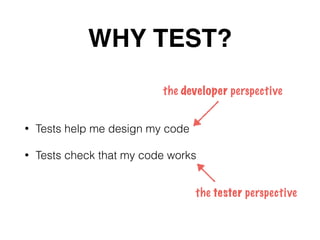
WHY TEST?
WHY TEST?
• Tests help me design my code
• Tests check that my code works
the developer perspective
the tester perspective
Some tests are less
useful than others…
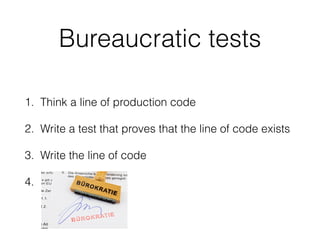
Bureaucratic tests
1. Think a line of production code
2. Write a test that proves that the line of code exists
3. Write the line of code
4. .
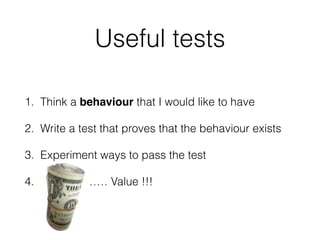
Useful tests
1. Think a behaviour that I would like to have
2. Write a test that proves that the behaviour exists
3. Experiment ways to pass the test
4. $$$!………… Value !!!
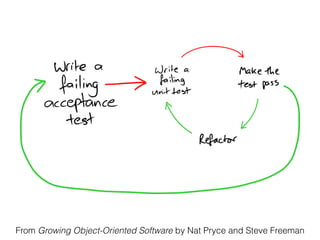
What is TDD?
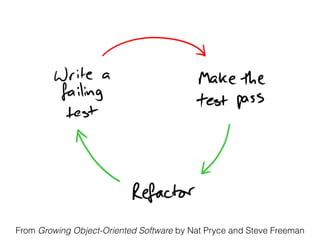
From Growing Object-Oriented Software by Nat Pryce and Steve Freeman
Why is it difficult to
TDD on Android?
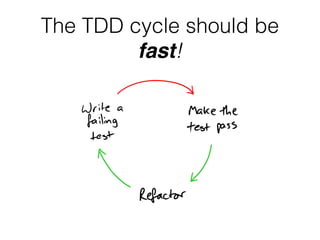
The TDD cycle should be
fast!
Value adding ?
Or waste?
fixing Gradle builds
is waste
and is not fun
How do you tell if an activity is value adding or waste?
Imagine doing that activity all the time… how does it feel?
What would the customer say if you do it all the time?
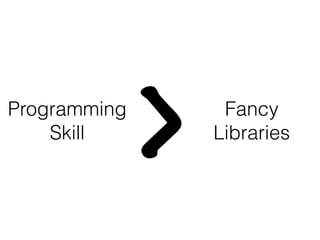
Programming
Skill
> Fancy
Libraries
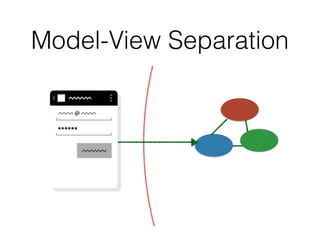
Model-View
Separation
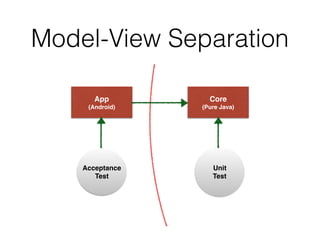
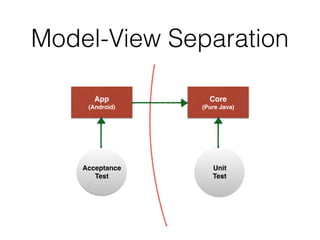
Model-View Separation
App
(Android)
Core
(Pure Java)
Acceptance
Test
Unit
Test
From Growing Object-Oriented Software by Nat Pryce and Steve Freeman
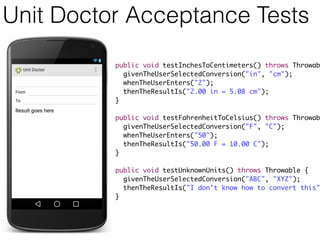
Unit Doctor Acceptance Tests
public void testInchesToCentimeters() throws Throwab
givenTheUserSelectedConversion("in", "cm");
whenTheUserEnters("2");
thenTheResultIs("2.00 in = 5.08 cm");
}
public void testFahrenheitToCelsius() throws Throwab
givenTheUserSelectedConversion("F", "C");
whenTheUserEnters("50");
thenTheResultIs("50.00 F = 10.00 C");
}
public void testUnknownUnits() throws Throwable {
givenTheUserSelectedConversion("ABC", "XYZ");
thenTheResultIs("I don't know how to convert this"
}
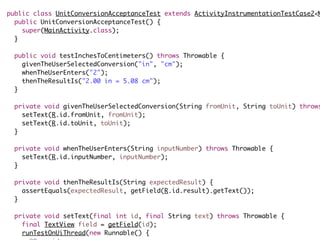
public class UnitConversionAcceptanceTest extends ActivityInstrumentationTestCase2<M
public UnitConversionAcceptanceTest() {
super(MainActivity.class);
}
public void testInchesToCentimeters() throws Throwable {
givenTheUserSelectedConversion("in", "cm");
whenTheUserEnters("2");
thenTheResultIs("2.00 in = 5.08 cm");
}
private void givenTheUserSelectedConversion(String fromUnit, String toUnit) throws
setText(R.id.fromUnit, fromUnit);
setText(R.id.toUnit, toUnit);
}
private void whenTheUserEnters(String inputNumber) throws Throwable {
setText(R.id.inputNumber, inputNumber);
}
private void thenTheResultIs(String expectedResult) {
assertEquals(expectedResult, getField(R.id.result).getText());
}
private void setText(final int id, final String text) throws Throwable {
final TextView field = getField(id);
runTestOnUiThread(new Runnable() {
}
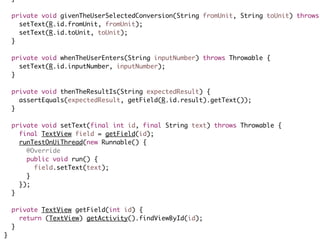
private void givenTheUserSelectedConversion(String fromUnit, String toUnit) throws
setText(R.id.fromUnit, fromUnit);
setText(R.id.toUnit, toUnit);
}
private void whenTheUserEnters(String inputNumber) throws Throwable {
setText(R.id.inputNumber, inputNumber);
}
private void thenTheResultIs(String expectedResult) {
assertEquals(expectedResult, getField(R.id.result).getText());
}
private void setText(final int id, final String text) throws Throwable {
final TextView field = getField(id);
runTestOnUiThread(new Runnable() {
@Override
public void run() {
field.setText(text);
}
});
}
private TextView getField(int id) {
return (TextView) getActivity().findViewById(id);
}
}
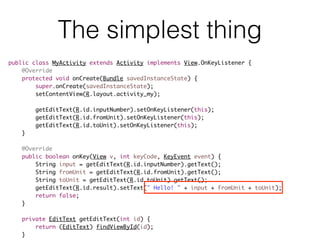
The simplest thing
public class MyActivity extends Activity implements View.OnKeyListener {
@Override
protected void onCreate(Bundle savedInstanceState) {
super.onCreate(savedInstanceState);
setContentView(R.layout.activity_my);
getEditText(R.id.inputNumber).setOnKeyListener(this);
getEditText(R.id.fromUnit).setOnKeyListener(this);
getEditText(R.id.toUnit).setOnKeyListener(this);
}
@Override
public boolean onKey(View v, int keyCode, KeyEvent event) {
String input = getEditText(R.id.inputNumber).getText();
String fromUnit = getEditText(R.id.fromUnit).getText();
String toUnit = getEditText(R.id.toUnit).getText();
getEditText(R.id.result).setText(" Hello! " + input + fromUnit + toUnit);
return false;
}
private EditText getEditText(int id) {
return (EditText) findViewById(id);
}
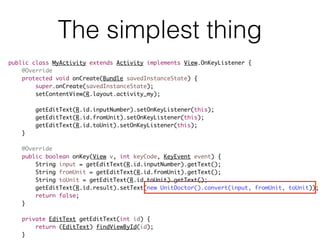
The simplest thing
public class MyActivity extends Activity implements View.OnKeyListener {
@Override
protected void onCreate(Bundle savedInstanceState) {
super.onCreate(savedInstanceState);
setContentView(R.layout.activity_my);
getEditText(R.id.inputNumber).setOnKeyListener(this);
getEditText(R.id.fromUnit).setOnKeyListener(this);
getEditText(R.id.toUnit).setOnKeyListener(this);
}
@Override
public boolean onKey(View v, int keyCode, KeyEvent event) {
String input = getEditText(R.id.inputNumber).getText();
String fromUnit = getEditText(R.id.fromUnit).getText();
String toUnit = getEditText(R.id.toUnit).getText();
getEditText(R.id.result).setText(new UnitDoctor().convert(input, fromUnit, toUnit));
return false;
}
private EditText getEditText(int id) {
return (EditText) findViewById(id);
}
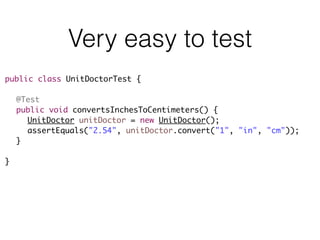
Very easy to test
public class UnitDoctorTest {
@Test
public void convertsInchesToCentimeters() {
UnitDoctor unitDoctor = new UnitDoctor();
assertEquals("2.54", unitDoctor.convert("1", "in", "cm"));
}
}
Yes yes… but my app
interacts heavily with
Android widgets!
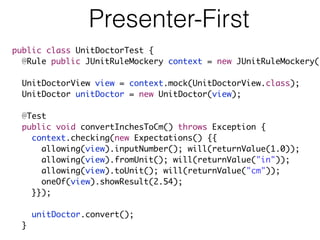
Presenter-First
public class UnitDoctorTest {
@Rule public JUnitRuleMockery context = new JUnitRuleMockery()
UnitDoctorView view = context.mock(UnitDoctorView.class);
UnitDoctor unitDoctor = new UnitDoctor(view);
@Test
public void convertInchesToCm() throws Exception {
context.checking(new Expectations() {{
allowing(view).inputNumber(); will(returnValue(1.0));
allowing(view).fromUnit(); will(returnValue("in"));
allowing(view).toUnit(); will(returnValue("cm"));
oneOf(view).showResult(2.54);
}});
unitDoctor.convert();
}
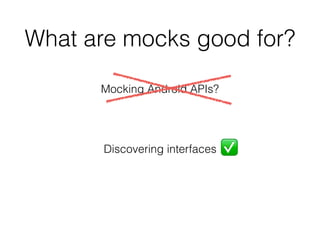
What are mocks good for?
Mocking Android APIs?
Discovering interfaces ✅
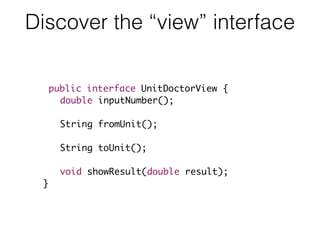
Discover the “view” interface
public interface UnitDoctorView {
double inputNumber();
String fromUnit();
String toUnit();
void showResult(double result);
}
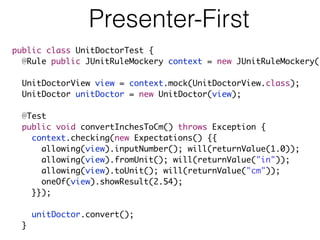
Presenter-First
public class UnitDoctorTest {
@Rule public JUnitRuleMockery context = new JUnitRuleMockery()
UnitDoctorView view = context.mock(UnitDoctorView.class);
UnitDoctor unitDoctor = new UnitDoctor(view);
@Test
public void convertInchesToCm() throws Exception {
context.checking(new Expectations() {{
allowing(view).inputNumber(); will(returnValue(1.0));
allowing(view).fromUnit(); will(returnValue("in"));
allowing(view).toUnit(); will(returnValue("cm"));
oneOf(view).showResult(2.54);
}});
unitDoctor.convert();
}
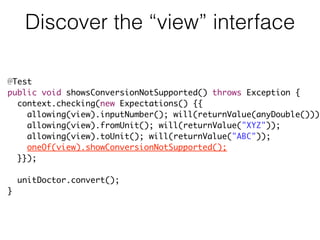
Discover the “view” interface
@Test
public void showsConversionNotSupported() throws Exception {
context.checking(new Expectations() {{
allowing(view).inputNumber(); will(returnValue(anyDouble()));
allowing(view).fromUnit(); will(returnValue("XYZ"));
allowing(view).toUnit(); will(returnValue("ABC"));
oneOf(view).showConversionNotSupported();
}});
unitDoctor.convert();
}
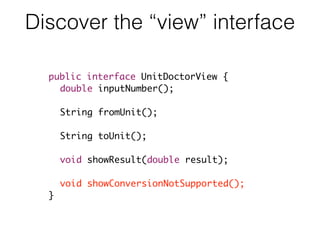
Discover the “view” interface
public interface UnitDoctorView {
double inputNumber();
String fromUnit();
String toUnit();
void showResult(double result);
void showConversionNotSupported();
}
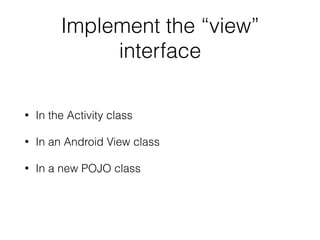
Implement the “view”
interface
• In the Activity class
• In an Android View class
• In a new POJO class
Yes, yes, yes… but my
app interacts heavily with
Android APIs!
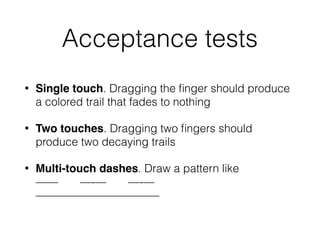
Acceptance tests
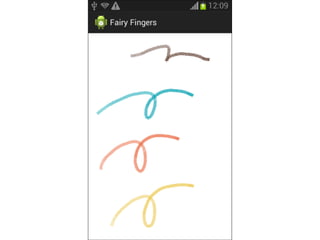
• Single touch. Dragging the finger should produce
a colored trail that fades to nothing
• Two touches. Dragging two fingers should
produce two decaying trails
• Multi-touch dashes. Draw a pattern like

—— —-— —-—

———————————
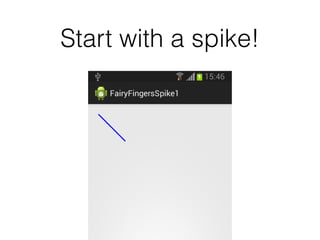
Start with a spike!
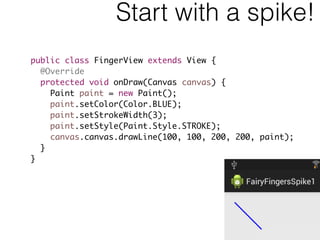
Start with a spike!
public class FingerView extends View {
@Override
protected void onDraw(Canvas canvas) {
Paint paint = new Paint();
paint.setColor(Color.BLUE);
paint.setStrokeWidth(3);
paint.setStyle(Paint.Style.STROKE);
canvas.canvas.drawLine(100, 100, 200, 200, paint);
}
}
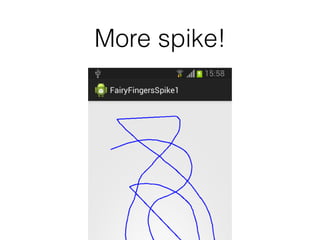
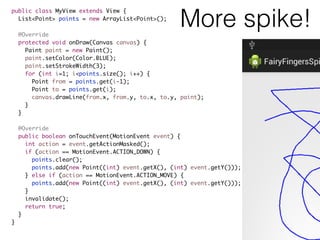
More spike!
More spike!
public class MyView extends View {
List<Point> points = new ArrayList<Point>();
@Override
protected void onDraw(Canvas canvas) {
Paint paint = new Paint();
paint.setColor(Color.BLUE);
paint.setStrokeWidth(3);
for (int i=1; i<points.size(); i++) {
Point from = points.get(i-1);
Point to = points.get(i);
canvas.drawLine(from.x, from.y, to.x, to.y, paint);
}
}
@Override
public boolean onTouchEvent(MotionEvent event) {
int action = event.getActionMasked();
if (action == MotionEvent.ACTION_DOWN) {
points.clear();
points.add(new Point((int) event.getX(), (int) event.getY()));
} else if (action == MotionEvent.ACTION_MOVE) {
points.add(new Point((int) event.getX(), (int) event.getY()));
}
invalidate();
return true;
}
}
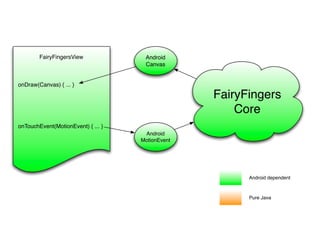
FairyFingers
Core
Android
MotionEvent
Android
Canvas
FairyFingersView
onDraw(Canvas) { ... }
onTouchEvent(MotionEvent) { ... }
Android dependent
Pure Java
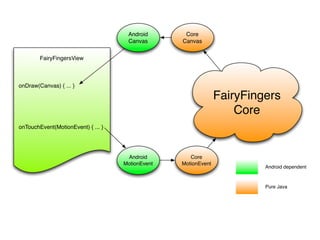
FairyFingers
Core
Android
MotionEvent
Android
Canvas
FairyFingersView
onDraw(Canvas) { ... }
onTouchEvent(MotionEvent) { ... }
Core
Canvas
Core
MotionEvent
Android dependent
Pure Java
Model-View Separation
App
(Android)
Core
(Pure Java)
Acceptance
Test
Unit
Test
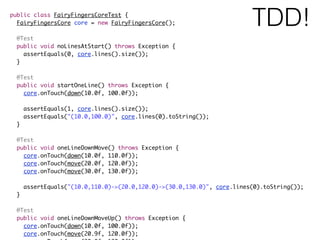
public class FairyFingersCoreTest {
FairyFingersCore core = new FairyFingersCore();
@Test
public void noLinesAtStart() throws Exception {
assertEquals(0, core.lines().size());
}
@Test
public void startOneLine() throws Exception {
core.onTouch(down(10.0f, 100.0f));
assertEquals(1, core.lines().size());
assertEquals("(10.0,100.0)", core.lines(0).toString());
}
@Test
public void oneLineDownMove() throws Exception {
core.onTouch(down(10.0f, 110.0f));
core.onTouch(move(20.0f, 120.0f));
core.onTouch(move(30.0f, 130.0f));
assertEquals("(10.0,110.0)->(20.0,120.0)->(30.0,130.0)", core.lines(0).toString());
}
@Test
public void oneLineDownMoveUp() throws Exception {
core.onTouch(down(10.0f, 100.0f));
core.onTouch(move(20.9f, 120.0f));
TDD!
TDD!
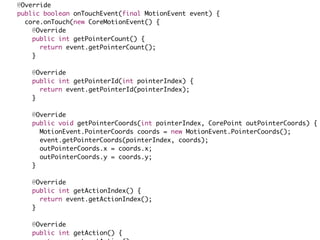
@Override
public boolean onTouchEvent(final MotionEvent event) {
core.onTouch(new CoreMotionEvent() {
@Override
public int getPointerCount() {
return event.getPointerCount();
}
@Override
public int getPointerId(int pointerIndex) {
return event.getPointerId(pointerIndex);
}
@Override
public void getPointerCoords(int pointerIndex, CorePoint outPointerCoords) {
MotionEvent.PointerCoords coords = new MotionEvent.PointerCoords();
event.getPointerCoords(pointerIndex, coords);
outPointerCoords.x = coords.x;
outPointerCoords.y = coords.y;
}
@Override
public int getActionIndex() {
return event.getActionIndex();
}
@Override
public int getAction() {
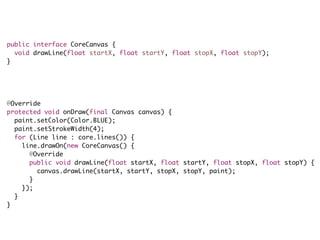
public interface CoreCanvas {
void drawLine(float startX, float startY, float stopX, float stopY);
}
@Override
protected void onDraw(final Canvas canvas) {
paint.setColor(Color.BLUE);
paint.setStrokeWidth(4);
for (Line line : core.lines()) {
line.drawOn(new CoreCanvas() {
@Override
public void drawLine(float startX, float startY, float stopX, float stopY) {
canvas.drawLine(startX, startY, stopX, stopY, paint);
}
});
}
}
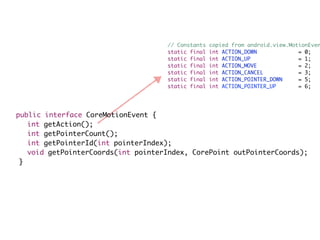
public interface CoreMotionEvent {
int getAction();
int getPointerCount();
int getPointerId(int pointerIndex);
void getPointerCoords(int pointerIndex, CorePoint outPointerCoords);
}
// Constants copied from android.view.MotionEven
static final int ACTION_DOWN = 0;
static final int ACTION_UP = 1;
static final int ACTION_MOVE = 2;
static final int ACTION_CANCEL = 3;
static final int ACTION_POINTER_DOWN = 5;
static final int ACTION_POINTER_UP = 6;
Programming
Skill
> Fancy
Libraries
Value adding ?
Or waste?
Deliver valuable
software faster,
sustainably
References
TDD For Android book (unfinished!) leanpub.com/tddforandroid
Source code for examples: github.com/xpmatteo
These slides are on slideshare.net/xpmatteo
Learn OOP and TDD well:

Growing Object-Oriented Software, Nat Pryce and Steve Freeman

TDD By Example, Kent Beck

Applying UML and Patterns, Craig Larman
Credits
• Carlo Bellettini was my sparring partner for this work
• The motto “Deliver valuable software faster, sustainably” is
my elaboration on Dan North’s “The goal of software
delivery is to minimise the lead time to business impact.
Everything else is detail.” I advise to attend one of Dan’s
seminars. They are illuminating.
• The “Fairy Fingers” idea is from “Ribbons” by Carlo Pescio
(www.aspectroid.com)
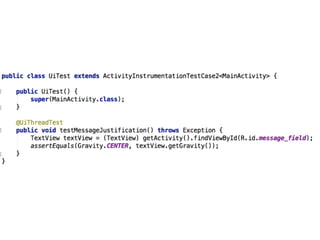
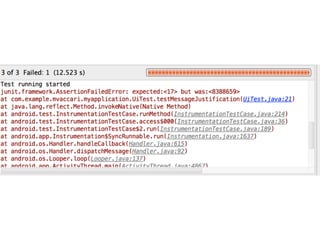
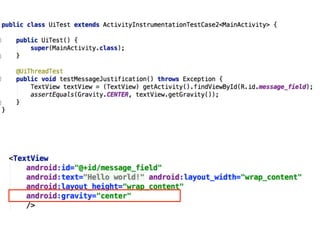
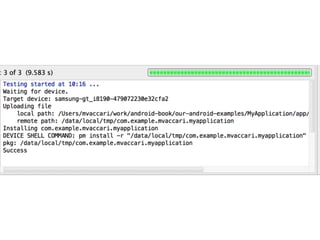
• The “gravity test” example is derived from a presentation
by Diego Torres Milano
Questions?
THANK YOU
WE’RE HIRING!

TDD and mobile development: some forgotten techniques, illustrated with Android

  • 1.
    TDD and mobile: someforgotten techniques! Matteo Vaccari mvaccari@thoughtworks.com
  • 2.
  • 3.
  • 4.
  • 5.
  • 6.
  • 7.
    WHY TEST? • Testshelp me design my code • Tests check that my code works the developer perspective the tester perspective
  • 8.
    Some tests areless useful than others…
  • 14.
    Bureaucratic tests 1. Thinka line of production code 2. Write a test that proves that the line of code exists 3. Write the line of code 4. .
  • 15.
    Useful tests 1. Thinka behaviour that I would like to have 2. Write a test that proves that the behaviour exists 3. Experiment ways to pass the test 4. $$$!………… Value !!!
  • 16.
  • 17.
    From Growing Object-OrientedSoftware by Nat Pryce and Steve Freeman
  • 18.
    Why is itdifficult to TDD on Android?
  • 19.
    The TDD cycleshould be fast!
  • 21.
  • 22.
    fixing Gradle builds iswaste and is not fun How do you tell if an activity is value adding or waste? Imagine doing that activity all the time… how does it feel? What would the customer say if you do it all the time?
  • 23.
  • 24.
  • 25.
  • 26.
  • 27.
    From Growing Object-OrientedSoftware by Nat Pryce and Steve Freeman
  • 28.
    Unit Doctor AcceptanceTests public void testInchesToCentimeters() throws Throwab givenTheUserSelectedConversion("in", "cm"); whenTheUserEnters("2"); thenTheResultIs("2.00 in = 5.08 cm"); } public void testFahrenheitToCelsius() throws Throwab givenTheUserSelectedConversion("F", "C"); whenTheUserEnters("50"); thenTheResultIs("50.00 F = 10.00 C"); } public void testUnknownUnits() throws Throwable { givenTheUserSelectedConversion("ABC", "XYZ"); thenTheResultIs("I don't know how to convert this" }
  • 29.
    public class UnitConversionAcceptanceTestextends ActivityInstrumentationTestCase2<M public UnitConversionAcceptanceTest() { super(MainActivity.class); } public void testInchesToCentimeters() throws Throwable { givenTheUserSelectedConversion("in", "cm"); whenTheUserEnters("2"); thenTheResultIs("2.00 in = 5.08 cm"); } private void givenTheUserSelectedConversion(String fromUnit, String toUnit) throws setText(R.id.fromUnit, fromUnit); setText(R.id.toUnit, toUnit); } private void whenTheUserEnters(String inputNumber) throws Throwable { setText(R.id.inputNumber, inputNumber); } private void thenTheResultIs(String expectedResult) { assertEquals(expectedResult, getField(R.id.result).getText()); } private void setText(final int id, final String text) throws Throwable { final TextView field = getField(id); runTestOnUiThread(new Runnable() {
  • 30.
    } private void givenTheUserSelectedConversion(StringfromUnit, String toUnit) throws setText(R.id.fromUnit, fromUnit); setText(R.id.toUnit, toUnit); } private void whenTheUserEnters(String inputNumber) throws Throwable { setText(R.id.inputNumber, inputNumber); } private void thenTheResultIs(String expectedResult) { assertEquals(expectedResult, getField(R.id.result).getText()); } private void setText(final int id, final String text) throws Throwable { final TextView field = getField(id); runTestOnUiThread(new Runnable() { @Override public void run() { field.setText(text); } }); } private TextView getField(int id) { return (TextView) getActivity().findViewById(id); } }
  • 31.
    The simplest thing publicclass MyActivity extends Activity implements View.OnKeyListener { @Override protected void onCreate(Bundle savedInstanceState) { super.onCreate(savedInstanceState); setContentView(R.layout.activity_my); getEditText(R.id.inputNumber).setOnKeyListener(this); getEditText(R.id.fromUnit).setOnKeyListener(this); getEditText(R.id.toUnit).setOnKeyListener(this); } @Override public boolean onKey(View v, int keyCode, KeyEvent event) { String input = getEditText(R.id.inputNumber).getText(); String fromUnit = getEditText(R.id.fromUnit).getText(); String toUnit = getEditText(R.id.toUnit).getText(); getEditText(R.id.result).setText(" Hello! " + input + fromUnit + toUnit); return false; } private EditText getEditText(int id) { return (EditText) findViewById(id); }
  • 32.
    The simplest thing publicclass MyActivity extends Activity implements View.OnKeyListener { @Override protected void onCreate(Bundle savedInstanceState) { super.onCreate(savedInstanceState); setContentView(R.layout.activity_my); getEditText(R.id.inputNumber).setOnKeyListener(this); getEditText(R.id.fromUnit).setOnKeyListener(this); getEditText(R.id.toUnit).setOnKeyListener(this); } @Override public boolean onKey(View v, int keyCode, KeyEvent event) { String input = getEditText(R.id.inputNumber).getText(); String fromUnit = getEditText(R.id.fromUnit).getText(); String toUnit = getEditText(R.id.toUnit).getText(); getEditText(R.id.result).setText(new UnitDoctor().convert(input, fromUnit, toUnit)); return false; } private EditText getEditText(int id) { return (EditText) findViewById(id); }
  • 33.
    Very easy totest public class UnitDoctorTest { @Test public void convertsInchesToCentimeters() { UnitDoctor unitDoctor = new UnitDoctor(); assertEquals("2.54", unitDoctor.convert("1", "in", "cm")); } }
  • 34.
    Yes yes… butmy app interacts heavily with Android widgets!
  • 35.
    Presenter-First public class UnitDoctorTest{ @Rule public JUnitRuleMockery context = new JUnitRuleMockery() UnitDoctorView view = context.mock(UnitDoctorView.class); UnitDoctor unitDoctor = new UnitDoctor(view); @Test public void convertInchesToCm() throws Exception { context.checking(new Expectations() {{ allowing(view).inputNumber(); will(returnValue(1.0)); allowing(view).fromUnit(); will(returnValue("in")); allowing(view).toUnit(); will(returnValue("cm")); oneOf(view).showResult(2.54); }}); unitDoctor.convert(); }
  • 36.
    What are mocksgood for? Mocking Android APIs? Discovering interfaces ✅
  • 37.
    Discover the “view”interface public interface UnitDoctorView { double inputNumber(); String fromUnit(); String toUnit(); void showResult(double result); }
  • 38.
    Presenter-First public class UnitDoctorTest{ @Rule public JUnitRuleMockery context = new JUnitRuleMockery() UnitDoctorView view = context.mock(UnitDoctorView.class); UnitDoctor unitDoctor = new UnitDoctor(view); @Test public void convertInchesToCm() throws Exception { context.checking(new Expectations() {{ allowing(view).inputNumber(); will(returnValue(1.0)); allowing(view).fromUnit(); will(returnValue("in")); allowing(view).toUnit(); will(returnValue("cm")); oneOf(view).showResult(2.54); }}); unitDoctor.convert(); }
  • 39.
    Discover the “view”interface @Test public void showsConversionNotSupported() throws Exception { context.checking(new Expectations() {{ allowing(view).inputNumber(); will(returnValue(anyDouble())); allowing(view).fromUnit(); will(returnValue("XYZ")); allowing(view).toUnit(); will(returnValue("ABC")); oneOf(view).showConversionNotSupported(); }}); unitDoctor.convert(); }
  • 40.
    Discover the “view”interface public interface UnitDoctorView { double inputNumber(); String fromUnit(); String toUnit(); void showResult(double result); void showConversionNotSupported(); }
  • 41.
    Implement the “view” interface •In the Activity class • In an Android View class • In a new POJO class
  • 42.
    Yes, yes, yes…but my app interacts heavily with Android APIs!
  • 44.
    Acceptance tests • Singletouch. Dragging the finger should produce a colored trail that fades to nothing • Two touches. Dragging two fingers should produce two decaying trails • Multi-touch dashes. Draw a pattern like
 —— —-— —-—
 ———————————
  • 45.
  • 46.
    Start with aspike! public class FingerView extends View { @Override protected void onDraw(Canvas canvas) { Paint paint = new Paint(); paint.setColor(Color.BLUE); paint.setStrokeWidth(3); paint.setStyle(Paint.Style.STROKE); canvas.canvas.drawLine(100, 100, 200, 200, paint); } }
  • 47.
  • 48.
    More spike! public classMyView extends View { List<Point> points = new ArrayList<Point>(); @Override protected void onDraw(Canvas canvas) { Paint paint = new Paint(); paint.setColor(Color.BLUE); paint.setStrokeWidth(3); for (int i=1; i<points.size(); i++) { Point from = points.get(i-1); Point to = points.get(i); canvas.drawLine(from.x, from.y, to.x, to.y, paint); } } @Override public boolean onTouchEvent(MotionEvent event) { int action = event.getActionMasked(); if (action == MotionEvent.ACTION_DOWN) { points.clear(); points.add(new Point((int) event.getX(), (int) event.getY())); } else if (action == MotionEvent.ACTION_MOVE) { points.add(new Point((int) event.getX(), (int) event.getY())); } invalidate(); return true; } }
  • 49.
    FairyFingers Core Android MotionEvent Android Canvas FairyFingersView onDraw(Canvas) { ...} onTouchEvent(MotionEvent) { ... } Android dependent Pure Java
  • 50.
    FairyFingers Core Android MotionEvent Android Canvas FairyFingersView onDraw(Canvas) { ...} onTouchEvent(MotionEvent) { ... } Core Canvas Core MotionEvent Android dependent Pure Java
  • 51.
  • 52.
    public class FairyFingersCoreTest{ FairyFingersCore core = new FairyFingersCore(); @Test public void noLinesAtStart() throws Exception { assertEquals(0, core.lines().size()); } @Test public void startOneLine() throws Exception { core.onTouch(down(10.0f, 100.0f)); assertEquals(1, core.lines().size()); assertEquals("(10.0,100.0)", core.lines(0).toString()); } @Test public void oneLineDownMove() throws Exception { core.onTouch(down(10.0f, 110.0f)); core.onTouch(move(20.0f, 120.0f)); core.onTouch(move(30.0f, 130.0f)); assertEquals("(10.0,110.0)->(20.0,120.0)->(30.0,130.0)", core.lines(0).toString()); } @Test public void oneLineDownMoveUp() throws Exception { core.onTouch(down(10.0f, 100.0f)); core.onTouch(move(20.9f, 120.0f)); TDD!
  • 53.
  • 54.
    @Override public boolean onTouchEvent(finalMotionEvent event) { core.onTouch(new CoreMotionEvent() { @Override public int getPointerCount() { return event.getPointerCount(); } @Override public int getPointerId(int pointerIndex) { return event.getPointerId(pointerIndex); } @Override public void getPointerCoords(int pointerIndex, CorePoint outPointerCoords) { MotionEvent.PointerCoords coords = new MotionEvent.PointerCoords(); event.getPointerCoords(pointerIndex, coords); outPointerCoords.x = coords.x; outPointerCoords.y = coords.y; } @Override public int getActionIndex() { return event.getActionIndex(); } @Override public int getAction() {
  • 55.
    public interface CoreCanvas{ void drawLine(float startX, float startY, float stopX, float stopY); } @Override protected void onDraw(final Canvas canvas) { paint.setColor(Color.BLUE); paint.setStrokeWidth(4); for (Line line : core.lines()) { line.drawOn(new CoreCanvas() { @Override public void drawLine(float startX, float startY, float stopX, float stopY) { canvas.drawLine(startX, startY, stopX, stopY, paint); } }); } }
  • 56.
    public interface CoreMotionEvent{ int getAction(); int getPointerCount(); int getPointerId(int pointerIndex); void getPointerCoords(int pointerIndex, CorePoint outPointerCoords); } // Constants copied from android.view.MotionEven static final int ACTION_DOWN = 0; static final int ACTION_UP = 1; static final int ACTION_MOVE = 2; static final int ACTION_CANCEL = 3; static final int ACTION_POINTER_DOWN = 5; static final int ACTION_POINTER_UP = 6;
  • 57.
  • 58.
  • 59.
  • 60.
    References TDD For Androidbook (unfinished!) leanpub.com/tddforandroid Source code for examples: github.com/xpmatteo These slides are on slideshare.net/xpmatteo Learn OOP and TDD well:
 Growing Object-Oriented Software, Nat Pryce and Steve Freeman
 TDD By Example, Kent Beck
 Applying UML and Patterns, Craig Larman
  • 61.
    Credits • Carlo Bellettiniwas my sparring partner for this work • The motto “Deliver valuable software faster, sustainably” is my elaboration on Dan North’s “The goal of software delivery is to minimise the lead time to business impact. Everything else is detail.” I advise to attend one of Dan’s seminars. They are illuminating. • The “Fairy Fingers” idea is from “Ribbons” by Carlo Pescio (www.aspectroid.com) • The “gravity test” example is derived from a presentation by Diego Torres Milano
  • 62.