TCP/IP protocol
TCP/IP protocol have four layers:
1. Host-to-network
2. Internet Layer
3. Transport Layer
4. Application Layer
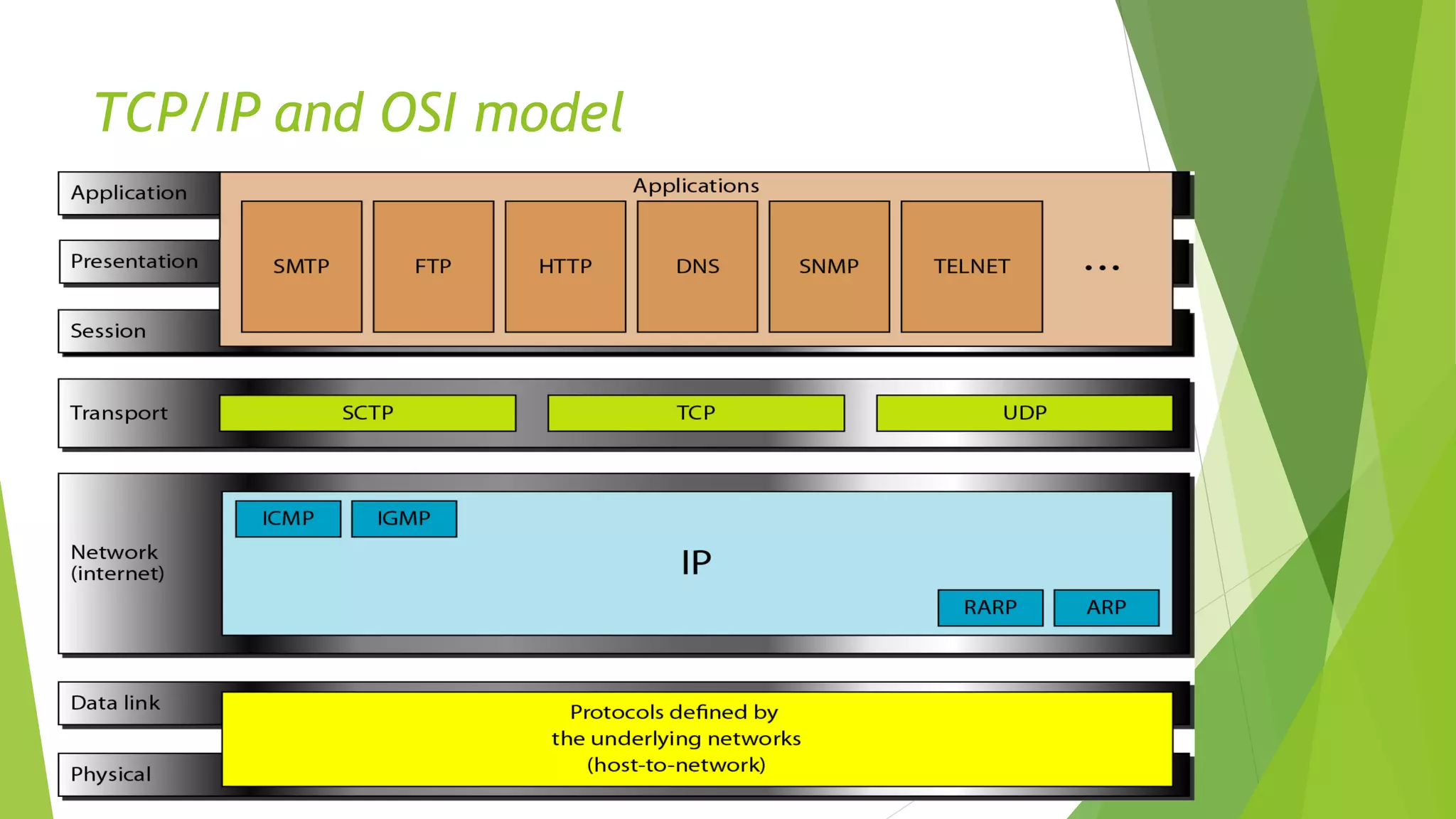
TCP/IP and OSI model
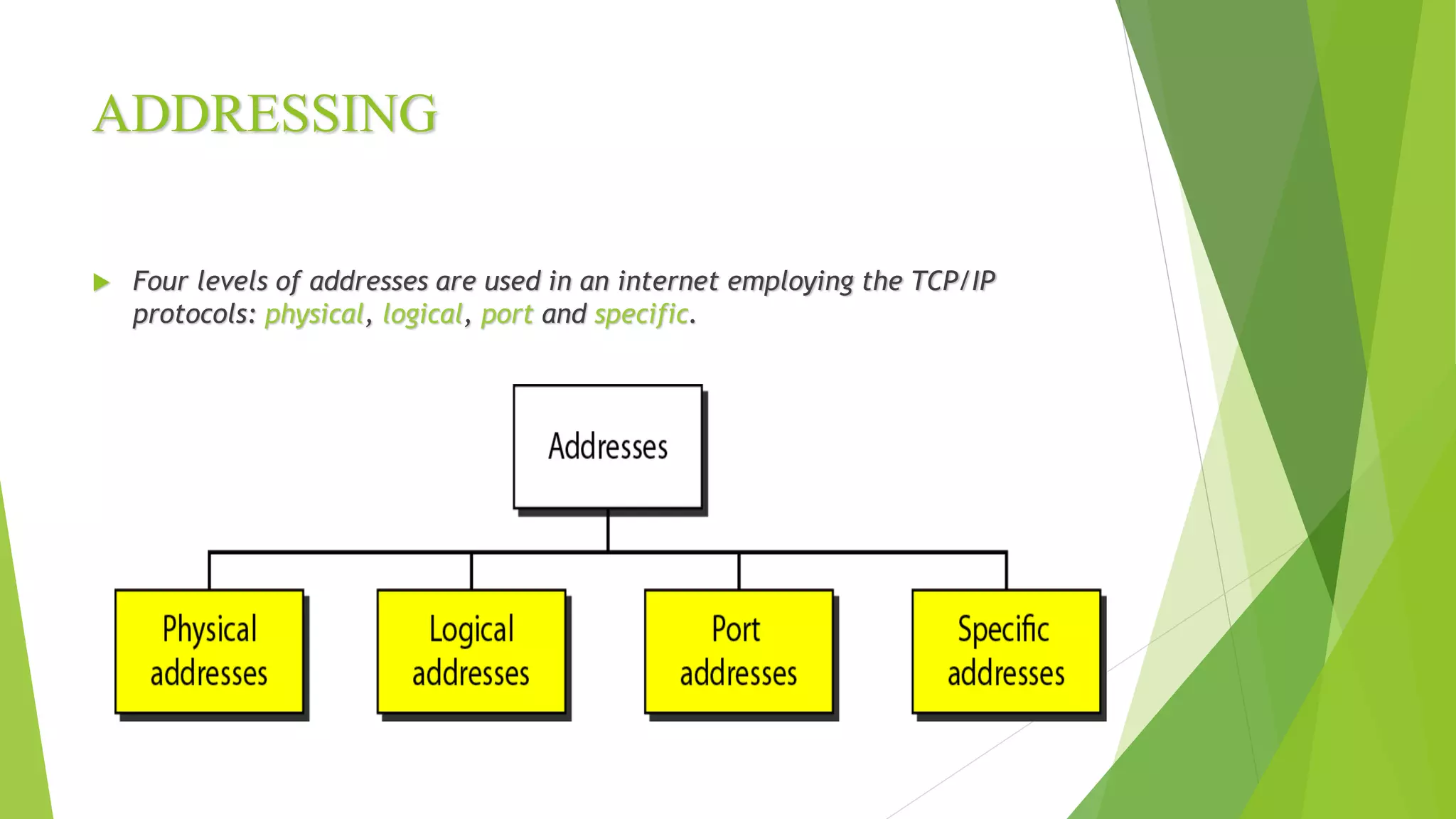
ADDRESSING
 Four levels of addresses are used in an internet employing the TCP/IP
protocols: physical, logical, port and specific.
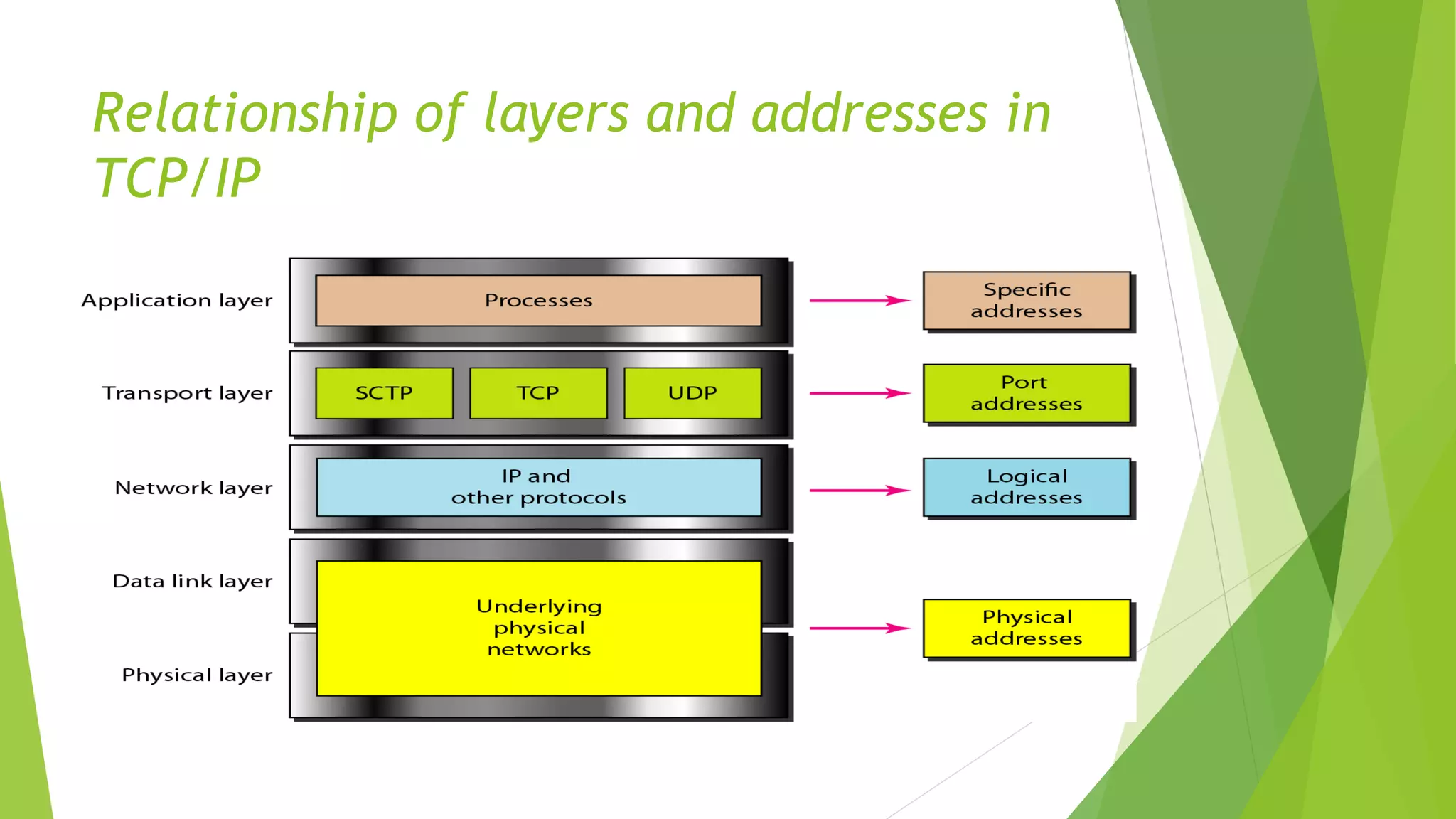
Relationship of layers and addresses in
TCP/IP
Physical address
 Each system having a NIC(Network Interface Card) through which two systems
physically connected with each other with cables. The address of the NIC is called
Physical address or mac address. This is specified by the manufacturer company of
the card. This address is used by data link layer.
 The size and format of these addresses vary depending on the network. For
example, Ethernet uses a 6-byte (48-bit) physical address.
Example: Most local area networks use a 48-bit (6-byte) physical address written as 12
hexadecimal digits; every byte (2 hexadecimal digits) is separated by a colon, as
shown below: A 6-byte (12 hexadecimal digits) physical address 07:01:02:01:2C:4B
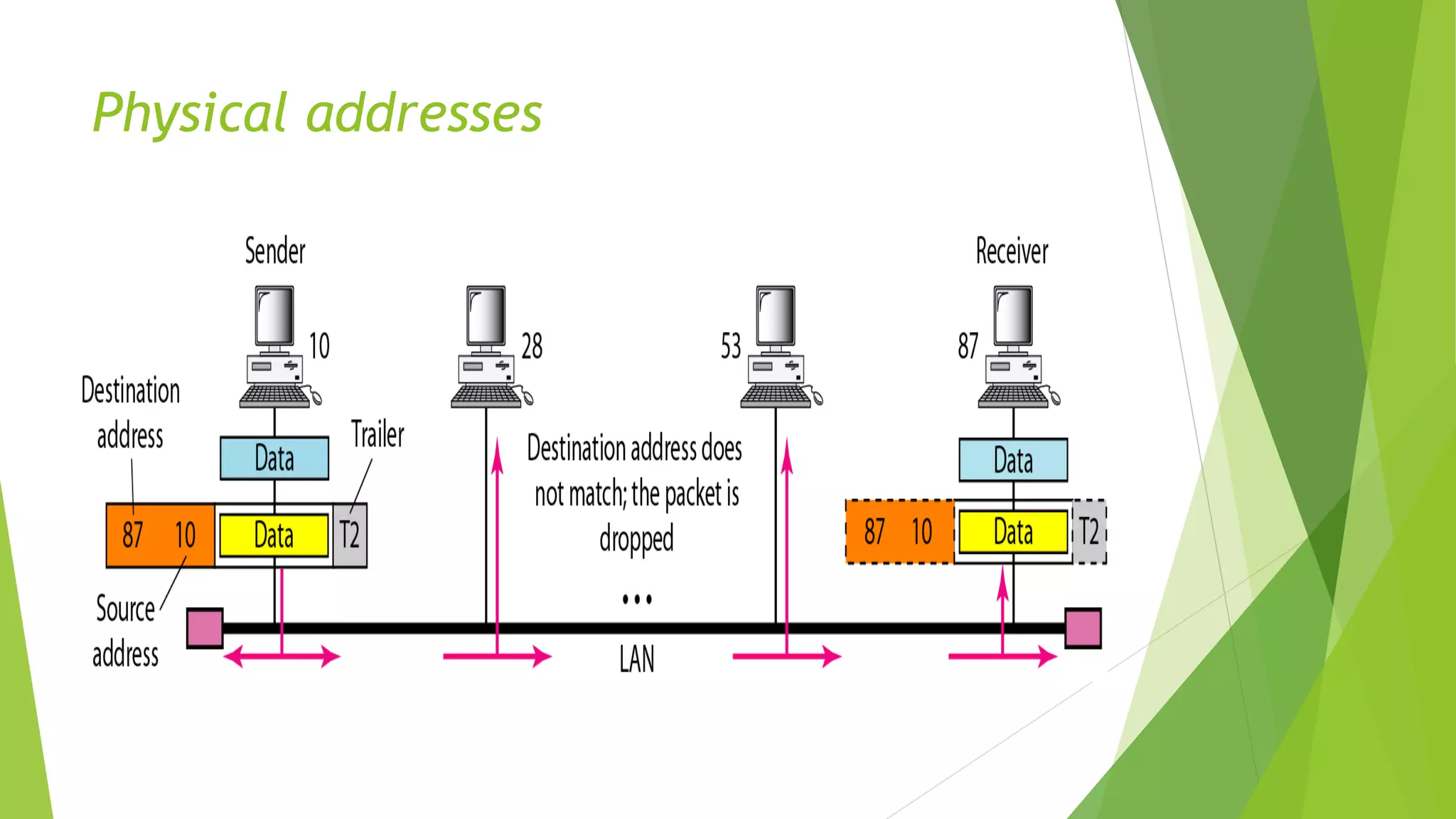
Physical addresses
Logical Address
 An IP address of the system is called logical address. This address is the combination of
Net ID and Host ID. This address is used by network layer to identify a particular network
(source to destination) among the networks. This address can be changed by changing
the host position on the network. So it is called logical address.
 Logical addresses are used by networking software to allow packets to be independent of
the physical connection of the network, that is, to work with different network
topologies and types of media.
 A logical address in the Internet is currently a 32-bit address that can uniquely define a
host connected to the Internet. An internet address in IPv4 in decimal
numbers 132.24.75.9
 No two publicly addressed and visible hosts on the Internet can have the same IP
address.
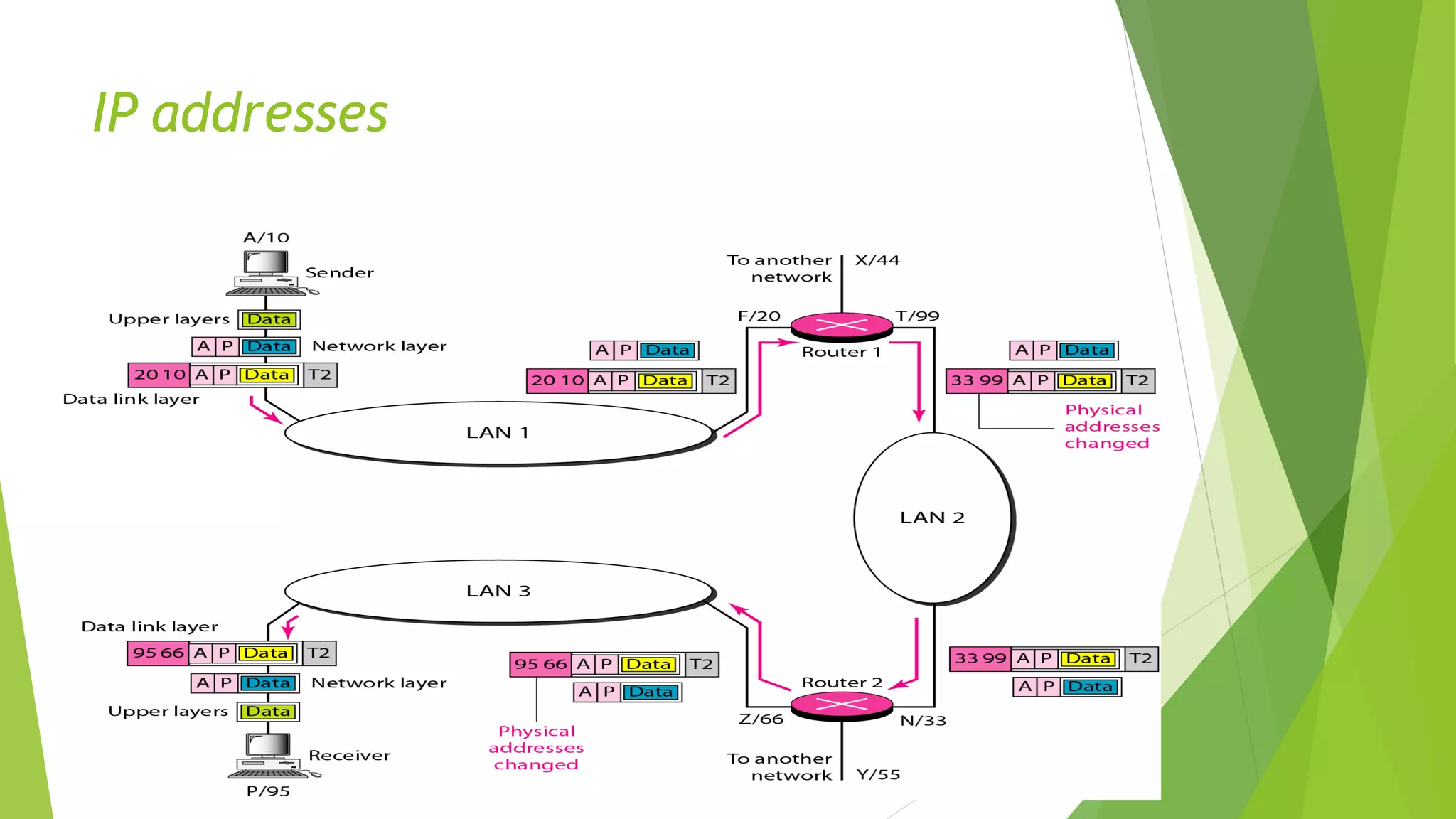
 The physical addresses will change from hop to hop, but the logical addresses remain the
same.
IP addresses
Port Address
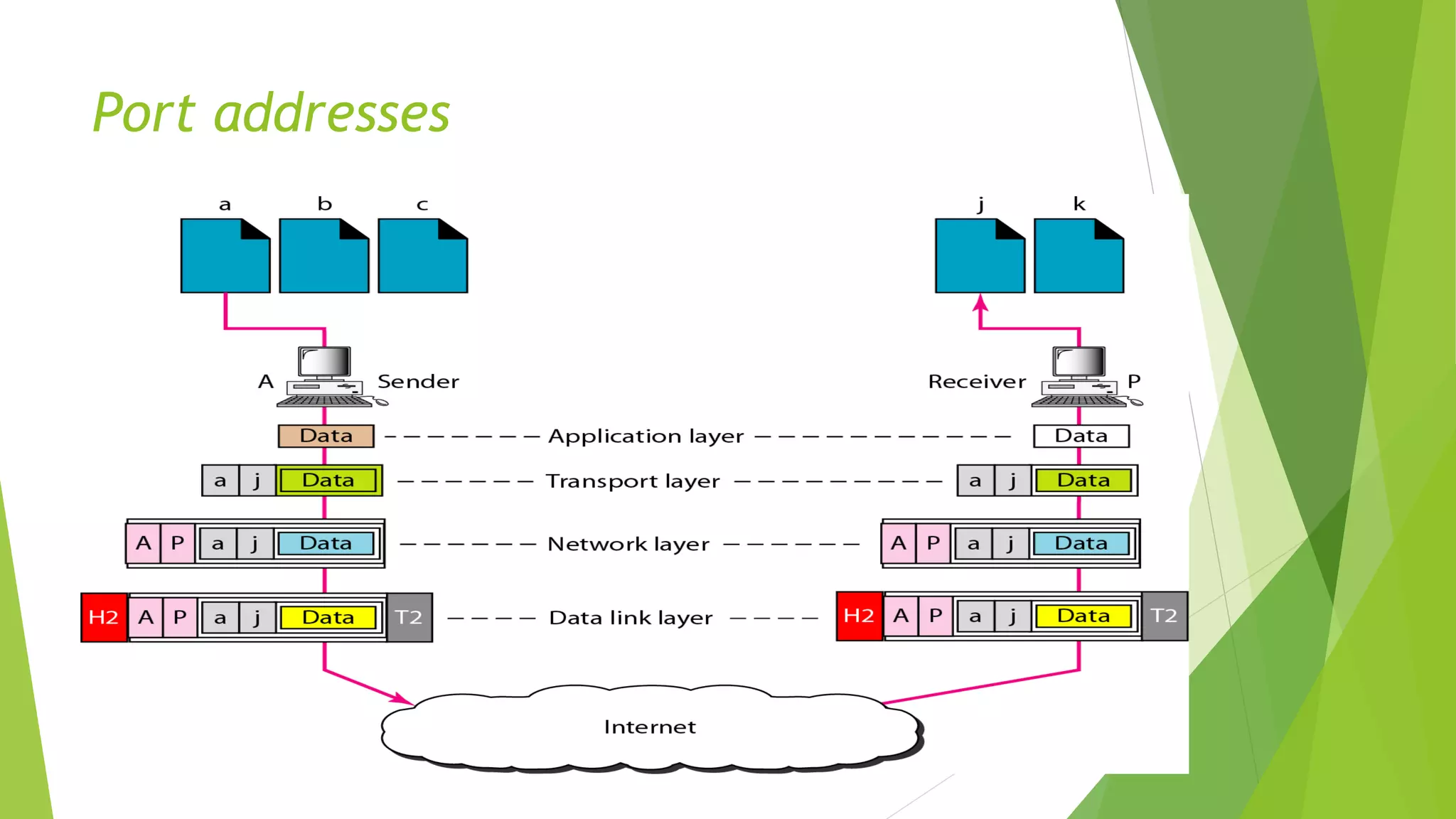
 There are many application running on the computer. Each application run with a
port no.(logically) on the computer. This port no. for application is decided by the
Kernal of the OS. This port no. is called port address.
 A port number is part of the addressing information used to identify the senders and
receivers of messages.
 Port numbers are most commonly used with TCP/IP connections.
 These port numbers allow different applications on the same computer to share
network resources simultaneously.
 The physical addresses change from hop to hop, but the logical and port addresses
usually remain the same.
 Example: a port address is a 16-bit address represented by one decimal number 753
Port addresses
Application-Specific Addresses
 Some applications have user-friendly addresses that are designed for that
specific application.
 Examples include the e-mail address (for example, gckalka@gmail.com) and
the Universal Resource Locator (URL) (for example, www.gckalka.edu.in). The
first defines the recipient of an e-mail; the second is used to find a document
on the World Wide Web.

TCP (1).pdf

  • 1.
    TCP/IP protocol TCP/IP protocolhave four layers: 1. Host-to-network 2. Internet Layer 3. Transport Layer 4. Application Layer
  • 2.
  • 3.
    ADDRESSING  Four levelsof addresses are used in an internet employing the TCP/IP protocols: physical, logical, port and specific.
  • 4.
    Relationship of layersand addresses in TCP/IP
  • 5.
    Physical address  Eachsystem having a NIC(Network Interface Card) through which two systems physically connected with each other with cables. The address of the NIC is called Physical address or mac address. This is specified by the manufacturer company of the card. This address is used by data link layer.  The size and format of these addresses vary depending on the network. For example, Ethernet uses a 6-byte (48-bit) physical address. Example: Most local area networks use a 48-bit (6-byte) physical address written as 12 hexadecimal digits; every byte (2 hexadecimal digits) is separated by a colon, as shown below: A 6-byte (12 hexadecimal digits) physical address 07:01:02:01:2C:4B
  • 6.
  • 7.
    Logical Address  AnIP address of the system is called logical address. This address is the combination of Net ID and Host ID. This address is used by network layer to identify a particular network (source to destination) among the networks. This address can be changed by changing the host position on the network. So it is called logical address.  Logical addresses are used by networking software to allow packets to be independent of the physical connection of the network, that is, to work with different network topologies and types of media.  A logical address in the Internet is currently a 32-bit address that can uniquely define a host connected to the Internet. An internet address in IPv4 in decimal numbers 132.24.75.9  No two publicly addressed and visible hosts on the Internet can have the same IP address.  The physical addresses will change from hop to hop, but the logical addresses remain the same.
  • 8.
  • 9.
    Port Address  Thereare many application running on the computer. Each application run with a port no.(logically) on the computer. This port no. for application is decided by the Kernal of the OS. This port no. is called port address.  A port number is part of the addressing information used to identify the senders and receivers of messages.  Port numbers are most commonly used with TCP/IP connections.  These port numbers allow different applications on the same computer to share network resources simultaneously.  The physical addresses change from hop to hop, but the logical and port addresses usually remain the same.  Example: a port address is a 16-bit address represented by one decimal number 753
  • 10.
  • 11.
    Application-Specific Addresses  Someapplications have user-friendly addresses that are designed for that specific application.  Examples include the e-mail address (for example, gckalka@gmail.com) and the Universal Resource Locator (URL) (for example, www.gckalka.edu.in). The first defines the recipient of an e-mail; the second is used to find a document on the World Wide Web.