Task 3 – Technical File
Pixel and resolution
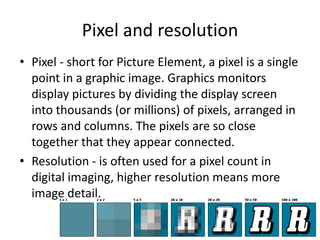
• Pixel - short for Picture Element, a pixel is a single
  point in a graphic image. Graphics monitors
  display pictures by dividing the display screen
  into thousands (or millions) of pixels, arranged in
  rows and columns. The pixels are so close
  together that they appear connected.
• Resolution - is often used for a pixel count in
  digital imaging, higher resolution means more
  image detail.
Vector and Raster Images
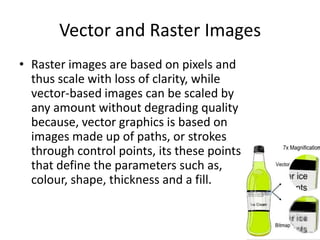
• Raster images are based on pixels and
  thus scale with loss of clarity, while
  vector-based images can be scaled by
  any amount without degrading quality
  because, vector graphics is based on
  images made up of paths, or strokes
  through control points, its these points
  that define the parameters such as,
  colour, shape, thickness and a fill.
File formats and uses
• Bmp – bitmap image file, used to store bitmap digital images
• Png – portable network graphics, used as a bitmapped image format that
  uses lossless data compression, supports transparency.
• Gif – graphics interchange format, bitmap image format, supports
  animations
• Tiff – tagged image file format, file format for storing images
• Jpg/JPEG – image file format, used for its compression of images, also
  supports layered images
• Psd – Photoshop document, stores an image with support for most editing
  options in Photoshop
• Pdf – portable document format, file format used to show document in
  software, hardware and operating systems.
• Eps – encapsulated postscript, standard format for importing and
  exporting postscript language files
• Ai – adobe illustrator artwork, proprietary file format, representing sing-
  page vector based drawing
Compression
• Compression is where a file is reduced in bit
  size to help reduce resources usage, such as
  hard drive space.

• There is lossless compression ( eliminates not
  needed data) and lossy compression
  (identifies marginally important information
  and removes it)
Image capture devices
• Devices that capture images such as, camera’s,
  software that take screenshots of your
  computer screen, or simply a computers
  automatic print screen command on the
  keyboard
Optimising
• The process of modifying a software system to
  make some aspect of it work more efficiently
  or use fewer resources.
• In general, a computer program may be
  optimized so that it executes more rapidly, or
  is capable of operating with less memory
  storage or other resources.
Storage and asset management
• Asset management refers to being in control
  of your digital files – renaming, backing up,
  grouping, archiving, maintaining, and
  exporting them to other formats.

Task 3 – technical file

  • 1.
    Task 3 –Technical File
  • 2.
    Pixel and resolution •Pixel - short for Picture Element, a pixel is a single point in a graphic image. Graphics monitors display pictures by dividing the display screen into thousands (or millions) of pixels, arranged in rows and columns. The pixels are so close together that they appear connected. • Resolution - is often used for a pixel count in digital imaging, higher resolution means more image detail.
  • 3.
    Vector and RasterImages • Raster images are based on pixels and thus scale with loss of clarity, while vector-based images can be scaled by any amount without degrading quality because, vector graphics is based on images made up of paths, or strokes through control points, its these points that define the parameters such as, colour, shape, thickness and a fill.
  • 4.
    File formats anduses • Bmp – bitmap image file, used to store bitmap digital images • Png – portable network graphics, used as a bitmapped image format that uses lossless data compression, supports transparency. • Gif – graphics interchange format, bitmap image format, supports animations • Tiff – tagged image file format, file format for storing images • Jpg/JPEG – image file format, used for its compression of images, also supports layered images • Psd – Photoshop document, stores an image with support for most editing options in Photoshop • Pdf – portable document format, file format used to show document in software, hardware and operating systems. • Eps – encapsulated postscript, standard format for importing and exporting postscript language files • Ai – adobe illustrator artwork, proprietary file format, representing sing- page vector based drawing
  • 5.
    Compression • Compression iswhere a file is reduced in bit size to help reduce resources usage, such as hard drive space. • There is lossless compression ( eliminates not needed data) and lossy compression (identifies marginally important information and removes it)
  • 6.
    Image capture devices •Devices that capture images such as, camera’s, software that take screenshots of your computer screen, or simply a computers automatic print screen command on the keyboard
  • 7.
    Optimising • The processof modifying a software system to make some aspect of it work more efficiently or use fewer resources. • In general, a computer program may be optimized so that it executes more rapidly, or is capable of operating with less memory storage or other resources.
  • 8.
    Storage and assetmanagement • Asset management refers to being in control of your digital files – renaming, backing up, grouping, archiving, maintaining, and exporting them to other formats.