Takeaways & Mobile
Why Your Takeaway Needs A Mobile App
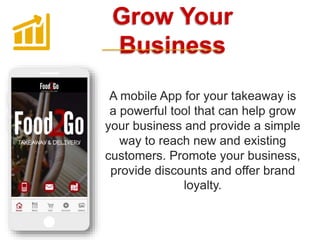
Grow Your
Business
A mobile App for your takeaway is
a powerful tool that can help grow
your business and provide a simple
way to reach new and existing
customers. Promote your business,
provide discounts and offer brand
loyalty.
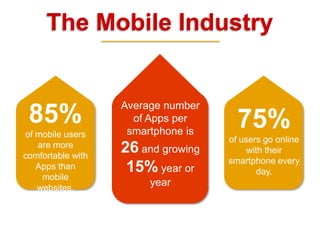
The Mobile Industry
85%
of mobile users
are more
comfortable with
Apps than
mobile
websites.
75%
of users go online
with their
smartphone every
day.
Average number
of Apps per
smartphone is
26 and growing
15% year or
year
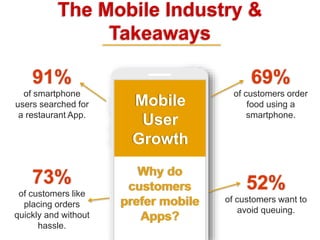
The Mobile Industry &
Takeaways
Why do
customers
prefer mobile
Apps?
69%
of customers order
food using a
smartphone.
91%
of smartphone
users searched for
a restaurant App.
73%
of customers like
placing orders
quickly and without
hassle.
52%
of customers want to
avoid queuing.
Mobile
User
Growth
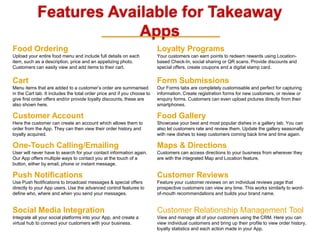
Features Available for Takeaway
Apps
Food Ordering
Upload your entire food menu and include full details on each
item, such as a description, price and an appetizing photo.
Customers can easily view and add items to their cart.
Loyalty Programs
Your customers can earn points to redeem rewards using Location-
based Check-In, social sharing or QR scans. Provide discounts and
special offers, create coupons and a digital stamp card.
Cart
Menu items that are added to a customer’s order are summarised
in the Cart tab. It includes the total order price and if you choose to
give first order offers and/or provide loyalty discounts, these are
also shown here.
Form Submissions
Our Forms tabs are completely customisable and perfect for capturing
information. Create registration forms for new customers, or review or
enquiry forms. Customers can even upload pictures directly from their
smartphones.
Customer Account
Here the customer can create an account which allows them to
order from the App. They can then view their order history and
loyalty acquired.
Food Gallery
Showcase your best and most popular dishes in a gallery tab. You can
also let customers rate and review them. Update the gallery seasonally
with new dishes to keep customers coming back time and time again.
One-Touch Calling/Emailing
User will never have to search for your contact information again.
Our App offers multiple ways to contact you at the touch of a
button, either by email, phone or instant message.
Maps & Directions
Customers can access directions to your business from wherever they
are with the integrated Map and Location feature.
Push Notifications
Use Push Notifications to broadcast messages & special offers
directly to your App users. Use the advanced control features to
define who, where and when you send your messages.
Customer Reviews
Feature your customer reviews on an individual reviews page that
prospective customers can view any time. This works similarly to word-
of-mouth recommendations and builds your brand name.
Social Media Integration
Integrate all your social platforms into your App, and create a
virtual hub to connect your customers with your business.
Customer Relationship Management Tool
View and manage all of your customers using the CRM. Here you can
view individual customers and bring up their profile to view order history,
loyalty statistics and each action made in your App.
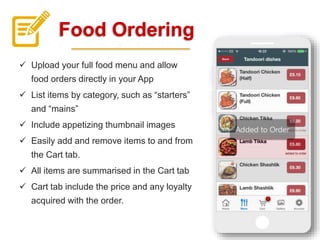
Food Ordering
 Upload your full food menu and allow
food orders directly in your App
 List items by category, such as “starters”
and “mains”
 Include appetizing thumbnail images
 Easily add and remove items to and from
the Cart tab.
 All items are summarised in the Cart tab
 Cart tab include the price and any loyalty
acquired with the order.
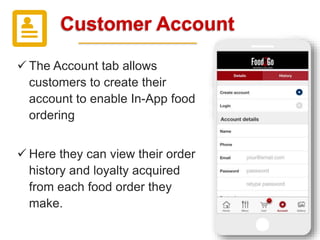
Customer Account
 The Account tab allows
customers to create their
account to enable In-App food
ordering
 Here they can view their order
history and loyalty acquired
from each food order they
make.
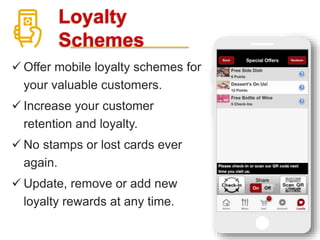
Loyalty
Schemes
 Offer mobile loyalty schemes for
your valuable customers.
 Increase your customer
retention and loyalty.
 No stamps or lost cards ever
again.
 Update, remove or add new
loyalty rewards at any time.
Loyalty
Cards
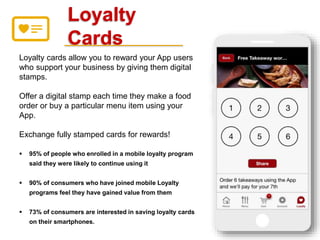
Loyalty cards allow you to reward your App users
who support your business by giving them digital
stamps.
Offer a digital stamp each time they make a food
order or buy a particular menu item using your
App.
Exchange fully stamped cards for rewards!
 95% of people who enrolled in a mobile loyalty program
said they were likely to continue using it
 90% of consumers who have joined mobile Loyalty
programs feel they have gained value from them
 73% of consumers are interested in saving loyalty cards
on their smartphones.
Coupon
s
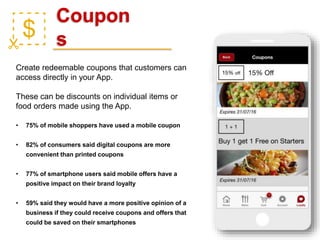
Create redeemable coupons that customers can
access directly in your App.
These can be discounts on individual items or
food orders made using the App.
• 75% of mobile shoppers have used a mobile coupon
• 82% of consumers said digital coupons are more
convenient than printed coupons
• 77% of smartphone users said mobile offers have a
positive impact on their brand loyalty
• 59% said they would have a more positive opinion of a
business if they could receive coupons and offers that
could be saved on their smartphones
Push
Notifications
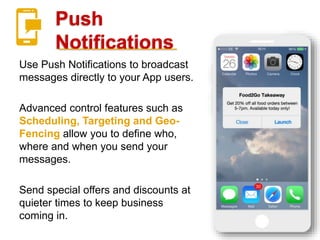
Use Push Notifications to broadcast
messages directly to your App users.
Advanced control features such as
Scheduling, Targeting and Geo-
Fencing allow you to define who,
where and when you send your
messages.
Send special offers and discounts at
quieter times to keep business
coming in.
Geo-Fencing
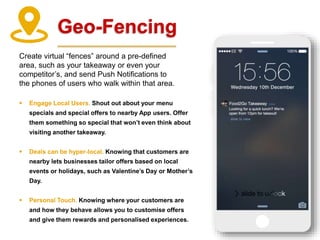
Create virtual “fences” around a pre-defined
area, such as your takeaway or even your
competitor’s, and send Push Notifications to
the phones of users who walk within that area.
 Engage Local Users. Shout out about your menu
specials and special offers to nearby App users. Offer
them something so special that won’t even think about
visiting another takeaway.
 Deals can be hyper-local. Knowing that customers are
nearby lets businesses tailor offers based on local
events or holidays, such as Valentine’s Day or Mother’s
Day.
 Personal Touch. Knowing where your customers are
and how they behave allows you to customise offers
and give them rewards and personalised experiences.
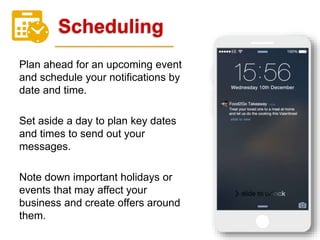
Scheduling
Plan ahead for an upcoming event
and schedule your notifications by
date and time.
Set aside a day to plan key dates
and times to send out your
messages.
Note down important holidays or
events that may affect your
business and create offers around
them.
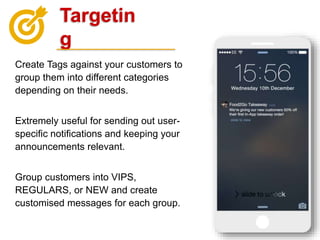
Targetin
g
Create Tags against your customers to
group them into different categories
depending on their needs.
Extremely useful for sending out user-
specific notifications and keeping your
announcements relevant.
Group customers into VIPS,
REGULARS, or NEW and create
customised messages for each group.

Takeaways

  • 1.
    Takeaways & Mobile WhyYour Takeaway Needs A Mobile App
  • 2.
    Grow Your Business A mobileApp for your takeaway is a powerful tool that can help grow your business and provide a simple way to reach new and existing customers. Promote your business, provide discounts and offer brand loyalty.
  • 3.
    The Mobile Industry 85% ofmobile users are more comfortable with Apps than mobile websites. 75% of users go online with their smartphone every day. Average number of Apps per smartphone is 26 and growing 15% year or year
  • 4.
    The Mobile Industry& Takeaways Why do customers prefer mobile Apps? 69% of customers order food using a smartphone. 91% of smartphone users searched for a restaurant App. 73% of customers like placing orders quickly and without hassle. 52% of customers want to avoid queuing. Mobile User Growth
  • 5.
    Features Available forTakeaway Apps Food Ordering Upload your entire food menu and include full details on each item, such as a description, price and an appetizing photo. Customers can easily view and add items to their cart. Loyalty Programs Your customers can earn points to redeem rewards using Location- based Check-In, social sharing or QR scans. Provide discounts and special offers, create coupons and a digital stamp card. Cart Menu items that are added to a customer’s order are summarised in the Cart tab. It includes the total order price and if you choose to give first order offers and/or provide loyalty discounts, these are also shown here. Form Submissions Our Forms tabs are completely customisable and perfect for capturing information. Create registration forms for new customers, or review or enquiry forms. Customers can even upload pictures directly from their smartphones. Customer Account Here the customer can create an account which allows them to order from the App. They can then view their order history and loyalty acquired. Food Gallery Showcase your best and most popular dishes in a gallery tab. You can also let customers rate and review them. Update the gallery seasonally with new dishes to keep customers coming back time and time again. One-Touch Calling/Emailing User will never have to search for your contact information again. Our App offers multiple ways to contact you at the touch of a button, either by email, phone or instant message. Maps & Directions Customers can access directions to your business from wherever they are with the integrated Map and Location feature. Push Notifications Use Push Notifications to broadcast messages & special offers directly to your App users. Use the advanced control features to define who, where and when you send your messages. Customer Reviews Feature your customer reviews on an individual reviews page that prospective customers can view any time. This works similarly to word- of-mouth recommendations and builds your brand name. Social Media Integration Integrate all your social platforms into your App, and create a virtual hub to connect your customers with your business. Customer Relationship Management Tool View and manage all of your customers using the CRM. Here you can view individual customers and bring up their profile to view order history, loyalty statistics and each action made in your App.
  • 6.
    Food Ordering  Uploadyour full food menu and allow food orders directly in your App  List items by category, such as “starters” and “mains”  Include appetizing thumbnail images  Easily add and remove items to and from the Cart tab.  All items are summarised in the Cart tab  Cart tab include the price and any loyalty acquired with the order.
  • 7.
    Customer Account  TheAccount tab allows customers to create their account to enable In-App food ordering  Here they can view their order history and loyalty acquired from each food order they make.
  • 8.
    Loyalty Schemes  Offer mobileloyalty schemes for your valuable customers.  Increase your customer retention and loyalty.  No stamps or lost cards ever again.  Update, remove or add new loyalty rewards at any time.
  • 9.
    Loyalty Cards Loyalty cards allowyou to reward your App users who support your business by giving them digital stamps. Offer a digital stamp each time they make a food order or buy a particular menu item using your App. Exchange fully stamped cards for rewards!  95% of people who enrolled in a mobile loyalty program said they were likely to continue using it  90% of consumers who have joined mobile Loyalty programs feel they have gained value from them  73% of consumers are interested in saving loyalty cards on their smartphones.
  • 10.
    Coupon s Create redeemable couponsthat customers can access directly in your App. These can be discounts on individual items or food orders made using the App. • 75% of mobile shoppers have used a mobile coupon • 82% of consumers said digital coupons are more convenient than printed coupons • 77% of smartphone users said mobile offers have a positive impact on their brand loyalty • 59% said they would have a more positive opinion of a business if they could receive coupons and offers that could be saved on their smartphones
  • 11.
    Push Notifications Use Push Notificationsto broadcast messages directly to your App users. Advanced control features such as Scheduling, Targeting and Geo- Fencing allow you to define who, where and when you send your messages. Send special offers and discounts at quieter times to keep business coming in.
  • 12.
    Geo-Fencing Create virtual “fences”around a pre-defined area, such as your takeaway or even your competitor’s, and send Push Notifications to the phones of users who walk within that area.  Engage Local Users. Shout out about your menu specials and special offers to nearby App users. Offer them something so special that won’t even think about visiting another takeaway.  Deals can be hyper-local. Knowing that customers are nearby lets businesses tailor offers based on local events or holidays, such as Valentine’s Day or Mother’s Day.  Personal Touch. Knowing where your customers are and how they behave allows you to customise offers and give them rewards and personalised experiences.
  • 13.
    Scheduling Plan ahead foran upcoming event and schedule your notifications by date and time. Set aside a day to plan key dates and times to send out your messages. Note down important holidays or events that may affect your business and create offers around them.
  • 14.
    Targetin g Create Tags againstyour customers to group them into different categories depending on their needs. Extremely useful for sending out user- specific notifications and keeping your announcements relevant. Group customers into VIPS, REGULARS, or NEW and create customised messages for each group.