3/11/2010


  Advanced Programming
  With Notes/Domino
  COM Classes

 EntwicklerCamp, March, 2010


Bob Balaban
Looseleaf Software LLC
bbalaban@gmail.com
                                           Copyright 2010 Looseleaf Software


    Agenda
    • Speaker intro
    • COM and OLE
    • Notes “front-end” and “back-end” objects
    • Where can you use Notes COM/OLE classes?
       • Vb.net
       • C#
       • C++
    • Why?
    • Demos and samples
    • Q &A


       Copyright 2010 Looseleaf Software


                                                                                      1
3/11/2010


Speaker Introduction
• 15+ years as a Lotus/Iris/IBM developer (1-2-3,
  Notes/Domino)
  • Wrote the original LotusScript/Java back-end classes (Notes
    v4.0)
  • Notes/SAP integration (v7.x, 2006)
• 9+ years as an independent consultant/developer/author
  • Frequent speaker at LUGs and Lotusphere
  • Many trade journal articles
  • Expertise in N/D programmability, plugins, J2ee, system
     integration, messaging, appdev in general


   Copyright 2010 Looseleaf Software


COM – Component Object Model
• A way to provide “interfaces” for other code to use
  • Kind of like Web Services, for Windows programs
• “Provider” (“server”):
  • Create a component in c++ or a .NET language,
  • Describe the interface in IDL (interface definition language),
  • Compile IDL to a “type library”, register it under some ID and/or
     name
  • COM objects can be DLL or EXE (“in-proc”, “out-of-proc”)
• “Consumer” (“client”):
  • Use Visual Studio (it generates a lot of code for you)
  • Get an instance of the root object (by ID or name, or…)
  • Use it to get other objects


   Copyright 2010 Looseleaf Software


                                                                               2
3/11/2010


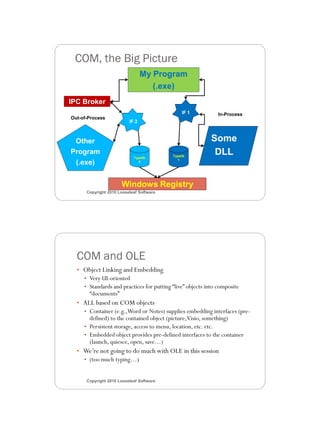
 COM, the Big Picture
                                 My Program
                                    (.exe)
IPC Broker
                                                IF 1          In-Process
Out-of-Process
                          IF 2


 Other                                                     Some
Program
                            Typelib
                                           Typelib
                                                            DLL
                                             1
 (.exe)                       2


                      Windows Registry
      Copyright 2010 Looseleaf Software


  COM and OLE
  • Object Linking and Embedding
     • Very UI-oriented
     • Standards and practices for putting “live” objects into composite
       “documents”
  • ALL based on COM objects
     • Container (e.g., Word or Notes) supplies embedding interfaces (pre-
       defined) to the contained object (picture, Visio, something)
     • Persistent storage, access to menu, location, etc. etc.
     • Embedded object provides pre-defined interfaces to the container
       (launch, quiesce, open, save…)
  • We’re not going to do much with OLE in this session
     • (too much typing…)


      Copyright 2010 Looseleaf Software


                                                                                    3
3/11/2010


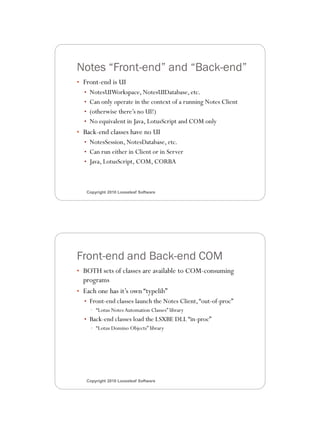
Notes “Front-end” and “Back-end”
• Front-end is UI
  • NotesUIWorkspace, NotesUIDatabase, etc.
  • Can only operate in the context of a running Notes Client
  • (otherwise there’s no UI!)
  • No equivalent in Java, LotusScript and COM only
• Back-end classes have no UI
  • NotesSession, NotesDatabase, etc.
  • Can run either in Client or in Server
  • Java, LotusScript, COM, CORBA


   Copyright 2010 Looseleaf Software


Front-end and Back-end COM
• BOTH sets of classes are available to COM-consuming
  programs
• Each one has it’s own “typelib”
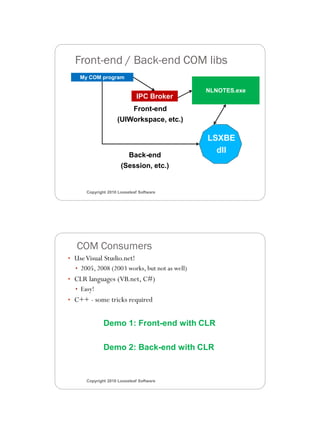
  • Front-end classes launch the Notes Client, “out-of-proc”
    • “Lotus Notes Automation Classes” library
  • Back-end classes load the LSXBE DLL “in-proc”
    • “Lotus Domino Objects” library


   Copyright 2010 Looseleaf Software


                                                                       4
3/11/2010


  Front-end / Back-end COM libs
    My COM program

                                               NLNOTES.exe
                             IPC Broker
                        Front-end
                    (UIWorkspace, etc.)

                                               LSXBE
                                                 dll
                        Back-end
                      (Session, etc.)


      Copyright 2010 Looseleaf Software


   COM Consumers
• Use Visual Studio.net!
  • 2005, 2008 (2003 works, but not as well)
• CLR languages (VB.net, C#)
  • Easy!
• C++ - some tricks required


              Demo 1: Front-end with CLR

              Demo 2: Back-end with CLR


      Copyright 2010 Looseleaf Software


                                                                    5
3/11/2010


Why Do This: Use Cases
• You want to write a standalone program (.exe) that uses
  Notes objects, and you don’t want to write Java
• You want to write a standalone program (.exe) that uses
  front-end objects (not an option with Java)
• You’re writing an Extension Manager plugin or Server Addin
  (or anything that requires C/C++) and want to use higher-
  level objects than you get in Notes CAPI
• You are writing something that requires .NET (ASPX, Web
  part, whatever)


   Copyright 2010 Looseleaf Software


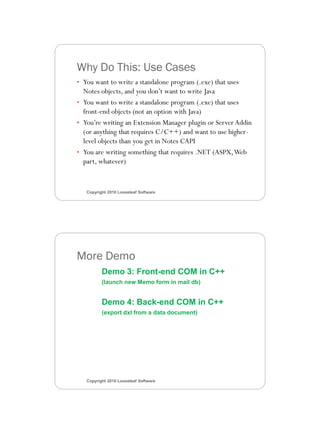
More Demo
          Demo 3: Front-end COM in C++
          (launch new Memo form in mail db)


          Demo 4: Back-end COM in C++
          (export dxl from a data document)


   Copyright 2010 Looseleaf Software


                                                                      6
3/11/2010


Summary
• COM is difficult to explain thoroughly
  • But pretty easy to use
  • If you get the right tools (Visual Studio!)
• COM gives you access to both Front- and Back-end objects
  from “outside” the product
• CLR languages (C#, VB.net) are the easiest to use
• C++ also possible, requires a bit of extra work


   Copyright 2010 Looseleaf Software


References
• “Essential COM” by Don Box (1988)
  • The best and most thorough reference on all things COM
• “COM Together” – Lotus Redbook, 2000
  • http://www.redbooks.ibm.com/abstracts/sg245670.html?Op
    en
• “In Theory” blog – couple of articles on using COM and C#
  with Notes CAPI
  • http://www.bobzblog.com


   Copyright 2010 Looseleaf Software


                                                                     7
3/11/2010


Questions


       How to contact me:
       Bob Balaban (not the actor)
       bbalaban@gmail.com
       Blog – http://www.bobzblog.com
     Copyright 2010 Looseleaf Software


                                                8

Advanced Programming With Notes/DominoCOM Classes

  • 1.
    3/11/2010 AdvancedProgramming With Notes/Domino COM Classes EntwicklerCamp, March, 2010 Bob Balaban Looseleaf Software LLC bbalaban@gmail.com Copyright 2010 Looseleaf Software Agenda • Speaker intro • COM and OLE • Notes “front-end” and “back-end” objects • Where can you use Notes COM/OLE classes? • Vb.net • C# • C++ • Why? • Demos and samples • Q &A Copyright 2010 Looseleaf Software 1
  • 2.
    3/11/2010 Speaker Introduction • 15+years as a Lotus/Iris/IBM developer (1-2-3, Notes/Domino) • Wrote the original LotusScript/Java back-end classes (Notes v4.0) • Notes/SAP integration (v7.x, 2006) • 9+ years as an independent consultant/developer/author • Frequent speaker at LUGs and Lotusphere • Many trade journal articles • Expertise in N/D programmability, plugins, J2ee, system integration, messaging, appdev in general Copyright 2010 Looseleaf Software COM – Component Object Model • A way to provide “interfaces” for other code to use • Kind of like Web Services, for Windows programs • “Provider” (“server”): • Create a component in c++ or a .NET language, • Describe the interface in IDL (interface definition language), • Compile IDL to a “type library”, register it under some ID and/or name • COM objects can be DLL or EXE (“in-proc”, “out-of-proc”) • “Consumer” (“client”): • Use Visual Studio (it generates a lot of code for you) • Get an instance of the root object (by ID or name, or…) • Use it to get other objects Copyright 2010 Looseleaf Software 2
  • 3.
    3/11/2010 COM, theBig Picture My Program (.exe) IPC Broker IF 1 In-Process Out-of-Process IF 2 Other Some Program Typelib Typelib DLL 1 (.exe) 2 Windows Registry Copyright 2010 Looseleaf Software COM and OLE • Object Linking and Embedding • Very UI-oriented • Standards and practices for putting “live” objects into composite “documents” • ALL based on COM objects • Container (e.g., Word or Notes) supplies embedding interfaces (pre- defined) to the contained object (picture, Visio, something) • Persistent storage, access to menu, location, etc. etc. • Embedded object provides pre-defined interfaces to the container (launch, quiesce, open, save…) • We’re not going to do much with OLE in this session • (too much typing…) Copyright 2010 Looseleaf Software 3
  • 4.
    3/11/2010 Notes “Front-end” and“Back-end” • Front-end is UI • NotesUIWorkspace, NotesUIDatabase, etc. • Can only operate in the context of a running Notes Client • (otherwise there’s no UI!) • No equivalent in Java, LotusScript and COM only • Back-end classes have no UI • NotesSession, NotesDatabase, etc. • Can run either in Client or in Server • Java, LotusScript, COM, CORBA Copyright 2010 Looseleaf Software Front-end and Back-end COM • BOTH sets of classes are available to COM-consuming programs • Each one has it’s own “typelib” • Front-end classes launch the Notes Client, “out-of-proc” • “Lotus Notes Automation Classes” library • Back-end classes load the LSXBE DLL “in-proc” • “Lotus Domino Objects” library Copyright 2010 Looseleaf Software 4
  • 5.
    3/11/2010 Front-end/ Back-end COM libs My COM program NLNOTES.exe IPC Broker Front-end (UIWorkspace, etc.) LSXBE dll Back-end (Session, etc.) Copyright 2010 Looseleaf Software COM Consumers • Use Visual Studio.net! • 2005, 2008 (2003 works, but not as well) • CLR languages (VB.net, C#) • Easy! • C++ - some tricks required Demo 1: Front-end with CLR Demo 2: Back-end with CLR Copyright 2010 Looseleaf Software 5
  • 6.
    3/11/2010 Why Do This:Use Cases • You want to write a standalone program (.exe) that uses Notes objects, and you don’t want to write Java • You want to write a standalone program (.exe) that uses front-end objects (not an option with Java) • You’re writing an Extension Manager plugin or Server Addin (or anything that requires C/C++) and want to use higher- level objects than you get in Notes CAPI • You are writing something that requires .NET (ASPX, Web part, whatever) Copyright 2010 Looseleaf Software More Demo Demo 3: Front-end COM in C++ (launch new Memo form in mail db) Demo 4: Back-end COM in C++ (export dxl from a data document) Copyright 2010 Looseleaf Software 6
  • 7.
    3/11/2010 Summary • COM isdifficult to explain thoroughly • But pretty easy to use • If you get the right tools (Visual Studio!) • COM gives you access to both Front- and Back-end objects from “outside” the product • CLR languages (C#, VB.net) are the easiest to use • C++ also possible, requires a bit of extra work Copyright 2010 Looseleaf Software References • “Essential COM” by Don Box (1988) • The best and most thorough reference on all things COM • “COM Together” – Lotus Redbook, 2000 • http://www.redbooks.ibm.com/abstracts/sg245670.html?Op en • “In Theory” blog – couple of articles on using COM and C# with Notes CAPI • http://www.bobzblog.com Copyright 2010 Looseleaf Software 7
  • 8.
    3/11/2010 Questions How to contact me: Bob Balaban (not the actor) bbalaban@gmail.com Blog – http://www.bobzblog.com Copyright 2010 Looseleaf Software 8