System i – DDL vs DDS
In today’s world using SQL / DDL is the obvious path to managing our database objects. This has long
been true with the other Database Management Systems and is the future path for the System i. There
are major differences in the way DDL objects are treated by the OS resulting in improvements in data
integrity and performance. Let’s get a better understanding of why this is the path we should take and
how to get there.
SQL Terminology
What is SQL / DDL ?
Overview
The History of SQL
What are the Advantages of using SQL/DDL ?
The Primary Advantages of using DDL instead of DDS
Data Integrity – Data Validation Differences
Data Integrity – Referential Integrity
Performance – Access Path Performance
SQL / DDL Language Basics
Most common DDL statement examples
DB2 Sequence Objects
How to build / Execute DDL scripts
i Series Navigator
using PDM
DDS to DDL Conversion
i Series Navigator
Using API’s within PDM
Good Practices
Presented by : Chuck Walker
The System Solutions Group, llc
SQL Terminology
Term /
Acronym
Description
SQL Structured Query Language
DDL DDL (Data Description Language) is a subset of the SQL Language that contains
statements to create and modify database objects. These statements include those to
create, modify, and drop table and index definitions, create and modify Views, as well
as to grant and revoke authorities on these objects.
DML DML ( Data Manipulation Language) is a subset of the SQL Language that contains
statements to modify values within our database objects. Most commonly these
statements are used to Add, Change and Delete data within tables.
DDS
DDS (Data Description Specifications) is a Specification Language used to define the
attributes of several external file types. These files are the physical, logical, display,
printer, and ICF (intersystem communications function) files.
RDBMS Relational Data Base Management System – A general term used to describe today’s
database systems such as SQL Server, Oracle, Sybase, DB2, etc.
RLA Record Level Access. Typically used to refer to Reads, Chains, Updates, etc. in a
HLL program.
System i SQL
Library Collection or Schema
Physical File Table
Logical File – Keyed Index
Logical File – Non Keyed View
Record Row
Field Column
What is SQL / DDL ?
Overview:
The evolution of the i Series has resulted in a mixture of older and newer technologies. Most notably
are the methods used to create, populate and manipulate databases. The technologies vary widely between the
early days and today.
In the early days of the AS400 DDS (Data Description Specifications) was the most common and efficient way of
creating and manipulating data through Physical and Logical files and Record Level Access (RLA) in the HLL
(High Level Language) programs. Although SQL was available the underlying SQL engine was painfully slow.
As a result developers and system administrators where discouraged from using SQL in the development process.
This, as well as the fact that most System 36 and System 38 programs already used DDS and RLA processing
methods, the primary development process was DDS. In the early days IBM AS400 training classes in Database
Development taught primarily DDS. SQL / DDL, although mentioned, wasn’t the primary focus.
As a result many of the System i applications in use today still use DDS with record level access to the DB2-400
files through RPG or COBOL. All other Relational Database Management Systems (RDBMS) use Structured
Query Language, or SQL, to define their tables, indexes, and views as well as access the data.
Over time IBM has greatly improved the SQL Query Engine and it is now more efficient than using DDS
described files. In recent years the only improvements and enhancements to the database architecture for i Series
DB2 are being made to the SQL described database objects and the SQL Query Engine.
In years gone by IBM typically addressed performance issues in the AS400 / system i with the primary approach
of throwing more hardware at the problem. Over the years great improvements were made in disk access speed,
processor speed, etc. Space, both on disk and memory, is not only much more efficient but is now relatively
cheap compared to what it used to cost. The focus of IBM now to remedy performance issues is the software
methods used.
Because of this many companies that use the i Series are using SQL DDL to define their database objects and
embedded SQL DML to manipulate their data in RPG and COBOL programs for all new applications and
converting their old applications to do the same. So, the question may before long not be IF you should make that
transition, but WHEN.
Is there a way that these applications can take advantage of SQL database enhancements without a total
rewrite? Yes. The IBM Redbook "Modernizing iSeries Application Data Access - a Roadmap Cornerstone"
addresses this and the conversion process. We will also look at some of the conversion methods later in this
presentation.
The History of SQL
In 1970, Dr. E.F. Codd, an employee of IBM, presented a relational model for databases. His
ideas were the groundwork for all modern Relational Database Management Systems
(RDBMS). The Structured English Query Language (SEQUEL) was developed in 1974 by
D.D. Chamberlin, an employee at IBM’s lab in San Jose (California) and renamed Structured
Query Language (SQL) three years later. The first commercial database with relational
capabilities was introduced with IBMs System/38, the predecessor of the AS/400 and iSeries.
The language SQL is not proprietary. This, and the fact that both the American National
Standards Institute (ANSI) and the International Standards Organization (ISO) formed SQL
Standards committees in 1986 and 1987, were major reasons for SQL to become a widely
accepted standard that is implemented in almost all RDBMSs.
So far three standards have been published by the ANSI-SQL group. SQL1 (1989), SQL2 (1992), and
SQL3 (1999).
From IBM Redbook – Modernizing IBM @ Server iseries Data Access – A Roadmap Cornerstone
The Advantages of Using DDL instead of DDS :
There are a variety of reasons to use SQL Data Definition Language (DDL) rather than Data Definition
Specifications (DDS) to define your iSeries physical and Logical files (or tables, indexes, and views, as
they're known in SQL terminology). Many SQL functions aren't available in DDS (e.g., views with
summary values), and SQL is both IBM's and the industry's standard database language. But there's
another important reason - Performance. For many situations, access is faster for files defined with SQL
DDL than with DDS.
The primary advantages of using DDL instead of DDS for your database object creation and SQL for
your database access methods are :
Industry Standard Compliance : SQL / DDL is the most widely used standard across Relational Data Base Management
Systems for creating database objects.
Data integrity: Because data validation is done when data is added as opposed to when data is read it helps to insure the
reliability of data in your databases. Also, business rules may be applied to further validate data.
Performance: IBM is investing money on improving database access through SQL. No enhancements to the underlying
architecture are being targeted for DDS created objects or Record Level Access methodology.
Functionality: Some new functions require SQL.
System Openness: Using modern technologies to maintain and access your database provides you with more and better
options to access your database using third-party tools.
In this presentation we will look at the performance differences in the two approaches and the actual
programming differences in managing and accessing your physical and logical files.
As programmers we see more and more skill requirements in the marketplace for programmers with
embedded SQL experience as well as programming without F Specs. This is where it all starts.
Data Integrity – Data Validation Differences
A DDS Physical File is created from a source member of type PF with a CRTPF command.
A DDL Table is created from a SQL script with a Create Table SQL Statement.
With a DDS created Physical File data is validated when a Read occurs. We have all run into the
situation where our application programs get data decimal errors from trying to read a record that has
garbage, or non-numeric data in a numeric field. This is possible because the Write doesn’t do the data
validation. Therefore garbage data can end up in the file if our programs that do the write don’t have
data validation in them.
With a DDL created Table data validation occurs when a record is Written instead of when a Read
occurs. This prevents garbage data from being inserted into the file. Therefore data decimal errors are
avoided and the integrity of our numeric and date fields is insured.
Let’s consider the impact that these two methods have on the I/O operations. Obviously the data
validation requires some additional overhead. In the typical life cycle of a File / Table record the record
is written once, updated occasionally, and read many times by different programs. With a DDL defined
table the data validation overhead occurs only once during the Write or Insert operation. With a DDS
defined Physical File the data validation overhead occurs each time an application program reads the
record. Obviously the DDL table will have better performance just for this reason.
Write
Passed
Read
Failed
Read
Passed
Write
Failed
DDS
PF
Data
Validation Application
Program
Eception Error
DDL
Table
Data
Validation
Application
Program
Exception Error
Data Integrity – Referential Integrity
Referential integrity is a fundamental principle of database theory and arises from the notion that a
database should not only store data, but should also actively seek to ensure its quality. Referential
integrity is a database constraint that ensures that references between data are indeed valid and intact.
Referential integrity is usually enforced by the combination of a primary key and a foreign key.
It ensures that every foreign key matches a primary key.
For example, customer numbers in a customer file are the primary keys, and customer numbers in the
order file are the foreign keys. If an Order record is created the customer column in the order file must
exist in the customer file. If a customer record is deleted, the order records must also be deleted;
otherwise they are left without a primary reference. If the RDBMS does not test for this, it must be
programmed into the applications. In a nutshell Referential Integrity enforces relationships between
different tables.
Below is a graphic showing the logical relationships between four different tables.
Referential Integrity constraints are used regularly in other RDBMS systems such as Oracle and SQL
Server. But I rarely see them used in the System i DB2 system. Referential Integrity constraints are not
exclusive to DML database management either.
We have the ability to use constraints with DDS files. A constraint is defined for DDS Physical Files
with the Add Physical File Constraint (ADDPFCST) command. You can also use the CHGPFCST,
RMVPFCST, WRKPFCST, EDTCPCST and DSPCPCST commands. Although these contstraints are
available for DDS files it is extremely rare to see them in use. Most System i programmers don’t evem
realize they are available. It may very well be worth considering these types of data integrity checks in
our design as we convert our physical files to DDL tables.
Although Referential Integrity is a good way to ensure the quality of your systems data it’s not an easy
thing to implement within a system that has existed for years without it. In spite of data validation
within application programs any system with much age on it will have plenty of orphan records. So it is
likely to take a significant amount of data cleanup before Referential Integrity constraints can be
implemented.
Item Master
Item Number
Item Description
Vendor ID
Item Category
Item Cost
Item Price
Status Code
Reorder Level
Order Detail
Order Number
Line Number
Item Number
Qty Ordered
Unit Price
Extended Price
Line Status Code
Order Header
Order Number
Customer Number
PO Number
Order Date
Ship Date
Order Amount
Customer Master
Customer Number
Customer Name
Status Code
Credit Limit
Street Address
City
State
Zip Code
Data Integrity – Business Rules Enforcement
In today’s world of RDBMS systems one of the primary functions is data integrity. Using Referential
Integrity constraints is only one aspect of that. The other is the use of Stored Procedures. Stored
Procedures are part of the RDBMS. Whenever possible Stored Procedures should be used to Insert.
Update, or Delete records.
If all of your application programs use the same stored procedures for these functions then the obvious
place to enforce business rules restrictions is in the stored procedure.
If your applications are structured in this manner then there is only one place to make changes to your
business rules logic when needed.
The reason a Stored Procedure should be used is that it can be called from any platform (Web, Windows,
etc) as well as a static call from an RPG program.
Order Entry –
Manual Input –
Telephone Sales
Incoming Order -
Web application
order.
Incoming Order -
EDI Order
Stored Procedure
Order validation / post.
Order
Header
Table
Order
Detail
Table
Performance – Access Path Performance
Modernizing Database Access - The Madness Behind the Methods
by Dan Cruikshank is an article that talks extensively about database engineering as well as the
performance differences between the access paths used for DDL tables and DDS Physical and Logical
files.
Since V4R2 an access path created via SQL/DDL has a logical page size of 64K. A DDS keyed logical
file will create, on average, an 8K access path up to a maximum size of 32K.
In this article It shows a comparison of running a SELECT COUNT(*) SQL statement over identical
files, one keyed Logical file and one SQL Index. Because of the access path differences the SQL Index
is processed more than 3 times faster than the Logical file.
He also compares using SQL defined Indexes and DDS defined Logicals to going the speed limit in the
HOV lane as opposed to sitting in rush hour traffic in the slow lanes because of the access path size and
the access path sharing that is done with SQL defined indexes.
Those organizations that have a large number of keyed logical files may see improved
performance as a result of recreating the logical files after comparable SQL indexes have been
created. This is due to the possibility that some logical files may have been created out of order
(e.g. access path K1, K2 being created after access path K1 was created). Creating the access
paths in order by most key columns first may result in fewer access paths. In addition, the first
application to read in an index page will benefit other applications that need to reference the same
index page. This is because of the access path sharing with DDL defined indexes.
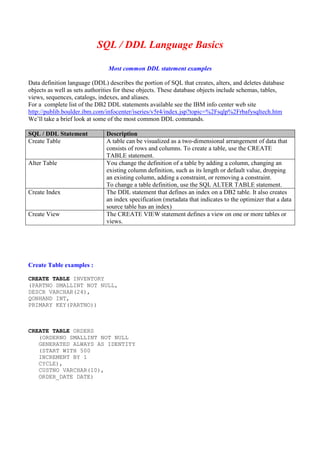
SQL / DDL Language Basics
Most common DDL statement examples
Data definition language (DDL) describes the portion of SQL that creates, alters, and deletes database
objects as well as sets authorities for these objects. These database objects include schemas, tables,
views, sequences, catalogs, indexes, and aliases.
For a complete list of the DB2 DDL statements available see the IBM info center web site
http://publib.boulder.ibm.com/infocenter/iseries/v5r4/index.jsp?topic=%2Fsqlp%2Frbafysqltech.htm
We’ll take a brief look at some of the most common DDL commands.
SQL / DDL Statement Description
Create Table A table can be visualized as a two-dimensional arrangement of data that
consists of rows and columns. To create a table, use the CREATE
TABLE statement.
Alter Table You change the definition of a table by adding a column, changing an
existing column definition, such as its length or default value, dropping
an existing column, adding a constraint, or removing a constraint.
To change a table definition, use the SQL ALTER TABLE statement.
Create Index The DDL statement that defines an index on a DB2 table. It also creates
an index specification (metadata that indicates to the optimizer that a data
source table has an index)
Create View The CREATE VIEW statement defines a view on one or more tables or
views.
Create Table examples :
CREATE TABLE INVENTORY
(PARTNO SMALLINT NOT NULL,
DESCR VARCHAR(24),
QONHAND INT,
PRIMARY KEY(PARTNO))
CREATE TABLE ORDERS
(ORDERNO SMALLINT NOT NULL
GENERATED ALWAYS AS IDENTITY
(START WITH 500
INCREMENT BY 1
CYCLE),
CUSTNO VARCHAR(10),
ORDER_DATE DATE)
ALTER Table Examples :
Constraints can be added to a new table or an existing table. You can add a unique or primary key,
a referential constraint, or a check constraint, using the ADD constraint clause on the CREATE TABLE
or the ALTER TABLE statements. For example, add a primary key to a new table or to an existing table.
The following example illustrates adding a primary key to an existing table using the ALTER TABLE
statement.
ALTER TABLE ORDERS
ADD PRIMARY KEY (ORDERNO)
You can remove a constraint using the same ALTER TABLE statement:
ALTER TABLE ORDERS
DROP PRIMARY KEY (ORDERNO)
Creating Indexes :
You can create any number of indexes. However, because the indexes are maintained by the system, a
large number of Indexes can adversely affect performance just as a large number of Logicals can do.
CREATE INDEX ORDIDX1
ON ORDERS
(CUSTNO ASC, ORDER_DATE ASC)
Creating Views :
Once you have created the view, you can use it in SQL statements just like a table name. You can also change the
data in the base table. Typically I will use a View instead of an Index when I want to join tables and / or when I
only want records with particular values included, just like a select Logical. The following SELECT statement
displays the contents of EMP_MANAGERS: SELECT * FROM EMP_MANAGERS
CREATE VIEW EMP_MANAGERS AS
SELECT LASTNAME, WORKDEPT
FROM EMPLOYEE
WHERE JOB = ’MANAGER’
DB2 Sequence Objects
A sequence is an object that generates a sequence of numeric values according to the specification with
which the sequence was created. Sequences, unlike identity columns or row ID columns, are not associated
with tables. Applications refer to a sequence object to get its current or next value.
In most RDBMS systems database administrators and programmers are encouraged to make their first
column in any new table a Record ID column that is numeric. The RDBMS may have a data type of Auto
Number which assigns the next number automatically whenever a record is added. The Record ID column
may then defined as the Primary Key. So whenever the sort on that table is by the Primary Key then it is in
arrival sequence. This key value may also be stored in other related tables as a reference.
MS SQL Server as well as MS Access are just a couple of examples for database systems that provide Auto
Increment data types to accomplish this. ORACLE and DB2 use a ROWID data type which is also auto
incremented. So, the Sequence object is not typically used for this purpose. A field data type is already
available.
Historically as System i programmers we have used Data Areas to keep track of the last value for an order
number used, P. O. number used, etc. Within our program we take the last value, increment it by 1, update
the data area value , and use the new number in our functions to write new records. Some applications may
use configuration or control type physical files to accomplish the same thing. A Sequence object will do this
without all of the code.
You create a sequence object with the CREATE SEQUENCE statement, alter it with the ALTER
SEQUENCE statement, and drop it with the DROP SEQUENCE statement. You grant access to a sequence
with the GRANT (privilege) ON SEQUENCE statement, and revoke access to the sequence with the
REVOKE (privilege) ON SEQUENCE statement.
The values that DB2 generates for a sequence depend on how the sequence is created. The START WITH
option determines the first value that DB2 generates. The values advance by the INCREMENT BY value in
ascending or descending order.
CREATE SEQUENCE ORDER_SEQ AS INTEGER
START WITH 1
INCREMENT BY 1
NO MAXVALUE
NO CYCLE;
The MINVALUE and MAXVALUE options determine the minimum and maximum values that DB2
generates. The CYCLE or NO CYCLE option determines whether DB2 wraps values when it has generated
all values between the START WITH value and MAXVALUE if the values are ascending, or between the
START WITH value and MINVALUE if the values are descending. If the length of your order number is
7,0 then your MAXVALUE should be 999,999. If you just want the number to start at 1 again the CYCLE
value should be set to CYCLE instead of NO CYCLE.
You can then use the same sequence number as a key value for an ORDERS table indexes.
INSERT INTO ORDERS (ORDERNO, CUSTNO)
VALUES (NEXT VALUE FOR ORDER_SEQ, 12345);
The NEXT VALUE expression in the INSERT statement generates a sequence number value for the
sequence object ORDER_SEQ. The number 12345 is the Customer number value.
So, when using a Sequence object for an order number instead of a data area all that needs to be done in a
SQL Insert statement is a NEXT VALUE clause referring to the Sequence Object in the Values clause of the
Insert statement.
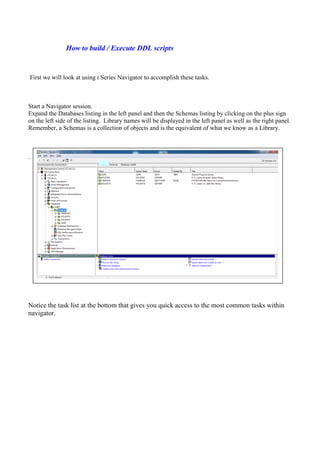
How to build / Execute DDL scripts
First we will look at using i Series Navigator to accomplish these tasks.
Start a Navigator session.
Expand the Databases listing in the left panel and then the Schemas listing by clicking on the plus sign
on the left side of the listing. Library names will be displayed in the left panel as well as the right panel.
Remember, a Schemas is a collection of objects and is the equivalent of what we know as a Library.
.
Notice the task list at the bottom that gives you quick access to the most common tasks within
navigator.
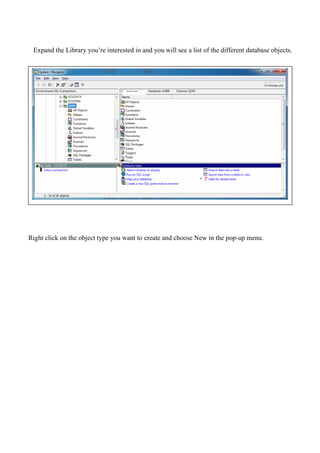
Expand the Library you’re interested in and you will see a list of the different database objects.
Right click on the object type you want to create and choose New in the pop-up menu.
System Name
The following screen appears when selecting a New Table.
This image shows the Table Tab.
Notice the different tabs for columns, key constraints, foreign key constraints, etc.
System Name
This image shows the Columns Tab.
Notice the Show SQL button in the bottom left corner. The SQL statement is built for you. If
you click on Show SQL button it will show you the SQL script generated.
Systen Name
This image is the screen displayed when the option to Add a new column is selected.
So, you simply use this tool to step through each tab and fill in the blanks.
System Name
This is the screen displayed when the option to add a new Index is selected.
System Name
You may also use PDM to create a SQL script. Simply create a member in a source file with
type SQL.
Key in your SQL script just as you would in any other type of source member. Notice the
double hyphens are used to identify comment lines.
Execute the RUNSQLSTM command to execute the script and create your table, index, etc.
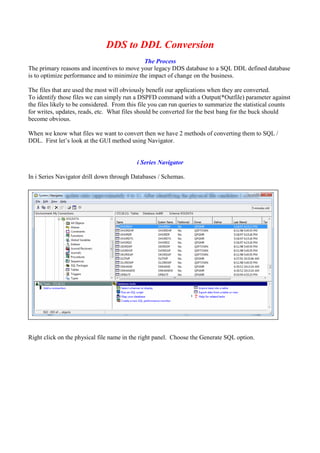
DDS to DDL Conversion
The Process
The primary reasons and incentives to move your legacy DDS database to a SQL DDL defined database
is to optimize performance and to minimize the impact of change on the business.
The files that are used the most will obviously benefit our applications when they are converted.
To identify those files we can simply run a DSPFD command with a Output(*Outfile) parameter against
the files likely to be considered. From this file you can run queries to summarize the statistical counts
for writes, updates, reads, etc. What files should be converted for the best bang for the buck should
become obvious.
When we know what files we want to convert then we have 2 methods of converting them to SQL /
DDL. First let’s look at the GUI method using Navigator.
i Series Navigator
In i Series Navigator drill down through Databases / Schemas.
Right click on the physical file name in the right panel. Choose the Generate SQL option.
Then this screen appears.
The SQL generated may be put into a source file by choosing the Write to file option.
The same may be done for Views but not Indexes.
We need to create SQL indexes to take advantage of the 64K access path. Since i Series Navigator doesn’t do it
for us we need to find another way. For those Logical files that do not show up in the View list the easiest
process is just to create a SQL script or statement as a SQL member type in a source file.
Using API’s within PDM
The second method to generating SQL script for conversion is to simply use green screen / PDM.
IBM has provided an API that may be called from RPG program or CL programs that will generate SQL
statements to source members. This API can be used to generate SQL to create DDL objects from
existing DDS objects. The API object is QSQGNDD. A couple of good articles describing the use of
this command as well as source code that can be used to turn it into an easy to use utility are
http://www.ibmsystemsmag.com/ibmi/developer/general/Generating-DDL-Source-Using-a-CL-Command/
and
http://www.itjungle.com/mgo/mgo060502-story01.html .
Good Practices
How does using DML (Data Manipulation Language) accelerate the development
process and minimize the impact on the business?
When using RLA (Record Level Access) with native RPG setll, read, reade, and chain operation codes
one of the primary problems with adding new fields to a physical file or lengthening an existing field is
that we then have to recompile and deploy all programs that use the file or we get level check errors.
Unless, of course, we use the Level Check *No option when creating our new physical file. But there is
a certain level of risk in using the Level Check *No option.
If we are using SQL / DML within our programs and we are field level specific in our programs then we
only have to recompile the programs that need to use the new fields. The others will still function as
designed without recompiling. If you are lengthening a field you would only need to recompile the
programs that use that specific field.
This can significantly reduce the amount of time development and deployment takes and therefore
reduce the impact on the business. This is, of course, if we use good practices in writing our code.
Good Practices :
I often see programs written using embedded SQL that use an external physical file to define a data
structure within the program and then use a Select * SQL statement to populate the data structure.
Example :
D salesHeader e ds extname(SHSLSH)
exec sql
select * into :SalesHeader from shslsh
where shinv = :shinv;
Avoid using this method. The only time I would suggest using this method is within a program that is
going to copy the complete record structure into a different table. As a general rule Select * should
never be used otherwise.
First, by using this method one of the main advantages of using DML within our application programs
has been nullified. When this method is used we have to recompile this program whenever we make a
file change because it is dependent on the physical file structure to build the data structure. If it isn’t
recompiled we will likely get some data mapping errors.
Secondly, it is very rare that an application program really needs all of the fields in a file. Many files
have more than a hundred fields / columns. Most of our application programs need only a few of these
fields. So by pulling in the entire record instead of just the fields we need hurts performance and
lengthens the development process when we need to make file changes.
It takes a little more code initially to list the fields you need in the data structure within your program
and to list the fields needed in the select statement but it is well worth the extra time. Then we only
need to recompile the program if the program needs to use a new column added or is already using a
column where the length has changed.
On The CD
Type Name Description
PDF System i - DDL vs
DDS Presentation
A copy of this presentation in PDF format.
PDF Moving from DDS to
SQL
IBM Publication – This publication goes into the details behind
Data Modeling as well as the conversion steps needed to convert to
SQL data tables.
PDF Modernizing Database
Access – The Madness
Behind the Methods
By Dan Cruikshank
This article provides a high level overview of the madness behind
the methods known as the Stage 1 DDS to DDL reengineering
strategy.
PDF Modernizing IBM e
server iSeries
Application Data
Access – A Roadmap
Cornerstone
IBM Redbook – This Redbook not only goes into great detail on
data modeling, design, and the conversion to SQL tables, but also
discusses data access through embedded SQL, creating I/O modules
for accessing data, and moving business rules to the database.
PDF DB2 for i5 OS - SQL
Reference V5R4
An IBM published SQL Reference for iseries SQL. V5 R4
PDF Advanced_Database
functions and
administration on DB2
UDB_for iSeries
This IBM Redbook covers some of the more advanced functions of
database administration such as Referential Integrity and other
constraints, data import and export, and commitment control. It
also goes into detail on the IBM tools available for these tasks.
PDF DB2 UDB SQL
Programming – V5R3
This IBM publication covers in detail the iSeries server
implementation of the Structured Query Language (SQL) using
DB2 UDB for iSeries and the DB2 UDB Query Manager and SQL
Development Kit Version 5 licensed program.
PDF System i Database
Programming - V5R4
This Publication covers all aspects of database programming
including Triggers, UDFs, and Referential Integrity.
Helpful Links
Link Description
http://www.iprodeveloper.com/article/databasesql/performance-comparison-of-
dds-defined-files-and-sql-defined-files-254
Performance Comparison of DDS-Defined Files and SQL-
Defined Files
Author: Dan Cruikshank
http://www-
03.ibm.com/systems/resources/systems_i_software_db2_pdf_Performance_DDS_
SQL.pdf
PDF link. Modernizing Database Access Author: Dan
Cruikshank
http://www-03.ibm.com/systems/i/software/db2/ IBM DB2 for i. This site has links to resources and related
downloads easily accessible.
http://www-
304.ibm.com/partnerworld/wps/servlet/ContentHandler/servers/enable/site/educati
on/ibp/29a2/index.html
Application Modernization: DB2 for i style. This site also has
useful downloadable PDFs for the SQL programming language
on system i.
http://www.redbooks.ibm.com/abstracts/sg246393.html Modernizing IBM eServer iSeries Application Data Access - A
Roadmap Cornerstone. An IBM Redbook site.
http://comments.gmane.org/gmane.comp.hardware.ibm.midrange/167160 Midrange.com – A technical discussion of DDS vs DDL Time
columns.
http://comments.gmane.org/gmane.comp.hardware.ibm.midrange/152855 Midrange.com – A technical discussion on convering DDS to
DDL.
http://www.mcpressonline.com/forum/showthread.php?17871-VARLEN-in-DDS-
vs.-VARCHAR-in-DDL
mcpressonline.com - A tread discussing VARLEN in DDS vs.
VARCHAR in DDL
http://editorial.mcpressonline.com/web/mcpdf.nsf/wdocs/5075/$FILE/5075_EXP.
pdf
A PDF link – Using IBM I tools in Navigator ton convert to
DDL.
http://www.iprodeveloper.com/forums/aft/95831 Article - How do you convert and store your converted DDS to
DDL source?
Author - Wyatt Repavich

System i - DDL vs DDS Presentation

  • 1.
    System i –DDL vs DDS In today’s world using SQL / DDL is the obvious path to managing our database objects. This has long been true with the other Database Management Systems and is the future path for the System i. There are major differences in the way DDL objects are treated by the OS resulting in improvements in data integrity and performance. Let’s get a better understanding of why this is the path we should take and how to get there. SQL Terminology What is SQL / DDL ? Overview The History of SQL What are the Advantages of using SQL/DDL ? The Primary Advantages of using DDL instead of DDS Data Integrity – Data Validation Differences Data Integrity – Referential Integrity Performance – Access Path Performance SQL / DDL Language Basics Most common DDL statement examples DB2 Sequence Objects How to build / Execute DDL scripts i Series Navigator using PDM DDS to DDL Conversion i Series Navigator Using API’s within PDM Good Practices Presented by : Chuck Walker The System Solutions Group, llc
  • 2.
    SQL Terminology Term / Acronym Description SQLStructured Query Language DDL DDL (Data Description Language) is a subset of the SQL Language that contains statements to create and modify database objects. These statements include those to create, modify, and drop table and index definitions, create and modify Views, as well as to grant and revoke authorities on these objects. DML DML ( Data Manipulation Language) is a subset of the SQL Language that contains statements to modify values within our database objects. Most commonly these statements are used to Add, Change and Delete data within tables. DDS DDS (Data Description Specifications) is a Specification Language used to define the attributes of several external file types. These files are the physical, logical, display, printer, and ICF (intersystem communications function) files. RDBMS Relational Data Base Management System – A general term used to describe today’s database systems such as SQL Server, Oracle, Sybase, DB2, etc. RLA Record Level Access. Typically used to refer to Reads, Chains, Updates, etc. in a HLL program. System i SQL Library Collection or Schema Physical File Table Logical File – Keyed Index Logical File – Non Keyed View Record Row Field Column
  • 3.
    What is SQL/ DDL ? Overview: The evolution of the i Series has resulted in a mixture of older and newer technologies. Most notably are the methods used to create, populate and manipulate databases. The technologies vary widely between the early days and today. In the early days of the AS400 DDS (Data Description Specifications) was the most common and efficient way of creating and manipulating data through Physical and Logical files and Record Level Access (RLA) in the HLL (High Level Language) programs. Although SQL was available the underlying SQL engine was painfully slow. As a result developers and system administrators where discouraged from using SQL in the development process. This, as well as the fact that most System 36 and System 38 programs already used DDS and RLA processing methods, the primary development process was DDS. In the early days IBM AS400 training classes in Database Development taught primarily DDS. SQL / DDL, although mentioned, wasn’t the primary focus. As a result many of the System i applications in use today still use DDS with record level access to the DB2-400 files through RPG or COBOL. All other Relational Database Management Systems (RDBMS) use Structured Query Language, or SQL, to define their tables, indexes, and views as well as access the data. Over time IBM has greatly improved the SQL Query Engine and it is now more efficient than using DDS described files. In recent years the only improvements and enhancements to the database architecture for i Series DB2 are being made to the SQL described database objects and the SQL Query Engine. In years gone by IBM typically addressed performance issues in the AS400 / system i with the primary approach of throwing more hardware at the problem. Over the years great improvements were made in disk access speed, processor speed, etc. Space, both on disk and memory, is not only much more efficient but is now relatively cheap compared to what it used to cost. The focus of IBM now to remedy performance issues is the software methods used. Because of this many companies that use the i Series are using SQL DDL to define their database objects and embedded SQL DML to manipulate their data in RPG and COBOL programs for all new applications and converting their old applications to do the same. So, the question may before long not be IF you should make that transition, but WHEN. Is there a way that these applications can take advantage of SQL database enhancements without a total rewrite? Yes. The IBM Redbook "Modernizing iSeries Application Data Access - a Roadmap Cornerstone" addresses this and the conversion process. We will also look at some of the conversion methods later in this presentation. The History of SQL In 1970, Dr. E.F. Codd, an employee of IBM, presented a relational model for databases. His ideas were the groundwork for all modern Relational Database Management Systems (RDBMS). The Structured English Query Language (SEQUEL) was developed in 1974 by D.D. Chamberlin, an employee at IBM’s lab in San Jose (California) and renamed Structured Query Language (SQL) three years later. The first commercial database with relational capabilities was introduced with IBMs System/38, the predecessor of the AS/400 and iSeries. The language SQL is not proprietary. This, and the fact that both the American National Standards Institute (ANSI) and the International Standards Organization (ISO) formed SQL Standards committees in 1986 and 1987, were major reasons for SQL to become a widely accepted standard that is implemented in almost all RDBMSs. So far three standards have been published by the ANSI-SQL group. SQL1 (1989), SQL2 (1992), and SQL3 (1999). From IBM Redbook – Modernizing IBM @ Server iseries Data Access – A Roadmap Cornerstone
  • 4.
    The Advantages ofUsing DDL instead of DDS : There are a variety of reasons to use SQL Data Definition Language (DDL) rather than Data Definition Specifications (DDS) to define your iSeries physical and Logical files (or tables, indexes, and views, as they're known in SQL terminology). Many SQL functions aren't available in DDS (e.g., views with summary values), and SQL is both IBM's and the industry's standard database language. But there's another important reason - Performance. For many situations, access is faster for files defined with SQL DDL than with DDS. The primary advantages of using DDL instead of DDS for your database object creation and SQL for your database access methods are : Industry Standard Compliance : SQL / DDL is the most widely used standard across Relational Data Base Management Systems for creating database objects. Data integrity: Because data validation is done when data is added as opposed to when data is read it helps to insure the reliability of data in your databases. Also, business rules may be applied to further validate data. Performance: IBM is investing money on improving database access through SQL. No enhancements to the underlying architecture are being targeted for DDS created objects or Record Level Access methodology. Functionality: Some new functions require SQL. System Openness: Using modern technologies to maintain and access your database provides you with more and better options to access your database using third-party tools. In this presentation we will look at the performance differences in the two approaches and the actual programming differences in managing and accessing your physical and logical files. As programmers we see more and more skill requirements in the marketplace for programmers with embedded SQL experience as well as programming without F Specs. This is where it all starts.
  • 5.
    Data Integrity –Data Validation Differences A DDS Physical File is created from a source member of type PF with a CRTPF command. A DDL Table is created from a SQL script with a Create Table SQL Statement. With a DDS created Physical File data is validated when a Read occurs. We have all run into the situation where our application programs get data decimal errors from trying to read a record that has garbage, or non-numeric data in a numeric field. This is possible because the Write doesn’t do the data validation. Therefore garbage data can end up in the file if our programs that do the write don’t have data validation in them. With a DDL created Table data validation occurs when a record is Written instead of when a Read occurs. This prevents garbage data from being inserted into the file. Therefore data decimal errors are avoided and the integrity of our numeric and date fields is insured. Let’s consider the impact that these two methods have on the I/O operations. Obviously the data validation requires some additional overhead. In the typical life cycle of a File / Table record the record is written once, updated occasionally, and read many times by different programs. With a DDL defined table the data validation overhead occurs only once during the Write or Insert operation. With a DDS defined Physical File the data validation overhead occurs each time an application program reads the record. Obviously the DDL table will have better performance just for this reason. Write Passed Read Failed Read Passed Write Failed DDS PF Data Validation Application Program Eception Error DDL Table Data Validation Application Program Exception Error
  • 6.
    Data Integrity –Referential Integrity Referential integrity is a fundamental principle of database theory and arises from the notion that a database should not only store data, but should also actively seek to ensure its quality. Referential integrity is a database constraint that ensures that references between data are indeed valid and intact. Referential integrity is usually enforced by the combination of a primary key and a foreign key. It ensures that every foreign key matches a primary key. For example, customer numbers in a customer file are the primary keys, and customer numbers in the order file are the foreign keys. If an Order record is created the customer column in the order file must exist in the customer file. If a customer record is deleted, the order records must also be deleted; otherwise they are left without a primary reference. If the RDBMS does not test for this, it must be programmed into the applications. In a nutshell Referential Integrity enforces relationships between different tables. Below is a graphic showing the logical relationships between four different tables. Referential Integrity constraints are used regularly in other RDBMS systems such as Oracle and SQL Server. But I rarely see them used in the System i DB2 system. Referential Integrity constraints are not exclusive to DML database management either. We have the ability to use constraints with DDS files. A constraint is defined for DDS Physical Files with the Add Physical File Constraint (ADDPFCST) command. You can also use the CHGPFCST, RMVPFCST, WRKPFCST, EDTCPCST and DSPCPCST commands. Although these contstraints are available for DDS files it is extremely rare to see them in use. Most System i programmers don’t evem realize they are available. It may very well be worth considering these types of data integrity checks in our design as we convert our physical files to DDL tables. Although Referential Integrity is a good way to ensure the quality of your systems data it’s not an easy thing to implement within a system that has existed for years without it. In spite of data validation within application programs any system with much age on it will have plenty of orphan records. So it is likely to take a significant amount of data cleanup before Referential Integrity constraints can be implemented. Item Master Item Number Item Description Vendor ID Item Category Item Cost Item Price Status Code Reorder Level Order Detail Order Number Line Number Item Number Qty Ordered Unit Price Extended Price Line Status Code Order Header Order Number Customer Number PO Number Order Date Ship Date Order Amount Customer Master Customer Number Customer Name Status Code Credit Limit Street Address City State Zip Code
  • 7.
    Data Integrity –Business Rules Enforcement In today’s world of RDBMS systems one of the primary functions is data integrity. Using Referential Integrity constraints is only one aspect of that. The other is the use of Stored Procedures. Stored Procedures are part of the RDBMS. Whenever possible Stored Procedures should be used to Insert. Update, or Delete records. If all of your application programs use the same stored procedures for these functions then the obvious place to enforce business rules restrictions is in the stored procedure. If your applications are structured in this manner then there is only one place to make changes to your business rules logic when needed. The reason a Stored Procedure should be used is that it can be called from any platform (Web, Windows, etc) as well as a static call from an RPG program. Order Entry – Manual Input – Telephone Sales Incoming Order - Web application order. Incoming Order - EDI Order Stored Procedure Order validation / post. Order Header Table Order Detail Table
  • 8.
    Performance – AccessPath Performance Modernizing Database Access - The Madness Behind the Methods by Dan Cruikshank is an article that talks extensively about database engineering as well as the performance differences between the access paths used for DDL tables and DDS Physical and Logical files. Since V4R2 an access path created via SQL/DDL has a logical page size of 64K. A DDS keyed logical file will create, on average, an 8K access path up to a maximum size of 32K. In this article It shows a comparison of running a SELECT COUNT(*) SQL statement over identical files, one keyed Logical file and one SQL Index. Because of the access path differences the SQL Index is processed more than 3 times faster than the Logical file. He also compares using SQL defined Indexes and DDS defined Logicals to going the speed limit in the HOV lane as opposed to sitting in rush hour traffic in the slow lanes because of the access path size and the access path sharing that is done with SQL defined indexes. Those organizations that have a large number of keyed logical files may see improved performance as a result of recreating the logical files after comparable SQL indexes have been created. This is due to the possibility that some logical files may have been created out of order (e.g. access path K1, K2 being created after access path K1 was created). Creating the access paths in order by most key columns first may result in fewer access paths. In addition, the first application to read in an index page will benefit other applications that need to reference the same index page. This is because of the access path sharing with DDL defined indexes.
  • 9.
    SQL / DDLLanguage Basics Most common DDL statement examples Data definition language (DDL) describes the portion of SQL that creates, alters, and deletes database objects as well as sets authorities for these objects. These database objects include schemas, tables, views, sequences, catalogs, indexes, and aliases. For a complete list of the DB2 DDL statements available see the IBM info center web site http://publib.boulder.ibm.com/infocenter/iseries/v5r4/index.jsp?topic=%2Fsqlp%2Frbafysqltech.htm We’ll take a brief look at some of the most common DDL commands. SQL / DDL Statement Description Create Table A table can be visualized as a two-dimensional arrangement of data that consists of rows and columns. To create a table, use the CREATE TABLE statement. Alter Table You change the definition of a table by adding a column, changing an existing column definition, such as its length or default value, dropping an existing column, adding a constraint, or removing a constraint. To change a table definition, use the SQL ALTER TABLE statement. Create Index The DDL statement that defines an index on a DB2 table. It also creates an index specification (metadata that indicates to the optimizer that a data source table has an index) Create View The CREATE VIEW statement defines a view on one or more tables or views. Create Table examples : CREATE TABLE INVENTORY (PARTNO SMALLINT NOT NULL, DESCR VARCHAR(24), QONHAND INT, PRIMARY KEY(PARTNO)) CREATE TABLE ORDERS (ORDERNO SMALLINT NOT NULL GENERATED ALWAYS AS IDENTITY (START WITH 500 INCREMENT BY 1 CYCLE), CUSTNO VARCHAR(10), ORDER_DATE DATE)
  • 10.
    ALTER Table Examples: Constraints can be added to a new table or an existing table. You can add a unique or primary key, a referential constraint, or a check constraint, using the ADD constraint clause on the CREATE TABLE or the ALTER TABLE statements. For example, add a primary key to a new table or to an existing table. The following example illustrates adding a primary key to an existing table using the ALTER TABLE statement. ALTER TABLE ORDERS ADD PRIMARY KEY (ORDERNO) You can remove a constraint using the same ALTER TABLE statement: ALTER TABLE ORDERS DROP PRIMARY KEY (ORDERNO) Creating Indexes : You can create any number of indexes. However, because the indexes are maintained by the system, a large number of Indexes can adversely affect performance just as a large number of Logicals can do. CREATE INDEX ORDIDX1 ON ORDERS (CUSTNO ASC, ORDER_DATE ASC) Creating Views : Once you have created the view, you can use it in SQL statements just like a table name. You can also change the data in the base table. Typically I will use a View instead of an Index when I want to join tables and / or when I only want records with particular values included, just like a select Logical. The following SELECT statement displays the contents of EMP_MANAGERS: SELECT * FROM EMP_MANAGERS CREATE VIEW EMP_MANAGERS AS SELECT LASTNAME, WORKDEPT FROM EMPLOYEE WHERE JOB = ’MANAGER’
  • 11.
    DB2 Sequence Objects Asequence is an object that generates a sequence of numeric values according to the specification with which the sequence was created. Sequences, unlike identity columns or row ID columns, are not associated with tables. Applications refer to a sequence object to get its current or next value. In most RDBMS systems database administrators and programmers are encouraged to make their first column in any new table a Record ID column that is numeric. The RDBMS may have a data type of Auto Number which assigns the next number automatically whenever a record is added. The Record ID column may then defined as the Primary Key. So whenever the sort on that table is by the Primary Key then it is in arrival sequence. This key value may also be stored in other related tables as a reference. MS SQL Server as well as MS Access are just a couple of examples for database systems that provide Auto Increment data types to accomplish this. ORACLE and DB2 use a ROWID data type which is also auto incremented. So, the Sequence object is not typically used for this purpose. A field data type is already available. Historically as System i programmers we have used Data Areas to keep track of the last value for an order number used, P. O. number used, etc. Within our program we take the last value, increment it by 1, update the data area value , and use the new number in our functions to write new records. Some applications may use configuration or control type physical files to accomplish the same thing. A Sequence object will do this without all of the code. You create a sequence object with the CREATE SEQUENCE statement, alter it with the ALTER SEQUENCE statement, and drop it with the DROP SEQUENCE statement. You grant access to a sequence with the GRANT (privilege) ON SEQUENCE statement, and revoke access to the sequence with the REVOKE (privilege) ON SEQUENCE statement. The values that DB2 generates for a sequence depend on how the sequence is created. The START WITH option determines the first value that DB2 generates. The values advance by the INCREMENT BY value in ascending or descending order. CREATE SEQUENCE ORDER_SEQ AS INTEGER START WITH 1 INCREMENT BY 1 NO MAXVALUE NO CYCLE; The MINVALUE and MAXVALUE options determine the minimum and maximum values that DB2 generates. The CYCLE or NO CYCLE option determines whether DB2 wraps values when it has generated all values between the START WITH value and MAXVALUE if the values are ascending, or between the START WITH value and MINVALUE if the values are descending. If the length of your order number is 7,0 then your MAXVALUE should be 999,999. If you just want the number to start at 1 again the CYCLE value should be set to CYCLE instead of NO CYCLE. You can then use the same sequence number as a key value for an ORDERS table indexes. INSERT INTO ORDERS (ORDERNO, CUSTNO) VALUES (NEXT VALUE FOR ORDER_SEQ, 12345); The NEXT VALUE expression in the INSERT statement generates a sequence number value for the sequence object ORDER_SEQ. The number 12345 is the Customer number value. So, when using a Sequence object for an order number instead of a data area all that needs to be done in a SQL Insert statement is a NEXT VALUE clause referring to the Sequence Object in the Values clause of the Insert statement.
  • 12.
    How to build/ Execute DDL scripts First we will look at using i Series Navigator to accomplish these tasks. Start a Navigator session. Expand the Databases listing in the left panel and then the Schemas listing by clicking on the plus sign on the left side of the listing. Library names will be displayed in the left panel as well as the right panel. Remember, a Schemas is a collection of objects and is the equivalent of what we know as a Library. . Notice the task list at the bottom that gives you quick access to the most common tasks within navigator.
  • 13.
    Expand the Libraryyou’re interested in and you will see a list of the different database objects. Right click on the object type you want to create and choose New in the pop-up menu. System Name
  • 14.
    The following screenappears when selecting a New Table. This image shows the Table Tab. Notice the different tabs for columns, key constraints, foreign key constraints, etc. System Name
  • 15.
    This image showsthe Columns Tab. Notice the Show SQL button in the bottom left corner. The SQL statement is built for you. If you click on Show SQL button it will show you the SQL script generated. Systen Name
  • 16.
    This image isthe screen displayed when the option to Add a new column is selected. So, you simply use this tool to step through each tab and fill in the blanks. System Name
  • 17.
    This is thescreen displayed when the option to add a new Index is selected. System Name
  • 18.
    You may alsouse PDM to create a SQL script. Simply create a member in a source file with type SQL.
  • 19.
    Key in yourSQL script just as you would in any other type of source member. Notice the double hyphens are used to identify comment lines. Execute the RUNSQLSTM command to execute the script and create your table, index, etc. DDS to DDL Conversion
  • 20.
    DDS to DDLConversion The Process The primary reasons and incentives to move your legacy DDS database to a SQL DDL defined database is to optimize performance and to minimize the impact of change on the business. The files that are used the most will obviously benefit our applications when they are converted. To identify those files we can simply run a DSPFD command with a Output(*Outfile) parameter against the files likely to be considered. From this file you can run queries to summarize the statistical counts for writes, updates, reads, etc. What files should be converted for the best bang for the buck should become obvious. When we know what files we want to convert then we have 2 methods of converting them to SQL / DDL. First let’s look at the GUI method using Navigator. i Series Navigator In i Series Navigator drill down through Databases / Schemas. Right click on the physical file name in the right panel. Choose the Generate SQL option.
  • 21.
    Then this screenappears. The SQL generated may be put into a source file by choosing the Write to file option. The same may be done for Views but not Indexes. We need to create SQL indexes to take advantage of the 64K access path. Since i Series Navigator doesn’t do it for us we need to find another way. For those Logical files that do not show up in the View list the easiest process is just to create a SQL script or statement as a SQL member type in a source file.
  • 22.
    Using API’s withinPDM The second method to generating SQL script for conversion is to simply use green screen / PDM. IBM has provided an API that may be called from RPG program or CL programs that will generate SQL statements to source members. This API can be used to generate SQL to create DDL objects from existing DDS objects. The API object is QSQGNDD. A couple of good articles describing the use of this command as well as source code that can be used to turn it into an easy to use utility are http://www.ibmsystemsmag.com/ibmi/developer/general/Generating-DDL-Source-Using-a-CL-Command/ and http://www.itjungle.com/mgo/mgo060502-story01.html .
  • 23.
    Good Practices How doesusing DML (Data Manipulation Language) accelerate the development process and minimize the impact on the business? When using RLA (Record Level Access) with native RPG setll, read, reade, and chain operation codes one of the primary problems with adding new fields to a physical file or lengthening an existing field is that we then have to recompile and deploy all programs that use the file or we get level check errors. Unless, of course, we use the Level Check *No option when creating our new physical file. But there is a certain level of risk in using the Level Check *No option. If we are using SQL / DML within our programs and we are field level specific in our programs then we only have to recompile the programs that need to use the new fields. The others will still function as designed without recompiling. If you are lengthening a field you would only need to recompile the programs that use that specific field. This can significantly reduce the amount of time development and deployment takes and therefore reduce the impact on the business. This is, of course, if we use good practices in writing our code. Good Practices : I often see programs written using embedded SQL that use an external physical file to define a data structure within the program and then use a Select * SQL statement to populate the data structure. Example : D salesHeader e ds extname(SHSLSH) exec sql select * into :SalesHeader from shslsh where shinv = :shinv; Avoid using this method. The only time I would suggest using this method is within a program that is going to copy the complete record structure into a different table. As a general rule Select * should never be used otherwise. First, by using this method one of the main advantages of using DML within our application programs has been nullified. When this method is used we have to recompile this program whenever we make a file change because it is dependent on the physical file structure to build the data structure. If it isn’t recompiled we will likely get some data mapping errors. Secondly, it is very rare that an application program really needs all of the fields in a file. Many files have more than a hundred fields / columns. Most of our application programs need only a few of these fields. So by pulling in the entire record instead of just the fields we need hurts performance and lengthens the development process when we need to make file changes. It takes a little more code initially to list the fields you need in the data structure within your program and to list the fields needed in the select statement but it is well worth the extra time. Then we only need to recompile the program if the program needs to use a new column added or is already using a column where the length has changed.
  • 24.
    On The CD TypeName Description PDF System i - DDL vs DDS Presentation A copy of this presentation in PDF format. PDF Moving from DDS to SQL IBM Publication – This publication goes into the details behind Data Modeling as well as the conversion steps needed to convert to SQL data tables. PDF Modernizing Database Access – The Madness Behind the Methods By Dan Cruikshank This article provides a high level overview of the madness behind the methods known as the Stage 1 DDS to DDL reengineering strategy. PDF Modernizing IBM e server iSeries Application Data Access – A Roadmap Cornerstone IBM Redbook – This Redbook not only goes into great detail on data modeling, design, and the conversion to SQL tables, but also discusses data access through embedded SQL, creating I/O modules for accessing data, and moving business rules to the database. PDF DB2 for i5 OS - SQL Reference V5R4 An IBM published SQL Reference for iseries SQL. V5 R4 PDF Advanced_Database functions and administration on DB2 UDB_for iSeries This IBM Redbook covers some of the more advanced functions of database administration such as Referential Integrity and other constraints, data import and export, and commitment control. It also goes into detail on the IBM tools available for these tasks. PDF DB2 UDB SQL Programming – V5R3 This IBM publication covers in detail the iSeries server implementation of the Structured Query Language (SQL) using DB2 UDB for iSeries and the DB2 UDB Query Manager and SQL Development Kit Version 5 licensed program. PDF System i Database Programming - V5R4 This Publication covers all aspects of database programming including Triggers, UDFs, and Referential Integrity.
  • 25.
    Helpful Links Link Description http://www.iprodeveloper.com/article/databasesql/performance-comparison-of- dds-defined-files-and-sql-defined-files-254 PerformanceComparison of DDS-Defined Files and SQL- Defined Files Author: Dan Cruikshank http://www- 03.ibm.com/systems/resources/systems_i_software_db2_pdf_Performance_DDS_ SQL.pdf PDF link. Modernizing Database Access Author: Dan Cruikshank http://www-03.ibm.com/systems/i/software/db2/ IBM DB2 for i. This site has links to resources and related downloads easily accessible. http://www- 304.ibm.com/partnerworld/wps/servlet/ContentHandler/servers/enable/site/educati on/ibp/29a2/index.html Application Modernization: DB2 for i style. This site also has useful downloadable PDFs for the SQL programming language on system i. http://www.redbooks.ibm.com/abstracts/sg246393.html Modernizing IBM eServer iSeries Application Data Access - A Roadmap Cornerstone. An IBM Redbook site. http://comments.gmane.org/gmane.comp.hardware.ibm.midrange/167160 Midrange.com – A technical discussion of DDS vs DDL Time columns. http://comments.gmane.org/gmane.comp.hardware.ibm.midrange/152855 Midrange.com – A technical discussion on convering DDS to DDL. http://www.mcpressonline.com/forum/showthread.php?17871-VARLEN-in-DDS- vs.-VARCHAR-in-DDL mcpressonline.com - A tread discussing VARLEN in DDS vs. VARCHAR in DDL http://editorial.mcpressonline.com/web/mcpdf.nsf/wdocs/5075/$FILE/5075_EXP. pdf A PDF link – Using IBM I tools in Navigator ton convert to DDL. http://www.iprodeveloper.com/forums/aft/95831 Article - How do you convert and store your converted DDS to DDL source? Author - Wyatt Repavich