Express.JS
How does express help you?
● Less code
● Promotes a better project structure
● Widely used. Has lots of plugins
Your First Express
Application
Your machine is the
localhost
Hostname: localhost
IP Address: 127.0.0.1
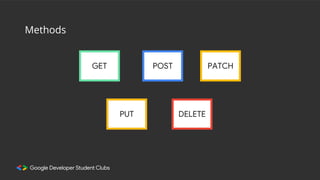
GET POST
PUT DELETE
PATCH
Methods
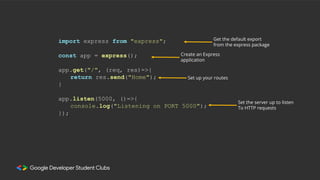
import express from "express";
const app = express();
app.get("/", (req, res)=>{
return res.send("Home");
}
app.listen(5000, ()=>{
console.log("Listening on PORT 5000");
});
Get the default export
from the express package
Create an Express
application
Set up your routes
Set the server up to listen
To HTTP requests
import fetch from 'node-fetch';
app.get("/post/rand", (req, res)=>{
const response = await fetch('https://dummyjson.com/posts');
const posts = await response.json();
const rand = Math.random() * posts.length;
for (let i = posts.length - 1; i > 0; i--) {
const j = Math.floor(Math.random() * (i + 1));
const temp = posts[i];
posts[i] = posts[j];
posts[j] = temp;
}
const randomPosts = posts.subarray(0, rand);
return res.json({posts: randomPosts);
});
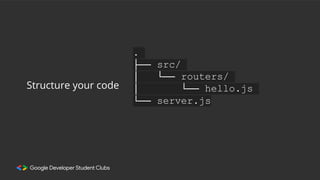
.
├── src/
│ └── routers/
│ └── hello.js
└── server.js
Structure your code
"post/:id”
Route Parameters
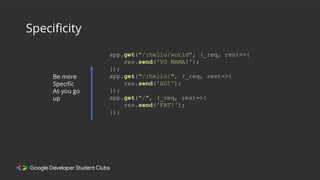
Specificity
Be more
Specific
As you go
up
app.get("/:hello/world", (_req, res)=>{
res.send('YO MAMA!');
});
app.get("/:hello/", (_req, res)=>{
res.send('SO!');
});
app.get("/", (_req, res)=>{
res.send('FAT!');
});
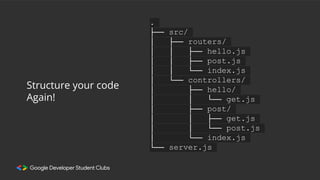
.
├── src/
│ ├── routers/
│ │ ├── hello.js
│ │ ├── post.js
│ │ └── index.js
│ └── controllers/
│ ├── hello/
│ │ └── get.js
│ ├── post/
│ │ ├── get.js
│ │ └── post.js
│ └── index.js
└── server.js
Structure your code
Again!
Extras
You don’t need them now, but you will
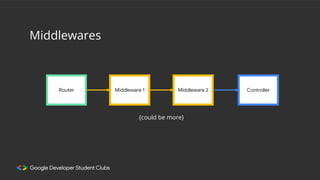
Middlewares
Router Middleware 1 Middleware 2
{could be more}
Controller
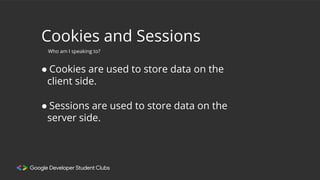
Cookies and Sessions
● Cookies are used to store data on the
client side.
Who am I speaking to?
● Sessions are used to store data on the
server side.
Static Folder
Direct access for clients.

Switch to Backend 2023 | Day 1 Part 2

  • 1.
  • 2.
    How does expresshelp you? ● Less code ● Promotes a better project structure ● Widely used. Has lots of plugins
  • 3.
  • 4.
    Your machine isthe localhost Hostname: localhost IP Address: 127.0.0.1
  • 6.
  • 7.
    import express from"express"; const app = express(); app.get("/", (req, res)=>{ return res.send("Home"); } app.listen(5000, ()=>{ console.log("Listening on PORT 5000"); }); Get the default export from the express package Create an Express application Set up your routes Set the server up to listen To HTTP requests
  • 8.
    import fetch from'node-fetch'; app.get("/post/rand", (req, res)=>{ const response = await fetch('https://dummyjson.com/posts'); const posts = await response.json(); const rand = Math.random() * posts.length; for (let i = posts.length - 1; i > 0; i--) { const j = Math.floor(Math.random() * (i + 1)); const temp = posts[i]; posts[i] = posts[j]; posts[j] = temp; } const randomPosts = posts.subarray(0, rand); return res.json({posts: randomPosts); });
  • 9.
    . ├── src/ │ └──routers/ │ └── hello.js └── server.js Structure your code
  • 10.
  • 11.
    Specificity Be more Specific As yougo up app.get("/:hello/world", (_req, res)=>{ res.send('YO MAMA!'); }); app.get("/:hello/", (_req, res)=>{ res.send('SO!'); }); app.get("/", (_req, res)=>{ res.send('FAT!'); });
  • 12.
    . ├── src/ │ ├──routers/ │ │ ├── hello.js │ │ ├── post.js │ │ └── index.js │ └── controllers/ │ ├── hello/ │ │ └── get.js │ ├── post/ │ │ ├── get.js │ │ └── post.js │ └── index.js └── server.js Structure your code Again!
  • 13.
    Extras You don’t needthem now, but you will
  • 14.
    Middlewares Router Middleware 1Middleware 2 {could be more} Controller
  • 15.
    Cookies and Sessions ●Cookies are used to store data on the client side. Who am I speaking to? ● Sessions are used to store data on the server side.
  • 16.