UNIT-IV
Express with Node.js: Routes, Request and Response objects, Template
engine. Understanding middleware, Query middleware, Serving static files,
Handling POST body data, Cookies, Sessions, Authentication.
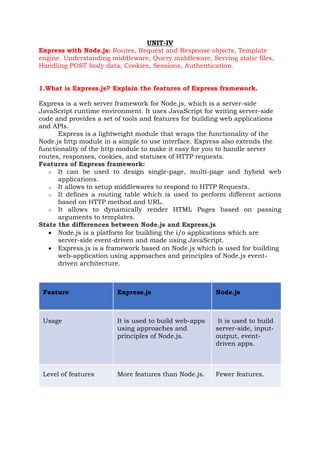
1.What is Express.js? Explain the features of Express framework.
Express is a web server framework for Node.js, which is a server-side
JavaScript runtime environment. It uses JavaScript for writing server-side
code and provides a set of tools and features for building web applications
and APIs.
Express is a lightweight module that wraps the functionality of the
Node.js http module in a simple to use interface. Express also extends the
functionality of the http module to make it easy for you to handle server
routes, responses, cookies, and statuses of HTTP requests.
Features of Express framework:
o It can be used to design single-page, multi-page and hybrid web
applications.
o It allows to setup middlewares to respond to HTTP Requests.
o It defines a routing table which is used to perform different actions
based on HTTP method and URL.
o It allows to dynamically render HTML Pages based on passing
arguments to templates.
State the differences between Node.js and Express.js
• Node.js is a platform for building the i/o applications which are
server-side event-driven and made using JavaScript.
• Express.js is a framework based on Node.js which is used for building
web-application using approaches and principles of Node.js event-
driven architecture.
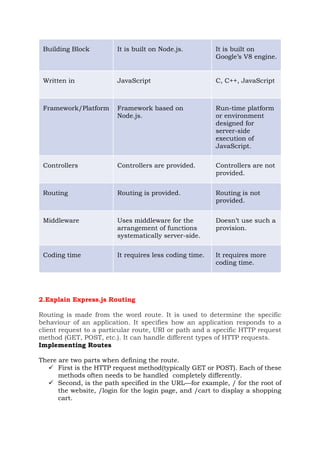
Feature Express.js Node.js
Usage It is used to build web-apps
using approaches and
principles of Node.js.
It is used to build
server-side, input-
output, event-
driven apps.
Level of features More features than Node.js. Fewer features.
Building Block It is built on Node.js. It is built on
Google’s V8 engine.
Written in JavaScript C, C++, JavaScript
Framework/Platform Framework based on
Node.js.
Run-time platform
or environment
designed for
server-side
execution of
JavaScript.
Controllers Controllers are provided. Controllers are not
provided.
Routing Routing is provided. Routing is not
provided.
Middleware Uses middleware for the
arrangement of functions
systematically server-side.
Doesn’t use such a
provision.
Coding time It requires less coding time. It requires more
coding time.
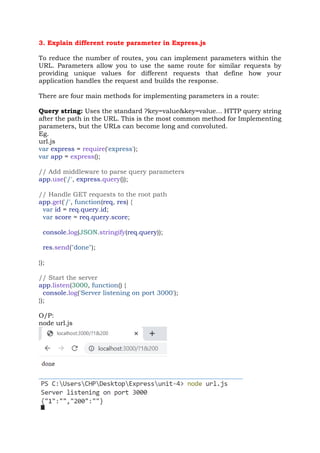
2.Explain Express.js Routing
Routing is made from the word route. It is used to determine the specific
behaviour of an application. It specifies how an application responds to a
client request to a particular route, URI or path and a specific HTTP request
method (GET, POST, etc.). It can handle different types of HTTP requests.
Implementing Routes
There are two parts when defining the route.
✓ First is the HTTP request method(typically GET or POST). Each of these
methods often needs to be handled completely differently.
✓ Second, is the path specified in the URL—for example, / for the root of
the website, /login for the login page, and /cart to display a shopping
cart.
The express module provides a series of functions that allow you to implement
routes for the Express server. These functions all use the following syntax:
app.<method>(path, [callback . . .], callback)
The <method> portion of the syntax actually refers to the HTTP request
method, such as GET or POST.
For example:
app.get(path, [middleware, ...], callback)
app.post(path, [middleware, ...], callback)
Eg.:
var express = require('express');
const app = express();
app.listen(80)
app.get('/', function(req, res){
res.send("Server Root");
});
app.get('/login', function(req, res){
res.send("Login Page");
});
app.post('/save', function(req, res){
res.send("Save Page");
});
O/P:
3. Explain different route parameter in Express.js
To reduce the number of routes, you can implement parameters within the
URL. Parameters allow you to use the same route for similar requests by
providing unique values for different requests that define how your
application handles the request and builds the response.
There are four main methods for implementing parameters in a route:
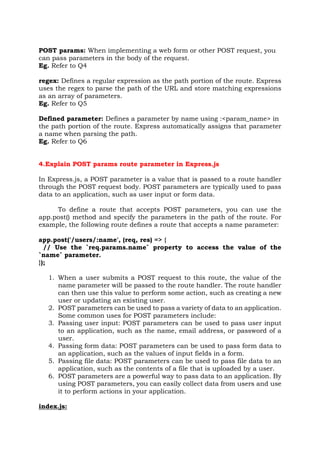
Query string: Uses the standard ?key=value&key=value... HTTP query string
after the path in the URL. This is the most common method for Implementing
parameters, but the URLs can become long and convoluted.
Eg.
url.js
var express = require('express');
var app = express();
// Add middleware to parse query parameters
app.use('/', express.query());
// Handle GET requests to the root path
app.get('/', function(req, res) {
var id = req.query.id;
var score = req.query.score;
console.log(JSON.stringify(req.query));
res.send("done");
});
// Start the server
app.listen(3000, function() {
console.log('Server listening on port 3000');
});
O/P:
node url.js
POST params: When implementing a web form or other POST request, you
can pass parameters in the body of the request.
Eg. Refer to Q4
regex: Defines a regular expression as the path portion of the route. Express
uses the regex to parse the path of the URL and store matching expressions
as an array of parameters.
Eg. Refer to Q5
Defined parameter: Defines a parameter by name using :<param_name> in
the path portion of the route. Express automatically assigns that parameter
a name when parsing the path.
Eg. Refer to Q6
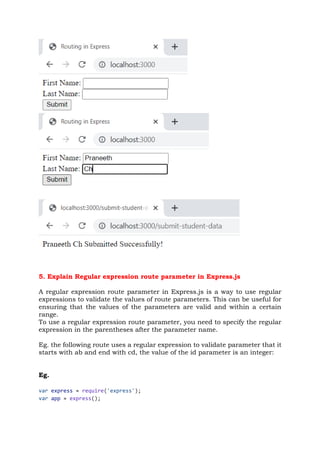
4.Explain POST params route parameter in Express.js
In Express.js, a POST parameter is a value that is passed to a route handler
through the POST request body. POST parameters are typically used to pass
data to an application, such as user input or form data.
To define a route that accepts POST parameters, you can use the
app.post() method and specify the parameters in the path of the route. For
example, the following route defines a route that accepts a name parameter:
app.post('/users/:name', (req, res) => {
// Use the `req.params.name` property to access the value of the
`name` parameter.
});
1. When a user submits a POST request to this route, the value of the
name parameter will be passed to the route handler. The route handler
can then use this value to perform some action, such as creating a new
user or updating an existing user.
2. POST parameters can be used to pass a variety of data to an application.
Some common uses for POST parameters include:
3. Passing user input: POST parameters can be used to pass user input
to an application, such as the name, email address, or password of a
user.
4. Passing form data: POST parameters can be used to pass form data to
an application, such as the values of input fields in a form.
5. Passing file data: POST parameters can be used to pass file data to an
application, such as the contents of a file that is uploaded by a user.
6. POST parameters are a powerful way to pass data to an application. By
using POST parameters, you can easily collect data from users and use
it to perform actions in your application.
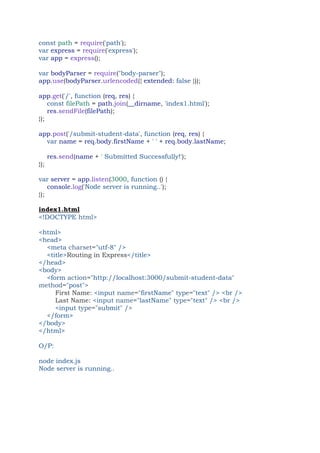
index.js:
const path = require('path');
var express = require('express');
var app = express();
var bodyParser = require("body-parser");
app.use(bodyParser.urlencoded({ extended: false }));
app.get('/', function (req, res) {
const filePath = path.join(__dirname, 'index1.html');
res.sendFile(filePath);
});
app.post('/submit-student-data', function (req, res) {
var name = req.body.firstName + ' ' + req.body.lastName;
res.send(name + ' Submitted Successfully!');
});
var server = app.listen(3000, function () {
console.log('Node server is running..');
});
index1.html
<!DOCTYPE html>
<html>
<head>
<meta charset="utf-8" />
<title>Routing in Express</title>
</head>
<body>
<form action="http://localhost:3000/submit-student-data"
method="post">
First Name: <input name="firstName" type="text" /> <br />
Last Name: <input name="lastName" type="text" /> <br />
<input type="submit" />
</form>
</body>
</html>
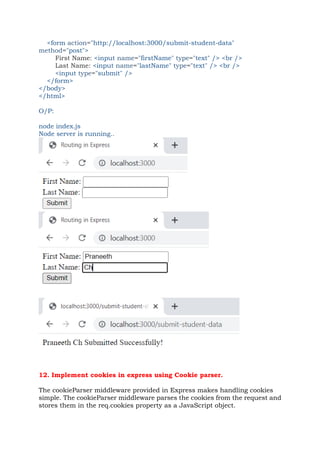
O/P:
node index.js
Node server is running..
5. Explain Regular expression route parameter in Express.js
A regular expression route parameter in Express.js is a way to use regular
expressions to validate the values of route parameters. This can be useful for
ensuring that the values of the parameters are valid and within a certain
range.
To use a regular expression route parameter, you need to specify the regular
expression in the parentheses after the parameter name.
Eg. the following route uses a regular expression to validate parameter that it
starts with ab and end with cd, the value of the id parameter is an integer:
Eg.
var express = require('express');
var app = express();
// This responds a GET request for abcd, abxcd, ab123cd, and so on
app.get('/ab*cd', function(req, res) {
console.log("Got a GET request for /ab*cd");
res.send('Pattern Matched.');
})
app.get('/users/:id([0-9]+)', (req, res) => {
// `req.params.id` will be an integer
res.send(req.params.id)
});
var server = app.listen(3000, function () {
var host = server.address().address
var port = server.address().port
console.log("Example app listening at http://%s:%s", host, port)
})
O/P:
6. Explain defined parameter route parameter in Express.js
• Defined parameter route parameters are used to pass data to an
Express route through the URL.
• Defined parameter route parameters are defined using colons (:) in the
route path.
For example, the following route defines a defined parameter route
parameter named id:
app.get('/users/:id', (req, res) => {
// `req.params.id` will contain the value of the `id` parameter
});
When a user visits the URL /users/123, the id parameter will be set to the
value 123.
• The value of the defined parameter route parameter can be accessed
using the req.params object.
• The req.params object is an object that contains all of the defined
parameter route parameters as key-value pairs.
• You can access the value of a defined parameter route parameter by
using the key of the parameter.
For example, the following code will get the value of the id defined
parameter route parameter and print it to the console:
const id = req.params.id;
console.log(`The id is ${id}`);
Eg.
const express = require('express');
const app = express();
// Define an array of users
const users = [
{ id: 1, name: 'chp' },
{ id: 2, name: 'vr' },
{ id: 3, name: 'pnr' },
];
// Define a route that retrieves a user by ID
app.get('/users/:id', (req, res) => {
const id = parseInt(req.params.id);
const user = users.find(user => user.id === id);
if (!user) {
return res.status(404).send('User not found');
}
return res.send(user);
});
// Start the server
app.listen(3000, () => {
console.log('Server started on port 3000');
});
O/P:
node route_params.js
Server started on port 3000
7. Explain HTTP Request objects in Express.js with an example.
Express.js Request Object
Express.js Request and Response objects are the parameters of the callback
function which is used in Express applications.
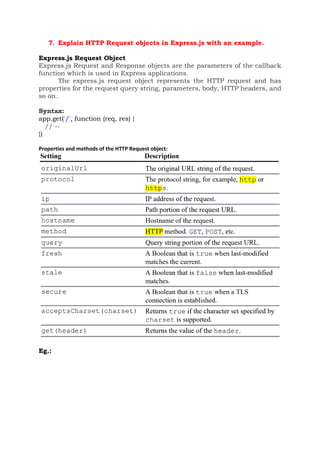
The express.js request object represents the HTTP request and has
properties for the request query string, parameters, body, HTTP headers, and
so on.
Syntax:
app.get('/', function (req, res) {
// --
})
Properties and methods of the HTTP Request object:
Eg.:
var express = require('express');
var app = express();
app.listen(80);
app.get('/', function (req, res) {
console.log("URL:t " + req.originalUrl);
console.log("Protocol: " + req.protocol);
console.log("IP:t " + req.ip);
console.log("Path:t " + req.path);
console.log("Host:t " + req.host);
console.log("Method:t " + req.method);
console.log("Query:t " + JSON.stringify(req.query));
console.log("Fresh:t " + req.fresh);
console.log("Stale:t " + req.stale);
console.log("Secure:t"+req.secure);
console.log("UTF8:t"+req.acceptsCharset('utf8'));
console.log("Connection: "+req.get('connection'));
console.log("Headers: "+JSON.stringify(req.headers,null,2));
});
O/P:
URL: /
Protocol: http
IP: ::1
Path: /
express deprecated req.host: Use req.hostname instead http_req.js:9:30
Host: localhost
Method: GET
Query: {}
Fresh: false
Stale: true
Secure: false
express deprecated req.acceptsCharset: Use acceptsCharsets instead
http_req.js:15:27
UTF8: utf8
Connection: keep-alive
Headers: {
"host": "localhost",
"connection": "keep-alive",
"sec-ch-ua": ""Google Chrome";v="113", "Chromium";v="113",
"Not-A.Brand";v="24"",
"sec-ch-ua-mobile": "?0",
"sec-ch-ua-platform": ""Windows"",
"upgrade-insecure-requests": "1",
"user-agent": "Mozilla/5.0 (Windows NT 10.0; Win64; x64)
AppleWebKit/537.36 (KHTML, like Gecko) Chrome/113.0.0.0
Safari/537.36",
"accept":
"text/html,application/xhtml+xml,application/xml;q=0.9,image/avif,image/
webp,image/apng,*/*;q=0.8,application/signed-exchange;v=b3;q=0.7",
"sec-fetch-site": "none",
"sec-fetch-mode": "navigate",
"sec-fetch-user": "?1",
"sec-fetch-dest": "document",
"accept-encoding": "gzip, deflate, br",
"accept-language": "en-US,en;q=0.9"
}
8. Explain HTTP Response objects in Express.js with an example.
The Response object passed to the route handler provides the necessary functionality to build and
send a proper HTTP response. The following sections discuss using the Response object to set headers,
set the status, and send data back to the client.
Methods to get and set header values on the Response object:
the following lines set different statuses:
res.status(200); // OK
res.status(300); // Redirection
res.status(400); // Bad Request
res.status(401); // Unauthorized
res.status(403); // Forbidden
res.status(500); // Server Error
Eg.
var express = require('express');
var url = require('url');
var app = express();
app.listen(80);
app.get('/', function (req, res) {
var response = '<html><head><title>Simple Send</title></head>' +
'<body><h1>Hello from Express</h1></body></html>';
res.status(200);
res.set({
'Content-Type': 'text/html',
'Content-Length': response.length
});
res.send(response);
console.log('Response Finished? ' + res.finished);
console.log('nHeaders Sent: ');
console.log(res.headerSent);
});
app.get('/error', function (req, res) {
res.status(400);
res.send("This is a bad request.");
});
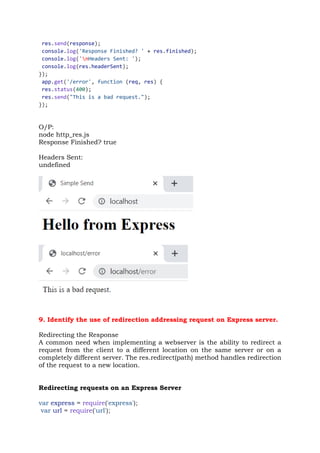
O/P:
node http_res.js
Response Finished? true
Headers Sent:
undefined
9. Identify the use of redirection addressing request on Express server.
Redirecting the Response
A common need when implementing a webserver is the ability to redirect a
request from the client to a different location on the same server or on a
completely different server. The res.redirect(path) method handles redirection
of the request to a new location.
Redirecting requests on an Express Server
var express = require('express');
var url = require('url');
var app = express();
app.listen(80);
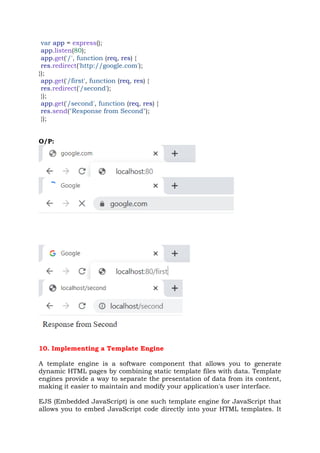
app.get('/', function (req, res) {
res.redirect('http://google.com');
});
app.get('/first', function (req, res) {
res.redirect('/second');
});
app.get('/second', function (req, res) {
res.send("Response from Second");
});
O/P:
10. Implementing a Template Engine
A template engine is a software component that allows you to generate
dynamic HTML pages by combining static template files with data. Template
engines provide a way to separate the presentation of data from its content,
making it easier to maintain and modify your application's user interface.
EJS (Embedded JavaScript) is one such template engine for JavaScript that
allows you to embed JavaScript code directly into your HTML templates. It
provides a simple and efficient way to generate dynamic web pages by allowing
you to add logic and iterate over data within your templates.
EJS uses a syntax similar to HTML, but with special tags that allow you to
embed JavaScript code. For example, to output the value of a variable in your
template, you would use the <%= %> tags.
Pug is a template engine for Node.js and for the browser that provides a clean,
concise syntax for creating HTML templates. Pug was previously known as
"Jade," but was renamed in 2016 due to a trademark dispute.
Pug uses indentation and whitespace to define the structure of an HTML
document, rather than opening and closing tags. This makes Pug templates
more concise and easier to read, especially for complex documents with
nested elements.
Eg.
tengine.js
var express = require('express'),
pug = require('pug'),
ejs = require('ejs');
var app = express();
app.set('views', './views');
app.set('view engine', 'pug');
app.engine('pug', pug.__express);
app.set('view engine', 'ejs');
app.engine('html', ejs.renderFile);
app.listen(80);
app.locals.sname = 'chp';
app.locals.id = '001';
app.locals.branch = 'it';
app.get('/pug', function (req, res) {
res.render('user_pug');
});
app.get('/ejs', function (req, res) {
app.render('user_ejs.html', function(err, renderedData){
console.log("chp")
res.send(renderedData);
});
});
views/main_pug.pug:
doctype 5
html(lang="en")
head
title="Pug Template"
body
block content
views/user_pug.pug:
extends main_pug
block content
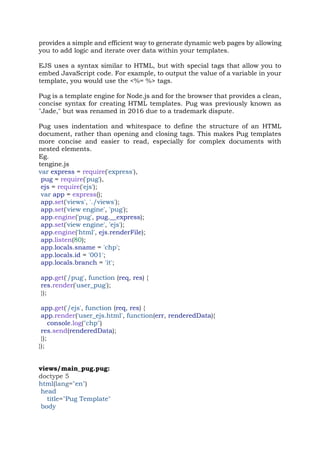
h1 User using Pug Template
ul
li Name: #{sname}
li Roll No.: #{id}
li Branch: #{branch}
views/user_ejs.html:
<!DOCTYPE html>
<html lang="en">
<head>
<title>EJS Template</title>
</head>
<body>
<h1>User using EJS Template</h1>
<ul>
<li>Name: <%= sname %></li>
<li>Roll No.: <%= id %></li>
<li>Branch: <%= branch %></li>
</ul>
</body>
</html>
Output:
Iterating over an array:
tengine_loop.js:
const express = require('express');
const app = express();
const items = [
{ name: 'Item 1', price: 10 },
{ name: 'Item 2', price: 20 },
{ name: 'Item 3', price: 30 }
];
app.set('view engine', 'pug');
app.set('views', './views');
app.set('view engine', 'ejs');
app.get('/pug', (req, res) => {
res.render('index', { items });
});
app.get('/ejs', (req, res) => {
res.render('index', { items });
});
app.listen(3000, () => {
console.log('Server started on port 3000');
});
views/index.pug
doctype html
html
head
title My Pug App
body
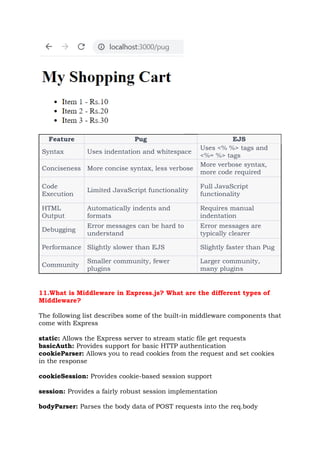
h1 My Shopping Cart
ul
each item in items
li #{item.name} - Rs.#{item.price}
views/index.ejs
<!DOCTYPE html>
<html>
<head>
<title>My EJS App</title>
</head>
<body>
<h1>My Shopping Cart</h1>
<ul>
<% for (var i = 0; i < items.length; i++) { %>
<li><%= items[i].name %> - Rs.<%= items[i].price %></li>
<% } %>
</ul>
</body>
</html>
Output:
Feature Pug EJS
Syntax Uses indentation and whitespace
Uses <% %> tags and
<%= %> tags
Conciseness More concise syntax, less verbose
More verbose syntax,
more code required
Code
Execution
Limited JavaScript functionality
Full JavaScript
functionality
HTML
Output
Automatically indents and
formats
Requires manual
indentation
Debugging
Error messages can be hard to
understand
Error messages are
typically clearer
Performance Slightly slower than EJS Slightly faster than Pug
Community
Smaller community, fewer
plugins
Larger community,
many plugins
11.What is Middleware in Express.js? What are the different types of
Middleware?
The following list describes some of the built-in middleware components that
come with Express
static: Allows the Express server to stream static file get requests
basicAuth: Provides support for basic HTTP authentication
cookieParser: Allows you to read cookies from the request and set cookies
in the response
cookieSession: Provides cookie-based session support
session: Provides a fairly robust session implementation
bodyParser: Parses the body data of POST requests into the req.body
property
query: Converts the query string to a JavaScript object and stores it as
req.query
1.Using the query Middleware
The query middleware converts the query string in the URL into a
JavaScript object and stores it as the query property on the Request object.
url.js
var express = require('express');
var app = express();
// Add middleware to parse query parameters
app.use('/', express.query());
// Handle GET requests to the root path
app.get('/', function(req, res) {
var id = req.query.id;
var score = req.query.score;
console.log(JSON.stringify(req.query));
res.send("done");
});
// Start the server
app.listen(3000, function() {
console.log('Server listening on port 3000');
});
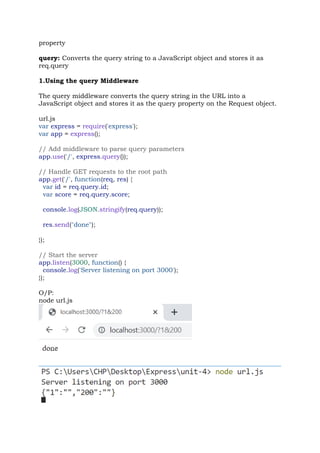
O/P:
node url.js
2. A commonly used Express middleware is the static middleware
The static middleware, which allows you to serve static files directly from disk
to the client. You can use static middleware to support things like JavaScript
files, CSS files, image files, and HTML documents that do not change. The
static module is easy to implement and uses the following syntax:
express.static(path, [options])
The path is the root path to where the static files are referenced from in the
requests. The options parameter allows you to set the following properties:
maxAge: Sets the browser cache maxAge in milliseconds. The default is 0.
hidden: A Boolean that, when true, indicates that transfer of hidden files is
enabled. The default is false.
redirect: A Boolean that, when true, indicates that if the request path is a
directory, the request is redirected to the path with a trailing /. The default is
true.
index: Specifies the default filename for the root path. The default is
index.html.
eg.:
static_files.js
var express = require('express');
var app = express();
app.use('/', express.static('assets'));
app.listen(80);
index.html(inside assets directory):
<html>
<head>
<title>Static File</title>
<link rel="stylesheet" type="text/css" href="css/static.css"/>
</head>
<body>
<img src="images/outer.jpeg" height="200px"/>
<img src="images/inner.jpeg" height="200px" />
</body>
</html>
static.css
img
{
display:inline;
margin:3px;
border:5px solid #000000;
}
3. Handling POST parameters in the request body using the bodyParser
middleware
index.js:
const path = require('path');
var express = require('express');
var app = express();
var bodyParser = require("body-parser");
app.use(bodyParser.urlencoded({ extended: false }));
app.get('/', function (req, res) {
const filePath = path.join(__dirname, 'index1.html');
res.sendFile(filePath);
});
app.post('/submit-student-data', function (req, res) {
var name = req.body.firstName + ' ' + req.body.lastName;
res.send(name + ' Submitted Successfully!');
});
var server = app.listen(3000, function () {
console.log('Node server is running..');
});
index1.html
<!DOCTYPE html>
<html>
<head>
<meta charset="utf-8" />
<title>Routing in Express</title>
</head>
<body>
<form action="http://localhost:3000/submit-student-data"
method="post">
First Name: <input name="firstName" type="text" /> <br />
Last Name: <input name="lastName" type="text" /> <br />
<input type="submit" />
</form>
</body>
</html>
O/P:
node index.js
Node server is running..
12. Implement cookies in express using Cookie parser.
The cookieParser middleware provided in Express makes handling cookies
simple. The cookieParser middleware parses the cookies from the request and
stores them in the req.cookies property as a JavaScript object.
To set a cookie in a response, you can use the res.cookie() method shown
below:
res.cookie(name, value, [options])
A cookie with the name and value specified is added to the response
cookieexample.js:
var express = require('express');
var cookieParser = require('cookie-parser');
var app = express();
app.use(cookieParser());
app.get('/cookieset',function(req, res){
res.cookie('cookie_name', 'cookie_value');
res.cookie('college', 'pvpsit');
res.cookie('name', 'chp');
res.status(200).send('Cookie is set');
});
app.get('/cookieget', function(req, res) {
res.status(200).send(req.cookies);
});
app.get('/', function (req, res) {
res.status(200).send('Welcome to cookies demo');
});
var server = app.listen(8000, function () {
var host = server.address().address;
var port = server.address().port;
console.log('Example app listening at http://%s:%s', host, port);
});
O/P:
node cookieexample.js
Example app listening at http://:::8000
13. Explain how sessions can be implemented using Express.
Session middleware
session.js:
const express = require('express');
const session = require('express-session');
const app = express();
app.use(session({
secret: 'chp', //unique session id
resave: false, // If true, the session will be saved on every request
saveUninitialized: true, //If true, a new, empty session will be created for
each new visitor. This is set to true so that we can track the number of
visits.
}));
app.get('/', (req, res) => {
if (req.session.views) {
req.session.views++;
res.send(`You have visited this page ${req.session.views} times`);
} else {
req.session.views = 1;
res.send('Welcome to this page for the first time!');
}
});
app.listen(3000, () => {
console.log('Server listening on port 3000');
});
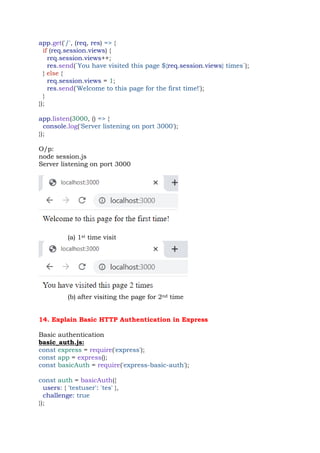
O/p:
node session.js
Server listening on port 3000
(a) 1st time visit
(b) after visiting the page for 2nd time
14. Explain Basic HTTP Authentication in Express
Basic authentication
basic_auth.js:
const express = require('express');
const app = express();
const basicAuth = require('express-basic-auth');
const auth = basicAuth({
users: { 'testuser': 'tes' },
challenge: true
});
app.get('/library', (req, res) => {
res.send('Welcome to the library.');
});
app.get('/restricted', auth, (req, res) => {
res.send('Welcome to the restricted section.');
});
app.listen(80, () => {
console.log('Server running on port 80');
});
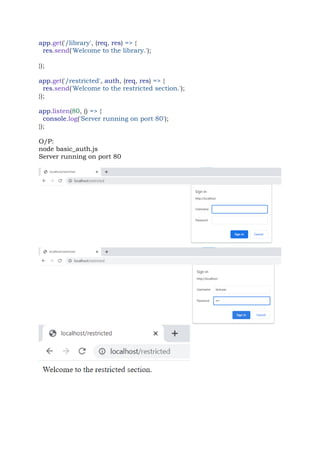
O/P:
node basic_auth.js
Server running on port 80
15. With session middleware in express explain session authentication
using an example.
Session authentication:
session_auth.js
var express = require('express');
var crypto = require('crypto');
var bodyParser = require('body-parser');
var cookieParser = require('cookie-parser');
var session = require('express-session');
function hashPW(pwd) {
return crypto.createHash('sha256').update(pwd).digest('base64').toString();
}
var app = express();
app.use(bodyParser.urlencoded({ extended: true }));
app.use(cookieParser('MAGICString'));
app.use(session({
secret: 'MAGICString',
resave: true,
saveUninitialized: true
}));
app.get('/restricted', function(req, res) {
if (req.session.user) {
res.send('<h2>' + req.session.success + '</h2>' +
'<p>You have Entered the restricted section<p><br>' +
' <a href="/logout">logout</a>');
} else {
req.session.error = 'Access denied!';
res.redirect('/login');
}
});
app.get('/logout', function(req, res) {
req.session.destroy(function() {
res.redirect('/login');
});
});
app.get('/login', function(req, res) {
var response = '<form method="POST">' +
'Username: <input type="text" name="username"><br>' +
'Password: <input type="password" name="password"><br>' +
'<input type="submit" value="Submit"></form>';
if (req.session.user) {
res.redirect('/restricted');
} else if (req.session.error) {
response += '<h2>' + req.session.error + '<h2>';
}
res.type('html');
res.send(response);
});
app.post('/login', function(req, res) {
var user = { name: req.body.username, password: hashPW('myPass') };
if (user.password === hashPW(req.body.password.toString())) {
req.session.regenerate(function() {
req.session.user = user;
req.session.success = 'Authenticated as ' + user.name;
res.redirect('/restricted');
});
} else {
req.session.regenerate(function() {
req.session.error = 'Authentication failed.';
res.redirect('/restricted');
});
res.redirect('/login');
}
});
app.listen(80);
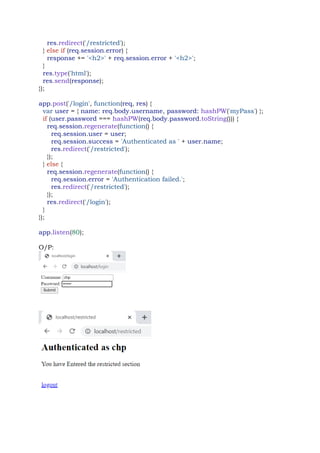
O/P:

express of full stack web development notes

  • 1.
    UNIT-IV Express with Node.js:Routes, Request and Response objects, Template engine. Understanding middleware, Query middleware, Serving static files, Handling POST body data, Cookies, Sessions, Authentication. 1.What is Express.js? Explain the features of Express framework. Express is a web server framework for Node.js, which is a server-side JavaScript runtime environment. It uses JavaScript for writing server-side code and provides a set of tools and features for building web applications and APIs. Express is a lightweight module that wraps the functionality of the Node.js http module in a simple to use interface. Express also extends the functionality of the http module to make it easy for you to handle server routes, responses, cookies, and statuses of HTTP requests. Features of Express framework: o It can be used to design single-page, multi-page and hybrid web applications. o It allows to setup middlewares to respond to HTTP Requests. o It defines a routing table which is used to perform different actions based on HTTP method and URL. o It allows to dynamically render HTML Pages based on passing arguments to templates. State the differences between Node.js and Express.js • Node.js is a platform for building the i/o applications which are server-side event-driven and made using JavaScript. • Express.js is a framework based on Node.js which is used for building web-application using approaches and principles of Node.js event- driven architecture. Feature Express.js Node.js Usage It is used to build web-apps using approaches and principles of Node.js. It is used to build server-side, input- output, event- driven apps. Level of features More features than Node.js. Fewer features.
  • 2.
    Building Block Itis built on Node.js. It is built on Google’s V8 engine. Written in JavaScript C, C++, JavaScript Framework/Platform Framework based on Node.js. Run-time platform or environment designed for server-side execution of JavaScript. Controllers Controllers are provided. Controllers are not provided. Routing Routing is provided. Routing is not provided. Middleware Uses middleware for the arrangement of functions systematically server-side. Doesn’t use such a provision. Coding time It requires less coding time. It requires more coding time. 2.Explain Express.js Routing Routing is made from the word route. It is used to determine the specific behaviour of an application. It specifies how an application responds to a client request to a particular route, URI or path and a specific HTTP request method (GET, POST, etc.). It can handle different types of HTTP requests. Implementing Routes There are two parts when defining the route. ✓ First is the HTTP request method(typically GET or POST). Each of these methods often needs to be handled completely differently. ✓ Second, is the path specified in the URL—for example, / for the root of the website, /login for the login page, and /cart to display a shopping cart.
  • 3.
    The express moduleprovides a series of functions that allow you to implement routes for the Express server. These functions all use the following syntax: app.<method>(path, [callback . . .], callback) The <method> portion of the syntax actually refers to the HTTP request method, such as GET or POST. For example: app.get(path, [middleware, ...], callback) app.post(path, [middleware, ...], callback) Eg.: var express = require('express'); const app = express(); app.listen(80) app.get('/', function(req, res){ res.send("Server Root"); }); app.get('/login', function(req, res){ res.send("Login Page"); }); app.post('/save', function(req, res){ res.send("Save Page"); }); O/P:
  • 4.
    3. Explain differentroute parameter in Express.js To reduce the number of routes, you can implement parameters within the URL. Parameters allow you to use the same route for similar requests by providing unique values for different requests that define how your application handles the request and builds the response. There are four main methods for implementing parameters in a route: Query string: Uses the standard ?key=value&key=value... HTTP query string after the path in the URL. This is the most common method for Implementing parameters, but the URLs can become long and convoluted. Eg. url.js var express = require('express'); var app = express(); // Add middleware to parse query parameters app.use('/', express.query()); // Handle GET requests to the root path app.get('/', function(req, res) { var id = req.query.id; var score = req.query.score; console.log(JSON.stringify(req.query)); res.send("done"); }); // Start the server app.listen(3000, function() { console.log('Server listening on port 3000'); }); O/P: node url.js
  • 5.
    POST params: Whenimplementing a web form or other POST request, you can pass parameters in the body of the request. Eg. Refer to Q4 regex: Defines a regular expression as the path portion of the route. Express uses the regex to parse the path of the URL and store matching expressions as an array of parameters. Eg. Refer to Q5 Defined parameter: Defines a parameter by name using :<param_name> in the path portion of the route. Express automatically assigns that parameter a name when parsing the path. Eg. Refer to Q6 4.Explain POST params route parameter in Express.js In Express.js, a POST parameter is a value that is passed to a route handler through the POST request body. POST parameters are typically used to pass data to an application, such as user input or form data. To define a route that accepts POST parameters, you can use the app.post() method and specify the parameters in the path of the route. For example, the following route defines a route that accepts a name parameter: app.post('/users/:name', (req, res) => { // Use the `req.params.name` property to access the value of the `name` parameter. }); 1. When a user submits a POST request to this route, the value of the name parameter will be passed to the route handler. The route handler can then use this value to perform some action, such as creating a new user or updating an existing user. 2. POST parameters can be used to pass a variety of data to an application. Some common uses for POST parameters include: 3. Passing user input: POST parameters can be used to pass user input to an application, such as the name, email address, or password of a user. 4. Passing form data: POST parameters can be used to pass form data to an application, such as the values of input fields in a form. 5. Passing file data: POST parameters can be used to pass file data to an application, such as the contents of a file that is uploaded by a user. 6. POST parameters are a powerful way to pass data to an application. By using POST parameters, you can easily collect data from users and use it to perform actions in your application. index.js:
  • 6.
    const path =require('path'); var express = require('express'); var app = express(); var bodyParser = require("body-parser"); app.use(bodyParser.urlencoded({ extended: false })); app.get('/', function (req, res) { const filePath = path.join(__dirname, 'index1.html'); res.sendFile(filePath); }); app.post('/submit-student-data', function (req, res) { var name = req.body.firstName + ' ' + req.body.lastName; res.send(name + ' Submitted Successfully!'); }); var server = app.listen(3000, function () { console.log('Node server is running..'); }); index1.html <!DOCTYPE html> <html> <head> <meta charset="utf-8" /> <title>Routing in Express</title> </head> <body> <form action="http://localhost:3000/submit-student-data" method="post"> First Name: <input name="firstName" type="text" /> <br /> Last Name: <input name="lastName" type="text" /> <br /> <input type="submit" /> </form> </body> </html> O/P: node index.js Node server is running..
  • 7.
    5. Explain Regularexpression route parameter in Express.js A regular expression route parameter in Express.js is a way to use regular expressions to validate the values of route parameters. This can be useful for ensuring that the values of the parameters are valid and within a certain range. To use a regular expression route parameter, you need to specify the regular expression in the parentheses after the parameter name. Eg. the following route uses a regular expression to validate parameter that it starts with ab and end with cd, the value of the id parameter is an integer: Eg. var express = require('express'); var app = express();
  • 8.
    // This respondsa GET request for abcd, abxcd, ab123cd, and so on app.get('/ab*cd', function(req, res) { console.log("Got a GET request for /ab*cd"); res.send('Pattern Matched.'); }) app.get('/users/:id([0-9]+)', (req, res) => { // `req.params.id` will be an integer res.send(req.params.id) }); var server = app.listen(3000, function () { var host = server.address().address var port = server.address().port console.log("Example app listening at http://%s:%s", host, port) }) O/P: 6. Explain defined parameter route parameter in Express.js • Defined parameter route parameters are used to pass data to an Express route through the URL. • Defined parameter route parameters are defined using colons (:) in the route path. For example, the following route defines a defined parameter route parameter named id: app.get('/users/:id', (req, res) => { // `req.params.id` will contain the value of the `id` parameter }); When a user visits the URL /users/123, the id parameter will be set to the value 123.
  • 9.
    • The valueof the defined parameter route parameter can be accessed using the req.params object. • The req.params object is an object that contains all of the defined parameter route parameters as key-value pairs. • You can access the value of a defined parameter route parameter by using the key of the parameter. For example, the following code will get the value of the id defined parameter route parameter and print it to the console: const id = req.params.id; console.log(`The id is ${id}`); Eg. const express = require('express'); const app = express(); // Define an array of users const users = [ { id: 1, name: 'chp' }, { id: 2, name: 'vr' }, { id: 3, name: 'pnr' }, ]; // Define a route that retrieves a user by ID app.get('/users/:id', (req, res) => { const id = parseInt(req.params.id); const user = users.find(user => user.id === id); if (!user) { return res.status(404).send('User not found'); } return res.send(user); }); // Start the server app.listen(3000, () => { console.log('Server started on port 3000'); }); O/P: node route_params.js Server started on port 3000
  • 10.
    7. Explain HTTPRequest objects in Express.js with an example. Express.js Request Object Express.js Request and Response objects are the parameters of the callback function which is used in Express applications. The express.js request object represents the HTTP request and has properties for the request query string, parameters, body, HTTP headers, and so on. Syntax: app.get('/', function (req, res) { // -- }) Properties and methods of the HTTP Request object: Eg.:
  • 11.
    var express =require('express'); var app = express(); app.listen(80); app.get('/', function (req, res) { console.log("URL:t " + req.originalUrl); console.log("Protocol: " + req.protocol); console.log("IP:t " + req.ip); console.log("Path:t " + req.path); console.log("Host:t " + req.host); console.log("Method:t " + req.method); console.log("Query:t " + JSON.stringify(req.query)); console.log("Fresh:t " + req.fresh); console.log("Stale:t " + req.stale); console.log("Secure:t"+req.secure); console.log("UTF8:t"+req.acceptsCharset('utf8')); console.log("Connection: "+req.get('connection')); console.log("Headers: "+JSON.stringify(req.headers,null,2)); }); O/P: URL: / Protocol: http IP: ::1 Path: / express deprecated req.host: Use req.hostname instead http_req.js:9:30 Host: localhost Method: GET Query: {} Fresh: false Stale: true Secure: false express deprecated req.acceptsCharset: Use acceptsCharsets instead http_req.js:15:27 UTF8: utf8 Connection: keep-alive Headers: { "host": "localhost",
  • 12.
    "connection": "keep-alive", "sec-ch-ua": ""GoogleChrome";v="113", "Chromium";v="113", "Not-A.Brand";v="24"", "sec-ch-ua-mobile": "?0", "sec-ch-ua-platform": ""Windows"", "upgrade-insecure-requests": "1", "user-agent": "Mozilla/5.0 (Windows NT 10.0; Win64; x64) AppleWebKit/537.36 (KHTML, like Gecko) Chrome/113.0.0.0 Safari/537.36", "accept": "text/html,application/xhtml+xml,application/xml;q=0.9,image/avif,image/ webp,image/apng,*/*;q=0.8,application/signed-exchange;v=b3;q=0.7", "sec-fetch-site": "none", "sec-fetch-mode": "navigate", "sec-fetch-user": "?1", "sec-fetch-dest": "document", "accept-encoding": "gzip, deflate, br", "accept-language": "en-US,en;q=0.9" } 8. Explain HTTP Response objects in Express.js with an example. The Response object passed to the route handler provides the necessary functionality to build and send a proper HTTP response. The following sections discuss using the Response object to set headers, set the status, and send data back to the client. Methods to get and set header values on the Response object:
  • 13.
    the following linesset different statuses: res.status(200); // OK res.status(300); // Redirection res.status(400); // Bad Request res.status(401); // Unauthorized res.status(403); // Forbidden res.status(500); // Server Error Eg. var express = require('express'); var url = require('url'); var app = express(); app.listen(80); app.get('/', function (req, res) { var response = '<html><head><title>Simple Send</title></head>' + '<body><h1>Hello from Express</h1></body></html>'; res.status(200); res.set({ 'Content-Type': 'text/html', 'Content-Length': response.length });
  • 14.
    res.send(response); console.log('Response Finished? '+ res.finished); console.log('nHeaders Sent: '); console.log(res.headerSent); }); app.get('/error', function (req, res) { res.status(400); res.send("This is a bad request."); }); O/P: node http_res.js Response Finished? true Headers Sent: undefined 9. Identify the use of redirection addressing request on Express server. Redirecting the Response A common need when implementing a webserver is the ability to redirect a request from the client to a different location on the same server or on a completely different server. The res.redirect(path) method handles redirection of the request to a new location. Redirecting requests on an Express Server var express = require('express'); var url = require('url');
  • 15.
    var app =express(); app.listen(80); app.get('/', function (req, res) { res.redirect('http://google.com'); }); app.get('/first', function (req, res) { res.redirect('/second'); }); app.get('/second', function (req, res) { res.send("Response from Second"); }); O/P: 10. Implementing a Template Engine A template engine is a software component that allows you to generate dynamic HTML pages by combining static template files with data. Template engines provide a way to separate the presentation of data from its content, making it easier to maintain and modify your application's user interface. EJS (Embedded JavaScript) is one such template engine for JavaScript that allows you to embed JavaScript code directly into your HTML templates. It
  • 16.
    provides a simpleand efficient way to generate dynamic web pages by allowing you to add logic and iterate over data within your templates. EJS uses a syntax similar to HTML, but with special tags that allow you to embed JavaScript code. For example, to output the value of a variable in your template, you would use the <%= %> tags. Pug is a template engine for Node.js and for the browser that provides a clean, concise syntax for creating HTML templates. Pug was previously known as "Jade," but was renamed in 2016 due to a trademark dispute. Pug uses indentation and whitespace to define the structure of an HTML document, rather than opening and closing tags. This makes Pug templates more concise and easier to read, especially for complex documents with nested elements. Eg. tengine.js var express = require('express'), pug = require('pug'), ejs = require('ejs'); var app = express(); app.set('views', './views'); app.set('view engine', 'pug'); app.engine('pug', pug.__express); app.set('view engine', 'ejs'); app.engine('html', ejs.renderFile); app.listen(80); app.locals.sname = 'chp'; app.locals.id = '001'; app.locals.branch = 'it'; app.get('/pug', function (req, res) { res.render('user_pug'); }); app.get('/ejs', function (req, res) { app.render('user_ejs.html', function(err, renderedData){ console.log("chp") res.send(renderedData); }); }); views/main_pug.pug: doctype 5 html(lang="en") head title="Pug Template" body
  • 17.
    block content views/user_pug.pug: extends main_pug blockcontent h1 User using Pug Template ul li Name: #{sname} li Roll No.: #{id} li Branch: #{branch} views/user_ejs.html: <!DOCTYPE html> <html lang="en"> <head> <title>EJS Template</title> </head> <body> <h1>User using EJS Template</h1> <ul> <li>Name: <%= sname %></li> <li>Roll No.: <%= id %></li> <li>Branch: <%= branch %></li> </ul> </body> </html> Output:
  • 18.
    Iterating over anarray: tengine_loop.js: const express = require('express'); const app = express(); const items = [ { name: 'Item 1', price: 10 }, { name: 'Item 2', price: 20 }, { name: 'Item 3', price: 30 } ]; app.set('view engine', 'pug'); app.set('views', './views'); app.set('view engine', 'ejs'); app.get('/pug', (req, res) => { res.render('index', { items }); }); app.get('/ejs', (req, res) => { res.render('index', { items }); }); app.listen(3000, () => { console.log('Server started on port 3000'); }); views/index.pug doctype html html
  • 19.
    head title My PugApp body h1 My Shopping Cart ul each item in items li #{item.name} - Rs.#{item.price} views/index.ejs <!DOCTYPE html> <html> <head> <title>My EJS App</title> </head> <body> <h1>My Shopping Cart</h1> <ul> <% for (var i = 0; i < items.length; i++) { %> <li><%= items[i].name %> - Rs.<%= items[i].price %></li> <% } %> </ul> </body> </html> Output:
  • 20.
    Feature Pug EJS SyntaxUses indentation and whitespace Uses <% %> tags and <%= %> tags Conciseness More concise syntax, less verbose More verbose syntax, more code required Code Execution Limited JavaScript functionality Full JavaScript functionality HTML Output Automatically indents and formats Requires manual indentation Debugging Error messages can be hard to understand Error messages are typically clearer Performance Slightly slower than EJS Slightly faster than Pug Community Smaller community, fewer plugins Larger community, many plugins 11.What is Middleware in Express.js? What are the different types of Middleware? The following list describes some of the built-in middleware components that come with Express static: Allows the Express server to stream static file get requests basicAuth: Provides support for basic HTTP authentication cookieParser: Allows you to read cookies from the request and set cookies in the response cookieSession: Provides cookie-based session support session: Provides a fairly robust session implementation bodyParser: Parses the body data of POST requests into the req.body
  • 21.
    property query: Converts thequery string to a JavaScript object and stores it as req.query 1.Using the query Middleware The query middleware converts the query string in the URL into a JavaScript object and stores it as the query property on the Request object. url.js var express = require('express'); var app = express(); // Add middleware to parse query parameters app.use('/', express.query()); // Handle GET requests to the root path app.get('/', function(req, res) { var id = req.query.id; var score = req.query.score; console.log(JSON.stringify(req.query)); res.send("done"); }); // Start the server app.listen(3000, function() { console.log('Server listening on port 3000'); }); O/P: node url.js
  • 22.
    2. A commonlyused Express middleware is the static middleware The static middleware, which allows you to serve static files directly from disk to the client. You can use static middleware to support things like JavaScript files, CSS files, image files, and HTML documents that do not change. The static module is easy to implement and uses the following syntax: express.static(path, [options]) The path is the root path to where the static files are referenced from in the requests. The options parameter allows you to set the following properties: maxAge: Sets the browser cache maxAge in milliseconds. The default is 0. hidden: A Boolean that, when true, indicates that transfer of hidden files is enabled. The default is false. redirect: A Boolean that, when true, indicates that if the request path is a directory, the request is redirected to the path with a trailing /. The default is true. index: Specifies the default filename for the root path. The default is index.html. eg.: static_files.js var express = require('express'); var app = express(); app.use('/', express.static('assets')); app.listen(80); index.html(inside assets directory): <html> <head> <title>Static File</title> <link rel="stylesheet" type="text/css" href="css/static.css"/> </head> <body> <img src="images/outer.jpeg" height="200px"/> <img src="images/inner.jpeg" height="200px" /> </body> </html> static.css img { display:inline; margin:3px; border:5px solid #000000; }
  • 23.
    3. Handling POSTparameters in the request body using the bodyParser middleware index.js: const path = require('path'); var express = require('express'); var app = express(); var bodyParser = require("body-parser"); app.use(bodyParser.urlencoded({ extended: false })); app.get('/', function (req, res) { const filePath = path.join(__dirname, 'index1.html'); res.sendFile(filePath); }); app.post('/submit-student-data', function (req, res) { var name = req.body.firstName + ' ' + req.body.lastName; res.send(name + ' Submitted Successfully!'); }); var server = app.listen(3000, function () { console.log('Node server is running..'); }); index1.html <!DOCTYPE html> <html> <head> <meta charset="utf-8" /> <title>Routing in Express</title> </head> <body>
  • 24.
    <form action="http://localhost:3000/submit-student-data" method="post"> First Name:<input name="firstName" type="text" /> <br /> Last Name: <input name="lastName" type="text" /> <br /> <input type="submit" /> </form> </body> </html> O/P: node index.js Node server is running.. 12. Implement cookies in express using Cookie parser. The cookieParser middleware provided in Express makes handling cookies simple. The cookieParser middleware parses the cookies from the request and stores them in the req.cookies property as a JavaScript object.
  • 25.
    To set acookie in a response, you can use the res.cookie() method shown below: res.cookie(name, value, [options]) A cookie with the name and value specified is added to the response cookieexample.js: var express = require('express'); var cookieParser = require('cookie-parser'); var app = express(); app.use(cookieParser()); app.get('/cookieset',function(req, res){ res.cookie('cookie_name', 'cookie_value'); res.cookie('college', 'pvpsit'); res.cookie('name', 'chp'); res.status(200).send('Cookie is set'); }); app.get('/cookieget', function(req, res) { res.status(200).send(req.cookies); }); app.get('/', function (req, res) { res.status(200).send('Welcome to cookies demo'); }); var server = app.listen(8000, function () { var host = server.address().address; var port = server.address().port; console.log('Example app listening at http://%s:%s', host, port); }); O/P: node cookieexample.js Example app listening at http://:::8000
  • 26.
    13. Explain howsessions can be implemented using Express. Session middleware session.js: const express = require('express'); const session = require('express-session'); const app = express(); app.use(session({ secret: 'chp', //unique session id resave: false, // If true, the session will be saved on every request saveUninitialized: true, //If true, a new, empty session will be created for each new visitor. This is set to true so that we can track the number of visits. }));
  • 27.
    app.get('/', (req, res)=> { if (req.session.views) { req.session.views++; res.send(`You have visited this page ${req.session.views} times`); } else { req.session.views = 1; res.send('Welcome to this page for the first time!'); } }); app.listen(3000, () => { console.log('Server listening on port 3000'); }); O/p: node session.js Server listening on port 3000 (a) 1st time visit (b) after visiting the page for 2nd time 14. Explain Basic HTTP Authentication in Express Basic authentication basic_auth.js: const express = require('express'); const app = express(); const basicAuth = require('express-basic-auth'); const auth = basicAuth({ users: { 'testuser': 'tes' }, challenge: true });
  • 28.
    app.get('/library', (req, res)=> { res.send('Welcome to the library.'); }); app.get('/restricted', auth, (req, res) => { res.send('Welcome to the restricted section.'); }); app.listen(80, () => { console.log('Server running on port 80'); }); O/P: node basic_auth.js Server running on port 80
  • 29.
    15. With sessionmiddleware in express explain session authentication using an example. Session authentication: session_auth.js var express = require('express'); var crypto = require('crypto'); var bodyParser = require('body-parser'); var cookieParser = require('cookie-parser'); var session = require('express-session'); function hashPW(pwd) { return crypto.createHash('sha256').update(pwd).digest('base64').toString(); } var app = express(); app.use(bodyParser.urlencoded({ extended: true })); app.use(cookieParser('MAGICString')); app.use(session({ secret: 'MAGICString', resave: true, saveUninitialized: true })); app.get('/restricted', function(req, res) { if (req.session.user) { res.send('<h2>' + req.session.success + '</h2>' + '<p>You have Entered the restricted section<p><br>' + ' <a href="/logout">logout</a>'); } else { req.session.error = 'Access denied!'; res.redirect('/login'); } }); app.get('/logout', function(req, res) { req.session.destroy(function() { res.redirect('/login'); }); }); app.get('/login', function(req, res) { var response = '<form method="POST">' + 'Username: <input type="text" name="username"><br>' + 'Password: <input type="password" name="password"><br>' + '<input type="submit" value="Submit"></form>'; if (req.session.user) {
  • 30.
    res.redirect('/restricted'); } else if(req.session.error) { response += '<h2>' + req.session.error + '<h2>'; } res.type('html'); res.send(response); }); app.post('/login', function(req, res) { var user = { name: req.body.username, password: hashPW('myPass') }; if (user.password === hashPW(req.body.password.toString())) { req.session.regenerate(function() { req.session.user = user; req.session.success = 'Authenticated as ' + user.name; res.redirect('/restricted'); }); } else { req.session.regenerate(function() { req.session.error = 'Authentication failed.'; res.redirect('/restricted'); }); res.redirect('/login'); } }); app.listen(80); O/P: