8 digital business tools to 
Swap Complexity 
for Productivity 
Magnus Blikeng 
!
Swap complexity for productivity 
One of the key challenges that stops modern companies from 
working productively is a reliance on complex legacy digital tools 
which are; 
! 
1) Very complex (version 13.4.1) 
2) Designed for desk bound office workers 
3) Don’t provide an api or integrate with your workflow 
! 
In this presentation we have identified x8 digital tools you can use to 
swap complexity for productivity.
Evolver is a digital strategy consultancy 
We help companies master digital. We do this through accelerated 
evolution – by transforming operations, unlocking new opportunities 
and helping them achieve their digital vision. 
! 
for more information about how Evolver can help your business 
email hello@evolver.com or visit our website www.evolver.cc
Communication and Collaboration 
©Toiletpaper Magazine
Email 
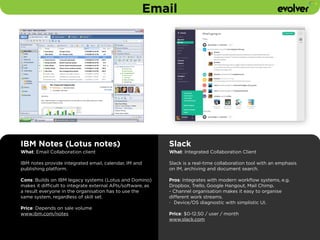
IBM Notes (Lotus notes) 
What: Email Collaboration client 
IBM notes provide integrated email, calendar, IM and 
publishing platform. 
! 
Cons: Builds on IBM legacy systems (Lotus and Domino) 
makes it difficult to integrate external APIs/software, as 
a result everyone in the organisation has to use the 
same system, regardless of skill set. 
Price: Depends on sale volume 
www.ibm.com/notes 
Slack 
What: Integrated Collaboration Client 
Slack is a real-time collaboration tool with an emphasis 
on IM, archiving and document search. 
! 
Pros: Integrates with modern workflow systems, e.g. 
Dropbox, Trello, Google Hangout, Mail Chimp. 
- Channel organisation makes it easy to organise 
different work streams. 
- Device/OS diagnostic with simplistic UI. 
Price: $0-12.50 / user / month 
www.slack.com
Remote Collaboration 
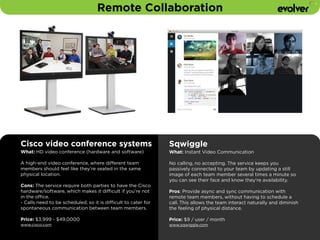
Cisco video conference systems 
What: HD video conference (hardware and software) 
A high-end video conference, where different team 
members should feel like they’re seated in the same 
physical location. 
Cons: The service require both parties to have the Cisco 
hardware/software, which makes it difficult if you’re not 
in the office. 
- Calls need to be scheduled, so it is difficult to cater for 
spontaneous communication between team members. 
! 
Price: $3,999 - $49,0000 
www.cisco.com 
Sqwiggle 
What: Instant Video Communication 
No calling, no accepting. The service keeps you 
passively connected to your team by updating a still 
image of each team member several times a minute so 
you can see their face and know they're availability. 
Pros: Provide async and sync communication with 
remote team members, without having to schedule a 
call. This allows the team interact naturally and diminish 
the feeling of physical distance. 
! 
Price: $9 / user / month 
www.sqwiggle.com
Employee performance management 
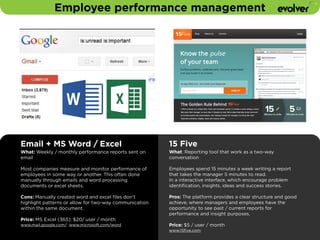
Email + MS Word / Excel 
What: Weekly / monthly performance reports sent on 
email 
! 
Most companies measure and monitor performance of 
employees in some way or another. This often done 
manually through emails and word processing 
documents or excel sheets. 
Cons: Manually created word and excel files don’t 
highlight patterns or allow for two-way communication 
within the same document. 
! 
Price: MS Excel (365): $20/ user / month 
www.mail.google.com/ www.microsoft.com/word 
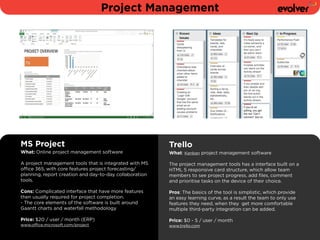
15 Five 
What: Reporting tool that work as a two-way 
conversation 
! 
Employees spend 15 minutes a week writing a report 
that takes the manager 5 minutes to read. 
In a interactive interface, which encourage problem 
identification, insights, ideas and success stories. 
! 
Pros: The platform provides a clear structure and good 
achieve, where managers and employees have the 
opportunity to see past / current reports for 
performance and insight purposes. 
Price: $5 / user / month 
www.15five.com
Productivity
Project Management 
MS Project 
What: Online project management software 
A project management tools that is integrated with MS 
office 365, with core features project forecasting/ 
planning, report creation and day-to-day collaboration 
tools. 
! 
Cons: Complicated interface that have more features 
then usually required for project completion. 
- The core elements of the software is built around 
Gaantt charts and waterfall methodology 
Price: $20 / user / month (ERP) 
www.office.microsoft.com/project 
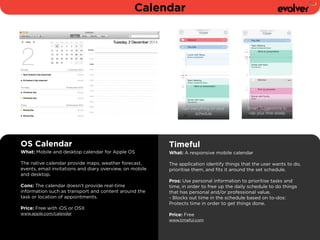
Trello 
What: Kanban project management software 
! 
The project management tools has a interface built on a 
HTML 5 responsive card structure, which allow team 
members to see project progress, add files, comment 
and prioritise tasks on the device of their choice. 
! 
Pros: The basics of the tool is simplistic, which provide 
an easy learning curve, as a result the team to only use 
features they need, when they get more comfortable 
multiple third-party integration can be added. 
! 
Price: $0 - 5 / user / month 
www.trello.com
Calendar 
OS Calendar 
What: Mobile and desktop calendar for Apple OS 
! 
The native calendar provide maps, weather forecast, 
events, email invitations and diary overview, on mobile 
and desktop. 
! 
Cons: The calendar doesn’t provide real-time 
information such as transport and content around the 
task or location of appointments. 
Price: Free with iOS or OSX 
www.apple.com/calendar 
Timeful 
What: A responsive mobile calendar 
! 
The application identify things that the user wants to do, 
prioritise them, and fits it around the set schedule. 
! 
Pros: Use personal information to prioritise tasks and 
time, in order to free up the daily schedule to do things 
that has personal and/or professional value. 
- Blocks out time in the schedule based on to-dos: 
Protects time in order to get things done. 
! 
Price: Free 
www.timeful.com
Calculations 
Calculator + MS Excel 
What: A basic calculator and MS excel a spreadsheet 
application 
! 
The calculator works well on simple calculation, while 
Microsoft excel is used for more complicated calculation 
such as graphing, pivot tables and macro programming. 
! 
Cons: The applications both have their extreme (basic 
and complex), as a result they are not providing a 
middle ground for fast, reliable and documented 
calculations 
Price: Calculator: Free - MS Excel: $20/ user / month 
www.apple.com/calculator www.office.microsoft.com/excel 
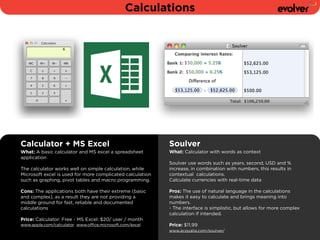
Soulver 
What: Calculator with words as context 
! 
Soulver use words such as years, second, USD and % 
increase, in combination with numbers, this results in 
contextual calculations. 
Calculate currencies with real-time data 
! 
Pros: The use of natural language in the calculations 
makes it easy to calculate and brings meaning into 
numbers. 
- The interface is simplistic, but allows for more complex 
calculation if intended. 
! 
Price: $11.99 
www.acqualia.com/soulver/
B2B Sales and CRM 
©Toiletpaper Magazine
B2B Sales and CRM 
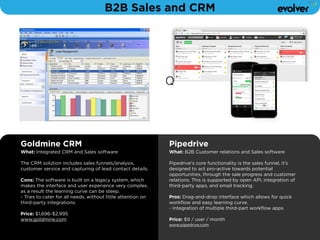
Goldmine CRM 
What: Integrated CRM and Sales software 
! 
The CRM solution includes sales funnels/analysis, 
customer service and capturing of lead contact details. 
! 
Cons: The software is built on a legacy system, which 
makes the interface and user experience very complex, 
as a result the learning curve can be steep. 
- Tries to cater for all needs, without little attention on 
third-party integrations. 
! 
Price: $1,696-$2,995 
www.goldmine.com 
Q 
Pipedrive 
What: B2B Customer relations and Sales software 
! 
Pipedrive's core functionality is the sales funnel, it’s 
designed to act pro-active towards potential 
opportunities, through the sale progress and customer 
relations. This is supported by open API, integration of 
third-party apps, and email tracking. 
! 
Pros: Drag-and-drop interface which allows for quick 
workflow and easy learning curve. 
- Integration of multiple third-part workflow apps 
! 
Price: $9 / user / month 
www.pipedrive.com
Security 
©Maurizio Di Iorio
Logins, Passwords and Credit Info 
Docs, Post-its and Email 
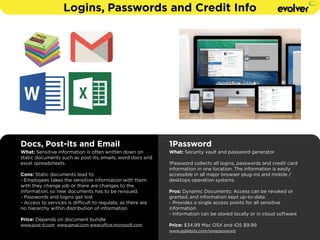
What: Sensitive information is often written down on 
static documents such as post-its, emails, word docs and 
excel spreadsheets. 
Cons: Static documents lead to: 
- Employees takes the sensitive information with them 
with they change job or there are changes to the 
information, so new documents has to be reissued. 
- Passwords and logins get lost 
- Access to services is difficult to regulate, as there are 
no hierarchy within distribution of information 
! 
Price: Depends on document bundle 
www.post-it.com www.gmail.com www.office.microsoft.com 
1Password 
What: Security vault and password generator 
! 
1Password collects all logins, passwords and credit card 
information in one location. The information is easily 
accessible in all major browser plug-ins and mobile / 
desktops operation systems. 
! 
Pros: Dynamic Documents: Access can be revoked or 
granted, and information kept up-to-date. 
- Provides a single access points for all sensitive 
information 
- Information can be stored locally or in cloud software 
! 
Price: $34.99 Mac OSX and iOS $9.99 
www.agilebits.com/onepassword
Summary 
Email: IBM Notes (Lotus notes) 
! 
Remote Collaboration: Cisco video conference systems 
! 
Employee performance management: Email + MS Word / Excel 
! 
Project Management: MS Project 
! 
Calendar: OS Calendar 
! 
Calculations: Calculator + MS Excel 
! 
B2B Sales and CRM: Goldmine 
! 
Logins, Passwords and Credit Info: Docs, Post-its and Email 
Slack 
! 
Sqwiggle 
! 
15 Five 
! 
Trello 
! 
Timeful 
! 
Soulver 
! 
Pipedrive 
! 
1Password
www.evolver.cc 
! 
@evolverHQ 
Magnus@evolver.cc 
! 
+44 20 3095 4101

Swap Complexity For Productivity

  • 1.
    8 digital businesstools to Swap Complexity for Productivity Magnus Blikeng !
  • 2.
    Swap complexity forproductivity One of the key challenges that stops modern companies from working productively is a reliance on complex legacy digital tools which are; ! 1) Very complex (version 13.4.1) 2) Designed for desk bound office workers 3) Don’t provide an api or integrate with your workflow ! In this presentation we have identified x8 digital tools you can use to swap complexity for productivity.
  • 3.
    Evolver is adigital strategy consultancy We help companies master digital. We do this through accelerated evolution – by transforming operations, unlocking new opportunities and helping them achieve their digital vision. ! for more information about how Evolver can help your business email hello@evolver.com or visit our website www.evolver.cc
  • 4.
    Communication and Collaboration ©Toiletpaper Magazine
  • 5.
    Email IBM Notes(Lotus notes) What: Email Collaboration client IBM notes provide integrated email, calendar, IM and publishing platform. ! Cons: Builds on IBM legacy systems (Lotus and Domino) makes it difficult to integrate external APIs/software, as a result everyone in the organisation has to use the same system, regardless of skill set. Price: Depends on sale volume www.ibm.com/notes Slack What: Integrated Collaboration Client Slack is a real-time collaboration tool with an emphasis on IM, archiving and document search. ! Pros: Integrates with modern workflow systems, e.g. Dropbox, Trello, Google Hangout, Mail Chimp. - Channel organisation makes it easy to organise different work streams. - Device/OS diagnostic with simplistic UI. Price: $0-12.50 / user / month www.slack.com
  • 6.
    Remote Collaboration Ciscovideo conference systems What: HD video conference (hardware and software) A high-end video conference, where different team members should feel like they’re seated in the same physical location. Cons: The service require both parties to have the Cisco hardware/software, which makes it difficult if you’re not in the office. - Calls need to be scheduled, so it is difficult to cater for spontaneous communication between team members. ! Price: $3,999 - $49,0000 www.cisco.com Sqwiggle What: Instant Video Communication No calling, no accepting. The service keeps you passively connected to your team by updating a still image of each team member several times a minute so you can see their face and know they're availability. Pros: Provide async and sync communication with remote team members, without having to schedule a call. This allows the team interact naturally and diminish the feeling of physical distance. ! Price: $9 / user / month www.sqwiggle.com
  • 7.
    Employee performance management Email + MS Word / Excel What: Weekly / monthly performance reports sent on email ! Most companies measure and monitor performance of employees in some way or another. This often done manually through emails and word processing documents or excel sheets. Cons: Manually created word and excel files don’t highlight patterns or allow for two-way communication within the same document. ! Price: MS Excel (365): $20/ user / month www.mail.google.com/ www.microsoft.com/word 15 Five What: Reporting tool that work as a two-way conversation ! Employees spend 15 minutes a week writing a report that takes the manager 5 minutes to read. In a interactive interface, which encourage problem identification, insights, ideas and success stories. ! Pros: The platform provides a clear structure and good achieve, where managers and employees have the opportunity to see past / current reports for performance and insight purposes. Price: $5 / user / month www.15five.com
  • 8.
  • 9.
    Project Management MSProject What: Online project management software A project management tools that is integrated with MS office 365, with core features project forecasting/ planning, report creation and day-to-day collaboration tools. ! Cons: Complicated interface that have more features then usually required for project completion. - The core elements of the software is built around Gaantt charts and waterfall methodology Price: $20 / user / month (ERP) www.office.microsoft.com/project Trello What: Kanban project management software ! The project management tools has a interface built on a HTML 5 responsive card structure, which allow team members to see project progress, add files, comment and prioritise tasks on the device of their choice. ! Pros: The basics of the tool is simplistic, which provide an easy learning curve, as a result the team to only use features they need, when they get more comfortable multiple third-party integration can be added. ! Price: $0 - 5 / user / month www.trello.com
  • 10.
    Calendar OS Calendar What: Mobile and desktop calendar for Apple OS ! The native calendar provide maps, weather forecast, events, email invitations and diary overview, on mobile and desktop. ! Cons: The calendar doesn’t provide real-time information such as transport and content around the task or location of appointments. Price: Free with iOS or OSX www.apple.com/calendar Timeful What: A responsive mobile calendar ! The application identify things that the user wants to do, prioritise them, and fits it around the set schedule. ! Pros: Use personal information to prioritise tasks and time, in order to free up the daily schedule to do things that has personal and/or professional value. - Blocks out time in the schedule based on to-dos: Protects time in order to get things done. ! Price: Free www.timeful.com
  • 11.
    Calculations Calculator +MS Excel What: A basic calculator and MS excel a spreadsheet application ! The calculator works well on simple calculation, while Microsoft excel is used for more complicated calculation such as graphing, pivot tables and macro programming. ! Cons: The applications both have their extreme (basic and complex), as a result they are not providing a middle ground for fast, reliable and documented calculations Price: Calculator: Free - MS Excel: $20/ user / month www.apple.com/calculator www.office.microsoft.com/excel Soulver What: Calculator with words as context ! Soulver use words such as years, second, USD and % increase, in combination with numbers, this results in contextual calculations. Calculate currencies with real-time data ! Pros: The use of natural language in the calculations makes it easy to calculate and brings meaning into numbers. - The interface is simplistic, but allows for more complex calculation if intended. ! Price: $11.99 www.acqualia.com/soulver/
  • 12.
    B2B Sales andCRM ©Toiletpaper Magazine
  • 13.
    B2B Sales andCRM Goldmine CRM What: Integrated CRM and Sales software ! The CRM solution includes sales funnels/analysis, customer service and capturing of lead contact details. ! Cons: The software is built on a legacy system, which makes the interface and user experience very complex, as a result the learning curve can be steep. - Tries to cater for all needs, without little attention on third-party integrations. ! Price: $1,696-$2,995 www.goldmine.com Q Pipedrive What: B2B Customer relations and Sales software ! Pipedrive's core functionality is the sales funnel, it’s designed to act pro-active towards potential opportunities, through the sale progress and customer relations. This is supported by open API, integration of third-party apps, and email tracking. ! Pros: Drag-and-drop interface which allows for quick workflow and easy learning curve. - Integration of multiple third-part workflow apps ! Price: $9 / user / month www.pipedrive.com
  • 14.
  • 15.
    Logins, Passwords andCredit Info Docs, Post-its and Email What: Sensitive information is often written down on static documents such as post-its, emails, word docs and excel spreadsheets. Cons: Static documents lead to: - Employees takes the sensitive information with them with they change job or there are changes to the information, so new documents has to be reissued. - Passwords and logins get lost - Access to services is difficult to regulate, as there are no hierarchy within distribution of information ! Price: Depends on document bundle www.post-it.com www.gmail.com www.office.microsoft.com 1Password What: Security vault and password generator ! 1Password collects all logins, passwords and credit card information in one location. The information is easily accessible in all major browser plug-ins and mobile / desktops operation systems. ! Pros: Dynamic Documents: Access can be revoked or granted, and information kept up-to-date. - Provides a single access points for all sensitive information - Information can be stored locally or in cloud software ! Price: $34.99 Mac OSX and iOS $9.99 www.agilebits.com/onepassword
  • 16.
    Summary Email: IBMNotes (Lotus notes) ! Remote Collaboration: Cisco video conference systems ! Employee performance management: Email + MS Word / Excel ! Project Management: MS Project ! Calendar: OS Calendar ! Calculations: Calculator + MS Excel ! B2B Sales and CRM: Goldmine ! Logins, Passwords and Credit Info: Docs, Post-its and Email Slack ! Sqwiggle ! 15 Five ! Trello ! Timeful ! Soulver ! Pipedrive ! 1Password
  • 17.
    www.evolver.cc ! @evolverHQ Magnus@evolver.cc ! +44 20 3095 4101