VS002 -Sviluppare App per Office 
Fabio Franzini –SharePoint MVP
•SharePoint MVP 
•Senior Consultant and Software Engineer 
•MCT Trainer 
•MCPD Web Applications, MCTS SharePoint 2010/2007 
•Official Ignite Trainer for SharePoint 2013 & 2010 in Italy 
•Over 10 years experience in IT as a software engineer 
•Twitter: @franzinifabio 
•Email: fabio@fabiofranzini.com 
•Web: www.fabiofranzini.com 
About Me
“SharePoint 2013 App Model Succinctly” 
SharePoint2013 App Model Succinctly is a hands-on approach to learning how to develop SharePoint apps. 
Author Fabio Franzini introduces readers to the concepts that make SharePoint 2013 simpler and easier to use than previous development models. 
You’ll learn to develop both on-premises and cloud applications in Visual Studio 2013, then enable your apps to communicate with SharePoint using the client-side object model (CSOM) or the representational state transfer (REST) API 
http://bit.ly/1ytzthl
Agenda 
•Introduction 
•Document-based Apps 
•Mail Apps 
•Distribution
Introduction
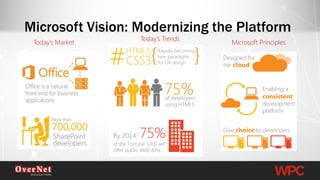
Microsoft Vision: Modernizing the Platform 
Today’s Market 
Today’s Trends 
Microsoft Principles
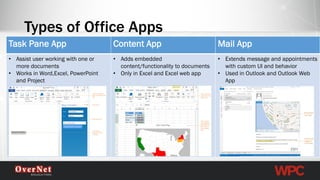
Types of Office Apps 
TaskPane App 
Content App 
Mail App 
•Assist userworking with one or more documents 
•Works in Word,Excel, PowerPoint and Project 
•Adds embeddedcontent/functionality to documents 
•Only in Excel and Excel web app 
•Extendsmessage and appointments with custom UI and behavior 
•Used in Outlook and Outlook Web App
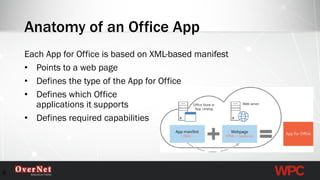
Anatomy of an Office App 
Each App for Office is based on XML-based manifest 
•Points to a web page 
•Defines the type of the App for Office 
•Defines which Office applications it supports 
•Defines required capabilities 
8
•Cross Platform 
•Designed from the ground up, Abstraction, Async 
•Cross App 
•Common objects and methods across apps (selection, tables, settings) 
•Web Standards 
•ECMAScript5 
•Performance 
•Async, limits 
Principles
Server 
Client 
Browser Host 
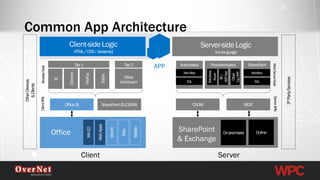
Common App Architecture 
Web Server Host 
SharePoint 
& Exchange 
APP 
Client APIs 
Server APIs 
Other Devices 
& Clients 
3rdParty Services 
Office
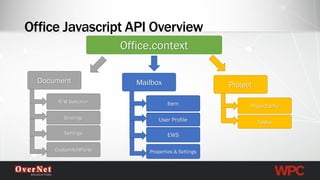
Office JavascriptAPI OverviewDocumentOffice.contextCustomXmlPartsBindingsSettingsR/W SelectionMailboxProperties & SettingsUser ProfileEWSItemProjectTasksProject Info
Document-based Apps
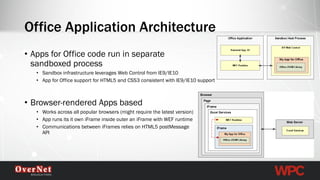
•Apps for Office code run in separate sandboxed process 
•Sandbox infrastructure leverages Web Control from IE9/IE10 
•App for Office support for HTML5 and CSS3 consistent with IE9/IE10 support 
•Browser-rendered Apps based 
•Works across all popular browsers (might require the latest version) 
•App runs its it own iFrameinside outer an iFramewith WEF runtime 
•Communications between iFramesrelies on HTML5 postMessageAPI 
Office Application Architecture
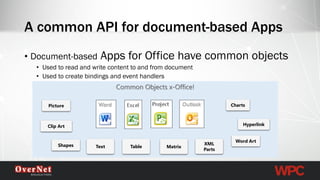
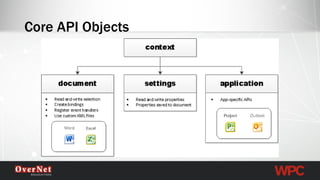
•Document-basedApps for Office have common objects 
•Used to read and write content to and from document 
•Used to create bindings and event handlers 
A common API for document-based AppsCommon Objects x-Office! 
Text 
Table 
Matrix 
Charts 
Shapes 
Picture 
Hyperlink 
Word Art 
XML Parts 
Clip Art
Core API Objects
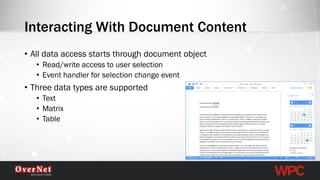
•All data access starts through document object 
•Read/write access to user selection 
•Event handler for selection change event 
•Three data types are supported 
•Text 
•Matrix 
•Table 
Interacting With Document Content
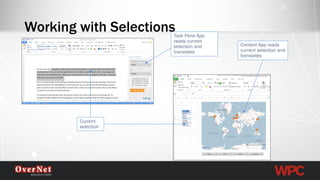
Working with Selections 
Current selection 
Task Pane App reads current selection and translates 
Content App reads current selection and translates
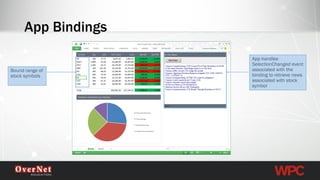
App Bindings 
Bound range of stock symbols 
App handles SelectionChanged event associated with the binding to retrieve news associated with stock symbol
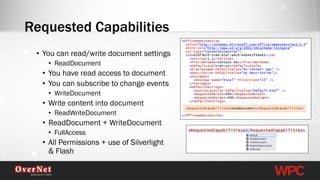
•You can read/write document settings 
•ReadDocument 
•You have read access to document 
•You can subscribe to change events 
•WriteDocument 
•Write content into document 
•ReadWriteDocument 
•ReadDocument+ WriteDocument 
•FullAccess 
•All Permissions + use of Silverlight & Flash 
Requested Capabilities
Document-based Apps -Demo
Mail Apps
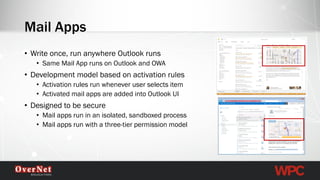
•Write once, run anywhere Outlook runs 
•Same Mail App runs on Outlook and OWA 
•Development model based on activation rules 
•Activation rules run whenever user selects item 
•Activated mail apps are added into Outlook UI 
•Designed to be secure 
•Mail apps run in an isolated, sandboxed process 
•Mail apps run with a three-tier permission model 
Mail Apps
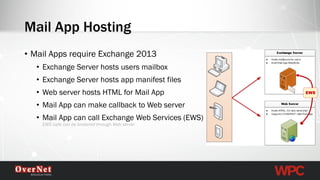
•Mail Apps require Exchange 2013 
•Exchange Server hosts users mailbox 
•Exchange Server hosts app manifest files 
•Web server hosts HTML for Mail App 
•Mail App can make callback to Web server 
•Mail App can call Exchange Web Services (EWS) EWS calls can be brokered through Web server 
Mail App Hosting 
EWS
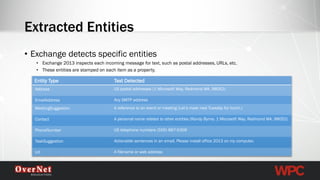
•Exchange detects specific entities 
•Exchange 2013 inspects each incoming message for text, such as postal addresses, URLs, etc. 
•These entities are stamped on each item as a property. 
Extracted Entities 
Entity Type 
Text Detected 
Address 
US postal addresses(1 Microsoft Way, Redmond WA, 98052) 
EmailAddress 
Any SMTP address 
MeetingSuggestion 
A reference to an event or meeting(Let’s meetnext Tuesday for lunch.) 
Contact 
A personal name relatedto other entities (Randy Byrne, 1 Microsoft Way, Redmond WA, 98052) 
PhoneNumber 
US telephone numbers(555) 867-5309 
TaskSuggestion 
Actionable sentences in anemail, Please install office 2013 on my computer. 
Url 
A filename or web address
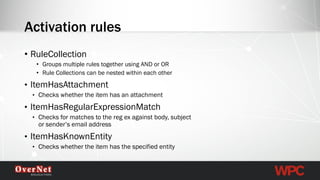
•RuleCollection 
•Groups multiple rules together using AND or OR 
•Rule Collections can be nested within each other 
•ItemHasAttachment 
•Checks whether the item has an attachment 
•ItemHasRegularExpressionMatch 
•Checks for matches to the regex against body, subject or sender’s email address 
•ItemHasKnownEntity 
•Checks whether the item has the specified entity 
Activation rules
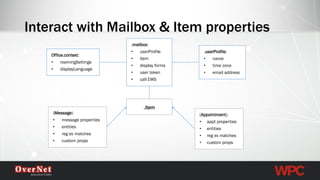
Interact with Mailbox & Item properties 
.mailbox: 
•userProfile 
•item 
•display forms 
•user token 
•call EWS 
Office.context: 
•roamingSettings 
•displayLanguage 
.item 
.userProfile: 
•name 
•time zone 
•email address 
(Message) 
•message properties 
•entities 
•regex matches 
•custom props 
(Appointment): 
•apptproperties 
•entities 
•regex matches 
•custom props
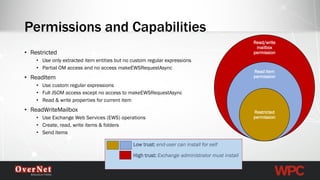
Low trust: end-user can install for self 
High trust: Exchange administrator must install 
•Restricted 
•Use only extracted item entities but no custom regular expressions 
•Partial OM access and no access makeEWSRequestAsync 
•ReadItem 
•Use custom regular expressions 
•Full JSOM access except no access to makeEWSRequestAsync 
•Read & write properties for current item 
•ReadWriteMailbox 
•Use Exchange Web Services (EWS) operations 
•Create, read, write items & folders 
•Send items 
Permissions and Capabilities 
Read/write mailbox permission 
Read item permission 
Restricted permission
Mail Apps -Demo
Distribution
Publication to App Catalog 
•App for Office distribution/deployment model based on App Catalogs 
•Apps for Office are published by uploading its manifest to an App Catalog 
•Different App Catalogs 
•Office Store 
•SharePoint App Catalog 
•File share App Catalog 
•Exchange 2013 App Catalog (mail apps only)
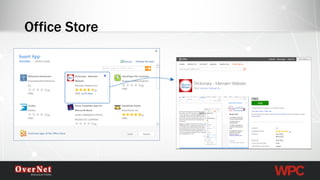
Office Store
For more info… 
•http://dev.office.com 
•https://code.msdn.microsoft.com/officeapps/Apps-for-Office-code- d04762b7
Contatti OverNet Education 
OverNet Education 
info@overneteducation.it 
www.overneteducation.it 
Tel. 02 365738 
@overnete 
www.facebook.com/OverNetEducationwww.linkedin.com/company/overnet-solutions

Sviluppare app per office

  • 1.
    VS002 -Sviluppare Appper Office Fabio Franzini –SharePoint MVP
  • 2.
    •SharePoint MVP •SeniorConsultant and Software Engineer •MCT Trainer •MCPD Web Applications, MCTS SharePoint 2010/2007 •Official Ignite Trainer for SharePoint 2013 & 2010 in Italy •Over 10 years experience in IT as a software engineer •Twitter: @franzinifabio •Email: fabio@fabiofranzini.com •Web: www.fabiofranzini.com About Me
  • 3.
    “SharePoint 2013 AppModel Succinctly” SharePoint2013 App Model Succinctly is a hands-on approach to learning how to develop SharePoint apps. Author Fabio Franzini introduces readers to the concepts that make SharePoint 2013 simpler and easier to use than previous development models. You’ll learn to develop both on-premises and cloud applications in Visual Studio 2013, then enable your apps to communicate with SharePoint using the client-side object model (CSOM) or the representational state transfer (REST) API http://bit.ly/1ytzthl
  • 4.
    Agenda •Introduction •Document-basedApps •Mail Apps •Distribution
  • 5.
  • 6.
    Microsoft Vision: Modernizingthe Platform Today’s Market Today’s Trends Microsoft Principles
  • 7.
    Types of OfficeApps TaskPane App Content App Mail App •Assist userworking with one or more documents •Works in Word,Excel, PowerPoint and Project •Adds embeddedcontent/functionality to documents •Only in Excel and Excel web app •Extendsmessage and appointments with custom UI and behavior •Used in Outlook and Outlook Web App
  • 8.
    Anatomy of anOffice App Each App for Office is based on XML-based manifest •Points to a web page •Defines the type of the App for Office •Defines which Office applications it supports •Defines required capabilities 8
  • 9.
    •Cross Platform •Designedfrom the ground up, Abstraction, Async •Cross App •Common objects and methods across apps (selection, tables, settings) •Web Standards •ECMAScript5 •Performance •Async, limits Principles
  • 10.
    Server Client BrowserHost Common App Architecture Web Server Host SharePoint & Exchange APP Client APIs Server APIs Other Devices & Clients 3rdParty Services Office
  • 11.
    Office JavascriptAPI OverviewDocumentOffice.contextCustomXmlPartsBindingsSettingsR/WSelectionMailboxProperties & SettingsUser ProfileEWSItemProjectTasksProject Info
  • 12.
  • 13.
    •Apps for Officecode run in separate sandboxed process •Sandbox infrastructure leverages Web Control from IE9/IE10 •App for Office support for HTML5 and CSS3 consistent with IE9/IE10 support •Browser-rendered Apps based •Works across all popular browsers (might require the latest version) •App runs its it own iFrameinside outer an iFramewith WEF runtime •Communications between iFramesrelies on HTML5 postMessageAPI Office Application Architecture
  • 14.
    •Document-basedApps for Officehave common objects •Used to read and write content to and from document •Used to create bindings and event handlers A common API for document-based AppsCommon Objects x-Office! Text Table Matrix Charts Shapes Picture Hyperlink Word Art XML Parts Clip Art
  • 15.
  • 16.
    •All data accessstarts through document object •Read/write access to user selection •Event handler for selection change event •Three data types are supported •Text •Matrix •Table Interacting With Document Content
  • 17.
    Working with Selections Current selection Task Pane App reads current selection and translates Content App reads current selection and translates
  • 18.
    App Bindings Boundrange of stock symbols App handles SelectionChanged event associated with the binding to retrieve news associated with stock symbol
  • 19.
    •You can read/writedocument settings •ReadDocument •You have read access to document •You can subscribe to change events •WriteDocument •Write content into document •ReadWriteDocument •ReadDocument+ WriteDocument •FullAccess •All Permissions + use of Silverlight & Flash Requested Capabilities
  • 20.
  • 21.
  • 22.
    •Write once, runanywhere Outlook runs •Same Mail App runs on Outlook and OWA •Development model based on activation rules •Activation rules run whenever user selects item •Activated mail apps are added into Outlook UI •Designed to be secure •Mail apps run in an isolated, sandboxed process •Mail apps run with a three-tier permission model Mail Apps
  • 23.
    •Mail Apps requireExchange 2013 •Exchange Server hosts users mailbox •Exchange Server hosts app manifest files •Web server hosts HTML for Mail App •Mail App can make callback to Web server •Mail App can call Exchange Web Services (EWS) EWS calls can be brokered through Web server Mail App Hosting EWS
  • 24.
    •Exchange detects specificentities •Exchange 2013 inspects each incoming message for text, such as postal addresses, URLs, etc. •These entities are stamped on each item as a property. Extracted Entities Entity Type Text Detected Address US postal addresses(1 Microsoft Way, Redmond WA, 98052) EmailAddress Any SMTP address MeetingSuggestion A reference to an event or meeting(Let’s meetnext Tuesday for lunch.) Contact A personal name relatedto other entities (Randy Byrne, 1 Microsoft Way, Redmond WA, 98052) PhoneNumber US telephone numbers(555) 867-5309 TaskSuggestion Actionable sentences in anemail, Please install office 2013 on my computer. Url A filename or web address
  • 25.
    •RuleCollection •Groups multiplerules together using AND or OR •Rule Collections can be nested within each other •ItemHasAttachment •Checks whether the item has an attachment •ItemHasRegularExpressionMatch •Checks for matches to the regex against body, subject or sender’s email address •ItemHasKnownEntity •Checks whether the item has the specified entity Activation rules
  • 26.
    Interact with Mailbox& Item properties .mailbox: •userProfile •item •display forms •user token •call EWS Office.context: •roamingSettings •displayLanguage .item .userProfile: •name •time zone •email address (Message) •message properties •entities •regex matches •custom props (Appointment): •apptproperties •entities •regex matches •custom props
  • 27.
    Low trust: end-usercan install for self High trust: Exchange administrator must install •Restricted •Use only extracted item entities but no custom regular expressions •Partial OM access and no access makeEWSRequestAsync •ReadItem •Use custom regular expressions •Full JSOM access except no access to makeEWSRequestAsync •Read & write properties for current item •ReadWriteMailbox •Use Exchange Web Services (EWS) operations •Create, read, write items & folders •Send items Permissions and Capabilities Read/write mailbox permission Read item permission Restricted permission
  • 28.
  • 29.
  • 30.
    Publication to AppCatalog •App for Office distribution/deployment model based on App Catalogs •Apps for Office are published by uploading its manifest to an App Catalog •Different App Catalogs •Office Store •SharePoint App Catalog •File share App Catalog •Exchange 2013 App Catalog (mail apps only)
  • 31.
  • 32.
    For more info… •http://dev.office.com •https://code.msdn.microsoft.com/officeapps/Apps-for-Office-code- d04762b7
  • 33.
    Contatti OverNet Education OverNet Education info@overneteducation.it www.overneteducation.it Tel. 02 365738 @overnete www.facebook.com/OverNetEducationwww.linkedin.com/company/overnet-solutions