SUPER MARKET MANAGEMENT
SUBMITTED BY :
Sushmita Singh
Department of Computer Applications
Bhilai Institute of Technology, Durg
PROJECT ON
SUPER MARKET MANAGEMENT
Introduction
About system
Future scope
Hardware Requirement
Software Requirement
Feature Activity Diagram
Login Activity Diagram
State Diagram
Data flow diagram
CONTENT
SUPER MARKET MANAGEMENT SYSTEM is a simple way
to manage warehouse, inventory and product stock in better
manner.
In olden times inventory was managed by supervisor but now a
days this is the age of INTERNET so inventory should managed
by APPLICATION system .
So we decided that , we will make an APPLICATION on this by
the using of JAVA and MySQL Language.
INTRODUCTION
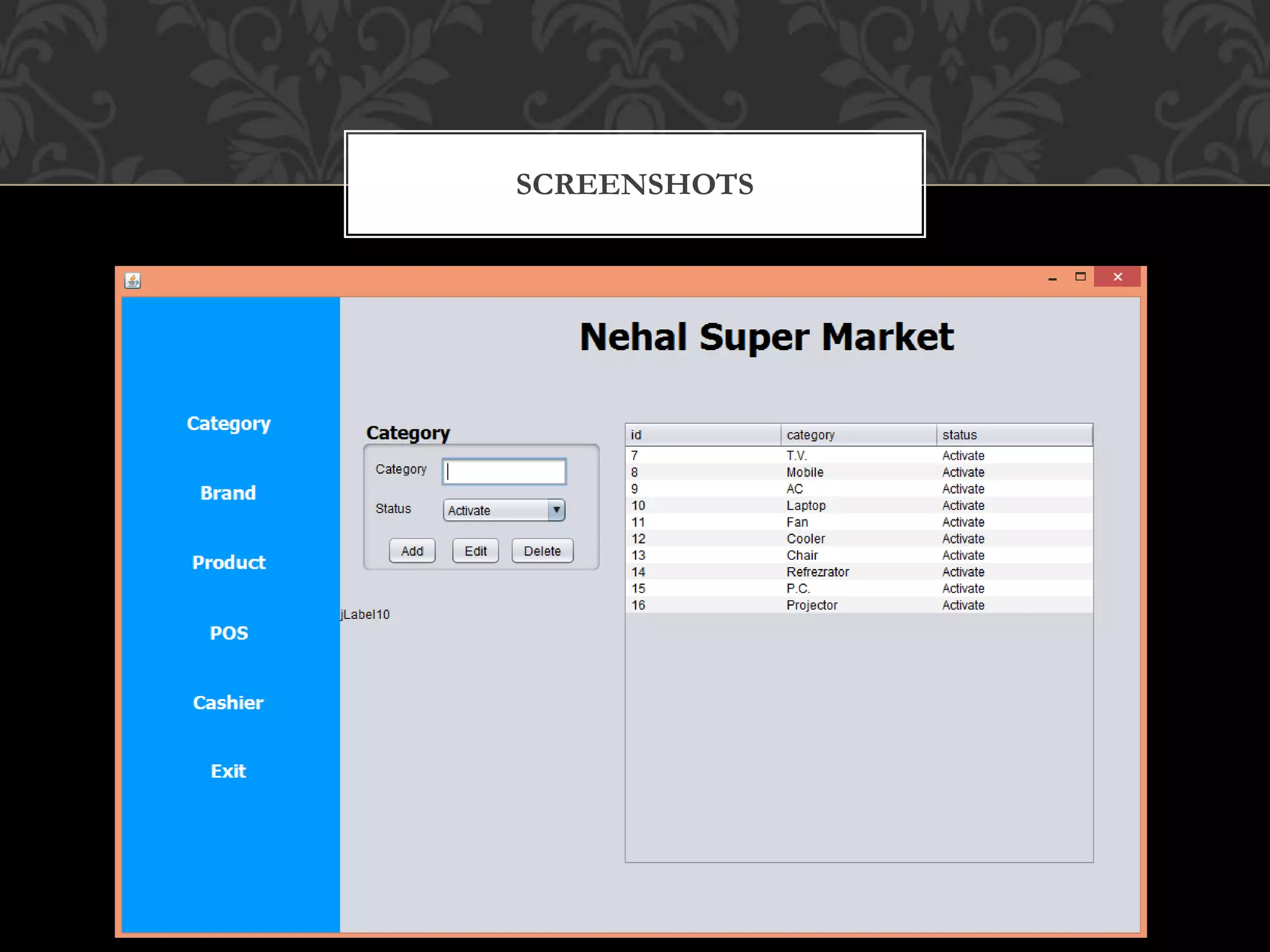
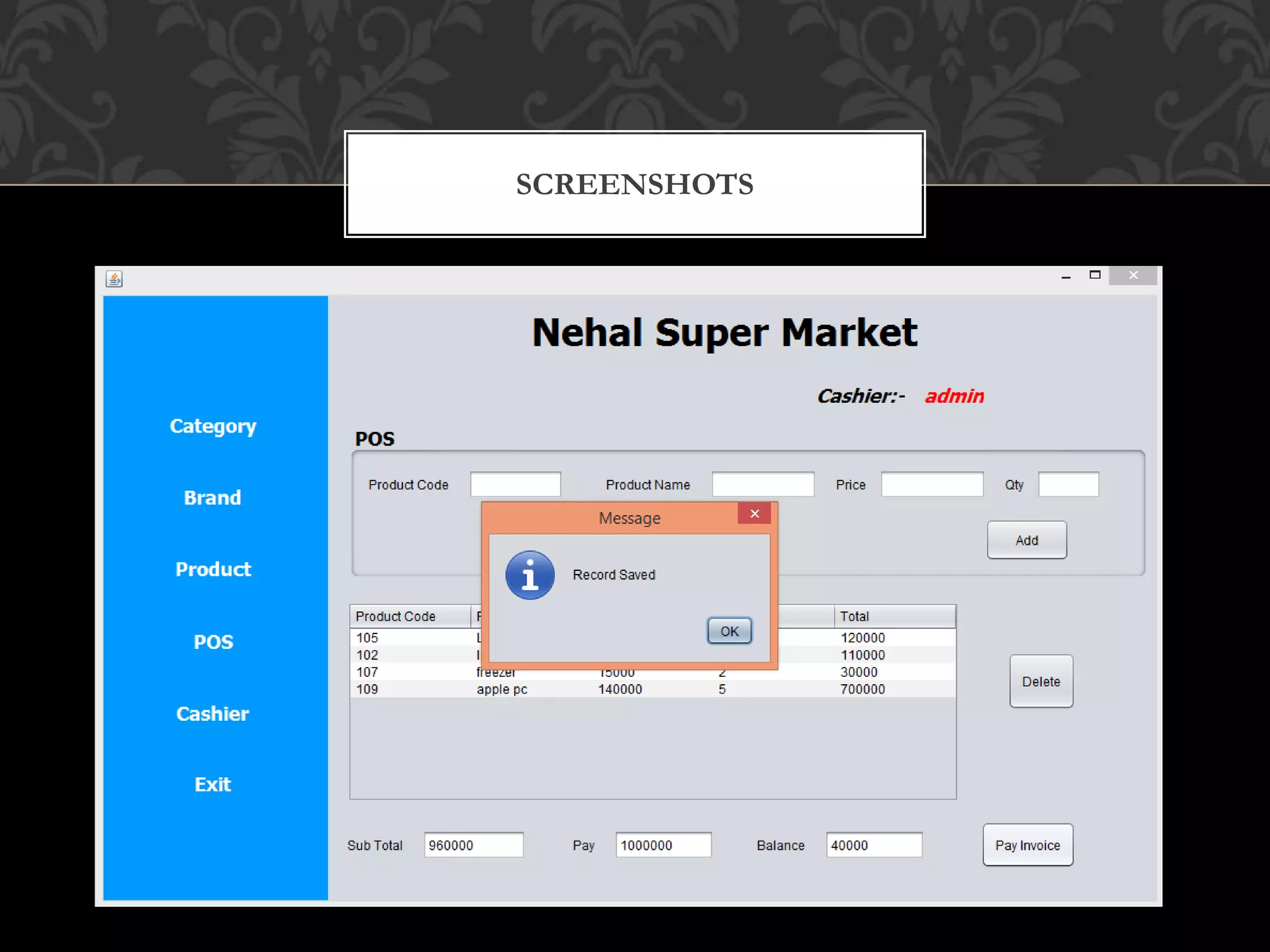
SUPER MARKET MANAGEMENT SYSTEM, the user can
add/modify/delete “CATEGORY/BRAND/PRODUCT/USER” as well as
user can use POS(point of sell), where cashier/user can easily manage.
Design of this project is pretty simple so that the user won’t find any
difficulties while working on it.
To run this project you must have installed virtual server i.e XAMPP on
your PC (for Windows) for MySQL and JAVA IDE.
ABOUT SYSTEM
A PC with following minimum requirements:-
OS :- Windows 7 or higher
Ram :- 2GB or Greater
Hard Disk :- 10 GB or Greater
Processor :- Intel Pentium or Greater (like i3, i5, i7 )
System Architecture :- 32bit or 64 bit
HARDWARE REQUIREMENT
Front end: NetBeans
Back end: XAMMP v3.2.2 (MySql v5.0.12)
Operating System: Window XP, Vista, 7, 8, 8.1, 10, MAC OS
Programming Language: JAVA + MYSQL
SOFTWARE REQUIREMENTS
FEATURE ACTIVITY DIAGRAM
Start Login to Super Market
User can add /modify / delete
Category Brand Product User
Point Of
Sell (POS)
Logout from Super Market
Stop
LOGIN ACTIVITY DIAGRAM
Admin is registered
Admin login id and password
Check login id password
Login to the successfully
Use APPLICATION
End
Invalid login
password
start
SCREENSHOTS
SCREENSHOTS
SCREENSHOTS
SCREENSHOTS
SCREENSHOTS
SCREENSHOTS
SCREENSHOTS
SCREENSHOTS
SCREENSHOTS
SUPER MARKET MANAGEMENT SYSTEM is a fast, responsive, secure
alternative to supermarket or shop system.
Its POS experience amazing and quick.
The user needs to login once only. If ever there is a s can be updated easily in
his profile.
The security of the Database could be enhanced further.
CONCLUSION
THANK YOU !

Super Market Management.pptx

  • 1.
    SUPER MARKET MANAGEMENT SUBMITTEDBY : Sushmita Singh Department of Computer Applications Bhilai Institute of Technology, Durg
  • 2.
  • 3.
    Introduction About system Future scope HardwareRequirement Software Requirement Feature Activity Diagram Login Activity Diagram State Diagram Data flow diagram CONTENT
  • 4.
    SUPER MARKET MANAGEMENTSYSTEM is a simple way to manage warehouse, inventory and product stock in better manner. In olden times inventory was managed by supervisor but now a days this is the age of INTERNET so inventory should managed by APPLICATION system . So we decided that , we will make an APPLICATION on this by the using of JAVA and MySQL Language. INTRODUCTION
  • 5.
    SUPER MARKET MANAGEMENTSYSTEM, the user can add/modify/delete “CATEGORY/BRAND/PRODUCT/USER” as well as user can use POS(point of sell), where cashier/user can easily manage. Design of this project is pretty simple so that the user won’t find any difficulties while working on it. To run this project you must have installed virtual server i.e XAMPP on your PC (for Windows) for MySQL and JAVA IDE. ABOUT SYSTEM
  • 6.
    A PC withfollowing minimum requirements:- OS :- Windows 7 or higher Ram :- 2GB or Greater Hard Disk :- 10 GB or Greater Processor :- Intel Pentium or Greater (like i3, i5, i7 ) System Architecture :- 32bit or 64 bit HARDWARE REQUIREMENT
  • 7.
    Front end: NetBeans Backend: XAMMP v3.2.2 (MySql v5.0.12) Operating System: Window XP, Vista, 7, 8, 8.1, 10, MAC OS Programming Language: JAVA + MYSQL SOFTWARE REQUIREMENTS
  • 8.
    FEATURE ACTIVITY DIAGRAM StartLogin to Super Market User can add /modify / delete Category Brand Product User Point Of Sell (POS) Logout from Super Market Stop
  • 9.
    LOGIN ACTIVITY DIAGRAM Adminis registered Admin login id and password Check login id password Login to the successfully Use APPLICATION End Invalid login password start
  • 10.
  • 11.
  • 12.
  • 13.
  • 14.
  • 15.
  • 16.
  • 17.
  • 18.
  • 19.
    SUPER MARKET MANAGEMENTSYSTEM is a fast, responsive, secure alternative to supermarket or shop system. Its POS experience amazing and quick. The user needs to login once only. If ever there is a s can be updated easily in his profile. The security of the Database could be enhanced further. CONCLUSION
  • 20.