
Transitioning Oracle E-Business Suite to the Maximum Availability Architecture on Sun Platforms Oracle MAA Team and Sun Market Development
The following is intended to outline our general product direction. It is intended for information purposes only, and may not be incorporated into any contract. It is not a commitment to deliver any material, code, or functionality, and should not be relied upon in making purchasing decisions. The development, release, and timing of any features or functionality described for Oracle’s products remain at the sole discretion of Oracle.
MAA:  Getting There With Less Downtime MAA  Philosophy and Flow Phase 1 – Local Cluster Creation Phase 2 – Two Node RAC Phase 3 – Full MAA Platform Ongoing Switchover and Failover Testing Partnering with Sun <Insert Picture Here>
MAA:  Getting There With Less Downtime MAA   Philosophy and Flow Phase 1 – Local Cluster Creation Phase 2 – Two Node RAC Phase 3 – Full MAA Platform Ongoing Switchover and Failover Testing Partnering with Sun <Insert Picture Here>
Maximum Availability Architecture:  MAA, and the MAA Team Oracle-recommended best practices for High Availability Based on proven technologies Enhanced and validated with new Oracle versions Goal: reduce the complexity of implementing MAA while minimizing downtime Best practices available through white papers and Oracle documentation Implemented by the MAA Team HA engineering experts in Oracle’s core development group Deep-domain expertise designing, developing, and deploying HA architectures using Oracle and system technologies, and supporting the same at customer sites worldwide
MAA for EBS: Target Architecture Redundancy for local hardware failures Solaris Cluster, Oracle Clusterware, Oracle RAC, ASM Protection against operator error Flashback database Redundancy for site-level failures Data Guard Redo Apply But must we suffer an outage to implement MAA?
MAA:  Getting There With Less Downtime MAA  Philosophy and Flow Phase 1 – Local Cluster Creation Phase 2 – Two Node RAC Phase 3 – Full MAA Platform Ongoing Switchover and Failover Testing Partnering with Sun <Insert Picture Here>
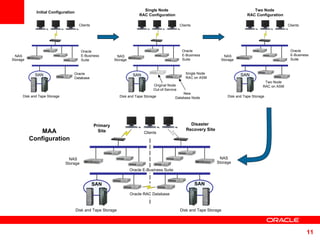
Minimizing Outage to Implement MAA Stage all the changes, then switch Clone the file systems: Applications software, tech stack Clone the database to create a physical standby of production Stage as many configuration changes as possible Switch over, complete configuration
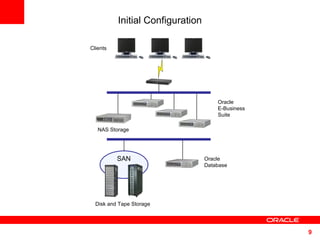
Clients NAS Storage  Oracle  E-Business  Suite Oracle Database  Initial Configuration SAN Disk and Tape Storage
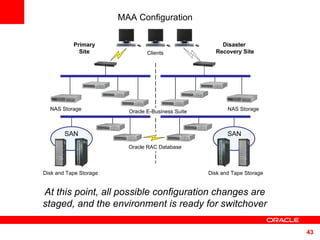
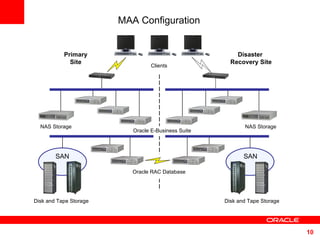
MAA Configuration Clients Primary  Site  Disaster  Recovery Site SAN SAN NAS Storage  Oracle E-Business Suite Disk and Tape Storage Disk and Tape Storage Oracle RAC Database  NAS Storage
Clients NAS Storage  Oracle  E-Business  Suite Oracle Database  SAN Disk and Tape Storage Initial Configuration Clients Oracle  E-Business  Suite Two Node RAC on ASM SAN Disk and Tape Storage NAS Storage  Two Node  RAC Configuration MAA Configuration Clients Primary  Site  Disaster  Recovery Site SAN SAN NAS Storage  Oracle E-Business Suite Disk and Tape Storage Disk and Tape Storage Oracle RAC Database  NAS  Storage  Clients Oracle  E-Business  Suite New  Database Node SAN Disk and Tape Storage Single Node  RAC Configuration NAS Storage  Original Node Out-of-Service Single Node RAC on ASM
MAA:  Getting There With Less Downtime MAA  Philosophy and Flow Phase 1 – Local Cluster Creation Phase 2 – Two Node RAC Phase 3 – Full MAA Platform Ongoing Switchover and Failover Testing Partnering with Sun <Insert Picture Here>
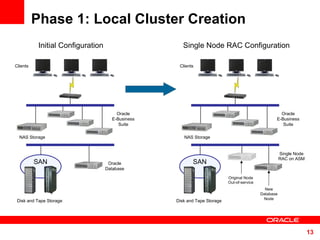
Phase 1: Local Cluster Creation Clients NAS Storage  Oracle  E-Business  Suite  Oracle  Database  Initial Configuration SAN Disk and Tape Storage Clients NAS Storage  Oracle  E-Business  Suite  Single Node RAC Configuration SAN Disk and Tape Storage New  Database  Node  Original Node Out-of-service Single Node RAC on ASM
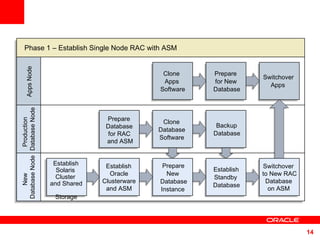
Phase 1 – Establish Single Node RAC with ASM Production  Database Node New  Database Node Apps Node Establish Oracle Clusterware and ASM Establish Solaris  Cluster  and Shared  Storage Backup Database Switchover  Apps  Clone  Database  Software  Prepare Database  for RAC  and ASM Prepare  for New  Database Clone  Apps  Software Switchover   to New RAC  Database  on ASM Establish Standby  Database Prepare New  Database Instance
Local Cluster Creation: Prep Target Server Patch OS to current recommended levels Install Solaris Cluster Install and configure shared disk Create shared logical volumes Create OCR, Voting, and ASM spfile disk groups - these can each be 1GB Create Data and Flash Recovery disk groups. Install Oracle Clusterware and ASM Single Node  RAC Configuration
Local Cluster Creation: Prep Current Database for RAC Add redo threads for the new instance(s) Add undo tablespace(s) for the new instance(s) Add the clustering tables to the data dictionary by running $ORACLE_HOME/rdbms/admin/catclust.sql Do these steps ahead of time in production,  not using DBCA, to reduce and simplify  the steps required during the downtime  Single Node  RAC Configuration
Local Cluster Creation: Prep Current DB for Data Guard Enable “force logging” to ensure all activity  is written to the redo logs Add standby redo logs Create database password files Create them for your final configuration – all instance names Grant SQL*Net access to other database nodes for redo traffic 11i10 enables SQL*Net access control by default Use OAM to add all appropriate interfaces for your new database nodes, local and remote Run AutoConfig to generate the new sqlnet.ora file Single Node  RAC Configuration
Local Cluster Creation: Prep DB Configuration Files Make configuration changes using the “include”  file, to avoid conflicts with AutoConfig  For the temporary local standby database, we used EZConnect to simplify network configurations, for example: sqlplus sys/manager@ha1db:1521/VIS   We set fewer parameters than for a normal standby scenario, as this is a temporary setup Single Node  RAC Configuration
Local Cluster Creation: Clone the DB Oracle Home Run the Apps pre-clone utility against the  production database Copy the software to a new directory on the target server (named differently than the original) E.g., /u01/appltop in production; /u01/visdbRAC on target Use  adcfgclone.pl dbTechStack  on the target server, to define the new topology You will point to the standby, so will not successfully connect to a database Configure and restart the listener Single Node  RAC Configuration
Local Cluster Creation: Establish the Local Standby Using RMAN, back up the production database,  then restore it to the new environment Start managed recovery: On the primary: set log_archive_dest_state_2 = enable On the standby: start managed recovery Validate that redo is being shipped and applied Single Node  RAC Configuration
Local Cluster Creation: Clone App Tier Software Clone the Application tier software to a new  directory structure on the current middle tier(s), so configuration can be ready ahead of downtime Run the pre-clone utility Copy the software to a new directory Run  adclonectx.pl  to define the new topology Run  adcfgclone.pl appsTier , pointing to the new context file created above At this point, all possible configuration changes are staged, and the environment is ready for switchover Single Node  RAC Configuration
Switchover to Single Instance RAC Be sure you are up to date with redo apply Shut down the apps [0:43] Switch to the local standby [0:01] Enable flashback [0:05] Open the new primary database instance [0:02] Remove the old application topology [1:34] Run AutoConfig on the database server [0:02] Bounce the DB listener to get the correct services [2:50] Run AutoConfig on the middle tiers (in parallel) Start the application, pointing to your single-node RAC instance Add the single instance to the Clusterware configuration Single Node  RAC Configuration
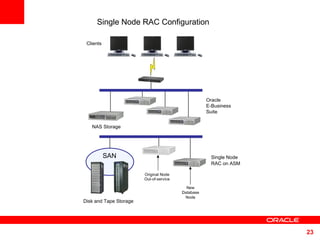
Clients NAS Storage  Oracle  E-Business  Suite  Single Node RAC Configuration SAN Disk and Tape Storage New  Database  Node  Original Node Out-of-service Single Node RAC on ASM
MAA:  Getting There With Less Downtime MAA  Philosophy and Flow Phase 1 – Local Cluster Creation Phase 2 – Two Node RAC Phase 3 – Full MAA Platform Ongoing Switchover and Failover Testing Partnering with Sun <Insert Picture Here>
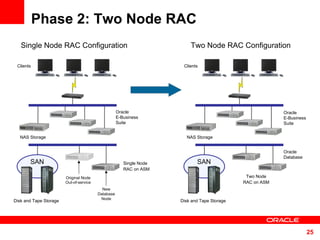
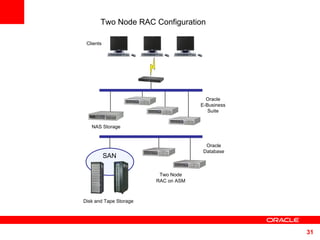
Phase 2: Two Node RAC Clients NAS Storage  Oracle  E-Business  Suite  Single Node RAC Configuration SAN Disk and Tape Storage New  Database  Node  Original Node Out-of-service Single Node RAC on ASM Clients NAS Storage  Oracle  E-Business  Suite  Two Node RAC Configuration SAN Disk and Tape Storage Two Node RAC on ASM Oracle  Database
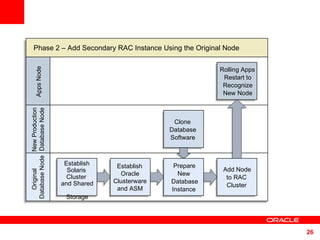
Phase 2 – Add Secondary RAC Instance Using the Original Node New Production Database Node Original  Database Node Apps Node Clone  Database  Software  Rolling Apps Restart to Recognize New Node Establish Oracle Clusterware and ASM Establish Solaris  Cluster  and Shared  Storage Add Node to RAC Cluster Prepare New  Database Instance
Prep Original Node for Cluster: Hardware, OS, Storage Add in any hardware required for cluster  operations Apply OS patches as necessary Change the server name to be cluster-friendly (e.g., ha1db to ha1db02) Install Solaris Cluster and add the node to the cluster Configure access to shared disk Add this node to the cluster for Oracle Clusterware and ASM Two Node  RAC Configuration
Prep Original Node for Cluster: Clone, Configure DB Software Clone the DB software from the production  RAC DB oracle_home to the original server Start the new DB instance on the original server Configure new DB instance using AutoConfig and the DB parameter include file Run AutoConfig in the production RAC DB server to regenerate the TNS configuration there Two Node  RAC Configuration
Prep Original Node for Cluster: Configure Middle Tier Using OAM’s Context Editor, set Tools and iAS two_task to point to values in the generated TNS_NAMES.ora file: To load-balance Forms sessions: set Tools OH TWO_TASK to point to the <database name>_806_balance alias To load-balance self-service connections: set iAS OH TWO_TASK to point to the <database name>_balance alias Run AutoConfig on the apps tier servers.  Bounce them when desired, to take advantage of the new database instance Two Node  RAC Configuration
Prep Original Node for Cluster: Add Node to Clusterware To be able to use srvctl to control the new  cluster, add the resources to Clusterware via srvctl: Add the database Add all database instances Add listeners to Clusterware : Point to the Apps’ TNS_ADMIN directory in $OH/bin/racgwrap Make sure the listener is running Run netca, cluster configuration, choose local node.  Run on all nodes. Run AutoConfig again, to overwrite the listener.ora file created by netca. Two Node  RAC Configuration
Clients NAS Storage  Oracle  E-Business  Suite  Two Node RAC Configuration SAN Disk and Tape Storage Two Node RAC on ASM Oracle  Database
MAA:  Getting There With Less Downtime MAA  Philosophy and Flow Phase 1 – Local Cluster Creation Phase 2 – Two Node RAC Phase 3 – Full MAA Platform Ongoing Switchover and Failover Testing Partnering with Sun <Insert Picture Here>
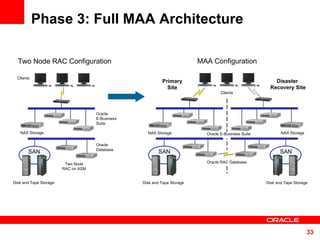
Phase 3: Full MAA Architecture Clients NAS Storage  Oracle  E-Business  Suite  Two Node RAC Configuration SAN Disk and Tape Storage Two Node RAC on ASM MAA Configuration Clients Primary  Site  Disaster  Recovery Site SAN SAN NAS Storage  Oracle E-Business Suite Disk and Tape Storage Disk and Tape Storage Oracle RAC Database  NAS Storage  Oracle  Database
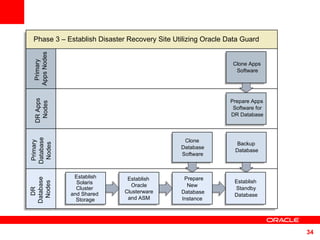
Phase 3 – Establish Disaster Recovery Site Utilizing Oracle Data Guard  Primary  Database  Nodes DR  Database  Nodes Prepare New  Database Instance Establish Oracle Clusterware and ASM Establish Solaris  Cluster  and Shared  Storage DR Apps  Nodes Primary  Apps Nodes Establish Standby Database Clone  Database  Software  Backup  Database  Prepare Apps Software for DR Database Clone Apps Software
Full MAA: Establish Target Environment Build DR site hardware platform  (best: mimic production – multiple middle tiers, RAC database server cluster) Install the operating system Install and configure Solaris Cluster Configure shared storage Install Oracle Clusterware and ASM MAA Configuration
Full MAA: Configure Prod Database Add TNS entries for standby  communications between sites Configure failover across nodes, not load balancing Set database parameters for standby operations.  Same as for local standby, except: Use only permanent sites in log_archive_config Use TNS entries for FAL_CLIENT and FAL_SERVER parameters Use TNS entries for log_archive_dest_2 Assuming in place: standby redo logs, extra undo tablespace(s), redo threads, cluster catalog in database, password files, SQL*Net access control, … MAA Configuration
Full MAA: Clone Prod DB Software Run the Apps pre-clone utility Copy database ORACLE_HOME to DR database servers Run  adcfgclone.pl dbTechStack  on each DR database server MAA Configuration
Full MAA: Generate Core init.ora Edit the context files to correct topology  information (incorrect, as the DB is not yet up) Instance_number Instance_thread Undo_tablespace Move / remove init<sid>.ora and <sid>_APPS_BASE.ora so AutoConfig regenerates Run AutoConfig  Adjust the database configuration for when this environment is primary and when it is standby, and for RMAN  MAA Configuration
Full MAA: Configure Standby TNS TNS configuration Copy production <context>_ifile.ora to standby <context>_ifile.ora, to add the “failover” services Listener configuration Add the ability to listen on the physical machine name to the list of addresses, using include files Bounce the listener on each node on the DR site MAA Configuration
Full MAA: Clone the Database Using RMAN, back up the production  database including archivelogs, and the production control file “as standby” Using RMAN, restore the database to the DR site using one of the configured instances Start managed recovery MAA Configuration
Full MAA: Update Clusterware With Standby DB Update the Oracle Clusterware  configuration on the standby site: Add the database Add all instances Add listeners Run AutoConfig once more to restore the base listener.ora files MAA Configuration
Full MAA: Clone Application Software Run the pre-clone step, copy the software,  run  adclonectx.pl  and  adcfgclone.pl  on each DR site middle tier server Ignore the error when running  adcfgclone.pl appsTier  which occurs due to no connection to database Edit the context file to point Tools OH TWO_TASK, iAS OH TWO_TASK, and Apps JDBC Connect Alias to the appropriate load balancing service MAA Configuration
At this point, all possible configuration changes are staged, and the environment is ready for switchover MAA Configuration Clients Primary  Site  Disaster  Recovery Site SAN SAN NAS Storage  Oracle E-Business Suite Disk and Tape Storage Disk and Tape Storage Oracle RAC Database  NAS Storage
MAA:  Getting There With Less Downtime MAA  Philosophy and Flow Phase 1 – Local Cluster Creation Phase 2 – Two Node RAC Phase 3 – Full MAA Platform Ongoing Switchover and Failover Testing Partnering with Sun <Insert Picture Here>
Ongoing Switchover and Failover Testing Periodically verify viability of DR environment Practice steps so the process flows easily if disaster strikes Use the DR environment to provide application services when performing platform or site maintenance
Test Failover Be sure you are up to date with redo apply Shut down the app and all but 1 RAC instance on each site Switch the standby to primary, enable flashback, open, start other instances Run AutoConfig on database, then middle tier Do the “topology dance” on the DB tier first Start the Apps Use Flashback Database to start the original database as a standby of the new production server Requires a Brief Outage MAA Configuration
DR Testing Procedure Using Flashback Database Create a database restore point on the DR standby database Open the standby database, complete the configuration Perform testing Flash the standby back to the restore point, resume recovery as a standby
MAA:  Getting There With Less Downtime MAA  Philosophy and Flow Phase 1 – Local Cluster Creation Phase 2 – Two Node RAC Phase 3 – Full MAA Platform Ongoing Switchover and Failover Testing Partnering with Sun <Insert Picture Here>
Oracle Clusterware  In Oracle RAC 10g - Various Oracle resources are configured to be managed by Oracle Clusterware ONS (Oracle Notification Service) VIP (Virtual IP Address) LISTENERS DATABASE INSTANCES SERVICES
Oracle Clusterware Provides VIP resource Provides Application VIP’s HA -  Framework Extends  Oracle Clusterware  HA  protection to application HA - API Interface to allow customers to change - at run time -  how Oracle Clusterware manages customer application
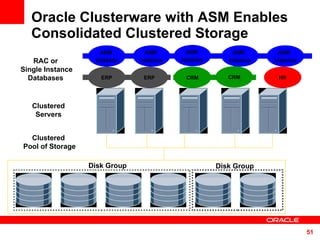
Oracle Clusterware with ASM Enables Consolidated Clustered Storage Clustered  Pool of Storage ASM  Instance ASM  Instance ASM  Instance ASM  Instance Clustered  Servers   RAC or  Single Instance Databases  ERP ERP CRM CRM Disk Group Disk Group ASM  Instance HR
Partnering with Sun Part of MAA means proving and testing  our best practices, and working closely  with Sun to ensure our joint solutions work well together
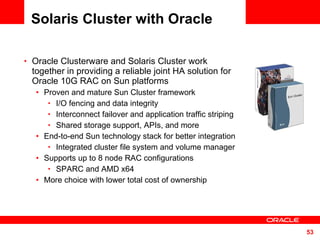
Solaris Cluster with Oracle Oracle Clusterware and Solaris Cluster work together in providing a reliable joint HA solution for Oracle 10G RAC on Sun platforms Proven and mature Sun Cluster framework I/O fencing and data integrity Interconnect failover and application traffic striping Shared storage support, APIs, and more End-to-end Sun technology stack for better integration Integrated cluster file system and volume manager Supports up to 8 node RAC configurations SPARC and AMD x64 More choice with lower total cost of ownership
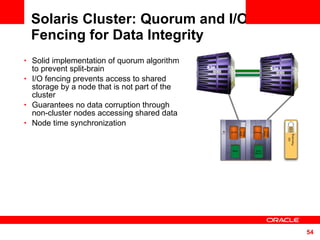
Solaris Cluster: Quorum and I/O Fencing for Data Integrity Solid implementation of quorum algorithm to prevent split-brain I/O fencing prevents access to shared storage by a node that is not part of the cluster Guarantees no data corruption through non-cluster nodes accessing shared data Node time synchronization
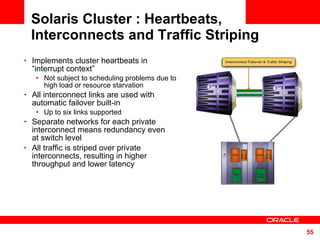
Solaris Cluster : Heartbeats, Interconnects and Traffic Striping Implements cluster heartbeats in  “interrupt context” Not subject to scheduling problems due to high load or resource starvation All interconnect links are used with automatic failover built-in Up to six links supported Separate networks for each private interconnect means redundancy even  at switch level All traffic is striped over private interconnects, resulting in higher  throughput and lower latency
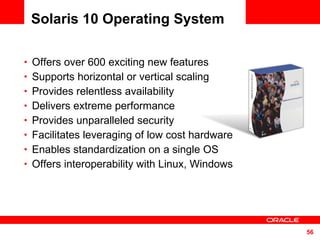
Solaris 10 Operating System Offers over 600 exciting new features Supports horizontal or vertical scaling Provides relentless availability Delivers extreme performance Provides unparalleled security Facilitates leveraging of low cost hardware Enables standardization on a single OS Offers interoperability with Linux, Windows
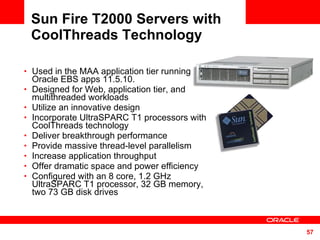
Sun Fire T2000 Servers with CoolThreads Technology Used in the MAA application tier running Oracle EBS apps 11.5.10. Designed for Web, application tier, and multithreaded workloads Utilize an innovative design Incorporate UltraSPARC T1 processors with CoolThreads technology Deliver breakthrough performance Provide massive thread-level parallelism Increase application throughput Offer dramatic space and power efficiency Configured with an 8 core, 1.2 GHz UltraSPARC T1 processor, 32 GB memory, two 73 GB disk drives
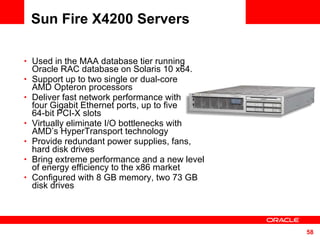
Sun Fire X4200 Servers Used in the MAA database tier running Oracle RAC database on Solaris 10 x64. Support up to two single or dual-core  AMD Opteron processors Deliver fast network performance with  four Gigabit Ethernet ports, up to five  64-bit PCI-X slots Virtually eliminate I/O bottlenecks with AMD’s HyperTransport technology Provide redundant power supplies, fans, hard disk drives Bring extreme performance and a new level of energy efficiency to the x86 market Configured with 8 GB memory, two 73 GB disk drives
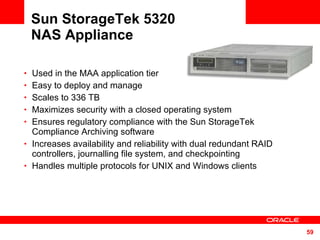
Sun StorageTek 5320  NAS Appliance Used in the MAA application tier  Easy to deploy and manage Scales to 336 TB Maximizes security with a closed operating system  Ensures regulatory compliance with the Sun StorageTek Compliance Archiving software Increases availability and reliability with dual redundant RAID controllers, journalling file system, and checkpointing Handles multiple protocols for UNIX and Windows clients
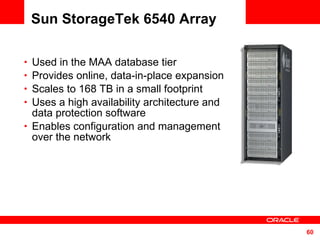
Sun StorageTek 6540 Array Used in the MAA database tier  Provides online, data-in-place expansion Scales to 168 TB in a small footprint Uses a high availability architecture and data protection software Enables configuration and management over the network
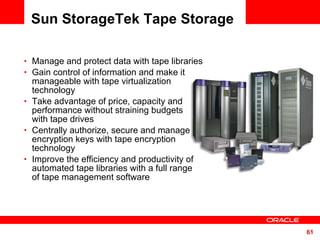
Sun StorageTek Tape Storage Manage and protect data with tape libraries Gain control of information and make it manageable with tape virtualization technology Take advantage of price, capacity and performance without straining budgets  with tape drives Centrally authorize, secure and manage encryption keys with tape encryption technology Improve the efficiency and productivity of automated tape libraries with a full range  of tape management software
Software Components from Oracle and Sun Oracle E-Business Suite 11.5.10.2 Oracle RAC database, ASM and Clusterware 10.2.0.2  Oracle Enterprise Manager 10g Grid Control Solaris™ 10 Operating System (Update 3) Solaris Cluster 3.2 Advanced Edition  for Oracle RAC Sun N1™ System Manager software
For More Information http://search.oracle.com or http://www.oracle.com/technology/deploy/availability/htdocs/maa.htm maximum availability architecture


Sun oracle-maa-060407

  • 1.
    Transitioning Oracle E-BusinessSuite to the Maximum Availability Architecture on Sun Platforms Oracle MAA Team and Sun Market Development
  • 2.
    The following isintended to outline our general product direction. It is intended for information purposes only, and may not be incorporated into any contract. It is not a commitment to deliver any material, code, or functionality, and should not be relied upon in making purchasing decisions. The development, release, and timing of any features or functionality described for Oracle’s products remain at the sole discretion of Oracle.
  • 3.
    MAA: GettingThere With Less Downtime MAA Philosophy and Flow Phase 1 – Local Cluster Creation Phase 2 – Two Node RAC Phase 3 – Full MAA Platform Ongoing Switchover and Failover Testing Partnering with Sun <Insert Picture Here>
  • 4.
    MAA: GettingThere With Less Downtime MAA Philosophy and Flow Phase 1 – Local Cluster Creation Phase 2 – Two Node RAC Phase 3 – Full MAA Platform Ongoing Switchover and Failover Testing Partnering with Sun <Insert Picture Here>
  • 5.
    Maximum Availability Architecture: MAA, and the MAA Team Oracle-recommended best practices for High Availability Based on proven technologies Enhanced and validated with new Oracle versions Goal: reduce the complexity of implementing MAA while minimizing downtime Best practices available through white papers and Oracle documentation Implemented by the MAA Team HA engineering experts in Oracle’s core development group Deep-domain expertise designing, developing, and deploying HA architectures using Oracle and system technologies, and supporting the same at customer sites worldwide
  • 6.
    MAA for EBS:Target Architecture Redundancy for local hardware failures Solaris Cluster, Oracle Clusterware, Oracle RAC, ASM Protection against operator error Flashback database Redundancy for site-level failures Data Guard Redo Apply But must we suffer an outage to implement MAA?
  • 7.
    MAA: GettingThere With Less Downtime MAA Philosophy and Flow Phase 1 – Local Cluster Creation Phase 2 – Two Node RAC Phase 3 – Full MAA Platform Ongoing Switchover and Failover Testing Partnering with Sun <Insert Picture Here>
  • 8.
    Minimizing Outage toImplement MAA Stage all the changes, then switch Clone the file systems: Applications software, tech stack Clone the database to create a physical standby of production Stage as many configuration changes as possible Switch over, complete configuration
  • 9.
    Clients NAS Storage Oracle E-Business Suite Oracle Database Initial Configuration SAN Disk and Tape Storage
  • 10.
    MAA Configuration ClientsPrimary Site Disaster Recovery Site SAN SAN NAS Storage Oracle E-Business Suite Disk and Tape Storage Disk and Tape Storage Oracle RAC Database NAS Storage
  • 11.
    Clients NAS Storage Oracle E-Business Suite Oracle Database SAN Disk and Tape Storage Initial Configuration Clients Oracle E-Business Suite Two Node RAC on ASM SAN Disk and Tape Storage NAS Storage Two Node RAC Configuration MAA Configuration Clients Primary Site Disaster Recovery Site SAN SAN NAS Storage Oracle E-Business Suite Disk and Tape Storage Disk and Tape Storage Oracle RAC Database NAS Storage Clients Oracle E-Business Suite New Database Node SAN Disk and Tape Storage Single Node RAC Configuration NAS Storage Original Node Out-of-Service Single Node RAC on ASM
  • 12.
    MAA: GettingThere With Less Downtime MAA Philosophy and Flow Phase 1 – Local Cluster Creation Phase 2 – Two Node RAC Phase 3 – Full MAA Platform Ongoing Switchover and Failover Testing Partnering with Sun <Insert Picture Here>
  • 13.
    Phase 1: LocalCluster Creation Clients NAS Storage Oracle E-Business Suite Oracle Database Initial Configuration SAN Disk and Tape Storage Clients NAS Storage Oracle E-Business Suite Single Node RAC Configuration SAN Disk and Tape Storage New Database Node Original Node Out-of-service Single Node RAC on ASM
  • 14.
    Phase 1 –Establish Single Node RAC with ASM Production Database Node New Database Node Apps Node Establish Oracle Clusterware and ASM Establish Solaris Cluster and Shared Storage Backup Database Switchover Apps Clone Database Software Prepare Database for RAC and ASM Prepare for New Database Clone Apps Software Switchover to New RAC Database on ASM Establish Standby Database Prepare New Database Instance
  • 15.
    Local Cluster Creation:Prep Target Server Patch OS to current recommended levels Install Solaris Cluster Install and configure shared disk Create shared logical volumes Create OCR, Voting, and ASM spfile disk groups - these can each be 1GB Create Data and Flash Recovery disk groups. Install Oracle Clusterware and ASM Single Node RAC Configuration
  • 16.
    Local Cluster Creation:Prep Current Database for RAC Add redo threads for the new instance(s) Add undo tablespace(s) for the new instance(s) Add the clustering tables to the data dictionary by running $ORACLE_HOME/rdbms/admin/catclust.sql Do these steps ahead of time in production, not using DBCA, to reduce and simplify the steps required during the downtime Single Node RAC Configuration
  • 17.
    Local Cluster Creation:Prep Current DB for Data Guard Enable “force logging” to ensure all activity is written to the redo logs Add standby redo logs Create database password files Create them for your final configuration – all instance names Grant SQL*Net access to other database nodes for redo traffic 11i10 enables SQL*Net access control by default Use OAM to add all appropriate interfaces for your new database nodes, local and remote Run AutoConfig to generate the new sqlnet.ora file Single Node RAC Configuration
  • 18.
    Local Cluster Creation:Prep DB Configuration Files Make configuration changes using the “include” file, to avoid conflicts with AutoConfig For the temporary local standby database, we used EZConnect to simplify network configurations, for example: sqlplus sys/manager@ha1db:1521/VIS We set fewer parameters than for a normal standby scenario, as this is a temporary setup Single Node RAC Configuration
  • 19.
    Local Cluster Creation:Clone the DB Oracle Home Run the Apps pre-clone utility against the production database Copy the software to a new directory on the target server (named differently than the original) E.g., /u01/appltop in production; /u01/visdbRAC on target Use adcfgclone.pl dbTechStack on the target server, to define the new topology You will point to the standby, so will not successfully connect to a database Configure and restart the listener Single Node RAC Configuration
  • 20.
    Local Cluster Creation:Establish the Local Standby Using RMAN, back up the production database, then restore it to the new environment Start managed recovery: On the primary: set log_archive_dest_state_2 = enable On the standby: start managed recovery Validate that redo is being shipped and applied Single Node RAC Configuration
  • 21.
    Local Cluster Creation:Clone App Tier Software Clone the Application tier software to a new directory structure on the current middle tier(s), so configuration can be ready ahead of downtime Run the pre-clone utility Copy the software to a new directory Run adclonectx.pl to define the new topology Run adcfgclone.pl appsTier , pointing to the new context file created above At this point, all possible configuration changes are staged, and the environment is ready for switchover Single Node RAC Configuration
  • 22.
    Switchover to SingleInstance RAC Be sure you are up to date with redo apply Shut down the apps [0:43] Switch to the local standby [0:01] Enable flashback [0:05] Open the new primary database instance [0:02] Remove the old application topology [1:34] Run AutoConfig on the database server [0:02] Bounce the DB listener to get the correct services [2:50] Run AutoConfig on the middle tiers (in parallel) Start the application, pointing to your single-node RAC instance Add the single instance to the Clusterware configuration Single Node RAC Configuration
  • 23.
    Clients NAS Storage Oracle E-Business Suite Single Node RAC Configuration SAN Disk and Tape Storage New Database Node Original Node Out-of-service Single Node RAC on ASM
  • 24.
    MAA: GettingThere With Less Downtime MAA Philosophy and Flow Phase 1 – Local Cluster Creation Phase 2 – Two Node RAC Phase 3 – Full MAA Platform Ongoing Switchover and Failover Testing Partnering with Sun <Insert Picture Here>
  • 25.
    Phase 2: TwoNode RAC Clients NAS Storage Oracle E-Business Suite Single Node RAC Configuration SAN Disk and Tape Storage New Database Node Original Node Out-of-service Single Node RAC on ASM Clients NAS Storage Oracle E-Business Suite Two Node RAC Configuration SAN Disk and Tape Storage Two Node RAC on ASM Oracle Database
  • 26.
    Phase 2 –Add Secondary RAC Instance Using the Original Node New Production Database Node Original Database Node Apps Node Clone Database Software Rolling Apps Restart to Recognize New Node Establish Oracle Clusterware and ASM Establish Solaris Cluster and Shared Storage Add Node to RAC Cluster Prepare New Database Instance
  • 27.
    Prep Original Nodefor Cluster: Hardware, OS, Storage Add in any hardware required for cluster operations Apply OS patches as necessary Change the server name to be cluster-friendly (e.g., ha1db to ha1db02) Install Solaris Cluster and add the node to the cluster Configure access to shared disk Add this node to the cluster for Oracle Clusterware and ASM Two Node RAC Configuration
  • 28.
    Prep Original Nodefor Cluster: Clone, Configure DB Software Clone the DB software from the production RAC DB oracle_home to the original server Start the new DB instance on the original server Configure new DB instance using AutoConfig and the DB parameter include file Run AutoConfig in the production RAC DB server to regenerate the TNS configuration there Two Node RAC Configuration
  • 29.
    Prep Original Nodefor Cluster: Configure Middle Tier Using OAM’s Context Editor, set Tools and iAS two_task to point to values in the generated TNS_NAMES.ora file: To load-balance Forms sessions: set Tools OH TWO_TASK to point to the <database name>_806_balance alias To load-balance self-service connections: set iAS OH TWO_TASK to point to the <database name>_balance alias Run AutoConfig on the apps tier servers. Bounce them when desired, to take advantage of the new database instance Two Node RAC Configuration
  • 30.
    Prep Original Nodefor Cluster: Add Node to Clusterware To be able to use srvctl to control the new cluster, add the resources to Clusterware via srvctl: Add the database Add all database instances Add listeners to Clusterware : Point to the Apps’ TNS_ADMIN directory in $OH/bin/racgwrap Make sure the listener is running Run netca, cluster configuration, choose local node. Run on all nodes. Run AutoConfig again, to overwrite the listener.ora file created by netca. Two Node RAC Configuration
  • 31.
    Clients NAS Storage Oracle E-Business Suite Two Node RAC Configuration SAN Disk and Tape Storage Two Node RAC on ASM Oracle Database
  • 32.
    MAA: GettingThere With Less Downtime MAA Philosophy and Flow Phase 1 – Local Cluster Creation Phase 2 – Two Node RAC Phase 3 – Full MAA Platform Ongoing Switchover and Failover Testing Partnering with Sun <Insert Picture Here>
  • 33.
    Phase 3: FullMAA Architecture Clients NAS Storage Oracle E-Business Suite Two Node RAC Configuration SAN Disk and Tape Storage Two Node RAC on ASM MAA Configuration Clients Primary Site Disaster Recovery Site SAN SAN NAS Storage Oracle E-Business Suite Disk and Tape Storage Disk and Tape Storage Oracle RAC Database NAS Storage Oracle Database
  • 34.
    Phase 3 –Establish Disaster Recovery Site Utilizing Oracle Data Guard Primary Database Nodes DR Database Nodes Prepare New Database Instance Establish Oracle Clusterware and ASM Establish Solaris Cluster and Shared Storage DR Apps Nodes Primary Apps Nodes Establish Standby Database Clone Database Software Backup Database Prepare Apps Software for DR Database Clone Apps Software
  • 35.
    Full MAA: EstablishTarget Environment Build DR site hardware platform (best: mimic production – multiple middle tiers, RAC database server cluster) Install the operating system Install and configure Solaris Cluster Configure shared storage Install Oracle Clusterware and ASM MAA Configuration
  • 36.
    Full MAA: ConfigureProd Database Add TNS entries for standby communications between sites Configure failover across nodes, not load balancing Set database parameters for standby operations. Same as for local standby, except: Use only permanent sites in log_archive_config Use TNS entries for FAL_CLIENT and FAL_SERVER parameters Use TNS entries for log_archive_dest_2 Assuming in place: standby redo logs, extra undo tablespace(s), redo threads, cluster catalog in database, password files, SQL*Net access control, … MAA Configuration
  • 37.
    Full MAA: CloneProd DB Software Run the Apps pre-clone utility Copy database ORACLE_HOME to DR database servers Run adcfgclone.pl dbTechStack on each DR database server MAA Configuration
  • 38.
    Full MAA: GenerateCore init.ora Edit the context files to correct topology information (incorrect, as the DB is not yet up) Instance_number Instance_thread Undo_tablespace Move / remove init<sid>.ora and <sid>_APPS_BASE.ora so AutoConfig regenerates Run AutoConfig Adjust the database configuration for when this environment is primary and when it is standby, and for RMAN MAA Configuration
  • 39.
    Full MAA: ConfigureStandby TNS TNS configuration Copy production <context>_ifile.ora to standby <context>_ifile.ora, to add the “failover” services Listener configuration Add the ability to listen on the physical machine name to the list of addresses, using include files Bounce the listener on each node on the DR site MAA Configuration
  • 40.
    Full MAA: Clonethe Database Using RMAN, back up the production database including archivelogs, and the production control file “as standby” Using RMAN, restore the database to the DR site using one of the configured instances Start managed recovery MAA Configuration
  • 41.
    Full MAA: UpdateClusterware With Standby DB Update the Oracle Clusterware configuration on the standby site: Add the database Add all instances Add listeners Run AutoConfig once more to restore the base listener.ora files MAA Configuration
  • 42.
    Full MAA: CloneApplication Software Run the pre-clone step, copy the software, run adclonectx.pl and adcfgclone.pl on each DR site middle tier server Ignore the error when running adcfgclone.pl appsTier which occurs due to no connection to database Edit the context file to point Tools OH TWO_TASK, iAS OH TWO_TASK, and Apps JDBC Connect Alias to the appropriate load balancing service MAA Configuration
  • 43.
    At this point,all possible configuration changes are staged, and the environment is ready for switchover MAA Configuration Clients Primary Site Disaster Recovery Site SAN SAN NAS Storage Oracle E-Business Suite Disk and Tape Storage Disk and Tape Storage Oracle RAC Database NAS Storage
  • 44.
    MAA: GettingThere With Less Downtime MAA Philosophy and Flow Phase 1 – Local Cluster Creation Phase 2 – Two Node RAC Phase 3 – Full MAA Platform Ongoing Switchover and Failover Testing Partnering with Sun <Insert Picture Here>
  • 45.
    Ongoing Switchover andFailover Testing Periodically verify viability of DR environment Practice steps so the process flows easily if disaster strikes Use the DR environment to provide application services when performing platform or site maintenance
  • 46.
    Test Failover Besure you are up to date with redo apply Shut down the app and all but 1 RAC instance on each site Switch the standby to primary, enable flashback, open, start other instances Run AutoConfig on database, then middle tier Do the “topology dance” on the DB tier first Start the Apps Use Flashback Database to start the original database as a standby of the new production server Requires a Brief Outage MAA Configuration
  • 47.
    DR Testing ProcedureUsing Flashback Database Create a database restore point on the DR standby database Open the standby database, complete the configuration Perform testing Flash the standby back to the restore point, resume recovery as a standby
  • 48.
    MAA: GettingThere With Less Downtime MAA Philosophy and Flow Phase 1 – Local Cluster Creation Phase 2 – Two Node RAC Phase 3 – Full MAA Platform Ongoing Switchover and Failover Testing Partnering with Sun <Insert Picture Here>
  • 49.
    Oracle Clusterware In Oracle RAC 10g - Various Oracle resources are configured to be managed by Oracle Clusterware ONS (Oracle Notification Service) VIP (Virtual IP Address) LISTENERS DATABASE INSTANCES SERVICES
  • 50.
    Oracle Clusterware ProvidesVIP resource Provides Application VIP’s HA - Framework Extends Oracle Clusterware HA protection to application HA - API Interface to allow customers to change - at run time - how Oracle Clusterware manages customer application
  • 51.
    Oracle Clusterware withASM Enables Consolidated Clustered Storage Clustered Pool of Storage ASM Instance ASM Instance ASM Instance ASM Instance Clustered Servers RAC or Single Instance Databases ERP ERP CRM CRM Disk Group Disk Group ASM Instance HR
  • 52.
    Partnering with SunPart of MAA means proving and testing our best practices, and working closely with Sun to ensure our joint solutions work well together
  • 53.
    Solaris Cluster withOracle Oracle Clusterware and Solaris Cluster work together in providing a reliable joint HA solution for Oracle 10G RAC on Sun platforms Proven and mature Sun Cluster framework I/O fencing and data integrity Interconnect failover and application traffic striping Shared storage support, APIs, and more End-to-end Sun technology stack for better integration Integrated cluster file system and volume manager Supports up to 8 node RAC configurations SPARC and AMD x64 More choice with lower total cost of ownership
  • 54.
    Solaris Cluster: Quorumand I/O Fencing for Data Integrity Solid implementation of quorum algorithm to prevent split-brain I/O fencing prevents access to shared storage by a node that is not part of the cluster Guarantees no data corruption through non-cluster nodes accessing shared data Node time synchronization
  • 55.
    Solaris Cluster :Heartbeats, Interconnects and Traffic Striping Implements cluster heartbeats in “interrupt context” Not subject to scheduling problems due to high load or resource starvation All interconnect links are used with automatic failover built-in Up to six links supported Separate networks for each private interconnect means redundancy even at switch level All traffic is striped over private interconnects, resulting in higher throughput and lower latency
  • 56.
    Solaris 10 OperatingSystem Offers over 600 exciting new features Supports horizontal or vertical scaling Provides relentless availability Delivers extreme performance Provides unparalleled security Facilitates leveraging of low cost hardware Enables standardization on a single OS Offers interoperability with Linux, Windows
  • 57.
    Sun Fire T2000Servers with CoolThreads Technology Used in the MAA application tier running Oracle EBS apps 11.5.10. Designed for Web, application tier, and multithreaded workloads Utilize an innovative design Incorporate UltraSPARC T1 processors with CoolThreads technology Deliver breakthrough performance Provide massive thread-level parallelism Increase application throughput Offer dramatic space and power efficiency Configured with an 8 core, 1.2 GHz UltraSPARC T1 processor, 32 GB memory, two 73 GB disk drives
  • 58.
    Sun Fire X4200Servers Used in the MAA database tier running Oracle RAC database on Solaris 10 x64. Support up to two single or dual-core AMD Opteron processors Deliver fast network performance with four Gigabit Ethernet ports, up to five 64-bit PCI-X slots Virtually eliminate I/O bottlenecks with AMD’s HyperTransport technology Provide redundant power supplies, fans, hard disk drives Bring extreme performance and a new level of energy efficiency to the x86 market Configured with 8 GB memory, two 73 GB disk drives
  • 59.
    Sun StorageTek 5320 NAS Appliance Used in the MAA application tier Easy to deploy and manage Scales to 336 TB Maximizes security with a closed operating system Ensures regulatory compliance with the Sun StorageTek Compliance Archiving software Increases availability and reliability with dual redundant RAID controllers, journalling file system, and checkpointing Handles multiple protocols for UNIX and Windows clients
  • 60.
    Sun StorageTek 6540Array Used in the MAA database tier Provides online, data-in-place expansion Scales to 168 TB in a small footprint Uses a high availability architecture and data protection software Enables configuration and management over the network
  • 61.
    Sun StorageTek TapeStorage Manage and protect data with tape libraries Gain control of information and make it manageable with tape virtualization technology Take advantage of price, capacity and performance without straining budgets with tape drives Centrally authorize, secure and manage encryption keys with tape encryption technology Improve the efficiency and productivity of automated tape libraries with a full range of tape management software
  • 62.
    Software Components fromOracle and Sun Oracle E-Business Suite 11.5.10.2 Oracle RAC database, ASM and Clusterware 10.2.0.2 Oracle Enterprise Manager 10g Grid Control Solaris™ 10 Operating System (Update 3) Solaris Cluster 3.2 Advanced Edition for Oracle RAC Sun N1™ System Manager software
  • 63.
    For More Informationhttp://search.oracle.com or http://www.oracle.com/technology/deploy/availability/htdocs/maa.htm maximum availability architecture
  • 64.
  • 65.

Editor's Notes

  • #52 With Oracle Database 10g Release 2, Oracle Clusterware can be used independently of a RAC License. However at least one node in the cluster must be licensed for Oracle Database. This allows us to consolidate the storage requirements of our databases into a single pool of storage. All of the databases can access the available disks when they require storage. This provides easy management and overall less disk.
  • #65 Bring up on stage two customers to tell the audience about their experiences. Manpower Associates is a $14.9B global company with 27,000 employees in the temporary staffing business. Manpower runs a combined PeopleSoft Enterprise and JD Edwards EnterpriseOne shop. These experts in human resources use Enterprise HCM for their own staffing and EnterpriseOne Payroll and Service Billing for handling the large volumes of US-based temporary staff. Manpower is very happy with Oracle’s support since purchasing PeopleSoft and is looking forward to a long relationship with Oracle. Spokesperson will be Jay Schaudies, Vice President, Global eCommerce. Welch Foods is the food processing and marketing arm of National Grape Cooperative Association. Organized in 1945, National Grape is a grower-owned agricultural cooperative with 1,461 members. The company, headquartered in Concord, Massachusetts, operates six plants located in Michigan, New York, Pennsylvania and Washington. The company was running a mix of legacy, home grown, and manual systems that failed to provide senior management with accurate and timely cost and production information. Welch’s required a centralized manufacturing and financial information system to improve management decision making. The solution had to be hot-pluggable with existing technologies, for example, Welch’s Plumtree portal. Welch Foods chose Oracle over SAP for this business-critical application. The key to the customer’s business problem was their ability to manage costs. The company’s costs are driven by fruit solid content in each of their products, and they use a specialized technique called BRIX for measuring and calculating the cost of materials. Welch’s compared SAP and Oracle SAP’s software was too rigid and, therefore, unable to include the BRIX calculation in their manufacturing solution. Only Oracle’s OPM could bind this custom cost method into the Quality Management Process. Technology customer yet to be determined. Current possibilities include eBay and FTD Florists.
  • #66 Bring up on stage two customers to tell the audience about their experiences. Manpower Associates is a $14.9B global company with 27,000 employees in the temporary staffing business. Manpower runs a combined PeopleSoft Enterprise and JD Edwards EnterpriseOne shop. These experts in human resources use Enterprise HCM for their own staffing and EnterpriseOne Payroll and Service Billing for handling the large volumes of US-based temporary staff. Manpower is very happy with Oracle’s support since purchasing PeopleSoft and is looking forward to a long relationship with Oracle. Spokesperson will be Jay Schaudies, Vice President, Global eCommerce. Welch Foods is the food processing and marketing arm of National Grape Cooperative Association. Organized in 1945, National Grape is a grower-owned agricultural cooperative with 1,461 members. The company, headquartered in Concord, Massachusetts, operates six plants located in Michigan, New York, Pennsylvania and Washington. The company was running a mix of legacy, home grown, and manual systems that failed to provide senior management with accurate and timely cost and production information. Welch’s required a centralized manufacturing and financial information system to improve management decision making. The solution had to be hot-pluggable with existing technologies, for example, Welch’s Plumtree portal. Welch Foods chose Oracle over SAP for this business-critical application. The key to the customer’s business problem was their ability to manage costs. The company’s costs are driven by fruit solid content in each of their products, and they use a specialized technique called BRIX for measuring and calculating the cost of materials. Welch’s compared SAP and Oracle SAP’s software was too rigid and, therefore, unable to include the BRIX calculation in their manufacturing solution. Only Oracle’s OPM could bind this custom cost method into the Quality Management Process. Technology customer yet to be determined. Current possibilities include eBay and FTD Florists.