Subnetting
Subnetting
 Binary to Decimal Conversion
 Decimal to Binary Conversion
 Classes of IP Addresses
 Subnet Masks
 7 step method to practical subnetting
– Class C
– Class B
Binary to Decimal Conversion
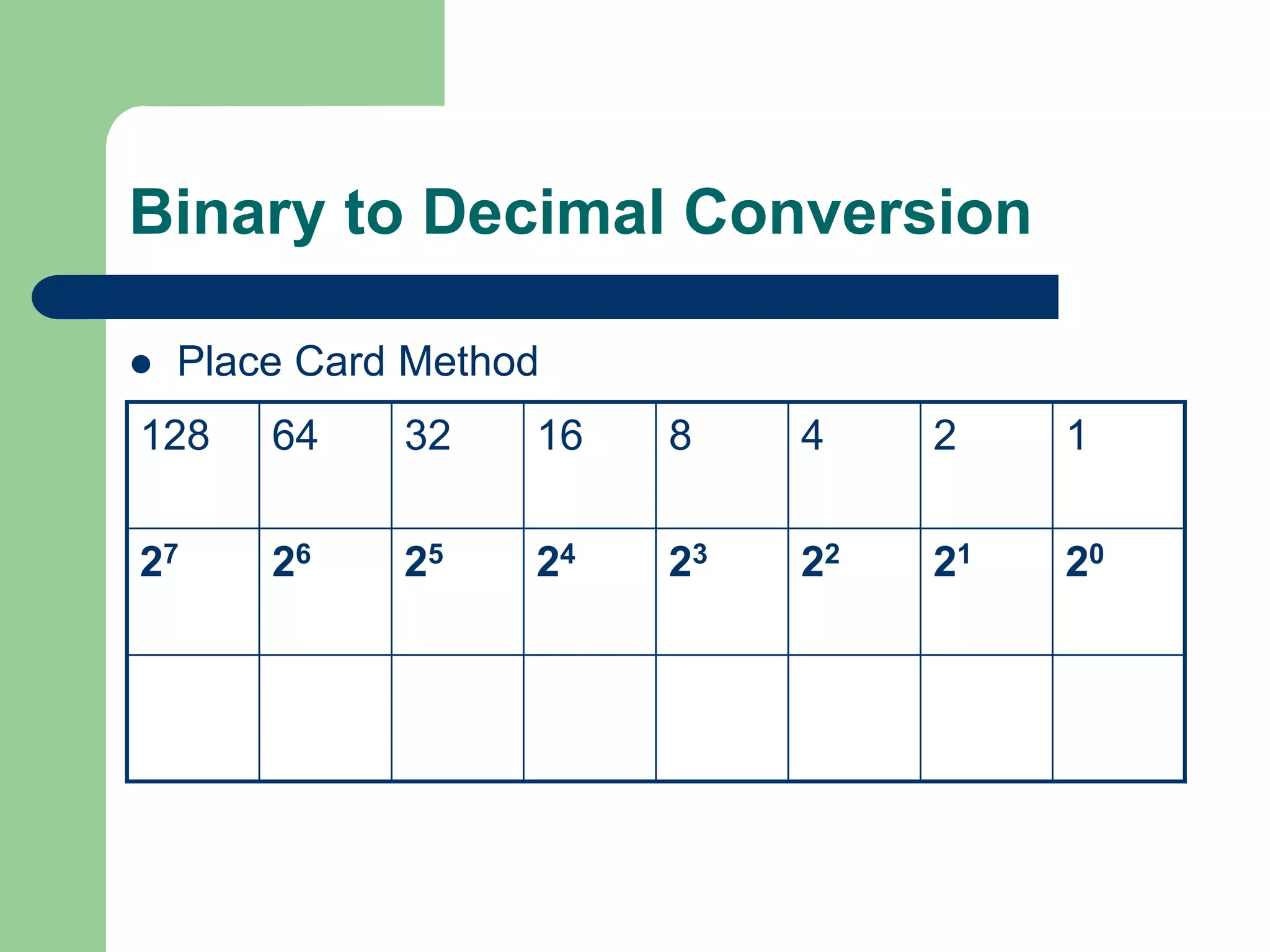
 Place Card Method
128 64 32 16 8 4 2 1
27 26 25 24 23 22 21 20
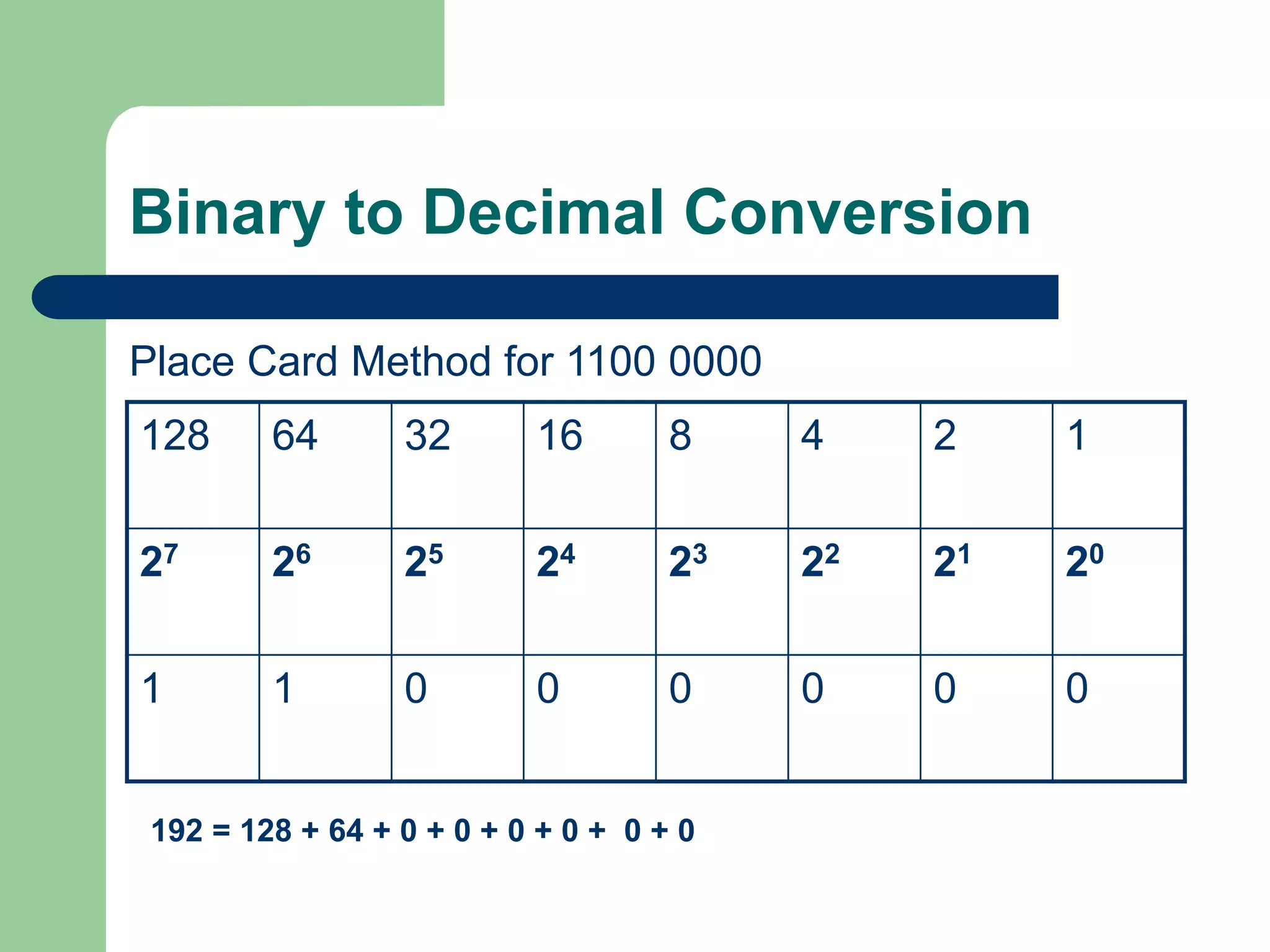
Binary to Decimal Conversion
Place Card Method for 1100 0000
128 64 32 16 8 4 2 1
27 26 25 24 23 22 21 20
1 1 0 0 0 0 0 0
192 = 128 + 64 + 0 + 0 + 0 + 0 + 0 + 0
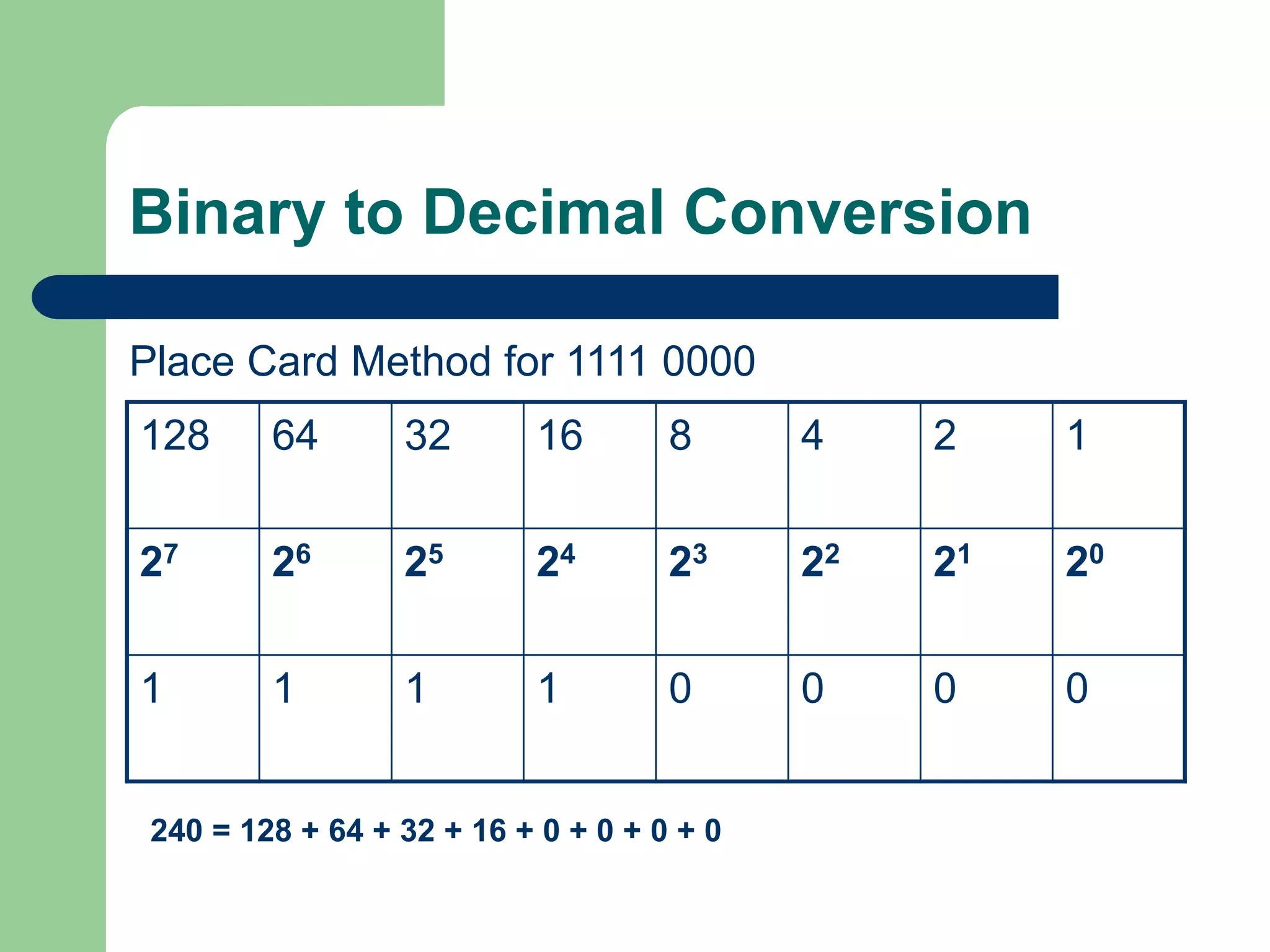
Binary to Decimal Conversion
Place Card Method for 1111 0000
128 64 32 16 8 4 2 1
27 26 25 24 23 22 21 20
1 1 1 1 0 0 0 0
240 = 128 + 64 + 32 + 16 + 0 + 0 + 0 + 0
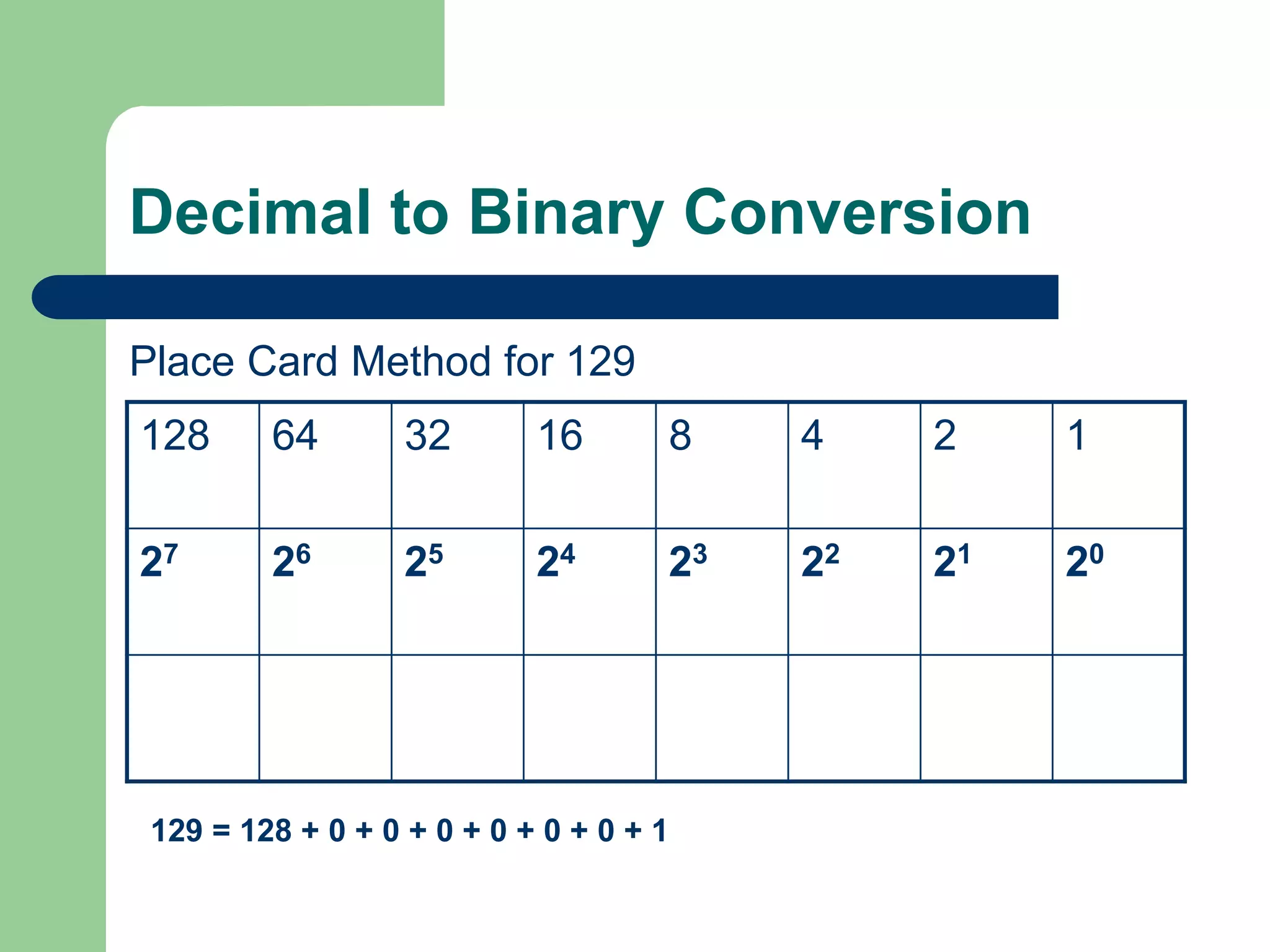
Decimal to Binary Conversion
Place Card Method for 129
128 64 32 16 8 4 2 1
27 26 25 24 23 22 21 20
129 = 128 + 0 + 0 + 0 + 0 + 0 + 0 + 1
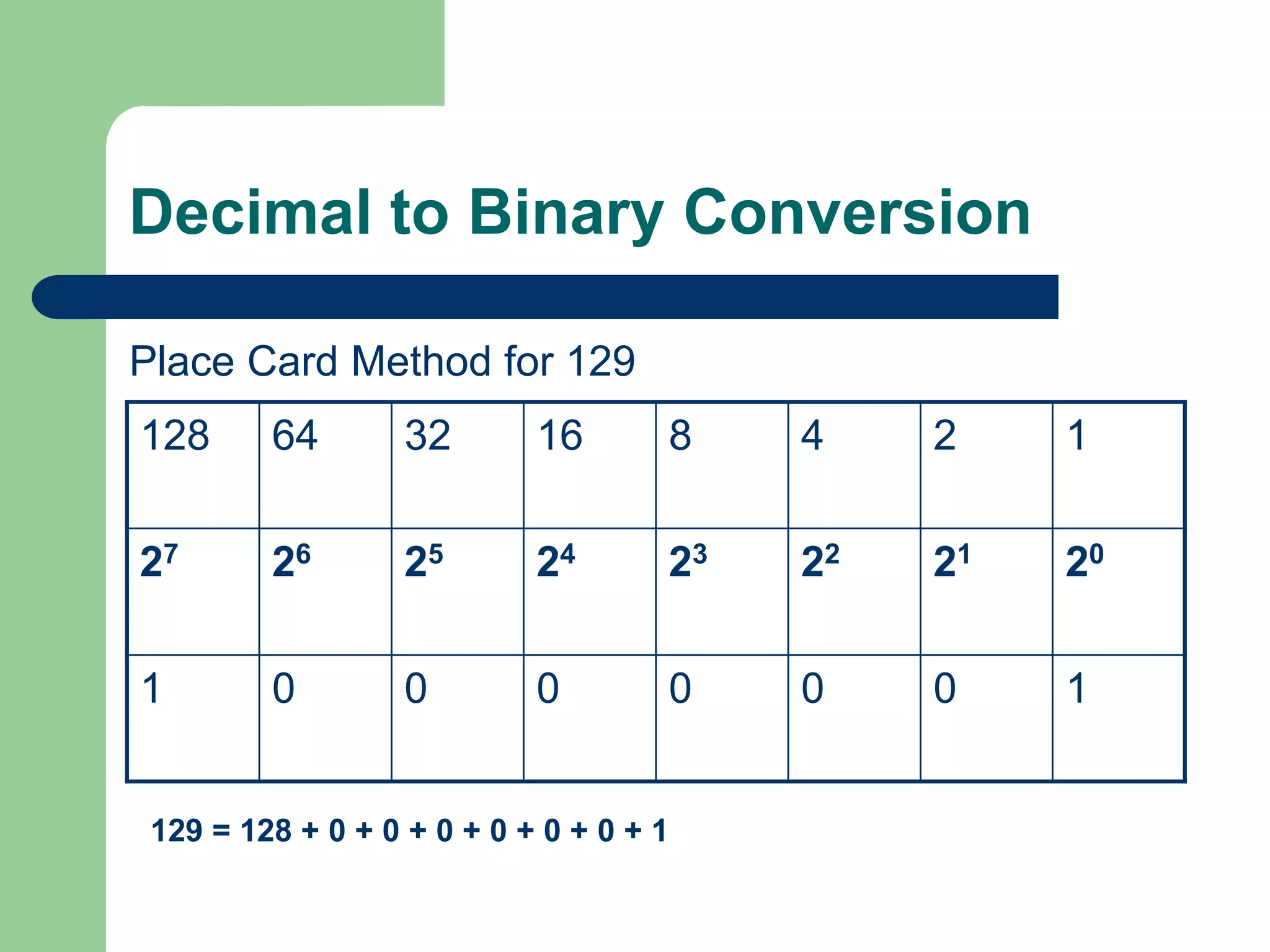
Decimal to Binary Conversion
Place Card Method for 129
128 64 32 16 8 4 2 1
27 26 25 24 23 22 21 20
1 0 0 0 0 0 0 1
129 = 128 + 0 + 0 + 0 + 0 + 0 + 0 + 1
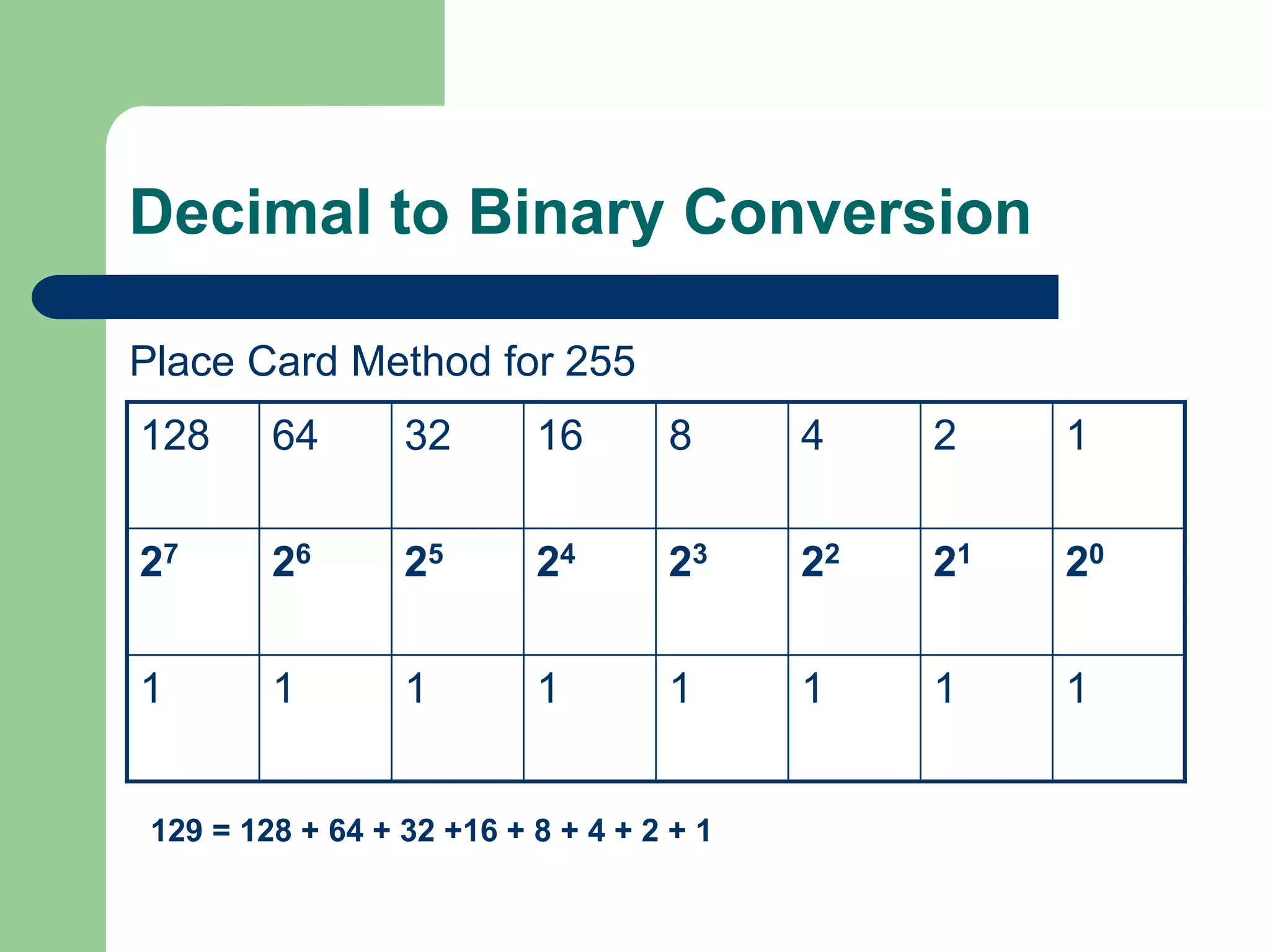
Decimal to Binary Conversion
Place Card Method for 255
128 64 32 16 8 4 2 1
27 26 25 24 23 22 21 20
1 1 1 1 1 1 1 1
129 = 128 + 64 + 32 +16 + 8 + 4 + 2 + 1
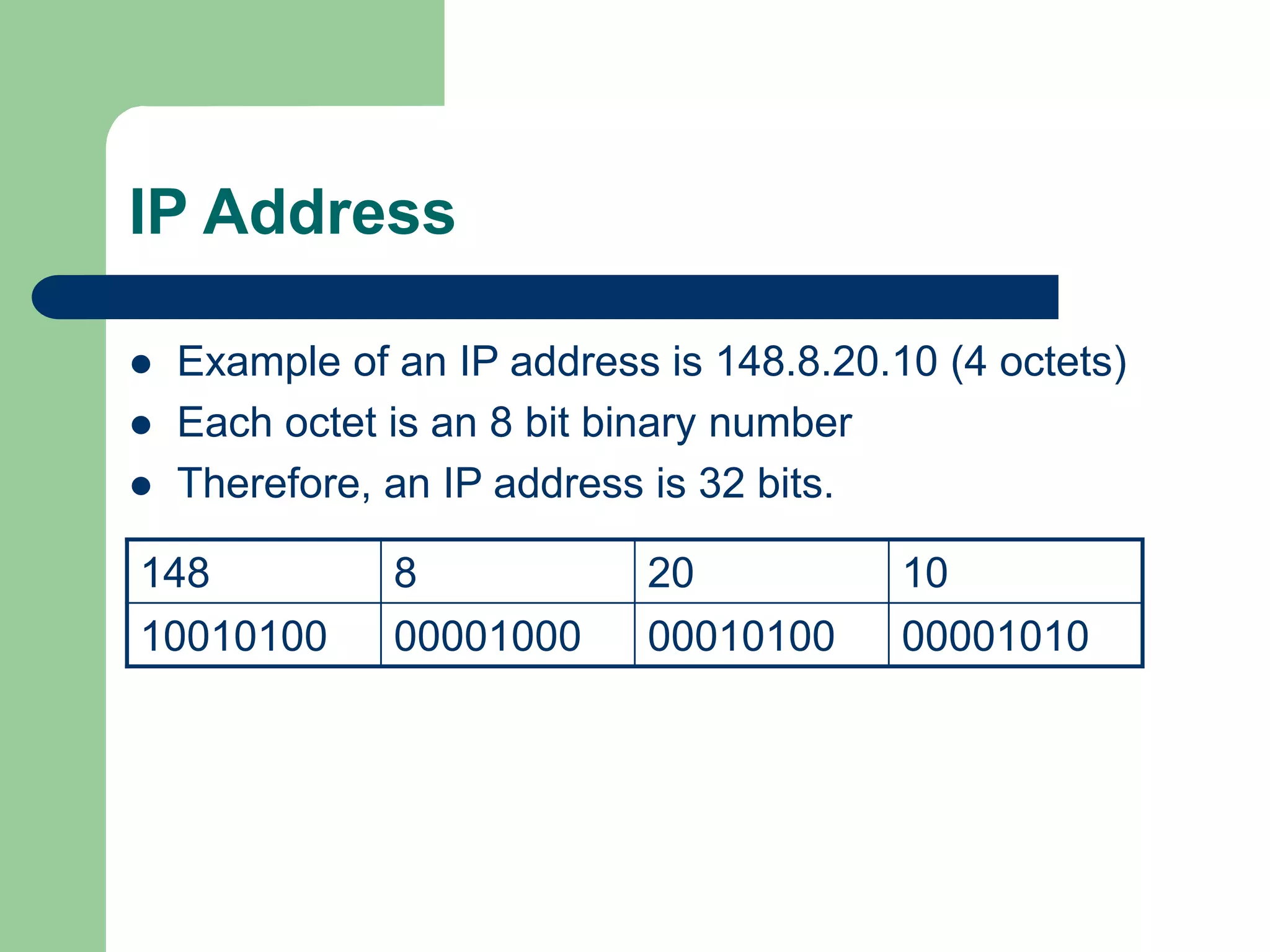
IP Address
 Example of an IP address is 148.8.20.10 (4 octets)
 Each octet is an 8 bit binary number
 Therefore, an IP address is 32 bits.
148 8 20 10
10010100 00001000 00010100 00001010
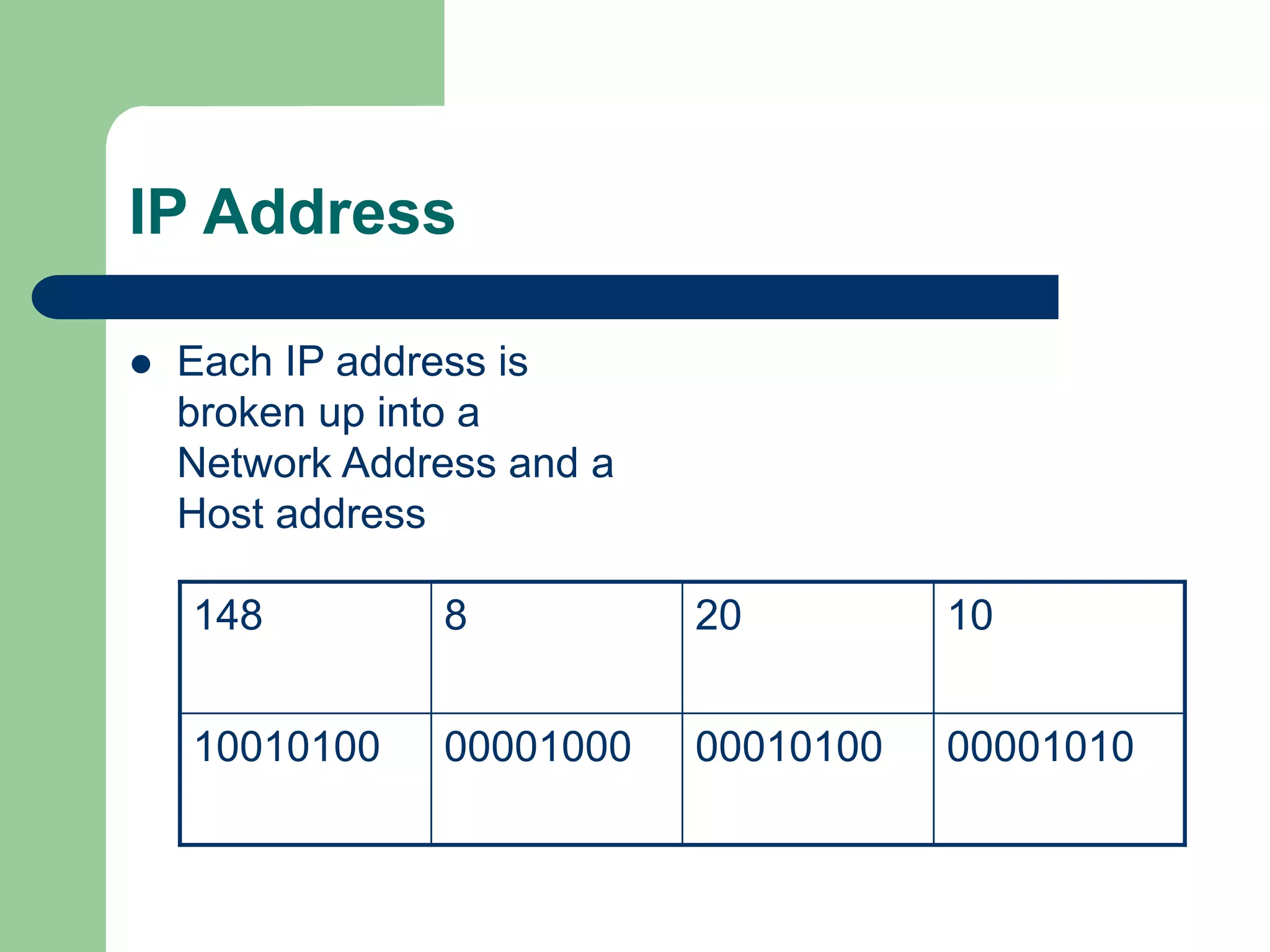
IP Address
 Each IP address is
broken up into a
Network Address and a
Host address
148 8 20 10
10010100 00001000 00010100 00001010
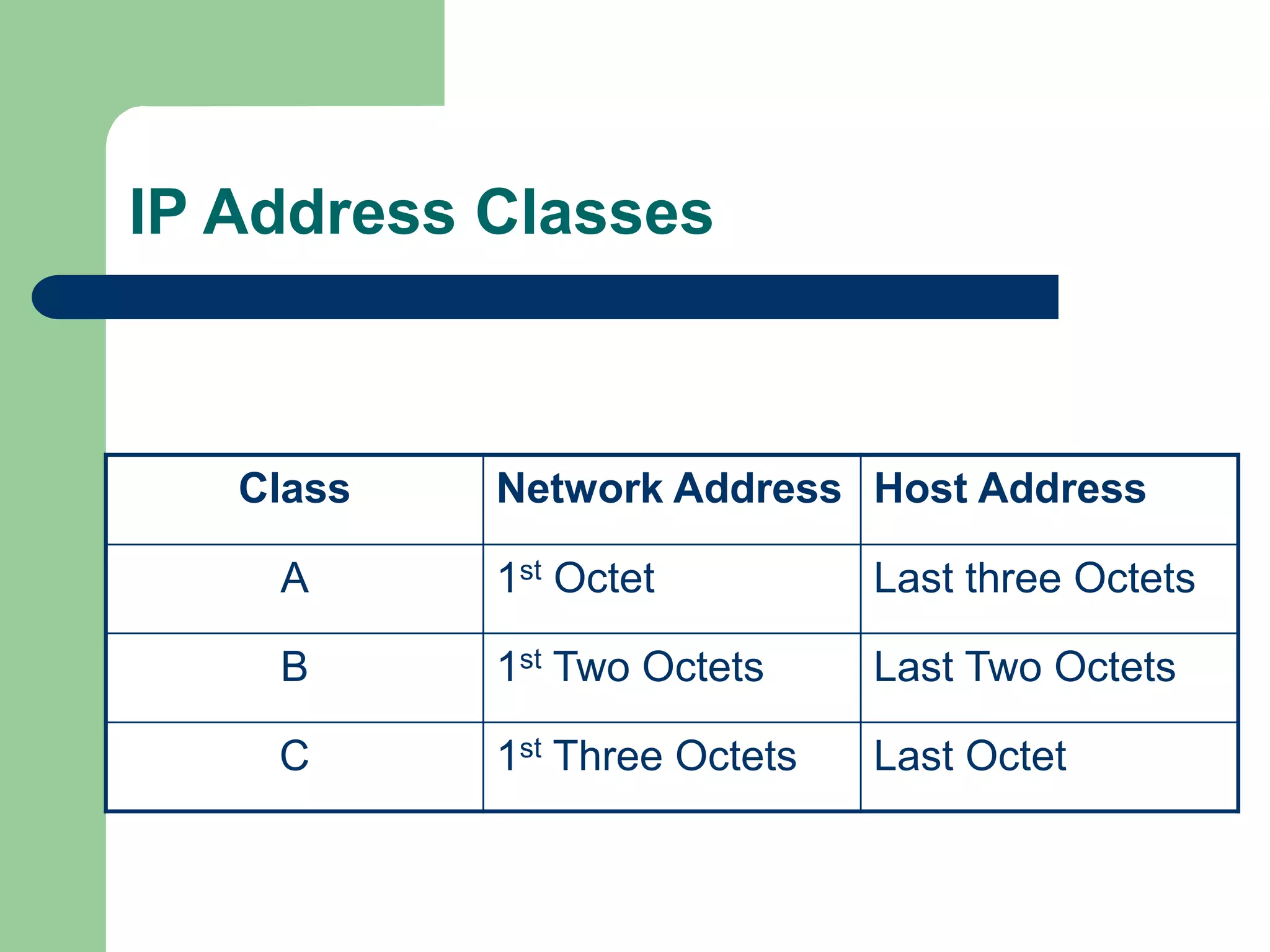
IP Address Classes
Class Network Address Host Address
A 1st Octet Last three Octets
B 1st Two Octets Last Two Octets
C 1st Three Octets Last Octet
IP Address Classes
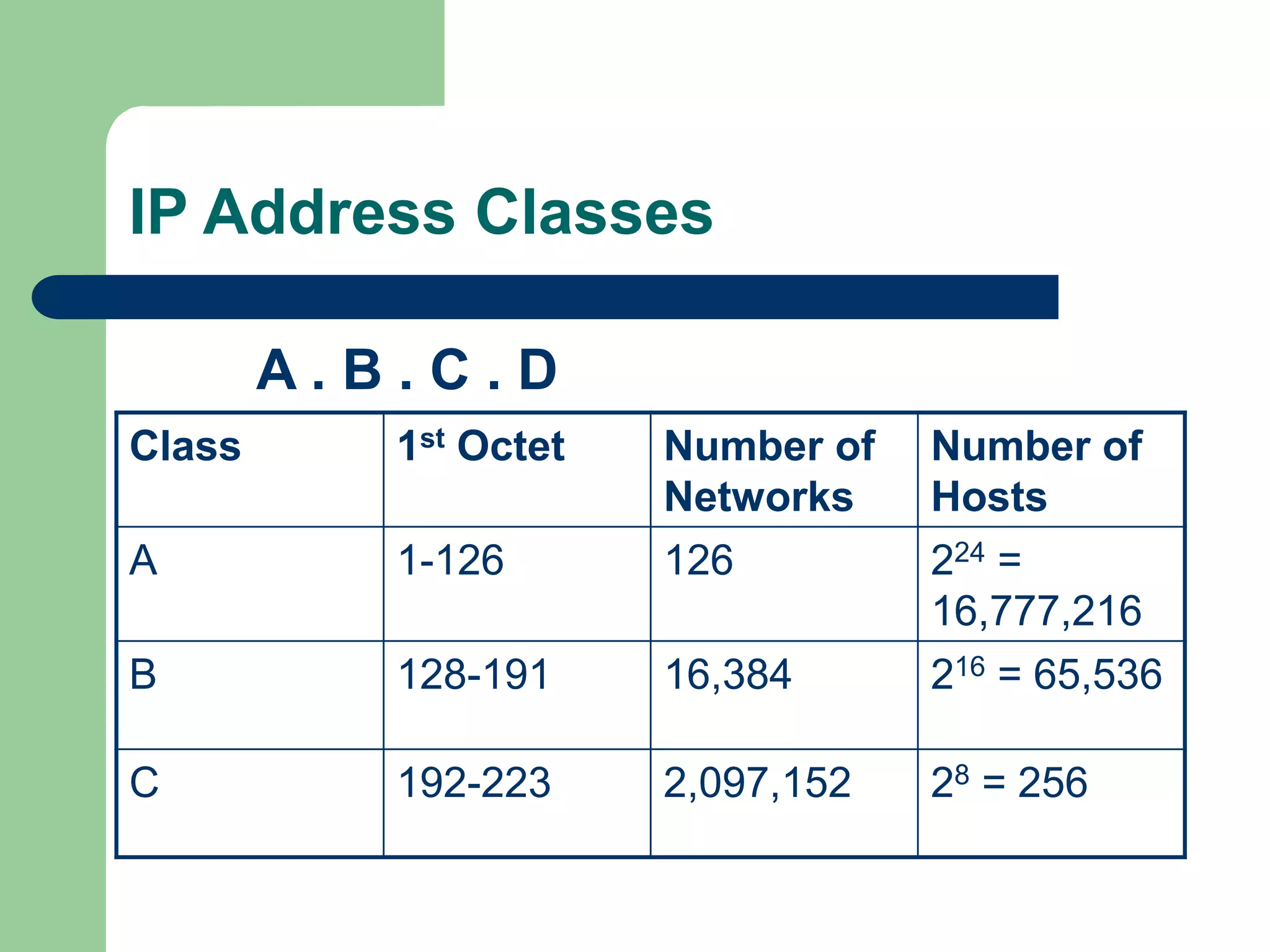
A . B . C . D
Class 1st Octet Number of
Networks
Number of
Hosts
A 1-126 126 224 =
16,777,216
B 128-191 16,384 216 = 65,536
C 192-223 2,097,152 28 = 256
Subnet Masks
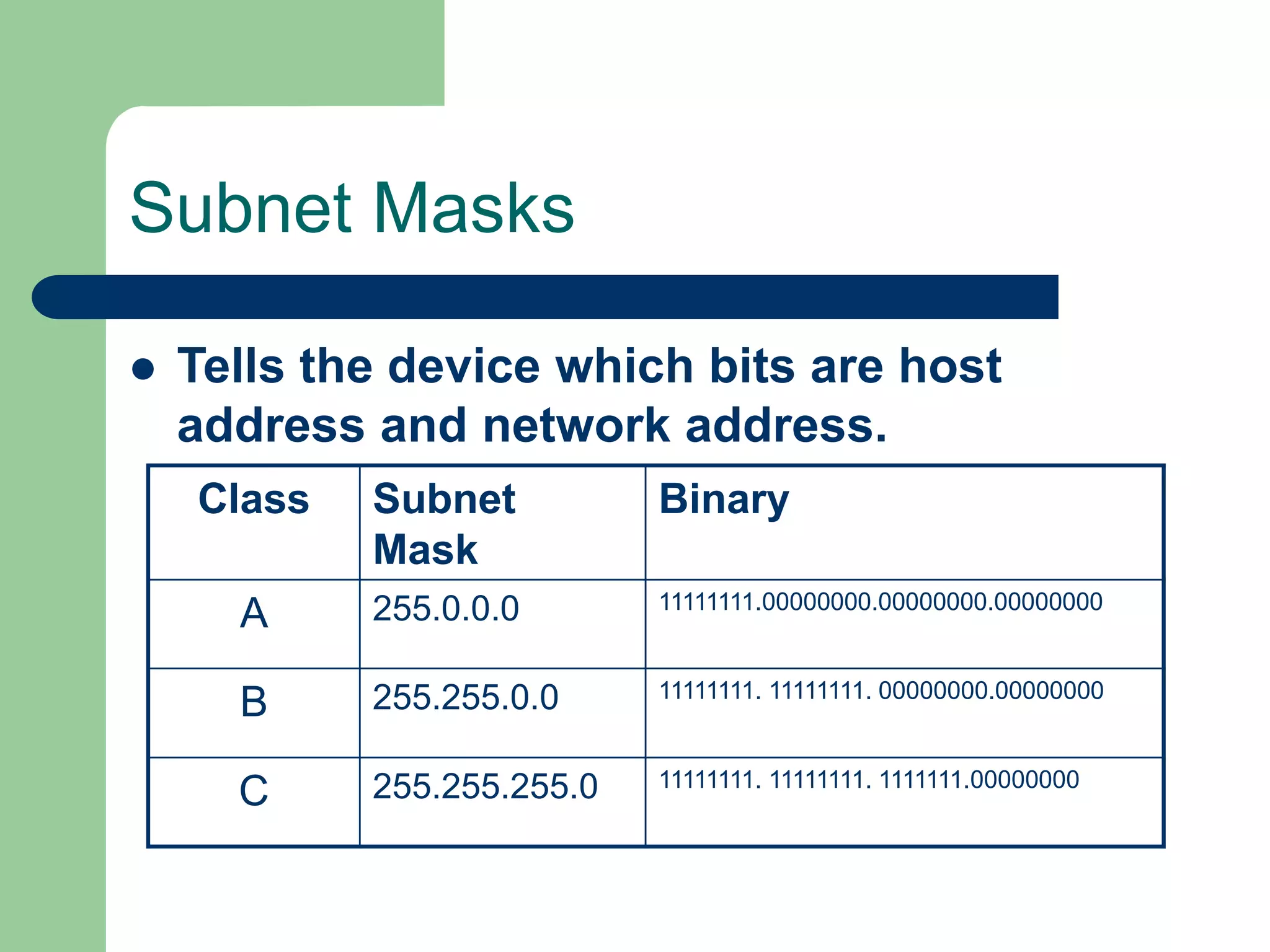
 Tells the device which bits are host
address and network address.
Class Subnet
Mask
Binary
A 255.0.0.0 11111111.00000000.00000000.00000000
B 255.255.0.0 11111111. 11111111. 00000000.00000000
C 255.255.255.0 11111111. 11111111. 1111111.00000000
Subnetting
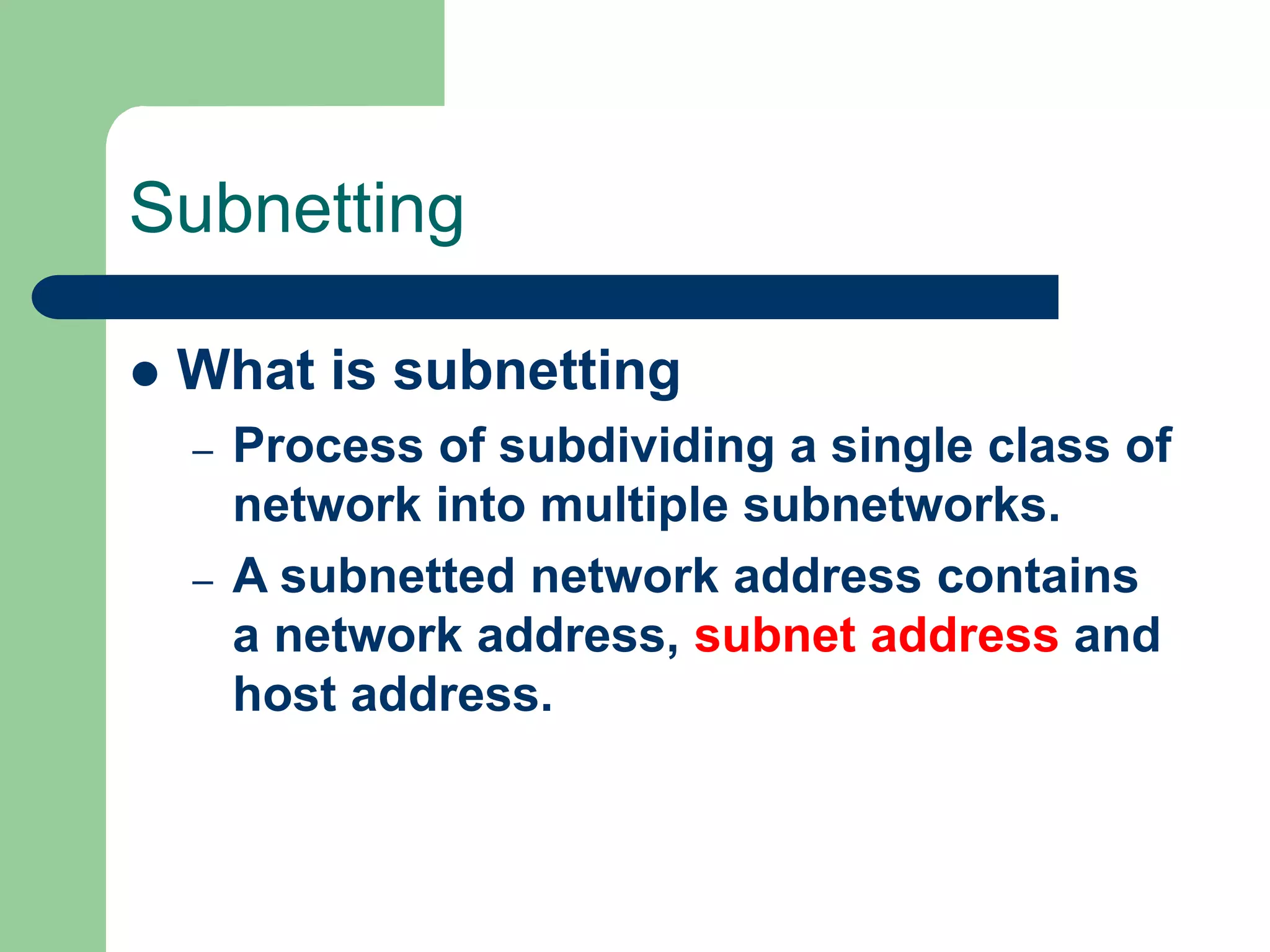
 What is subnetting
– Process of subdividing a single class of
network into multiple subnetworks.
– A subnetted network address contains
a network address, subnet address and
host address.
Subnetting
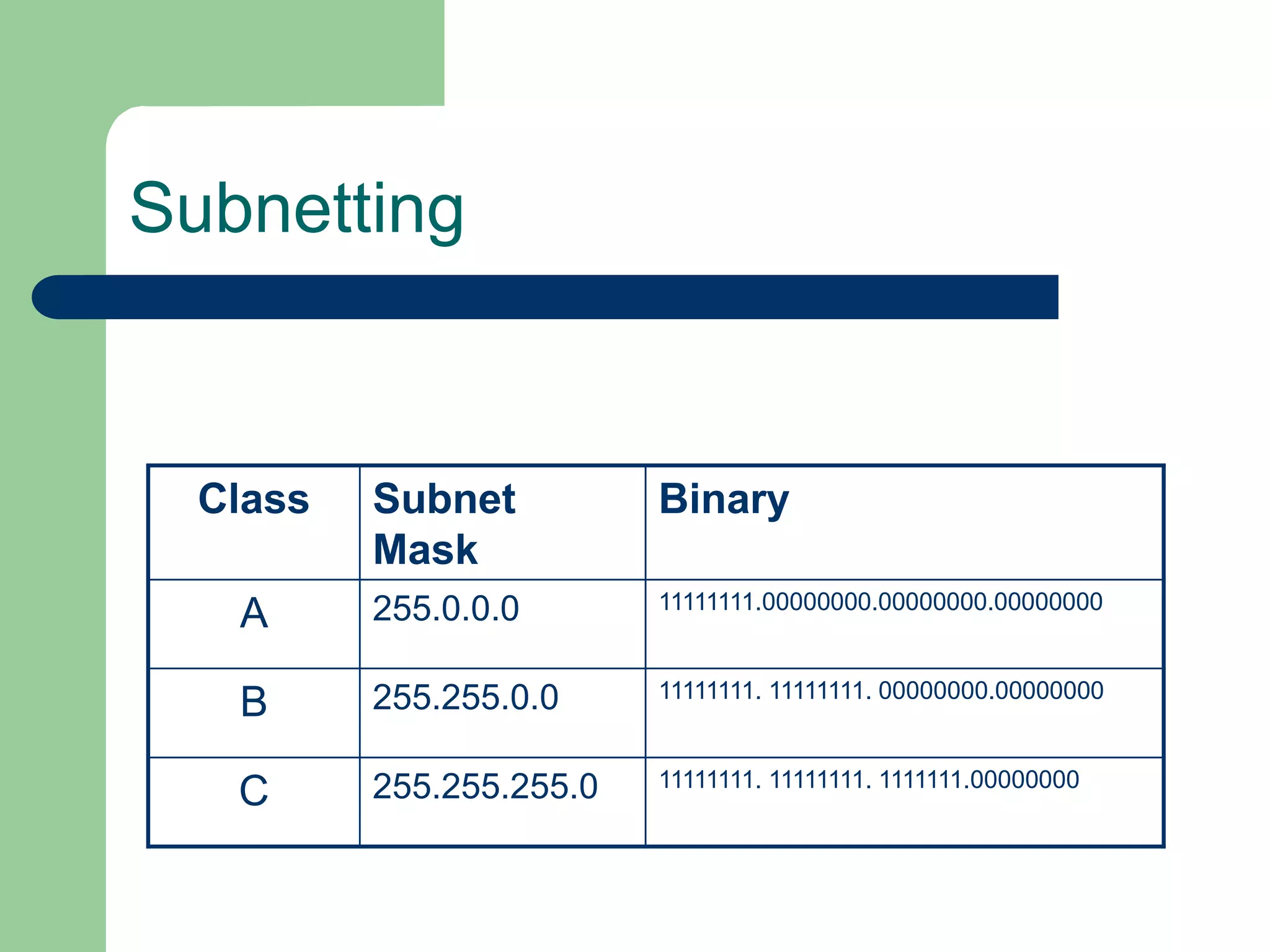
Class Subnet
Mask
Binary
A 255.0.0.0 11111111.00000000.00000000.00000000
B 255.255.0.0 11111111. 11111111. 00000000.00000000
C 255.255.255.0 11111111. 11111111. 1111111.00000000
Subnetting
 Why subnet
– Reduce Collision Domain
– Makes it easier to manage your network
(lower TCO)
– Makes you network more secure
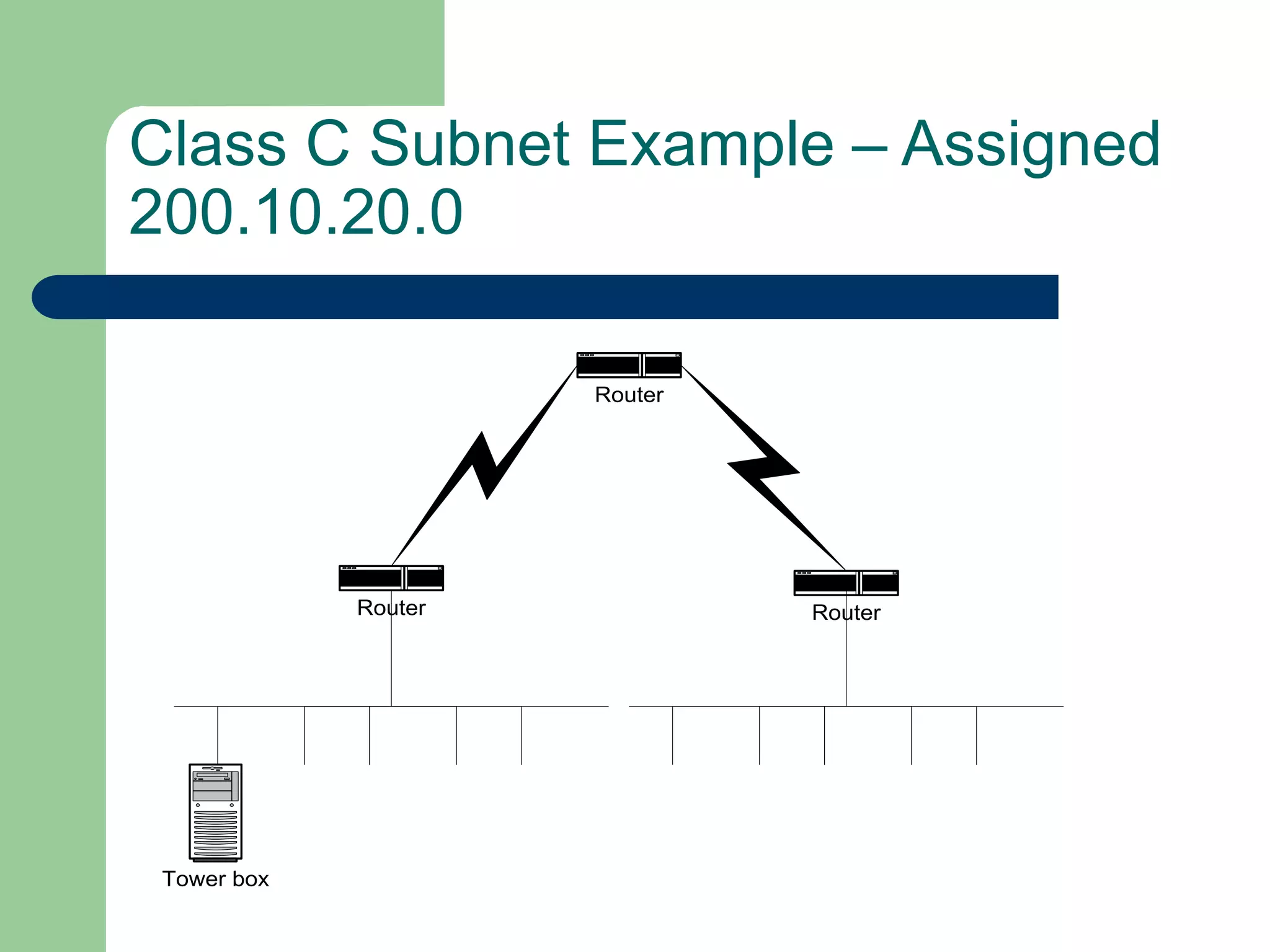
Class C Subnet Example – Assigned
200.10.20.0
Router
Router Router
Tower box
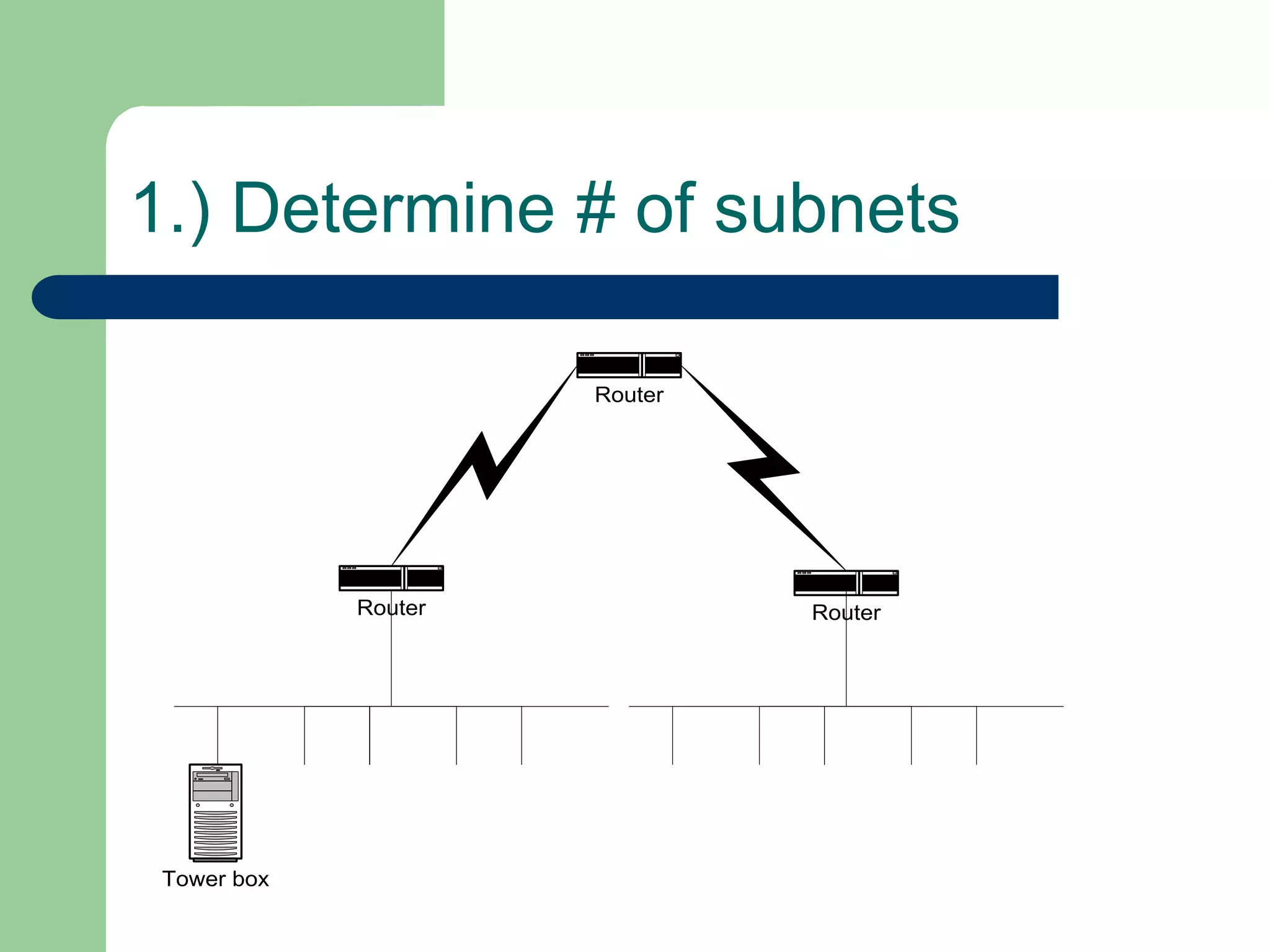
1.) Determine # of subnets
Router
Router Router
Tower box
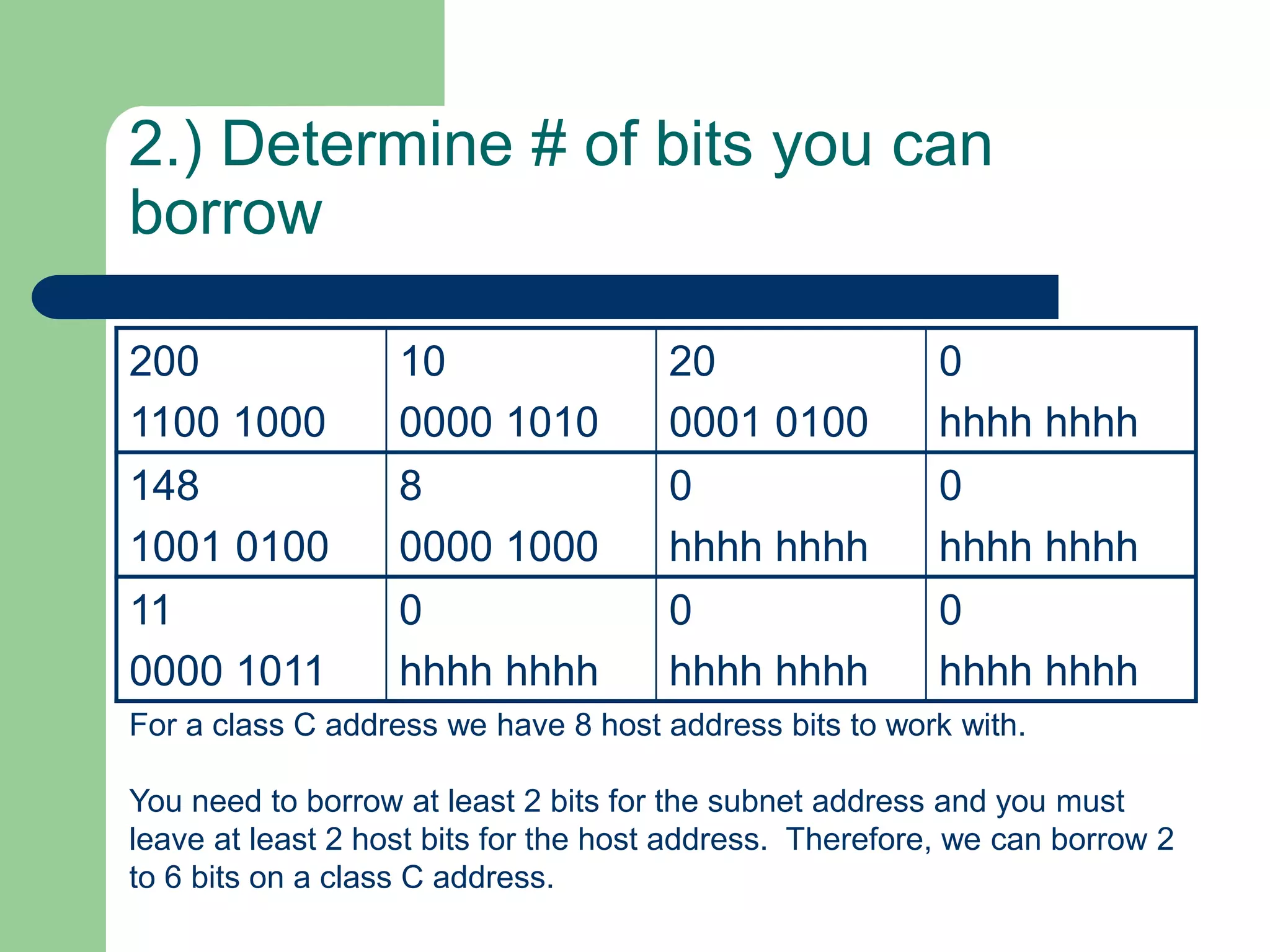
2.) Determine # of bits you can
borrow
200
1100 1000
10
0000 1010
20
0001 0100
0
hhhh hhhh
148
1001 0100
8
0000 1000
0
hhhh hhhh
0
hhhh hhhh
11
0000 1011
0
hhhh hhhh
0
hhhh hhhh
0
hhhh hhhh
For a class C address we have 8 host address bits to work with.
You need to borrow at least 2 bits for the subnet address and you must
leave at least 2 host bits for the host address. Therefore, we can borrow 2
to 6 bits on a class C address.
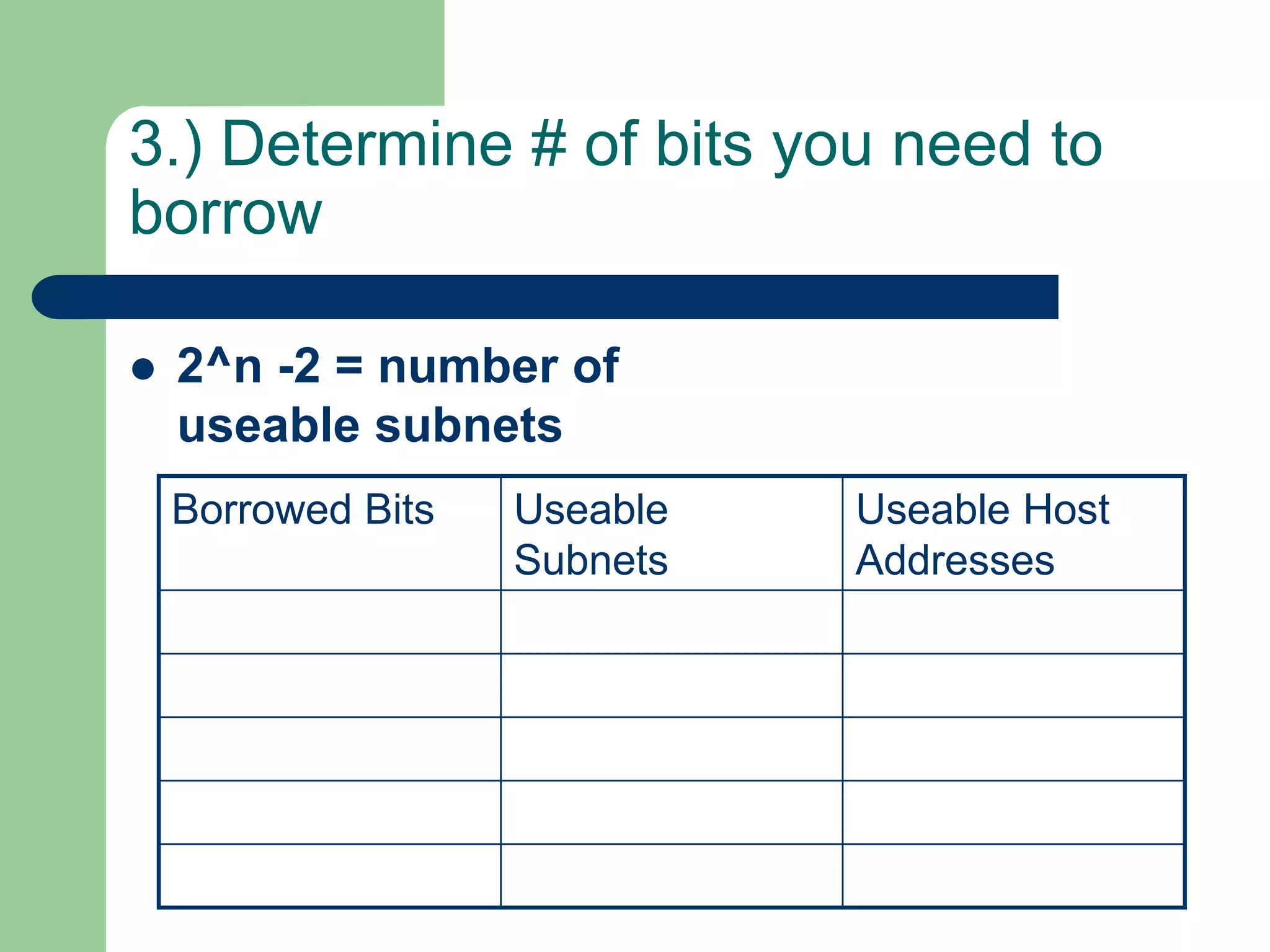
3.) Determine # of bits you need to
borrow
 2^n -2 = number of
useable subnets
Borrowed Bits Useable
Subnets
Useable Host
Addresses
4.) High Order Bits
 Set the high order bits (determined above)
to 1.
5.) Subnet Mask
 Combine the
Default Subnet
Mask with value
determined in step
#4.
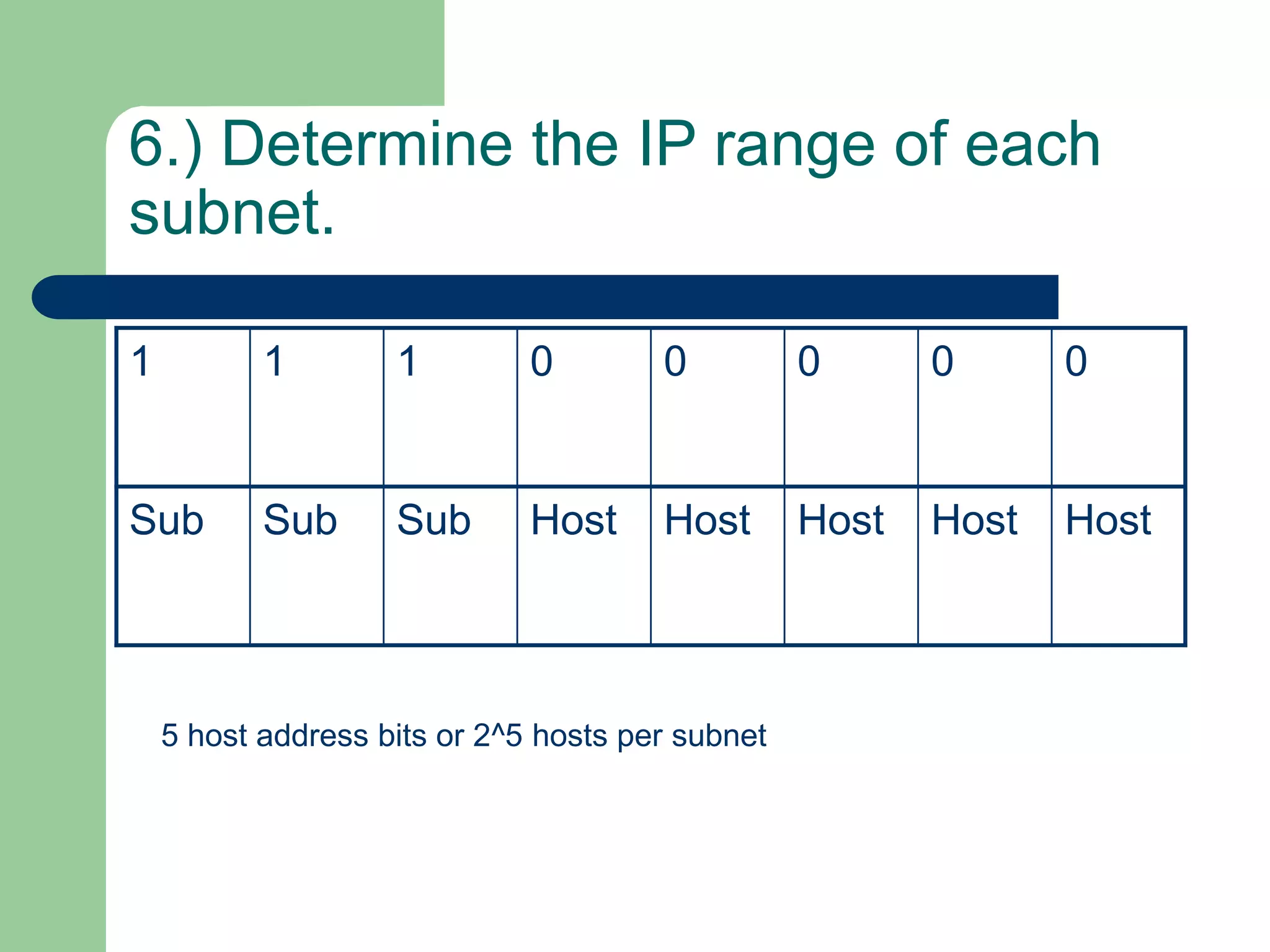
6.) Determine the IP range of each
subnet.
1 1 1 0 0 0 0 0
Sub Sub Sub Host Host Host Host Host
5 host address bits or 2^5 hosts per subnet
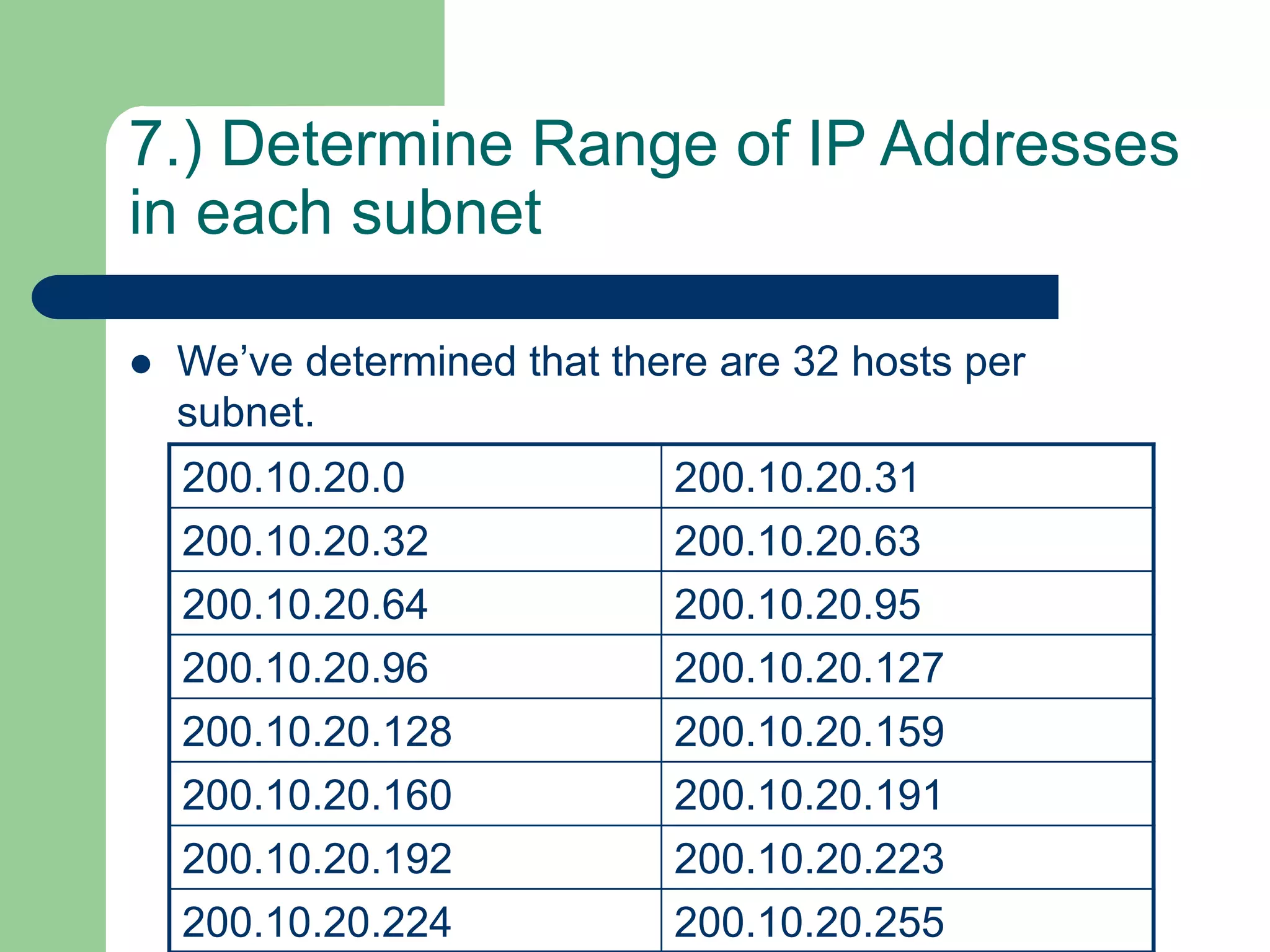
7.) Determine Range of IP Addresses
in each subnet
 We’ve determined that there are 32 hosts per
subnet.
200.10.20.0 200.10.20.
200.10.20. 200.10.20.
200.10.20. 200.10.20.
200.10.20. 200.10.20.
200.10.20. 200.10.20.
200.10.20. 200.10.20.
200.10.20. 200.10.20.
200.10.20. 200.10.20.
7.) Determine Range of IP Addresses
in each subnet
 We’ve determined that there are 32 hosts per
subnet.
200.10.20.0 200.10.20.31
200.10.20.32 200.10.20.63
200.10.20.64 200.10.20.95
200.10.20.96 200.10.20.127
200.10.20.128 200.10.20.159
200.10.20.160 200.10.20.191
200.10.20.192 200.10.20.223
200.10.20.224 200.10.20.255
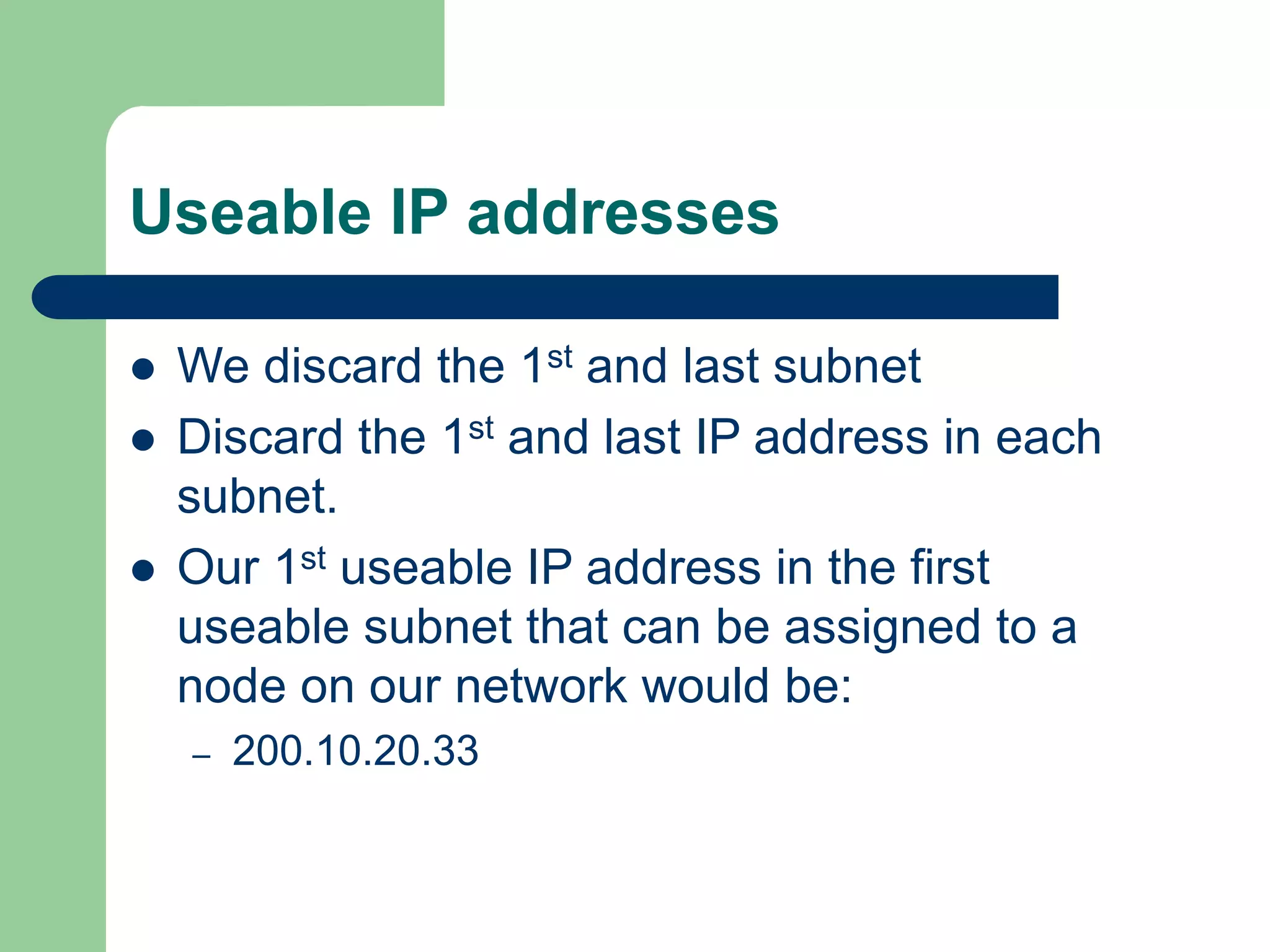
Useable IP addresses
 We discard the 1st and last subnet
 Discard the 1st and last IP address in each
subnet.
 Our 1st useable IP address in the first
useable subnet that can be assigned to a
node on our network would be:
– 200.10.20.33

subnet.ppt

  • 1.
  • 2.
    Subnetting  Binary toDecimal Conversion  Decimal to Binary Conversion  Classes of IP Addresses  Subnet Masks  7 step method to practical subnetting – Class C – Class B
  • 3.
  • 4.
    Binary to DecimalConversion  Place Card Method 128 64 32 16 8 4 2 1 27 26 25 24 23 22 21 20
  • 5.
    Binary to DecimalConversion Place Card Method for 1100 0000 128 64 32 16 8 4 2 1 27 26 25 24 23 22 21 20 1 1 0 0 0 0 0 0 192 = 128 + 64 + 0 + 0 + 0 + 0 + 0 + 0
  • 6.
    Binary to DecimalConversion Place Card Method for 1111 0000 128 64 32 16 8 4 2 1 27 26 25 24 23 22 21 20 1 1 1 1 0 0 0 0 240 = 128 + 64 + 32 + 16 + 0 + 0 + 0 + 0
  • 7.
    Decimal to BinaryConversion Place Card Method for 129 128 64 32 16 8 4 2 1 27 26 25 24 23 22 21 20 129 = 128 + 0 + 0 + 0 + 0 + 0 + 0 + 1
  • 8.
    Decimal to BinaryConversion Place Card Method for 129 128 64 32 16 8 4 2 1 27 26 25 24 23 22 21 20 1 0 0 0 0 0 0 1 129 = 128 + 0 + 0 + 0 + 0 + 0 + 0 + 1
  • 9.
    Decimal to BinaryConversion Place Card Method for 255 128 64 32 16 8 4 2 1 27 26 25 24 23 22 21 20 1 1 1 1 1 1 1 1 129 = 128 + 64 + 32 +16 + 8 + 4 + 2 + 1
  • 10.
    IP Address  Exampleof an IP address is 148.8.20.10 (4 octets)  Each octet is an 8 bit binary number  Therefore, an IP address is 32 bits. 148 8 20 10 10010100 00001000 00010100 00001010
  • 11.
    IP Address  EachIP address is broken up into a Network Address and a Host address 148 8 20 10 10010100 00001000 00010100 00001010
  • 12.
    IP Address Classes ClassNetwork Address Host Address A 1st Octet Last three Octets B 1st Two Octets Last Two Octets C 1st Three Octets Last Octet
  • 13.
    IP Address Classes A. B . C . D Class 1st Octet Number of Networks Number of Hosts A 1-126 126 224 = 16,777,216 B 128-191 16,384 216 = 65,536 C 192-223 2,097,152 28 = 256
  • 14.
    Subnet Masks  Tellsthe device which bits are host address and network address. Class Subnet Mask Binary A 255.0.0.0 11111111.00000000.00000000.00000000 B 255.255.0.0 11111111. 11111111. 00000000.00000000 C 255.255.255.0 11111111. 11111111. 1111111.00000000
  • 15.
    Subnetting  What issubnetting – Process of subdividing a single class of network into multiple subnetworks. – A subnetted network address contains a network address, subnet address and host address.
  • 16.
    Subnetting Class Subnet Mask Binary A 255.0.0.011111111.00000000.00000000.00000000 B 255.255.0.0 11111111. 11111111. 00000000.00000000 C 255.255.255.0 11111111. 11111111. 1111111.00000000
  • 17.
    Subnetting  Why subnet –Reduce Collision Domain – Makes it easier to manage your network (lower TCO) – Makes you network more secure
  • 18.
    Class C SubnetExample – Assigned 200.10.20.0 Router Router Router Tower box
  • 19.
    1.) Determine #of subnets Router Router Router Tower box
  • 20.
    2.) Determine #of bits you can borrow 200 1100 1000 10 0000 1010 20 0001 0100 0 hhhh hhhh 148 1001 0100 8 0000 1000 0 hhhh hhhh 0 hhhh hhhh 11 0000 1011 0 hhhh hhhh 0 hhhh hhhh 0 hhhh hhhh For a class C address we have 8 host address bits to work with. You need to borrow at least 2 bits for the subnet address and you must leave at least 2 host bits for the host address. Therefore, we can borrow 2 to 6 bits on a class C address.
  • 21.
    3.) Determine #of bits you need to borrow  2^n -2 = number of useable subnets Borrowed Bits Useable Subnets Useable Host Addresses
  • 22.
    4.) High OrderBits  Set the high order bits (determined above) to 1.
  • 23.
    5.) Subnet Mask Combine the Default Subnet Mask with value determined in step #4.
  • 24.
    6.) Determine theIP range of each subnet. 1 1 1 0 0 0 0 0 Sub Sub Sub Host Host Host Host Host 5 host address bits or 2^5 hosts per subnet
  • 25.
    7.) Determine Rangeof IP Addresses in each subnet  We’ve determined that there are 32 hosts per subnet. 200.10.20.0 200.10.20. 200.10.20. 200.10.20. 200.10.20. 200.10.20. 200.10.20. 200.10.20. 200.10.20. 200.10.20. 200.10.20. 200.10.20. 200.10.20. 200.10.20. 200.10.20. 200.10.20.
  • 26.
    7.) Determine Rangeof IP Addresses in each subnet  We’ve determined that there are 32 hosts per subnet. 200.10.20.0 200.10.20.31 200.10.20.32 200.10.20.63 200.10.20.64 200.10.20.95 200.10.20.96 200.10.20.127 200.10.20.128 200.10.20.159 200.10.20.160 200.10.20.191 200.10.20.192 200.10.20.223 200.10.20.224 200.10.20.255
  • 27.
    Useable IP addresses We discard the 1st and last subnet  Discard the 1st and last IP address in each subnet.  Our 1st useable IP address in the first useable subnet that can be assigned to a node on our network would be: – 200.10.20.33