


1Student Support Services on Banner Self-ServicePresented by: Khalid TariqStudent Records Systems ManagerApril 14, 2008Course ID 0464
2Course ID 0464ObjectivesBy the end of this presentation, you learn about:Increasing demands from college student support to be able to enter and track special needs information using web with out using “Native Banner”How HCT has addressed these demands from counselors and nursesWhat baseline forms are available in Banner to track special needs and other student services informationHow HCT has addressed the confidentiality and security requirements for special needs records
3Course ID 0464AgendaIntroduction to HCTHistory of tracking special needsOutcome of training counselors on BannerNew counselor self-service module on BSSDemoQ & A
4Part #1Introduction to Higher Colleges of Technology and History of Tracking Special Needs Information
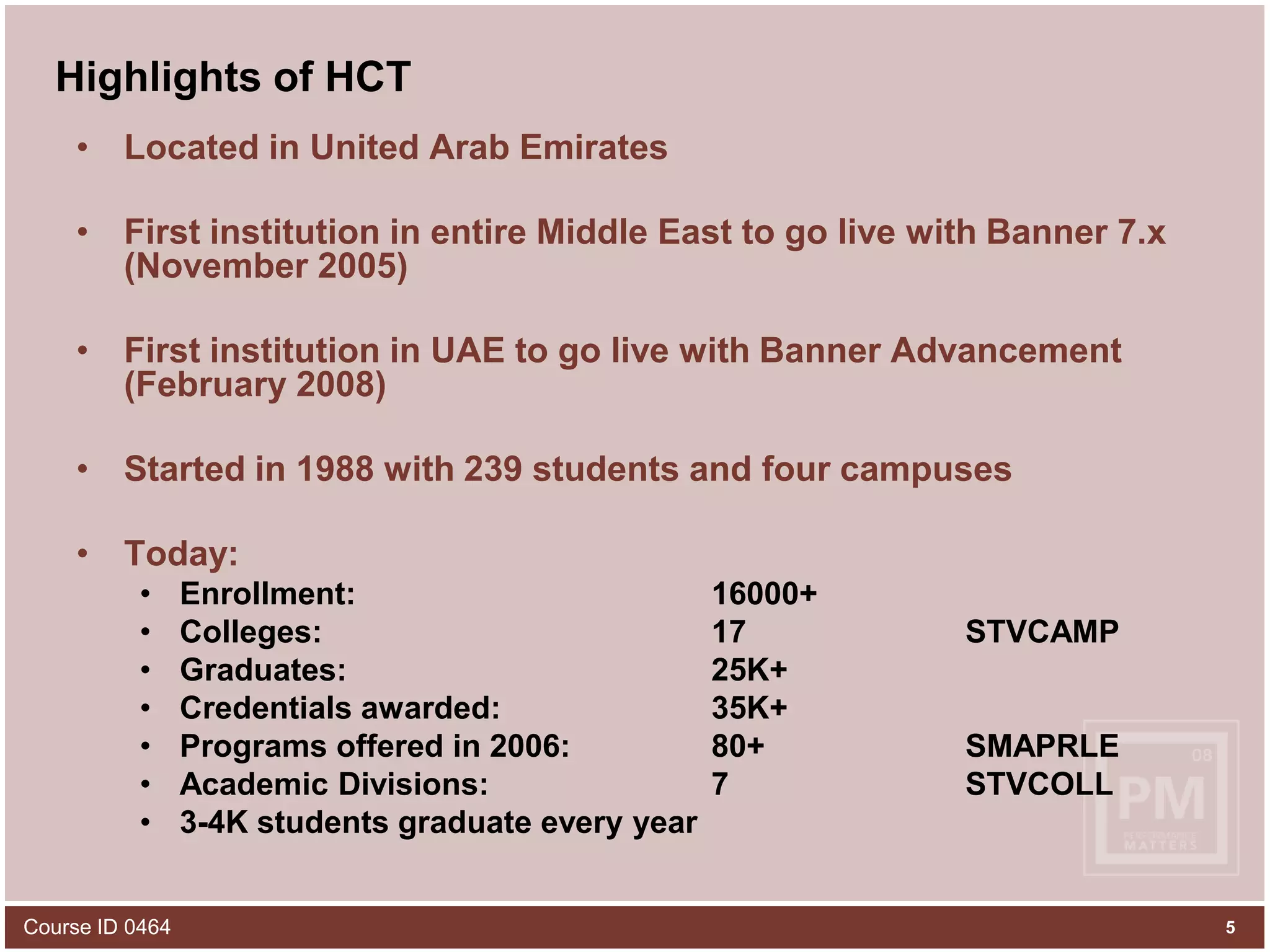
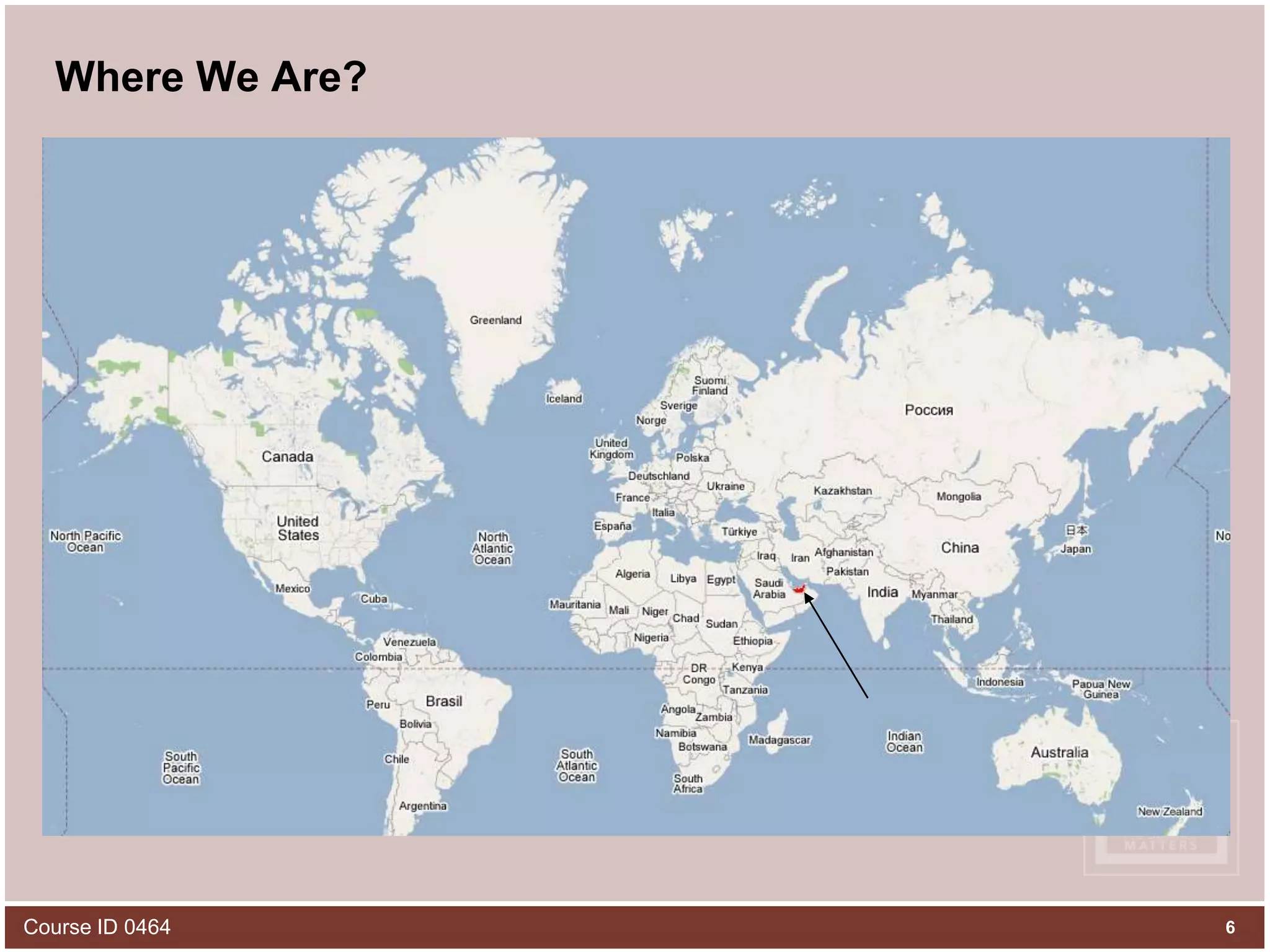
5Course ID 0464Highlights of HCTLocated in United Arab EmiratesFirst institution in entire Middle East to go live with Banner 7.x (November 2005)First institution in UAE to go live with Banner Advancement (February 2008)Started in 1988 with 239 students and four campusesToday: Enrollment: 			16000+Colleges: 			17		STVCAMPGraduates: 			25K+		Credentials awarded: 		35K+ 		Programs offered in 2006: 		80+		SMAPRLEAcademic Divisions: 		7		STVCOLL3-4K students graduate every year
6Course ID 0464Where We Are?
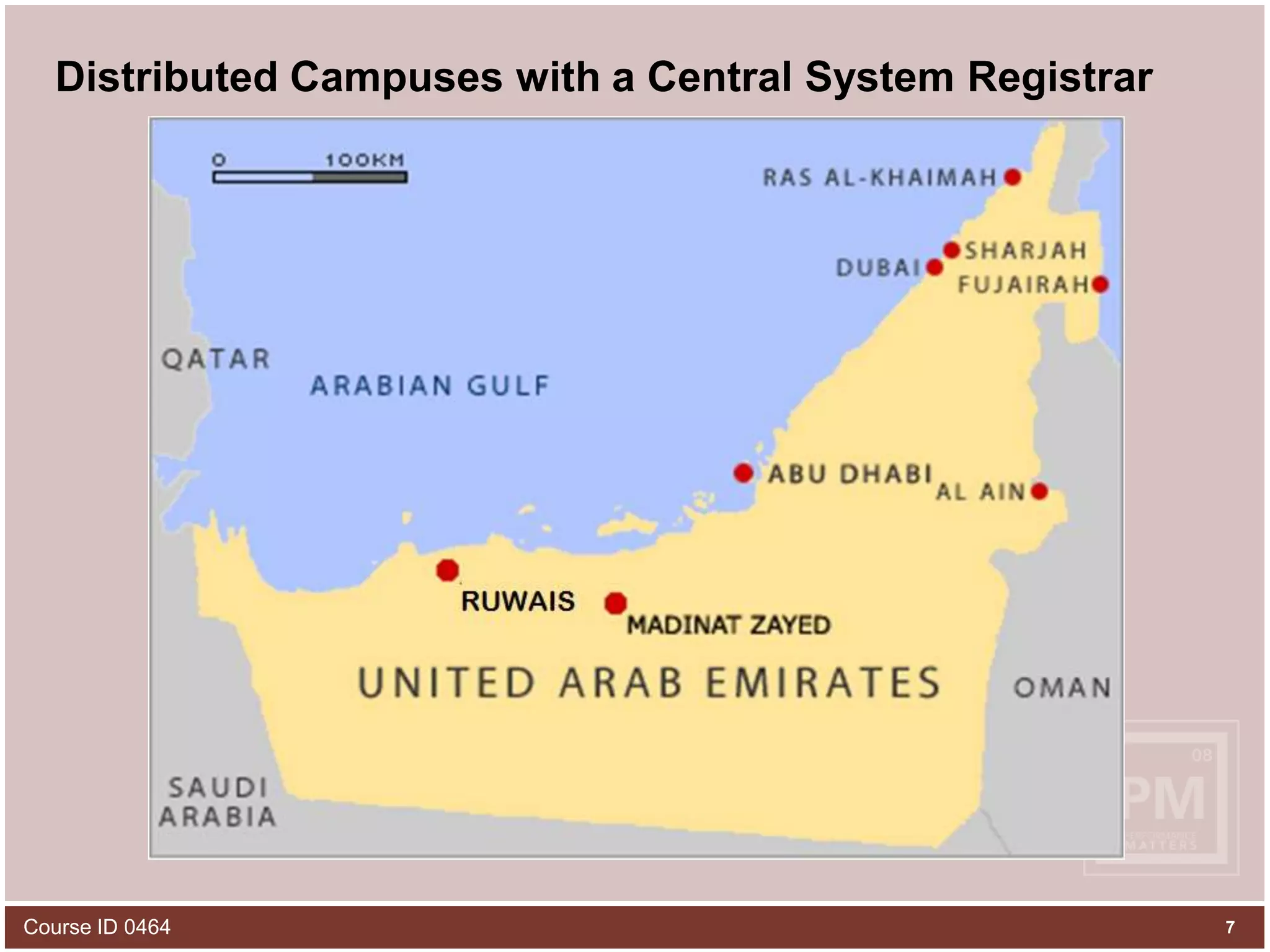
7Course ID 0464Distributed Campuses with a Central System Registrar(2)(2)(2)(3)(2)(2)
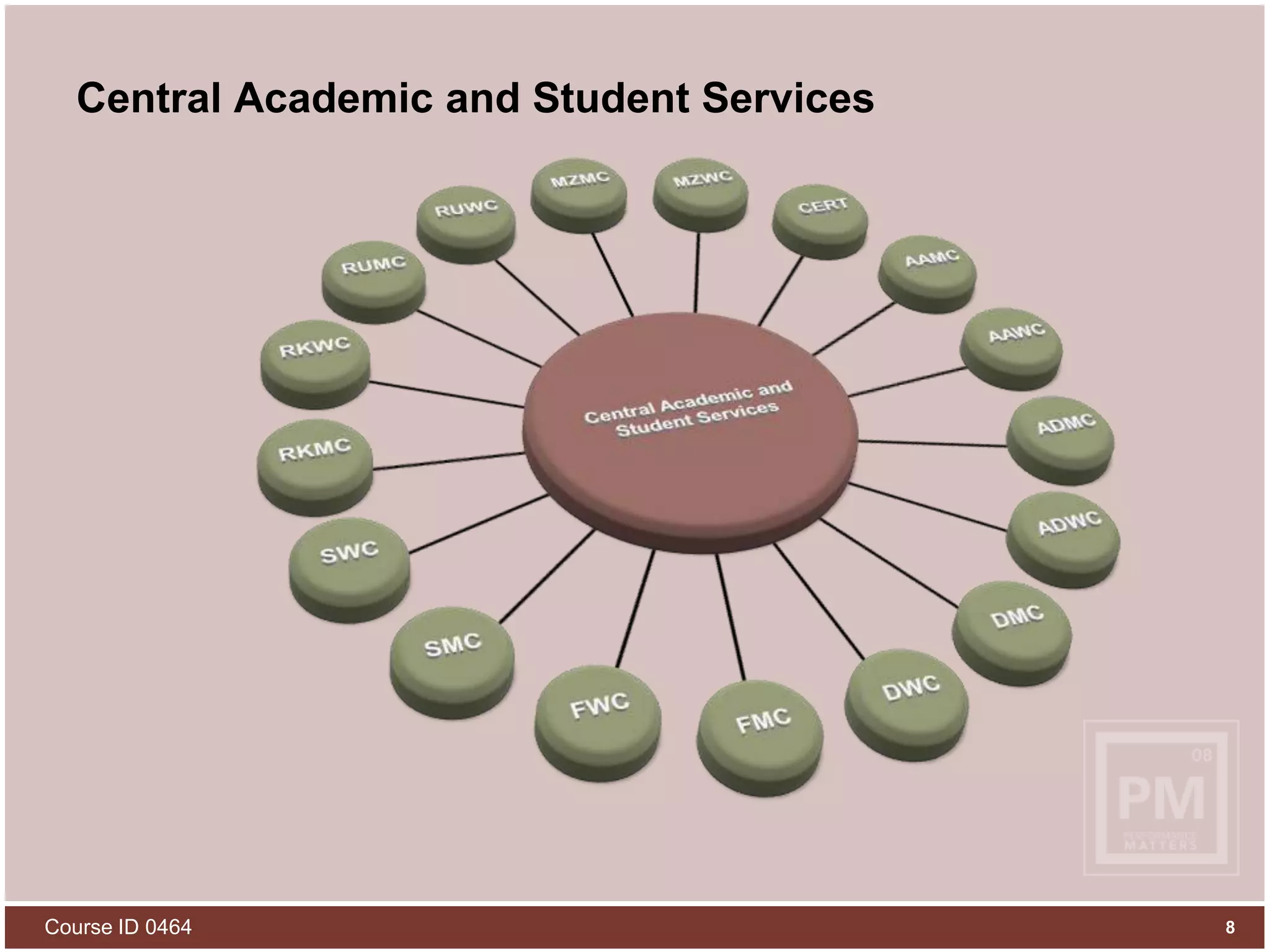
Course ID 04648Central Academic and Student Services
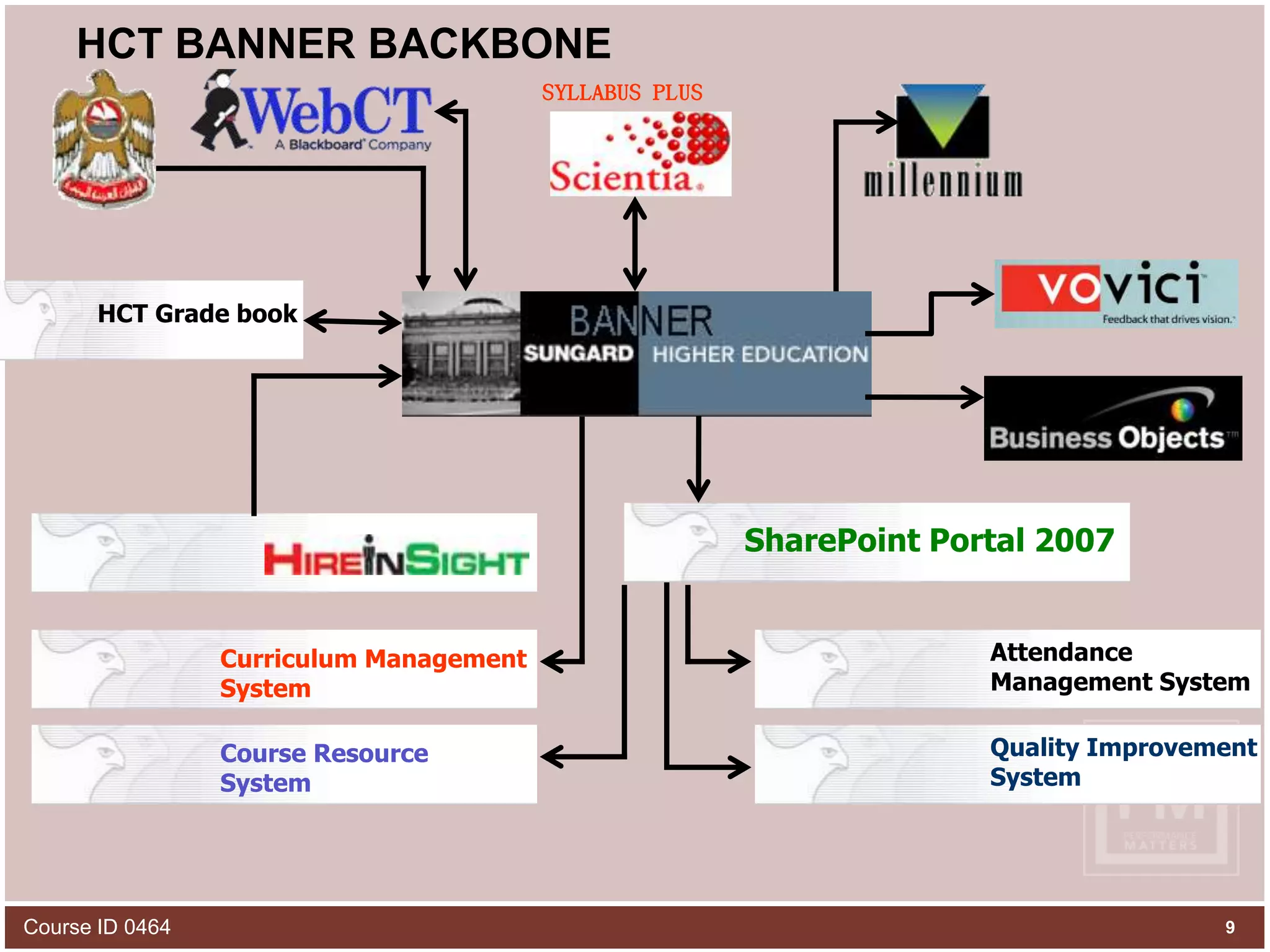
HCT BANNER BACKBONEHCT Grade bookAttendance Management SystemSharePoint Portal 2007Curriculum Management SystemQuality ImprovementSystemSYLLABUS PLUSCourse ResourceSystemCourse ID 04649
10Course ID 0464Prior Tracking of Special Need Students Paper/Excel files in offices of nurses and counselors based on their preference in each campusThese records were not easily accessible if a student moved from one campus to anotherThe records were inconsistent as counselors and nurses tracked and recorded issues differentlySometimes these records were lost along with the loss of a counselor or nurseFew campuses built their own web applications with a decentralized database to track special needs
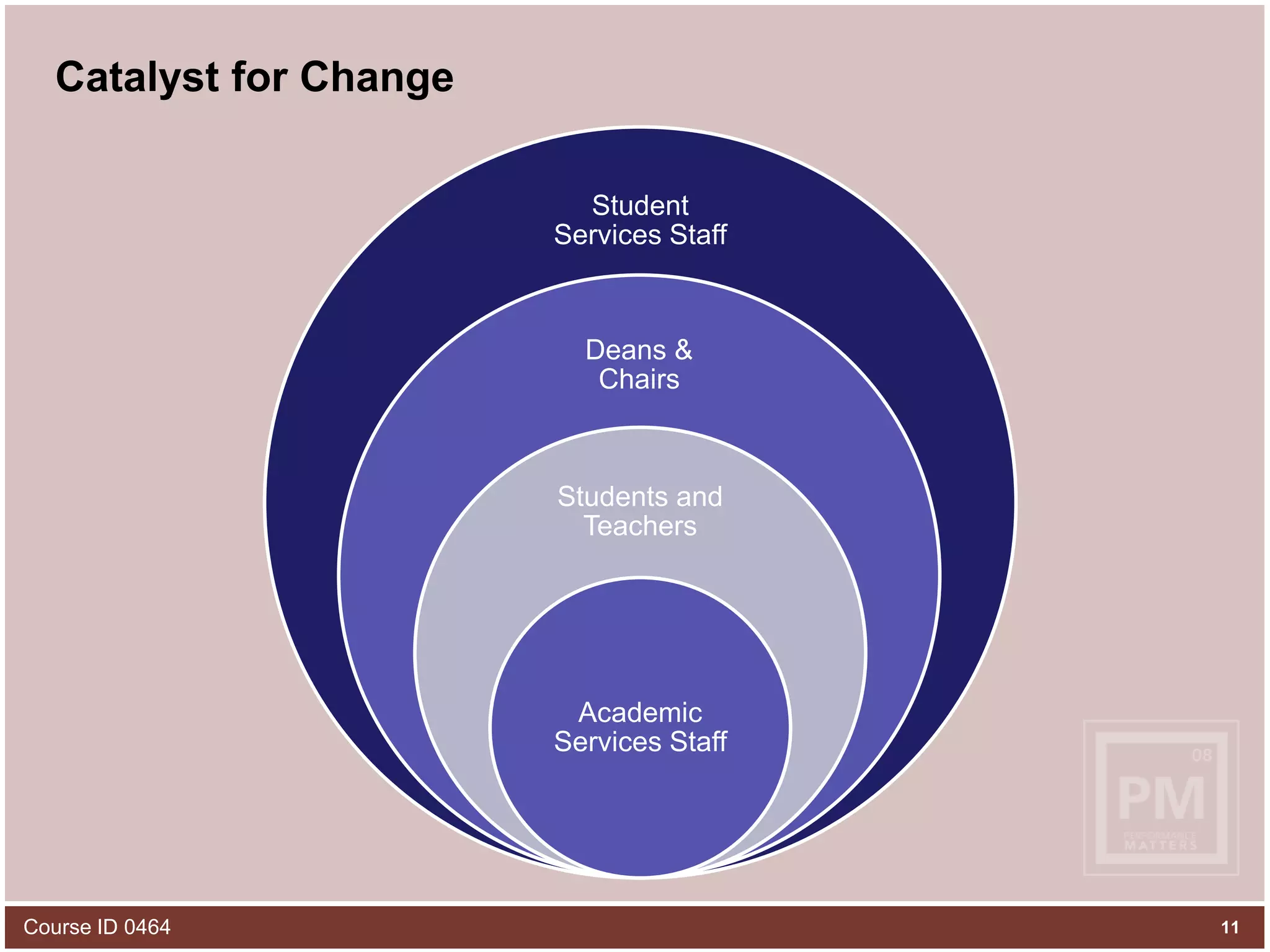
11Course ID 0464Catalyst for Change
12Part #2Banner Training of Counselors
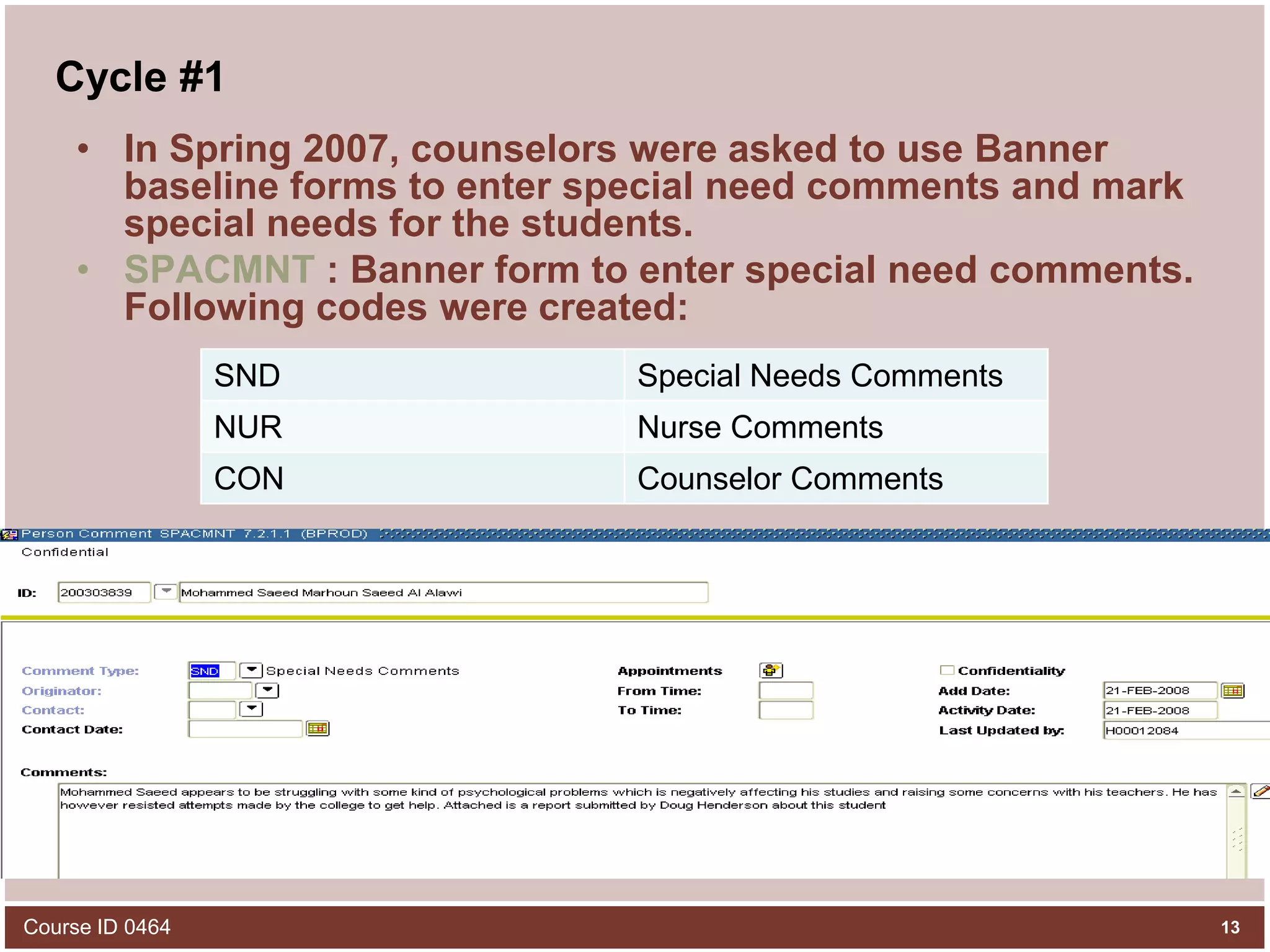
Cycle #1In Spring 2007, counselors were asked to use Banner baseline forms to enter special need comments and mark special needs for the students.SPACMNT : Banner form to enter special need comments. Following codes were created:Course ID 046413
Cycle #1SGADISA : Banner form to enter special needs type, medical code and service type to be offered for the student.Course ID 046414
Result of Cycle #1Although counselors agreed to a central tracking of special needs, they found it very difficult to remember the name of these forms and were not ready to follow the technicalities in these forms as it was not a user friendly approachAlso they wanted reports from which they can view the data they entered and for which it will be another banner report and should know what parameters to enter and how to run the report.Course ID 046415
Cycle #2In late Spring 2007, we gathered all the requirements from the counselors and thought of a user friendly way to cater their needs of entering comments and special needs and viewing the reports and associated details of the student all in one place.Final result of all that was the emergence of Counselor Services in Banner Self service which is a web based service.Counselors find it very user friendly and secure and solved all their problems of entering these info directly in banner baseline forms.Course ID 046416
17Part #3Development of New Counselor Self-Service on BSS
COUNSELOR SERVICESA new service called Counselor Services is made available through Share point Portal, which helped Counselors and Nurses to:Search StudentsEnter CommentEnter MeetingEnter Special NeedsCourse ID 046418
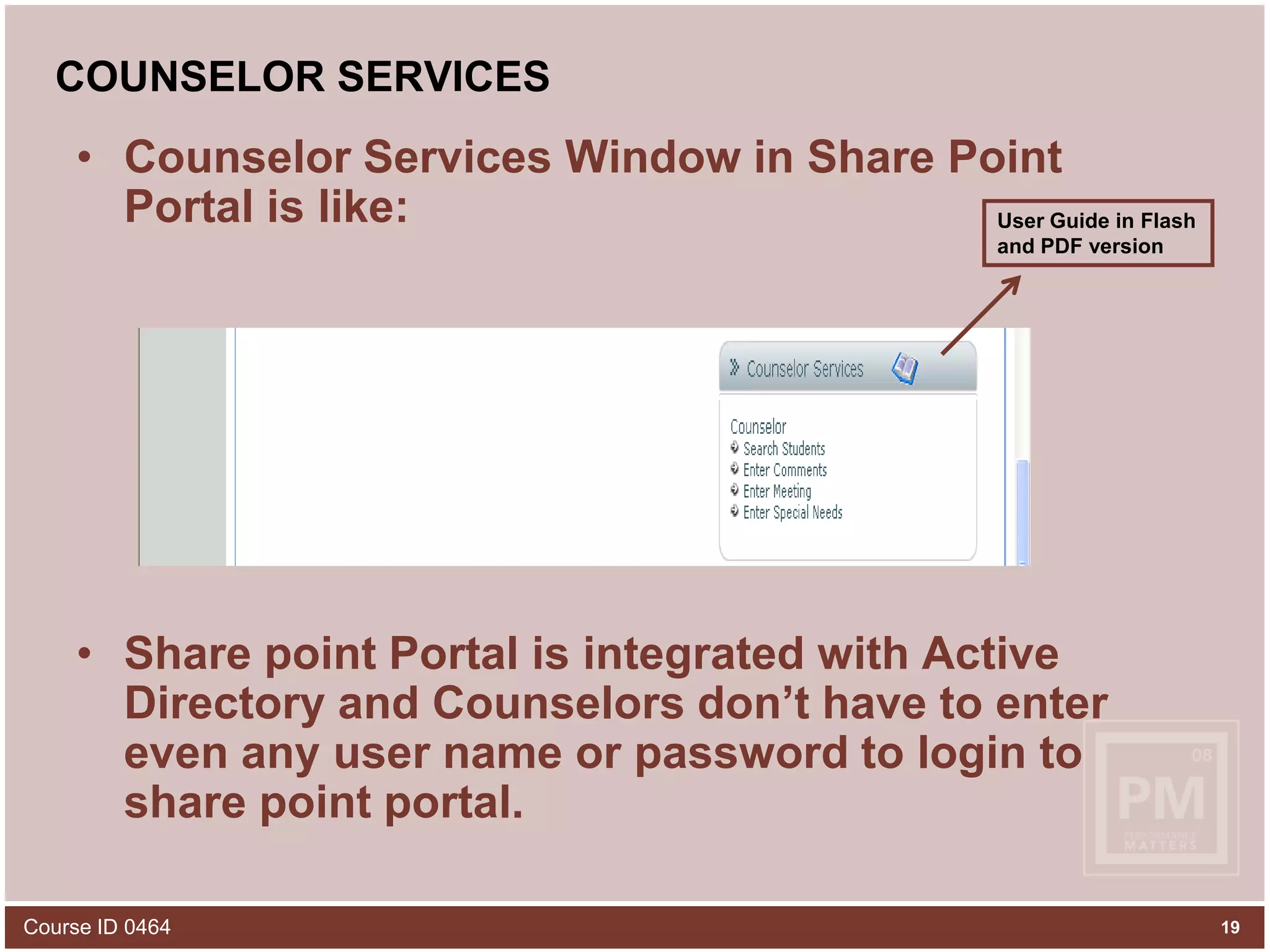
COUNSELOR SERVICESCounselor Services Window in Share Point Portal is like:Share point Portal is integrated with Active Directory and Counselors don’t have to enter even any user name or password to login to share point portal.User Guide in Flash and PDF versionCourse ID 046419
COUNSELOR SERVICESSearch Students: This link allows searching for a student or a set of students based on the search criteria applied by counselor and view their details.Course ID 046420
COUNSELOR SERVICESAfter applying all the search criteria and submitting, counselors can view student list or one student with ID , Name , DOB and a link to View CommentsA red flag (exclamation mark) is used to differentiate a special need student from others in the list.Course ID 046421
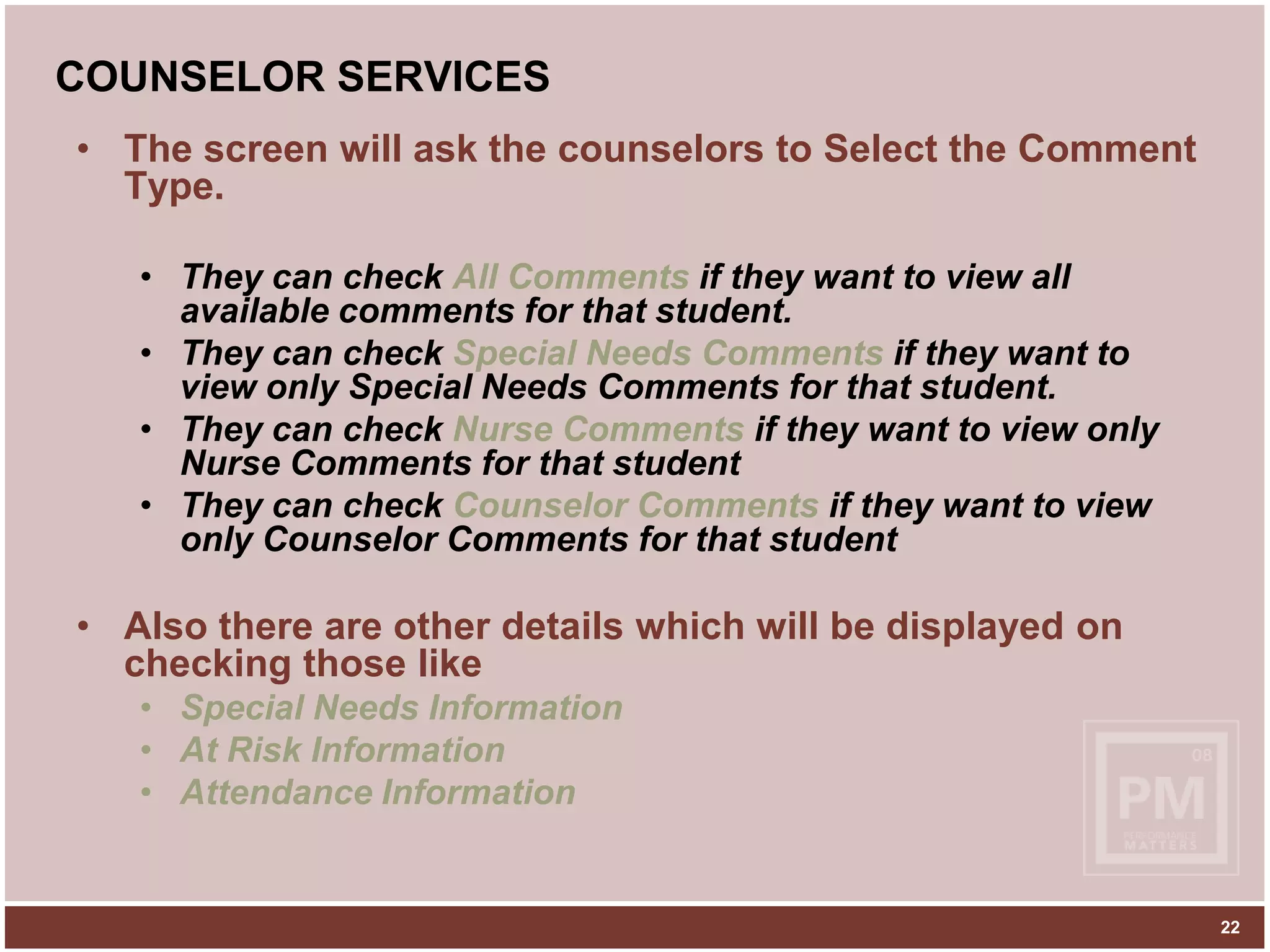
COUNSELOR SERVICESThe screen will ask the counselors to Select the Comment Type. They can check All Comments if they want to view all available comments for that student.They can check Special Needs Comments if they want to view only Special Needs Comments for that student.They can check Nurse Comments if they want to view only Nurse Comments for that studentThey can check Counselor Comments if they want to view only Counselor Comments for that studentAlso there are other details which will be displayed on checking those likeSpecial Needs InformationAt Risk InformationAttendance Information22
COUNSELOR SERVICESClicking on View Comments link will prompt user for what kind of comments to be shown:Course ID 046423
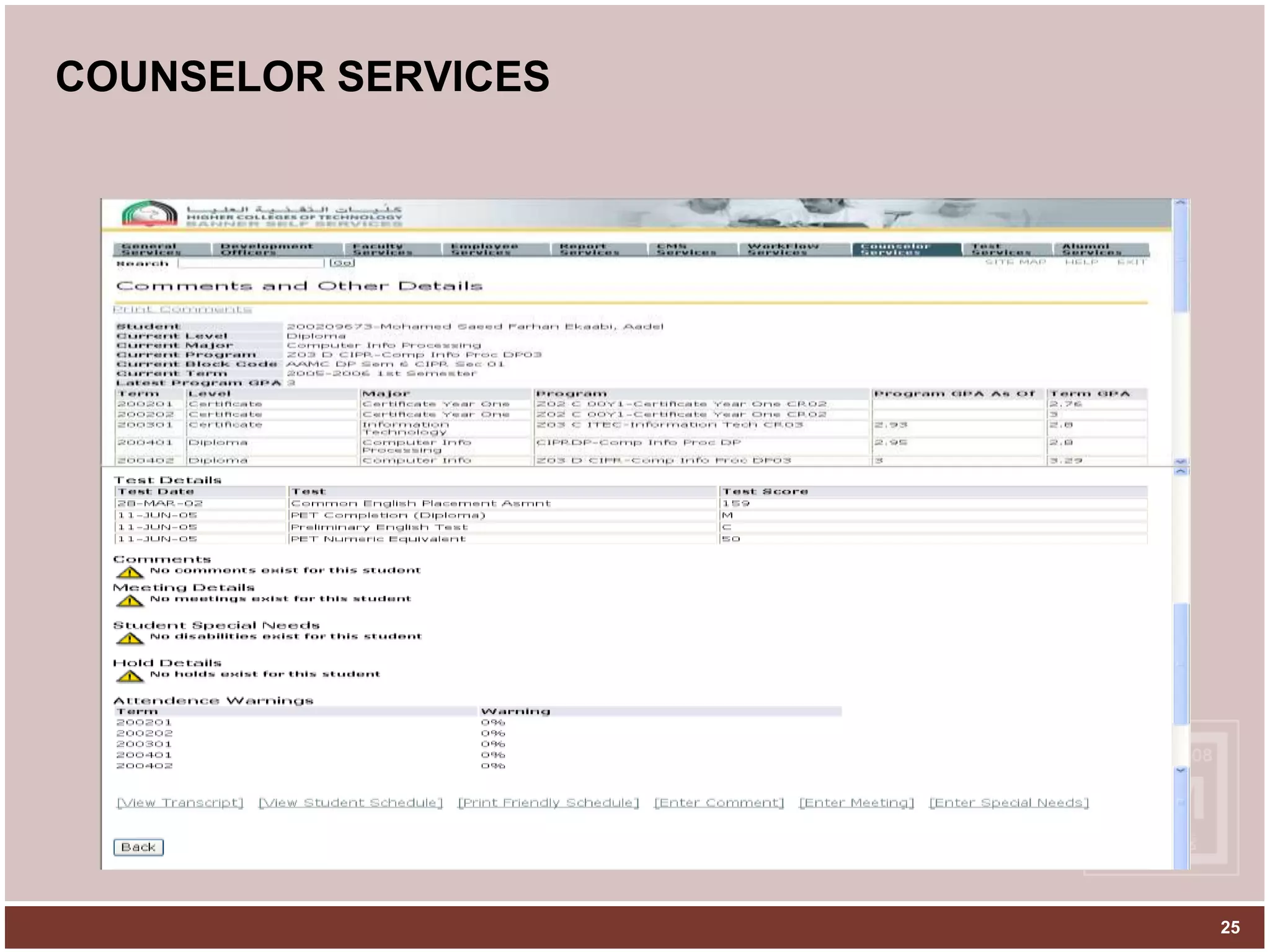
COUNSELOR SERVICESWhen Counselors check ‘All Comments’ option, it will show them details like:Student details (Program, GPA etc)Test DetailsComment types and comments availableMeeting Details if anyStudent’s Special Needs InformationHold Details if anyAttendance Warnings if any. Counselors can access the following links also from the same screen:View Transcript: displays the transcript of the specified studentView Student Schedule: displays the current schedule of the specified studentPrint friendly Schedule : printable version of student scheduleEnter Comment: can enter comments for the specified studentEnter Meeting: can enter meeting for the specified studentEnter Special Needs: can enter special needs  for the specified studentCourse ID 046424
COUNSELOR SERVICES25
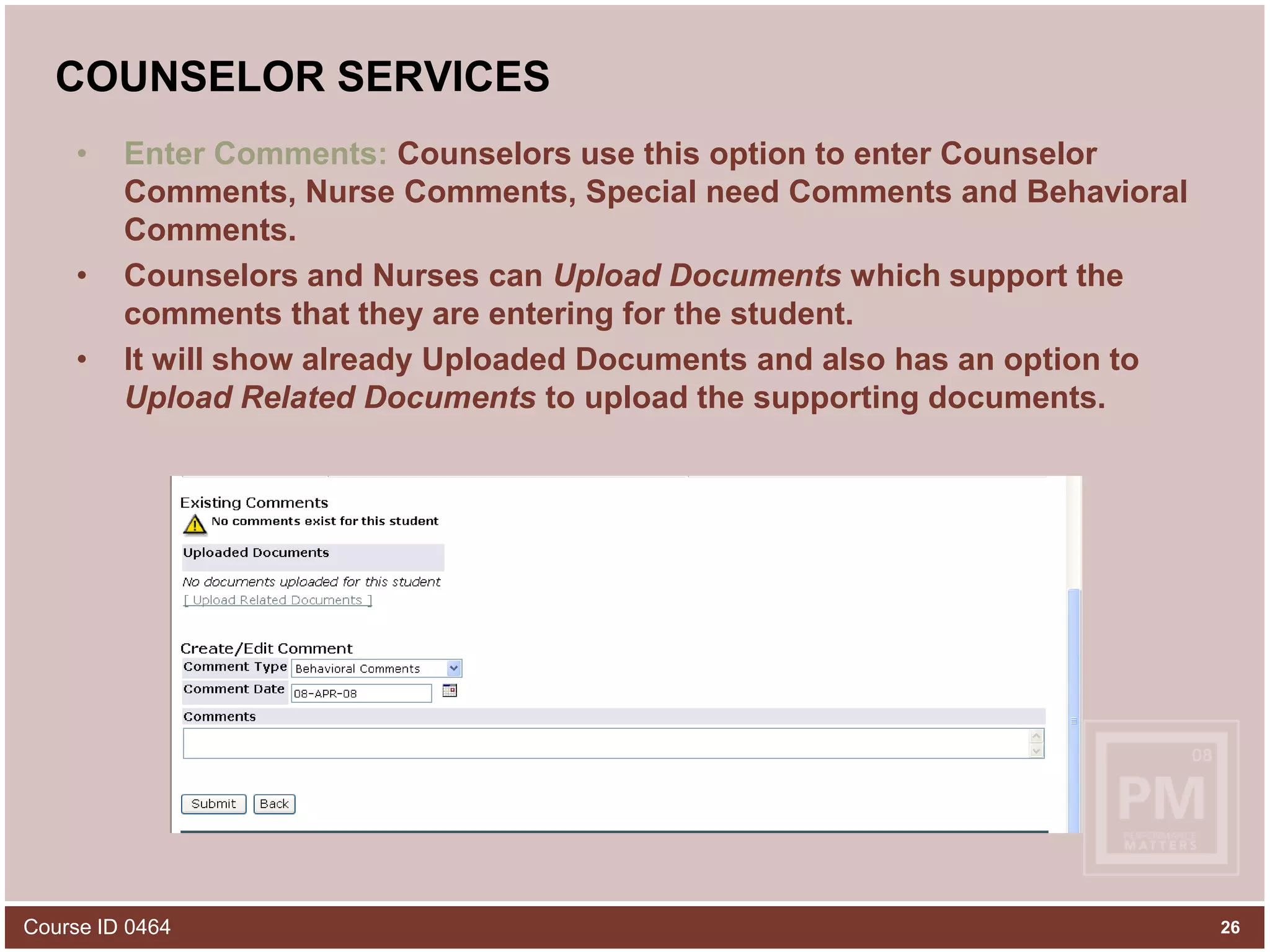
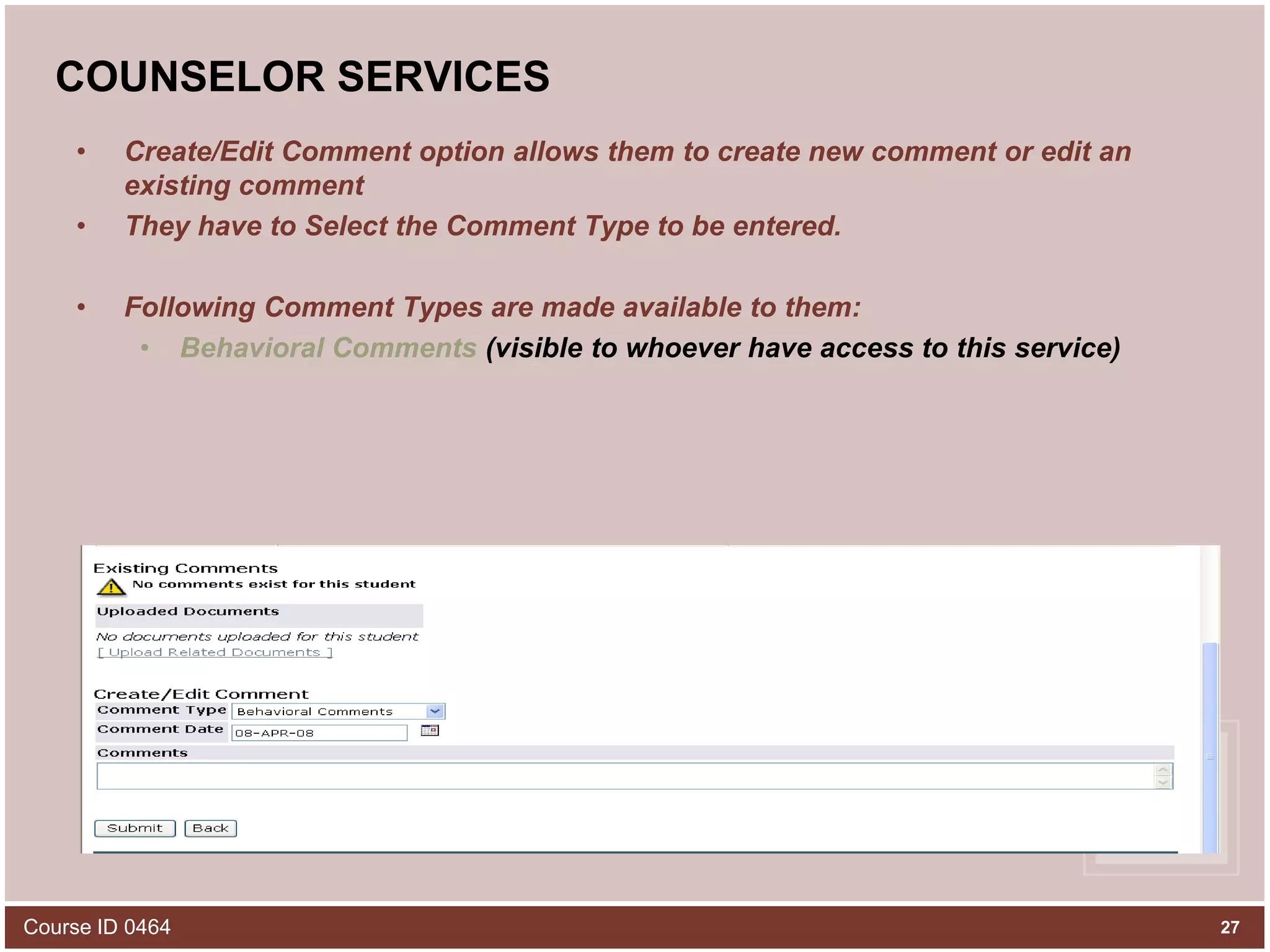
COUNSELOR SERVICESEnter Comments: Counselors use this option to enter Counselor Comments, Nurse Comments, Special need Comments and Behavioral Comments.Counselors and Nurses can Upload Documents which support the comments that they are entering for the student.It will show already Uploaded Documents and also has an option to Upload Related Documents to upload the supporting documents.Course ID 046426
COUNSELOR SERVICESCreate/Edit Comment option allows them to create new comment or edit an existing commentThey have to Select the Comment Type to be entered. Following Comment Types are made available to them:Behavioral Comments (visible to whoever have access to this service)Course ID 046427
Security RequirementsCounselor Comments – Only Counselors can enter this type of comment. Three sets of Comments are available within Counselor Comments like:General Comments: visible to all who have access to this service for the student Campus.Campus Specific Comments: will be visible only to other Counselors of the student Campus.Confidential Comments: these comments won’t be visible to anybody else except the person who entered it.Course ID 046428
COUNSELOR SERVICESNurse Comments – Only Nurses can enter this type of comment. Three sets of Comments are available within Nurse Comments like:General Comments: visible to all who have access to this service for the student Campus.Campus Specific Comments: will be visible only to other Nurses of the student Campus.Confidential Comments: these comments won’t be visible to anybody else except the person who entered it.Course ID 046429
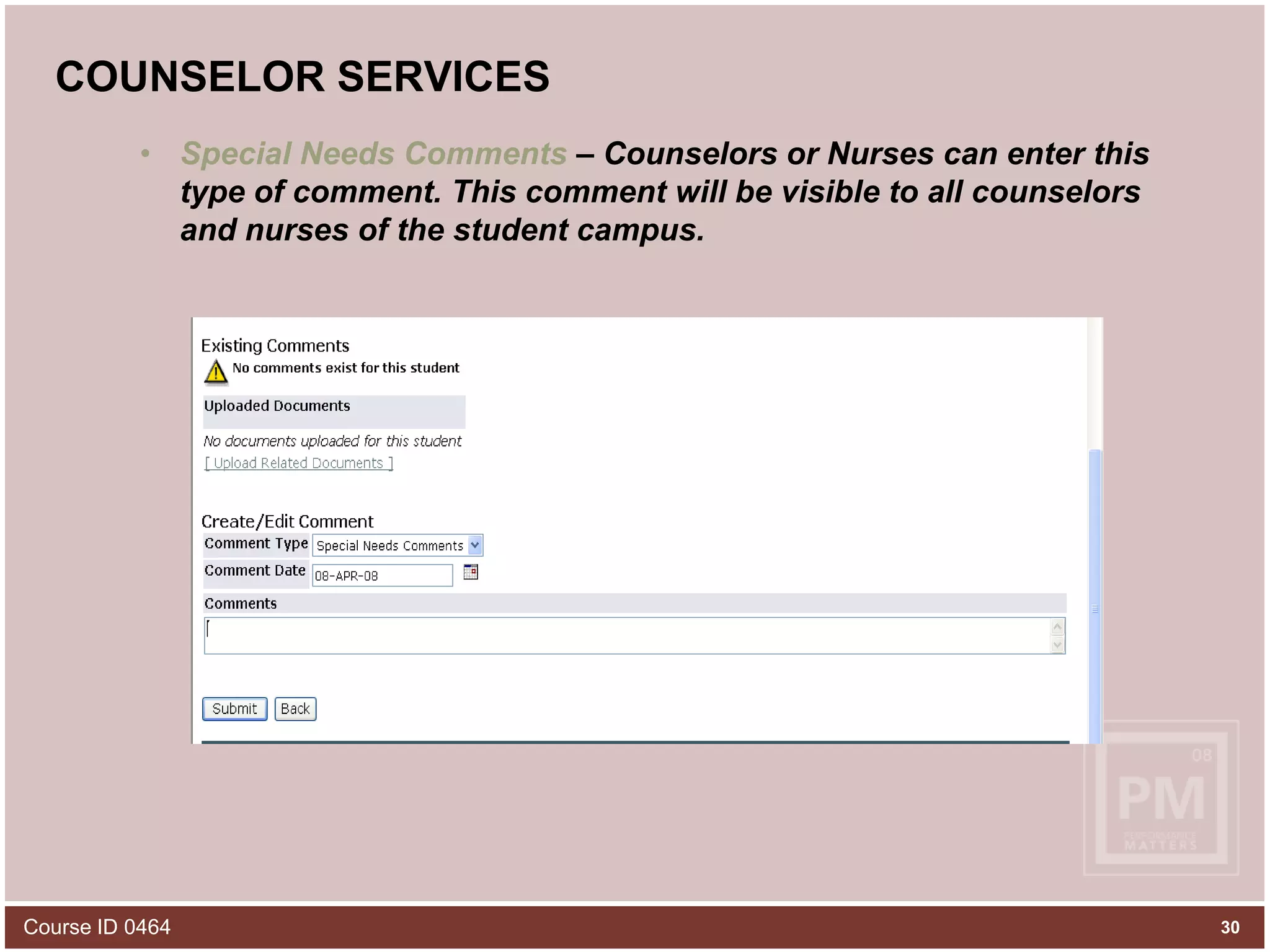
COUNSELOR SERVICESSpecial Needs Comments – Counselors or Nurses can enter this type of comment. This comment will be visible to all counselors and nurses of the student campus.Course ID 046430
COUNSELOR SERVICESEnter Meeting: This option gives the counselors and nurses flexibility to arrange meetings with the special need students and the teachers teaching those students.Course ID 046431
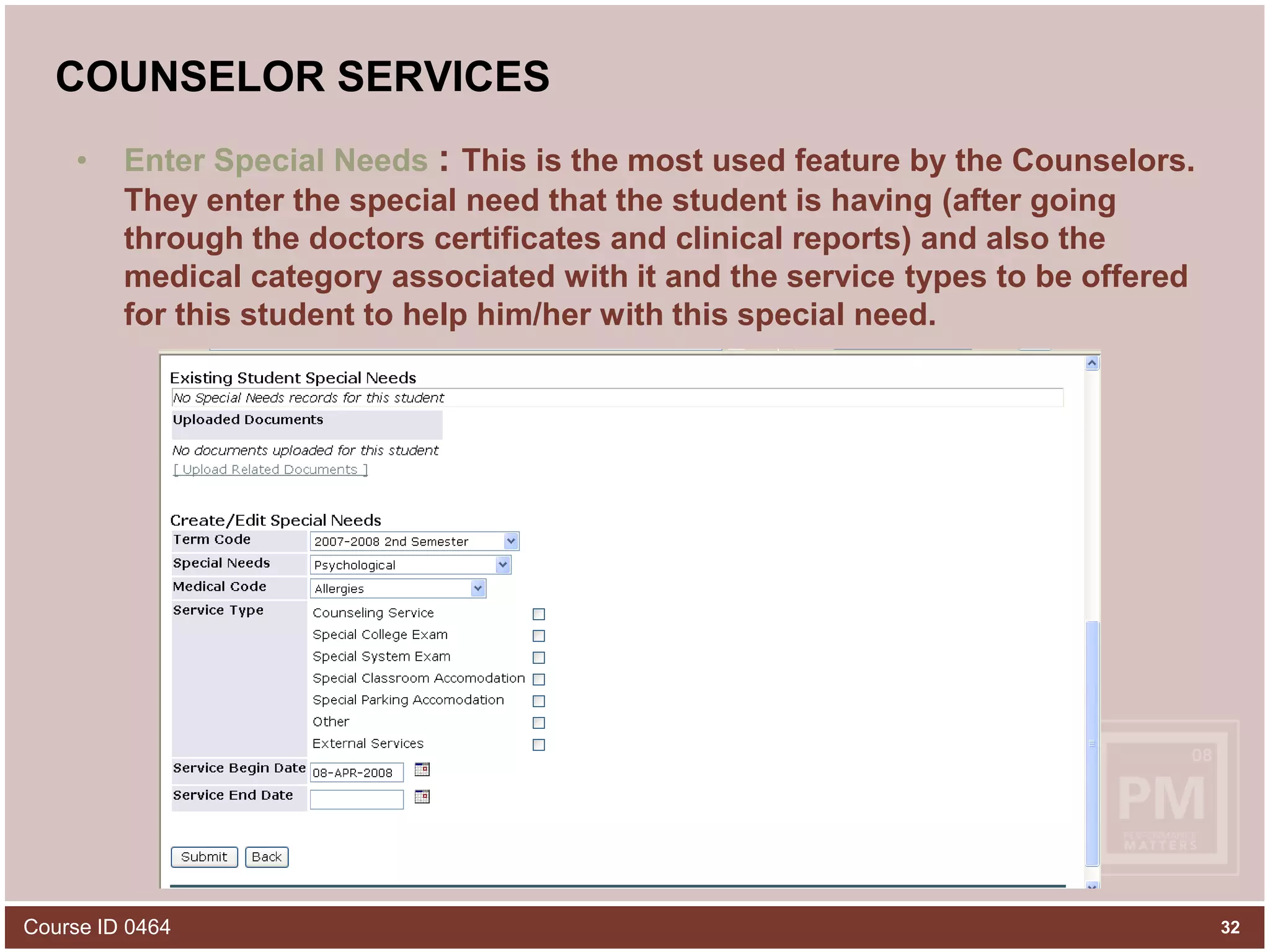
COUNSELOR SERVICESEnter Special Needs : This is the most used feature by the Counselors. They enter the special need that the student is having (after going through the doctors certificates and clinical reports) and also the medical category associated with it and the service types to be offered for this student to help him/her with this special need.Course ID 046432
SECURITY IMPLEMENTATIONHCT has Counselors and Nurses for each of its campus. We define Profiles for each campus Counselors and Nurses separately and map the profiles to the campuses and then assigned users to each profile.GTVFBPR : banner form used for defining Campus Counselor and Nurse profiles.For e.g. : Al Ain Men’s College is one of HCT’s campus, Profile for Counselors in Al Ain Men’s College can be AAMC_CONS.Course ID 046433
SECURITY IMPLEMENTATIONGTVSDAX: banner form used to map the defined profiles to the various campuses in HCT.For e.g. : AAMC_CONS  is a profile defined for Al Ain Men’s College Counselors and the campus code for this college is 01. In GTVSDAX we map AAMC_CONS profile to 01 campus code.Course ID 046434
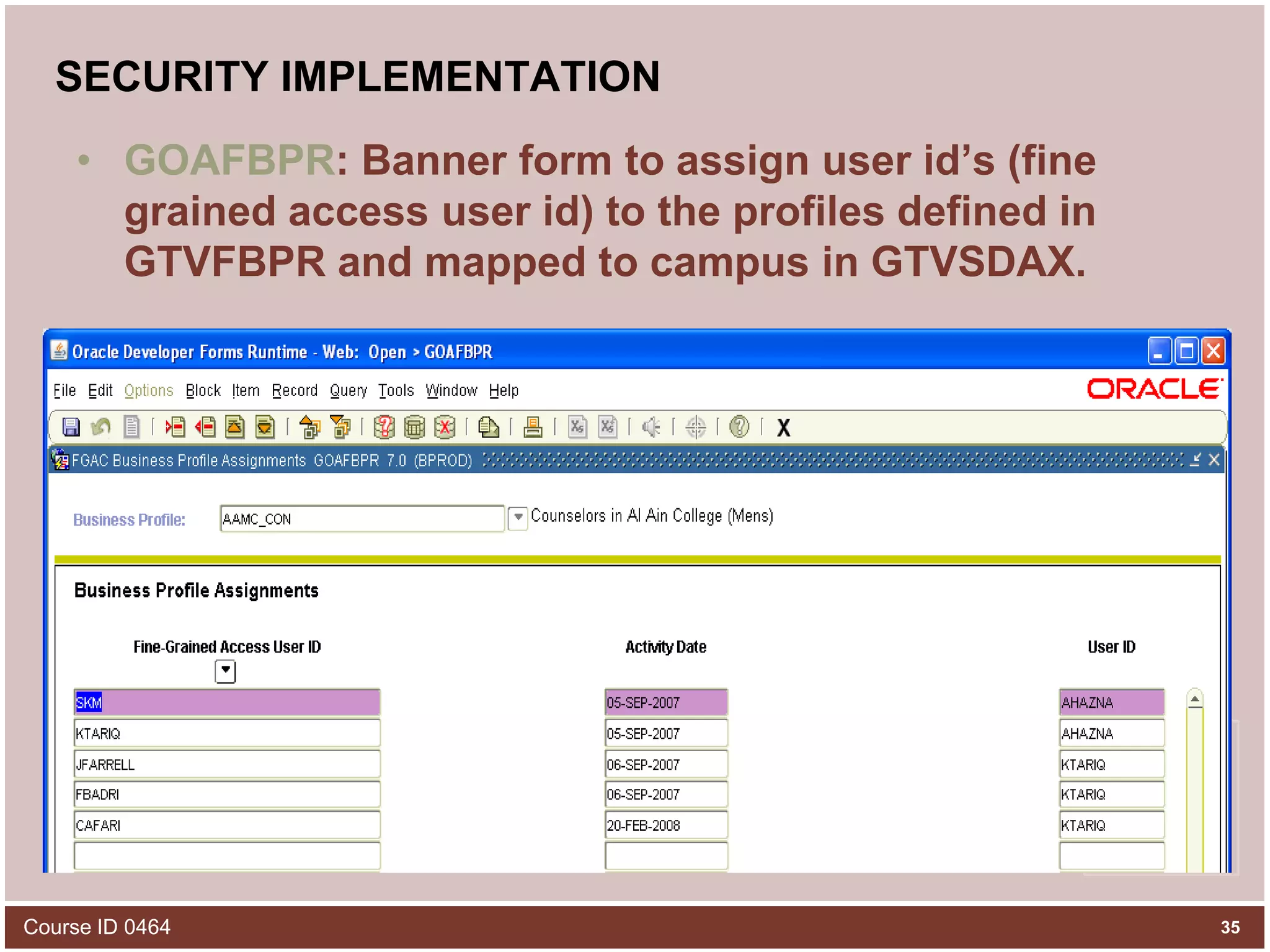
SECURITY IMPLEMENTATIONGOAFBPR: Banner form to assign user id’s (fine grained access user id) to the profiles defined in GTVFBPR and mapped to campus in GTVSDAX. Course ID 046435
SECURITY IMPLEMENTATIONProfiling makes sure that Counseling or Nursing related information of a student in one campus is not accessed or seen by any other campus counselors or users who have access to Counselors Service in Portal.Even after profiling Counselors were worried about the confidential comments that they enter for a student. They were strict on the fact that confidential comments entered by a counselor should not be seen by any other counselors of even the same campus and not even the database maintenance people.Course ID 046436
SECURITY IMPLEMENTATIONTo cater this requirement we encrypted the confidential comments whatever the counselors have entered and stored in the database in encrypted format so that the person who have access even to the backend database will not be able to read what the counselors have written.Course ID 046437
SECURITY IMPLEMENTATIONWhile displaying the confidential comments in Portal Counselor Services or in banner SPACMNT (Comments form) , we match the user id logged in to the service or system and the user id who entered the confidential comments for that student and if both user id’s are the same , only then Counselor Confidential comments will be displayed.For displaying campus specific counselor comments we check the campus (location)of the counselor who logs into the service and matches it with the campus (location) of the counselor who entered the Campus Specific Counselor comments for this student and if both of theirs location match, only then Campus Specific Counselor comments will be displayed.Course ID 046438
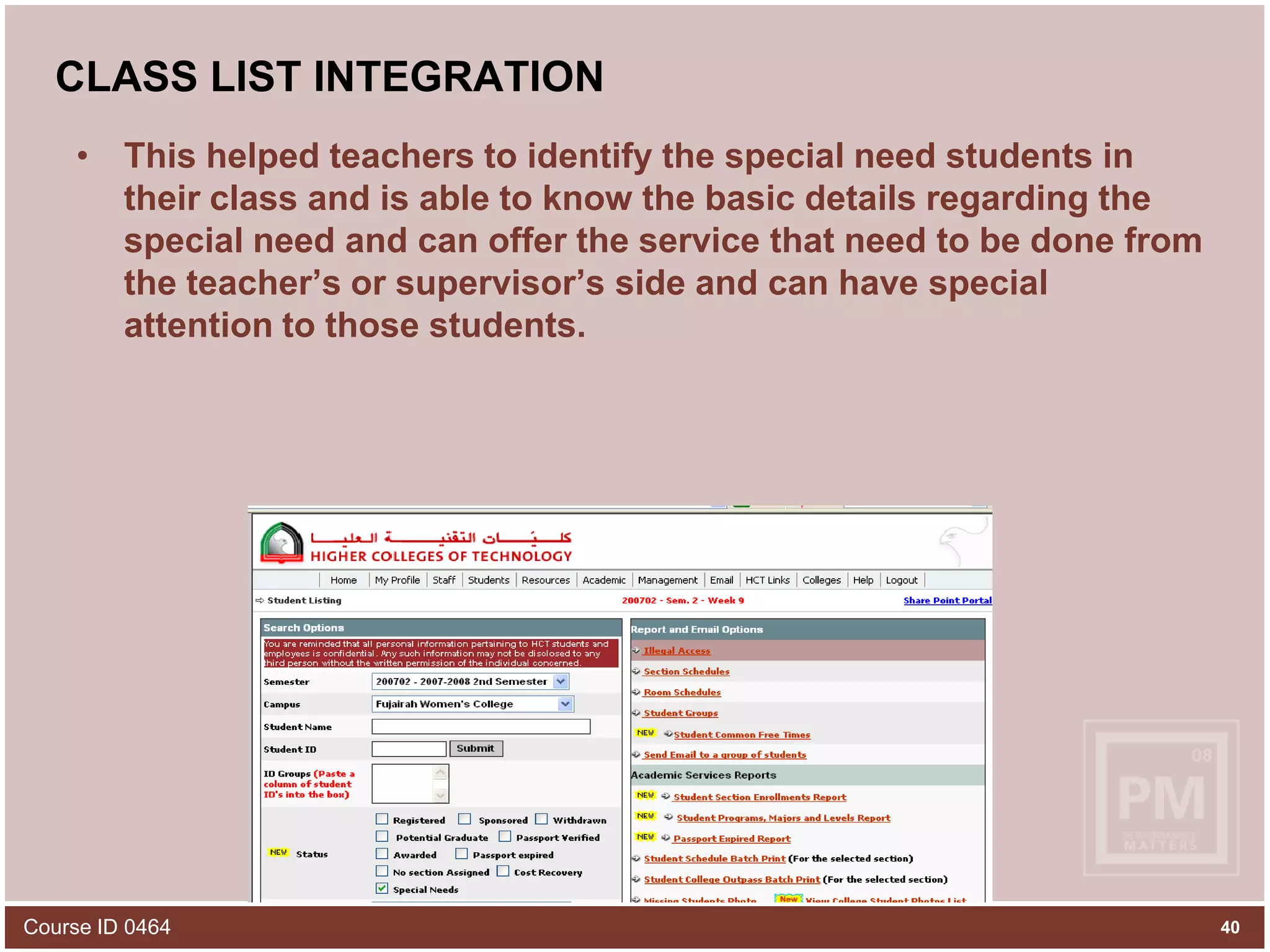
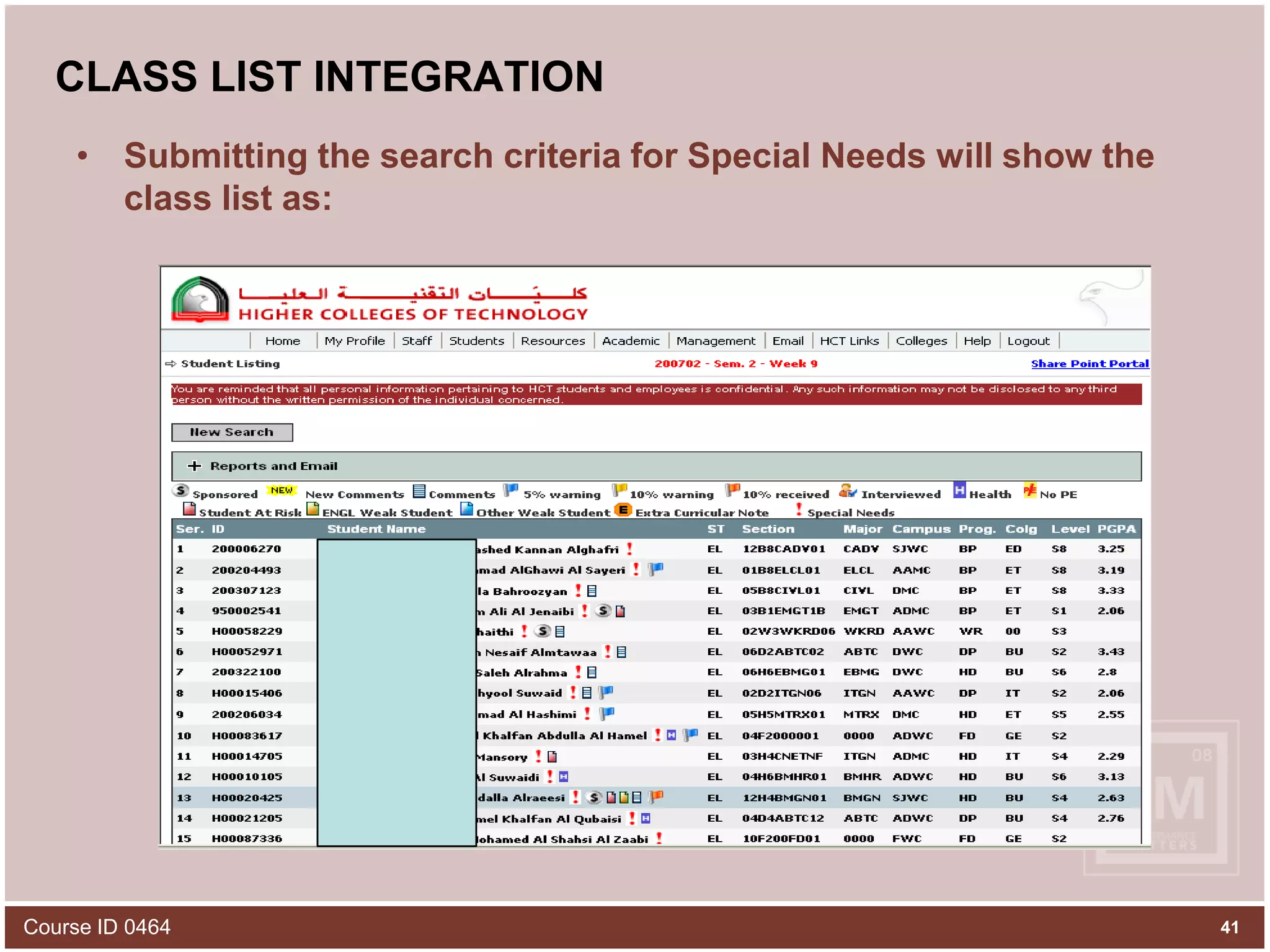
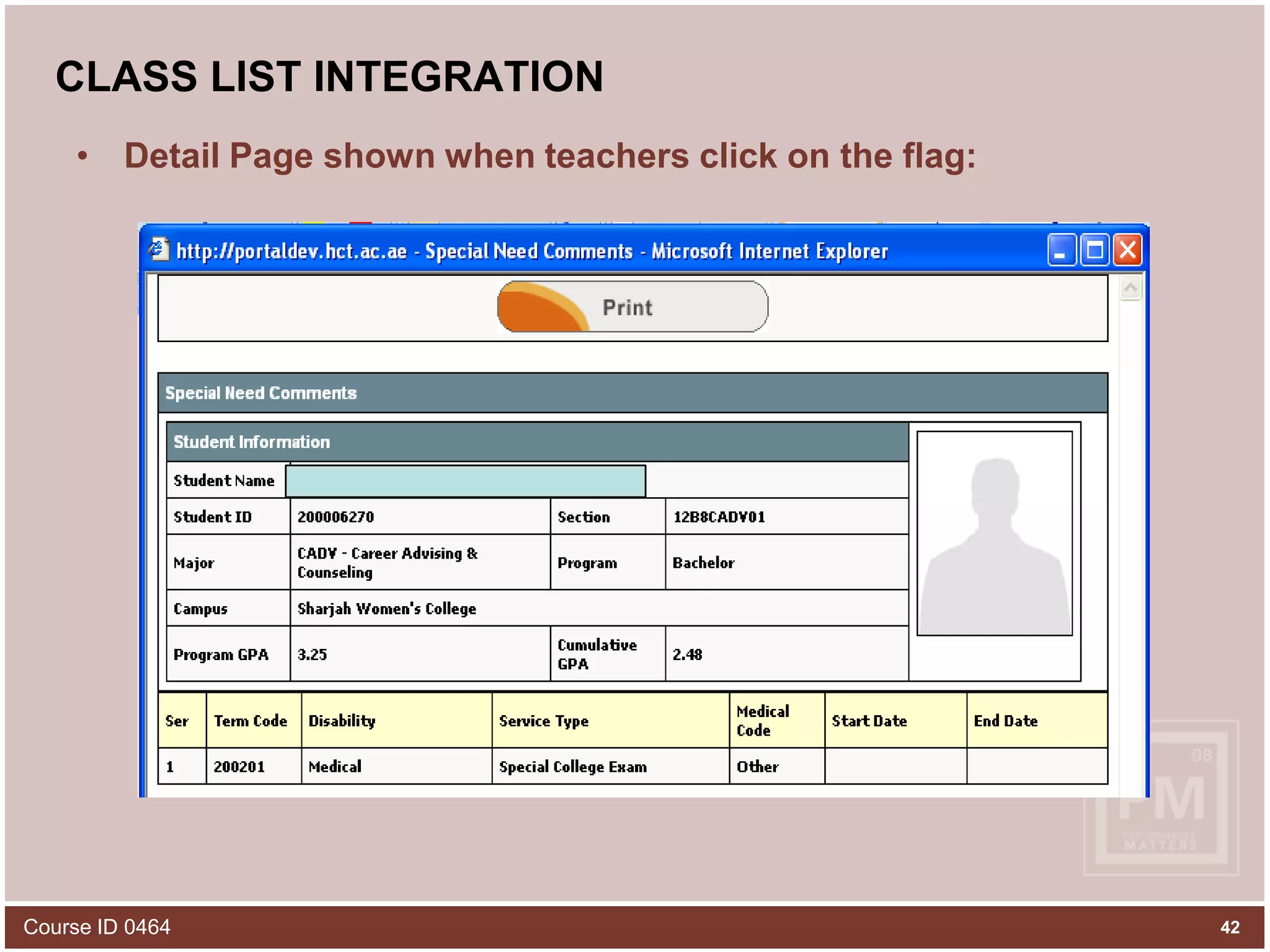
CLASS LIST INTEGRATIONWe integrated the special needs information of the students with Portal Class List which the teachers and supervisors maintain for the students in a class to which that teacher is assigned to.For offering some special service types to the special need students by the teachers like ‘Special Seat’ or Special College Exam’, teachers have to know the special need students in their class and the class list was the most recommended place to share that information to the teachers by the counselors who exactly know the medical condition of the student and service type to be offered.In the class list, the special need student is marked with a red exclamation mark and clicking on that will open up a page showing the special need of the student, the medical category associated with that special need and the possible service types to be offered to help the student.Course ID 046439
CLASS LIST INTEGRATIONThis helped teachers to identify the special need students in their class and is able to know the basic details regarding the special need and can offer the service that need to be done from the teacher’s or supervisor’s side and can have special attention to those students.Course ID 046440
CLASS LIST INTEGRATIONSubmitting the search criteria for Special Needs will show the class list as:Course ID 046441
CLASS LIST INTEGRATIONDetail Page shown when teachers click on the flag:42Course ID 0464
SummaryBanner Self-Service can be used as a launch pad for Student Support ServicesHigh Tech counselors of today have specific security requirements which have to be catered either by storing encrypted data or by using FGAC 43Course ID 0464
44Part #4DEMO
45Course ID 0464Thank you and email if you need help!			Khalid M. Tariq						Student Record Systems Manager			Higher Colleges of Technology			Abu Dhabi, UAEktariq@hct.ac.aehttp://www.hct.ac.aePlease complete the online class evaluation form Course ID 0464SunGard, the SunGard logo, Banner, Campus Pipeline, Luminis, PowerCAMPUS, Matrix, and Plus are trademarks or registered trademarks of SunGard Data Systems Inc. or its subsidiaries in the U.S. and other countries. Third-party names and marks referenced herein are trademarks or registered trademarks of their respective owners.© 2008 SunGard.  All rights reserved.

Student Support Services on Banner Self-Service

  • 1.
    1Student Support Serviceson Banner Self-ServicePresented by: Khalid TariqStudent Records Systems ManagerApril 14, 2008Course ID 0464
  • 2.
    2Course ID 0464ObjectivesBythe end of this presentation, you learn about:Increasing demands from college student support to be able to enter and track special needs information using web with out using “Native Banner”How HCT has addressed these demands from counselors and nursesWhat baseline forms are available in Banner to track special needs and other student services informationHow HCT has addressed the confidentiality and security requirements for special needs records
  • 3.
    3Course ID 0464AgendaIntroductionto HCTHistory of tracking special needsOutcome of training counselors on BannerNew counselor self-service module on BSSDemoQ & A
  • 4.
    4Part #1Introduction toHigher Colleges of Technology and History of Tracking Special Needs Information
  • 5.
    5Course ID 0464Highlightsof HCTLocated in United Arab EmiratesFirst institution in entire Middle East to go live with Banner 7.x (November 2005)First institution in UAE to go live with Banner Advancement (February 2008)Started in 1988 with 239 students and four campusesToday: Enrollment: 16000+Colleges: 17 STVCAMPGraduates: 25K+ Credentials awarded: 35K+ Programs offered in 2006: 80+ SMAPRLEAcademic Divisions: 7 STVCOLL3-4K students graduate every year
  • 6.
  • 7.
    7Course ID 0464DistributedCampuses with a Central System Registrar(2)(2)(2)(3)(2)(2)
  • 8.
    Course ID 04648CentralAcademic and Student Services
  • 9.
    HCT BANNER BACKBONEHCTGrade bookAttendance Management SystemSharePoint Portal 2007Curriculum Management SystemQuality ImprovementSystemSYLLABUS PLUSCourse ResourceSystemCourse ID 04649
  • 10.
    10Course ID 0464PriorTracking of Special Need Students Paper/Excel files in offices of nurses and counselors based on their preference in each campusThese records were not easily accessible if a student moved from one campus to anotherThe records were inconsistent as counselors and nurses tracked and recorded issues differentlySometimes these records were lost along with the loss of a counselor or nurseFew campuses built their own web applications with a decentralized database to track special needs
  • 11.
  • 12.
  • 13.
    Cycle #1In Spring2007, counselors were asked to use Banner baseline forms to enter special need comments and mark special needs for the students.SPACMNT : Banner form to enter special need comments. Following codes were created:Course ID 046413
  • 14.
    Cycle #1SGADISA :Banner form to enter special needs type, medical code and service type to be offered for the student.Course ID 046414
  • 15.
    Result of Cycle#1Although counselors agreed to a central tracking of special needs, they found it very difficult to remember the name of these forms and were not ready to follow the technicalities in these forms as it was not a user friendly approachAlso they wanted reports from which they can view the data they entered and for which it will be another banner report and should know what parameters to enter and how to run the report.Course ID 046415
  • 16.
    Cycle #2In lateSpring 2007, we gathered all the requirements from the counselors and thought of a user friendly way to cater their needs of entering comments and special needs and viewing the reports and associated details of the student all in one place.Final result of all that was the emergence of Counselor Services in Banner Self service which is a web based service.Counselors find it very user friendly and secure and solved all their problems of entering these info directly in banner baseline forms.Course ID 046416
  • 17.
    17Part #3Development ofNew Counselor Self-Service on BSS
  • 18.
    COUNSELOR SERVICESA newservice called Counselor Services is made available through Share point Portal, which helped Counselors and Nurses to:Search StudentsEnter CommentEnter MeetingEnter Special NeedsCourse ID 046418
  • 19.
    COUNSELOR SERVICESCounselor ServicesWindow in Share Point Portal is like:Share point Portal is integrated with Active Directory and Counselors don’t have to enter even any user name or password to login to share point portal.User Guide in Flash and PDF versionCourse ID 046419
  • 20.
    COUNSELOR SERVICESSearch Students:This link allows searching for a student or a set of students based on the search criteria applied by counselor and view their details.Course ID 046420
  • 21.
    COUNSELOR SERVICESAfter applyingall the search criteria and submitting, counselors can view student list or one student with ID , Name , DOB and a link to View CommentsA red flag (exclamation mark) is used to differentiate a special need student from others in the list.Course ID 046421
  • 22.
    COUNSELOR SERVICESThe screenwill ask the counselors to Select the Comment Type. They can check All Comments if they want to view all available comments for that student.They can check Special Needs Comments if they want to view only Special Needs Comments for that student.They can check Nurse Comments if they want to view only Nurse Comments for that studentThey can check Counselor Comments if they want to view only Counselor Comments for that studentAlso there are other details which will be displayed on checking those likeSpecial Needs InformationAt Risk InformationAttendance Information22
  • 23.
    COUNSELOR SERVICESClicking onView Comments link will prompt user for what kind of comments to be shown:Course ID 046423
  • 24.
    COUNSELOR SERVICESWhen Counselorscheck ‘All Comments’ option, it will show them details like:Student details (Program, GPA etc)Test DetailsComment types and comments availableMeeting Details if anyStudent’s Special Needs InformationHold Details if anyAttendance Warnings if any. Counselors can access the following links also from the same screen:View Transcript: displays the transcript of the specified studentView Student Schedule: displays the current schedule of the specified studentPrint friendly Schedule : printable version of student scheduleEnter Comment: can enter comments for the specified studentEnter Meeting: can enter meeting for the specified studentEnter Special Needs: can enter special needs for the specified studentCourse ID 046424
  • 25.
  • 26.
    COUNSELOR SERVICESEnter Comments:Counselors use this option to enter Counselor Comments, Nurse Comments, Special need Comments and Behavioral Comments.Counselors and Nurses can Upload Documents which support the comments that they are entering for the student.It will show already Uploaded Documents and also has an option to Upload Related Documents to upload the supporting documents.Course ID 046426
  • 27.
    COUNSELOR SERVICESCreate/Edit Commentoption allows them to create new comment or edit an existing commentThey have to Select the Comment Type to be entered. Following Comment Types are made available to them:Behavioral Comments (visible to whoever have access to this service)Course ID 046427
  • 28.
    Security RequirementsCounselor Comments– Only Counselors can enter this type of comment. Three sets of Comments are available within Counselor Comments like:General Comments: visible to all who have access to this service for the student Campus.Campus Specific Comments: will be visible only to other Counselors of the student Campus.Confidential Comments: these comments won’t be visible to anybody else except the person who entered it.Course ID 046428
  • 29.
    COUNSELOR SERVICESNurse Comments– Only Nurses can enter this type of comment. Three sets of Comments are available within Nurse Comments like:General Comments: visible to all who have access to this service for the student Campus.Campus Specific Comments: will be visible only to other Nurses of the student Campus.Confidential Comments: these comments won’t be visible to anybody else except the person who entered it.Course ID 046429
  • 30.
    COUNSELOR SERVICESSpecial NeedsComments – Counselors or Nurses can enter this type of comment. This comment will be visible to all counselors and nurses of the student campus.Course ID 046430
  • 31.
    COUNSELOR SERVICESEnter Meeting:This option gives the counselors and nurses flexibility to arrange meetings with the special need students and the teachers teaching those students.Course ID 046431
  • 32.
    COUNSELOR SERVICESEnter SpecialNeeds : This is the most used feature by the Counselors. They enter the special need that the student is having (after going through the doctors certificates and clinical reports) and also the medical category associated with it and the service types to be offered for this student to help him/her with this special need.Course ID 046432
  • 33.
    SECURITY IMPLEMENTATIONHCT hasCounselors and Nurses for each of its campus. We define Profiles for each campus Counselors and Nurses separately and map the profiles to the campuses and then assigned users to each profile.GTVFBPR : banner form used for defining Campus Counselor and Nurse profiles.For e.g. : Al Ain Men’s College is one of HCT’s campus, Profile for Counselors in Al Ain Men’s College can be AAMC_CONS.Course ID 046433
  • 34.
    SECURITY IMPLEMENTATIONGTVSDAX: bannerform used to map the defined profiles to the various campuses in HCT.For e.g. : AAMC_CONS is a profile defined for Al Ain Men’s College Counselors and the campus code for this college is 01. In GTVSDAX we map AAMC_CONS profile to 01 campus code.Course ID 046434
  • 35.
    SECURITY IMPLEMENTATIONGOAFBPR: Bannerform to assign user id’s (fine grained access user id) to the profiles defined in GTVFBPR and mapped to campus in GTVSDAX. Course ID 046435
  • 36.
    SECURITY IMPLEMENTATIONProfiling makessure that Counseling or Nursing related information of a student in one campus is not accessed or seen by any other campus counselors or users who have access to Counselors Service in Portal.Even after profiling Counselors were worried about the confidential comments that they enter for a student. They were strict on the fact that confidential comments entered by a counselor should not be seen by any other counselors of even the same campus and not even the database maintenance people.Course ID 046436
  • 37.
    SECURITY IMPLEMENTATIONTo caterthis requirement we encrypted the confidential comments whatever the counselors have entered and stored in the database in encrypted format so that the person who have access even to the backend database will not be able to read what the counselors have written.Course ID 046437
  • 38.
    SECURITY IMPLEMENTATIONWhile displayingthe confidential comments in Portal Counselor Services or in banner SPACMNT (Comments form) , we match the user id logged in to the service or system and the user id who entered the confidential comments for that student and if both user id’s are the same , only then Counselor Confidential comments will be displayed.For displaying campus specific counselor comments we check the campus (location)of the counselor who logs into the service and matches it with the campus (location) of the counselor who entered the Campus Specific Counselor comments for this student and if both of theirs location match, only then Campus Specific Counselor comments will be displayed.Course ID 046438
  • 39.
    CLASS LIST INTEGRATIONWeintegrated the special needs information of the students with Portal Class List which the teachers and supervisors maintain for the students in a class to which that teacher is assigned to.For offering some special service types to the special need students by the teachers like ‘Special Seat’ or Special College Exam’, teachers have to know the special need students in their class and the class list was the most recommended place to share that information to the teachers by the counselors who exactly know the medical condition of the student and service type to be offered.In the class list, the special need student is marked with a red exclamation mark and clicking on that will open up a page showing the special need of the student, the medical category associated with that special need and the possible service types to be offered to help the student.Course ID 046439
  • 40.
    CLASS LIST INTEGRATIONThishelped teachers to identify the special need students in their class and is able to know the basic details regarding the special need and can offer the service that need to be done from the teacher’s or supervisor’s side and can have special attention to those students.Course ID 046440
  • 41.
    CLASS LIST INTEGRATIONSubmittingthe search criteria for Special Needs will show the class list as:Course ID 046441
  • 42.
    CLASS LIST INTEGRATIONDetailPage shown when teachers click on the flag:42Course ID 0464
  • 43.
    SummaryBanner Self-Service canbe used as a launch pad for Student Support ServicesHigh Tech counselors of today have specific security requirements which have to be catered either by storing encrypted data or by using FGAC 43Course ID 0464
  • 44.
  • 45.
    45Course ID 0464Thankyou and email if you need help! Khalid M. Tariq Student Record Systems Manager Higher Colleges of Technology Abu Dhabi, UAEktariq@hct.ac.aehttp://www.hct.ac.aePlease complete the online class evaluation form Course ID 0464SunGard, the SunGard logo, Banner, Campus Pipeline, Luminis, PowerCAMPUS, Matrix, and Plus are trademarks or registered trademarks of SunGard Data Systems Inc. or its subsidiaries in the U.S. and other countries. Third-party names and marks referenced herein are trademarks or registered trademarks of their respective owners.© 2008 SunGard. All rights reserved.