Online Course Registration
System
TABLE OF CONTENTS
•Introduction
•Requirement Analysis
•Identified Functionalities
•Data Flow in the System
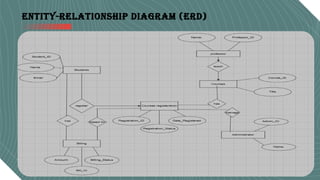
•Entity-Relationship Diagram (ERD)
•Design Choices and MVC
•Key Findings
•Conclusion
Click icon to add picture
INTRODUCTION
Title: Online Course Registration System
Subtitle: Streamlining Enrollment for Students, Professors, and Administrators
for Students, Professors, and Administrators
Requirement Analysis
Purpose:
Streamline course enrollment, improve communication, and
reduce manual errors.
Scope:
 Includes course catalog, registration, schedule adjustment, and
billing.
 Roles: Students, Professors, and Administrators.
 Visual suggestion: Stakeholder icons or flow diagram.
FUNCTIONALITIES
Features for Students:
 View detailed course catalog (titles, instructors,
prerequisites).
 Register for courses and update schedules during
add/drop.
 Receive real-time updates and billing details.
FUNCTIONALITIES FOR STUDENTS
FUNCTIONALITIES
Features for Professors:
 Specify courses to teach.
 Access student enrollment lists.
 Track attendance and progress.
 Visual suggestion: Professor interacting with a course system.
FUNCTIONALITIES FOR PROFESSORS
•Track attendance and progress.
•Visual suggestion: Professor interacting with a course system.
FUNCTIONALITIES
Features for Administrators:
Manage course catalogs and enrollment thresholds.
Handle cancellations for under-enrolled courses.
Oversee billing integration.
Add an admin dashboard screenshot or mockup.
FUNCTIONALITIES FOR ADMINISTRATORS
•Track attendance and progress.
•Visual suggestion: Professor interacting with a course system.
Data Flow in the System
Input Stage
Students:
Course selections, add/drop requests.
Professors:
Teaching preferences.
•Administrators:
• Course catalog upload.
Processing Stage:
•Validation, updates to rosters, billing integration.
Output Stage:
•Notifications to students, updated lists for professors, reports for administrators.
•Use a flowchart or labeled diagram.
Entity-Relationship Diagram (ERD)
Benefits of MVC
Why MVC Works Well:
Separation of concerns (organized and modular).
Reusability and maintainability.
Testability and flexibility for scaling.
Allows parallel development.
Use a clean graphic summarizing these benefits.
Key Findings
•Simplifies registration and billing.
•Centralizes course management and updates.
•Real-time synchronization across stakeholders.
•Enhances scalability with modular design.
•Provides detailed reports and minimizes errors.
•Visual suggestion: Summary chart or infographic.
MVC DIAGRAM

Streamlined Online Course Registration System

  • 1.
  • 2.
    TABLE OF CONTENTS •Introduction •RequirementAnalysis •Identified Functionalities •Data Flow in the System •Entity-Relationship Diagram (ERD) •Design Choices and MVC •Key Findings •Conclusion Click icon to add picture
  • 3.
    INTRODUCTION Title: Online CourseRegistration System Subtitle: Streamlining Enrollment for Students, Professors, and Administrators for Students, Professors, and Administrators
  • 4.
    Requirement Analysis Purpose: Streamline courseenrollment, improve communication, and reduce manual errors. Scope:  Includes course catalog, registration, schedule adjustment, and billing.  Roles: Students, Professors, and Administrators.  Visual suggestion: Stakeholder icons or flow diagram.
  • 5.
    FUNCTIONALITIES Features for Students: View detailed course catalog (titles, instructors, prerequisites).  Register for courses and update schedules during add/drop.  Receive real-time updates and billing details. FUNCTIONALITIES FOR STUDENTS
  • 6.
    FUNCTIONALITIES Features for Professors: Specify courses to teach.  Access student enrollment lists.  Track attendance and progress.  Visual suggestion: Professor interacting with a course system. FUNCTIONALITIES FOR PROFESSORS •Track attendance and progress. •Visual suggestion: Professor interacting with a course system.
  • 7.
    FUNCTIONALITIES Features for Administrators: Managecourse catalogs and enrollment thresholds. Handle cancellations for under-enrolled courses. Oversee billing integration. Add an admin dashboard screenshot or mockup. FUNCTIONALITIES FOR ADMINISTRATORS •Track attendance and progress. •Visual suggestion: Professor interacting with a course system.
  • 8.
    Data Flow inthe System Input Stage Students: Course selections, add/drop requests. Professors: Teaching preferences. •Administrators: • Course catalog upload. Processing Stage: •Validation, updates to rosters, billing integration. Output Stage: •Notifications to students, updated lists for professors, reports for administrators. •Use a flowchart or labeled diagram.
  • 9.
  • 10.
    Benefits of MVC WhyMVC Works Well: Separation of concerns (organized and modular). Reusability and maintainability. Testability and flexibility for scaling. Allows parallel development. Use a clean graphic summarizing these benefits.
  • 11.
    Key Findings •Simplifies registrationand billing. •Centralizes course management and updates. •Real-time synchronization across stakeholders. •Enhances scalability with modular design. •Provides detailed reports and minimizes errors. •Visual suggestion: Summary chart or infographic.
  • 12.