Django Web Framework
TEMPLATE
TEMPLATE
 A template in Django is basically written in HTML in a .html file.
 Django framework efficiently handles and generates dynamic HTML web
pages that are visible to the end-user.
 Django mainly functions with a backend so, in order to provide a
frontend and provide a layout to our website, we use templates.
TEMPLATE
 In current project, we will create a single template directory/folder that
will contain all html files and that can be spread over the entire project
for simplicity.
 Create a folder/directory in command prompt on your project path using
DOS (Disk Operating System) command md (make directory)
 Example :
(djangowork) C:UsersLenovoweekdays_django_batchtemplate_inheritance>md template
Project path
TEMPLATE
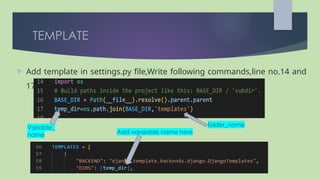
 Add template in settings.py file,Write following commands,line no.14 and
17
Variable_
name
folder_name
Add varaiable name here
DJANGO TEMPLATE LANGUAGE
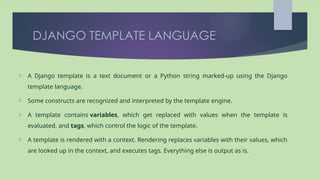
 A Django template is a text document or a Python string marked-up using the Django
template language.
 Some constructs are recognized and interpreted by the template engine.
 A template contains variables, which get replaced with values when the template is
evaluated, and tags, which control the logic of the template.
 A template is rendered with a context. Rendering replaces variables with their values, which
are looked up in the context, and executes tags. Everything else is output as is.
DJANGO TEMPLATE LANGUAGE
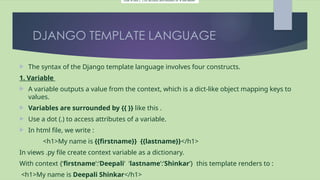
 The syntax of the Django template language involves four constructs.
1. Variable
 A variable outputs a value from the context, which is a dict-like object mapping keys to
values.
 Variables are surrounded by {{ }} like this .
 Use a dot (.) to access attributes of a variable.
 In html file, we write :
<h1>My name is {{firstname}} {{lastname}}</h1>
In views .py file create context variable as a dictionary.
With context {‘firstname’:’Deepali’ ‘lastname’:’Shinkar’} this template renders to :
<h1>My name is Deepali Shinkar</h1>
Use a dot (.) to access attributes of a variable.
DJANGO TEMPLATE LANGUAGE
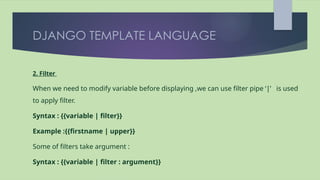
2. Filter
When we need to modify variable before displaying ,we can use filter pipe ‘|’ is used
to apply filter.
Syntax : {{variable | filter}}
Example :{{firstname | upper}}
Some of filters take argument :
Syntax : {{variable | filter : argument}}
DJANGO TEMPLATE LANGUAGE
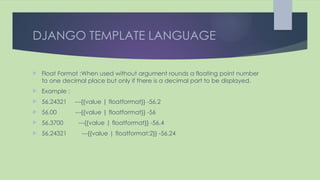
 Float Format :When used without argument rounds a floating point number
to one decimal place but only if there is a decimal part to be displayed.
 Example :
 56.24321 ---{{value | floatformat}} -56.2
 56.00 ---{{value | floatformat}} -56
 56.3700 ---{{value | floatformat}} -56.4
 56.24321 ---{{value | floatformat:2}} -56.24
DJANGO TEMPLATE LANGUAGE
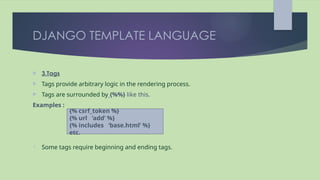
 3.Tags
 Tags provide arbitrary logic in the rendering process.
 Tags are surrounded by {%%} like this.
Examples :
 Some tags require beginning and ending tags.
{% csrf_token %}
{% url ‘add’ %}
{% includes ‘base.html’ %}
etc.
DJANGO TEMPLATE LANGUAGE
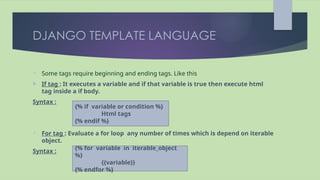
 Some tags require beginning and ending tags. Like this
 If tag : It executes a variable and if that variable is true then execute html
tag inside a if body.
Syntax :
 For tag : Evaluate a for loop any number of times which is depend on iterable
object.
Syntax :
{% if variable or condition %}
Html tags
{% endif %}
{% for variable in iterable_object
%}
{{variable}}
{% endfor %}

steps for template in django for project

  • 1.
  • 2.
    TEMPLATE  A templatein Django is basically written in HTML in a .html file.  Django framework efficiently handles and generates dynamic HTML web pages that are visible to the end-user.  Django mainly functions with a backend so, in order to provide a frontend and provide a layout to our website, we use templates.
  • 3.
    TEMPLATE  In currentproject, we will create a single template directory/folder that will contain all html files and that can be spread over the entire project for simplicity.  Create a folder/directory in command prompt on your project path using DOS (Disk Operating System) command md (make directory)  Example : (djangowork) C:UsersLenovoweekdays_django_batchtemplate_inheritance>md template Project path
  • 4.
    TEMPLATE  Add templatein settings.py file,Write following commands,line no.14 and 17 Variable_ name folder_name Add varaiable name here
  • 5.
    DJANGO TEMPLATE LANGUAGE A Django template is a text document or a Python string marked-up using the Django template language.  Some constructs are recognized and interpreted by the template engine.  A template contains variables, which get replaced with values when the template is evaluated, and tags, which control the logic of the template.  A template is rendered with a context. Rendering replaces variables with their values, which are looked up in the context, and executes tags. Everything else is output as is.
  • 6.
    DJANGO TEMPLATE LANGUAGE The syntax of the Django template language involves four constructs. 1. Variable  A variable outputs a value from the context, which is a dict-like object mapping keys to values.  Variables are surrounded by {{ }} like this .  Use a dot (.) to access attributes of a variable.  In html file, we write : <h1>My name is {{firstname}} {{lastname}}</h1> In views .py file create context variable as a dictionary. With context {‘firstname’:’Deepali’ ‘lastname’:’Shinkar’} this template renders to : <h1>My name is Deepali Shinkar</h1> Use a dot (.) to access attributes of a variable.
  • 7.
    DJANGO TEMPLATE LANGUAGE 2.Filter When we need to modify variable before displaying ,we can use filter pipe ‘|’ is used to apply filter. Syntax : {{variable | filter}} Example :{{firstname | upper}} Some of filters take argument : Syntax : {{variable | filter : argument}}
  • 8.
    DJANGO TEMPLATE LANGUAGE Float Format :When used without argument rounds a floating point number to one decimal place but only if there is a decimal part to be displayed.  Example :  56.24321 ---{{value | floatformat}} -56.2  56.00 ---{{value | floatformat}} -56  56.3700 ---{{value | floatformat}} -56.4  56.24321 ---{{value | floatformat:2}} -56.24
  • 9.
    DJANGO TEMPLATE LANGUAGE 3.Tags  Tags provide arbitrary logic in the rendering process.  Tags are surrounded by {%%} like this. Examples :  Some tags require beginning and ending tags. {% csrf_token %} {% url ‘add’ %} {% includes ‘base.html’ %} etc.
  • 10.
    DJANGO TEMPLATE LANGUAGE Some tags require beginning and ending tags. Like this  If tag : It executes a variable and if that variable is true then execute html tag inside a if body. Syntax :  For tag : Evaluate a for loop any number of times which is depend on iterable object. Syntax : {% if variable or condition %} Html tags {% endif %} {% for variable in iterable_object %} {{variable}} {% endfor %}