
CHAPTER 4
List and Table
Handling in HTML
Part 1 – List in HTML
Presented by Nuzhat Ibrahim Memon 1
List
 In HTML, different individual entities or
elements are organized in the form of
list instead of paragraph
 We can add a number or symbol (bullet)
before each item that result of clarity in
representation and aids reader in
understanding them.
Presented by Nuzhat Ibrahim Memon 2
<li> tag is used to define the items of the list (in ordered or unordered list)
Three types of Lists in HTML
Presented by Nuzhat Ibrahim Memon 3
Unordered List
 Items along with a symbol and this symbol is also called a bullet.
 Unordered list can be created using <ul> and </ul> tag.
 The default shape of bullet is filled circle (disc)
 The type of bullet can be specifies with the ‘type’ attribute.
 Three types of bullets:
• Disc (filled circle)
oCircle (unfilled circle)
 Square (filled square)
Presented by Nuzhat Ibrahim Memon 4
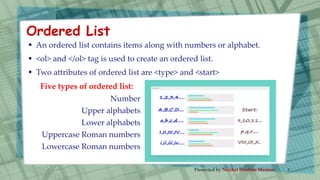
 An ordered list contains items along with numbers or alphabet.
 <ol> and </ol> tag is used to create an ordered list.
 Two attributes of ordered list are <type> and <start>
Five types of ordered list:
Number
Upper alphabets
Lower alphabets
Uppercase Roman numbers
Lowercase Roman numbers
Ordered List
Presented by Nuzhat Ibrahim Memon 5
Description List
<html>
</html>
<head>
</head>
<title> Tom & Jerry </title>
<body>
</body>
HTML
Hypertext Markup Language
CPU
Central Processing Unit
<dt>
<dt>
<dd>
<dd>
 In place of any bullets or numbering,
one can use <dl> tag
Presented by Nuzhat Ibrahim Memon 6
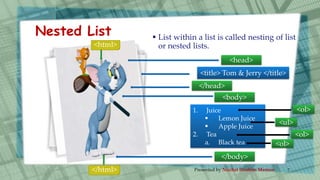
Nested List
<html>
</html>
<head>
</head>
<title> Tom & Jerry </title>
<body>
</body>
1. Juice
 Lemon Juice
 Apple Juice
2. Tea
a. Black tea
<ol>
<ul>
<ol>
<ol>
 List within a list is called nesting of list
or nested lists.
Presented by Nuzhat Ibrahim Memon 7
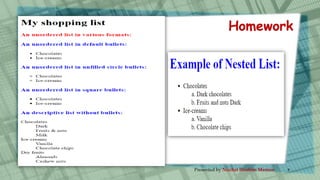
Homework
Presented by Nuzhat Ibrahim Memon 8
Thanks for Watching
Presented by Nuzhat Ibrahim Memon 9

Std 10 Computer Chapter 4 List and Table Handling in HTML(Part 1 List in HTML)

  • 1.
    CHAPTER 4 List andTable Handling in HTML Part 1 – List in HTML Presented by Nuzhat Ibrahim Memon 1
  • 2.
    List  In HTML,different individual entities or elements are organized in the form of list instead of paragraph  We can add a number or symbol (bullet) before each item that result of clarity in representation and aids reader in understanding them. Presented by Nuzhat Ibrahim Memon 2
  • 3.
    <li> tag isused to define the items of the list (in ordered or unordered list) Three types of Lists in HTML Presented by Nuzhat Ibrahim Memon 3
  • 4.
    Unordered List  Itemsalong with a symbol and this symbol is also called a bullet.  Unordered list can be created using <ul> and </ul> tag.  The default shape of bullet is filled circle (disc)  The type of bullet can be specifies with the ‘type’ attribute.  Three types of bullets: • Disc (filled circle) oCircle (unfilled circle)  Square (filled square) Presented by Nuzhat Ibrahim Memon 4
  • 5.
     An orderedlist contains items along with numbers or alphabet.  <ol> and </ol> tag is used to create an ordered list.  Two attributes of ordered list are <type> and <start> Five types of ordered list: Number Upper alphabets Lower alphabets Uppercase Roman numbers Lowercase Roman numbers Ordered List Presented by Nuzhat Ibrahim Memon 5
  • 6.
    Description List <html> </html> <head> </head> <title> Tom& Jerry </title> <body> </body> HTML Hypertext Markup Language CPU Central Processing Unit <dt> <dt> <dd> <dd>  In place of any bullets or numbering, one can use <dl> tag Presented by Nuzhat Ibrahim Memon 6
  • 7.
    Nested List <html> </html> <head> </head> <title> Tom& Jerry </title> <body> </body> 1. Juice  Lemon Juice  Apple Juice 2. Tea a. Black tea <ol> <ul> <ol> <ol>  List within a list is called nesting of list or nested lists. Presented by Nuzhat Ibrahim Memon 7
  • 8.
  • 9.
    Thanks for Watching Presentedby Nuzhat Ibrahim Memon 9