Starget: Sentiment Analyzer for English
Technical description
SemanticAnalyzer Group, 2013-11-19
www.semanticanalyzer.info
This document describes technical details of sentiment analyzer API for the English language. The
component can be served as API or as a library for you applications. You can gain the access to the API by
registering with mashape.com. The free demo is available on the SemanticAnalyzer Group web site:
http://semanticanalyzer.info/blog/starget-english-sentiment-analysis/
The API has two types of analysis:
●
●

Finding accurate sentiment hits, but missing some difficult cases optimizing for precision
Finding more, but less accurate, sentiment hits, optimizing for recall

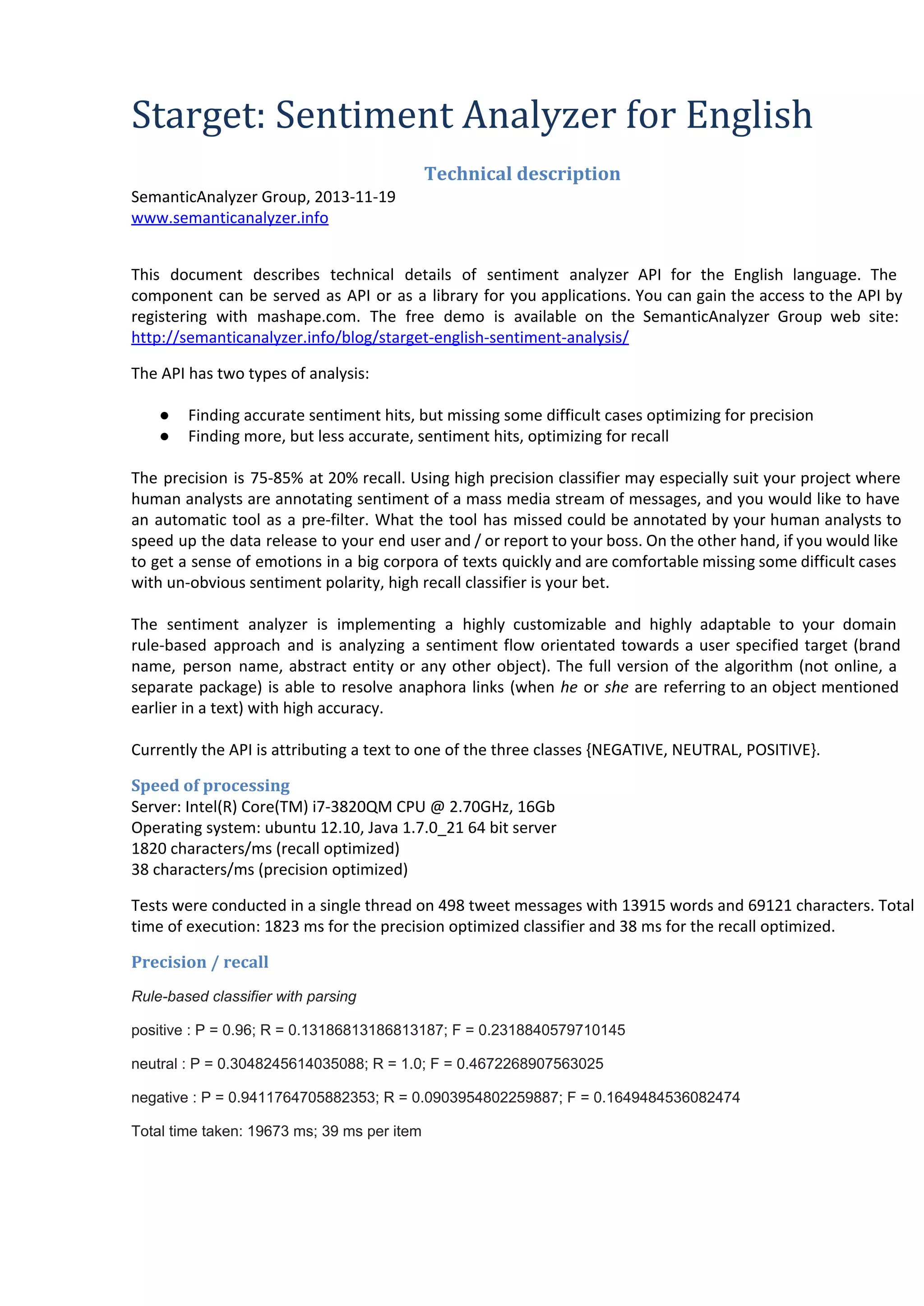
The precision is 75-85% at 20% recall. Using high precision classifier may especially suit your project where
human analysts are annotating sentiment of a mass media stream of messages, and you would like to have
an automatic tool as a pre-filter. What the tool has missed could be annotated by your human analysts to
speed up the data release to your end user and / or report to your boss. On the other hand, if you would like
to get a sense of emotions in a big corpora of texts quickly and are comfortable missing some difficult cases
with un-obvious sentiment polarity, high recall classifier is your bet.
The sentiment analyzer is implementing a highly customizable and highly adaptable to your domain
rule-based approach and is analyzing a sentiment flow orientated towards a user specified target (brand
name, person name, abstract entity or any other object). The full version of the algorithm (not online, a
separate package) is able to resolve anaphora links (when he or she are referring to an object mentioned
earlier in a text) with high accuracy.
Currently the API is attributing a text to one of the three classes {NEGATIVE, NEUTRAL, POSITIVE}.
Speed of processing
Server: Intel(R) Core(TM) i7-3820QM CPU @ 2.70GHz, 16Gb
Operating system: ubuntu 12.10, Java 1.7.0_21 64 bit server
1820 characters/ms (recall optimized)
38 characters/ms (precision optimized)
Tests were conducted in a single thread on 498 tweet messages with 13915 words and 69121 characters. Total
time of execution: 1823 ms for the precision optimized classifier and 38 ms for the recall optimized.
Precision / recall
Rule­based classifier with parsing
positive : P = 0.96; R = 0.13186813186813187; F = 0.2318840579710145
neutral : P = 0.3048245614035088; R = 1.0; F = 0.4672268907563025
negative : P = 0.9411764705882353; R = 0.0903954802259887; F = 0.1649484536082474
Total time taken: 19673 ms; 39 ms per item
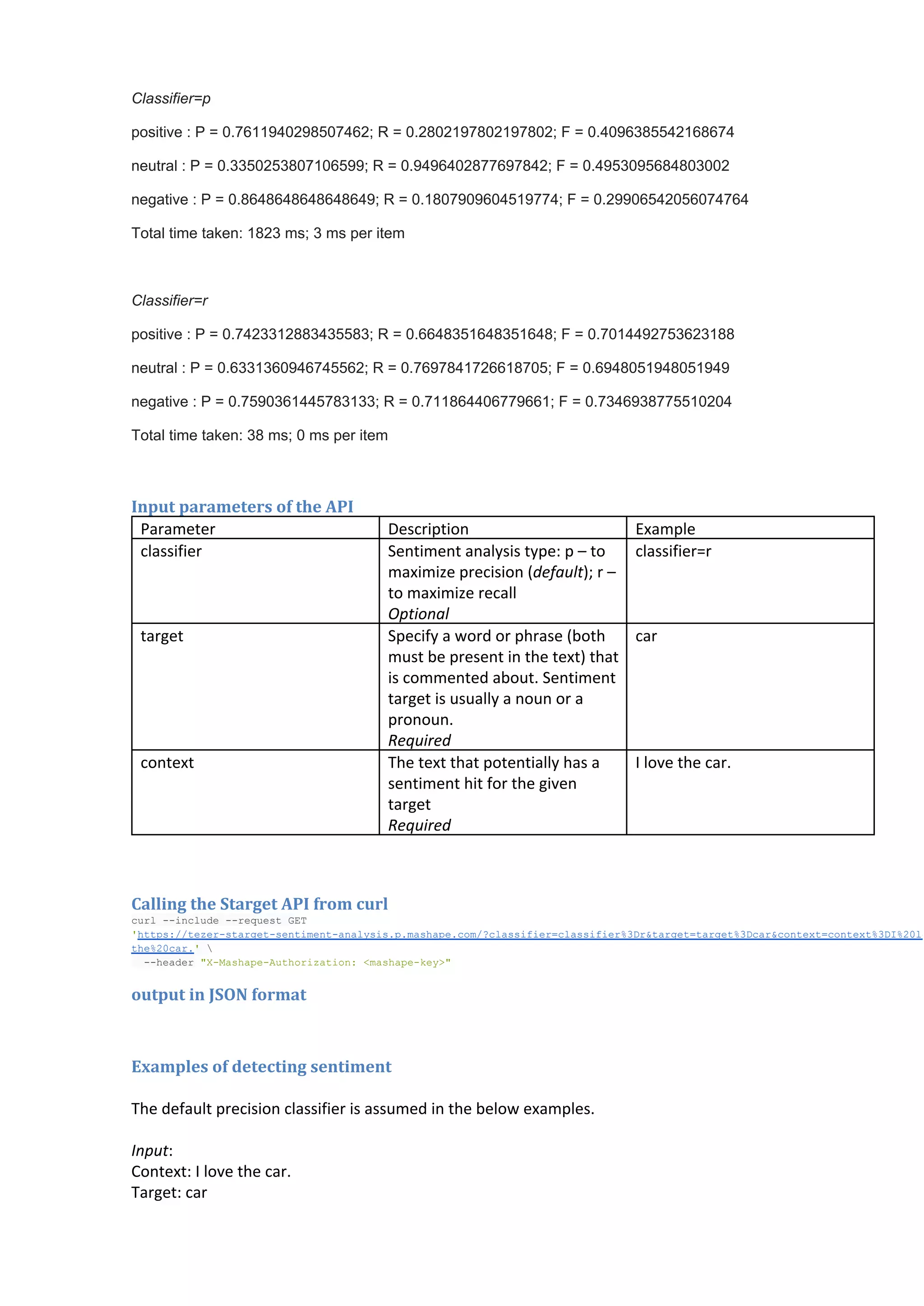
Classifier=p
positive : P = 0.7611940298507462; R = 0.2802197802197802; F = 0.4096385542168674
neutral : P = 0.3350253807106599; R = 0.9496402877697842; F = 0.4953095684803002
negative : P = 0.8648648648648649; R = 0.1807909604519774; F = 0.29906542056074764
Total time taken: 1823 ms; 3 ms per item

Classifier=r
positive : P = 0.7423312883435583; R = 0.6648351648351648; F = 0.7014492753623188
neutral : P = 0.6331360946745562; R = 0.7697841726618705; F = 0.6948051948051949
negative : P = 0.7590361445783133; R = 0.711864406779661; F = 0.7346938775510204
Total time taken: 38 ms; 0 ms per item

Input parameters of the API
Parameter
classifier

target

context

Description
Sentiment analysis type: p – to
maximize precision (default); r –
to maximize recall
Optional
Specify a word or phrase (both
must be present in the text) that
is commented about. Sentiment
target is usually a noun or a
pronoun.
Required
The text that potentially has a
sentiment hit for the given
target
Required

Example
classifier=r

car

I love the car.

Calling the Starget API from curl

cr ­nld ­eus E
ul­icue­rqetGT
'tp:/ee­tre­etmn­nlsspmsaecm?lsiircasfe%D&agttre%Da&otx=otx%D%0o
hts/tzrsagtsnietaayi..ahp.o/casfe=lsiir3rtre=agt3crcnetcnet3I2l
te2cr'
h%0a. 
 ­hae XMsaeAtoiain msaeky"
 ­edr"­ahp­uhrzto:<ahp­e>

output in JSON format

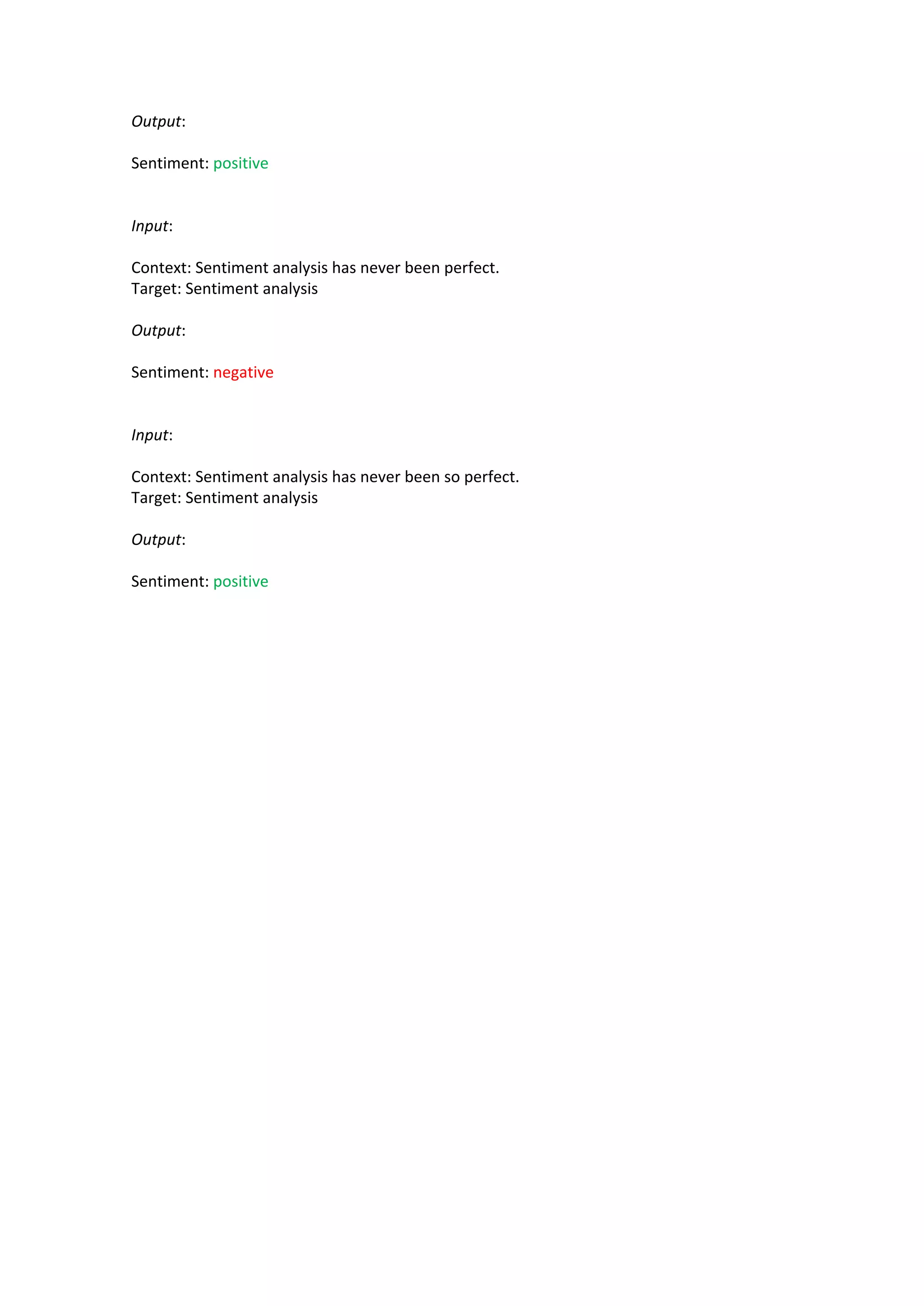
Examples of detecting sentiment
The default precision classifier is assumed in the below examples.
Input:
Context: I love the car.
Target: car
Output:
Sentiment: positive

Input:
Context: Sentiment analysis has never been perfect.
Target: Sentiment analysis
Output:
Sentiment: negative

Input:
Context: Sentiment analysis has never been so perfect.
Target: Sentiment analysis
Output:
Sentiment: positive

Starget sentiment analyzer for English

  • 1.
    Starget: Sentiment Analyzerfor English Technical description SemanticAnalyzer Group, 2013-11-19 www.semanticanalyzer.info This document describes technical details of sentiment analyzer API for the English language. The component can be served as API or as a library for you applications. You can gain the access to the API by registering with mashape.com. The free demo is available on the SemanticAnalyzer Group web site: http://semanticanalyzer.info/blog/starget-english-sentiment-analysis/ The API has two types of analysis: ● ● Finding accurate sentiment hits, but missing some difficult cases optimizing for precision Finding more, but less accurate, sentiment hits, optimizing for recall The precision is 75-85% at 20% recall. Using high precision classifier may especially suit your project where human analysts are annotating sentiment of a mass media stream of messages, and you would like to have an automatic tool as a pre-filter. What the tool has missed could be annotated by your human analysts to speed up the data release to your end user and / or report to your boss. On the other hand, if you would like to get a sense of emotions in a big corpora of texts quickly and are comfortable missing some difficult cases with un-obvious sentiment polarity, high recall classifier is your bet. The sentiment analyzer is implementing a highly customizable and highly adaptable to your domain rule-based approach and is analyzing a sentiment flow orientated towards a user specified target (brand name, person name, abstract entity or any other object). The full version of the algorithm (not online, a separate package) is able to resolve anaphora links (when he or she are referring to an object mentioned earlier in a text) with high accuracy. Currently the API is attributing a text to one of the three classes {NEGATIVE, NEUTRAL, POSITIVE}. Speed of processing Server: Intel(R) Core(TM) i7-3820QM CPU @ 2.70GHz, 16Gb Operating system: ubuntu 12.10, Java 1.7.0_21 64 bit server 1820 characters/ms (recall optimized) 38 characters/ms (precision optimized) Tests were conducted in a single thread on 498 tweet messages with 13915 words and 69121 characters. Total time of execution: 1823 ms for the precision optimized classifier and 38 ms for the recall optimized. Precision / recall Rule­based classifier with parsing positive : P = 0.96; R = 0.13186813186813187; F = 0.2318840579710145 neutral : P = 0.3048245614035088; R = 1.0; F = 0.4672268907563025 negative : P = 0.9411764705882353; R = 0.0903954802259887; F = 0.1649484536082474 Total time taken: 19673 ms; 39 ms per item
  • 2.
    Classifier=p positive : P = 0.7611940298507462; R = 0.2802197802197802; F = 0.4096385542168674 neutral : P = 0.3350253807106599; R = 0.9496402877697842; F = 0.4953095684803002 negative : P = 0.8648648648648649; R = 0.1807909604519774; F = 0.29906542056074764 Total time taken: 1823 ms; 3 ms per item Classifier=r positive : P = 0.7423312883435583; R = 0.6648351648351648; F = 0.7014492753623188 neutral : P = 0.6331360946745562; R = 0.7697841726618705; F = 0.6948051948051949 negative : P = 0.7590361445783133; R = 0.711864406779661; F = 0.7346938775510204 Total time taken: 38 ms; 0 ms per item Input parameters ofthe API Parameter classifier target context Description Sentiment analysis type: p – to maximize precision (default); r – to maximize recall Optional Specify a word or phrase (both must be present in the text) that is commented about. Sentiment target is usually a noun or a pronoun. Required The text that potentially has a sentiment hit for the given target Required Example classifier=r car I love the car. Calling the Starget API from curl cr ­nld ­eus E ul­icue­rqetGT 'tp:/ee­tre­etmn­nlsspmsaecm?lsiircasfe%D&agttre%Da&otx=otx%D%0o hts/tzrsagtsnietaayi..ahp.o/casfe=lsiir3rtre=agt3crcnetcnet3I2l te2cr' h%0a.   ­hae XMsaeAtoiain msaeky"  ­edr"­ahp­uhrzto:<ahp­e> output in JSON format Examples of detecting sentiment The default precision classifier is assumed in the below examples. Input: Context: I love the car. Target: car
  • 3.
    Output: Sentiment: positive Input: Context: Sentimentanalysis has never been perfect. Target: Sentiment analysis Output: Sentiment: negative Input: Context: Sentiment analysis has never been so perfect. Target: Sentiment analysis Output: Sentiment: positive