Debugging JS with Chrome
>The little power tools
by Igor Zalutsky
Console API: the basics
var obj = {
prop: 1, child: {
prop: 2
}
};
console.log(obj);
console.log('%On%o', document.body, document.body);
console.warn('something unexpected happened');
console.error('something went wrong');
console.assert("str" instanceof String, 'gotcha!');
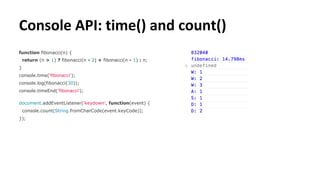
Console API: time() and count()
function fibonacci(n) {
return (n > 1) ? fibonacci(n - 2) + fibonacci(n - 1) : n;
}
console.time('fibonacci');
console.log(fibonacci(30));
console.timeEnd('fibonacci');
document.addEventListener('keydown', function(event) {
console.count(String.fromCharCode(event.keyCode));
});
Console from the inside
console.dir(console);
?
Console API: table()
var people = [
{
name: 'Hopper', surname: 'Herring'
}, {
name: 'Sampson', surname: 'Douglas'
}, {
name: 'Carmella', surname: 'Vincent'
}
];
console.table(people);
console.table(
document.querySelectorAll('a'),
['href', 'text']
);
Console API: other methods
clear() remove all previous output
debug(), info() aliases for log()
group(), groupEnd() grouped output
profile(), profileEnd() last evaluated expression
timeStamp() marking the timeline
trace() stack trace
Digging out Command Line API
(function() {
debugger;
})();
var members = Object.keys(__commandLineAPI)
.filter(function(key) {
return ! (key in console);
}).reduce(function(obj, key) {
obj[key] = __commandLineAPI[key];
return obj;
}, {});
console.dir(members);
Command Line API: overview
Command Line API: shortcuts
$(selector) document.querySelector()
$$(selector) document.querySelectorAll()
$_ last evaluated expression
$0 - $4 last 5 inspected DOM nodes or heap entries
$x(path) XPath query
Command Line API: monitoring events
Command Line API: hidden hooks
Command Line API: other methods
copy(object) copies string representation to clipboard
inspect(object) shows object in DOM inspector or profiler
getEventListeners(object) returns hash of arrays of listeners
profile(), profileEnd() last evaluated expression
keys(object) same as Object.keys(object)
values(object) returns array of object’s values
The end
Useful links
Google Chrome Console API docs
Google Chrome Command Line API docs
“Lesser-Known JavaScript Debugging Techniques” by Amjad Masad
“Advanced JavaScript Debugging with console.table()” by Marius Schulz
Follow me!
@igorzij
github.com/zij
linkedin.com/in/izalutsky

Продвинутая отладка JavaScript с помощью Chrome Dev Tools

  • 1.
    Debugging JS withChrome >The little power tools by Igor Zalutsky
  • 2.
    Console API: thebasics var obj = { prop: 1, child: { prop: 2 } }; console.log(obj); console.log('%On%o', document.body, document.body); console.warn('something unexpected happened'); console.error('something went wrong'); console.assert("str" instanceof String, 'gotcha!');
  • 3.
    Console API: time()and count() function fibonacci(n) { return (n > 1) ? fibonacci(n - 2) + fibonacci(n - 1) : n; } console.time('fibonacci'); console.log(fibonacci(30)); console.timeEnd('fibonacci'); document.addEventListener('keydown', function(event) { console.count(String.fromCharCode(event.keyCode)); });
  • 4.
    Console from theinside console.dir(console); ?
  • 5.
    Console API: table() varpeople = [ { name: 'Hopper', surname: 'Herring' }, { name: 'Sampson', surname: 'Douglas' }, { name: 'Carmella', surname: 'Vincent' } ]; console.table(people); console.table( document.querySelectorAll('a'), ['href', 'text'] );
  • 6.
    Console API: othermethods clear() remove all previous output debug(), info() aliases for log() group(), groupEnd() grouped output profile(), profileEnd() last evaluated expression timeStamp() marking the timeline trace() stack trace
  • 7.
    Digging out CommandLine API (function() { debugger; })(); var members = Object.keys(__commandLineAPI) .filter(function(key) { return ! (key in console); }).reduce(function(obj, key) { obj[key] = __commandLineAPI[key]; return obj; }, {}); console.dir(members);
  • 8.
  • 9.
    Command Line API:shortcuts $(selector) document.querySelector() $$(selector) document.querySelectorAll() $_ last evaluated expression $0 - $4 last 5 inspected DOM nodes or heap entries $x(path) XPath query
  • 10.
    Command Line API:monitoring events
  • 11.
    Command Line API:hidden hooks
  • 12.
    Command Line API:other methods copy(object) copies string representation to clipboard inspect(object) shows object in DOM inspector or profiler getEventListeners(object) returns hash of arrays of listeners profile(), profileEnd() last evaluated expression keys(object) same as Object.keys(object) values(object) returns array of object’s values
  • 13.
    The end Useful links GoogleChrome Console API docs Google Chrome Command Line API docs “Lesser-Known JavaScript Debugging Techniques” by Amjad Masad “Advanced JavaScript Debugging with console.table()” by Marius Schulz Follow me! @igorzij github.com/zij linkedin.com/in/izalutsky