JavaScript Multi Thread or
Single Thread?
-By Rahit Nath
What is
JavaScript?
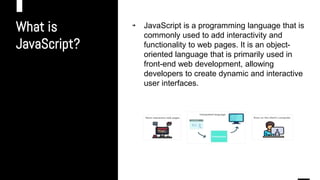
→ JavaScript is a programming language that is
commonly used to add interactivity and
functionality to web pages. It is an object-
oriented language that is primarily used in
front-end web development, allowing
developers to create dynamic and interactive
user interfaces.
How JavaScript
Works?
(Example-1)
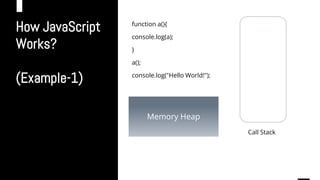
function a(){
console.log(a);
}
a();
console.log("Hello World!");
w
Memory Heap
Call Stack
How JavaScript
Works?
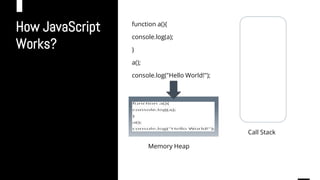
function a(){
console.log(a);
}
a();
console.log("Hello World!");
w
Memory Heap
Call Stack
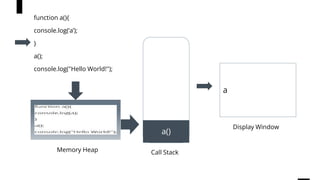
Memory Heap
function a(){
console.log(‘a’);
}
a();
console.log("Hello World!");
w
a()
Display Window
Call Stack
Memory Heap
function a(){
console.log(‘a’);
}
a();
console.log("Hello World!");
w
a()
a
Display Window
Call Stack
Memory Heap
console.log("
a");
function a(){
console.log(‘a’);
}
a();
console.log("Hello World!");
w
a()
a
Display Window
Call Stack
Memory Heap
function a(){
console.log(‘a’);
}
a();
console.log("Hello World!");
w a
Display Window
Call Stack
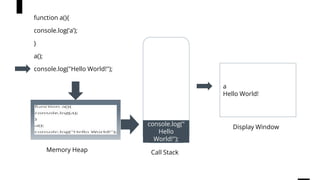
Memory Heap
function a(){
console.log(‘a’);
}
a();
console.log("Hello World!");
w
console.log("
Hello
World!");
a
Hello World!
Memory Heap Call Stack
Display Window
function a(){
console.log(‘a’);
}
a();
console.log("Hello World!");
w a
Hello World!
Memory Heap Call Stack
Display Window
Is JavaScript
Single-Thread?
→ Yes!, JavaScript is Single Threaded
language.
→ It have a single Call Stack Memory where
the programs are executed line by line
→ In hierarchical programming where on
function calls the other function, the
functions are stacked and executed one by
one.
How JavaScript
Works?
(Example-2)
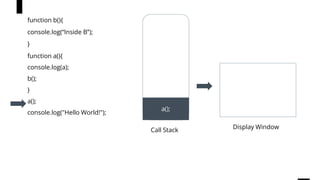
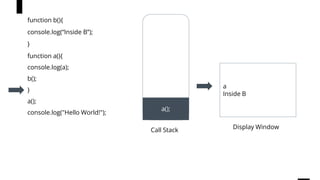
function b(){
console.log(“Inside B”);
}
function a(){
console.log(a);
b();
}
a();
console.log("Hello World!");
w
Call Stack
function b(){
console.log(“Inside B”);
}
function a(){
console.log(a);
b();
}
a();
console.log("Hello World!");
w
Call Stack
a();
Display Window
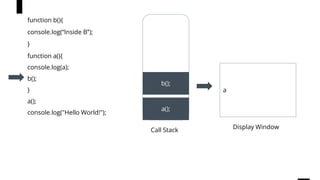
function b(){
console.log(“Inside B”);
}
function a(){
console.log(a);
b();
}
a();
console.log("Hello World!");
w
Call Stack
a();
a
Display Window
console.log("
a");
function b(){
console.log(“Inside B”);
}
function a(){
console.log(a);
b();
}
a();
console.log("Hello World!");
w
Call Stack
a();
b();
a
Display Window
function b(){
console.log(“Inside B”);
}
function a(){
console.log(a);
b();
}
a();
console.log("Hello World!");
w
Call Stack
a();
b(); a
Inside B
Display Window
console.log("I
nside B");
function b(){
console.log(“Inside B”);
}
function a(){
console.log(a);
b();
}
a();
console.log("Hello World!");
w
Call Stack
a();
b();
Display Window
a
Inside B
function b(){
console.log(“Inside B”);
}
function a(){
console.log(a);
b();
}
a();
console.log("Hello World!");
w
Call Stack
a();
Display Window
a
Inside B
function b(){
console.log(“Inside B”);
}
function a(){
console.log(a);
b();
}
a();
console.log("Hello World!");
w
Call Stack Display Window
a
Inside B
Hello World!
console.log("
Hello
World!");
function b(){
console.log(“Inside B”);
}
function a(){
console.log(a);
b();
}
a();
console.log("Hello World!");
w
Call Stack Display Window
a
Inside B
Hello World!
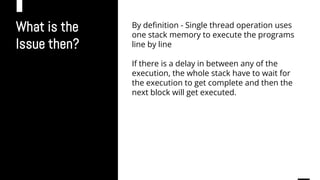
What is the
Issue then?
By definition - Single thread operation uses
one stack memory to execute the programs
line by line
If there is a delay in between any of the
execution, the whole stack have to wait for
the execution to get complete and then the
next block will get executed.
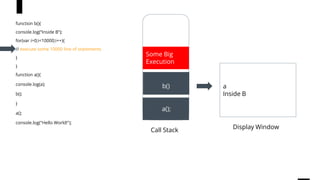
Issue In multi
threading
(Example-3)
function b(){
console.log(“Inside B”);
for(var i=0;i<10000;i++){
// execute some 10000 line of statements
}
}
function a(){
console.log(a);
b();
}
a();
console.log("Hello World!");
w
Call Stack
w
Call Stack
a();
Display Window
function b(){
console.log(“Inside B”);
for(var i=0;i<10000;i++){
// execute some 10000 line of statements
}
}
function a(){
console.log(a);
b();
}
a();
console.log("Hello World!");
w
Call Stack
a();
a
Display Window
function b(){
console.log(“Inside B”);
for(var i=0;i<10000;i++){
// execute some 10000 line of statements
}
}
function a(){
console.log(a);
b();
}
a();
console.log("Hello World!");
console.log(a)
;
w
Call Stack
a();
a
Display Window
function b(){
console.log(“Inside B”);
for(var i=0;i<10000;i++){
// execute some 10000 line of statements
}
}
function a(){
console.log(a);
b();
}
a();
console.log("Hello World!");
b()
w
Call Stack
a();
a
Inside B
Display Window
function b(){
console.log(“Inside B”);
for(var i=0;i<10000;i++){
// execute some 10000 line of statements
}
}
function a(){
console.log(a);
b();
}
a();
console.log("Hello World!");
b()
console.log(“I
nside B”);
w
Call Stack
a();
a
Inside B
Display Window
function b(){
console.log(“Inside B”);
for(var i=0;i<10000;i++){
// execute some 10000 line of statements
}
}
function a(){
console.log(a);
b();
}
a();
console.log("Hello World!");
b()
Some Big
Execution
What to do
next?
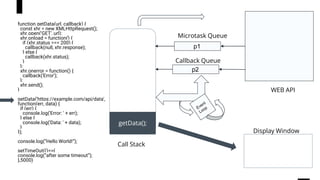
→ Here comes the non blocking concept of
JavaScript programming
→ In the above example, if we want to
execute the statement after all the other
statement gets executed, we can achieve
with the non blocking techniques
Lets know
about few
jargons.
→ WEB API -
→ Callback Queue -
→ Event Loop -
What is WEB
API?
Web APIs play a significant role in implementing non-blocking
techniques in JavaScript, which allows for more efficient and responsive
web applications.
Here are some examples of non-blocking techniques in JavaScript that
use Web APIs:
1. Asynchronous JavaScript and XMLHttpRequest (XHR)
2. Web Workers
3. setTimeout and setInterval
4. Promises and async/await
What is
CallBack
Queue? In JavaScript, the Callback Queue is a data structure that stores callback
functions that are ready to be executed. It is part of the event loop, which
is responsible for handling asynchronous operations in JavaScript.
The Callback Queue ensures that asynchronous functions are executed
in the correct order and that they do not block the main thread of the
application
What is Event
Loop? → When an asynchronous operation is completed.
→ The Web API sends the result and any associated callback
functions to the event loop.
→ The event loop then checks if the call stack is empty.
→ If it is, the callback is pushed onto the call stack and executed.
-
→ If the call stack is not empty, the callback is added to the callback
queue to be executed later.
Non Blocking
Techniques of
Js.
(Example- 4)
function getData(url, callback) {
const xhr = new XMLHttpRequest();
xhr.open('GET', url);
xhr.onload = function() {
if (xhr.status === 200) {
callback(null, xhr.response);
} else {
callback(xhr.status);
}
};
xhr.onerror = function() {
callback('Error');
};
xhr.send();
}
getData('https://example.com/api/data', function(err, data) {
if (err) {
console.log('Error: ' + err);
} else {
console.log('Data: ' + data);
}
});
console.log(“Hello World!”);
setTimeOut(()=>{
console.log(“after some timeout”);
},5000)
w
Call Stack
getData();
Display Window
function getData(url, callback) {
const xhr = new XMLHttpRequest();
xhr.open('GET', url);
xhr.onload = function() {
if (xhr.status === 200) {
callback(null, xhr.response);
} else {
callback(xhr.status);
}
};
xhr.onerror = function() {
callback('Error');
};
xhr.send();
}
getData('https://example.com/api/data',
function(err, data) {
if (err) {
console.log('Error: ' + err);
} else {
console.log('Data: ' + data);
}
});
console.log(“Hello World!”);
setTimeOut(()=>{
console.log(“after some timeout”);
},5000)
p2
p1
Callback Queue
Microtask Queue
WEB API
w
Call Stack
getData();
Display Window
function getData(url, callback) {
const xhr = new XMLHttpRequest();
xhr.open('GET', url);
xhr.onload = function() {
if (xhr.status === 200) {
callback(null, xhr.response);
} else {
callback(xhr.status);
}
};
xhr.onerror = function() {
callback('Error');
};
xhr.send();
}
getData('https://example.com/api/data',
function(err, data) {
if (err) {
console.log('Error: ' + err);
} else {
console.log('Data: ' + data);
}
});
console.log(“Hello World!”);
setTimeOut(()=>{
console.log(“after some timeout”);
},5000)
p2
p1
Callback Queue
Microtask Queue
WEB API
xhr.open('GET',
url);
w
Call Stack
Display Window
function getData(url, callback) {
const xhr = new XMLHttpRequest();
xhr.open('GET', url);
xhr.onload = function() {
if (xhr.status === 200) {
callback(null, xhr.response);
} else {
callback(xhr.status);
}
};
xhr.onerror = function() {
callback('Error');
};
xhr.send();
}
getData('https://example.com/api/data',
function(err, data) {
if (err) {
console.log('Error: ' + err);
} else {
console.log('Data: ' + data);
}
});
console.log(“Hello World!”);
setTimeOut(()=>{
console.log(“after some timeout”);
},5000)
p2
p1
Callback Queue
Microtask Queue
WEB API
xhr.open('GET', url);
w
Call Stack
Hello World!
Display Window
function getData(url, callback) {
const xhr = new XMLHttpRequest();
xhr.open('GET', url);
xhr.onload = function() {
if (xhr.status === 200) {
callback(null, xhr.response);
} else {
callback(xhr.status);
}
};
xhr.onerror = function() {
callback('Error');
};
xhr.send();
}
getData('https://example.com/api/data',
function(err, data) {
if (err) {
console.log('Error: ' + err);
} else {
console.log('Data: ' + data);
}
});
console.log(“Hello World!”);
setTimeOut(()=>{
console.log(“after some timeout”);
},5000)
p2
p1
Callback Queue
Microtask Queue
WEB API
xhr.open('GET', url);
console.log(“Hel
lo World!”)
w
Call Stack
Hello World!
Display Window
function getData(url, callback) {
const xhr = new XMLHttpRequest();
xhr.open('GET', url);
xhr.onload = function() {
if (xhr.status === 200) {
callback(null, xhr.response);
} else {
callback(xhr.status);
}
};
xhr.onerror = function() {
callback('Error');
};
xhr.send();
}
getData('https://example.com/api/data',
function(err, data) {
if (err) {
console.log('Error: ' + err);
} else {
console.log('Data: ' + data);
}
});
console.log(“Hello World!”);
setTimeOut(()=>{
console.log(“after some timeout”);
},5000)
p2
p1
Callback Queue
Microtask Queue
WEB API
xhr.open('GET', url);
timeOut()
Case -1 :
Promise
Resolve first
than
setTimeOut
w
Call Stack
Hello World!
<Some XHR Data>
Data
Display Window
p2
p1
Callback Queue
Microtask Queue
WEB API
timeOut()
xhr.open('GET',
url);
Case -2 :
Promise
Resolve after
setTimeOut
w
Call Stack Hello World!
after some timeout
Display Window
p2
p1
Callback Queue
Microtask Queue
WEB API
timeOut()
xhr.open('GET', url);
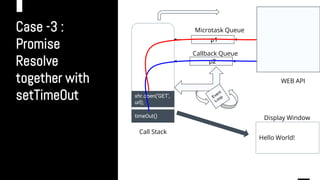
Case -3 :
Promise
Resolve
together with
setTimeOut
w
Call Stack
Hello World!
Display Window
p2
p1
Callback Queue
WEB API
timeOut()
xhr.open('GET',
url);
Microtask Queue
Case -3 :
Promise
Resolve
together with
setTimeOut
w
Call Stack Hello World!
<Some XHR Data>
Data
Display Window
p2
p1
Callback Queue
WEB API
timeOut()
Microtask Queue
Case -3 :
Promise
Resolve
together with
setTimeOut
w
Call Stack
Hello World!
<Some XHR Data>
Data
after some timeout
Display Window
p2
p1
Callback Queue
WEB API
Microtask Queue
Thank You!

JavaScript Multithread or Single Thread.pptx

  • 1.
    JavaScript Multi Threador Single Thread? -By Rahit Nath
  • 2.
    What is JavaScript? → JavaScriptis a programming language that is commonly used to add interactivity and functionality to web pages. It is an object- oriented language that is primarily used in front-end web development, allowing developers to create dynamic and interactive user interfaces.
  • 3.
  • 4.
  • 5.
  • 6.
  • 7.
  • 8.
  • 9.
  • 10.
    function a(){ console.log(‘a’); } a(); console.log("Hello World!"); wa Hello World! Memory Heap Call Stack Display Window
  • 11.
    Is JavaScript Single-Thread? → Yes!,JavaScript is Single Threaded language. → It have a single Call Stack Memory where the programs are executed line by line → In hierarchical programming where on function calls the other function, the functions are stacked and executed one by one.
  • 12.
    How JavaScript Works? (Example-2) function b(){ console.log(“InsideB”); } function a(){ console.log(a); b(); } a(); console.log("Hello World!"); w Call Stack
  • 13.
    function b(){ console.log(“Inside B”); } functiona(){ console.log(a); b(); } a(); console.log("Hello World!"); w Call Stack a(); Display Window
  • 14.
    function b(){ console.log(“Inside B”); } functiona(){ console.log(a); b(); } a(); console.log("Hello World!"); w Call Stack a(); a Display Window console.log(" a");
  • 15.
    function b(){ console.log(“Inside B”); } functiona(){ console.log(a); b(); } a(); console.log("Hello World!"); w Call Stack a(); b(); a Display Window
  • 16.
    function b(){ console.log(“Inside B”); } functiona(){ console.log(a); b(); } a(); console.log("Hello World!"); w Call Stack a(); b(); a Inside B Display Window console.log("I nside B");
  • 17.
    function b(){ console.log(“Inside B”); } functiona(){ console.log(a); b(); } a(); console.log("Hello World!"); w Call Stack a(); b(); Display Window a Inside B
  • 18.
    function b(){ console.log(“Inside B”); } functiona(){ console.log(a); b(); } a(); console.log("Hello World!"); w Call Stack a(); Display Window a Inside B
  • 19.
    function b(){ console.log(“Inside B”); } functiona(){ console.log(a); b(); } a(); console.log("Hello World!"); w Call Stack Display Window a Inside B Hello World! console.log(" Hello World!");
  • 20.
    function b(){ console.log(“Inside B”); } functiona(){ console.log(a); b(); } a(); console.log("Hello World!"); w Call Stack Display Window a Inside B Hello World!
  • 21.
    What is the Issuethen? By definition - Single thread operation uses one stack memory to execute the programs line by line If there is a delay in between any of the execution, the whole stack have to wait for the execution to get complete and then the next block will get executed.
  • 22.
    Issue In multi threading (Example-3) functionb(){ console.log(“Inside B”); for(var i=0;i<10000;i++){ // execute some 10000 line of statements } } function a(){ console.log(a); b(); } a(); console.log("Hello World!"); w Call Stack
  • 23.
    w Call Stack a(); Display Window functionb(){ console.log(“Inside B”); for(var i=0;i<10000;i++){ // execute some 10000 line of statements } } function a(){ console.log(a); b(); } a(); console.log("Hello World!");
  • 24.
    w Call Stack a(); a Display Window functionb(){ console.log(“Inside B”); for(var i=0;i<10000;i++){ // execute some 10000 line of statements } } function a(){ console.log(a); b(); } a(); console.log("Hello World!"); console.log(a) ;
  • 25.
    w Call Stack a(); a Display Window functionb(){ console.log(“Inside B”); for(var i=0;i<10000;i++){ // execute some 10000 line of statements } } function a(){ console.log(a); b(); } a(); console.log("Hello World!"); b()
  • 26.
    w Call Stack a(); a Inside B DisplayWindow function b(){ console.log(“Inside B”); for(var i=0;i<10000;i++){ // execute some 10000 line of statements } } function a(){ console.log(a); b(); } a(); console.log("Hello World!"); b() console.log(“I nside B”);
  • 27.
    w Call Stack a(); a Inside B DisplayWindow function b(){ console.log(“Inside B”); for(var i=0;i<10000;i++){ // execute some 10000 line of statements } } function a(){ console.log(a); b(); } a(); console.log("Hello World!"); b() Some Big Execution
  • 28.
    What to do next? →Here comes the non blocking concept of JavaScript programming → In the above example, if we want to execute the statement after all the other statement gets executed, we can achieve with the non blocking techniques
  • 29.
    Lets know about few jargons. →WEB API - → Callback Queue - → Event Loop -
  • 30.
    What is WEB API? WebAPIs play a significant role in implementing non-blocking techniques in JavaScript, which allows for more efficient and responsive web applications. Here are some examples of non-blocking techniques in JavaScript that use Web APIs: 1. Asynchronous JavaScript and XMLHttpRequest (XHR) 2. Web Workers 3. setTimeout and setInterval 4. Promises and async/await
  • 31.
    What is CallBack Queue? InJavaScript, the Callback Queue is a data structure that stores callback functions that are ready to be executed. It is part of the event loop, which is responsible for handling asynchronous operations in JavaScript. The Callback Queue ensures that asynchronous functions are executed in the correct order and that they do not block the main thread of the application
  • 32.
    What is Event Loop?→ When an asynchronous operation is completed. → The Web API sends the result and any associated callback functions to the event loop. → The event loop then checks if the call stack is empty. → If it is, the callback is pushed onto the call stack and executed. - → If the call stack is not empty, the callback is added to the callback queue to be executed later.
  • 33.
    Non Blocking Techniques of Js. (Example-4) function getData(url, callback) { const xhr = new XMLHttpRequest(); xhr.open('GET', url); xhr.onload = function() { if (xhr.status === 200) { callback(null, xhr.response); } else { callback(xhr.status); } }; xhr.onerror = function() { callback('Error'); }; xhr.send(); } getData('https://example.com/api/data', function(err, data) { if (err) { console.log('Error: ' + err); } else { console.log('Data: ' + data); } }); console.log(“Hello World!”); setTimeOut(()=>{ console.log(“after some timeout”); },5000)
  • 34.
    w Call Stack getData(); Display Window functiongetData(url, callback) { const xhr = new XMLHttpRequest(); xhr.open('GET', url); xhr.onload = function() { if (xhr.status === 200) { callback(null, xhr.response); } else { callback(xhr.status); } }; xhr.onerror = function() { callback('Error'); }; xhr.send(); } getData('https://example.com/api/data', function(err, data) { if (err) { console.log('Error: ' + err); } else { console.log('Data: ' + data); } }); console.log(“Hello World!”); setTimeOut(()=>{ console.log(“after some timeout”); },5000) p2 p1 Callback Queue Microtask Queue WEB API
  • 35.
    w Call Stack getData(); Display Window functiongetData(url, callback) { const xhr = new XMLHttpRequest(); xhr.open('GET', url); xhr.onload = function() { if (xhr.status === 200) { callback(null, xhr.response); } else { callback(xhr.status); } }; xhr.onerror = function() { callback('Error'); }; xhr.send(); } getData('https://example.com/api/data', function(err, data) { if (err) { console.log('Error: ' + err); } else { console.log('Data: ' + data); } }); console.log(“Hello World!”); setTimeOut(()=>{ console.log(“after some timeout”); },5000) p2 p1 Callback Queue Microtask Queue WEB API xhr.open('GET', url);
  • 36.
    w Call Stack Display Window functiongetData(url, callback) { const xhr = new XMLHttpRequest(); xhr.open('GET', url); xhr.onload = function() { if (xhr.status === 200) { callback(null, xhr.response); } else { callback(xhr.status); } }; xhr.onerror = function() { callback('Error'); }; xhr.send(); } getData('https://example.com/api/data', function(err, data) { if (err) { console.log('Error: ' + err); } else { console.log('Data: ' + data); } }); console.log(“Hello World!”); setTimeOut(()=>{ console.log(“after some timeout”); },5000) p2 p1 Callback Queue Microtask Queue WEB API xhr.open('GET', url);
  • 37.
    w Call Stack Hello World! DisplayWindow function getData(url, callback) { const xhr = new XMLHttpRequest(); xhr.open('GET', url); xhr.onload = function() { if (xhr.status === 200) { callback(null, xhr.response); } else { callback(xhr.status); } }; xhr.onerror = function() { callback('Error'); }; xhr.send(); } getData('https://example.com/api/data', function(err, data) { if (err) { console.log('Error: ' + err); } else { console.log('Data: ' + data); } }); console.log(“Hello World!”); setTimeOut(()=>{ console.log(“after some timeout”); },5000) p2 p1 Callback Queue Microtask Queue WEB API xhr.open('GET', url); console.log(“Hel lo World!”)
  • 38.
    w Call Stack Hello World! DisplayWindow function getData(url, callback) { const xhr = new XMLHttpRequest(); xhr.open('GET', url); xhr.onload = function() { if (xhr.status === 200) { callback(null, xhr.response); } else { callback(xhr.status); } }; xhr.onerror = function() { callback('Error'); }; xhr.send(); } getData('https://example.com/api/data', function(err, data) { if (err) { console.log('Error: ' + err); } else { console.log('Data: ' + data); } }); console.log(“Hello World!”); setTimeOut(()=>{ console.log(“after some timeout”); },5000) p2 p1 Callback Queue Microtask Queue WEB API xhr.open('GET', url); timeOut()
  • 39.
    Case -1 : Promise Resolvefirst than setTimeOut w Call Stack Hello World! <Some XHR Data> Data Display Window p2 p1 Callback Queue Microtask Queue WEB API timeOut() xhr.open('GET', url);
  • 40.
    Case -2 : Promise Resolveafter setTimeOut w Call Stack Hello World! after some timeout Display Window p2 p1 Callback Queue Microtask Queue WEB API timeOut() xhr.open('GET', url);
  • 41.
    Case -3 : Promise Resolve togetherwith setTimeOut w Call Stack Hello World! Display Window p2 p1 Callback Queue WEB API timeOut() xhr.open('GET', url); Microtask Queue
  • 42.
    Case -3 : Promise Resolve togetherwith setTimeOut w Call Stack Hello World! <Some XHR Data> Data Display Window p2 p1 Callback Queue WEB API timeOut() Microtask Queue
  • 43.
    Case -3 : Promise Resolve togetherwith setTimeOut w Call Stack Hello World! <Some XHR Data> Data after some timeout Display Window p2 p1 Callback Queue WEB API Microtask Queue
  • 44.