SQL Introduction (Part 1)
Part 1
Database
Example:
- Personal Data
- customer transaction
- medical records
- etc
Stored
from
Multiple
Sources
Extracted
for
Multiple
Purposes
Form of
relational
tables
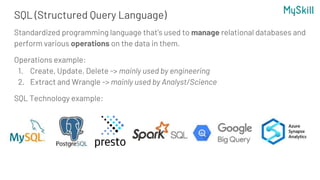
SQL (Structured Query Language)
Standardized programming language that's used to manage relational databases and
perform various operations on the data in them.
Operations example:
1. Create, Update, Delete -> mainly used by engineering
2. Extract and Wrangle -> mainly used by Analyst/Science
SQL Technology example:
Data engineer
Data Analyst/
Business Intelligence
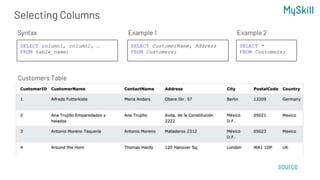
Selecting Columns
SELECT column1, column2, …
FROM table_name;
Customers Table
Syntax
SELECT CustomerName, Address
FROM Customers;
Example 1
SELECT *
FROM Customers;
Example 2
source
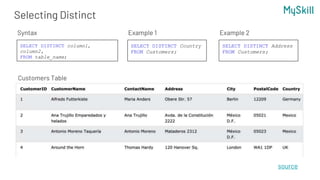
Selecting Distinct
SELECT DISTINCT column1,
column2,
FROM table_name;
Customers Table
Syntax
SELECT DISTINCT Country
FROM Customers;
Example 1
source
SELECT DISTINCT Address
FROM Customers;
Example 2
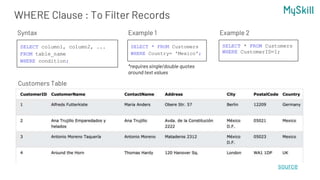
WHERE Clause : To Filter Records
SELECT column1, column2, ...
FROM table_name
WHERE condition;
Customers Table
Syntax
SELECT * FROM Customers
WHERE Country= 'Mexico';
Example 1
source
SELECT * FROM Customers
WHERE CustomerID=1;
Example 2
*requires single/double quotes
around text values
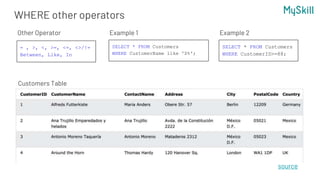
WHERE other operators
Customers Table
Other Operator
SELECT * FROM Customers
WHERE CustomerName like 'D%';
Example 1
source
SELECT * FROM Customers
WHERE CustomerID>=88;
Example 2
= , >, <, >=, <=, <>/!=
Between, Like, In
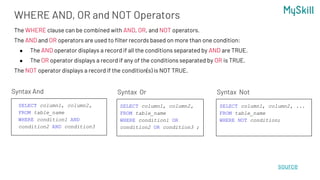
WHERE AND, OR and NOT Operators
Syntax And
source
SELECT column1, column2,
FROM table_name
WHERE condition1 OR
condition2 OR condition3 ;
Syntax Or
The WHERE clause can be combined with AND, OR, and NOT operators.
The AND and OR operators are used to filter records based on more than one condition:
● The AND operator displays a record if all the conditions separated by AND are TRUE.
● The OR operator displays a record if any of the conditions separated by OR is TRUE.
The NOT operator displays a record if the condition(s) is NOT TRUE.
SELECT column1, column2,
FROM table_name
WHERE condition1 AND
condition2 AND condition3
SELECT column1, column2, ...
FROM table_name
WHERE NOT condition;
Syntax Not
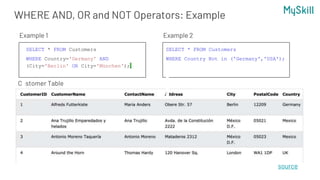
WHERE AND, OR and NOT Operators: Example
Customer Table
SELECT * FROM Customers
WHERE Country='Germany' AND
(City='Berlin' OR City='München');
Example 1
source
SELECT * FROM Customers
WHERE Country Not in ('Germany','USA');
Example 2
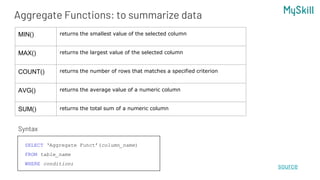
Aggregate Functions: to summarize data
source
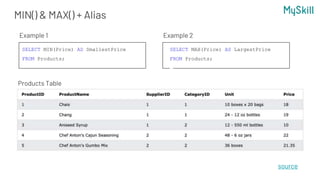
MIN() returns the smallest value of the selected column
MAX() returns the largest value of the selected column
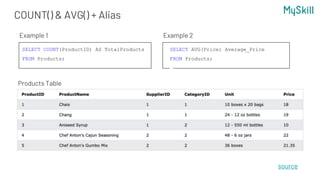
COUNT() returns the number of rows that matches a specified criterion
AVG() returns the average value of a numeric column
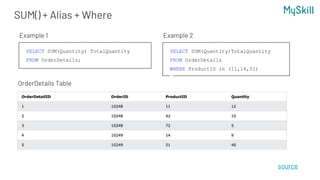
SUM() returns the total sum of a numeric column
SELECT ‘Aggregate Funct’(column_name)
FROM table_name
WHERE condition;
Syntax
MIN() & MAX() + Alias
Products Table
SELECT MIN(Price) AS SmallestPrice
FROM Products;
Example 1
source
SELECT MAX(Price) AS LargestPrice
FROM Products;
Example 2
COUNT() & AVG() + Alias
Products Table
SELECT COUNT(ProductID) AS TotalProducts
FROM Products;
Example 1
source
SELECT AVG(Price) Average_Price
FROM Products;
Example 2
SUM() + Alias + Where
OrderDetails Table
SELECT SUM(Quantity) TotalQuantity
FROM OrderDetails;
Example 1
source
SELECT SUM(Quantity)TotalQuantity
FROM OrderDetails
WHERE ProductID in (11,14,51)
Example 2
Quiz Time!
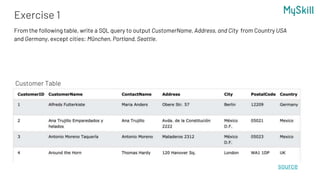
Exercise 1
source
From the following table, write a SQL query to output CustomerName, Address, and City from Country USA
and Germany, except cities: München, Portland, Seattle.
Customer Table
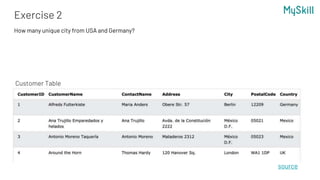
Exercise 2
source
How many unique city from USA and Germany?
Customer Table
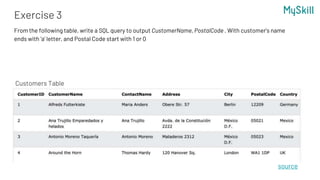
Exercise 3
source
From the following table, write a SQL query to output CustomerName, PostalCode . With customer’s name
ends with ‘a’ letter, and Postal Code start with 1 or 0
Customers Table
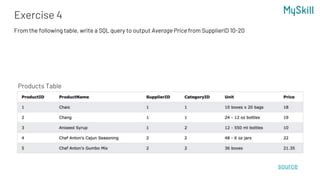
Exercise 4
source
From the following table, write a SQL query to output Average Price from SupplierID 10-20
Products Table
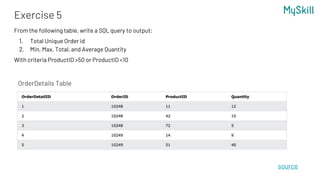
Exercise 5
source
From the following table, write a SQL query to output:
1. Total Unique Order id
2. Min, Max, Total, and Average Quantity
With criteria ProductID >50 or ProductID <10
OrderDetails Table
Source
https://searchdatamanagement.techtarget.com/definition/SQL
https://www.w3schools.com/sql/sql_select.asp

SQL Training- Introduction Part One.pptx

  • 1.
  • 2.
    Database Example: - Personal Data -customer transaction - medical records - etc Stored from Multiple Sources Extracted for Multiple Purposes Form of relational tables
  • 3.
    SQL (Structured QueryLanguage) Standardized programming language that's used to manage relational databases and perform various operations on the data in them. Operations example: 1. Create, Update, Delete -> mainly used by engineering 2. Extract and Wrangle -> mainly used by Analyst/Science SQL Technology example:
  • 4.
  • 5.
    Selecting Columns SELECT column1,column2, … FROM table_name; Customers Table Syntax SELECT CustomerName, Address FROM Customers; Example 1 SELECT * FROM Customers; Example 2 source
  • 6.
    Selecting Distinct SELECT DISTINCTcolumn1, column2, FROM table_name; Customers Table Syntax SELECT DISTINCT Country FROM Customers; Example 1 source SELECT DISTINCT Address FROM Customers; Example 2
  • 7.
    WHERE Clause :To Filter Records SELECT column1, column2, ... FROM table_name WHERE condition; Customers Table Syntax SELECT * FROM Customers WHERE Country= 'Mexico'; Example 1 source SELECT * FROM Customers WHERE CustomerID=1; Example 2 *requires single/double quotes around text values
  • 8.
    WHERE other operators CustomersTable Other Operator SELECT * FROM Customers WHERE CustomerName like 'D%'; Example 1 source SELECT * FROM Customers WHERE CustomerID>=88; Example 2 = , >, <, >=, <=, <>/!= Between, Like, In
  • 9.
    WHERE AND, ORand NOT Operators Syntax And source SELECT column1, column2, FROM table_name WHERE condition1 OR condition2 OR condition3 ; Syntax Or The WHERE clause can be combined with AND, OR, and NOT operators. The AND and OR operators are used to filter records based on more than one condition: ● The AND operator displays a record if all the conditions separated by AND are TRUE. ● The OR operator displays a record if any of the conditions separated by OR is TRUE. The NOT operator displays a record if the condition(s) is NOT TRUE. SELECT column1, column2, FROM table_name WHERE condition1 AND condition2 AND condition3 SELECT column1, column2, ... FROM table_name WHERE NOT condition; Syntax Not
  • 10.
    WHERE AND, ORand NOT Operators: Example Customer Table SELECT * FROM Customers WHERE Country='Germany' AND (City='Berlin' OR City='München'); Example 1 source SELECT * FROM Customers WHERE Country Not in ('Germany','USA'); Example 2
  • 11.
    Aggregate Functions: tosummarize data source MIN() returns the smallest value of the selected column MAX() returns the largest value of the selected column COUNT() returns the number of rows that matches a specified criterion AVG() returns the average value of a numeric column SUM() returns the total sum of a numeric column SELECT ‘Aggregate Funct’(column_name) FROM table_name WHERE condition; Syntax
  • 12.
    MIN() & MAX()+ Alias Products Table SELECT MIN(Price) AS SmallestPrice FROM Products; Example 1 source SELECT MAX(Price) AS LargestPrice FROM Products; Example 2
  • 13.
    COUNT() & AVG()+ Alias Products Table SELECT COUNT(ProductID) AS TotalProducts FROM Products; Example 1 source SELECT AVG(Price) Average_Price FROM Products; Example 2
  • 14.
    SUM() + Alias+ Where OrderDetails Table SELECT SUM(Quantity) TotalQuantity FROM OrderDetails; Example 1 source SELECT SUM(Quantity)TotalQuantity FROM OrderDetails WHERE ProductID in (11,14,51) Example 2
  • 15.
  • 16.
    Exercise 1 source From thefollowing table, write a SQL query to output CustomerName, Address, and City from Country USA and Germany, except cities: München, Portland, Seattle. Customer Table
  • 17.
    Exercise 2 source How manyunique city from USA and Germany? Customer Table
  • 18.
    Exercise 3 source From thefollowing table, write a SQL query to output CustomerName, PostalCode . With customer’s name ends with ‘a’ letter, and Postal Code start with 1 or 0 Customers Table
  • 19.
    Exercise 4 source From thefollowing table, write a SQL query to output Average Price from SupplierID 10-20 Products Table
  • 20.
    Exercise 5 source From thefollowing table, write a SQL query to output: 1. Total Unique Order id 2. Min, Max, Total, and Average Quantity With criteria ProductID >50 or ProductID <10 OrderDetails Table
  • 22.

Editor's Notes

  • #17 SELECT CustomerName, Address, City FROM Customers where country in ('USA', 'Germany') and City not in ('Seattle', 'München', 'Portland')
  • #18 SELECT count(distinct City) unique_city FROM Customers where country in ('USA', 'Germany')
  • #19 SELECT CustomerName, Postalcode FROM Customers where CustomerName like 'a%' and (Postalcode like '0%' or Postalcode like '1%')
  • #20 SELECT avg(Price) AveragePrice FROM Products Where SupplierID between 10 and 20
  • #21 SELECT COUNT(distinct OrderID) TotalUniqueOrder, MIN(Quantity) MaxQuantity, MAX(Quantity) MinQuantity, SUM(Quantity) TotalQuantity, AVG(Quantity) AverageQuantity FROM OrderDetails WHERE ProductID >50 or ProductID <10